

20 Best Cybersecurity Software in 2026

Best Cybersecurity Software Shortlist
Here’s my shortlist of the best cybersecurity software:


The best cybersecurity software helps you detect threats early, block unauthorized access, and protect sensitive data across endpoints, networks, and cloud environments.
If you’ve dealt with agents that bog down system performance, alerts that flood your inbox without context, or tools that don’t work well together, you know how frustrating it is to piece together a reliable security posture. Many teams also run into problems with visibility, especially when supporting hybrid or remote environments, or trying to layer protection across legacy infrastructure.
I’ve tested and implemented dozens of cybersecurity tools in enterprise and SaaS environments, working closely with teams to secure everything from endpoints to cloud-based services. This guide breaks down the platforms that offer clean integrations, meaningful alerting, and the visibility you need to respond quickly without getting buried in noise.
Why Trust Our Software Reviews
We’ve been testing and reviewing software since 2023. As tech leaders ourselves, we know how critical and difficult it is to make the right decision when selecting software.
We invest in deep research to help our audience make better software purchasing decisions. We’ve tested more than 2,000 tools for different tech use cases and written over 1,000 comprehensive software reviews. Learn how we stay transparent & our software review methodology.
Best Cybersecurity Software Summary
| Tool | Best For | Trial Info | Price | ||
|---|---|---|---|---|---|
| 1 | Best for real-time behavioral detection | 30-day free trial + free demo available | Pricing upon request | Website | |
| 2 | Best for compliance-focused TPRM programs | Free demo available | Pricing upon request | Website | |
| 3 | Best for continuous vulnerability detection | Free demo available | From $69/month | Website | |
| 4 | Best for secure VPN privacy | 30-day free trial | From $119.99/year (billed annually) | Website | |
| 5 | Best for Google Workspace and Microsoft 365 | Free demo available | From $4/user/month (billed annually) | Website | |
| 6 | Best for DNS-level threat blocking | 14-day free trial + free demo available | From $7/user/month (billed annually) | Website | |
| 7 | Best for AI-driven auto-triage | Free plan available | From $34/developer/month | Website | |
| 8 | Best for company-wide password policies | Free plan available | From $1.79/user/month | Website | |
| 9 | Best for real-time threat alerts | Not available | Pricing upon request | Website | |
| 10 | Best for context-aware code security | Free plan available | From $200/month | Website | |
| 11 | Best for code-to-cloud security | Free plan available + free demo | From $350/month | Website | |
| 12 | Best for real-time log visibility | Free demo available | From $0.09/GB/month | Website | |
| 13 | Best for managing and securing IT infrastructure | 30-day free trial available | From $795/50 endpoints/year | Website | |
| 14 | Best for integrated DLP and CASB capabilities | Free demo available | Pricing upon request | Website | |
| 15 | Best with DNS security and ransomware protection | Free trial + free demo available | Pricing upon request | Website | |
| 16 | Best rootkit scanner | 14-day free trial + free demo available | From $49.99/year | Website | |
| 17 | Best for proactive threat detection | 30-day free trial + free demo available | From $338.50/year | Website | |
| 18 | Best for securing applications | 15-day free trial | From $7/month | Website | |
| 19 | Best for educational institutions | 14-day free trial + free plan available | From $15/host/month (billed annually) | Website | |
| 20 | Best for insider threat detection | Free trial + free demo available | From $14/user/month (billed annually) | Website |


-

Aikido Security
Visit WebsiteThis is an aggregated rating for this tool including ratings from Crozdesk users and ratings from other sites.4.7 -
ManageEngine Log360
Visit WebsiteThis is an aggregated rating for this tool including ratings from Crozdesk users and ratings from other sites.4.2 -
Dynatrace
Visit WebsiteThis is an aggregated rating for this tool including ratings from Crozdesk users and ratings from other sites.4.5


Best Cybersecurity Software Reviews
Below are my picks for the best cybersecurity software with brief but detailed rundowns to help you compare their strengths, weaknesses, and pricing:


Radware helps security teams and enterprises protect web applications and APIs from automated threats, offering advanced bot management and real-time attack mitigation for organizations facing evolving cybersecurity risks.
Who Is Radware Best For?
Radware is a strong fit for mid-to-large enterprises running high-traffic web applications that need dedicated protection against sophisticated bot attacks and API abuse.
Why I Picked Radware
Radware earns its spot on my shortlist because of how it handles real-time behavioral detection—something most bot management tools still struggle to do without generating excessive false positives. I like that it uses proprietary AI-based behavioral algorithms that analyze traffic and generate attack signatures in real time, so my team doesn't have to wait for manual rule updates to block new threats. The auto cross-module correlation feature is particularly useful: it cross-references signals across security modules to preemptively block malicious sources before they even reach the application layer. The CAPTCHA-less crypto challenge means legitimate users don't get caught in the crossfire when a bot attack is actively being mitigated.
Radware Key Features
- Advanced detection modules: Identifies sophisticated bots that manipulate IPs and identities, uncovers distributed bot attacks, and detects CAPTCHA farm services.
- AI crawler visibility and management: Classifies AI crawler traffic by intent and gives you granular controls to manage which crawlers can access your content.
- Native mobile app protection: Uses integrated device authentication for iOS and Android to verify devices and validate requests before bot attacks materialize.
- Transparent reporting and analytics: Delivers granular bot classification with clean dashboards and detailed reports so you can see exactly what traffic is hitting your applications.
Radware Integrations
Integrations include Amazon CloudFront, Akamai, Fastly, Cloudflare, F5, Citrix, Imperva, Microsoft Azure, AWS, and Google Cloud Platform.
Pros and Cons
Pros:
- Strong integration with SIEM tools
- Comprehensive traffic analytics reporting
- Accurate AI-based bot detection
Cons:
- Interface could be more intuitive
- Limited pricing transparency available


Prevalent helps IT, risk, and compliance teams in regulated industries automate third-party risk management and vendor security assessments to address evolving cybersecurity and compliance demands.
Who Is Prevalent Best For?
Prevalent is a strong fit for mid-to-large enterprises in regulated industries like finance, healthcare, and government that need structured vendor risk oversight.
Why I Picked Prevalent
I picked Prevalent as one of the best because of how well it handles the compliance side of TPRM—something a lot of vendor risk tools treat as an afterthought. What I find most useful is the library of 750+ pre-built assessment templates mapped to frameworks like NIST CSF, ISO 27001, HIPAA, and GDPR. Instead of building questionnaires from scratch, my team can launch a compliance-aligned vendor assessment in minutes. I also like the audit-ready reporting, which pulls together vendor responses, risk scores, and remediation status into a format regulators and auditors actually want to see—no manual compiling required.
Prevalent Key Features
- Inherent risk scoring: Automatically tiers and categorizes vendors by calculating inherent and residual risk scores based on the likelihood and impact of security, compliance, and operational incidents.
- Continuous monitoring: Tracks vendor cyber threats, financial problems, regulatory findings, and reputational concerns in real time across 500k+ external sources.
- Vendor offboarding automation: Automates contract assessments and offboarding procedures to reduce post-contract exposure when ending vendor relationships.
- Risk analytics and dashboards: Customizable dashboards and reporting let you visualize risk trends and build executive-ready reports for stakeholder communication.
Prevalent Integrations
Integrations include ServiceNow, BitSight, SecZetta, Source Defense, RiskRecon, SecurityScorecard, Rapid7, Tenable, Qualys, and Microsoft Azure.
Pros and Cons
Pros:
- Strong security protocols to protect data
- Users can tailor reports according to specific needs
- Extensive functionalities for managing vendor risk
Cons:
- Challenges in migrating data can complicate the initial setup
- The platform is complex and comes with a learning curve


Astra Pentest helps IT teams and security professionals in SaaS, ecommerce, and enterprise environments identify and fix vulnerabilities with automated scanning, manual penetration testing, and compliance-ready reporting.
Who Is Astra Pentest Best For?
Astra Pentest is a good fit for security and engineering teams in SaaS, fintech, and healthcare companies that need to meet compliance requirements like PCI DSS, SOC 2, or ISO 27001.
Why I Picked Astra Pentest
I've included Astra Pentest in my top picks because it's one of the few platforms that combines continuous automated scanning with expert-led manual pentesting in a single dashboard. What I like most is the unlimited DAST scanning on paid plans—my team can trigger scans tied directly to CI/CD pipeline deployments, so every code push gets checked against 10,000+ test cases covering OWASP, SANS, and CVEs. The AI-assisted false positive triaging is also a real differentiator: instead of wading through noisy scan results, vetted scans have security experts review every finding before it reaches you.
Astra Pentest Key Features
- Vulnerability management dashboard: Track, prioritize, and assign discovered vulnerabilities to engineers using CVSS-based risk scoring and a potential dollar loss predictor.
- Compliance reporting view: Map scan findings directly to SOC 2, ISO 27001, PCI-DSS, and HIPAA requirements to identify compliance gaps in one place.
- Publicly verifiable pentest certificate: Get a unique, shareable certificate after expert-verified fixes that you can share with customers and partners.
- Automated cloud security scanning: Scan AWS, GCP, and Azure environments for misconfigurations, IAM risks, and vulnerabilities on a scheduled or continuous basis.
Astra Pentest Integrations
Integrations include Jira, Slack, AWS, GCP, Azure, Postman, Kong, Nginx, and custom integrations via API.
Pros and Cons
Pros:
- Excellent compliance reporting options
- Integrates easily with CI/CD tools
- Combines automated and manual testing
Cons:
- Pricing available upon request
- Occasional false positives reported


Norton gives small businesses a way to protect devices, data, and online activity with layered cybersecurity tools that address threats like malware, ransomware, and network intrusions.
Who Is Norton Best For?
Norton is a good fit for small businesses that need straightforward, multi-device security without dedicated IT staff to manage it.
Why I Picked Norton
I picked Norton as one of the best because its Secure VPN uses bank-grade encryption to protect internet traffic across all employee devices, whether your team is working from a coffee shop, a hotel, or a client's office. I like that the VPN is bundled directly into the Norton Small Business Premium plan rather than sold as a separate add-on. The no-log policy means Norton isn't storing records of your browsing activity, which matters when employees are handling sensitive business data on public networks. The kill switch feature is another detail I appreciate—it cuts internet access automatically if the VPN connection drops, so there's no accidental exposure.
Norton Key Features
- Dark web monitoring: Scans the dark web for your business's sensitive information—like tax ID numbers and company email addresses—and alerts you if anything surfaces.
- Software Updater: Automatically keeps your business software patched and up to date to close known security vulnerabilities across employee devices.
- Smart firewall: Monitors incoming and outgoing network traffic on Windows and Mac devices to block unauthorized access attempts.
- Cloud Backup: Stores up to 500 GB of business-critical data in the cloud, giving you a recovery option if devices are hit by ransomware or theft.
Norton Integrations
Native integrations are not currently listed.
Pros and Cons
Pros:
- Frequent updates address new and evolving online threats
- Covers multiple devices under one subscription
- Strong device protection against malware and ransomware
Cons:
- VPN features may have usage limits on lower plans
- Users report increased advertisements within the software


Material Security helps IT and security teams protect cloud email and collaboration platforms from phishing, account compromise, and data loss, offering advanced controls and incident response tools designed for organizations using Google Workspace or Microsoft 365.
Who Is Material Security Best For?
Material Security is a good fit for mid-size to enterprise security teams that rely on Google Workspace or Microsoft 365 as their primary collaboration environment.
Why I Picked Material Security
Material Security earns its spot on my shortlist because of how deeply it integrates with Google Workspace and Microsoft 365 to protect email at the data layer, not just the perimeter. I like that it can retroactively remediate threats already sitting in inboxes—something most email security tools can't do after delivery. My team also uses its data protection controls to restrict access to sensitive messages based on identity verification, which adds a meaningful layer of defense against account takeover. The phishing "herd immunity" feature is especially useful: when one user reports a threat, Material Security scans and remediates that message across every inbox in the organization.
Material Security Key Features
- BEC and VEC detection: Identifies business email compromise and vendor email compromise attacks using behavioral analysis across email in Google Workspace and Microsoft 365.
- File security and sharing controls: Scans Google Drive and Microsoft 365 files to clean up overshared permissions and reduce sensitive data sprawl.
- Security posture management: Continuously monitors your Google Workspace and Microsoft 365 configurations to detect and remediate drift before it creates exploitable gaps.
- Shadow AI and third-party app controls: Gives visibility into unauthorized third-party app connections and OAuth grants across your cloud workspace.
Material Security Integrations
Integrations include Google Workspace and Microsoft 365.
Pros and Cons
Pros:
- Enables secure file sharing within email communications.
- Supports advanced threat protection for email accounts.
- Automates phishing response to improve response times.
Cons:
- Limited native integrations with other security tools.
- Dependency on cloud infrastructure may introduce latency issues.


NordLayer is a network security platform designed for businesses that need to secure remote access, protect sensitive data, and manage user permissions across distributed teams.
Who Is NordLayer Best For?
NordLayer is a good fit for IT teams in mid-sized businesses that need centralized control over network access and security across remote or hybrid workforces.
Why I Picked NordLayer
I picked NordLayer as one of the best because its DNS filtering goes well beyond a basic blocklist. It uses patented, AI-powered technology that continuously updates its threat database using machine learning—so when a new malicious domain surfaces, my team doesn't have to wait for a manual update to stay protected. In practice, that means phishing links in emails get blocked at the DNS level before a page even loads. I also like the category-based filtering, which lets me block over 50 content categories—malware, cryptojacking, phishing, and more—from a single control panel across the entire organization.
NordLayer Key Features
- Device posture security: Evaluates devices against your defined security rules and automatically restricts network access for non-compliant devices.
- Cloud firewall: Applies granular network segmentation across hybrid infrastructure, controlling traffic between users, servers, and cloud resources.
- Dedicated IP with allowlisting: Assigns a fixed IP address to your organization so you can restrict resource access to verified addresses only.
- Virtual private gateways: Creates organization-specific VPN gateways with layered security policies for controlling access to internal resources.
NordLayer Integrations
Integrations include Okta, Google Workspace, JumpCloud, Entra ID, OneLogin, AWS, Google Cloud, IBM Cloud, Jamf Cloud, and SentinelOne.
Pros and Cons
Pros:
- Security measures like AES-256 encryption and multi-factor authentication
- Extensive access control and session monitoring
- Utilizes a zero-trust framework
Cons:
- Server setup can be complex
- Number of available server locations could be expanded


Corgea is a cybersecurity platform for IT teams and security professionals who need to automate threat detection, incident triage, and response across complex digital environments.
Who Is Corgea Best For?
Corgea is a strong fit for security engineering teams at mid-size to enterprise companies that need to reduce manual triage workloads across high-volume vulnerability pipelines.
Why I Picked Corgea
I picked Corgea as one of the best because its AI-driven auto-triage directly addresses one of the most frustrating parts of application security work: alert fatigue from false positives. When my team runs scans across a large codebase, Corgea's auto-triage engine uses contextual code analysis to separate real exploitable findings from noise, cutting false positives by up to 3x compared to traditional static analysis tools. I also like that it goes beyond simple flagging—it traces real runtime paths from public-facing routes like
/login
all the way to vulnerable code or packages, so my team knows exactly what attackers can reach. That reachability mapping, combined with AI-generated fix suggestions with over 90% accuracy, means we're spending less time debating severity and more time closing out the backlog.
Corgea Key Features
- Dependency scanning (SCA): Identifies known vulnerabilities in third-party packages across 25+ programming languages, with CVE details and CVSS scores included.
- Infrastructure as code (IaC) scanning: Detects security misconfigurations in Kubernetes, Terraform, Docker, and CloudFormation files before deployment.
- Secrets detection: Scans codebases for hardcoded API keys, tokens, and credentials using pattern matching, entropy analysis, and AI-powered context analysis.
- PolicyIQ: Lets you define custom policies in natural language to tailor detection, triage, and fix behavior to your specific environment and security requirements.
Corgea Integrations
Integrations include GitHub, GitLab, Bitbucket, Azure DevOps, JIRA, Slack, CodeQL, Zapier, webhooks, and an API for custom integrations.
Pros and Cons
Pros:
- Business logic flaw detection
- Automatic secure code fixes
- AI-driven vulnerability detection
Cons:
- AppSec-focused, not full stack
- No runtime protection features


NordPass is a business password manager designed for IT teams and organizations that need to secure, manage, and control access to company credentials across their workforce.
Who Is NordPass Best For?
NordPass is a strong fit for IT administrators and security teams in mid-sized to large organizations that need centralized control over employee password practices.
Why I Picked NordPass
NordPass earns its spot on my shortlist because it handles company-wide password policy enforcement from a single admin panel. I like that admins can set security rules that apply automatically to all users, so admins don't have to rely on individual employees to follow best practices. The Security Dashboard gives my team a real-time view of password health across the organization, flagging weak or reused credentials against the policies we've set. The Activity Log tracks every credential access event, helping to spot unusual behavior without searching separate audit tools.
NordPass Key Features
- Built-in authenticator: Generates and stores TOTP codes alongside passwords, so your team manages credentials and MFA in one place.
- Shared folders: Organizes credentials, notes, and payment details into folders that can be shared across specific teams or groups.
- Data breach scanner: Monitors stored credentials against known breach databases and alerts you when compromised accounts are detected.
- Autofill and autosave: Automatically captures and fills login credentials across browsers and apps, reducing manual entry across devices.
NordPass Integrations
Integrations include Entra ID, MS ADFS, Okta, Google Workspace, Vanta, Microsoft Sentinel, and Splunk.
Pros and Cons
Pros:
- Centralized control through sharing hub
- Easy integrations with major ID providers
- Strong encryption with zero-knowledge policy
Cons:
- Offline access issues reported frequently
- Autofill functionality occasionally inconsistent


NordStellar gives IT and security teams a way to monitor, detect, and respond to cyber threats as they emerge, helping organizations protect sensitive data and maintain business continuity.
Who Is NordStellar Best For?
NordStellar is a good fit for security-focused teams in mid-size to enterprise organizations that need continuous visibility into external threats and data exposure risks.
Why I Picked NordStellar
NordStellar earns its spot on my shortlist because of how it handles real-time threat alerts across some of the hardest-to-monitor environments. Its dark web monitoring continuously scans hacker forums, illicit marketplaces, and Telegram channels, alerting my team the moment our brand or credentials surface where they shouldn't. Its cybersquatting detection uses AI-powered content and visual similarity algorithms to flag suspicious domain registrations in real time, a capability most platforms don't offer. The data breach monitoring also pulls from infostealer malware logs and leaked credential databases, giving us full context on each incident rather than just a raw alert.
NordStellar Key Features
- Account takeover prevention: Scans Telegram, deep web, and dark web sources for exposed credentials and sends instant alerts so your team can reset passwords or suspend accounts before attackers gain access.
- Attack surface management: Uses DNS enumeration, subdomain brute-forcing, and DAST to continuously discover and actively verify exploitable vulnerabilities across your external-facing assets.
- Session hijacking prevention: Monitors for stolen session cookies and active session tokens that attackers can use to bypass MFA and gain unauthorized access to corporate accounts.
- Supply chain risk monitoring: Identifies account takeover vulnerabilities tied to third-party partners, giving your team credential exposure data on vendors before those risks reach your environment.
NordStellar Integrations
Integrations include Splunk, QRadar, Datadog, Fortinet, Sentinel, Elastic, and Cortex.
Pros and Cons
Pros:
- Centralized threat intelligence platform
- Automated asset discovery system
- Real-time alerts for breaches
Cons:
- Limited pricing transparency available
- Minimum five-user annual plan


Zeropath helps security teams and developers identify and address vulnerabilities in code by providing advanced analysis tailored for organizations that need to secure complex software environments.
Who Is Zeropath Best For?
Zeropath is a strong fit for development and security teams at software companies that need code-level vulnerability detection built into their engineering workflows.
Why I Picked Zeropath
Zeropath is one of my top picks because I love how its context-aware SAST goes beyond pattern matching to understand your codebase's auth models, data flows, and business logic. Most scanners I've used flood my team with hundreds of alerts that turn out to be false positives—Zeropath's AI-powered triage reduces that noise by 92%, so we're only looking at real, exploitable issues. I also rely on its autopatch feature, which generates ready-to-merge fixes that match our existing code style rather than dropping in generic patches that break functionality. For teams securing AI-generated code or complex multi-service architectures, that level of context awareness is hard to replicate with traditional SAST tools.
Zeropath Key Features
- SCA with reachability analysis: Identifies vulnerable dependencies and confirms whether the vulnerable code path is reachable in your application.
- IaC scanning: Detects infrastructure misconfigurations in your infrastructure-as-code files before they reach production.
- Compliance automation: Maps scan findings to SOC 2, PCI-DSS 4.0, ISO 27001, and NIST 800-53 controls and generates auditor-ready evidence reports.
- PR security reviews: Runs SAST, SCA, secrets, and IaC checks on pull requests in under two minutes, scoped to changed files and their surrounding context.
Zeropath Integrations
Integrations include GitHub, GitLab, Bitbucket, Azure DevOps, Jira, Linear, Slack, Snyk, Semgrep, and Checkmarx.
Pros and Cons
Pros:
- Supports one-click patches that match your team’s code style.
- Gives clear, context-aware vulnerability fixes for developers.
- Unified platform for SAST, SCA, IaC and secrets scans.
Cons:
- You may need time to adjust your workflow around its automation.
- Not ideal if you're looking for broader cybersecurity features outside of AppSec.

Aikido Security helps development and security teams protect their code, cloud infrastructure, and software supply chain by automating vulnerability detection and remediation across the entire development lifecycle.
Who Is Aikido Security Best For?
Aikido Security suits engineering and security teams at software companies that need a single platform to manage security across their codebase and cloud environments.
Why I Picked Aikido Security
I picked Aikido Security as one of the best because it covers the full code-to-cloud attack surface in a single platform—an area most tools only partially address. I particularly value the AutoTriage feature, which evaluates alerts against your actual code and infrastructure context to filter out false positives. As a result, my team isn't wading through hundreds of irrelevant CVEs—we're looking at the vulnerabilities that are reachable and exploitable in our environment. I also use the AI AutoFix capability, which generates pull requests to fix issues across source code, open-source dependencies, IaC configurations, and container images, so remediation occurs within the development workflow.
Aikido Security Key Features
- Secrets detection: Scans your repositories for exposed API keys, tokens, and credentials before they reach production.
- Cloud and Kubernetes posture management: Monitors your cloud environment for misconfigurations and security exposures across cloud accounts and Kubernetes clusters.
- Authenticated DAST: Runs dynamic application security testing against live environments, including authenticated user flows, to surface runtime vulnerabilities.
- Open-source license risk scanning: Identifies open-source dependencies with license types that could create legal or compliance exposure in your codebase.
Aikido Security Integrations
Integrations include GitHub, GitLab, Bitbucket, Jira, Asana, AWS, Google Cloud, Microsoft Azure, Docker Hub, and CircleCI.
Pros and Cons
Pros:
- Scalable for growing teams
- Offers actionable insights
- Has a comprehensive dashboard and customizable reports
Cons:
- Does not have endpoint security or intrusion detection capabilities
- Ignores vulnerabilities if no fix is available


Logmanager gives IT and security teams a centralized platform to collect, monitor, and analyze logs across their infrastructure, helping businesses detect threats, investigate incidents, and meet compliance requirements.
Who Is Logmanager Best For?
Logmanager is a strong fit for mid-sized to enterprise organizations that need centralized log management across complex, multi-source IT environments.
Why I Picked Logmanager
Logmanager earns its spot as one of the best on my shortlist because of how well it handles real-time log visibility across heterogeneous IT environments. I like that it pulls logs from endpoints, servers, network devices, cloud workloads, and Microsoft 365 into a single interface, so my team isn't jumping between tools to piece together what's happening. The predefined dashboards surface security and operational data immediately after deployment, which means we're not spending hours configuring views before we can act. The event correlation feature is where it really clicks for security work—my team is able to connect activity across multiple sources to spot anomalies and investigate potential threats in context rather than in isolation.
Logmanager Key Features
- Automated alerting logic: Set threshold- and trigger-based alert rules that fire automatically when security or operational issues are detected across your log data.
- Compliance reporting templates: Generate predefined or custom reports to meet auditing requirements for standards like GDPR, NIS2, DORA, and ISO 27001.
- Log tagging and enriching: Add contextual tags to logs—such as device type, location, or security classification—to improve searchability and incident investigation.
- Role-based access control (RBAC): Assign system and database-level permissions to team members to control who can view, manage, and act on log data.
Logmanager Integrations
Integrations include Microsoft 365, Windows Server, Cisco, Fortinet, Palo Alto Networks, Check Point, VMware, AWS, Azure, and Linux.
Pros and Cons
Pros:
- Strong compliance reporting support
- Comprehensive log analysis tools
- Quick deployment and setup
Cons:
- Some features require expertise
- Interface could be more modern

Best for managing and securing IT infrastructure

ManageEngine Endpoint Central gives IT teams a unified platform to automate patching, secure endpoints, and manage devices across complex business environments, helping organizations reduce vulnerabilities and maintain compliance.
Who Is ManageEngine Endpoint Central Best For?
ManageEngine Endpoint Central is a strong fit for mid-size to large IT teams that need centralized control over a diverse, distributed device environment.
Why I Picked ManageEngine Endpoint Central
I picked ManageEngine Endpoint Central because it covers the full scope of managing and securing IT infrastructure from a single console. What I find most useful is the automated patch management, which handles Windows, Mac, Linux, and 850+ third-party applications without requiring manual intervention on each device. I also rely on the vulnerability assessment and remediation tools, which audit systems against 75+ CIS benchmarks and flag risks before they become incidents. The ransomware protection module provides root cause analysis alongside real-time incident response, so you're not just reacting—you're actively closing the gaps that led to the attack.
ManageEngine Endpoint Central Key Features
- Device control: Restrict or block unauthorized USB drives, cameras, and other peripheral devices to prevent data leakage.
- Application control: Create allowlists and blocklists to manage which applications can run across your endpoints.
- Browser security: Enforce browser configurations, manage extensions, and control web access policies across devices.
- Mobile device management: Enroll, configure, and remotely wipe iOS and Android devices from the same central console.
ManageEngine Endpoint Central Integrations
Integrations include ServiceDesk Plus, Jira, Active Directory, Microsoft 365, AssetExplorer, OpManager, Analytics Plus, Remote Access Plus, Patch Manager Plus, and Mobile Device Manager Plus.
Pros and Cons
Pros:
- Extensive customization and configurations
- Consistent patch management
- Secure remote control and desktop sharing
Cons:
- Limited mobile device management features
- Steep learning curve
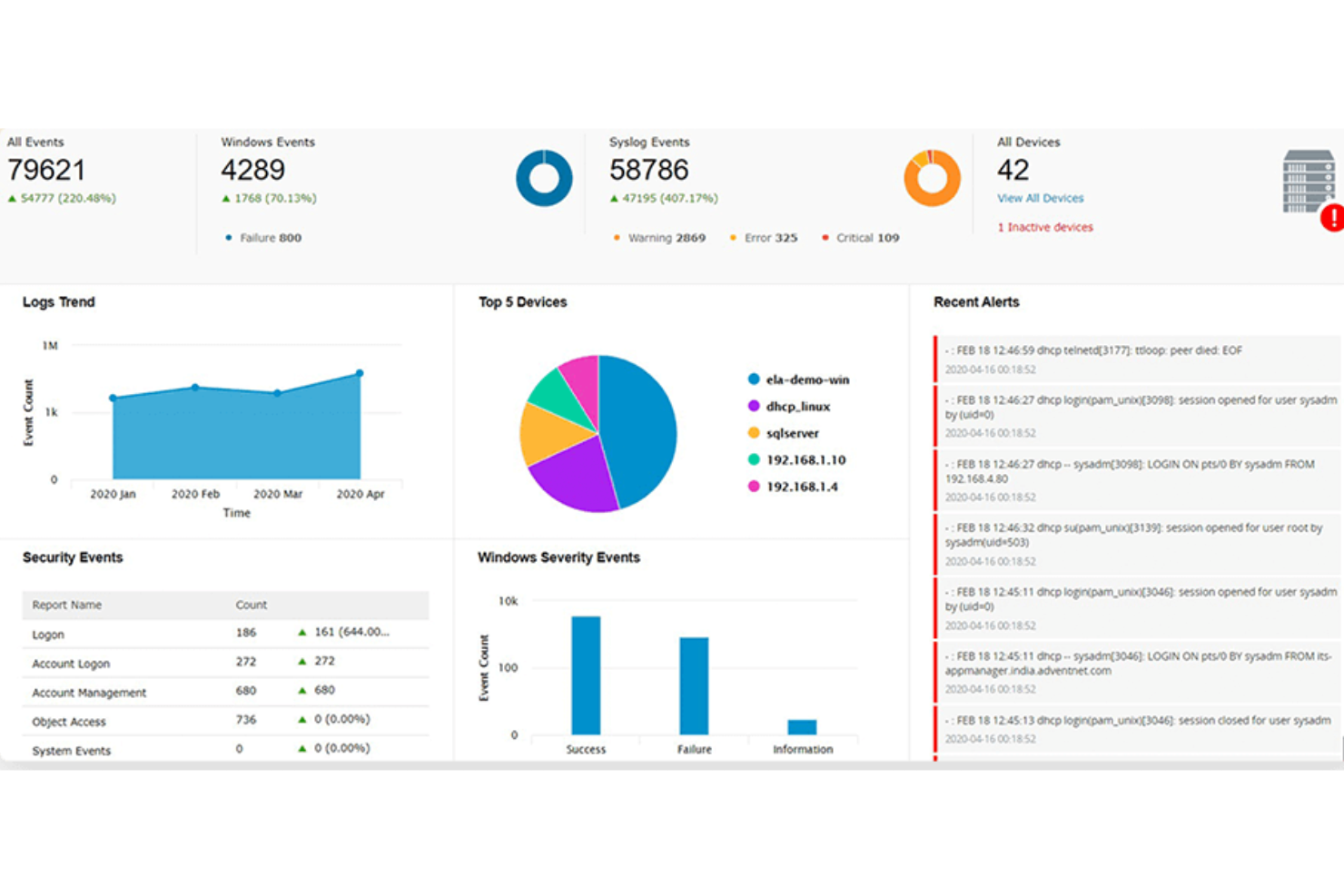
ManageEngine Log360 is a unified SIEM platform for IT teams and security professionals who need to monitor, detect, and respond to threats across on-premises and cloud environments while meeting compliance requirements.
Who Is ManageEngine Log360 Best For?
Log360 is a strong fit for mid-size to large enterprises with dedicated security operations teams managing complex, hybrid IT environments.
Why I Picked ManageEngine Log360
I picked ManageEngine Log360 as one of the best because of how it handles DLP and CASB as native, built-in capabilities rather than bolt-on add-ons. Most SIEM tools require you to integrate separate products to cover data protection and cloud visibility—with Log360, both are already there. The integrated DLP module includes content-aware protection and data risk assessment, so my team monitors access to sensitive files and identifies where critical data resides across the network. On the CASB side, shadow IT monitoring lets us spot unsanctioned cloud apps in use across the environment and track who's accessing them, which matters as SaaS sprawl increases.
ManageEngine Log360 Key Features
- UEBA: Detects anomalous user and entity behavior using machine learning to surface insider threats and compromised accounts.
- Real-time event correlation: Applies rule-based analysis across log data to identify attack patterns and trigger automated alerts.
- Compliance reporting: Generates pre-built audit reports mapped to frameworks like HIPAA, PCI DSS, GDPR, and SOX.
- Incident management: Lets your team assign, track, and resolve security incidents directly within the platform using a built-in ticketing workflow.
ManageEngine Log360 Integrations
Integrations include ServiceDesk Plus, Jira Service Desk, Kayako, Amazon Web Services (AWS), Microsoft Azure, Salesforce, Microsoft 365, Exchange Server, Active Directory, and databases like SQL Server.
Pros and Cons
Pros:
- Threat intelligence features
- Robust compliance management capabilities
- Real-time log collection and analysis
Cons:
- The tool requires regular maintenance and updates
- Setup and configuration process can be complex


Heimdal is a cybersecurity platform designed for IT teams and businesses that need layered protection against advanced threats, combining endpoint security, threat prevention, and automated patch management to help reduce risk across complex environments.
Who Is Heimdal Best For?
Heimdal is a good fit for mid-size to enterprise IT and security teams that need a unified platform to manage endpoint protection, threat prevention, and compliance across their organization.
Why I Picked Heimdal
Heimdal earns its spot on my shortlist because of how it handles DNS security and ransomware protection together in a single, unified platform. I like that its DNS filtering actively blocks malicious domains before a connection is even established—stopping threats at the network layer rather than reacting after the fact. On the ransomware side, Heimdal's encryption protection detects and halts unauthorized file encryption in real time, which I find especially valuable for teams managing endpoints across distributed environments. The combination of these two layers means my team can address two of the most common attack vectors without juggling separate tools.
Heimdal Key Features
- Patch & asset management: Automatically deploys OS and third-party application patches across endpoints to close vulnerabilities before they can be exploited.
- Privileged access management: Controls and monitors privileged user sessions to prevent unauthorized access to sensitive systems and data.
- Next-gen antivirus: Detects and blocks malware and advanced threats at the endpoint level using behavioral analysis alongside traditional signature-based detection.
- Email fraud prevention: Identifies and blocks business email compromise (BEC) and CEO fraud attempts before they reach end users.
Heimdal Integrations
Integrations include ConnectWise, Autotask, HaloPSA, Cisco Meraki, Microsoft Business, Microsoft 365, Blackpoint Cyber, Patch My PC, and an API is available for custom integrations.
Pros and Cons
Pros:
- Detailed asset and license visibility
- Strong vulnerability and threat detection
- Automates patching across endpoints
Cons:
- Interface requires onboarding time
- No native integrations available


Malwarebytes provides anti-malware and cybersecurity services for devices used by both personal and business customers.
Why I picked Malwarebytes: I chose malwarebytes because it provides a free rootkit scanner that makes it easier to find these notoriously difficult-to-detect forms of malware. It uses the same approach to heuristics and anomaly detection that goes into addressing zero-day attacks so you can deal with rootkits as soon as possible. I also liked their antivirus and VPN products.
Malwarebytes standout features and integrations:
Features that I took note of while evaluating Malwarebytes’ rootkit scanner include automatic repairs of any system files and services that might have been damaged by an infection. It also scans first and provides you with a list of rootkits it discovers so you can review them before taking action. This way, you can ensure that it doesn’t interfere with any ethical hacking exercises you have in progress.
Integrations are pre-built for ServiceNow, Slack, Datto RMM, Azure Sentinel, IBM QRadar, Splunk, Rapid7, Addigy, Atera, and ConnectWise.
Pros and Cons
Pros:
- Premium plans are relatively cheap, especially for businesses
- Free antivirus and rootkit scanner
- Beginner-friendly and intuitive design
Cons:
- Some features are Windows-only
- Free plan is a comprehensive enough security solution on its own


ESET PROTECT Complete is a comprehensive cybersecurity software focusing on prevention, detection, and response.
Why I picked ESET PROTECT Complete: This software takes a proactive approach to managing cyber threats. Leveraging technologies like AI, the platform helps prevent breaches and investigate incidents while providing an easy-to-understand interface that captures all you need to know in a single dashboard. You'll also have access to detailed reports with actionable steps to keep your IT infrastructure secure.
ESET PROTECT Complete standout features and integrations:
The platform offers a full suite of protection features, including its Management Console, Endpoint Protection, File Server Security, Full Disk Encryption, Advanced Threat Defense, Mail Security, and Cloud App Protection. This allows you to monitor the security of your entire business environment and receive real-time insights to minimize operational disruptions.
Integrations include ConnectWise Automate, Datto RMM, NinjaOne, Kaseya VSA, ATERA, and more.
Pros and Cons
Pros:
- Protection for all your devices and apps
- Allows for remote management
- Wide variety of detailed reports
Cons:
- May slow down devices during scans and updates
- Can be expensive for some users

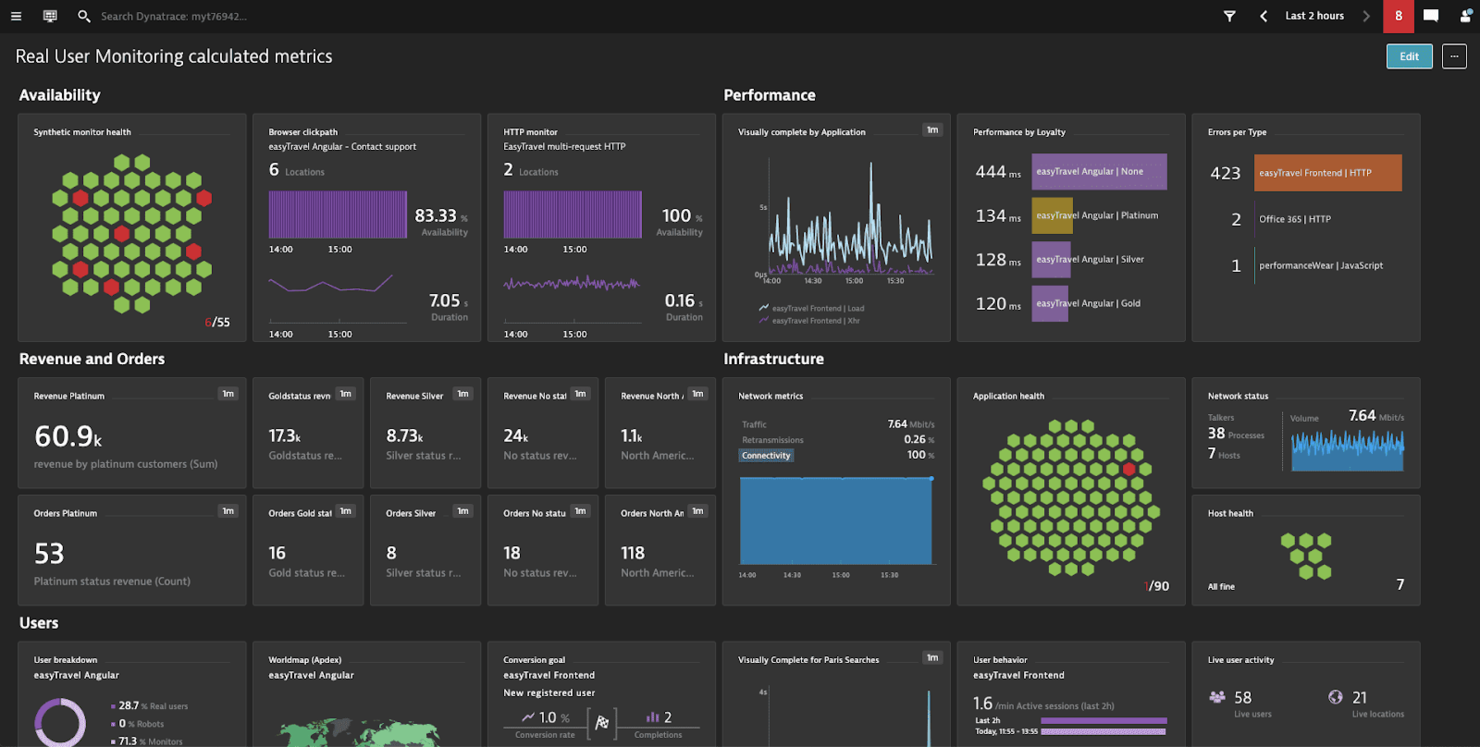
Dynatrace is a cloud-based monitoring, observability, automation, and analytics solution for systems such as infrastructure and applications.
Why I picked Dynatrace: One of Dynatrace’s main offerings is its application performance monitoring (APM) solution, whose security features I tested. Whenever it found an issue, it sent me a single concise notification with actionable information that identified the root cause down to the exact line of code.
Dynatrace standout features and integrations:
Features that made me like Dynatrace’s APM tools include the automatic detection of all application dependencies and extending its scope, something I believe is useful for large complex systems or those that rely on microservices. It also provides usage metrics from both synthetic and real users to increase the pool of information you have for making decisions that affect performance and security.
Integrations are pre-built for GitLab, Google Cloud, AWS, Azure, Jenkins, Docker, Kubernetes, JFrog, PagerDuty, and LaunchDarkly.
Pros and Cons
Pros:
- Easy to deploy
- Makes debugging easier
- Robust application monitoring features
Cons:
- Only practical for enterprise applications
- Customer support is unresponsive at times
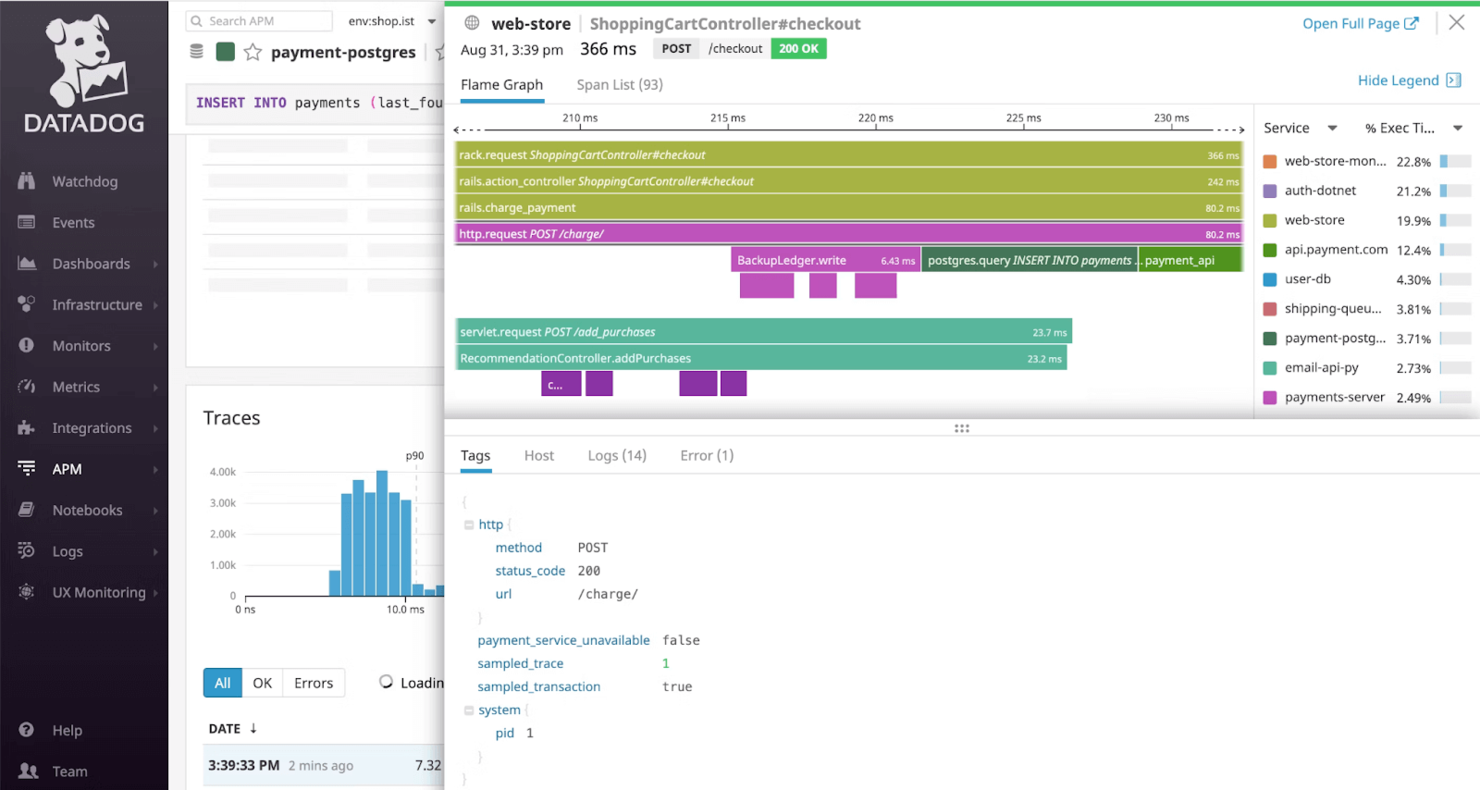
Datadog is a cloud monitoring platform that provides observability across systems such as infrastructure, applications, and digital experiences.
Why I picked Datadog: I chose Datadog because its infrastructure monitoring platform makes it easy to comply with the security standards, including those imposed on educational institutions, as well as in health and financial sectors. On top of the platform’s SOC 2 Type II certification, you can also implement TLS and HTTP Strict Transport Security (HSTS).
Datadog standout features and integrations:
Features I found while testing Datadog include the sensitive data scanner that combs through logs to identify, classify, and protect sensitive information. This could be great for any organization that needs to safeguard sensitive personal data, such as educational institutions responsible for student records. Datadog can also monitor portals and e-learning platforms, with real-time insights that you can act on to keep emerging threats at bay.
Integrations are pre-built for Adobe Experience Manager, AWS CloudTrail, Auth0, Google Workspace, OneLogin, Meraki, Sophos, Okta, Slack, Microsoft 365, and JFrog.
Pros and Cons
Pros:
- Provides a unified monitoring solution
- Beginner-friendly UI and dashboards
- Large integration library
Cons:
- Complex setup on private hardware
- Can get expensive if usage isn’t monitored


Teramind is a user behavior analytics platform designed to enhance cybersecurity, compliance, and productivity across various industries.
Why I picked Teramind: I like that Teramind offers the ability to monitor user activities across multiple channels, including applications, websites, emails, instant messages, social media, and file transfers. This extensive monitoring helps you detect and prevent potential security breaches by providing a detailed view of user interactions. Additionally, Teramind's rule-based risk analysis allows you to set up specific policies that trigger alerts or actions when certain behaviors are detected. These features help enhance insider threat detection and prevention.
Teramind standout features and integrations:
Features include video recording of user sessions, which allows you to review activities for compliance and security audits. The software also offers remote desktop control, enabling you to assist or intervene when necessary. Additionally, Teramind provides IT forensics capabilities, helping you investigate incidents thoroughly and gather the necessary evidence.
Integrations include Google Cloud BigQuery, Splunk Cloud Platform, Jira, Zendesk, Redmine, Microsoft Power BI, IBM Security QRadar, LogRhythm, ArcSight, McAfee Business Protection, Microsoft Entra ID, and ServiceNow.
Pros and Cons
Pros:
- Customizable rules and policies
- Real-time alerts for immediate threat response
- Comprehensive monitoring across various platforms
Cons:
- Minimum of 5 seats
- Limited support for mobile device monitoring
Other Cybersecurity Software
While I was making my evaluations, I found these tools that didn’t make the main list, but might still be a good choice for other use cases:
- CrowdStrike Falcon
For ITOps teams
- New Relic
For full-stack observability
- NETSCOUT
DDoS protection features
- Zygon
For SaaS security posture management
- Sprinto
For companies in highly regulated industries
- Sophos
For small businesses
- Amazon CloudWatch
For AWS
- Azure Sphere
For IoT devices
- Microsoft Intune
For endpoint security
- Bitdefender
Browser protection features


Related Software and Tool Reviews
If you still haven't found what you're looking for here, check out these other types of tools that we've tested and evaluated.
- Network Monitoring Software
- Server Monitoring Software
- SD-Wan Solutions
- Infrastructure Monitoring Tools
- Packet Sniffer
- Application Monitoring Tools
Selection Criteria for Cybersecurity Software
In my journey of researching various cybersecurity solutions, I've developed a comprehensive criteria framework to ensure my selection process is fair and consistent. Here's how I assessed each tool that made it onto my list:
Core Cybersecurity Software Functionality: 25% of total weighting score.
To be considered for inclusion on my list of the best cybersecurity solutions, the solution had to fulfill common use cases. These include:
- Protecting against external threats
- Securing sensitive data from unauthorized access
- Ensuring compliance with data protection regulations
- Providing visibility into network and device security status
- Facilitating swift incident response and recovery
Additional Standout Features: 25% of total weighting score.
- Advanced predictive analytics capabilities for foreseeing potential threats before they become imminent.
- Innovative user behavior analytics to detect insider threats or compromised accounts.
- Artificial intelligence and machine learning features for improved threat detection and response times.
- Comprehensive security coverage across both on-premises and cloud environments, providing a unified security posture.
Usability: 10% of total weighting score. Important considerations include:
- An intuitive user interface that simplifies complex security operations.
- Dashboards that provide at-a-glance insights into security posture and alerts.
- A balance between powerful features and ease of use to accommodate users with varying levels of technical expertise.
Onboarding: 10% of total weighting score. Effective onboarding is evaluated based on:
- Comprehensive training materials, such as videos and interactive tutorials.
- Quick setup processes with guided product tours to help new users navigate the platform.
- Support services like chatbots and webinars to assist with initial configuration and deployment.
Customer Support: 10% of total weighting score. Key aspects include:
- Responsive and knowledgeable support teams available through multiple channels (e.g., live chat, email, phone).
- A rich knowledge base or community forums for self-service support.
- Dedicated account managers for enterprise clients.
Value For Money: 10% of total weighting score. This involves:
- Assessing the pricing structure against the breadth and depth of features offered.
- Considering the scalability of the solution to support business growth without disproportionate cost increases.
- Evaluating any hidden costs, such as those for additional modules or support services.
Customer Reviews: 10% of total weighting score. Evaluation focuses on:
- Consistency in positive feedback across key areas such as ease of use, customer support, and effectiveness of the solution.
- Real-world testimonials highlighting specific scenarios where the tool provided significant value.
- Reviews that detail how the solution addresses and mitigates specific security challenges.
Through this criteria framework, I ensure that the cybersecurity tools not only meet generic expectations but also stand out for their ability to address the unique needs and challenges faced by different organizations.
How to Choose Cybersecurity Software
As you're shortlisting, trialing, and selecting cybersecurity software, consider the following:
- What problem are you trying to solve - Start by identifying the cybersecurity feature gap you're trying to fill to clarify the features and functionality the tool needs to provide.
- Who will need to use it - To evaluate cost and requirements, consider who'll be using the platform and how many licenses you'll need. You'll need to evaluate if it'll just be the IT team, or the whole organization that will require access. When that's clear, it's worth considering if you're prioritizing ease of use for all, or speed for your technical power users.
- What other tools it needs to work with - Clarify what tools you're replacing, what tools are staying, and the tools you'll need to integrate with. This could include your cloud infrastructure, DMARC software, networks, and data sources, and your overall tech stack. You might also need to decide if the tools will need to integrate together, or alternatively, if you can replace multiple tools with one consolidated cybersecurity software.
- What outcomes are important - Consider the result that the tool needs to deliver to be considered a success. Think about what capability you want to gain, or what you want to improve, and how you will be measuring success. You could compare cybersecurity software offerings until you’re blue in the face, but if you aren’t thinking about the outcomes you want to drive, you could be wasting a lot of valuable time.
- How it would work within your organization - Consider the solutions alongside your workflows and delivery methodology. Evaluate what's working well, and the areas that are causing issues that need to be addressed. Remember every business is different — don’t assume that because a tool is popular that it'll work in your organization.
2025 Trends in Cybersecurity Software
In 2025, the increasing complexity and sophistication of cyber threats makes updates in the features and functionalities of cybersecurity software all the more important, especially for financial services cybersecurity. A review of product updates, press releases, and release logs from the most rapidly evolving and popular cybersecurity tools reveals key trends in software and technology designed to protect and secure company devices and infrastructure. Here are some of the trends I've observed:
Evolving Features
- Enhanced Endpoint Security: With the rise of remote work, there's a notable emphasis on advanced endpoint protection solutions. These offer more comprehensive defenses against attacks targeting remote devices, including zero trust security models.
- Cloud Security Enhancements: As companies continue to migrate to cloud platforms, the demand for cloud-specific security features has grown. Tools are evolving to offer better visibility, control, and protection for cloud environments, including multi-cloud and hybrid cloud configurations.
Novel and Unusual Functionality
- Behavioral Analytics for Insider Threat Detection: Some cybersecurity tools are introducing sophisticated user behavior analytics to identify and mitigate insider threats. This unusual feature relies on monitoring user activities to detect anomalies that could indicate a security risk.
- Decentralized Security Operations: A novel approach being explored is the decentralization of cybersecurity operations, leveraging blockchain technology for enhanced security and integrity of data across networks.
Declining in Importance
- Traditional Signature-Based Antivirus: The reliance on traditional signature-based antivirus solutions is diminishing, as these are less effective against zero-day exploits and advanced persistent threats (APTs). The market is shifting towards solutions that offer more dynamic and behavioral-based detection methods.
As cyber threats evolve, so do the tools designed to combat them. Staying up to date with these trends helps businesses make smarter choices about the software and solutions they implement, ensuring they're not just suitable for current needs, but future ones.
What is Cybersecurity Software?
Cybersecurity software is used to protect systems, networks, and data from threats like malware, phishing, and unauthorized access. It's typically used by IT teams, security professionals, and managed service providers who need to monitor vulnerabilities, manage incidents, and keep business operations safe.
DNS security services, threat detection, access control, and activity logging features help with identifying risks, stopping intrusions, and tracking events. These tools help reduce downtime, support compliance, and make it easier to protect both internal and customer-facing systems.
Features
Here are the core features I looked for in my research of cybersecurity software:
- Real-Time Threat Detection: This feature allows for the immediate identification of threats as they occur. It's vital for minimizing the window of opportunity for attackers to exploit vulnerabilities, ensuring that your devices and networks remain secure.
- Automated Incident Response: Software (such as unified threat management software) with this capability can automatically take predefined actions against detected threats. It reduces the time and resources required for manual intervention, streamlining the process of mitigating cyber threats efficiently.
- Endpoint Security: This ensures the protection of individual devices (endpoints) that connect to your network. With the proliferation of remote work, securing each endpoint is essential to safeguard against threats that target devices outside traditional network defenses.
- Advanced Firewall Protection: Robust firewall software acts as a barrier between your network and untrusted external networks. It filters incoming and outgoing traffic based on an established set of security rules, crucial for preventing unauthorized access to your network resources.
- Multi-factor Authentication (MFA): MFA requires users to provide multiple forms of verification before gaining access. This feature adds an additional layer of security, significantly reducing the risk of unauthorized access through compromised credentials.
- Cloud Security: Specifically designed to protect cloud-based infrastructure and data, this feature ensures that your assets in the cloud are as secure as those on physical devices or on-premises networks. It's critical for businesses leveraging cloud computing.
- Encryption Tools: Encryption safeguards sensitive data by converting it into unreadable code for unauthorized users. This feature is indispensable for protecting data integrity and confidentiality, particularly for information stored on cloud platforms or transmitted across networks. For management of encrypted keys, PKI software is available to allow the highest level of control.
- Security Information and Event Management (SIEM): SIEM provides an overview of the security landscape across your organization by collecting and analyzing security data from various sources. This feature is key for detecting patterns and potential security incidents before they escalate.
- Vulnerability Scanning: Regular scanning for vulnerabilities allows for the identification and patching of security gaps in software and systems. This proactive measure is crucial for preventing attackers from exploiting known vulnerabilities.
- Data Loss Prevention (DLP): DLP technologies prevent sensitive data from being lost, misused, or accessed by unauthorized users. This feature is essential for maintaining the confidentiality and integrity of critical business data, ensuring compliance with data protection regulations.
Common Cybersecurity Software AI Features
Beyond the standard cybersecurity software features listed above, many of these solutions are incorporating AI with features like:
- AI-powered threat intelligence: This feature uses artificial intelligence to analyze vast amounts of data and quickly identify new or evolving threats. You get early warnings and proactive defense against emerging attacks.
- Anomaly detection: AI automatically spots abnormal patterns or behaviors that could indicate a cyberattack. It helps you catch sneaky threats that traditional methods might miss.
- Automated incident response: When a threat is detected, AI systems can automatically quarantine devices or block suspicious actions, speeding up response times and reducing the impact of attacks.
- Predictive risk assessment: AI evaluates your systems and predicts where vulnerabilities might crop up in the future. You can fix weak spots before they turn into bigger problems.
- Phishing detection: AI scans emails and communications to catch phishing attempts by analyzing language, sender behavior, and intent. This helps stop scams before anyone clicks a dangerous link.
Selecting cybersecurity software that encompasses these features can significantly enhance your organization's ability to defend against and respond to cyber threats. By deciding which features to prioritize, you can build a resilient digital environment that supports your company's goals, operations, and growth.
Benefits
Cybersecurity software plays a crucial role in safeguarding organizations from the myriad of cyber threats lurking online. Here are five specific key benefits that cybersecurity software provides to users and organizations:
- Enhanced Threat Detection and Response: Cybersecurity software offers sophisticated mechanisms to detect and respond to threats in real-time. Intrusion detection software allows businesses to identify potential security breaches quickly and mitigate them before they can cause significant damage.
- Improved Compliance with Regulations: Many cybersecurity solutions come equipped with features designed to help organizations comply with data protection laws and industry regulations. This not only helps avoid legal penalties but also strengthens trust with customers and partners by demonstrating a commitment to data security.
- Protection Against Data Breaches: By implementing robust encryption, firewall audit software, and intrusion detection systems, cybersecurity software significantly reduces the risk of data breaches. This protection is essential for safeguarding sensitive information and maintaining the integrity and confidentiality of business data.
- Enhanced Productivity: Cybersecurity threats can disrupt business operations and lead to costly downtime. By preventing attacks and minimizing their impact, cybersecurity software ensures that employees can maintain productivity without interruption from malicious activities.
- Brand Reputation and Trust: Effective cybersecurity measures protect not only data and systems but also the reputation of the organization. Customers are more likely to trust and engage with businesses that can demonstrate a strong commitment to securing their information.
The benefits of investing in cybersecurity software extend far beyond simple risk mitigation. For organizations looking to navigate the complexities of the digital landscape, these tools offer a vital line of defense, enhancing overall resilience and fostering a secure environment for growth and innovation. For companies based in the United States, working with a cybersecurity company in Chicago or another major city provides a crucial layer of protection and insight for each project.
Costs & Pricing
Cybersecurity solutions come in various plans and pricing options, each designed to cater to different needs, from small businesses seeking basic protection to large enterprises requiring advanced security measures. Understanding these options will help you make an informed decision that aligns with your organization's specific security needs and budget constraints.
Plan Comparison Table for Cybersecurity Software
Here's an outline of the common plan options for cybersecurity software:
| Plan Type | Average Price | Common Features | Best For |
|---|---|---|---|
| Free | $0 | Basic protection, limited features, recommended for personal use or very small businesses | Personal use, very small businesses with minimal online presence |
| Basic | $10 - $30/month | Antivirus, firewall, email security, web filtering | Small businesses with basic security needs, home offices |
| Standard | $30 - $70/month | Basic features plus endpoint protection, mobile security, VPN | Growing businesses, startups, organizations with some sensitive data |
| Premium | $70 - $150/month | Standard features plus advanced threat protection, identity management, security analytics | Mid-sized businesses with expanding security needs, organizations with customer data |
| Enterprise | Custom Pricing | Premium features plus scalability options, dedicated support, BAS software, full-suite solutions | Large enterprises, organizations with complex IT infrastructure, businesses handling highly sensitive data |
When selecting a cybersecurity software plan, consider both your immediate and future security needs, as well as your budget. The right plan should offer a balance of comprehensive protection without overextending your financial resources.
Cybersecurity Software FAQs
Here are some answers to common questions about cybersecurity software:
How do I evaluate cybersecurity software for integration with my existing tech stack?
What are the most important compliance standards to consider when choosing cybersecurity software?
How do I measure the ROI of a cybersecurity solution for my organization?
Can cybersecurity tools help automate threat detection and response?
What are common challenges when deploying cybersecurity software at scale?
What are cybersecurity best practices?
Is Windows Defender good enough, or do I need an antivirus?
What’s Next
If you're in the process of researching database monitoring tools, connect with a SoftwareSelect advisor for free recommendations.
You fill out a form and have a quick chat where they get into the specifics of your needs. Then you'll get a shortlist of software to review. They'll even support you through the entire buying process, including price negotiations.