

20 Best Asset Management Software for IT Teams in 2026

Best Asset Management Software Shortlist


The best asset management software helps you track, maintain, and optimize every physical and digital asset across your organization—without relying on error-prone spreadsheets or siloed systems. These tools give IT leaders and operations teams full visibility into equipment lifecycles, software licenses, and depreciation, helping prevent costly downtime and compliance gaps before they happen.
After evaluating SaaS and enterprise IT tools for more than 12 years, I have successfully implemented asset management systems across IT departments. The right platform doesn’t just catalog assets—it transforms how teams plan budgets, extend hardware lifespans, and align procurement decisions with business goals.
Let's dive into my picks!
Why Trust Our Software Reviews
We’ve been testing and reviewing software since 2023. As tech leaders ourselves, we know how critical and difficult it is to make the right decision when selecting software.
We invest in deep research to help our audience make better software purchasing decisions. We’ve tested more than 2,000 tools for different tech use cases and written over 1,000 comprehensive software reviews. Learn how we stay transparent & our software review methodology.
Best Asset Management Software For IT Teams Summary
| Tool | Best For | Trial Info | Price | ||
|---|---|---|---|---|---|
| 1 | Best for asset lifecycle with dependency mapping | 14-day free trial + free demo available | From $19/agent/month (billed annually) | Website | |
| 2 | Best for reducing IT ticket volume | 30-day free trial + free demo available | From $149/technician/month (billed annually) | Website | |
| 3 | Best for automated hardware workflows | Free demo available | From $8/month/seat (+$540 platform fee) | Website | |
| 4 | Best for integrated IT asset oversight | 21-day free trial + free demo available | From $149/technician/month (billed annually) | Website | |
| 5 | Best for IT asset and license management | Free trial available | From $300/month | Website | |
| 6 | Best for hybrid workspace asset tracking | Free demo available | Pricing upon request | Website | |
| 7 | Best for managing global assets in 130+ countries | Free demo available | from $5/person/month | Website | |
| 8 | Best for automated device discovery | 14-day free trial + free demo available | Pricing upon request | Website | |
| 9 | Best for preventive IT maintenance automation | Free plan available | From $28/user/month | Website | |
| 10 | Best for automated asset tracking | 7-day free trial | From $29.99/user/month | Website |


-

Deel IT
Visit WebsiteThis is an aggregated rating for this tool including ratings from Crozdesk users and ratings from other sites.4.9 -
Freshservice
Visit WebsiteThis is an aggregated rating for this tool including ratings from Crozdesk users and ratings from other sites.4.6 -
Rippling IT
Visit WebsiteThis is an aggregated rating for this tool including ratings from Crozdesk users and ratings from other sites.4.8


Best Asset Management Software Reviews
Here’s a summary of the top ten asset management for IT teams to help you understand each tool’s unique features, best use cases, price, and downsides so you can find the right one.


Freshservice is a leading IT Asset Management (ITAM) platform that helps organizations gain full control over their technology assets. From hardware and software to fixed assets like vehicles and machinery, teams can track, manage, and optimize resources throughout their lifecycle. Emma Johnson, IT Consultant at Johnson Technology Solutions, shared: “As an IT consultant, I recommend Freshservice to my clients for its comprehensive ITIL-aligned service management features. Its problem management and change management modules are particularly impressive.”
Why I picked Freshservice: It’s one of the easiest platforms to use when you’re wanting to track all of your software, SaaS, computers, devices, and keep them maintained without much work.
Freshservice Standout Features and Integrations:
Standout features include automated reminders to enable proactive maintenance scheduling. This helps save a ton of time when you're wanting to keep your assets up-to-date and to improve asset life cycles. The platform helps with forecasting future maintenance and costs to help manage expenses to improve your profit margins. Plus, you can manage your inventory, purchase orders, and relationship mapping.
Integrations include Dropbox, Jira, Freshdesk, Bomgar, CloudWatch, Quickbooks, Zapier, Zoom, Freshbooks, and Microsoft Teams.
Pros and Cons
Pros:
- Mobile app for barcodes or QR code scanning
- User-friendly platform
Cons:
- API can be a bit complicated
New Product Updates from Freshservice

Freshservice Adds Integrations and Document Workflow Updates
Freshservice introduces ControlUp integration, Adobe Acrobat Sign integration, enhanced document management and data mapping, and document attachments for Journey emails. These updates improve workflow efficiency by streamlining documentation, approvals, and issue resolution. For more information, visit Freshservice’s official site.


Atera is an IT management platform built to help IT teams oversee assets, automate tasks, and deliver proactive support through AI-powered capabilities. It combines essential IT tools like RMM, helpdesk, ticketing, and patch management into one platform.
Why I Picked Atera: I chose Atera for its focus on autonomous IT management, which blends AI-driven agents with traditional IT tools to handle routine tasks automatically. This lets you run IT operations more efficiently by reducing ticket volumes and response times. You also gain full visibility and control over your assets through a unified platform—ideal for small IT teams looking to scale without additional headcount.
Atera Standout Features and Integrations:
Standout features include AI agents that autonomously resolve issues on user devices, unified remote monitoring and management (RMM), built-in helpdesk ticketing, patch management, and IT automation. Atera also offers context-aware intelligence that taps into your knowledge base to resolve issues in line with your processes.
Integrations include Microsoft Teams, Slack, Zapier, Bitdefender, and other common IT tools to support communication, security, and workflows.
Pros and Cons
Pros:
- Detailed reporting and client-facing dashboards
- Proactive issue detection and automation options
- Centralizes ticketing, RMM, PSA, and asset management
Cons:
- Some limitations in PSA and billing features
- Learning curve for new users due to breadth of features
New Product Updates from Atera

Atera Enhances IT Autopilot With Automation and File Support
Atera’s IT Autopilot gets three major boosts: you can now attach common files for deeper analysis, automate IT tasks with clear workflows, and choose how the system follows up when users go silent. These updates help streamline IT operations and improve resolution efficiency. For more information, visit Atera’s official site.


Workwize is an IT hardware management platform designed to help businesses equip their global workforce. It caters to the needs of IT, HR, and operations teams, providing a comprehensive solution to manage IT hardware assets.
Why I picked Workwize: Workwize offers a centralized platform that connects IT suppliers, logistics, and local warehouses, giving you a single view to oversee the complete lifecycle of your IT assets. This integration simplifies procurement, deployment, management, retrieval, and disposal of IT assets across distributed teams. By automating workflows, Workwize reduces manual tasks, allowing your team to focus on more strategic initiatives.
Workwize Standout Features and Integrations:
Standout features include automated workflows, device procurement and deployment, management of replacements and retrievals, centralized asset lifecycle view, connection with IT suppliers, logistics integration, local warehouse coordination, Active Directory integration, and SCIM compatibility.
Integrations include Active Directory, SCIM, HR Systems, IRIS Cascade HR, ADP Workforce Now, AFAS Software, AlexisHR, Azure Active Directory, BambooHR, and Breathe HR.
Pros and Cons
Pros:
- Centralized platform for IT asset management
- Automated workflows
- Assists with procuring and deploying devices
Cons:
- Device repairs limited to enterprise plan
- May be expensive for smaller businesses
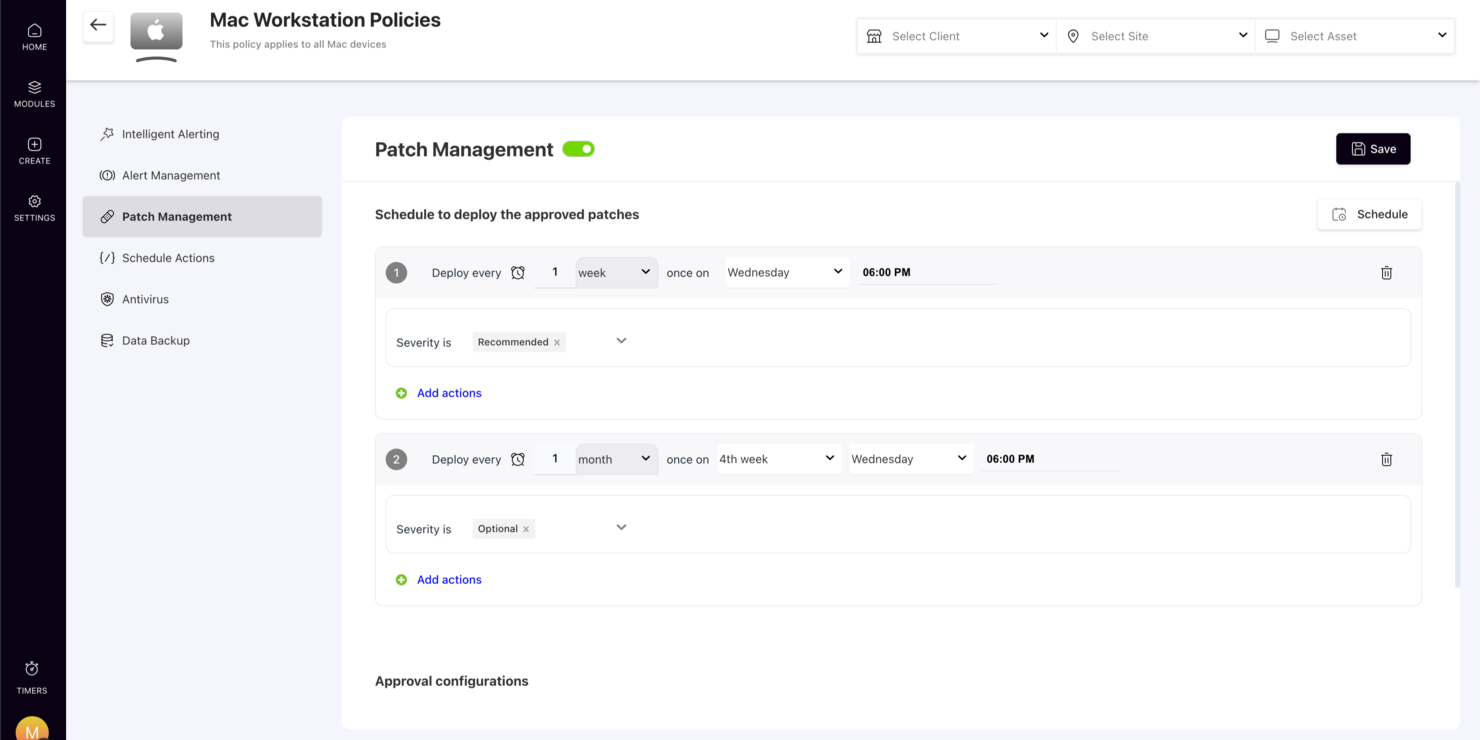
In the fast-paced world of IT management, SuperOps stands out as a dynamic platform designed specifically for Managed Service Providers (MSPs) and internal IT teams. By harnessing the power of Agentic AI, it offers a suite of features that cater to the complex needs of asset management. Whether you're dealing with endpoint security, service automation, or asset tracking, SuperOps aims to consolidate these processes into a single, efficient workflow. This makes it an invaluable tool for those looking to streamline IT operations and enhance overall efficiency.
Why I Picked SuperOps
I picked SuperOps because it uniquely integrates service desk management and asset management into one cohesive platform, making it ideal for CTO asset management. The platform leverages Agentic AI to automate workflows, which is crucial for efficient IT operations. Additionally, it provides comprehensive endpoint security, ensuring that all devices within your network are protected. These features directly address the needs of IT teams looking to manage assets while maintaining high levels of security and efficiency.
SuperOps Key Features
In addition to its core functionalities, I also found several features that make SuperOps a compelling choice for CTO asset management:
- Patch Management: Keeps your software up-to-date by automating the deployment of patches across your network.
- Mobile Device Management: Allows you to manage and secure mobile devices from a single platform.
- Executive Dashboards: Provides strategic business insights through customizable dashboards.
- Real-Time Profitability Tracking: Helps you monitor and improve financial performance with real-time data analytics.
SuperOps Integrations
Integrations include Microsoft 365, Google Workspace, QuickBooks, Xero, TeamViewer, Splashtop, Acronis, Bitdefender, Webroot, and IT Glue.
Pros and Cons
Pros:
- AI-powered workflow automation
- Built-in endpoint security tools
- Unified PSA and RMM platform
Cons:
- Learning curve for new users
- Primarily built for MSPs
New Product Updates from SuperOps

SuperOps Adds HTML Support for Ticket Closure Emails
SuperOps introduces HTML embedding for ticket closure emails. This update allows teams to include custom content such as CSAT survey links and branded elements in resolution emails. For more information, visit SuperOps’ official site.
 .
.

Setyl provides organizations with a clear, organized view of their entire IT landscape, bringing hardware, software, users, and vendors into one accessible platform. Instead of juggling multiple tools or spreadsheets, teams can rely on Setyl to streamline processes, improve accountability, and maintain control over growing tech environments.
Why I Picked Setyl: I chose Setyl because it excels at unifying hardware, software, license, and spend data in one place, making it a true single source of truth for IT management. Its lifecycle tracking ensures assets and licenses are efficiently assigned, monitored, and recovered during onboarding and offboarding. With features like renewal alerts, shadow IT detection, and compliance-ready reporting, it helps organizations cut waste, improve security, and stay audit-ready. Plus, its wide range of integrations with HR, MDM, IAM, and finance tools automates data syncing, reducing manual effort and eliminating silos.
Standout features & integrations:
Standout features include employee-centric workflows, such as equipment assignment tracking and seamless recovery during staff transitions. Its vendor management tools also let you consolidate contract details, renewal dates, and vendor risk profiles, while expenditure tracking links costs to specific assets and teams for clearer budget accountability.
Integrations include Google Workspace, Microsoft 365, Intune, Google Endpoint Management, Jamf, Lansweeper, Meraki, JumpCloud, Okta, BambooHR, HiBob, ADP Workforce Now, Workday, Zendesk, Jira Service Management, and more.
Pros and Cons
Pros:
- Software and hardware asset management in one
- Assistance with setup offered as standard
- Unlimited assets included in price
Cons:
- Doesn’t offer the complex functionalities that may be needed for large enterprise organizations
- No native mobile app


OfficeSpace helps IT and operations teams track physical assets across hybrid workplaces, giving you a clear view of what equipment you own, where it lives, and who is using it. It’s especially useful for organizations juggling both in-office and remote setups, since it centralizes asset data and supports real-time updates from the field.
Why I Picked OfficeSpace
I picked OfficeSpace because it gives your team a single system to manage desks, hardware, and shared resources without switching between tools. You can automate maintenance tasks through scheduled work orders, which reduces manual follow-up and keeps equipment in reliable condition. The platform also ties asset data to location details, helping you understand where devices are deployed and how they’re being used. I like that OfficeSpace includes depreciation and lifecycle tracking, since this helps finance and IT stay aligned on asset value. Its mobile access ensures field teams can update records immediately through barcode scans, photos, and condition notes.
OfficeSpace Key Features
Here are a few more features that support asset tracking across hybrid work environments:
- Asset Audits: Lets you run location-based audits to confirm inventory accuracy.
- Mobile Check-In/Out: Enables real-time updates when employees borrow or return equipment.
- Depreciation Tracking: Calculates asset value over time for better financial planning.
- Cross-Team Dashboards: Gives IT, facilities, and finance shared visibility into asset health and usage.
OfficeSpace Integrations
Integrations include Microsoft Teams, Slack, ServiceNow, Jira, SAP, Google Workspace, Workday, Zoom, Okta, and OneLogin.
Pros and Cons
Pros:
- Detailed lifecycle tracking supports financial planning
- Mobile tools help field teams update records instantly
- Automated work orders reduce manual maintenance follow-up
Cons:
- Setup requires time to configure locations and asset types
- Some facility-focused modules may exceed IT team needs


Deel is a comprehensive platform that integrates HR, payroll, immigration, and people development tools, making it a versatile solution for businesses of all sizes. In addition to these core functions, Deel offers a robust IT suite that addresses the challenges of managing IT operations for a distributed workforce.
Why I picked Deel: As a platform that manages IT operations in over 130 countries, Deel IT provides a unified solution for the procurement, deployment, tracking, and recovery of IT assets. Its unique combination of local expertise and global infrastructure allows companies to navigate complex regulations and logistics, ensuring that equipment is delivered quickly and securely. With real-time visibility and control over all IT assets, including those owned or leased from other vendors, Deel helps IT teams manage their global inventory efficiently.
Deel Standout Features and Integrations:
Standout features include a fully automated device setup process, where devices are pre-configured with necessary apps, software, and security controls before reaching employees. It also provides comprehensive support with global service-level agreement (SLA) backed repairs, loaner devices, and 24/7 support. Additionally, the platform's device refresh and upgrade automation feature ensures that equipment stays up-to-date.
Integrations include Microsoft Azure Active Directory, Okta, Google Workspace, Slack, Microsoft Teams, BambooHR, Workday, and SAP SuccessFactors.
Pros and Cons
Pros:
- Supports equipment deployment in over 130 countries
- Helps automate asset workflows
- HR and IT asset management in one
Cons:
- Doesn't offer features beyond device management, like network and server management
- May not be ideal for teams with very complex IT asset needs


Auvik is a cloud-based network management software designed to give you complete visibility and control over your network infrastructure. It automatically discovers and maps your network devices, providing real-time insights into their status and connections.
Why I picked Auvik: I picked Auvik because it automatically discovers and inventories all devices on your network, capturing details like make, model, and location. This helps your team stay on top of every asset without manual tracking. Auvik also supports hardware lifecycle management by flagging devices nearing end-of-life or end-of-support so you can plan replacements and avoid downtime.
Auvik Standout Features and Integrations:
Standout features include real-time network mapping that visually represents your network's topology, allowing you to see how devices are interconnected and quickly identify potential issues. Auvik also offers configuration management, automatically backing up device configurations and tracking changes so you can restore previous settings if needed.
Integrations include Autotask PSA, Microsoft Teams, Slack, Datto RMM, Cisco, Fortinet, Ubiquiti, Salesforce, Zoom, ConnectWise, Palo Alto Networks, and Dell.
Pros and Cons
Pros:
- Detailed device inventory aids in lifecycle management
- Can back up and restore device configurations
- Prompt alerting system for various issues
Cons:
- Occasional delays in real-time data updates
- Setting up more advanced functionalities can be challenging
New Product Updates from Auvik
Auvik Adds Alert Insights Report and Enhanced Alerting Controls
Auvik introduces the Alert Insights Report (Beta), count-based alert delays, and automatic alert dismissal. These updates help reduce alert noise and improve how teams monitor and manage alerts. For more information, visit Auvik’s official site.
 .
.
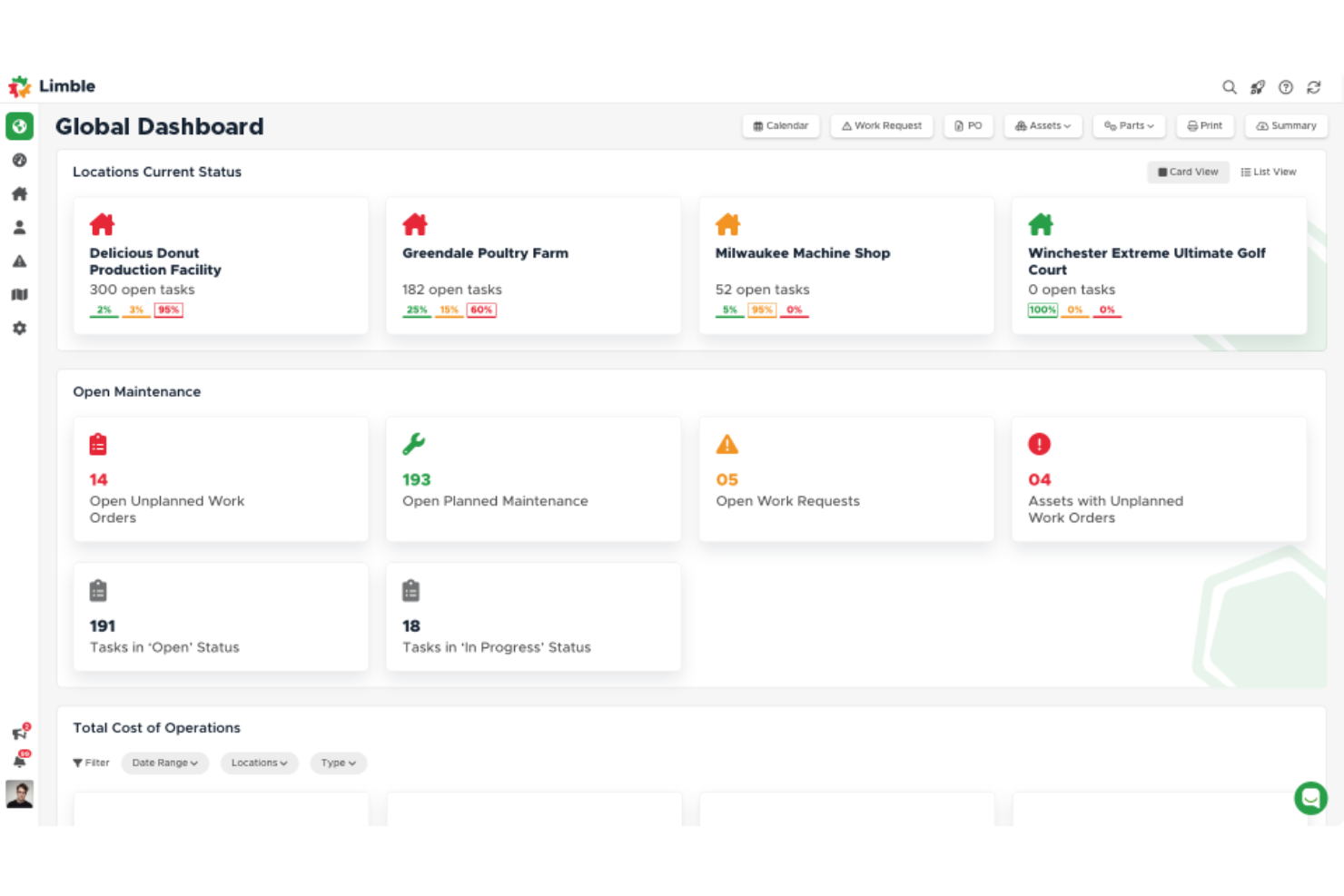
Limble is a cloud-based computerized maintenance management system (CMMS) and asset management platform. Originally designed to streamline maintenance operations in various industries, Limble offers features such as work order management, preventive maintenance, and inventory tracking.
Why I picked Limble: It provides robust tools for tracking and managing IT assets, ensuring that all hardware and software assets are accounted for and maintained properly. Limble's automated work order management system allows IT teams to schedule and prioritize maintenance tasks effectively, while its asset management capabilities ensure that equipment lifecycle information is readily available.
Limble Standout Features and Integrations:
Standout features include an intuitive dashboard that provides a real-time overview of all maintenance activities and customizable reporting that allows teams to generate detailed reports on various aspects of asset management. Preventive maintenance scheduling helps to automate routine maintenance tasks, reducing the likelihood of unexpected equipment failures.
Integrations include Zapier, QuickBooks, Salesforce, Microsoft Teams, Slack, Jira, ServiceNow, and Google Workspace.
Pros and Cons
Pros:
- Robust features for tracking asset history and managing parts inventory
- Simplifies the creation, assignment, and tracking of work orders
- Accessible through mobile
Cons:
- Initial setup may require assistance
- Automated reporting could be more robust


EZO AssetSonar is an IT Asset Management (ITAM) platform that helps organizations manage hardware, software, and SaaS in one place. It is designed to support scaling IT teams by providing visibility, control, and compliance across assets
Why I Picked Ezo AssetSonar: I picked Ezo AssetSonar for its automation features that simplify asset tracking and ensure license compliance across your IT environment. It supports IT service management with tools for faster incident response and ticket resolution, helping teams maintain operational continuity. Real-time monitoring and vulnerability alerts enhance security, while centralized license data helps reclaim unused software and control SaaS spending.
Ezo AssetSonar Standout Features and Integrations:
Standout features include real-time monitoring and alerts that secure assets and prevent security breaches by providing immediate notifications of vulnerabilities. The software's centralized license management helps you optimize software spending by reclaiming unused licenses. Additionally, Ezo AssetSonar's shadow IT detection ensures compliance across your organization by identifying unauthorized software usage.
Integrations include Zendesk, Jira Service Desk, G Suite, Okta, OneLogin, Centrify, Azure AD, Ping Identity, SCCM, Jamf Pro, Microsoft Intune, and Cisco Meraki.
Pros and Cons
Pros:
- Detailed asset tracking
- Real-time compliance alerts
- Mobile device management
Cons:
- Limited customization options
- Occasional reporting delays
Other Asset Management Software
Here are a few more options that didn’t make the asset management software shortlist but are still worth considering:
- Asset Panda
For advanced inventory management
- Ezo
Budget-friendly fixed asset management tool
- Flexera
ITAM for large organizations
- HxGN EAM
Enterprise asset management software to extend asset life cycle
- ManageEngine Mobile Device Manager Plus
For managing corporate mobile devices
- NinjaOne
ITAM for managed service providers
- AssetCloud
For managing identical software assets
- Snipe-IT
ITAM customization with an open API
- AssetTiger
User-friendly physical asset management
- Bynder
Digital asset management tool for scalability
- InvGate Asset Management
For simplifying IT asset onboarding
- Syncro
For real-time remote asset monitoring and management
- Prey
For device movement visibility
- GoCodes Asset Management
ITAM for construction and schools
- Wedia
Marketing asset management for copyrights and licenses
- Zluri
For SaaS management
- GLPI
Simple open-source asset tracking
- 4ALLPORTAL
DAM for OCR text recognition
- MaintainX
For maintaining physical equipment
- TOPdesk
Visual ITAM
- InvGate Assets
ITAM for startups
- Zoho
For integrating with other Zoho tools
- Sapphire
AI-powered ITAM
- SysAid IT Asset Management
For on-site hosting
- Xyicon
ITAM for multiple locations


Related Reviews
Looking for more tech tools and systems? Here are a few more software reviews from The CTO Club Team:
- Cloud Platform as a Service
- API Tools
- Cloud Storage Software
- Virtualization Software
- Infrastructure as Code Tools
- PaaS Services
- Cloud Security Tools
- Devops Monitoring tools
Asset Management Software Selection Criteria
When selecting the best asset management software to include in this list, I considered common buyer needs and pain points like efficient asset tracking and compliance with data regulations. I also used the following framework to keep my evaluation structured and fair:
Core Functionality (25% of total score)
To be considered for inclusion in this list, each solution had to fulfill these common use cases:
- Track asset locations
- Manage asset lifecycle
- Monitor maintenance schedules
- Generate compliance reports
- Provide audit trails
Additional Standout Features (25% of total score)
To help further narrow down the competition, I also looked for unique features, such as:
- Real-time asset tracking
- Customizable dashboards
- Integration with IoT devices
- Advanced reporting tools
- Mobile app access
Usability (10% of total score)
To get a sense of the usability of each system, I considered the following:
- Intuitive user interface
- Easy navigation
- Minimal learning curve
- Clear visual design
- Responsive performance
Onboarding (10% of total score)
To evaluate the onboarding experience for each platform, I considered the following:
- Availability of training videos
- Interactive product tours
- Access to templates
- Chat support during setup
- Webinars for new users
Customer Support (10% of total score)
To assess each software provider’s customer support services, I considered the following:
- 24/7 support availability
- Multiple contact channels
- Knowledge base access
- Response time efficiency
- Personalized assistance
Value For Money (10% of total score)
To evaluate the value for money of each platform, I considered the following:
- Competitive pricing
- Flexible subscription plans
- Free trial availability
- Cost relative to features
- Discounts for annual plans
Customer Reviews (10% of total score)
To get a sense of overall customer satisfaction, I considered the following when reading customer reviews:
- Overall satisfaction ratings
- Commonly praised features
- Frequent complaints
- User feedback on updates
- Testimonials from similar industries
How to Choose Asset Management Software
It’s easy to get bogged down in long feature lists and complex pricing structures. To help you stay focused as you work through your unique software selection process, here’s a checklist of factors to keep in mind:
| Factor | What to Consider |
|---|---|
| Scalability | Will the software grow with your company? Consider future expansion and whether the tool can handle increased assets and users without a hitch. |
| Integrations | Does it sync with your existing systems? Check for compatibility with tools like ERP, CRM, or DCIM software your team already uses. |
| Customizability | Can you tailor it to fit your workflows? Look for options to adjust fields, dashboards, and reports to match your specific needs. |
| Ease of use | Is it user-friendly for everyone on your team? Test the interface to ensure it’s intuitive and reduces training time. |
| Implementation and onboarding | How long will it take to get up and running? Evaluate the setup process and resources like tutorials or support to ease the transition. |
| Cost | How does it fit your budget? Compare pricing plans, including hidden costs like setup fees or additional charges for extra features. |
| Security safeguards | Are your assets protected? Ensure the software meets your security standards, offers data encryption, and complies with industry regulations. |
| Support availability | What help can you expect when issues arise? Check for 24/7 support options and review user feedback on support quality and responsiveness. |
What Is Asset Management Software?
Asset management software is a tool that IT professionals, facility managers, and finance teams utilize to enhance asset utilization and minimize costs. This software provides a centralized system for tracking physical equipment, digital assets, and software licenses throughout their lifecycle—from procurement to disposal.
Inventory tracking, maintenance scheduling, and compliance reporting facilitate efficient asset management and informed decision-making.
By consolidating data across departments, these tools enable smarter budgeting, compliance monitoring, and maintenance scheduling, ensuring assets are secure, efficient, and fully accounted for.
Features of Asset Management Software
When selecting asset management software, keep an eye out for the following key features:
- Inventory tracking: Stay on top of your assets with real-time tracking, so you always know where your equipment, hardware, or tools are located. This feature simplifies audits and helps prevent loss or misplacement.
- Lifecycle management: Monitor every stage of an asset’s journey—from acquisition to disposal. This lets you plan replacements, schedule maintenance, and capture critical data points to maximize the lifespan and value of each asset.
- Maintenance scheduling: Automatically set up regular maintenance reminders for your assets. Timely upkeep can extend asset life, reduce downtime, and make your operations smoother.
- Compliance management: Ensure all assets meet regulatory and safety standards. Get reminders for inspections and generate reports that keep you audit-ready and confident you’re following the rules.
- Barcode/RFID integration: Use barcode or RFID technology to quickly check assets in or out, speed up physical audits, and reduce manual data entry errors. It adds an easy layer of accuracy to asset management.
- Reporting and analytics: Generate detailed reports to identify trends, spot bottlenecks, and make better investment decisions. The right insights help you trim costs and optimize resource allocation.
- User permissions and roles: Control who can access, modify, or manage different types of assets. This ensures data security and makes collaboration clear, everyone knows their boundaries.
- Mobile accessibility: Manage assets from anywhere with a mobile-friendly interface or dedicated app. This feature is especially handy for teams in the field or those who need real-time updates on the go.
- Depreciation tracking: Keep tabs on your assets’ value over time with automated depreciation calculations, so you’re always prepared for accounting, tax filings, or resale planning.
- Integration capabilities: Seamlessly connect your asset management software with other tools, like financial systems, procurement platforms, and help desk solutions, to keep your data synchronized and your workflows hassle-free.
Common Asset Management Software AI Features
Beyond the standard asset management software features listed above, many of these solutions are incorporating AI with features like:
- Predictive maintenance: AI analyzes historical data and usage trends to forecast when an asset might need maintenance, helping you prevent unexpected breakdowns and reduce costly downtime.
- Automated asset categorization: AI automatically organizes new assets into the correct categories using smart recognition algorithms, so you don’t waste time on manual classification.
- Anomaly detection: AI continuously scans asset usage patterns and flags irregularities, allowing you to catch potential fraud, misuse, or technical issues before they escalate.
- Smart inventory optimization: AI calculates optimal stock levels and suggests reorder points based on usage patterns, ensuring you keep operations running smoothly without overstocking.
- Advanced risk assessment: AI evaluates data from multiple sources to give you a clearer, real-time picture of the risks associated with each asset, helping you prioritize inspections or upgrades.
- Natural language search: AI-powered search understands plain-English queries, making it easier for you to find asset information quickly, even if you don’t know exact names or details.
Benefits
Implementing asset management software provides several benefits for your team and your business. Here are a few you can look forward to:
- Improved efficiency: Automates tracking and reporting tasks, freeing up time for your team to focus on more strategic activities.
- Cost savings: Optimizes asset utilization and reduces unnecessary purchases by providing a clear view of current assets.
- Enhanced compliance: Simplifies meeting industry regulations with automated compliance reporting and audit trails.
- Better decision-making: Provides real-time data and advanced reporting tools, enabling informed and timely decisions.
- Increased asset lifespan: Schedules regular maintenance to prevent breakdowns and extend the life of your assets.
- Greater transparency: Offers visibility into asset movements and usage, helping you maintain control and accountability.
- Scalability: Adapts to your growing business needs, supporting an increasing number of assets and users over time.
Costs & Pricing
Selecting fixed asset management software requires an understanding of the various pricing models and plans available. Costs vary based on features, team size, add-ons, and more. The table below summarizes common plans, their average prices, and typical features included in asset management software solutions:
Plan Comparison Table for Asset Management Software
| Plan Type | Average Price | Common Features |
|---|---|---|
| Free Plan | $0 | Basic asset tracking, limited users, and basic reporting. |
| Personal Plan | $5-$25/user/month | Asset tracking, maintenance scheduling, basic reporting, and mobile access. |
| Business Plan | $30-$60/user/month | Advanced tracking, integration capabilities, customizable dashboards, and compliance reporting. |
| Enterprise Plan | $70-$150/user/month | Full feature set, advanced analytics, dedicated support, and unlimited users and assets. |
Asset Management Software FAQs
Here are some answers to common questions about asset management software:
Can asset management software integrate with existing systems?
How does asset management software improve compliance?
Is training required to use asset management software?
What’s Next
If you're researching asset management software, connect with a SoftwareSelect advisor for free recommendations.
Fill out a form and chat about the specifics of your needs. You'll receive a shortlist of software to review and support through the entire buying process, including price negotiations.