



Atera vs. ServiceNow: Comparison & Expert Reviews For 2026


When your IT management software starts slowing your team down, creating extra manual work, or making it harder to stay on top of issues, you start looking for a platform that feels easier to manage and better aligned with how your operations actually run. You want something that gives you clearer visibility, smarter automation, and more control without adding complexity.
As you explore your options, Atera and ServiceNow are a couple of popular names that you’ll come across. I’ll walk you through how they compare so you can decide which better fits your team, workflows, and IT priorities.
Atera vs. ServiceNow: An Overview
Atera


ServiceNow


Why Trust Our Software Reviews
We’ve been testing and reviewing software since 2023. As tech leaders ourselves, we know how critical and difficult it is to make the right decision when selecting software.
We invest in deep research to help our audience make better software purchasing decisions. We’ve tested more than 2,000 tools for different tech use cases and written over 1,000 comprehensive software reviews. Learn how we stay transparent & our software review methodology.
Atera vs. ServiceNow Pricing Comparison
| Atera | ServiceNow | |
|---|---|---|
| Free Trial | 30-day free trial + free demo available | Free demo available |
| Pricing | From $149/technician/month (billed annually) | Pricing upon request |
Atera vs. ServiceNow Pricing & Hidden Costs
Atera uses a subscription model with pricing based on the number of technicians, offering unlimited devices per seat and bundling core features like remote monitoring, ticketing, and patch management. ServiceNow, on the other hand, follows a modular, enterprise-oriented pricing structure—costs depend on the number of users, modules, and integrations you need, with add-ons and customizations often increasing the total investment. Both platforms may introduce extra costs for premium support, advanced automation, or third-party integrations.
To select the right vendor, map your current and future IT management requirements to each platform’s pricing tiers and feature sets. Consider not just the base subscription, but also the potential for growth—factor in the cost of scaling users, adding modules, or integrating with other business systems. Request a detailed quote and clarify which features are included versus which require extra fees, so you can avoid surprises as your needs evolve.
Atera vs. ServiceNow Feature Comparison
With Atera’s autonomous AI agent, Robin, along with built-in RMM and unified IT operations, you can detect, diagnose, and resolve issues across devices and systems—often without manual intervention. This is especially valuable for enterprise teams looking to reduce ticket volume, accelerate resolution times, and maintain real-time control over distributed environments.
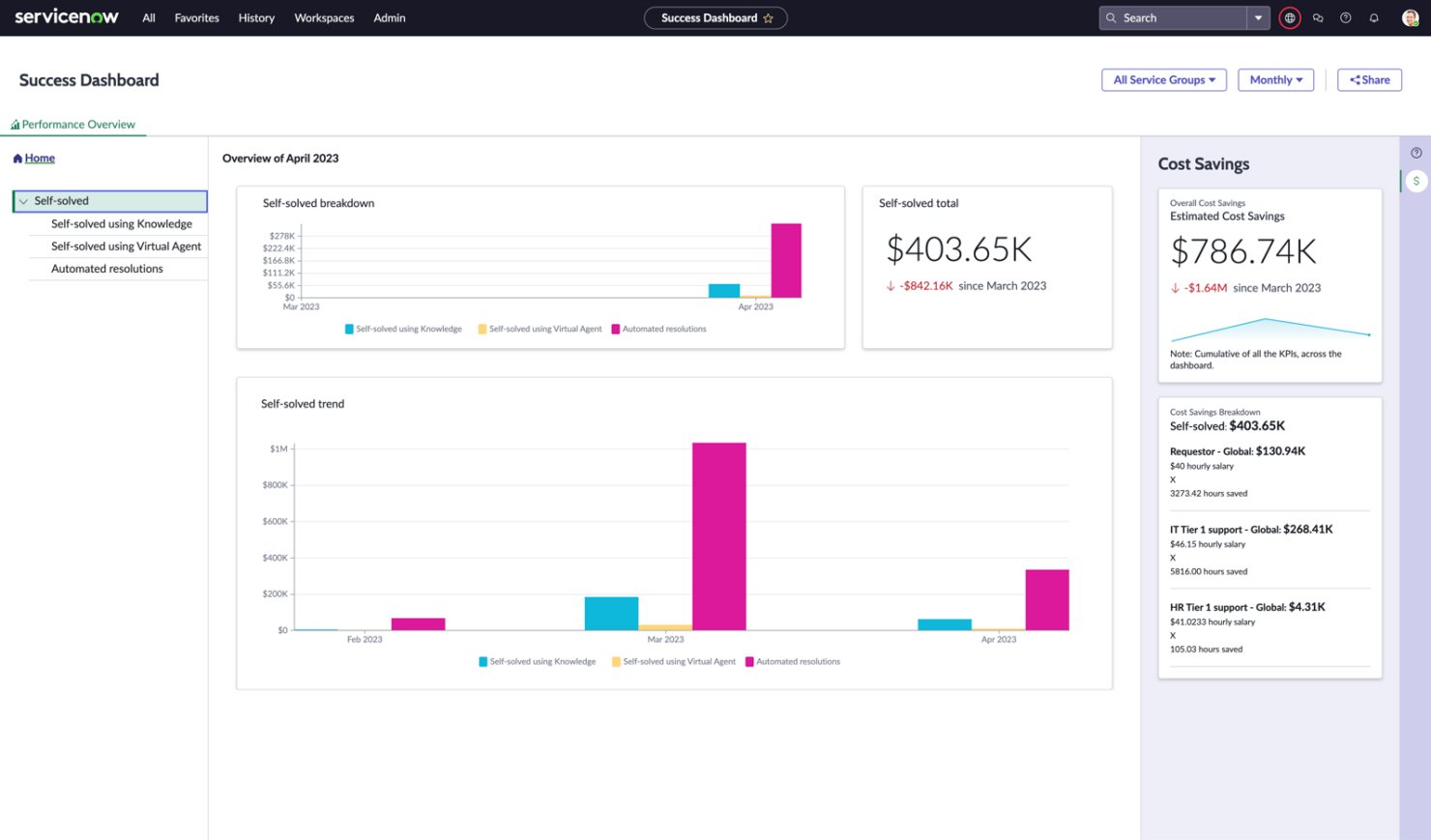
ServiceNow’s workflow automation and incident management are better suited for organizations that require highly structured service processes, formal change management, and standardized service delivery at scale. Its expanded AI capabilities, including the acquisition of Moveworks, strengthen conversational support and workflow orchestration within a broader enterprise ITSM ecosystem.
| Atera | ServiceNow | |
|---|---|---|
| 2-Factor Authentication | ||
| API | ||
| Anti-Virus | ||
| Bug Tracking | ||
| Customer Management | ||
| Data Export | ||
| Data Import | ||
| Email Integration | ||
| External Integrations | ||
| Malware Protection | ||
| Multi-User | ||
| Notifications | ||
| Project Management | ||
| SAP Integration | ||
| Ticket Management |
Atera vs. ServiceNow Integrations
| Integration | Atera | ServiceNow |
|---|---|---|
| Slack | ✅ | ✅ |
| Microsoft Teams | ✅ | ✅ |
| Salesforce | ✅ | ❌ |
| Jira | ✅ | ✅ |
| Okta | ✅ | ✅ |
| Zendesk | ✅ | ✅ |
| HubSpot | ✅ | ❌ |
| Dropbox | ✅ | ✅ |
| API | ✅ | ✅ |
| Zapier | ✅ | ✅ |
Both Atera and ServiceNow integrate with common IT tools (ticketing, monitoring, PSA/RMM, chat/email apps) so you can automate workflows and surface data across systems, and both provide API access to extend or build custom connections. Atera’s integrations are more SMB-focused and easier to set up right out of the box, while ServiceNow’s ecosystem is far broader and deeper for enterprise ITSM/ITOM use cases with more complex, scalable integration options.
Atera vs. ServiceNow Security, Compliance & Reliability
| Factor | Atera | ServiceNow |
|---|---|---|
| Data Encryption | Uses TLS and AES-256 encryption for data in transit and at rest. | Offers encryption in transit and at rest, with optional field-level encryption for sensitive data. |
| Regulatory Compliance | Supports GDPR requirements and maintains SOC 2 Type II certification. | Provides broad compliance support, including GDPR, HIPAA, SOC 2, and FedRAMP-authorized environments. |
| Access Controls | Provides role-based access and multi-factor authentication for technicians. | Offers granular role-based access, SSO, and multi-factor authentication options. |
| Uptime & Reliability | Backed by cloud infrastructure with a 99.9% uptime SLA. | Offers a 99.99% uptime SLA with highly available cloud architecture. |
Both platforms prioritize security through encryption, access controls, and reliable cloud infrastructure, helping you protect data and maintain service availability. Atera focuses on practical security and compliance suited for operational IT environments, while ServiceNow emphasizes broader enterprise governance, wider compliance coverage, and a slightly higher reliability for organizations with stricter regulatory and risk requirements.
Atera vs. ServiceNow Ease of Use
| Factor | Atera | ServiceNow |
|---|---|---|
| User Interface | Provides a clean, simple dashboard that helps you quickly view devices, alerts, and tickets with minimal navigation. | Offers a powerful interface with many modules, which may take time to become comfortable navigating. |
| Setup Process | Allows fast agent deployment and initial setup, though larger environments may require additional configuration. | Requires structured setup, configuration, and planning before the platform is fully operational. |
| Onboarding | Supports onboarding with Atera Academy, help guides, and step-by-step resources to help you get started. | Provides onboarding through ServiceNow University, documentation, and community resources to support learning and setup. |
| Daily Workflow | Handles routine tasks like monitoring, patching, and ticketing through centralized tools designed for operational efficiency. | Supports structured service workflows, though navigating multiple modules may take adjustment early on. |
| Learning Curve | Is easy to learn for core tasks, while advanced automation and AI features may require more time to fully use. | Has a steeper learning curve due to deeper customization and broader platform capabilities. |
In my opinion, Atera is easier to adopt for daily IT management because of its simpler workflow and faster setup, while ServiceNow requires more time to learn but offers deeper control for complex, structured IT operations.
Atera vs ServiceNow: Pros & Cons
Atera
- The modern, clean interface makes it easy for your team to navigate and use.
- Autonomously detects and resolves IT issues, reducing ticket volume and manual workload.
- Unifies RMM, ticketing, and IT operations in one place, helping enterprises eliminate tool sprawl.
- Some advanced features, like AI Copilot, require paid add-ons.
- Pricing can increase as you add more technicians.
- Reporting customization is more limited on lower-tier plans.
ServiceNow
- It enhances collaboration across different departments.
- The platform offers robust reporting and analytics tools.
- You can customize workflows to fit your team's specific needs.
- You might find the setup process time-consuming.
- The interface can feel cluttered and overwhelming.
- Your team may face a steep learning curve initially.
Best Use Cases for Atera and ServiceNow
Atera
- Managed Service Providers You can handle multiple clients, track tickets, automate tasks, and scale endpoints without paying per device.
- Retail Chains You can monitor POS systems and branch devices remotely and fix issues without traveling on-site.
- Education Sector Schools or universities can benefit from Atera’s remote support and management features to keep educational technology running smoothly.
- Healthcare IT You can maintain device uptime, manage patches, and track assets while supporting distributed clinics securely.
- IT Departments Scaling Rapidly You can handle growing infrastructure and user demands without increasing headcount, using automation and AI-driven workflows to maintain efficiency.
- Enterprise IT Teams You can reduce ticket overload by resolving issues automatically at the endpoint, improve employee productivity, and maintain control over complex, distributed environments.
ServiceNow
- Highly Customized Enterprise Environments Best for organizations that require deep customization and tailored workflows across complex operations.
- Organizations with Dedicated Platform Teams Well-suited for enterprises that have large specialist teams to implement, manage, and extend the platform.
- Advanced Governance and Portfolio Needs (GRC, PPM) Strong fit for companies needing extended capabilities beyond ITSM, such as governance, risk, and project portfolio management.
- Single-Tenant or Highly Controlled Environments Ideal for organizations that require greater control over infrastructure and deployment models.
- Project Management Your projects can run more smoothly with ServiceNow’s tools for tracking progress, managing resources, and improving team collaboration.
- Customer Service Teams ServiceNow enhances your team’s ability to track and resolve customer issues quickly with its efficient ticketing system.
Who Should Use Atera, and Who Should Use ServiceNow?
Atera is best suited for mid-market and enterprise IT teams that want to reduce operational overhead and move beyond traditional, ticket-driven support. It’s a strong fit for organizations looking to streamline IT operations through a unified platform and leverage autonomous capabilities to resolve issues faster and scale without increasing headcount. It also remains a solid option for managed service providers that want to deliver efficient, automated support across multiple environments.
ServiceNow is better suited for large enterprises, regulated industries, or organizations with highly complex workflows that require deep customization, formal ITIL processes, and extensive integration across business units. If you need structured service management and granular control over workflows, ServiceNow is the stronger choice.
If your priority is simplifying operations and increasing efficiency through automation and autonomous resolution, Atera is the better fit. If you require highly customized service management at enterprise scale, ServiceNow may be the more appropriate solution.
Differences Between Atera and ServiceNow
| Atera | ServiceNow | |
|---|---|---|
| Automation | Combines autonomous AI with built-in IT operations, using its agent (Robin) to diagnose issues, execute fixes, and resolve incidents with minimal manual input. | Uses workflow automation and orchestration to standardize service processes and cross-team operations. AI-driven capabilities strengthened through their Moveworks acquisition. |
| Ease of Use | Provides a streamlined, intuitive interface that simplifies monitoring, automation, and support workflows within a single platform, enabling faster onboarding and day-to-day management. | Offers a powerful but more complex interface that requires configuration, customization, and workflow design. |
| Pricing Model | Uses technician-based pricing with unlimited endpoints, making scaling tied to team size. | Uses enterprise, module-based pricing that scales with users, features, and platform scope. |
| Primary Platform Focus | Focuses on autonomous IT operations, combining monitoring, ticketing, patching, and AI-driven resolution into a unified platform. | Focuses on structured IT service management with workflows, incident, change, and service process control. |
| Service Management | Supports service management through integrated monitoring, ticketing, and AI-driven resolution, helping reduce ticket volume and streamline operations. | Delivers deep ITSM capabilities like incident, change, service catalog, and knowledge management for enterprise control. |
| Visit AteraOpens new window | Read ServiceNow ReviewOpens new window |
Similarities Between Atera and ServiceNow
| Cloud-Based Delivery | Both are cloud-based platforms, allowing remote access and centralized management from any location. |
|---|---|
| Integrations | Both support integrations with widely used tools like Microsoft Teams, Slack, and Google Workspace, along with API access for extending functionality across the IT ecosystem. |
| Remote Monitoring | Both provide visibility into endpoints and systems, enabling IT teams to monitor performance, detect issues, and maintain operational health across environments. |
| Reporting & Analytics | Both offer reporting and analytics capabilities to track IT performance, system health, and operational metrics, supporting better decision-making and oversight. |
| Ticket Management | Both include ticketing capabilities for tracking and managing IT issues, though Atera emphasizes reducing ticket volume through automation and autonomous resolution, while ServiceNow focuses on structured ticket workflows. |
| Visit AteraOpens new window Read ServiceNow ReviewOpens new window | |