

Las 10 mejores herramientas de monitoreo de servidores analizadas en 2026

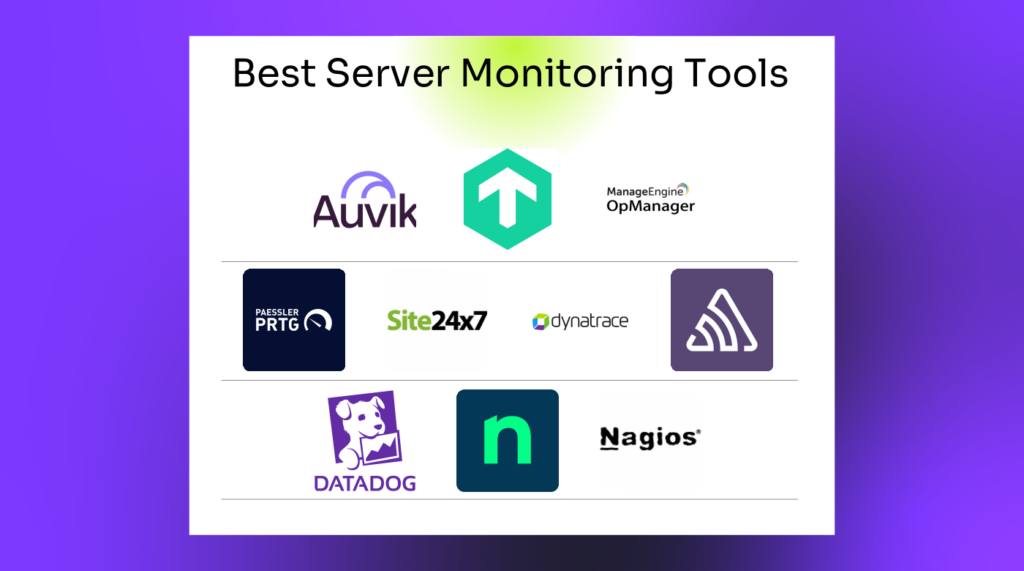
Mejores herramientas de monitorización de servidores: lista breve


Gestionar servidores puede ser un quebradero de cabeza, ¿verdad? Hay que controlar el tiempo de actividad, la seguridad y el rendimiento, y es fácil sentirse abrumado. Ahí es donde entran en juego las herramientas de monitorización de servidores, que actúan como un par de ojos extra en la red.
Llevo años analizando estas herramientas y estoy aquí para compartir lo que he descubierto. Mi objetivo es ofrecerte una visión clara e imparcial de las mejores opciones disponibles, para ayudarte a tomar decisiones informadas.
En este artículo encontrarás mis principales recomendaciones, cada una analizada teniendo en cuenta lo que realmente importa. Tanto si buscas algo sencillo como una solución algo más sofisticada, aquí encontrarás lo que necesitas. Vamos a analizar los detalles para encontrar la opción adecuada para tu equipo.
Por qué confiar en nuestras recomendaciones de software
Nuestro equipo lleva probando y evaluando software desde 2012. Como líderes tecnológicos, sabemos lo difícil —y lo importante— que es elegir el software adecuado.
Para esta guía, evaluamos las herramientas mediante pruebas prácticas e investigación independiente, puntuando las herramientas según nuestros criterios de selección.
Nuestras reseñas reflejan nuestro criterio editorial humano, no un discurso de ventas.
Revisores expertos:
Resumen de las mejores herramientas de monitorización de servidores
Este cuadro comparativo resume los detalles de precios de mis principales selecciones de herramientas de monitorización de servidores para ayudarte a encontrar la mejor opción según tu presupuesto y las necesidades de tu empresa.
| Tool | Best For | Trial Info | Price | ||
|---|---|---|---|---|---|
| 1 | Mejor para la gestión de endpoints y cumplimiento de parches | Prueba gratuita de 14 días disponible | Precio bajo solicitud | Website | |
| 2 | Mejor para el monitoreo de infraestructura a escala de la nube | Prueba gratuita de 14 días | Desde $15/host/mes (facturado anualmente) | Website | |
| 3 | Ideal para servidores Windows, Linux y virtualizados | Prueba gratuita de 30 días | Desde $179/mes (facturado anualmente) | Website | |
| 4 | Mejor solución de código abierto | Plan gratuito disponible | Precios bajo consulta | Website | |
| 5 | Mejor para el rendimiento de aplicaciones impulsado por IA | Prueba gratuita disponible | Desde $7/host/mes | Website | |
| 6 | Ideal para la monitorización sin agente de servidores Windows | Prueba gratuita de 14 días + demo gratuita disponible | Precio bajo solicitud | Website | |
| 7 | Ideal para el monitoreo continuo de servidores | Demo gratuita disponible | Desde $245/25 dispositivos | Website | |
| 8 | Ideal para la monitorización de servidores a gran escala | Plan gratuito + prueba gratuita de 30 días disponible | Desde $275/mes (facturado anualmente) | Website | |
| 9 | El mejor para el seguimiento extensivo de métricas de servidores | Prueba gratuita de 30 días + demo gratuita disponible | Desde $10/mes (facturado anualmente) | Website | |
| 10 | Ideal para rastreo distribuido y depuración de errores | Plan gratuito + prueba gratuita + demo gratis disponible | Desde $26/mes (facturado anualmente) | Website |

Análisis de las mejores herramientas de monitorización de servidores
A continuación encontrarás mis resúmenes detallados de las mejores herramientas de monitorización de servidores que llegaron a mi lista breve. En mis análisis examino detalladamente las funciones principales, las ventajas & desventajas, las integraciones y los casos de uso ideales de cada herramienta para ayudarte a encontrar la mejor opción para ti.

NinjaOne
Mejor para la gestión de endpoints y cumplimiento de parches
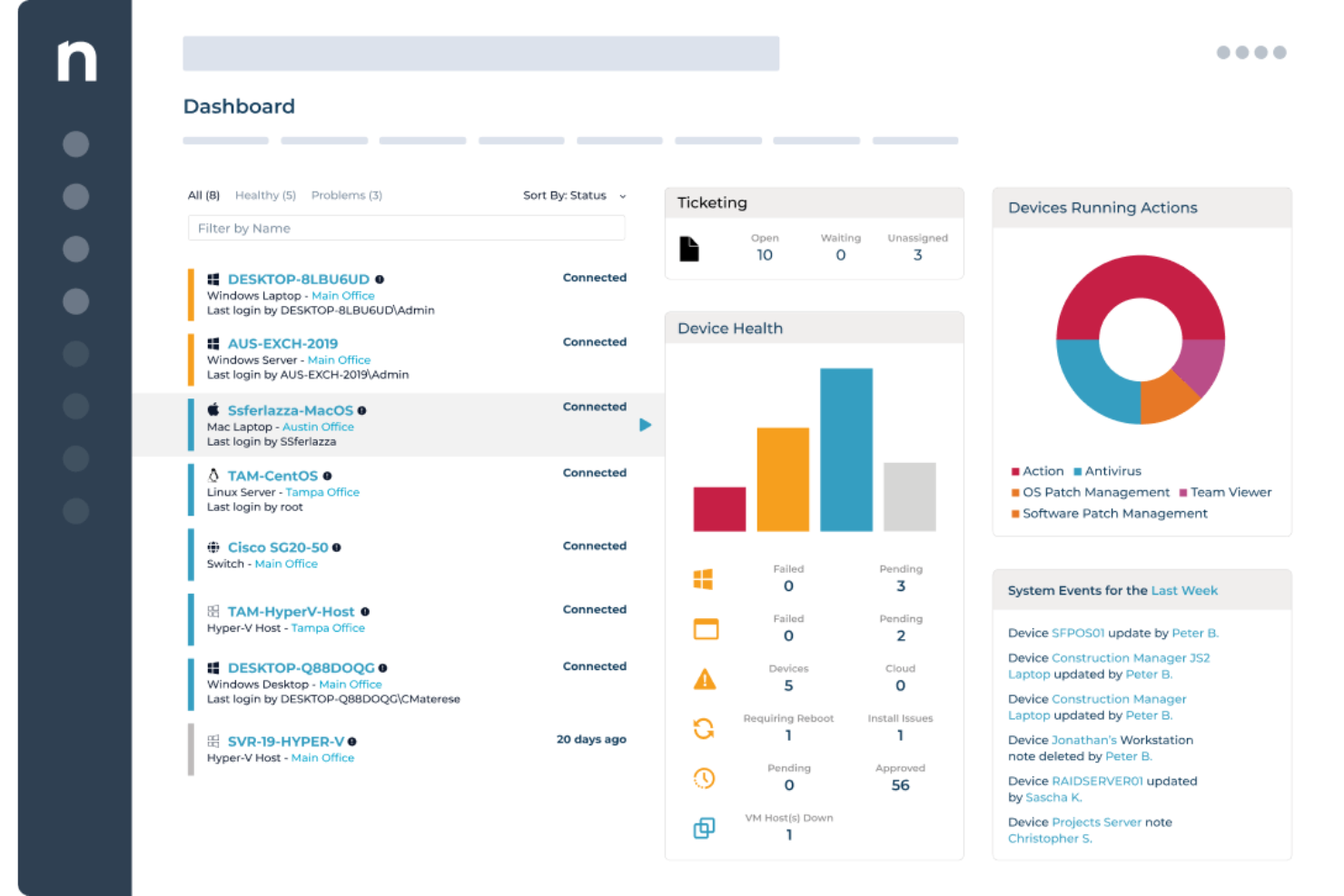
NinjaOne proporciona a los equipos de TI y proveedores de servicios gestionados una plataforma unificada para monitorizar servidores, automatizar el parcheo y gestionar endpoints en entornos distribuidos, ayudando a reducir el tiempo de inactividad y simplificar la supervisión de la infraestructura.
¿Para quién es mejor NinjaOne?
NinjaOne es ideal para proveedores de servicios gestionados (MSP) y equipos de TI internos que administran grandes flotas de servidores y endpoints en varias ubicaciones o entornos de clientes.
Por qué elegí NinjaOne
Elegí NinjaOne como uno de los mejores porque su gestión de parches cubre todo el ciclo de cumplimiento, no solo la implementación. La función Patch Intelligence analiza la telemetría y señales de implementación para marcar automáticamente actualizaciones inestables y pausar parches de riesgo antes de que causen una interrupción. Puedes establecer políticas de parcheo basadas en el rol del dispositivo, de modo que los servidores con diferentes cargas de trabajo se actualicen en distintos horarios sin intervención manual. Además, los informes de cumplimiento de parches ofrecen una visión clara y bajo demanda de qué ha sido parcheado, qué no y dónde existen vulnerabilidades en cada endpoint.
Características clave de NinjaOne
- Supervisión de endpoints en tiempo real: Visualiza el estado de los dispositivos, configuraciones y cumplimiento en todos los endpoints desde una única consola nativa en la nube.
- Remediación automática de endpoints: Utiliza scripts basados en condiciones para detectar y solucionar problemas de endpoints automáticamente sin intervención de técnicos.
- Implementación de software y sistemas operativos: Distribuye software de Windows, actualizaciones y configuraciones a través de endpoints con flujos de trabajo repetibles y automatizados.
- Inventario de hardware y software: Obtén una vista en tiempo real de cada dispositivo en tu entorno, incluyendo especificaciones de hardware, software instalado y estado de la garantía.
Integraciones de NinjaOne
NinjaOne ofrece integraciones nativas con ConnectWise, Autotask, Zendesk, Webroot, Bitdefender, TeamViewer, Splashtop, Acronis y el ecosistema de Microsoft, incluyendo Microsoft 365 y Azure. Hay una API disponible para integraciones personalizadas.
Pros and Cons
Pros:
- Documentación de API completa
- Informes flexibles con métricas personalizadas
- Descubrimiento automatizado de endpoints
Cons:
- Retrasos ocasionales en la implementación de parches
- Complejidad al configurar alertas para eventos no estándar
New Product Updates from NinjaOne
NinjaOne Launches Browser Management
NinjaOne launches Browser Management with visibility into browser activity, extensions, AI usage, and policy controls. This extends endpoint management into the browser while giving IT teams more control over browser-based risk. For more information, visit NinjaOne’s official site.
Datadog
Mejor para el monitoreo de infraestructura a escala de la nube
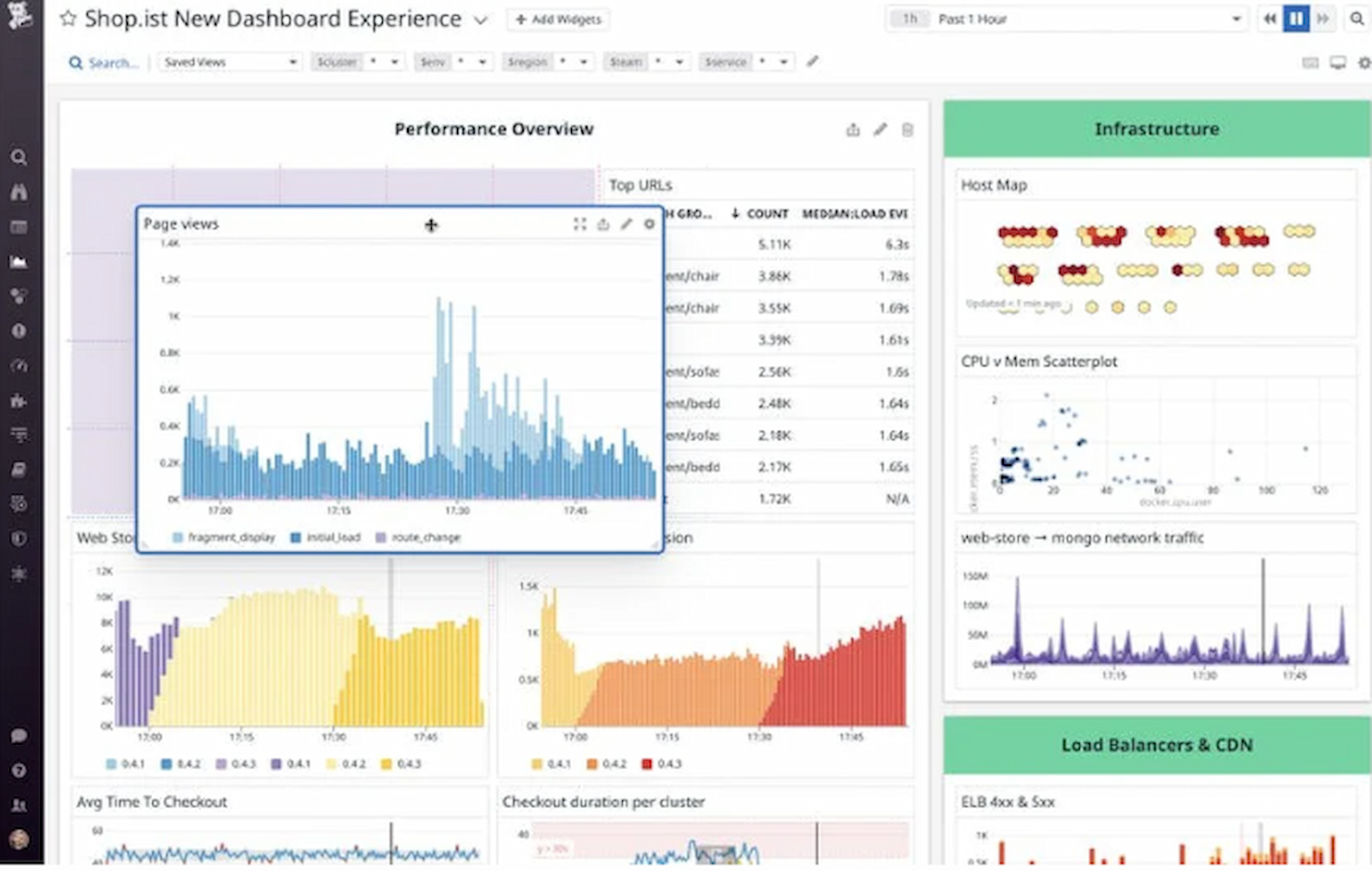
Datadog ofrece a los equipos de TI y a los profesionales de DevOps una plataforma unificada para monitorear la salud de los servidores, rastrear métricas de rendimiento y solucionar problemas en entornos complejos de nube y entornos híbridos.
¿Para quién es mejor Datadog?
Datadog es ideal para equipos de ingeniería de medianas y grandes empresas que gestionan infraestructuras nativas en la nube o híbridas a gran escala.
Por qué elegí Datadog
Datadog merece su lugar en mi lista porque gestiona el monitoreo a escala en la nube de manera sobresaliente, en un contexto donde el gran volumen de hosts, contenedores y servicios hace que la mayoría de las herramientas fracasen. Me gusta que supervise decenas de miles de métricas de infraestructura desde el principio, con registros históricos continuos que persisten incluso después de desmantelar la infraestructura, algo que realmente resulta útil cuando se realiza un análisis posterior a incidentes sobre recursos efímeros en la nube. También utilizo la búsqueda y analítica basada en etiquetas para analizar entornos multinube sin necesidad de escribir consultas complejas, lo cual ahorra mucho tiempo cuando gestionas cientos de hosts entre AWS, Azure y GCP simultáneamente. La correlación de alertas impulsada por AIOps es otra función en la que confío bastante: permite identificar las señales importantes y filtrar el ruido en lugar de saturar a los ingenieros de guardia con alertas redundantes.
Funciones clave de Datadog
- Monitoreo de procesos en vivo: Visualiza en tiempo real el consumo de CPU, memoria y E/S a nivel de proceso individual en todos tus hosts.
- Monitoreo del rendimiento de la red: Supervisa el volumen de solicitudes, la latencia y los errores entre servicios y componentes de infraestructura en tu entorno.
- Gestión de registros: Recopila, analiza y busca registros de servidores y servicios, con la capacidad de correlacionarlos directamente con métricas y trazas.
- Paneles personalizados: Crea visualizaciones que combinan métricas, registros y trazas de toda tu infraestructura en una sola vista.
Integraciones de Datadog
Datadog ofrece más de 600 integraciones nativas, incluyendo AWS, Azure, Google Cloud Platform, Kubernetes, Docker, Slack, PagerDuty, Jira, GitHub, ServiceNow y Zapier. Hay una API disponible para integraciones personalizadas.
Pros and Cons
Pros:
- Diseñado para entornos en la nube
- Monitoreo y alertas integrales
- Lista extensa de integraciones
Cons:
- Curva de aprendizaje para funciones avanzadas
- Costos adicionales por funciones extra

Ideal para servidores Windows, Linux y virtualizados
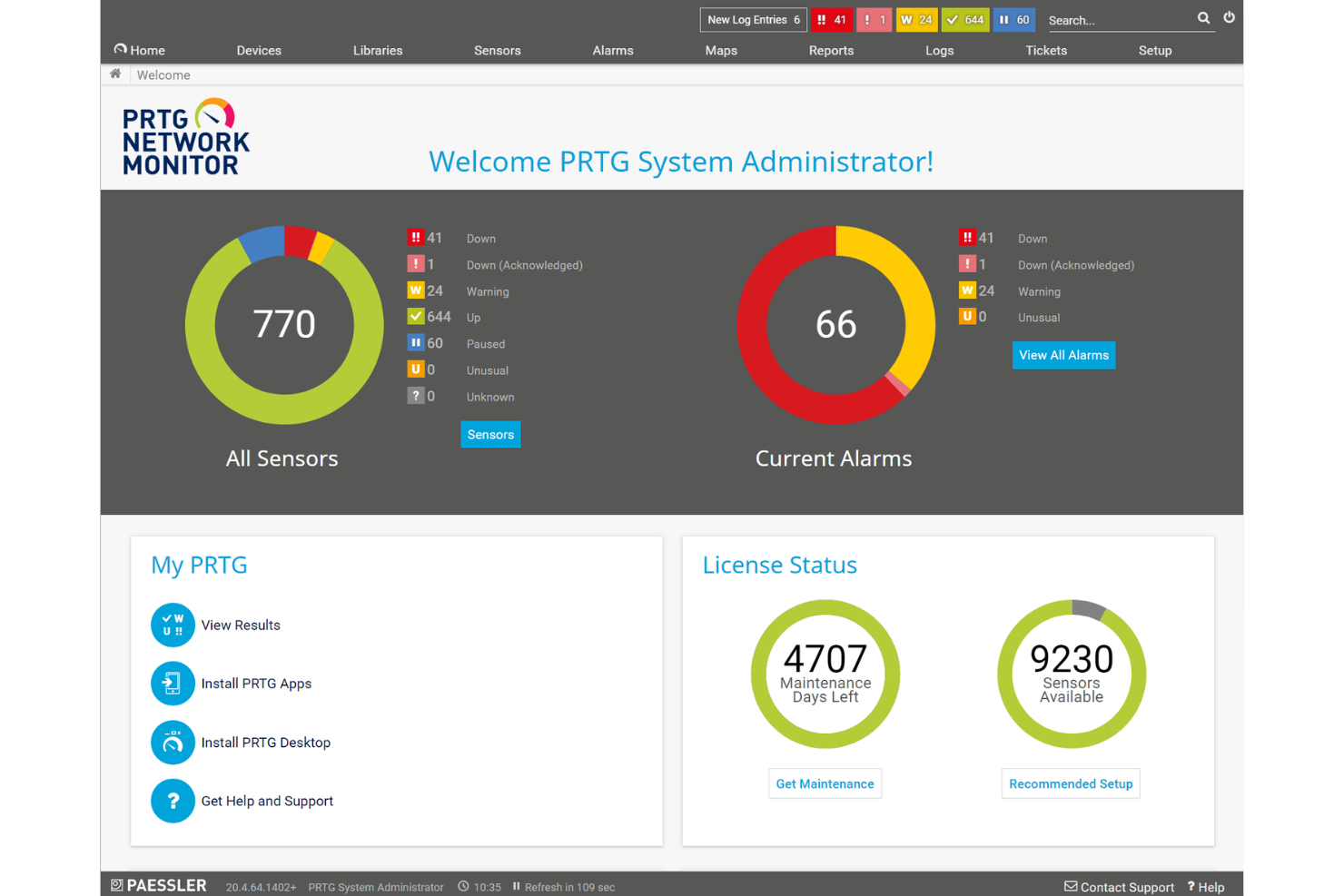
PRTG es una plataforma de monitoreo diseñada para equipos de TI y administradores de sistemas que necesitan mantener servidores, redes e infraestructura en funcionamiento sin problemas, con paneles personalizables, alertas automatizadas y compatibilidad con una amplia gama de protocolos.
¿Para quién es mejor PRTG?
PRTG es especialmente adecuado para equipos de TI medianos a grandes que gestionan entornos complejos y multi-dispositivo y que necesitan visibilidad centralizada sobre servidores, redes y aplicaciones.
Por qué elegí PRTG
Elegí PRTG como uno de los mejores para la monitorización en tiempo real de servidores debido a lo granular e inmediato que es su monitoreo basado en sensores. Cada sensor supervisa un solo valor medido (carga de CPU, uso de memoria, espacio en disco) y puedes configurar el intervalo de escaneo por sensor, de modo que recibes datos en vivo en la cadencia que tu entorno requiera. Las alertas de PRTG van más allá de simples notificaciones de encendido/apagado: puedes establecer disparadores de umbral que se activan antes de que un servidor alcance un estado crítico, lo que significa que mi equipo puede detectar un disco llenándose o un pico de memoria antes de que cause una interrupción. La detección de anomalías impulsada por IA añade otra capa al adaptar automáticamente las referencias a tu entorno, manteniendo las alertas relevantes en lugar de ruidosas. PRTG supervisa servidores Windows, Linux y virtualizados simultáneamente, usando el protocolo que mejor se adapte a cada uno (SNMP, WMI o SSH) en lugar de obligarte a un solo método de recopilación. El descubrimiento automático escanea tu entorno y sugiere sensores relevantes automáticamente, así que gestionar una flota de servidores mixta no requiere emplear múltiples herramientas.
Funciones clave de PRTG
- Monitoreo distribuido: Controla múltiples ubicaciones remotas desde un solo panel usando sondas que se comunican por cifrado TLS.
- Informes personalizables: Crea y programa informes usando plantillas personalizadas para compartir el estado de la infraestructura con los interesados.
- Mapas y paneles: Diseña mapas de red en tiempo real con información de estado en vivo utilizando el diseñador de mapas de arrastrar y soltar.
- Acceso desde app móvil: Supervisa tu entorno sobre la marcha usando las aplicaciones nativas de PRTG para iOS y Android.
Integraciones de PRTG
PRTG ofrece integraciones nativas con Amazon CloudWatch, VMware vSphere, Microsoft Azure, Google Cloud Platform, Cisco, Dell EMC, HPE, NetApp, y cuenta con integraciones nativas en todo el ecosistema de Microsoft, incluyendo Microsoft 365 y Azure. Hay una API disponible para integraciones personalizadas.
Pros and Cons
Pros:
- Escalable para una amplia gama de tamaños de red
- Monitoreo y alertas personalizables
- Interfaz visual fácil de usar
Cons:
- Costos elevados para implementaciones grandes
- Las funciones más avanzadas pueden requerir una curva de aprendizaje
New Product Updates from Paessler PRTG
Paessler PRTG Improves Route Monitoring and Auto-Discovery
Paessler PRTG adds route-change alerts, faster traceroute processing, updated auto-discovery defaults, and a Proxmox template. This improves network monitoring and setup. For more information, visit Paessler’s official site.
 .
.
Icinga
Mejor solución de código abierto
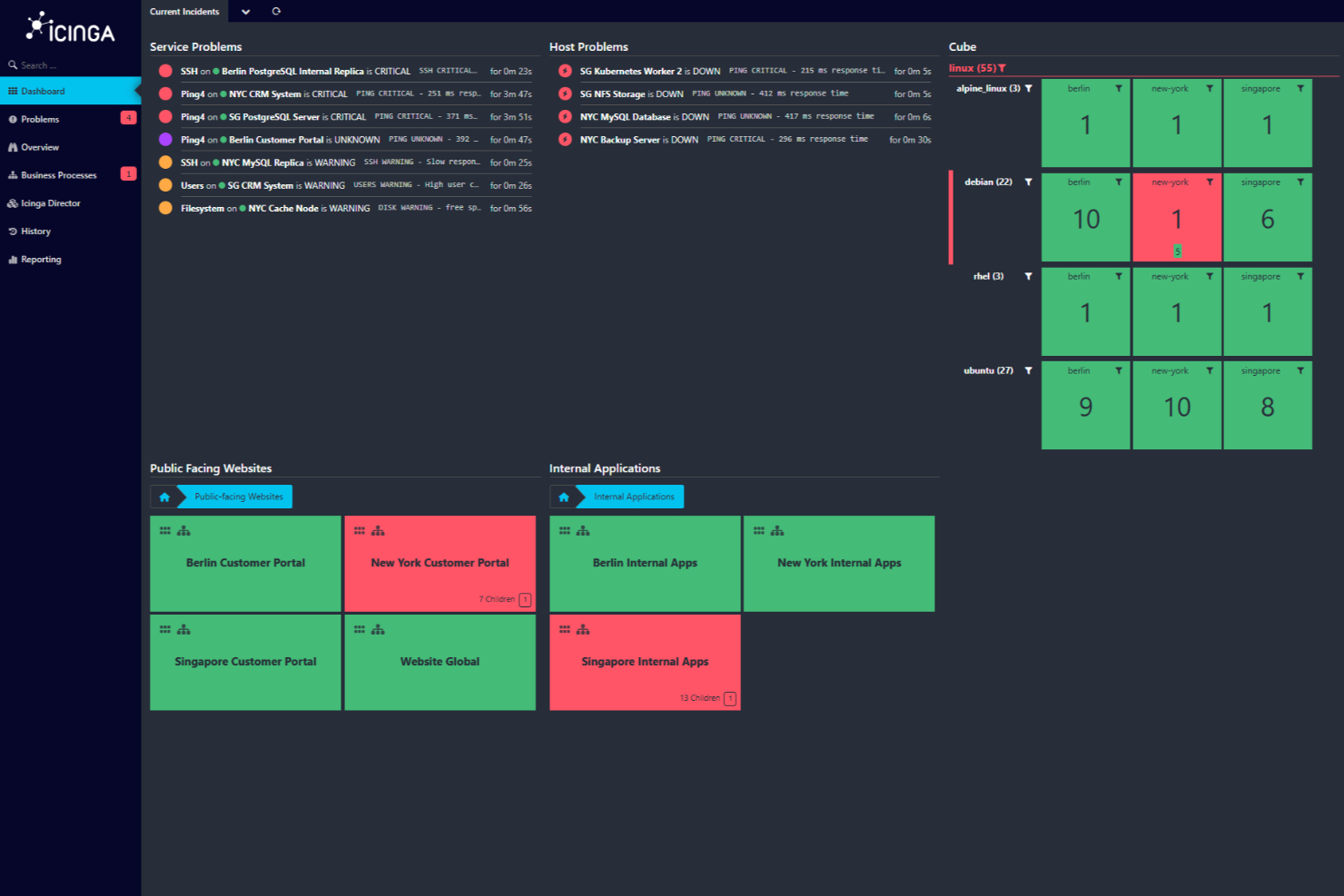
Icinga es una plataforma de monitoreo creada para equipos de TI y administradores de sistemas que necesitan una visibilidad profunda del estado de los servidores, el rendimiento de la red y la situación de la infraestructura en entornos complejos.
¿Para quién es Icinga más adecuado?
Icinga es una excelente opción para equipos de TI medianos a grandes que necesitan una solución de monitoreo de código abierto, altamente personalizable y que pueda adaptarse a infraestructuras complejas y de múltiples entornos.
Por qué elegí Icinga
Icinga se gana su lugar en mi lista porque es una de las pocas plataformas de monitoreo de servidores verdaderamente de código abierto que no limita sus funciones para llevarte a un nivel de pago. Me gusta cómo el motor de ejecución de comprobaciones de Icinga permite a mi equipo definir lógica de monitoreo personalizada usando cualquier lenguaje de scripting, por lo que no estamos limitados a plantillas prediseñadas de comprobaciones. El módulo Icinga Director resulta especialmente útil: nos brinda una interfaz web para configurar y gestionar hosts, servicios y notificaciones a gran escala, sin tener que editar archivos de configuración directamente. Para los equipos que gestionan infraestructuras híbridas o locales, ese nivel de control es difícil de replicar en una herramienta de código cerrado.
Características clave de Icinga
- Monitoreo distribuido: Implementa zonas satélite para monitorear redes remotas y centros de datos desde una instancia central de Icinga.
- Alertas y reglas de escalamiento: Configura flujos de trabajo de notificaciones que dirigen las alertas a los miembros adecuados del equipo según la gravedad y franjas horarias.
- Icinga DB: Un backend de alto rendimiento que almacena y procesa los datos de monitoreo para consultas y reportes rápidos.
- Gráficas y visualización: Se integra con herramientas como Grafana para mostrar métricas de rendimiento en tiempo real y datos históricos de los servidores.
Integraciones de Icinga
Icinga ofrece integraciones nativas con Grafana, Jira, Slack, PagerDuty, ServiceNow, InfluxDB, Elasticsearch, Graylog y dispone de una API para integraciones personalizadas.
Pros and Cons
Pros:
- Gratuito sin costes de implementación
- Escalable para entornos pequeños y grandes
- Altamente personalizable para diversas necesidades de infraestructura de TI
Cons:
- Se han reportado problemas ocasionales de rendimiento bajo cargas altas
- La instalación y configuración requieren un proceso de aprendizaje
New Product Updates from Icinga

Icinga Adds TOTP Two-Factor Authentication to Icinga Web
Icinga added time-based one-time password (TOTP) two-factor authentication to Icinga Web, helping organizations strengthen login security with an additional verification step. For more information, visit Icinga’s official site.
 .
.
Mejor para el rendimiento de aplicaciones impulsado por IA
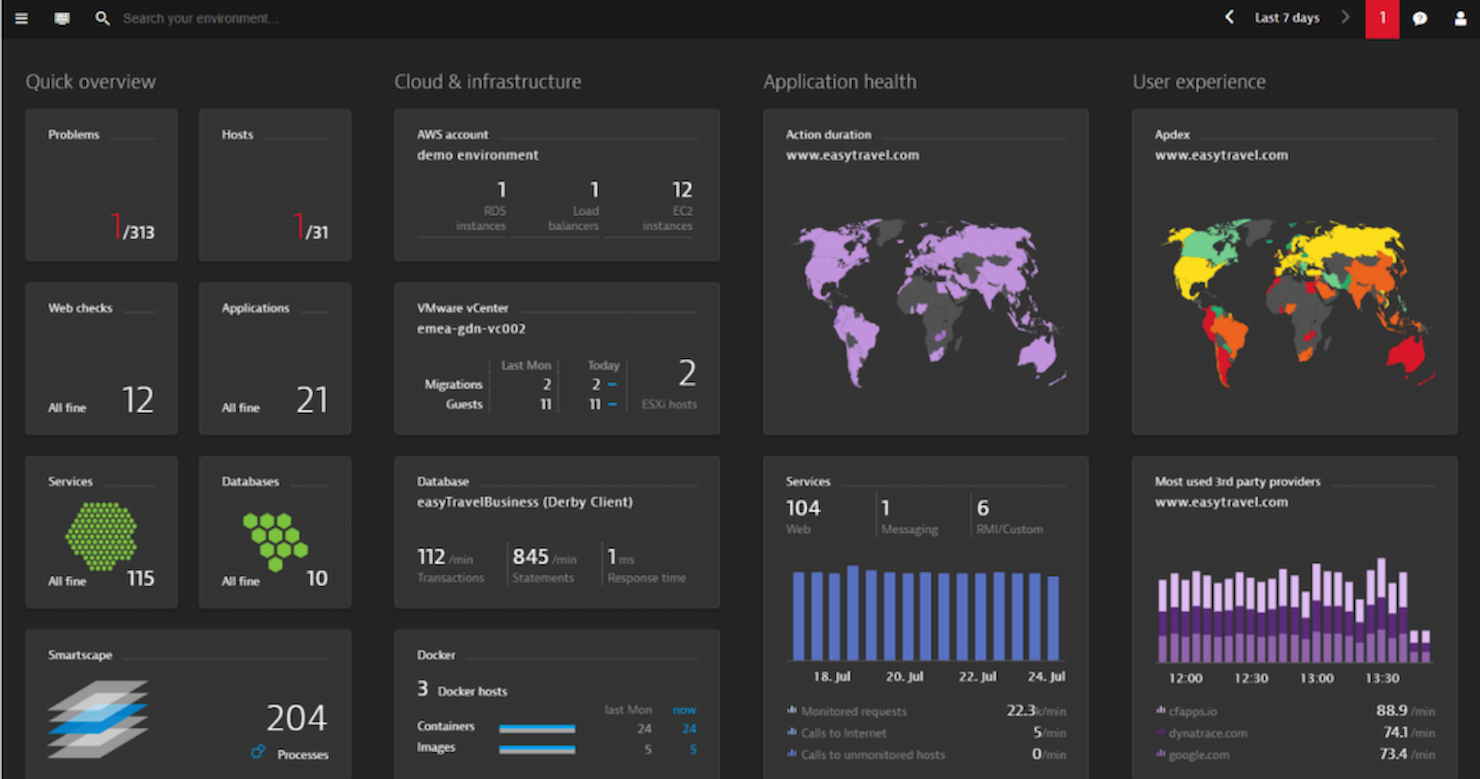
Dynatrace brinda a los equipos de TI y a las empresas una plataforma unificada para monitorear la salud de los servidores, analizar el rendimiento de la infraestructura y localizar problemas en entornos complejos de nube y entornos híbridos.
¿Para quién es mejor Dynatrace?
Dynatrace es ideal para grandes empresas y equipos DevOps que gestionan infraestructuras complejas, multinube o híbridas, y que necesitan una visibilidad profunda de todo su stack tecnológico.
Por qué elegí Dynatrace
Dynatrace se ha ganado un lugar en mi lista corta por la forma en que su motor Davis AI maneja el análisis de causa raíz. En lugar de inundar a mi equipo con alertas para clasificar, Davis localiza automáticamente la fuente exacta de un problema de rendimiento, hasta el nivel de código, antes de que los usuarios se vean afectados. También me gusta el gráfico de dependencias Smartscape, que ofrece un mapa en tiempo real de cómo se conectan los servicios, procesos y hosts, así que cuando una aplicación se ralentiza, puedo ver exactamente qué componente ascendente o descendente es responsable. Esa combinación de IA causal y mapeo de topología en vivo lo hace realmente diferente a las herramientas que solo recopilan métricas y dejan el diagnóstico a tu cargo.
Funciones clave de Dynatrace
- Despliegue OneAgent: Un solo agente se instala en cualquier host y recopila automáticamente métricas, registros, trazas y datos de topología en todo tu stack sin necesidad de configuración manual.
- Supervisión de registros con Grail: El lago de datos Grail de Dynatrace ingiere y almacena registros en contexto con trazas y métricas, para que puedas consultar entre todos los tipos de datos sin administrar esquemas ni niveles de almacenamiento.
- AutomationEngine: Se conecta con herramientas de gestión de incidentes y remediación para activar flujos de trabajo de autorremediación, creación automática de tickets y actualizaciones en tiempo real del CMDB cuando se detectan problemas.
- OpenPipeline: Una capa de procesamiento de flujo de alto rendimiento que ingiere, enriquece y contextualiza datos de cualquier fuente antes de que lleguen al almacenamiento o a los análisis.
Integraciones de Dynatrace
Dynatrace ofrece más de 650 integraciones nativas, incluyendo ServiceNow, AWS, Azure, Google Cloud Platform, Kubernetes, VMware, Red Hat OpenShift, Slack, PagerDuty, Jira y Zapier. Hay una API disponible para integraciones personalizadas y automatización.
Pros and Cons
Pros:
- Profundos conocimientos impulsados por IA
- Supervisión integral de aplicaciones
- Amplia variedad de integraciones
Cons:
- La complejidad requiere formación dedicada
- La configuración puede resultar desafiante para principiantes

Auvik
Ideal para la monitorización sin agente de servidores Windows
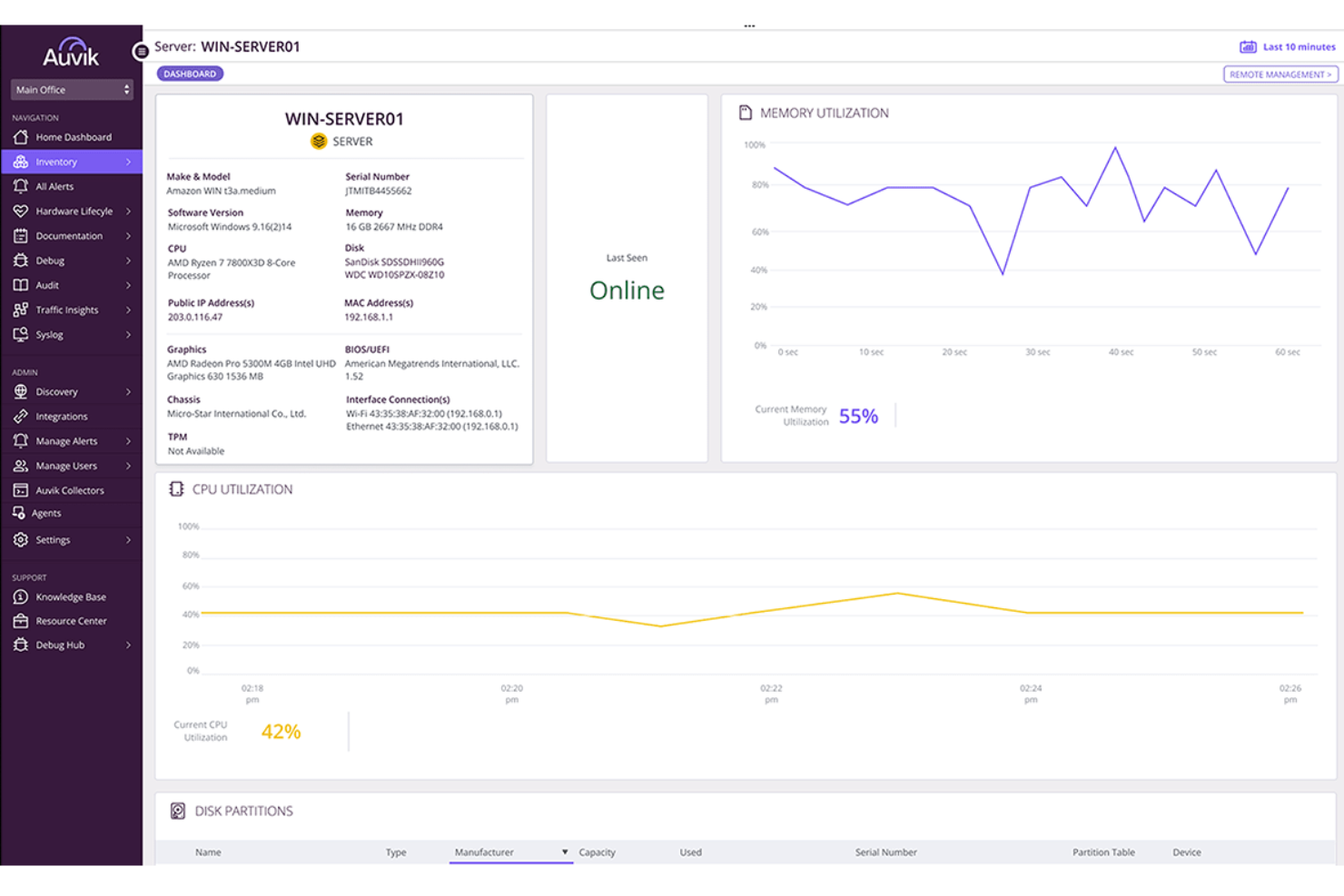
Auvik ofrece a los equipos de TI y a los proveedores de servicios gestionados una forma de supervisar, mapear y gestionar la infraestructura de servidores y redes desde un único panel de control basado en la nube, ayudando a detectar problemas y mantener el tiempo de actividad en entornos complejos.
¿Para quién es mejor Auvik?
Auvik es ideal para proveedores de servicios gestionados y equipos internos de TI que necesitan visibilidad centralizada en entornos de red y servidores de varios sitios o clientes.
Por qué elegí Auvik
Elegí Auvik como uno de los mejores porque me encanta cómo gestiona la monitorización de servidores Windows sin requerir que sustituyas tu configuración existente. El método sin agente a través de Auvik Collector te da visibilidad en tiempo real del uso de CPU, memoria, disco y el estado en línea, sin necesidad de instalar software en cada servidor. También me gustan las alertas de Servicios de Windows, donde mi equipo puede crear reglas de alerta personalizadas usando Alerts 2.0 para activarlas según estados de servicios específicos, nombres de servicio o umbrales de utilización, con opciones de supresión para reducir el ruido de servicios que se recuperan solos. El inventario automático de software extrae el nombre de la aplicación, el proveedor, la versión y la fecha de instalación de cada servidor monitorizado, lo cual es realmente útil cuando realizas una auditoría de seguridad o investigas un problema de cumplimiento de software.
Funciones clave de Auvik
- Descubrimiento automático de servidores: Auvik detecta automáticamente los servidores Windows y muestra información detallada de componentes y servicios a los pocos minutos de la implementación.
- Paneles de rendimiento: Visualiza tendencias de uso de CPU, memoria y disco a lo largo del tiempo en paneles de servidor dedicados, con datos históricos que puedes utilizar para identificar patrones y planificar la capacidad.
- Pronóstico de rendimiento: Auvik rastrea las métricas de CPU y memoria a lo largo del tiempo para identificar tendencias de uso y predecir posibles problemas antes de que afecten la disponibilidad del servidor.
- Visibilidad de infraestructura de múltiples sitios: Supervisa servidores y dispositivos de red en sitios ilimitados desde un solo panel de control en la nube, con todas las alertas y datos de dispositivos en un solo lugar.
Integraciones de Auvik
Auvik ofrece integraciones nativas con ConnectWise, Autotask, ServiceNow, Slack, PagerDuty, Freshdesk, Zendesk, Microsoft Teams y Webex, y también proporciona una API para integraciones personalizadas.
Pros and Cons
Pros:
- Las copias de seguridad automáticas de configuración protegen contra cambios erróneos
- Las alertas en tiempo real ayudan a los equipos a responder antes de que el rendimiento se degrade
- La supervisión sin agente permite una configuración rápida para servidores Windows
Cons:
- Las funciones avanzadas pueden requerir configuración y ajustes adicionales
- Compatibilidad limitada con Linux y otros servidores que no sean Windows
New Product Updates from Auvik
Auvik Aurora Adds AI Alert Creation and Troubleshooting
Auvik Aurora adds AI-assisted alert creation and troubleshooting with natural-language prompts and guided investigation. This helps teams create alerts and diagnose issues faster. For more information, visit Auvik’s official site.
 .
.
Ideal para el monitoreo continuo de servidores
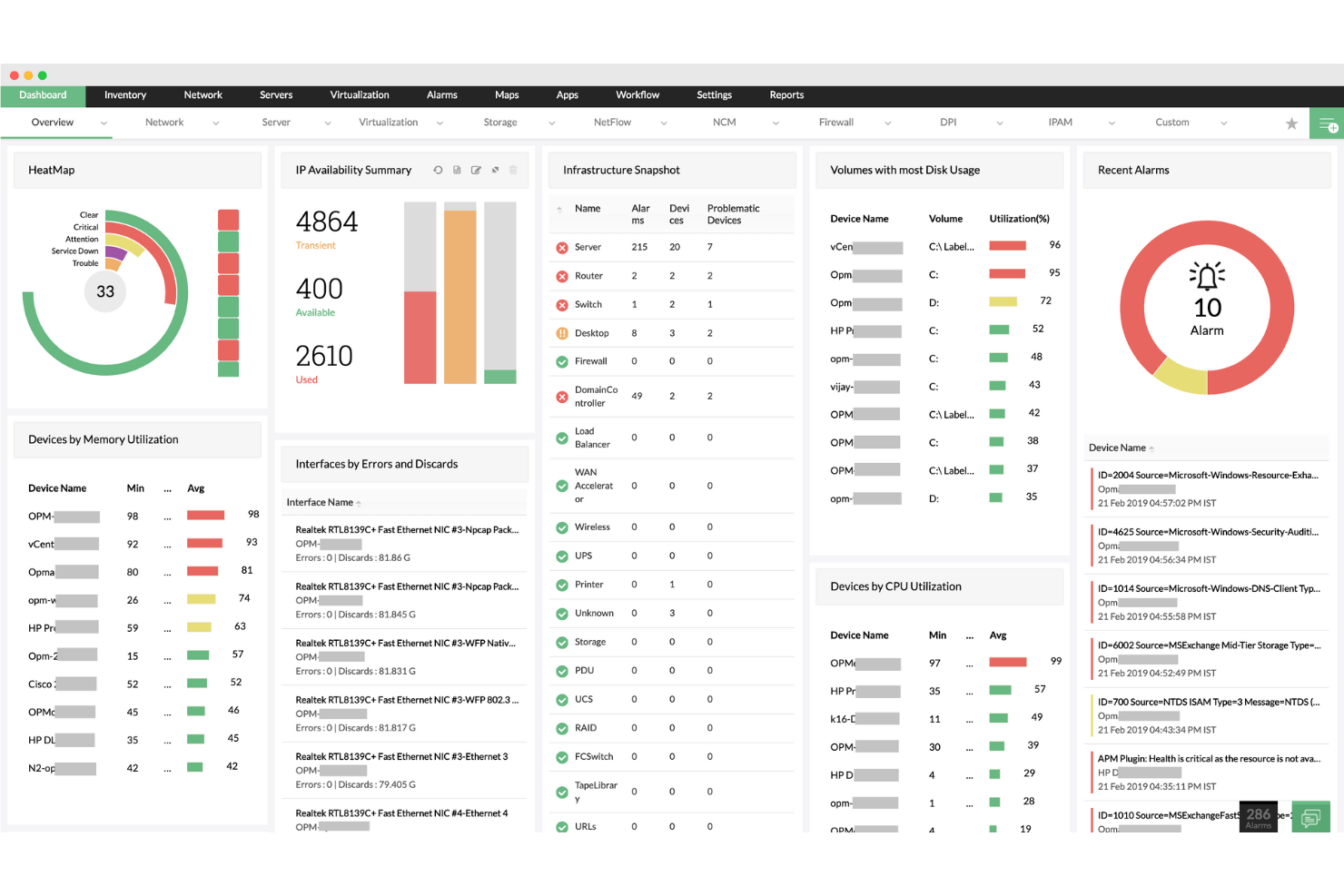
ManageEngine OpManager es una plataforma de monitoreo de redes y servidores diseñada para equipos de TI y administradores de sistemas que necesitan rastrear el estado, el rendimiento y el tiempo de actividad de los servidores en infraestructuras complejas.
¿Para quién es mejor ManageEngine OpManager?
ManageEngine OpManager es ideal para equipos de TI medianos y grandes que gestionan entornos de servidores distribuidos y requieren visibilidad centralizada.
Por qué elegí ManageEngine OpManager
ManageEngine OpManager se gana su lugar en mi lista por la minuciosidad con la que cubre el seguimiento continuo de servidores: los intervalos de monitoreo pueden ser de hasta 30 segundos, y los monitores en tiempo real de 'latido' pueden ejecutarse a intervalos de 1 segundo para recursos críticos. Supervisa más de 300 métricas de rendimiento dedicadas de más de 130 fabricantes de servidores, desde la utilización de CPU y memoria hasta la latencia de disco y bloqueos por segundo. Los umbrales adaptativos impulsados por ML son un diferenciador genuino: OpManager aprende cómo es lo 'normal' para cada métrica y ajusta automáticamente los umbrales de alarma cada hora, reduciendo los falsos positivos. Esta visibilidad continua y autocalibrada es difícil de replicar con la configuración manual de umbrales.
Características clave de ManageEngine OpManager
- Monitoreo de registros de servidores: Rastrea registros de eventos de Windows, syslogs y registros de aplicaciones para servidores Exchange, IIS y MS SQL, con alertas basadas en reglas para eventos de registro específicos.
- Constructor de flujos de trabajo automatizados: Utiliza una interfaz de arrastrar y soltar, sin código, con más de 70 acciones para construir flujos de trabajo de remediación secuenciales que pueden reiniciar servicios o iniciar máquinas virtuales automáticamente.
- Vistas de pisos de centro de datos en 3D: Permite mapear racks de servidores y pisos de centros de datos en 2D o 3D, con el estado de los dispositivos en tiempo real superpuesto al diseño físico.
- Pronóstico de capacidad de almacenamiento: Analiza las tendencias de uso históricas y actuales para generar informes que predicen la utilización futura del almacenamiento antes de que surjan problemas de capacidad.
Integraciones de ManageEngine OpManager
ManageEngine OpManager ofrece integraciones nativas con ServiceDesk Plus, AlarmsOne, Analytics Plus, Applications Manager, NetFlow Analyzer, Network Configuration Manager y tiene integraciones nativas en todo el ecosistema de Microsoft, incluyendo Microsoft 365 y Azure. Existe una API disponible para integraciones personalizadas.
Pros and Cons
Pros:
- Capacidades de monitoreo integrales
- Alertas en tiempo real
- Escalabilidad para redes en crecimiento
Cons:
- Configuración inicial compleja
- Problemas ocasionales con actualizaciones
New Product Updates from ManageEngine OpManager

ManageEngine OpManager Adds NVIDIA GPU Monitoring
ManageEngine OpManager adds NVIDIA GPU monitoring for Linux servers, dedicated GPU dashboards, adaptive thresholds, and automated incident response to help teams track AI infrastructure performance, health, and resource usage. For more information, visit ManageEngine OpManager’s official site.
 .
.
Checkmk
Ideal para la monitorización de servidores a gran escala
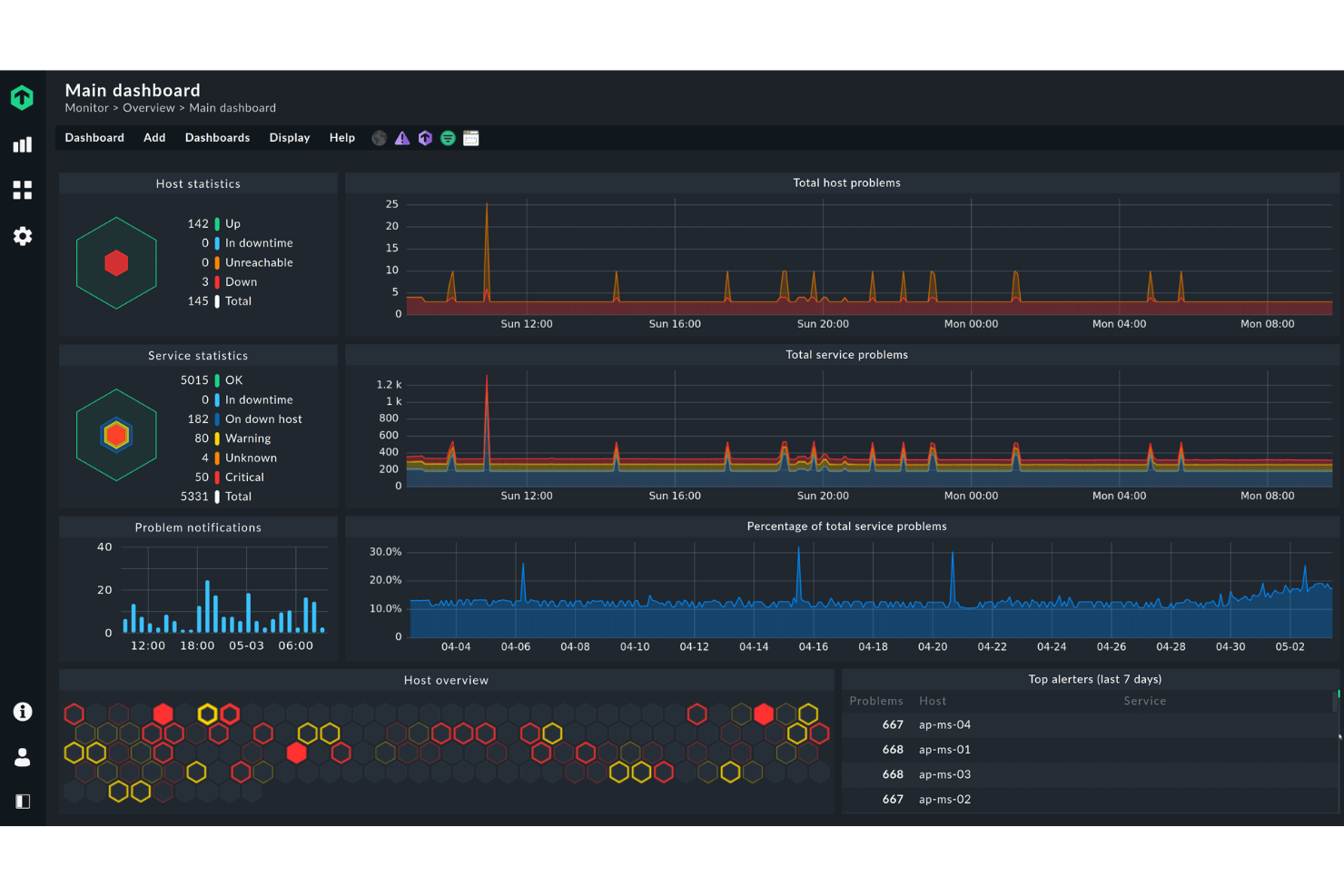
Checkmk es una plataforma de monitorización diseñada para equipos de TI y empresas que necesitan supervisar el estado, el rendimiento y la disponibilidad de los servidores en entornos complejos y distribuidos.
¿Para quién es más adecuado Checkmk?
Checkmk es una opción adecuada para empresas medianas y grandes, así como para proveedores de servicios gestionados que ejecutan una amplia infraestructura de servidores en entornos locales, en la nube o híbridos.
Por qué elegí Checkmk
Checkmk ocupa un lugar destacado en mi lista porque gestiona muy bien la monitorización de servidores a gran escala sin verse afectado por la complejidad de la infraestructura. Me gusta especialmente su arquitectura de monitorización distribuida, que permite a mi equipo escalar en cientos de sitios y supervisar millones de dispositivos desde una única configuración. La función de descubrimiento automático resulta útil: detecta equipos y servicios automáticamente, por lo que incorporar nuevos servidores no requiere configurarlos manualmente en cada paso. La configuración basada en reglas de 1 a N permite aplicar reglas de monitorización a miles de equipos a la vez, en lugar de configurar cada uno individualmente.
Características principales de Checkmk
- Monitorización predictiva: Utiliza datos históricos y algoritmos para ajustar dinámicamente los umbrales y prever el consumo futuro de recursos antes de que se produzcan problemas.
- Monitorización de registros: Recopila y filtra eventos de syslog, trampas SNMP, registros de eventos de Windows y archivos de registro, agrupando las entradas duplicadas para reducir el ruido de las alertas.
- Fábrica de agentes: Gestiona y automatiza de forma centralizada la implementación y las actualizaciones de agentes en los equipos, reduciendo la carga manual en grandes flotas de servidores.
- Inventario de hardware y software: Identifica y realiza un seguimiento automático de todos los activos de hardware y software, supervisa los cambios e integra los datos en la vista de la CMDB.
Integraciones de Checkmk
Checkmk ofrece más de 20 integraciones nativas, entre ellas ServiceNow, Jira, Grafana, Nagios, Prometheus, VMware vSphere, AWS, Azure, Google Cloud Platform, Slack y Zapier. También dispone de una API para integraciones personalizadas.
Pros and Cons
Pros:
- Monitorización escalable
- Paneles personalizables
- API REST para la integración con herramientas de terceros
Cons:
- Configuración compleja
- Posible curva de aprendizaje para principiantes
New Product Updates from Checkmk
Checkmk Adds Experimental MCP Server and OAuth 2.0 Support
Checkmk adds an experimental MCP server and built-in OAuth 2.0 authorization for commercial editions. These updates let AI agents query monitoring data with native authorization support. For more information, visit Checkmk’s official site.
 .
.
Site24x7
El mejor para el seguimiento extensivo de métricas de servidores

Site24x7 ofrece a los equipos de TI y a los proveedores de servicios gestionados una plataforma unificada para monitorizar la salud, el rendimiento y la disponibilidad de los servidores tanto en la nube como en entornos locales, ayudando a detectar problemas antes de que afecten a los usuarios.
¿Para quién es mejor Site24x7?
Site24x7 es ideal para equipos de TI y MSPs que gestionan entornos de infraestructura mixta y necesitan una herramienta única para monitorizar conjuntamente servidores, aplicaciones y redes.
Por qué elegí Site24x7
Site24x7 se gana su puesto en mi lista corta por la profundidad con la que rastrea los indicadores de los servidores. Puedo monitorizar el uso de CPU, memoria, disco I/O, el rendimiento de la red y los procesos en ejecución, todo desde un único panel de control, sin tener que unir distintas herramientas. También destaco la función de monitorización de procesos, que me permite seguir servicios específicos y recibir alertas en el mismo momento en que alguno deja de responder. Los informes de monitorización de servidores de Site24x7 me proporcionan datos históricos de rendimiento que utilizo para identificar tendencias antes de que se conviertan en incidentes.
Características clave de Site24x7
- Detección de anomalías con IA: Site24x7 utiliza aprendizaje automático para señalar comportamientos inusuales del servidor y predecir la degradación del rendimiento antes de que cause una interrupción.
- Gestión de registros: Recopile, busque y analice datos de registros del servidor directamente en la plataforma para correlacionar eventos de registros con indicadores de rendimiento.
- Monitorización de VMware y contenedores: Supervise hosts VMware ESX/ESXi, contenedores Docker y clústeres Kubernetes junto con servidores físicos desde una sola consola.
- Alertas personalizables: Configure alertas basadas en umbrales o activadas por anomalías con políticas de escalado para dirigir las notificaciones a los miembros de equipo adecuados.
Integraciones de Site24x7
Site24x7 ofrece más de 100 integraciones nativas, incluidas AWS, Azure, Google Cloud Platform, Microsoft Teams, Slack, PagerDuty, Jira, ServiceNow, Opsgenie, Datadog y Zapier. Hay una API disponible para integraciones personalizadas.
Pros and Cons
Pros:
- Capacidades de monitorización completas
- Alertas y notificaciones en tiempo real
- Paneles y reportes personalizables
Cons:
- Complejidad en la configuración inicial para entornos grandes
- Personalización limitada en los mecanismos de alerta
New Product Updates from Site24x7
Site24x7 Adds Compliance Reports and Domain Squatting Detection
Site24x7’s Digital Risk Analyzer now offers domain compliance assessment and squatting detection to help you validate security posture, compare domains, and spot impersonation risks faster. For more information, visit Site24x7’s official site.
 .
.
Sentry
Ideal para rastreo distribuido y depuración de errores
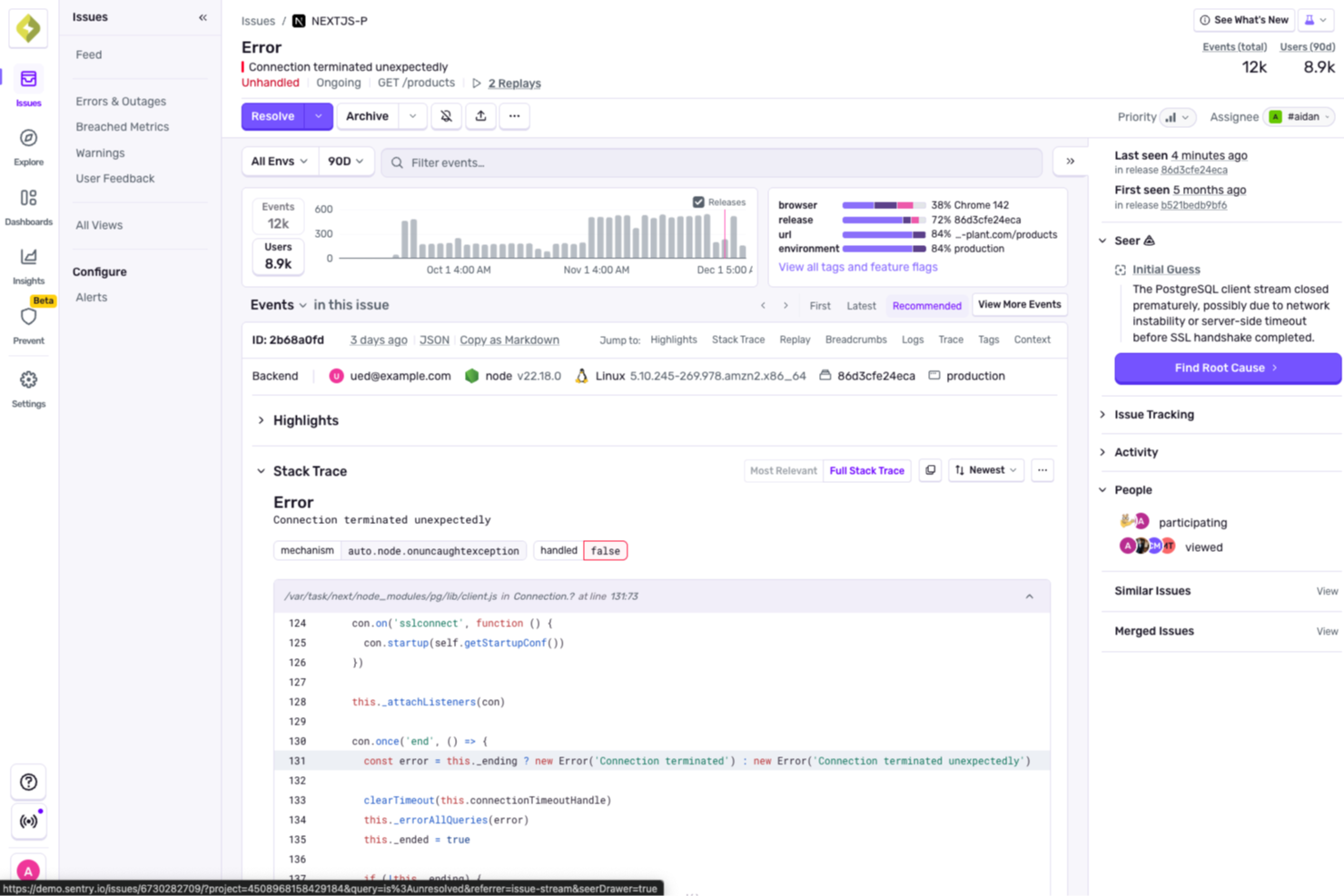
Sentry ofrece a los equipos de TI y desarrolladores visibilidad en tiempo real sobre errores del lado del servidor y problemas de rendimiento, ayudando a identificar, diagnosticar y resolver problemas en sistemas distribuidos y entornos en la nube.
¿Para quién es Sentry más adecuado?
Sentry es ideal para equipos de ingeniería y DevOps que desarrollan y mantienen aplicaciones complejas y de múltiples servicios, que necesitan visibilidad profunda de errores y rendimiento a nivel de código.
Por qué elegí Sentry
Elegí Sentry como uno de los mejores porque su rastreo distribuido va más allá que la mayoría de las herramientas de monitoreo. Donde otras plataformas solo muestran que algo es lento, el Explorador de Trazas de Sentry te permite seguir una petición individual a través de cada servicio, llamada a base de datos y salto de API—para que puedas identificar el tramo exacto que causa un pico de latencia sin tener que cambiar de herramientas. También me gusta cómo los errores y las trazas están conectados en la misma vista, lo que significa que cuando falla un trabajo en segundo plano, puedo ver qué lo desencadenó en el flujo ascendente. Seer—el agente de depuración con IA de Sentry—analiza trazas de pila, registros, reproducciones y datos de trazas juntos para detectar automáticamente la causa raíz de los problemas e incluso sugerir una solución.
Funciones clave de Sentry
- Monitoreo de errores en tiempo real: Captura y agrupa excepciones a medida que ocurren en tus aplicaciones del lado del servidor, con trazas de pila completas y datos contextuales adjuntos a cada problema.
- Monitoreo de rendimiento: Supervisa el rendimiento de transacciones, percentiles de latencia y consultas lentas a la base de datos para identificar cuellos de botella en los servicios backend.
- Repetición de sesiones: Graba sesiones de usuario para que puedas reproducir las condiciones exactas que llevaron a un error o fallo del lado del servidor.
- Alertas personalizadas: Permite configurar alertas basadas en umbrales o anomalías sobre tasas de error, latencia y métricas de rendimiento en proyectos o entornos específicos.
Integraciones de Sentry
Sentry ofrece más de 100 integraciones nativas, incluyendo GitHub, GitLab, Jira, Slack, Trello, PagerDuty, Datadog, AWS, Azure DevOps, Google Cloud Platform y Zapier. Hay una API disponible para integraciones personalizadas y automatización con flujos de trabajo CI/CD.
Pros and Cons
Pros:
- Observabilidad eficaz del frontend con funciones de repetición de sesiones
- Monitoreo integral, incluidos informes de rendimiento y de fallos
- Seguimiento sólido de errores con seguimiento de excepciones por usuario
Cons:
- Implementación compleja especialmente para pilas de plataformas diversas
- Menor cobertura para monitoreo a nivel de infraestructura
New Product Updates from Sentry

Sentry Expands Seer Agent With API Actions and External Telemetry
Seer Agent can now create and manage Sentry assets via the API and ingest Datadog and Google Cloud Platform telemetry through Seer Connectors to improve diagnosis. For more information, visit Sentry's official site.
 .
.Otras herramientas de monitorización de servidores
Estas son algunas opciones adicionales de herramientas de monitorización de servidores que no llegaron a mi lista breve, pero que aun así merece la pena revisar:
- Nagios
Mejor para monitoreo integral de infraestructura de TI
- LogicMonitor
Ideal para la supervisión de infraestructuras híbridas
- AppDynamics
Ideal para el rastreo de transacciones empresariales de extremo a extremo
- New Relic
Ideal para análisis de aplicaciones en tiempo real
- Dotcom Monitor
Ideal para simular interacciones reales de usuarios


Cómo evalúo las herramientas de monitoreo de servidores
Las herramientas de monitoreo de servidores son las que mantienen a un administrador del sistema por delante de un pico de CPU a las 3 de la mañana, ayudan a un equipo NOC a priorizar fallas en cascada a través de cientos de nodos y dan a los ingenieros de confiabilidad del sitio la telemetría que necesitan para cumplir compromisos de SLA. Cuando evalúo herramientas en este ámbito, separo lo que todos los aspirantes deben cumplir solo para estar en la lista de lo que realmente distingue a una opción de otra según ambientes y equipos específicos.
Funcionalidad principal (Condiciones mínimas para esta lista)
Para las herramientas de monitoreo de servidores, la funcionalidad principal que pruebo y evalúo es:
- Métricas en tiempo real: Verifico si la herramienta monitoriza CPU, memoria, E/S de disco y el tráfico de red con granularidad hasta el nivel de proceso en Linux y Windows.
- Motor de alertas: Las alertas basadas en umbrales son el mínimo. Evalúo políticas de escalamiento, supresión de flapping y entrega multicanal a Slack, PagerDuty o correo electrónico.
- Cobertura multi-OS: Rara vez el entorno es homogéneo. Busco soporte nativo para Windows Server, las principales distribuciones de Linux e idealmente variantes de UNIX.
- Auto-descubrimiento: Agregar manualmente 200 servidores no es una opción. Reviso si la herramienta puede escanear un segmento de red y comenzar a monitorizar nuevos hosts automáticamente.
- Paneles y visualización: Vistas de estado de toda la flota, gráficos de tendencias históricas y diseños personalizables son importantes. Evalúo cuán rápido se puede pasar del inicio de sesión a identificar la causa raíz.
- Comprobaciones de servicio y tiempo de actividad: Más allá de un simple ping, busco comprobaciones de salud a nivel de puerto y de servicio que aseguren que Apache, MySQL o Docker realmente estén respondiendo.
- Correlación de logs y eventos: Cuando un disco se llena y un servicio falla, la herramienta debe conectar esos puntos. Evalúo qué tan bien muestra eventos relacionados entre múltiples servidores.
Una herramienta debe ofrecer la mayoría de estas capacidades para ganarse un lugar en la lista. A partir de ahí, considero qué diferencia a cada herramienta.
Características destacadas (lo que separa las opciones)
Busco integración nativa con la nube que extraiga métricas directamente de cuentas de AWS, Azure o GCP, lo que ahorra horas a la hora de monitorizar infraestructura dinámica. Algunas herramientas destacadas incluyen detección de anomalías y previsión integradas, ayudando a los equipos a detectar picos de recursos antes de que se conviertan en incidentes. También evalúo el alcance de las integraciones con ecosistemas ITSM y DevOps, ya que poder enviar alertas directamente a ServiceNow o activar scripts de remediación con un webhook puede marcar la diferencia.
Lo que considero más allá de las funcionalidades
El modelo de despliegue es muy importante aquí. Evalúo si una herramienta es solo SaaS, local o ambas, ya que los equipos en industrias reguladas suelen necesitar plena soberanía sobre los datos. La estructura de precios es otro factor importante: los costes por host pueden escalar rápidamente, por lo que reviso si el modelo se mantiene predecible a medida que tu flota crece. También considero cuán pronunciada es la curva de aprendizaje, porque una herramienta que requiere semanas configurando archivos para desplegarse atiende a un comprador muy distinto al de una con asistentes de configuración guiada y plantillas preconstruidas de monitoreo.
Cómo elegir herramientas de monitorización de servidores
Es fácil perderse entre largas listas de funciones y complejas estructuras de precios. Para ayudarte a mantener la atención mientras avanzas en tu proceso particular de selección de software, aquí tienes una lista de factores que debes tener en cuenta:
| Factor | Qué debes considerar |
| Escalabilidad | Asegúrate de que la herramienta pueda crecer junto con tu empresa. Busca software de monitorización empresarial que pueda gestionar un aumento de datos y usuarios sin disminuciones de rendimiento, especialmente si estás expandiéndote. |
| Integraciones | Comprueba la compatibilidad con los sistemas existentes. La herramienta debe integrarse fácilmente con tu conjunto de software actual, como AWS, Azure o Slack, para ahorrar tiempo y esfuerzo. |
| Personalización | Opta por herramientas que te permitan adaptar los paneles y los informes. Así te asegurarás de que tu equipo reciba la información específica que necesita sin elementos innecesarios. |
| Facilidad de uso | Evalúa si la interfaz resulta intuitiva. Tu equipo debe poder utilizarla sin esfuerzo, reduciendo la curva de aprendizaje y acelerando la adopción. |
| Presupuesto | Compara los planes de precios para adaptarlos a tus limitaciones financieras. Considera el coste total, incluidas las tarifas ocultas o los complementos necesarios, para evitar sobrepasar el presupuesto. |
| Medidas de seguridad | Da prioridad a las herramientas con medidas de seguridad sólidas. Asegúrate de que incorporen cifrado de datos, controles de acceso y cumplimiento de las normas del sector para proteger la información confidencial. |
| Fiabilidad | Busca garantías de tiempo de actividad demostradas. Una herramienta fiable garantiza una monitorización continua sin interrupciones frecuentes, manteniendo tus operaciones en funcionamiento. |
| Opciones de asistencia | Ten en cuenta la disponibilidad y la calidad del servicio de atención al cliente. Es fundamental disponer de asistencia las 24 horas del día, los 7 días de la semana, gestores de cuentas dedicados y recursos de ayuda completos. |
Tendencias en las herramientas de monitorización de servidores
En mi investigación, recopilé innumerables actualizaciones de productos, comunicados de prensa y registros de versiones de distintos proveedores de herramientas de monitorización de servidores. Estas son algunas de las tendencias emergentes que estoy siguiendo de cerca:
- Información basada en IA: Muchas herramientas utilizan ahora la IA para proporcionar análisis predictivos, lo que ayuda a prever los problemas antes de que ocurran. Esta tendencia está haciendo que la monitorización sea más proactiva, con proveedores de alternativas a Nagios como Dynatrace que incorporan IA para ofrecer alertas y diagnósticos más inteligentes.
- Observabilidad de pila completa: Los usuarios quieren visibilidad de toda su pila tecnológica, no solo de los servidores. Herramientas como New Relic se están ampliando para ofrecer información sobre aplicaciones, infraestructura y experiencias de usuario en un solo lugar, proporcionando una visión integral.
- Visualización de datos en tiempo real: A medida que aumentan los datos, la necesidad de visualizarlos en tiempo real se vuelve fundamental. Los proveedores están mejorando los paneles para mostrar flujos de datos en directo, lo que permite a los equipos reaccionar al instante ante los cambios en sus entornos.
- Monitorización nativa de la nube: A medida que más empresas migran a la nube, las herramientas de monitorización están evolucionando para admitir arquitecturas nativas de la nube. Soluciones como Datadog ofrecen funciones específicas para entornos en la nube, garantizando la compatibilidad y la eficiencia.
- Monitorización de seguridad mejorada: La seguridad es una preocupación cada vez mayor, y ahora las herramientas ofrecen funciones de seguridad más avanzadas. Las soluciones de monitorización están integrando detección de amenazas y comprobaciones de cumplimiento para proteger los datos y responder a la demanda de los usuarios de sistemas más seguros.
¿Qué son las herramientas de monitorización de servidores?
Las herramientas de monitorización de servidores realizan un seguimiento continuo del estado y el rendimiento de los servidores —CPU, memoria, disco, E/S, procesos, servicios y red— para que los equipos de TI y DevOps puedan detectar problemas con antelación, resolver incidentes más rápido y mantener los SLO en entornos locales, en la nube e híbridos.
Las alertas en tiempo real, las métricas de rendimiento y las funciones de visualización de datos ayudan a realizar una monitorización proactiva y a resolver rápidamente los problemas, de forma similar a como las herramientas de monitorización de sitios web realizan un seguimiento del tiempo de actividad y el rendimiento.
Funciones de las herramientas de monitorización de servidores
Al seleccionar herramientas de monitorización de servidores, presta atención a las siguientes funciones clave:
- Monitorización en tiempo real: Recibe actualizaciones instantáneas sobre el estado y el rendimiento de tus servidores. La monitorización en tiempo real te permite detectar los problemas en el momento en que ocurren, para que puedas intervenir y solucionarlos antes de que se conviertan en problemas importantes.
- Alertas automatizadas: Recibe notificaciones por correo electrónico, SMS o alertas del panel cuando tus servidores alcancen los umbrales establecidos para la CPU, la memoria, el espacio en disco u otras métricas. No tendrás que vigilar manualmente tus servidores; el sistema te avisará cuando sea necesario actuar.
- Seguimiento del uso de recursos: Supervisa estadísticas detalladas como el uso de la CPU, el consumo de memoria, la actividad del disco y el tráfico de red en todos tus servidores. Esto te ayuda a tomar decisiones más acertadas sobre actualizaciones, escalado o equilibrio de carga.
- Datos históricos e informes: Accede a registros e informes que hacen un seguimiento del rendimiento de los servidores a lo largo del tiempo. Revisar las tendencias históricas te ayuda a identificar problemas recurrentes o momentos en los que podrías necesitar capacidad adicional del servidor.
- Paneles personalizables: Personaliza tu panel de monitorización para mostrar la información que más te importa. Los widgets de arrastrar y soltar te permiten visualizar métricas clave y obtener una visión general de un vistazo que se adapte a tu flujo de trabajo.
- Monitorización de procesos y servicios: Supervisa procesos o servicios específicos que se ejecutan en tus servidores. Sabrás inmediatamente si una tarea crítica deja de funcionar, para que puedas restablecer todo rápidamente.
- Compatibilidad con varias plataformas: Monitoriza servidores independientemente de su sistema operativo, ya sea Windows, Linux o macOS. Puedes gestionar entornos mixtos sin cambiar de herramienta.
- Integración con sistemas de notificación: Conecta tu herramienta de monitorización con aplicaciones de colaboración como Slack o herramientas de gestión de tickets. Esto evita los intercambios interminables de correos electrónicos y ayuda a tu equipo a actuar rápidamente cuando algo requiere atención.
- Controles de seguridad y acceso: Controla quién puede ver o modificar tus configuraciones de monitorización. Las sólidas funciones de seguridad ayudan a evitar cambios no autorizados y a mantener protegida la información confidencial de los servidores.
- Escalabilidad: Añade fácilmente nuevos servidores y servicios a medida que crece tu empresa. Esto garantiza que tu solución de monitorización se mantenga al ritmo de tus necesidades cada vez mayores sin perder el paso.
Funciones comunes de IA para las herramientas de monitorización de servidores
Las herramientas modernas de monitorización de servidores suelen aprovechar la inteligencia artificial para mejorar el rendimiento y agilizar la gestión. Estas son algunas funciones habituales basadas en IA que conviene buscar:
- Detección de anomalías: los algoritmos de IA identifican automáticamente patrones inusuales o desviaciones en el rendimiento de los servidores, lo que te ayuda a detectar problemas antes de que se agraven.
- Análisis predictivo: los modelos de aprendizaje automático predicen posibles fallos del servidor o escasez de recursos, lo que te permite tomar medidas preventivas y minimizar el tiempo de inactividad.
- Análisis automatizado de la causa raíz: la IA identifica rápidamente el origen de los problemas de rendimiento, reduciendo el tiempo y el esfuerzo necesarios para resolverlos.
- Alertas inteligentes: los sistemas inteligentes minimizan los falsos positivos al aprender el comportamiento normal de tu servidor y avisarte solo cuando algo requiere realmente atención.
- Planificación de capacidad: la IA analiza las tendencias de uso para recomendar una asignación óptima de recursos y estrategias de escalado, garantizando que tus servidores puedan hacer frente a las demandas futuras.
- Automatización de autorreparación: algunas herramientas utilizan IA para resolver automáticamente problemas comunes, como reiniciar servicios o reasignar recursos, sin intervención humana.
- Umbrales adaptativos de supervisión: la IA ajusta dinámicamente los umbrales de alerta en función de los datos históricos y los patrones de uso, manteniendo la relevancia de las notificaciones a medida que evoluciona tu entorno.
Ventajas
La implementación de herramientas de supervisión de servidores ofrece varias ventajas para tu equipo y tu empresa. Estas son algunas de las que puedes esperar:
- Resolución proactiva de problemas: las alertas en tiempo real y el análisis predictivo permiten a tu equipo abordar los problemas antes de que se agraven, reduciendo el tiempo de inactividad.
- Rendimiento mejorado: la supervisión de las métricas de rendimiento ayuda a mantener un funcionamiento óptimo de los servidores y mejora la eficiencia general.
- Toma de decisiones fundamentada: los paneles personalizables y los informes automatizados ofrecen información útil para orientar las decisiones estratégicas de tu equipo.
- Mayor seguridad: las funciones de supervisión de seguridad detectan amenazas y garantizan el cumplimiento normativo, protegiendo tus datos frente a posibles filtraciones.
- Compatibilidad con la escalabilidad: las herramientas diseñadas para escalar crecen junto con tu empresa y se adaptan sin problemas al aumento de datos y usuarios.
- Visibilidad integral: la observabilidad de toda la pila ofrece a tu equipo una visión completa de tu infraestructura y mejora las capacidades de supervisión.
Costes y precios
La selección de herramientas de supervisión de servidores requiere comprender los distintos modelos de precios y planes disponibles. Los costes varían en función de las funciones, el tamaño del equipo, los complementos y otros factores. La siguiente tabla resume los planes habituales, sus precios medios y las funciones que suelen incluir las soluciones de herramientas de supervisión de servidores:
Tabla comparativa de planes para herramientas de supervisión de servidores
| Tipo de plan | Precio medio | Funciones habituales |
| Plan gratuito | $0 | Supervisión básica, paneles limitados y alertas estándar. |
| Plan personal | $5-$25/usuario/mes | Métricas de rendimiento, paneles personalizables e informes básicos. |
| Plan empresarial | $30-$75/usuario/mes | Análisis avanzado, alertas en tiempo real y capacidades de integración. |
| Plan corporativo | $100-$300/usuario/mes | Observabilidad de toda la pila, análisis predictivo y asistencia especializada. |
Preguntas frecuentes sobre herramientas de monitoreo de servidores
Estas son algunas respuestas a preguntas frecuentes sobre las herramientas de monitoreo de servidores:
¿Por qué es importante el seguimiento del inventario en la ciberseguridad?
El seguimiento del inventario es fundamental para la ciberseguridad porque te ayuda a identificar, monitorear y gestionar cada dispositivo y activo de software en tu entorno de TI. Con un inventario completo, puedes detectar dispositivos no autorizados, hacer un seguimiento de las vulnerabilidades y garantizar que el software cumpla con las normativas. Un seguimiento preciso ayuda a reducir las filtraciones de datos al poner de relieve las brechas en la seguridad o en la gestión de parches, y te ofrece una visión clara para las auditorías y la respuesta a incidentes.
¿Cómo puede ayudar el software de gestión del inventario de TI con las auditorías de cumplimiento?
El software de gestión del inventario de TI facilita las auditorías de cumplimiento al mantener registros precisos de todos los activos de hardware y software. Puedes generar informes rápidamente, rastrear el historial de los activos y demostrar los detalles de las licencias o configuraciones cuando sea necesario. La documentación automatizada y los registros de cambios te ayudan a estar preparado para las auditorías, reducir el papeleo manual y simplificar las comprobaciones normativas.
¿Qué integraciones debería buscar en las herramientas de gestión del inventario de TI?
Busca herramientas de inventario de TI que se integren con tus sistemas existentes, como el software de mesa de ayuda, las bases de datos de gestión de la configuración (CMDB), software de servidores de aplicaciones y las soluciones de gestión de endpoints. Las integraciones con herramientas de seguridad, servicios de directorio y proveedores de la nube agilizan los flujos de trabajo y garantizan que los datos de tu inventario estén actualizados en toda tu infraestructura de TI. Las herramientas de monitoreo de servidores rastrean continuamente el estado y el rendimiento de los servidores—CPU, memoria, disco, E/S, procesos, servicios y red—para que los equipos de TI y DevOps puedan detectar problemas con anticipación, resolver incidentes más rápido y mantener los SLO en entornos locales, de nube e híbridos.
¿Cómo respaldan estas herramientas los entornos de trabajo remotos o híbridos?
La mayoría de las plataformas modernas de gestión del inventario de TI ofrecen acceso desde la nube, instalación remota de agentes y sincronización en tiempo real. Puedes monitorear dispositivos desde cualquier lugar—ya sea en casa o en distintas oficinas—, hacer un seguimiento del hardware asignado a los trabajadores remotos y automatizar las actualizaciones. Esto significa que reduces los puntos ciegos y puedes responder más rápido a los problemas, sin importar dónde se encuentre tu equipo.
¿Qué funciones ayudan a reducir la pérdida o el robo de hardware?
Muchas herramientas de gestión del inventario de TI ofrecen etiquetado de activos, geolocalización, registros de entrada y salida, y alertas sobre actividades inusuales. Estas funciones te permiten hacer un seguimiento de las asignaciones de dispositivos, registrar los movimientos y recuperar más rápido el hardware perdido. También puedes configurar recordatorios automatizados para la devolución o el mantenimiento de los dispositivos, lo que minimiza el riesgo de pérdida o robo.
¿Cómo funciona el descubrimiento automatizado de activos en las plataformas modernas de gestión del inventario?
El descubrimiento automatizado de activos analiza tu red para encontrar todos los dispositivos conectados y el software instalado. El sistema actualiza continuamente tu inventario, detecta activos nuevos o no autorizados y te ayuda a mantener una base de datos de activos precisa. Esto te ahorra tiempo, mejora la seguridad y reduce los errores del seguimiento manual.
Qué sigue
Si estás investigando software de monitoreo de servidores, conecta con un asesor de SoftwareSelect para recibir recomendaciones gratuitas.
Completa un formulario y programa una conversación para compartir los detalles de tus necesidades. Recibirás una lista breve de opciones de software para evaluar, además de asistencia durante todo el proceso de compra, incluidas las negociaciones de precios.