

The best Nagios alternatives help teams monitor systems without dealing with complex setup requirements or running into scalability limits. They provide clearer dashboards, simpler configurations, and flexible integrations that make it easier to track performance across servers, networks, and applications.
Many organizations begin searching for alternatives after struggling with issues like configuring Nagios plug-ins that don’t integrate cleanly, wasting time troubleshooting cryptic error messages, or hitting performance walls as monitoring needs grow. These challenges slow down operations and make it harder for IT teams to maintain visibility at scale.
I’ve tested monitoring platforms in live production environments, worked with teams migrating away from legacy Nagios deployments, and evaluated how these tools perform across hybrid and cloud infrastructures. Those experiences showed me which solutions actually reduce monitoring overhead and which create new complexities.
In this guide, you’ll see which Nagios alternatives deliver easier setup, better scalability, and more actionable insights so your team can focus on fixing issues instead of fighting the monitoring system.
What is Nagios?
Nagios is an open source monitoring and network management platform designed for network and system monitoring. IT professionals and system administrators generally use Nagios to keep an eye on critical infrastructure and ensure smooth operations.
Its alerting, reporting, and monitoring capabilities help you detect issues, analyze performance, and manage network resources effectively. Overall, Nagios provides value by helping your team maintain system reliability and minimize downtime.
Nagios Alternatives Comparison Table
This comparison table summarizes pricing details for my top Nagios alternative selections:
| Tool | Best For | Trial Info | Price | ||
|---|---|---|---|---|---|
| 1 | Best for unified device and sensor monitoring | 30-day free trial + free plan available | From $200/month (billed annually) | Website | |
| 2 | Best for complex IT infrastructures | Free plan available | From $166.67/month (billed annually) | Website | |
| 3 | Best for multi-cloud monitoring | 30-day free trial | From $9/month (billed annually) | Website | |
| 4 | Best for web application monitoring | 30-day free trial + free plan + free demo available | From $19.99/month | Website | |
| 5 | Best for plug-and-play setup | Free demo available | Pricing upon request | Website | |
| 6 | Best for full-stack observability | 14-day free trial | From $5/month | Website | |
| 7 | Best for graphing capabilities | Free to download | Free to use | Website | |
| 8 | Best for AIOps and observability | Free demo available | Pricing upon request | Website | |
| 9 | Best for end-to-end monitoring | 7-day free trial | Pricing upon request | Website | |
| 10 | Best for distributed networks | Free consultation available | Pricing upon request | Website |


Why Trust Our Software Recommendations
6,700+
Reviews
20
Industry experts
16+
Evaluation factors
14
Years
Our team has been testing and reviewing software since 2012. As tech leaders ourselves, we know how difficult—and important—it is to choose the right software.
For this guide, we evaluated tools using hands-on testing and independent research, scoring tools using our selection criteria.
Our reviews reflect our human editorial judgment, not a sales pitch.
Expert reviewers:
- Paulo Gardini MiguelTech Director
 Tim FisherVP of AI
 Gabriel RosasTech Lead & Software Architect
 Christhian GruhnTech Lead & Platform Architect

Best Nagios Alternatives Reviews
Below are my detailed summaries of the best Nagios alternatives that made it onto my shortlist. My reviews offer a detailed look at the key features, pros & cons, integrations, and ideal use cases of each tool to help you find the best one for you.
 Best for unified device and sensor monitoring
- 30-day free trial + free plan available
- From $200/month (billed annually)
Visit WebsiteCustomer Rating:4.6/5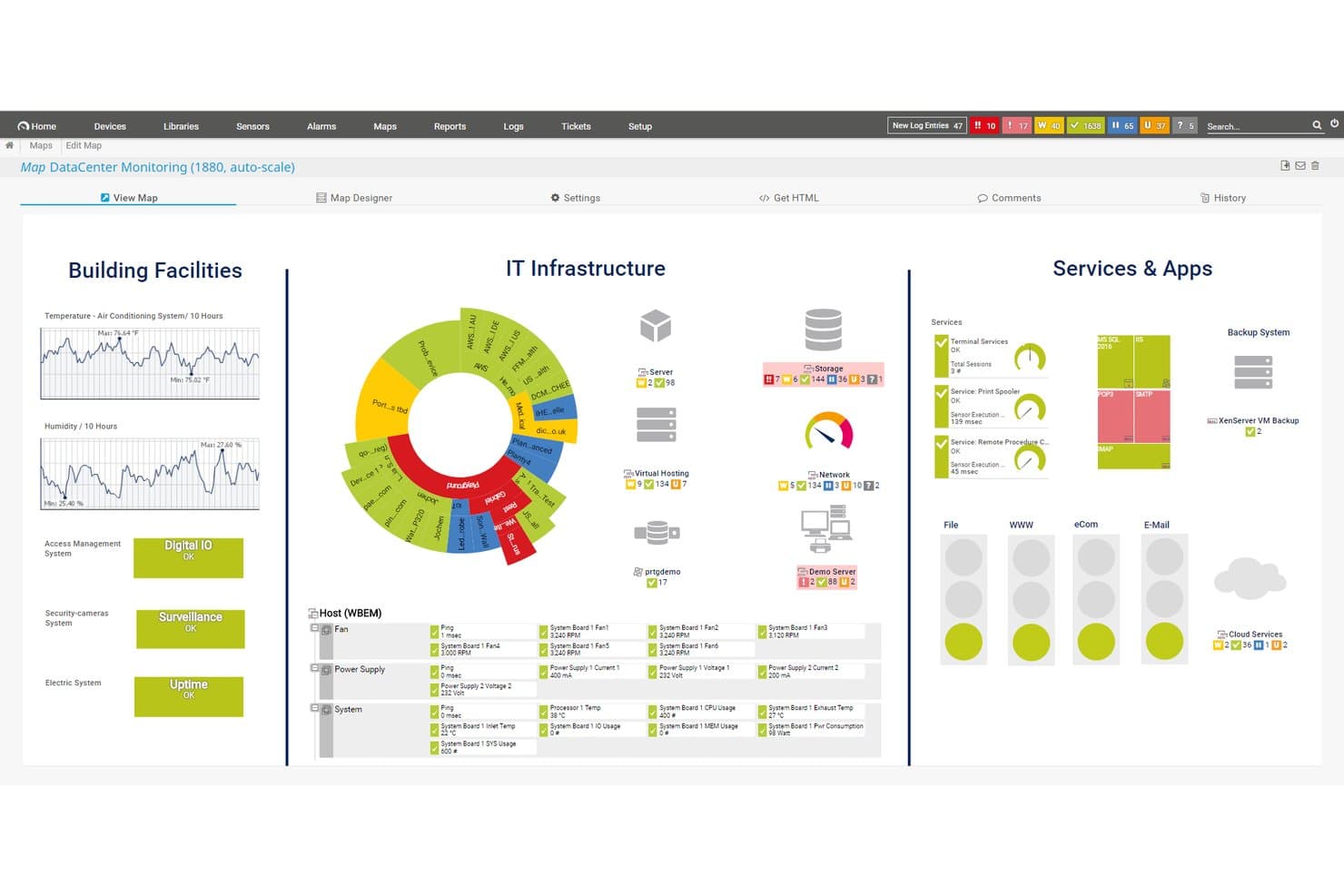
Paessler PRTG offers a customizable data center monitoring map displaying building facilities, IT infrastructure, and services and apps in a unified dashboard view. Paessler PRTG is an on-premises and cloud-hosted monitoring platform that helps IT teams and NOC managers track networks, servers, applications, and devices from a single interface without the complex manual configuration that tools like Nagios demand.
Who Is Paessler PRTG Best For?
PRTG is a strong fit for mid-market to enterprise IT infrastructure teams managing large, mixed-device environments across on-premises and hybrid setups.
Why Paessler PRTG Is a Good Nagios Alternative
I picked Paessler PRTG because its sensor-based architecture sets it apart from Nagios in a meaningful way. Where Nagios requires manual plugin configuration per check, PRTG's auto-discovery scans your network and builds sensors across devices, servers, and services automatically. I also appreciate that a single PRTG deployment covers IT, OT, and IoT assets using protocols like SNMP, WMI, NetFlow, and OPC UA, without needing separate tools for each environment.
Paessler PRTG Key Features
- Distributed monitoring via remote probes: Deploy remote probes to extend monitoring reach across multiple locations and networks.
- Customizable map designer: Build real-time, interactive network maps using a drag-and-drop editor.
- Role-based access control: Assign user permissions to control who can view or manage specific dashboards and sensors.
- Audit logging and single sign-on: Enable secure access and track user activity with enterprise authentication and compliance features.
Paessler PRTG Integrations
Paessler PRTG offers native integrations with AWS, Microsoft Azure, VMware, Siemens Industrial Edge, Cisco Meraki, HPE, Dell EMC, OPC UA, and MQTT. An API is available for custom integrations.
Pros and Cons
Pros:
- Single pane covers all infrastructure layers
- Monitors IT, OT, and IoT natively
- Auto-discovers devices without manual plugin setup
Cons:
- Server component requires Windows installation
- Sensor count limits escalate costs quickly
Learn more about Paessler PRTG: Best for complex IT infrastructures
- Free plan available
- From $166.67/month (billed annually)
Visit WebsiteCustomer Rating:4.7/5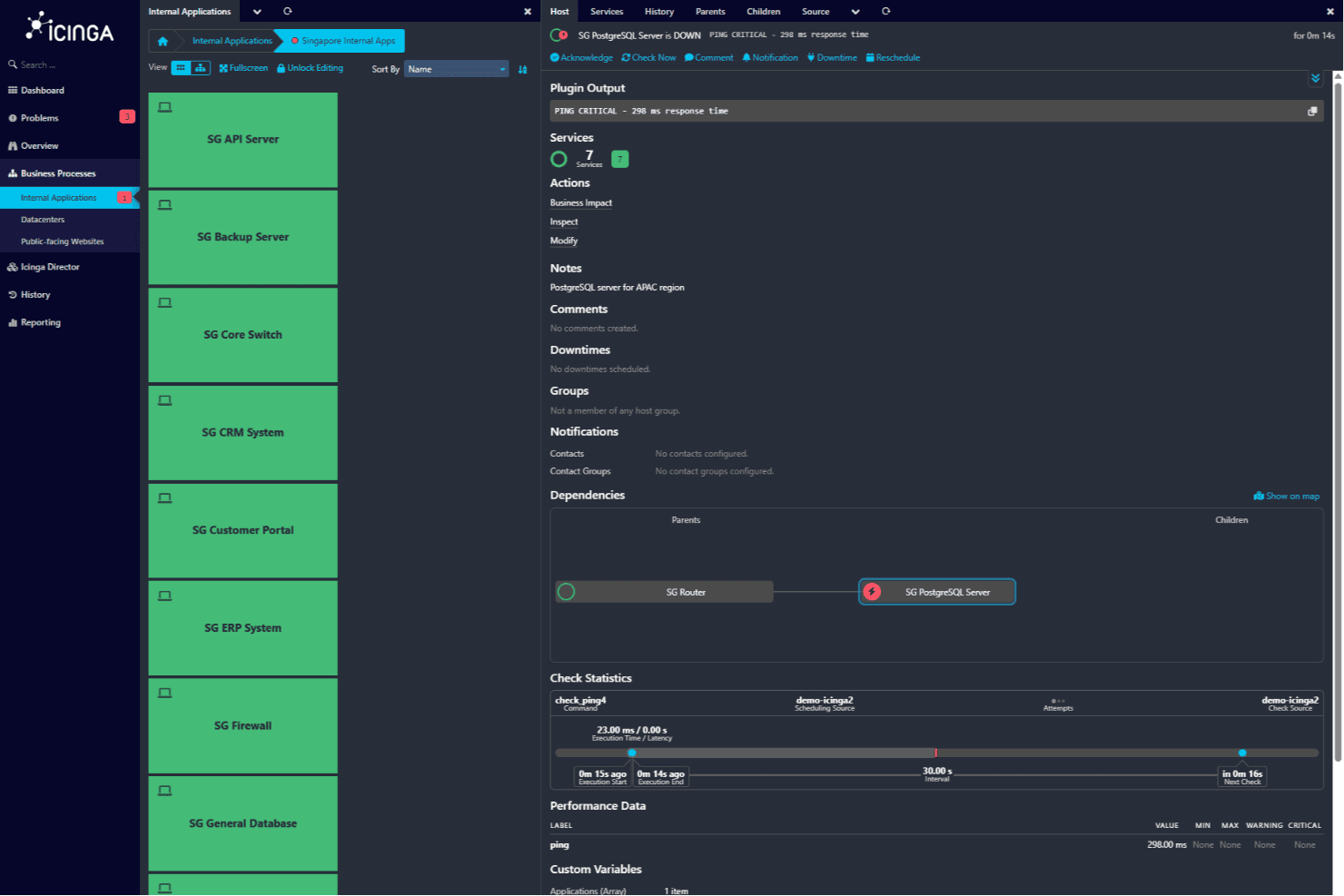
Host detail screen displaying the SG PostgreSQL Server status with a critical ping alert and dependency chain linking to the SG Router. Icinga is an open-source monitoring solution tailored for complex IT infrastructures, primarily used by IT professionals and organizations. It monitors servers, networks, applications, and cloud environments.
Why it's a good Nagios alternative: Icinga excels in complex IT setups with infrastructure monitoring, automation, and notifications. It offers specialized monitoring for Kubernetes, databases, and VMware, making it ideal for complex environments. Its analytics and metrics/logs management help your team gain insights. The platform also integrates with IT service management tools, enhancing its utility.
Standout Features & Integrations:
Features include infrastructure monitoring, automation, and cloud monitoring. It also offers analytics and metrics/logs management, supporting specialized monitoring for Kubernetes, databases, and VMware.
Integrations include Puppet, Ansible, Chef, SaltStack, Grafana, Graylog, Elasticsearch, InfluxDB, Jira, and Slack.
Pros and Cons
Pros:
- Nagios plugin compatibility
- Supports complex environments
- Open-source flexibility
Cons:
- Requires technical expertise
- Steeper learning curve
Learn more about Icinga: Best for multi-cloud monitoring
- 30-day free trial
- From $9/month (billed annually)
Visit WebsiteCustomer Rating:4.7/5
Site24x7 tracks multi-cloud infrastructure performance and availability. For businesses seeking a reliable Nagios alternative, Site24x7 offers a compelling blend of monitoring capabilities and user-friendly features. This cloud-based solution caters to IT professionals and organizations that require extensive monitoring of servers, networks, applications, and websites across various environments. Site24x7 addresses challenges such as managing multi-cloud environments and automating repetitive tasks, providing a cost-effective way to monitor IT infrastructure under a single plan.
Why I Picked Site24x7
I picked Site24x7 as a top Nagios alternative for its reliable multi-cloud monitoring capabilities and automation features. With Site24x7, you can seamlessly monitor environments like AWS, Azure, and GCP from a single console, making it easier to manage complex infrastructures. Additionally, the platform's automation of repetitive tasks helps reduce manual effort, allowing your team to focus on more strategic initiatives. These features are vital for organizations looking to enhance efficiency and streamline their monitoring processes.
Site24x7 Key Features
In addition to multi-cloud monitoring and automation, Site24x7 offers:
- Log Management: Provides insights across your tech stack for enhanced analysis and troubleshooting.
- API Monitoring: Ensures your APIs function correctly to maintain service reliability.
- Status Pages: Allows you to create customizable pages to communicate downtime and build user trust.
- Incident Management: Facilitates efficient incident handling through detailed documentation, including error logs and timelines.
Site24x7 Integrations
Integrations include AWS, Azure, Google Cloud Platform, Docker, Kubernetes, Microsoft Exchange, Microsoft SharePoint, and more.
Pros and Cons
Pros:
- Flexible monitoring integrates easily with multiple infrastructure components
- AI-powered full-stack monitoring supports multicloud infrastructure management
- Comprehensive monitoring for various systems
Cons:
- Complex configuration slows initial setup and platform understanding
- Alert bugs cause issues when adding new monitoring configurations
Learn more about Site24x7: Best for web application monitoring
- 30-day free trial + free plan + free demo available
- From $19.99/month
Visit WebsiteCustomer Rating:4.5/5
Dotcom-Monitor tracks website uptime, performance, and functionality for IT and dev teams. Dotcom-Monitor is a web performance monitoring tool aimed at developers, IT teams, and digital marketers. It helps ensure website uptime, performance, and functionality.
Why it's a good Nagios alternative: Dotcom-Monitor specializes in monitoring web applications, offering real-time performance insights. Its synthetic monitoring capabilities allow your team to simulate user interactions and detect issues proactively. The tool provides comprehensive reporting, helping you understand performance trends over time. With a focus on web application monitoring, it offers a specialized approach that differs from Nagios's general monitoring capabilities.
Standout Features & Integrations:
Features include synthetic monitoring that simulates user interactions to detect issues before they affect real users. It also offers comprehensive reporting to help you understand performance trends over time. The real-time performance insights ensure you can address issues promptly.
Integrations include Amazon Web Services, Microsoft Azure, Google Cloud Platform, Jenkins, PagerDuty, Slack, Splunk, New Relic, ServiceNow, and Atlassian Jira.
Pros and Cons
Pros:
- Comprehensive reporting
- Real-time performance insights
- Specialized web application monitoring
Cons:
- Limited to web applications
- Requires some technical knowledge
Learn more about Dotcom-Monitor:

Munin tracks system performance and resource usage for admins and IT teams. Munin is a networked resource monitoring tool designed for system administrators and IT professionals. It provides insights into system performance and resource usage.
Why it's a good Nagios alternative: Munin offers a straightforward plug-and-play setup, making it easy for your team to start monitoring quickly. It automatically creates graphs for performance data, allowing you to visualize trends effortlessly. The tool is lightweight, reducing resource consumption on your systems. Its ease of use and minimal configuration make it a practical choice for those seeking a simple alternative to Nagios.
Standout Features & Integrations:
Features include automated graph creation, which helps you visualize data trends over time. It also supports a lightweight architecture, minimizing system resource consumption. The tool's simple configuration process means you can get started quickly without complex setups.
Integrations include Nagios, Cacti, Zabbix, Graphite, InfluxDB, Prometheus, Elasticsearch, Grafana, Jenkins, and Docker.
Pros and Cons
Pros:
- Automated graph creation
- Lightweight architecture
- Simple setup process
Cons:
- Basic feature set
- Limited scalability
Learn more about Munin:

Sematext delivers cloud monitoring and logging for apps, infrastructure, and logs. Sematext is a cloud-based monitoring and logging platform aimed at developers, IT operations, and DevOps teams. It provides insights into application performance, infrastructure monitoring, and log management.
Why it's a good Nagios alternative: Sematext offers full-stack observability, allowing your team to monitor applications, infrastructure, and logs all in one place. Its real-time analytics help identify performance issues quickly. The tool’s user-friendly dashboards make it easy to visualize data and track metrics. With its comprehensive monitoring capabilities, Sematext provides a more integrated approach than Nagios.
Standout Features & Integrations:
Features include real-time analytics that help your team quickly identify issues. The user-friendly dashboards make data visualization straightforward, allowing you to track metrics easily. Its comprehensive monitoring capabilities ensure you have a complete view of your systems.
Integrations include AWS, Azure, Google Cloud Platform, Kubernetes, Docker, Elasticsearch, Apache Kafka, NGINX, Redis, and MySQL.
Pros and Cons
Pros:
- User-friendly dashboards
- Real-time analytics
- Full-stack observability
Cons:
- Limited offline features
- Requires learning curve
Learn more about Sematext:

Cacti delivers network monitoring and graphing with detailed performance visuals. Cacti is a network monitoring and graphing tool designed for IT administrators and network managers. It provides detailed visualizations of network data and system performance.
Why it's a good Nagios alternative: Cacti excels in graphing capabilities, allowing you to create detailed visual representations of your network data. Its intuitive interface makes setting up and managing graphs straightforward, even for complex data sets. The tool supports data collection through SNMP, which enhances its graphing precision. With its focus on visualization, Cacti offers a distinct advantage for teams needing clear, graphical insights into their networks.
Standout Features & Integrations:
Features include advanced graphing capabilities that let you visualize complex data easily. It supports SNMP for precise data collection, improving the accuracy of your graphs. The intuitive interface simplifies setting up and managing these visualizations.
Integrations include Nagios, InfluxDB, Graphite, Prometheus, Elasticsearch, Grafana, OpenNMS, Zabbix, SolarWinds, and Splunk.
Pros and Cons
Pros:
- Supports SNMP data collection
- Intuitive interface
- Excellent graphing capabilities
Cons:
- Basic alerting features
- Limited scalability
Learn more about Cacti:

Zenoss Core monitors hybrid IT infrastructure and delivers real-time performance insights. Zenoss Core is a hybrid IT monitoring and analytics platform designed for IT operations teams. It provides insights into infrastructure performance and helps detect and resolve issues in real-time.
Why it's a good Nagios alternative: Zenoss Core integrates AIOps capabilities, offering advanced analytics to predict and prevent issues before they impact your operations. Its real-time monitoring provides a comprehensive view of your infrastructure, helping your team respond quickly to incidents. The platform's observability features ensure you can track performance metrics and gain insights into system health. With its focus on analytics and observability, Zenoss Core offers a more proactive approach compared to Nagios.
Standout Features & Integrations:
Features include advanced analytics that help predict and prevent potential issues. Real-time monitoring provides comprehensive visibility into your infrastructure. The platform's observability capabilities ensure you can track performance metrics and system health effectively.
Integrations include Amazon Web Services, Microsoft Azure, Google Cloud Platform, VMware, Docker, Kubernetes, ServiceNow, Splunk, PagerDuty, and Slack.
Pros and Cons
Pros:
- Proactive issue detection
- Real-time monitoring
- Advanced analytics capabilities
Cons:
- Initial setup complexity
- Requires technical expertise
Learn more about Zenoss Core:

Centreon monitors infrastructure, apps, and networks to give IT teams full visibility. Centreon is an IT monitoring solution designed for businesses needing end-to-end visibility, mainly used by IT operations teams. It monitors IT infrastructure, applications, and networks to ensure optimal performance.
Why it's a good Nagios alternative: Centreon offers end-to-end monitoring with features like auto-discovery and centralized dashboards. It provides real-time insights into your IT environment, helping your team quickly identify and resolve issues. The platform's scalability supports growing businesses, ensuring you can monitor extensive networks. Its user-friendly interface and customizable alerts make it easier to tailor the system to your needs.
Standout Features & Integrations:
Features include auto-discovery, centralized dashboards, and customizable alerts. It also offers real-time insights and scalability to support growing businesses.
Integrations include Amazon Web Services, Microsoft Azure, Google Cloud Platform, Docker, Kubernetes, VMware, Cisco, Juniper, Slack, and ServiceNow.
Pros and Cons
Pros:
- Scalable for growing businesses
- Auto-discovery feature
- End-to-end visibility
Cons:
- Initial setup complexity
- Requires technical expertise
Learn more about Centreon:

OpenNMS manages distributed networks with monitoring, events, and performance tools. OpenNMS is an open-source network management platform designed for distributed networks, primarily used by network administrators and IT professionals. It performs network monitoring, event management, and performance measurement.
Why it's a good Nagios alternative: OpenNMS is tailored for distributed networks with features like event management and service monitoring. It supports large-scale deployments, making it ideal for handling complex network structures. The platform offers performance data collection and visualization to help your team manage network health. Its scalability and ability to handle distributed systems set it apart from Nagios.
Standout Features & Integrations:
Features include event management, service monitoring, and performance data collection. It also provides visualization tools for network health and supports large-scale deployments for complex networks.
Integrations include Grafana, Elasticsearch, Prometheus, Kafka, PagerDuty, Slack, Jenkins, AWS, Azure, and Google Cloud Platforms
Pros and Cons
Pros:
- Detailed performance metrics
- Open-source flexibility
- Supports large-scale networks
Cons:
- Steep learning curve
- Requires technical expertise
Learn more about OpenNMS:
Other Nagios Alternatives
Here are some additional Nagios alternatives that didn’t make it onto my shortlist, but are still worth checking out:
- 11MonitorixBest for lightweight monitoring
- 12op5 MonitorBest for enterprise scalability
- 13NaemonBest for modular architecturePricing upon request
- 14ArgusBest for system and network monitoring
- 15DatadogBest for cloud monitoring
- 16SolarWinds Network Performance MonitorBest for network performance insights
- 17ManageEngine OpManagerBest for enterprise IT management
- 18ZabbixBest for open-source flexibility
- 19NetdataBest for real-time system metrics
- 20PrometheusBest for time-series data handling
How I Evaluate Nagios Alternatives
I split my evaluation into two layers: the baseline every tool must clear—real-time alerting, multi-environment coverage, auto-discovery—and the differentiators that separate the best from the rest.
Core Functionality (Table Stakes For This List)
When I'm selecting tools for my list, I rank each one on a scale from 0 (does not offer the functionality) to 5 (excels in this area) for each core functionality listed below. Then, I calculate the tool's total score into a percentage. Each tool needs to achieve a minimum total score of 75% to be considered for inclusion.
- Infrastructure Monitoring: I check whether a tool tracks servers, network devices, and services with real-time health checks and performance metrics—like CPU, memory, disk, and interface utilization across a mixed fleet of Linux and Windows hosts.
- Alerting & Notifications: Each tool should support multi-channel alerts (email, Slack, PagerDuty, SMS) with configurable thresholds and escalation policies, so the right on-call engineer gets paged when a disk fills up at 2 a.m.
- Dashboards & Visualization: I evaluate whether dashboards are customizable enough to build role-specific views—a NOC wall display showing network status vs. a DevOps team's container performance panel, for example.
- Auto-Discovery & Agent Support: Tools that auto-discover hosts and services via SNMP, WMI, or cloud provider APIs save hours of manual configuration, and I look for flexible agent-based and agentless options to cover firewalled segments and cloud VPCs alike.
- Integrations & Extensibility: I look at prebuilt integrations with ITSM platforms like ServiceNow or Jira Service Management, plus API access and plugin support for writing custom checks or feeding data into tools like Grafana.
- Multi-Environment Coverage: Whether you're running bare-metal servers, multi-cloud workloads across AWS and Azure, or Kubernetes clusters, I evaluate how well each tool monitors across on-prem, cloud, and containerized environments.
Once I have a list of tools that meet this criteria, I consider what sets each platform apart.
Differentiating Factors (What Sets Vendors Apart)
Here's how I compare and contrast different vendors:
Standout Features
AIOps capabilities matter a lot here. Tools that use machine learning to baseline normal behavior and flag true anomalies cut through alert noise in ways static thresholds never will. I also evaluate dependency and topology mapping—when a core switch goes down, seeing the blast radius across dependent services speeds up triage dramatically. Automation and self-healing round out the picture. I look for tools that can trigger runbook actions automatically, like restarting a failed service or clearing a temp directory before an alert even reaches the on-call team.
Beyond Features
Migration support is a big deal when you're moving off Nagios. I check whether a tool can import existing check configurations or reuse custom plugins to avoid rebuilding from scratch. Pricing transparency matters just as much—Nagios users are accustomed to open-source economics, so I evaluate whether vendors offer a free tier or predictable per-host pricing that won't spike as your environment grows. Community and ecosystem health also carry weight. An active plugin marketplace and frequent release cadence signal long-term viability.
Why Look For A Nagios Alternative?
While Nagios is a good choice of software development, there are a number of reasons why some users seek out alternative solutions. You might be looking for a Nagios alternative because…
- You need more intuitive user interfaces
- Your team requires better scalability
- You're looking for simpler configuration
- You want advanced analytics capabilities
- Your business needs faster alerting systems
If any of these sound like you, you’ve come to the right place. My list contains several software development options that are better suited for teams facing these challenges with Nagios and looking for alternative solutions. For teams considering broader monitoring solutions, exploring New Relic alternatives can provide additional options for comprehensive application performance monitoring.
Nagios Key Features
Here are some of the key features of Nagios, to help you contrast and compare what alternative solutions offer:
- Monitoring capabilities: Tracks the performance and availability of servers, applications, and network devices.
- Alerting system: Sends notifications via email or SMS when issues arise, allowing for quick response.
- Web interface: Provides a user-friendly dashboard for real-time monitoring and reporting.
- Customizable plugins: Supports a variety of plugins for extended functionality tailored to specific needs.
- Scalability: Can be scaled to monitor large environments with numerous devices.
- Community support: Backed by a strong community for troubleshooting and enhancements.
- Problem remediation: Features like alert acknowledgments and event handlers for automatic issue resolution.
- Proactive planning: Tools for trending, capacity planning, and scheduled downtime management.
- Reporting: Generates availability and historical reports to track performance and compliance with SLAs.
- Multi-tenant capabilities: Allow multiple users to access tailored views of the infrastructure.