

10 mejores herramientas de monitoreo de sistemas reseñadas en 2026

10 Lista de los mejores sistemas de monitoreo


Las herramientas de monitoreo de sistemas te ayudan a supervisar el estado y el rendimiento de tu infraestructura para que puedas detectar y solucionar los problemas antes de que afecten a los usuarios.
Muchos equipos recurren a estas herramientas cuando tienen problemas con interrupciones inesperadas, sistemas lentos o una visibilidad limitada de la actividad de la red. Sin la solución adecuada, es difícil saber qué está fallando o incluso dónde buscar.
He trabajado con equipos de SaaS y MSP para evaluar e implementar plataformas de monitoreo que reducen el tiempo de inactividad y aceleran los tiempos de respuesta. Esta guía comparte lo que he aprendido para ayudarte a encontrar una herramienta que se adapte a tu sistema y a tu flujo de trabajo.
Por qué confiar en nuestras recomendaciones de software
Nuestro equipo lleva probando y evaluando software desde 2012. Como líderes tecnológicos, sabemos lo difícil —y lo importante— que es elegir el software adecuado.
Para esta guía, evaluamos las herramientas mediante pruebas prácticas e investigación independiente, puntuando las herramientas según nuestros criterios de selección.
Nuestras reseñas reflejan nuestro criterio editorial humano, no un discurso de ventas.
Revisores expertos:
Resumen de las mejores herramientas de monitoreo de sistemas
Esta tabla comparativa resume los detalles de precios de mis principales selecciones de herramientas de monitoreo de sistemas para ayudarte a encontrar la mejor opción según tu presupuesto y las necesidades de tu empresa.
| Tool | Best For | Trial Info | Price | ||
|---|---|---|---|---|---|
| 1 | Mejor para la monitorización integral basada en IA | No | Precio bajo solicitud | Website | |
| 2 | Mejor para métricas de rendimiento de aplicaciones | No | Desde $15/host/mes (facturado anualmente) | Website | |
| 3 | Ideal para monitorización de sistemas simple y centralizada | Prueba gratuita de 30 días | Desde $179/mes (facturado anualmente) | Website | |
| 4 | Mejor con gestión integrada de activos de TI | Prueba gratuita de 14 días + demo gratuita disponible | Desde $19/agente/mes (facturación anual) | Website | |
| 5 | Ideal para la monitorización y gestión remota | Prueba gratuita de 30 días + demo gratis disponible | Desde $129/técnico/mes (facturado anualmente) | Website | |
| 6 | Mejor solución de código abierto | Plan gratuito disponible | Precio bajo consulta | Website | |
| 7 | La mejor opción para la monitorización integral de entornos de TI complejos | Plan gratuito + prueba gratuita de 30 días disponible | Desde $275/mes (facturado anualmente) | Website | |
| 8 | Mejor para seguimiento de errores en tiempo real | No | Desde $26/mes (facturación anual) | Website | |
| 9 | Mejor para la monitorización de redes distribuidas | Demo gratis disponible | Desde $245/25 dispositivos | Website | |
| 10 | Mejor para la monitorización de infraestructura de pila completa | Prueba gratuita de 30 días + demo gratis disponible | Desde $10/mes (facturación anual) | Website |


Reseñas de las mejores herramientas de monitoreo de sistemas
A continuación encontrarás mis resúmenes detallados de las mejores herramientas de monitoreo de sistemas que llegaron a mi lista de selección. Mis reseñas ofrecen un análisis detallado de las características principales, ventajas & desventajas, integraciones y casos de uso ideales de cada herramienta para ayudarte a encontrar la mejor opción para ti.

Mejor para la monitorización integral basada en IA
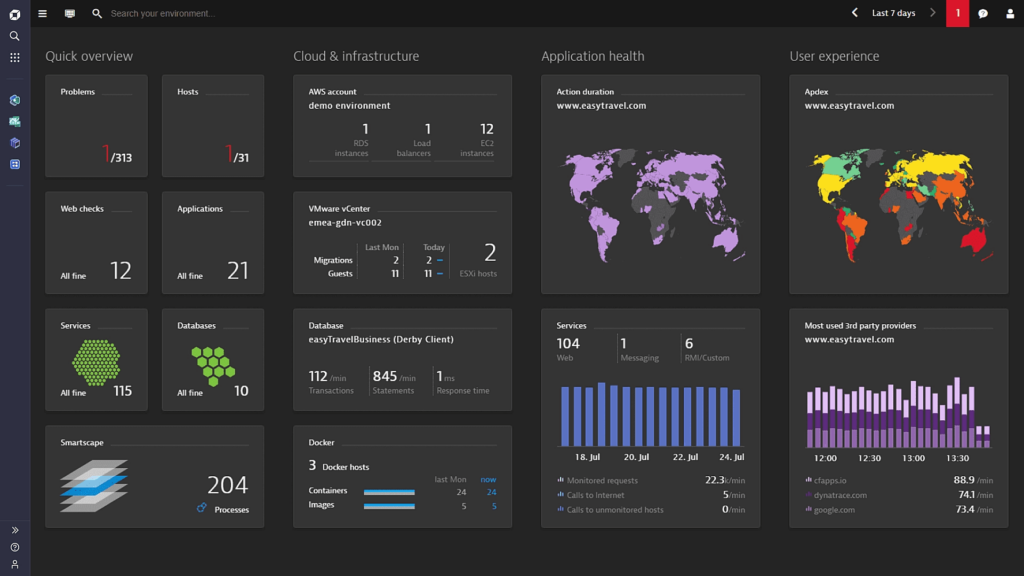
Dynatrace ofrece a los equipos de TI y a las empresas una plataforma unificada para monitorizar infraestructura, aplicaciones y la experiencia del usuario, ayudándoles a detectar, analizar y resolver problemas de rendimiento en entornos modernos y complejos.
¿Para quién es mejor Dynatrace?
Dynatrace es ideal para grandes empresas y organizaciones nativas en la nube que gestionan entornos complejos y distribuidos y necesitan una observabilidad automática y profunda en toda su pila tecnológica.
Por qué elegí Dynatrace
Dynatrace se gana su lugar en mi lista porque su motor de IA, Davis, va más allá de las alertas al ofrecer un análisis automatizado y preciso de la causa raíz. Cuando ocurre un incidente, Davis no solo muestra una lista de anomalías; rastrea la cadena causal en toda tu pila y localiza la fuente exacta, lo que reduce significativamente el tiempo medio de recuperación. También me gusta el modelo de despliegue OneAgent, donde una sola instalación de agente en un host recopila continuamente métricas, trazas, registros y datos de topología a lo largo de toda la cadena de entrega de aplicaciones sin instrumentación manual. Smartscape crea un mapa de dependencias en tiempo real de tu entorno, así que cuando algo falla, ya tienes el contexto para entender qué se ve afectado y por qué.
Características clave de Dynatrace
- Seguimiento distribuido PurePath: Captura el tiempo de extremo a extremo y el contexto a nivel de código para cada traza distribuida en toda tu pila, sin realizar muestreo.
- Análisis de registros: Ingiera, indexa y correlaciona los datos de registro en tiempo real junto con métricas y trazas en una única vista unificada.
- Monitorización de la experiencia digital: Rastrea sesiones reales de usuarios y transacciones sintéticas para medir el rendimiento del front-end en navegadores y aplicaciones móviles.
- Ingesta de datos OpenPipeline: Procesa, enriquece y contextualiza datos de observabilidad en streaming de cualquier fuente antes de que lleguen al almacenamiento o al análisis.
Integraciones de Dynatrace
Las integraciones incluyen AWS, Azure, Google Cloud, Jira, Slack, GitHub Copilot, PagerDuty, JetBrains, Cursor IDE y Windsurf.
Pros and Cons
Pros:
- La IA Davis proporciona detección y diagnóstico autónomos de problemas en tiempo real
- Ofrece una visión holística de los entornos digitales, desde la nube hasta la experiencia del usuario
- Amplias integraciones con las principales plataformas en la nube
Cons:
- La ausencia de precios transparentes puede disuadir a usuarios potenciales
- Puede ser excesivamente completo para empresas pequeñas o configuraciones más sencillas
- Algunos usuarios pueden encontrar desafiante la configuración y el despliegue inicial
Datadog
Mejor para métricas de rendimiento de aplicaciones
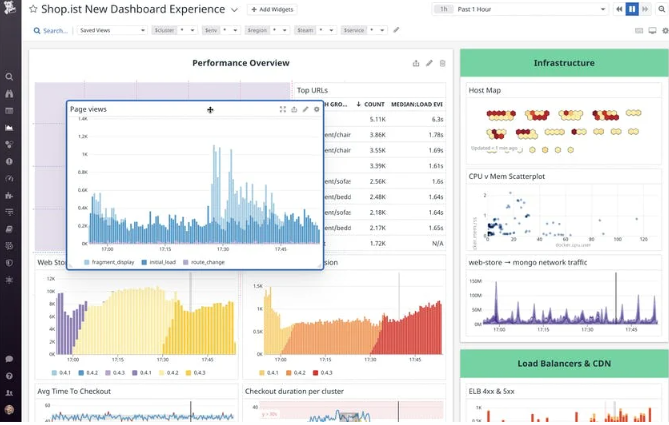
Datadog es una plataforma de monitoreo y análisis basada en la nube que proporciona información profunda sobre el rendimiento de las aplicaciones. Consolida métricas, trazas y registros en una plataforma unificada, lo que la hace especialmente potente para el monitoreo de rendimiento de aplicaciones, alineándose con su fortaleza en la medición de métricas.
Por qué elegí Datadog: Al determinar las mejores herramientas para el monitoreo, Datadog surgió de manera destacada en mi análisis. Evalué su capacidad para ofrecer información granular y en tiempo real sobre las aplicaciones como un diferenciador clave. Basado en la profundidad y amplitud de sus capacidades, la consideré la más adecuada para métricas de rendimiento de aplicaciones.
Funciones y integraciones destacadas:
Datadog es conocido por su APM (Monitoreo de Rendimiento de Aplicaciones), que ofrece información detallada sobre el rendimiento y análisis de causa raíz. Su trazado distribuido y análisis en tiempo real permiten a los equipos comprender los cuellos de botella en el flujo de trabajo de las aplicaciones. Complementando su funcionalidad principal, Datadog se integra con una infinidad de servicios, incluyendo AWS, Azure y Google Cloud, y ofrece un amplio conjunto de integraciones mediante API.
Pros and Cons
Pros:
- Robusto APM con visualización de datos informativa
- Amplia gama de integraciones con proveedores de nube y otros servicios
- Paneles personalizables adaptados a necesidades de monitoreo únicas
Cons:
- Puede resultar costoso para equipos o proyectos pequeños
- Curva de aprendizaje pronunciada para aprovechar todas sus funciones
- Algunos usuarios reportan retrasos ocasionales en la actualización de métricas

Ideal para monitorización de sistemas simple y centralizada

PRTG ofrece a los equipos de TI y administradores de sistemas una plataforma unificada para monitorizar redes, servidores y aplicaciones, ayudando a empresas de todos los tamaños a detectar problemas y mantener una infraestructura confiable.
¿Para quién es mejor PRTG?
PRTG es ideal para equipos de TI en pequeñas y medianas empresas que necesitan una forma sencilla de monitorizar toda su infraestructura desde un solo lugar.
Por qué elegí PRTG
PRTG se gana un lugar en mi lista porque integra todo en un solo sitio sin requerir una configuración compleja. Me gusta que su función de descubrimiento automático escanea la red y configura automáticamente los sensores para los dispositivos detectados, por lo que mi equipo no pierde horas agregando servidores, switches y puntos finales manualmente. La biblioteca de más de 250 sensores preconfigurados cubre todo, desde tráfico SNMP y carga de CPU hasta entornos VMware y dispositivos IoT basados en MQTT. Además, la función de monitorización distribuida me permite gestionar ubicaciones remotas y sucursales desde un solo panel utilizando sondas remotas, que recogen datos localmente y los envían a una instalación central de PRTG.
Características clave de PRTG
- Umbrales de alerta personalizados: Establece umbrales específicos para cualquier sensor para que PRTG envíe notificaciones por correo electrónico, push, SMS o petición HTTP cuando una métrica cruce tu límite definido.
- Informes personalizables: Crea y programa informes utilizando plantillas personalizables que extraen datos en vivo de los sensores para compartir el estado de la infraestructura con los interesados.
- Detección de anomalías impulsada por IA: PRTG utiliza bases de referencia basadas en IA que se adaptan a tu entorno para señalar comportamientos inusuales sin necesidad de configurar umbrales manualmente.
- Mapas y paneles: Diseña mapas de red en tiempo real utilizando un diseñador de mapas de arrastrar y soltar que muestra el estado en vivo de los dispositivos en toda tu infraestructura.
Integraciones de PRTG
Las integraciones incluyen Amazon Web Services (AWS), Microsoft Azure, VMware, Cisco, HPE, Dell, NetApp, IBM, Oracle y SAP.
Pros and Cons
Pros:
- Soporta múltiples tecnologías de monitorización
- Paneles personalizables y alertas en tiempo real
- Escalable para adaptarse a redes en crecimiento
Cons:
- La configuración inicial puede ser lenta
- La licencia basada en sensores puede ser costosa para redes grandes
New Product Updates from Paessler PRTG
Paessler PRTG Improves Route Monitoring and Auto-Discovery
Paessler PRTG adds route-change alerts, faster traceroute processing, updated auto-discovery defaults, and a Proxmox template. This improves network monitoring and setup. For more information, visit Paessler’s official site.
 .
.
Mejor con gestión integrada de activos de TI
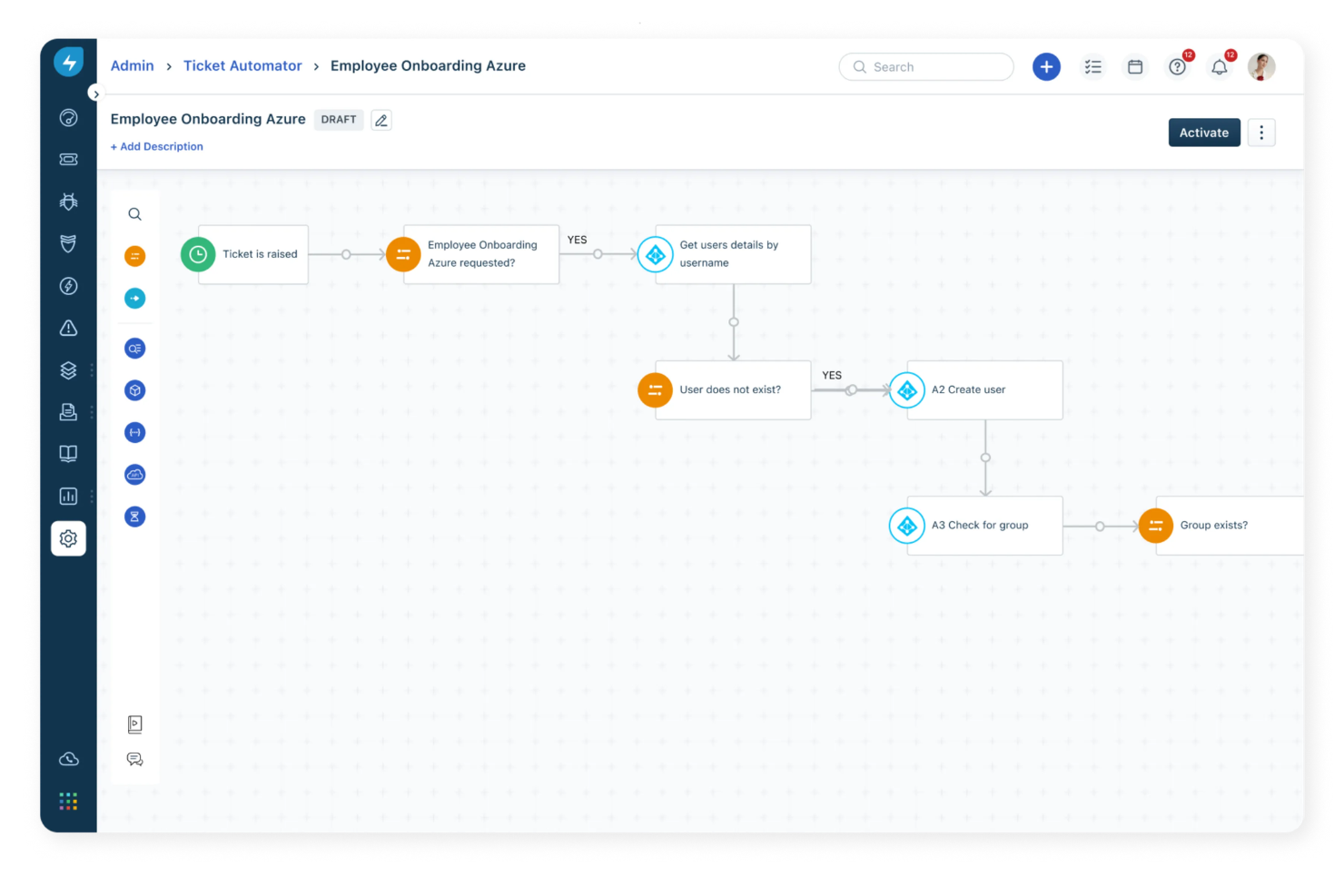
Freshservice es una plataforma de gestión de servicios de TI que también admite el monitoreo de sistemas a través de sus capacidades de ITOM. No es una herramienta de monitoreo dedicada, pero funciona bien para equipos que desean reunir alertas, estado de los servicios, datos de activos y flujos de trabajo de incidentes en un solo lugar. En lugar de centrarse en métricas profundas de infraestructura, ayuda a los equipos a comprender lo que significa una alerta en el contexto de sus servicios y sistemas.
¿Para quién es mejor Freshservice?
Freshservice es adecuado para equipos de TI en organizaciones medianas y grandes que ya gestionan una mesa de servicio y quieren conectar señales de monitoreo con la gestión de incidentes, el seguimiento de activos y los flujos de trabajo de cambio. Es especialmente útil para equipos que gestionan servicios de TI internos o entornos distribuidos, donde comprender el impacto es tan importante como detectar los problemas.
Por qué elegí Freshservice
Elegí Freshservice porque añade contexto útil a los datos de monitoreo cuando llega una alerta. Poder vincular incidentes a activos específicos y ver cómo esos activos se relacionan con otros sistemas a través del CMDB facilita comprender qué está realmente afectado y responder en consecuencia. Es una buena opción para equipos que necesitan coordinar la respuesta, no solo detectar problemas.
Características clave de Freshservice
- Alertas automatizadas: Recibe notificaciones en tiempo real sobre incidentes y eventos del sistema.
- Paneles personalizables: Crea paneles visuales para monitorear métricas clave y el estado del sistema.
- Gestión de solicitudes de servicio: Rastrea y gestiona solicitudes de servicio de TI desde una interfaz unificada.
- Módulo de gestión de cambios: Planifica, aprueba y documenta cambios en tu entorno de TI.
Integraciones de Freshservice
Freshservice ofrece integraciones nativas con Microsoft Teams, SecPod, Slack, TeamViewer, Jira y Azure AD. Hay aplicaciones de conectores y API disponibles para integraciones personalizadas y automatización de flujos de trabajo.
Pros and Cons
Pros:
- CMDB y seguimiento de activos sólidos comparados con la mayoría de las herramientas de monitoreo
- Útil para equipos que quieren el monitoreo integrado en los flujos de trabajo ITSM
- Conecta alertas con incidentes, activos y contexto del servicio
Cons:
- Depende de integraciones para la mayor parte de la recopilación de datos de monitoreo
- No es una plataforma de monitoreo completa para logs, trazas o métricas profundas de infraestructura
New Product Updates from Freshservice
 Experience)
Freshservice Introduces a Reimagined IT Asset Management (ITAM) Experience
Freshservice introduces a reimagined IT Asset Management (ITAM) experience with continuous infrastructure discovery, dependency mapping, IPAM, and Software License Management. This update helps teams improve asset visibility and manage connected IT environments more effectively. For more information, visit Freshservice’s official site.

Atera
Ideal para la monitorización y gestión remota

Atera es una plataforma integral de gestión de TI diseñada para proveedores de servicios gestionados y departamentos de TI que necesitan monitorear, gestionar y dar soporte a endpoints y redes desde un único panel de control.
¿Para Quién es Mejor Atera?
Atera es ideal para MSP y equipos internos de TI que gestionan múltiples endpoints en entornos distribuidos.
Por Qué Elegí Atera
Elegí Atera como uno de los mejores para la monitorización y gestión remota porque su agente RMM ofrece visibilidad en tiempo real a través de endpoints distribuidos. El agente rastrea de manera continua el uso de CPU, RAM, disco, el ancho de banda de red y los eventos de Windows, y entra en línea en aproximadamente 1,2 segundos, reduciendo la demora cuando un dispositivo necesita atención. La gestión de alertas de Atera permite configurar umbrales personalizados y recibir notificaciones instantáneas antes de que los problemas afecten a los usuarios, proporcionando un enfoque proactivo para gestionar dispositivos en múltiples sitios. Las opciones de acceso remoto integradas—Splashtop, AnyDesk, TeamViewer y ScreenConnect—permiten que mi equipo inicie sesiones remotas sin cambiar de herramienta.
Características Clave de Atera
- Automatización de TI: Programa y ejecuta scripts automatizados en varios dispositivos para tareas como incorporación, despliegue de software y mantenimiento rutinario.
- Monitorización SNMP: Supervisa routers, cortafuegos, impresoras y otros dispositivos de red utilizando monitorización automática de OID en sistemas basados en Linux.
- Gestión de parches: Automatiza los parches de software de Windows, macOS y Linux en todos los endpoints gestionados desde un único panel.
- AI Copilot: Obtén resúmenes de incidencias generados por IA y resoluciones sugeridas para pasar de la alerta a la solución más rápidamente durante incidentes activos.
Integraciones de Atera
Las integraciones incluyen Splashtop, TeamViewer, AnyDesk, ScreenConnect, Webroot, Bitdefender, Acronis, QuickBooks, Xero y Domotz.
Pros and Cons
Pros:
- Las alertas por umbral y herramientas de mantenimiento remoto reducen el tiempo de respuesta ante incidentes en los dispositivos.
- El inventario integrado de activos y software ofrece visibilidad sobre implementaciones de hardware y software.
- Consolida la gestión de TI en una sola plataforma, simplificando las operaciones.
Cons:
- La gestión de proyectos y el seguimiento de SLA complejos son relativamente limitados.
- Menos control granular para flujos de trabajo personalizados altamente complejos o integraciones.
New Product Updates from Atera

Atera Adds Webhook Triggers for Technician Assignment Changes
Atera ticket automation rules now support a webhook trigger when a ticket’s technician assignment changes, expanding automation beyond creation, status updates, and closure/resolution events. For more information, visit Atera's official site.

Icinga
Mejor solución de código abierto
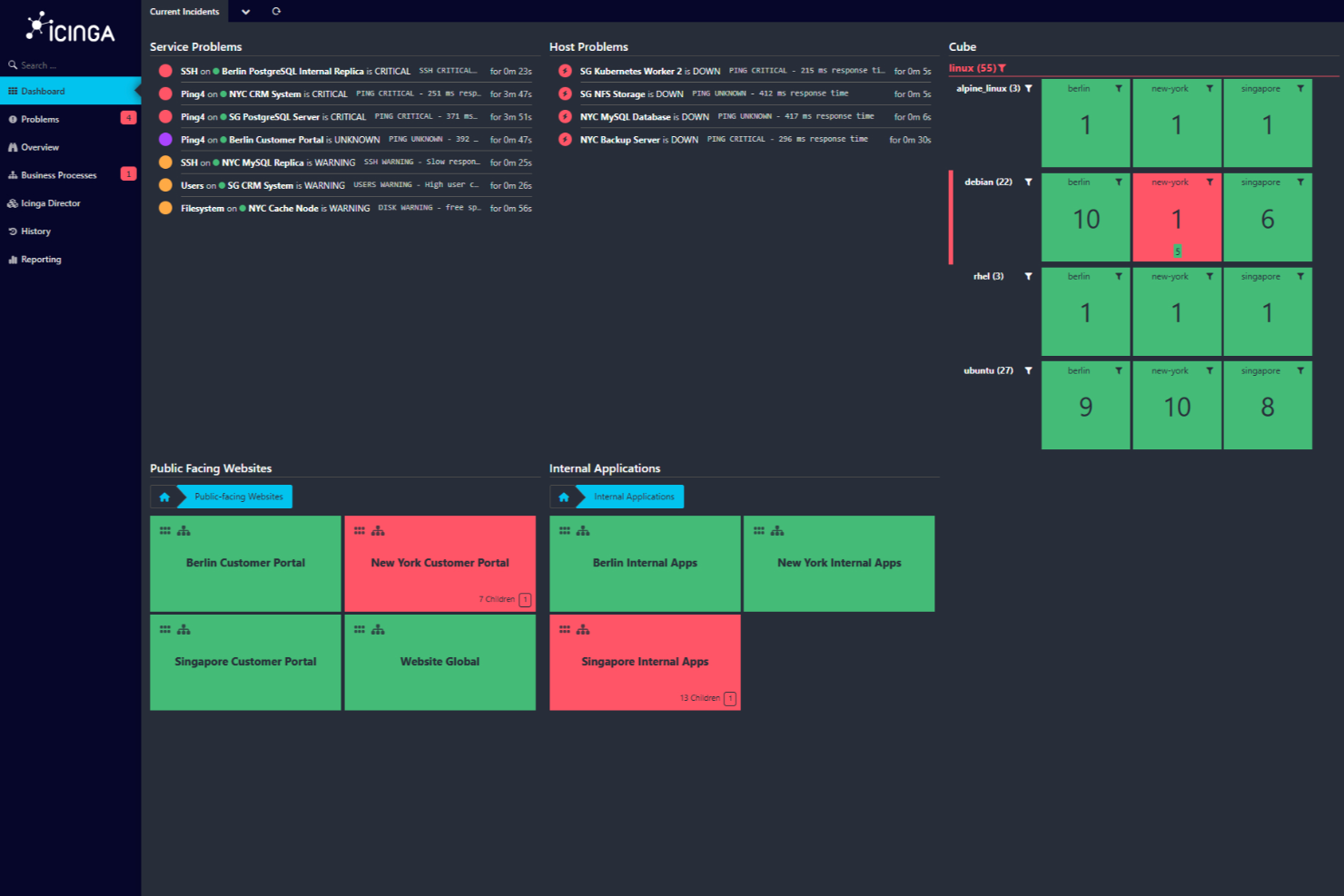
Icinga es una solución de monitoreo de código abierto diseñada para entornos informáticos complejos. Ofrece una pila de monitoreo integral que abarca la infraestructura, la nube y el monitoreo de aplicaciones, lo que la convierte en una opción versátil para empresas de diferentes sectores.
Por qué elegí Icinga: Elegí Icinga por sus funciones de automatización de configuraciones diseñadas para el monitoreo de sistemas. Con el seguimiento de configuración versionada y la posibilidad de retroceder, tu equipo puede probar cambios con seguridad, saber quién modificó qué y revertir si es necesario—ideal para gestionar infraestructuras complejas. Además, el director de Icinga automatiza la creación de objetos de host y servicios importando datos del inventario o CMDB, asegurando que tus verificaciones estén siempre actualizadas.
También proporciona soporte para entornos en la nube—ya sean privados, públicos o híbridos. Módulos dedicados se conectan a vSphere, AWS, Azure, GCP y OpenStack, por lo que tus agentes funcionan igual sin importar dónde se desplieguen.
Características destacadas e integraciones:
Otras funciones incluyen el manejo incorporado de registros y métricas mediante módulos como icingabeat, elasticsearch, logstash y graphite writers, para extraer contexto de registros y datos de rendimiento y así integrarlos en los paneles de monitoreo. Incluso ofrece paneles personalizables con editores de filtros y widgets que permiten enfocarte en contextos y tendencias específicas.
Algunas integraciones de Icinga incluyen Grafana, AWS, Azure, Puppet, Ansible, Chef, Terraform, Jira, PagerDuty, ServiceNow, BigPanda y Stackstorm.
Pros and Cons
Pros:
- Altamente personalizable para diversas necesidades de infraestructura IT
- Escalable tanto para entornos pequeños como grandes
- Gratis para usar y sin tarifas de configuración
Cons:
- El montaje y la configuración presentan una curva de aprendizaje
- Se han reportado problemas ocasionales de rendimiento durante escenarios de alta carga
New Product Updates from Icinga

Icinga Adds TOTP Two-Factor Authentication to Icinga Web
Icinga added time-based one-time password (TOTP) two-factor authentication to Icinga Web, helping organizations strengthen login security with an additional verification step. For more information, visit Icinga’s official site.
 .
.
Checkmk
La mejor opción para la monitorización integral de entornos de TI complejos
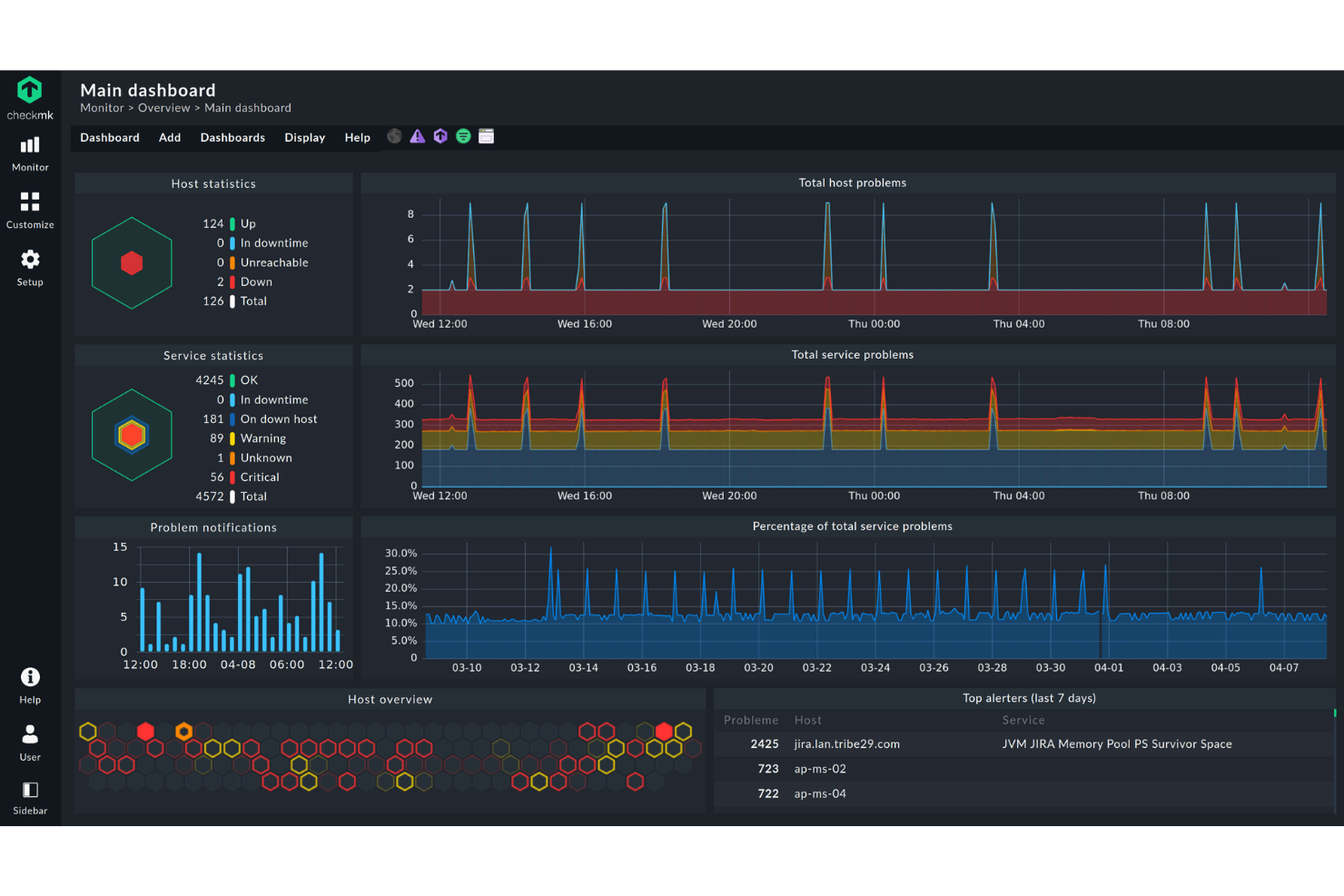
Checkmk es una plataforma de monitorización diseñada para equipos de TI y proveedores de servicios gestionados que necesitan supervisar servidores, redes, aplicaciones y recursos en la nube en entornos complejos, lo que les ayuda a detectar problemas rápidamente y mantener el estado del sistema.
¿Para quién es más adecuado Checkmk?
Checkmk es una opción sólida para equipos de TI medianos y grandes, así como para proveedores de servicios gestionados, que administran entornos híbridos o multinube con un gran volumen de equipos supervisados.
Por qué elegí Checkmk
Checkmk ocupa un lugar en mi lista de favoritos porque realmente cubre la monitorización integral de toda la pila de TI—servidores, redes, contenedores, servicios en la nube y procesos empresariales—sin requerir herramientas separadas para cada capa. Me gusta especialmente su función de autodetección, que identifica automáticamente equipos y servicios y recomienda métricas y umbrales relevantes, de modo que mi equipo no tenga que dedicar horas a la configuración manual en entornos grandes. La capacidad de monitorización de procesos empresariales también es algo que me resulta difícil de replicar en otros productos: permite mapear las dependencias de las aplicaciones en una única vista agregada e incluso simular escenarios de fallo en el peor de los casos en tiempo real. Además, la arquitectura distribuida escala a cientos de sitios y millones de dispositivos, algo importante cuando se administra una infraestructura que abarca varios centros de datos o regiones.
Características principales de Checkmk
- Monitorización de registros: Recopila y filtra eventos de syslog, traps de SNMP, registros de eventos de Windows y archivos de registro, agrupando las entradas duplicadas para reducir el ruido de las alertas.
- Análisis predictivo: Analiza datos históricos para pronosticar el consumo de recursos y ajusta dinámicamente los umbrales según eventos anteriores.
- Inventario de hardware y software: Identifica y realiza un seguimiento automáticos de todos los activos de hardware y software, supervisa los cambios e integra los datos en la vista de la CMDB.
- Paneles personalizables: Proporciona paneles listos para usar y totalmente personalizables para entornos de AWS, Azure, Linux, Windows y Kubernetes, con gráficos HTML5 interactivos.
Integraciones de Checkmk
Las integraciones incluyen AWS, Azure, Google Cloud Platform, VMware vSphere, Docker, Kubernetes, Microsoft SQL Server, Oracle Database, SAP HANA y Cisco.
Pros and Cons
Pros:
- Admite configuraciones de monitorización adaptadas para entornos complejos
- Actualizaciones del panel en tiempo real para una mejor visibilidad de la infraestructura
- Opciones de monitorización flexibles que admiten configuraciones personalizadas
Cons:
- Orientación y documentación limitadas para principiantes
- La interfaz puede resultar confusa al principio
New Product Updates from Checkmk
Checkmk Adds Experimental MCP Server and OAuth 2.0 Support
Checkmk adds an experimental MCP server and built-in OAuth 2.0 authorization for commercial editions. These updates let AI agents query monitoring data with native authorization support. For more information, visit Checkmk’s official site.
 .
.
Sentry
Mejor para seguimiento de errores en tiempo real
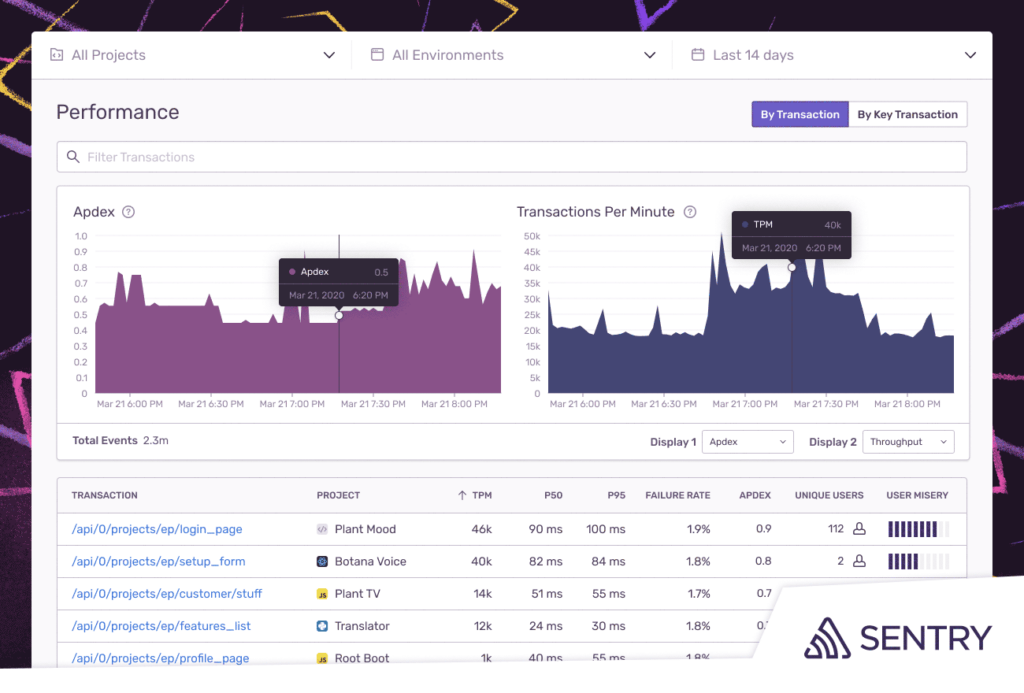
Sentry permite a los desarrolladores y equipos de TI monitorear, diagnosticar y resolver errores de aplicaciones y problemas de rendimiento en sistemas web, móviles y de backend, ayudando a detectar problemas antes de que afecten a los usuarios.
¿Para quién es mejor Sentry?
Sentry es ideal para equipos de desarrollo de software y DevOps que necesitan una visibilidad profunda sobre la salud de aplicaciones en múltiples entornos y bases de código.
Por qué elegí Sentry
Elegí Sentry como uno de los mejores por su capacidad de seguir errores en tiempo real con contexto real, no solo datos brutos de registros. Cuando ocurre un error en producción, Sentry captura el stack trace completo, variables locales, breadcrumbs y las acciones del usuario previas al error—de modo que mi equipo no tiene que adivinar qué pasó. También me gusta el monitoreo del estado de las versiones, que rastrea en tiempo real la tasa de sesiones sin fallos y la adopción de nuevas versiones, permitiendo detectar al instante cuándo una nueva implementación comienza a degradarse. Seer, el agente de depuración con IA de Sentry, analiza stack traces, registros e historial de commits para identificar automáticamente las causas raíz y sugerir soluciones—reduciendo el tiempo entre 'algo se rompió' y 'esta es la razón'.
Características clave de Sentry
- Trazado distribuido: Sigue una sola solicitud a través de múltiples servicios con vistas de traza en cascada que señalan exactamente dónde se introduce latencia o errores.
- Métricas personalizadas y monitoreo de span: Define y rastrea indicadores de rendimiento específicos de tu aplicación, como consultas lentas a la base de datos o llamadas a API que no responden, a nivel de código.
- Priorización por impacto en usuarios: Destaca automáticamente los problemas que afectan a la mayor cantidad de usuarios para que tu equipo pueda priorizar qué corregir primero.
- Correlación distribuida de logs: Vincula registros directamente con las trazas e incidencias específicas que provocan caídas de rendimiento, sustituyendo búsquedas manuales de logs.
Integraciones de Sentry
Las integraciones incluyen GitHub, Jira, Slack, GitLab, Microsoft Teams, PagerDuty, Bitbucket, Discord, Asana y Datadog.
Pros and Cons
Pros:
- Los stack traces detallados proporcionan ubicaciones precisas de los errores
- Los datos contextuales ayudan a replicar y resolver problemas
- Se integra con muchas herramientas populares de desarrollo y comunicación
Cons:
- Puede ser abrumador para principiantes debido a sus numerosas funciones
- Equipos grandes podrían necesitar actualizarse para más eventos
- Algunos usuarios han mencionado que quisieran opciones de alertas más flexibles
New Product Updates from Sentry

Sentry Expands Seer Agent With API Actions and External Telemetry
Seer Agent can now create and manage Sentry assets via the API and ingest Datadog and Google Cloud Platform telemetry through Seer Connectors to improve diagnosis. For more information, visit Sentry's official site.
 .
.
Mejor para la monitorización de redes distribuidas
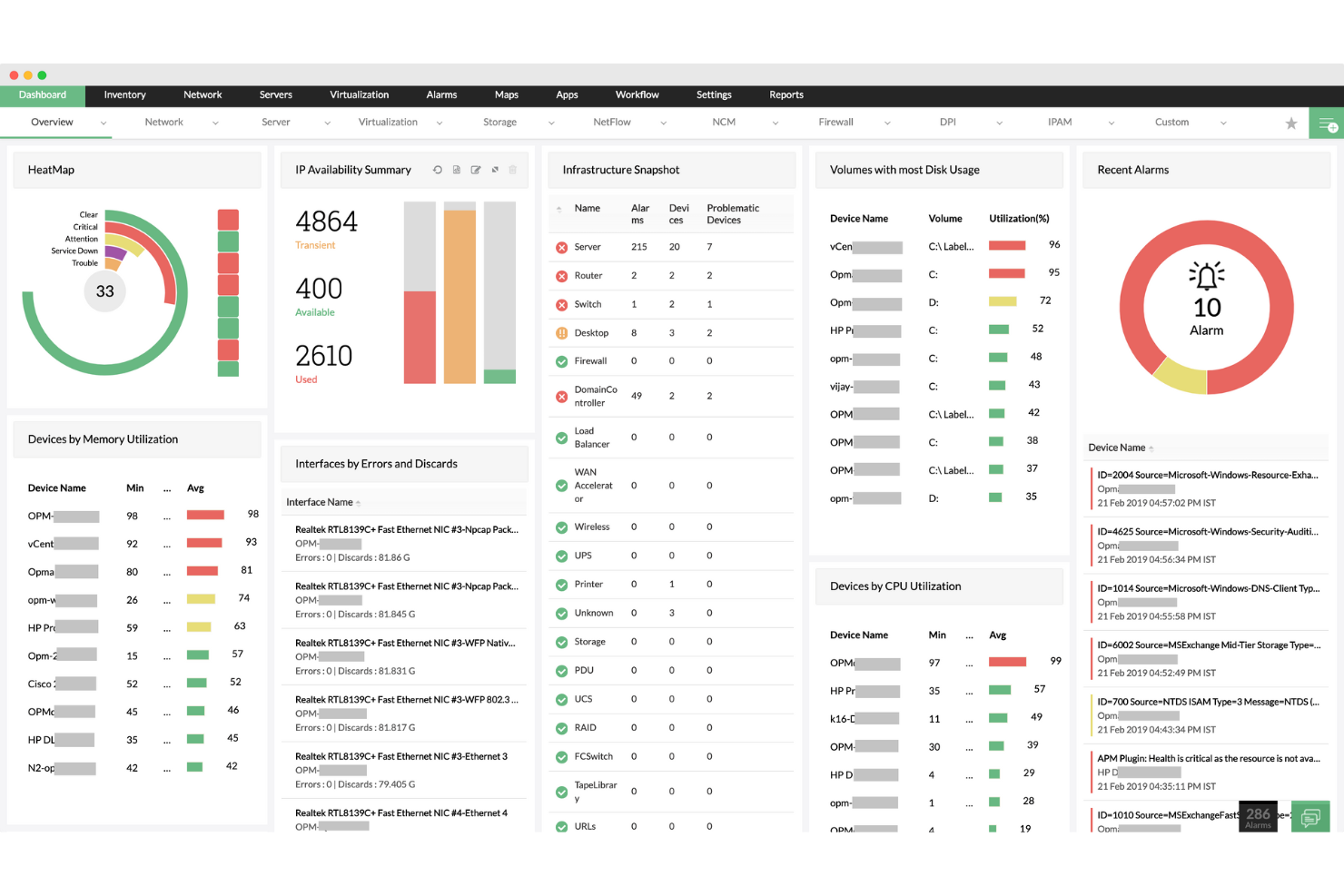
ManageEngine OpManager ofrece a los equipos de TI y administradores de red una plataforma unificada para monitorear dispositivos de red, servidores e infraestructura crítica, ayudando a las organizaciones a detectar y resolver rápidamente problemas de rendimiento en entornos complejos.
¿Para quién es mejor ManageEngine OpManager?
ManageEngine OpManager es ideal para medianas y grandes empresas que necesitan visibilidad centralizada en múltiples sitios, sucursales u oficinas con infraestructura de red distribuida geográficamente.
Por qué elegí ManageEngine OpManager
Elegí ManageEngine OpManager como uno de los mejores debido a lo bien que su arquitectura central-con-sondas maneja la monitorización de redes distribuidas a gran escala. Cuando gestionas infraestructura en varias sucursales u oficinas de datos, OpManager despliega sondas en cada sitio remoto que se encargan del descubrimiento local, mapeo y monitoreo de fallos—y luego envían toda la información al panel central. Me gusta que el servidor central te brinda visibilidad total sobre el estado de los dispositivos, utilización de CPU, memoria y disco por cada sonda sin necesidad de iniciar sesión en cada sitio por separado. Además, cualquier cambio de configuración o actualización de políticas que se aplica desde el servidor central se propaga automáticamente a todas las sondas conectadas, lo que reduce la deriva de configuración que puede provocar inconvenientes en entornos multinivel.
Funciones clave de ManageEngine OpManager
- Mapeo de red: Genera automáticamente mapas de topología L1/L2 para visualizar relaciones entre dispositivos e identificar el origen de fallos o degradación del rendimiento.
- Umbrales adaptativos: Utiliza ML para aprender patrones de utilización y establecer umbrales de alerta dinámicos, reduciendo falsos positivos provenientes de configuraciones estáticas.
- Automatización de flujos de trabajo de TI: Permite crear respuestas automáticas ante condiciones de falla, como ejecutar scripts de diagnóstico o reiniciar servicios al activarse alertas específicas.
- Pronóstico de capacidad de almacenamiento: Analiza tendencias históricas de uso para predecir cuándo se agotarán los recursos de almacenamiento antes de que suceda.
Integraciones de ManageEngine OpManager
Las integraciones incluyen ServiceDesk Plus, NetFlow Analyzer, Network Configuration Manager, OpUtils, AlarmsOne, Applications Manager, Firewall Analyzer, Analytics Plus, AssetExplorer y Zoho Creator.
Pros and Cons
Pros:
- Descubrimiento de red automatizado y programado
- Soporte para entornos de múltiples proveedores
- Mapas de red en tiempo real y que se actualizan automáticamente
Cons:
- El precio puede ser elevado para equipos pequeños
- La configuración inicial puede ser compleja
New Product Updates from ManageEngine OpManager

ManageEngine OpManager Adds NVIDIA GPU Monitoring
ManageEngine OpManager adds NVIDIA GPU monitoring for Linux servers, dedicated GPU dashboards, adaptive thresholds, and automated incident response to help teams track AI infrastructure performance, health, and resource usage. For more information, visit ManageEngine OpManager’s official site.
 .
.
Site24x7
Mejor para la monitorización de infraestructura de pila completa
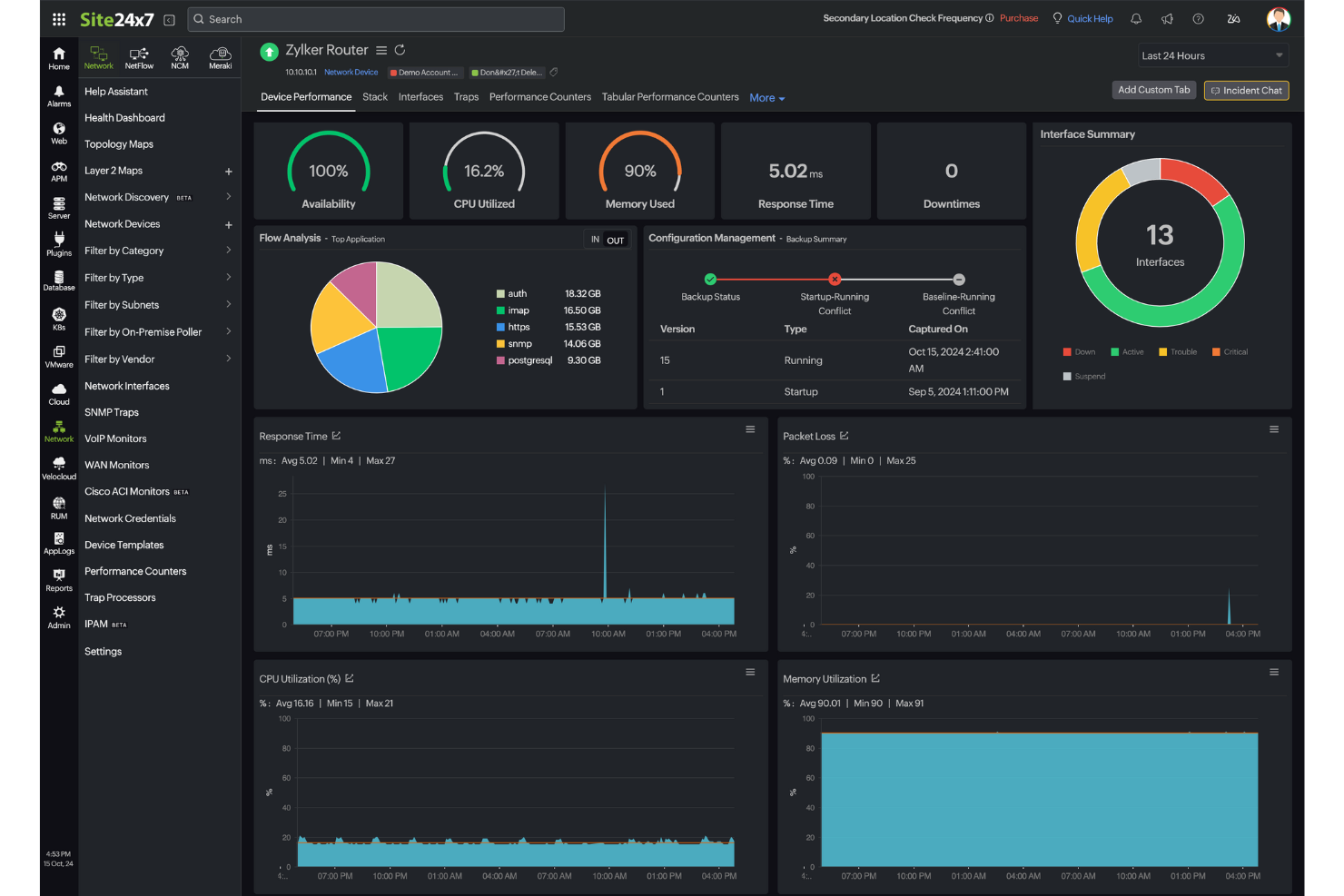
Site24x7 ofrece a los equipos de TI y proveedores de servicios gestionados una plataforma unificada para monitorizar servidores, redes, aplicaciones y recursos en la nube, ayudándote a detectar y resolver problemas de rendimiento en toda tu infraestructura tecnológica.
¿Para quién es mejor Site24x7?
Site24x7 es ideal para equipos de TI y MSPs que gestionan entornos mixtos que abarcan infraestructuras locales, plataformas en la nube y aplicaciones web.
Por qué elegí Site24x7
Site24x7 gana su lugar en mi lista porque cubre toda la infraestructura desde una sola consola: servidores, redes, contenedores, plataformas en la nube y aplicaciones, todo en un solo lugar. Me gusta especialmente la detección de anomalías basada en AIOps, que usa aprendizaje automático para señalar desviaciones sobre referencias dinámicas en vez de depender de umbrales estáticos que tienes que configurar manualmente. Esto permite que mi equipo detecte una fuga de memoria o un pico de tráfico inusual antes de que provoque una interrupción. La vista correlacionada de métricas, trazas y registros también es muy útil: cuando algo falla, no tengo que estar saltando entre tres herramientas diferentes para averiguar qué ocurrió.
Funciones clave de Site24x7
- Monitoreo de rendimiento de red: Analiza el rendimiento de dispositivos de más de 450 proveedores usando más de 15,000 plantillas de dispositivos a nivel de dispositivo e interfaz.
- Monitoreo real de usuarios: Supervisa cómo los usuarios finales experimentan tus sitios web a través de diferentes geografías, dispositivos, navegadores y proveedores de internet, incluyendo repeticiones de sesión y seguimiento de errores JavaScript.
- Gestión de configuración de red: Automatiza las copias de seguridad de configuración, detecta cambios no autorizados, identifica vulnerabilidades de firmware y supervisa el cumplimiento desde un solo lugar.
- Gestión de registros: Recopila e indexa registros de servidores, aplicaciones, redes y servicios en la nube dentro de una consola centralizada, con búsqueda basada en consultas y visualización en paneles.
Integraciones de Site24x7
Las integraciones incluyen ServiceNow, PagerDuty, Opsgenie, Jira, Slack, Microsoft Teams, Zendesk, Freshservice, Splunk On-Call (VictorOps) y Discord.
Pros and Cons
Pros:
- La monitorización de pila completa potenciada por IA soporta la gestión de infraestructura multicloud
- El proceso de configuración rápida cubre la monitorización de sitios web y recursos en la nube
- El monitoreo flexible se integra fácilmente con múltiples componentes de infraestructura
Cons:
- Errores en las alertas generan problemas al añadir nuevas configuraciones de monitoreo
- La estructura de precios se vuelve costosa por los distintos tipos de monitorización
New Product Updates from Site24x7
Site24x7 Adds Compliance Reports and Domain Squatting Detection
Site24x7’s Digital Risk Analyzer now offers domain compliance assessment and squatting detection to help you validate security posture, compare domains, and spot impersonation risks faster. For more information, visit Site24x7’s official site.
 .
.Otras herramientas de monitoreo de sistemas
Estas son algunas opciones adicionales de herramientas de monitoreo de sistemas que no llegaron a mi lista de selección, pero que aún vale la pena revisar:
- Nagios
Mejor para monitorización integral de infraestructura de TI
- Zabbix
Ideal para soluciones de monitoreo escalables
- New Relic
Ideal para información sobre el estado de la infraestructura
- Prometheus
Ideal para alertas y consultas fiables
- Grafana Labs
Ideal para visualizar métricas
- Zenoss
Mejor para operaciones de TI nativas en la nube
- Lakeside
Mejor para analítica de experiencia digital
- LibreNMS
Mejor para monitoreo de redes de código abierto


Cómo Evalúo las Herramientas de Monitoreo de Sistemas
Divido mi evaluación en dos capas: requisitos básicos como métricas en tiempo real y alertas multiplataforma, y diferenciadores como la detección de anomalías con IA que hacen que una herramienta valga la pena recomendar.
Funcionalidad Principal (Requisitos Esenciales Para Esta Lista)
Cuando selecciono herramientas para mi lista, califico cada una en una escala del 0 (no ofrece la funcionalidad) al 5 (destaca en esta área) para cada funcionalidad principal que se enumera a continuación. Luego, calculo la puntuación total de la herramienta en porcentaje. Cada herramienta debe alcanzar una puntuación total mínima del 75% para ser considerada para su inclusión.
- Recopilación de métricas en tiempo real: Verifico si una herramienta supervisa el uso de CPU, memoria, disco y red con granularidad de menos de un minuto—el tipo de tasa de actualización que necesitas durante un incidente en vivo.
- Alertas y notificaciones: Cada herramienta debe admitir alertas configurables por umbral en canales como correo electrónico, Slack o PagerDuty, con reglas de escalamiento para direccionar los problemas al ingeniero de guardia adecuado.
- Cobertura de sistemas multiplataforma: Evalúo si la herramienta monitorea servidores físicos, máquinas virtuales, contenedores y cargas de trabajo en la nube en entornos Linux, Windows y Unix, todo en una sola vista.
- Paneles e interfaces de visualización: Un buen panel permite profundizar desde una visión general de toda la flota hasta la tendencia de memoria de un host individual durante 30 días, así que busco widgets personalizables y vistas históricas.
- Seguimiento de registros y eventos: Busco recopilación centralizada de registros con búsqueda y correlación de eventos—funciones que ayudan a conectar un pico en la E/S de disco con una tarea cron o evento de despliegue específico.
- Recopilación de datos con o sin agente: La herramienta debe ofrecer métodos de recopilación flexibles, ya sea con agentes ligeros en los hosts de producción o sondeo sin agentes mediante SNMP, WMI o SSH para el equipamiento de red.
Una vez tengo una lista de herramientas que cumplen este criterio, considero qué distingue a cada plataforma.
Factores Diferenciadores (Qué Distingue a los Proveedores)
Así es como comparo y contrasto diferentes proveedores:
Características Destacadas
La detección de anomalías impulsada por IA es un gran diferenciador. Las herramientas que establecen una línea base de comportamiento normal y señalan desviaciones ayudan a los equipos a detectar problemas como una fuga de memoria lenta días antes de que cause la caída de un equipo de producción. También evalúo el auto-descubrimiento y el mapeo de topología, lo cual es relevante cuando tu infraestructura cambia frecuentemente debido a eventos de escalado o despliegues. La planificación de capacidad predictiva completa el panorama al prever el agotamiento de recursos, dando a los directores de TI los datos que necesitan para justificar inversiones en infraestructura antes de que una interrupción fuerce la decisión.
Más Allá de las Características
La transparencia en el modelo de precios es muy importante aquí. Algunas herramientas cobran por host, otras por volumen de datos, y un incremento inesperado en la ingesta puede agotar un presupuesto de la noche a la mañana. Evalúo si el precio escala de manera predecible a medida que crece tu entorno. La profundidad de integración es otra prioridad—reviso conectores nativos con herramientas de incidentes como PagerDuty y plataformas ITSM como ServiceNow, además de soporte para OpenTelemetry para equipos que arman pipelines de observabilidad personalizados. La flexibilidad de despliegue también es clave, especialmente para equipos que operan entornos híbridos o bajo requisitos estrictos de residencia de datos.
Cómo elegir una herramienta de monitoreo de sistemas
Es fácil perderse entre largas listas de características y estructuras de precios complejas. Para ayudarte a mantener la atención mientras avanzas en tu proceso único de selección de software, aquí tienes una lista de factores que debes tener en cuenta:
| Factor | Qué debes considerar |
|---|---|
| Escalabilidad | ¿Puede la herramienta crecer junto con tu empresa? Busca soluciones que gestionen un mayor volumen de datos y usuarios sin reducir el rendimiento. Considera las posibles necesidades futuras. |
| Integraciones | ¿Funciona con tu conjunto de tecnologías actual? Comprueba la compatibilidad con el software existente para garantizar un flujo de datos fluido y evitar sistemas aislados. |
| Personalización | ¿Puedes adaptarla a tu flujo de trabajo? Evalúa si la herramienta permite modificaciones para ajustarse a tus procesos y evita soluciones rígidas que te obliguen a adaptarte. |
| Facilidad de uso | ¿La interfaz es intuitiva para tu equipo? Una herramienta compleja puede obstaculizar la eficiencia. Considera herramientas que ofrezcan un diseño fácil de usar para minimizar el tiempo de capacitación. |
| Implementación e incorporación | ¿Cuánto tiempo tardará en estar operativa? Evalúa el tiempo y los recursos necesarios para la implementación, incluida la capacitación y la asistencia durante la transición. |
| Coste | ¿Los precios son transparentes y se ajustan al presupuesto? Ten en cuenta tanto los costes iniciales como las tarifas recurrentes. Desconfía de los cargos ocultos que pueden aumentar los gastos totales. |
| Medidas de seguridad | ¿Protege tus datos? Asegúrate de que la herramienta cumpla con los estándares de seguridad y ofrezca funciones como cifrado y controles de acceso para proteger la información confidencial. |
¿Qué son las herramientas de monitoreo de sistemas?
Las herramientas de monitoreo de sistemas son soluciones de software que rastrean y gestionan el rendimiento y el estado de los sistemas de TI. Los administradores de TI, ingenieros de redes y analistas de sistemas suelen utilizar estas herramientas para garantizar que los sistemas funcionen de manera fluida y eficiente. Las capacidades de monitoreo en tiempo real, alertas y generación de informes ayudan a identificar problemas, optimizar recursos y mantener el tiempo de actividad. Estas herramientas proporcionan información esencial que mantiene los sistemas confiables y seguros, especialmente al utilizar software dedicado de monitoreo de hardware.
Características
Al seleccionar herramientas de monitoreo de sistemas, presta atención a las siguientes características clave:
- Monitoreo en tiempo real: Rastrea continuamente el rendimiento del sistema para identificar y abordar rápidamente los problemas a medida que surgen.
- Alertas: Envía notificaciones a los usuarios cuando se superan determinados umbrales, lo que permite responder rápidamente a posibles problemas.
- Generación de informes: Genera informes detallados de rendimiento que ayudan a analizar tendencias y tomar decisiones fundamentadas.
- Capacidades de integración: Se conecta con el software y los sistemas existentes para garantizar un flujo de datos fluido y un monitoreo integral.
- Paneles personalizables: Permiten a los usuarios adaptar la interfaz para mostrar los datos más relevantes según sus necesidades específicas.
- Análisis predictivo: Utiliza datos históricos para pronosticar posibles problemas futuros y ayuda a prevenir el tiempo de inactividad antes de que ocurra.
- Medidas de seguridad: Ofrece funciones como cifrado y controles de acceso para proteger los datos confidenciales del sistema.
- Escalabilidad: Se adapta al crecimiento de los datos y a las demandas de los usuarios sin comprometer el rendimiento.
- Interfaz fácil de usar: Garantiza la facilidad de uso, reduce la curva de aprendizaje y minimiza la necesidad de capacitación extensa.
- Respuesta automatizada a incidentes: Proporciona herramientas para abordar automáticamente los problemas habituales, reduciendo la necesidad de intervención manual.
Beneficios
La implementación de herramientas de monitoreo de sistemas, incluidas las modernas alternativas a Nagios, ofrece varios beneficios para tu equipo y tu empresa. Estos son algunos de los que puedes esperar:
- Mayor tiempo de actividad: El monitoreo en tiempo real y las alertas ayudan a abordar rápidamente los problemas, reducen el tiempo de inactividad y mantienen los sistemas funcionando sin inconvenientes.
- Seguridad mejorada: Las medidas de seguridad, como el cifrado y los controles de acceso, protegen los datos confidenciales y minimizan el riesgo de filtraciones.
- Toma de decisiones fundamentada: Los informes detallados y el análisis predictivo ofrecen información que orienta la asignación de recursos y la planificación futura.
- Mayor eficiencia: La respuesta automatizada a incidentes reduce la carga de trabajo manual y permite que tu equipo se concentre en tareas más estratégicas.
- Mejor gestión de recursos: El seguimiento del uso de recursos ayuda a optimizar el rendimiento del sistema y evitar gastos innecesarios.
- Compatibilidad con la escalabilidad: La capacidad de gestionar demandas crecientes garantiza que tus sistemas puedan crecer junto con tu empresa sin perder rendimiento.
- Satisfacción de los usuarios: Una interfaz fácil de usar facilita que tu equipo adopte y utilice eficazmente la herramienta, minimizando la frustración.
Costos & precios
Seleccionar herramientas de monitoreo de sistemas requiere comprender los diversos modelos y planes de precios disponibles. Los costos varían según las características, el tamaño del equipo, los complementos y otros factores. La siguiente tabla resume los planes habituales, sus precios promedio y las características que suelen incluir las soluciones de herramientas de monitoreo de sistemas:
Tabla comparativa de planes para herramientas de monitoreo de sistemas
| Tipo de plan | Precio promedio | Características habituales |
|---|---|---|
| Plan gratuito | $0 | Monitoreo básico, alertas limitadas y asistencia de la comunidad. |
| Plan personal | $5-$15/usuario/mes | Monitoreo en tiempo real, generación de informes básicos y notificaciones por correo electrónico. |
| Plan empresarial | $20-$50/usuario/mes | Generación avanzada de informes, integraciones y paneles personalizables. |
| Plan corporativo | $60-$100/usuario/mes | Suite completa de análisis, análisis predictivo y asistencia dedicada al cliente. |
Preguntas frecuentes sobre las herramientas de monitorización de sistemas
Estas son algunas respuestas a preguntas frecuentes sobre las herramientas de monitorización de sistemas:
¿Pueden las herramientas de monitorización de sistemas integrarse con sistemas de gestión de incidencias?
Sí, muchas herramientas se conectan con plataformas de gestión de incidencias como Jira o ServiceNow. Esto significa que las alertas pueden crear incidencias automáticamente, para que tu equipo no pase nada por alto. Ayuda a mantener organizados los flujos de trabajo y a garantizar que la resolución de incidencias siga su curso. La configuración normalmente implica utilizar webhooks o complementos nativos.
¿Qué tipos de alertas se pueden configurar en las herramientas de monitorización de sistemas?
Puedes configurar alertas para umbrales, anomalías o eventos específicos, como interrupciones del servicio. Algunas herramientas admiten alertas personalizadas para mensajes de registro o comprobaciones fallidas. Tú decides cómo se activan las alertas: por valor, intervalo de tiempo o tendencias. Se pueden enviar por correo electrónico, SMS, Slack u otros canales.
¿Pueden las herramientas de monitorización de sistemas realizar un seguimiento tanto de servidores como de aplicaciones?
Sí, muchas herramientas realizan un seguimiento de las métricas del hardware y también monitorizan el rendimiento a nivel de aplicación. Esto incluye el tiempo de actividad, el tiempo de respuesta y el comportamiento de los usuarios en las aplicaciones. Puedes obtener visibilidad sobre cómo el estado del servidor afecta al rendimiento de la aplicación. Algunas herramientas ofrecen módulos independientes para la monitorización de la infraestructura y de las aplicaciones.
¿Cómo ayudan las herramientas de monitorización de sistemas a gestionar entornos multinube?
La mayoría de las herramientas permiten conectarse a AWS, Azure y Google Cloud mediante API o agentes. Recopilan datos de estas plataformas y los presentan en un único panel. Esto ofrece a tu equipo una vista unificada del rendimiento, incluso si los sistemas se ejecutan en nubes diferentes. Reduce la necesidad de alternar entre las herramientas de varios proveedores.
Qué sigue:
Si estás investigando herramientas de monitorización de sistemas, contacta gratuitamente con un asesor de SoftwareSelect para obtener recomendaciones.
Rellenas un formulario y mantienes una breve conversación en la que se profundiza en los detalles de tus necesidades. Después recibirás una lista de opciones de software para revisar. También te ayudarán durante todo el proceso de compra, incluidas las negociaciones de precios.