

El software de monitorización de infraestructuras te ayuda a realizar un seguimiento del estado y el rendimiento de tus sistemas, tanto si gestionas servidores, redes, aplicaciones o máquinas virtuales.
Muchos equipos buscan estas herramientas cuando tienen puntos ciegos en su infraestructura, les cuesta detectar los problemas a tiempo o pierden tiempo gestionando diferentes paneles. Elegir la herramienta equivocada o depender de una que esté desactualizada puede provocar alertas desapercibidas, periodos de inactividad o una visibilidad limitada.
He ayudado a equipos a seleccionar y configurar plataformas de monitorización que se ajustan a sus necesidades y que realmente facilitan la resolución de problemas, en lugar de complicarla. Esta guía se basa en esa experiencia práctica para que puedas encontrar un software que te ofrezca claridad sin complicaciones.
Por qué confiar en nuestras recomendaciones de software
6,700+
Reviews
20
Industry experts
16+
Evaluation factors
14
Years
Nuestro equipo lleva probando y evaluando software desde 2012. Como líderes tecnológicos, sabemos lo difícil —y lo importante— que es elegir el software adecuado.
Para esta guía, evaluamos las herramientas mediante pruebas prácticas e investigación independiente, puntuando las herramientas según nuestros criterios de selección.
Nuestras reseñas reflejan nuestro criterio editorial humano, no un discurso de ventas.
Revisores expertos:
- Paulo Gardini MiguelDirector técnico
 Tim FisherVP de IA
 Gabriel RosasTech Lead y arquitecto de software
 Christhian GruhnTech Lead y arquitecto de plataforma

Tabla comparativa de herramientas de monitorización
La siguiente tabla compara los detalles de precios de mis principales selecciones de herramientas de monitorización.
| Tool | Best For | Trial Info | Price | ||
|---|---|---|---|---|---|
| 1 | El mejor para monitorizar TI, OT y la nube | Prueba gratuita de 30 días | Desde $179/mes (facturado anualmente) | Website | |
| 2 | Ideal para visibilidad de red en tiempo real | Prueba gratuita de 14 días + demo gratuita disponible | Precios bajo solicitud | Website | |
| 3 | Mejor para la detección proactiva de problemas | Prueba gratuita de 30 días + demo gratuita disponible | Desde $129/técnico/mes (facturación anual) | Website | |
| 4 | Mejor solución de código abierto | Plan gratuito disponible | Precio bajo consulta | Website | |
| 5 | Ideal para seguimiento de rendimiento en tiempo real | Prueba gratuita de 30 días + demo gratuita + plan gratuito disponible | Desde $199/año | Website | |
| 6 | Ideal para el rastreo de errores en aplicaciones en tiempo real | Plan gratuito + prueba gratuita + demo gratuito disponible | Desde $26/mes (facturado anualmente) | Website | |
| 7 | La mejor opción para gestión completa de redes | Demostración gratuita disponible | Desde $245/mes (facturado anualmente) | Website | |
| 8 | Ideal para monitoreo proactivo | Prueba gratuita de 30 días + demostración gratuita disponible | Desde $10/mes (facturación anual) | Website | |
| 9 | Ideal para la detección de anomalías asistida por IA | Prueba gratuita disponible | Precios bajo solicitud | Website | |
| 10 | Mejor para supervisión a escala de nube | Prueba gratuita de 14 días | Desde $15/usuario/mes (facturado anualmente) | Website |


Análisis de las mejores herramientas de monitorización
A continuación encontrarás mis resúmenes detallados de las mejores herramientas de monitorización que llegaron a mi lista final. Mis análisis ofrecen una visión detallada de las funciones principales, ventajas & inconvenientes, integraciones y casos de uso ideales de cada herramienta para ayudarte a encontrar la mejor para ti.
 El mejor para monitorizar TI, OT y la nube
- Prueba gratuita de 30 días
- Desde $179/mes (facturado anualmente)
Visit WebsiteCustomer Rating:4.6/5
El árbol de dispositivos para la monitorización de red en PRTG muestra cómo se interconectan los dispositivos y proporciona información detallada sobre el estado de cada uno. PRTG Network Monitor es una herramienta integral que te ayuda a supervisar toda tu infraestructura de TI. Monitorea sistemas, dispositivos, tráfico y aplicaciones, proporcionando información en tiempo real sobre el estado de tu red. Con PRTG, puedes identificar y solucionar problemas antes de que se vuelvan críticos.
Por qué elegí PRTG: Elegí PRTG por su capacidad para unificar la monitorización de diversas tecnologías a través de protocolos integrados como SNMP, WMI, SSH y otros. Esto significa que puedes supervisar una amplia variedad de plataformas, dispositivos y sistemas dentro de tu red, asegurando que todos los componentes funcionen correctamente. Además, PRTG ofrece informes personalizables, que te permiten generar informes detallados adaptados a tus necesidades. Otro aspecto valioso de PRTG es su sistema de alertas en tiempo real. Recibes notificaciones inmediatas sobre posibles problemas, lo que te permite responder rápidamente y minimizar el tiempo de inactividad. La mayoría de las herramientas de monitoreo cubren infraestructura de TI, la nube o sistemas industriales—raramente los tres. PRTG reúne servidores, dispositivos de red y servicios en la nube junto con equipos OT modernos a través de Modbus y OPC UA, para que los equipos que supervisan entornos combinados de TI estándar e industrial no tengan que combinar herramientas por separado.
Características destacadas e integraciones:
Otras funciones clave incluyen estadísticas detalladas de las aplicaciones que se ejecutan en tu red, ayudándote a gestionar los recursos de manera eficaz. Además, su función de monitoreo distribuido te permite supervisar varias redes en diferentes ubicaciones, todo desde una sola interfaz. También dispone de mapas y paneles en tiempo real que visualizan el estado de tu red, facilitando la identificación y resolución de problemas. Entre las integraciones se encuentran AWS, Cisco, Dell Technologies, HPE, VMware, ServiceNow, Check Point, Sonicwall, NetApp, Fujitsu, Lansweeper y Martello.
Pros and Cons
Pros:
- Proporciona una visión completa de la infraestructura de red
- Paneles personalizables y alertas en tiempo real
- Soporta múltiples tecnologías de monitoreo
Cons:
- La configuración inicial puede llevar bastante tiempo
- La licencia basada en sensores puede volverse costosa para redes grandes
Learn more about Paessler PRTG: Ideal para visibilidad de red en tiempo real
- Prueba gratuita de 14 días + demo gratuita disponible
- Precios bajo solicitud
Visit WebsiteCustomer Rating:4.7/5
Auvik ofrece un panel de supervisión de red detallado. Auvik es una plataforma de gestión de redes que mejora la visibilidad y el rendimiento de tu red. Ofrece herramientas de supervisión para ayudarte a mantener tu red bajo control y funcionando sin problemas.
Por qué elegí Auvik: Una de las razones por las que escogí Auvik como una de las mejores herramientas de monitorización es su capacidad de proporcionar monitorización de dispositivos en tiempo real. Esta función te permite vigilar constantemente la salud de tu red, asegurando que puedas detectar y abordar problemas en cuanto surjan. Otra característica destacada es el mapeo automatizado de la red, que representa visualmente el diseño y las conexiones de tu red. Esto te ayuda a comprender cómo interactúan los diferentes dispositivos, facilitando la gestión y la resolución de problemas. Otra función que resalta es el seguimiento de métricas de rendimiento. Con esto, puedes recopilar datos valiosos sobre el rendimiento de tu red, permitiéndote tomar decisiones informadas para optimizar su funcionalidad. La plataforma también ofrece alertas personalizables que te notifican sobre posibles incidencias, para que puedas abordarlas antes de que se agraven.
Funciones destacadas e integraciones:
Las funciones incluyen copias de seguridad de configuración que aseguran que nunca pierdas ajustes críticos, gestión remota de dispositivos que te permite controlar dispositivos desde cualquier lugar y configuraciones de alertas globales que proporcionan monitorización consistente en toda tu red. Estas funciones trabajan juntas para ofrecer una solución integral para gestionar y monitorizar tu red.
Las integraciones incluyen Cisco, Datto, Microsoft Intune, Slack, ServiceNow, ConnectWise, Dell, Fortinet, Palo Alto Networks, Cisco Meraki, Okta y Jamf.
Pros and Cons
Pros:
- Visibilidad en tiempo real del rendimiento de la red
- Mapeo y descubrimiento automatizados de la red
- Copias de seguridad y automatización de comparación de configuraciones
Cons:
- Detalles de precios no disponibles públicamente
- Capacidad limitada de gestión sin conexión
Learn more about Auvik: Mejor para la detección proactiva de problemas
- Prueba gratuita de 30 días + demo gratuita disponible
- Desde $129/técnico/mes (facturación anual)
Visit WebsiteCustomer Rating:4.6/5
Atera ofrece monitorización y alertas en tiempo real para una gestión eficiente del sistema. Atera es una plataforma integral de gestión de TI diseñada para Proveedores de Servicios Gestionados (MSP) y profesionales de TI. Te ayuda a monitorizar, gestionar y automatizar las operaciones de TI en diferentes dispositivos y redes, con un fuerte enfoque en reducir la carga de trabajo manual mediante IA y automatización. Atera ofrece visibilidad en tiempo real del rendimiento del sistema, salud de la red y estado de los dispositivos, facilitando la gestión proactiva de los entornos de TI.
Por qué elegí Atera: Elegí Atera porque destaca por sus capacidades de supervisión y gestión remota (RMM), que te permiten mantener un control sobre el rendimiento, el tiempo de actividad y la salud de la red en tiempo real. Esto facilita identificar y resolver problemas antes de que se agraven. También valoro las herramientas de automatización impulsadas por IA de Atera, que aceleran la resolución de tickets y liberan tiempo para tareas de TI más estratégicas. Sus paneles personalizables mejoran aún más la usabilidad, ya que te ofrecen el control total de cómo visualizas tu entorno.
Características destacadas e integraciones:
Las funciones de Atera incluyen gestión de parches para asegurar que los sistemas se mantengan seguros y actualizados, junto con herramientas de descubrimiento de red que proporcionan una visión clara de todos los dispositivos conectados. Los informes avanzados te ayudan a analizar tendencias de rendimiento, mientras que su sistema de tickets integrado centraliza el seguimiento de incidencias. Las integraciones incluyen Salesforce, HubSpot, Microsoft Teams, Zendesk, Jira Software Cloud, Acronis Cyber Protect Cloud, Asana, ServiceNow y notificaciones por WhatsApp, entre otros.
Pros and Cons
Pros:
- Precios asequibles que se cobran por técnico en lugar de por dispositivo
- Combina monitorización remota, ticketing y automatización
- Gestión de TI eficaz y resolución de problemas
Cons:
- Puede requerir una leve curva de aprendizaje
- Carece de algunas opciones avanzadas de personalización
 Mejor solución de código abierto
- Plan gratuito disponible
- Precio bajo consulta
Visit WebsiteCustomer Rating:4.7/5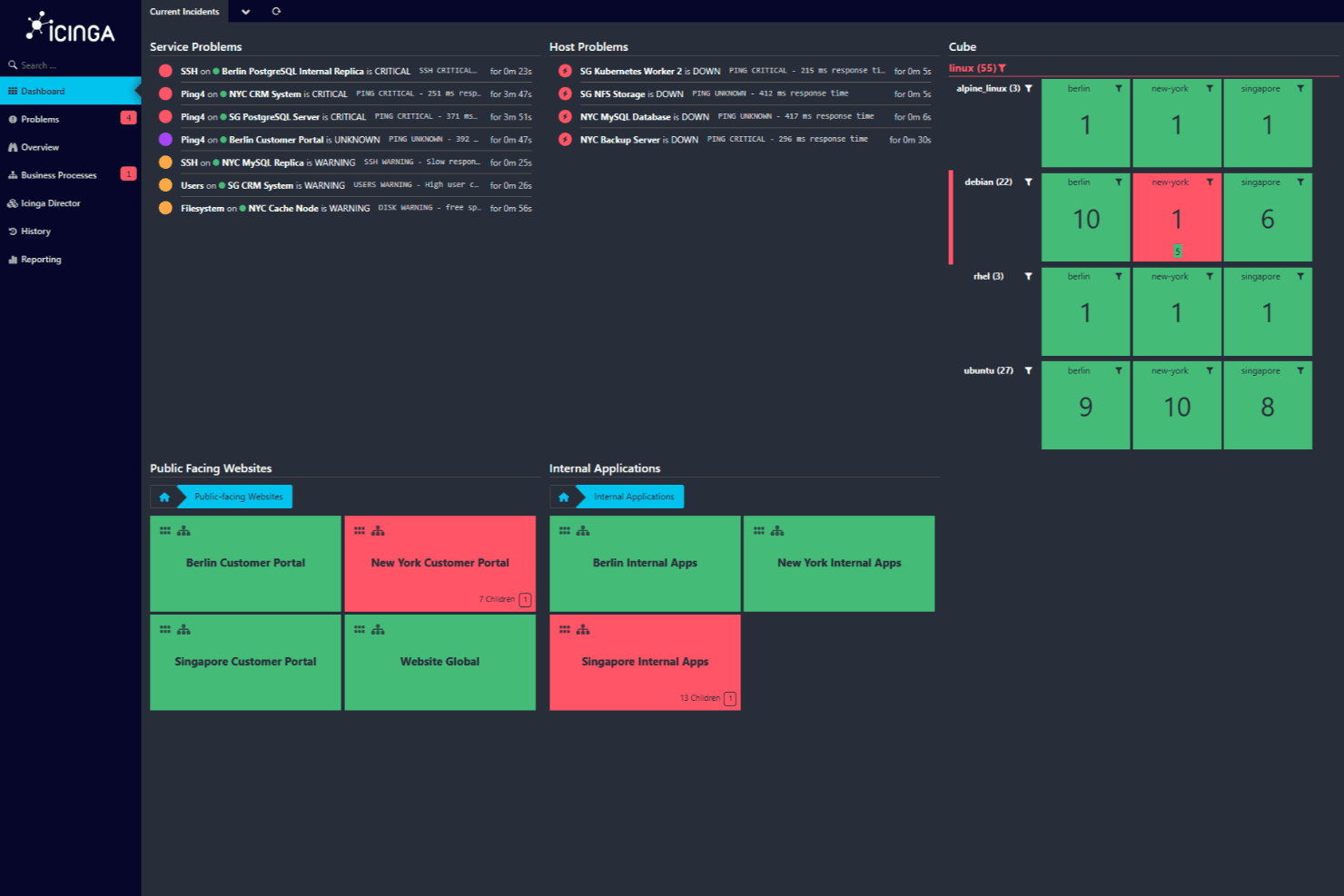
Panel de control de Icinga mostrando incidentes actuales con problemas críticos y de advertencia en servicios de sitios web públicos y aplicaciones internas. Icinga es una solución de monitoreo de código abierto que te ayuda a vigilar toda tu infraestructura de TI. Está diseñada para manejar entornos complejos, ofreciendo una amplia gama de funciones para asegurar que tus sistemas funcionen sin problemas.
Por qué elegí Icinga: Permite monitorizar todo, desde servidores y redes hasta aplicaciones y bases de datos. Puedes importar datos automáticamente desde fuentes como Active Directory o plataformas en la nube como AWS y Azure, manteniendo tu configuración de monitoreo sincronizada con tu infraestructura. También me gusta que proporciona automatización del monitoreo, lo que te permite gestionar los procesos repetitivos con mayor facilidad. Además, con sus métricas y registros, puedes recopilar y analizar datos para obtener conocimientos valiosos sobre tus sistemas.
Funciones destacadas e integraciones:
Otras funciones clave incluyen monitoreo distribuido y basado en agentes para cubrir múltiples ubicaciones y alertas y notificaciones personalizables para ayudarte a resolver incidencias rápidamente. Sus herramientas de análisis también te permiten crear paneles e informes personalizados, ayudándote a identificar cuellos de botella y a hacer seguimiento del tiempo de actividad histórico.
Algunas de las integraciones de Icinga incluyen Grafana, AWS, Azure, Puppet, Ansible, Chef, Terraform, Jira, PagerDuty, ServiceNow, BigPanda y Stackstorm.
Pros and Cons
Pros:
- Altamente personalizable para diversas necesidades de infraestructura TI
- Escalable para entornos pequeños y grandes
- Gratuito, sin tarifas de instalación
Cons:
- La configuración e instalación tiene una curva de aprendizaje
- Se han reportado problemas de rendimiento ocasionales durante escenarios de alta carga
Learn more about Icinga: Ideal para seguimiento de rendimiento en tiempo real
- Prueba gratuita de 30 días + demo gratuita + plan gratuito disponible
- Desde $199/año
Visit WebsiteCustomer Rating:4.3/5
ManageEngine Applications Manager proporciona monitorización de aplicaciones en tiempo real, mostrando la salud del sistema, disponibilidad y estado de funcionamiento en un panel centralizado. ManageEngine Applications Manager es una herramienta que te ayuda a supervisar el rendimiento de tus aplicaciones e infraestructura de TI. Vigila varios componentes como servidores, bases de datos y servicios en la nube para asegurarse de que funcionen correctamente. Al hacerlo, ayuda a tu equipo a identificar y solucionar problemas antes de que afecten a tus usuarios.
Por qué elegí ManageEngine Applications Manager: Una de las razones por las que elegí ManageEngine Applications Manager es su capacidad para monitorizar una amplia gama de tecnologías. Es compatible con más de 150 tecnologías, incluidos servidores de aplicaciones, bases de datos y plataformas en la nube. Esto significa que puedes supervisar todo tu entorno de TI desde una sola consola, facilitando la detección y resolución de posibles problemas. Otra característica útil es su seguimiento del rendimiento en tiempo real. La herramienta ofrece información sobre métricas como el uso de CPU y memoria, tiempos de respuesta y detalles de transacciones. Con esta información, tu equipo puede identificar rápidamente cuellos de botella en el rendimiento y tomar medidas correctivas para mantener un rendimiento óptimo de las aplicaciones.
Funciones e integraciones destacadas:
Incluye funciones como la monitorización de transacciones sintéticas, que te permite simular interacciones de usuarios con tus aplicaciones para identificar posibles problemas antes de que afecten a los usuarios reales. Además, la monitorización real de usuarios proporciona información sobre las experiencias reales de los usuarios, ayudándote a comprender cómo funcionan tus aplicaciones en condiciones del mundo real.
Entre las integraciones se incluyen ManageEngine ServiceDesk Plus, ServiceNow, Site24x7, AlarmsOne, Slack, Prometheus, AWS, Google Cloud, Microsoft Azure, Oracle y MySQL.
Pros and Cons
Pros:
- Simplifica la gestión de aplicaciones y sus relaciones
- El sistema de alertas en tiempo real ayuda a los equipos a responder con rapidez a los problemas
- Supervisa una amplia variedad de aplicaciones y componentes de infraestructura
Cons:
- La herramienta puede consumir muchos recursos
- Configurar la herramienta para necesidades específicas puede ser un reto
Learn more about ManageEngine Applications Manager: Ideal para el rastreo de errores en aplicaciones en tiempo real
- Plan gratuito + prueba gratuita + demo gratuito disponible
- Desde $26/mes (facturado anualmente)
Visit WebsiteCustomer Rating:4.5/5
Sentry proporciona monitoreo a nivel de código para desarrolladores. Para desarrolladores y empresas que buscan una herramienta de monitoreo que ofrezca información inmediata sobre el rendimiento de las aplicaciones y los errores, Sentry destaca como una solución integral. Resulta especialmente atractiva para quienes trabajan en desarrollo web y móvil, comercio electrónico y sectores empresariales, ya que responde a la necesidad crítica de rastreo de errores en tiempo real y optimización del rendimiento durante períodos de alto tráfico.
Por qué elegí Sentry
Elegí Sentry por sus sólidas capacidades de monitoreo de errores y seguimiento de rendimiento. La herramienta sobresale en el rastreo de errores en tiempo real, alertando de inmediato a tu equipo sobre los problemas y permitiendo una resolución ágil. La función de rastreo distribuido de Sentry ofrece una visión detallada del rendimiento de las transacciones, ayudándote a identificar operaciones lentas y optimizarlas. Además, la funcionalidad de reproducción de sesiones ofrece contexto visual para la depuración, facilitando la comprensión de las interacciones de los usuarios y la resolución efectiva de problemas.
Características clave de Sentry
Además del monitoreo en tiempo real de errores de aplicaciones, Sentry ofrece:
- Informe de bloqueos en aplicaciones móviles: Brinda información sobre los bloqueos en apps móviles con trazas de pila detalladas.
- Analítica para videojuegos: Proporciona monitoreo de rendimiento adaptado a aplicaciones de juegos, resaltando problemas de latencia y frecuencia de cuadros.
- Revisión de código mediante IA: Utiliza IA para sugerir posibles soluciones a los problemas detectados, agilizando el proceso de depuración.
- Seguridad y cumplimiento: Garantiza la protección de los datos de usuario mediante medidas de seguridad estándar del sector, resultando adecuado para aplicaciones que manejan información sensible.
Integraciones de Sentry
Sentry ofrece una amplia gama de integraciones nativas para mejorar la eficiencia del flujo de trabajo, incluyendo GitHub, Bitbucket, GitLab, Slack, Microsoft Teams, Jira, Asana, Trello, Datadog y PagerDuty.
Pros and Cons
Pros:
- El rastreo distribuido muestra información sobre el rendimiento a nivel de transacciones
- La agrupación avanzada de errores ayuda a priorizar los problemas para una resolución rápida
- Ofrece rastreo de errores en tiempo real en aplicaciones web, móviles y de backend
Cons:
- No todas las integraciones están disponibles de forma nativa, dependiendo de APIs de terceros para algunas
- Alertas limitadas e información de aplicaciones restringida en planes de nivel básico
Learn more about Sentry: La mejor opción para gestión completa de redes
- Demostración gratuita disponible
- Desde $245/mes (facturado anualmente)
Visit WebsiteCustomer Rating:4.3/5
Panel de gestión de red de ManageEngine OpManager ManageEngine OpManager es una herramienta robusta que se especializa en ofrecer un enfoque integral para la gestión de redes. Ofrece funcionalidades que abarcan desde la monitorización del rendimiento de la red hasta la automatización de las configuraciones de red, alineándose perfectamente como una solución para una gestión de red completa.
Por qué elegí ManageEngine OpManager: Al momento de escoger una herramienta para la gestión integral de redes, ManageEngine OpManager destacó entre mis evaluaciones. Su distintiva gama de funciones está dirigida específicamente a quienes buscan una perspectiva holística sobre las operaciones y el estado de salud de su red.
Basándome en estas evaluaciones, formé la opinión de que ManageEngine OpManager está mejor posicionado para tareas completas de gestión de redes.
Funciones y integraciones destacadas:
OpManager se distingue por sus capacidades de monitorización de servidores físicos y virtuales. Su gestión de configuración de red permite a los administradores realizar copias de seguridad, restaurar y automatizar tareas, brindando tranquilidad frente a errores de configuración.
En cuanto a integraciones, ManageEngine OpManager permite la integración con soluciones ITOM populares y aplicaciones de gestión de TI de terceros, enriqueciendo su funcionalidad.
Pros and Cons
Pros:
- Ofrece monitorización tanto de servidores físicos como virtuales.
- Incluye un conjunto integral para la gestión de configuraciones de red.
- Extensas capacidades de integración con otras soluciones de gestión de TI.
Cons:
- Puede tener una curva de aprendizaje pronunciada para principiantes.
- Su amplia gama de funciones puede resultar abrumadora para operaciones de pequeña escala.
- El modelo de licenciamiento puede no ser favorable para todo tipo de empresas.
Learn more about ManageEngine OpManager: Ideal para monitoreo proactivo
- Prueba gratuita de 30 días + demostración gratuita disponible
- Desde $10/mes (facturación anual)
Visit WebsiteCustomer Rating:4.7/5
Site24x7 proporciona paneles en tiempo real que muestran métricas clave de rendimiento, como tiempo de respuesta, disponibilidad, pérdida de paquetes, sesiones activas y tráfico de red. Site24x7 es una solución de monitoreo basada en la nube diseñada para equipos de DevOps y operaciones de TI. Ofrece capacidades de monitoreo integrales para sitios web, servidores, aplicaciones y dispositivos de red, proporcionando información en tiempo real sobre el rendimiento y la disponibilidad.
Por qué elegí Site24x7: Me gusta Site24x7 por su sólido monitoreo del rendimiento de aplicaciones (APM). Admite varios lenguajes de programación, incluidos Java, .NET, Ruby, PHP y Node.js. Otro aspecto notable es el monitoreo real de usuarios (RUM) de Site24x7. Esta función te permite analizar la experiencia real de los usuarios que interactúan con tu sitio web o aplicaciones web. Al segmentar los datos de rendimiento por navegador, plataforma, ubicación geográfica y más, puedes obtener valiosos conocimientos sobre cómo diversos factores afectan la experiencia del usuario y tomar decisiones informadas para mejorarla. En general, estas funciones te ayudan a monitorear de forma proactiva varios componentes de tu infraestructura de TI.
Funciones destacadas e integraciones:
Otras funciones incluyen el monitoreo sintético de transacciones web, que te permite grabar y simular interacciones de usuario de varios pasos en un navegador real, ayudándote a optimizar jornadas críticas de usuario como formularios de inicio de sesión y carritos de compra. Además, la gestión de registros de Site24x7 consolida e indexa registros de diversas fuentes, lo que facilita la resolución eficiente de problemas e incidencias.
Las integraciones incluyen ServiceNow, PagerDuty, Opsgenie, Jira, ManageEngine AlarmsOne, ManageEngine ServiceDesk Plus, Slack, Microsoft Teams, Zoho Cliq, Amazon EventBridge, Zapier y Webhooks.
Pros and Cons
Pros:
- Opciones de personalización flexibles para paneles e informes
- Alertas en tiempo real fiables que permiten una resolución rápida de problemas
- Capacidades de monitoreo integrales en varios componentes de la infraestructura de TI
Cons:
- Opciones de integración limitadas con ciertas herramientas de terceros
- La complejidad de la configuración puede ser un reto para los nuevos usuarios
Learn more about Site24x7: Ideal para la detección de anomalías asistida por IA
- Prueba gratuita disponible
- Precios bajo solicitud
Visit WebsiteCustomer Rating:4.5/5
Panel central de la herramienta de monitoreo Dynatrace Dynatrace es una herramienta de monitoreo de rendimiento diseñada para supervisar la totalidad de un ecosistema digital. Sus sofisticadas capacidades de IA le permiten no solo monitorear, sino también identificar de manera proactiva anomalías dentro de un sistema.
Este enfoque particular en los conocimientos impulsados por IA la hace especialmente adecuada para quienes buscan una solución para la detección de anomalías.
Por qué elegí Dynatrace: En mi búsqueda de soluciones de monitoreo, Dynatrace captó mi atención por su marcado énfasis en la IA. La decisión de seleccionarla se vio influenciada por la manera en que sus capacidades únicas de IA facilitan la detección rápida de anomalías, anticipándose a menudo a los problemas antes de que escalen.
Mi juicio, tras comparar varias herramientas, me llevó a creer que Dynatrace es inigualable en su oferta de detección de anomalías asistida por IA.
Características destacadas e integraciones:
Dynatrace ofrece detección de anomalías en tiempo real y determinación de causas raíz, atributos vitales para una resolución rápida de problemas. Ofrece monitoreo full-stack, desde aplicaciones hasta infraestructura, asegurando una cobertura integral.
En cuanto a integraciones, Dynatrace se conecta con plataformas en la nube, herramientas CI/CD y principales plataformas de operaciones de TI, haciéndolo adaptable a entornos de TI variados.
Pros and Cons
Pros:
- Capacidades avanzadas de IA para detección de anomalías en tiempo real.
- Monitoreo integral full-stack.
- Entorno de integración amplio con plataformas populares de nube y operaciones de TI.
Cons:
- Puede ser complejo para usuarios no familiarizados con herramientas impulsadas por IA.
- La gran cantidad de funciones puede requerir sesiones de capacitación dedicadas.
- La falta de transparencia en los precios puede disuadir a algunos posibles usuarios.
 10Mejor para supervisión a escala de nube
Datadog
- Prueba gratuita de 14 días
- Desde $15/usuario/mes (facturado anualmente)
Visit WebsiteCustomer Rating:4.5/5
La interfaz sencilla de arrastrar y soltar de Datadog Datadog es una plataforma integral de supervisión y análisis que ofrece una vista unificada de la infraestructura de TI. Su enfoque en la supervisión a escala de nube permite a las organizaciones obtener información sobre sus operaciones en distintos entornos en la nube. Esta estrecha alineación con operaciones a escala de nube es lo que hace que Datadog sea una opción óptima para este propósito.
Por qué elegí Datadog: En mi proceso de selección de una herramienta para esta lista, Datadog surgió consistentemente como uno de los principales contendientes. Evalué sus capacidades basándome en su enfoque especializado en la supervisión centrada en la nube, algo que no se observa comúnmente en otras herramientas.
Este enfoque específico me llevó a determinar que Datadog es, de hecho, el mejor para quienes requieren soluciones de supervisión a escala de nube.
Características destacadas e integraciones:
Datadog es conocido por sus paneles de rendimiento en tiempo real, que pueden personalizarse para mostrar métricas, seguimientos y registros. Además, su detección de anomalías puede identificar proactivamente problemas antes de que impacten a los usuarios.
En cuanto a integraciones, Datadog admite más de 400 integraciones, incluyendo pero no limitándose a AWS, Google Cloud Platform, Azure, Slack y Docker.
Pros and Cons
Pros:
- Los paneles personalizados proporcionan una visión integral de las operaciones.
- Admite una amplia gama de integraciones para máxima compatibilidad.
- La detección proactiva de anomalías ayuda en la identificación temprana de problemas.
Cons:
- Podría ser demasiado complejo para operaciones de pequeña escala.
- El precio puede volverse significativo para equipos grandes.
- Algunos usuarios pueden enfrentar una curva de aprendizaje al principio.
Otras herramientas de monitorización
A continuación encontrarás una lista de herramientas de monitorización adicionales que incluí en mi lista final, pero que no llegaron a estar entre las 10 mejores. Sin duda, merece la pena echarles un vistazo.
- 11New RelicLa mejor para obtener información sobre el rendimiento de aplicaciones
- 12Nagios XIMejor para la monitorización completa de infraestructuras
- 13PrometheusIdeal para alertas en tiempo real y recopilación de datos multidimensional
- 14SolarWinds Observability SaaSBueno para el monitoreo en tiempo real de la salud de bases de datos
- 15Micro Focus SiteScopeMejor para monitoreo de aplicaciones sin agentes
- 16SensuIdeal para flujos de trabajo de monitoreo flexibles
- 17ObserviumLa mejor opción para comprobaciones de salud del hardware de red y servidores
- 18CheckmkIdeal para soluciones de monitorización unificadas
- 19Dotcom MonitorIdeal para crear scripts de varios pasos
Cómo evalúo las herramientas de monitorización
Divido mi evaluación en dos capas: las características básicas que una herramienta necesita para gestionar alertas a las 3 de la mañana y rastrear fallos en servicios distribuidos, y los diferenciadores que separan lo bueno de lo excelente.
Funcionalidad principal (Requisitos mínimos para esta lista)
Cuando selecciono herramientas para mi lista, califico cada una en una escala del 0 (no ofrece la funcionalidad) al 5 (destaca en esta área) para cada funcionalidad principal que se indica a continuación. Después, calculo la puntuación total de la herramienta en porcentaje. Cada herramienta debe lograr una puntuación mínima total del 75% para ser considerada para su inclusión.
- Monitorización en tiempo real: Compruebo la rapidez con la que cada herramienta muestra métricas en vivo—ya sea picos de CPU en un host o cambios de latencia en un clúster de Kubernetes durante un despliegue.
- Alertas y notificaciones: El sistema de alertas de cada herramienta debe admitir umbrales configurables, activadores basados en anomalías y el envío a canales como Slack, PagerDuty o correo electrónico.
- Recopilación de datos de múltiples fuentes: Evalúo si la herramienta recolecta métricas, logs y trazas de servidores, contenedores, servicios en la nube y aplicaciones, en lugar de cubrir solo un tipo de telemetría.
- Paneles y visualización: La capacidad de crear paneles personalizados es importante—piense en una sola vista mostrando tasas de error de API junto con los tiempos de consulta de la base de datos durante un incidente.
- Datos históricos e informes: El análisis de tendencias durante semanas o meses es esencial para la planificación de capacidad, así que reviso las ventanas de retención y la profundidad de las opciones de reporte.
- Integraciones y extensibilidad: Una herramienta debe conectarse con el resto del stack—pipelines de CI/CD, plataformas ITSM, proveedores de la nube—a través de integraciones nativas, APIs o estándares abiertos como OpenTelemetry.
Una vez que tengo una lista de herramientas que cumplen este criterio, considero qué distingue a cada plataforma.
Factores diferenciadores (Qué distingue a los proveedores)
Así es como comparo y contrasto los diferentes proveedores:
Características sobresalientes
La trazabilidad distribuida es un diferenciador clave—cuando un flujo de compra abarca cinco microservicios, quiero ver exactamente dónde se acumula la latencia. El auto-descubrimiento y el mapeo de topología también son importantes para equipos que gestionan entornos dinámicos donde los contenedores se crean constantemente. También reviso la monitorización sintética, que permite simular transacciones de usuario y llamadas API para detectar errores antes de que impacten a usuarios reales.
Más allá de las características
La previsibilidad de precios es algo que evalúo detenidamente—los costes de monitorización pueden dispararse cuando el volumen de datos aumenta durante incidentes, así que reviso si el modelo del proveedor se mantiene manejable a medida que crece tu entorno. También influyen certificaciones de seguridad y cumplimiento como SOC 2 e ISO 27001, especialmente para equipos en sectores regulados. Considero también el tiempo hasta obtener valor: paneles preconfigurados, auto-instrumentación y agentes livianos marcan la diferencia cuando se necesita visibilidad desde el primer día.
Cómo elegir herramientas de monitorización
Es fácil perderse entre listas interminables de funciones y estructuras de precios complejas. Para ayudarte a mantener la concentración mientras avanzas en tu proceso único de selección de software, aquí tienes una lista de factores que debes tener en cuenta:
| Factor | Qué tener en cuenta |
|---|---|
| FactorEscalabilidad | Qué tener en cuenta¿Puede la herramienta crecer junto con tu empresa? Ten en cuenta las necesidades futuras y si la herramienta puede gestionar un aumento de datos y usuarios sin problemas de rendimiento. Busca opciones de escalado flexibles. |
| FactorIntegraciones | Qué tener en cuenta¿Se conecta con tus sistemas actuales? Asegúrate de que sea compatible con tu pila tecnológica actual, como CRM, ERP o servicios en la nube, para evitar soluciones alternativas costosas. |
| FactorPersonalización | Qué tener en cuenta¿Puedes adaptar la herramienta a tus flujos de trabajo? Comprueba si puedes modificar los paneles, las alertas y los informes para ajustarlos a los procesos y necesidades específicos de tu equipo. |
| FactorFacilidad de uso | Qué tener en cuenta¿La herramienta es intuitiva para tu equipo? Evalúa la curva de aprendizaje y si tu equipo puede adoptarla rápidamente sin una formación exhaustiva. Busca interfaces fáciles de usar. |
| FactorImplementación e incorporación | Qué tener en cuenta¿Qué tan fluido es el proceso de configuración? Ten en cuenta el tiempo y los recursos necesarios para poner la herramienta en funcionamiento. Busca proveedores que ofrezcan asistencia y recursos completos para la incorporación. |
| FactorCoste | Qué tener en cuenta¿El precio se ajusta a tu presupuesto? Compara el coste de la herramienta con sus funciones y ventajas. Presta atención a las tarifas ocultas o a los cargos por usuarios o funciones adicionales. |
| FactorMedidas de seguridad | Qué tener en cuenta¿Protege tus datos? Evalúa las medidas de seguridad implementadas, como el cifrado y el cumplimiento de los estándares del sector, para garantizar que tus datos permanezcan seguros. |
| FactorDisponibilidad de asistencia | Qué tener en cuenta¿Puedes acceder a ayuda cuando la necesitas? Comprueba las opciones de asistencia disponibles, como ayuda las 24 horas, chat en directo o gestores de cuentas dedicados, para asegurarte de que recibirás asistencia cuando la necesites. |
¿Qué son las herramientas de monitorización?
Las herramientas de monitorización son programas que realizan un seguimiento del rendimiento y el estado de los sistemas, las redes y las aplicaciones. Los equipos de TI, los ingenieros de DevOps y los administradores de sistemas las utilizan para detectar problemas con antelación, reducir el tiempo de inactividad y mantener los sistemas en funcionamiento sin problemas. El seguimiento de métricas, las alertas y los paneles ayudan a detectar tendencias, solucionar problemas y mantener informados a los equipos. El software de monitorización de hardware proporciona a los equipos la visibilidad que necesitan para gestionar los sistemas sin sorpresas.
Funciones
Al seleccionar herramientas de monitorización, presta atención a las siguientes funciones clave:
- Alertas en tiempo real: Notifican al instante a los usuarios cuando surgen problemas, lo que permite responder y resolverlos rápidamente.
- Paneles personalizables: Adapta la interfaz para mostrar las métricas y los datos más relevantes para tu equipo.
- Capacidades de integración: Conéctate sin problemas con los sistemas y programas existentes para ofrecer una visión unificada de las operaciones.
- Análisis automatizado de la causa raíz: Identifica la causa subyacente de los problemas sin intervención manual, ahorrando tiempo y esfuerzo.
- Análisis predictivo: Pronostica posibles problemas antes de que ocurran, ayudando a mantener la estabilidad del sistema.
- Escalabilidad: Se adapta al crecimiento de los datos y a las demandas de los usuarios, garantizando que la herramienta siga siendo eficaz a medida que tu empresa se expande.
- Medidas de seguridad: Protege los datos confidenciales mediante el cifrado y el cumplimiento de los estándares del sector.
- Informes exhaustivos: Genera informes detallados para analizar las tendencias de rendimiento y respaldar la toma de decisiones.
- Compatibilidad con múltiples nubes: Monitoriza aplicaciones en distintos entornos de nube y ofrece una visión completa de las operaciones.
- Interfaz fácil de usar: Garantiza la facilidad de uso, permitiendo que los miembros del equipo naveguen por la herramienta y la utilicen de forma eficiente.
Ventajas
La implementación de herramientas de monitorización junto con herramientas de mapeo de redes aporta varias ventajas a tu equipo y a tu empresa. Estas son algunas de las que puedes esperar:
- Mejor rendimiento del sistema: Las alertas en tiempo real y el análisis automatizado de la causa raíz ayudan a abordar rápidamente los problemas y mantienen los sistemas en funcionamiento sin problemas.
- Mejora de la toma de decisiones: Los informes exhaustivos y el análisis predictivo ofrecen información que respalda decisiones empresariales fundamentadas.
- Mayor eficiencia: Los paneles personalizables y las capacidades de integración ahorran tiempo al proporcionar datos relevantes en un formato accesible.
- Escalabilidad: A medida que tu empresa crece, la escalabilidad garantiza que la herramienta se adapte al aumento de las demandas sin problemas de rendimiento.
- Seguridad de los datos: Las medidas de seguridad protegen tu información confidencial y garantizan el cumplimiento de los estándares del sector.
- Ahorro de costes: La detección y resolución tempranas de problemas reducen el tiempo de inactividad y los costes asociados, lo que beneficia a tus resultados.
- Visibilidad multiplataforma: La compatibilidad con múltiples nubes proporciona una visión unificada de las operaciones en distintos entornos, mejorando la transparencia general.
Costes & precios
Para seleccionar herramientas de monitorización es necesario comprender los distintos modelos de precios y planes disponibles. Los costes varían en función de las características, el tamaño del equipo, los complementos y otros factores. La tabla siguiente resume los planes habituales, sus precios medios y las funciones que suelen incluir las soluciones de herramientas de monitorización:
Tabla comparativa de planes para herramientas de monitorización
| Tipo de plan | Precio medio | Funciones habituales |
|---|---|---|
| Tipo de planPlan gratuito | Precio medio$0/usuario/mes | Funciones habitualesMonitorización básica, alertas limitadas y asistencia de la comunidad. |
| Tipo de planPlan personal | Precio medio$5-$25/usuario/mes | Funciones habitualesAlertas en tiempo real, paneles personalizables y análisis básicos. |
| Tipo de planPlan empresarial | Precio medio$30-$75/usuario/mes | Funciones habitualesInformes avanzados, capacidades de integración y acceso multiusuario. |
| Tipo de planPlan para empresas | Precio medio$100-$300/usuario/mes | Funciones habitualesAnálisis predictivo, asistencia 24/7 y opciones completas de personalización. |
Preguntas frecuentes sobre herramientas de monitorización
Estas son algunas respuestas a preguntas frecuentes sobre las herramientas de monitorización:
¿Cómo funciona una herramienta de monitorización?
Una herramienta de monitorización realiza un seguimiento de diversas métricas, como la carga de la CPU, el ancho de banda de la red y el espacio en disco. Ayuda a detectar problemas y alerta a los administradores antes de que los usuarios se vean afectados. Estas herramientas garantizan que los sistemas funcionen correctamente al proporcionar información sobre el rendimiento y los posibles problemas.
¿Qué habilidades se necesitan para utilizar herramientas de monitorización?
Necesitarás habilidades estadísticas y analíticas para recopilar y analizar datos. Estas habilidades te ayudan a comprender el impacto de la monitorización y a tomar decisiones fundamentadas. También resulta beneficioso sentirse cómodo interpretando datos y tener conocimientos básicos de sistemas informáticos.
¿Cómo seleccionar herramientas de monitorización de aplicaciones?
Ten en cuenta el tipo y la complejidad de tu aplicación. Evalúa lo fácil que resulta implementar y gestionar la herramienta, y asegúrate de que cumple tus estándares de seguridad. Busca funciones que se ajusten a tus necesidades específicas y que proporcionen el máximo valor a tu equipo.
¿Cómo funcionan las herramientas de monitorización de redes?
Las herramientas de monitorización de redes realizan un seguimiento de aspectos como el tráfico, la utilización del ancho de banda y el tiempo de actividad. Detectan los dispositivos de la red y proporcionan actualizaciones de estado. Esto ayuda a gestionar el rendimiento de la red e identificar posibles problemas antes de que afecten a los usuarios.
¿Cuáles son los retos habituales al utilizar herramientas de monitorización?
Los usuarios suelen enfrentarse a retos como la sobrecarga de datos, que puede dificultar la identificación de los problemas principales. La integración con los sistemas existentes también puede resultar complicada. Es importante configurar correctamente las alertas para evitar notificaciones innecesarias que puedan provocar fatiga por alertas.
¿Cómo pueden las herramientas de monitorización mejorar el rendimiento del sistema?
Las herramientas de monitorización proporcionan información en tiempo real sobre el rendimiento del sistema, lo que te ayuda a identificar y resolver rápidamente los problemas. Al analizar tendencias y alertarte sobre posibles inconvenientes, estas herramientas ayudan a mantener el estado óptimo del sistema y a reducir el tiempo de inactividad.