

El mejor software de MDM te ayuda a aplicar políticas de seguridad, supervisar y controlar dispositivos, y proteger datos confidenciales en dispositivos propiedad de la empresa y puntos finales BYOD. Está diseñado para gestionar desafíos habituales, como borrar de forma remota un dispositivo después de su pérdida o robo, aplicar políticas de manera incoherente en distintos sistemas operativos y configurar manualmente nuevos dispositivos, una tarea que consume mucho tiempo.
Si has tenido problemas con la TI en la sombra, deficiencias en los informes de cumplimiento o un control de acceso remoto poco fiable, no eres el único. Muchos equipos de TI adoptan soluciones de MDM después de darse cuenta de que su enfoque actual no puede ampliarse ni protegerlos frente a amenazas cada vez mayores.
He probado plataformas de MDM en entornos empresariales y de medianas empresas, y he trabajado con equipos que implementan flotas de dispositivos en los sectores de la salud, las finanzas y la educación. Esta guía analiza las herramientas que realmente simplifican la inscripción, reducen las solicitudes de asistencia y proporcionan a los administradores una visibilidad clara de su ecosistema móvil.
Por qué confiar en nuestras recomendaciones de software
6,700+
Reviews
20
Industry experts
16+
Evaluation factors
14
Years
Nuestro equipo lleva probando y evaluando software desde 2012. Como líderes tecnológicos, sabemos lo difícil —y lo importante— que es elegir el software adecuado.
Para esta guía, evaluamos las herramientas mediante pruebas prácticas e investigación independiente, puntuando las herramientas según nuestros criterios de selección.
Nuestras reseñas reflejan nuestro criterio editorial humano, no un discurso de ventas.
Revisores expertos:
- Paulo Gardini MiguelDirector técnico
 Tim FisherVP de IA
 Gabriel RosasTech Lead y arquitecto de software
 Christhian GruhnTech Lead y arquitecto de plataforma

Resumen del mejor software de MDM
Este cuadro comparativo resume los detalles de precios de mis principales selecciones de software de MDM para ayudarte a encontrar la mejor opción para tu presupuesto y las necesidades de tu empresa.
| Tool | Best For | Trial Info | Price | ||
|---|---|---|---|---|---|
| 1 | Mejor para procesos de incorporación y baja del personal | Prueba gratuita disponible | Desde $8/usuario/mes (facturado anualmente) | Website | |
| 2 | Mejor para la gestión de endpoints y el cumplimiento de parches | Prueba gratuita de 14 días disponible | Precio bajo solicitud | Website | |
| 3 | Ideal para gestionar dispositivos de equipos remotos globales | Demo gratuita disponible | desde $5/persona/mes | Website | |
| 4 | Ideal para la gestión de dispositivos multi-OS | Prueba gratuita de 14 días + demo gratuita disponible | Desde $2/dispositivo/mes (facturado anualmente) | Website | |
| 5 | Ideal para el borrado remoto de datos | Prueba gratuita disponible | Desde $1.30/mes | Website | |
| 6 | Ideal para casos de uso en el borde | Prueba gratuita de 30 días | Desde $3.99/dispositivo/mes (facturación anual) | Website | |
| 7 | Ideal para la gestión de flotas mixtas y dispositivos resistentes | Demostración gratuita disponible | Precio bajo consulta | Website | |
| 8 | Mejor para instalaciones locales | Prueba gratuita de 30 días + demostración gratuita disponible | Desde $1.28/dispositivo/mes (facturado anualmente) | Website | |
| 9 | La mejor opción para la confianza cero y la información de flotas basada en IA | Prueba gratuita de 30 días | Desde $3.00/dispositivo/mes | Website | |
| 10 | Lo mejor en capacidades de quiosco | Prueba gratuita disponible | Desde $24/dispositivo/año | Website |


Reseñas del mejor software de MDM
Estas son mis 20 principales recomendaciones de software de MDM, incluidas sus características, ventajas y precios iniciales.
 Mejor para procesos de incorporación y baja del personal
- Prueba gratuita disponible
- Desde $8/usuario/mes (facturado anualmente)
Visit WebsiteCustomer Rating:4.8/5This rating combines scores from multiple user review sites to reflect overall customer sentiment about the product.
Consulta todo el hardware físico de un empleado con el portal MDM de Rippling. Rippling IT ofrece a los equipos de TI y a los profesionales de RR. HH. una plataforma unificada para gestionar dispositivos, aplicaciones y políticas de seguridad en toda su plantilla, ayudando a las empresas a automatizar la provisión de dispositivos, hacer cumplir el cumplimiento normativo y simplificar las operaciones de TI.
¿Para quién es mejor Rippling IT?
Rippling IT es ideal para empresas medianas y grandes que necesitan flujos de trabajo de TI y RR. HH. conectados en una sola plataforma.
Por qué elegí Rippling IT
Elegí Rippling IT como uno de los mejores porque su automatización de procesos de incorporación y baja está directamente vinculada a la gestión de dispositivos de una manera que la mayoría de las herramientas MDM no pueden igualar. Cuando un nuevo empleado se incorpora, Rippling IT puede inscribir automáticamente su dispositivo, instalar las aplicaciones necesarias y establecer permisos de acceso según su función, todo desencadenado desde un solo flujo de trabajo. La baja funciona de manera inversa: cuando alguien se va, su dispositivo puede bloquearse o borrarse de forma remota y el acceso a aplicaciones ser revocado simultáneamente. Esta automatización coordinada entre eventos de RR. HH. y acciones de TI lo distingue en la gestión del ciclo de vida.
Características clave de Rippling IT
- Políticas de seguridad personalizadas: Crea y aplica reglas de seguridad basadas en cientos de atributos de usuario y dispositivo, como departamento, sistema operativo y función, que se actualizan automáticamente en toda la organización.
- Integración con SentinelOne: Implementa automáticamente la protección de endpoint SentinelOne en todos los dispositivos gestionados directamente desde Rippling, sin configuración adicional.
- Configuración personalizada de dispositivos: Aplica configuraciones personalizadas —incluidos perfiles WiFi, reglas de firewall y pantallas de inicio de sesión— a los dispositivos según atributos de empleados como ubicación y departamento.
- Imposición de actualizaciones del sistema operativo: Supervisa y obliga la actualización de los sistemas operativos macOS y Windows en toda tu flota desde un solo panel.
Integraciones de Rippling IT
Las integraciones incluyen Microsoft 365, Google Workspace, Slack, AWS, Jira, GitHub, PayPal, 1Password, Yubikey y Carta.
Pros and Cons
Pros:
- Reduce la fricción en la incorporación y baja de empleados
- Permite crear flujos de trabajo comunes que se despliegan fácilmente
- Puede integrar funciones de RR. HH. y TI
Cons:
- Hace más que solo MDM, lo cual puede ser más de lo que necesitas
- La configuración inicial puede requerir mucho tiempo
Learn more about Rippling IT: Mejor para la gestión de endpoints y el cumplimiento de parches
- Prueba gratuita de 14 días disponible
- Precio bajo solicitud
Visit WebsiteCustomer Rating:4.7/5This rating combines scores from multiple user review sites to reflect overall customer sentiment about the product.
NinjaOne permite a las empresas controlar, parchear y gestionar dispositivos de empleados de forma remota. NinjaOne ofrece a los equipos de TI una plataforma unificada para gestionar, monitorizar y asegurar endpoints en entornos distribuidos, ayudando a las empresas a mantener el control sobre los dispositivos y automatizar tareas rutinarias de gestión.
¿Para quién es mejor NinjaOne?
NinjaOne es una excelente opción para equipos de TI y proveedores de servicios gestionados que necesitan un control centralizado sobre grandes entornos de dispositivos distribuidos.
Por qué elegí NinjaOne
NinjaOne se gana su lugar en mi lista debido a la efectividad con la que maneja la gestión de endpoints y el cumplimiento de parches a gran escala. Me gusta especialmente la función de Patch Intelligence AI, que analiza la telemetría y las señales de implementación para marcar automáticamente las actualizaciones inestables y pausar los parches riesgosos antes de que causen interrupciones. Mi equipo utiliza la gestión autónoma de parches para cubrir endpoints de Windows, macOS y Linux y más de 200 aplicaciones de terceros desde una sola consola. Además, la remediación automatizada basada en condiciones significa que no estamos buscando manualmente dispositivos no conformes—NinjaOne detecta y corrige los problemas de endpoints sin la intervención de un técnico.
Características clave de NinjaOne
- Inventario de hardware y software: Te ofrece una visión en tiempo real de cada dispositivo en tu entorno, incluyendo especificaciones de hardware, software instalado, estado de garantía y datos de rendimiento.
- Despliegue de software y sistemas operativos: Implementa software de Windows, actualizaciones y configuraciones en endpoints utilizando flujos de trabajo repetibles y automatizados.
- Acceso remoto seguro: Permite a los técnicos acceder a los dispositivos de forma remota para diagnosticar y resolver problemas en tiempo real desde una consola centralizada.
- Reportes flexibles de dispositivos: Te permite personalizar la visualización de dispositivos con columnas de datos y filtros configurables para mostrar los detalles de endpoints más relevantes para tu equipo.
Integraciones de NinjaOne
Las integraciones incluyen ServiceNow, CrowdStrike, SentinelOne, Microsoft Entra, Okta, PagerDuty, Bitdefender, ConnectWise Manage, IT Glue y Slack.
Pros and Cons
Pros:
- Scripting remoto en múltiples lenguajes
- Gestión detallada de roles de usuario
- Gestión de parches integrada
Cons:
- Curva de aprendizaje pronunciada
- Personalización limitada en los mecanismos de alerta
Learn more about NinjaOne: Ideal para gestionar dispositivos de equipos remotos globales
- Demo gratuita disponible
- desde $5/persona/mes
Visit WebsiteCustomer Rating:4.9/5This rating combines scores from multiple user review sites to reflect overall customer sentiment about the product.
El rastreador de activos de Deel ofrece una visión general de todos los dispositivos arrendados y propios que usan los empleados en todo el mundo. Deel IT sirve a equipos de TI y empresas que gestionan fuerzas laborales distribuidas, ofreciendo gestión centralizada de dispositivos, aprovisionamiento y controles de seguridad para respaldar operaciones remotas y globales.
¿Para quién es mejor Deel IT?
Deel IT es ideal para empresas con equipos internacionales o con enfoque remoto que necesitan administrar, aprovisionar y asegurar dispositivos en varios países.
Por qué elegí Deel IT
Deel IT se gana su lugar en mi lista porque es una de las pocas plataformas MDM que realmente gestiona operaciones globales de dispositivos de extremo a extremo. Me gusta que cubre todo el ciclo de vida del dispositivo—adquisición, configuración, envío y recuperación—en más de 130 países sin depender de proveedores regionales fragmentados. En la práctica, eso significa que mi equipo puede enviar una laptop preconfigurada y conforme a políticas a una nueva contratación en Brasil o Alemania sin utilizar una herramienta logística aparte. La inscripción sin contacto a través de Apple Business Manager y Windows Autopilot es un diferenciador real, ya que los dispositivos llegan ya inscritos y configurados antes de que el empleado siquiera abra la caja.
Funciones clave de Deel IT
- Configuración de políticas de seguridad: Establece y aplica estándares de seguridad en los dispositivos—including reglas de contraseñas, cifrado, requisitos de VPN y listas blancas de aplicaciones—para grupos de usuarios o tipos de dispositivos desde un único panel.
- Borrado y bloqueo remoto: Bloquea, borra o envía mensajes de forma remota a dispositivos perdidos o comprometidos, con borrado selectivo para dispositivos BYOD que elimina solo los datos corporativos.
- Monitoreo de cumplimiento y alertas: Supervisa el cumplimiento en toda tu flota en tiempo real, con indicadores codificados por colores y alertas instantáneas cuando los dispositivos salen de la política establecida.
- Geovallado y seguimiento de ubicación: Establece controles de acceso basados en ubicación que bloquean automáticamente los dispositivos o revocan permisos cuando salen de zonas seguras designadas o regiones aprobadas.
Integraciones de Deel IT
Las integraciones incluyen FaceUp, Snowflake API, DefensX, Microsoft Finance, Kintsugi, ReFresh OS, Revo.ai, Keeper, Human Interest y Everyminute.
Pros and Cons
Pros:
- Brinda configuraciones de dispositivos personalizables
- Garantiza la seguridad de los dispositivos con MDM y protección de endpoints
- Ofrece visibilidad integral sobre los activos de TI a nivel mundial
Cons:
- Puede no ser ideal para equipos con necesidades de activos de TI muy complejas
- No ofrece funciones más allá de la gestión de dispositivos, como la administración de redes y servidores
Learn more about Deel IT: Ideal para la gestión de dispositivos multi-OS
- Prueba gratuita de 14 días + demo gratuita disponible
- Desde $2/dispositivo/mes (facturado anualmente)
Visit WebsiteCustomer Rating:4.7/5This rating combines scores from multiple user review sites to reflect overall customer sentiment about the product.
Scalefusion te permite proyectar y controlar dispositivos empresariales, ya sean propiedad de la empresa o del empleado. Scalefusion ofrece a los equipos de TI de empresas de todos los tamaños una forma de gestionar, proteger y supervisar los dispositivos de la compañía en diferentes plataformas, ayudando a reducir la supervisión manual y a mantener los puntos finales en conformidad con las políticas organizacionales.
¿Para quién es mejor Scalefusion?
Scalefusion es ideal para equipos de TI que administran entornos de dispositivos mixtos a través de Android, iOS, Windows y macOS desde una sola consola.
Por qué elegí Scalefusion
Incluyo Scalefusion en mi lista porque permite la gestión de varios sistemas operativos desde un solo panel de control: Windows, macOS, iOS, Android, Linux y ChromeOS, todo en un mismo lugar. Me gusta que puedas enviar actualizaciones del sistema operativo, aplicar políticas de seguridad y desplegar aplicaciones en diferentes plataformas sin cambiar de herramienta ni mantener consolas separadas. La función AirThink AI permite generar y validar scripts de PowerShell y Shell desde el panel de control, ahorrando tiempo al trabajar con scripts en entornos mixtos. Además, el flujo de trabajo Maker Checker añade una capa de aprobación antes de que se apliquen cambios críticos en los dispositivos, una salvaguarda útil para gestionar una flota grande y diversa.
Características clave de Scalefusion
- Proyección y control remotos: Visualiza y controla los dispositivos registrados en tiempo real para solucionar problemas sin necesidad de acceso físico.
- Modo kiosco: Bloquea los dispositivos en una sola aplicación o en un conjunto seleccionado de aplicaciones, útil para dispositivos de uso dedicado como terminales POS o tablets de campo.
- Seguimiento de ubicación y geovallas: Supervisa la ubicación de los dispositivos y establece límites geográficos que activan acciones de políticas automatizadas al cruzarlos.
- Gestión de contenidos: Envía documentos, medios y contenido web a los dispositivos de manera silenciosa, sin requerir interacción del usuario.
Integraciones de Scalefusion
Las integraciones incluyen Azure Active Directory, Google Workspace, Okta, PingOne, Jira, Freshservice, Checkpoint Mobile Threat Defense, B2M Elemez, Intel vPro y Apple Business Manager.
Pros and Cons
Pros:
- Combina UEM, ZTA y seguridad de endpoints en una sola plataforma
- Soporte gratuito las 24 horas del día
- Capacidades de gestión de dispositivos efectivas
Cons:
- Solo facturación anual
- No dispone de VPN por aplicación
Learn more about Scalefusion: 5Ideal para el borrado remoto de datos
Prey
- Prueba gratuita disponible
- Desde $1.30/mes
Visit WebsiteCustomer Rating:4.7/5This rating combines scores from multiple user review sites to reflect overall customer sentiment about the product.
El rastreo de dispositivos de Prey ofrece datos de ubicación detallados, información del dispositivo y funciones de reporte. Prey es una plataforma MDM enfocada en la seguridad, diseñada para equipos de TI y organizaciones que rastrean, administran y protegen portátiles, teléfonos y tabletas en múltiples ubicaciones.
¿Para Quién es Mejor Prey?
Prey es adecuado para equipos de TI en educación, pequeñas y medianas empresas, y organizaciones de campo que gestionan flotas distribuidas de portátiles y dispositivos móviles.
Por Qué Elegí Prey
Elegí Prey como uno de los mejores porque sus capacidades de borrado remoto de datos son realmente útiles cuando un dispositivo se pierde en el campo. Me gusta que puedes activar un borrado completo o eliminar selectivamente archivos y carpetas específicos de forma remota, lo que le da a mi equipo más control sobre qué se borra según la situación. Prey también permite bloquear un dispositivo y mostrar un mensaje personalizado antes de borrarlo, por lo que existe la posibilidad de recuperarlo primero. Las acciones de borrado se registran, lo que ayuda con la documentación de incidentes e informes de cumplimiento.
Características Clave de Prey
- Seguimiento de ubicación en tiempo real: Supervisa la ubicación en vivo de cualquier dispositivo de tu flota usando rastreo activo y triangulación Wi-Fi.
- Acciones de geovalla: Establece límites geográficos y activa respuestas de seguridad automáticas cuando un dispositivo entra o sale de una zona definida.
- Panel de estado de flota: Consulta el estado de todos los dispositivos gestionados desde un solo panel, con etiquetas y búsqueda para organizar flotas grandes.
- Acciones masivas: Aplica acciones de seguridad o gestión en varios dispositivos a la vez, en lugar de manejar cada dispositivo individualmente.
Integraciones de Prey
Las integraciones incluyen Okta, Shibboleth, Keycloak, OpenAM, SimpleSAMLphp, Apache Syncope, WordPress, Drupal, NetIQ Access Manager y Gluu Server.
Pros and Cons
Pros:
- Compatibilidad en múltiples plataformas
- Funcionalidades remotas como bloqueo, mensajería y alarma
- Función de rastreo por GPS
Cons:
- Precisión variable en geolocalización
- El proceso de actualización puede ser engorroso
Learn more about Prey: Ideal para casos de uso en el borde
- Prueba gratuita de 30 días
- Desde $3.99/dispositivo/mes (facturación anual)
Visit WebsiteCustomer Rating:4.8/5This rating combines scores from multiple user review sites to reflect overall customer sentiment about the product.
Visualiza todos tus dispositivos en el portal de SureMDM. SureMDM es una plataforma de gestión de dispositivos móviles diseñada para equipos de TI en sectores como logística, manufactura y servicios de campo que necesitan administrar, asegurar y monitorear una amplia variedad de dispositivos en múltiples sistemas operativos y entornos.
¿Para Quién es Mejor SureMDM?
SureMDM es especialmente adecuado para equipos de TI en industrias como retail, salud y transporte que necesitan gestionar grandes flotas de dispositivos con diferentes sistemas operativos distribuidos en ubicaciones remotas o dispersas.
Por Qué Elegí SureMDM
Elegí SureMDM como uno de los mejores debido a lo lejos que llega para soportar dispositivos que la mayoría de las plataformas MDM simplemente no están diseñadas para manejar. Mientras otras herramientas se enfocan en smartphones y laptops, SureMDM extiende la gestión a dispositivos IoT, terminales robustos, dispositivos Wear OS, visores de realidad virtual y equipos con Linux, todo desde la misma consola.
Me gusta especialmente la función Things Management Technology (TMT), que permite a mi equipo inscribir y gestionar periféricos como lectores RFID, escáneres de códigos de barras y rastreadores GPS de la misma manera que lo harías con un dispositivo móvil. Esto significa que puedo enviar actualizaciones de firmware, monitorear estadísticas de batería y red, y aplicar políticas de cumplimiento en dispositivos periféricos que, de otro modo, serían invisibles para TI. El soporte OEMConfig para fabricantes de dispositivos robustos como Zebra y Datalogic es otra funcionalidad realmente útil; me permite configurar ajustes específicos de hardware directamente desde la consola de SureMDM sin necesidad de herramientas OEM adicionales.
Funcionalidades Clave de SureMDM
- Modo kiosco: Restringe los dispositivos para que solo se pueda utilizar una aplicación o un conjunto limitado de aplicaciones, impidiendo que los usuarios accedan a configuraciones o contenidos no autorizados.
- Gestión BYOD: Inscribe dispositivos propiedad de empleados usando Perfiles de Trabajo de Android o Inscripción de Usuario de Apple, manteniendo separados los datos corporativos y personales en contenedores independientes.
- Solución remota de problemas: Accede y controla los dispositivos de manera remota para diagnosticar y resolver incidencias sin requerir acceso físico o visitas in situ.
- Seguimiento de ubicación: Monitorea en tiempo real la ubicación de los dispositivos y configura políticas basadas en geovallas que restringen o ajustan automáticamente el comportamiento del dispositivo según su ubicación.
Integraciones de SureMDM
Las integraciones incluyen Zebra, Datalogic, Honeywell, Samsung Knox, Google Zero-Touch Enrollment, Apple Business Manager, Microsoft Azure Active Directory, VMware Workspace ONE, SOTI y también dispone de una API para integraciones personalizadas.
Pros and Cons
Pros:
- Flexible y personalizable
- Historial destacado de soporte al cliente
- Interfaz de usuario sencilla
Cons:
- Puede resultar abrumador de configurar
- La instalación puede ser lenta en los dispositivos de los usuarios
Learn more about SureMDM: Ideal para la gestión de flotas mixtas y dispositivos resistentes
- Demostración gratuita disponible
- Precio bajo consulta
Visit WebsiteCustomer Rating:4.4/5This rating combines scores from multiple user review sites to reflect overall customer sentiment about the product.
SOTI MobiControl proporciona a los equipos de TI de los sectores sanitario, minorista, logístico y de servicios de campo una forma de gestionar, proteger y brindar soporte a una amplia variedad de dispositivos móviles y puntos finales desde una única plataforma.
¿Para quién es más adecuado SOTI MobiControl?
SOTI MobiControl es una opción excelente para empresas medianas y grandes de sectores con muchos activos, como la logística, la atención sanitaria y el comercio minorista, que necesitan un control centralizado sobre grandes flotas de dispositivos con distintos sistemas operativos.
Por qué elegí SOTI MobiControl
SOTI MobiControl merece estar en mi lista de opciones porque realmente cubre todo el espectro de sistemas operativos—Android, iOS, macOS, Windows y Linux—desde una única consola de gestión. Me gusta que vaya más allá de la gestión básica de dispositivos móviles al encargarse de puntos finales de IoT y dispositivos basados en Linux, algo que la mayoría de sus competidores no ofrece. La función SOTI XTreme Technology me resulta especialmente útil en entornos distribuidos: acelera hasta 10 veces la entrega de aplicaciones y datos, lo cual es importante cuando se envían grandes actualizaciones del sistema operativo a cientos de dispositivos en almacenes o establecimientos minoristas con un ancho de banda limitado.
Funciones principales de SOTI MobiControl
- Geovallas y aplicación de políticas basadas en la ubicación: Cree geovallas con formas personalizadas para rastrear las ubicaciones de los dispositivos y desplegar o restringir automáticamente aplicaciones, contenido y políticas según la posición del dispositivo.
- Configuración de dispositivos compartidos: Permita que varios empleados compartan un único dispositivo en distintos turnos, con acceso personalizado a aplicaciones y datos mediante credenciales de inicio de sesión individuales o SSO.
- Inscripción y aprovisionamiento rápidos: Inscriba y configure nuevos dispositivos sobre el terreno mediante métodos como la inscripción sin contacto de Android, Apple DEP, Samsung KME, Autopilot de Windows y Zebra StageNow.
- Panel de estado del sistema: Supervise en tiempo real y consulte datos históricos de 48 horas sobre la longitud de las colas, el uso de la CPU, el rendimiento de la base de datos y el estado del servidor desde una única vista de la consola.
Integraciones de SOTI MobiControl
Entre las integraciones se incluyen Microsoft Entra ID, Zebra, Samsung, Apple DEP, la inscripción sin contacto de Android, Autopilot de Windows, Imprivata, SOTI Hub, SOTI Surf y SOTI Identity.
Pros and Cons
Pros:
- Interfaz fácil de usar que simplifica la gestión de dispositivos
- Sólido soporte para una amplia variedad de dispositivos y sistemas operativos
- Capacidades eficaces de resolución remota de problemas
Cons:
- Los usuarios han informado de problemas ocasionales de rendimiento
- Algunos usuarios consideran complejo el proceso de configuración
Learn more about SOTI MobiControl: Mejor para instalaciones locales
- Prueba gratuita de 30 días + demostración gratuita disponible
- Desde $1.28/dispositivo/mes (facturado anualmente)

Haz seguimiento de tus dispositivos con el portal de ManageEngine en las instalaciones, como se muestra aquí. ManageEngine Mobile Device Manager Plus destaca para organizaciones que necesitan una solución MDM flexible en las instalaciones. Es una opción sólida para los equipos de TI en industrias reguladas o empresas con requisitos estrictos de residencia de datos. Con soporte para entornos multi-OS y control granular de dispositivos, ayuda a gestionar la seguridad y el cumplimiento en flotas diversas.
¿Para quién es mejor ManageEngine Mobile Device Manager Plus?
Departamentos de TI en organizaciones medianas y grandes dentro de industrias reguladas. Es ideal para empresas que requieren opciones de implementación en las instalaciones para cumplir con requisitos internos de seguridad o cumplimiento.
Por qué elegí ManageEngine Mobile Device Manager Plus
Para organizaciones que requieren control en las instalaciones, ManageEngine Mobile Device Manager Plus ofrece una flexibilidad de implementación que las soluciones MDM sólo en la nube no pueden igualar. Lo elegí porque permite a los equipos de TI alojar y administrar su propia infraestructura MDM, lo cual es esencial para empresas con necesidades estrictas de cumplimiento o soberanía de datos. La plataforma permite una aplicación detallada de políticas de dispositivos y controles de acceso basados en roles, brindando a los administradores la capacidad de adaptar la seguridad y la gestión a su entorno. Esto lo convierte en una excelente opción para sectores como gobierno, salud y finanzas, donde las soluciones en las instalaciones suelen ser un requisito.
Funciones clave de ManageEngine Mobile Device Manager Plus
Otras características que hacen atractivo a ManageEngine Mobile Device Manager Plus para los equipos de TI incluyen:
- Soporte multi-OS: Administra y protege dispositivos con Android, iOS, Windows, macOS y Chrome OS.
- Distribución y gestión de aplicaciones: Implementa, actualiza y elimina aplicaciones en todos los dispositivos desde una consola central.
- Herramientas de resolución remota de problemas: Accede remotamente a los dispositivos para diagnosticar y resolver problemas sin intervención del usuario.
- Geovallado y rastreo de ubicación: Configura políticas basadas en ubicación y monitorea los dispositivos en tiempo real.
Integraciones de ManageEngine Mobile Device Manager Plus
Las integraciones están disponibles de forma nativa con plataformas como ServiceNow, Zendesk y Zoho CRM. También ofrece integraciones personalizadas mediante API.
Pros and Cons
Pros:
- Funciones completas para una variedad de casos de uso
- Atención al cliente especializada
- Portal de administrador fácil de usar
Cons:
- El precio es un compromiso anual
- Funciones de personalización limitadas
Learn more about ManageEngine Mobile Device Manager Plus: La mejor opción para la confianza cero y la información de flotas basada en IA
- Prueba gratuita de 30 días
- Desde $3.00/dispositivo/mes
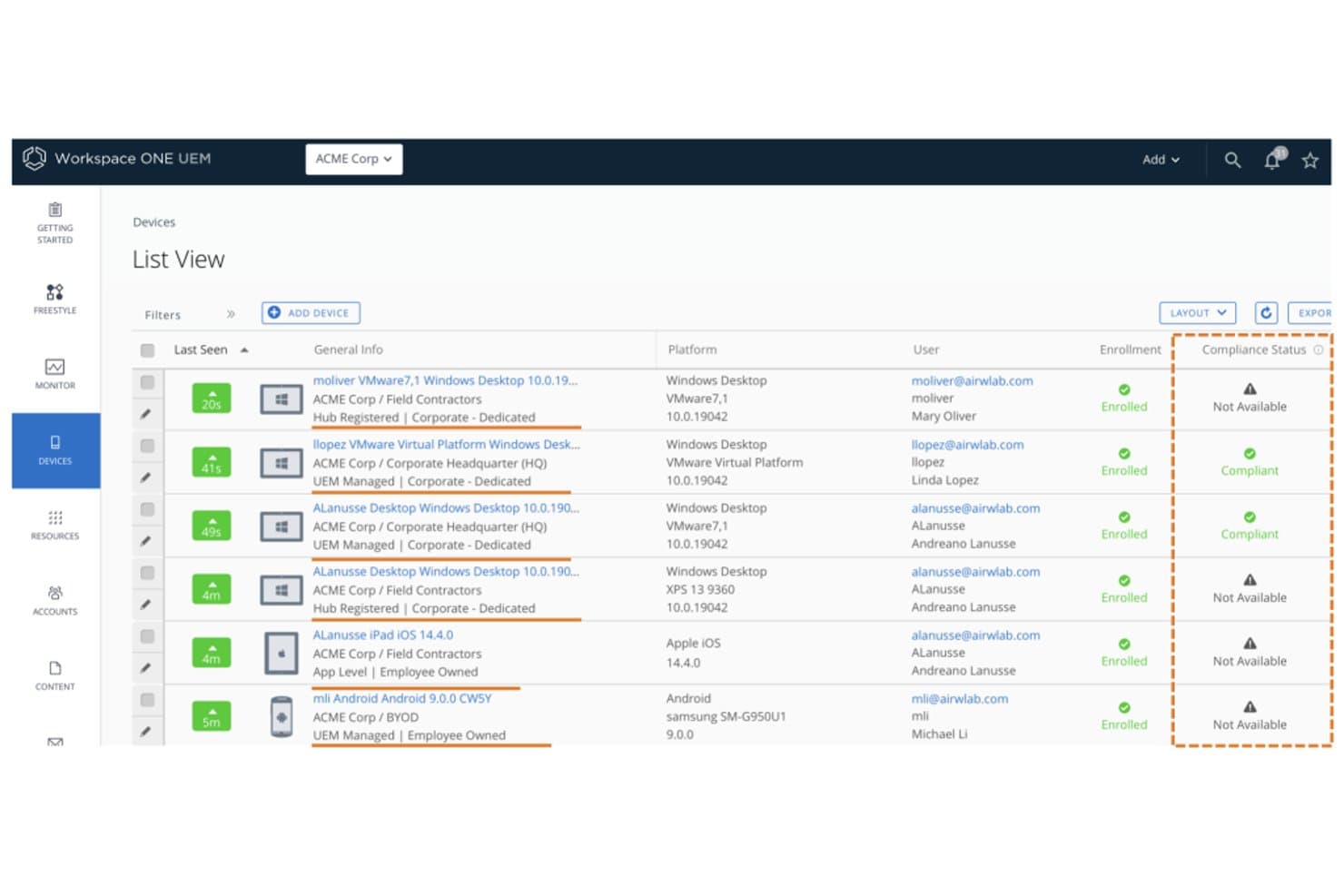
Workspace ONE UEM realiza un seguimiento del estado de cumplimiento de los dispositivos en todos los puntos finales inscritos. Workspace ONE UEM es una plataforma empresarial de gestión unificada de puntos finales de Omnissa que abarca la gestión de dispositivos móviles, de escritorio, robustos y de IoT en iOS, Android, Windows, macOS, ChromeOS y Linux desde una única consola de administración.
¿Para quién es más adecuado Workspace ONE UEM?
Workspace ONE UEM es una opción excelente para grandes empresas que gestionan flotas de dispositivos diversas y con distintos sistemas operativos, donde la seguridad de confianza cero y el cumplimiento normativo son innegociables.
Por qué elegí Workspace ONE UEM
Workspace ONE UEM se ha ganado un lugar en mi lista de opciones porque combina la aplicación de la confianza cero con inteligencia de flotas basada en IA de una forma que pocas plataformas pueden igualar. Me impresiona especialmente Omnissa Intelligence, que utiliza el aprendizaje automático para detectar anomalías, predecir problemas en los dispositivos y activar una corrección autónoma antes de que los usuarios se vean afectados. Su defensa contra amenazas móviles integrada también destaca: identifica redes Wi-Fi maliciosas, intentos de phishing y aplicaciones de riesgo en iOS, Android y ChromeOS, y luego envía esta información directamente al motor de cumplimiento para automatizar las respuestas.
Características principales de Workspace ONE UEM
- Inscripción sin intervención: Automatiza el aprovisionamiento de dispositivos en iOS, Android, Windows y macOS mediante ABM/DEP, Android Enterprise y Windows Autopilot sin configuración manual.
- Orquestador de flujos: Un creador de flujos de trabajo que permite a los administradores diseñar y automatizar secuencias de implementación de recursos basadas en políticas en grupos de dispositivos administrados.
- Borrado corporativo selectivo: Elimina únicamente los datos corporativos de los dispositivos inscritos y deja intacto el contenido personal, algo esencial para la desvinculación de dispositivos BYOD.
- VPN por aplicación: Enruta únicamente el tráfico de las aplicaciones administradas a través de un túnel VPN, manteniendo separado el tráfico de las aplicaciones personales en el mismo dispositivo.
Integraciones de Workspace ONE UEM
Workspace ONE UEM ofrece cinco integraciones nativas documentadas, incluidas Microsoft Entra ID, Okta, Google Workspace, ServiceNow y Microsoft Defender for Endpoint. Su API REST admite integraciones personalizadas, mientras que la conectividad con ServiceNow incluye conectores ITSM y Gráfico de servicios.
Pros and Cons
Pros:
- Compatible con iOS, Android, Windows, macOS y Linux
- Defensa contra amenazas y confianza cero integradas
- Detección y corrección de anomalías basada en IA
Cons:
- La implementación local está en proceso de retirada
- No ofrece aplicación de parches nativa para aplicaciones de terceros
Learn more about Workspace ONE UEM: 10Lo mejor en capacidades de quiosco
TinyMDM
- Prueba gratuita disponible
- Desde $24/dispositivo/año
Visit WebsiteCustomer Rating:4.7/5This rating combines scores from multiple user review sites to reflect overall customer sentiment about the product.
TinyMDM ofrece configuración de modo quiosco y controles de gestión de aplicaciones dentro de su panel de configuración de políticas. TinyMDM es una plataforma de gestión de dispositivos móviles diseñada para organizaciones que necesitan asegurar, monitorear y controlar dispositivos Android en sectores como el comercio minorista, la logística y los servicios de campo, ayudando a los equipos de TI a manejar grandes flotas de dispositivos.
¿Para quién es mejor TinyMDM?
TinyMDM es una excelente opción para equipos de TI en comercios minoristas, logística y operaciones de campo que requieren administrar flotas de dispositivos Android dedicados a gran escala.
Por qué elegí TinyMDM
Elegí TinyMDM como una de las mejores soluciones MDM porque sus capacidades de modo quiosco van mucho más allá de un simple bloqueo. Me gusta que ofrece configuraciones de quiosco de una sola aplicación y de múltiples aplicaciones—ya sea que mi equipo esté implementando una tableta de autoservicio en un entorno minorista o un dispositivo de campo bloqueado para una aplicación de logística, la configuración se adapta al caso de uso. El modo 'Clásico' es especialmente útil: bloquea las notificaciones, desactiva los botones de Inicio y Tareas Recientes y evita el apagado del dispositivo, para que los usuarios se mantengan enfocados en la tarea. También encuentro realmente útil la función de sesiones confidenciales—permite que un usuario temporal inicie sesión con cuentas personales y luego borra automáticamente esa información al finalizar la sesión.
Características clave de TinyMDM
- Control remoto: Accede y controla dispositivos Android registrados en tiempo real para solucionar problemas sin estar físicamente presente.
- Gestión de aplicaciones: Distribuye, actualiza o elimina aplicaciones de forma silenciosa en todos los dispositivos registrados directamente desde el panel de administración.
- Rastreo por geolocalización: Monitorea la ubicación en tiempo real de los dispositivos en un mapa para supervisar equipos de campo y bienes.
- Políticas de seguridad: Aplica requisitos de contraseña, restringe la configuración del dispositivo y realiza borrado remoto de dispositivos perdidos o robados.
Integraciones de TinyMDM
Las integraciones incluyen Microsoft Entra ID y una API REST para integrarse con aplicaciones externas.
Pros and Cons
Pros:
- Proceso de configuración sencillo, incluyendo enrolamiento mediante código QR
- Efectivas capacidades de gestión remota
- Admite dispositivos sin GMS, ampliando las opciones de compatibilidad
Cons:
- No puede forzar la habilitación de servicios de ubicación de forma remota
- Etiquetar dispositivos tras la configuración por lotes puede ser tedioso
Learn more about TinyMDM:
Otras opciones de software de MDM
Aunque no llegaron a formar parte de mi lista de las 12 mejores, siguen siendo soluciones interesantes que vale la pena conocer.
- 11Microsoft IntuneMejor para integraciones con Microsoft
- 12Swif.aiIdeal para entornos multi-OS con cumplimiento integrado
- 13HexnodeIdeal para la aplicación de políticas basada en geocercas
- 14IruIdeal para equipos centrados primero en Apple que se expanden a Windows
- 15BlackBerry UEMIdeal para la seguridad de endpoints de nivel gubernamental
- 16Ivanti Neurons for MDMIdeal para BYOD y la flota corporativa en una sola consola
Cómo evalúo el software MDM
Divido mi evaluación en aspectos imprescindibles, como la inscripción sin intervención manual y la aplicación de políticas multiplataforma, y en los diferenciadores que separan un buen MDM del adecuado para tu flota.
Funcionalidad básica (requisitos indispensables para esta lista)
Cuando selecciono herramientas para mi lista, califico cada una en una escala del 0 (no ofrece la funcionalidad) al 5 (destaca en esta área) para cada funcionalidad esencial listada a continuación. Luego, calculo la puntuación total de la herramienta como un porcentaje. Cada herramienta debe alcanzar una puntuación mínima total del 75% para ser considerada para su inclusión.
- Inscripción y aprovisionamiento de dispositivos: Verifico si la plataforma admite flujos de trabajo de inscripción sin intervención manual, como Apple Business Manager y Android Enterprise, para que los administradores puedan enviar dispositivos preconfigurados directamente a los usuarios finales.
- Aplicación remota de políticas: Cada herramienta debe permitir la configuración remota de requisitos de contraseña, ajustes de cifrado y configuraciones de Wi-Fi a grupos de dispositivos sin intervención manual y a escala.
- Bloqueo y borrado remoto: Evalúo si los administradores pueden forzar un borrado completo en un dispositivo robado o un borrado selectivo que elimine solo los datos corporativos cuando un empleado deja la organización.
- Gestión de aplicaciones móviles: La plataforma debe permitir la distribución de aplicaciones tanto en tiendas públicas como en desarrollos internos, incluyendo la asignación de licencias adquiridas por volumen y la imposición de actualizaciones.
- Monitoreo de cumplimiento y reportes: Busco paneles en tiempo real que alerten sobre dispositivos fuera de cumplimiento, como un teléfono con un sistema operativo desactualizado o sin el cifrado requerido.
- Soporte de sistemas operativos multiplataforma: Un MDM viable debe administrar iOS y Android como mínimo, y doy una puntuación más alta a las plataformas con paridad de funciones completa en Windows, macOS y ChromeOS.
Una vez que tengo una lista de herramientas que cumplen los criterios, considero lo que distingue a cada plataforma.
Factores diferenciadores (lo que distingue a los proveedores)
Así es como comparo y contrasto diferentes proveedores:
Funciones destacadas
La contenedorización BYOD es relevante cuando tu personal utiliza dispositivos personales. Busco plataformas que separen claramente los datos laborales de los personales para que IT pueda borrar aplicaciones corporativas sin tocar fotos personales. La integración con zero trust es otro factor que tomo en cuenta, especialmente las herramientas que incorporan verificaciones de cumplimiento de dispositivos en políticas de acceso condicional a través de proveedores de identidad como Okta o Azure AD. También evalúo si una plataforma incluye defensa contra amenazas móviles integrada capaz de detectar ataques de phishing o de red y poner automáticamente el dispositivo en cuarentena.
Más allá de las funciones
Las certificaciones de cumplimiento son un diferenciador clave que reviso. Una plataforma alineada con SOC 2, HIPAA o FedRAMP evita que tu equipo deba crear controles compensatorios por su cuenta. Las integraciones de ecosistema también tienen importancia—tu MDM debe conectarse con herramientas ITSM como ServiceNow y plataformas SIEM, para que las alertas de dispositivos se integren directamente en los flujos de trabajo de incidentes existentes. Además, evalúo la flexibilidad de licenciamiento, ya que una flota mixta de tabletas compartidas en almacenes y teléfonos personales suele requerir una combinación de modelos por dispositivo y por usuario.
Cómo elegir un software de MDM
Es fácil perderse entre largas listas de características y estructuras de precios complejas. Para ayudarte a mantener la concentración mientras avanzas en tu proceso único de selección de software, aquí tienes una lista de factores que debes tener en cuenta:
| Factor | Qué debes considerar |
|---|---|
| FactorEscalabilidad | Qué debes considerar¿Puede el software crecer junto con tu empresa? Considera las necesidades futuras y si los dispositivos adicionales se pueden gestionar fácilmente a medida que tu equipo se expande. |
| FactorIntegraciones | Qué debes considerar¿Se conecta con tus herramientas actuales? Asegúrate de que sea compatible con sistemas existentes, como CRM, correo electrónico y aplicaciones de productividad, para mantener la eficiencia del flujo de trabajo. |
| FactorPersonalización | Qué debes considerar¿Puedes adaptar el software a tus procesos? Busca opciones que permitan ajustar la configuración, los paneles y los informes para adaptarlos a tus necesidades específicas. |
| FactorFacilidad de uso | Qué debes considerar¿Qué tan intuitiva es la interfaz? Asegúrate de que tu equipo pueda utilizarla sin una formación exhaustiva, lo que ahorra tiempo y reduce la frustración. |
| FactorImplementación e incorporación | Qué debes considerar¿Qué tan rápido puedes comenzar? Evalúa el tiempo de configuración y los recursos necesarios, incluidos los materiales de formación y la asistencia para garantizar una transición fluida. |
| FactorCoste | Qué debes considerar¿Cuál es el gasto total? Compara el precio del software con tu presupuesto, incluidas las tarifas ocultas, el mantenimiento y los posibles ahorros de costes. |
| FactorMedidas de seguridad | Qué debes considerar¿Protege tus datos? Busca características como el cifrado, los controles de acceso y el cumplimiento de las normas de protección de datos para proteger la información confidencial. |
¿Qué es el software de MDM?
El software de gestión de dispositivos móviles (MDM) es una herramienta que permite a los administradores de TI gestionar de forma centralizada todos los dispositivos conectados a la red corporativa. El software se conecta a los dispositivos de su empresa, lo que le permite controlar el acceso, instalar software y aplicar políticas de seguridad.
El software MDM puede utilizarse para teléfonos, tabletas, ordenadores y otros dispositivos IoT que funcionan con sistemas operativos como iOS, Android, Windows y otros. Proporciona a los administradores de TI un control de nivel empresarial y les permite proteger y supervisar los dispositivos frente a amenazas de seguridad.
Funciones
Al seleccionar un software MDM, preste atención a las siguientes funciones clave:
- Inscripción de dispositivos: Esta función le permite añadir dispositivos nuevos a su sistema de gestión de forma rápida y segura, para que pueda poner en marcha a su equipo sin complicaciones. Es el primer paso para reunir todos sus dispositivos bajo un mismo techo.
- Gestión remota de dispositivos: Controle y solucione problemas de los dispositivos sin estar cerca de ellos. Puede enviar actualizaciones, configurar ajustes o incluso bloquear o borrar un dispositivo si se pierde, lo que puede ahorrarle muchas preocupaciones (y correos electrónicos de usuarios enfadados).
- Gestión de aplicaciones: Implemente, actualice o elimine aplicaciones en todos sus dispositivos desde un único panel de control. Esto ahorra mucho tiempo y ayuda a que todos utilicen las herramientas adecuadas.
- Controles de seguridad y cumplimiento: Establezca políticas para proteger los datos confidenciales, exigir requisitos de contraseña, cifrar los datos y garantizar que su organización cumpla las normativas de privacidad.
- Inventario y seguimiento de activos: Mantenga controlados todos los dispositivos de su flota, desde quién utiliza cada uno hasta su estado y ubicación. Siempre sabrá dónde están sus inversiones tecnológicas y quién podría necesitar una actualización.
- Gestión de contenidos: Distribuya documentos importantes, actualizaciones o formularios directamente a los dispositivos de los usuarios. Esto le ayuda a asegurarse de que todos tienen lo que necesitan, sin necesidad de interminables cadenas de correos electrónicos.
- Gestión del acceso de los usuarios: Controle quién puede acceder a determinados recursos y aplicaciones según sus roles o grupos. De este modo, puede mantener los datos confidenciales restringidos únicamente a las personas que los necesitan.
- Informes y análisis: Obtenga información detallada sobre el uso, los incidentes de seguridad y el cumplimiento. Los paneles de control le permiten detectar tendencias, solucionar problemas rápidamente y demostrar a su jefe que tiene todo bajo control.
- Compatibilidad con varias plataformas: Gestione una combinación de tipos de dispositivos y sistemas operativos, como iOS, Android y Windows, sin necesitar una herramienta diferente para cada uno. Esto simplifica las cosas cuando su equipo utiliza dispositivos personales (BYOD, por sus siglas en inglés).
Funciones habituales de inteligencia artificial del software MDM
Además de las funciones estándar del software MDM mencionadas anteriormente, muchas de estas soluciones están incorporando inteligencia artificial con funciones como las siguientes:
Autenticación de usuarios adaptativa: Mediante inteligencia artificial, el sistema ajusta los requisitos de autenticación según el contexto y el riesgo, por ejemplo, exigiendo pasos de seguridad adicionales solo cuando detecta algo inusual.
Detección predictiva de amenazas: La inteligencia artificial analiza los patrones de su red para detectar y alertarle sobre posibles riesgos de seguridad antes de que se conviertan en problemas importantes. Es como tener un guardaespaldas digital vigilando a la multitud.
Supervisión automatizada del cumplimiento: La inteligencia artificial analiza en tiempo real la configuración y la actividad de los dispositivos, y señala cualquier elemento que pudiera provocar una infracción de las políticas. Esto reduce considerablemente las comprobaciones manuales que debe realizar.
Detección inteligente de anomalías: La inteligencia artificial aprende cuáles son los comportamientos normales de los dispositivos de su organización y le notifica al instante cuando algo parece fuera de lo común, como horarios o ubicaciones de acceso inusuales.
Recomendaciones inteligentes de políticas: En lugar de establecer cada regla por su cuenta, la inteligencia artificial sugiere políticas óptimas basadas en sus datos de uso y en las necesidades de seguridad cambiantes.
Solución automatizada de problemas: La inteligencia artificial identifica problemas habituales de los dispositivos y ofrece soluciones, para que dedique menos tiempo a apagar incendios.
Beneficios
La implementación de un software MDM ofrece varios beneficios para su equipo y su empresa. Estos son algunos de los que puede esperar:
- Seguridad mejorada: Al aplicar políticas de seguridad y habilitar el borrado remoto, el software MDM protege los datos confidenciales frente al acceso no autorizado.
- Mayor eficiencia: Automatizar el registro de dispositivos y la distribución de aplicaciones ahorra tiempo y garantiza la coherencia entre los dispositivos.
- Mejor cumplimiento: El inventario y los informes periódicos ayudan a mantener el cumplimiento de las normas y regulaciones del sector.
- Mayor productividad: Garantizar que los usuarios dispongan de las aplicaciones y herramientas necesarias aumenta la productividad general del equipo.
- Ahorro de costes: Prevenir las filtraciones de datos y optimizar el uso de los dispositivos puede generar reducciones de costes significativas para la empresa.
- Flexibilidad en la gestión: La compatibilidad con múltiples plataformas permite gestionar diferentes dispositivos desde una única interfaz, lo que simplifica las tareas administrativas.
- Control basado en la ubicación: Las capacidades de geovallado proporcionan seguridad al controlar el acceso a los dispositivos según la ubicación.
Costes y precios
Seleccionar un software MDM requiere comprender los distintos modelos de precios y planes disponibles. Los costes varían según las funciones, el tamaño del equipo, los complementos y otros factores. La siguiente tabla resume los planes habituales, sus precios medios y las funciones que suelen incluir las soluciones de software MDM:
Tabla comparativa de planes de software MDM
| Tipo de plan | Precio medio | Funciones habituales |
|---|---|---|
| Tipo de planPlan gratuito | Precio medio$0 | Funciones habitualesGestión básica de dispositivos, distribución de aplicaciones e informes limitados. |
| Tipo de planPlan personal | Precio medio$5-$15/usuario/mes | Funciones habitualesGestión de dispositivos, distribución de aplicaciones, políticas de seguridad y análisis básicos. |
| Tipo de planPlan empresarial | Precio medio$20-$40/usuario/mes | Funciones habitualesFunciones de seguridad avanzadas, informes personalizados, integraciones y roles de usuario. |
| Tipo de planPlan corporativo | Precio medio$50-$100/usuario/mes | Funciones habitualesConjunto completo de funciones, análisis avanzados, compatibilidad con múltiples plataformas y asistencia las 24 horas, los 7 días de la semana. |
Preguntas frecuentes sobre el software MDM
Estas son algunas respuestas a preguntas frecuentes sobre el software MDM :
Qué viene después:
Si estás investigando software de MDM, conecta con un asesor de SoftwareSelect para obtener recomendaciones gratuitas.
Rellenas un formulario y tienes una breve conversación en la que detallan tus necesidades. Después, recibirás una lista breve de software para revisar. Incluso te ayudarán durante todo el proceso de compra, incluidas las negociaciones de precios.