

En este artículo, compartiré mis principales selecciones de programas de gestión de requisitos. He probado y analizado cada uno de forma independiente, por lo que puedes confiar en mis conclusiones. Mi objetivo es ayudarte a encontrar una herramienta que simplifique tus procesos y aumente la productividad de tu equipo.
Obtendrás una visión imparcial de cada programa, con sus características, ventajas y desventajas. Tanto si formas parte de un equipo pequeño como de una gran empresa, aquí encontrarás algo para ti. Empecemos a explorar las opciones para encontrar la más adecuada para tus necesidades.
Por qué confiar en nuestras recomendaciones de software
6,700+
Reviews
20
Industry experts
16+
Evaluation factors
14
Years
Nuestro equipo lleva probando y evaluando software desde 2012. Como líderes tecnológicos, sabemos lo difícil —y lo importante— que es elegir el software adecuado.
Para esta guía, evaluamos las herramientas mediante pruebas prácticas e investigación independiente, puntuando las herramientas según nuestros criterios de selección.
Nuestras reseñas reflejan nuestro criterio editorial humano, no un discurso de ventas.
Revisores expertos:
- Paulo Gardini MiguelDirector técnico
 Tim FisherVP de IA
 Gabriel RosasTech Lead y arquitecto de software
 Christhian GruhnTech Lead y arquitecto de plataforma

Resumen de los mejores programas de gestión de requisitos
| Tool | Best For | Trial Info | Price | ||
|---|---|---|---|---|---|
| 1 | Mejor para cumplimiento regulatorio de dispositivos médicos | Demo gratuita disponible | Precio a consultar | Website | |
| 2 | Lo mejor con colaboradores ilimitados incluidos | Plan gratuito disponible | Desde $1,990/año | Website | |
| 3 | Mejor para la personalización en la gestión de requisitos | Demo gratuita disponible | Precio bajo pedido | Website | |
| 4 | Ideal para la gestión de proyectos a gran escala | Prueba gratuita de 30 días disponible | Precio a consultar | Website | |
| 5 | Ideal para trazabilidad de extremo a extremo | Prueba gratuita disponible | Desde $520/usuario/año | Website | |
| 6 | Ideal para una personalización a nivel empresarial | Prueba gratuita de 30 días | Precios disponibles previa solicitud | Website | |
| 7 | Ideal para integraciones API listas para usar | Prueba gratuita de 30 días + demo sin costo disponible | Precio bajo consulta | Website | |
| 8 | Mejor con una mesa de ayuda ITSM | Prueba gratis de 7 días + plan gratuito disponible | Desde $20/mes | Website | |
| 9 | Ideal para despliegues escalables | Demo gratuita disponible | Precio bajo consulta | Website | |
| 10 | Mejor en funciones de trazabilidad | Precios bajo solicitud | Website |


Análisis de los mejores programas de gestión de requisitos
 Mejor para cumplimiento regulatorio de dispositivos médicos
- Demo gratuita disponible
- Precio a consultar
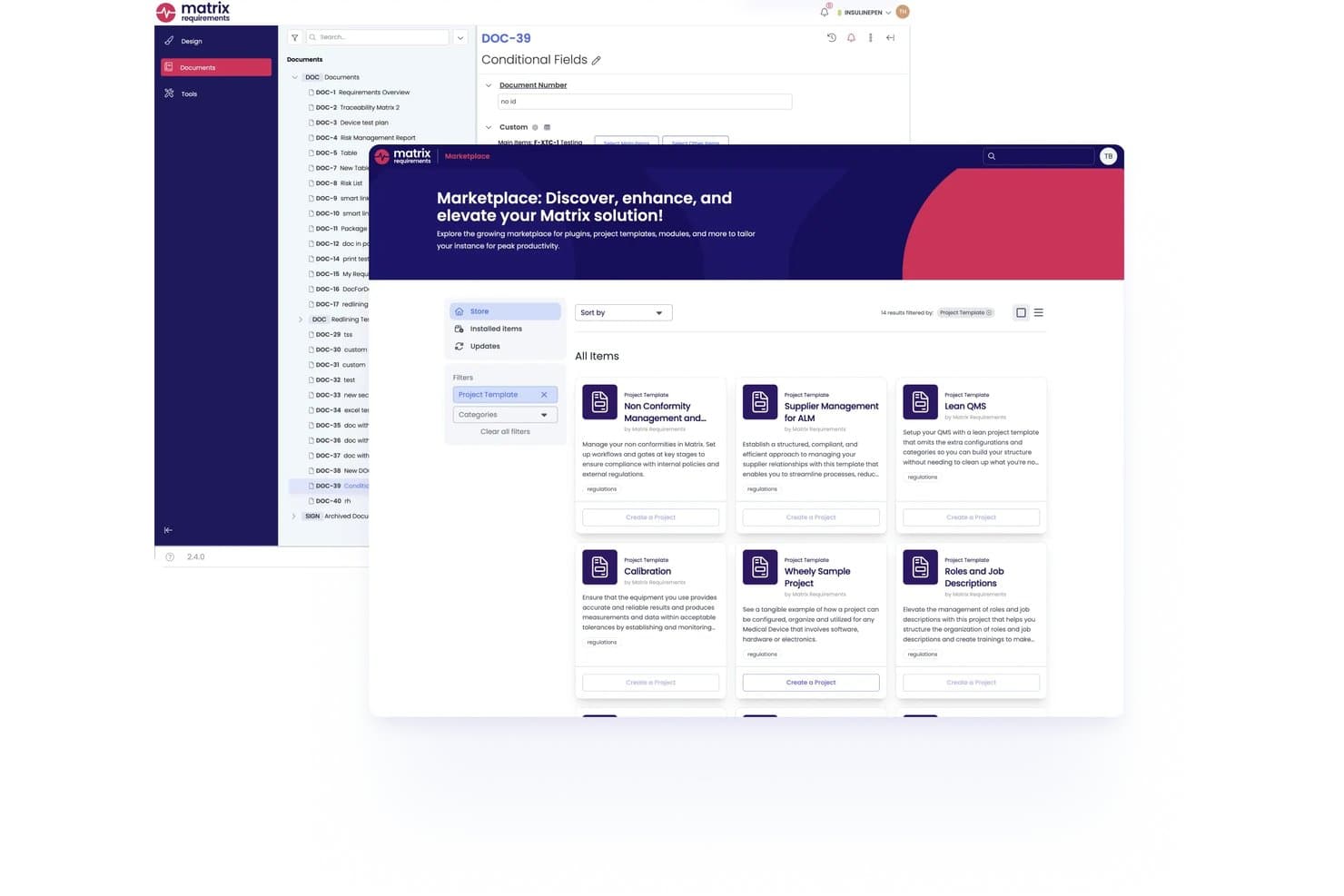
Matrix Req ofrece un Marketplace integrado donde los usuarios pueden descubrir e instalar plantillas de proyectos, plugins y módulos directamente en la plataforma. Matrix Req es una plataforma de gestión de requisitos diseñada específicamente para el desarrollo de dispositivos médicos, que combina control de diseño, gestión de riesgos, trazabilidad de extremo a extremo y gestión de pruebas en un solo entorno listo para cumplir regulaciones.
¿Para quién es mejor Matrix Req?
Matrix Req es ideal para equipos de aseguramiento de calidad y asuntos regulatorios en empresas de dispositivos médicos, SaMD e IVD que deben cumplir con los requisitos de la FDA o el MDR de la UE.
Por qué elegí Matrix Req
Matrix Req se gana su lugar en mi lista porque trata el cumplimiento normativo como arquitectura, no como un añadido de último momento. Me gusta especialmente su verificador de cumplimiento integrado, que compara la documentación con estándares como ISO 14971 e IEC 62304 y señala brechas antes de una presentación. Su gestión de ramas también te permite mantener variantes de requisitos diferenciadas para distintos mercados (MDR de la UE vs. FDA, por ejemplo) sin duplicar toda la estructura del proyecto.
Características clave de Matrix Req
- Biblioteca base de requisitos reutilizables: Almacena y gestiona módulos de requisitos reutilizables para crear rápidamente nuevas variantes de productos.
- Matriz de trazabilidad bidireccional: Conecta los requisitos con artefactos de diseño, prueba y riesgo con trazabilidad visual y en tiempo real.
- Historial de auditoría y versiones automatizado: Registra cada cambio, aprobación y comentario con un historial completo y registros listos para cumplimiento.
- Integraciones ALM nativas: Sincroniza requisitos y enlaces con Jira, Azure DevOps, GitHub y GitLab para flujos de trabajo unificados de equipo.
Integraciones de Matrix Req
Matrix Req ofrece integraciones nativas con Jira, Azure DevOps, GitHub, GitLab, Confluence, TFS, Broadcom Rally, Phabricator, YouTrack y Slack. Hay una API disponible para integraciones personalizadas.
Pros and Cons
Pros:
- Trazabilidad de extremo a extremo para industrias reguladas
- Verificaciones de cumplimiento integradas para FDA e ISO
- Gestión de variantes para requisitos de productos multirregión
Cons:
- La interfaz de usuario puede ser poco intuitiva
- Detalles de precios no disponibles de forma transparente
Learn more about Matrix Req: Lo mejor con colaboradores ilimitados incluidos
- Plan gratuito disponible
- Desde $1,990/año
Visit WebsiteCustomer Rating:4.6/5This rating combines scores from multiple user review sites to reflect overall customer sentiment about the product.
Interfaz de Requirements Portal con IDs de requisitos, métodos de trazabilidad y seguimiento de estado de verificación en vista de tabla. Requirements Portal ha ganado un lugar en mi lista de favoritos porque hace algo que no veo en la mayoría de otras herramientas: no limita tu capacidad de involucrar a las partes interesadas. Cuando veo equipos que necesitan una amplia variedad de opiniones—a veces docenas de revisores, aprobadores o expertos en la materia—pienso primero en esta opción.
Me gusta cómo Requirements Portal te permite agregar colaboradores ilimitados a los requisitos sin obligarte a pasar a un nivel más caro o a una licencia especial. Es ideal cuando tu producto o proyecto abarca muchos departamentos o grupos de clientes, y quieres dar visibilidad a todos sin complicaciones.
Lo mejor de Requirements Portal
- Equipos de producto e ingeniería que involucran a muchos participantes externos o no técnicos
- Organizaciones que necesitan cantidad ilimitada de colaboradores para revisar o aprobar requisitos
No es lo ideal para...
- Equipos que quieren gestión de tareas o tableros ágiles integrados
- Organizaciones que buscan funciones avanzadas de reportes o análisis
Qué distingue a Requirements Portal
Requirements Portal resulta muy útil para equipos que involucran a muchas partes interesadas en la recopilación de requisitos. A diferencia de Jira, que requiere un asiento para cada colaborador, esta herramienta te deja incluir todos los colaboradores que necesites sin costos extra ni una gestión de usuarios compleja. En la práctica, veo grupos de producto y analistas de negocio usarla para agilizar ciclos de revisión y recolectar comentarios entre departamentos. Está enfocada en la transparencia y el contexto compartido más que en la gestión detallada de tareas o sprints.
Compromisos de Requirements Portal
Requirements Portal está optimizada para una colaboración abierta y flexible, pero eso significa que no está pensada para gestionar la ejecución o los sprints. No cuenta con seguimiento de tareas incorporado ni automatización avanzada de flujos de trabajo, así que los equipos igual necesitarán otra herramienta para la entrega.
Pros and Cons
Pros:
- Desglose de requisitos y sugerencias impulsadas por IA
- Flujos de trabajo integrados para revisión y aprobación
- Sincronización en tiempo real con datos esquemáticos y de PCB
Cons:
- Integraciones limitadas fuera del ecosistema de Altium
- No es adecuada para equipos de proyectos no electrónicos
Learn more about Requirements Portal: Mejor para la personalización en la gestión de requisitos
- Demo gratuita disponible
- Precio bajo pedido
Visit WebsiteCustomer Rating:4.7/5This rating combines scores from multiple user review sites to reflect overall customer sentiment about the product.
reqSuite® rm proporciona una única fuente de la verdad para todos los requisitos y datos relacionados, garantizando consistencia y precisión a lo largo del proyecto. reqSuite® rm me destaca porque es muy flexible cuando los requisitos se vuelven más complejos de lo que las plantillas típicas pueden manejar. Usaría reqSuite si te encuentras limitado con herramientas de requisitos estándar y necesitas flujos de trabajo personalizados, estructuras de documentos o campos de metadatos adicionales.
Una cosa que agradezco es el nivel de control al configurar tipos de requisitos y reglas de trazabilidad. Si trabajas en entornos regulados o necesitas un proceso de requisitos que se adapte a tu organización, y no al revés, aquí es donde reqSuite® rm realmente destaca.
Mejor uso de reqSuite® rm
- Industrias reguladas que necesitan modelos de requisitos personalizados y trazabilidad
- Equipos que superan las plantillas fijas y requieren procesos de requisitos adaptables
No es ideal para reqSuite® rm
- Proyectos pequeños con requisitos simples o necesidades mínimas de documentación
- Equipos que desean una herramienta ligera con mínima configuración
Qué diferencia a reqSuite® rm
reqSuite® rm está diseñado para organizaciones que necesitan la gestión de requisitos adaptada a su propio lenguaje y procesos. Permite definir tipos de requisitos, flujos de trabajo y reglas personalizadas, por lo que no estás atado a un marco preestablecido. A diferencia de herramientas como Jira, que requieren soluciones alternativas para necesidades no estándar, reqSuite® rm espera que los usuarios adapten la herramienta a su metodología. Esto funciona mejor en entornos regulados y con procesos complejos, donde los enfoques genéricos no son suficientes.
Compromisos con reqSuite® rm
Al centrarse en la configurabilidad y la estructura, reqSuite® rm hace que la configuración y la administración continua sean más demandantes. Si necesitas una herramienta de arranque rápido o buscas algo ligero, ese nivel de profundidad puede ralentizar los proyectos iniciales.
Pros and Cons
Pros:
- Plataforma altamente configurable
- Funciones de control de versiones
- Verificaciones automáticas de enlaces y dependencias
Cons:
- La función de exportación de datos podría mejorarse
- La configuración gráfica de los informes podría modernizarse
Learn more about reqSuite® rm: Ideal para la gestión de proyectos a gran escala
- Prueba gratuita de 30 días disponible
- Precio a consultar

Vista de la pestaña de proyectos en Jama Software mostrando el resumen del estado de las pruebas. Jama Software está en mi lista porque es la herramienta a la que veo recurrir a las grandes organizaciones cuando los requisitos se vuelven complicados rápidamente. Los equipos con decenas de colaboradores y prioridades cambiantes utilizan Jama Software para hacer el seguimiento de los requisitos, gestionar el control de versiones y mantener la trazabilidad clara durante proyectos enormes.
Lo que aprecio es cómo Jama Software maneja la trazabilidad de extremo a extremo y el análisis de impacto. Cuando necesitas documentar relaciones complejas, alinear varios equipos y mantenerte al día con el cumplimiento normativo, esta plataforma responde bien.
Lo mejor de Jama Software para
- Grandes empresas que gestionan proyectos de ingeniería complejos y de alto riesgo
- Equipos que requieren una estricta trazabilidad de requisitos y cumplimiento con regulaciones
No es ideal de Jama Software para
- Pequeños equipos que necesitan un seguimiento de requisitos ligero o informal
- Proyectos sin grandes necesidades de documentación o trazabilidad
Qué diferencia a Jama Software
Jama Software trata la gestión de requisitos como un proceso estructurado y listo para auditorías en vez de una simple lista de tareas. A diferencia de Jira, que a menudo se amplía para manejar requisitos mediante complementos o soluciones improvisadas, Jama integra la trazabilidad y el análisis de impacto en su flujo de trabajo principal. En la práctica, esto funciona mejor cuando se trabaja en entornos regulados o en desarrollo de productos complejos donde no se pueden permitir fallos en los detalles.
Ventajas y desventajas de Jama Software
Se optimiza para una documentación y trazabilidad exhaustivas, pero la complejidad añade un tiempo considerable de integración y trabajo adicional. Para proyectos sin presiones fuertes de cumplimiento o trazabilidad, esta fricción adicional puede ralentizar a los equipos.
Pros and Cons
Pros:
- La trazabilidad integral ayuda a seguir los detalles del proyecto
- La colaboración en tiempo real asegura una toma de decisiones oportuna
- La interfaz está diseñada para supervisar proyectos a gran escala
Cons:
- Puede ser demasiado exhaustivo para proyectos pequeños
- La configuración inicial puede ser algo compleja
- Algunos usuarios pueden considerar que el precio es alto
Learn more about Jama Software: Ideal para trazabilidad de extremo a extremo
- Prueba gratuita disponible
- Desde $520/usuario/año
Visit WebsiteCustomer Rating:4.6/5This rating combines scores from multiple user review sites to reflect overall customer sentiment about the product.
La interfaz de ReqView organiza los requisitos del proyecto, documentos, riesgos y pruebas en un solo lugar. ReqView se gana su lugar en mi lista porque ofrece trazabilidad de extremo a extremo de una manera que la mayoría de las herramientas simplemente no puede igualar. Suelo recomendarlo siempre que un proyecto necesita un seguimiento sólido de los cambios de requisitos, la cobertura de pruebas y matrices de trazabilidad actualizadas.
En mi experiencia, la trazabilidad bidireccional y el detallado control de versiones de ReqView marcan una verdadera diferencia en proyectos regulados o sistemas críticos para la seguridad. Aprecio lo rápido que se pueden vincular requisitos, riesgos y pasos de verificación, y que luego se puedan generar informes claros de trazabilidad sin esfuerzo adicional.
Lo Mejor de ReqView
- Equipos en industrias reguladas que necesitan una trazabilidad de requisitos actualizada
- Grupos de ingeniería que rastrean requisitos, riesgos y verificaciones en detalle
Dónde No Destaca ReqView
- Equipos que deseen tableros visuales o gestión simplificada de tareas
- Organizaciones que necesitan funciones avanzadas de planificación de proyectos o gestión de recursos
Qué Distingue a ReqView
ReqView centra todo en torno a la gestión estructurada de requisitos basada en documentos. Espera que abordes los requisitos pensando en la trazabilidad y te da un enlace detallado entre cada requisito, riesgo y caso de prueba. A diferencia de algo como Jira, que está optimizado para historias de usuario y gestión iterativa de tareas, ReqView se mantiene más cerca de los flujos de trabajo basados en documentos, habituales en el desarrollo de productos regulados.
Esto suele funcionar bien para equipos que necesitan generar matrices de trazabilidad completas y demostrar cumplimiento, en lugar de simplemente hacer seguimiento de tareas diarias del proyecto.
Compromisos con ReqView
ReqView está optimizado para una trazabilidad y documentación exhaustiva, pero ese enfoque implica perder la planificación visual de proyectos y la gestión simplificada de tareas. En la práctica, esto lo hace poco ágil para equipos que buscan una coordinación de proyectos fluida y a alto nivel.
Pros and Cons
Pros:
- Buen soporte al cliente
- Estructura de proyecto flexible, atributos y vistas personalizables
- Fácil de configurar y usar
Cons:
- Se requieren habilidades de programación para personalizar las plantillas de exportación
- La colaboración en tiempo real aún no está implementada
Learn more about ReqView: Ideal para una personalización a nivel empresarial
- Prueba gratuita de 30 días
- Precios disponibles previa solicitud
Visit WebsiteCustomer Rating:4.7/5This rating combines scores from multiple user review sites to reflect overall customer sentiment about the product.
Además de registrar los requisitos del producto, los usuarios pueden realizar un seguimiento de la trazabilidad, los defectos y la verificación. Visure Requirements está en mi lista de opciones porque es la herramienta a la que recurro cuando los equipos necesitan una gran capacidad de personalización para adaptarse a procesos empresariales únicos. He visto organizaciones utilizarla para crear flujos de trabajo muy específicos, aplicar plantillas de proyecto diferenciadas y gestionar requisitos complejos de cumplimiento en una sola plataforma.
Lo que más destaca para mí es la forma en que Visure permite diseñar matrices de trazabilidad y aplicar estándares como DO-178C o ISO 26262 desde cero. Cuando aumenta la complejidad de los requisitos y las herramientas listas para usar simplemente no son suficientes, esta es la opción que recomiendo.
Ideal para Visure Requirements
- Grandes organizaciones con requisitos estrictos de cumplimiento o estándares específicos del sector
- Equipos que necesitan flujos de trabajo personalizados y una trazabilidad profunda para proyectos complejos
No es la mejor opción para
- Equipos pequeños con necesidades básicas de gestión de requisitos
- Grupos que buscan una configuración mínima o flujos de trabajo ligeros y prediseñados
Qué diferencia a Visure Requirements
Visure Requirements destaca por la forma en que permite definir desde cero sus propios flujos de trabajo y estructuras de datos. A diferencia de herramientas como Jira, que esperan que adaptes tu proceso al producto, aquí construyes el sistema en torno a tu forma actual de trabajar. Esto tiene más sentido cuando cuentas con normas estrictas de cumplimiento o necesidades de trazabilidad que las herramientas estándar no cubren. En la práctica, configuras cada etapa —desde la captura de requisitos hasta la generación de informes— para alinearla con los estándares del sector o con los procesos internos.
Desventajas de Visure Requirements
Obtienes el máximo control, pero ese nivel de profundidad implica que la configuración y los cambios requieren mucho más esfuerzo. Si buscas algo que puedas configurar y poner en marcha sin más, esta no será una opción adecuada.
Pros and Cons
Pros:
- Flexible para proyectos ágiles y en cascada
- Comprobaciones de calidad de requisitos basadas en IA
- Sólida integración con Word y Excel
Cons:
- La interfaz puede resultar abrumadora al principio
- La personalización requiere capacitación para los administradores
Learn more about Visure Requirements: Ideal para integraciones API listas para usar
- Prueba gratuita de 30 días + demo sin costo disponible
- Precio bajo consulta
Visit WebsiteCustomer Rating:4.3/5This rating combines scores from multiple user review sites to reflect overall customer sentiment about the product.
Identifica, gestiona y rastrea requisitos a lo largo del ciclo de vida con codebeamer. Reduce costos, riesgos y plazos de entrega en el desarrollo de productos. codebeamer está en mi lista porque es una de las pocas plataformas que resuelve los verdaderos obstáculos de integración de API desde el primer momento. Menciono esto sobre todo cuando los equipos dependen de la sincronización de requisitos con herramientas heredadas o de terceros y no tienen tiempo para desarrollar conectores personalizados.
Mi experiencia con codebeamer me dice que sobresale cuando necesitas mantener perfectamente alineados los requisitos, los casos de prueba y la trazabilidad en varios ecosistemas de software. Es especialmente sólido para industrias reguladas donde los puntos de integración no son negociables, y siempre he valorado cómo reduce la fricción de combinar datos a lo largo del ciclo de vida del producto.
Para quién es mejor codebeamer
- Equipos en industrias reguladas que necesitan trazabilidad de requisitos basada en API
- Organizaciones con cadenas de herramientas complejas que dependen de la sincronización de datos en tiempo real
Para quién no es ideal codebeamer
- Equipos que buscan una solución ligera de requisitos lista para usar
- Grupos sin necesidades de integración o que evitan la personalización por completo
Lo que distingue a codebeamer
Lo que encuentro único en codebeamer es cuánto prioriza la conectividad por API y la integración con los entornos de desarrollo existentes. En lugar de obligarte a quedarte en un silo aislado de seguimiento de requisitos, como a veces ocurre con Jira, parte de la base de que necesitarás conexiones en tiempo real con otras herramientas y sistemas.
Esto funciona mejor cuando quieres que los requisitos, pruebas y datos de lanzamientos estén sincronizados automáticamente en múltiples plataformas—especialmente en industrias muy reguladas donde la trazabilidad es una necesidad principal.
Compromisos con codebeamer
Al centrarse en integraciones profundas y flexibilidad, codebeamer introduce complejidad en la configuración y una curva de aprendizaje técnica. Esto significa que los equipos que buscan una solución lista para usar sin necesidad de configuración continua suelen tener más dificultades para comenzar.
Pros and Cons
Pros:
- Fuerte soporte para industrias reguladas
- Trazabilidad total en todo el ciclo de desarrollo
- Flujos de trabajo y plantillas altamente configurables
Cons:
- La configuración puede resultar compleja al principio
- La interfaz puede parecer anticuada a nuevos usuarios
Learn more about codebeamer: Mejor con una mesa de ayuda ITSM
- Prueba gratis de 7 días + plan gratuito disponible
- Desde $20/mes
Visit WebsiteCustomer Rating:4/5This rating combines scores from multiple user review sites to reflect overall customer sentiment about the product.
Jira Service Management te permite abordar los requisitos de proyectos y equipos en un panel unificado para una transparencia operativa total. Jira Service Management destaca para los equipos que necesitan funciones integradas de ITSM junto con la gestión de requisitos. Lo elegí porque los equipos de soporte pueden vincular las solicitudes de cambio, incidentes y tareas directamente con los requisitos, lo cual lo hace ideal para organizaciones que manejan tanto la entrega como el soporte. Me gusta cómo podemos enlazar los requisitos con los tickets de servicio, así que cuando alguien presenta una solicitud o interrupción, se ve el impacto de inmediato. Esto funciona mejor cuando los requisitos, incidentes y cambios deben permanecer conectados en organizaciones grandes y con procesos complejos.
Jira Service Management es mejor para
- Equipos de ITSM que necesitan requisitos vinculados con tickets de servicio e incidentes
- Empresas que gestionan requisitos junto con procesos de gestión de cambios y soporte
Jira Service Management no es ideal para
- Equipos de desarrollo de software enfocados únicamente en requisitos de producto
- Equipos pequeños que no necesitan flujos de trabajo ITSM integrados con requisitos
Qué distingue a Jira Service Management
Jira Service Management está construido bajo la idea de que la gestión de ITSM y de requisitos deben suceder juntas, no en silos separados. A diferencia de herramientas independientes como Jama Connect, espera que mapees requisitos, incidentes, cambios y solicitudes en un único flujo de trabajo. Esto resulta ideal cuando las partes interesadas necesitan ver el impacto de los procesos pendientes y posteriores—cómo el trabajo cambia a medida que los requisitos generan cambios o tickets de soporte. Lo veo funcionar muy bien en grandes empresas con estrictos controles de aprobación y auditoría.
Compensaciones de Jira Service Management
Está optimizado para entornos con muchos procesos, lo que significa que tienes mucha estructura y controles. Como resultado, los equipos dedicados sólo a productos pueden encontrar que las capas extra de ITSM son una carga que ralentiza la recopilación e iteración de requisitos.
Pros and Cons
Pros:
- Flujos de trabajo flexibles para equipos de TI y desarrollo
- El seguimiento de SLA mantiene las solicitudes en plazo
- Vincula requisitos con errores o solicitudes
Cons:
- La configuración puede ser compleja para nuevos usuarios
- La personalización requiere conocimientos de administración
Learn more about Jira Service Management: Ideal para despliegues escalables
- Demo gratuita disponible
- Precio bajo consulta

Aquí hay una captura de pantalla del panel de IBM Engineering Requirements Management DOORS Next. IBM Engineering Requirements Management 'DOORS Next' me llama la atención cada vez que veo organizaciones con necesidades de cumplimiento extensas y enormes volúmenes de requisitos que evolucionan con el tiempo. Cuando los equipos empiezan a enfrentar desafíos de trazabilidad y auditoría, esta es la herramienta que tiendo a recomendar: pueden mapear cada requisito con pruebas, riesgos y diseños a gran escala.
Aprecio cómo gestiona la gestión de líneas base y el control de cambios en proyectos complejos con múltiples partes interesadas, donde muchas personas contribuyen y los requisitos cambian a menudo. Ofrece un sólido soporte para iniciativas regulatorias a nivel empresarial: los equipos pueden rastrear cada requisito desde la idea hasta la entrega y verificar la cobertura a medida que se actualizan las regulaciones.
DOORS Next es ideal para
- Grandes empresas que gestionan requisitos extensos a través de múltiples productos o iniciativas regulatorias
- Equipos que necesitan trazabilidad de extremo a extremo y registros de auditoría para proyectos impulsados por el cumplimiento normativo
DOORS Next no es ideal para
- Equipos pequeños que buscan un seguimiento de requisitos ligero o informal
- Organizaciones que prefieren interfaces modernas y altamente visuales en lugar de rigor en los procesos
Lo que distingue a DOORS Next
Lo que destaco es que DOORS Next está construido para situaciones donde la trazabilidad es más importante que la velocidad. Se espera que grandes grupos definan los requisitos desde el principio y mantengan un control riguroso a medida que se producen cambios, a diferencia de herramientas como Jira, que se centran más en el seguimiento de incidencias y sprints. En la práctica, este enfoque hace que funcione mejor para industrias con estrictas necesidades de cumplimiento o auditoría, como la aeroespacial o la manufactura regulada.
Compromisos con DOORS Next
Está optimizado para el rigor en los procesos y la documentación trazable, pero esa estructura formal implica que la incorporación lleva más tiempo y los cambios rápidos se sienten lentos. Para equipos que necesitan adaptar requisitos frecuentemente o desean un entorno más visual y dinámico, suele parecer demasiado rígido.
Pros and Cons
Pros:
- Su robusta capacidad de escalabilidad garantiza que la herramienta se adapte a cualquier tamaño de proyecto
- Los paneles integrales proporcionan una visión detallada de los proyectos
- Permite la colaboración en tiempo real, lo que facilita el trabajo en equipo
Cons:
- Curva de aprendizaje más pronunciada en comparación con otras herramientas
- Puede ser excesivo para proyectos de muy pequeña escala
- La concesión de licencias y la configuración pueden ser más complejas que en alternativas más sencillas
Learn more about IBM Engineering Requirements Management DOORS Next:

Micro Focus Dimensions RM ofrece un panel basado en roles que proporciona a los usuarios actualizaciones de estado e informes de progreso. Micro Focus Dimensions RM destaca en mi lista por la forma en que gestiona la trazabilidad de requisitos. Cuando he trabajado en proyectos con cientos de componentes en movimiento, he visto cómo el seguimiento de dependencias y cambios puede pasar de ser manejable a caótico rápidamente.
Realmente aprecio la auditoría detallada de esta herramienta y la visualización en vivo de las relaciones de trazabilidad. Los equipos pueden identificar al instante los impactos aguas arriba y aguas abajo, que es exactamente lo que necesitamos cuando están en juego normativas o estándares de seguridad.
Lo mejor de Micro Focus Dimensions RM
- Industrias altamente reguladas que requieren trazabilidad y cumplimiento de requisitos
- Grandes organizaciones que gestionan proyectos complejos de software o sistemas, con múltiples equipos
Micro Focus Dimensions RM no es ideal para
- Pequeños equipos con necesidades simples o informales de gestión de requisitos
- Equipos que buscan flujos de trabajo ligeros, muy visuales o en estilo Kanban
Lo que distingue a Micro Focus Dimensions RM
Micro Focus Dimensions RM integra la trazabilidad en cada paso, lo que lo hace ideal cuando se necesita un control preciso y auditable de los requisitos. A diferencia de herramientas como Jira, que agregan trazabilidad mediante complementos o personalizaciones, Dimensions RM está diseñado para mapear dependencias y cambios desde el principio. Esto funciona mejor cuando se trabaja en entornos regulados o desarrollos de sistemas complejos y no se pueden dejar brechas en el historial de los requisitos.
Compensaciones con Micro Focus Dimensions RM
Dimensions RM está creado para entornos donde la trazabilidad es prioritaria, pero eso suele significar una incorporación más lenta y procesos más pesados. Si necesitas cambios rápidos o colaboración informal, la formalidad aquí tiende a ralentizar el trabajo.
Pros and Cons
Pros:
- Funciones de trazabilidad avanzadas para un seguimiento exhaustivo
- Se integra con una variedad de herramientas populares de desarrollo y pruebas
- El sólido control de versiones garantiza una documentación clara de cada cambio
Cons:
- Puede requerir un período de aprendizaje para equipos no familiarizados con su interfaz
- Algunas funciones pueden ser demasiado complejas para equipos o proyectos pequeños
- Posibles desafíos de integración con herramientas o plataformas no estándar
Learn more about Micro Focus Dimensions RM:
Otros programas de gestión de requisitos
A continuación, encontrarás una lista de programas adicionales de gestión de requisitos que incluí en mi selección, pero que no llegaron a estar entre los 12 primeros. Sin duda, merece la pena echarles un vistazo.
- 11TricentrisIdeal para integración de pruebas
- 12Visure SolutionsIdeal para integraciones robustas
- 13Doc SheetsIdeal para escalabilidad
- 14ValispaceIdeal para equipos de ingeniería
- 15OliveIdeal para colaboración en tiempo real
- 16OrcanosIdeal para proyectos enfocados en el cumplimiento normativo
- 17PolarionMejor para la gestión del ciclo de vida del producto
- 18InnoslateIdeal para la gestión del ciclo de vida
- 19AccompaIdeal para paneles de control fáciles de usar
- 20Modern RequirementsIdeal para la colaboración en Azure DevOps
Análisis de programas y herramientas relacionados
Si todavía no has encontrado aquí lo que buscas, consulta estos otros tipos de herramientas que hemos probado y evaluado.
- Programas de monitorización de redes
- Programas de monitorización de servidores
- Soluciones SD-Wan
- Herramientas de monitorización de infraestructuras
- Analizador de paquetes
- Herramientas de monitorización de aplicaciones
Cómo evalúo el software de gestión de requisitos
Divido cada evaluación en dos capas: criterios básicos—como la trazabilidad bidireccional y el establecimiento formal de líneas base—y diferenciadores, como las plantillas de cumplimiento o la integración con OSLC.
Funcionalidad principal (requisitos básicos para esta lista)
Al seleccionar las herramientas para mi lista, califico cada una en una escala del 0 (no ofrece la funcionalidad) al 5 (sobresale en esta área) para cada una de las funcionalidades principales que se indican a continuación. Después, convierto la puntuación total de la herramienta en un porcentaje. Cada herramienta debe alcanzar una puntuación total mínima del 65 % para ser considerada para su inclusión.
- Captura y jerarquía de requisitos: Evalúo cómo estructura cada herramienta los requisitos: si permite crear árboles de elementos principales y secundarios, asignar atributos personalizados e importar datos desde documentos de Word o fuentes CSV.
- Trazabilidad integral: Vincular un requisito con los casos de prueba, las especificaciones de diseño y los defectos es importante, por lo que compruebo la disponibilidad de matrices de trazabilidad bidireccionales y la detección de vínculos sospechosos.
- Control de versiones y líneas base: Busco un historial completo de revisiones para cada requisito, la posibilidad de crear instantáneas de líneas base antes de una publicación y la comparación lado a lado entre líneas base.
- Análisis de cambios e impacto: Cuando un único requisito cambia a mitad del sprint, la herramienta debería señalar todos los artefactos afectados. Evalúo cómo presenta cada plataforma el impacto posterior.
- Colaboración y flujos de trabajo de revisión: Los ciclos de aprobación de las partes interesadas son una parte fundamental del proceso, por lo que compruebo la disponibilidad de asignaciones de revisión estructuradas, comentarios encadenados y aprobaciones electrónicas.
- Integraciones con herramientas de desarrollo y pruebas: Analizo las conexiones nativas con plataformas como Jira, Azure DevOps y herramientas habituales de gestión de pruebas, además de la compatibilidad con API y ReqIF para cadenas de herramientas más amplias.
Una vez que tengo una lista de herramientas que cumplen estos criterios, considero qué distingue a cada plataforma.
Factores diferenciadores (qué distingue a los proveedores)
Así es como comparo y contrasto los distintos proveedores:
Características destacadas
La creación asistida por IA es un diferenciador importante: compruebo si una herramienta puede señalar requisitos ambiguos o duplicados durante la redacción, lo que ahorra horas de revisión manual. Las bibliotecas de requisitos reutilizables también son muy importantes cuando los equipos gestionan variantes de productos o carteras de varios programas. Evalúo hasta qué punto cada plataforma admite paneles de cobertura de pruebas en tiempo real, ya que detectar las brechas de verificación al instante es mejor que ejecutar informes estáticos posteriormente. Para los equipos regulados, las plantillas de cumplimiento configurables y adaptadas a estándares como ISO 26262 o DO-178C pueden reducir en semanas la preparación para las auditorías.
Más allá de las características
La flexibilidad de implementación es algo que siempre evalúo: los equipos que gestionan datos controlados por ITAR o propiedad intelectual sensible a menudo necesitan alojamiento local o de un solo inquilino, y no todos los proveedores lo admiten. También analizo la asistencia para la implementación y la migración, especialmente en el caso de organizaciones que abandonan plataformas heredadas como DOORS Classic o enormes hojas de cálculo de Excel. La adecuación al sector y a la normativa también es importante. Una herramienta preconfigurada para estándares de dispositivos médicos o del sector aeroespacial evita que el equipo tenga que crear flujos de trabajo de validación desde cero. Estos factores determinan el éxito a largo plazo tanto como el propio conjunto de funcionalidades.
Cómo elegir un programa de gestión de requisitos
Es fácil perderse entre largas listas de características y estructuras de precios complejas. Para ayudarte a mantenerte centrado mientras avanzas en tu proceso único de selección de software, aquí tienes una lista de factores que debes tener en cuenta:
| Factor | Qué debes considerar |
|---|---|
| FactorEscalabilidad | Qué debes considerar¿La herramienta crecerá junto con tu equipo? Considera si puede gestionar más proyectos o usuarios a medida que aumenten tus necesidades. Busca rutas claras de actualización en la estructura de precios. |
| FactorIntegraciones | Qué debes considerar¿Se conecta con tus herramientas actuales? Asegúrate de que sea compatible con los programas que tu equipo ya utiliza, como Jira o Slack, para evitar interrupciones en el flujo de trabajo. |
| FactorPersonalización | Qué debes considerar¿Puedes adaptarla para ajustarla a tus procesos? Comprueba si puedes modificar los flujos de trabajo, las plantillas y los campos para adaptarlos a las necesidades de tu equipo sin recurrir a un soporte técnico considerable. |
| FactorFacilidad de uso | Qué debes considerar¿La interfaz es intuitiva para todos los usuarios? Un diseño sencillo puede reducir el tiempo de formación y mejorar la adopción. Busca demostraciones o pruebas para comprobar directamente su facilidad de uso. |
| FactorImplementación e incorporación | Qué debes considerar¿Con qué rapidez puede empezar a utilizarla tu equipo? Considera los recursos necesarios para la configuración y la formación. El acceso a tutoriales y soporte puede facilitar la transición. |
| FactorCoste | Qué debes considerar¿Se ajusta a tu presupuesto sin cargos ocultos? Compara los costes totales, incluidas las licencias, la formación y el soporte, con los límites de tu presupuesto y el ROI previsto. |
| FactorMedidas de seguridad | Qué debes considerar¿Protege tus datos? Evalúa las medidas de seguridad implementadas, como el cifrado y los permisos de usuario, para garantizar la protección de los datos |
¿Qué es el software de gestión de requisitos?
El software de gestión de requisitos se utiliza para recopilar, documentar y realizar un seguimiento de los requisitos del proyecto durante todo su ciclo de vida. Los ingenieros, gerentes de proyecto y analistas de negocio suelen utilizar estas herramientas para garantizar que los proyectos cumplan sus objetivos previstos y sigan avanzando según lo planificado. Las funciones de trazabilidad, gestión de cambios y colaboración favorecen una comunicación eficaz y la adaptabilidad entre los equipos. Estas herramientas ayudan a mantener la claridad y la organización, mejorando en última instancia el éxito del proyecto y su alineación con los objetivos empresariales.
Funciones
Al seleccionar un software de gestión de requisitos, presta atención a las siguientes funciones clave:
- Medidas de seguridad: Protege los datos confidenciales del proyecto con funciones como el cifrado y los permisos de usuario, garantizando el cumplimiento normativo y la integridad de los datos. Al seleccionar las funciones que mejor se ajusten a tu caso de uso, podrás gestionar mejor las complejidades de los requisitos del proyecto y lograr resultados satisfactorios.
- Trazabilidad: Garantiza que todos los requisitos se sigan durante todo el ciclo de vida del proyecto, proporcionando responsabilidad y alineación con los objetivos del proyecto.
- Gestión de cambios: Ayuda a gestionar y documentar los cambios en los requisitos, reduciendo el riesgo de falta de comunicación y retrasos en el proyecto.
- Herramientas de colaboración: Facilita la comunicación entre las partes interesadas, permitiendo que los equipos trabajen juntos eficazmente y tomen decisiones fundamentadas.
- Opciones de personalización: Permite adaptar los flujos de trabajo, las plantillas y los campos a los procesos y necesidades específicos de tu equipo.
- Análisis de impacto: Evalúa los efectos de los cambios en los requisitos sobre el proyecto, ayudándote a mitigar riesgos y tomar decisiones basadas en datos.
- Actualizaciones en tiempo real: Proporciona información actualizada sobre el estado del proyecto, garantizando que todos los miembros del equipo dispongan de los datos más recientes para tomar decisiones.
- Control de versiones: Gestiona diferentes versiones de los requisitos para mantener la coherencia y realizar un seguimiento de los cambios a lo largo del tiempo.
- Informes y análisis: Ofrece información sobre el rendimiento del proyecto y el estado de los requisitos, ayudando en la planificación y ejecución estratégicas.
Beneficios
Implementar un software de gestión de requisitos proporciona varios beneficios para tu equipo y tu empresa. Estos son algunos de los que puedes esperar:
- Garantía de seguridad: Protege los datos de tu proyecto con medidas de seguridad como el cifrado y los permisos de usuario, garantizando el cumplimiento normativo y la integridad de los datos. El software de gestión agiliza la ejecución del proyecto, pero también proporciona un marco sólido para gestionar los cambios, garantizar la calidad y aportar valor.
- Mejor alineación del proyecto: Mantiene informadas y alineadas con los objetivos del proyecto a todas las partes interesadas mediante herramientas de trazabilidad y colaboración.
- Reducción de riesgos: Minimiza los riesgos del proyecto mediante funciones de gestión de cambios y análisis de impacto que gestionan eficazmente las actualizaciones de los requisitos.
- Comunicación mejorada: Facilita una mejor comunicación entre los miembros del equipo y las partes interesadas gracias a las actualizaciones en tiempo real y las funciones de colaboración.
- Mayor eficiencia: Aumenta la productividad al automatizar procesos rutinarios y proporcionar flujos de trabajo personalizables adaptados a tus necesidades.
- Decisiones basadas en datos: Permite que tu equipo tome decisiones fundamentadas gracias al acceso a herramientas de informes y análisis que ofrecen información sobre el rendimiento del proyecto.
Costes y precios
Seleccionar un software de gestión de requisitos requiere comprender los diversos modelos de precios y planes disponibles. Las opciones van desde herramientas gratuitas de gestión de requisitos hasta planes iniciales, profesionales y empresariales. Los costes varían según las funciones, el tamaño del equipo, los complementos y otros factores.
La siguiente tabla resume los planes habituales, sus precios medios y las funciones que suelen incluir las soluciones de software de gestión de requisitos:
Tabla comparativa de planes de software de gestión de requisitos
| Tipo de plan | Precio promedio | Características comunes |
|---|---|---|
| Tipo de planGratis | Precio promedio$0 | Características comunesGestión básica de requisitos, usuarios limitados, herramientas básicas de colaboración, acceso al soporte de la comunidad |
| Tipo de planInicial | Precio promedio$10 - $25/usuario/mes | Características comunesHerramientas de colaboración mejoradas, más usuarios, informes y análisis básicos, soporte por correo electrónico |
| Tipo de planProfesional | Precio promedio$25 - $50/usuario/mes | Características comunesSeguimiento avanzado de requisitos, capacidades de integración, informes y análisis completos, soporte prioritario por correo electrónico |
| Tipo de planEmpresarial | Precio promedioPrecios personalizados | Características comunesFlujos de trabajo personalizables, usuarios ilimitados, funciones de seguridad avanzadas, soporte dedicado, opciones locales, capacidades de integración completas, información basada en IA |
Preguntas frecuentes sobre el software de gestión de requisitos
Estas son algunas respuestas a preguntas frecuentes sobre el software de gestión de requisitos:
¿Cómo gestiona los cambios el software de gestión de requisitos?
El software de gestión de requisitos suele incluir funciones de gestión de cambios para realizar un seguimiento y documentar las modificaciones. Te ayuda a evaluar el impacto de los cambios en el proyecto y garantiza que todas las actualizaciones se comuniquen a las partes interesadas, manteniendo la alineación del proyecto y reduciendo los riesgos.
¿Cómo se garantiza la trazabilidad en el software de gestión de requisitos?
La trazabilidad se garantiza vinculando los requisitos con sus orígenes y haciendo un seguimiento de ellos durante todo el ciclo de vida del proyecto. Esto ayuda a tu equipo a verificar que se cumplen todos los requisitos y proporciona un registro de auditoría claro, esencial para el cumplimiento y la rendición de cuentas.
¿Qué debes tener en cuenta al integrar el software de gestión de requisitos?
Al integrar el software de gestión de requisitos, considera su compatibilidad con herramientas existentes como Jira o Slack. Asegúrate de que admita la migración de datos y ofrezca API para una conectividad fluida. Esta integración ayuda a mantener la continuidad del flujo de trabajo y mejora la colaboración entre los equipos.
¿Cómo puede el software de gestión de requisitos facilitar el cumplimiento normativo?
El software de gestión de requisitos facilita el cumplimiento normativo al proporcionar funciones como registros de auditoría, control de versiones y trazabilidad. Estas herramientas ayudan a tu equipo a documentar los procesos, realizar un seguimiento de los cambios y garantizar que se cumplan todos los requisitos normativos, reduciendo el riesgo de incumplimiento.
Qué sigue:
Si estás investigando software de gestión de requisitos, conecta con un asesor de SoftwareSelect para recibir recomendaciones gratuitas.
Completas un formulario y tienes una breve conversación en la que se profundiza en los detalles específicos de tus necesidades. Después recibirás una lista breve de software para revisar. Incluso te ayudarán durante todo el proceso de compra, incluidas las negociaciones de precios.