



NinjaOne vs. Atera: Comparison & Expert Reviews For 2026


Managing multiple endpoints, patching systems, and supporting users across locations can quickly become complex, especially when your tools don’t work well together or give you limited visibility. Many teams start looking for an IT management software that helps them stay in control, automate routine work, and manage operations more efficiently without adding complexity.
As you evaluate your options, NinjaOne and Atera are two platforms that consistently stand out for IT teams. In this guide, I’ll break down how they differ across features, automation, pricing, and usability so you can determine which one better supports your daily IT operations and long-term growth.
NinjaOne vs. Atera: An Overview
NinjaOne


Atera


Why Trust Our Software Recommendations
Our team has been testing and reviewing software since 2012. As tech leaders ourselves, we know how difficult—and important—it is to choose the right software.
For this guide, we evaluated tools using hands-on testing and independent research, scoring tools using our selection criteria.
Our reviews reflect our human editorial judgment, not a sales pitch.
Expert reviewers:
NinjaOne vs. Atera Pricing Comparison
| NinjaOne | Atera | |
|---|---|---|
| Free Trial | 14-day free trial + free demo available | 30-day free trial + free demo available |
| Pricing | Pricing upon request | From $129/technician/month (billed annually) |
NinjaOne vs. Atera Pricing & Hidden Costs
NinjaOne pricing is based on a subscription model that scales with the number of devices managed, with potential additional costs for premium features or support. In contrast, with Atera pricing, you pay per technician for unlimited devices, although add-ons like AI Copilot and advanced capabilities can increase your overall cost.
As an IT leader, you should first estimate your device count and technician growth, then compare how each pricing model scales over time so you can determine which option stays predictable and cost-efficient as your workload expands.
NinjaOne vs. Atera Feature Comparison
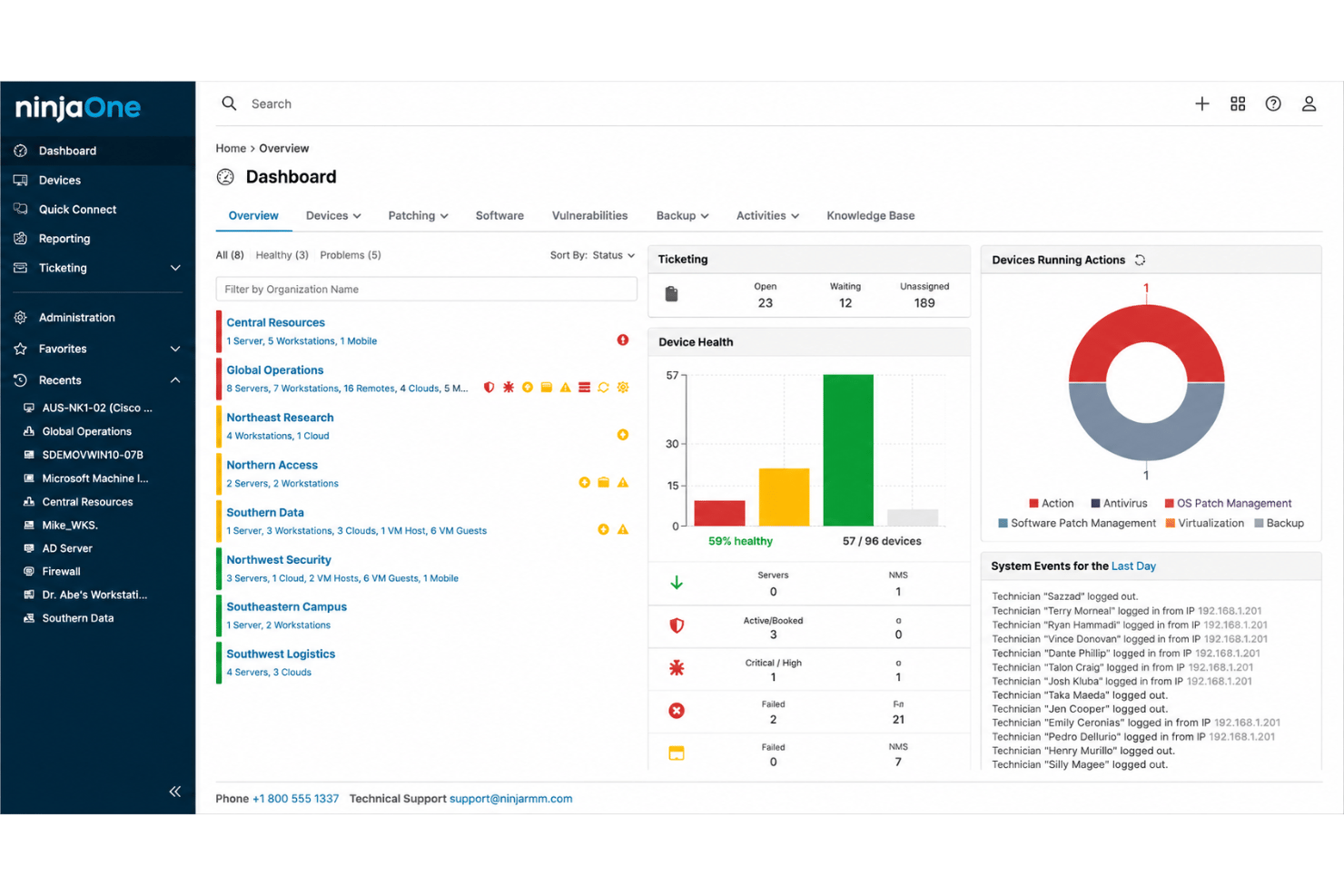
With NinjaOne’s remote management capabilities, you can easily handle IT tasks from anywhere, making it valuable for teams managing distributed devices and environments. In comparison, Atera extends beyond traditional monitoring and management by incorporating an autonomous AI agent, Robin, which can diagnose issues, execute fixes, and confirm resolution with minimal technician involvement.
Both platforms support proactive IT operations, but they differ in approach. NinjaOne emphasizes strong device control and visibility, while Atera focuses on reducing manual workload through autonomous workflows and end-to-end incident resolution, helping IT teams move beyond reactive support and scale operations more efficiently.
| NinjaOne | Atera | |
|---|---|---|
| 2-Factor Authentication | ||
| API | ||
| Access Management | ||
| Anti-Virus | ||
| Audit Trail | ||
| Bug Tracking | ||
| Calendar Management | ||
| Customer Management | ||
| Dashboard | ||
| Data Export | ||
| Data Import | ||
| Data Visualization | ||
| Email Integration | ||
| External Integrations | ||
| File Sharing | ||
| File Transfer | ||
| Firewall | ||
| Google Apps Integration | ||
| Inventory Tracking | ||
| Malware Protection | ||
| Multi-User | ||
| Network Device Performance Monitoring | ||
| Network Traffic Monitoring | ||
| Network Visualization | ||
| Notifications | ||
| Project Management | ||
| Remote Access | ||
| Risk Assessment | ||
| SAP Integration | ||
| Scheduling | ||
| Software Integration | ||
| Third-Party Plugins/Add-Ons | ||
| Ticket Management |
NinjaOne vs. Atera Integrations
| Integration | NinjaOne | Atera |
|---|---|---|
| Microsoft 365 | ❌ | ✅ |
| Google Workspace | ❌ | ✅ |
| Zendesk | ✅ | ✅ |
| ServiceNow | ✅ | ✅ |
| Dropbox | ❌ | ✅ |
| Salesforce | ❌ | ✅ |
| Zoom | ❌ | ❌ |
| Freshdesk | ❌ | ✅ |
| API | ✅ | ✅ |
| Zapier | ❌ | ✅ |
NinjaOne’s integrations focus mainly on core IT operations, helping you connect RMM with PSA, ticketing, and security tools to centralize device management, automate workflows, and improve endpoint visibility. In comparison, Atera provides broader business and SaaS connectivity, making it easier for you to link IT operations with identity, finance, and automation tools without relying heavily on custom development. Both platforms also support APIs for flexible integrations.
NinjaOne vs. Atera Security, Compliance & Reliability
| Factor | NinjaOne | Atera |
|---|---|---|
| Data Encryption | NinjaOne encrypts data both in transit and at rest using industry-standard protocols. | Atera uses AES-256 encryption to protect data during storage and transmission. |
| Regulatory Compliance | NinjaOne complies with GDPR and CCPA, providing tools for data access and deletion requests. | Atera adheres to GDPR regulations and offers compliance documentation for audits. |
| Access Control | NinjaOne supports role-based access controls and secure authentication to manage user permissions. | Atera provides role-based permissions and multi-factor authentication to control system access. |
| Cloud Architecture | NinjaOne operates as a cloud-based platform designed to deliver continuous service access. | Atera runs on a cloud-based infrastructure to support consistent uptime and remote accessibility. |
| Audit Logging | NinjaOne records user actions and device activity to help you review changes and investigate incidents. | Atera tracks user and system activity through audit logs to support oversight and accountability. |
Both NinjaOne and Atera provide strong baseline security and compliance for IT management software, with comparable encryption, access control, and audit logging, though NinjaOne emphasizes privacy tooling while Atera highlights MFA and centralized oversight. As an IT leader and professional, you should review encryption methods, authentication strength, audit log depth, and compliance documentation, then verify how each platform enforces policies and handles real incident tracking before selecting a vendor.
NinjaOne vs. Atera Ease of Use
| Factor | NinjaOne | Atera |
|---|---|---|
| User Interface | NinjaOne offers a clean, intuitive interface that makes navigating tools and features straightforward. | Atera provides a simple dashboard with clear navigation and configurable views for monitoring key metrics. |
| Onboarding Experience | NinjaOne has a guided onboarding process that helps you quickly set up and configure essential tools. | Atera supports onboarding with step-by-step guides, Atera Academy training, and detailed help documentation. |
| Customer Support | NinjaOne provides responsive support with a dedicated team available via chat and email. | Atera provides 24/7 chat support along with a searchable knowledge base and training materials. |
| Setup Process | NinjaOne allows fast agent deployment and centralized device management once installed. | Atera enables quick agent installation and immediate access to monitoring, patching, and ticketing tools. |
| Learning Curve | NinjaOne is straightforward for daily monitoring and patch management tasks. | Atera is easy for core tasks, though learning advanced automation and AI features may take additional time. |
NinjaOne is easy to navigate due to its intuitive layout, but setting up advanced features can be challenging without prior experience. On the other hand, Atera's dashboard is customizable, making it adaptable for different needs, though its extensive options might be overwhelming initially.
NinjaOne vs Atera: Pros & Cons
NinjaOne
- Deploys fast and delivers detailed endpoint visibility with no on-premise infrastructure to purchase, configure, and manage.
- Pulls patching, backup, remote access, and ticketing into one console.
- Automates patching with CVE and CVSS context, stability scoring, and dependable scripting.
- Built-in reporting is thin for client-facing work.
- Mobile device management is less robust than desktop support.
- The service desk and PSA are sized for SMB teams rather than enterprise ITSM or high-end MSP workflows.
Atera
- Autonomously detects and resolves IT issues, reducing ticket volume and manual workload.
- Unifies RMM, ticketing, and IT operations in one place, helping enterprises eliminate tool sprawl.
- The modern, clean interface makes it easy for your team to navigate and use.
- Reporting customization is more limited on lower-tier plans.
- Pricing can increase as you add more technicians.
- Some advanced features, like AI Copilot, require paid add-ons.
Best Use Cases for NinjaOne and Atera
NinjaOne
- Managed Service Providers NinjaOne’s multi-tenant architecture and remote support streamline managing multiple client environments from a single dashboard.
- Small to Midsize Businesses Device-based pricing and easy deployment provide SMBs effective IT management without extra complexity.
- Healthcare IT Departments Patch management and compliance reporting features help healthcare teams meet standards and secure sensitive data.
- Education Institutions Remote monitoring and access ease support for student and faculty devices across multiple sites.
- Hybrid Workforce Support Policy management, help desk, and remote access empower teams supporting remote and distributed users.
- Enterprise IT Teams Multi-tenant architecture and automation scale to support large, distributed fleets and high endpoint volume.
Atera
- Managed Service Providers You can handle multiple clients, track tickets, automate tasks, and scale endpoints without paying per device.
- Retail Chains You can monitor POS systems and branch devices remotely and fix issues without traveling on-site.
- Education Sector Schools or universities can benefit from Atera’s remote support and management features to keep educational technology running smoothly.
- Healthcare IT You can maintain device uptime, manage patches, and track assets while supporting distributed clinics securely.
- IT Departments Scaling Rapidly You can handle growing infrastructure and user demands without increasing headcount, using automation and AI-driven workflows to maintain efficiency.
- Enterprise IT Teams You can reduce ticket overload by resolving issues automatically at the endpoint, improve employee productivity, and maintain control over complex, distributed environments.
Who Should Use NinjaOne and Atera?
NinjaOne is a strong fit for IT leaders who prioritize reliable remote monitoring and device management, particularly in small to mid-sized environments where ease of use and operational simplicity are key.
Atera, on the other hand, is better suited for enterprise IT teams and managed service providers that want to move beyond traditional, ticket-driven support. Its autonomous capabilities—powered by its AI agent, Robin—help teams reduce manual workload by diagnosing and resolving issues end-to-end within a unified platform.
NinjaOne works well when your priority is streamlined device control and straightforward workflows. Atera is a better fit if you’re looking to consolidate tools, scale operations efficiently, and shift toward more proactive, autonomous IT management.
Differences Between NinjaOne and Atera
| NinjaOne | Atera | |
|---|---|---|
| Endpoint Management | Strong emphasis on endpoint management, patching, and device control, with deep visibility across environments. | Covers endpoint management as part of a broader IT operations platform, with additional focus on automation and autonomous issue resolution. |
| Helpdesk | NinjaOne does not include a native helpdesk and typically relies on integrations with external PSA or ticketing tools. | Atera includes a built-in helpdesk with ticketing, SLAs, automation rules, and service portal in the same platform. |
| Platform Scope | Provides a unified platform focused on endpoint management, including RMM, patching, backup, and security, with strong integrations to extend functionality. | Combines monitoring, service management, automation, and AI-driven resolution into a single platform, with a stronger focus on reducing operational workload through autonomous capabilities (Robin). |
| Pricing Model | NinjaOne charges per device, which can benefit teams managing numerous endpoints. | Atera charges per technician with unlimited devices, making costs scale with your team size instead of endpoints. |
| Service Management | NinjaOne focuses primarily on device and endpoint management with limited built-in service management features. | Atera includes built-in PSA, ticketing, billing, and service tracking to help you manage IT operations end to end. |
| Visit NinjaOneOpens new window | Visit AteraOpens new window |
Similarities Between NinjaOne and Atera
| Cloud-Based Access | Both platforms provide cloud-based solutions, enabling you to manage IT tasks from anywhere with internet access. |
|---|---|
| Customer Support | Both offer direct support channels and documentation resources to help you resolve setup, configuration, and operational issues. |
| Remote Monitoring | Both provide full remote monitoring and management, letting you track device health, push patches, and manage endpoints without being on-site. |
| Security | Both NinjaOne and Atera prioritize security with robust encryption and compliance with major regulations. |
| Unified Platform | Both platforms aim to consolidate key IT management functions into a centralized interface, reducing the need for multiple tools. |
| Visit NinjaOneOpens new window Visit AteraOpens new window | |