

Managing cloud environments can be a daunting task. You're juggling performance monitoring, security, and cost efficiency across many workloads. Cloud monitoring tools can be a lifeline, serving as a central security platform that helps you and your team maintain a strong security posture, keep systems running smoothly, and identify issues before they become problems.
I've spent countless hours testing and reviewing these tools to bring you an unbiased, well-researched list of top picks. In my experience, choosing the right cloud monitoring solution can make a significant difference in your cloud operations.
In this article, I'll guide you through the best cloud monitoring tools available, highlighting their unique features and benefits. Whether you're a small team or a large enterprise, there's something here to fit your needs.
Why Trust Our Software Recommendations
6,700+
Reviews
20
Industry experts
16+
Evaluation factors
14
Years
Our team has been testing and reviewing software since 2012. As tech leaders ourselves, we know how difficult—and important—it is to choose the right software.
For this guide, we evaluated tools using hands-on testing and independent research, scoring tools using our selection criteria.
Our reviews reflect our human editorial judgment, not a sales pitch.
Expert reviewers:
- Paulo Gardini MiguelTech Director
 Tim FisherVP of AI
 Gabriel RosasTech Lead & Software Architect
 Christhian GruhnTech Lead & Platform Architect

Best Cloud Monitoring Tools Summary
This comparison chart summarizes pricing details for my top cloud monitoring tool selections to help you find the best one for your budget and business needs.
| Tool | Best For | Trial Info | Price | ||
|---|---|---|---|---|---|
| 1 | Best with customizable sensor-based monitoring | 30-day free trial + free plan available | From $200/month (billed annually) | Website | |
| 2 | Best for hybrid environments | 14-day free trial | Pricing upon request | Website | |
| 3 | Best for open-source flexibility | Free download available | From $325/month (billed annually) | Website | |
| 4 | Best for network monitoring | Free 30-day trial + Free edition available | Pricing upon request | Website | |
| 5 | Best for infrastructure monitoring and alerting | Free demo + 30-day free trial + free plan available | From $2,595/100 node license | Website | |
| 6 | Best for time-series data | Free to use | No licensing cost | Website | |
| 7 | Best for Google Cloud users | Free plan available | From $0.1510/MiB for metrics ingested | Website | |
| 8 | Best for AWS integration | Free plan available | Pricing upon request | Website | |
| 9 | Best for DevOps automation | Pricing upon request | Website | ||
| 10 | Best for Azure services | Free demo available | Pricing upon request | Website |


Best Cloud Monitoring Tool Reviews
Below are my detailed summaries of the best cloud monitoring tools that made it onto my shortlist. My reviews offer a detailed look at the key features, pros and cons, integrations, and ideal use cases of each tool to help you find the best one for you.
 Best with customizable sensor-based monitoring
- 30-day free trial + free plan available
- From $200/month (billed annually)
Visit WebsiteCustomer Rating:4.6/5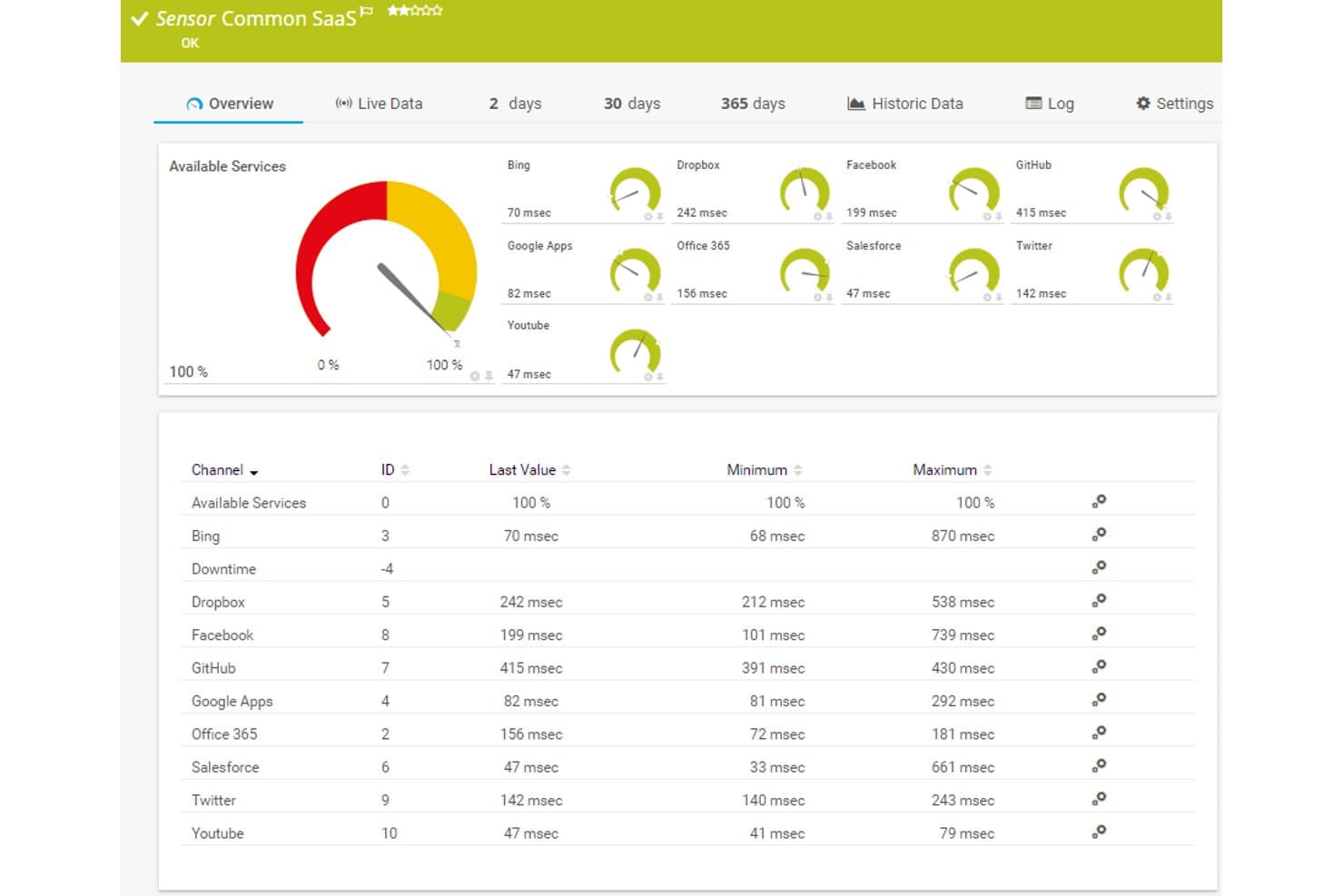
Paessler PRTG offers a Common SaaS sensor dashboard displaying real-time response times and availability for cloud services like Dropbox, Office 365, Salesforce, and GitHub. Paessler PRTG is a sensor-based monitoring platform that tracks infrastructure, cloud services, and network performance across AWS, Azure, and hybrid environments using 250+ preconfigured sensors.
Who Is Paessler PRTG Best For?
IT operations teams managing mixed environments—combining on-premises infrastructure with cloud services—who need a single monitoring platform without per-host pricing surprises.
Why I Picked Paessler PRTG
I picked Paessler PRTG as one of the best because its sensor-based architecture gives me precise control over exactly what gets monitored. I can deploy preconfigured AWS sensors like AWS EC2 v2 and AWS Cost alongside Cloud HTTP v2 sensors that check response times from Asia, Europe, and the USA simultaneously. When standard sensors aren't enough, I build custom ones via REST API or HTTP requests to cover gaps no other tool addresses out of the box.
Paessler PRTG Key Features
- Multi-cloud integrations: Native sensors connect directly with AWS, Azure, Microsoft 365, and Google Cloud services.
- Customizable dashboards: Drag-and-drop Maps and dashboards visualize metrics, alarms, and device status across your environment.
- Grafana exporter: Export metrics from multiple PRTG servers to Grafana for unified multi-instance visualization.
- Syslog and SNMP monitoring: Built-in support for Syslog, SNMP, and Windows Event Log collection from network devices and servers.
Paessler PRTG Integrations
Paessler PRTG offers native integrations with AWS, Azure, Google Cloud, Microsoft 365, vSphere, and SNMP network devices. An API is available for custom integrations and data exports.
Pros and Cons
Pros:
- Monitors on-premises and cloud from one interface
- Sensor-based pricing scales predictably with coverage
- 250+ preconfigured sensors for deployment
Cons:
- Log analysis capabilities are limited
- Cloud-native monitoring depth trails dedicated cloud tools
Learn more about Paessler PRTG:

LogicMonitor tracks multi-cloud resources from a single pane of glass. LogicMonitor is a cloud-based infrastructure monitoring platform designed for IT operations teams and managed service providers. It helps monitor both on-premises and cloud environments, providing a unified view of your IT infrastructure. The tool is valuable for businesses needing to track performance across diverse environments.
Why I picked LogicMonitor: It excels in monitoring hybrid environments, allowing you to keep an eye on both cloud and on-premises resources. You can set up automated alerts to notify your team of any issues. The tool's customizable dashboards offer insights into key metrics across your infrastructure. Its scalability makes it suitable for growing businesses with complex needs.
Standout Features and Integrations:
Features include automated discovery of devices and resources, which saves you time during setup. You can use its forecasting capabilities to predict future resource needs. The tool also provides detailed reporting to help you analyze performance trends over time.
Integrations include AWS, Microsoft Azure, Google Cloud Platform, Slack, and more.
Pros and Cons
Pros:
- Automated device discovery
- Scalable for large organizations
- Supports hybrid infrastructure
Cons:
- Can return a high volume of alerts
- Limited native reporting
Learn more about LogicMonitor: Best for open-source flexibility
- Free download available
- From $325/month (billed annually)
Visit WebsiteCustomer Rating:4.4/5
Zabbix monitors server resources such as CPU, memory, disk, and network usage. Zabbix is an open-source monitoring solution designed for IT infrastructure, applications, and cloud operations. It's widely used by IT administrators and developers to monitor the performance and availability of network servers, devices, VMs, and applications. The tool provides a range of monitoring capabilities, including network, server, and cloud monitoring.
Why I picked Zabbix: It offers open-source flexibility that allows you to customize and extend monitoring capabilities to fit infrastructure needs. With its reliable alerting system, you can set triggers based on thresholds and receive notifications. The tool supports distributed monitoring, which is ideal for large-scale environments. Detailed visualization options help you track metrics.
Standout Features and Integrations:
Features include a built-in web interface that provides easy access to monitoring data. You can create custom templates to optimize the monitoring setup. The tool also supports auto-discovery of network devices, which saves you time in configuration.
Integrations include VMware, AWS, Microsoft Azure, IBM Tivoli, Oracle, SAP, and more.
Pros and Cons
Pros:
- Extensive monitoring capabilities
- Detailed visualization options
- Scalable for large environments
Cons:
- Alert management can be intricate
- Resource-intensive for large deployments
 Best for network monitoring
- Free 30-day trial + Free edition available
- Pricing upon request
Visit WebsiteCustomer Rating:4.4/5
WhatsUp Gold monitors network devices and cloud status with live dashboards. WhatsUp Gold is a network monitoring software designed for IT professionals and network administrators. It helps monitor network performance and availability, providing insights to maintain smooth operations. The tool is valuable for businesses needing to track and manage network resources efficiently.
Why I picked WhatsUp Gold: It offers specialized network monitoring capabilities, making it ideal for IT teams. The tool allows you to visualize your network topology, giving you a clear view of device connections. You can set up alerts for network issues to support timely responses. A user-friendly interface simplifies network management, even for those with limited technical expertise.
Standout Features and Integrations:
Features include customizable dashboards that let you track key network metrics at a glance. You can automate network discovery to keep your inventory up-to-date. The tool also provides detailed reporting to help you analyze network performance trends.
Integrations include Microsoft Active Directory, VMware, AWS, Microsoft Azure, Google Cloud Platform, Slack, and more.
Pros and Cons
Pros:
- Customizable dashboards
- Automated network discovery
- Specialized network monitoring
Cons:
- Can be resource-intensive
- Limited scalability
Learn more about WhatsUp Gold: Best for infrastructure monitoring and alerting
- Free demo + 30-day free trial + free plan available
- From $2,595/100 node license
Visit WebsiteCustomer Rating:4.6/5
Nagios XI tracks system health with dashboards for alerts, hosts, and services. Nagios XI is an enterprise-level monitoring solution for IT infrastructure. It serves IT administrators and managers by providing insights into system health and performance. The tool excels in monitoring servers, networks, and applications.
Why I picked Nagios XI: Its complete alerting system helps you catch all critical issues. You can configure alerts based on specific thresholds and conditions. The tool provides an easy-to-use web interface for managing alerts and notifications. Its customizable alerting options make it a reliable choice for IT teams.
Standout Features and Integrations:
Features include advanced reporting that helps you analyze trends and performance over time. You can also use its visualizations to create custom dashboards for your team. The tool's capacity planning features assist in predicting future resource needs.
Integrations include AWS, Microsoft Azure, VMware, Oracle, Cisco, Slack, and more.
Pros and Cons
Pros:
- Reliable notification system
- Scalable architecture
- Extensive alert customization
Cons:
- Performance issues at scale
- High cost compared to competitors
Learn more about Nagios XI:

Prometheus monitors real-time server metrics such as CPU, memory, and traffic. Prometheus is an open-source monitoring system designed for capturing time-series data. It integrates with CI/CD pipelines to monitor applications, systems, and services. The tool collects and queries metrics for alerting and dashboarding.
Why I picked Prometheus: Its functional language, PromQL, allows you to query and transform data efficiently. It operates independently, relying on local storage, and is easy to deploy across environments. A large selection of instrumentation libraries supports most programming languages.
Standout Features and Integrations:
Features include a multi-dimensional data model that identifies time series with a metric name and key-value pairs. It supports precise alerting rules based on PromQL. The tool also offers simple operation with statically linked binaries for easy deployment.
Integrations include Kubernetes, Consul, etcd, HAProxy, and more.
Pros and Cons
Pros:
- Cloud-native integration
- Flexible query language
- Strong time-series support
Cons:
- No built-in long-term storage
- Limited dashboarding
Learn more about Prometheus: Best for Google Cloud users
- Free plan available
- From $0.1510/MiB for metrics ingested

Google Cloud Monitoring tracks cloud metrics with customizable dashboards. Google Cloud Monitoring is designed for monitoring applications running on Google Cloud Platform and other cloud environments. It's primarily used by developers and IT operations teams to gain insights into system performance and availability. The tool helps identify and resolve issues quickly, maintaining smooth operations.
Why I picked Google Cloud Monitoring: It's tailored for Google Cloud users, offering deep integration with Google's services. The tool provides out-of-the-box dashboards for a quick overview of system health. Its integration with other Google services improves the monitoring experience for those already using Google Cloud.
Standout Features and Integrations:
Features include the ability to create custom dashboards to visualize data in a way that makes sense for your team. You can set up alerting policies to notify you of issues based on specific conditions. The tool also offers uptime checks to help keep your services available to users.
Integrations are not publicly listed.
Pros and Cons
Pros:
- Supports multi-cloud environments
- Quick setup for Google Cloud users
- Deep integration with Google services
Cons:
- Complex alerting setup for beginners
- Limited to the Google ecosystem
Learn more about Google Cloud Monitoring:

Amazon CloudWatch monitors AWS resources with dashboards, alarms, and metrics. Amazon CloudWatch is a monitoring service for AWS cloud resources and applications. It's primarily used by developers and IT operations teams to track system performance and optimize resource usage. The tool provides metrics and logs to help you monitor your AWS environments.
Why I picked Amazon CloudWatch: It provides optimal integration with AWS services, making it a natural choice for AWS users. You can monitor and collect metrics from multiple AWS services with ease. The tool's ability to create custom dashboards helps you visualize key metrics. The alerting system helps you stay informed about important events.
Standout Features and Integrations:
Features include the ability to collect and monitor log files, which aids in troubleshooting. You can set alarms to automatically respond to changes in your AWS resources. The tool also supports real-time monitoring, helping you react quickly to issues.
Integrations include nearly all AWS services, Zapier, Grafana, and more.
Pros and Cons
Pros:
- Supports multiple AWS services
- Real-time monitoring capabilities
- Deep AWS integration
Cons:
- Limited visualization options
- Complex setup for non-AWS users
Learn more about Amazon CloudWatch:

DuploCloud monitors cloud infrastructure with built-in observability. DuploCloud is a cloud automation platform designed for DevOps teams and developers. It helps automate infrastructure provisioning and compliance, making cloud management more efficient. The tool is ideal for teams looking to accelerate deployment and maintain cloud security.
Why I picked DuploCloud: It excels in automating DevOps processes, saving your team time and effort. The platform offers predefined templates for compliance and security, helping you stay on track with regulations. You can manage infrastructure as code without extensive coding skills. The user-friendly interface makes it accessible for teams of all sizes.
Standout Features and Integrations:
Features include automated compliance checks to help your system meet industry standards. You can use the role-based access control to manage permissions. The tool also provides real-time monitoring and alerts to keep you informed about system performance.
Integrations include AWS, Microsoft Azure, Google Cloud Platform, GitHub, Slack, and more.
Pros and Cons
Pros:
- Reduces manual coding
- Simplifies infrastructure management
- Automates compliance checks
Cons:
- Vendor lock-in risk
- Limited flexibility for niche use cases
Learn more about DuploCloud:

Azure Monitor tracks real-time usage, performance, and reliability metrics. Azure Monitor is a complete monitoring solution offering native visibility into serverless workloads within the Microsoft Azure cloud provider ecosystem. It's designed for IT administrators and developers who need insights into the performance and health of their Azure resources. The tool supports application availability and performance through detailed data collection and analysis.
Why I picked Azure Monitor: It offers deep integration with Azure services, providing a continuous monitoring experience for Azure users. You can collect and analyze telemetry data across your Azure resources with ease. The tool's ability to create personalized dashboards helps you visualize important metrics, and its alerting capabilities keep you informed about critical issues.
Standout Features and Integrations:
Features include the ability to perform end-to-end monitoring of your applications, which aids in quickly identifying performance issues. You can set up proactive alerts based on specific conditions to mitigate risks. The tool also offers advanced analytics to dive deeper into your data for better insights.
Integrations include Microsoft Entra ID, Datadog, Dynatrace, and more.
Pros and Cons
Pros:
- Scalable for large environments
- Advanced data analytics
- Deep integration with Azure
Cons:
- High data ingestion costs
- Complex for non-Azure environments
Learn more about Azure Monitor:
Other Cloud Monitoring Tools
Here are some additional cloud monitoring tools that didn’t make it onto my shortlist, but are still worth checking out:
- 11DatadogBest for real-time dashboards
- 12ManageEngine OpManagerBest for network management
- 13ManageEngine NetFlow AnalyzerBest for traffic analysis
- 14Nagios CoreBest for open-source monitoring
How I Evaluate Cloud Monitoring Tools
I look at tools through two lenses: whether they cover the fundamentals—real-time metrics, multi-cloud alerting, log aggregation—and what sets them apart, like AI anomaly detection or cost visibility.
Core Functionality (Table Stakes For This List)
When I'm selecting tools for my list, I rank each one on a scale from 0 (does not offer the functionality) to 5 (excels in this area) for each core functionality listed below. Then, I calculate the tool's total score into a percentage. Each tool needs to achieve a minimum total score of 75% to be considered for inclusion.
- Real-Time Infrastructure Monitoring: I check whether a tool can pull live metrics like CPU, memory, and disk I/O from VMs, containers, and serverless functions with sub-minute refresh intervals.
- Multi-Cloud & Hybrid Support: Tools that integrate with AWS, Azure, and GCP through native connectors earn higher marks, especially when they also cover on-prem or hybrid setups.
- Alerting & Incident Notifications: I evaluate how flexible alert rules are and whether the tool routes notifications to channels teams already use, like Slack, PagerDuty, or email.
- Log Aggregation & Analysis: Centralizing logs from dozens of cloud services matters, so I look for strong search, filtering, and the ability to correlate log entries with metrics.
- Dashboards & Visualization: I look at whether teams can build custom dashboards with relevant widgets, share them across roles, and template views for repeated use across environments.
- Application Performance Monitoring: Distributed tracing across microservices is what I focus on here, along with support for common languages and frameworks used in cloud-native apps.
Once I have a list of tools that meet this criteria, I consider what sets each platform apart.
Differentiating Factors (What Sets Vendors Apart)
Here's how I compare and contrast different vendors:
Standout Features
AI-driven anomaly detection is a big differentiator—I look for tools that surface unusual patterns in metrics and logs without requiring teams to manually configure every threshold. Kubernetes observability also matters, especially auto-discovery of pods, nodes, and service meshes across clusters. Cost monitoring ties it together; tools that connect resource utilization data directly to cloud spend help teams spot waste without switching to a separate FinOps platform.
Beyond Features
Integration ecosystem is one of the first things I evaluate. A tool that connects to your CI/CD pipeline, ITSM platform, and supports OpenTelemetry means fewer data silos across your stack. Pricing model also shapes long-term fit—I check whether costs scale by host count, data volume, or events, since unpredictable ingestion-based billing can spiral fast in large environments. For teams in regulated industries, I look at compliance certifications like SOC 2 Type II and HIPAA, along with data residency options and RBAC controls.
How To Choose Cloud Monitoring Tools
It’s easy to get bogged down in long feature lists and complex pricing structures. To help you stay focused as you work through your unique software selection process, here’s a checklist of factors to keep in mind:
| Factor | What To Consider |
| Scalability | Can the tool grow with your business? Check if it supports increasing data volumes and users without a drop in performance. Consider future growth and whether the tool can handle it. |
| Integrations | Does it connect with your existing systems? Look for compatibility with your current tech stack to avoid extra work. Verify it integrates smoothly with your critical applications and platforms. |
| Customizability | Can you tailor the tool to your needs? Determine if it allows adjustments to dashboards and alerts to fit your specific workflows. Look for flexibility in how data is displayed and accessed. |
| Ease of use | Is it user-friendly for your team? Evaluate the learning curve and how quickly your team can start using it effectively. Tools with intuitive interfaces can save time and reduce frustration. |
| Implementation and onboarding | How long will the setup take? Consider the resources needed for a successful rollout. Evaluate the availability of support and training during the onboarding phase to minimize disruption. |
| Cost | Does it fit your budget? Analyze total costs, including hidden fees or long-term commitments. Compare the pricing with the value it provides, considering both initial and ongoing expenses. |
| Security safeguards | Are your data and operations secure? Verify the tool's security measures, such as data encryption and access controls. Confirm it aligns with your organization's security policies and standards. |
| Compliance requirements | Does it meet industry regulations? Assess if the tool complies with relevant legal and industry standards, especially if you operate in highly regulated sectors. Confirm it supports necessary compliance reporting and audits. |
What Are Cloud Monitoring Tools?
Cloud monitoring tools are software solutions used to track and manage the performance, security, and availability of cloud-based resources. IT professionals, developers, and operations teams generally use these tools to keep systems running smoothly and efficiently. Dashboards, alerts, and integration capabilities help with real-time monitoring and quick issue resolution. These tools provide essential insights, enabling teams to optimize performance and maintain reliable cloud services.
Features of Cloud Monitoring Tools
When selecting cloud monitoring tools, keep an eye out for the following key features:
- Real-time monitoring: Continuously tracks the performance and health of cloud resources, providing immediate insights into system status.
- Dashboards: Offer customizable visualizations of key metrics, helping teams quickly assess performance and identify issues.
- Alerts: Send notifications based on predefined conditions to support timely responses to potential problems.
- Integration capabilities: Connect with existing systems and applications to provide a unified view of the IT infrastructure.
- Scalability: Supports growth by accommodating increasing data volumes and users without performance loss.
- Security safeguards: Include measures such as encryption and access controls to protect data and meet compliance requirements.
- Data analytics: Analyze collected data to identify trends and provide actionable insights for optimization.
- Customizability: Allows tailoring of dashboards and alerts to fit specific workflows and organizational needs.
- Anomaly detection: Identifies unusual patterns in data to proactively address potential issues before they escalate.
- User management: Provides role-based access controls to manage permissions and maintain data security across teams.
Benefits of Cloud Monitoring Tools
Implementing a cloud monitoring solution provides several benefits for your team and your business. Here are a few you can look forward to:
- Improved performance: By tracking real-time data, these tools help you identify and fix performance issues.
- Greater security: Security safeguards such as encryption and access controls protect your data and maintain compliance with regulations.
- Cost efficiency: Scalability features allow you to manage resources efficiently, reducing unnecessary expenses.
- Increased uptime: Alerts notify you of potential issues, helping to prevent downtime and maintain service availability.
- Data-driven insights: Data analytics provide actionable insights, enabling better decision-making and optimization.
- Customization options: Customizable dashboards and alerts let you tailor the tools to fit your team's specific needs and workflows.
- Proactive problem-solving: Anomaly detection helps identify potential issues early, reducing the risk of major disruptions.
Costs and Pricing of Cloud Monitoring Tools
Selecting cloud monitoring tools requires an understanding of the various pricing models and plans available. Costs vary based on features, team size, add-ons, and more. The table below summarizes common plans, their average prices, and typical features included in cloud monitoring tools solutions:
Plan Comparison Table for Cloud Monitoring Tools
| Plan Type | Average Price | Common Features |
| Free Plan | $0 | Basic monitoring, limited alerts, and community support. |
| Personal Plan | $15-$300/user/month | Real-time monitoring, customizable dashboards, and email alerts. |
| Business Plan | $1000-$4000/month | Advanced analytics, role-based access control, and integration capabilities. |
| Enterprise Plan | $10000-$50000/month | Full-stack visibility, AI-driven insights, dedicated customer support, and extensive security features. |
Cloud Monitoring Tools FAQs
Here are some answers to common questions about cloud monitoring tools:
What is the primary purpose of cloud monitoring tools?
Cloud monitoring tools primarily track and manage the performance, security, and availability of cloud-based resources. They help your team keep systems running smoothly by providing real-time data and alerts. This allows you to quickly identify and resolve issues, keeping your operations efficient and reliable.
How do cloud monitoring tools support multi-cloud environments?
Cloud monitoring tools support multi-cloud by aggregating performance data across providers, such as AWS, Azure, and Google Cloud. You get a single dashboard for metrics, logs, and alerts—helping you centrally track usage and spot issues across clouds.
Can cloud monitoring tools work with hybrid environments?
Yes, many cloud monitoring tools can work with hybrid environments, supporting both cloud-based and on-premises resources. This flexibility is important if your organization uses a mix of infrastructure. Look for tools that offer integration capabilities with your existing systems to maintain continuous monitoring across all environments.
Can cloud monitoring platforms help with compliance and security monitoring?
Yes, most cloud monitoring platforms have features for compliance and security monitoring. They track user access, audit logs, and system changes. Tools often include rule-based alerts for unauthorized activity, which helps with frameworks such as SOC 2, HIPAA, or GDPR.
Are cloud monitoring tools suitable for small businesses?
Yes, cloud monitoring tools are suitable for small businesses, especially those offering scalable plans. Start with a basic plan that covers essential monitoring needs and upgrade as your business grows. These tools can provide valuable insights even at a smaller scale, helping you optimize performance and manage resources.
How do CTOs measure ROI for a cloud monitoring investment?
CTOs measure ROI by tracking reduced downtime, faster incident resolution, and lower operational overhead. Monitor mean time to recovery and see if proactive monitoring helps you deprioritize manual checks. Alignment with business uptime goals also indicates positive ROI.
What’s Next:
If you're in the process of researching cloud monitoring tools, connect with a SoftwareSelect advisor for free recommendations.
You fill out a form and have a quick chat where they get into the specifics of your needs. Then you'll get a shortlist of software to review. They'll even support you through the entire buying process, including price negotiations.