


SolarWinds vs. Datadog: Comparison and Expert Reviews for 2026

We review tools independently, and commissions help fund our testing. See our transparency policy, our methodology, or suggest a tool.
Choosing between SolarWinds and Datadog for your next observability platform means weighing SolarWinds’ deep network visibility against Datadog’s unified cloud monitoring experience. If you’re struggling to decide which platform will help your team catch outages faster, reduce alert fatigue, and keep your web services running smoothly, you’re not alone.
In this article, you’ll get a side-by-side look at both tools, expert perspectives on their strengths and weaknesses, and practical guidance to help you pick the right fit for your environment.
SolarWinds

4.3/5
- 30-day free trial + free demo available
- From $7/node/month
Datadog
4.5/5
- Free plan available and 14-day free trial
- From $5/month (billed annually)
Why Trust Our Software Recommendations
6,700+
Reviews
20
Industry experts
16+
Evaluation factors
14
Years
Our team has been testing and reviewing software since 2012. As tech leaders ourselves, we know how difficult—and important—it is to choose the right software.
For this guide, we evaluated tools using hands-on testing and independent research, scoring tools using our selection criteria.
Our reviews reflect our human editorial judgment, not a sales pitch.
Expert reviewers:
- Paulo Gardini MiguelTech Director
 Tim FisherVP of AI
 Gabriel RosasTech Lead & Software Architect
 Christhian GruhnTech Lead & Platform Architect

| SolarWinds | Datadog | |
|---|---|---|
| Free Trial | 30-day free trial + free demo available | Free plan available and 14-day free trial |
| Pricing | From $7/node/month | From $5/month (billed annually) |
SolarWinds vs. Datadog Pricing & Hidden Costs
SolarWinds uses a tiered licensing model that’s typically based on monitored entities like nodes, databases, or users, with different products and modules priced separately. This structure can make costs less predictable as you expand functionality or adopt additional tools across your stack. Datadog, by contrast, follows a usage-based pricing model centered on hosts and enabled features. While this approach offers flexibility and makes it easy to start small, costs can increase quickly as you scale usage, ingest more data, or enable advanced capabilities like custom metrics, logs, or security features.
To choose the right pricing model, map out your current and future monitoring needs in detail. Consider how your infrastructure might scale, which products or features you’ll actually use, and how pricing units (like nodes vs. hosts vs. data volume) align with your environment. Ask each vendor for a clear breakdown of what’s included, what counts as a billable unit, and how overages or add-ons are priced. This approach helps you avoid unexpected charges and ensures you’re comparing total cost of ownership—not just the starting price.
Both SolarWinds and Datadog offer core observability and monitoring capabilities designed to give teams visibility into their IT environments. They overlap heavily in areas like infrastructure monitoring, application performance monitoring (APM), log management, alerting, dashboards, and anomaly detection, allowing teams to track performance, troubleshoot issues, and analyze trends across systems. In practice, both platforms aim to unify metrics, logs, and traces into a single view so teams can detect and resolve issues quickly in complex, hybrid environments.
Where they diverge is in how they approach modern infrastructure. Datadog stands out for its cloud-native design, with deep integrations (hundreds of services), real-time analytics, and strong support for containers, microservices, and multi-cloud environments. SolarWinds, on the other hand, differentiates itself with strong on-premises and hybrid monitoring, plus its modular Orion-based ecosystem that excels in network visibility, device monitoring, and enterprise IT operations use cases.
| SolarWinds | Datadog | |
|---|---|---|
| API | Yes | Yes |
| Bug Tracking | No | Yes |
| Data Export | Yes | Yes |
| Data Import | Yes | Yes |
| External Integrations | Yes | Yes |
| Malware Protection | No | No |
| Multi-User | Yes | Yes |
| Notifications | Yes | Yes |
| Integration | SolarWinds | Datadog |
| ServiceNow | ✅ | ✅ |
| Jira | ✅ | ✅ |
| Slack | ✅ | ✅ |
| Microsoft Teams | ✅ | ✅ |
| AWS | ✅ | ✅ |
| Google Cloud | ❌ | ✅ |
| Azure | ✅ | ✅ |
| PagerDuty | ✅ | ✅ |
| Splunk | ✅ | ✅ |
| New Relic | ❌ | ✅ |
| API | ✅ | ✅ |
| Zapier | ✅ | ❌ |
Both SolarWinds and Datadog support a wide range of integrations, especially across infrastructure, applications, and cloud services. Datadog generally offers deeper and more extensive integrations for cloud-native environments and modern observability stacks, while SolarWinds focuses more on traditional IT systems and hybrid infrastructure.
| Factor | SolarWinds | Datadog |
| Data Encryption | Uses TLS and AES-256 encryption for data in transit and at rest. | Encrypts data in transit and at rest with industry-standard protocols. |
| Regulatory Compliance | Offers support for HIPAA, GDPR, and SOC 2 compliance requirements. | Provides SOC 2 Type II, GDPR, and HIPAA compliance certifications. |
| Incident Response | Includes automated alerting and customizable escalation workflows. | Features real-time incident detection and integrated response playbooks. |
| Uptime Guarantees | Delivers high availability with built-in failover and redundancy options. | Offers a published SLA with 99.9% uptime and global redundancy. |
| Access Controls | Supports role-based access and multi-factor authentication. | Provides granular role-based access and SSO integration. |
Datadog leads with more transparent uptime guarantees and a wider range of compliance certifications, while SolarWinds offers strong encryption and flexible access controls. SolarWinds is a solid choice for teams prioritizing customizable security policies, but Datadog stands out for organizations with strict compliance and reliability needs.
| Factor | SolarWinds | Datadog |
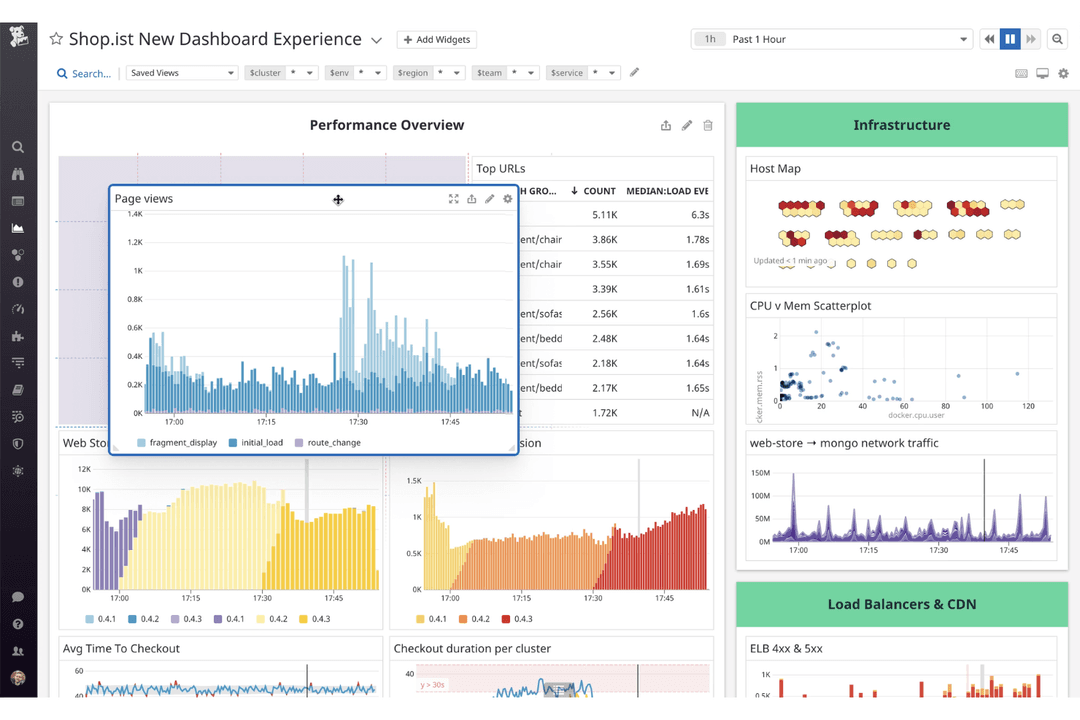
| User Interface | Offers a classic, highly customizable dashboard that can feel dated but is powerful for experienced users. | Features a modern, intuitive interface with drag-and-drop widgets and real-time updates. |
| Onboarding | Setup can be complex, often requiring detailed configuration and network knowledge. | Provides guided onboarding and automated discovery for a faster start. |
| Documentation | Includes extensive documentation and a large knowledge base, though navigation can be overwhelming. | Offers clear, searchable documentation and in-app tooltips for quick answers. |
| Support | Delivers responsive support with live chat and phone options, especially for enterprise customers. | Provides 24/7 support and an active community forum for troubleshooting. |
| Customization | Allows deep customization of alerts and reports, but setup can be time-consuming. | Enables easy customization of dashboards and alerts with minimal effort. |
Datadog is easier to pick up and use day-to-day, while SolarWinds rewards users who invest time in setup and customization. SolarWinds is best for teams who want granular control and don’t mind a learning curve, but Datadog is ideal if you want a smooth, modern digital experience right out of the box.
SolarWinds
- You get real-time alerts and diagnostics that help you quickly address network issues.
- The intuitive dashboard makes it easy for your team to monitor performance at a glance.
- You can customize reports to fit your specific needs and get detailed insights.
- The software can feel overwhelming due to its extensive features.
- You might experience occasional lags in the user interface.
- Some users find the initial setup process to be a bit complex.
Datadog
- Highly customizable dashboards for visualizing key metrics
- Advanced alerting and anomaly detection features
- Real-time monitoring across infrastructure, applications, and logs
- Setup complexity grows in large or hybrid environments
- Data retention limits can restrict historical analysis
- Pricing increases quickly with data volume and features
SolarWinds
- Large EnterprisesYour large-scale operations will benefit from detailed insights and real-time alerts, ensuring network stability.
- Financial InstitutionsYou can rely on its robust monitoring to maintain secure and continuous network operations, critical for financial transactions.
- Tech CompaniesYour team will appreciate the customizable dashboards that help you manage complex network systems efficiently.
- Healthcare ProvidersYou need reliable performance monitoring to ensure uninterrupted access to critical patient data and applications.
- Educational InstitutionsYour IT department can use its easy-to-understand dashboards to manage diverse network needs across campuses.
- Government AgenciesYou require a dependable tool to monitor and secure sensitive data across extensive network infrastructures.
Datadog
- Hybrid IT DepartmentsUnified dashboards simplify monitoring across on-premises and cloud resources.
- Ecommerce PlatformsTransaction tracing and anomaly detection support high-traffic reliability.
- SaaS ProvidersEnd-to-end application monitoring ensures uptime and user experience.
- DevOps TeamsAutomated alerting and integrations streamline incident response and troubleshooting.
- Large EnterprisesCentralized observability and advanced analytics help manage sprawling infrastructure.
- Cloud-Native StartupsDatadog’s real-time monitoring and automation support rapid scaling and deployment.
Who Should Use SolarWinds, And Who Should Use Datadog?
SolarWinds is best suited for organizations with on-premises or hybrid IT environments that need strong network monitoring and centralized infrastructure management. It’s a good fit for IT teams that want deep visibility into servers, devices, and traditional systems, along with the option to self-host for greater control over data and deployment. Enterprises with established infrastructure and dedicated IT operations teams will typically get the most value from SolarWinds.
Datadog is ideal for teams running cloud-native, containerized, or highly distributed environments that require scalable, real-time observability. It works especially well for DevOps and engineering teams that rely on integrations, automation, and unified monitoring across modern stacks like microservices and multi-cloud platforms. Fast-growing companies and SaaS businesses tend to benefit most from Datadog’s flexibility and breadth of features.
| SolarWinds | Datadog | |
|---|---|---|
| Core Focus | SolarWinds Strong network performance monitor and traditional IT infrastructure management. | Datadog Built for full-stack observability across cloud-native environments. |
| Deployment Model | SolarWinds Offers both self-hosted and SaaS options, with strong on-prem support. | Datadog Cloud infrastructure (primarily SaaS-first), fully managed with no on-prem deployment. |
| Integrations | SolarWinds Supports many integrations, especially for infrastructure and enterprise systems. | Datadog Offers extensive, deep integrations across cloud services, containers, and SaaS tools. |
| Observability Depth | SolarWinds Strong in infrastructure and network-level visibility. | Datadog Deep observability across APM, logs, metrics, traces, and user experience. |
| Platform Architecture | SolarWinds More monolithic, with products built around a shared platform (e.g., Orion). | Datadog Highly modular and unified platform designed for metrics, logs, and traces. |
| API Availability | Both provide robust APIs, allowing you to integrate with other tools and automate workflows as needed. |
|---|---|
| Custom Alerts | Each provider lets you set up custom notifications and escalation policies tailored to your environment. |
| Real-Time Monitoring | Both deliver real-time monitoring tools and alerting, helping you catch outages and performance issues as they happen. |
| Reporting & Analytics | Each offers detailed reporting and analytics tools for tracking uptime, incidents, and trends over time. |
| Role-Based Access | Both support granular role-based access controls to manage user permissions and security. |