

19 Best Jira Service Management Alternatives For 2026

Best Jira Service Management Alternatives Shortlist
Here’s my shortlist of the best Jira Service Management alternatives:


The best Jira Service Management alternatives help IT teams deliver faster support, align with ITIL processes, and manage service requests without running into the platform’s customization and integration limits. These tools give organizations more flexibility in workflows, better automation options, and stronger reporting capabilities to meet the needs of both technical and non-technical teams.
Many organizations start searching for Jira Service Management alternatives after struggling with challenges like rigid configurations that slow down process changes, juggling integrations that don’t connect cleanly, or spending too much time maintaining complex setups instead of focusing on resolving tickets. These pain points often lead to delays, frustrated users, and higher support costs.
I’ve tested IT service management tools in live production environments, worked with teams migrating from legacy systems, and evaluated how platforms perform across SaaS and enterprise stacks. Those experiences showed me which solutions actually improve service delivery and which introduce new inefficiencies.
In this guide, you’ll see which Jira Service Management alternatives provide the cleanest setups, stronger ITIL alignment, and the most useful automation features to help your team resolve requests faster and with less effort.
What is Jira Service Management?
Jira Service Management is a service management software designed to help teams manage and deliver great service experiences. It's commonly used by IT professionals, customer support teams, and project managers who need efficient tools for handling service requests and incident management.
Ticketing, workflow automation, and reporting features help with organizing tasks, prioritizing requests, and gaining insights into service performance. Overall, Jira Service Management provides a structured approach to managing service operations, helping your team deliver quality service efficiently.
Why Trust Our Software Reviews
We’ve been testing and reviewing software since 2023. As tech leaders ourselves, we know how critical and difficult it is to make the right decision when selecting software.
We invest in deep research to help our audience make better software purchasing decisions. We’ve tested more than 2,000 tools for different tech use cases and written over 1,000 comprehensive software reviews. Learn how we stay transparent & our software review methodology.
Best Jira Service Management Alternatives Summary
This comparison chart summarizes pricing details for my top Jira Service Management alternative selections to help you find the best one for your budget and business needs.
| Tool | Best For | Trial Info | Price | ||
|---|---|---|---|---|---|
| 1 | Best for quick ITSM adoption | 14-day free trial available | From $19/user/month (billed annually) | Website | |
| 2 | Best for ITIL-aligned service operations | 14-day free trial | Pricing upon request | Website | |
| 3 | Best for user-friendly customization | 14-day free trial | Pricing upon request | Website | |
| 4 | Best for customizable service portals | Free demo available | Pricing upon request | Website | |
| 5 | Best for self-service capabilities | 30-day free trial + free demo available | From $76/agent/month | Website | |
| 6 | Best for customizable service portals | 14-day free trial + free demo available | Pricing upon request | Website | |
| 7 | Best for endpoint automation | Free demo available | Pricing upon request | Website | |
| 8 | Best for self-service capabilities | Free demo available | Pricing upon request | Website | |
| 9 | Best for AI-driven automation | Free demo available | Pricing upon request | Website | |
| 10 | Best for seamless system integration | Free demo available | Pricing upon request | Website |

Why Trust Our Software Reviews
We’ve been testing and reviewing software since 2023. As tech leaders ourselves, we know how critical and difficult it is to make the right decision when selecting software.
We invest in deep research to help our audience make better software purchasing decisions. We’ve tested more than 2,000 tools for different tech use cases and written over 1,000 comprehensive software reviews. Learn how we stay transparent & our software review methodology.
-

Freshservice
Visit WebsiteThis is an aggregated rating for this tool including ratings from Crozdesk users and ratings from other sites.4.6 -
Deel IT
Visit Website -
Rippling IT
Visit WebsiteThis is an aggregated rating for this tool including ratings from Crozdesk users and ratings from other sites.4.8



Best Jira Service Management Alternatives Reviews
Below are my detailed summaries of the best Jira Service Management alternatives that made it onto my shortlist. My reviews offer a detailed look at the key features, pros & cons, integrations, and ideal use cases of each tool to help you find the best one for you.

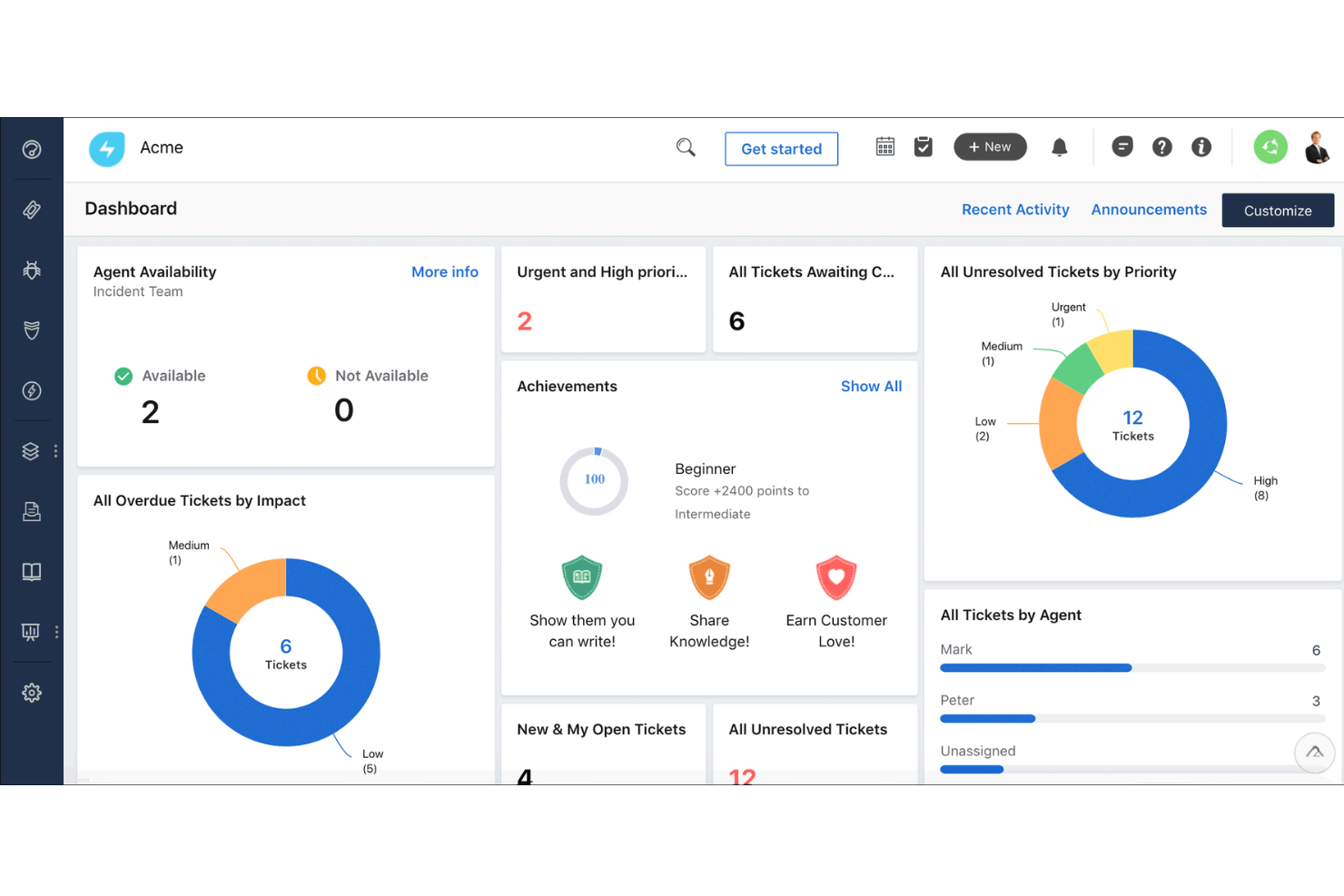
Freshservice gives you an IT service management platform that feels more approachable and structured than Jira Service Management when your team isn’t already tied into the Atlassian ecosystem or doesn’t need deep developer workflow alignment. It’s built around standardized ITIL practices—handling incidents, problems, changes, and assets from a single interface with automation and self-service portals that help reduce manual coordination.
Why I Picked Freshservice
I picked Freshservice as an alternative to Jira Service Management because it lets your IT and support teams adopt a solid ITSM framework quickly while avoiding the steeper learning curve and setup overhead that often comes with Atlassian’s tools. You’ll find structured incident, problem, and change management workflows that guide your processes in line with widely accepted service standards.
Built-in automation lets you route tickets, manage SLAs, and keep work moving without hand-built configurations. For organizations that prioritize clarity and ease of adoption over deep developer-centric integrations, Freshservice feels like a practical alternative.
Freshservice Key Features
Aside from the ticketing and ITIL workflows noted above, there are several other features that make Freshservice a compelling choice when you’re weighing it against Jira Service Management:
- Asset management: Track hardware, software, and cloud assets in a CMDB that links directly to service tickets so you know what’s affected and why.
- Enterprise Service Management: Extend service management beyond IT to other departments within your organization, such as HR or Facilities.
- Reporting and Analytics: Gain insights into your service desk performance with detailed reports and analytics.
- Change Management: Manage changes in your IT environment with a structured approach to minimize risks and disruptions.
Freshservice Integrations
Integrations include Microsoft Teams, Slack, Jira, SecPod, Azure Active Directory, TeamViewer, DocuSign, GitHub, Google Workspace, and Dropbox.
Pros and Cons
Pros:
- Strong ITIL-aligned workflows for structured service delivery.
- Integrated ticketing and asset management improves context.
- Self-service portal reduces incoming manual requests.
Cons:
- Mobile app has limited functionality for some users.
- Asset management can get expensive as you scale.
New Product Updates from Freshservice

Freshservice Enhances Global Search and Dashboards With Task Support
Freshservice enhances Global Search and Dashboards by adding support for ticket, problem, change, and release tasks, along with custom task views. This update helps teams search, track, and report on tasks from one centralized interface. For more information, visit Freshservice's official site.


SysAid speaks directly to IT teams and service desks that want a single place to manage tickets, assets, and service requests. It is well-suited for mid-sized to large organizations that feel slowed down by fragmented help desk tools and manual workflows. If your team needs both IT service management capabilities, such as incident, change, and problem handling, alongside asset tracking, SysAid brings these functions together so you do not have to manage separate systems.
Why I Picked SysAid
I picked SysAid because it combines a mature ITSM framework with automation that helps you manage service requests and infrastructure from one platform. It supports core ITIL practices, including incident, change, and configuration management, which adds structure to service delivery. Its built-in automation and AI-driven ticket categorization and routing reduce the workload on your agents, allowing them to focus on higher-priority issues.
SysAid Key Features
Aside from those core capabilities, you get a suite of additional tools that make SysAid more than just a help desk:
- Self-Service Portal: Allows end users to submit tickets, track request status, and access a knowledge base, which can reduce incoming support requests.
- Asset Management and CMDB: Automatically discovers and tracks hardware and software assets, while mapping relationships between assets and services for improved infrastructure visibility.
- Service Level Management: Helps you define, manage, and meet service level agreements (SLAs) to support consistent service delivery.
- Reporting and Analytics: Provides detailed reporting on ticket resolution times, asset lifecycle data, and overall service performance to help guide operational improvements.
SysAid Integrations
Integrations include Jira, Microsoft Teams, Slack, Active Directory, Azure AD, SCCM, VMware, Google Workspace, Okta, and Salesforce.
Pros and Cons
Pros:
- Workflow automation handles repetitive tasks, saving time.
- Self-service options reduce support load on IT staff.
- Strong asset tracking and visibility across hardware/software lifecycles.
Cons:
- When features are not properly configured, automations and SLA workflows can become complex and confusing for agents.
- Mobile app experience lacks full functionality.
New Product Updates from SysAid

SysAid Adds Direct Knowledge Base Linking in Service Records
SysAid now allows linking knowledge base articles directly to service records, enhancing centralized access to information and speeding up issue resolution. For more information, visit SysAid's official site.
 .
.

HaloITSM is an IT service management software designed for IT teams and service desk professionals. It helps with incident management, problem management, and change management.
Why it's a good Jira Service Management alternative: HaloITSM's user-friendly customization allows your team to tailor workflows to fit specific needs. With drag-and-drop interfaces and customizable dashboards, it simplifies complex processes. The tool also offers intuitive reporting and analytics, making it easy to track performance. Its flexibility in adapting to various business environments sets it apart from Jira Service Management.
Standout Features & Integrations:
Features include asset management for tracking hardware and software, a self-service portal for users to submit and track requests, and automated ticket routing to ensure the right person handles each issue.
Integrations include Microsoft Teams, Azure Active Directory, Microsoft 365, Slack, Okta, Google Workspace, Freshdesk, Jira, and Zapier.
Pros and Cons
Pros:
- Flexible deployment options
- Intuitive reporting tools
- Easy to customize workflows
Cons:
- Requires initial setup time
- Limited mobile app functionality


Vivantio is an IT service management platform designed for enterprises and large teams. It supports service delivery, incident resolution, and workflow automation across departments.
Why Vivantio is a good Jira Service Management alternative: You can build service desks that adapt to enterprise-scale needs with configurable ticketing and role-based access. Features like SLA management let you track and meet service expectations across multiple teams. Its service catalog tools make it easier to manage complex service offerings in one place. Reporting and analytics give your team visibility into performance so you can keep improving.
Standout Features & Integrations:
Features include asset and CMDB management that centralize configuration data, workflow automation that reduces manual steps in daily tasks, and knowledge management that makes resources easier to find and share.
Integrations include Microsoft Teams, Slack, Salesforce, ServiceNow, Zendesk, Freshservice, Jira, Asana, Trello, and Monday.com.
Pros and Cons
Pros:
- Useful service catalog features
- Strong SLA tracking tools
- Scales well for enterprise service desks
Cons:
- Setup may take time
- Pricing not transparent


TOPdesk is an IT service management software solution aimed at service desk teams across various sectors. It helps manage incidents, assets, and workflows to improve service delivery.
Why it's a good Jira Service Management alternative: TOPdesk offers strong self-service capabilities through its user-friendly portal, allowing you to empower users to solve common issues themselves. With incident management tools, your team can efficiently track and resolve issues. The asset management feature helps you keep track of all your resources. Its customizable forms and dashboards enable you to tailor the system to meet your specific needs.
Standout Features & Integrations:
Features include a knowledge base that allows users to find solutions quickly, a change management module that helps you manage IT changes efficiently, and performance reporting to track service levels. These features ensure your team can deliver effective service.
Integrations include Microsoft Teams, Slack, Atlassian Jira, Microsoft 365, Google Workspace, Salesforce, Azure Active Directory, ServiceNow, Zendesk, and Freshdesk.
Pros and Cons
Pros:
- Customizable dashboards
- Efficient incident tracking
- Strong self-service portal
Cons:
- Learning curve for new users
- Setup can be complex


SysAid is an IT service management platform designed for IT departments and service desks. It supports incident management, service delivery, and workflow automation across organizations.
Why SysAid is a good Jira Service Management alternative: You get built-in asset tracking that connects directly with your service desk. Features like IT asset management and CMDB let you track hardware, software, and cloud resources in one place. Asset data is tied to tickets, giving your team context for faster resolutions. Reporting tools then give you clear insights into performance and resource usage.
Standout Features & Integrations:
Features include workflow designer that simplifies automation of daily tasks, service catalog management that organizes services for users, and knowledge management that helps your team document and share solutions.
Integrations include Microsoft Teams, Slack, Salesforce, ServiceNow, Zendesk, Freshservice, Jira, Asana, Trello, and monday.com.
Pros and Cons
Pros:
- Supports ITIL 4 practices
- Good automation options
- Built-in asset management
Cons:
- Setup can be complex
- Pricing not transparent


Ivanti Neurons is an IT service management platform built for enterprises. It supports service delivery, workflow automation, and IT operations across organizations.
Why Ivanti Neurons is a good Jira Service Management alternative: You get endpoint automation that detects, diagnoses, and resolves issues before they affect users. Features like automated remediation and AI-driven classification reduce manual work. Its asset management tools connect devices, software, and cloud resources to your service desk. Dashboards then give your team insights to keep systems healthy and efficient.
Standout Features & Integrations:
Features include self-service portals that let users resolve requests quickly, no-code workflow tools that allow you to design processes without technical skills, and mobile access that keeps your team connected anywhere.
Integrations include Microsoft Teams, Slack, Salesforce, ServiceNow, Zendesk, Freshservice, Jira, Asana, Trello, and Monday.com.
Pros and Cons
Pros:
- Flexible deployment options
- AI-driven ticket classification
- Strong endpoint automation
Cons:
- Setup may take time
- Pricing not transparent


BMC Helix is an IT service management platform designed for enterprises. It supports service delivery, incident management, and IT operations at scale.
Why BMC Helix is a good Jira Service Management alternative: You get AI-driven service management designed to handle complex IT operations. Features like predictive insights and automated issue resolution keep large systems running smoothly. Its CMDB and asset management tools give your team control over infrastructure data. Advanced analytics and dashboards then provide clarity across your enterprise operations.
Standout Features & Integrations:
Features include generative AI assistants that guide users through tasks, change and release management that reduces risk in updates, and digital workplace tools that unify service access for employees.
Integrations include Microsoft Teams, Slack, Salesforce, ServiceNow, Zendesk, Freshservice, Jira, Asana, Trello, and monday.com.
Pros and Cons
Pros:
- Strong CMDB capabilities
- AI-driven insights and automation
- Scales well for large enterprises
Cons:
- Setup can be complex
- Pricing not transparent


SymphonyAI is an IT service management platform designed for enterprises across multiple sectors, including retail and finance. It focuses on enhancing efficiency through AI-powered automation and self-service capabilities.
Why it's a good Jira Service Management alternative: AI-driven automation in SymphonyAI optimizes service requests and enhances productivity. The platform offers a unified service portal and self-service options, which facilitate easier management of IT operations. Its workflow customization without coding allows your team to adapt processes to specific needs. The operational intelligence dashboard provides real-time insights, helping you resolve issues swiftly.
Standout Features & Integrations:
Features include multi-language support for global operations, contextual knowledge delivery tailored to user roles, and an operational intelligence dashboard for real-time incident insights. These features ensure your team can operate efficiently and address issues quickly.
Integrations include Microsoft Teams, ServiceNow, Slack, Salesforce, Zendesk, Google Workspace, Atlassian Jira, IBM Watson, AWS, and Azure.
Pros and Cons
Pros:
- Real-time operational insights
- Customizable workflows
- AI-driven automation
Cons:
- Requires technical expertise
- Complex setup process


EasyVista is an IT service management software that caters to IT professionals and service desks in various industries. It focuses on automating and simplifying service delivery processes.
Why it's a good Jira Service Management alternative: EasyVista offers seamless system integration, which allows your team to connect various business applications effortlessly. Its no-code workflow automation simplifies complex tasks without technical expertise. The self-service portal empowers users to resolve issues independently, reducing the workload on your IT team. EasyVista's comprehensive knowledge management ensures that team members have easy access to the necessary information.
Standout Features & Integrations:
Features include advanced reporting tools that provide insights into service performance, customizable dashboards that let you tailor views to your needs, and mobile access, which ensures your team can work on the go. These features help your team stay informed and efficient.
Integrations include Microsoft Teams, Salesforce, ServiceNow, Jira, AWS, Azure, Google Workspace, Slack, Ivanti, and Zendesk.
Pros and Cons
Pros:
- Easy mobile access
- Strong knowledge management
- No-code workflow automation
Cons:
- Requires training for new users
- Initial setup complexity
Other Jira Service Management Alternatives
Here are some additional Jira Service Management alternatives that didn’t make it onto my shortlist, but are still worth checking out:
- Xurrent
For structured workflows
- INFRAON ITSM
For unified IT and business services
- C2-ITSM
For no-code workflow automation
- TeamDynamix
For customizable service portals
- ManageEngine ServiceDesk Plus
For IT asset management
- SolarWinds Service Desk
For cloud-based service desks
- ServiceNow IT Service Management (ITSM)
For global enterprise IT teams
- Freshservice by Freshworks
For AI-driven service automation
- Efecte Service Management
For European data hosting
- OpenText Service Management
For enterprise-grade compliance


Jira Service Management Alternatives Selection Criteria
When selecting the best Jira Service Management alternatives to include in this list, I considered common buyer needs and pain points related to service management software products, like scalability and integration capabilities. I also used the following framework to keep my evaluation structured and fair:
Core Functionality (25% of total score)
To be considered for inclusion in this list, each solution had to fulfill these common use cases:
- Incident management
- Change management
- Asset management
- Problem management
- Service request fulfillment
Additional Standout Features (25% of total score)
To help further narrow down the competition, I also looked for unique features, such as:
- AI-driven automation
- No-code workflow customization
- Self-service portal capabilities
- Real-time analytics
- Multi-language support
Usability (10% of total score)
To get a sense of the usability of each system, I considered the following:
- Intuitive user interface
- Easy navigation
- Customization options
- Accessibility on mobile devices
- Speed of operation
Onboarding (10% of total score)
To evaluate the onboarding experience for each platform, I considered the following:
- Availability of training videos
- Interactive product tours
- Access to templates
- Webinars and workshops
- Chatbot assistance
Customer Support (10% of total score)
To assess each software provider’s customer support services, I considered the following:
- 24/7 support availability
- Response time to inquiries
- Availability of live chat
- Comprehensive help center
- Dedicated account managers
Value For Money (10% of total score)
To evaluate the value for money of each platform, I considered the following:
- Pricing transparency
- Range of features offered
- Flexibility in pricing plans
- Cost compared to competitors
- Customer satisfaction with pricing
Customer Reviews (10% of total score)
To get a sense of overall customer satisfaction, I considered the following when reading customer reviews:
- Overall user satisfaction
- Commonly cited pros and cons
- Frequency of updates and improvements
- Ease of implementation
- Support experiences
Why Look For A Jira Service Management Alternative?
While Jira Service Management is a good choice of service management software, there are a number of reasons why some users seek out alternative solutions. You might be looking for a Jira Service Management alternative for the following reasons:
- It's too complex for small teams
- You need more customization options
- It lacks certain industry-specific features
- You're looking for better mobile access
- You need a more budget-friendly option
- It doesn't support your region's language
If any of these sound like you, you’ve come to the right place. My list contains several service management software options that are better suited for teams facing these challenges with Jira Service Management and looking for alternative solutions.
Jira Service Management Key Features
Here are some of the key features of Jira Service Management, to help you contrast and compare what alternative solutions offer:
- Incident management: Allows your team to track and resolve incidents efficiently, ensuring minimal disruption.
- Change management: Helps you manage changes to IT infrastructure, reducing risk and improving service quality.
- Asset management: Enables tracking and management of IT assets, providing visibility into your resources.
- Service request fulfillment: Allows users to submit requests and track their status, improving service delivery.
- Problem management: Helps identify and resolve the root causes of incidents, preventing future issues.
- Self-service portal: Empowers users to find solutions and submit requests independently, reducing the IT team's workload.
- Automation rules: Let you automate repetitive tasks, saving time and increasing efficiency.
- Reporting and analytics: Provides insights into service performance, helping you make informed decisions.
- Knowledge management: Stores and organizes information, making it easy for your team to access and share knowledge.
- Customizable workflows: Allows you to tailor processes to fit your team's specific needs, enhancing productivity.
What’s Next
If you're in the process of researching service management software, connect with a SoftwareSelect advisor for free recommendations.
You fill out a form and have a quick chat where they get into the specifics of your needs. Then you'll get a shortlist of software to review. They'll even support you through the entire buying process, including price negotiations.