

10 Best AI Software Testing Tools Reviewed in 2026

Best AI Software Testing Tools Shortlist
Here’s my shortlist of the best AI software testing tools:


In the fast-paced world of software development, you're constantly juggling deadlines, quality assurance, and user expectations. AI software testing tools can help by automating repetitive tasks and identifying issues faster.
I've spent time researching and testing these tools to bring you an unbiased, practical review of the best AI options available. My goal is to help your team make informed decisions and avoid time wasted on the wrong fit.
In this article, you'll find insights into AI-driven features, workflows, and capabilities that set these tools apart. Let's explore how they can enhance your software testing process and fit into your existing toolchain.
Why Trust Our Software Reviews
We’ve been testing and reviewing software since 2023. As tech leaders ourselves, we know how critical and difficult it is to make the right decision when selecting software.
We invest in deep research to help our audience make better software purchasing decisions. We’ve tested more than 2,000 tools for different tech use cases and written over 1,000 comprehensive software reviews. Learn how we stay transparent & our software review methodology.
Best AI Software Testing Tools Summary
This comparison chart summarizes pricing details for my top AI software testing tool selections to help you find the best one for your budget and business needs.
| Tool | Best For | Trial Info | Price | ||
|---|---|---|---|---|---|
| 1 | Best for static application security testing | Free plan available (up to 5 users) | From $65/month | Website | |
| 2 | Best with targeted PR-based test generation | 30-day free trial | Pricing upon request | Website | |
| 3 | Best for automated browser testing | Free plan available + free demo | From $15/user/month (billed annually) | Website | |
| 4 | Best for cross-browser testing | Free trial available | From $29/month (billed annually) | Website | |
| 5 | Best for plain English tests | Free open source access available + 14-day free trial | Pricing upon request | Website | |
| 6 | Best for cloud-based testing | Free trial + demo available | Pricing upon request | Website | |
| 7 | Best for AI-driven test creation | 14-day free trial | Pricing upon request | Website | |
| 8 | Best for reducing flaky tests | No free trial available | Pricing upon request | Website | |
| 9 | Best for no-code test automation | Free plan available | From $99/month (billed annually) | Website | |
| 10 | Best for self-healing tests | Free trial available + free demo | Pricing upon request | Website |
-

Site24x7
Visit WebsiteThis is an aggregated rating for this tool including ratings from Crozdesk users and ratings from other sites.4.7 -
GitHub Actions
Visit WebsiteThis is an aggregated rating for this tool including ratings from Crozdesk users and ratings from other sites.4.8 -
Docker
Visit WebsiteThis is an aggregated rating for this tool including ratings from Crozdesk users and ratings from other sites.4.6





Best AI Software Testing Tool Reviews
Below are my detailed summaries of the best AI software testing tools that made it onto my shortlist. My reviews offer a detailed look at the key features, pros & cons, integrations, and ideal use cases for each tool, to help you find the best fit for your team.

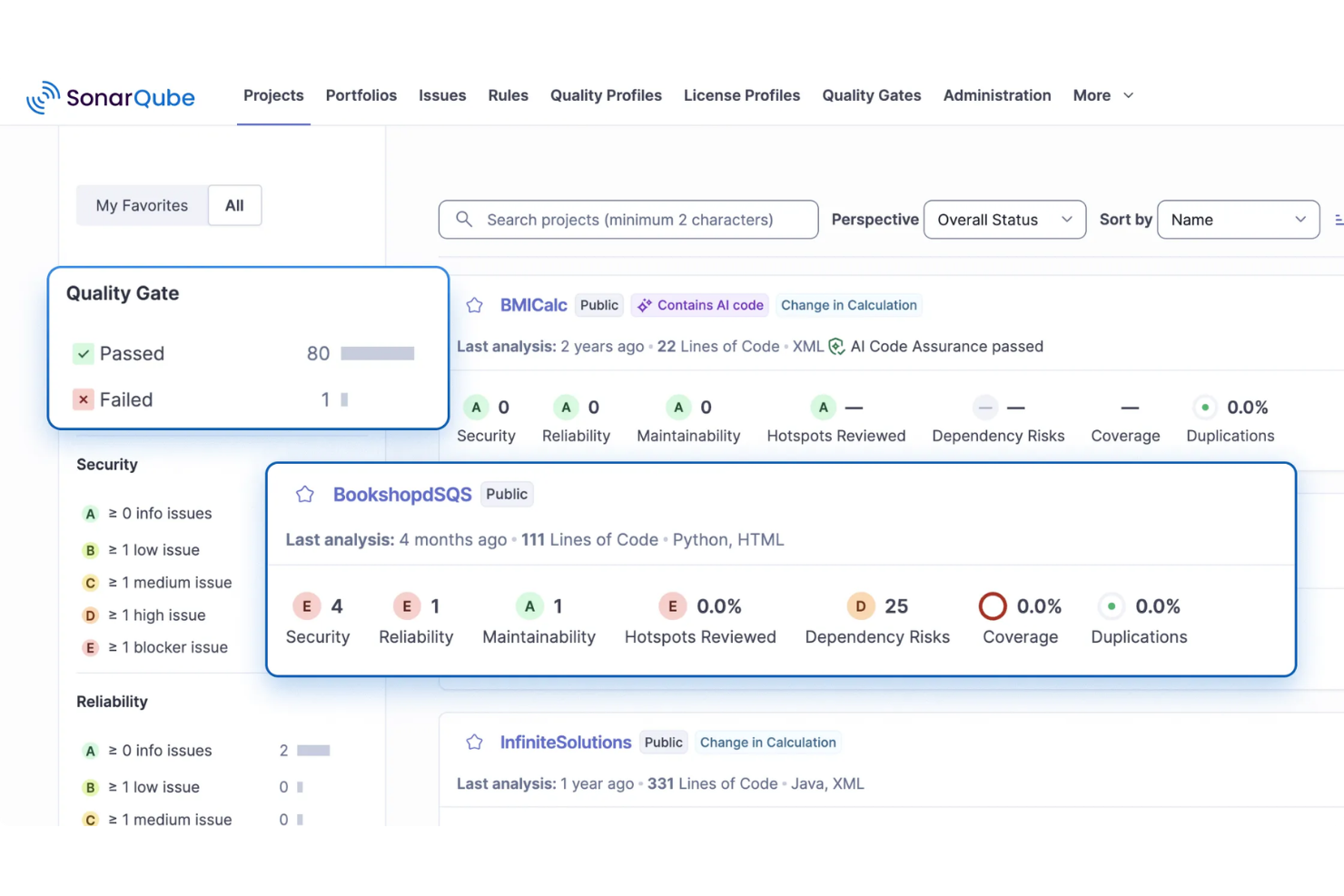
SonarQube addresses the need for continuous code quality and security inspection, making it a useful tool for AI development teams. It also supports static application security testing, helping identify vulnerabilities and security issues in code during development. By providing automated code reviews and validation, SonarQube helps developers maintain reliable and secure AI applications.
Why I Picked SonarQube
I picked SonarQube for its static application security testing, which helps teams detect vulnerabilities and security issues directly in their code. It also includes AI CodeFix, which suggests context-aware fixes for bugs and security issues within the development workflow. These features help developers improve code quality while maintaining secure AI applications.
SonarQube Key Features
In addition to static application security testing, SonarQube offers:
- Software Composition Analysis (SCA): This feature helps manage open-source dependencies, detect vulnerabilities, and ensure license compliance.
- Infrastructure as Code (IaC) Scanning: Allows your team to identify misconfigurations before deployment, reducing potential security risks.
- IDE Integrations: Provides real-time code analysis within your integrated development environment, enhancing developer productivity.
- Customizable Quality Gates: Enables your team to enforce consistent coding standards across projects, ensuring code quality and compliance.
SonarQube Integrations
Integrations include GitHub, GitLab, Bitbucket, Azure DevOps, Jenkins, Travis CI, CircleCI, Bamboo, TeamCity, and Jira. An API is also available for custom integrations.
Pros and Cons
Pros:
- Automated bug and vulnerability detection improves code quality during development
- Automated code analysis helps maintain consistent coding standards across projects
- Strong CI/CD integrations support continuous code scanning in development pipelines
Cons:
- Advanced features limited to paid editions, increasing costs for larger teams
- Occasional bugs can produce unclear errors during code analysis
New Product Updates from SonarQube
SonarQube Cloud Introduces Architecture Management
SonarQube Cloud now offers architecture management to automatically map your project's structure, ensuring design integrity and resolving deviations seamlessly. For more information, visit SonarQube's official site.
 .
.
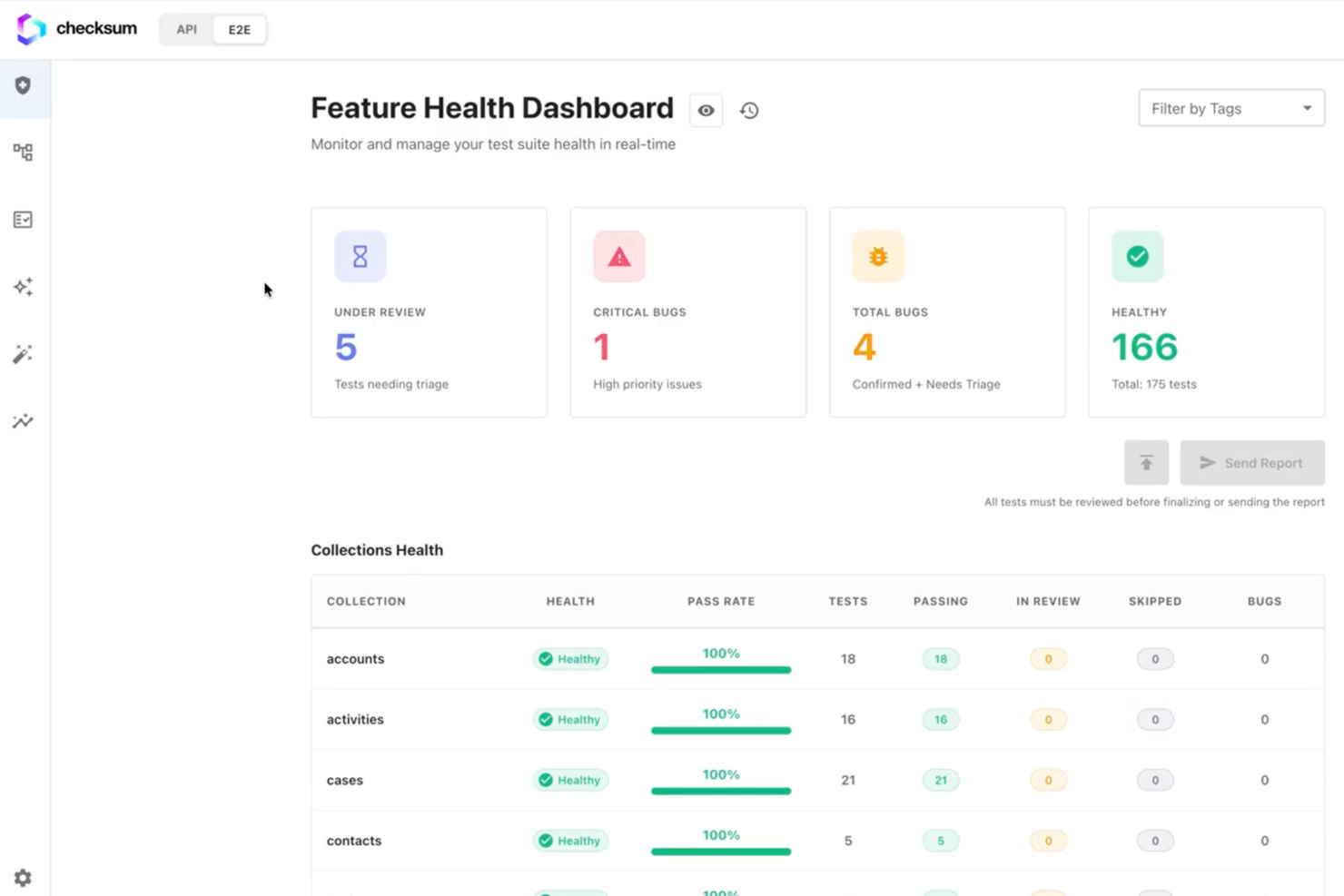
Checksum is an AI-driven software testing platform that automates test generation, API coverage, and integrates directly with developer workflows through GitHub and GitLab.
Who Is Checksum Best For?
Checksum suits development teams at tech companies who want to automate software testing and integrate testing directly into their existing GitHub or GitLab workflows.
Why I Picked Checksum
I picked Checksum as one of the best because I can generate targeted tests automatically for every pull request. My team uses its AI-driven PR-based test generation to ensure new code is covered as soon as it’s submitted. I like how Checksum analyzes code changes and creates relevant tests without manual intervention, which fits perfectly into our review process.
Checksum Key Features
- API schema analysis: Automatically inspects and understands your API structure to inform test creation.
- Autonomous test maintenance: Updates and maintains tests as your codebase evolves without manual input.
- Native GitHub and GitLab integration: Connects directly to your repositories for seamless workflow integration.
- Change impact detection: Identifies and highlights areas of your codebase affected by recent changes.
Checksum Integrations
Checksum offers native integrations with GitHub and GitLab. An API is available for custom integrations.
Pros and Cons
Pros:
- Supports unlimited users during the free trial
- Detailed test result reporting within pull requests
- Real-time code change detection and test updates
Cons:
- Lacks integrations beyond GitHub and GitLab
- Limited to API testing, not full-stack coverage


LambdaTest is a cross-browser testing platform designed for QA and development teams that need to execute automated tests at scale. It supports major test frameworks and offers both real-device and virtualized testing environments. LambdaTest’s cloud grid runs tests in parallel to speed up execution across different browsers and OS combinations.
Why I picked LambdaTest:
LambdaTest is optimized for automated browser testing, offering a large browser/OS matrix and parallel execution to handle high test volumes. It integrates with common automation frameworks such as Selenium and Playwright, and its real-device cloud allows teams to validate behavior on physical mobile hardware. These capabilities support its USP of being best for automated browser testing.
Standout features & integrations:
Features include real-time browser testing, parallel testing, and geolocation testing. Real-time browser testing lets your team test applications across different browsers instantly. Parallel testing saves time by running multiple tests concurrently, while geolocation testing ensures your applications work globally.
Integrations include Jira, Jenkins, GitHub, GitLab, Slack, Bitbucket, Asana, Trello, CircleCI, Travis CI, and Azure DevOps.
Pros and Cons
Pros:
- Includes geolocation testing
- Offers real-device testing
- Supports parallel execution
Cons:
- Performance varies on shared devices
- Complex setup for new users

BrowserStack is a cross-browser testing platform built for developers and QA teams. It provides access to real desktop and mobile devices for both manual and automated testing, helping teams validate functionality across environments without managing their own device labs.
Why I picked BrowserStack:
BrowserStack’s real-device infrastructure remains one of the most reliable ways to test on actual iOS and Android hardware. Its automated test grids support large-scale parallel runs, and the platform integrates tightly with popular frameworks such as Selenium, Playwright, and Cypress. Including Percy for visual regression testing enables teams to detect UI changes alongside functional checks. These strengths align with its USP of being the best choice for cross-browser testing.
Standout features & integrations:
Features include live manual testing, automated testing grids, and visual testing with Percy. These tools let you test in real browsers and devices, ensuring your applications perform well in real-world conditions. Accessibility compliance automation helps your team meet industry standards efficiently.
Integrations include Jenkins, Slack, Jira, Visual Studio, Firebase, GitHub, Bitbucket, Trello, and Asana.
Pros and Cons
Pros:
- Low-code automation options
- Supports automated CI/CD testing
- Real-device testing available
Cons:
- Real-device sessions can feel slow under heavy load, especially on older device models
- Complex for beginners


testRigor is designed for QA teams and developers who want to write tests in everyday language rather than code or complex syntax. Its NLP engine converts written instructions into executable test steps, making test creation accessible to non-technical team members while still supporting cross-browser and mobile testing.
Why I picked testRigor: testRigor stands out for allowing teams to define test steps entirely in plain English, removing the need for scripting or recorder-based flows. Its NLP model interprets written instructions and maps them to UI elements and actions. The platform also adapts to application changes, helping keep tests stable across updates. These capabilities align with its USP of being best for plain English tests.
Standout features & integrations:
Features include natural-language test authoring that lets you write full test cases using simple English statements, cross-platform automation to run tests on web, mobile, and native applications, and AI-supported maintenance that automatically adjusts tests when UI elements or flows change. The platform also provides execution insights with logs, screenshots, and analytics to support efficient debugging.
Integrations include Jira, TestRail, Slack, GitHub, Azure DevOps, Jenkins, GitLab, Asana, and Trello.
Pros and Cons
Pros:
- Cross-platform testing available
- AI-supported test maintenance
- Tests written in plain English
Cons:
- Slight learning curve to effectively use all features
- Requires initial setup time


Functionize is designed for QA and development teams seeking scalable test automation in the cloud. Tests run entirely in the platform’s distributed infrastructure, removing the need for local grids or device farms. Functionize uses model-based test creation to interpret user actions and maintain tests as applications change.
Why I picked Functionize: Functionize’s cloud architecture enables teams to execute large volumes of tests without managing infrastructure. Its model-based engine generates tests from recorded interactions and updates locators when UI elements change. The platform also supports cross-browser testing and visual checks, aligning with its USP as the best for cloud-based testing.
Standout features & integrations:
Features include cloud-native execution that runs tests across distributed cloud environments without requiring local setup, model-based test creation that builds tests from recorded or written steps while tracking element behavior, and adaptive locator updates that automatically adjust element mappings when the UI changes. The platform also supports visual validation, capturing and comparing UI snapshots to detect layout or rendering issues before they reach users.
Integrations include Jira, Jenkins, GitHub, Slack, Azure DevOps, CircleCI, GitLab, TestRail, and Trello.
Pros and Cons
Pros:
- Adaptive learning for evolving tests
- AI-driven test creation
- Scalable cloud-based execution environment
Cons:
- Cost may be a barrier for small teams
- Slow test execution


Virtuoso is a test automation platform built for QA and development teams that want to author tests using plain-language instructions. It uses natural language processing (NLP) to convert test steps written in everyday language into executable automated tests. Virtuoso also includes self-healing capabilities to keep tests stable when application elements change.
Why I picked Virtuoso: Virtuoso’s ability to generate test steps from plain English prompts sets it apart from script-based automation platforms. Teams can describe actions and expected outcomes directly, reducing the need for coding knowledge. Its self-healing engine adjusts selectors when the UI changes, and its cross-browser scheduling supports execution across multiple environments. These capabilities align with its USP of being best for AI-driven test creation.
Standout features & integrations:
Features include natural language processing for test writing, self-healing test capabilities, and cross-browser testing. Natural language processing allows your team to create tests without coding. Self-healing features reduce the need for constant test updates.
Integrations include Jira, Slack, GitHub, Jenkins, Azure DevOps, CircleCI, Bitbucket, TestRail, and Trello.
Pros and Cons
Pros:
- Supports cross-browser testing
- Self-healing test execution
- Natural language test creation
Cons:
- May need integration with other tools for advanced workflows
- Requires onboarding for NLP features


QA.tech is an AI-driven software testing tool built to strengthen QA processes and support shift-left testing. It is ideal for B2B SaaS teams that want to improve testing workflows and release products faster. By addressing issues like time-consuming manual testing and slow feedback loops, QA.tech helps teams maintain quality without slowing development.
Why I Picked QA.tech
I chose QA.tech for its ability to automate end-to-end testing with minimal manual upkeep. Its AI can test complex user journeys, which helps ensure broad and reliable test coverage. QA.tech also adjusts to product changes, reducing flaky tests and delivering consistent results. These capabilities make it a strong fit for tech leaders and QA professionals who prioritize efficiency and accuracy.
QA.tech Key Features
In addition to its core functionalities, QA.tech offers several features to enhance your testing efforts:
- Instant Feedback: Provides immediate insights into code and product quality, allowing your team to address issues promptly.
- Mobile Testing: Supports testing on mobile platforms, ensuring your applications perform optimally across devices.
- Shift-Left Testing: Encourages early testing in the development cycle, helping your team catch defects sooner.
- Seamless Integration: Works with popular tools like GitHub and Slack, enhancing your existing workflows.
QA.tech Integrations
Integrations include GitHub, Slack, JIRA, Jenkins, CircleCI, Travis CI, Bitbucket, Trello, Asana, and GitLab.
Pros and Cons
Pros:
- Autonomous AI test case generation
- CI/CD and collaboration integrations supported
- Real-time defect feedback and reports
Cons:
- Pricing available upon request only
- AI may miss edge cases

Autify is a test automation platform designed for QA teams and developers who want to automate tests without writing scripts. Its recorder-based approach captures user actions and converts them into repeatable test scenarios. Autify also uses AI to keep tests up to date as UI elements change, reducing the manual maintenance typically required with no-code tooling.
Why I picked Autify: Autify lets you build automated tests with a visual, no-code interface, which is helpful for teams without deep coding experience. Its AI-assisted maintenance updates test steps when UI elements shift, helping keep test suites stable. Autify’s cross-browser support ensures tests can run across different environments. These capabilities align with its USP of being best for no-code test automation.
Standout features & integrations:
Features no-code test creation that records user actions through a guided interface, AI-based test maintenance that adjusts selectors and updates steps when page elements change, and cross-browser execution to ensure coverage across major browsers and device configurations. The platform also supports visual regression checks to detect unexpected UI changes across versions, alongside core capabilities such as cross-browser testing, visual regression testing, and parallel test execution to speed up feedback cycles.
Integrations include Slack, Jira, GitHub, GitLab, Bitbucket, TestRail, Jenkins, CircleCI, and Azure DevOps.
Pros and Cons
Pros:
- Cross-browser execution available
- AI-supported test maintenance
- No-code test creation
Cons:
- May take time to fully master advanced features
- Requires initial onboarding time

Mabl is a test automation platform designed for QA teams and developers who want more resilient functional tests. It uses machine learning to update selectors and test steps automatically when UI components change, reducing the need for manual maintenance.
Why I picked Mabl: Mabl’s self-healing ability is one of the most mature in the category. When UI elements are moved, renamed, or restructured, Mabl updates affected steps to keep tests stable. Its reporting views help teams understand failures by analyzing collected artifacts such as screenshots and performance data. These capabilities align directly with the USP of being best for self-healing tests.
Standout features & integrations:
Features include self-healing test execution that automatically updates selectors when the UI changes, parallel test runs that execute multiple tests simultaneously in the cloud, and journey-based test creation that records real user flows and turns them into repeatable tests. Centralized reporting brings logs, screenshots, and performance data together in unified dashboards, supported by auto-scaling for efficient parallel execution, advanced reporting, and a user-friendly interface.
Integrations include Jira, Jenkins, GitHub, Bamboo, Slack, Bitbucket, Azure DevOps, CircleCI, Datadog, and Microsoft Teams.
Pros and Cons
Pros:
- Detailed reporting artifacts
- Parallel test execution
- Reliable self-healing capabilities
Cons:
- Requires an internet connection
- Initial learning curve
Other AI Software Testing Tools
Here are some additional AI software testing tools options that didn’t make it onto my shortlist, but are still worth checking out:
- Tricentis
For model-based testing
- Katalon
For integrated test automation
- Applitools
For visual AI testing
- Rainforest QA
For crowdtesting solutions
- Testim
For AI-powered test automation
- ACCELQ
For continuous testing
- Leapwork
For codeless automation
- BlinqIO
For AI-based test automation
- Testers AI
For AI-driven bug detection
- Keysight Eggplant Test
For intelligent test automation
- TestResults
For test result analytics
- Sauce Labs
For browser and device testing
- QA Wolf
For team-based test creation
- Momentic
For predictive test analytics
- Relicx
For AI-driven user insights


AI Software Testing Tool Selection Criteria
When selecting the best AI software testing tools to include in this list, I considered common buyer needs and pain points like reducing manual testing efforts and improving test accuracy. I also used the following framework to keep my evaluation structured and fair:
Core Functionality (25% of total score)
To be considered for inclusion in this list, each solution had to fulfill these common use cases:
- Automated test execution
- Cross-browser testing
- Test case management
- Real-time reporting
- Integration with CI/CD tools
Additional Standout Features (25% of total score)
To help further narrow down the competition, I also looked for unique features, such as:
- AI-driven test creation
- Self-healing test scripts
- Visual testing capabilities
- Predictive analytics
- Natural language processing
Usability (10% of total score)
To get a sense of the usability of each system, I considered the following:
- Intuitive user interface
- Easy navigation
- Minimal learning curve
- Customizable dashboards
- Clear documentation
Onboarding (10% of total score)
To evaluate the onboarding experience for each platform, I considered the following:
- Availability of training videos
- Interactive product tours
- Comprehensive tutorials
- Access to webinars
- Supportive onboarding materials
Customer Support (10% of total score)
To assess each software provider’s customer support services, I considered the following:
- 24/7 support availability
- Live chat options
- Response time for inquiries
- Availability of a knowledge base
- Quality of support documentation
Value For Money (10% of total score)
To evaluate the value for money of each platform, I considered the following:
- Competitive pricing
- Feature set vs. price
- Flexible pricing plans
- Discounts for annual billing
- Free trial availability
Customer Reviews (10% of total score)
To get a sense of overall customer satisfaction, I considered the following when reading customer reviews:
- Overall satisfaction ratings
- Feedback on ease of use
- Comments on feature effectiveness
- Insights on customer support experience
- Reports on reliability and performance
How to Choose AI Software Testing Tools
It’s easy to get bogged down in long feature lists and complex pricing structures. To help you stay focused as you work through your unique software selection process, here’s a checklist of factors to keep in mind:
| Factor | What to Consider |
|---|---|
| Scalability | Can the tool grow with your team and testing needs? Look for solutions that support increasing workloads without requiring significant reconfiguration. |
| Integrations | Does it integrate with your existing tech stack? Ensure compatibility with CI/CD tools, version control systems, and project management software. |
| Customizability | Can you tailor the tool to fit your workflows? Consider if the tool allows for custom scripts, dashboards, and reporting formats. |
| Ease of use | Is the tool intuitive for all team members? Evaluate the user interface and consider if non-technical users can navigate it easily. |
| Implementation and onboarding | How quickly can your team get up and running? Look for tools with comprehensive onboarding resources like tutorials and interactive guides. |
| Cost | Is the tool within your budget? Compare pricing models, including user-based fees and annual discounts, to ensure it aligns with your financial plans. |
| Security safeguards | Does the tool adhere to security best practices? Verify the presence of data encryption, access controls, and compliance with relevant regulations. |
| Support availability | What support options are available? Check for 24/7 support, live chat, and a robust knowledge base to assist your team when needed. |
What Are AI Software Testing Tools?
AI software testing tools are automated solutions that use artificial intelligence to enhance the testing process for software applications. These tools are commonly used by developers, QA teams, and IT professionals to increase testing accuracy and efficiency. Features such as machine learning algorithms, predictive analytics, and natural language processing help identify bugs, optimize test cases, and reduce manual effort. Overall, these tools provide users with faster, more reliable testing outcomes, improving software quality and deployment speed.
Features
When selecting AI software testing tools, keep an eye out for the following key features:
- Machine learning algorithms: These algorithms analyze past test data to predict and identify potential issues, enhancing test accuracy.
- Predictive analytics: This feature forecasts possible software failures, allowing teams to proactively address issues before they occur.
- Natural language processing: Enables tests to be written in plain English, making test creation accessible to non-technical users.
- Self-healing tests: Automatically adjust test scripts in response to UI changes, reducing the need for manual updates.
- Visual testing: Compares visual aspects of software across different environments to ensure a consistent user experience.
- Cross-platform compatibility: Enables testing across multiple devices and operating systems, ensuring broad application support.
- Automated reporting: Provides real-time insights and analytics, helping teams quickly understand test results and make informed decisions.
- Integration capabilities: Seamlessly integrates with existing tools such as CI/CD systems and project management software to enhance workflow efficiency.
- Parallel testing: Runs multiple tests simultaneously, significantly reducing testing time and speeding up the release cycle.
- Adaptive learning: Continuously improves test scripts by learning from past executions, increasing the reliability of future tests.
Benefits
Implementing AI software testing tools can offer several practical advantages for development and QA teams. Here are some category-level benefits you can expect:
- Reduced manual effort: AI supports repetitive tasks such as regression execution, allowing teams to spend more time on test design, exploratory testing, and higher-level quality review.
- More consistent test coverage: Machine learning and pattern analysis can identify gaps in test suites, helping teams maintain broader, more consistent coverage across releases.
- Lower test maintenance: Self-healing capabilities adjust to common UI or element changes, reducing the time spent updating locators or fixing broken test cases.
- Greater accessibility for non-technical contributors: Natural language processing and no-code interfaces make it easier for product owners, analysts, or less technical team members to participate in test creation.
- Faster feedback cycles: Parallel execution and automation help teams receive results earlier in the development process, supporting quicker iteration and decision-making.
- Improved visibility into quality trends: Automated analytics provide real-time insights into failures, stability patterns, and recurring problem areas, helping teams prioritize fixes and monitor release readiness.
- More consistent user experiences: Visual and cross-environment testing help identify UI differences or layout issues that may appear across browsers, devices, or operating systems.
Costs & Pricing
Selecting AI software testing tools requires an understanding of the various pricing models and plans available. Costs vary based on features, team size, add-ons, and more. The table below summarizes common plans, their average prices, and typical features included in AI software testing tools solutions:
Plan Comparison Table for AI Software Testing Tools
| Plan type | Typical price range* | Common features included |
|---|---|---|
| Free tier | $0 | Basic test execution, limited runs or users |
| Personal/Small | ~$10-$30/user/month | Automated tests, cross-browser support, compatibility, basic reports |
| Business | ~$50-$100/user/month | CI/CD integration, advanced analytics, parallel runs |
| Enterprise Plan | ~$150+/user/month | Dedicated support, SSO, custom services |
*Ranges are illustrative and may vary significantly by vendor, region, and test volume.
AI Software Testing Tools FAQs
Here are some answers to common questions about AI software testing tools:
How do AI testing tools secure critical test data?
Most AI testing platforms protect test data through encryption in transit and at rest, access controls, and audit logging. Many also support data masking to prevent sensitive information from appearing in test environments. When reviewing vendors, check for security certifications such as SOC 2 or ISO 27001 and confirm their data retention policies.
What skills are needed for a team to adopt AI tests?
Most AI testing platforms require a basic understanding of software testing concepts, such as test design and coverage. For tools that support scripting or advanced configurations, familiarity with languages like JavaScript or Python can be helpful, but many offer no-code or natural-language options. Teams also benefit from being comfortable interpreting test analytics and adjusting testing priorities based on insights from the tool.
How should we measure real ROI from AI test tools?
Start by establishing baseline metrics such as test execution time, defect escape rate, and the effort spent maintaining tests. After implementing an AI testing tool, compare changes in these areas along with release frequency and stability. It’s also helpful to track reductions in manual regression testing and recurring issues, as well as developers’ and QAs’ feedback on workflow improvements.
What’s Next:
If you're in the process of researching AI software testing tools, connect with a SoftwareSelect advisor for free recommendations.
You fill out a form and have a quick chat where they get into the specifics of your needs. Then you'll get a shortlist of software to review. They'll even support you through the entire buying process, including price negotiations.