

El mejor software de mesa de ayuda ayuda a los equipos a resolver problemas más rápidamente, reducir la acumulación de tickets, mejorar la precisión de las respuestas y mantener una comunicación clara con los usuarios. Estas herramientas centralizan las solicitudes, automatizan las tareas rutinarias y ofrecen a los equipos de soporte la visibilidad que necesitan para gestionar los problemas antes de que interrumpan los flujos de trabajo.
Los equipos suelen buscar soluciones de mesa de ayuda cuando el seguimiento manual provoca que se pasen por alto solicitudes, los procesos incoherentes ralentizan el soporte o las deficiencias en la documentación dificultan la comprensión de los problemas recurrentes. Estos desafíos generan retrasos, aumentan la frustración de los usuarios y dificultan la coordinación eficaz de los equipos de TI y operaciones.
Con más de 20 años de experiencia en el sector como director de tecnología, he probado y analizado decenas de plataformas de software de mesa de ayuda en entornos reales para evaluar sus flujos de trabajo, integraciones y facilidad de uso. Esta guía destaca las mejores soluciones de software de mesa de ayuda, que mejoran la eficiencia del soporte, optimizan la colaboración y ayudan a los equipos a ofrecer una asistencia fiable a los usuarios. Cada análisis aborda las funciones, las ventajas y desventajas, y los casos de uso más adecuados para ayudarte a elegir la herramienta correcta.
Por qué confiar en nuestras recomendaciones de software
6,700+
Reviews
20
Industry experts
16+
Evaluation factors
14
Years
Nuestro equipo lleva probando y evaluando software desde 2012. Como líderes tecnológicos, sabemos lo difícil —y lo importante— que es elegir el software adecuado.
Para esta guía, evaluamos las herramientas mediante pruebas prácticas e investigación independiente, puntuando las herramientas según nuestros criterios de selección.
Nuestras reseñas reflejan nuestro criterio editorial humano, no un discurso de ventas.
Revisores expertos:
- Paulo Gardini MiguelDirector técnico
 Tim FisherVP de IA
 Gabriel RosasTech Lead y arquitecto de software
 Christhian GruhnTech Lead y arquitecto de plataforma

Tabla comparativa: software de mesa de ayuda
Esta tabla comparativa resume los detalles de precios de mis principales selecciones de software de mesa de ayuda.
| Tool | Best For | Trial Info | Price | ||
|---|---|---|---|---|---|
| 1 | Ideal para automatización de tickets con IA | Prueba gratuita de 30 días + demo gratuita disponible | Desde $129/técnico/mes (facturado anualmente) | Website | |
| 2 | Mejor para mesa de ayuda y gestión de activos de TI unificada | Prueba gratuita de 14 días + demo gratuita disponible | Desde $19/agente/mes (facturado anualmente) | Website | |
| 3 | Mejor para automatizaciones de flujos de trabajo impulsadas por IA | Prueba gratuita de 14 días | Precio a consultar | Website | |
| 4 | Mejor para tickets con contexto completo | Prueba gratuita de 21 días + demo gratuita disponible | Desde $149/técnico/mes (facturación anual) | Website | |
| 5 | Mejor para flujos de trabajo basados en tickets | Prueba gratuita de 14 días + demo gratis disponible | Desde $15/usuario/mes (facturado anualmente) | Website | |
| 6 | Ideal para la gestión de tickets y colaboración potenciadas por IA | Plan gratuito + prueba gratis de 7 días + demostración gratuita disponible | Desde $25/usuario/mes (facturado anualmente) | Website | |
| 7 | Ideal para ofrecer asistencia personalizada | Prueba gratuita de 15 días + demo gratuita disponible | Desde $12/usuario/mes (facturado anualmente) | Website | |
| 8 | Ideal para soporte centralizado de comercio electrónico | Prueba gratuita de 14 días | Desde $39/agente/mes | Website | |
| 9 | La mejor opción para la gestión automatizada de tickets multilingües | Prueba gratuita de 14 días + plan gratuito + demostración gratuita | Desde $16/usuario/mes (facturado anualmente) | Website | |
| 10 | Ideal con configuración instantánea en la nube o en local | Prueba gratuita de 21 días | Desde $29/mes | Website |


Análisis del mejor software de mesa de ayuda
 Ideal para automatización de tickets con IA
- Prueba gratuita de 30 días + demo gratuita disponible
- Desde $129/técnico/mes (facturado anualmente)
Visit WebsiteCustomer Rating:4.6/5
Interfaz de monitoreo de dispositivos de Atera mostrando disponibilidad en tiempo real, métricas del sistema y opciones de acceso remoto. Atera es principalmente una plataforma integral de gestión de TI diseñada para proveedores de servicios gestionados (MSP) y departamentos de TI. Entre sus múltiples capacidades, también ofrece un sistema de mesa de ayuda completo que combina gestión de tickets, automatización y flujos de trabajo impulsados por IA.
Por qué elegí Atera: Incluí Atera porque su mesa de ayuda se integra directamente en su sistema de supervisión y gestión remota (RMM) más amplio, brindándote visibilidad total tanto sobre los tickets de soporte como sobre la salud de los endpoints en un solo lugar. Lo que hace destacar a Atera es su Copiloto IA, que puede resumir tickets automáticamente, proponer soluciones y extraer diagnósticos dentro del propio ticket. Esto te permite reducir el tiempo dedicado a revisar y clasificar tickets, especialmente cuando se trabaja con grandes parques de dispositivos. Para los equipos de TI que deben alternar entre soporte y gestión de sistemas, la automatización de tickets impulsada por IA ayuda a reducir el trabajo repetitivo y mantener tiempos de respuesta ágiles.
Funciones y integraciones destacadas:
Atera ofrece campos de tickets personalizados, enrutamiento dinámico y reglas de automatización adaptativas que pueden ajustarse según el tipo o prioridad del ticket. Se pueden configurar portales de autoservicio y bases de conocimientos para desviar tickets y reducir el volumen de solicitudes. Las funciones impulsadas por IA también permiten generar resúmenes de tickets y diagnósticos de manera automática para agilizar la clasificación.
Las integraciones incluyen Microsoft Teams, Slack, ServiceNow, Okta, Azure Active Directory, Microsoft Outlook, notificaciones por WhatsApp, monday.com, Jira Software Cloud, Acronis Cyber Protect Cloud, Google Sheets y ChatGPT (OpenAI).
Pros and Cons
Pros:
- Gestión centralizada de tickets y mesa de servicios
- El Copiloto IA puede generar resúmenes de tickets y automatizar respuestas
- Incluye portal de autoservicio y base de conocimientos integrados
Cons:
- Profundidad de integración limitada en comparación con herramientas PSA o ITSM especializadas
- Las funciones avanzadas pueden requerir tiempo de configuración y ajuste
 Mejor para mesa de ayuda y gestión de activos de TI unificada
- Prueba gratuita de 14 días + demo gratuita disponible
- Desde $19/agente/mes (facturado anualmente)
Visit WebsiteCustomer Rating:4.6/5
Freshservice proporciona un repositorio centralizado de información y soluciones para problemas comunes de TI. Freshservice es una herramienta de gestión de servicios de TI basada en la nube, diseñada para ayudar a tus equipos de TI a gestionar y resolver problemas de forma rápida. Sus funciones responden a las necesidades modernas de TI, asegurando que tu equipo pueda manejar retos técnicos con facilidad.
Por qué elegí Freshservice: Elegí Freshservice por sus potentes capacidades de automatización e IA, que optimizan tareas repetitivas y permiten que tu equipo de TI se concentre en asuntos más complejos. Sus análisis impulsados por IA ayudan a tomar decisiones más rápidas e inteligentes al analizar patrones de datos. La plataforma también incluye una gestión de activos robusta, permitiéndote rastrear todos los activos de TI en un solo lugar y supervisar su ciclo de vida completo. Esta visibilidad facilita una mejor planificación de actualizaciones y mantenimiento. Además, el portal de autoservicio permite a los usuarios finales resolver problemas comunes de manera independiente, ayudando a reducir el volumen de tickets para tu equipo.
Funciones y conectores destacados:
Las funciones incluyen gestión de incidentes, que ayuda a tu equipo a priorizar y resolver problemas rápidamente, y gestión de problemas, que identifica y mitiga la causa raíz de incidentes recurrentes. La gestión de cambios es otra función que asegura que cualquier modificación en la infraestructura de TI se realice sin inconvenientes y con mínima interrupción. Estas funciones trabajan en conjunto para proporcionar un sistema de soporte integral para tus operaciones de TI.
Integraciones incluyen Microsoft Teams, Slack, Google Workspace, Azure, Jira, AWS, Zapier, Trello, GitHub y ServiceNow.
Pros and Cons
Pros:
- Gestión de soporte impulsada por IA
- Capacidades de gestión de activos
- Funciones de automatización robustas para reducir tareas manuales
Cons:
- Freddy AI es una función adicional de pago
- Los informes podrían ser más personalizables
Learn more about Freshservice: Mejor para automatizaciones de flujos de trabajo impulsadas por IA
- Prueba gratuita de 14 días
- Precio a consultar
Visit WebsiteCustomer Rating:4.5/5
SysAid muestra registros de servicios activos con resúmenes de tickets asistidos por IA, niveles de prioridad y cronogramas de respuesta. SysAid es una plataforma de Gestión de Servicios de TI (ITSM) con un sólido soporte para la gestión de activos de TI y operaciones de TI. Proporciona herramientas que ayudan a los equipos a rastrear, gestionar y mantener activos de hardware y software, vinculando esos datos con la mesa de servicio y los flujos de trabajo ITSM. Esto la convierte en una opción práctica para organizaciones que dan prioridad a la visibilidad y control de activos.
Por qué elegí SysAid: Elegí SysAid porque sus capacidades de gestión de activos están estrechamente integradas con sus funciones de mesa de servicio y operaciones de TI. Los datos de los activos no se gestionan de forma aislada, sino que están directamente vinculados a tickets, usuarios y solicitudes de servicio, lo que brinda a los equipos de TI un mejor contexto al solucionar problemas o planificar mantenimientos. Para organizaciones centradas en mejorar la gestión de activos de TI mientras siguen respaldando los servicios de TI diarios, SysAid ofrece un enfoque equilibrado y estructurado.
Características e integraciones destacadas:
Entre las características más destacadas de SysAid se incluyen un inventario de activos de TI, gestión de parches y funcionalidades de control remoto. Además, cuenta con un portal de autoservicio, aumentando la autonomía de los usuarios y reduciendo la carga de trabajo de TI.
En cuanto a integraciones, SysAid funciona bien con varias aplicaciones de terceros, asegurando un entorno de TI conectado.
Pros and Cons
Pros:
- Las robustas funcionalidades de gestión de activos de TI optimizan las operaciones de TI
- El portal de autoservicio da autonomía a los usuarios y reduce el volumen de tickets en la mesa de ayuda
- La flexibilidad con integraciones de terceros asegura operaciones de TI adaptables
Cons:
- La interfaz de usuario puede ser compleja para principiantes
- Las funciones de informes pueden requerir personalización adicional para necesidades específicas
- La configuración inicial puede ser demorada en entornos de TI más grandes
 Mejor para tickets con contexto completo
- Prueba gratuita de 21 días + demo gratuita disponible
- Desde $149/técnico/mes (facturación anual)
Visit WebsiteCustomer Rating:4.6/5
SuperOps organiza los tickets críticos por estado, ayudando a los equipos a priorizar y actuar rápidamente sobre los problemas urgentes. SuperOps es una plataforma potenciada por IA que combina automatización de servicios profesionales (PSA) con herramientas de monitorización y gestión remota (RMM). Está diseñada para ayudar a proveedores de servicios gestionados (MSP) y equipos de TI a gestionar tickets, activos y flujos de trabajo en un solo lugar.
Por qué elegí SuperOps: Una razón por la que SuperOps destaca es su sistema de gestión de tickets impulsado por IA. Con funciones como Monica AI, tu equipo puede recibir sugerencias de soluciones, resúmenes de tickets e identificación de problemas recurrentes, lo que ayuda a reducir las escaladas y acelerar las resoluciones. La plataforma también vincula los tickets a los historiales de dispositivos y activos, ofreciendo a los técnicos el contexto completo que necesitan para resolver problemas sin cambiar entre herramientas.
Características destacadas e integraciones:
Las características incluyen gestión jerárquica de políticas que te permite definir reglas a nivel de cliente, sitio o dispositivo, lo cual ayuda a estandarizar la prestación de servicios en diferentes entornos. Además, cuenta con una base de conocimientos integrada que permite a tu equipo documentar soluciones y procedimientos para una referencia sencilla.
Las integraciones incluyen ConnectWise, TeamViewer, Xero, Stripe, QuickBooks, SentinelOne, Lifecycle Manager, Guardz y Microsoft Azure.
Pros and Cons
Pros:
- Monica AI asiste en la resolución de tickets sugiriendo soluciones
- El registrador de tiempo incorporado garantiza un control exacto del tiempo invertido en los tickets
- Gestiona la asignación de recursos y la disponibilidad de técnicos
Cons:
- En comparación con sus competidores, SuperOps ofrece menos integraciones de terceros
- Aunque potente, las opciones de personalización pueden ser complejas
Learn more about SuperOps: Mejor para flujos de trabajo basados en tickets
- Prueba gratuita de 14 días + demo gratis disponible
- Desde $15/usuario/mes (facturado anualmente)
Visit WebsiteCustomer Rating:4.4/5
Una foto centrada en la gestión de solicitudes de servicio al cliente dentro de Freshdesk. Freshdesk (un producto de Freshworks Inc.) es una plataforma de atención al cliente diseñada para ayudar a las empresas a gestionar y organizar las solicitudes de soporte de manera más efectiva. Se centra en flujos de trabajo basados en tickets que facilitan a los equipos el seguimiento, la priorización y la resolución de incidencias de los clientes desde un mismo sistema. La interfaz está pensada para ser accesible, lo que ayuda a una incorporación más rápida de los agentes de soporte.
Por qué elegí Freshdesk: Elegí Freshdesk por la claridad con la que estructura los flujos de tickets. Al revisar diferentes herramientas de atención al cliente, Freshdesk destacó por su enfoque sencillo para crear, asignar y resolver tickets sin añadir complejidad innecesaria. También incluye a Freddy AI, que puede asistir a los agentes con sugerencias de respuesta y gestión de tickets dentro del flujo de trabajo. Si buscas un software que facilite el seguimiento y la gestión de tickets de forma sencilla y práctica, Freshdesk se ajusta muy bien a esa necesidad.
Funciones destacadas e integraciones:
Freshdesk incluye herramientas de enrutamiento de tickets que permiten asignar solicitudes según reglas predeterminadas, ayudando a los equipos a dirigir las incidencias a los agentes correspondientes. Permite la atención desde múltiples canales, incluyendo correo electrónico y plataformas sociales, manteniendo todas las conversaciones dentro de un único flujo de tickets.
Integraciones disponibles con herramientas como Slack, Salesforce y Trello, lo que ayuda a conectar las actividades de soporte con flujos de trabajo de colaboración, CRM y gestión de proyectos.
Pros and Cons
Pros:
- Enrutamiento eficiente de tickets que minimiza los tiempos de respuesta
- Soporte multicanal que mantiene un flujo de trabajo consistente
- Ecosistema de integración con terceros muy amplio
Cons:
- Las analíticas avanzadas están reservadas para los planes premium
- La configuración puede llevar tiempo para equipos grandes
- Algunas limitaciones de personalización
Learn more about Freshdesk: Ideal para la gestión de tickets y colaboración potenciadas por IA
- Plan gratuito + prueba gratis de 7 días + demostración gratuita disponible
- Desde $25/usuario/mes (facturado anualmente)
Visit WebsiteCustomer Rating:4.7/5
Hiver proporciona paneles de análisis en tiempo real para rastrear el rendimiento del equipo y las métricas de servicio al cliente. Hiver es una plataforma de mesa de ayuda potenciada por IA, diseñada para equipos que gestionan consultas de clientes a través de buzones compartidos como Gmail. Creada para mejorar la visibilidad, la colaboración y la precisión en las respuestas, centraliza cada interacción, desde el correo electrónico hasta el chat y WhatsApp, en un espacio de trabajo unificado.
Por qué elegí Hiver: Elegí Hiver por su integración perfecta con Gmail y su sólido sistema de tickets impulsado por IA. Organiza automáticamente los mensajes entrantes en tickets rastreables, ayudando a mantener el control de las consultas de los clientes sin cambiar de herramienta. También destaco su análisis de sentimientos incorporado y las sugerencias automáticas de respuesta, que pueden ayudar a tu equipo a priorizar y responder más rápido. Las herramientas de automatización de flujos de trabajo de Hiver reducen aún más el esfuerzo manual, asegurando que las operaciones de soporte funcionen de manera fluida y constante.
Características destacadas e integraciones:
Las características incluyen gestión omnicanal de bandeja de entrada que consolida todas las comunicaciones con clientes en un solo lugar, automatización de flujo de trabajo que asigna y deriva los tickets automáticamente, y un portal de clientes que permite a los usuarios resolver problemas de forma independiente. Los paneles de analítica ofrecen información sobre tendencias del servicio y el desempeño de los agentes.
Las integraciones incluyen Salesforce, HubSpot, Slack, Google Sheets, Gmail, monday.com, Asana, ClickUp, Zoho CRM, Shopify, WhatsApp y Jira.
Pros and Cons
Pros:
- La bandeja de entrada omnicanal centraliza las comunicaciones
- La automatización con IA mejora la resolución de tickets
- Los paneles de analítica mejoran el seguimiento del rendimiento
Cons:
- Problemas de sincronización entre plataformas de dispositivos
- 3. Las actualizaciones frecuentes de la aplicación provocan demoras
Learn more about Hiver: Ideal para ofrecer asistencia personalizada
- Prueba gratuita de 15 días + demo gratuita disponible
- Desde $12/usuario/mes (facturado anualmente)
Visit WebsiteCustomer Rating:4.4/5
Una captura de pantalla centrada en el panel de control con tema oscuro de la herramienta Zoho Desk. Zoho Desk se presenta como un sistema de mesa de ayuda de gran reputación que ofrece a las empresas una manera eficiente de gestionar su soporte al cliente. Su énfasis en el uso de inteligencia artificial para proporcionar soporte contextual lo convierte en un candidato destacado para compañías que buscan aprovechar la IA para mejorar el soporte IT, de ahí su distinción como el mejor para asistencia contextual con inteligencia artificial.
Por qué elegí Zoho Desk: Al seleccionar las mejores herramientas, Zoho Desk surgió de manera constante como favorito gracias a sus innovadoras funciones de IA. Su enfoque en la asistencia contextual diferenciada por IA lo distinguió del resto, ya que lleva la experiencia de la mesa de ayuda a un nivel más detallado, utilizando inteligencia artificial para entender el contexto de los problemas y ayudarte a ofrecer soluciones personalizadas. Lo elegí específicamente porque, en mi opinión y tras comparar, sus capacidades de IA son superiores para ofrecer soporte IT orientado al contexto.
Funciones destacadas & integraciones:
El asistente de IA de Zoho Desk, Zia, sobresale, ofreciendo predicciones inteligentes, detección de anomalías y sugerencias para la base de conocimientos, todo diseñado para mejorar el proceso de soporte. Además, la herramienta cuenta con potentes funciones de automatización que optimizan los flujos de trabajo para los equipos de soporte IT.
En términos de integraciones, Zoho Desk ofrece una fuerte conexión con otros productos de Zoho y aplicaciones de terceros esenciales como Salesforce, Slack y Trello, garantizando que las empresas cuenten con un sistema cohesionado.
Pros and Cons
Pros:
- Innovadora asistencia de IA que comprende el contexto
- Herramientas de automatización robustas para flujos de trabajo de soporte IT
- Integraciones fluidas con aplicaciones populares de terceros
Cons:
- Puede ser abrumador para empresas nuevas en IA
- La interfaz puede parecer recargada debido a las numerosas funciones
- Requiere una curva de aprendizaje para aprovechar todas las capacidades de IA
Learn more about Zoho Desk: Ideal para soporte centralizado de comercio electrónico
- Prueba gratuita de 14 días
- Desde $39/agente/mes
Visit WebsiteCustomer Rating:4.4/5
eDesk gestiona el soporte al cliente de comercio electrónico de múltiples canales en una sola vista. eDesk es una solución de servicio de asistencia potenciada por IA diseñada para negocios de comercio electrónico que necesitan soporte centralizado junto con un enrutamiento inteligente de tickets. Con herramientas para automatizar tareas rutinarias de soporte, eDesk ayuda a los equipos a gestionar altos volúmenes de interacciones con clientes de manera más eficiente. Al centralizar los mensajes de los clientes en un solo sistema y enrutar los tickets a los agentes adecuados, agiliza respuestas más rápidas y precisas.
Por qué elegí eDesk
Elegí eDesk por su soporte centralizado para comercio electrónico, que reúne los mensajes de los clientes de todos los canales de venta en un solo lugar. El enrutamiento inteligente de tickets asigna las consultas a los agentes apropiados, reduciendo la clasificación manual para tu equipo. La Bandeja de Entrada Inteligente facilita priorizar problemas urgentes y responder de manera consistente en todas las plataformas de comercio electrónico, ayudando a mantener la confianza del cliente y la calidad del servicio.
Funciones clave de eDesk
Además del enrutamiento inteligente de tickets, eDesk ofrece:
- Chatbot con IA: Proporciona soporte en tiempo real las 24/7, asegurando que los clientes reciban asistencia incluso fuera del horario laboral.
- Vista del cliente: Ofrece acceso rápido al historial de pedidos del cliente, permitiendo que tu equipo brinde respuestas personalizadas e informadas.
- Herramientas de soporte previas a la venta: Ayudan a interactuar con clientes potenciales respondiendo rápidamente a sus consultas e impulsando conversiones.
- Base de conocimientos: Reduce la frecuencia de consultas al permitir que los propios clientes encuentren respuestas de manera independiente.
Integraciones de eDesk
Las integraciones incluyen Shopify, Amazon, eBay, Walmart, BigCommerce, Magento, WooCommerce, Allegro y Linnworks.
Pros and Cons
Pros:
- Diseñado para gestionar altos volúmenes de consultas de comercio electrónico
- Las automatizaciones impulsadas por IA mejoran la eficiencia de respuesta
- Integra datos completos de pedidos para mejorar el servicio al cliente
Cons:
- La personalización de informes es limitada para análisis complejos
- Principalmente desarrollado para comercio electrónico, menos flexible para otros sectores
Learn more about eDesk: La mejor opción para la gestión automatizada de tickets multilingües
- Prueba gratuita de 14 días + plan gratuito + demostración gratuita
- Desde $16/usuario/mes (facturado anualmente)
Visit WebsiteCustomer Rating:4.6/5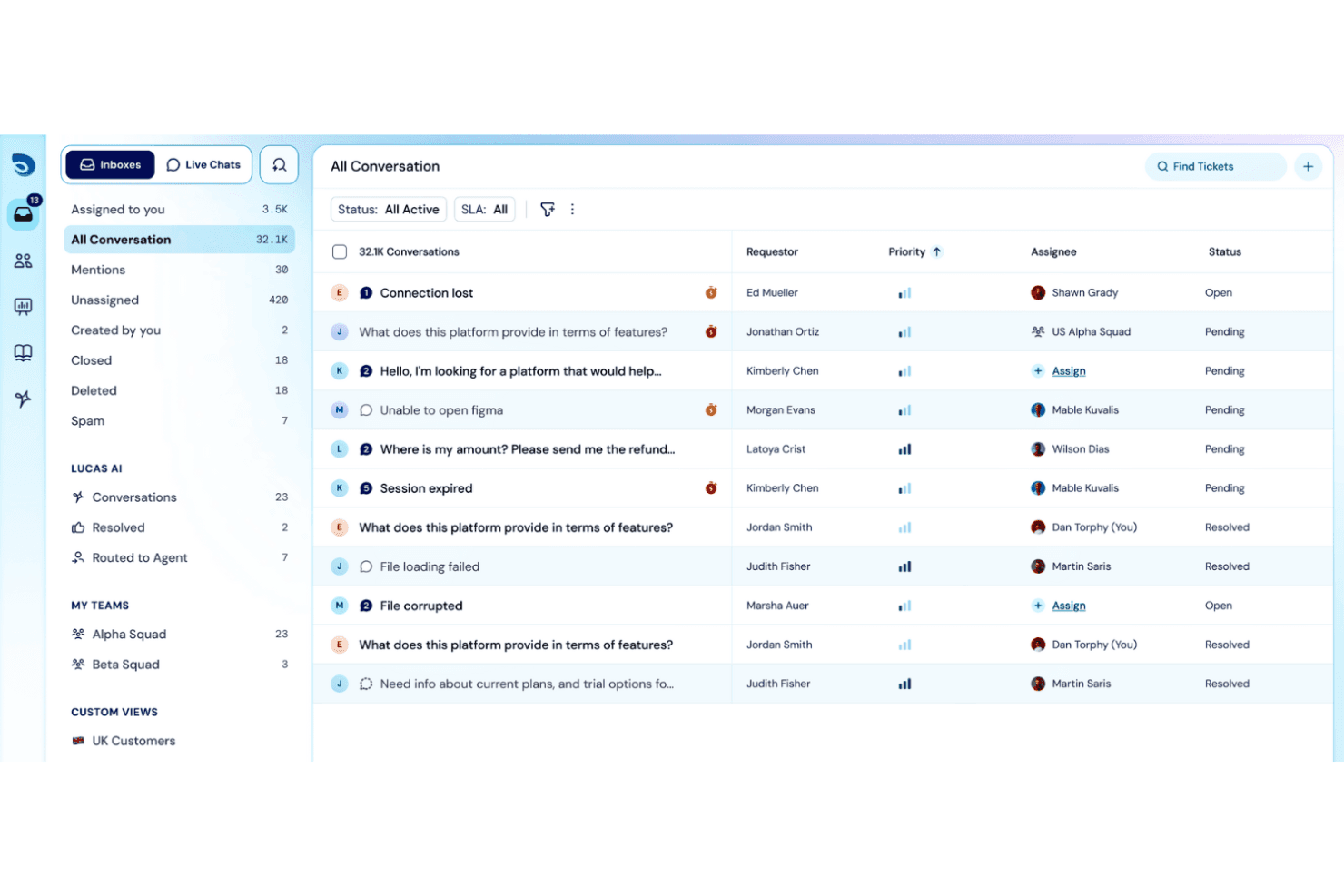
SparrowDesk muestra una bandeja de entrada de conversaciones unificada con columnas de prioridad, responsable y estado para gestionar 32.1K tickets de soporte. SparrowDesk es una plataforma de mesa de ayuda impulsada por IA que combina la gestión omnicanal de tickets, la automatización de flujos de trabajo sin código, el seguimiento de SLA, una base de conocimientos de autoservicio y un agente de IA para la resolución automatizada de tickets.
¿Para quién es más adecuado SparrowDesk?
SparrowDesk es una opción sólida para pequeñas y medianas empresas con equipos de soporte reducidos que necesitan gestionar tickets con IA sin una configuración compleja de ITSM.
Por qué elegí SparrowDesk
Elegí SparrowDesk como una de las mejores opciones porque su gestión multilingüe de tickets está realmente automatizada, no es simplemente un interruptor de traducción añadido. Zoona, su agente de IA, resuelve los tickets entrantes en cualquier idioma utilizando el contenido de tu base de conocimientos y, después, traduce el hilo completo para que los agentes puedan responder sin cambiar de herramienta ni contratar especialistas lingüísticos. El copiloto de IA añade resúmenes instantáneos de tickets y respuestas sugeridas, por lo que incluso los hilos multilingües complejos avanzan rápidamente.
Características principales de SparrowDesk
- Creador de flujos de trabajo sin código: Diseña y automatiza visualmente los procesos de soporte mediante la creación de flujos de trabajo con arrastrar y soltar.
- Bandeja de entrada omnicanal: Gestiona tickets de correo electrónico, chat en vivo, formularios web y Slack en una única cola priorizada.
- Seguimiento del Acuerdo de nivel de servicio (SLA): Establece, supervisa y aplica plazos de respuesta y resolución según horarios laborales personalizados.
- Informes y paneles personalizados: Crea y consulta análisis en tiempo real sobre las métricas de los tickets, la actividad de los agentes y el cumplimiento de los SLA.
Integraciones de SparrowDesk
SparrowDesk ofrece integraciones nativas con Gmail, Slack, Salesforce, Microsoft 365, HubSpot, Shopify, Linear, Pipedrive, Attio y SurveySparrow. También hay una API disponible para integraciones personalizadas.
Pros and Cons
Pros:
- El agente de IA gestiona tickets sin intervención de los agentes
- El soporte multilingüe cubre automáticamente los canales de tickets
- La automatización sin código reduce el trabajo manual del flujo de trabajo
Cons:
- Plataforma más reciente con una comunidad de usuarios más pequeña
- Los informes carecen de opciones avanzadas de exportación de BI
Learn more about SparrowDesk: Ideal con configuración instantánea en la nube o en local
- Prueba gratuita de 21 días
- Desde $29/mes
Visit WebsiteCustomer Rating:4.3/5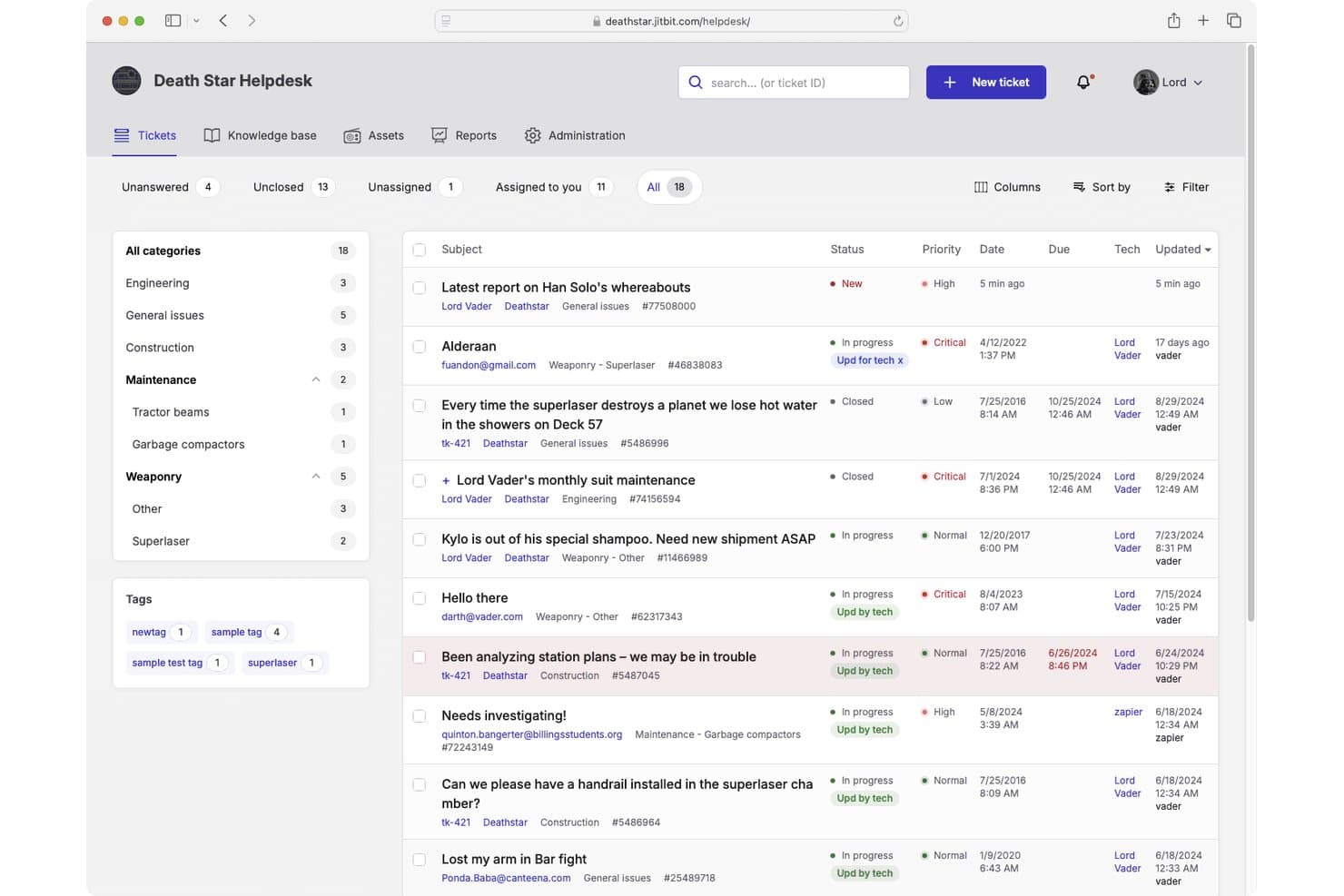
Jitbit Helpdesk ofrece una interfaz de gestión de tickets con vistas categorizadas, niveles de prioridad, indicadores de estado y seguimiento de asignaciones para los equipos de soporte. Jitbit Helpdesk es una plataforma de mesa de ayuda que gestiona la administración de tickets, la conversión de correos electrónicos en tickets, la automatización de flujos de trabajo, una base de conocimientos de autoservicio e integraciones de TI, disponibles tanto en la nube como en modelos de implementación autogestionados.
¿Para quién es mejor Jitbit Helpdesk?
Los equipos de soporte de TI en empresas pequeñas y medianas que necesitan un control total sobre su infraestructura encontrarán especialmente atractivo el modelo autogestionado con licencia perpetua.
Por qué elegí Jitbit Helpdesk
He incluido Jitbit Helpdesk entre mis mejores elecciones porque muy pocas herramientas de mesa de ayuda realmente admiten tanto la implementación SaaS como autogestionada sin compromisos. En la nube, estás en funcionamiento en segundos sin necesidad de tarjeta de crédito. La opción autogestionada incluye una licencia perpetua y acceso al código fuente en C#, para que tu equipo posea y pueda modificar la propia aplicación. Me gusta especialmente el motor de reglas de automatización, que te permite programar lógica de SLA, asignaciones automáticas y disparadores de escalado sin escribir una sola línea de código.
Características principales de Jitbit Helpdesk
- Soporte para campos personalizados: Agrega campos hechos a medida a los tickets para una recolección y seguimiento de datos más detallados.
- Módulo de seguimiento de activos: Vincula equipos o recursos directamente a los tickets de soporte usando la gestión de activos integrada.
- Integración con Active Directory: Sincroniza cuentas de usuario y habilita el inicio de sesión único a través de los servicios de directorio de tu organización.
- Base de conocimientos con sugerencias de IA: Muestra automáticamente artículos relevantes mientras agentes o usuarios crean nuevos tickets de soporte.
Integraciones de Jitbit Helpdesk
Jitbit Helpdesk ofrece integraciones nativas con Slack, Jira, GitHub, Asana, Microsoft Teams, TeamViewer, Google Drive, Dropbox, Basecamp y WhatsApp, y se conecta con Zapier. Hay una API disponible para integraciones personalizadas.
Pros and Cons
Pros:
- Se puede implementar como software verdaderamente local
- Automatización del enrutamiento y escalamiento de tickets
- Acceso total al código fuente con autogestión
Cons:
- Las opciones de personalización de reportes son limitadas
- Sin soporte telefónico nativo en la cola de tickets
Learn more about Jitbit Helpdesk:
Otro software de mesa de ayuda destacado
A continuación se incluye una lista de soluciones adicionales de software de mesa de ayuda que seleccioné, pero que no llegaron a estar entre las diez primeras. Sin embargo, sin duda merece la pena tenerlas en cuenta.
- 11MissiveLa mejor opción para la colaboración de equipos en bandejas de entrada compartidas
- 12TidioLa mejor para soporte al cliente impulsado por IA
- 13monday serviceIdeal para el seguimiento de solicitudes internas de soporte
- 14IntercomMejor para mensajería con clientes en tiempo real
- 15IssuetrakIdeal para la asignación de incidencias por turnos
- 16ServiceNowMejor para operaciones de servicios de TI empresariales
- 17Jira Service ManagementIdeal para proyectos de servicios de TI ágiles
- 18KayakoIdeal para recorridos de cliente unificados
- 19GuruIdeal para acceso a base de conocimientos
- 20SolarWinds Web Help DeskIdeal para la automatización de tickets en ITSM
- 21SAAS FirstIdeal para chatbots impulsados por IA
- 22LiveAgentMejor para la comunicación multicanal
- 23Help ScoutIdeal para pequeñas empresas y equipos
- 24Desk365Ideal para respuestas a tickets impulsadas por IA
- 25ZendeskIdeal para integrar diferentes canales
Análisis de software relacionados
Si aún no has encontrado lo que buscas, consulta estas herramientas alternativas que hemos probado y evaluado.
- Software de monitorización de redes
- Software de monitorización de servidores
- Soluciones SD-WAN
- Herramientas de monitorización de infraestructuras
- Analizador de paquetes
- Herramientas de monitorización de aplicaciones
Cómo Evalúo el Software de Mesa de Ayuda
Divido mi evaluación en dos capas: la base que toda herramienta debe cubrir—como la recepción multicanal y la aplicación de SLAs—y los diferenciadores que hacen que una plataforma sea la adecuada por encima de otra.
Funcionalidades Básicas (Requisitos Indispensables para esta Lista)
Cuando selecciono herramientas para mi lista, califico cada una en una escala de 0 (no ofrece la funcionalidad) a 5 (destaca en esta área) por cada funcionalidad básica indicada a continuación. Luego, calculo la puntuación total de la herramienta como un porcentaje. Cada herramienta debe obtener una puntuación total mínima de 75% para ser considerada para su inclusión.
- Sistema de Gestión de Tickets: Analizo cómo cada herramienta gestiona el ciclo de vida del ticket—estados, prioridades, categorización, campos personalizados y vinculación de tickets padre/hijo para casos complejos.
- Recepción Multicanal: Cada plataforma debe unificar las solicitudes de email, portal, chat y herramientas como Slack o Teams en una sola cola en lugar de bandejas de entrada aisladas.
- Automatización de Flujos de Trabajo y SLAs: Verifico si las reglas de encaminamiento, los desencadenantes de escalamiento y los temporizadores SLA pueden configurarse por prioridad o equipo—como la auto-escalada de una caída de servidor P1.
- Base de Conocimiento y Autoservicio: Una base de conocimiento (KB) con búsqueda junto a un portal de autoservicio importa mucho, especialmente cuando sugiere artículos relevantes antes de que el usuario envíe un ticket.
- Informes y Analítica: Los tableros que muestran volumen de tickets, carga de trabajo de los agentes, cumplimiento de SLAs y tendencias de resolución ayudan a los responsables de TI a identificar cuellos de botella sin recurrir a extracción manual de datos.
- Integraciones con Herramientas de TI: Las conexiones nativas con monitorización, gestión de activos, servicios de directorio y herramientas de desarrollo como Jira o PagerDuty mantienen el soporte integrado en el stack general de TI.
Una vez que tengo una lista de herramientas que cumplen con estos criterios, considero qué distingue a cada plataforma.
Factores Diferenciadores (Lo que Distingue a los Proveedores)
Así es como comparo y contrasto distintos proveedores:
Funciones Destacadas
El soporte para ITSM e ITIL es un gran diferenciador. Herramientas como Freshservice y ServiceNow van más allá de los tickets, incluyendo gestión de cambios, problemas y lanzamientos; muy útil cuando una sola caída genera decenas de incidentes relacionados. También evalúo si una plataforma incluye gestión de activos o de configuración integrada, ya que vincular un ticket a un dispositivo o CI específico acelera el análisis de causa raíz. Las capacidades de IA también son importantes, especialmente los agentes virtuales capaces de gestionar restablecimientos de contraseña o solicitudes comunes sin intervención de un técnico.
Más Allá de las Funcionalidades
Las certificaciones de seguridad y cumplimiento como SOC 2 Tipo II e ISO 27001 tienen verdadero peso aquí, especialmente para equipos de TI que manejan datos sensibles de empleados o infraestructuras. También considero cómo cada plataforma se adapta al tamaño del equipo, ya que una herramienta adecuada para un servicio de soporte de cinco personas podría colapsar ante el volumen de tickets de una empresa grande. La extensibilidad del ecosistema también es importante. Las APIs abiertas y los webhooks permiten crear integraciones personalizadas, como canalizar alertas de tu stack de monitorización directamente a la mesa de ayuda como tickets.
Cómo elegir un software de mesa de ayuda
Es fácil perderse entre largas listas de funciones y estructuras de precios complejas. Para ayudarte a mantener la atención mientras avanzas en tu proceso de selección de software, aquí tienes una lista de factores que debes tener en cuenta:
| Factor | Qué tener en cuenta |
|---|---|
| FactorEscalabilidad | Qué tener en cuentaComprueba si el software puede crecer junto con tu equipo y gestionar un volumen cada vez mayor de tickets sin problemas de rendimiento. Esto ayuda a evitar migraciones frecuentes de software a medida que tu empresa crece. |
| FactorIntegraciones | Qué tener en cuentaConfirma que el software se integra sin problemas con las herramientas que ya utilizas, como plataformas de correo electrónico, sistemas CRM o herramientas de chat interno, para garantizar que tu flujo de trabajo siga siendo eficiente. |
| FactorPersonalización | Qué tener en cuentaBusca una solución que te permita adaptar los campos de los tickets, los informes y los flujos de trabajo para que coincidan con los procesos de soporte únicos de tu equipo. La personalización evita soluciones alternativas que hacen perder tiempo a tu equipo. |
| FactorFacilidad de uso | Qué tener en cuentaSelecciona un software con una interfaz intuitiva y una navegación clara. Si a tu equipo le resulta difícil utilizar la herramienta, los índices de adopción se verán perjudicados, lo que afectará a la productividad. |
| FactorPresupuesto | Qué tener en cuentaCompara herramientas que se ajusten a tu presupuesto y asegúrate de que los precios sean transparentes. Averigua si existen costes ocultos, como tarifas por integraciones, almacenamiento adicional o niveles de soporte. |
| FactorMedidas de seguridad | Qué tener en cuentaAsegúrate de que el software proporcione medidas de seguridad sólidas, incluido el cifrado de datos, permisos basados en roles y cumplimiento de normas como GDPR o HIPAA, para proteger los datos confidenciales de los clientes. |
| FactorInformes | Qué tener en cuentaConsidera si la herramienta ofrece informes y análisis detallados que ayuden a identificar patrones, realizar un seguimiento del rendimiento del equipo y mejorar la prestación del servicio. |
| FactorCalidad del soporte | Qué tener en cuentaEvalúa la capacidad de respuesta del servicio de atención al cliente del proveedor. Un buen soporte te ayuda a resolver rápidamente los problemas o dudas que tu equipo pueda encontrar durante la implementación y posteriormente. |
Tendencias en el software de mesa de ayuda
Durante mi investigación, recopilé innumerables actualizaciones de productos, comunicados de prensa y registros de lanzamientos de distintos proveedores de software de mesa de ayuda. Estas son algunas de las tendencias emergentes que estoy siguiendo:
- Chatbots con IA: Ahora las herramientas utilizan chatbots más inteligentes para responder a las consultas de los clientes de forma instantánea y precisa. Esto reduce los tiempos de espera y permite que tu equipo se centre en problemas más complejos. Proveedores como Freshdesk y Zendesk han ampliado considerablemente las capacidades de sus chatbots.
- Soporte proactivo: El software hace cada vez más hincapié en la detección proactiva de problemas. En lugar de esperar a que lleguen tickets, estas herramientas avisan a tu equipo de posibles problemas, evitando que surjan dificultades antes de que los clientes las detecten. Help Scout es uno de los proveedores que lideran este cambio.
- Análisis avanzado: Las herramientas de mesa de ayuda están mejorando la forma en que recopilan y presentan los datos. Con análisis avanzados, tu equipo puede detectar fácilmente los cuellos de botella del servicio, mejorar el rendimiento y comprender mejor el comportamiento de los clientes. Zoho Desk ha mejorado notablemente sus funciones de análisis.
- Análisis del sentimiento de los clientes: Ahora las herramientas analizan automáticamente las interacciones con los clientes para evaluar su satisfacción o frustración. Tu equipo puede priorizar los tickets en consecuencia, lo que ayuda a evitar experiencias negativas. Gladly está abriendo camino en este enfoque.
- Innovación en el autoservicio: Los proveedores están perfeccionando los portales de autoservicio para que a los clientes les resulte más fácil encontrar rápidamente sus propias respuestas. Esto permite a los usuarios resolver sus dudas y reduce la carga de trabajo de tu equipo de soporte. Proveedores como HubSpot Service Hub han mejorado notablemente sus bases de conocimientos.
¿Qué es el software de mesa de ayuda?
El software de mesa de ayuda permite a los equipos gestionar solicitudes de usuarios, realizar un seguimiento de los problemas y responder a las incidencias desde un único sistema. El personal de TI, los equipos de soporte y los profesionales de operaciones lo utilizan para organizar los tickets, reducir las demoras y ofrecer una asistencia más clara a los usuarios.
El seguimiento de tickets, el enrutamiento automatizado y las herramientas de comunicación ayudan a mantener organizadas las solicitudes, reducir los tiempos de respuesta y facilitar el seguimiento del trabajo de soporte. En general, este software ayuda a los equipos a ofrecer una asistencia más rápida y coherente a los usuarios.
Funciones del software de mesa de ayuda
Al seleccionar un software de mesa de ayuda, presta atención a las siguientes funciones clave:
- Gestión de tickets: Realiza el seguimiento y organiza las solicitudes de los clientes en un lugar centralizado, lo que ayuda a tu equipo a responder rápidamente y resolver los problemas.
- Base de conocimientos: Proporciona recursos de autoservicio, lo que permite a los clientes encontrar soluciones de forma independiente y reduce el volumen de tickets.
- Chat en directo: Permite a tu equipo interactuar con los clientes al instante, mejorando los tiempos de respuesta y la satisfacción del cliente.
- Soporte multicanal: Permite a tu equipo gestionar las comunicaciones con los clientes a través de canales como el correo electrónico, las redes sociales y las aplicaciones de mensajería desde un único panel.
- Informes: Ofrece información detallada sobre el rendimiento del equipo, las tendencias de los tickets y la satisfacción del cliente, ayudando a tu empresa a mejorar la calidad del servicio.
- Gestión de SLA: Ayuda a definir, realizar el seguimiento y cumplir los acuerdos de nivel de servicio, garantizando respuestas puntuales y un soporte fiable.
- Reglas de automatización: Reduce las tareas repetitivas, como la asignación de tickets o de prioridades, y permite que tu equipo se centre en interacciones de mayor valor.
- Encuestas de opinión de los clientes: Recopila directamente los comentarios de los clientes, proporcionando a tu equipo información para mejorar las experiencias de los clientes y la calidad del servicio.
- Flujos de trabajo personalizados: Permite adaptar los procesos de la mesa de ayuda a los requisitos específicos de tu empresa, mejorando la eficiencia general.
- Detección de conflictos: Evita que varios miembros del equipo trabajen en el mismo ticket, previniendo esfuerzos duplicados y confusiones.
Ventajas del software de mesa de ayuda
La implementación de un software de mesa de ayuda ofrece varias ventajas para tu equipo y tu empresa. Estas son algunas de las que puedes esperar:
- Respuestas más rápidas: La gestión centralizada de tickets ayuda a tu equipo a ver, priorizar y responder rápidamente a las solicitudes.
- Mayor eficiencia: Las reglas de automatización se encargan de las tareas repetitivas, lo que permite a tu equipo dedicar más tiempo a los problemas importantes.
- Clientes más satisfechos: Los portales de autoservicio y las bases de conocimientos ayudan a los clientes a encontrar rápidamente las respuestas por sí mismos.
- Mayor visibilidad: Las herramientas de informes muestran claramente las tendencias de los tickets y el rendimiento del equipo, para que sepas exactamente dónde mejorar.
- Mayor productividad: Funciones como la detección de conflictos evitan esfuerzos duplicados, de modo que tu equipo puede gestionar más solicitudes de forma eficiente.
- Colaboración más sólida: Los paneles unificados y las notas internas ayudan a tu equipo a trabajar mejor conjuntamente al resolver problemas.
- Cumplimiento más sencillo: La gestión de SLA garantiza que los tickets cumplan los tiempos de servicio acordados, ayudando a tu equipo a mantener el rumbo.
Costes y precios del software de mesa de ayuda
Seleccionar un software de mesa de ayuda requiere comprender los distintos modelos de precios y planes disponibles. Los costes varían en función de las funciones, el tamaño del equipo, los complementos y otros factores. La siguiente tabla resume los planes habituales, sus precios medios y las funciones que suelen incluir las soluciones de software de mesa de ayuda:
Tabla comparativa de planes de software de mesa de ayuda
| Tipo de plan | Precio medio | Funciones habituales |
|---|---|---|
| Tipo de planPlan gratuito | Precio medio$0 | Funciones habitualesGestión básica de tickets, soporte por correo electrónico e informes limitados. |
| Tipo de planPlan personal | Precio medio$10-$25/usuario/mes | Funciones habitualesSoporte multicanal, reglas de automatización y encuestas a clientes. |
| Tipo de planPlan empresarial | Precio medio$30-$75/usuario/mes | Funciones habitualesGestión de SLA, análisis avanzados, flujos de trabajo personalizados y detección de conflictos. |
| Tipo de planPlan para empresas | Precio medio$80-$150+/usuario/mes | Funciones habitualesInformes avanzados, chatbots basados en IA, amplias opciones de personalización y soporte exclusivo para la cuenta. |
Resumen
El software de mesa de ayuda adecuado puede agilizar la gestión de los problemas de los clientes, implementar la gestión de cambios y garantizar operaciones fluidas, especialmente en un modelo SaaS basado en la nube.
Sin embargo, el software ideal varía en función de las necesidades específicas: desde quienes requieren funcionalidades de TI sólidas hasta quienes buscan una gestión integrada de activos o una solución integral de mesa de servicio.
Conclusiones clave:
- Determina las necesidades principales: Antes de analizar las opciones, identifica tus necesidades principales. Tanto si buscas una infraestructura de TI sólida, una gestión de activos o una sencilla solución de mesa de ayuda en la nube, el software debe abordar tus principales preocupaciones y requisitos.
- Prioriza la facilidad de uso y la funcionalidad: El mejor software no solo ofrece muchas funciones; también debe proporcionar una interfaz intuitiva. Un diseño sencillo y fácil de usar puede marcar una gran diferencia, especialmente en plataformas como las soluciones de mesa de ayuda, donde la rapidez de respuesta y la eficiencia son fundamentales.
- Considera el análisis de coste-beneficio: Aunque el precio es un factor importante, es esencial evaluar el valor del software. A veces, una opción ligeramente más cara puede ofrecer funcionalidades que ahorran tiempo y recursos a largo plazo. Además, no pases por alto las opciones gratuitas de mesa de ayuda ni las alternativas de código abierto; podrían ofrecer justo las funciones adecuadas para empresas emergentes o negocios más pequeños.