

Las mejores soluciones de mesa de ayuda de TI ayudan a los equipos a resolver problemas más rápido, mejorar los tiempos de respuesta de los tickets y mantener los sistemas funcionando sin problemas para los empleados de toda la organización. Estas herramientas centralizan las solicitudes, automatizan las tareas rutinarias y proporcionan a los equipos de soporte la visibilidad que necesitan para solucionar los problemas antes de que interrumpan las operaciones diarias.
Cuando las configuraciones incorrectas provocan interrupciones repetidas, los procesos manuales ralentizan la gestión de tickets o los equipos de soporte dependen de canales de comunicación dispersos, el rendimiento y la eficiencia pueden deteriorarse rápidamente. Estos desafíos generan retrasos, aumentan la frustración de los usuarios finales y dificultan la colaboración del personal de TI que intenta diagnosticar y resolver los problemas.
Con más de 20 años de experiencia en el sector como director de tecnología, he probado y analizado docenas de plataformas de mesa de ayuda de TI en entornos reales para evaluar su rendimiento, integraciones y facilidad de uso. Esta guía destaca las mejores soluciones de mesa de ayuda de TI que mejoran los flujos de trabajo de soporte, refuerzan la coordinación de los equipos y ayudan a las organizaciones a ofrecer un servicio de TI fiable y ágil. Cada análisis incluye características, ventajas y desventajas, y casos de uso más adecuados para ayudarte a elegir la herramienta correcta.
Por qué confiar en nuestras recomendaciones de software
6,700+
Reviews
20
Industry experts
16+
Evaluation factors
14
Years
Nuestro equipo lleva probando y evaluando software desde 2012. Como líderes tecnológicos, sabemos lo difícil —y lo importante— que es elegir el software adecuado.
Para esta guía, evaluamos las herramientas mediante pruebas prácticas e investigación independiente, puntuando las herramientas según nuestros criterios de selección.
Nuestras reseñas reflejan nuestro criterio editorial humano, no un discurso de ventas.
Revisores expertos:
- Paulo Gardini MiguelDirector técnico
 Tim FisherVP de IA
 Gabriel RosasTech Lead y arquitecto de software
 Christhian GruhnTech Lead y arquitecto de plataforma

Tabla comparativa de soluciones de mesa de ayuda de TI
La siguiente tabla compara los detalles de precios de mis principales selecciones de soluciones de mesa de ayuda de TI.
| Tool | Best For | Trial Info | Price | ||
|---|---|---|---|---|---|
| 1 | Ideal para una mesa de ayuda con IA e ITSM completo | Prueba gratuita de 14 días + demo gratuita disponible | Desde $19/agente/mes (facturado anualmente) | Website | |
| 2 | Ideal para monitoreo remoto | Prueba gratuita de 30 días + demostración gratuita disponible | Desde $129/técnico/mes (facturado anualmente) | Website | |
| 3 | Mejores agentes de IA que resuelven tickets | Prueba gratuita de 14 días | Precio a consultar | Website | |
| 4 | Ideal para proveedores de servicios gestionados | Prueba gratuita de 21 días + demo gratis disponible | Desde $149/técnico/mes (facturado anualmente) | Website | |
| 5 | Ideal para asistencia de acceso remoto | Prueba gratuita de 15 días | Desde $8.25/mes (facturado anualmente) | Website | |
| 6 | Ideal para crear experiencias personalizadas con IA | Prueba gratuita de 30 días disponible | Desde $15/usuario/mes | Website | |
| 7 | Ideal para flujos de trabajo de servicio de TI nativos de IA | Demostración gratuita disponible | Precios bajo solicitud | Website | |
| 8 | Ideal para la gestión de tickets multicanal | Prueba gratuita de 14 días + demo gratis disponible | Desde $19/agente/mes (facturado anualmente) | Website | |
| 9 | Mayor flexibilidad de implementación para nube y local | Prueba gratuita de 21 días | Desde $29/mes | Website | |
| 10 | Ideal para gestionar bandejas de entrada colaborativas | Prueba gratuita de 30 días disponible | Desde $14/usuario/mes (facturado anualmente) | Website |


Análisis de las 10 mejores soluciones de mesa de ayuda de TI
Aquí tienes una breve descripción de cada solución de mesa de ayuda de TI, su caso de uso más adecuado, sus características destacadas y capturas de pantalla para mostrar una vista general del panel de control.
 Ideal para una mesa de ayuda con IA e ITSM completo
- Prueba gratuita de 14 días + demo gratuita disponible
- Desde $19/agente/mes (facturado anualmente)
Visit WebsiteCustomer Rating:4.6/5
Freshservice permite el enrutamiento inteligente de incidentes, proporcionando a los técnicos las herramientas necesarias para resolver problemas desde una sola pantalla. Freshservice es un software de gestión de servicios de TI (ITSM) basado en la nube desarrollado por Freshworks. Ofrece una completa suite de herramientas que permite a los equipos de TI brindar un mejor servicio y resolver problemas.
Por qué elegí Freshservice: Me gusta el soporte potenciado por IA de Freshservice, el cual aprovecha el aprendizaje automático para automatizar tareas rutinarias, proporcionar enrutamiento inteligente de tickets y ofrecer análisis predictivos para mejorar la prestación del servicio. Además, la plataforma incluye un sólido sistema de gestión de incidentes que permite a los equipos de TI capturar, rastrear y resolver incidentes rápidamente. El módulo de gestión de cambios del software también posibilita que los equipos planifiquen, aprueben e implementen cambios con un riesgo mínimo.
Funciones y integraciones destacadas de Freshservice:
Las funciones incluyen gestión de activos para obtener una visión completa de todos los activos de TI y la función de catálogo de servicios que permite a los usuarios crear y publicar una lista de los servicios de TI disponibles, facilitando a los usuarios finales solicitar y recibir servicios. Freshservice también incluye un módulo de base de conocimientos y admite servicios multicanal, permitiendo a los usuarios enviar tickets por correo electrónico, chat, teléfono o portal.
Las integraciones incluyen Slack, Microsoft Teams, Jira, Trello, GitHub, Azure DevOps, Google Workspace, Office 365, Zapier, Twilio, Okta, Dropbox, Salesforce, AWS y Zendesk.
Pros and Cons
Pros:
- Funciones de automatización de flujos de trabajo
- Intuitivo y fácil de configurar
- Buena variedad de integraciones
Cons:
- La mayoría de los reportes solo están disponibles en los planes superiores
- Las opciones de filtrado podrían mejorar
Learn more about Freshservice: Ideal para monitoreo remoto
- Prueba gratuita de 30 días + demostración gratuita disponible
- Desde $129/técnico/mes (facturado anualmente)
Visit WebsiteCustomer Rating:4.6/5
Atera proporciona una mesa de ayuda y un sistema de tickets para gestionar solicitudes, automatizar flujos de trabajo y mejorar la eficiencia. Este sistema permite a los equipos de TI manejar tickets de servicio en una plataforma unificada. Atera es una solución integral de RMM y PSA diseñada para profesionales de TI y Proveedores de Servicios Gestionados (MSP), con énfasis en la facilidad de uso, la automatización y las capacidades remotas.
Por qué elegí Atera: Atera destaca por su interfaz intuitiva y sus herramientas de monitoreo en tiempo real, que ayudan a los equipos de TI a detectar y resolver problemas antes de que se agraven. Su funcionalidad de acceso remoto es rápida, segura y funciona en múltiples plataformas, permitiendo que los técnicos brinden soporte desde cualquier lugar. También destaco que Atera cobra por técnico, no por dispositivo, lo que la convierte en una opción rentable para equipos que gestionan una gran cantidad de puntos finales. Además, la gestión automatizada de parches y las alertas ayudan a mantener la seguridad y el cumplimiento sin seguimiento manual.
Funciones e integraciones destacadas de Atera:
Funciones incluyen automatización interna de TI para tareas como instalación de software, aplicación de parches y ejecución de scripts, junto con monitoreo en tiempo real, seguimiento de activos y acceso remoto. Atera también incluye un sistema de tickets para mesa de ayuda, gestión de contratos y herramientas de facturación, ofreciendo a los MSP y departamentos de TI todo lo que necesitan en una sola plataforma. Las herramientas de generación de informes son personalizables y ofrecen visibilidad sobre el estado del sistema, la actividad del usuario y el desempeño ante acuerdos de nivel de servicio (SLA).
Integraciones incluyen TeamViewer y Splashtop para acceso remoto, Acronis Cyber Protect Cloud para copias de seguridad y ciberseguridad, Microsoft Teams y Slack para comunicación interna, así como ServiceNow, Okta, Jira Software Cloud, Azure Active Directory y Google Sheets para identidad, flujos de trabajo e informes.
Pros and Cons
Pros:
- Sistema de tickets automatizado
- Flujos de trabajo personalizables y automatización
- Capacidades avanzadas de informes
Cons:
- Las funciones avanzadas pueden requerir una curva de aprendizaje
- Escalabilidad limitada para organizaciones muy grandes
 Mejores agentes de IA que resuelven tickets
- Prueba gratuita de 14 días
- Precio a consultar
Visit WebsiteCustomer Rating:4.5/5
SysAid muestra registros de servicio activos con resúmenes de tickets asistidos por IA, niveles de prioridad y cronogramas de respuesta. SysAid te ayuda a centralizar el soporte de TI, el seguimiento de activos y las tareas de mesa de ayuda en una sola plataforma, facilitando que equipos de TI de tamaño medio o empresarial gestionen tickets, administren inventario de hardware y software, y ofrezcan soporte de autoservicio para empleados o clientes. Es una opción sólida si tu equipo busca reducir tareas manuales rutinarias, brindar a los usuarios un portal de autoservicio confiable y obtener mayor visibilidad tanto de los incidentes como de los activos de TI.
Por Qué Elegí SysAid
Elegí SysAid porque integra automatización impulsada por IA directamente en el flujo de trabajo de la mesa de ayuda. Capacidades como la clasificación, categorización y priorización automática de tickets ayudan a evitar que las colas de soporte se vuelvan inmanejables, especialmente durante picos de solicitudes. Su gestión de activos integrada también vincula los tickets con hardware, software o licencias específicos, lo que facilita la resolución de problemas, auditorías y revisiones de cumplimiento. Esta conexión estrecha entre tickets y datos de activos convierte a SysAid en una herramienta práctica y unificada para equipos de TI responsables tanto de soporte como de infraestructura.
Características Clave de SysAid
Además de su automatización y gestión de tickets consciente de activos, SysAid ofrece otras funciones que mejoran las operaciones del service desk de TI:
- Gestión de Incidentes: Facilita el seguimiento y la resolución eficiente de incidentes de TI, asegurando una mínima interrupción en tus operaciones.
- Gestión de Cambios: Optimiza el proceso de implementación de cambios de TI, reduciendo el riesgo de errores y tiempos de inactividad.
- Gestión del Conocimiento: Ofrece herramientas para crear y mantener una base de conocimientos integral que permite una resolución más rápida de problemas.
- Portal de Autoservicio: Permite que los usuarios finales busquen en una base de conocimientos, soliciten servicios o informen incidencias por sí mismos, ayudando a reducir los tickets rutinarios.
Integraciones de SysAid
Las integraciones incluyen Jira, Microsoft Teams, Slack, Active Directory, Azure AD, SCCM, VMware, Google Workspace, Okta y Salesforce.
Pros and Cons
Pros:
- Capacidades de categorización y priorización de tickets impulsadas por IA para reducir la clasificación manual.
- El portal de autoservicio permite a los usuarios finales encontrar soluciones por su cuenta.
- Los flujos de trabajo personalizables y las políticas SLA permiten adaptar los procesos a las necesidades de tu organización.
Cons:
- La experiencia en la aplicación móvil carece de funcionalidad completa.
- Cuando las funciones no están correctamente configuradas, las automatizaciones y los flujos de trabajo SLA pueden volverse complejos y confusos para los agentes.
 Ideal para proveedores de servicios gestionados
- Prueba gratuita de 21 días + demo gratis disponible
- Desde $149/técnico/mes (facturado anualmente)
Visit WebsiteCustomer Rating:4.6/5
La PSA de SuperOps ofrece una función de mesa de servicio que permite a los técnicos comunicarse con los clientes y gestionar incidencias fácilmente. SuperOps es una plataforma PSA-RMM diseñada para Proveedores de Servicios Gestionados (MSP), que ofrece automatización y una variedad de funciones.
Por qué elegí SuperOps: SuperOps cuenta con una funcionalidad de mesa de servicio que proporciona una solución para que los MSP gestionen tickets y se comuniquen con los clientes. La mesa de servicio admite una interacción contextual, con cada ticket que contiene toda la información necesaria tan pronto como se abre. Su sistema de tickets también ofrece potentes funciones de automatización, desde el uso de desencadenantes basados en eventos hasta el seguimiento automático del tiempo, la asignación de tickets y la programación. SuperOps incluso incluye funciones de facturación automatizada para garantizar pagos puntuales.
Características y integraciones destacadas de SuperOps:
Características incluyen una plataforma unificada de RMM y PSA, que permite a los equipos de TI gestionar puntos finales, monitorear redes y manejar las operaciones de la mesa de servicio dentro de una sola herramienta. Su automatización potenciada por IA reduce la carga de trabajo manual al identificar problemas de manera proactiva y activar resoluciones automáticas, mejorando la eficiencia y los tiempos de respuesta. Además, SuperOps ofrece monitoreo sin agente, permitiendo a los profesionales de TI supervisar la salud de la red sin instalar software en cada dispositivo, simplificando la implementación y la gestión.
Las integraciones incluyen Splashtop, TeamViewer, Bitdefender, Xero, QuickBooks, Stripe, SentinelOne, Guardz, Hudu, Emsisoft, Microsoft Azure y Webroot.
Pros and Cons
Pros:
- Automatización de tickets eficaz
- RMM y PSA en una sola solución
- Módulo de scripting fácil de usar
Cons:
- Soporte de idiomas limitado
- El portal del cliente podría mejorarse
Learn more about SuperOps: Ideal para asistencia de acceso remoto
- Prueba gratuita de 15 días
- Desde $8.25/mes (facturado anualmente)
Visit WebsiteCustomer Rating:4.7/5
La función de acceso desatendido de SetMe permite a los técnicos acceder a los ordenadores de los clientes sin la intervención del usuario. SetMe es un software de asistencia remota que permite acceder y controlar ordenadores Windows y Mac desde cualquier lugar. Está diseñado para ayudar a los profesionales de TI y a los equipos de soporte a solucionar problemas, realizar actualizaciones del sistema y proporcionar asistencia en tiempo real sin necesidad de estar presencialmente.
Por qué elegí SetMe: Aunque carece de funciones como la gestión de tickets, SetMe ofrece un enfoque único para gestionar servicios de asistencia de TI, centrado en la asistencia remota. Por ejemplo, su gestión de varias sesiones permite conectarse y controlar varios ordenadores remotos simultáneamente. Esto resulta especialmente útil al gestionar varias solicitudes de soporte a la vez, ya que permite realizar varias tareas de manera eficiente sin tener que desconectarse y volver a conectarse entre sesiones. Además, la función «ejecutar como administrador» permite realizar tareas administrativas en máquinas remotas, como instalar software o gestionar cuentas de usuario, incluso si el usuario remoto no tiene privilegios administrativos.
Características e integraciones destacadas de SetMe:
Las características incluyen el reinicio remoto y la función de reconexión automática. Si es necesario reiniciar un sistema durante una sesión de soporte, SetMe puede reiniciar el ordenador remoto en modo normal o seguro y volver a conectarse automáticamente una vez que el sistema vuelva a estar operativo. También ofrece sincronización del portapapeles, lo que permite compartir texto, imágenes y archivos entre los ordenadores local y remoto.
Las integraciones no aparecen en el sitio web de SetMe, pero es compatible con ordenadores Windows y Mac.
Pros and Cons
Pros:
- Facilita las transferencias de archivos mediante arrastrar y soltar
- Compatibilidad multiplataforma
- Garantiza una comunicación y un intercambio de datos seguros
Cons:
- Posibles problemas de compatibilidad con sistemas operativos o dispositivos antiguos
- No ofrece funciones tradicionales de asistencia técnica, como la gestión de tickets
Learn more about SetMe: Ideal para crear experiencias personalizadas con IA
- Prueba gratuita de 30 días disponible
- Desde $15/usuario/mes
Visit WebsiteCustomer Rating:4.4/5
Resuelve casos más rápido con automatización y recomendaciones personalizadas. Salesforce Service Cloud es una avanzada mesa de ayuda multicanal que puede utilizarse tanto en entornos internos como de cara al cliente. Cuenta con funciones de IA que permiten un soporte más personalizado y contextual.
Por qué elegí Salesforce Service Cloud: El software aprovecha la IA y la automatización para gestionar tareas rutinarias, permitiendo que el personal de TI se concentre en ofrecer un soporte excepcional. Funciones como chatbots impulsados por IA y el triaje automático agilizan los procesos, mejorando la eficiencia al derivar los problemas al personal de TI adecuado con las habilidades necesarias.
Esta plataforma es adecuada para departamentos de TI de todos los tamaños. Mejora el soporte analizando interacciones, ofreciendo sugerencias proactivas de servicio y anticipando necesidades. El editor de arrastrar y soltar permite crear un centro de autoservicio, facilitando que los empleados encuentren soluciones de manera independiente, lo que aumenta la eficacia del soporte.
Funciones e integraciones destacadas de Salesforce Service Cloud:
Las funciones incluyen el enrutamiento omnicanal, que dirige los problemas de TI al personal correspondiente en función de sus habilidades y disponibilidad, asegurando respuestas rápidas y precisas. La plataforma también incluye una base de conocimientos integral, que brinda al personal de TI fácil acceso a información y soluciones, acelerando así la resolución de problemas.
Las integraciones incluyen Freshdesk, CloudTalk, Twilio, Brandwatch, Paligo, Mailchimp, HubSpot CRM, Trello, TeamViewer, Smartsheet, Klaviyo, Aircall, Gainsight y Conversocial.
Pros and Cons
Pros:
- Proporciona una vista unificada de las interacciones
- Simplifica eficazmente los procedimientos de soporte
- Se adapta a las necesidades de los usuarios
Cons:
- Puede ser complicado de implementar
- Tiene una curva de aprendizaje
Learn more about Agentforce Service (formerly Service Cloud): Ideal para flujos de trabajo de servicio de TI nativos de IA
- Demostración gratuita disponible
- Precios bajo solicitud
Visit WebsiteCustomer Rating:4.5/5
Serval ofrece un bot de Slack con tecnología de IA que responde automáticamente a las consultas de la mesa de ayuda de TI, como proporcionar credenciales de WiFi en tiempo real. Serval es una plataforma de mesa de ayuda de TI nativa de IA que combina la automatización de tickets, la gestión de accesos y la automatización de flujos de trabajo mediante una fuerza laboral integrada de agentes de IA en Slack, Teams, correo electrónico y portales web.
¿Para quién es más adecuado Serval?
Serval es una opción excelente para los equipos técnicos de operaciones de TI de empresas en etapa de crecimiento y grandes empresas que desean automatizar flujos de trabajo de mesa de ayuda de gran volumen sin aumentar el personal.
Por qué elegí Serval
Elegí Serval como una de las mejores opciones porque su Agente de automatización convierte descripciones en lenguaje sencillo en código de flujos de trabajo TypeScript, que luego mi equipo puede versionar, revisar y mantener en Git como cualquier otro proyecto de software. Esto significa que los flujos de aprovisionamiento de accesos, incorporación y desvinculación no quedan bloqueados dentro de una interfaz de arrastrar y soltar, sino que realmente se encuentran en el repositorio. También me gusta que el Agente de mesa de ayuda resuelva tickets de forma autónoma en Slack, Microsoft Teams, correo electrónico y un portal web antes de que intervenga una persona.
Características principales de Serval
- Recepción de tickets omnicanal: Acepta solicitudes de TI a través de Slack, Microsoft Teams, correo electrónico y canales de portal web.
- Automatización de la gestión de accesos: Gestiona solicitudes de acceso, aprobaciones y aprovisionamiento para cualquier aplicación o recurso.
- Sugerencias de IA: Identifica oportunidades de automatización al detectar patrones en los datos de los tickets.
- Análisis: Realiza un seguimiento de las tasas de resolución, el tiempo ahorrado y el rendimiento de los SLA mediante paneles integrados.
Integraciones de Serval
Serval ofrece integraciones nativas con Okta, Google Workspace, Microsoft Teams, Slack, Notion, Confluence, Jira, GitHub, ServiceNow y Salesforce. Hay una API disponible para integraciones personalizadas.
Pros and Cons
Pros:
- Los agentes de IA resuelven tickets sin intervención humana
- El Agente de automatización escribe código de flujos de trabajo implementable
- Gestiona el aprovisionamiento de accesos de principio a fin de forma autónoma
Cons:
- La personalización avanzada de los flujos de trabajo puede requerir conocimientos técnicos
- Pocas reseñas de terceros para validar su funcionamiento en situaciones reales
Learn more about Serval: Ideal para la gestión de tickets multicanal
- Prueba gratuita de 14 días + demo gratis disponible
- Desde $19/agente/mes (facturado anualmente)
Visit WebsiteCustomer Rating:4.3/5
Panel Zendesk Explore mostrando métricas de rendimiento en tiempo real de chat, llamadas y tickets. Zendesk es un software de mesa de ayuda de TI que ayuda a las organizaciones a gestionar el soporte interno de TI y las consultas de servicio al cliente desde una plataforma centralizada. Admite múltiples canales de comunicación, lo que permite a los equipos responder a solicitudes por correo electrónico, chat, teléfono y redes sociales, manteniendo un historial completo de tickets para cada interacción.
Por qué elegí Zendesk: Me gusta su sólido sistema de gestión de tickets que organiza todas las solicitudes entrantes en un solo lugar, facilitando que tu equipo de TI pueda realizar el seguimiento, priorizar y resolver problemas rápidamente. Las herramientas de automatización de la plataforma, incluyendo el enrutamiento impulsado por IA y los macros, ayudan a reducir tareas repetitivas para que tus agentes puedan centrarse en problemas complejos. También valoro la inclusión de una base de conocimientos de autoservicio, que ofrece a los usuarios una manera de resolver problemas comunes de forma independiente y reducir el volumen de tickets.
Funciones destacadas e integraciones de Zendesk:
Las funcionalidades incluyen gestión de tickets impulsada por IA que sugiere soluciones y asigna solicitudes al miembro adecuado del equipo, una base de conocimientos personalizable para que los usuarios finales se autosirvan y análisis detallados que te ofrecen información sobre tiempos de respuesta y tendencias de resolución. Las herramientas de seguridad ayudan a garantizar el cumplimiento con estándares como HIPAA y GDPR, lo que lo hace adecuado para organizaciones con estrictas necesidades de protección de datos.
Las integraciones incluyen Slack, HubSpot, Marketo, Twilio, Zapier, Jira, Trello, Hootsuite, Mailchimp, PandaDoc, Dialpad y Zoho Analytics.
Pros and Cons
Pros:
- Bandeja de entrada centralizada para todos los canales de soporte
- Funciones de IA para acelerar la resolución de tickets
- Potentes capacidades de integración con aplicaciones empresariales populares
Cons:
- Curva de aprendizaje más pronunciada para nuevos usuarios
- Coste superior para funciones avanzadas
 Mayor flexibilidad de implementación para nube y local
- Prueba gratuita de 21 días
- Desde $29/mes
Visit WebsiteCustomer Rating:4.4/5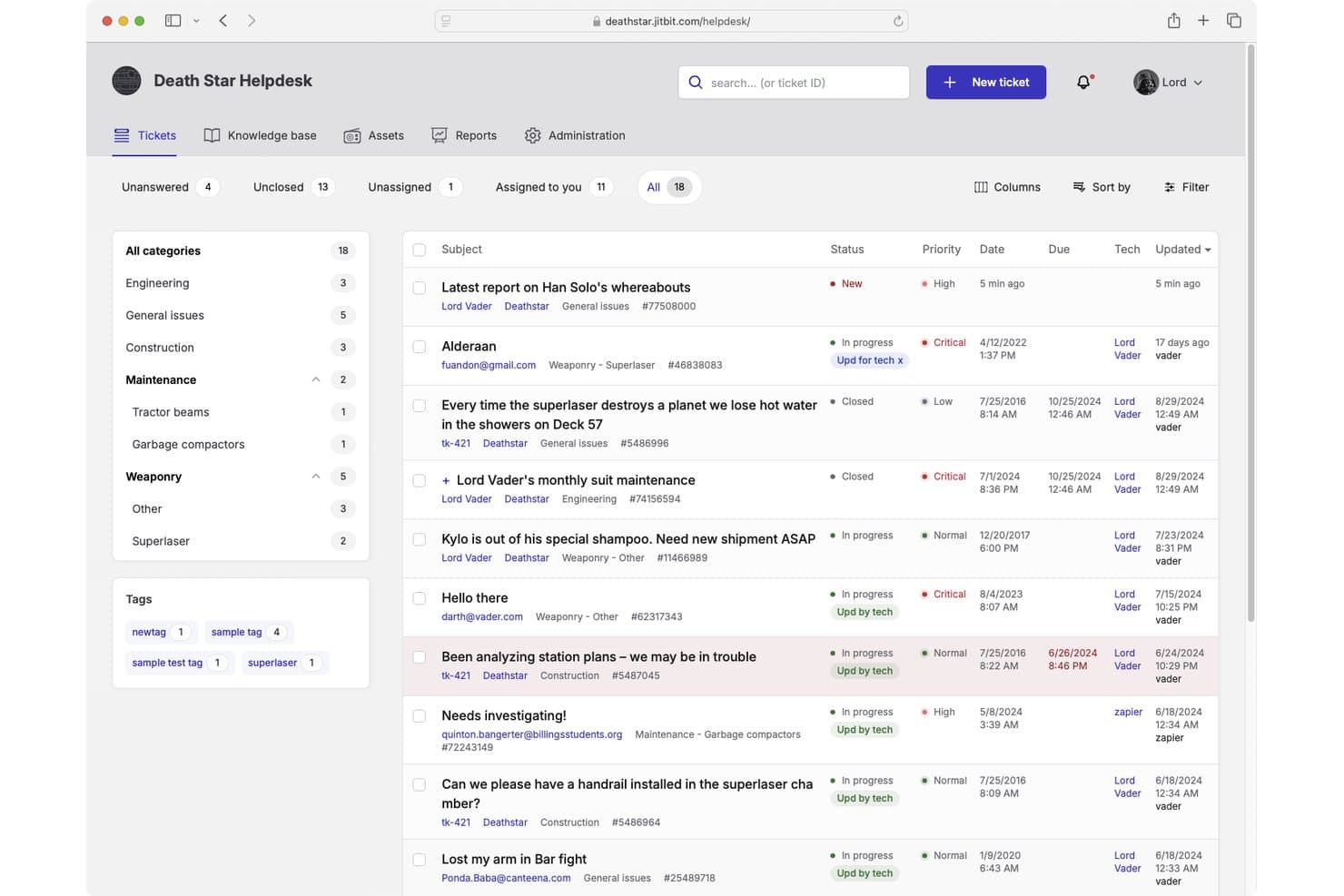
Jitbit Helpdesk ofrece una interfaz de gestión de tiques con tiques categorizados, niveles de prioridad, seguimiento de estado y gestión de asignaciones para equipos de soporte de TI. Jitbit Helpdesk es una plataforma de mesa de ayuda de TI centrada en el correo electrónico que combina la gestión de tiques, automatización, seguimiento de acuerdos de nivel de servicio (SLA), una base de conocimientos de autoservicio y seguimiento de activos—disponible tanto como una solución SaaS en la nube como una aplicación autohospedada en las instalaciones.
¿Para quién es mejor Jitbit Helpdesk?
Jitbit Helpdesk es una excelente opción para equipos de TI pequeños o medianos que necesitan un sistema de tiques sencillo que puedan alojar ellos mismos o ejecutar en la nube.
Por qué elegí Jitbit Helpdesk
Elegí Jitbit Helpdesk como uno de los mejores porque es una de las únicas herramientas de mesa de ayuda de TI que ofrece paridad total de funcionalidades entre las versiones en la nube y autohospedada. La licencia en las instalaciones es perpetua, por lo que mi equipo posee completamente el software sin necesidad de una suscripción continua. También me gusta que el código fuente en C# está disponible para su compra, lo que nos permite personalizar la plataforma en profundidad cuando la configuración estándar no es suficiente.
Características clave de Jitbit Helpdesk
- Respuestas de tiques potenciadas por IA: Utiliza IA para sugerir respuestas, resumir tiques y recomendar artículos de la base de conocimientos.
- Recepción multicanal de tiques: Acepta tiques por correo electrónico, portal web, chat en vivo, WhatsApp, API y aplicación móvil.
- Disparadores de automatización: Reglas personalizables gestionan la asignación automática, las escaladas y las solicitudes HTTP externas.
- Seguimiento de SLA y alertas: Supervisa múltiples políticas de SLA con notificaciones de incumplimiento y escaladas automáticas.
Integraciones de Jitbit Helpdesk
Jitbit Helpdesk ofrece integraciones nativas con Microsoft Teams, Slack, Jira, Active Directory, Zapier y cuenta con una API para integraciones personalizadas.
Pros and Cons
Pros:
- Licencia perpetua local con código fuente completo
- Las versiones en la nube y autohospedada tienen paridad de funcionalidades
- Las reglas de automatización admiten solicitudes HTTP externas
Cons:
- Las capacidades de informes y analítica son limitadas
- Sin módulos nativos de gestión de cambios o problemas ITIL
Learn more about Jitbit Helpdesk: 10Ideal para gestionar bandejas de entrada colaborativas
Missive
- Prueba gratuita de 30 días disponible
- Desde $14/usuario/mes (facturado anualmente)
Visit WebsiteCustomer Rating:4.8/5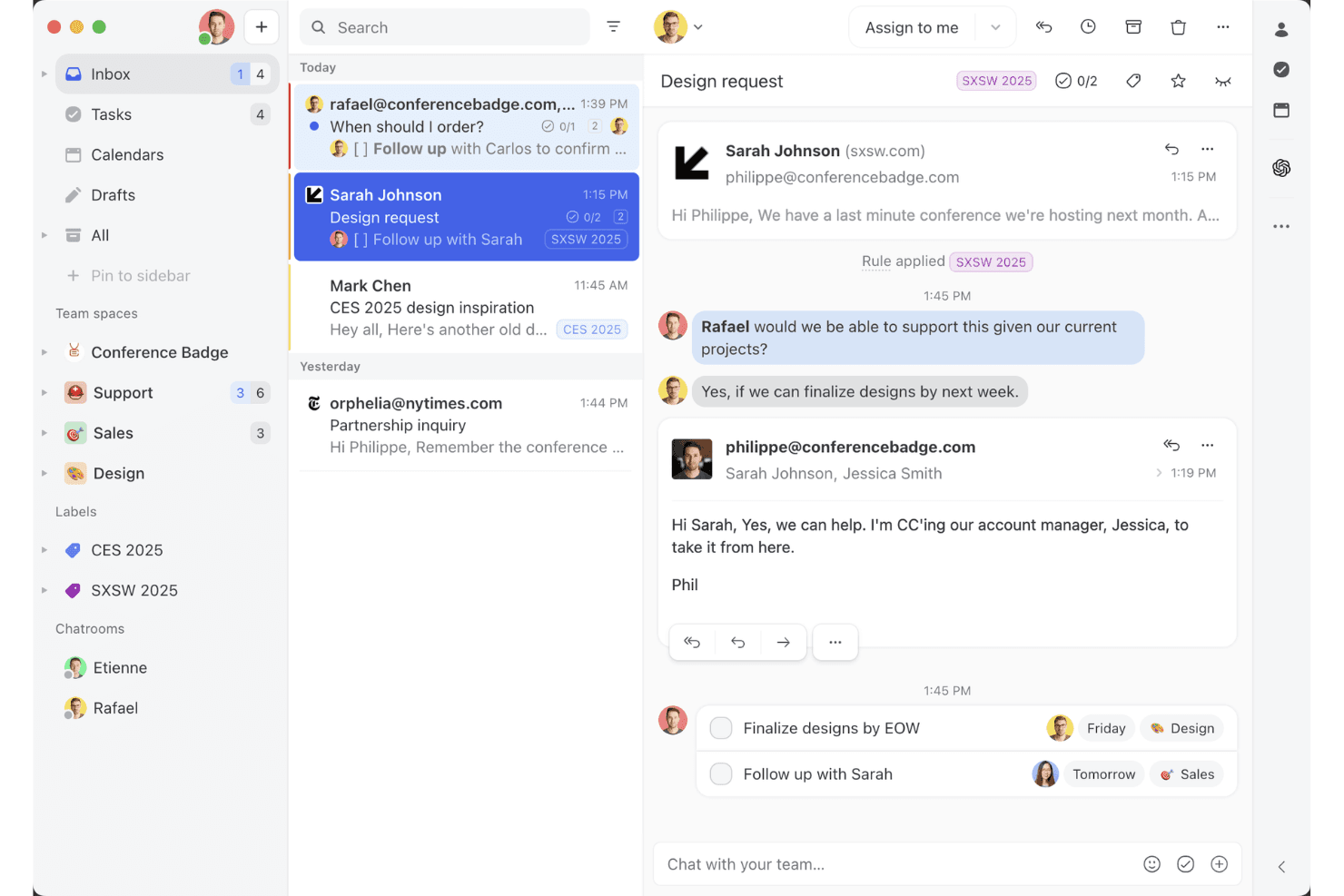
La vista de bandeja de entrada compartida de Missive muestra cómo los equipos pueden colaborar en hilos de correo electrónico, asignar tareas y gestionar conversaciones con clientes en un solo espacio de trabajo. Missive es una plataforma de bandeja de entrada colaborativa que unifica el correo electrónico, el chat en directo, los SMS y los canales de mensajería social en un espacio de trabajo compartido con asignación de conversaciones, reglas de automatización y respuestas asistidas por IA.
¿Para quién es más adecuado Missive?
Missive es adecuado para pequeños equipos de soporte que gestionan solicitudes informáticas principalmente a través del correo electrónico y los canales de mensajería, y necesitan colaboración en una bandeja de entrada compartida sin contar con una plataforma ITSM completa.
Por qué elegí Missive
Elegí Missive como una de las mejores opciones porque su enfoque de bandeja de entrada colaborativa resuelve realmente una necesidad de los pequeños equipos de soporte informático que reciben solicitudes por correo electrónico y chat. Me encanta cómo varios agentes pueden redactar juntos una respuesta en tiempo real, como si se tratara de un documento compartido, lo que reduce las respuestas duplicadas durante los incidentes activos. Las reglas de enrutamiento basadas en IA de Missive pueden asignar automáticamente las conversaciones según su contenido, de modo que las solicitudes urgentes lleguen a la persona adecuada sin necesidad de una clasificación manual.
Funciones principales de Missive
- Bandeja de entrada multicanal: Consolida el correo electrónico, los SMS, WhatsApp, Facebook Messenger, los mensajes directos de Instagram y el chat en directo en un único espacio de trabajo compartido.
- Servidor MCP de Missive: Conecta clientes de IA externos (como Claude o ChatGPT) a mcp.missiveapp.com para buscar hilos de soporte informático, consultar contactos y redactar respuestas a solicitudes, manteniendo la aprobación humana como requisito antes del envío.
- Redacción de respuestas asistida por IA: Genera sugerencias de respuesta basadas en el contexto de la conversación utilizando OpenAI, Anthropic o Google Gemini, según tu elección, mediante tu propia clave de API.
- Registro de auditoría: Registra cada acción realizada en una conversación, incluido quién efectuó el cambio y cuándo, para garantizar la responsabilidad plena del equipo.
- Inicio de sesión único mediante SAML: Admite el inicio de sesión único mediante Okta y Azure AD en el plan Business, lo que permite aplicar una gestión centralizada del acceso y las identidades.
Integraciones de Missive
Missive ofrece integraciones nativas con Okta y Azure AD mediante el inicio de sesión único de SAML, además de GitHub, Asana, ClickUp y Trello. Los planes Productive y Business incluyen acceso personalizado a la API REST, compatibilidad con Zapier y su nuevo servidor MCP cuando un administrador lo habilita.
Pros and Cons
Pros:
- La coautoría en tiempo real evita respuestas duplicadas
- Bandeja de entrada unificada para correo electrónico, chat y redes sociales
- Las reglas de IA gestionan la asignación y el enrutamiento automáticos
Cons:
- No incluye una base de conocimientos ni un portal de autoservicio
- Carece de gestión de activos y configuraciones informáticas
Learn more about Missive:
Otras soluciones de mesa de ayuda de TI que puedes considerar
Aquí tienes algunas opciones adicionales entre las que puedes elegir. No entraron en la lista de las 10 mejores, pero puedes considerarlas como tu próxima herramienta de mesa de ayuda:
- 11Zoho DeskMejor para soporte de TI multicanal
- 12TidioMejor para soporte de chat en vivo con funciones de chatbots de IA
- 13HaloMejor para usuarios avanzados de mesas de ayuda
- 14monday serviceMejor para la automatización de flujos de trabajo
- 15Vision HelpdeskMejor por sus funciones de gamificación
- 16HappyFoxIdeal para integraciones
- 17IssuetrakMejor para informes y analíticas de mesa de ayuda
- 18InvGate Service ManagementIdeal para la configuración de mesa de ayuda
- 19SpiceworksLa mejor mesa de ayuda de TI gratuita
- 20GuruIdeal para acceder a la base de conocimientos interna
Análisis relacionados de software de TI
Si aún no has encontrado aquí lo que buscas, echa un vistazo a estas herramientas alternativas que hemos probado y evaluado.
- Software de supervisión de redes
- Software de supervisión de servidores
- Soluciones SD-Wan
- Herramientas de supervisión de infraestructuras
- Analizador de paquetes
- Herramientas de supervisión de aplicaciones
Cómo evalúo el software de mesa de ayuda de TI
Evalúo cada herramienta en dos niveles: lo básico—enrutamiento de tickets, cumplimiento de SLA y portales de autoservicio—y los diferenciadores que importan para los equipos de TI que gestionan incidentes bajo presión.
Funcionalidad principal (lo imprescindible para esta lista)
Al seleccionar herramientas para mi lista, califico cada una en una escala de 0 (no ofrece la funcionalidad) a 5 (sobresale en esta área) para cada funcionalidad principal que se muestra a continuación. Luego, calculo la puntuación total de la herramienta como un porcentaje. Cada herramienta necesita obtener una puntuación total mínima del 75% para ser considerada para su inclusión.
- Gestión de tickets: Analizo cómo maneja cada herramienta la categorización, asignación, seguimiento del estado y relaciones entre tickets—como vincular un incidente principal con tareas secundarias cuando una caída de servidor genera múltiples solicitudes de hardware.
- Recepción multicanal: Cada plataforma debe aceptar tickets por correo electrónico, un portal web y al menos un canal adicional como Microsoft Teams o Slack, para que los usuarios finales puedan reportar incidencias donde ya trabajan.
- Automatización y enrutamiento: Valoro si la herramienta admite enrutamiento basado en reglas y desencadenantes de escalamiento—por ejemplo, asignar automáticamente problemas de impresora a un técnico específico o escalar una caída de VPN tras 30 minutos sin respuesta.
- Base de conocimientos y portal de autoservicio: Es fundamental que cuente con una base de conocimientos buscable junto con un portal de autoservicio. Verifico si los empleados pueden encontrar guías para restablecer contraseñas o configurar VPN y enviar tickets sin escribir al soporte.
- Gestión de SLA: Busco políticas de SLA configurables vinculadas a la prioridad o categoría del ticket, con alertas de incumplimiento y seguimiento por horario laboral para que los equipos puedan diferenciar expectativas de respuesta entre un servidor en producción caído y una solicitud de acceso a software.
- Gestión de activos de TI y seguimiento de configuración: La herramienta debe vincular activos a tickets y usuarios. Cuando entra un fallo de portátil, los agentes deberían ver el estado de garantía, software instalado y otros incidentes relacionados con ese dispositivo.
Una vez tengo una lista de herramientas que cumplen estos criterios, considero qué diferencia a cada plataforma.
Factores diferenciadores (lo que distingue a los proveedores)
Así es como comparo y contrasto diferentes proveedores:
Características destacadas
La gestión asistida por IA es un gran diferenciador—las herramientas que pueden categorizar automáticamente tickets y redactar respuestas ahorran tiempo real a los agentes durante incidentes de alto volumen como una caída a nivel empresarial. También evalúo si una plataforma incluye módulos nativos de gestión de cambios y problemas, ya que los equipos que manejan análisis de causa raíz y aprobaciones de cambios fuera de la mesa de ayuda pierden visibilidad. El control remoto integrado es otra característica clave, especialmente para equipos de soporte que solucionan problemas en terminales sin cambiar a otra herramienta de escritorio remoto.
Más allá de las características
La integración con el ecosistema es muy relevante. Verifico si una herramienta se conecta de forma nativa con proveedores de identidad como Azure AD y gestores de terminales como Intune, ya que una mesa de ayuda que no se conecta con tu infraestructura existente genera más trabajo que soluciones. El cumplimiento es otro factor clave—los equipos en industrias reguladas requieren certificaciones como SOC 2 Tipo II o ISO 27001, junto con SSO y controles de acceso basados en roles. También evalúo la transparencia de precios, en particular si las funciones de gestión de activos y automatización son complementos o están incluidas en los planes básicos.
Cómo elegir una solución de mesa de ayuda de TI
Es fácil perderse entre largas listas de características y complejas estructuras de precios. Para ayudarte a mantener la atención mientras avanzas en tu proceso único de selección de software, aquí tienes una lista de factores que debes tener en cuenta:
| Factor | Qué tener en cuenta |
|---|---|
| FactorEscalabilidad | Qué tener en cuenta¿Puede el software crecer al ritmo de las necesidades de tu equipo? Busca una solución que admita un volumen creciente de incidencias, varios departamentos y equipos globales. |
| FactorIntegraciones | Qué tener en cuenta¿Se conecta con tus herramientas actuales? Asegúrate de que se integre con sistemas de correo electrónico, chat, CRM y gestión de activos para agilizar los flujos de trabajo. |
| FactorCapacidad de personalización | Qué tener en cuenta¿Puedes ajustar los flujos de trabajo, las categorías de incidencias y los roles de usuario? Una mesa de ayuda flexible te permite adaptar los procesos a las necesidades específicas de tu equipo. |
| FactorFacilidad de uso | Qué tener en cuenta¿La interfaz es intuitiva tanto para los agentes como para los usuarios finales? Busca un sistema sencillo de gestión de incidencias, una navegación clara y un panel fácil de usar. |
| FactorPresupuesto | Qué tener en cuenta¿El precio se ajusta a tu presupuesto y al tamaño de tu equipo? Comprueba si existen costes ocultos en los complementos de funciones, los precios por agente y los planes empresariales. |
| FactorMedidas de seguridad | Qué tener en cuenta¿Hasta qué punto protege los datos confidenciales de TI? Busca controles de acceso basados en roles, cifrado y cumplimiento de estándares del sector como el RGPD. |
| FactorFunciones de automatización | Qué tener en cuenta¿Ofrece automatización de flujos de trabajo, enrutamiento de incidencias basado en IA o chatbots? La automatización reduce el trabajo manual y acelera los tiempos de resolución de incidencias. |
| FactorInformes & análisis | Qué tener en cuenta¿Proporciona información en tiempo real sobre el rendimiento de TI? Busca paneles, seguimiento de SLA y análisis de tendencias para medir la eficiencia y las áreas de mejora. |
Tendencias en el software de mesa de ayuda de TI
En mi investigación, recopilé innumerables actualizaciones de productos, comunicados de prensa y registros de lanzamientos de distintos proveedores de software de mesa de ayuda de TI. La creación de documentación completa suele requerir herramientas de autoría de ayuda especializadas para organizar y presentar esta información de forma eficaz. Estas son algunas de las tendencias emergentes que estoy siguiendo:
- Resolución de incidencias con IA: Cada vez más herramientas de mesa de ayuda utilizan la IA para categorizar, asignar e incluso resolver incidencias automáticamente. Los modelos de aprendizaje automático analizan incidencias anteriores para sugerir soluciones, lo que reduce la carga de trabajo manual y acelera los tiempos de respuesta.
- Soporte de TI proactivo: En lugar de esperar a que los usuarios envíen incidencias, algunas herramientas ahora detectan posibles problemas antes de que causen interrupciones. Las integraciones de análisis predictivo y monitorización de sistemas ayudan a los equipos de TI a abordar los problemas antes de que afecten a los empleados.
- Gestión conversacional de incidencias: Los formularios tradicionales de incidencias están siendo sustituidos por interfaces basadas en chat. Ahora los empleados pueden enviar y consultar incidencias directamente a través de Slack, Microsoft Teams o chatbots con IA, lo que hace que el soporte de TI sea más accesible.
- Automatización de flujos de trabajo sin código: Cada vez más plataformas permiten a los equipos de TI crear flujos de trabajo personalizados para la gestión de incidencias sin escribir código. Los creadores de flujos de trabajo de arrastrar y soltar ayudan a los equipos a automatizar procesos repetitivos, como la incorporación de nuevos empleados o el restablecimiento de contraseñas.
- Seguimiento de la experiencia de los empleados: El software de mesa de ayuda está ampliando su alcance más allá del soporte de TI para medir la satisfacción general de los empleados. Algunas herramientas ahora recopilan comentarios después de resolver una incidencia y analizan las tendencias de sentimiento para ayudar a los equipos de TI a mejorar la calidad del servicio.
¿Qué es el software de mesa de ayuda de TI?
El software de mesa de ayuda de TI ayuda a los equipos de TI a realizar el seguimiento, gestionar y resolver solicitudes de soporte técnico. Los administradores de TI, los agentes de soporte y los responsables de la mesa de ayuda utilizan estas herramientas para organizar las incidencias, automatizar los flujos de trabajo y mejorar los tiempos de respuesta.
El seguimiento de incidencias, la automatización basada en IA y las bases de conocimiento de autoservicio ayudan a reducir los tiempos de resolución, mejorar la satisfacción de los usuarios y mantener organizadas las operaciones de TI. Para los equipos que necesitan entornos de formación prácticos, el software de laboratorios virtuales de TI puede complementar estas herramientas de soporte. Estas herramientas facilitan que los equipos proporcionen un soporte eficiente y fiable al tiempo que minimizan el tiempo de inactividad.
Funciones del software de mesa de ayuda de TI
Al seleccionar un software de mesa de ayuda de TI, presta atención a las siguientes funciones clave:
- Gestión de tickets: Organiza las solicitudes de soporte entrantes, las asigna a los agentes adecuados y realiza un seguimiento de su progreso hasta su resolución.
- Flujos de trabajo automatizados: Utiliza reglas predefinidas para distribuir tickets, enviar notificaciones y activar acciones con el fin de reducir el trabajo manual.
- Portal de autoservicio: El mejor software de portal para profesionales de TI proporciona bases de conocimientos donde los usuarios pueden encontrar respuestas a problemas comunes sin enviar un ticket.
- Soporte multicanal: Permite a los usuarios enviar tickets por correo electrónico, chat, teléfono y aplicaciones de mensajería como Slack o Microsoft Teams.
- Asistencia basada en IA: Utiliza el aprendizaje automático para sugerir soluciones, clasificar tickets e incluso resolver automáticamente problemas sencillos.
- Seguimiento de los SLA: Supervisa los tiempos de respuesta y resolución para garantizar el cumplimiento de los acuerdos de nivel de servicio (SLAs).
- Gestión de activos: Realiza un seguimiento de los activos de TI y los vincula a los tickets de soporte para ayudar a los equipos de TI a diagnosticar y resolver más rápidamente problemas de hardware o software.
- Informes y análisis: Proporciona información sobre el volumen de tickets, los tiempos de resolución y el rendimiento de los agentes para mejorar la eficiencia de los servicios de TI.
- Herramientas de soporte remoto: Permite a los equipos de TI solucionar y resolver problemas en los dispositivos de los usuarios sin necesidad de estar físicamente presentes.
- Recopilación de comentarios de los usuarios: Recoge valoraciones y comentarios después de resolver los tickets para medir la satisfacción con el servicio e identificar áreas de mejora.
Beneficios del software de mesa de ayuda de TI
La implementación de un software de mesa de ayuda de TI ofrece varios beneficios para tu equipo y tu empresa. Estos son algunos de los que puedes esperar:
- Resolución más rápida de problemas: Automatiza la distribución y priorización de tickets para que los equipos de TI puedan resolver los problemas con mayor rapidez.
- Mejor organización: Mantiene todas las solicitudes de soporte en un solo lugar, lo que facilita el seguimiento y la gestión de los tickets desde el principio hasta el final.
- Mejor experiencia del usuario: Proporciona a los empleados opciones de autoservicio y respuestas más rápidas, reduciendo la frustración.
- Mayor eficiencia de TI: Reduce las tareas manuales mediante la automatización, lo que permite a los equipos de TI centrarse en trabajos de mayor prioridad.
- Mejor toma de decisiones: Genera informes e información sobre las tendencias de los tickets, el rendimiento de los agentes y los problemas comunes para ayudar a mejorar los servicios de TI.
- Mejor cumplimiento de la seguridad: Realiza un seguimiento de los incidentes y activos de TI, ayudando a las organizaciones a cumplir los requisitos de seguridad y normativos.
- Menores costes de soporte: Reduce el número de tickets repetitivos al ofrecer bases de conocimientos de autoservicio y asistencia basada en IA.
Costes y precios del software de mesa de ayuda de TI
Para seleccionar un software de mesa de ayuda de TI es necesario comprender los distintos modelos de precios y planes disponibles. Los costes varían según las funciones, el tamaño del equipo, los complementos y otros factores. La siguiente tabla resume los planes habituales, sus precios medios y las funciones que suelen incluir las soluciones de software de mesa de ayuda de TI:
Tabla comparativa de planes para software de mesa de ayuda de TI
| Tipo de plan | Precio medio | Funciones habituales |
|---|---|---|
| Tipo de planPlan gratuito | Precio medio$0 | Funciones habitualesSistema básico de gestión de tickets, automatización limitada, acceso para un solo usuario y soporte de la comunidad. |
| Tipo de planPlan personal | Precio medio$10-$30/usuario/mes | Funciones habitualesSoporte multicanal, asignación de tickets, herramientas de informes y notificaciones por correo electrónico. |
| Tipo de planPlan empresarial | Precio medio$40-$100/usuario/mes | Funciones habitualesAutomatización avanzada, distribución de tickets basada en IA, seguimiento de los SLA e integraciones con aplicaciones de terceros. |
| Tipo de planPlan corporativo | Precio medioPrecios personalizados | Funciones habitualesFlujos de trabajo personalizados, soporte especializado, gestión del cumplimiento y análisis avanzados. |
Preguntas frecuentes sobre el software de mesa de ayuda de TI
Estas son algunas respuestas a preguntas frecuentes sobre el software de mesa de ayuda de TI: