

Die 20 besten Cybersecurity-Software im Jahr 2026

Beste Cybersecurity-Software im Überblick
Hier ist meine Auswahl der besten Cybersecurity-Software:


Die beste Cybersecurity-Software hilft Ihnen, Bedrohungen frühzeitig zu erkennen, unbefugten Zugriff zu verhindern und sensible Daten über Endpunkte, Netzwerke und Cloud-Umgebungen hinweg zu schützen.
Wenn Sie schon einmal mit Programmen zu tun hatten, die die Systemleistung beeinträchtigen, mit Warnmeldungen, die Ihre Inbox ohne Kontext fluten, oder mit Werkzeugen, die nicht gut miteinander funktionieren, wissen Sie, wie frustrierend es ist, eine zuverlässige Sicherheitsstrategie zusammenzustellen. Viele Teams stehen außerdem vor dem Problem mangelnder Sichtbarkeit – insbesondere beim Support von Hybrid- oder Remote-Umgebungen oder beim Schutz von Altsystemen mit verschiedenen Schutzschichten.
Ich habe Dutzende Cybersecurity-Tools in Unternehmen und SaaS-Umgebungen getestet und eingeführt und dabei eng mit Teams zusammengearbeitet, um alles vom Endgerät bis zu Cloud-basierten Diensten abzusichern. Dieser Leitfaden zeigt Plattformen, die saubere Integrationen, aussagekräftige Warnmeldungen und die nötige Übersicht bieten, um schnell reagieren zu können, ohne im Lärm unterzugehen.
Why Trust Our Software Reviews
We’ve been testing and reviewing software since 2023. As tech leaders ourselves, we know how critical and difficult it is to make the right decision when selecting software.
We invest in deep research to help our audience make better software purchasing decisions. We’ve tested more than 2,000 tools for different tech use cases and written over 1,000 comprehensive software reviews. Learn how we stay transparent & our software review methodology.
Zusammenfassung der besten Cybersecurity-Software
| Tool | Best For | Trial Info | Price | ||
|---|---|---|---|---|---|
| 1 | Am besten geeignet für Verhaltensanalyse in Echtzeit | 30-tägige kostenlose Testphase + kostenlose Demo verfügbar | Preise auf Anfrage | Website | |
| 2 | Am besten für Compliance-orientierte TPRM-Programme | Kostenlose Demo verfügbar | Preis auf Anfrage | Website | |
| 3 | Am besten für kontinuierliche Schwachstellenerkennung | Kostenlose Demo verfügbar | Ab $69/Monat | Website | |
| 4 | Am besten für sichere VPN-Privatsphäre | 30-tägige kostenlose Testversion | Ab $119.99/Jahr (jährliche Abrechnung) | Website | |
| 5 | Am besten für Google Workspace und Microsoft 365 | Kostenlose Demo verfügbar | Ab $4/Nutzer/Monat (jährliche Abrechnung) | Website | |
| 6 | Am besten geeignet für das Blockieren von Bedrohungen auf DNS-Ebene | 14-tägige kostenlose Testversion + kostenlose Demo verfügbar | Ab $7/Nutzer/Monat (jährlich abgerechnet) | Website | |
| 7 | Am besten geeignet für KI-gestützte Auto-Triage | Kostenloser Tarif verfügbar | Ab $34/Entwickler/Monat | Website | |
| 8 | Am besten für unternehmensweite Passwort-Richtlinien | Kostenloser Tarif verfügbar | Ab $1,79/Nutzer/Monat | Website | |
| 9 | Am besten für Echtzeit-Bedrohungsalarme | Not available | Preise auf Anfrage | Website | |
| 10 | Am besten für kontextbewusste Code-Sicherheit | Kostenlose Version verfügbar | Ab $200/Monat | Website | |
| 11 | Am besten geeignet für Code-to-Cloud-Sicherheit | Kostenloser Plan verfügbar + kostenlose Demo | Ab $350/Monat | Website | |
| 12 | Am besten für Echtzeit-Log-Transparenz | Kostenlose Demo verfügbar | Ab $0,09/GB/Monat | Website | |
| 13 | Am besten geeignet für Verwaltung und Absicherung der IT-Infrastruktur | 30-tägige kostenlose Testversion verfügbar | Ab $795/50 Endpunkte/Jahr | Website | |
| 14 | Am besten für integrierte DLP- und CASB-Funktionen | Kostenlose Demo verfügbar | Preise auf Anfrage | Website | |
| 15 | Am besten mit DNS-Sicherheit und Ransomware-Schutz | Kostenlose Testversion + kostenlose Demo verfügbar | Preise auf Anfrage | Website | |
| 16 | Bester Rootkit-Scanner | Kostenloser Tarif verfügbar | Ab $3.75/Gerät/Monat | Website | |
| 17 | Am besten für proaktive Bedrohungserkennung | 30-tägige kostenlose Testversion + kostenlose Demo verfügbar | Ab $338.50/Jahr | Website | |
| 18 | Am besten geeignet für die Absicherung von Anwendungen | 15-tägige kostenlose Testphase | Ab $0.08/Stunde | Website | |
| 19 | Am besten für Bildungseinrichtungen geeignet | Kostenloser Plan verfügbar | Ab $15/Host/Monat | Website | |
| 20 | Am besten geeignet für die Erkennung von Insider-Bedrohungen | Kostenlose Testversion + kostenlose Demo verfügbar | Ab $14/Nutzer/Monat (jährliche Abrechnung) | Website |


-

Site24x7
Visit WebsiteThis is an aggregated rating for this tool including ratings from Crozdesk users and ratings from other sites.4.7 -
GitHub Actions
Visit WebsiteThis is an aggregated rating for this tool including ratings from Crozdesk users and ratings from other sites.4.8 -
Docker
Visit WebsiteThis is an aggregated rating for this tool including ratings from Crozdesk users and ratings from other sites.4.6





Bewertungen der besten Cybersecurity-Software
Im Folgenden finden Sie meine Favoriten für die beste Cybersecurity-Software mit kurzen, aber detaillierten Beschreibungen, die den Vergleich von Stärken, Schwächen und Preisen erleichtern:

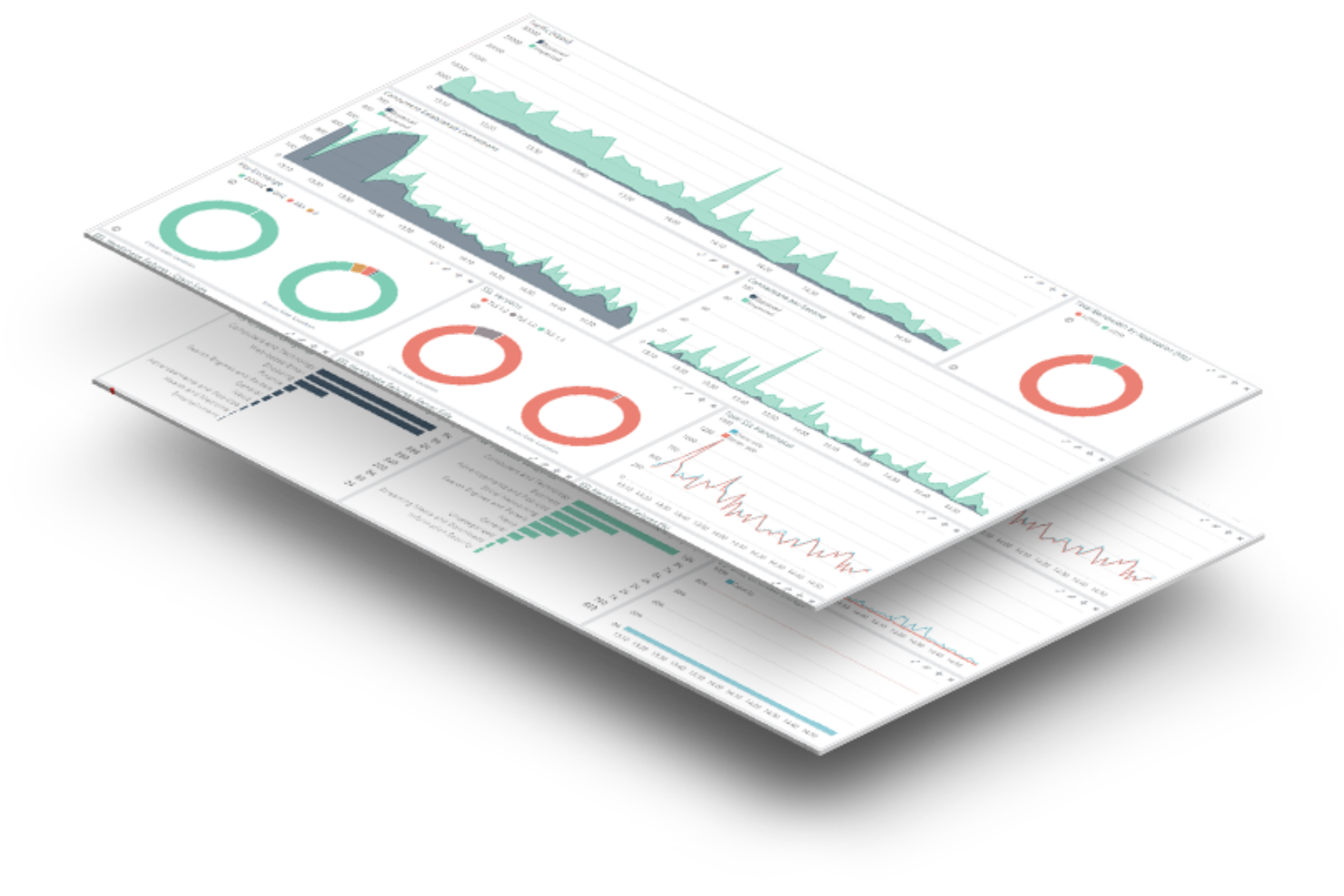
Radware unterstützt Sicherheitsteams und Unternehmen beim Schutz von Webanwendungen und APIs vor automatisierten Bedrohungen. Es bietet fortschrittliches Bot-Management und Echtzeit-Abwehrmaßnahmen gegen Angriffe für Organisationen, die mit sich ständig weiterentwickelnden Cyberrisiken konfrontiert sind.
Für wen ist Radware am besten geeignet?
Radware eignet sich besonders für mittlere bis große Unternehmen, die hochfrequentierte Webanwendungen betreiben und einen gezielten Schutz vor ausgeklügelten Bot-Angriffen und Missbrauch von APIs benötigen.
Warum ich mich für Radware entschieden habe
Radware hat seinen Platz auf meiner Auswahlliste wegen seiner Fähigkeit zur Verhaltensanalyse in Echtzeit verdient – etwas, womit die meisten Bot-Management-Tools immer noch Schwierigkeiten haben, ohne dabei zu viele Fehlalarme zu erzeugen. Mir gefällt, dass proprietäre, KI-basierte Verhaltensalgorithmen den Datenverkehr analysieren und Angriffssignaturen in Echtzeit generieren, sodass mein Team nicht auf manuelle Regelaktualisierungen warten muss, um neue Bedrohungen zu blockieren. Besonders nützlich ist die automatische modulübergreifende Korrelation: Sie gleicht Hinweise über verschiedene Sicherheitsmodule hinweg ab, um bösartige Quellen proaktiv zu blockieren, noch bevor sie die Anwendungsebene erreichen. Die CAPTCHA-losen Kryptografie-Herausforderungen sorgen zudem dafür, dass echte Nutzer beim aktiven Abwehren eines Bot-Angriffs nicht beeinträchtigt werden.
Radware Hauptfunktionen
- Erweiterte Erkennungs-Module: Identifiziert fortschrittliche Bots, die IPs und Identitäten manipulieren, erkennt verteilte Bot-Angriffe und deckt CAPTCHA-Farm-Services auf.
- KI-Crawler-Transparenz und -Steuerung: Klassifiziert den Datenverkehr von KI-Crawlern nach Absicht und bietet detaillierte Kontrollmöglichkeiten, um zu bestimmen, welche Crawler auf Ihre Inhalte zugreifen dürfen.
- Nativer Schutz mobiler Apps: Setzt integrierte Geräte-Authentifizierung für iOS und Android ein, um Geräte zu verifizieren und Anfragen zu validieren, bevor Bot-Angriffe entstehen.
- Transparente Berichte und Analysen: Liefert detaillierte Bot-Klassifizierung mit übersichtlichen Dashboards und ausführlichen Berichten, damit Sie genau sehen, welcher Traffic Ihre Anwendungen erreicht.
Radware Integrationen
Integrationen umfassen Amazon CloudFront, Akamai, Fastly, Cloudflare, F5, Citrix, Imperva, Microsoft Azure, AWS und Google Cloud Platform.
Pros and Cons
Pros:
- Zuverlässige KI-basierte Bot-Erkennung
- Umfassende Berichte zur Datenverkehrsanalyse
- Starke Integration mit SIEM-Tools
Cons:
- Begrenzte Preistransparenz
- Oberfläche könnte intuitiver sein

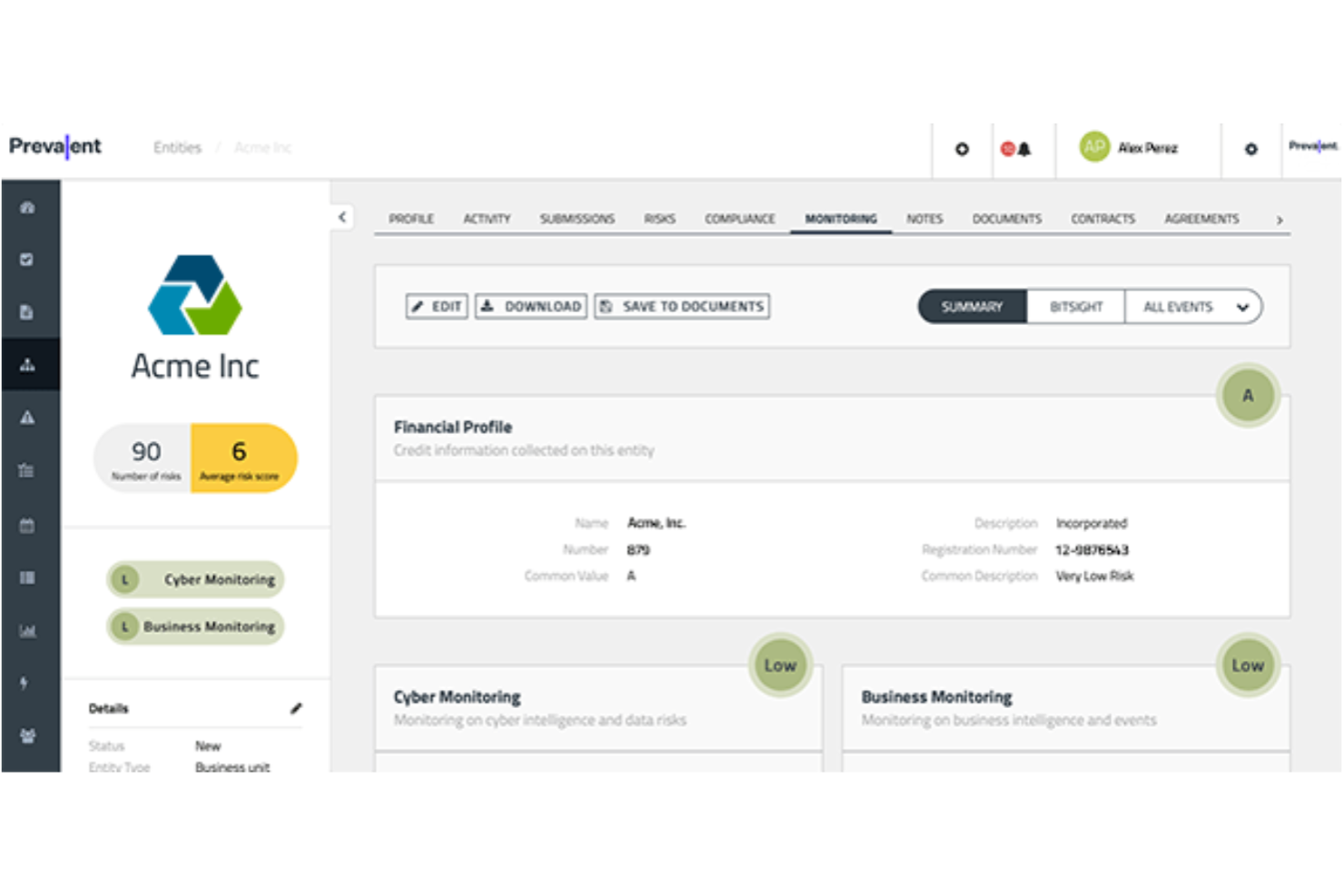
Prevalent unterstützt IT-, Risiko- und Compliance-Teams in regulierten Branchen dabei, das Management von Risiken durch Drittanbieter und die Sicherheitsbewertungen von Anbietern zu automatisieren, um den sich wandelnden Anforderungen an Cybersicherheit und Compliance gerecht zu werden.
Für wen ist Prevalent am besten geeignet?
Prevalent eignet sich besonders für mittelgroße bis große Unternehmen in regulierten Branchen wie Finanzen, Gesundheitswesen und Regierung, die eine strukturierte Überwachung der Risiken durch Drittanbieter benötigen.
Warum ich Prevalent ausgewählt habe
Ich habe Prevalent als eines der besten Tools ausgewählt, weil es den Compliance-Bereich im Third Party Risk Management (TPRM) hervorragend abdeckt – ein Aspekt, der bei vielen Anbieterrisiko-Tools oft nur eine Nebenrolle spielt. Besonders nützlich finde ich die Bibliothek mit über 750 vorgefertigten Bewertungsvorlagen, die auf Rahmenwerke wie NIST CSF, ISO 27001, HIPAA und DSGVO abgestimmt sind. Anstatt Fragebögen von Grund auf zu erstellen, kann mein Team eine compliance-konforme Anbieterbewertung innerhalb von Minuten starten. Ebenfalls gefällt mir das prüfungsbereite Reporting, das Anbieterantworten, Risikobewertungen und Status von Maßnahmen in einem für Prüfer und Regulierungsbehörden geeigneten Format zusammenführt – ganz ohne manuelles Zusammenstellen.
Wichtige Funktionen von Prevalent
- Bewertung des inhärenten Risikos: Anbieter werden automatisch gestaffelt und kategorisiert, indem inhärente und verbleibende Risikowerte anhand der Wahrscheinlichkeit und Auswirkung von Sicherheits-, Compliance- und Betriebszwischenfällen berechnet werden.
- Kontinuierliche Überwachung: Überwacht Cyber-Bedrohungen, finanzielle Schwierigkeiten, regulatorische Feststellungen und Reputationsprobleme von Anbietern in Echtzeit über mehr als 500.000 externe Quellen.
- Automatisierung des Offboardings von Anbietern: Automatisiert Vertragsbewertungen und Offboarding-Prozesse, um das Risiko nach Vertragsende beim Beenden von Geschäftsbeziehungen zu minimieren.
- Risikoberichte und Dashboards: Anpassbare Dashboards und Berichte ermöglichen die Visualisierung von Risikoentwicklungen und das Erstellen von Berichten für das Management sowie die Kommunikation mit Stakeholdern.
Prevalent-Integrationen
Zu den Integrationen gehören ServiceNow, BitSight, SecZetta, Source Defense, RiskRecon, SecurityScorecard, Rapid7, Tenable, Qualys und Microsoft Azure.
Pros and Cons
Pros:
- Umfangreiche Funktionen für das Management von Anbieterrisiken
- Benutzer können Berichte individuell auf spezifische Anforderungen anpassen
- Starke Sicherheitsprotokolle zum Schutz von Daten
Cons:
- Die Plattform ist komplex und mit einer gewissen Lernkurve verbunden
- Herausforderungen bei der Datenmigration können die Ersteinrichtung erschweren

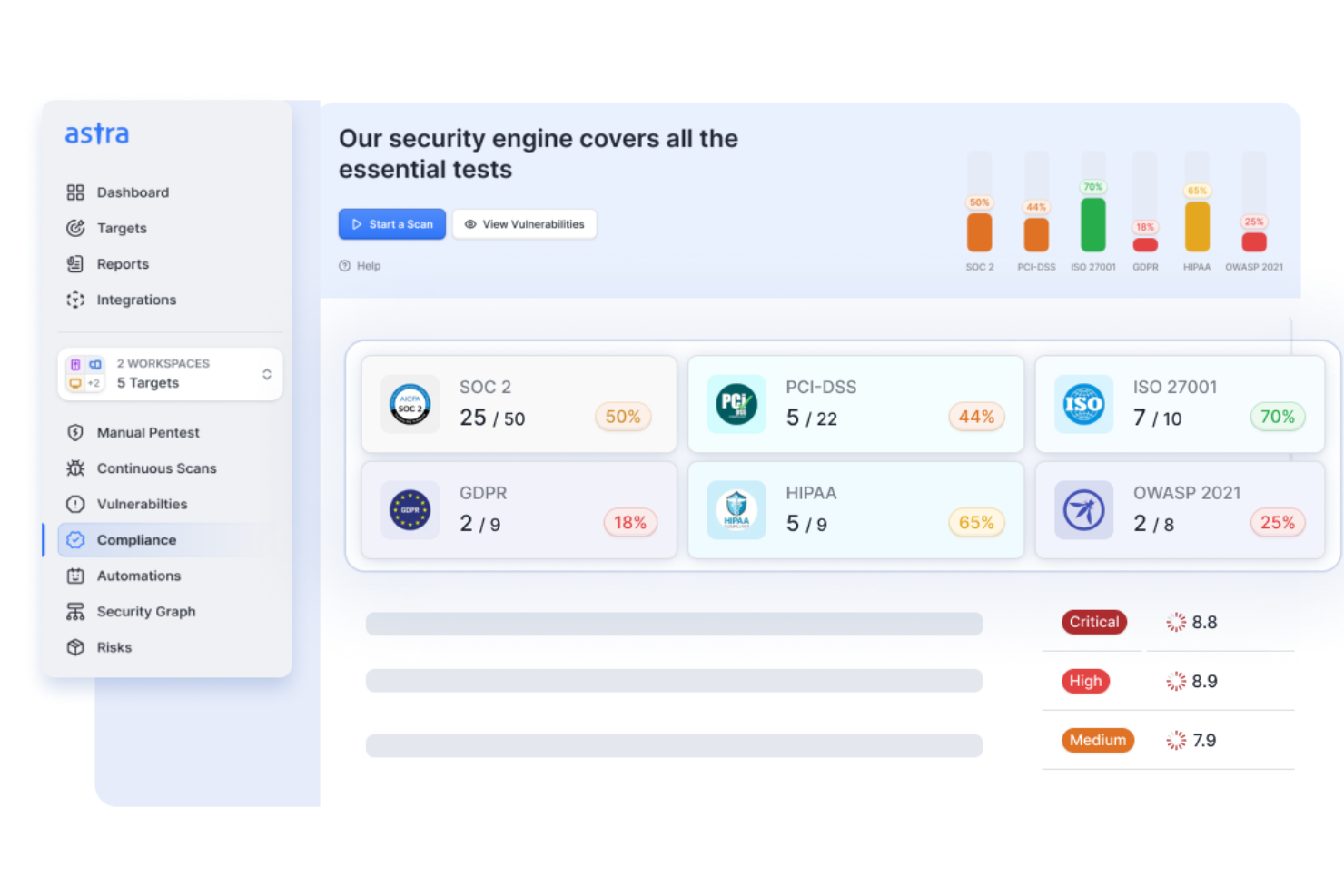
Astra Pentest unterstützt IT-Teams und Sicherheitsexperten in SaaS-, E-Commerce- und Unternehmensumgebungen bei der Identifizierung und Behebung von Schwachstellen durch automatisierte Scans, manuelle Penetrationstests und compliance-fähige Berichte.
Für wen ist Astra Pentest am besten geeignet?
Astra Pentest eignet sich gut für Sicherheits- und Engineering-Teams in SaaS-, Fintech- und Healthcare-Unternehmen, die Anforderungen wie PCI DSS, SOC 2 oder ISO 27001 erfüllen müssen.
Warum habe ich Astra Pentest ausgewählt?
Ich habe Astra Pentest in meine Top-Auswahl aufgenommen, da es eine der wenigen Plattformen ist, die kontinuierliches, automatisiertes Scannen mit von Experten durchgeführten manuellen Penetrationstests in einem einzigen Dashboard kombiniert. Besonders gefällt mir das unbegrenzte DAST-Scannen in den kostenpflichtigen Tarifen – mein Team kann Scans direkt mit CI/CD-Pipeline-Deployments auslösen, sodass jeder Code-Push gegen mehr als 10.000 Testfälle für OWASP, SANS und CVEs geprüft wird. Die KI-unterstützte Einstufung von Fehlalarmen ist ebenfalls ein echtes Unterscheidungsmerkmal: Anstatt sich durch laute Scan-Ergebnisse zu kämpfen, prüfen Sicherheitsexperten alle relevanten Funde, bevor sie an Sie weitergeleitet werden.
Astra Pentest – Hauptfunktionen
- Vulnerability-Management-Dashboard: Nachverfolgen, priorisieren und zuweisen gefundener Schwachstellen an Entwickler mit CVSS-basiertem Risiko-Scoring und potenziellem Dollar-Schadensvorhersager.
- Compliance-Reporting-Ansicht: Scan-Ergebnisse direkt auf SOC 2-, ISO 27001-, PCI-DSS- und HIPAA-Anforderungen abbilden, um Compliance-Lücken an einer Stelle zu erkennen.
- Öffentlich verifizierbares Pentest-Zertifikat: Erhalten Sie ein einzigartiges, teilbares Zertifikat nach von Experten bestätigten Korrekturen, das Sie mit Kunden und Partnern teilen können.
- Automatisiertes Cloud-Security-Scanning: Scannen Sie AWS-, GCP- und Azure-Umgebungen nach Fehlkonfigurationen, IAM-Risiken und Schwachstellen, entweder geplant oder fortlaufend.
Astra Pentest – Integrationen
Integrationen umfassen Jira, Slack, AWS, GCP, Azure, Postman, Kong, Nginx und kundenspezifische Integrationen über API.
Pros and Cons
Pros:
- Kombiniert automatisierte und manuelle Tests
- Einfache Integration in CI/CD-Tools
- Ausgezeichnete Optionen für Compliance-Berichte
Cons:
- Gelegentliche Fehlalarme gemeldet
- Preise auf Anfrage erhältlich

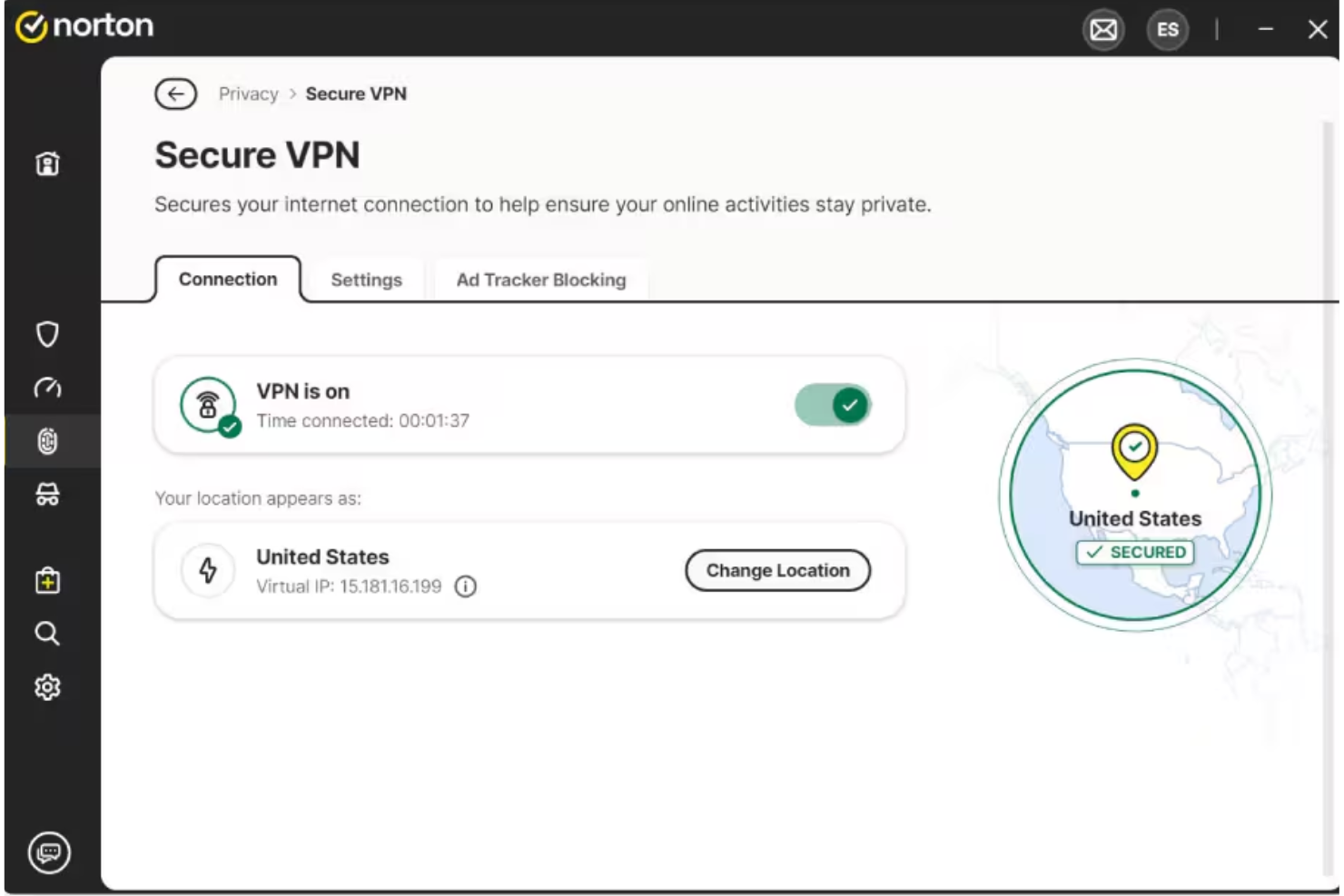
Norton bietet kleinen Unternehmen eine Möglichkeit, Geräte, Daten und Online-Aktivitäten mit mehrschichtigen Cybersicherheits-Tools zu schützen, die Bedrohungen wie Malware, Ransomware und Netzwerkangriffe adressieren.
Für wen ist Norton am besten geeignet?
Norton eignet sich gut für kleine Unternehmen, die unkomplizierte, geräteübergreifende Sicherheit benötigen, ohne dass eine eigene IT-Abteilung sie verwalten muss.
Warum ich Norton ausgewählt habe
Ich habe Norton als eine der besten Lösungen gewählt, da das Secure VPN für die Absicherung des Internetverkehrs aller Mitarbeitergeräte Bankniveau-Verschlüsselung verwendet – egal, ob Ihr Team in einem Café, Hotel oder im Büro eines Kunden arbeitet. Besonders gefällt mir, dass das VPN direkt im Norton Small Business Premium-Plan enthalten ist und nicht als separates Add-on verkauft wird. Die No-Log-Richtlinie bedeutet, dass Norton keine Protokolle Ihrer Browserverläufe speichert, was besonders wichtig ist, wenn Mitarbeiter auf öffentlichen Netzwerken mit sensiblen Geschäftsdaten arbeiten. Das Kill-Switch-Feature schätze ich ebenfalls – es unterbricht die Internetverbindung automatisch, wenn die VPN-Verbindung abbricht, sodass keine versehentliche Offenlegung erfolgt.
Wichtige Funktionen von Norton
- Dark-Web-Überwachung: Überwacht das Dark Web nach sensiblen Informationen Ihres Unternehmens – wie Steuernummern und geschäftliche E-Mail-Adressen – und benachrichtigt Sie, falls etwas gefunden wird.
- Software Updater: Hält Ihre Unternehmenssoftware automatisch auf dem neuesten Stand und schließt bekannte Sicherheitslücken auf Mitarbeitergeräten.
- Intelligente Firewall: Überwacht den ein- und ausgehenden Netzwerkverkehr auf Windows- und Mac-Geräten, um unbefugte Zugriffsversuche zu blockieren.
- Cloud-Backup: Speichert bis zu 500 GB unternehmenskritischer Daten in der Cloud, damit Sie im Falle eines Ransomware-Angriffs oder Diebstahls eine Wiederherstellungsoption haben.
Norton-Integrationen
Es sind derzeit keine nativen Integrationen gelistet.
Pros and Cons
Pros:
- Starker Geräteschutz vor Malware und Ransomware
- Schützt mehrere Geräte mit einem Abonnement
- Häufige Updates reagieren auf neue und sich entwickelnde Online-Bedrohungen
Cons:
- Nutzer berichten über vermehrte Werbung in der Software
- VPN-Funktionen können bei günstigeren Tarifen Nutzungsbeschränkungen haben

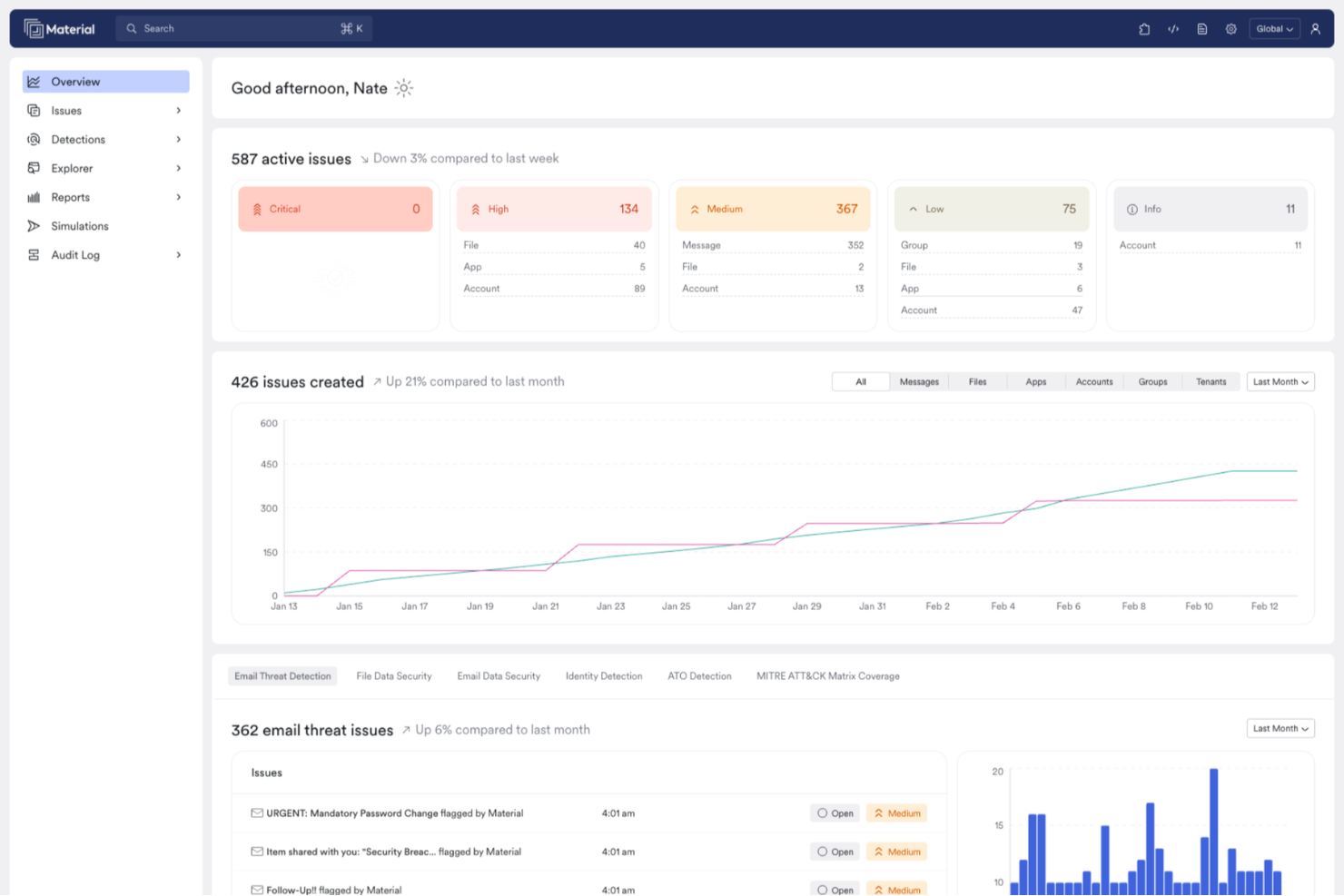
Material Security hilft IT- und Sicherheitsteams, Cloud-E-Mail- und Kollaborationsplattformen vor Phishing, Kontenübernahmen und Datenverlust zu schützen. Es bietet fortschrittliche Kontroll- und Incident-Response-Tools, die speziell für Organisationen entwickelt wurden, die Google Workspace oder Microsoft 365 nutzen.
Für wen ist Material Security am besten geeignet?
Material Security eignet sich besonders für mittlere bis große Sicherheitsteams, die Google Workspace oder Microsoft 365 als primäre Kollaborationsumgebung einsetzen.
Warum ich Material Security gewählt habe
Material Security steht auf meiner Shortlist, weil es sich so tief in Google Workspace und Microsoft 365 integriert und E-Mails auf der Datenebene schützt, nicht nur am Perimeter. Mir gefällt, dass es Bedrohungen, die sich bereits in Posteingängen befinden, nachträglich beseitigen kann – etwas, das die meisten E-Mail-Sicherheitslösungen nach der Zustellung nicht leisten können. Mein Team nutzt außerdem die Datenschutzkontrollen von Material Security, um den Zugriff auf vertrauliche Nachrichten auf der Basis von Identitätsprüfung einzuschränken, was einen sinnvollen zusätzlichen Schutz vor Kontenübernahme bietet. Besonders hilfreich ist die Phishing-'Herdenimmunität': Wenn ein Nutzer eine Bedrohung meldet, scannt und beseitigt Material Security diese Nachricht automatisch in sämtlichen Postfächern der Organisation.
Material Security – Wichtigste Funktionen
- BEC- und VEC-Erkennung: Erkennt Angriffe wie Business E-Mail Compromise und Vendor E-Mail Compromise durch Verhaltensanalysen von E-Mails in Google Workspace und Microsoft 365.
- Dateisicherheit und Freigabekontrollen: Scannt Dateien in Google Drive und Microsoft 365, um übermäßig freigegebene Berechtigungen zu bereinigen und die Ausbreitung sensibler Daten zu verringern.
- Sicherheitsstatus-Management: Überwacht fortlaufend die Konfigurationen von Google Workspace und Microsoft 365, um Veränderungen frühzeitig zu erkennen und zu beheben, bevor daraus angreifbare Lücken entstehen.
- Kontrollen für Shadow AI und Drittanbieter-Apps: Verschafft Einblick in unautorisierte Drittanbieter-App-Verbindungen und OAuth-Freigaben in Ihrer Cloud-Umgebung.
Material Security Integrationen
Integrationen umfassen Google Workspace und Microsoft 365.
Pros and Cons
Pros:
- Automatisiert Phishing-Reaktionen, um Reaktionszeiten zu verbessern.
- Unterstützt erweiterten Bedrohungsschutz für E-Mail-Konten.
- Ermöglicht sichere Dateifreigabe innerhalb von E-Mail-Kommunikation.
Cons:
- Abhängigkeit von Cloud-Infrastruktur kann Latenzprobleme verursachen.
- Begrenzte native Integrationen mit anderen Sicherheitstools.

Am besten geeignet für das Blockieren von Bedrohungen auf DNS-Ebene
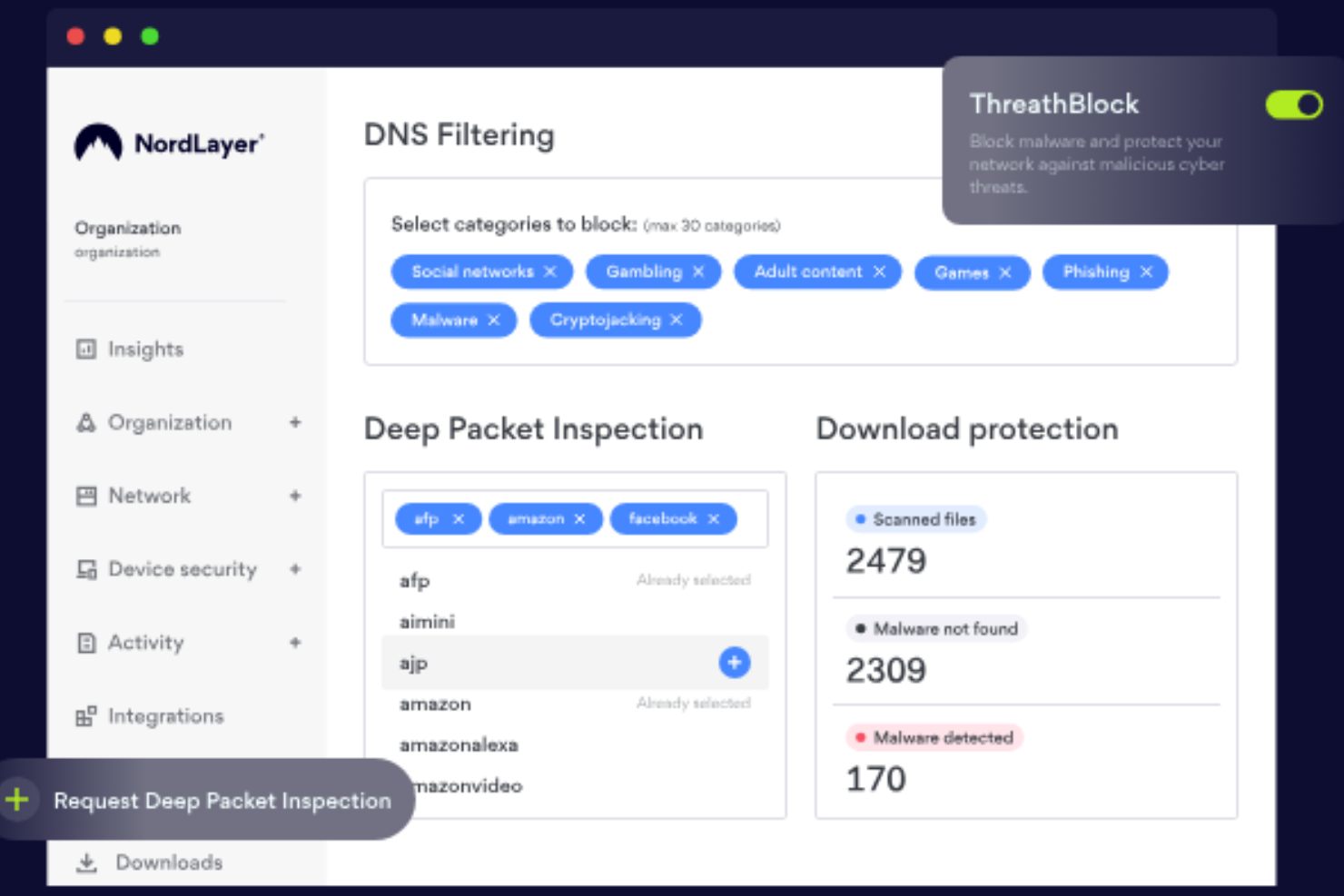
NordLayer ist eine Netzwerksicherheitsplattform, die für Unternehmen entwickelt wurde, die den Fernzugriff sichern, sensible Daten schützen und Benutzerberechtigungen in verteilten Teams verwalten müssen.
Für wen ist NordLayer am besten geeignet?
NordLayer eignet sich besonders für IT-Teams in mittelständischen Unternehmen, die eine zentrale Kontrolle über den Netzwerkzugriff und die Sicherheit für Remote- oder Hybridarbeitskräfte benötigen.
Warum ich NordLayer ausgewählt habe
Ich habe NordLayer als eines der besten Produkte gewählt, weil seine DNS-Filterung weit über eine einfache Blockliste hinausgeht. Es verwendet patentierte, KI-gestützte Technologie, die seine Bedrohungsdatenbank mit Hilfe von Machine Learning kontinuierlich aktualisiert – sodass mein Team nicht auf ein manuelles Update warten muss, wenn eine neue schädliche Domain auftaucht. In der Praxis bedeutet das, dass Phishing-Links in E-Mails bereits auf DNS-Ebene blockiert werden, bevor die Seite überhaupt geladen wird. Außerdem gefällt mir die kategoriebasierte Filterung, mit der ich über 50 Inhaltskategorien – Malware, Cryptojacking, Phishing und mehr – über ein einziges Kontrollpanel für das gesamte Unternehmen blockieren kann.
NordLayer Hauptfunktionen
- Gerätezustandssicherheit: Bewertet Geräte anhand Ihrer definierten Sicherheitsrichtlinien und schränkt den Netzwerkzugriff für nicht-konforme Geräte automatisch ein.
- Cloud-Firewall: Setzt eine granulare Netzwerksegmentierung über hybride Infrastrukturen hinweg um und kontrolliert den Datenverkehr zwischen Nutzern, Servern und Cloud-Ressourcen.
- Dedizierte IP mit Allowlisting: Weist Ihrer Organisation eine feste IP-Adresse zu, sodass Sie den Zugriff auf Ressourcen auf nur verifizierte Adressen beschränken können.
- Virtuelle private Gateways: Erstellt organisationsspezifische VPN-Gateways mit mehrschichtigen Sicherheitsrichtlinien zur Kontrolle des Zugriffs auf interne Ressourcen.
NordLayer-Integrationen
Zu den Integrationen gehören Okta, Google Workspace, JumpCloud, Entra ID, OneLogin, AWS, Google Cloud, IBM Cloud, Jamf Cloud und SentinelOne.
Pros and Cons
Pros:
- Verwendet ein Zero-Trust-Framework
- Umfassende Zugriffskontrolle und Sitzungsüberwachung
- Sicherheitsmaßnahmen wie AES-256-Verschlüsselung und Multi-Faktor-Authentifizierung
Cons:
- Die Anzahl verfügbarer Serverstandorte könnte vergrößert werden
- Das Einrichten von Servern kann komplex sein

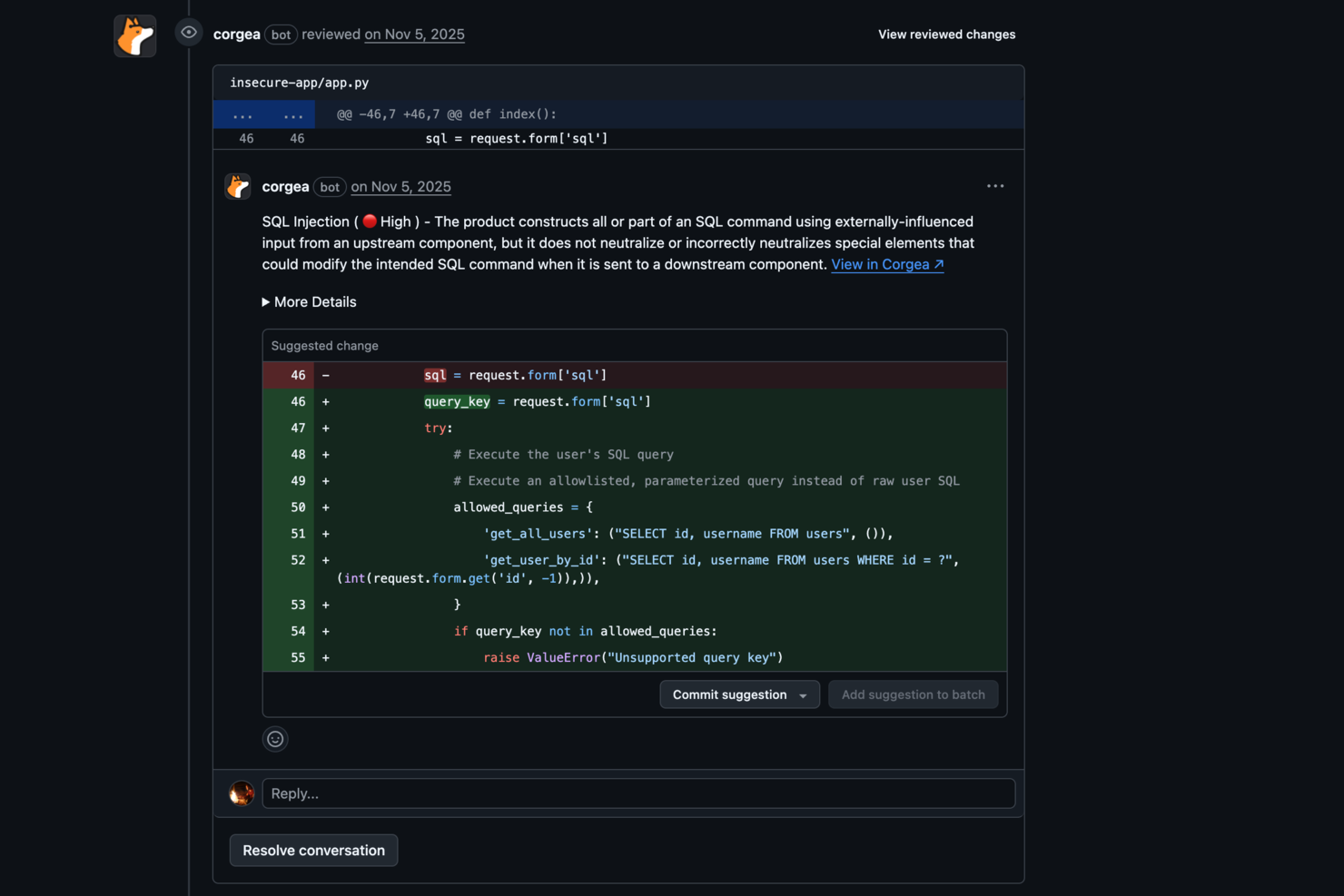
Corgea ist eine Cybersicherheitsplattform für IT-Teams und Sicherheitsexperten, die die Bedrohungserkennung, Vorfallbearbeitung und Reaktion in komplexen digitalen Umgebungen automatisieren müssen.
Für wen ist Corgea am besten geeignet?
Corgea eignet sich besonders für Security-Engineering-Teams in mittelständischen und großen Unternehmen, die manuelle Triage-Aufwände in umfangreichen Schwachstellen-Pipelines reduzieren möchten.
Warum ich Corgea ausgewählt habe
Ich habe Corgea als eine der besten Lösungen gewählt, weil seine KI-gestützte Auto-Triage gezielt eines der frustrierendsten Probleme der Anwendungssicherheit adressiert: die Alarmmüdigkeit durch Fehlalarme. Wenn mein Team Scans über große Codebasen ausführt, nutzt Corgeas Auto-Triage-Engine kontextbasierte Codeanalyse, um echte, ausnutzbare Funde vom Rauschen zu trennen und reduziert Fehlalarme um das bis zu Dreifache im Vergleich zu herkömmlichen statischen Analysetools. Mir gefällt auch, dass es über das einfache Markieren hinausgeht – es verfolgt reale Laufzeitpfade von öffentlich zugänglichen Schnittstellen wie
/login
bis hin zum verwundbaren Code oder zu Paketen, sodass mein Team genau weiß, was Angreifer erreichen können. Diese Erreichbarkeitsanalyse, kombiniert mit KI-generierten Lösungsvorschlägen mit über 90 % Genauigkeit, bedeutet, dass wir weniger Zeit mit Schweregraddiskussionen verbringen und schneller Backlogs schließen können.
Wichtige Funktionen von Corgea
- Abhängigkeitsprüfung (SCA): Erkennt bekannte Schwachstellen in Drittanbieterpaketen über 25+ Programmiersprachen hinweg, inklusive CVE-Details und CVSS-Bewertung.
- Infrastructure as Code (IaC)-Scanning: Erfasst Fehlkonfigurationen in Kubernetes-, Terraform-, Docker- und CloudFormation-Dateien vor dem Deployment.
- Erkennung von Geheimnissen: Scannt Codebasen nach hartkodierten API-Keys, Token und Zugangsdaten mittels Pattern Matching, Entropieanalyse und KI-gestützter Kontextanalyse.
- PolicyIQ: Sie können benutzerdefinierte Richtlinien in natürlicher Sprache definieren, um Erkennung, Priorisierung und Behebung an Ihre spezifische Umgebung und Sicherheitsanforderungen anzupassen.
Corgea-Integrationen
Integrationen umfassen GitHub, GitLab, Bitbucket, Azure DevOps, JIRA, Slack, CodeQL, Zapier, Webhooks und eine API für individuelle Integrationen.
Pros and Cons
Pros:
- KI-gestützte Schwachstellenerkennung
- Automatische sichere Codekorrekturen
- Erkennung von Geschäftslogikfehlern
Cons:
- Keine Schutzfunktionen zur Laufzeit
- Fokussiert auf Anwendungssicherheit, nicht Full-Stack

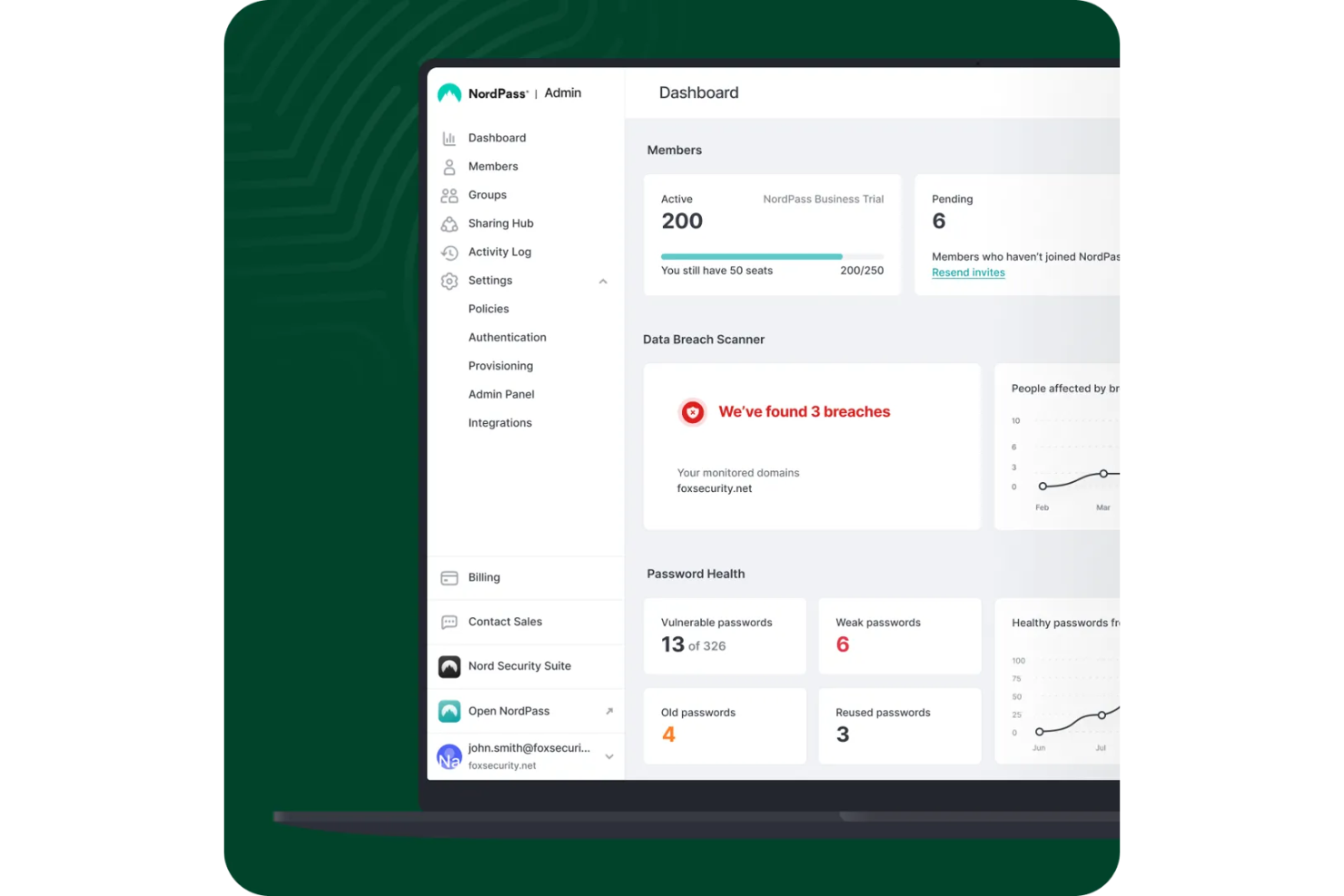
NordPass ist ein Business-Passwortmanager, der für IT-Teams und Unternehmen entwickelt wurde, die Anmeldeinformationen ihres Unternehmens über die gesamte Belegschaft hinweg sichern, verwalten und kontrollieren müssen.
Für wen eignet sich NordPass am besten?
NordPass ist besonders geeignet für IT-Administratoren und Sicherheitsteams in mittelgroßen bis großen Unternehmen, die eine zentrale Kontrolle über die Passwortpraxis der Mitarbeiter benötigen.
Warum ich NordPass ausgewählt habe
NordPass steht auf meiner Auswahlliste, weil es die unternehmensweite Durchsetzung von Passwort-Richtlinien über ein einziges Admin-Panel ermöglicht. Mir gefällt, dass Administratoren Sicherheitsregeln festlegen können, die automatisch auf alle Nutzer angewendet werden, sodass sich die Admins nicht darauf verlassen müssen, dass einzelne Mitarbeiter Best Practices selbst umsetzen. Das Security Dashboard verschafft meinem Team einen Echtzeit-Überblick über die Passwort-Sicherheit im gesamten Unternehmen und weist schwache oder wiederverwendete Anmeldedaten aus, die gegen unsere festgelegten Richtlinien verstoßen. Das Aktivitätsprotokoll dokumentiert jeden Zugriff auf Anmeldedaten, sodass ungewöhnliches Verhalten erkannt werden kann, ohne separate Audit-Tools durchsuchen zu müssen.
Wichtige Funktionen von NordPass
- Eingebauter Authenticator: Generiert und speichert TOTP-Codes zusammen mit Passwörtern, sodass Ihr Team Anmeldedaten und Multi-Faktor-Authentifizierung an einem Ort verwalten kann.
- Gemeinsame Ordner: Organisiert Zugangsdaten, Notizen und Zahlungsdetails in Ordnern, die für bestimmte Teams oder Gruppen freigegeben werden können.
- Datenpannen-Scanner: Überwacht gespeicherte Zugangsdaten anhand bekannter Datenbank-Lecks und benachrichtigt Sie, wenn kompromittierte Konten erkannt werden.
- Automatisches Ausfüllen und Speichern: Erfasst und füllt Anmeldeinformationen automatisch in Browsern und Apps ein, wodurch manuelle Eingaben auf Geräten reduziert werden.
NordPass-Integrationen
Zu den Integrationen zählen Entra ID, MS ADFS, Okta, Google Workspace, Vanta, Microsoft Sentinel und Splunk.
Pros and Cons
Pros:
- Starke Verschlüsselung mit Zero-Knowledge-Policy
- Einfache Integration mit wichtigsten ID-Anbietern
- Zentrale Kontrolle über das Sharing-Hub
Cons:
- Autofill-Funktion ist gelegentlich inkonsistent
- Probleme beim Offline-Zugriff werden häufig gemeldet

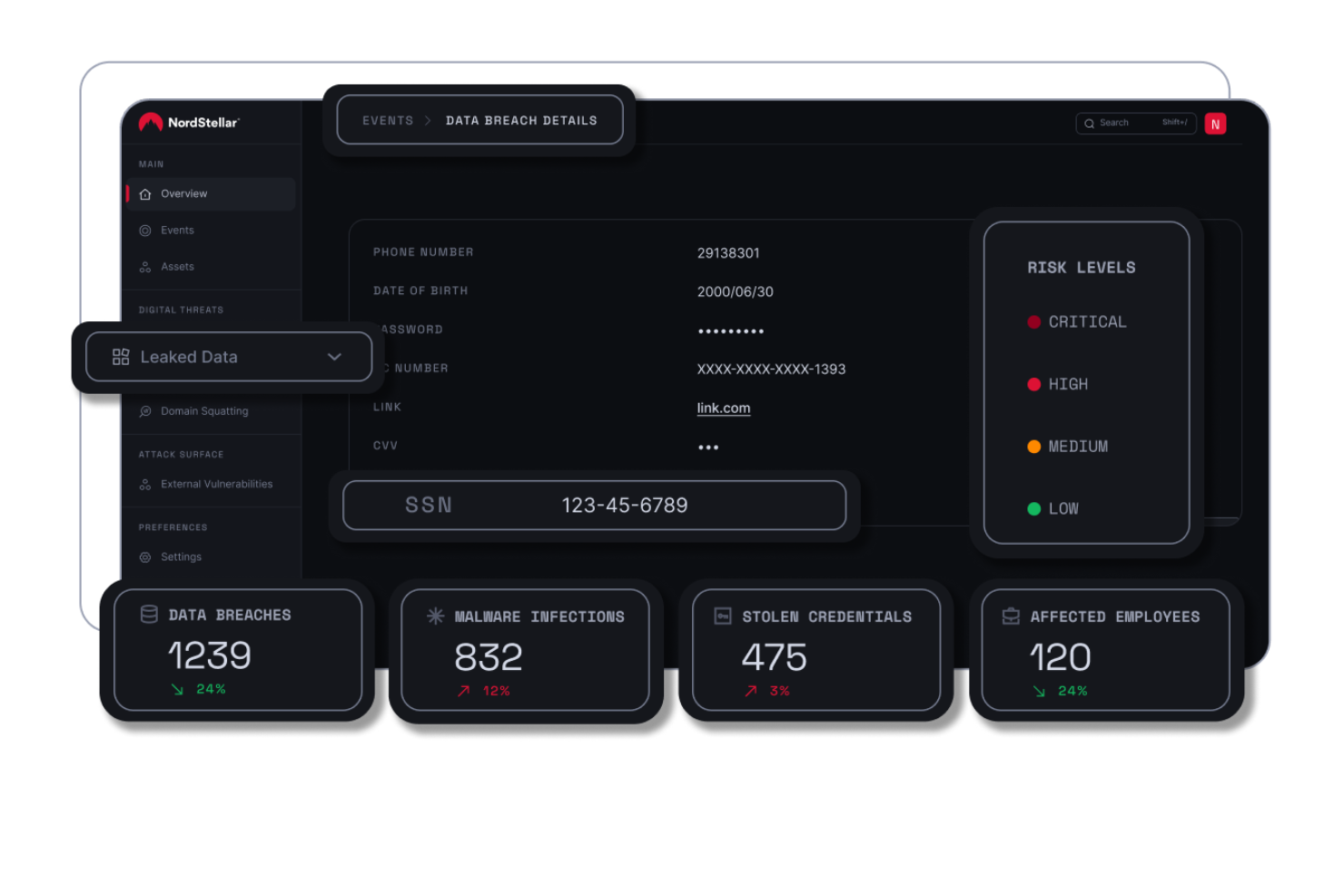
NordStellar bietet IT- und Sicherheitsteams die Möglichkeit, Cyber-Bedrohungen während ihres Auftretens zu überwachen, zu erkennen und darauf zu reagieren. So können Organisationen sensible Daten schützen und die Geschäftskontinuität wahren.
Für wen ist NordStellar am besten geeignet?
NordStellar ist ideal für sicherheitsorientierte Teams in mittelgroßen bis großen Unternehmen, die eine kontinuierliche Sichtbarkeit auf externe Bedrohungen und Risiken durch Datenexponierung benötigen.
Warum habe ich NordStellar ausgewählt?
NordStellar hat sich einen Platz auf meiner Shortlist gesichert, weil es Echtzeit-Bedrohungsbenachrichtigungen auch in schwierig zu überwachenden Umgebungen hervorragend handhabt. Die Darknet-Überwachung scannt kontinuierlich Hackerforen, illegale Marktplätze und Telegram-Kanäle und warnt mein Team sofort, wenn unsere Marke oder Zugangsdaten dort auftauchen, wo sie nicht hingehören. Die Erkennung von Cybersquatting nutzt KI-gestützte Inhalts- und Bildähnlichkeitsalgorithmen, um verdächtige Domain-Registrierungen in Echtzeit zu melden – eine Fähigkeit, die viele andere Plattformen nicht bieten. Das Monitoring von Datenlecks zieht außerdem Informationen aus Infostealer-Malware-Logs und Datenbanken mit geleakten Zugangsdaten, sodass wir bei jedem Vorfall den vollständigen Kontext und nicht nur eine grobe Meldung erhalten.
NordStellar Schlüsselfunktionen
- Schutz vor Account-Übernahmen: Überwacht Telegram, Deep Web und Darknet nach offengelegten Zugangsdaten und schickt sofortige Warnungen, sodass Ihr Team Passwörter zurücksetzen oder Konten sperren kann, bevor Angreifer Zugriff erhalten.
- Angriffsflächenmanagement: Nutzt DNS-Abfragen, Subdomain-Brute-Forcing und DAST, um kontinuierlich verwundbare Stellen in externen Assets zu entdecken und aktiv zu überprüfen.
- Schutz vor Sitzungsübernahmen: Überwacht auf gestohlene Session-Cookies und aktive Session-Tokens, die Angreifer verwenden könnten, um MFA zu umgehen und unerlaubten Zugang zu Firmenkonten zu erlangen.
- Überwachung von Risiken in der Lieferkette: Erkennt Schwachstellen für Account-Übernahmen bei Drittanbietern und stellt Ihrem Team Informationen zu offengelegten Anmeldedaten von Partnern bereit, bevor diese Risiken Ihr Unternehmen erreichen.
NordStellar Integrationen
Integrationen umfassen Splunk, QRadar, Datadog, Fortinet, Sentinel, Elastic und Cortex.
Pros and Cons
Pros:
- Echtzeitwarnungen bei Sicherheitsverletzungen
- Automatisiertes System zur Asset-Erkennung
- Zentrale Threat-Intelligence-Plattform
Cons:
- Mindestvertragslaufzeit: Fünf-Nutzer-Jahresplan
- Begrenzte Preistransparenz verfügbar

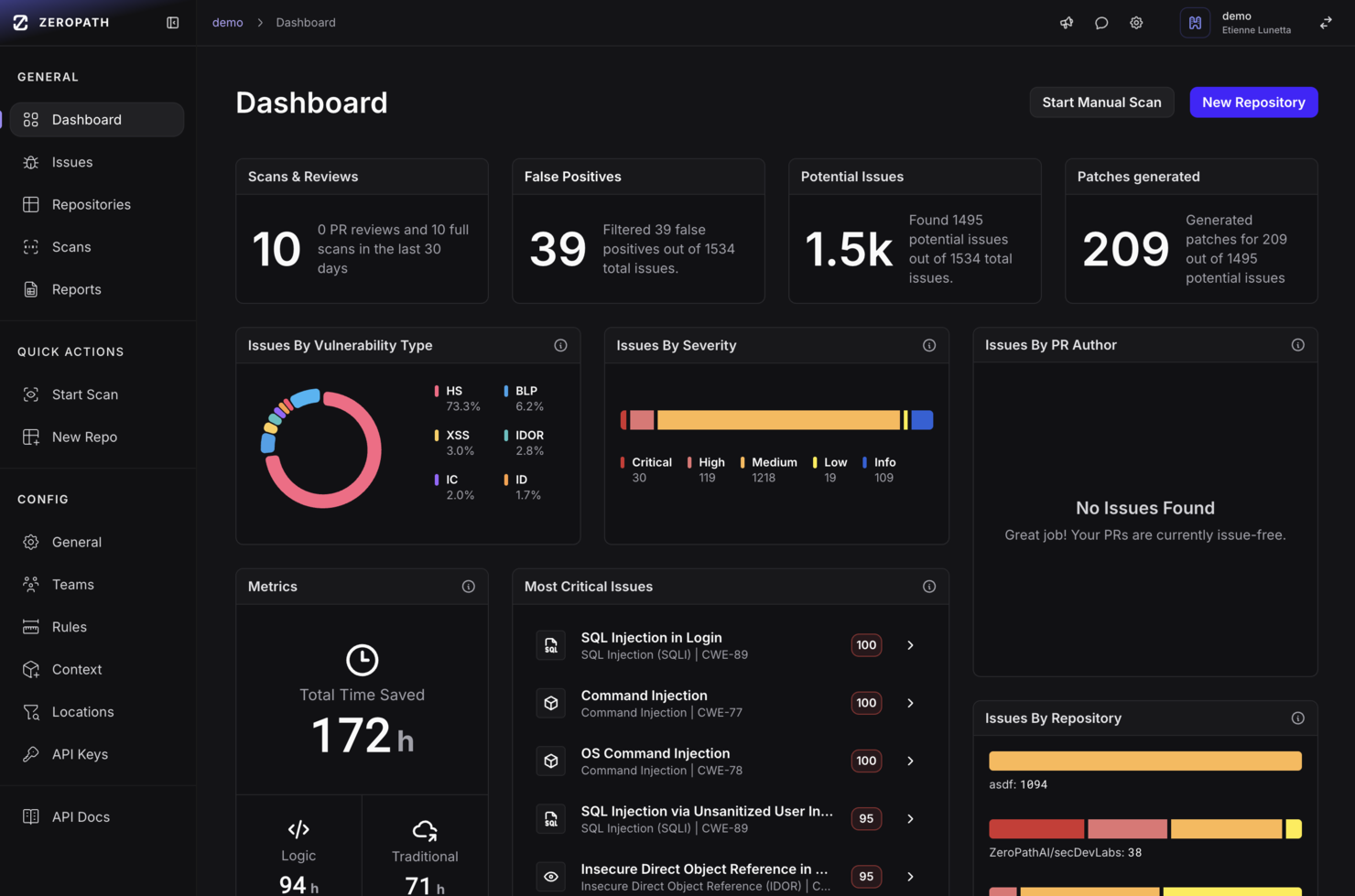
Zeropath hilft Sicherheitsteams und Entwicklern dabei, Schwachstellen im Code zu identifizieren und zu beheben, indem es fortschrittliche Analysen bereitstellt, die speziell für Organisationen entwickelt wurden, die komplexe Softwareumgebungen absichern müssen.
Für wen ist Zeropath am besten geeignet?
Zeropath eignet sich besonders für Entwicklungs- und Sicherheitsteams in Softwareunternehmen, die eine codebasierte Schwachstellenerkennung direkt in ihre Entwicklungsprozesse integrieren möchten.
Warum ich Zeropath gewählt habe
Zeropath gehört zu meinen Favoriten, weil ich es liebe, wie sein kontextbewusstes SAST über reines Pattern Matching hinausgeht und die Berechtigungsmodelle, Datenflüsse und Geschäftslogiken der Codebasis wirklich versteht. Die meisten Scanner, die ich bisher genutzt habe, überfluten mein Team mit Hunderten von Meldungen, die sich als Fehlalarme herausstellen – das KI-gestützte Triage-System von Zeropath reduziert diesen Lärm um 92%, sodass wir uns nur auf tatsächliche, ausnutzbare Probleme konzentrieren. Außerdem verlasse ich mich auf die Autopatch-Funktion, die fertig zusammengeführte Korrekturen erstellt, die zu unserem bestehenden Codestil passen, statt generische Patches einzuspielen, die die Funktionalität beeinträchtigen. Für Teams, die KI-generierten Code oder komplexe Multi-Service-Architekturen absichern müssen, ist diese Kontextsensibilität mit traditionellen SAST-Tools kaum zu erreichen.
Zeropath Hauptfunktionen
- SCA mit Erreichbarkeitsanalyse: Erkennt verwundbare Abhängigkeiten und prüft, ob der verwundbare Codepfad in Ihrer Anwendung tatsächlich erreichbar ist.
- IaC-Scanning: Erkennt Infrastrukturfehlkonfigurationen in Ihren Infrastructure-as-Code-Dateien, bevor sie in Produktion gelangen.
- Compliance-Automatisierung: Ordnet Scan-Ergebnisse Kontrollen nach SOC 2, PCI-DSS 4.0, ISO 27001 und NIST 800-53 zu und erstellt prüffertige Evidenzberichte.
- PR-Sicherheitsreviews: Führt SAST, SCA, Secrets- und IaC-Checks für Pull Requests in weniger als zwei Minuten durch, angepasst an geänderte Dateien und deren Kontext.
Zeropath Integrationen
Zu den Integrationen gehören GitHub, GitLab, Bitbucket, Azure DevOps, Jira, Linear, Slack, Snyk, Semgrep und Checkmarx.
Pros and Cons
Pros:
- Vereinte Plattform für SAST-, SCA-, IaC- und Secrets-Scans.
- Bietet klare, kontextbezogene Schwachstellenbehebungen für Entwickler.
- Unterstützt Ein-Klick-Patches, die dem Codestil Ihres Teams entsprechen.
Cons:
- Nicht ideal, wenn Sie nach umfassenderen Cybersicherheitsfunktionen außerhalb von AppSec suchen.
- Sie benötigen möglicherweise etwas Zeit, um Ihren Arbeitsablauf an die Automatisierung anzupassen.
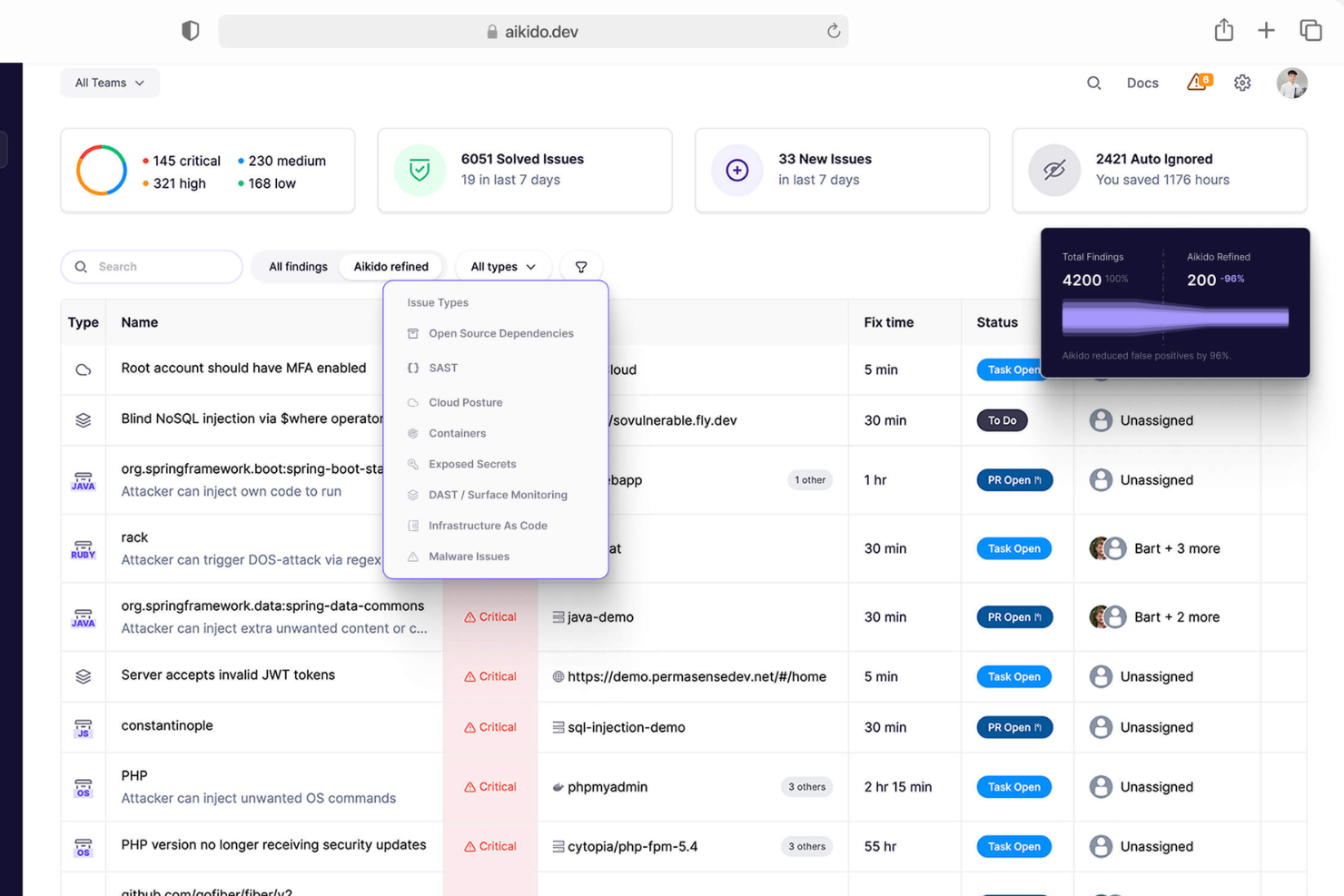
Aikido Security unterstützt Entwicklungs- und Sicherheitsteams dabei, ihren Code, die Cloud-Infrastruktur und die Software-Lieferkette zu schützen, indem es die Erkennung und Behebung von Schwachstellen über den gesamten Entwicklungszyklus hinweg automatisiert.
Für wen ist Aikido Security am besten geeignet?
Aikido Security ist ideal für Entwicklungs- und Sicherheitsteams in Softwareunternehmen, die eine zentrale Plattform benötigen, um Sicherheitsmaßnahmen im gesamten Codebestand und in Cloud-Umgebungen zu verwalten.
Warum ich Aikido Security gewählt habe
Ich habe Aikido Security als eines der besten Tools ausgewählt, weil es die komplette Code-to-Cloud-Angriffsfläche auf einer einzigen Plattform abdeckt – ein Bereich, den die meisten Tools nur teilweise berücksichtigen. Besonders schätze ich die AutoTriage-Funktion, die Warnungen im Kontext Ihres tatsächlichen Codes und Ihrer Infrastruktur bewertet, um Fehlalarme herauszufiltern. Dadurch muss mein Team nicht hunderte irrelevante CVEs durchgehen – wir konzentrieren uns auf Schwachstellen, die in unserer Umgebung tatsächlich erreichbar und ausnutzbar sind. Ebenfalls nutze ich die KI-gestützte AutoFix-Funktion, die Pull Requests zur Behebung von Problemen im Quellcode, bei Open-Source-Abhängigkeiten, IaC-Konfigurationen und Container-Images generiert, sodass die Behebung direkt im Entwicklungs-Workflow erfolgt.
Wichtige Funktionen von Aikido Security
- Geheimniserkennung: Scannt Ihre Repositories nach offengelegten API-Schlüsseln, Tokens und Zugangsdaten, bevor diese in die Produktion gelangen.
- Management der Cloud- und Kubernetes-Sicherheitslage: Überwacht Ihre Cloud-Umgebung auf Fehlkonfigurationen und Sicherheitsrisiken in Cloud-Konten und Kubernetes-Clustern.
- Authentisiertes DAST: Führt dynamische Anwendungssicherheitstests in Live-Umgebungen durch, einschließlich authentifizierter Benutzerabläufe, um Schwachstellen zur Laufzeit aufzudecken.
- Risikoscan von Open-Source-Lizenzen: Identifiziert Open-Source-Abhängigkeiten mit Lizenztypen, die rechtliche oder Compliance-Risiken in Ihrem Codebestand verursachen könnten.
Aikido Security Integrationen
Integrationen umfassen GitHub, GitLab, Bitbucket, Jira, Asana, AWS, Google Cloud, Microsoft Azure, Docker Hub und CircleCI.
Pros and Cons
Pros:
- Verfügt über ein umfassendes Dashboard und anpassbare Berichte
- Bietet umsetzbare Einblicke
- Skalierbar für wachsende Teams
Cons:
- Ignoriert Schwachstellen, wenn keine Behebung verfügbar ist
- Verfügt nicht über Endpunktsicherheit oder Funktionen zur Eindringungserkennung

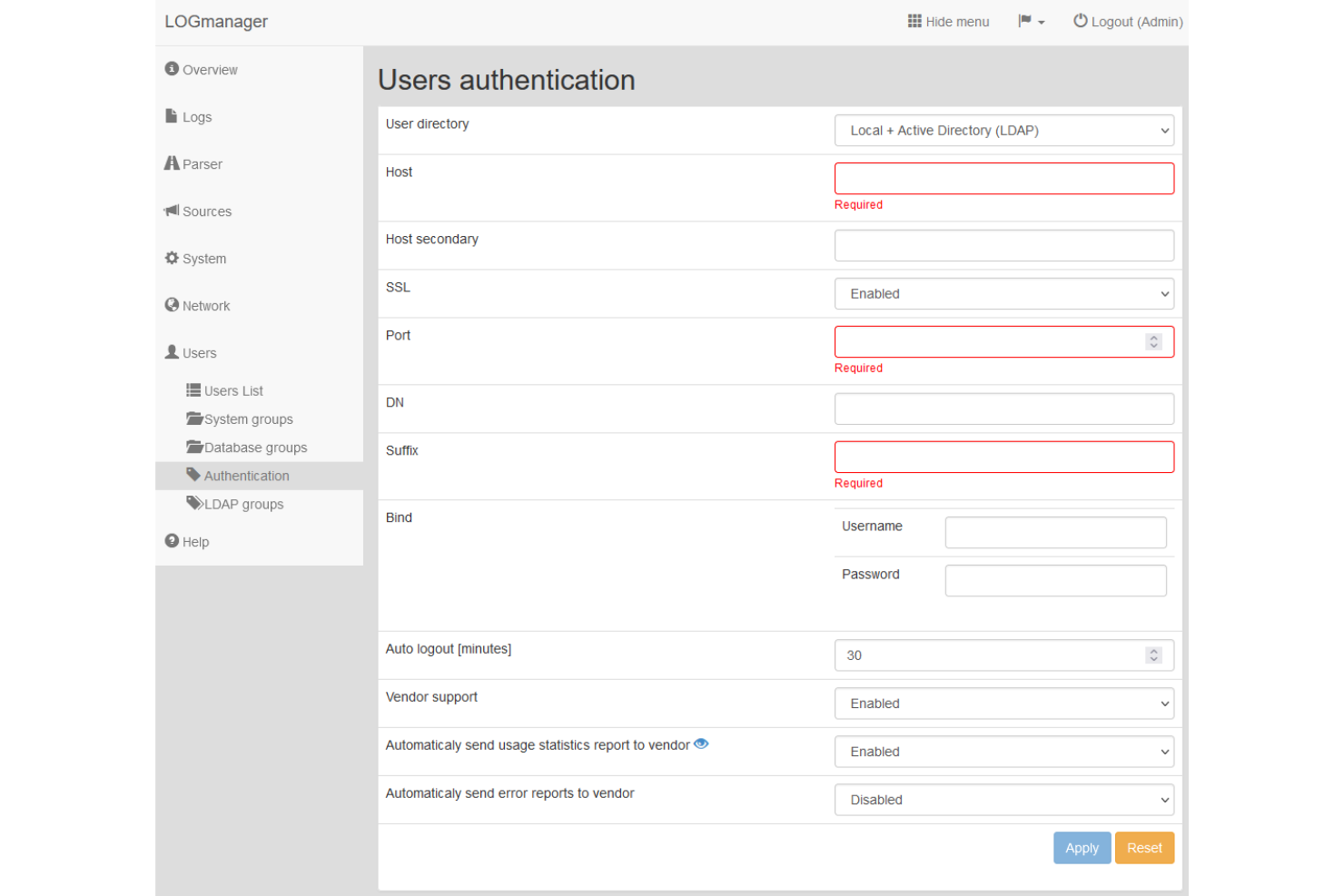
Logmanager bietet IT- und Sicherheitsteams eine zentrale Plattform zum Sammeln, Überwachen und Analysieren von Logs in ihrer gesamten Infrastruktur. So können Unternehmen Bedrohungen erkennen, Vorfälle untersuchen und Compliance-Anforderungen erfüllen.
Für wen ist Logmanager am besten geeignet?
Logmanager eignet sich besonders für mittelständische bis große Unternehmen, die zentrales Log-Management in komplexen, vielschichtigen IT-Umgebungen benötigen.
Warum ich Logmanager ausgewählt habe
Logmanager hat sich einen Platz auf meiner Bestenliste verdient, weil die Lösung eine ausgezeichnete Echtzeit-Transparenz über Logs in heterogenen IT-Umgebungen bietet. Ich schätze, dass Logs von Endpunkten, Servern, Netzwerkgeräten, Cloud-Workloads und Microsoft 365 in einer Oberfläche zusammengeführt werden – mein Team muss also nicht ständig zwischen Tools wechseln, um herauszufinden, was passiert. Die vordefinierten Dashboards zeigen nach der Implementierung sofort Sicherheits- und Betriebsdaten an, sodass wir nicht erst stundenlang Ansichten konfigurieren müssen, bevor wir reagieren können. Die Ereignis-Korrelation ist das eigentliche Highlight für Security-Arbeiten – mein Team kann Aktivitäten aus mehreren Quellen miteinander verknüpfen, um Auffälligkeiten im Zusammenhang zu erkennen und potenzielle Bedrohungen im Kontext statt isoliert zu untersuchen.
Logmanager Hauptfunktionen
- Automatisierte Alarmierungslogik: Definieren Sie Schwellen- und Auslöseregeln, sodass automatisch Benachrichtigungen generiert werden, sobald Sicherheits- oder Betriebsprobleme in Ihren Logdaten erkannt werden.
- Vorlagen für Compliance-Berichte: Erstellen Sie vordefinierte oder individuelle Berichte, um Prüfungsanforderungen gemäß Standards wie GDPR, NIS2, DORA und ISO 27001 zu erfüllen.
- Log-Tagging und -Anreicherung: Fügen Sie Logs kontextuelle Tags wie Gerätetyp, Standort oder Sicherheitsklassifikation hinzu, um die Suchbarkeit sowie die Vorfalluntersuchung zu verbessern.
- Rollenbasierte Zugriffskontrolle (RBAC): Weisen Sie Teammitgliedern System- und Datenbankberechtigungen zu, um zu steuern, wer Logdaten einsehen, verwalten und bearbeiten darf.
Logmanager-Integrationen
Zu den Integrationen gehören Microsoft 365, Windows Server, Cisco, Fortinet, Palo Alto Networks, Check Point, VMware, AWS, Azure und Linux.
Pros and Cons
Pros:
- Schnelle Implementierung und Einrichtung
- Umfassende Log-Analysewerkzeuge
- Starke Unterstützung für Compliance-Berichte
Cons:
- Benutzeroberfläche könnte moderner sein
- Einige Funktionen erfordern Fachkenntnisse

Am besten geeignet für Verwaltung und Absicherung der IT-Infrastruktur
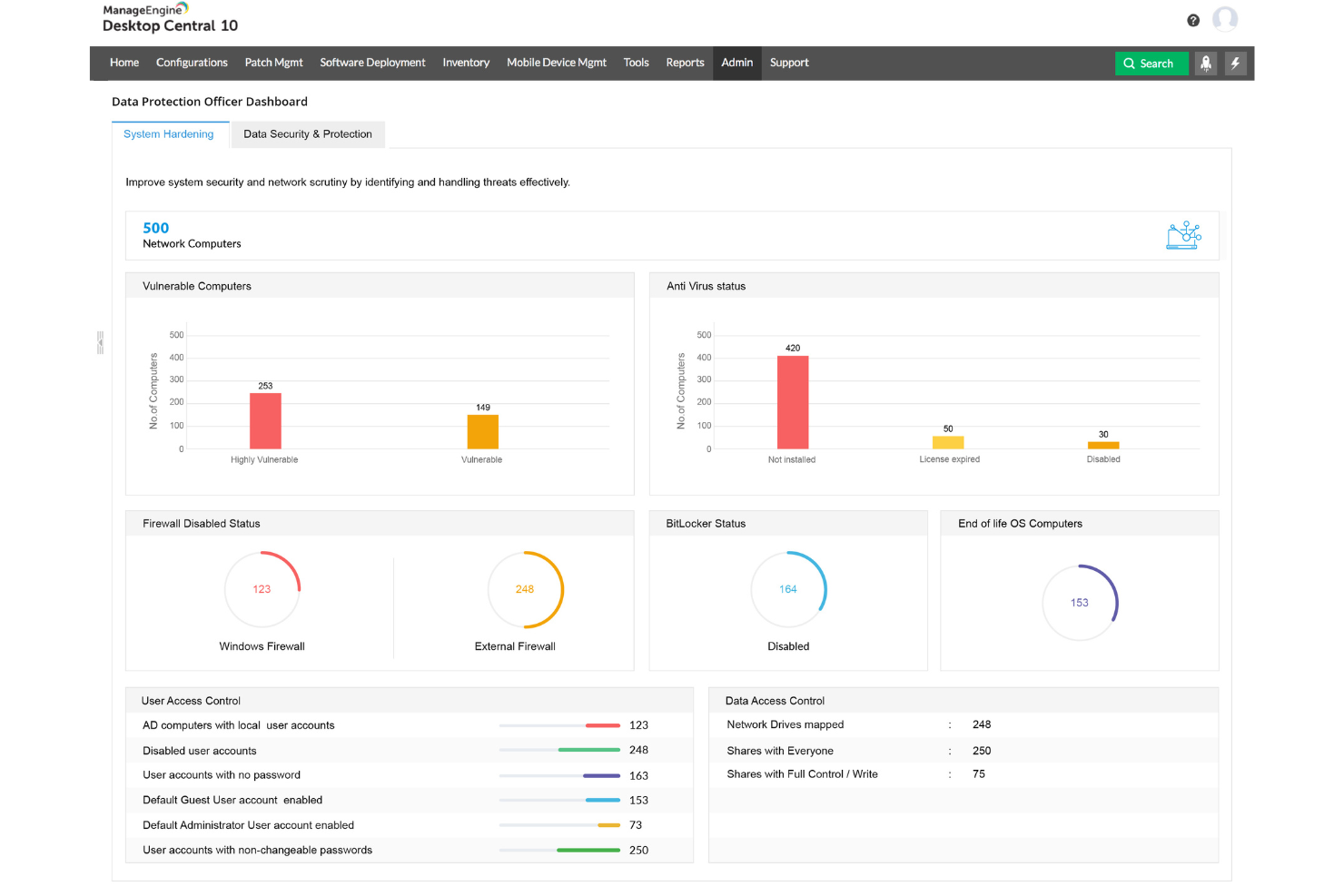
ManageEngine Endpoint Central bietet IT-Teams eine einheitliche Plattform zur Automatisierung des Patch-Managements, zur Sicherung von Endpunkten und zur Verwaltung von Geräten in komplexen Unternehmensumgebungen. So helfen Sie Organisationen, Schwachstellen zu reduzieren und Compliance-Vorgaben einzuhalten.
Für wen ist ManageEngine Endpoint Central am besten geeignet?
ManageEngine Endpoint Central ist besonders gut geeignet für mittelgroße bis große IT-Teams, die eine zentrale Kontrolle über eine vielfältige und verteilte Geräteumgebung benötigen.
Warum ich ManageEngine Endpoint Central ausgewählt habe
Ich habe ManageEngine Endpoint Central ausgewählt, weil es die gesamte Verwaltung und Absicherung der IT-Infrastruktur von einer einzigen Konsole aus abdeckt. Am nützlichsten finde ich das automatisierte Patch-Management, das Windows-, Mac-, Linux-Systeme und über 850 Drittanbieteranwendungen ohne manuellen Eingriff auf jedem Gerät verwaltet. Ebenso vertraue ich auf die Tools zur Schwachstellenbewertung und -behebung, die Systeme anhand von über 75 CIS-Benchmarks prüfen und Risiken melden, bevor sie zu Vorfällen werden. Das Ransomware-Schutz-Modul bietet Ursachenanalyse sowie eine Echtzeit-Reaktion auf Vorfälle, sodass Sie nicht nur reagieren, sondern aktiv Schwachstellen schließen, die zu einem Angriff geführt haben.
Schlüsselfunktionen von ManageEngine Endpoint Central
- Gerätesteuerung: Beschränken oder blockieren Sie unerlaubte USB-Sticks, Kameras und andere Peripheriegeräte, um Datenlecks zu verhindern.
- Anwendungssteuerung: Erstellen Sie Zulassungs- und Sperrlisten, um zu steuern, welche Anwendungen auf Ihren Endgeräten ausgeführt werden dürfen.
- Browsersicherheit: Erzwingen Sie Browser-Konfigurationen, verwalten Sie Erweiterungen und steuern Sie Webzugriff-Richtlinien auf allen Geräten.
- Verwaltung mobiler Geräte: Registrieren, konfigurieren und löschen Sie iOS- und Android-Geräte aus der zentralen Konsole.
ManageEngine Endpoint Central Integrationen
Zu den Integrationen gehören ServiceDesk Plus, Jira, Active Directory, Microsoft 365, AssetExplorer, OpManager, Analytics Plus, Remote Access Plus, Patch Manager Plus und Mobile Device Manager Plus.
Pros and Cons
Pros:
- Sichere Fernsteuerung und Desktop-Sharing
- Konsistentes Patch-Management
- Weitreichende Anpassungs- und Konfigurationsmöglichkeiten
Cons:
- Steile Lernkurve
- Begrenzte Funktionen für mobile Endgeräte
Am besten für integrierte DLP- und CASB-Funktionen
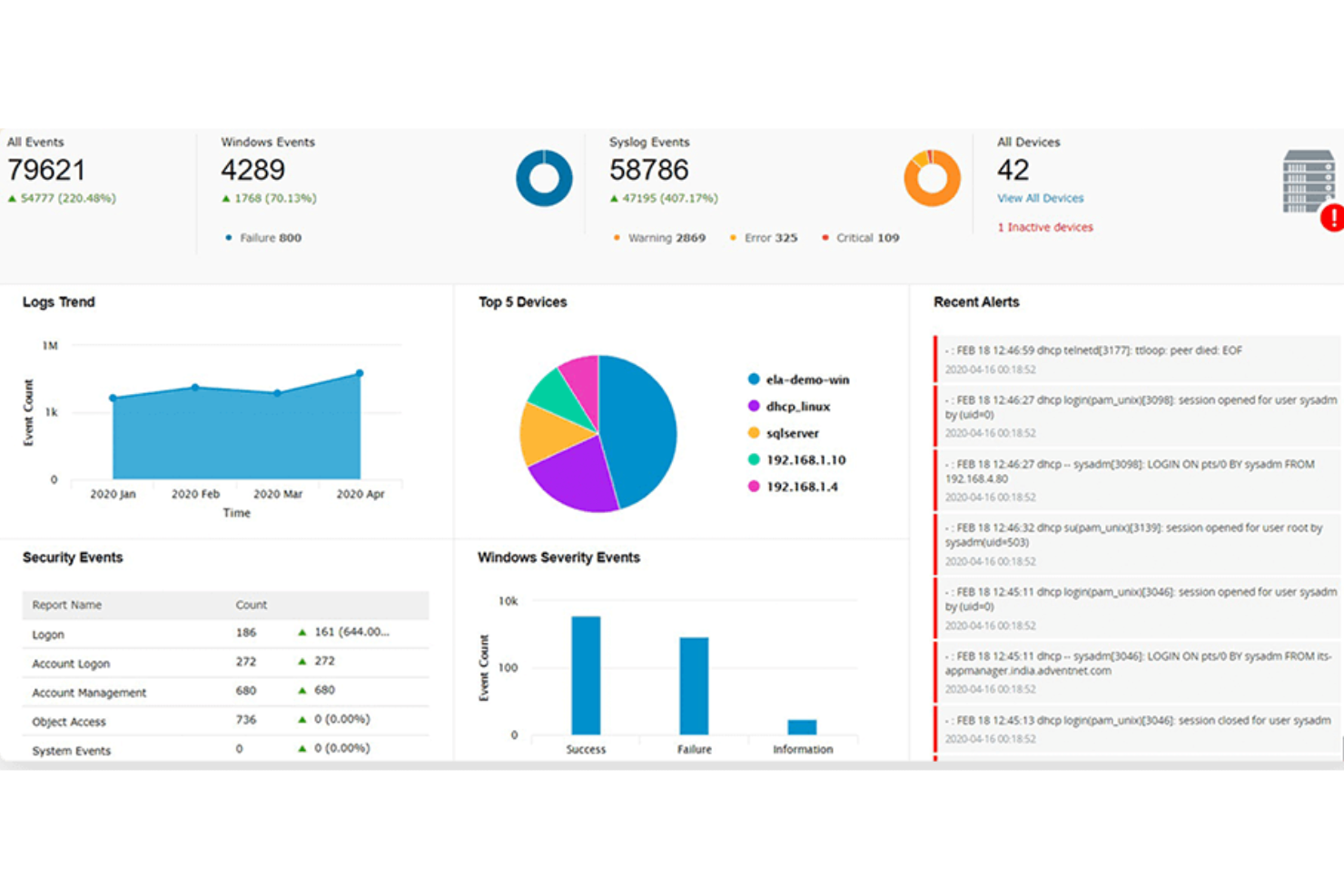
ManageEngine Log360 ist eine einheitliche SIEM-Plattform für IT-Teams und Sicherheitsfachleute, die Bedrohungen in lokalen und Cloud-Umgebungen überwachen, erkennen und darauf reagieren müssen und gleichzeitig Compliance-Anforderungen erfüllen.
Für wen ist ManageEngine Log360 am besten geeignet?
Log360 eignet sich besonders für mittelständische bis große Unternehmen mit eigenen Security Operations Teams, die komplexe und hybride IT-Umgebungen verwalten.
Warum ich ManageEngine Log360 ausgewählt habe
Ich habe ManageEngine Log360 als eines der besten Tools gewählt, weil es DLP und CASB als native, integrierte Funktionen bereitstellt und nicht als nachträglich angefügte Add-ons. Die meisten SIEM-Tools erfordern die Integration separater Produkte, um Datenschutz und Cloud-Transparenz abzudecken – bei Log360 ist beides bereits enthalten. Das integrierte DLP-Modul bietet inhaltsbasierte Schutzmechanismen und eine Bewertung von Datenrisiken, sodass mein Team den Zugriff auf sensible Dateien überwachen und erkennen kann, wo sich kritische Daten im Netzwerk befinden. Bei der CASB-Funktionalität ermöglicht das Monitoring von Shadow-IT, unautorisierte Cloud-Anwendungen im Einsatz zu identifizieren und nachvollziehen zu können, wer darauf zugreift – was angesichts der zunehmenden SaaS-Nutzung immer wichtiger wird.
ManageEngine Log360 – Wichtige Funktionen
- UEBA: Erkennt abweichendes Nutzer- und Entity-Verhalten mittels maschinellem Lernen und macht Bedrohungen durch Insider sowie kompromittierte Konten sichtbar.
- Ereigniskorrelation in Echtzeit: Nutzt regelbasierte Analysen über Logdaten hinweg, um Angriffsmuster zu erkennen und automatisierte Alarme auszulösen.
- Compliance-Berichte: Erstellt vorgefertigte Prüfberichte, die Richtlinien wie HIPAA, PCI DSS, DSGVO und SOX zugeordnet sind.
- Vorfallmanagement: Ermöglicht Ihrem Team, Sicherheitsvorfälle direkt in der Plattform zuzuweisen, nachzuverfolgen und zu beheben, mittels integriertem Ticket-Workflow.
ManageEngine Log360 – Integrationen
Zu den Integrationen gehören ServiceDesk Plus, Jira Service Desk, Kayako, Amazon Web Services (AWS), Microsoft Azure, Salesforce, Microsoft 365, Exchange Server, Active Directory und Datenbanken wie SQL Server.
Pros and Cons
Pros:
- Echtzeit-Protokollsammelung und Analyse
- Umfassende Compliance-Management-Fähigkeiten
- Bedrohungsanalyse-Funktionen
Cons:
- Einrichtung und Konfiguration können komplex sein
- Das Tool erfordert regelmäßige Wartung und Updates

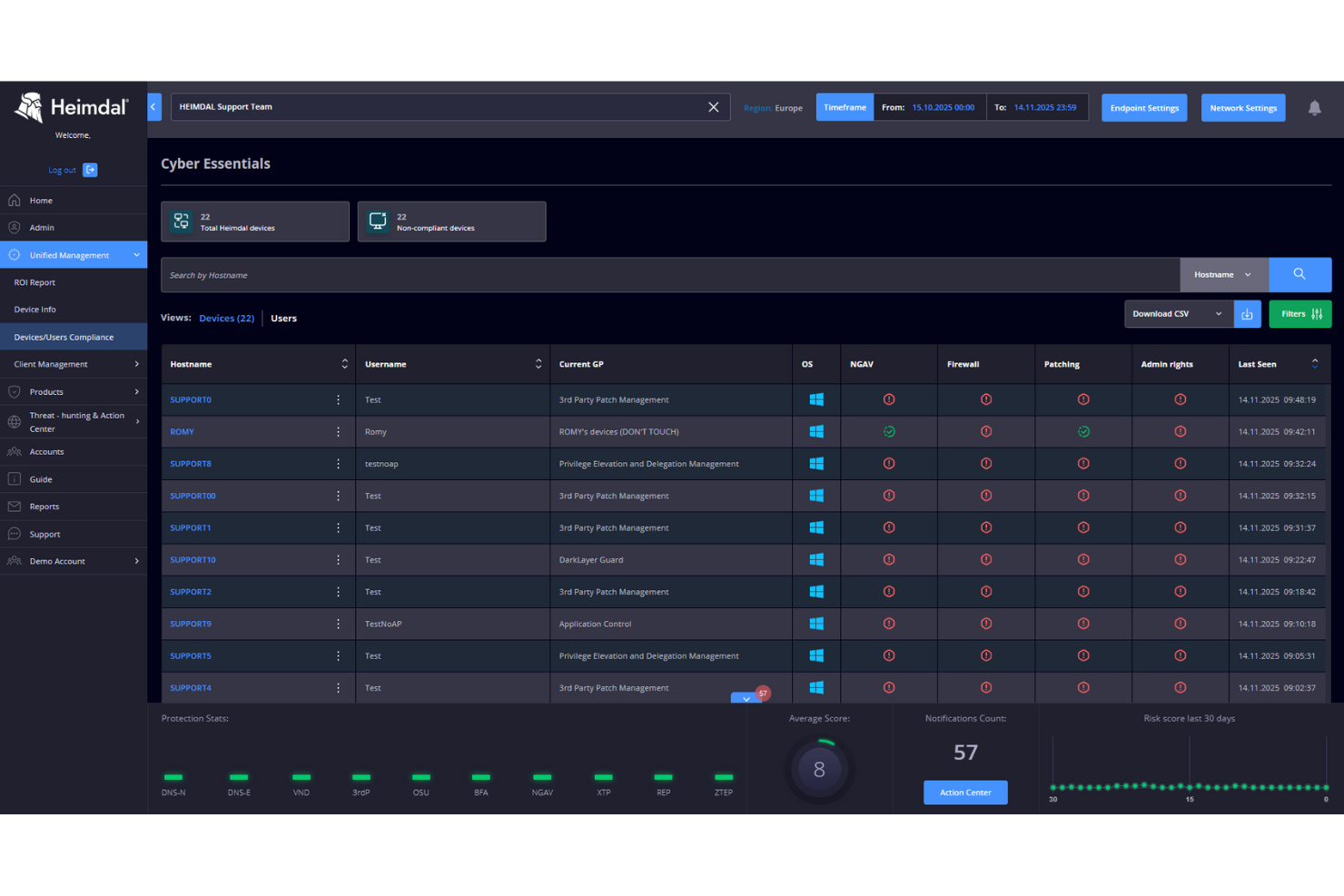
Heimdal ist eine Cybersicherheitsplattform, die für IT-Teams und Unternehmen entwickelt wurde, die einen mehrschichtigen Schutz gegen fortschrittliche Bedrohungen benötigen. Sie vereint Endpunktsicherheit, Bedrohungsprävention und automatisiertes Patch-Management, um Risiken in komplexen Umgebungen zu reduzieren.
Für wen ist Heimdal am besten geeignet?
Heimdal eignet sich besonders für mittelständische bis große IT- und Sicherheitsteams, die eine einheitliche Plattform zur Verwaltung von Endpunktschutz, Bedrohungsabwehr und Compliance im gesamten Unternehmen benötigen.
Warum ich Heimdal ausgewählt habe
Heimdal verdient seinen Platz auf meiner Auswahlliste durch die Kombination von DNS-Sicherheit und Ransomware-Schutz in einer einzigen, einheitlichen Plattform. Mir gefällt, dass das DNS-Filtering bösartige Domains aktiv blockiert, bevor überhaupt eine Verbindung aufgebaut wird – Bedrohungen werden so auf Netzwerkebene gestoppt, statt erst später zu reagieren. Beim Ransomware-Schutz erkennt und stoppt Heimdals Verschlüsselungsschutz unautorisierte Datei-Verschlüsselungen in Echtzeit – ein besonders wertvolles Feature für Teams, die Endpunkte in verteilten Umgebungen verwalten. Die Kombination dieser zwei Ebenen ermöglicht es meinem Team, zwei der häufigsten Angriffsvektoren anzugehen, ohne mehrere Tools parallel nutzen zu müssen.
Heimdal Hauptfunktionen
- Patch- & Asset-Management: Stellt automatisch Patches für Betriebssysteme und Drittanwendungen auf Endpunkten bereit, um Schwachstellen zu schließen, bevor sie ausgenutzt werden können.
- Privilegierte Zugriffskontrolle: Kontrolliert und überwacht Sitzungen privilegierter Nutzer, um unbefugten Zugriff auf sensible Systeme und Daten zu verhindern.
- Nächstgenerations-Antivirus: Erkennt und blockiert Malware und fortschrittliche Bedrohungen auf Endpunktebene durch Verhaltensanalysen sowie klassische signaturbasierte Verfahren.
- Schutz vor E-Mail-Betrug: Ermittelt und blockiert versuchte Business E-Mail Compromise (BEC) und CEO-Betrug, bevor diese bei Endnutzern ankommen.
Heimdal Integrationen
Zu den Integrationen gehören ConnectWise, Autotask, HaloPSA, Cisco Meraki, Microsoft Business, Microsoft 365, Blackpoint Cyber, Patch My PC sowie eine API für individuelle Integrationen.
Pros and Cons
Pros:
- Automatisierte Verteilung von Patches auf Endpunkte
- Starke Erkennung von Schwachstellen und Bedrohungen
- Detaillierte Übersicht über Assets und Lizenzen
Cons:
- Keine nativen Integrationen verfügbar
- Benutzeroberfläche erfordert Einarbeitungszeit

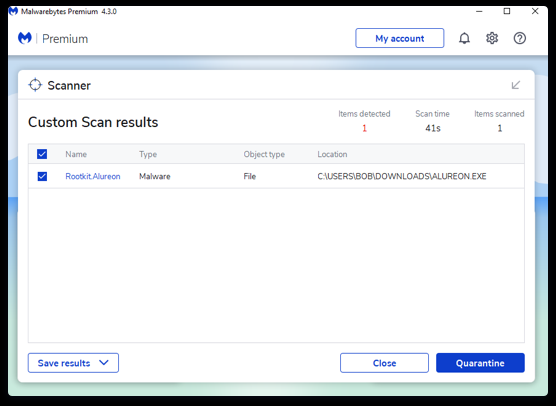
Malwarebytes bietet Anti-Malware- und Cybersicherheitsdienste für Geräte, die sowohl von Privat- als auch von Geschäftskunden genutzt werden.
Warum ich Malwarebytes ausgewählt habe: Ich habe mich für Malwarebytes entschieden, weil es einen kostenlosen Rootkit-Scanner bereitstellt, der die Suche nach diesen berüchtigt schwer auffindbaren Malware-Arten erleichtert. Es nutzt denselben heuristischen und anomalen Erkennungsansatz, wie er auch für die Abwehr von Zero-Day-Angriffen verwendet wird, sodass Sie Rootkits so schnell wie möglich angehen können. Außerdem haben mir deren Antiviren- und VPN-Produkte gefallen.
Malwarebytes – herausragende Funktionen und Integrationen:
Funktionen, die mir bei der Bewertung des Rootkit-Scanners von Malwarebytes aufgefallen sind, umfassen automatische Reparaturen aller Systemdateien und -dienste, die durch eine Infektion beschädigt worden sein könnten. Zudem wird zunächst gescannt und eine Liste der entdeckten Rootkits bereitgestellt, damit Sie diese prüfen können, bevor Sie Maßnahmen ergreifen. Dadurch können Sie sicherstellen, dass laufende Ethical-Hacking-Übungen nicht beeinträchtigt werden.
Integrationen sind vorgefertigt für ServiceNow, Slack, Datto RMM, Azure Sentinel, IBM QRadar, Splunk, Rapid7, Addigy, Atera und ConnectWise.
Pros and Cons
Pros:
- Anfängerfreundliches und intuitives Design
- Kostenloser Antivirus- und Rootkit-Scanner
- Premium-Tarife sind relativ günstig, besonders für Unternehmen
Cons:
- Kostenloser Tarif ist eine bereits umfassende Sicherheitslösung
- Einige Funktionen nur für Windows verfügbar

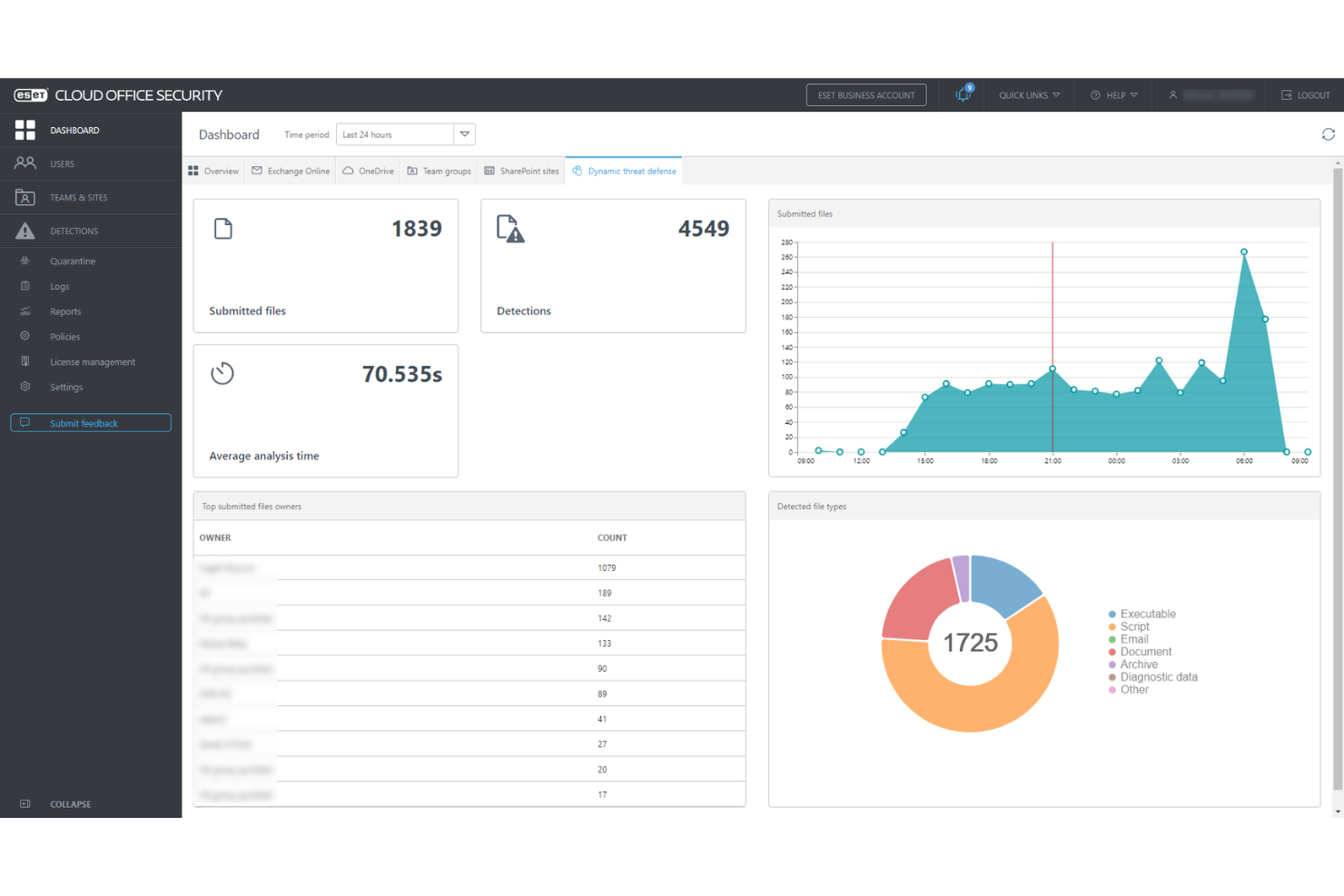
ESET PROTECT Complete ist eine umfassende Cybersicherheitssoftware, die sich auf Prävention, Erkennung und Reaktion konzentriert.
Warum ich ESET PROTECT Complete gewählt habe: Diese Software verfolgt einen proaktiven Ansatz im Umgang mit Cyber-Bedrohungen. Mithilfe von Technologien wie KI hilft die Plattform, Sicherheitsverletzungen zu verhindern und Vorfälle zu untersuchen, während eine benutzerfreundliche Oberfläche alle wichtigen Informationen in einem einzigen Dashboard übersichtlich darstellt. Außerdem erhalten Sie Zugang zu ausführlichen Berichten mit umsetzbaren Schritten, um Ihre IT-Infrastruktur sicher zu halten.
Hervorstechende Funktionen und Integrationen von ESET PROTECT Complete:
Die Plattform bietet ein vollständiges Schutzpaket, einschließlich Management-Konsole, Endpunktschutz, Dateiserver-Sicherheit, vollständiger Festplattenverschlüsselung, erweiterten Bedrohungsabwehr, E-Mail-Sicherheit und Cloud App-Schutz. Dadurch können Sie die Sicherheit Ihrer gesamten Unternehmensumgebung überwachen und erhalten Echtzeit-Einblicke, um Betriebsunterbrechungen zu minimieren.
Integrationen umfassen ConnectWise Automate, Datto RMM, NinjaOne, Kaseya VSA, ATERA und mehr.
Pros and Cons
Pros:
- Große Auswahl an detaillierten Berichten
- Ermöglicht Fernverwaltung
- Schutz für all Ihre Geräte und Anwendungen
Cons:
- Für manche Nutzer eventuell teuer
- Kann Geräte während Scans und Updates verlangsamen

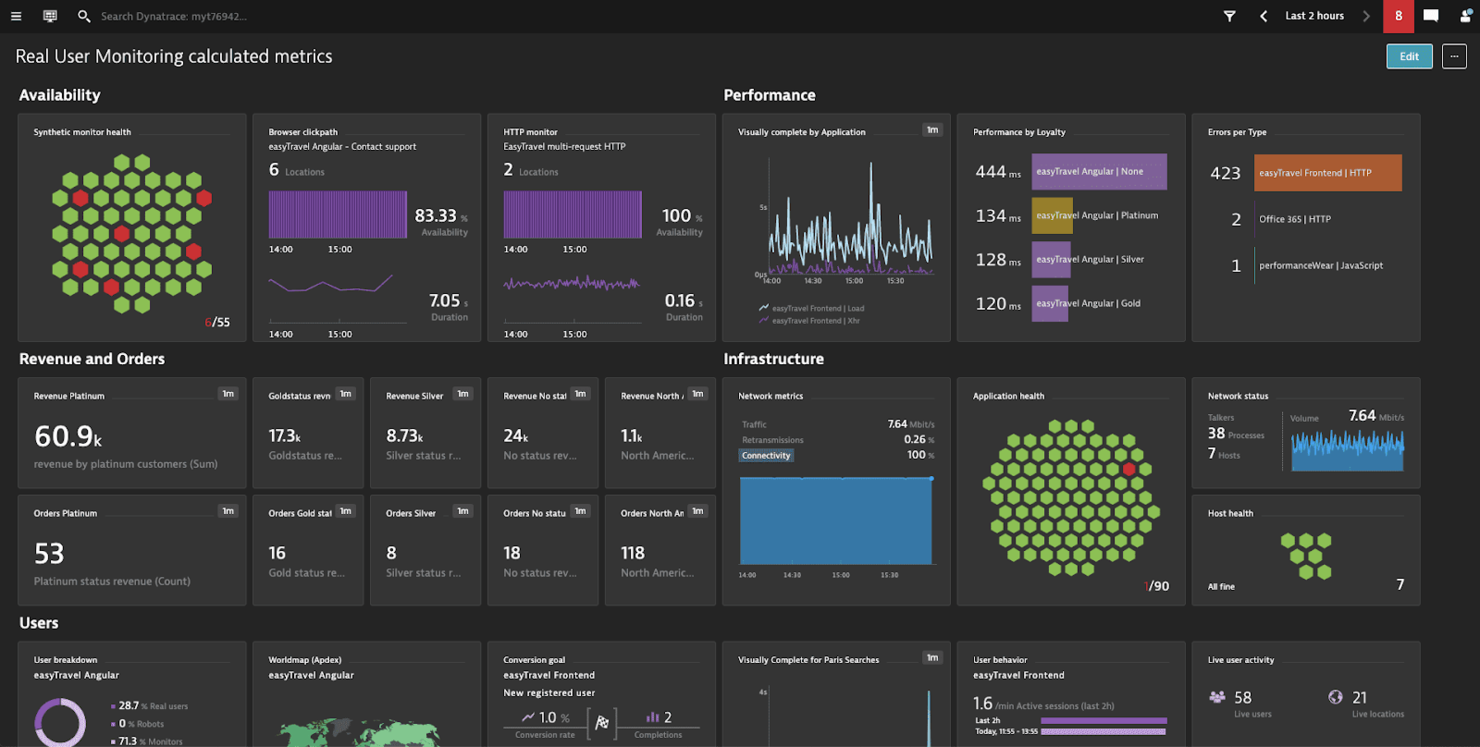
Dynatrace ist eine cloudbasierte Lösung für Monitoring, Observability, Automatisierung und Analysen von Systemen wie Infrastruktur und Anwendungen.
Warum ich Dynatrace gewählt habe: Eines der Hauptangebote von Dynatrace ist seine Application Performance Monitoring (APM)-Lösung, deren Sicherheitsfunktionen ich getestet habe. Wann immer ein Problem erkannt wurde, erhielt ich eine einzelne, prägnante Benachrichtigung mit umsetzbaren Informationen, die die Ursache bis zur exakten Codezeile identifizierte.
Hervorstechende Funktionen und Integrationen von Dynatrace:
Funktionen, die mir an den APM-Tools von Dynatrace gefallen haben, sind die automatische Erkennung aller Anwendungsabhängigkeiten und die Erweiterung ihres Umfangs, was ich für große, komplexe Systeme oder solche, die auf Microservices basieren, als nützlich erachte. Es liefert außerdem Nutzungsmetriken sowohl von synthetischen als auch von realen Nutzern, um die Informationsbasis für Entscheidungen zu erweitern, die die Leistung und Sicherheit betreffen.
Integrationen sind vorgefertigt für GitLab, Google Cloud, AWS, Azure, Jenkins, Docker, Kubernetes, JFrog, PagerDuty und LaunchDarkly.
Pros and Cons
Pros:
- Umfangreiche Application-Monitoring-Funktionen
- Erleichtert das Debugging
- Einfache Bereitstellung
Cons:
- Kundensupport ist gelegentlich nicht erreichbar
- Nur praktisch für Unternehmensanwendungen
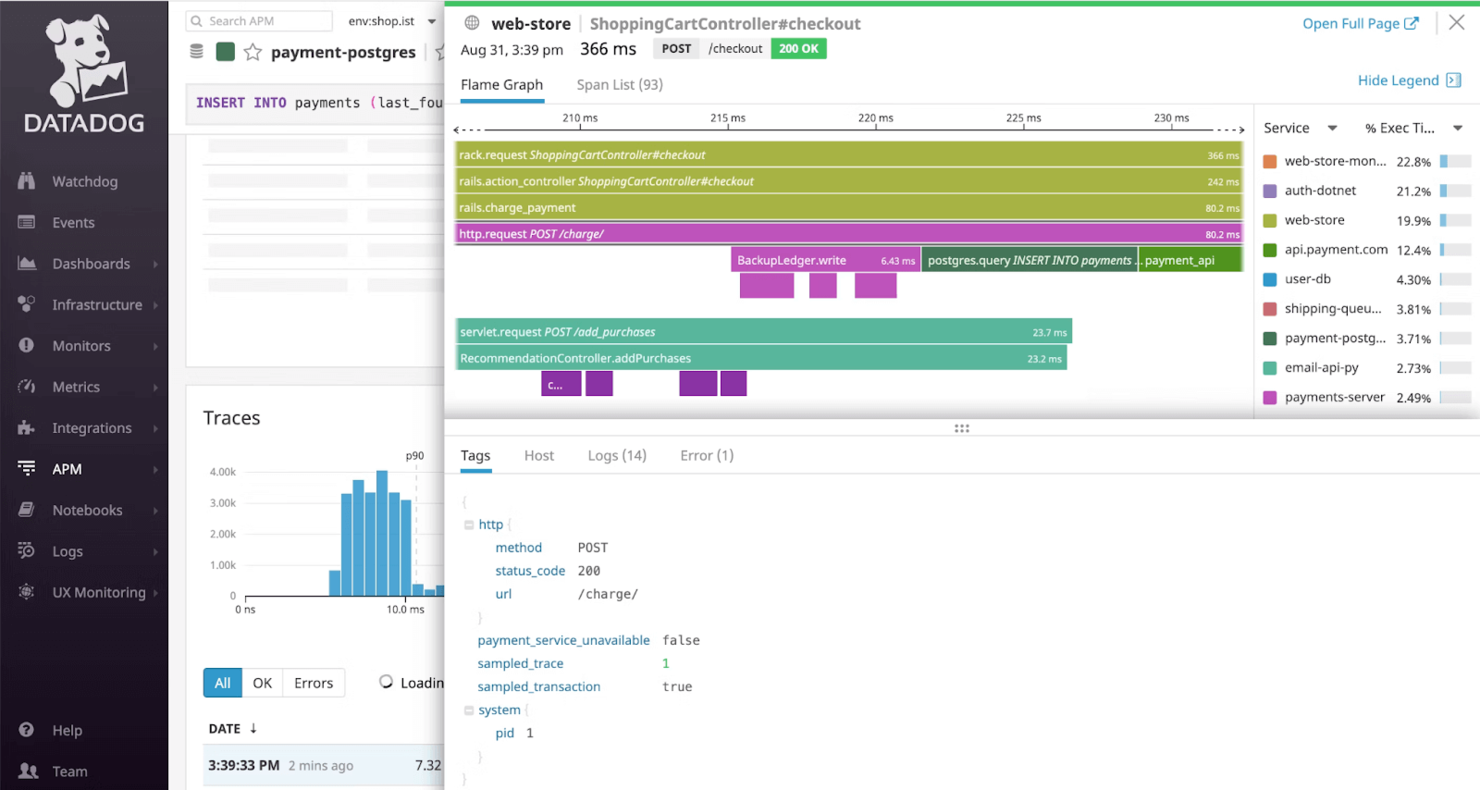
Datadog ist eine Cloud-Monitoring-Plattform, die Beobachtbarkeit über verschiedene Systeme wie Infrastruktur, Anwendungen und digitale Erlebnisse hinweg bietet.
Warum ich mich für Datadog entschieden habe: Ich habe Datadog ausgewählt, weil seine Infrastrukturüberwachungsplattform die Einhaltung von Sicherheitsstandards erleichtert, einschließlich derjenigen, die Bildungseinrichtungen sowie im Gesundheits- und Finanzsektor auferlegt werden. Über die SOC 2 Typ II-Zertifizierung der Plattform hinaus können Sie auch TLS und HTTP Strict Transport Security (HSTS) implementieren.
Herausragende Funktionen und Integrationen von Datadog:
Funktionen, die ich beim Testen von Datadog gefunden habe, sind unter anderem der Scanner für sensible Daten, der Logdateien durchsucht, um sensible Informationen zu identifizieren, zu klassifizieren und zu schützen. Das ist besonders nützlich für Organisationen, die personenbezogene Daten schützen müssen, wie z. B. Bildungseinrichtungen, die für Schülerakten verantwortlich sind. Datadog kann außerdem Portale und E-Learning-Plattformen überwachen und bietet Echtzeiteinblicke, auf die Sie reagieren können, um aufkommenden Bedrohungen entgegenzuwirken.
Integrationen sind vorgefertigt für Adobe Experience Manager, AWS CloudTrail, Auth0, Google Workspace, OneLogin, Meraki, Sophos, Okta, Slack, Microsoft 365 und JFrog.
Pros and Cons
Pros:
- Große Integrationsbibliothek
- Anfängerfreundliche Benutzeroberfläche und Dashboards
- Bietet eine einheitliche Überwachungslösung
Cons:
- Kann teuer werden, wenn die Nutzung nicht überwacht wird
- Komplexe Einrichtung auf privater Hardware

Teramind
Am besten geeignet für die Erkennung von Insider-Bedrohungen
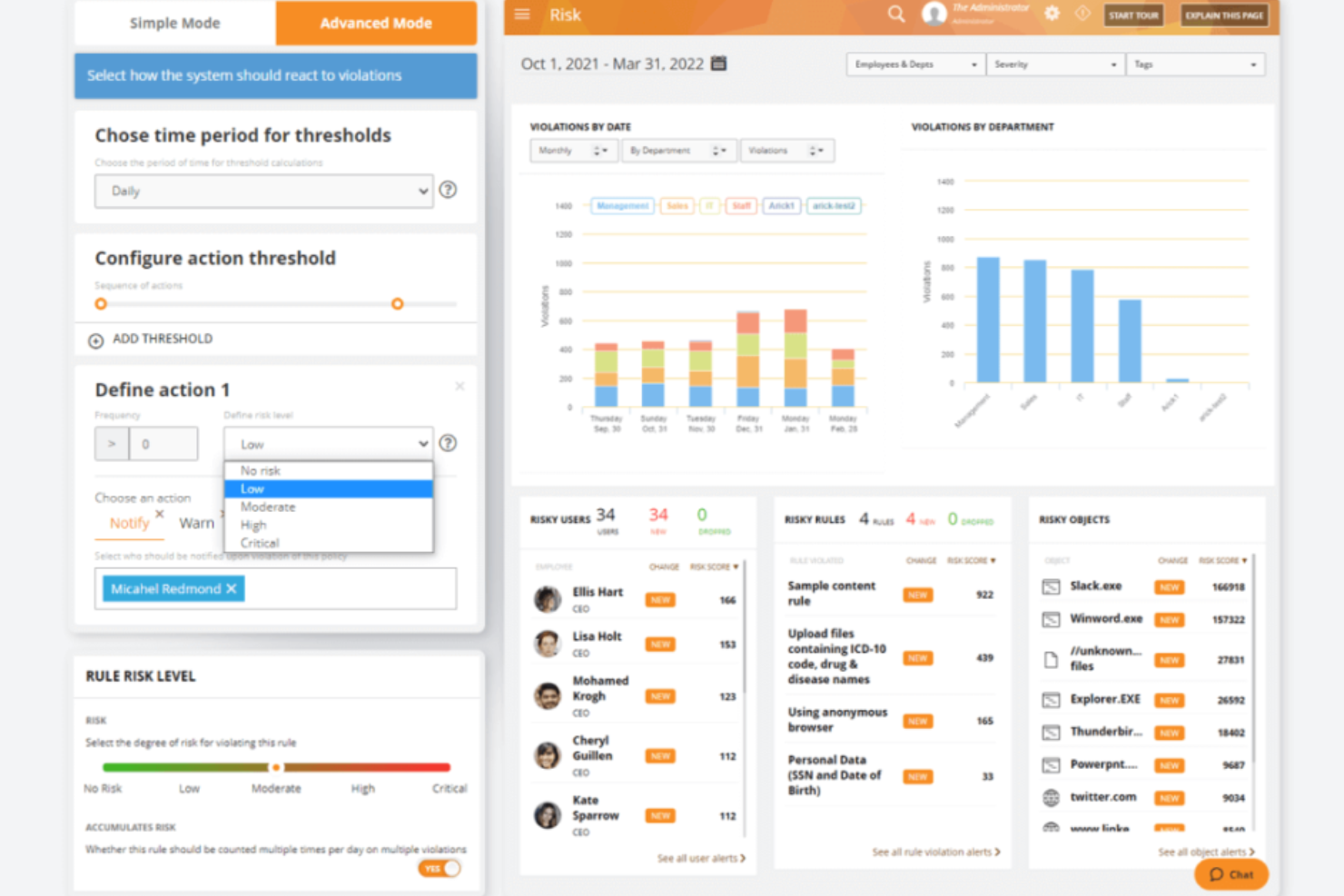
Teramind ist eine Plattform zur Analyse des Benutzerverhaltens, die darauf abzielt, Cybersicherheit, Compliance und Produktivität in verschiedenen Branchen zu verbessern.
Warum ich Teramind gewählt habe: Mir gefällt, dass Teramind die Überwachung von Nutzeraktivitäten über mehrere Kanäle hinweg ermöglicht, darunter Anwendungen, Websites, E-Mails, Instant Messaging, soziale Medien und Dateiübertragungen. Diese umfassende Überwachung hilft dabei, potenzielle Sicherheitsverletzungen zu erkennen und zu verhindern, indem sie einen detaillierten Einblick in Nutzerinteraktionen bietet. Zudem erlaubt die regelbasierte Risikoanalyse von Teramind das Festlegen spezifischer Richtlinien, die bei Erkennung bestimmter Verhaltensweisen Warnungen oder Aktionen auslösen. Diese Funktionen verbessern die Erkennung und Prävention von Insider-Bedrohungen.
Herausragende Funktionen und Integrationen von Teramind:
Funktionen beinhalten Videoaufzeichnungen von Benutzersitzungen, wodurch Sie Aktivitäten für Compliance- und Sicherheitsaudits überprüfen können. Die Software bietet außerdem Fernsteuerung von Desktops, wodurch Sie gegebenenfalls unterstützen oder eingreifen können. Zusätzlich stellt Teramind IT-Forensik-Funktionen bereit, die es ermöglichen, Vorfälle gründlich zu untersuchen und die erforderlichen Beweise zu sammeln.
Integrationen umfassen Google Cloud BigQuery, Splunk Cloud Platform, Jira, Zendesk, Redmine, Microsoft Power BI, IBM Security QRadar, LogRhythm, ArcSight, McAfee Business Protection, Microsoft Entra ID und ServiceNow.
Pros and Cons
Pros:
- Umfassende Überwachung auf verschiedenen Plattformen
- Echtzeit-Warnungen für sofortige Reaktion auf Bedrohungen
- Anpassbare Regeln und Richtlinien
Cons:
- Begrenzte Unterstützung für die Überwachung mobiler Geräte
- Mindestens 5 Benutzerplätze erforderlich
Weitere Cybersecurity-Software
Bei meinen Bewertungen habe ich auch Werkzeuge gefunden, die es zwar nicht auf die Hauptliste geschafft haben, aber für bestimmte Anwendungsfälle dennoch interessant sein könnten:
- CrowdStrike Falcon
Am besten für ITOps-Teams geeignet
- New Relic
Am besten für Full-Stack-Observability geeignet
- NETSCOUT
E Funktionen zum Schutz vor DDoS-Angriffen
- Zygon
Ideal für das Sicherheitsmanagement von SaaS-Umgebungen
- Guardio
Am besten für proaktive, webbasierte Echtzeitsicherheit
- Sprinto
Am besten für Unternehmen in stark regulierten Branchen
- Sophos
Am besten für kleine Unternehmen geeignet
- Amazon CloudWatch
Am besten für AWS geeignet
- Azure Sphere
Am besten für IoT-Geräte
- Microsoft Intune
Am besten für Endpunktsicherheit


Weitere Software- und Tool-Bewertungen
Falls Sie hier noch nicht fündig geworden sind, werfen Sie einen Blick auf diese anderen Arten von Tools, die wir ebenfalls getestet und bewertet haben.
- Netzwerküberwachungssoftware
- Serverüberwachungssoftware
- SD-WAN-Lösungen
- Tools zur Infrastrukturüberwachung
- Packet Sniffer
- Anwendungsüberwachungs-Tools
Auswahlkriterien für Cybersecurity-Software
Auf meiner Recherche-Reise zu unterschiedlichen Cybersecurity-Lösungen habe ich ein umfassendes Kriterienraster entwickelt, um den Auswahlprozess fair und konsistent zu gestalten. So habe ich jedes Werkzeug bewertet, das es auf meine Liste geschafft hat:
Zentrale Funktionen von Cybersecurity-Software: 25% der Gesamtbewertung.
Um in meine Liste der besten Cybersecurity-Lösungen aufgenommen zu werden, musste die Lösung gängige Anwendungsfälle abdecken. Dazu zählen:
- Schutz vor externen Bedrohungen
- Absicherung sensibler Daten vor unbefugtem Zugriff
- Einhaltung von Datenschutzvorschriften gewährleisten
- Transparenz beim Sicherheitsstatus von Netzwerken und Geräten schaffen
- Schnelle Reaktion und Wiederherstellung bei Sicherheitsvorfällen unterstützen
Zusätzliche herausragende Funktionen: 25% der Gesamtbewertung.
- Erweiterte prädiktive Analysefunktionen, um potenzielle Bedrohungen frühzeitig zu erkennen, bevor sie akut werden.
- Innovative Analysen des Benutzerverhaltens zur Erkennung von Insider-Bedrohungen oder kompromittierten Konten.
- Künstliche Intelligenz- und maschinelles Lernen-Funktionen für eine verbesserte Erkennung von Bedrohungen sowie schnellere Reaktionszeiten.
- Umfassende Sicherheitsabdeckung sowohl für lokale als auch für Cloud-Umgebungen, wodurch eine einheitliche Sicherheitsstrategie gewährleistet wird.
Benutzerfreundlichkeit: 10% der Gesamtbewertung. Wichtige Aspekte sind:
- Eine intuitive Benutzeroberfläche, die komplexe Sicherheitsprozesse vereinfacht.
- Dashboards, die einen schnellen Überblick über den Sicherheitsstatus und Warnmeldungen bieten.
- Ein ausgewogenes Verhältnis zwischen leistungsstarken Funktionen und einfacher Bedienbarkeit, um Anwender mit unterschiedlichen technischen Vorkenntnissen einzubeziehen.
Onboarding: 10% der Gesamtbewertung. Die Effektivität des Onboardings wird bewertet anhand von:
- Umfangreichen Schulungsmaterialien, wie Videos und interaktiven Tutorials.
- Schnellen Einrichtungsprozessen mit geführten Produkttouren, um neuen Nutzern die Navigation auf der Plattform zu erleichtern.
- Support-Angeboten wie Chatbots und Webinaren, die bei der ersten Konfiguration und Implementierung unterstützen.
Kundensupport: 10% der Gesamtbewertung. Wichtige Aspekte sind:
- Schnelle und kompetente Support-Teams, die über verschiedene Kanäle erreichbar sind (z.B. Live-Chat, E-Mail, Telefon).
- Eine umfangreiche Wissensdatenbank oder Community-Foren zur Selbsthilfe.
- Persönliche Account Manager für Unternehmenskunden.
Preis-Leistungs-Verhältnis: 10% der Gesamtbewertung. Dazu zählt:
- Bewertung der Preisgestaltung im Verhältnis zum Funktionsumfang und zur Leistungsfähigkeit der Lösung.
- Berücksichtigung der Skalierbarkeit der Lösung, sodass das Unternehmenswachstum ohne unverhältnismäßige Kostensteigerungen möglich ist.
- Prüfung etwaiger versteckter Kosten, zum Beispiel für zusätzliche Module oder Support-Leistungen.
Kundenbewertungen: 10% der Gesamtbewertung. Die Bewertung fokussiert sich auf:
- Stetig positives Feedback zu zentralen Bereichen wie Benutzerfreundlichkeit, Kundensupport und Wirksamkeit der Lösung.
- Praxiserfahrungen, die konkrete Szenarien hervorheben, in denen das Tool erheblichen Mehrwert geboten hat.
- Bewertungen, die beschreiben, wie die Lösung spezifische Sicherheitsherausforderungen adressiert und mindert.
Mit diesem Kriterienrahmen stelle ich sicher, dass die Cybersicherheits-Tools nicht nur generische Erwartungen erfüllen, sondern sich auch durch ihre Fähigkeit auszeichnen, die individuellen Anforderungen und Herausforderungen unterschiedlicher Organisationen gezielt anzugehen.
So wählen Sie Cybersicherheits-Software aus
Wenn Sie Cybersicherheits-Software auswählen, im Test haben oder eine Vorauswahl treffen, sollten Sie Folgendes berücksichtigen:
- Welches Problem möchten Sie lösen - Beginnen Sie damit, die Lücke in Ihrer Cybersicherheitsstrategie zu identifizieren, die Sie schließen möchten. So klären Sie, welche Funktionen und Möglichkeiten das Tool bieten muss.
- Wer muss die Software nutzen - Um Kosten und Anforderungen abzuschätzen, überlegen Sie, wer die Plattform nutzen wird und wie viele Lizenzen benötigt werden. Prüfen Sie, ob nur das IT-Team oder die gesamte Organisation Zugriff benötigt. Sobald das geklärt ist, sollten Sie abwägen, ob Sie Priorität auf eine einfache Nutzung für alle legen oder Geschwindigkeit für technisch versierte Power-User im Vordergrund steht.
- Mit welchen anderen Tools sie funktionieren muss - Klären Sie, welche Tools ersetzt, welche behalten und mit welchen Tools integriert werden muss. Dazu gehören Ihre Cloud-Infrastruktur, DMARC-Software, Netzwerke und Datenquellen sowie Ihr sonstiger Technologie-Stack. Möglicherweise müssen Sie entscheiden, ob die Tools zusammen integriert werden oder ob Sie mehrere Tools durch eine umfassende Cybersicherheits-Software ersetzen können.
- Welche Ergebnisse wichtig sind - Überlegen Sie, welches Ergebnis das Tool liefern muss, um als Erfolg zu gelten. Denken Sie darüber nach, welche Fähigkeiten Sie gewinnen oder verbessern wollen und wie Sie den Erfolg messen. Sie könnten Cybersicherheits-Software endlos vergleichen, aber ohne zu wissen, welche Ziele Sie verfolgen, könnten Sie wertvolle Zeit verlieren.
- Wie die Lösung in Ihr Unternehmen passt - Bewerten Sie die Lösungen im Kontext Ihrer bestehenden Arbeitsabläufe und Methoden. Überprüfen Sie, was gut funktioniert und identifizieren Sie Bereiche, die Probleme verursachen und behoben werden müssen. Denken Sie daran: Jedes Unternehmen ist unterschiedlich — gehen Sie nicht automatisch davon aus, dass ein beliebtes Tool auch bei Ihnen optimal funktioniert.
Trends für Cybersicherheits-Software im Jahr 2025
Im Jahr 2025 macht die zunehmende Komplexität und Raffinesse von Cyberbedrohungen Aktualisierungen der Funktionen und Fähigkeiten von Cybersicherheitssoftware umso wichtiger, besonders im Bereich der Cybersicherheit für Finanzdienstleistungen. Eine Auswertung von Produktaktualisierungen, Pressemitteilungen und Release-Logs der sich am schnellsten entwickelnden und beliebtesten Cybersicherheits-Tools zeigt wichtige Trends bei Software und Technologien, die dazu dienen, Unternehmensgeräte und Infrastrukturen zu schützen und abzusichern. Hier sind einige der Trends, die ich beobachtet habe:
Sich entwickelnde Funktionen
- Verbesserter Endgeräteschutz: Mit dem Anstieg von Remote-Arbeit liegt ein deutlicher Fokus auf fortschrittlichen Lösungen zum Schutz von Endgeräten. Diese bieten umfassendere Abwehrmechanismen gegen Angriffe auf entfernte Geräte, einschließlich Zero-Trust-Sicherheitsmodellen.
- Verbesserungen der Cloud-Sicherheit: Da Unternehmen weiterhin auf Cloud-Plattformen migrieren, wächst die Nachfrage nach spezifischen Sicherheitsfunktionen für die Cloud. Tools entwickeln sich weiter, um bessere Sichtbarkeit, Kontrolle und Schutz für Cloud-Umgebungen zu bieten – einschließlich Multi-Cloud- und Hybrid-Cloud-Konfigurationen.
Neue und ungewöhnliche Funktionen
- Verhaltensanalyse zur Erkennung interner Bedrohungen: Einige Cybersicherheits-Tools führen hochentwickelte Analysen des Nutzerverhaltens ein, um interne Bedrohungen zu identifizieren und einzudämmen. Diese ungewöhnliche Funktion basiert auf der Überwachung von Nutzeraktivitäten, um Anomalien zu erkennen, die auf ein Sicherheitsrisiko hindeuten könnten.
- Dezentrale Sicherheitsoperationen: Ein neuartiger Ansatz, der erforscht wird, ist die Dezentralisierung von Sicherheitsoperationen, wobei Blockchain-Technologie für erhöhte Sicherheit und Integrität von Daten über Netzwerke hinweg eingesetzt wird.
Abnehmende Bedeutung
- Traditionelle signaturbasierte Antivirensysteme: Die Abhängigkeit von traditionellen, signaturbasierten Antivirenlösungen nimmt ab, da diese weniger effektiv gegen Zero-Day-Exploits und fortgeschrittene, persistente Bedrohungen (APT) sind. Der Markt verlagert sich hin zu Lösungen mit dynamischeren, verhaltensbasierten Erkennungsmethoden.
Mit der Entwicklung von Cyberbedrohungen entwickeln sich auch die Tools weiter, die sie bekämpfen sollen. Wer diese Trends im Auge behält, kann als Unternehmen intelligentere Entscheidungen darüber treffen, welche Software und Lösungen eingesetzt werden. So wird sichergestellt, dass sie nicht nur den aktuellen, sondern auch den zukünftigen Anforderungen entsprechen.
Was ist Cybersicherheitssoftware?
Cybersicherheitssoftware wird genutzt, um Systeme, Netzwerke und Daten vor Bedrohungen wie Schadsoftware, Phishing und unbefugtem Zugriff zu schützen. Sie wird in der Regel von IT-Teams, Sicherheitsexperten und Dienstleistern eingesetzt, die Schwachstellen überwachen, Vorfälle managen und den Geschäftsbetrieb absichern müssen.
DNS-Sicherheitsdienste, Bedrohungserkennung, Zugangskontrolle und Funktionen zur Protokollierung von Aktivitäten helfen dabei, Risiken zu erkennen, Eindringversuche zu stoppen und Ereignisse nachzuverfolgen. Diese Tools tragen dazu bei, Ausfallzeiten zu reduzieren, Compliance-Anforderungen zu erfüllen und sowohl interne als auch kundenorientierte Systeme leichter zu schützen.
Funktionen
Dies sind die zentralen Funktionen, nach denen ich bei meiner Recherche zu Cybersicherheitssoftware gesucht habe:
- Echtzeit-Erkennung von Bedrohungen: Diese Funktion ermöglicht die sofortige Identifikation von Bedrohungen, sobald sie auftreten. Sie ist entscheidend, um das Zeitfenster zu minimieren, in dem Angreifer Schwachstellen ausnutzen können, und gewährleistet so die Sicherheit Ihrer Geräte und Netzwerke.
- Automatisierte Reaktion auf Vorfälle: Software (wie zum Beispiel Unified Threat Management Software) mit dieser Fähigkeit kann automatisch vordefinierte Maßnahmen gegen erkannte Bedrohungen ergreifen. Das reduziert den Zeit- und Ressourcenaufwand für manuelle Eingriffe und optimiert den Prozess der Abwehr von Cyber-Bedrohungen effizient.
- Endgerätesicherheit: Diese stellt sicher, dass einzelne Geräte (Endpunkte), die mit Ihrem Netzwerk verbunden sind, geschützt werden. Mit der Zunahme von Remote-Arbeit ist der Schutz jedes Endpunkts essenziell, um sich gegen Angriffe zu schützen, die auf Geräte außerhalb traditioneller Netzwerkschutzmaßnahmen abzielen.
- Erweiterter Firewall-Schutz: Leistungsstarke Firewall-Software fungiert als Barriere zwischen Ihrem Netzwerk und nicht vertrauenswürdigen externen Netzwerken. Sie filtert ein- und ausgehende Datenströme anhand eines festgelegten Satzes von Sicherheitsregeln und ist entscheidend, um unbefugten Zugriff auf Ihre Netzwerkressourcen zu verhindern.
- Multi-Faktor-Authentifizierung (MFA): MFA verlangt von Nutzern den Nachweis mehrerer Authentifizierungsmerkmale, bevor Zugriff gewährt wird. Diese Funktion fügt eine zusätzliche Sicherheitsschicht hinzu und reduziert das Risiko unbefugten Zugriffs durch kompromittierte Zugangsdaten erheblich.
- Cloud-Sicherheit: Speziell zum Schutz cloudbasierter Infrastrukturen und Daten entwickelt, stellt diese Funktion sicher, dass Ihre Assets in der Cloud ebenso sicher sind wie die auf physischen Geräten oder firmeneigenen Netzwerken. Dies ist besonders für Unternehmen, die Cloud-Computing nutzen, entscheidend.
- Verschlüsselungstools: Verschlüsselung schützt sensible Daten, indem sie sie in für unbefugte Benutzer unlesbaren Code umwandelt. Diese Funktion ist für den Schutz der Datenintegrität und Vertraulichkeit unverzichtbar, besonders für Informationen, die auf Cloud-Plattformen gespeichert oder über Netzwerke übertragen werden. Zur Verwaltung verschlüsselter Schlüssel steht PKI-Software zur Verfügung, die ein Höchstmaß an Kontrolle ermöglicht.
- Sicherheitsinformations- und Ereignismanagement (SIEM): SIEM bietet einen Überblick über die Sicherheitslage in Ihrem Unternehmen, indem es Sicherheitsdaten aus verschiedenen Quellen sammelt und analysiert. Diese Funktion ist zentral, um Muster und potenzielle Sicherheitsvorfälle frühzeitig zu erkennen.
- Schwachstellen-Scanning: Regelmäßiges Scannen auf Schwachstellen ermöglicht die Identifizierung und Behebung von Sicherheitslücken in Software und Systemen. Diese proaktive Maßnahme ist entscheidend, um Angreifern zuvorzukommen, bevor sie bekannte Schwachstellen ausnutzen.
- Verhinderung von Datenverlust (DLP): DLP-Technologien verhindern, dass sensible Daten verloren gehen, missbraucht oder von Unbefugten eingesehen werden. Diese Funktion ist für den Erhalt der Vertraulichkeit und Integrität geschäftskritischer Daten und die Einhaltung von Datenschutzvorschriften essenziell.
Typische KI-Funktionen von Cybersicherheitssoftware
Über die oben genannten Standardfunktionen von Cybersicherheitssoftware hinaus integrieren viele dieser Lösungen KI mit Funktionen wie:
- KI-gestützte Bedrohungsintelligenz: Diese Funktion nutzt künstliche Intelligenz, um riesige Datenmengen zu analysieren und neue oder sich entwickelnde Bedrohungen schnell zu erkennen. Sie erhalten frühzeitige Warnungen und einen proaktiven Schutz gegen aufkommende Angriffe.
- Anomalieerkennung: KI erkennt automatisch ungewöhnliche Muster oder Verhaltensweisen, die auf einen Cyberangriff hindeuten könnten. So werden auch schwer erkennbare Bedrohungen aufgedeckt, die mit herkömmlichen Methoden vielleicht unbemerkt bleiben.
- Automatisierte Vorfallsreaktion: Wenn eine Bedrohung erkannt wird, können KI-Systeme automatisch Geräte isolieren oder verdächtige Aktionen blockieren, was die Reaktionszeiten verkürzt und die Auswirkungen von Angriffen reduziert.
- Prädiktive Risikoabschätzung: KI bewertet Ihre Systeme und sagt voraus, wo künftig Schwachstellen auftreten könnten. Schwachstellen können so behoben werden, bevor sie zu größeren Problemen führen.
- Phishing-Erkennung: KI scannt E-Mails und Kommunikationen, um Phishing-Versuche durch Analyse von Sprache, Absenderverhalten und Absichten zu erkennen. So werden Betrugsversuche gestoppt, bevor jemand auf einen gefährlichen Link klickt.
Die Auswahl einer Cybersicherheitssoftware, die diese Funktionen umfasst, kann die Fähigkeit Ihrer Organisation erheblich stärken, sich gegen Cyberbedrohungen zu verteidigen und darauf zu reagieren. Durch die Priorisierung der gewünschten Funktionen schaffen Sie eine widerstandsfähige digitale Umgebung, die die Ziele, Abläufe und das Wachstum Ihres Unternehmens unterstützt.
Vorteile
Cybersicherheitssoftware spielt eine entscheidende Rolle beim Schutz von Unternehmen vor den zahlreichen Cyberbedrohungen im Internet. Hier sind fünf konkrete, zentrale Vorteile, die Cybersicherheitssoftware Nutzern und Organisationen bietet:
- Erweiterte Bedrohungserkennung und -reaktion: Cybersicherheitssoftware bietet ausgefeilte Mechanismen zur Erkennung und Abwehr von Bedrohungen in Echtzeit. Intrusion Detection Software ermöglicht es Unternehmen, potenzielle Sicherheitsverletzungen schnell zu identifizieren und sie zu entschärfen, bevor erheblicher Schaden entsteht.
- Verbesserte Einhaltung von Vorschriften: Viele Cybersicherheitslösungen verfügen über Funktionen, die Organisationen bei der Einhaltung von Datenschutzgesetzen und branchenspezifischen Vorschriften unterstützen. Dies hilft nicht nur, rechtliche Strafen zu vermeiden, sondern stärkt auch das Vertrauen von Kunden und Partnern, indem ein Bekenntnis zur Datensicherheit gezeigt wird.
- Schutz vor Datenschutzverletzungen: Durch den Einsatz von starker Verschlüsselung, Firewall-Prüfsoftware und Intrusion Detection Systemen senkt Cybersicherheitssoftware das Risiko von Datenpannen erheblich. Dieser Schutz ist entscheidend für die Sicherung sensibler Informationen und für die Wahrung der Integrität und Vertraulichkeit von Unternehmensdaten.
- Gesteigerte Produktivität: Cybersicherheitsbedrohungen können den Geschäftsbetrieb stören und zu kostspieligen Ausfallzeiten führen. Durch die Abwehr von Angriffen und die Begrenzung ihrer Auswirkungen sorgt Cybersicherheitssoftware dafür, dass Mitarbeitende ihre Produktivität ohne Unterbrechung durch böswillige Aktivitäten aufrechterhalten können.
- Markenreputation und Vertrauen: Effektive Sicherheitsmaßnahmen schützen nicht nur Daten und Systeme, sondern auch den Ruf des Unternehmens. Kundinnen und Kunden haben ein größeres Vertrauen in Unternehmen, die ihr Engagement für die Sicherheit ihrer Informationen unter Beweis stellen können.
Die Vorteile einer Investition in Cybersicherheitssoftware gehen weit über reine Risikominderung hinaus. Für Organisationen, die sich im komplexen digitalen Umfeld zurechtfinden wollen, bieten diese Tools eine wichtige Verteidigungslinie. Sie erhöhen die allgemeine Widerstandsfähigkeit und schaffen ein sicheres Umfeld für Wachstum und Innovation. Für Unternehmen mit Sitz in den Vereinigten Staaten sorgt die Zusammenarbeit mit einem Cybersicherheitsunternehmen in Chicago oder einer anderen größeren Stadt für eine entscheidende Schicht an Schutz und Fachwissen bei jedem Projekt.
Kosten & Preise
Cybersicherheitslösungen sind in verschiedenen Tarifen und Preismodellen erhältlich, die jeweils auf unterschiedliche Anforderungen zugeschnitten sind – von kleinen Unternehmen, die nach einem Basisschutz suchen, bis hin zu großen Unternehmen, die fortschrittliche Sicherheitsmaßnahmen benötigen. Das Verständnis dieser Optionen hilft Ihnen, eine fundierte Entscheidung zu treffen, die den spezifischen Sicherheitsanforderungen und Budgetvorgaben Ihrer Organisation entspricht.
Tarifvergleichstabelle für Cybersicherheitssoftware
Hier finden Sie einen Überblick über die gängigen Tarifoptionen für Cybersicherheitssoftware:
| Tariftyp | Durchschnittlicher Preis | Übliche Funktionen | Empfohlen für |
|---|---|---|---|
| Kostenlos | $0 | Grundschutz, eingeschränkte Funktionen, empfohlen für den privaten Gebrauch oder sehr kleine Unternehmen | Privatanwender, sehr kleine Unternehmen mit minimaler Online-Präsenz |
| Basic | $10 - $30/Monat | Antivirus, Firewall, E-Mail-Sicherheit, Webfilterung | Kleine Unternehmen mit grundlegenden Sicherheitsbedürfnissen, Home-Offices |
| Standard | $30 - $70/Monat | Basisfunktionen plus Endgeräteschutz, Mobile Security, VPN | Wachsende Unternehmen, Start-ups, Organisationen mit sensiblen Daten |
| Premium | $70 - $150/Monat | Standardfunktionen plus fortschrittlicher Bedrohungsschutz, Identitätsmanagement, Sicherheitsanalytik | Mittlere Unternehmen mit wachsenden Sicherheitsbedürfnissen, Organisationen mit Kundendaten |
| Enterprise | Individuelle Preisgestaltung | Premiumfunktionen plus Skalierungsoptionen, dedizierter Support, BAS-Software, Komplettlösungen | Große Unternehmen, Organisationen mit komplexer IT-Infrastruktur, Unternehmen mit hochsensiblen Daten |
Berücksichtigen Sie bei der Auswahl eines Cybersicherheitssoftware-Tarifs sowohl Ihre aktuellen als auch Ihre zukünftigen Sicherheitsanforderungen sowie Ihr Budget. Das richtige Angebot sollte einen umfassenden Schutz bieten, ohne Ihre finanziellen Ressourcen zu überdehnen.
Häufig gestellte Fragen zu Cybersicherheitssoftware
Hier finden Sie Antworten auf häufig gestellte Fragen zur Cybersicherheitssoftware:
Wie bewerte ich Cybersicherheitssoftware für die Integration in meinen bestehenden Technologie-Stack?
Welche Compliance-Standards sind bei der Auswahl von Cybersicherheitssoftware am wichtigsten?
Wie messe ich den ROI einer Cybersicherheitslösung für mein Unternehmen?
Können Cybersicherheits-Tools die Erkennung und Reaktion auf Bedrohungen automatisieren?
Welche typischen Herausforderungen gibt es bei der Einführung von Cybersicherheitssoftware im großen Maßstab?
Was sind Best Practices für Cybersicherheit?
Reicht Windows Defender aus oder benötige ich eine zusätzliche Antivirenlösung?
Wie geht es weiter?
Wenn Sie sich gerade mit der Recherche nach Datenbank-Monitoring-Tools beschäftigen, vereinbaren Sie ein kostenloses Beratungsgespräch mit einem SoftwareSelect-Advisor, um Empfehlungen zu erhalten.
Sie füllen ein Formular aus und führen ein kurzes Gespräch, in dem Ihre Anforderungen im Detail besprochen werden. Anschließend erhalten Sie eine Shortlist empfehlenswerter Software. Die Berater unterstützen Sie sogar während des gesamten Kaufprozesses, einschließlich Preisverhandlungen.