

I 10 migliori strumenti di test statico della sicurezza delle applicazioni nel 2026

10 Elenco dei migliori strumenti per il test statico della sicurezza delle applicazioni


Esplorando il mondo dei test statici della sicurezza delle applicazioni, ho compreso quanto siano indispensabili per automatizzare l'identificazione delle vulnerabilità di sicurezza all'interno delle righe di codice. Questi strumenti non si limitano agli aspetti fondamentali, ma si addentrano in aree complesse della cybersicurezza, aiutando a contrastare le configurazioni errate e offrendo una gestione completa delle vulnerabilità.
In qualità di esperto di sicurezza, ho visto sia soluzioni locali sia plugin che funzionano in tandem con i test dinamici della sicurezza delle applicazioni per rafforzare le difese. Non abbassare la guardia: scegli lo strumento giusto per consolidare le protezioni del tuo software.
Che cos'è uno strumento per il test statico della sicurezza delle applicazioni?
Gli strumenti per il test statico della sicurezza delle applicazioni, spesso abbreviati in SAST, sono strumenti software specializzati progettati per analizzare il codice sorgente, il bytecode o il codice binario delle applicazioni senza eseguirle. Gli sviluppatori, i professionisti della sicurezza e le organizzazioni integrano il SAST nel ciclo di vita dello sviluppo del software per affrontare e mitigare preventivamente i difetti di sicurezza, garantendo che le applicazioni mantengano una solida postura difensiva contro le minacce informatiche.
È più di un semplice strumento: è un alleato fondamentale che aiuta i team di sviluppo a garantire la sicurezza del codice e ad affrontare i problemi di sicurezza durante la fase di revisione del codice, molto prima che si aggravino. Integrando questi strumenti nel ciclo di sviluppo, puoi anticipare i controlli, adottando test a scatola bianca approfonditi per individuare e correggere vulnerabilità che vanno dagli overflow del buffer allo scripting tra siti, persino nelle applicazioni mobili.
Perché fidarsi dei nostri consigli sui software
Il nostro team testa e recensisce software dal 2012. In quanto leader tecnologici noi stessi, sappiamo quanto sia difficile — e importante — scegliere il software giusto.
Per questa guida, abbiamo valutato gli strumenti attraverso test praticie ricerche indipendenti, assegnando un punteggio agli strumenti in base ai nostri criteri di selezione.
Le nostre recensioni riflettono il nostro giudizio editoriale umano, non un discorso di vendita.
Riepilogo dei migliori strumenti per il test statico della sicurezza delle applicazioni
| Tool | Best For | Trial Info | Price | ||
|---|---|---|---|---|---|
| 1 | Ideale per ridurre i falsi positivi | Piano gratuito disponibile | A partire da $200/mese | Website | |
| 2 | Ideale per la prioritizzazione dei rischi senza rumore | Prova gratuita di 7 giorni + demo gratuita disponibile | A partire da $399/mese (fatturati annualmente) | Website | |
| 3 | Ideale per il triage delle vulnerabilità potenziato dall'intelligenza artificiale | Piano gratuito disponibile + demo gratuita | Da $350/mese | Website | |
| 4 | Ideale per l'analisi avanzata del flusso di dati (taint analysis) | Piano gratuito + prova gratuita di 14 giorni + demo gratuita disponibile | Da $34/mese | Website | |
| 5 | Ideale per approfondimenti sul codice open-source | Piano gratuito + demo gratuita disponibile | Prezzo su richiesta | Website | |
| 6 | Ideale per la sicurezza DevOps integrata | Prova gratuita di 30 giorni + demo gratuita | A partire da $4/utente/mese (fatturato annualmente) | Website | |
| 7 | Ideale per la sicurezza applicativa olistica | Not available | Prezzo su richiesta | Website | |
| 8 | Ideale per soluzioni aziendali scalabili | Demo gratuita disponibile | Prezzo su richiesta | Website | |
| 9 | Ideale per rilevare fughe di dati sensibili | Not available | Prezzi su richiesta | Website | |
| 10 | Ideale per il testing delle applicazioni Java | Prova gratuita di 14 giorni | Prezzo su richiesta | Website |


Recensioni dei migliori strumenti per il test statico della sicurezza delle applicazioni

Zeropath
Ideale per ridurre i falsi positivi
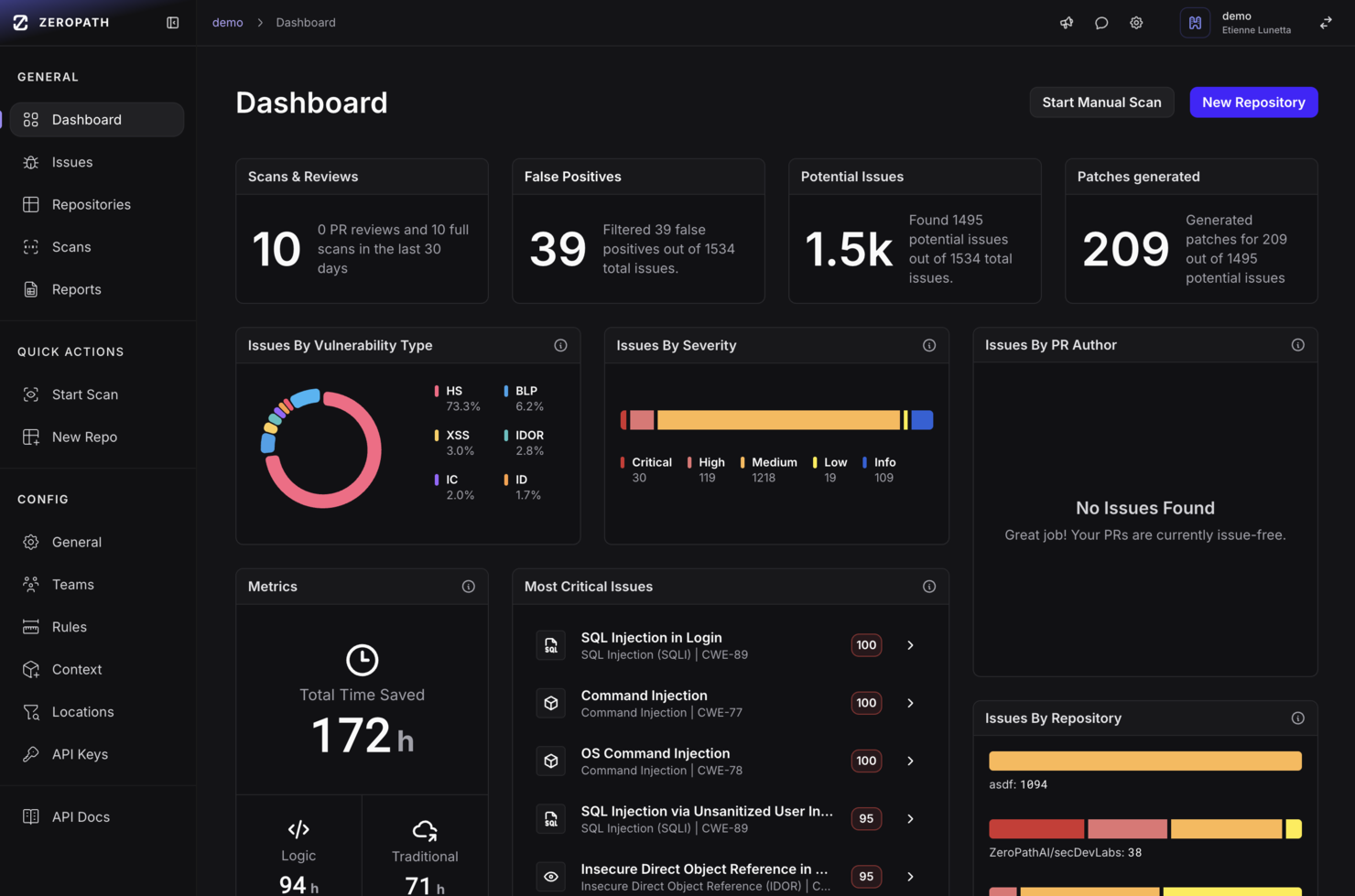
Per le organizzazioni che desiderano rafforzare la sicurezza delle proprie applicazioni, Zeropath offre una sofisticata soluzione di Static Application Security Testing (SAST) basata sull'IA. Ideale per aziende innovative, questa piattaforma eccelle nell’identificare e correggere automaticamente le vulnerabilità del codice, le violazioni della conformità e i problemi di sicurezza, offrendo un'integrazione fluida nel flusso di lavoro di sviluppo esistente.
Perché ho scelto Zeropath
Ho scelto Zeropath per il suo approccio basato sull'intelligenza artificiale al test statico di sicurezza delle applicazioni, che si distingue per la capacità di ridurre drasticamente i falsi positivi. Questa caratteristica è fondamentale per i team di sviluppo che cercano accuratezza ed efficienza nel rilevamento delle vulnerabilità. Inoltre, la sua integrazione senza soluzione di continuità con strumenti per sviluppatori come GitHub e GitLab fornisce feedback immediati e correzioni generate dall'IA, semplificando il processo di revisione della sicurezza. La capacità di triage contestuale di Zeropath garantisce inoltre che il team possa dare priorità e affrontare rapidamente le vulnerabilità più critiche.
Caratteristiche principali di Zeropath
Oltre alle sue funzionalità di intelligenza artificiale, Zeropath offre molte altre funzionalità preziose:
- Rilevamento profondo delle vulnerabilità: La piattaforma esegue una scansione approfondita del codice per identificare vulnerabilità complesse di sicurezza che altri strumenti potrebbero non rilevare.
- Capacità di gestione del rischio: Fornisce una panoramica completa dei potenziali rischi di sicurezza, consentendo al tuo team di gestirli e mitigarli in modo efficace.
- Reportistica di conformità: Zeropath include strumenti di reportistica di conformità robusti per aiutare la tua organizzazione a rimanere allineata agli standard e alle normative di settore.
- Dashboard per dirigenti: Queste dashboard offrono una visione di alto livello della tua postura di sicurezza, facilitando decisioni informate per gli stakeholder.
Integrazioni Zeropath
Le integrazioni includono GitHub, GitLab, Bitbucket, Jira, Slack, Linear e Azure DevOps.
Pros and Cons
Pros:
- Fornisce soluzioni chiare che velocizzano le revisioni di sicurezza.
- Riduce i risultati rumorosi così il tuo team può concentrarsi sui problemi reali.
- Individua errori logici e rischi nascosti che potresti non cogliere con scansioni normali.
Cons:
- Potrebbe essere necessario un periodo di adattamento del flusso di lavoro all'automazione.
- Possibilità di vulnerabilità non rilevate se l'IA non è configurata correttamente.

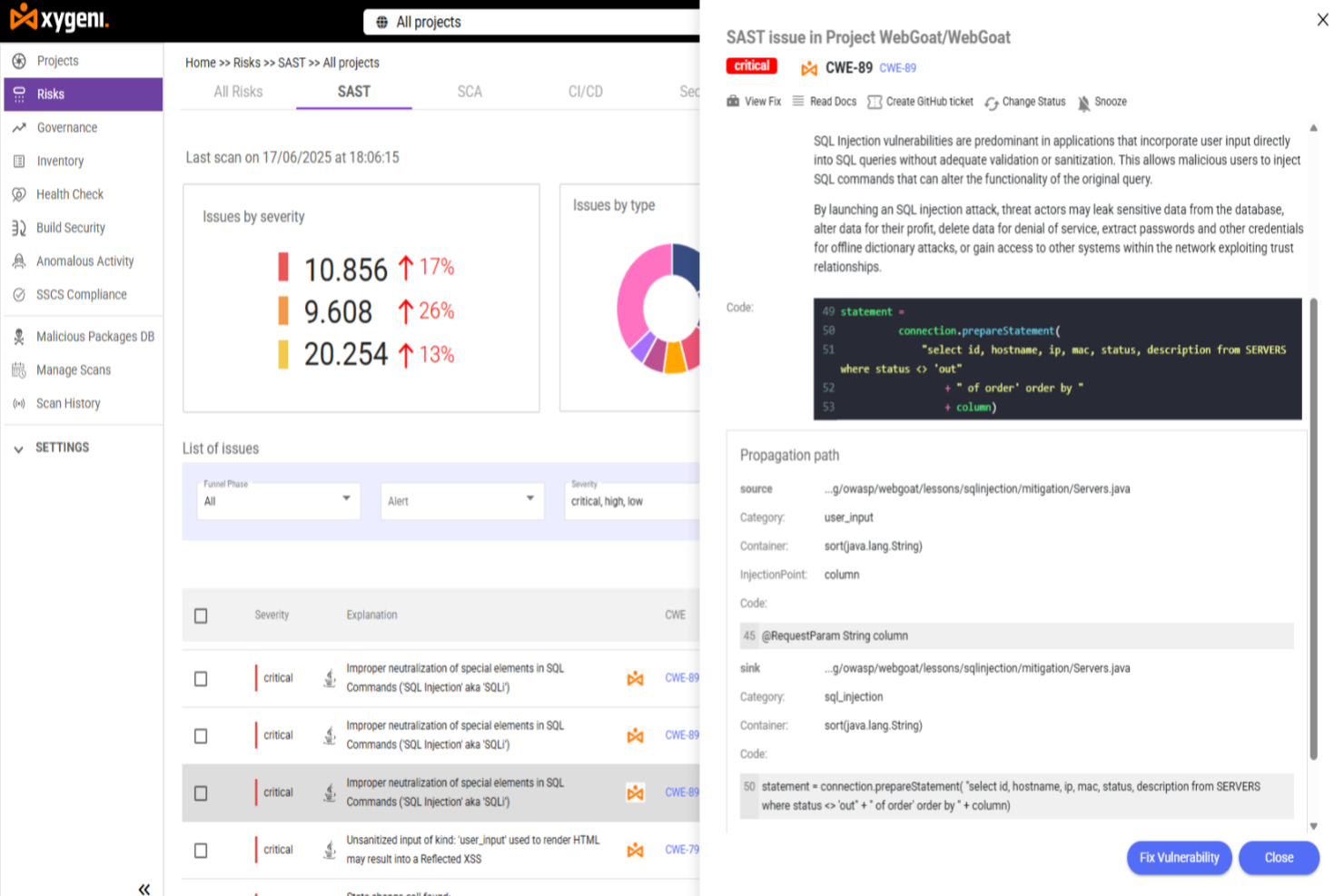
Per sviluppatori e team di sicurezza che cercano una soluzione affidabile per il testing statico della sicurezza delle applicazioni, Xygeni offre SAST potenziato dall’IA, analisi contestuale del rischio e correzione assistita dall’IA su codice applicativo e tutta la supply chain software. È progettato per aiutarti a rilevare le vulnerabilità precocemente, a priorizzarle in base all’esposizione reale e a gestirle direttamente nei tuoi flussi di lavoro di sviluppo. La piattaforma si concentra sulla riduzione del rumore degli alert migliorando al contempo la precisione della valutazione di sicurezza.
Perché ho scelto Xygeni
Ho scelto Xygeni per la sua priorizzazione dei rischi senza rumore, guidata da triage intelligente e analisi contestuale tramite IA. La piattaforma valuta le vulnerabilità in base a raggiungibilità, sfruttabilità, contesto delle dipendenze e analisi dell’esposizione, aiutando il tuo team a concentrarsi solo sui problemi che comportano un reale rischio invece che su semplici rilevamenti superficiali. Le funzionalità di correzione assistita dall’IA permettono, inoltre, di risolvere in automatico alcune problematiche, riducendo l’impegno manuale e sostenendo cicli di sviluppo sicuri più rapidi.
Caratteristiche principali di Xygeni
Oltre alle sue funzionalità di spicco, Xygeni offre altre capacità in linea con le esigenze di sicurezza:
- Triage IA e funnel di rischio personalizzabile: Classifica automaticamente i rilevamenti e permette di adattare i criteri di priorità alle caratteristiche dell’ambiente e alla tolleranza al rischio.
- Prioritizzazione contestuale: Usa raggiungibilità, sfruttabilità, analisi delle dipendenze e del contesto di esposizione per classificare le vulnerabilità in base al rischio reale.
- SAST alimentato dall’IA: Analizza il codice sorgente per individuare vulnerabilità e propone soluzioni direttamente in IDE e richieste pull.
- Rilevamento malware in tempo reale nel codice applicativo: Analizza codice proprietario e open source per identificare comportamenti malevoli, pattern sospetti e minacce nella supply chain software.
- Inventario degli asset automatizzato: Mantiene aggiornato l’inventario dei componenti e delle dipendenze software tra i vari progetti.
Integrazioni Xygeni
Le integrazioni includono GitHub, GitLab, Jenkins, Azure DevOps, Bitbucket, Slack, Jira e sistema ticketing GitHub.
Pros and Cons
Pros:
- Scansione privacy-first che garantisce la sicurezza dei dati
- Analisi a livello di funzione che priorizza le vulnerabilità
- Rilevamento in tempo reale che riduce il rischio di sicurezza
Cons:
- Il prezzo potrebbe essere elevato per alcuni team
- Integrazioni limitate rispetto ai concorrenti

Ideale per il triage delle vulnerabilità potenziato dall'intelligenza artificiale

Aikido Security è una piattaforma che analizza il tuo codice sorgente per identificare le vulnerabilità di sicurezza prima che diventino problemi. Analizzando la tua base di codice, rileva punti deboli come SQL injection, cross-site scripting (XSS) e buffer overflow, offrendo indicazioni chiare su come risolverli.
Perché ho scelto Aikido Security: Il motore SAST di Aikido si concentra esclusivamente sulla sicurezza, filtrando le questioni non legate alla sicurezza come la leggibilità del codice e lo stile. Questo significa che riceverai solo avvisi rilevanti, riducendo le distrazioni e permettendo al tuo team di concentrarsi sulle vere vulnerabilità. Inoltre, Aikido supporta tutti i principali linguaggi di programmazione, garantendo una copertura completa su basi di codice diverse.
Caratteristiche principali e integrazioni:
Altre funzionalità includono un sistema di auto-triage basato su intelligenza artificiale che prioritizza le vulnerabilità, elimina i falsi positivi e fornisce consigli attuabili. Offre anche la scansione delle dipendenze, supporto IDE integrato, protezione runtime, gestione della postura cloud, scansione delle dipendenze open source, rilevamento di segreti e scansione dell'infrastruttura come codice.
Le integrazioni includono Amazon Web Services (AWS), Google Cloud, Microsoft Azure Cloud, Drata, Vanta, AWS Elastic Container Registry, Docker Hub, Jira, Asana e GitHub.
Pros and Cons
Pros:
- Scalabile per team in crescita
- Offre indicazioni attuabili
- Ha una dashboard completa e report personalizzabili
Cons:
- Disponibile solo in inglese
- Ignora le vulnerabilità se non è disponibile una correzione
New Product Updates from Aikido Security
Aikido Security Adds Pentest for AI Capabilities
Aikido Security adds Pentest for AI to test agents and LLM features against OWASP Agentic Top 10 risks. This helps teams identify AI-specific security weaknesses before they reach production. For more information, visit Aikido Security’s official site.

Ideale per l'analisi avanzata del flusso di dati (taint analysis)
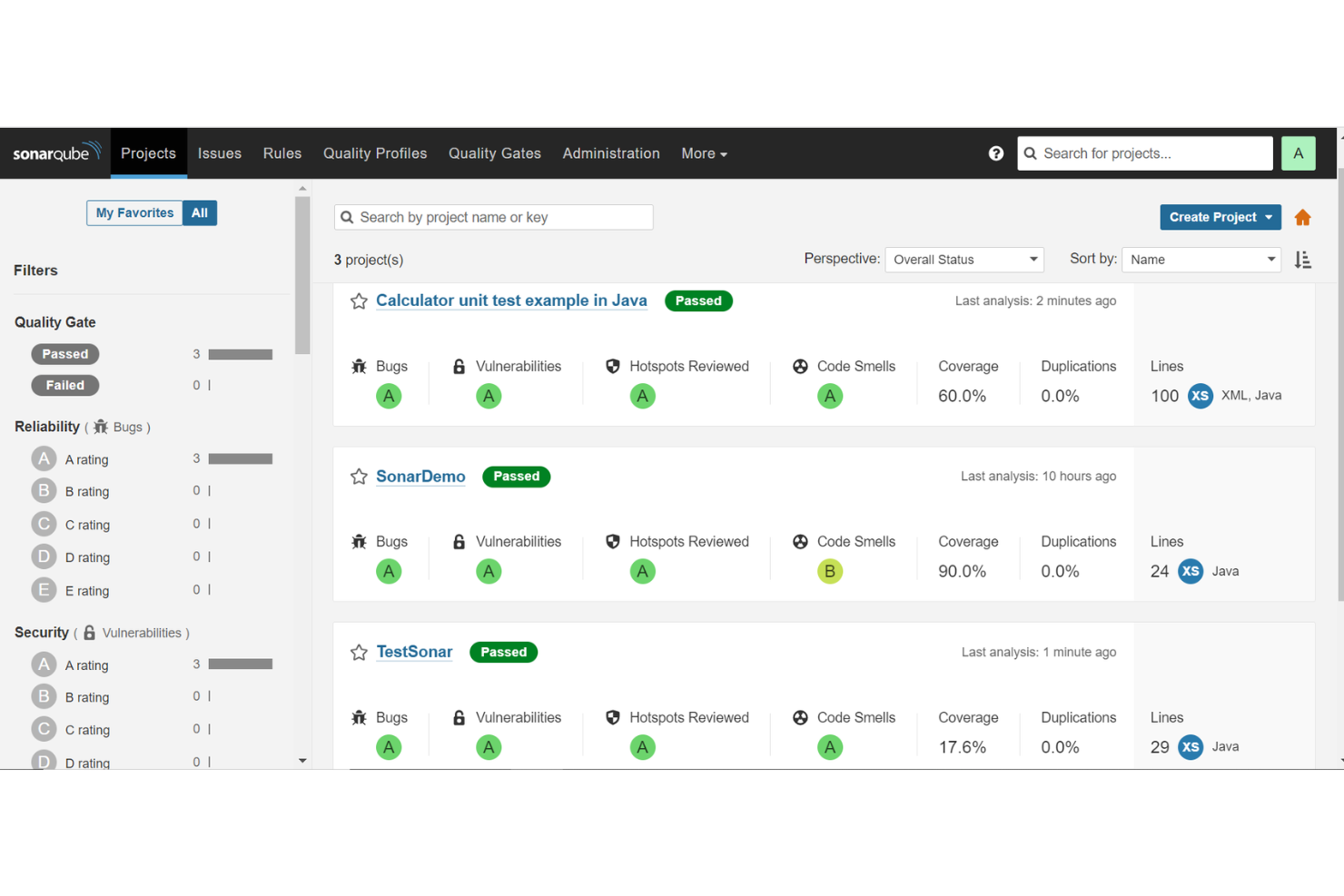
SonarQube è una piattaforma di static application security testing (SAST) che offre analisi automatica del codice, rilevamento delle vulnerabilità e applicazione di regole personalizzabili su un'ampia gamma di linguaggi di programmazione. Si integra nei flussi di lavoro di sviluppo per aiutare i team a identificare e risolvere problemi di sicurezza prima della messa in produzione.
Per chi è più indicato SonarQube?
Per team di sviluppo e DevOps in aziende di medie e grandi dimensioni che necessitano di controlli automatizzati sulla sicurezza e qualità del codice integrati nei pipeline CI/CD.
Perché ho scelto SonarQube
Ho scelto SonarQube per le sue avanzate capacità di analisi del flusso di dati (taint analysis), che aiutano a rilevare vulnerabilità nel flusso dei dati attraverso le applicazioni. Identifica come gli input non attendibili si propagano nel codice e mette in evidenza possibili rischi di injection o pattern non sicuri. In combinazione con quality gate personalizzabili, permette ai team di imporre standard di sicurezza prima di eseguire il merge del codice.
Caratteristiche principali di SonarQube
- Supporto multi-linguaggio: Analizza codice in oltre 30 linguaggi di programmazione da una sola piattaforma.
- Quality gate: Impone standard di superamento/fallimento per sicurezza e manutenibilità prima del merge.
- Analisi delle pull request: Scansiona le pull request e mostra i problemi direttamente nei flussi di lavoro di controllo versione.
- Creazione di regole personalizzate: Costruisci e applica regole di analisi statica specifiche per la tua organizzazione.
Integrazioni SonarQube
SonarQube si integra con GitHub, GitLab, Bitbucket, Azure DevOps, Jenkins e Bamboo. Supporta i flussi di lavoro CI/CD e offre un'API per integrazioni personalizzate.
Pros and Cons
Pros:
- Rileva vulnerabilità di sicurezza in diversi linguaggi
- Offre quality gate e regole personalizzabili
- Si integra con le principali piattaforme CI/CD
Cons:
- Le funzionalità avanzate richiedono le edizioni a pagamento
- La configurazione può essere complessa per progetti di grandi dimensioni
New Product Updates from SonarQube
SonarQube Cloud Expands Rust Analysis and Quality Controls
SonarQube Cloud now delivers enterprise-grade Rust verification by complementing Clippy and treating it as a dependency, preserving local workflows while enabling organization-wide quality and security governance. For more information, visit SonarQube's official site.
 .
.
Snyk
Ideale per approfondimenti sul codice open-source

Snyk è una piattaforma di sicurezza di rilievo pensata per rilevare e risolvere le vulnerabilità nelle librerie open-source e nei container. Concentrandosi sulle particolarità dei codebase open-source, Snyk offre ai team preziose informazioni, garantendo uno sviluppo e una distribuzione delle applicazioni più sicuri.
Perché ho scelto Snyk: Ho selezionato Snyk dopo aver confrontato attentamente diversi strumenti dedicati alla sicurezza open-source. Snyk si è distinto nettamente grazie al suo database di vulnerabilità approfondito e alla chiarezza delle analisi sul codice. Queste caratteristiche rendono Snyk indiscutibilmente 'la soluzione migliore per approfondimenti sul codice open-source'.
Funzionalità e integrazioni di rilievo:
Il fulcro dell’offerta di Snyk è il suo vasto database di vulnerabilità, regolarmente aggiornato, che consente un rilevamento delle minacce preciso e tempestivo. Inoltre, Snyk offre controlli sulla conformità delle licenze e consigli per la risoluzione dei problemi, elementi preziosi per i progetti open-source.
Per quanto riguarda le integrazioni, Snyk supporta un ampio ventaglio di piattaforme, da GitHub e Bitbucket ai più noti pipeline CI/CD, assicurando che i controlli di sicurezza vengano facilmente integrati nei flussi di lavoro di sviluppo.
Pros and Cons
Pros:
- Database delle vulnerabilità completo e pensato per progetti open-source
- Le funzionalità di conformità delle licenze garantiscono protezione legale
- Le ampie capacità di integrazione semplificano il processo di sviluppo
Cons:
- Rivolto principalmente a progetti open-source, quindi non adatto a tutte le tipologie di applicazioni
- La profondità degli approfondimenti potrebbe risultare eccessiva per i nuovi utenti
- Senza dettagli chiari sui prezzi, la pianificazione del budget può risultare complessa

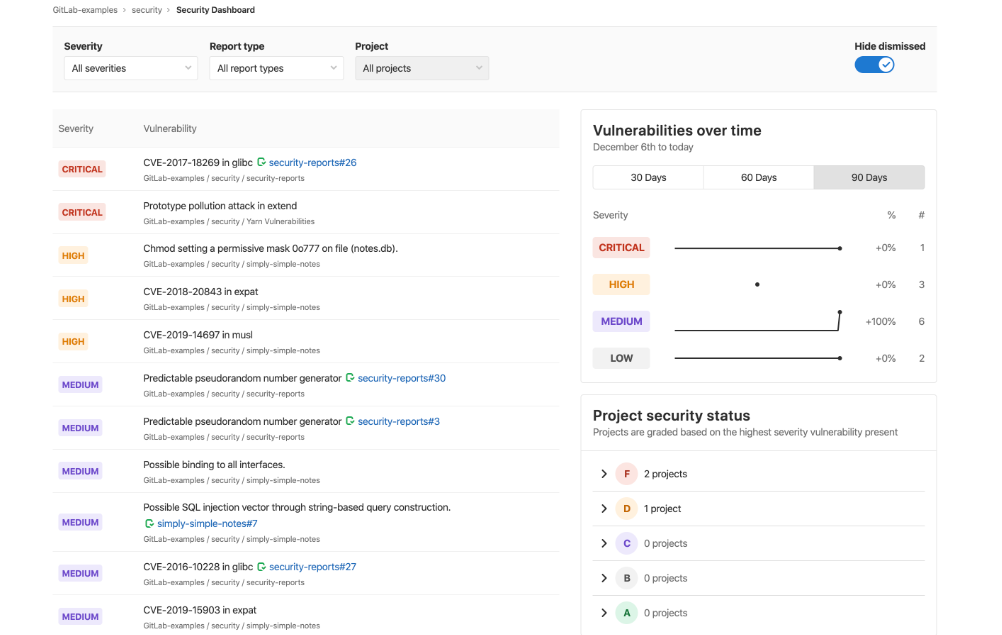
GitLab è una piattaforma DevOps completa che unisce la gestione del codice sorgente, l'integrazione continua e la distribuzione continua (CI/CD) in un'unica interfaccia. L'inclusione di funzionalità di sicurezza integrate garantisce che il processo di sviluppo software sia protetto in ogni fase, rendendolo ideale per i team che desiderano una soluzione di sicurezza integrata.
Perché ho scelto GitLab: Nella mia ricerca di uno strumento DevOps completo con una forte attenzione alla sicurezza, GitLab si è distinto come uno dei migliori. Il suo approccio unificato al ciclo di vita dello sviluppo software e i componenti di sicurezza integrati lo differenziano da molti strumenti standalone. Il modo in cui GitLab fonde facilmente sviluppo e sicurezza è il motivo principale per cui credo sia il 'migliore per la sicurezza DevOps integrata.'
Funzionalità principali e integrazioni:
GitLab offre scansioni di sicurezza automatizzate nelle sue pipeline CI/CD, assicurando che il codice venga valutato per le vulnerabilità prima della distribuzione. Inoltre, le sue capacità di sicurezza dei container proteggono sia i container Docker che i cluster Kubernetes.
Per quanto riguarda le integrazioni, GitLab supporta un'ampia gamma di strumenti come Jenkins, JIRA e Kubernetes, consentendo ai team di mantenere gli stack tecnologici esistenti sfruttando al contempo le funzionalità di GitLab.
Pros and Cons
Pros:
- DevOps e sicurezza consolidati in un'unica piattaforma
- Robuste funzionalità di sicurezza dei container per il deployment di applicazioni moderne
- Vasta possibilità di integrazione con popolari strumenti di sviluppo
Cons:
- Curva di apprendimento più ripida a causa dell'ampia gamma di funzionalità
- Le prestazioni possono variare a seconda della scala dei progetti
- Alcune funzionalità avanzate di sicurezza sono riservate a livelli di prezzo superiori

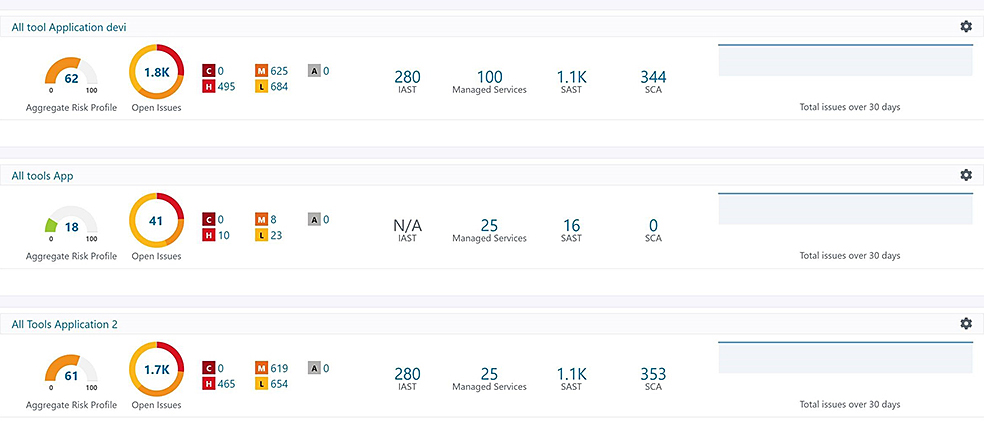
Synopsys offre una piattaforma completa per la sicurezza delle applicazioni che copre vari aspetti dell’assicurazione del software, dall’analisi del codice all’intelligence sulle minacce. La natura olistica delle sue soluzioni garantisce alle aziende una visione approfondita, consentendo di affrontare le vulnerabilità in ogni fase del ciclo di vita del software.
Perché ho scelto Synopsys: Durante la selezione degli strumenti per questa raccolta, Synopsys si è distinto per il suo approccio tutto compreso alla sicurezza delle applicazioni. Dalle mie ricerche e confronti, ho individuato nella capacità di offrire una soluzione end-to-end il suo principale tratto distintivo.
Con l’esigenza crescente per le aziende di garantire una sicurezza solida lungo tutto il ciclo di vita delle applicazioni, credo che Synopsys sia realmente la scelta giusta come “migliore per la sicurezza applicativa olistica”.
Funzionalità e integrazioni di rilievo:
Alla base, Synopsys offre funzionalità come l’analisi statica del codice, l’analisi della composizione del software e il penetration testing. Queste agevolano l’identificazione precoce e continua delle vulnerabilità. In termini di integrazione, Synopsys si collega senza problemi a una vasta gamma di strumenti di sviluppo e operativi, assicurando che la sicurezza diventi parte integrante del processo di delivery del software.
Pros and Cons
Pros:
- Fornisce una suite completa di strumenti per la sicurezza delle applicazioni
- Supporta il rilevamento precoce delle vulnerabilità grazie all'analisi statica del codice
- Si integra bene con i più diffusi strumenti DevOps
Cons:
- Potrebbe avere una curva di apprendimento più ripida per i principianti
- Le funzionalità complete possono risultare impegnative per i team più piccoli
- L’ampiezza degli strumenti potrebbe portare a ridondanze in alcuni casi d’uso

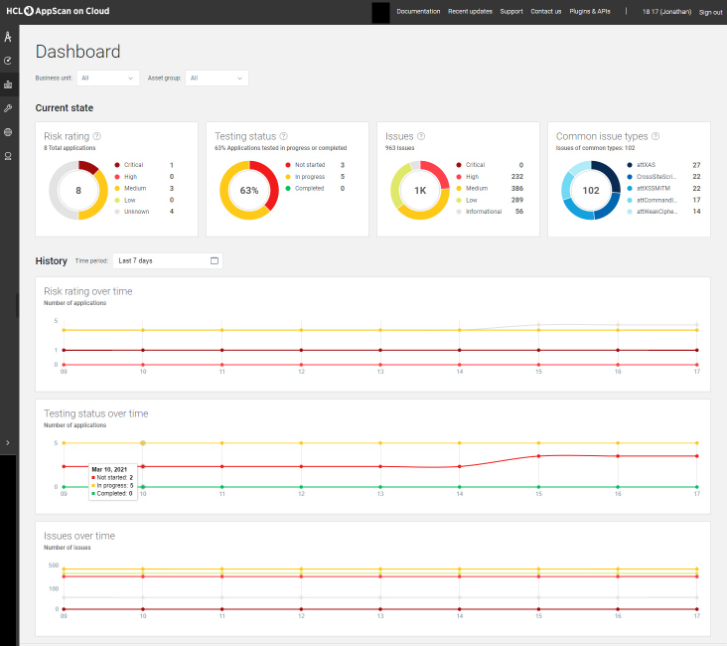
HCL AppScan è una soluzione completa per la sicurezza software che aiuta le aziende a identificare, correggere e prevenire le vulnerabilità nelle loro applicazioni. Con la crescita delle organizzazioni, aumenta la necessità di soluzioni di sicurezza scalabili, rendendo AppScan uno strumento essenziale per le imprese di grandi dimensioni.
Perché ho scelto HCL AppScan: Nel confrontare vari strumenti di sicurezza, ho riscontrato che HCL AppScan offre funzionalità robuste adatte alle grandi aziende. La sua proposta di valore unica risiede nella capacità di scalare insieme alla crescita dell'organizzazione, garantendo la sicurezza senza ostacolare l'espansione. Sono certo che sia la 'migliore soluzione per aziende in crescita' grazie alla sua comprovata esperienza e alla capacità di gestire esigenze di sicurezza su larga scala.
Caratteristiche principali e integrazioni:
HCL AppScan offre test di sicurezza applicativa sia dinamici che statici, assicurando che le app siano sicure sia a livello di codice che durante il runtime. Inoltre, il suo Interactive Application Security Testing (IAST) colma il divario tra test statici e dinamici.
Per quanto riguarda le integrazioni, AppScan offre connessioni con pipeline CI/CD, promuovendo così pratiche DevOps sicure.
Pros and Cons
Pros:
- Supporta sia i test di sicurezza delle applicazioni dinamici che statici
- Integrazione efficiente con strumenti CI/CD
- Progettato per la scalabilità, ideale per grandi organizzazioni
Cons:
- Potrebbe essere eccessivo per piccole imprese o startup
- È necessaria una certa competenza per un utilizzo ottimale
- Il vasto set di funzionalità può risultare intimidatorio per i nuovi utenti

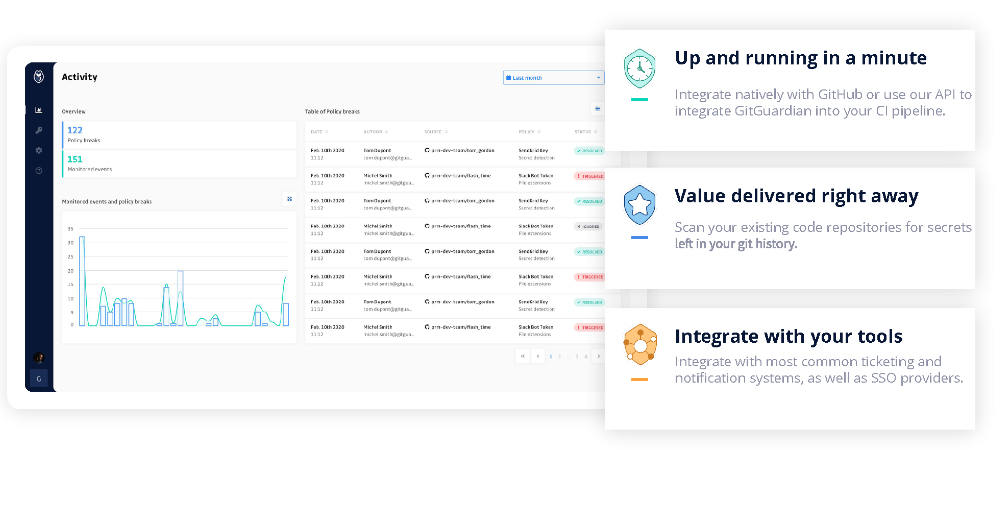
GitGuardian è specializzato nel monitoraggio delle basi di codice e nell'individuazione di fughe accidentali di informazioni sensibili, come chiavi API o credenziali. Con un numero crescente di violazioni che hanno origine da segreti esposti in repository pubblici, GitGuardian rappresenta una linea di difesa fondamentale per le organizzazioni.
Perché ho scelto GitGuardian: Ho selezionato GitGuardian dopo un'attenta analisi di diversi strumenti volti a proteggere i repository di codice. L'approccio mirato di GitGuardian nell'identificare i segreti esposti e i suoi solidi algoritmi di rilevamento lo hanno reso il favorito indiscusso. La sua precisione nell'individuare potenziali fughe di dati è il motivo per cui lo considero 'il migliore per rilevare fughe di dati sensibili.'
Caratteristiche principali e integrazioni:
Una delle funzionalità più importanti di GitGuardian è la capacità di eseguire una scansione continua sia dei repository pubblici che privati per oltre 200 tipi di segreti. Inoltre, la sua piattaforma di risposta agli incidenti consente ai team di agire tempestivamente sulle vulnerabilità individuate.
Per quanto riguarda le integrazioni, GitGuardian si collega facilmente a piattaforme come GitHub, GitLab e Bitbucket, assicurando una copertura completa in diversi ambienti di sviluppo.
Pros and Cons
Pros:
- Focus dedicato al rilevamento di fughe di dati sensibili
- Supporta la scansione sia dei repository pubblici che privati
- La piattaforma di risposta agli incidenti consente un intervento tempestivo sulle vulnerabilità
Cons:
- La specificità dello strumento potrebbe non coprire le esigenze di sicurezza più ampie
- La mancanza di trasparenza sui prezzi può rendere difficile per i team pianificare il budget con precisione
- La dipendenza dalle integrazioni di terze parti potrebbe influire sull'efficacia del rilevamento su piattaforme non supportate

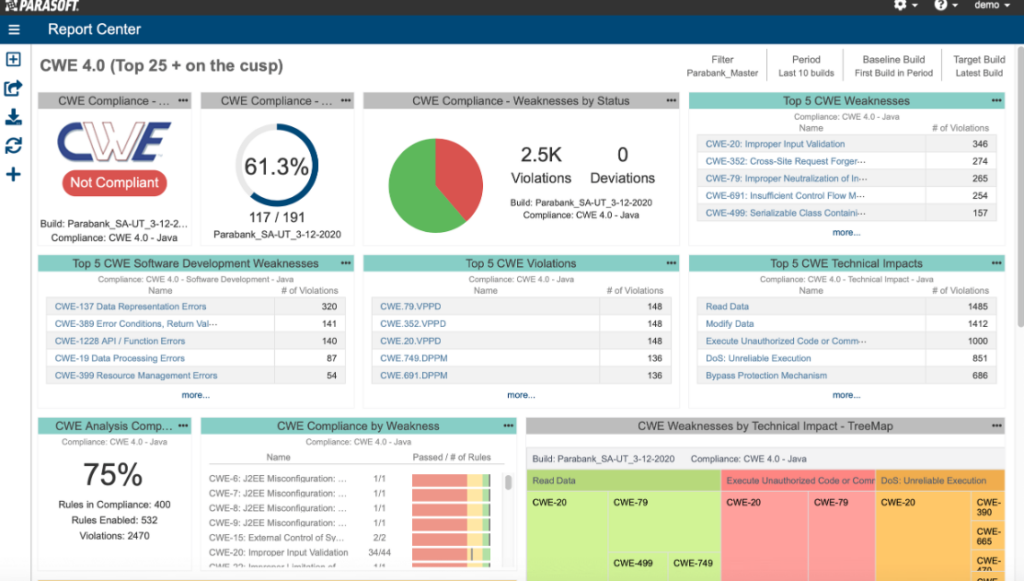
Parasoft Jtest è uno strumento di testing dedicato a Java, progettato scrupolosamente per rafforzare la qualità delle applicazioni Java. Offre una suite esaustiva di funzionalità per garantire che i codici Java non siano solo privi di errori, ma rispettino anche le best practice e gli standard, rendendolo una scelta ideale per il testing delle applicazioni Java.
Perché ho scelto Parasoft Jtest: Ho scelto Parasoft Jtest dopo un attento confronto con altri strumenti di testing Java. Il suo set completo di funzionalità specificamente pensate per Java, unito alla sua reputazione nel settore, lo distingue dai concorrenti.
La mia convinzione che sia 'il migliore per il testing delle applicazioni Java' deriva dalla sua incondizionata attenzione verso Java e le sue relative complessità.
Caratteristiche principali e integrazioni:
Parasoft Jtest eccelle nell'analisi statica, assicurando che i codici rispettino gli standard di codifica. Inoltre, sfrutta la potenza del test di unità e della copertura del codice per garantire che le applicazioni Java siano robuste e resilienti. Dal punto di vista delle integrazioni, Parasoft Jtest collabora perfettamente con i più diffusi strumenti CI/CD e supporta anche l'integrazione con i sistemi di controllo versione.
Pros and Cons
Pros:
- Specializzato in Java, garantendo test accurati
- Ricco set di funzionalità dall'analisi statica alla copertura del codice
- Elevate capacità di integrazione
Cons:
- Potrebbe risultare complesso per sviluppatori Java alle prime armi
- Si concentra principalmente su Java, limitando la versatilità cross-language
- La configurazione iniziale potrebbe richiedere un periodo di apprendimento per alcuni team
Altri strumenti degni di nota per il test statico della sicurezza delle applicazioni
Di seguito è riportato un elenco di ulteriori strumenti per il test statico della sicurezza delle applicazioni che ho selezionato, ma che non sono rientrati tra i primi 12. Vale sicuramente la pena prenderli in considerazione.
- CodePeer
Ideale per un'analisi approfondita del linguaggio Ada
- Legit Security
Ideale per il controllo di sicurezza unificato
- GuardRails
Migliore per feedback di sicurezza continui
- Embold
Ideale per identificare gli anti-pattern
- Dynatrace
Ideale per il rilevamento delle minacce in tempo reale
- Mend.io
Ideale per la sicurezza delle moderne applicazioni web


Criteri di selezione per scegliere i migliori strumenti per il test statico della sicurezza delle applicazioni
Nella mia ricerca dei migliori strumenti per il test statico della sicurezza delle applicazioni, non mi sono accontentato di valutazioni superficiali. Ho analizzato e testato in profondità numerosi strumenti per individuare le soluzioni migliori in questo ambito. Da questa valutazione approfondita ho ricavato alcuni criteri fondamentali, mettendo funzionalità specifiche in primo piano nella mia selezione.
Ecco un'analisi dettagliata di ciò che, secondo le mie conclusioni, conta di più:
Funzionalità principali
- Rilevamento delle vulnerabilità: Lo scopo principale di qualsiasi strumento SAST. Dovrebbe individuare in modo efficiente e accurato i potenziali difetti di sicurezza nel codice sorgente.
- Compatibilità con la base di codice: Capacità di analizzare più linguaggi di programmazione e framework, per garantire che nessuna parte dell'applicazione rimanga non controllata. Ciò significa che, sia che tu stia proteggendo strumenti di analisi statica del codice per Java sia che tu stia lavorando con Python, il software rimane compatibile.
- Integrazione continua: Facile integrazione nella pipeline CI/CD, che consente controlli del codice regolari e automatizzati come parte del processo di sviluppo.
- Prioritizzazione dei rischi: Non si tratta solo di trovare le vulnerabilità, ma anche di classificarle in base alla gravità per affrontare prima quelle più critiche.
Funzionalità chiave
- Creazione di regole personalizzate: consente agli utenti di definire il proprio insieme di regole, adattato alle esigenze specifiche della loro applicazione.
- Scansione del codice binario: alcuni strumenti offrono la possibilità di valutare le applicazioni compilate, analizzandole senza il codice sorgente originale.
- Feedback in tempo reale: il feedback immediato mentre gli sviluppatori scrivono o eseguono il commit del codice favorisce un approccio proattivo alla sicurezza.
- Scansioni basate sul cloud: offrono flessibilità e scalabilità, particolarmente importanti per le aziende più grandi o per quelle con team distribuiti.
Usabilità
- Pannello di controllo intuitivo: per uno strumento SAST, una rappresentazione visiva delle vulnerabilità, completa di percorsi dei file e grafici sulla gravità, è fondamentale. Ciò aiuta a comprendere rapidamente il livello di sicurezza dell'applicazione.
- Integrazioni semplici: gli strumenti SAST dovrebbero offrire integrazioni immediate con gli IDE e i sistemi di controllo delle versioni più diffusi, riducendo gli attriti nel processo di sviluppo.
- Accesso basato sui ruoli: garantisce che l'accesso ai risultati delle scansioni e alle configurazioni sia limitato al personale autorizzato, rafforzando la sicurezza all'interno dello strumento di sicurezza.
- Documentazione completa: data la natura tecnica di questi strumenti, una base di conoscenza completa, corredata da casi d'uso comuni e suggerimenti per la risoluzione dei problemi, è essenziale per l'inserimento degli utenti e il supporto continuo.
Domande più comuni sui tool per i test di sicurezza delle applicazioni statiche (FAQ)
Quali sono i vantaggi dell'utilizzo di un tool SAST?
L’utilizzo di un tool SAST offre diversi vantaggi:
- Rilevamento precoce: Identifica le vulnerabilità nelle prime fasi del ciclo di sviluppo, persino prima che il codice venga eseguito.
- Efficienza dei costi: Affrontare i problemi in anticipo è generalmente meno costoso che risolverli dopo la distribuzione.
- Miglioramento del livello di sicurezza: Ottieni una visione completa della sicurezza dell’applicazione, consentendo una migliore gestione del rischio.
- Formazione degli sviluppatori: Il feedback in tempo reale informa gli sviluppatori sulle migliori pratiche di sicurezza, migliorando gli standard di codifica.
- Conformità normativa: Molti tool aiutano a soddisfare i requisiti di conformità alla sicurezza specifici del settore.
Quanto costano generalmente questi tool?
Il costo dei tool SAST può variare notevolmente a seconda delle funzionalità, della scalabilità e del mercato di riferimento (aziende o singoli sviluppatori). I prezzi possono variare da pochi dollari al mese per i tool di base a diverse migliaia di dollari all’anno per le soluzioni di livello aziendale.
Quali sono i modelli di prezzo più comuni per i tool SAST?
I provider SAST adottano diversi modelli di prezzo:
- Per utente/sviluppatore: Il prezzo si basa sul numero di utenti o sviluppatori che accedono al tool.
- Per scansione: Il costo si basa sul numero di scansioni effettuate.
- Basato sull’abbonamento: Abbonamenti mensili o annuali che offrono scansioni illimitate durante il periodo di validità.
- Prezzi a livelli: Diversi livelli di prezzo basati sulle funzionalità, sul numero di scansioni o sulle dimensioni della base di codice.
Qual è la fascia di prezzo tipica per questi tool?
La fascia di prezzo può essere molto ampia. Per i singoli sviluppatori o i piccoli progetti, i prezzi possono partire da soli $10-$50 al mese. Per le aziende più grandi o i tool più completi, il costo può variare da $1,000 a $5,000 all’anno o anche di più.
Quali sono alcune delle opzioni software più economiche e più costose?
Tra le opzioni più convenienti ci sono tool come Semgrep o DeepSource, che offrono prezzi competitivi per singoli sviluppatori o piccoli team. D’altra parte, le soluzioni di livello aziendale come Checkmarx o Veracode Static Analysis tendono a trovarsi nella fascia più alta dello spettro a causa delle loro numerose funzionalità e della scalabilità.
Sono disponibili opzioni gratuite di tool SAST?
Sì, sono disponibili tool SAST gratuiti, spesso sotto forma di progetti open source. Ad esempio, Semgrep offre un piano gratuito e sono disponibili altre opzioni open source come FlawFinder o Brakeman per le applicazioni Ruby on Rails. Tuttavia, le versioni gratuite possono presentare limitazioni in termini di funzionalità o numero di scansioni.
Il prezzo di questi tool è generalmente una tariffa una tantum o ricorrente?
La maggior parte dei tool SAST adotta un modello di prezzo ricorrente, mensile, trimestrale o annuale. Alcuni potrebbero offrire opzioni di acquisto una tantum, ma sono meno comuni nel settore.
Questi tool offrono generalmente periodi di prova o demo?
Sì, molti tool SAST offrono periodi di prova, consentendo agli utenti di testarne le funzionalità e l’efficienza prima di decidere se effettuare l’acquisto. Questa fase di prova può durare da una settimana a un mese, a seconda del tool.
Recensioni di altri software per i test di sicurezza
Riepilogo
Selezionare il miglior tool per i test di sicurezza delle applicazioni statiche (SAST) è un passaggio essenziale per garantire la sicurezza del codice sorgente di un'applicazione. In questa guida ho analizzato in profondità le funzionalità principali, le caratteristiche essenziali, gli aspetti legati all'usabilità e i criteri fondamentali che contano maggiormente nella scelta della soluzione SAST giusta.
Oltre alla semplice identificazione delle vulnerabilità, il tool giusto può offrire informazioni preziose, favorire migliori abitudini di codifica tra gli sviluppatori e garantire la conformità normativa.
Punti chiave
- La rilevazione precoce è importante: il vantaggio principale degli strumenti SAST è la loro capacità di rilevare le vulnerabilità nelle fasi iniziali del ciclo di vita dello sviluppo, rendendo il processo conveniente e migliorando il livello di sicurezza complessivo.
- Usabilità ed esperienza utente: oltre alla semplice funzionalità, considera la progettazione dello strumento, la facilità di onboarding, l'interfaccia e l'assistenza clienti. Uno strumento SAST efficace dovrebbe integrarsi nel flusso di lavoro degli sviluppatori.
- Prezzo rispetto al valore: sebbene il prezzo sia un fattore essenziale da considerare, è fondamentale valutare il costo in rapporto al valore offerto. Alcuni strumenti possono essere costosi, ma le loro funzionalità complete, la scalabilità e la precisione possono offrire un ritorno sull'investimento maggiore.
Cosa ne pensi?
Sebbene abbia svolto ricerche e test approfonditi per creare questo elenco, il campo dei test di sicurezza statici delle applicazioni è vasto e in continua evoluzione. Se hai trovato utili altri strumenti per l'analisi statica delle applicazioni o per l'analisi della composizione del software che non ho incluso, mi farebbe piacere saperlo. Condividi i tuoi suggerimenti o le tue esperienze nei commenti e rendiamo questa risorsa ancora più completa per tutti. Le tue opinioni potrebbero essere fondamentali per aiutare altri a trovare lo strumento SAST ideale.