

In questo articolo condividerò le mie migliori scelte per i software di gestione dei requisiti. Ho testato e recensito in modo indipendente ciascuno di essi, quindi puoi fidarti delle mie valutazioni. Il mio obiettivo è aiutarti a trovare uno strumento che semplifichi i tuoi processi e aumenti la produttività del tuo team.
Troverai un'analisi imparziale di ogni software, con un'attenzione particolare a funzionalità, vantaggi e svantaggi. Che tu faccia parte di un piccolo team o di una grande azienda, qui troverai qualcosa di adatto a te. Scopriamo insieme quale soluzione è più adatta alle tue esigenze.
Perché fidarsi dei nostri consigli sui software
6,700+
Reviews
20
Industry experts
16+
Evaluation factors
14
Years
Il nostro team testa e recensisce software dal 2012. In quanto leader tecnologici noi stessi, sappiamo quanto sia difficile — e importante — scegliere il software giusto.
Per questa guida, abbiamo valutato gli strumenti attraverso test praticie ricerche indipendenti, assegnando un punteggio agli strumenti in base ai nostri criteri di selezione.
Le nostre recensioni riflettono il nostro giudizio editoriale umano, non un discorso di vendita.
Revisori esperti:
- Paulo Gardini MiguelDirettore tecnico
 Tim FisherVP dell'IA
 Gabriel RosasTech Lead e architetto software
 Christhian GruhnTech Lead e architetto della piattaforma

Riepilogo dei migliori software per la gestione dei requisiti
| Tool | Best For | Trial Info | Price | ||
|---|---|---|---|---|---|
| 1 | Ideale per la conformità normativa dei dispositivi medici | Demo gratuita disponibile | Prezzo su richiesta | Website | |
| 2 | Ottimo con collaboratori illimitati inclusi | Piano gratuito disponibile | Da $1,990/anno | Website | |
| 3 | Ideale per la personalizzazione nella gestione dei requisiti | Demo gratuita disponibile | Prezzo su richiesta | Website | |
| 4 | Ideale per la gestione di progetti su larga scala | Prova gratuita di 30 giorni disponibile | Prezzo su richiesta | Website | |
| 5 | Ideale per la tracciabilità end-to-end | Prova gratuita disponibile | A partire da $520/utente/anno | Website | |
| 6 | Ideale per un’elevata personalizzabilità a livello aziendale | Prova gratuita di 30 giorni | Prezzo disponibile su richiesta | Website | |
| 7 | Ideale per integrazioni API pronte all'uso | Prova gratuita di 30 giorni + demo gratuita disponibile | Prezzo su richiesta | Website | |
| 8 | Ideale con una help desk ITSM | Prova gratuita di 7 giorni + piano free disponibile | Da $20/mese | Website | |
| 9 | Ideale per implementazioni su larga scala | Demo gratuita disponibile | Prezzo su richiesta | Website | |
| 10 | Ideale per le funzionalità di tracciabilità | Prezzo su richiesta | Website |


Recensioni dei migliori software per la gestione dei requisiti
 Ideale per la conformità normativa dei dispositivi medici
- Demo gratuita disponibile
- Prezzo su richiesta
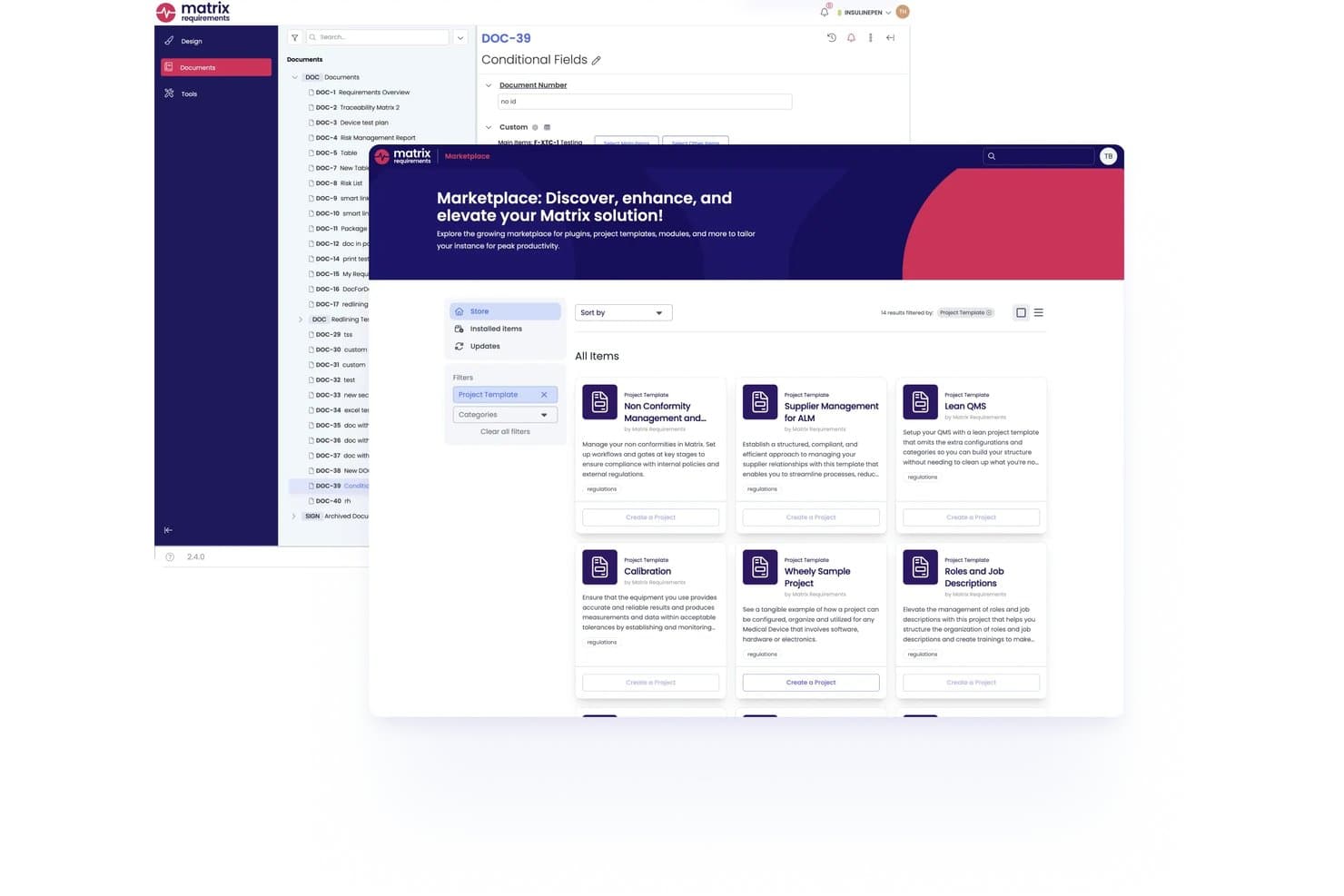
Matrix Req offre un Marketplace integrato dove gli utenti possono scoprire e installare template di progetti, plugin e moduli direttamente dalla piattaforma. Matrix Req è una piattaforma di gestione dei requisiti progettata specificamente per lo sviluppo di dispositivi medici, che combina controllo di progettazione, gestione del rischio, tracciabilità end-to-end e gestione dei test in un unico ambiente pronto per la conformità normativa.
Per chi è Matrix Req?
Matrix Req è una scelta ideale per i team QA e gli uffici regolatori in aziende di dispositivi medici, SaMD e IVD che devono rispettare i requisiti di conformità FDA o EU MDR.
Perché ho scelto Matrix Req
Matrix Req si guadagna un posto nella mia shortlist perché tratta la conformità regolatoria come un'architettura, non come un ripensamento. Apprezzo in particolare il Compliance Checker integrato, che confronta la tua documentazione con standard come ISO 14971 e IEC 62304, segnalando eventuali lacune prima di una sottomissione. La sua gestione dei branch permette inoltre di mantenere varianti distinte dei requisiti per diversi mercati (ad esempio EU MDR rispetto alla FDA) senza dover duplicare l'intera struttura del progetto.
Caratteristiche principali di Matrix Req
- Libreria base dei requisiti riutilizzabili: Archivia e gestisci moduli di requisiti riutilizzabili per una rapida creazione di nuove varianti di prodotto.
- Matrice di tracciabilità bidirezionale: Collega i requisiti a progettazione, test e analisi dei rischi con tracciabilità visiva e in tempo reale.
- Trail di audit automatizzato e versionamento: Tieni traccia di ogni modifica, approvazione e commento con una storia completa e log conformi alle normative.
- Integrazioni ALM native: Sincronizza requisiti e collegamenti con Jira, Azure DevOps, GitHub e GitLab per flussi di lavoro di team unificati.
Integrazioni di Matrix Req
Matrix Req offre integrazioni native con Jira, Azure DevOps, GitHub, GitLab, Confluence, TFS, Broadcom Rally, Phabricator, YouTrack e Slack. È disponibile un'API per integrazioni personalizzate.
Pros and Cons
Pros:
- Tracciabilità end-to-end per settori regolamentati
- Verifiche di conformità integrate per FDA e ISO
- Gestione delle varianti per requisiti di prodotto multi-regione
Cons:
- Interfaccia utente a volte poco intuitiva
- Dettagli sui prezzi non trasparenti
Learn more about Matrix Req: Ottimo con collaboratori illimitati inclusi
- Piano gratuito disponibile
- Da $1,990/anno
Visit WebsiteCustomer Rating:4.6/5This rating combines scores from multiple user review sites to reflect overall customer sentiment about the product.
Interfaccia di Requirements Portal con ID dei requisiti, metodi di tracciabilità e monitoraggio dello stato di verifica in visualizzazione tabellare. Requirements Portal si è guadagnato un posto nella mia lista perché fa una cosa che non vedo nella maggior parte degli altri strumenti: non limita la tua capacità di coinvolgere gli stakeholder. Quando vedo team che hanno bisogno di un ampio contributo—a volte decine di revisori, approvatori o esperti del settore—guardo prima qui.
Apprezzo il modo in cui Requirements Portal ti consente di aggiungere collaboratori illimitati sui requisiti senza obbligarti a passare a un livello costoso o a licenze particolari. È l’ideale quando il tuo prodotto o progetto coinvolge molti dipartimenti o gruppi di clienti e vuoi garantire visibilità a tutti senza complicazioni.
A chi è più adatto Requirements Portal
- Team di prodotto e ingegneria che coinvolgono molti stakeholder esterni o non tecnici
- Organizzazioni che hanno bisogno di collaboratori illimitati per revisionare o approvare i requisiti
Situazioni in cui Requirements Portal non è ideale
- Team che desiderano funzionalità integrate di gestione dei task o bacheche agile
- Organizzazioni in cerca di reportistica avanzata o strumenti di analytics
Cosa distingue Requirements Portal
Requirements Portal è perfetto per i team che coinvolgono molti stakeholder nella raccolta dei requisiti. A differenza di Jira, che richiede una licenza per ciascun collaboratore, questo strumento ti permette di includere quanti collaboratori vuoi senza costi aggiuntivi o una complessa gestione degli utenti. Nella pratica, vedo gruppi di prodotto e business analyst utilizzarlo per velocizzare i cicli di revisione e raccogliere feedback tra diversi dipartimenti. È focalizzato sulla trasparenza e sull’allineamento condiviso, piuttosto che sulla gestione dettagliata dei task o degli sprint.
Compromessi con Requirements Portal
Requirements Portal punta su contributi aperti e flessibili—ma questo significa che non è pensato per gestire l’esecuzione o gli sprint. Perdi la tracciabilità integrata delle attività e l’automazione avanzata dei workflow, quindi i team avranno comunque bisogno di un altro strumento per la delivery.
Pros and Cons
Pros:
- Suddivisione e suggerimenti dei requisiti tramite IA
- Workflow di revisione e approvazione integrati
- Sincronizzazione in tempo reale con dati schematici e PCB
Cons:
- Integrazioni limitate al di fuori dell’ecosistema Altium
- Non adatto a team di progetti non elettronici
Learn more about Requirements Portal: Ideale per la personalizzazione nella gestione dei requisiti
- Demo gratuita disponibile
- Prezzo su richiesta
Visit WebsiteCustomer Rating:4.7/5This rating combines scores from multiple user review sites to reflect overall customer sentiment about the product.
reqSuite® rm offre una fonte unica di verità per tutti i requisiti e i dati collegati, garantendo coerenza e accuratezza durante tutto il progetto. reqSuite® rm si distingue per la sua flessibilità, che emerge soprattutto quando i requisiti diventano più complessi di quanto i modelli standard possano gestire. Consiglierei l'uso di reqSuite se ti trovi bloccato con strumenti di gestione requisiti standard e hai bisogno di workflow personalizzati, strutture di documento adattabili o campi di metadati specifici.
Apprezzo particolarmente il livello di controllo che offre nella configurazione dei tipi di requisiti e nelle regole di tracciabilità. Se lavori in ambienti regolamentati o hai bisogno di un processo di gestione requisiti che si adatti alla tua organizzazione — e non il contrario — qui è dove reqSuite® rm inizia davvero a eccellere.
Per chi è ideale reqSuite® rm
- Settori regolamentati che necessitano di modelli di requisiti personalizzati e tracciabilità
- Team che superano i limiti dei modelli fissi e richiedono processi di requisiti adattabili
Per chi non è adatto reqSuite® rm
- Progetti piccoli con requisiti semplici o con esigenze minime di documentazione
- Team che desiderano uno strumento leggero con configurazione minima
Cosa distingue reqSuite® rm
reqSuite® rm è pensato per le organizzazioni che hanno bisogno di una gestione dei requisiti su misura per il proprio linguaggio e i propri processi. Permette di definire tipi di requisiti, workflow e regole personalizzati, così da non essere vincolati da un framework predefinito. A differenza di strumenti come Jira, che richiedono soluzioni alternative per necessità non standard, reqSuite® rm prevede che siano gli utenti a plasmare lo strumento sulle proprie metodologie. Ciò funziona al meglio in contesti regolamentati e con processi strutturati, dove le soluzioni 'unica per tutti' risultano insufficienti.
Compromessi con reqSuite® rm
Puntando su configurabilità e strutturazione, reqSuite® rm comporta un setup e un’amministrazione continua più impegnativi. Se hai bisogno di un avvio rapido o desideri uno strumento leggero, questa profondità potrebbe rallentare le fasi iniziali dei progetti.
Pros and Cons
Pros:
- Piattaforma altamente configurabile
- Funzionalità di controllo versione
- Controlli automatici su collegamenti e dipendenze
Cons:
- La funzione di esportazione dati potrebbe essere migliorata
- La configurazione grafica dei report potrebbe essere aggiornata
Learn more about reqSuite® rm: Ideale per la gestione di progetti su larga scala
- Prova gratuita di 30 giorni disponibile
- Prezzo su richiesta

Una panoramica della scheda progetti di Jama Software che mostra lo stato dei test. Jama Software entra nella mia lista perché è lo strumento a cui vedo rivolgersi le grandi organizzazioni quando i requisiti si complicano rapidamente. I team con dozzine di collaboratori e priorità in evoluzione utilizzano Jama Software per tracciare i requisiti, gestire la versionatura e garantire la tracciabilità durante progetti di grandi dimensioni.
Quello che apprezzo è come Jama Software gestisce la tracciabilità end-to-end e l’analisi dell’impatto. Quando è necessario documentare relazioni complesse, allineare più team e mantenersi conformi alle normative, questa piattaforma si dimostra all’altezza.
Ideale per
- Grandi aziende che gestiscono progetti di ingegneria complessi e di grande importanza
- Team che richiedono tracciabilità rigorosa dei requisiti e conformità alle normative
Meno adatto per
- Piccoli team che necessitano di una gestione dei requisiti leggera o informale
- Progetti privi di necessità di documentazione approfondita o tracciabilità
Cosa distingue Jama Software
Jama Software tratta la gestione dei requisiti come un processo strutturato e pronto per gli audit invece che come una semplice lista di cose da fare. Diversamente da Jira, che spesso viene forzato a gestire i requisiti tramite plugin o soluzioni alternative, Jama integra tracciabilità e analisi dell’impatto nel suo flusso di lavoro principale. In pratica, funziona al meglio quando si lavora in ambienti regolamentati o nello sviluppo di prodotti complessi dove non si possono correre rischi legati alla mancanza di dettagli.
Compromessi con Jama Software
Ottimizza la documentazione accurata e la tracciabilità, ma la complessità comporta tempi di onboarding significativi e maggiore carico di lavoro. Per progetti senza pressioni particolari su conformità o tracciabilità, questa frizione aggiuntiva può rallentare i team.
Pros and Cons
Pros:
- La tracciabilità completa aiuta a monitorare tutti i dettagli del progetto
- La collaborazione in tempo reale assicura decisioni tempestive
- L’interfaccia è progettata per supervisionare progetti di grandi dimensioni
Cons:
- Potrebbe essere troppo esteso per progetti di piccole dimensioni
- La configurazione iniziale può risultare piuttosto complessa
- Alcuni utenti potrebbero trovare il prezzo elevato
Learn more about Jama Software: Ideale per la tracciabilità end-to-end
- Prova gratuita disponibile
- A partire da $520/utente/anno
Visit WebsiteCustomer Rating:4.6/5This rating combines scores from multiple user review sites to reflect overall customer sentiment about the product.
L'interfaccia di ReqView organizza in un unico luogo requisiti, documenti, rischi e test del progetto. ReqView si guadagna un posto nella mia lista perché offre una tracciabilità end-to-end come pochi altri strumenti riescono a fare. Tendo a consigliarlo ogni volta che un progetto richiede un monitoraggio solido delle modifiche ai requisiti, della copertura dei test e delle matrici di tracciabilità sempre aggiornate.
Nella mia esperienza, la tracciabilità bidirezionale di ReqView e la gestione dettagliata delle versioni fanno davvero la differenza in progetti soggetti a regolamentazione o in sistemi critici per la sicurezza. Apprezzo la rapidità con cui è possibile collegare requisiti, rischi e passaggi di verifica, per poi generare chiari report di tracciabilità senza sforzo aggiuntivo.
Ideale per
- Team in settori regolamentati che necessitano di una tracciabilità dei requisiti sempre aggiornata
- Gruppi di ingegneria che monitorano in dettaglio requisiti, rischi e verifiche
Non adatto a
- Team che desiderano board visive o una gestione semplificata delle attività
- Organizzazioni che necessitano di funzioni avanzate di pianificazione progetti o gestione delle risorse
Cosa distingue ReqView
ReqView pone tutto al centro di una gestione dei requisiti strutturata e orientata ai documenti. Si aspetta che tu gestisca i requisiti pensando sempre alla tracciabilità e offre collegamenti dettagliati tra ogni requisito, rischio e caso di test. A differenza di un software come Jira, ottimizzato per user story e task management iterativo, ReqView rimane fedele a workflow basati su documenti tipici dello sviluppo di prodotti regolamentati.
Questa impostazione risulta ideale per i team che devono generare matrici di tracciabilità complete e dimostrare la conformità, più che per chi deve gestire solo le attività quotidiane di progetto.
Compromessi con ReqView
ReqView ottimizza la tracciabilità e la documentazione dettagliata, ma questa specializzazione comporta la perdita di funzionalità come la pianificazione visiva dei progetti o la gestione semplificata delle attività. In pratica, questo può risultare scomodo per i team che cercano un coordinamento di progetto fluido e ad alto livello.
Pros and Cons
Pros:
- Buon supporto clienti
- Struttura di progetto flessibile, attributi e viste personalizzabili
- Facile da configurare e usare
Cons:
- Sono necessarie competenze di programmazione per la personalizzazione dei template di esportazione
- Collaborazione in tempo reale non ancora disponibile
Learn more about ReqView: Ideale per un’elevata personalizzabilità a livello aziendale
- Prova gratuita di 30 giorni
- Prezzo disponibile su richiesta
Visit WebsiteCustomer Rating:4.7/5This rating combines scores from multiple user review sites to reflect overall customer sentiment about the product.
Oltre a registrare i requisiti del prodotto, gli utenti possono tenere traccia della tracciabilità, dei difetti e della verifica. Visure Requirements entra nella mia rosa dei candidati perché è lo strumento a cui ricorro quando i team hanno bisogno di un’elevata personalizzabilità per adattarsi a processi aziendali unici. Ho visto organizzazioni utilizzarlo per creare flussi di lavoro altamente specifici, applicare modelli di progetto distinti e gestire requisiti di conformità complessi, tutto su un’unica piattaforma.
Ciò che mi colpisce è il modo in cui Visure consente di progettare matrici di tracciabilità e applicare standard come DO-178C o ISO 26262 fin dalle fondamenta. Quando la complessità dei requisiti aumenta e gli strumenti pronti all’uso non sono sufficienti, è questa la soluzione che consiglio.
Ideale per Visure Requirements
- Grandi organizzazioni soggette a rigorosi requisiti di conformità o a standard specifici del settore
- Team che necessitano di flussi di lavoro personalizzati e di una tracciabilità approfondita per progetti complessi
Meno adatto per Visure Requirements
- Piccoli team con esigenze di base nella gestione dei requisiti
- Gruppi che cercano una configurazione minima o flussi di lavoro pronti all’uso e leggeri
Cosa distingue Visure Requirements
Visure Requirements si distingue per il modo in cui consente di definire da zero i propri flussi di lavoro e le proprie strutture dati. A differenza di strumenti come Jira, che richiedono di adattare il proprio processo al prodotto, qui si costruisce il sistema intorno al modo in cui si lavora già. Questa soluzione è particolarmente sensata quando si devono rispettare rigorose regole di conformità o requisiti di tracciabilità che gli strumenti pronti all’uso non riescono a soddisfare. In pratica, si definisce ogni fase, dalla raccolta dei requisiti alla reportistica, in modo che sia allineata agli standard del settore o ai processi interni.
Compromessi di Visure Requirements
Si ottiene il massimo controllo, ma questo livello di profondità fa sì che la configurazione e le modifiche richiedano molto più impegno. Se si cerca qualcosa da configurare e avviare rapidamente, questa soluzione non è adatta.
Pros and Cons
Pros:
- Flessibile per progetti agili e a cascata
- Controlli di qualità dei requisiti basati sull’intelligenza artificiale
- Solida integrazione con Word ed Excel
Cons:
- L’interfaccia può risultare inizialmente complessa
- La personalizzazione richiede formazione per gli amministratori
Learn more about Visure Requirements: Ideale per integrazioni API pronte all'uso
- Prova gratuita di 30 giorni + demo gratuita disponibile
- Prezzo su richiesta
Visit WebsiteCustomer Rating:4.3/5This rating combines scores from multiple user review sites to reflect overall customer sentiment about the product.
Identifica, gestisci e monitora i requisiti lungo il ciclo di vita con codebeamer. Riduci costi, rischi e tempi di consegna nello sviluppo prodotto. codebeamer è nella mia lista perché è una delle poche piattaforme che risolve davvero le barriere di integrazione API fin da subito. Lo cito spesso quando i team hanno bisogno di sincronizzare i requisiti con strumenti legacy o di terze parti e non hanno tempo per sviluppare connettori personalizzati.
La mia esperienza con codebeamer mi ha dimostrato che eccelle quando è necessario mantenere requisiti, casi di test e tracciabilità perfettamente allineati in più ecosistemi software. È particolarmente valido per i settori regolamentati dove i punti di integrazione non sono negoziabili, e ho sempre apprezzato il modo in cui riduce l'attrito nel combinare dati provenienti da tutto il ciclo di vita del prodotto.
Il Meglio di codebeamer
- Team nei settori regolamentati che necessitano di tracciabilità dei requisiti basata su API
- Organizzazioni con toolchain complesse che dipendono dalla sincronizzazione dei dati in tempo reale
Quando codebeamer Non È Ideale
- Team che desiderano una soluzione leggera e pronta all'uso per i requisiti
- Gruppi senza bisogni di integrazione o che evitano completamente la personalizzazione
Cosa Distingue codebeamer
Quello che trovo unico di codebeamer è quanto dia priorità alla connettività API e all'integrazione con gli ambienti di sviluppo esistenti. Invece di obbligarti a un silo chiuso per la tracciabilità dei requisiti come fa a volte Jira, prevede che avrai bisogno di connessioni attive con altri strumenti e sistemi.
Questo funziona al meglio quando vuoi requisiti, test e dati di rilascio sincronizzati automaticamente su più piattaforme—specialmente in settori fortemente regolamentati, dove la tracciabilità è un'esigenza fondamentale.
Compromessi con codebeamer
Dando priorità a integrazioni profonde e flessibilità, codebeamer introduce una certa complessità d'implementazione e una curva di apprendimento tecnica. Ciò significa che i team che cercano una soluzione plug-and-play senza necessità di configurazione continua avranno tendenzialmente più difficoltà a iniziare.
Pros and Cons
Pros:
- Ottimo supporto per settori regolamentati
- Tracciabilità totale su tutto il ciclo di sviluppo
- Workflow e template altamente configurabili
Cons:
- La configurazione può risultare complessa inizialmente
- L'interfaccia può sembrare datata ai nuovi utenti
Learn more about codebeamer: Ideale con una help desk ITSM
- Prova gratuita di 7 giorni + piano free disponibile
- Da $20/mese
Visit WebsiteCustomer Rating:4/5This rating combines scores from multiple user review sites to reflect overall customer sentiment about the product.
Jira Service Management consente di gestire i requisiti di progetto e di team in un’unica dashboard per una totale trasparenza operativa. Jira Service Management si distingue per i team che necessitano di funzionalità ITSM integrate insieme alla gestione dei requisiti. L'ho scelto perché i team di assistenza possono collegare richieste di modifica, incidenti e attività direttamente ai requisiti, rendendolo adatto per chi gestisce sia l’erogazione che il supporto. Ciò che apprezzo è la possibilità di collegare i requisiti ai ticket di servizio, così quando viene segnalata una richiesta o un'interruzione, si vede immediatamente l'impatto. Funziona al meglio nelle organizzazioni di grandi dimensioni e con molti processi dove requisiti, incidenti e modifiche devono restare collegati.
Jira Service Management è ideale per
- Team ITSM che necessitano di collegare i requisiti ai ticket di servizio e agli incidenti
- Grandi aziende che gestiscono i requisiti insieme ai processi di gestione delle modifiche e supporto
Jira Service Management non è adatto per
- Team di sviluppo software focalizzati solo sui requisiti di prodotto
- Piccoli team che non necessitano di flussi ITSM integrati con i requisiti
Cosa distingue Jira Service Management
Jira Service Management nasce con l’idea che ITSM e gestione dei requisiti debbano convivere e non essere separati in compartimenti stagni. Diversamente dagli strumenti di gestione dei requisiti puri come Jama Connect, qui si prevede di mappare requisiti, incidenti, modifiche e richieste in un unico flusso di lavoro. Questo approccio funziona al meglio quando gli stakeholder devono vedere l’impatto a monte e a valle: come il lavoro cambia quando i requisiti generano modifiche o ticket di supporto. Lo vedo funzionare bene in grandi aziende con processi di approvazione rigorosi e tracciamento completo delle attività.
Compromessi con Jira Service Management
È ottimizzato per ambienti molto strutturati, quindi offre molta organizzazione e controlli. Di conseguenza, i team di prodotto puri trovano che le componenti ITSM aggiuntive introducano un overhead che rallenta la raccolta e l’iterazione dei requisiti.
Pros and Cons
Pros:
- Flussi di lavoro flessibili per team IT e sviluppo
- Il monitoraggio SLA mantiene le richieste nei tempi previsti
- Collega requisiti con bug o richieste
Cons:
- La configurazione può essere complessa per i nuovi utenti
- La personalizzazione richiede competenze amministrative
Learn more about Jira Service Management: Ideale per implementazioni su larga scala
- Demo gratuita disponibile
- Prezzo su richiesta

Ecco uno screenshot della dashboard di IBM Engineering Requirements Management DOORS Next. IBM Engineering Requirements Management 'DOORS Next' mi colpisce ogni volta che vedo organizzazioni con grandi necessità di conformità normativa e un enorme volume di requisiti che evolvono nel tempo. Quando i team iniziano ad avere problemi di tracciabilità e di audit, questo è lo strumento che tendo a raccomandare—possono mappare ogni requisito su test, rischi e progetti su larga scala.
Apprezzo il modo in cui gestisce la creazione di baseline e la gestione delle modifiche in progetti complessi con molti stakeholder, dove tante persone contribuiscono e i requisiti cambiano spesso. Ha un supporto solido per iniziative regolatorie su scala enterprise—i team possono tracciare ogni requisito dall'idea al rilascio, e verificare la copertura man mano che le normative vengono aggiornate.
Quando DOORS Next è Consigliato
- Grandi imprese che gestiscono numerosi requisiti su più prodotti o iniziative regolatorie
- Team che necessitano di tracciabilità end-to-end e piste di audit per progetti guidati dalla conformità
Quando DOORS Next non è Ideale
- Piccoli team che cercano un monitoraggio dei requisiti leggero o informale
- Organizzazioni che preferiscono interfacce moderne e molto visuali rispetto al rigore dei processi
Cosa Distingue DOORS Next
Ciò che mi colpisce è come DOORS Next sia progettato per situazioni in cui la tracciabilità è più importante della rapidità. Si aspetta che gruppi numerosi definiscano i requisiti all'inizio e mantengano un controllo rigoroso man mano che avvengono cambiamenti, a differenza di strumenti come Jira che si concentrano più sulla gestione di problemi e sprint. In pratica, questo approccio lo rende ideale per settori con esigenze stringenti di conformità o audit—pensa all'aerospaziale o alla produzione regolamentata.
Compromessi di DOORS Next
Ottimizza per il rigore dei processi e la documentazione tracciabile, ma questa struttura formale comporta tempi di onboarding più lunghi e cambi di rotta meno rapidi. Per i team che hanno bisogno di adattare frequentemente i requisiti o desiderano un ambiente più visuale e dinamico, spesso risulta troppo rigido.
Pros and Cons
Pros:
- Scalabilità robusta che rende lo strumento adatto a ogni dimensione di progetto
- Dashboard complete forniscono una panoramica dettagliata dei progetti
- Supporta la collaborazione in tempo reale e facilita il lavoro di squadra
Cons:
- Curva di apprendimento più ripida rispetto ad alcuni altri strumenti
- Potrebbe essere eccessivo per progetti di dimensioni molto ridotte
- Licenze e configurazione possono essere più complesse rispetto alle alternative più semplici
Learn more about IBM Engineering Requirements Management DOORS Next: Ideale per le funzionalità di tracciabilità
- Prezzo su richiesta

Micro Focus Dimensions RM offre una dashboard basata sui ruoli che fornisce agli utenti aggiornamenti sullo stato e report di avanzamento. Micro Focus Dimensions RM si distingue nella mia selezione per la sua eccellente gestione della tracciabilità dei requisiti. Quando ho lavorato su progetti con centinaia di componenti in movimento, ho visto come il monitoraggio delle dipendenze e dei cambiamenti possa passare rapidamente da gestibile a caotico.
Apprezzo molto l’auditing dettagliato di questo strumento e la visualizzazione in tempo reale delle relazioni di tracciabilità. I team possono individuare immediatamente gli impatti a monte e a valle, che è esattamente ciò di cui abbiamo bisogno quando sono in gioco standard normativi o di sicurezza.
Ideale per
- Settori altamente regolamentati che richiedono tracciabilità e conformità dei requisiti
- Grandi organizzazioni che gestiscono progetti software o di sistemi complessi, multi-team
Non adatto per
- Piccoli team con esigenze semplici o informali di gestione dei requisiti
- Team che desiderano flussi di lavoro leggeri, molto visivi o in stile Kanban
Cosa differenzia Micro Focus Dimensions RM
Micro Focus Dimensions RM integra la tracciabilità in ogni fase, rendendolo ideale quando serve un controllo preciso e auditabile dei requisiti. A differenza di strumenti come Jira, che aggiungono la tracciabilità tramite plugin o personalizzazioni, Dimensions RM è progettato per mappare dipendenze e cambiamenti fin dall’inizio. Questa caratteristica è fondamentale quando ci si trova a lavorare in ambienti regolamentati o con sviluppo di sistemi complessi e non si possono lasciare lacune nella tracciabilità dei requisiti.
Compromessi con Micro Focus Dimensions RM
Dimensions RM è pensato per ambienti in cui la tracciabilità è prioritaria, ma questo spesso comporta un onboarding più lento e processi più rigorosi. Se hai bisogno di cambiamenti rapidi o collaborazione informale, il livello di formalità qui tende a rallentare il lavoro.
Pros and Cons
Pros:
- Funzionalità di tracciabilità approfondite per un monitoraggio completo
- Si integra con una varietà di strumenti di sviluppo e test popolari
- Il controllo di versione avanzato assicura una documentazione chiara di ogni modifica
Cons:
- Può richiedere un periodo di apprendimento per i team non familiari con la sua interfaccia
- Alcune funzionalità possono risultare troppo complesse per team o progetti di piccole dimensioni
- Possibili sfide di integrazione con strumenti o piattaforme non standard
Learn more about Micro Focus Dimensions RM:
Altri software per la gestione dei requisiti
Di seguito è riportato un elenco di ulteriori software per la gestione dei requisiti che ho selezionato, ma che non sono rientrati tra i primi 12. Vale sicuramente la pena dare un’occhiata anche a queste soluzioni.
- 11TricentrisIdeale per l'integrazione dei test
- 12Visure SolutionsIdeale per integrazioni robuste
- 13Doc SheetsIdeale per la scalabilità
- 14ValispaceIdeale per team di ingegneria
- 15OliveIdeale per la collaborazione in tempo reale
- 16OrcanosIdeale per progetti focalizzati sulla conformità
- 17PolarionIdeale per la gestione del ciclo di vita del prodotto
- 18InnoslateIdeale per la gestione del ciclo di vita
- 19AccompaIdeale per dashboard user-friendly
- 20Modern RequirementsIdeale per la collaborazione in Azure DevOps
Recensioni correlate di software e strumenti
Se non hai ancora trovato ciò che cerchi, dai un'occhiata a queste altre categorie di strumenti che abbiamo testato e valutato.
- Software per il monitoraggio della rete
- Software per il monitoraggio dei server
- Soluzioni SD-Wan
- Strumenti per il monitoraggio dell'infrastruttura
- Analizzatore di pacchetti
- Strumenti per il monitoraggio delle applicazioni
Come Valuto i Software di Gestione dei Requisiti
Scompongo ogni valutazione in due livelli: criteri di base—come la tracciabilità bidirezionale e il baselining formale—e fattori differenzianti come modelli di conformità o integrazione OSLC.
Funzionalità Core (Requisiti Minimi per Questa Lista)
Quando seleziono gli strumenti per il mio elenco, li valuto ciascuno su una scala da 0 (non offre la funzionalità) a 5 (eccelle in quest’area) per ogni funzionalità core elencata di seguito. Successivamente, calcolo il punteggio totale dello strumento come percentuale. Ogni software deve raggiungere un punteggio totale minimo del 65% per essere considerato per l’inclusione.
- Raccolta & Gerarchia dei Requisiti: Valuto come ogni tool struttura i requisiti—se consente di costruire alberi padre-figlio, assegnare attributi personalizzati e importare da fonti Word o CSV.
- Tracciabilità End-to-End: Collegare un requisito fino ai casi di test, alle specifiche di progettazione e ai difetti è fondamentale, quindi verifico la presenza di matrici di tracciabilità bidirezionale e rilevamento di link sospetti.
- Controllo di Versione & Baselining: Cerco una cronologia delle revisioni completa per requisito, la possibilità di creare snapshot delle baseline prima di un rilascio e il confronto affiancato tra diverse baseline.
- Analisi di Cambiamento & Impatto: Quando un singolo requisito cambia a metà sprint, lo strumento dovrebbe segnalare tutti gli artefatti coinvolti. Valuto come ogni piattaforma evidenzia l’impatto a valle.
- Flussi di Collaborazione & Revisione: I cicli di approvazione degli stakeholder sono parte fondamentale del processo, quindi verifico la presenza di assegnazioni di revisione strutturate, commenti nidificati e approvazioni elettroniche.
- Integrazioni con Strumenti di Sviluppo & Test: Analizzo le connessioni native con piattaforme come Jira, Azure DevOps e i comuni strumenti di gestione dei test, oltre al supporto API e ReqIF per catene di tool più ampie.
Una volta che ho un elenco di strumenti che soddisfano questi criteri, considero cosa differenzia ogni piattaforma.
Fattori Differenzianti (Cosa Distingue i Fornitori)
Ecco come confronto e metto in contrasto i vari fornitori:
Funzionalità Distintive
L’autocomposizione assistita dall’IA è un grande elemento di differenziazione—verifico se uno strumento può segnalare requisiti ambigui o duplicati durante la stesura, risparmiando ore di revisione manuale. Anche le librerie di requisiti riutilizzabili sono molto importanti quando i team gestiscono varianti di prodotto o portafogli multiprogramma. Valuto quanto bene ogni piattaforma supporti dashboard di copertura dei test in tempo reale, dato che visualizzare i gap di verifica in diretta è molto meglio che usare report statici a posteriori. Per i team regolamentati, modelli di conformità configurabili ad hoc per standard come ISO 26262 o DO-178C possono ridurre le settimane necessarie per la preparazione agli audit.
Oltre le Funzionalità
La flessibilità di distribuzione è qualcosa che valuto sempre—i team che gestiscono dati soggetti a ITAR o proprietà intellettuale sensibile spesso necessitano di hosting on-premise o single-tenant, e non tutti i fornitori lo supportano. Guardo anche al supporto all’implementazione e alla migrazione, soprattutto per le organizzazioni che migrano da piattaforme legacy come DOORS Classic o da fogli di calcolo Excel ampiamente utilizzati. Anche l’adattamento all’industria e alle normative è fondamentale. Uno strumento pre-configurato per gli standard medicali o aerospaziali risparmia al team la fatica di costruire workflow di validazione da zero. Questi fattori determinano il successo a lungo termine quanto il set di funzionalità stesso.
Come scegliere un software per la gestione dei requisiti
È facile perdersi in lunghi elenchi di funzionalità e strutture tariffarie complesse. Per aiutarti a rimanere concentrato mentre affronti il tuo processo di selezione del software, ecco una lista di fattori da tenere a mente:
| Fattore | Cosa considerare |
|---|---|
| FattoreScalabilità | Cosa considerareLo strumento crescerà insieme al tuo team? Valuta se è in grado di gestire più progetti o utenti con l'espansione delle tue esigenze. Cerca percorsi di upgrade chiari nella struttura tariffaria. |
| FattoreIntegrazioni | Cosa considerareSi collega agli strumenti che già utilizzi? Assicurati che supporti i software già impiegati dal tuo team, come Jira o Slack, per evitare interruzioni nei flussi di lavoro. |
| FattorePersonalizzazione | Cosa considerarePuoi adattarlo ai tuoi processi? Verifica se puoi modificare flussi di lavoro, modelli e campi in base alle esigenze del tuo team senza un supporto tecnico esteso. |
| FattoreSemplicità d'uso | Cosa considerareL'interfaccia è intuitiva per tutti gli utenti? Un design semplice può ridurre i tempi di formazione e favorire l'adozione. Cerca demo o prove gratuite per testarne direttamente l'usabilità. |
| FattoreImplementazione e avviamento | Cosa considerareQuanto velocemente può iniziare a utilizzarlo il tuo team? Considera le risorse necessarie per la configurazione e la formazione. L'accesso a tutorial e supporto può facilitare la transizione. |
| FattoreCosto | Cosa considerareRientra nel tuo budget senza costi nascosti? Confronta i costi totali, comprese licenze, formazione e supporto, con i limiti del tuo budget e il ROI previsto. |
| FattoreMisure di sicurezza | Cosa considerareProtegge i tuoi dati? Valuta le misure di sicurezza adottate, come la crittografia e le autorizzazioni degli utenti, per garantire la protezione dei dati. |
Che cos'è il software per la gestione dei requisiti?
Il software per la gestione dei requisiti viene utilizzato per acquisire, documentare e monitorare i requisiti di progetto durante tutto il loro ciclo di vita. In genere, ingegneri, responsabili di progetto e analisti aziendali utilizzano questi strumenti per garantire che i progetti raggiungano gli obiettivi previsti e rimangano in linea con i piani. Le funzionalità di tracciabilità, gestione delle modifiche e collaborazione favoriscono una comunicazione efficace e l'adattabilità tra i team. Questi strumenti contribuiscono a mantenere chiarezza e organizzazione, migliorando in definitiva il successo del progetto e l'allineamento con gli obiettivi aziendali.
Funzionalità
Quando selezioni un software per la gestione dei requisiti, presta attenzione alle seguenti funzionalità chiave:
- Misure di sicurezza: Protegge i dati sensibili del progetto con funzionalità come la crittografia e le autorizzazioni degli utenti, garantendo conformità e integrità dei dati. Scegliendo funzionalità più in linea con il tuo caso d'uso, puoi gestire meglio le complessità dei requisiti di progetto e raggiungere risultati positivi.
- Tracciabilità: Garantisce che tutti i requisiti vengano monitorati durante l'intero ciclo di vita del progetto, assicurando responsabilità e allineamento con gli obiettivi del progetto.
- Gestione delle modifiche: Aiuta a gestire e documentare le modifiche ai requisiti, riducendo il rischio di problemi di comunicazione e ritardi nel progetto.
- Strumenti di collaborazione: Favorisce la comunicazione tra i portatori di interesse, consentendo ai team di lavorare insieme in modo efficace e prendere decisioni informate.
- Opzioni di personalizzazione: Consente di adattare flussi di lavoro, modelli e campi ai processi e alle esigenze specifiche del team.
- Analisi dell'impatto: Valuta gli effetti delle modifiche ai requisiti sul progetto, aiutandoti a mitigare i rischi e a prendere decisioni basate sui dati.
- Aggiornamenti in tempo reale: Fornisce informazioni aggiornate sullo stato del progetto, garantendo che tutti i membri del team dispongano dei dati più recenti per prendere decisioni.
- Controllo delle versioni: Gestisce diverse versioni dei requisiti per mantenere la coerenza e monitorare le modifiche nel tempo.
- Report e analisi: Offre informazioni sulle prestazioni del progetto e sullo stato dei requisiti, supportando la pianificazione e l'esecuzione strategica.
Vantaggi
L'implementazione di un software per la gestione dei requisiti offre diversi vantaggi al tuo team e alla tua azienda. Ecco alcuni dei risultati che puoi aspettarti:
- Garanzia della sicurezza: Protegge i dati del progetto con misure di sicurezza come la crittografia e le autorizzazioni degli utenti, garantendo conformità e integrità dei dati. Il software per la gestione dei requisiti semplifica l'esecuzione del progetto, ma fornisce anche un solido quadro per gestire le modifiche, garantire la qualità e offrire valore.
- Migliore allineamento del progetto: Mantiene tutti i portatori di interesse informati e allineati agli obiettivi del progetto attraverso strumenti di tracciabilità e collaborazione.
- Riduzione dei rischi: Riduce al minimo i rischi del progetto grazie alle funzionalità di gestione delle modifiche e analisi dell'impatto, che gestiscono efficacemente gli aggiornamenti dei requisiti.
- Comunicazione migliorata: Favorisce una migliore comunicazione tra i membri del team e i portatori di interesse grazie agli aggiornamenti in tempo reale e alle funzionalità di collaborazione.
- Maggiore efficienza: Aumenta la produttività automatizzando i processi di routine e fornendo flussi di lavoro personalizzabili in base alle tue esigenze.
- Decisioni basate sui dati: Consente al team di prendere decisioni informate grazie all'accesso a strumenti di reportistica e analisi che offrono informazioni sulle prestazioni del progetto.
Costi & Prezzi
La selezione di un software per la gestione dei requisiti richiede la comprensione dei vari modelli di prezzo e dei piani disponibili. Le opzioni spaziano dagli strumenti gratuiti per la gestione dei requisiti ai piani base, professionali e aziendali. I costi variano in base alle funzionalità, alle dimensioni del team, ai componenti aggiuntivi e ad altro ancora.
La tabella seguente riassume i piani più comuni, i relativi prezzi medi e le funzionalità tipicamente incluse nelle soluzioni software per la gestione dei requisiti:
Tabella di confronto dei piani per il software di gestione dei requisiti
| Tipo di piano | Prezzo medio | Funzionalità comuni |
|---|---|---|
| Tipo di pianoGratuito | Prezzo medio$0 | Funzionalità comuniGestione di base dei requisiti, utenti limitati, strumenti di collaborazione di base, accesso al supporto della comunità |
| Tipo di pianoIniziale | Prezzo medio$10 - $25/utente/mese | Funzionalità comuniStrumenti di collaborazione avanzati, più utenti, reportistica e analisi di base, supporto via e-mail |
| Tipo di pianoProfessionale | Prezzo medio$25 - $50/utente/mese | Funzionalità comuniMonitoraggio avanzato dei requisiti, funzionalità di integrazione, reportistica e analisi complete, supporto prioritario via e-mail |
| Tipo di pianoAziendale | Prezzo medioPrezzo personalizzato | Funzionalità comuniFlussi di lavoro personalizzabili, utenti illimitati, funzionalità di sicurezza avanzate, supporto dedicato, opzioni in sede, funzionalità di integrazione complete, informazioni basate sull'intelligenza artificiale |
Domande frequenti sul software di gestione dei requisiti
Ecco alcune risposte alle domande comuni sul software di gestione dei requisiti:
In che modo il software di gestione dei requisiti gestisce le modifiche?
Il software di gestione dei requisiti include in genere funzionalità di gestione delle modifiche per monitorare e documentare le modifiche. Ti aiuta a valutare l’impatto delle modifiche sul progetto e garantisce che tutti gli aggiornamenti vengano comunicati alle parti interessate, mantenendo l’allineamento del progetto e riducendo i rischi.
Come si garantisce la tracciabilità nel software di gestione dei requisiti?
La tracciabilità viene garantita collegando i requisiti alle loro origini e monitorandoli durante tutto il ciclo di vita del progetto. Questo aiuta il tuo team a verificare che tutti i requisiti siano soddisfatti e fornisce una chiara traccia di controllo, essenziale per la conformità e la responsabilità.
Cosa bisogna considerare quando si integra un software di gestione dei requisiti?
Quando integri un software di gestione dei requisiti, considera la compatibilità con gli strumenti esistenti come Jira o Slack. Assicurati che supporti la migrazione dei dati e offra API per una connettività fluida. Questa integrazione aiuta a mantenere la continuità del flusso di lavoro e migliora la collaborazione tra i team.
In che modo il software di gestione dei requisiti può supportare la conformità?
Il software di gestione dei requisiti supporta la conformità fornendo funzionalità come tracce di controllo, controllo delle versioni e tracciabilità. Questi strumenti aiutano il tuo team a documentare i processi, monitorare le modifiche e garantire il rispetto di tutti i requisiti normativi, riducendo il rischio di non conformità.
Prossimi passi:
Se stai cercando un software di gestione dei requisiti, contatta gratuitamente un consulente SoftwareSelect per ricevere consigli.
Compila un modulo e fai una breve conversazione durante la quale verranno analizzate le tue esigenze specifiche. Riceverai quindi una selezione ristretta di software da valutare. Ti accompagneranno anche durante l'intero processo di acquisto, comprese le trattative sul prezzo.