

I migliori software MDM aiutano a far rispettare le policy di sicurezza, monitorare e controllare i dispositivi e proteggere i dati sensibili su endpoint di proprietà dell'azienda e BYOD. Sono progettati per gestire problemi comuni come la cancellazione remota dei dispositivi dopo uno smarrimento o un furto, l'applicazione incoerente delle policy tra i diversi sistemi operativi e la configurazione manuale, dispendiosa in termini di tempo, dei nuovi dispositivi.
Se hai avuto difficoltà con l'IT ombra, lacune nei report di conformità o un controllo inaffidabile degli accessi remoti, non sei il solo. Molti team IT adottano soluzioni MDM dopo essersi resi conto che il loro approccio esistente non è in grado di adattarsi alla crescita né di proteggere dalle minacce in aumento.
Ho testato piattaforme MDM in contesti aziendali e di medie dimensioni, collaborando con team che stavano implementando flotte di dispositivi nel settore sanitario, finanziario e dell'istruzione. Questa guida illustra gli strumenti che semplificano realmente la registrazione, riducono i ticket di assistenza e offrono agli amministratori una visibilità chiara sul loro ecosistema mobile.
Perché fidarsi dei nostri consigli sui software
6,700+
Reviews
20
Industry experts
16+
Evaluation factors
14
Years
Il nostro team testa e recensisce software dal 2012. In quanto leader tecnologici noi stessi, sappiamo quanto sia difficile — e importante — scegliere il software giusto.
Per questa guida, abbiamo valutato gli strumenti attraverso test praticie ricerche indipendenti, assegnando un punteggio agli strumenti in base ai nostri criteri di selezione.
Le nostre recensioni riflettono il nostro giudizio editoriale umano, non un discorso di vendita.
Revisori esperti:
- Paulo Gardini MiguelDirettore tecnico
 Tim FisherVP dell'IA
 Gabriel RosasTech Lead e architetto software
 Christhian GruhnTech Lead e architetto della piattaforma

Riepilogo dei migliori software MDM
Questa tabella comparativa riassume i dettagli sui prezzi delle mie migliori selezioni di software MDM, per aiutarti a trovare quella più adatta al tuo budget e alle esigenze della tua azienda.
| Tool | Best For | Trial Info | Price | ||
|---|---|---|---|---|---|
| 1 | Ideale per onboarding e offboarding | Prova gratuita disponibile | Da $8/utente/mese (fatturazione annuale) | Website | |
| 2 | Ideale per la gestione degli endpoint e la conformità delle patch | Prova gratuita di 14 giorni disponibile | Prezzo su richiesta | Website | |
| 3 | Ideale per la gestione di dispositivi per team remoti globali | Demo gratuita disponibile | da $5/persona/mese | Website | |
| 4 | Ideale per la gestione di dispositivi multi-OS | Prova gratuita di 14 giorni + demo gratuita disponibile | A partire da $2/dispositivo/mese (fatturato annualmente) | Website | |
| 5 | Ideale per la cancellazione remota dei dati | Prova gratuita disponibile | A partire da $1,30/mese | Website | |
| 6 | Ideale per l’analisi aumentata | Prova gratuita disponibile | Da $300/10 utenti/mese (fatturazione annuale) | Website | |
| 7 | Ideale per la gestione di flotte miste e dispositivi rinforzati | Demo gratuita disponibile | Prezzo su richiesta | Website | |
| 8 | Ideale per on-premises | Prova gratuita di 30 giorni + demo gratuita disponibile | Da $1,28/dispositivo/mese (fatturato annualmente) | Website | |
| 9 | Ideale per la sicurezza a fiducia zero e le informazioni dettagliate sulla flotta basate sull'IA | Prova gratuita di 30 giorni | A partire da $3.00/dispositivo/mese | Website | |
| 10 | Ideale per funzioni di chiosco avanzate | Prova gratuita disponibile | Da $24/dispositivo/anno | Website |


Recensioni dei migliori software MDM
Ecco le mie 20 migliori raccomandazioni di software MDM, con relative funzionalità, vantaggi e prezzi di partenza.
 Ideale per onboarding e offboarding
- Prova gratuita disponibile
- Da $8/utente/mese (fatturazione annuale)
Visit WebsiteCustomer Rating:4.8/5This rating combines scores from multiple user review sites to reflect overall customer sentiment about the product.
Visualizza tutto l'hardware fisico di un dipendente con il portale MDM di Rippling. Rippling IT offre ai team IT e ai professionisti delle risorse umane una piattaforma unificata per gestire dispositivi, app e politiche di sicurezza in tutta la forza lavoro, aiutando le aziende ad automatizzare il provisioning dei dispositivi, assicurare la conformità e semplificare le operazioni IT.
Per chi è ideale Rippling IT?
Rippling IT è perfetto per aziende di medie e grandi dimensioni che hanno bisogno di flussi di lavoro IT e HR connessi in un'unica piattaforma.
Perché ho scelto Rippling IT
Ho scelto Rippling IT tra i migliori perché la sua automazione dei processi di onboarding e offboarding è direttamente collegata alla gestione dei dispositivi in modo che la maggior parte degli strumenti MDM non è in grado di eguagliare. Quando un nuovo assunto entra in azienda, Rippling IT può iscrivere automaticamente il dispositivo, distribuire le app corrette e impostare i permessi di accesso in base al ruolo, il tutto gestito da un unico flusso di lavoro. L'offboarding funziona al contrario: quando qualcuno lascia l'azienda, il dispositivo può essere bloccato o cancellato da remoto e l'accesso alle app revocato simultaneamente. Questa automazione coordinata tra eventi HR e azioni IT lo distingue nella gestione del ciclo di vita.
Funzionalità chiave di Rippling IT
- Regole di sicurezza personalizzate: Crea e applica regole di sicurezza basate su centinaia di attributi di utenti e dispositivi, come dipartimento, sistema operativo e ruolo, che si aggiornano automaticamente per tutta l'organizzazione.
- Integrazione con SentinelOne: Distribuisci automaticamente la protezione endpoint SentinelOne su tutti i dispositivi gestiti direttamente da Rippling, senza necessità di configurazioni separate.
- Impostazioni di configurazione dei dispositivi: Applica impostazioni personalizzate—including profili WiFi, regole del firewall e schermate di login—ai dispositivi in base agli attributi dei dipendenti, come posizione e dipartimento.
- Applicazione degli aggiornamenti di sistema operativo: Monitora e impone gli aggiornamenti dei sistemi operativi macOS e Windows su tutta la flotta da un'unica dashboard.
Integrazioni di Rippling IT
Le integrazioni includono Microsoft 365, Google Workspace, Slack, AWS, Jira, GitHub, PayPal, 1Password, Yubikey e Carta.
Pros and Cons
Pros:
- Riduce gli attriti nell'onboarding e offboarding
- Crea flussi di lavoro comuni per una distribuzione facile
- Può integrare funzionalità HR e IT
Cons:
- Fa di più della sola MDM, che potrebbe essere eccessivo rispetto alle necessità
- La configurazione iniziale può richiedere tempo
Learn more about Rippling IT: Ideale per la gestione degli endpoint e la conformità delle patch
- Prova gratuita di 14 giorni disponibile
- Prezzo su richiesta
Visit WebsiteCustomer Rating:4.7/5This rating combines scores from multiple user review sites to reflect overall customer sentiment about the product.
NinjaOne consente alle aziende di controllare, aggiornare e gestire da remoto i dispositivi dei dipendenti. NinjaOne offre ai team IT una piattaforma unificata per gestire, monitorare e mettere in sicurezza gli endpoint in ambienti distribuiti, aiutando le aziende a mantenere il controllo sui dispositivi e ad automatizzare le attività di gestione di routine.
Per Chi È Ideale NinjaOne?
NinjaOne è particolarmente indicato per team IT e fornitori di servizi gestiti che necessitano di un controllo centralizzato su ambienti composti da numerosi dispositivi distribuiti.
Perché Ho Scelto NinjaOne
NinjaOne merita un posto nella mia selezione per la sua efficacia nella gestione degli endpoint e nella conformità delle patch su larga scala. Apprezzo in particolare la funzione Patch Intelligence AI, che analizza telemetria e segnali di distribuzione per segnalare automaticamente aggiornamenti instabili e mettere in pausa patch rischiose prima che causino interruzioni. Il mio team utilizza la gestione autonoma delle patch per coprire endpoint Windows, macOS, Linux e oltre 200 applicazioni di terze parti da una sola console. Inoltre, la correzione automatica basata su condizioni fa sì che non dobbiamo inseguire manualmente i dispositivi non conformi—NinjaOne rileva e corregge i problemi degli endpoint senza intervento tecnico.
Funzionalità Principali di NinjaOne
- Inventario hardware e software: Offre una visione in tempo reale di ogni dispositivo nell'ambiente, incluse le specifiche dell'hardware, il software installato, lo stato della garanzia e i dati sulle prestazioni.
- Distribuzione di software e sistemi operativi: Distribuisce software Windows, aggiornamenti e configurazioni sugli endpoint tramite flussi di lavoro automatizzati e ripetibili.
- Accesso remoto sicuro: Permette ai tecnici di accedere ai dispositivi da remoto per diagnosticare e risolvere problemi in tempo reale da una console centralizzata.
- Reportistica flessibile dei dispositivi: Consente di personalizzare la visualizzazione dei dispositivi con colonne di dati configurabili e filtri per evidenziare i dettagli degli endpoint più importanti per il team.
Integrazioni di NinjaOne
Le integrazioni includono ServiceNow, CrowdStrike, SentinelOne, Microsoft Entra, Okta, PagerDuty, Bitdefender, ConnectWise Manage, IT Glue e Slack.
Pros and Cons
Pros:
- Esecuzione remota di script in più linguaggi
- Gestione dettagliata dei ruoli utente
- Gestione integrata delle patch
Cons:
- Curva di apprendimento ripida
- Personalizzazione limitata nei meccanismi di avviso
Learn more about NinjaOne: Ideale per la gestione di dispositivi per team remoti globali
- Demo gratuita disponibile
- da $5/persona/mese
Visit WebsiteCustomer Rating:4.9/5This rating combines scores from multiple user review sites to reflect overall customer sentiment about the product.
Il tracker di asset di Deel offre una panoramica di tutti i dispositivi in leasing e di proprietà utilizzati dai dipendenti in tutto il mondo. Deel IT serve i team IT e le aziende che gestiscono una forza lavoro distribuita, offrendo una gestione centralizzata dei dispositivi, approvvigionamento e controlli di sicurezza per supportare operazioni remote e globali.
Per chi è ideale Deel IT?
Deel IT è particolarmente indicato per aziende con team internazionali o remote-first che hanno bisogno di gestire, fornire e mettere in sicurezza i dispositivi in più paesi.
Perché ho scelto Deel IT
Deel IT si guadagna un posto nella mia lista perché è una delle poche piattaforme MDM che gestisce realmente le operazioni globali sui dispositivi a 360 gradi. Apprezzo il fatto che copra tutto il ciclo di vita del dispositivo—approvvigionamento, configurazione, spedizione e recupero—in oltre 130 paesi senza affidarsi a fornitori regionali frammentati. In pratica, questo significa che il mio team può spedire un laptop preconfigurato e conforme alle policy a un nuovo assunto in Brasile o Germania senza utilizzare uno strumento logistico separato. L’iscrizione zero-touch tramite Apple Business Manager e Windows Autopilot è davvero un elemento distintivo, poiché i dispositivi arrivano già registrati e configurati, ancor prima che il dipendente apra la scatola.
Funzionalità principali di Deel IT
- Configurazione delle policy di sicurezza: Imposta e applica i parametri di sicurezza dei dispositivi—inclusi regole per le password, crittografia, requisiti VPN e allowlist di app—per gruppi di utenti o tipi di dispositivo da un'unica dashboard.
- Cancellazione e blocco da remoto: Blocca, cancella o invia messaggi a dispositivi persi o compromessi da remoto, con la cancellazione selettiva per dispositivi BYOD che elimina solo i dati aziendali.
- Monitoraggio della conformità e avvisi: Tieni traccia in tempo reale dello stato di conformità della tua flotta, con indicatori a colori e avvisi istantanei quando i dispositivi non rispettano le policy.
- Geofencing e localizzazione: Imposta controlli di accesso basati sulle posizioni che bloccano automaticamente i dispositivi o revocano permessi quando lasciano aree sicure designata o regioni approvate.
Integrazioni di Deel IT
Le integrazioni includono FaceUp, Snowflake API, DefensX, Microsoft Finance, Kintsugi, ReFresh OS, Revo.ai, Keeper, Human Interest e Everyminute.
Pros and Cons
Pros:
- Offre configurazioni personalizzabili dei dispositivi
- Assicura la sicurezza dei dispositivi con MDM e protezione degli endpoint
- Garantisce una visibilità completa sugli asset IT a livello globale
Cons:
- Potrebbe non essere ideale per team con esigenze di asset IT molto complesse
- Non offre funzionalità oltre la gestione dei dispositivi, come gestione di rete e server
Learn more about Deel IT: Ideale per la gestione di dispositivi multi-OS
- Prova gratuita di 14 giorni + demo gratuita disponibile
- A partire da $2/dispositivo/mese (fatturato annualmente)
Visit WebsiteCustomer Rating:4.7/5This rating combines scores from multiple user review sites to reflect overall customer sentiment about the product.
Scalefusion ti consente di trasmettere e controllare dispositivi aziendali, che siano di proprietà aziendale o dei dipendenti. Scalefusion offre ai team IT di aziende di qualsiasi dimensione un modo per gestire, proteggere e monitorare i dispositivi aziendali su diverse piattaforme, aiutando a ridurre la supervisione manuale e a mantenere i terminali conformi alle politiche organizzative.
Per chi è Scalefusion?
Scalefusion è ideale per i team IT che gestiscono ambienti con dispositivi misti su Android, iOS, Windows e macOS da una console unica.
Perché ho scelto Scalefusion
Scalefusion merita un posto nella mia lista perché offre la gestione multi-OS da un unico pannello — Windows, macOS, iOS, Android, Linux e ChromeOS, tutto in un unico posto. Mi piace che puoi distribuire aggiornamenti OS, applicare politiche di sicurezza e installare app su diverse piattaforme senza cambiare strumenti o mantenere console separate. La funzione AirThink AI permette di generare e validare script PowerShell e Shell direttamente dal pannello, risparmiando tempo nella creazione di script in ambienti misti. Inoltre, il flusso di lavoro Maker Checker aggiunge un livello di approvazione prima che modifiche critiche vengano applicate ai dispositivi, una salvaguardia utile per la gestione di un parco dispositivi ampio e diversificato.
Funzionalità principali di Scalefusion
- Trasmissione e controllo remoto: Visualizza e controlla i dispositivi registrati in tempo reale per risolvere problemi senza accesso fisico.
- Modalità kiosk: Blocca i dispositivi su un'unica app o un set di app selezionate, utile per dispositivi dedicati come terminali POS o tablet da campo.
- Monitoraggio della posizione e geofencing: Monitora le posizioni dei dispositivi e imposta confini geografici che attivano azioni automatiche sulle politiche quando vengono superati.
- Gestione dei contenuti: Invia documenti, contenuti multimediali e web ai dispositivi in modo silenzioso, senza necessità di interazione da parte dell'utente.
Integrazioni Scalefusion
Le integrazioni includono Azure Active Directory, Google Workspace, Okta, PingOne, Jira, Freshservice, Checkpoint Mobile Threat Defense, B2M Elemez, Intel vPro e Apple Business Manager.
Pros and Cons
Pros:
- Unisce UEM, ZTA e Sicurezza Endpoint in un'unica piattaforma
- Supporto gratuito 24/7
- Gestione dispositivi efficace
Cons:
- Fatturazione solo annuale
- VPN per singola app non disponibile
Learn more about Scalefusion: 5Ideale per la cancellazione remota dei dati
Prey
- Prova gratuita disponibile
- A partire da $1,30/mese
Visit WebsiteCustomer Rating:4.7/5This rating combines scores from multiple user review sites to reflect overall customer sentiment about the product.
Il tracciamento dei dispositivi Prey offre dati di posizione dettagliati, informazioni sul dispositivo e funzioni di reportistica. Prey è una piattaforma MDM orientata alla sicurezza per team IT e organizzazioni che desiderano tracciare, gestire e proteggere laptop, telefoni e tablet in più sedi.
Per Chi è Prey Più Adatto?
Prey è adatto per team IT nel settore dell’istruzione, PMI e organizzazioni con personale sul campo che gestiscono flotte distribuite di laptop e dispositivi mobili.
Perché Ho Scelto Prey
Ho scelto Prey tra i migliori perché le sue capacità di cancellazione remota dei dati sono davvero utili quando un dispositivo viene smarrito sul campo. Mi piace il fatto che si possa attivare una cancellazione completa o eliminare selettivamente file e cartelle specifici a distanza, offrendo al mio team maggiore controllo su ciò che viene eliminato a seconda della situazione. Prey consente anche di bloccare un dispositivo e mostrare un messaggio personalizzato prima della cancellazione, aumentando le possibilità di recupero. Le azioni di cancellazione sono registrate, il che aiuta nella documentazione degli incidenti e nei report di conformità.
Caratteristiche Principali di Prey
- Tracciamento della posizione in tempo reale: Monitora la posizione attuale di qualsiasi dispositivo nella tua flotta utilizzando il tracciamento attivo e la triangolazione Wi-Fi.
- Azioni geofence: Imposta confini geografici e attiva risposte di sicurezza automatiche quando un dispositivo entra o esce da una zona definita.
- Dashboard sullo stato della flotta: Visualizza lo stato di tutti i dispositivi gestiti da un unico pannello, con etichette e ricerca per organizzare grandi flotte.
- Azioni di massa: Applica azioni di sicurezza o gestione su più dispositivi contemporaneamente invece di agire su ciascun dispositivo singolarmente.
Integrazioni Prey
Le integrazioni includono Okta, Shibboleth, Keycloak, OpenAM, SimpleSAMLphp, Apache Syncope, WordPress, Drupal, NetIQ Access Manager e Gluu Server.
Pros and Cons
Pros:
- Compatibilità con diverse piattaforme
- Funzionalità remote come blocco, messaggi e allarme
- Funzionalità di tracciamento GPS
Cons:
- Precisione variabile della geolocalizzazione
- Il processo di aggiornamento può essere macchinoso
Learn more about Prey: Ideale per l’analisi aumentata
- Prova gratuita disponibile
- Da $300/10 utenti/mese (fatturazione annuale)
Visit WebsiteCustomer Rating:4.8/5This rating combines scores from multiple user review sites to reflect overall customer sentiment about the product.
La dashboard di Qlik Sense utilizza IA e interazione in linguaggio naturale per aiutarti a comprendere e utilizzare efficacemente i dati. La piattaforma di analisi cloud Qlik Sense è alimentata dall'IA, trasformando i dati in tempo reale in piani d'azione e approfondimenti generati automaticamente. Favorire un'attività immediata crea un ambiente proattivo e collaborativo per la crescita aziendale.
Perché ho scelto Qlik Sense: Ho scelto Qlik per il suo approccio all’analisi basato sull'intelligenza artificiale. Sebbene la maggior parte degli strumenti di analytics offra alcune funzionalità di IA, Qlik Sense si distingue per la qualità del suo machine learning. L’IA generativa elimina la difficoltà di sapere quali domande porre per ottenere gli approfondimenti necessari, mentre le previsioni IA guidano l’analisi dei dati e favoriscono la crescita del business.
Caratteristiche principali e integrazioni di Qlik Sense:
Le funzionalità includono visualizzazione e esplorazione dei dati rapide, flessibili e interattive. Mi è piaciuto che i suoi avvisi intelligenti sui dati informano gli utenti in caso di valori anomali o cambiamenti improvvisi, così da poter intervenire rapidamente grazie a trigger automatici basati su eventi.
Le integrazioni sono limitate, a mio avviso, rispetto ai concorrenti. Tuttavia, Qlik Sense offre connessioni native con Amazon AWS, Google, Microsoft, Snowflake, SAP, Confluent e Databricks. Le API aperte consentono di collegare altri strumenti.
Pros and Cons
Pros:
- Previsioni dati con IA
- Soluzione low code
- Dashboard interattive
Cons:
- Mancano alcuni grafici di base
- Difficile estrarre i dati
Learn more about SureMDM: Ideale per la gestione di flotte miste e dispositivi rinforzati
- Demo gratuita disponibile
- Prezzo su richiesta
Visit WebsiteCustomer Rating:4.4/5This rating combines scores from multiple user review sites to reflect overall customer sentiment about the product.
SOTI MobiControl offre ai team IT del settore sanitario, della vendita al dettaglio, della logistica e dei servizi sul campo un modo per gestire, proteggere e supportare un'ampia gamma di dispositivi mobili ed endpoint da un'unica piattaforma.
A chi è più adatto SOTI MobiControl?
SOTI MobiControl è particolarmente adatto alle aziende di medie e grandi dimensioni nei settori ad alta intensità di risorse, come la logistica, il settore sanitario e la vendita al dettaglio, che necessitano di un controllo centralizzato su grandi flotte di dispositivi con sistemi operativi diversi.
Perché ho scelto SOTI MobiControl
SOTI MobiControl è incluso nella mia lista ristretta perché copre davvero l'intero spettro dei sistemi operativi—Android, iOS, macOS, Windows e Linux—da un'unica console di gestione. Apprezzo il fatto che vada oltre la gestione di base dei dispositivi mobili, occupandosi anche degli endpoint IoT e dei dispositivi basati su Linux, ambiti che la maggior parte dei concorrenti non supporta. La funzionalità SOTI XTreme Technology è particolarmente utile negli ambienti distribuiti: accelera la distribuzione di app e dati fino a 10 volte, un aspetto importante quando si inviano aggiornamenti di grandi dimensioni del sistema operativo a centinaia di dispositivi dislocati in magazzini o punti vendita con larghezza di banda limitata.
Funzionalità principali di SOTI MobiControl
- Geofencing e applicazione di criteri basati sulla posizione: Crea geofence personalizzati per monitorare la posizione dei dispositivi e distribuire o limitare automaticamente app, contenuti e criteri in base alla posizione del dispositivo.
- Configurazione dei dispositivi condivisi: Consente a più dipendenti di condividere un singolo dispositivo tra diversi turni, con accesso personalizzato ad app e dati tramite credenziali di accesso individuali o SSO.
- Registrazione e provisioning rapidi: Registra e configura i nuovi dispositivi sul campo utilizzando metodi come Android Zero-Touch Enrollment, Apple DEP, Samsung KME, Windows Autopilot e Zebra StageNow.
- Pannello di controllo dello stato del sistema: Monitora i dati in tempo reale e quelli storici delle ultime 48 ore relativi alla lunghezza delle code, all'utilizzo della CPU, alle prestazioni del database e allo stato dei server da un'unica vista della console.
Integrazioni di SOTI MobiControl
Le integrazioni includono Microsoft Entra ID, Zebra, Samsung, Apple DEP, Android Zero-Touch Enrollment, Windows Autopilot, Imprivata, SOTI Hub, SOTI Surf e SOTI Identity.
Pros and Cons
Pros:
- Interfaccia intuitiva che semplifica la gestione dei dispositivi
- Supporto eccellente per un'ampia gamma di dispositivi e sistemi operativi
- Funzionalità efficaci per la risoluzione dei problemi da remoto
Cons:
- Gli utenti hanno segnalato occasionali problemi di prestazioni
- Alcuni utenti ritengono complesso il processo di configurazione
Learn more about SOTI MobiControl: Ideale per on-premises
- Prova gratuita di 30 giorni + demo gratuita disponibile
- Da $1,28/dispositivo/mese (fatturato annualmente)

Monitora i tuoi dispositivi tramite il portale on-premises di ManageEngine, come mostrato qui. ManageEngine Mobile Device Manager Plus si distingue per le organizzazioni che necessitano di una soluzione MDM flessibile on-premises. È una scelta solida per i team IT nei settori regolamentati o per le aziende con rigidi requisiti di residenza dei dati. Con il supporto per ambienti multi-OS e un controllo granulare dei dispositivi, aiuta a gestire la sicurezza e la conformità su flotte eterogenee.
Per chi è ideale ManageEngine Mobile Device Manager Plus?
Dipartimenti IT di organizzazioni di medie e grandi dimensioni nei settori regolamentati. Si adatta alle aziende che necessitano di opzioni di implementazione on-premises per soddisfare esigenze interne di sicurezza o conformità.
Perché ho scelto ManageEngine Mobile Device Manager Plus
Per le organizzazioni che richiedono un controllo on-premises, ManageEngine Mobile Device Manager Plus offre una flessibilità di implementazione che i MDM solo cloud non possono eguagliare. L'ho scelto perché consente ai team IT di ospitare e gestire la propria infrastruttura MDM, essenziale per le aziende con stringenti esigenze di conformità o sovranità dei dati. La piattaforma supporta l'applicazione dettagliata delle policy sui dispositivi e i controlli di accesso basati sui ruoli, offrendo agli amministratori la possibilità di personalizzare la sicurezza e la gestione in base al proprio ambiente. Questo lo rende una scelta adatta per settori come governo, sanità e finanza, dove spesso le soluzioni on-premises sono un requisito obbligatorio.
Caratteristiche principali di ManageEngine Mobile Device Manager Plus
Altre funzionalità che rendono ManageEngine Mobile Device Manager Plus interessante per i team IT includono:
- Supporto multi-OS: Gestisci e proteggi dispositivi con Android, iOS, Windows, macOS e Chrome OS.
- Distribuzione e gestione delle app: Distribuisci, aggiorna e rimuovi app su tutti i dispositivi attraverso una console centrale.
- Strumenti di assistenza remota: Accedi ai dispositivi da remoto per diagnosticare e risolvere problemi senza intervento dell'utente.
- Geofencing e tracciamento della posizione: Imposta policy basate sulla posizione e monitora in tempo reale la posizione dei dispositivi.
Integrazioni di ManageEngine Mobile Device Manager Plus
Sono disponibili integrazioni native con piattaforme come ServiceNow, Zendesk e Zoho CRM. Offre anche integrazioni personalizzate tramite API.
Pros and Cons
Pros:
- Funzionalità complete per molteplici casi d'uso
- Supporto clienti mirato
- Portale di amministrazione semplice da usare
Cons:
- Prezzo vincolato a un impegno annuale
- Funzionalità di personalizzazione limitate
Learn more about ManageEngine Mobile Device Manager Plus: Ideale per la sicurezza a fiducia zero e le informazioni dettagliate sulla flotta basate sull'IA
- Prova gratuita di 30 giorni
- A partire da $3.00/dispositivo/mese
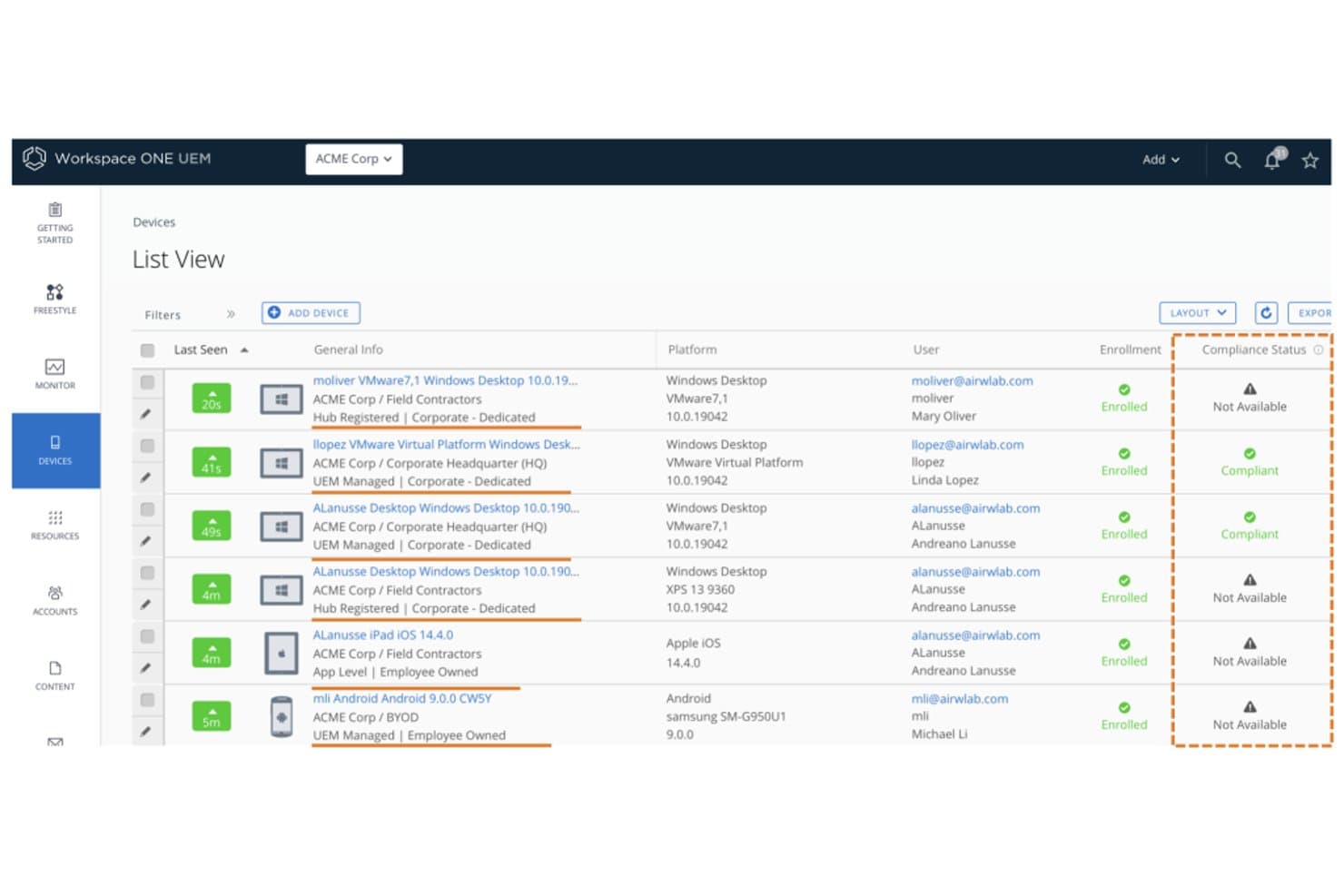
Workspace ONE UEM monitora lo stato di conformità dei dispositivi tra gli endpoint registrati. Workspace ONE UEM è una piattaforma aziendale di gestione unificata degli endpoint di Omnissa che copre la gestione di dispositivi mobili, computer desktop, robusti e IoT su iOS, Android, Windows, macOS, ChromeOS e Linux da un'unica console di amministrazione.
Per chi è più indicato Workspace ONE UEM?
Workspace ONE UEM è una scelta ideale per le grandi aziende che gestiscono flotte di dispositivi diversificate e con sistemi operativi misti, dove la sicurezza a fiducia zero e la conformità normativa sono imprescindibili.
Perché ho scelto Workspace ONE UEM
Workspace ONE UEM è entrato nella mia rosa ristretta grazie al modo in cui combina l'applicazione della sicurezza a fiducia zero con l'intelligence della flotta basata sull'IA, in un modo che poche piattaforme riescono a eguagliare. Sono particolarmente colpito da Omnissa Intelligence, che utilizza l'apprendimento automatico per rilevare anomalie, prevedere i problemi dei dispositivi e attivare la correzione automatica prima ancora che gli utenti ne siano interessati. Anche la funzionalità integrata di difesa dalle minacce mobili si distingue: identifica reti Wi-Fi non autorizzate, tentativi di phishing e app rischiose su iOS, Android e ChromeOS, quindi invia direttamente i dati al motore di conformità per automatizzare le risposte.
Funzionalità principali di Workspace ONE UEM
- Registrazione senza intervento: automatizza la predisposizione dei dispositivi su iOS, Android, Windows e macOS tramite ABM/DEP, Android Enterprise e Windows Autopilot senza configurazione manuale.
- Freestyle Orchestrator: un generatore di flussi di lavoro che consente agli amministratori di progettare e automatizzare sequenze di distribuzione delle risorse basate su criteri tra gruppi di dispositivi gestiti.
- Cancellazione selettiva dei dati aziendali: rimuove solo i dati aziendali dai dispositivi registrati, lasciando intatti i contenuti personali, una funzione essenziale per la dismissione del BYOD.
- VPN per app: instrada attraverso un tunnel VPN solo il traffico delle app gestite, mantenendo separato il traffico delle app personali sullo stesso dispositivo.
Integrazioni di Workspace ONE UEM
Workspace ONE UEM offre cinque integrazioni native documentate, tra cui Microsoft Entra ID, Okta, Google Workspace, ServiceNow e Microsoft Defender for Endpoint. La sua REST API supporta integrazioni personalizzate, mentre la connettività con ServiceNow include ITSM e i connettori Service Graph.
Pros and Cons
Pros:
- Copre iOS, Android, Windows, macOS e Linux
- Sicurezza a fiducia zero e difesa dalle minacce integrate
- Rilevamento e correzione delle anomalie basati sull'IA
Cons:
- Implementazione in sede in fase di dismissione
- Nessuna applicazione nativa di patch per app di terze parti
Learn more about Workspace ONE UEM: 10Ideale per funzioni di chiosco avanzate
TinyMDM
- Prova gratuita disponibile
- Da $24/dispositivo/anno
Visit WebsiteCustomer Rating:4.7/5This rating combines scores from multiple user review sites to reflect overall customer sentiment about the product.
TinyMDM offre configurazione della modalità chiosco e controlli di gestione delle app nella dashboard delle policy. TinyMDM è una piattaforma di gestione dei dispositivi mobili progettata per le organizzazioni che hanno bisogno di proteggere, monitorare e controllare dispositivi Android in settori come il retail, la logistica e i servizi sul campo, aiutando i team IT a gestire flotte di dispositivi di grandi dimensioni.
Per chi è più indicato TinyMDM?
TinyMDM è particolarmente adatto ai team IT nei settori del retail, della logistica e delle operazioni sul campo che devono gestire flotte di dispositivi Android dedicati su larga scala.
Perché ho scelto TinyMDM
Ho scelto TinyMDM tra le migliori soluzioni MDM perché le sue capacità di modalità chiosco vanno ben oltre un semplice blocco di base. Mi piace che offra configurazioni di chiosco per singola app e multi-app—sia che il mio team debba distribuire un tablet self-service in un ambiente retail o un dispositivo sul campo bloccato su un'app logistica, la configurazione si adatta al caso d'uso. La modalità 'Classica' è particolarmente utile: blocca le notifiche, disabilita i tasti Home e Attività Recenti e impedisce lo spegnimento del dispositivo, così gli utenti rimangono concentrati sul compito. Trovo anche davvero utile la funzione delle sessioni confidenziali—permette a un utente temporaneo di accedere con account personali, poi cancella automaticamente quei dati al termine della sessione.
Funzionalità principali di TinyMDM
- Controllo remoto: Accedi e controlla in tempo reale i dispositivi Android iscritti per risolvere problemi senza essere sul posto.
- Gestione delle app: Distribuisci, aggiorna o rimuovi app in modo silenzioso su tutti i dispositivi iscritti direttamente dalla dashboard.
- Tracciamento geolocalizzazione: Monitora la posizione in tempo reale dei dispositivi su una mappa per tenere sotto controllo team e risorse sul campo.
- Politiche di sicurezza: Imposta requisiti per le password, limita le impostazioni del dispositivo e cancella da remoto dispositivi smarriti o rubati.
Integrazioni di TinyMDM
Le integrazioni includono Microsoft Entra ID e una REST API per l'integrazione con applicazioni esterne.
Pros and Cons
Pros:
- Procedura di configurazione semplice, inclusa l'iscrizione tramite QR code
- Gestione remota efficace
- Supporta dispositivi non-GMS, ampliando le opzioni di compatibilità
Cons:
- Non è possibile abilitare forzatamente i servizi di localizzazione da remoto
- Etichettare i dispositivi dopo la configurazione in batch può essere noioso
Learn more about TinyMDM:
Altre opzioni di software MDM
Sebbene non siano entrate nella mia lista delle 12 migliori, sono comunque soluzioni valide da prendere in considerazione.
- 11Microsoft IntuneIdeale per integrazione con Microsoft
- 12Swif.aiIdeale per ambienti multi-OS con conformità integrata
- 13HexnodeIdeale per l'applicazione di criteri basati sulla geolocalizzazione
- 14IruIdeale per i team che privilegiano Apple e si espandono su Windows
- 15BlackBerry UEMIdeale per la sicurezza degli endpoint di livello governativo
- 16Ivanti Neurons for MDMIdeale per BYOD e parco dispositivi aziendale in un'unica console
Come Valuto il Software MDM
Suddivido la mia valutazione tra i requisiti fondamentali—come l’iscrizione zero-touch e l’applicazione delle policy cross-platform—e i fattori di differenziazione che separano un buon MDM da quello giusto per il tuo parco dispositivi.
Funzionalità Core (Requisiti Essenziali per Questa Lista)
Quando seleziono gli strumenti per la mia lista, valuto ciascuno su una scala da 0 (non offre la funzionalità) a 5 (eccelle in questo ambito) per ogni funzionalità fondamentale elencata di seguito. Calcolo poi il punteggio totale dello strumento in percentuale. Ogni strumento deve raggiungere un punteggio minimo totale del 75% per essere considerato per l’inclusione.
- Registrazione e Provisioning dei Dispositivi: Verifico che la piattaforma supporti flussi di lavoro di iscrizione zero-touch come Apple Business Manager e Android Enterprise, in modo che gli amministratori possano inviare i dispositivi preconfigurati direttamente agli utenti finali.
- Applicazione Remota delle Policy: Ogni strumento dovrebbe permetterti di impostare requisiti per le password, impostazioni di crittografia e configurazioni Wi-Fi a gruppi di dispositivi senza interventi manuali di massa.
- Blocco e Cancellazione da Remoto: Valuto se gli amministratori possono avviare una cancellazione totale di un dispositivo rubato o una cancellazione selettiva che rimuova solo i dati aziendali quando un dipendente lascia l'organizzazione.
- Gestione delle Applicazioni Mobili: La piattaforma deve gestire la distribuzione delle app sia tramite store pubblici che tramite build interne, inclusa l’assegnazione di licenze acquistate in volume e aggiornamenti forzati.
- Monitoraggio della Compliance e Reporting: Cerco dashboard in tempo reale che segnalino i dispositivi fuori conformità, come un telefono con sistema operativo obsoleto o privo della crittografia richiesta.
- Supporto Cross-Platform: Un MDM valido deve gestire almeno iOS e Android, e do un punteggio maggiore alle piattaforme che offrono parità di funzionalità anche su Windows, macOS e ChromeOS.
Una volta ottenuta la lista degli strumenti che rispettano i criteri, considero cosa distingue ciascuna piattaforma.
Fattori di Differenziazione (Cosa Contraddistingue i Fornitori)
Ecco come confronto e metto a paragone i diversi fornitori:
Funzionalità Distintive
La containerizzazione BYOD è importante quando la tua forza lavoro utilizza dispositivi personali. Cerco piattaforme che separino nettamente i dati lavorativi da quelli personali, così l’IT può cancellare le app aziendali senza toccare le foto private. Un altro fattore che valuto è l’integrazione zero-trust, in particolare strumenti che collegano i controlli di conformità dei dispositivi alle policy di accesso condizionato tramite identity provider come Okta o Azure AD. Valuto anche se la piattaforma include una difesa dalle minacce mobili integrata in grado di rilevare phishing o attacchi di rete e isolare automaticamente il dispositivo.
Oltre le Funzionalità
Le certificazioni di conformità sono un elemento chiave che verifico. Una piattaforma allineata con SOC 2, HIPAA o FedRAMP permette al tuo team di evitare di dover implementare controlli compensativi autonomamente. Anche le integrazioni con l’ecosistema hanno peso: il tuo MDM dovrebbe collegarsi a strumenti ITSM come ServiceNow e piattaforme SIEM, in modo che gli allarmi dei dispositivi vengano inseriti direttamente nei workflow di gestione degli incidenti esistenti. Valuto anche la flessibilità delle licenze, dato che un parco misto di tablet condivisi in magazzino e telefoni personali spesso richiede un mix di modelli per dispositivo e per utente.
Come scegliere il software MDM
È facile perdersi in lunghi elenchi di funzionalità e strutture di prezzo complesse. Per aiutarti a rimanere concentrato mentre affronti il tuo processo di selezione del software, ecco un elenco dei fattori da tenere presenti:
| Fattore | Cosa considerare |
|---|---|
| FattoreScalabilità | Cosa considerareIl software può crescere insieme alla tua azienda? Considera le esigenze future e la possibilità di gestire facilmente altri dispositivi con l'espansione del team. |
| FattoreIntegrazioni | Cosa considerareSi collega agli strumenti già in uso? Assicurati che sia compatibile con i sistemi attuali, come CRM, posta elettronica e app per la produttività, per mantenere l'efficienza del flusso di lavoro. |
| FattorePersonalizzazione | Cosa considerarePuoi adattare il software ai tuoi processi? Cerca opzioni che consentano di modificare impostazioni, dashboard e report in base alle tue esigenze specifiche. |
| FattoreFacilità d'uso | Cosa considerareQuanto è intuitiva l'interfaccia? Assicurati che il tuo team possa utilizzarla senza una formazione approfondita, risparmiando tempo e riducendo la frustrazione. |
| FattoreImplementazione e avvio | Cosa considerareQuanto velocemente puoi iniziare? Valuta i tempi di configurazione e le risorse necessarie, inclusi i materiali di formazione e il supporto, per una transizione senza problemi. |
| FattoreCosto | Cosa considerareQual è la spesa complessiva? Confronta il prezzo del software con il tuo budget, includendo costi nascosti, manutenzione e potenziali risparmi. |
| FattoreMisure di sicurezza | Cosa considerareProtegge i tuoi dati? Cerca funzionalità come la crittografia, i controlli degli accessi e la conformità agli standard di protezione dei dati per salvaguardare le informazioni sensibili. |
Che cos'è il software MDM?
Il software di gestione dei dispositivi mobili (MDM) è uno strumento che consente agli amministratori IT di gestire centralmente tutti i dispositivi connessi alla rete aziendale. Il software si connette ai dispositivi della tua azienda, permettendoti di controllare gli accessi, installare software e applicare i criteri di sicurezza.
Il software MDM può essere utilizzato per telefoni, tablet, computer e altri dispositivi IoT che eseguono sistemi operativi come iOS, Android, Windows e altri ancora. Offre agli amministratori IT un controllo di livello aziendale e consente loro di proteggere e monitorare i dispositivi alla ricerca di minacce alla sicurezza.
Funzionalità
Quando scegli un software MDM, presta attenzione alle seguenti funzionalità chiave:
- Registrazione dei dispositivi: questa funzionalità consente di aggiungere nuovi dispositivi al sistema di gestione in modo rapido e sicuro, così puoi rendere operativo il tuo team senza complicazioni. È il primo passo per riunire tutti i tuoi dispositivi sotto un'unica gestione.
- Gestione remota dei dispositivi: controlla e risolvi i problemi dei dispositivi senza trovarti nelle loro vicinanze. Puoi distribuire aggiornamenti, configurare impostazioni o persino bloccare o cancellare un dispositivo in caso di smarrimento, risparmiandoti così molte preoccupazioni (e numerose email arrabbiate).
- Gestione delle applicazioni: distribuisci, aggiorna o rimuovi le app su tutti i tuoi dispositivi da un'unica dashboard. È un enorme risparmio di tempo e aiuta a fare in modo che tutti utilizzino gli strumenti giusti.
- Controlli di sicurezza e conformità: imposta criteri per proteggere i dati sensibili, applicare i requisiti per le password, crittografare i dati e assicurarti che la tua organizzazione rispetti le normative sulla privacy.
- Inventario e tracciamento delle risorse: tieni sotto controllo ogni dispositivo della tua flotta, da chi utilizza cosa fino al suo stato e alla sua posizione. Saprai sempre dove si trovano i tuoi investimenti tecnologici e chi potrebbe aver bisogno di un aggiornamento.
- Gestione dei contenuti: distribuisci documenti importanti, aggiornamenti o moduli direttamente sui dispositivi degli utenti. Questo ti aiuta ad assicurarti che tutti abbiano ciò di cui hanno bisogno, senza dover ricorrere a interminabili catene di email.
- Gestione degli accessi degli utenti: controlla chi può accedere a determinate risorse e app in base ai ruoli o ai gruppi. In questo modo puoi limitare l'accesso ai dati sensibili alle sole persone che ne hanno bisogno.
- Reportistica e analisi: ottieni informazioni approfondite sull'utilizzo, sugli incidenti di sicurezza e sulla conformità. Le dashboard ti consentono di individuare le tendenze, risolvere rapidamente i problemi e dimostrare al tuo responsabile di avere tutto sotto controllo.
- Supporto multipiattaforma: gestisci diversi tipi di dispositivi e sistemi operativi, come iOS, Android e Windows, senza aver bisogno di uno strumento diverso per ciascuno. Questo semplifica le operazioni quando il tuo team adotta un modello BYOD (porta il tuo dispositivo).
Funzionalità comuni dell'IA nei software MDM
Oltre alle funzionalità standard dei software MDM elencate sopra, molte di queste soluzioni stanno integrando l'IA con funzionalità come:
Autenticazione adattiva degli utenti: utilizzando l'IA, il sistema adatta i requisiti di autenticazione in base al contesto e al rischio, richiedendo ulteriori passaggi di sicurezza solo quando rileva qualcosa di insolito.
Rilevamento predittivo delle minacce: l'IA analizza i modelli all'interno della rete per individuare e segnalare possibili rischi per la sicurezza prima che diventino problemi seri. È come avere una guardia del corpo digitale che sorveglia la folla.
Monitoraggio automatizzato della conformità: l'IA analizza in tempo reale le impostazioni e le attività dei dispositivi, segnalando qualsiasi elemento che potrebbe portare a una violazione dei criteri. In questo modo riduce notevolmente i controlli manuali a tuo carico.
Rilevamento intelligente delle anomalie: l'IA impara a conoscere i comportamenti normali dei dispositivi della tua organizzazione e ti avvisa immediatamente quando qualcosa sembra anomalo, ad esempio orari o posizioni di accesso insoliti.
Raccomandazioni intelligenti sui criteri: invece di impostare personalmente ogni regola, l'IA suggerisce i criteri ottimali in base ai dati sull'utilizzo e alle esigenze di sicurezza in continua evoluzione.
Risoluzione automatizzata dei problemi: l'IA identifica i problemi comuni dei dispositivi e propone soluzioni, così passi meno tempo a gestire le emergenze.
Vantaggi
L'implementazione di un software MDM offre diversi vantaggi al tuo team e alla tua azienda. Eccone alcuni:
- Sicurezza avanzata: Applicando criteri di sicurezza e abilitando la cancellazione da remoto, il software MDM protegge i dati sensibili dagli accessi non autorizzati.
- Maggiore efficienza: Automatizzare la registrazione dei dispositivi e la distribuzione delle app fa risparmiare tempo e garantisce uniformità tra i dispositivi.
- Conformità migliorata: L'inventario e la reportistica regolari aiutano a mantenere la conformità agli standard e alle normative del settore.
- Maggiore produttività: Assicurarsi che gli utenti dispongano delle app e degli strumenti necessari aumenta la produttività complessiva del team.
- Risparmio sui costi: Prevenire le violazioni dei dati e ottimizzare l'utilizzo dei dispositivi può portare a significative riduzioni dei costi per l'azienda.
- Flessibilità nella gestione: Il supporto multipiattaforma consente di gestire dispositivi diversi da un'unica interfaccia, semplificando le attività amministrative.
- Controllo basato sulla posizione: Le funzionalità di geofencing garantiscono la sicurezza controllando l'accesso ai dispositivi in base alla posizione.
Costi e prezzi
La scelta del software MDM richiede la comprensione dei vari modelli e piani tariffari disponibili. I costi variano in base alle funzionalità, alle dimensioni del team, agli strumenti aggiuntivi e ad altri fattori. La tabella seguente riassume i piani più comuni, i relativi prezzi medi e le funzionalità generalmente incluse nelle soluzioni software MDM:
Tabella comparativa dei piani per il software MDM
| Tipo di piano | Prezzo medio | Funzionalità comuni |
|---|---|---|
| Tipo di pianoPiano gratuito | Prezzo medio$0 | Funzionalità comuniGestione di base dei dispositivi, distribuzione delle app e reportistica limitata. |
| Tipo di pianoPiano personale | Prezzo medio$5-$15/utente/mese | Funzionalità comuniGestione dei dispositivi, distribuzione delle app, criteri di sicurezza e analisi di base. |
| Tipo di pianoPiano aziendale | Prezzo medio$20-$40/utente/mese | Funzionalità comuniFunzionalità di sicurezza avanzate, report personalizzati, integrazioni e ruoli utente. |
| Tipo di pianoPiano per grandi aziende | Prezzo medio$50-$100/utente/mese | Funzionalità comuniSet completo di funzionalità, analisi avanzate, supporto multipiattaforma e assistenza 24/7. |
Domande frequenti sul software MDM
Ecco alcune risposte alle domande più comuni sul software MDM :
Cosa succede ora:
Se stai cercando un software MDM, contatta gratuitamente un consulente SoftwareSelect per ricevere consigli.
Compili un modulo e fai una breve conversazione durante la quale entreranno nel dettaglio delle tue esigenze. Poi riceverai una lista ristretta di software da esaminare. Ti assisteranno persino durante l'intero processo di acquisto, comprese le negoziazioni sul prezzo.