

The 10 Best Static Code Analysis Tools for Java of 2026

10 Best Static Code Analysis Tools for Java Shortlist


Writing clean, reliable Java code is a challenge every developer faces. It’s not just about getting the job done—it’s about doing it efficiently and avoiding the headaches that come with debugging and compatibility issues down the road. If you’ve ever spent hours chasing a hidden vulnerability or struggled to maintain consistent code quality across your team, you know how frustrating it can be. These challenges slow down progress and introduce risks that can be costly to fix later.
That’s where static code analysis tools come in. These tools help you catch errors early, ensure compliance with coding standards, and improve the overall quality of your Java applications. Over the years, I’ve used a wide range of these tools across different projects, from Android development to enterprise-grade systems, and I’ve seen firsthand how they can transform workflows. In this guide, I’ll share my top picks for static code analysis tools for Java, along with practical insights to help you choose the best one for your needs.
Why Trust Our Software Recommendations
Our team has been testing and reviewing software since 2012. As tech leaders ourselves, we know how difficult—and important—it is to choose the right software.
For this guide, we evaluated tools using hands-on testing and independent research, scoring tools using our selection criteria.
Our reviews reflect our human editorial judgment, not a sales pitch.
Best Static Code Analysis Tools for Java Summary
This comparison chart summarizes pricing details for my top static code analysis tools java selections to help you find the best one for your budget and business needs.
| Tool | Best For | Trial Info | Price | ||
|---|---|---|---|---|---|
| 1 | Best for continuous codebase monitoring | Free plan + 14-day free trial + free demo available | From $34/month | Website | |
| 2 | Best for identifying malware | 7-day free trial + free demo available | From $399/month (billed annually) | Website | |
| 3 | Best for dependency scanning | Free plan available | From $34/developer/month | Website | |
| 4 | Best for context-aware AI analysis | Free plan available | From $200/month | Website | |
| 5 | Best for custom security rules | Free plan available | From $350/month | Website | |
| 6 | Best for open-source vulnerability management | Free plan + free demo available | From $25/contributing developer/month | Website | |
| 7 | Best for automated code quality reviews | 14-day free trial + free plan + free demo available | From $18/user/month (billed annually) | Website | |
| 8 | Best for in-depth source code scanning | Free demo available | Pricing upon request | Website | |
| 9 | Best for quick identification of common coding flaws | Free | Open source project and available for free. | Website | |
| 10 | Best for cloud-based security assessments | Not available | Pricing upon request | Website |


Best Static Code Analysis Tools for Java Reviews
Below are my detailed summaries of the best static code analysis tools java that made it onto my shortlist. My reviews offer a detailed look at the key features, pros & cons, integrations, and ideal use cases of each tool to help you find the best one for you.

Best for continuous codebase monitoring
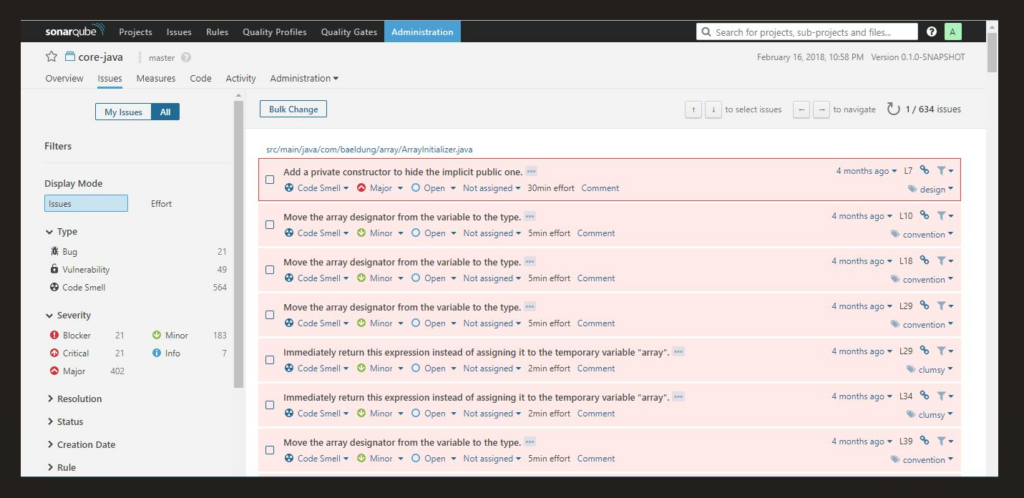
SonarQube is a static code analysis tool available for both self-managed and cloud deployments. It examines first-party, AI-generated, and open source code to detect bugs, security vulnerabilities, and maintainability issues early in the development process. The platform flags reliability and security risks and can generate AI-assisted fix suggestions to help reduce manual review.
Why I Picked SonarQube:
I included SonarQube because it offers broad language coverage and flexibility in how teams apply static analysis. It provides structured reporting that highlights areas of technical debt and security exposure, supporting teams that want consistent visibility into project health.
Its compatibility with CI/CD environments also makes it suitable for continuous inspection workflows.
Standout Features and Integrations:
Features include support for over 35 languages, 6,500+ coding rules, taint analysis for common programming languages, and unified configuration options.
Integrations include Jenkins, GitHub, GitLab, Bitbucket, Azure DevOps, Jira, Slack, and Port. A SonarQube IDE extension is available for VS Code, JetBrains IDEs, Cursor, Windsurf, and others.
Pros and Cons
Pros:
- Open-source nature with a large community, fostering frequent updates and shared best practices.
- Comprehensive integrations with popular development tools and repositories.
- Robust source code analysis that detects a broad range of coding issues.
Cons:
- Complexity can be a challenge for smaller teams without dedicated DevOps personnel.
- Some false positives might arise, necessitating thorough review.
- The initial setup might require some technical expertise.
New Product Updates from SonarQube
SonarQube Cloud Expands Rust Analysis and Quality Controls
SonarQube Cloud now delivers enterprise-grade Rust verification by complementing Clippy and treating it as a dependency, preserving local workflows while enabling organization-wide quality and security governance. For more information, visit SonarQube's official site.
 .
.
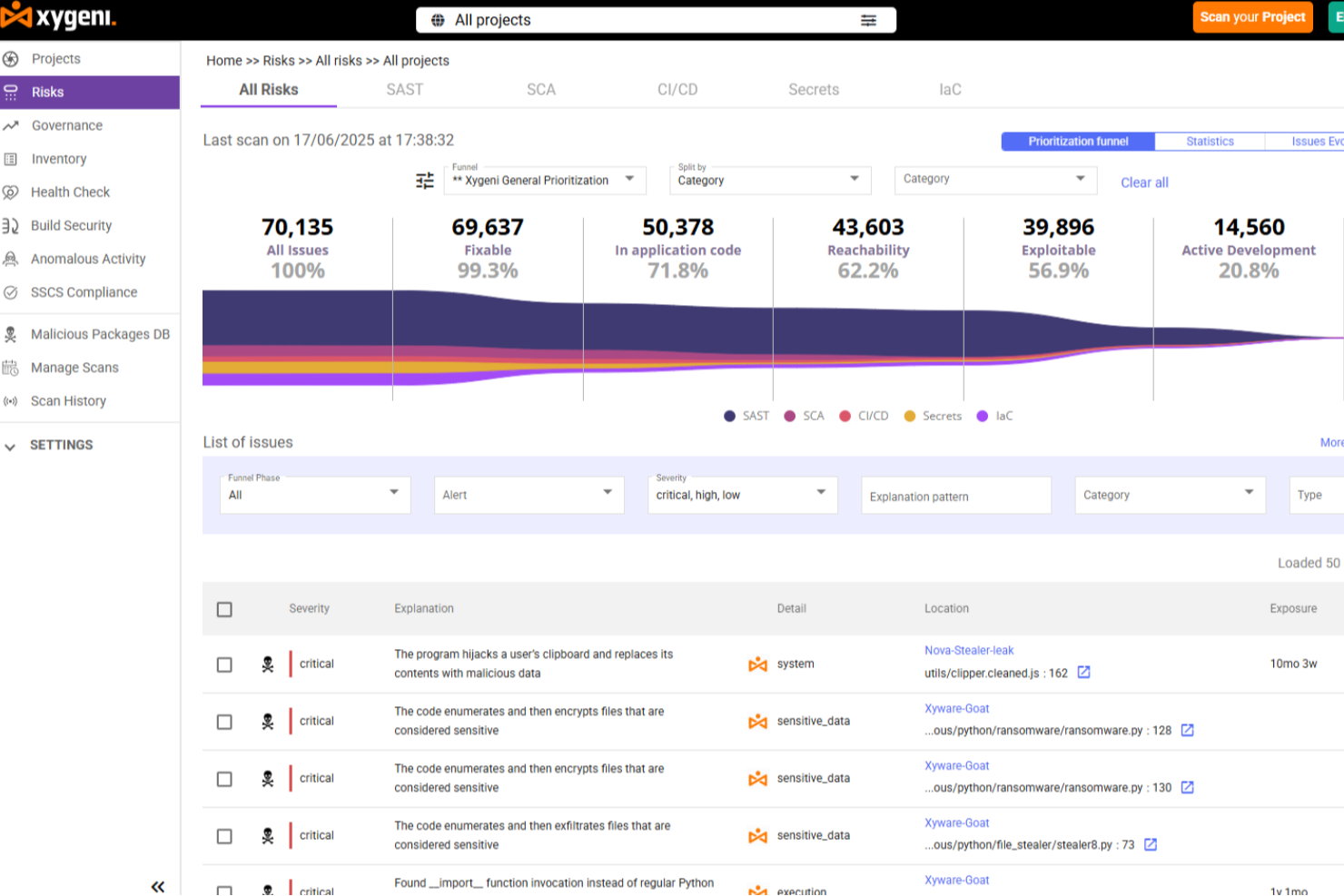
Xygeni offers a unique approach to static code analysis for Java by providing deep contextual insights and a unified application security strategy. This tool is particularly appealing to DevSecOps teams and developers focused on maintaining code integrity and security throughout the software development lifecycle. By aggregating and deduplicating findings from various scanners, Xygeni ensures that you receive a clean, correlated risk view, addressing the common challenge of alert fatigue and allowing you to focus on genuine threats.
Why I Picked Xygeni
I picked Xygeni because it excels in providing precise vulnerability detection, which is crucial for Java developers aiming to secure their code. The tool's standout feature is its ability to identify malware and supply chain threats, offering a level of security that many other static code analysis tools lack. Additionally, Xygeni's integration with CI/CD pipelines ensures that vulnerability detection is seamlessly incorporated into your existing workflows, making it an efficient choice for development teams.
Xygeni Key Features
In addition to its malware detection capabilities, Xygeni offers several other features that enhance its utility:
- Policy-Driven Rules and Guardrails: These allow you to automate actions based on scan results, ensuring that security policies are consistently enforced.
- AI-Powered AutoFix: This feature provides context-aware code suggestions and automatic fixes, helping your team write secure code faster.
- Supply Chain Security: Xygeni detects malware in open-source components, adding an extra layer of protection to your projects.
- True Positive Rate: With a 100% true positive rate and a low false positive rate of 16.7%, you can trust the alerts you receive are actionable.
Xygeni Integrations
Xygeni integrates seamlessly with popular development tools, including GitHub Actions, Jenkins, GitLab, and Bitbucket. These integrations allow for smooth incorporation into your existing development environment, enhancing workflow efficiency and security.
Pros and Cons
Pros:
- Real-time detection minimizes security risk
- Function-level analysis prioritizes vulnerabilities
- Privacy-first scanning ensures data safety
Cons:
- Limited integrations compared to competitors
- Pricing may be steep for some teams

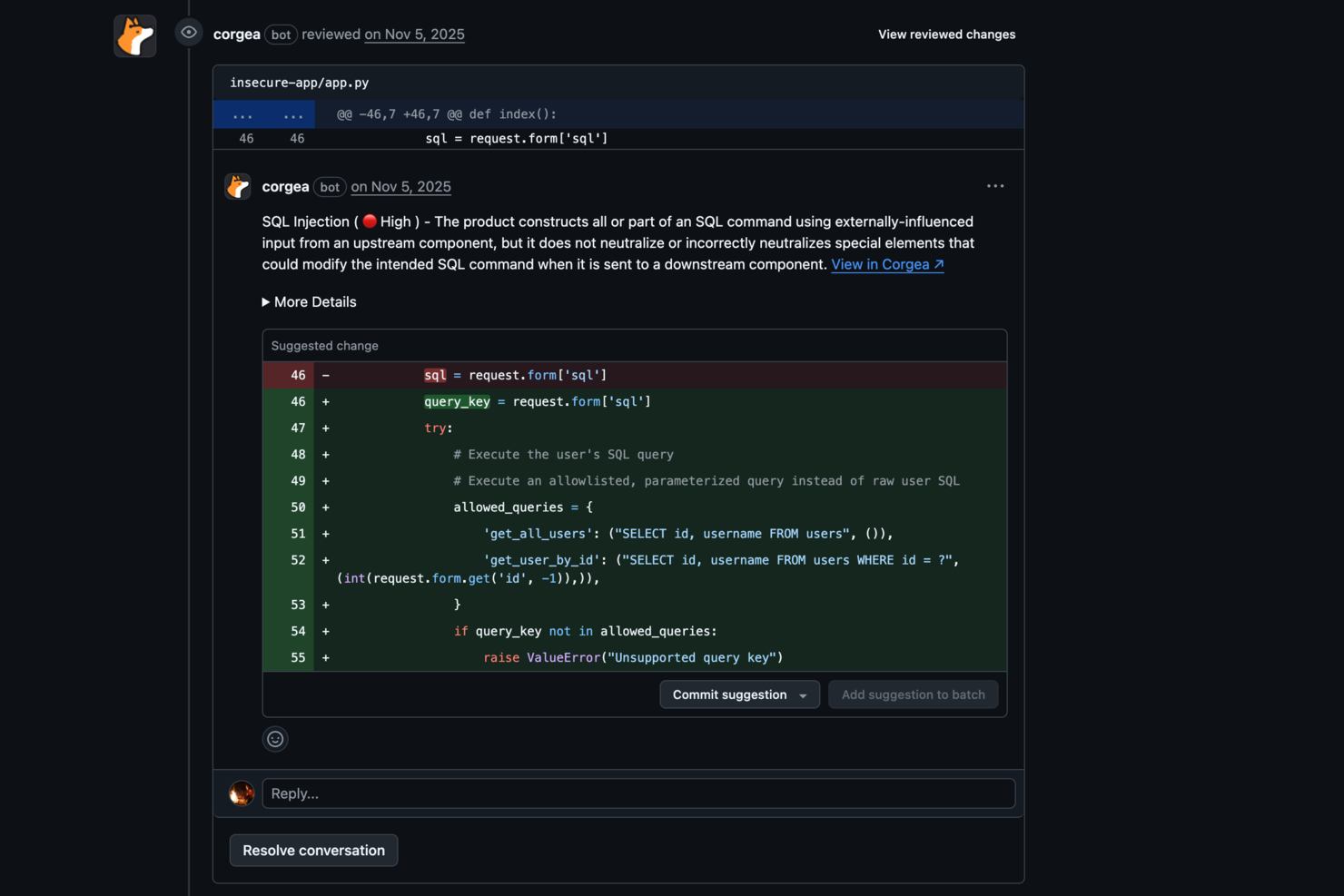
Corgea is a static code analysis tool built for developers and organizations that want to improve application security. It uses AI to identify issues such as business logic flaws and authentication vulnerabilities, helping keep code secure. The tool is especially useful for teams that want to automate how they find and fix insecure code, cutting down on manual review and speeding up security workflows.
Why I Picked Corgea
I picked Corgea for its AI-native approach to static application security testing, which sets it apart from other static code analysis tools for Java. By using large language models, Corgea can detect complex vulnerabilities like business logic flaws and broken authentication that traditional tools often miss. It adapts to the codebase with each scan and significantly reduces false positives, making it a strong option for developers who need accurate and dependable security findings.
Corgea Key Features
In addition to its AI-driven vulnerability detection, Corgea offers several key features that enhance its utility for static code analysis in Java:
- Dependency Scanning: Automatically scans and identifies vulnerabilities within your code dependencies, ensuring comprehensive security coverage.
- Customizable Policies: Allows you to set security policies in natural language, tailoring the tool to fit your specific security needs and workflows.
- SAST Auto-Fix: Provides automated security patches, simplifying the process of addressing vulnerabilities and maintaining secure codebases.
- Multi-Language Support: Supports Java along with other languages like JavaScript, Python, and C#, broadening its applicability across different projects.
Corgea Integrations
Native integrations are not currently listed by Corgea.
Pros and Cons
Pros:
- Business logic flaw detection
- Automatic secure code fixes
- AI-driven vulnerability detection
Cons:
- AppSec-focused, not full stack
- No runtime protection features

Zeropath
Best for context-aware AI analysis

ZeroPath is built for development teams looking to bring advanced code-security into their Java (and other language) codebases without drowning in alert noise. If you’re operating in a Java-centric environment—whether fintech, healthcare or SaaS—and you want a static code analysis tool that understands business logic, handles complex flows, and offers actionable fixes, ZeroPath is worth a look.
Why I Picked Zeropath
I picked ZeroPath because it leverages AI-native static application security testing (SAST) that goes beyond pattern-matching and works deep into logic and authorization flows—so your Java services won’t silently ship broken auth or business logic holes. It uses context-aware analysis to trace data flows and dependency reachability (for example SCA and dependency-graphing) which helps your team spot real vulnerabilities, not just generic findings. I appreciate how it can generate one-click patches directly in pull requests and integrate into your workflow so that your Java team can keep moving fast while still embedding security checks early.
Zeropath Key Features
In addition to its standout AI-driven analysis, I also found several features that enhance its utility:
- Infrastructure as Code (IaC) Detection: This feature allows you to identify and address security vulnerabilities within your infrastructure code, ensuring comprehensive security coverage.
- Automated Compliance Reporting: Zeropath automatically generates compliance reports, simplifying the process of meeting industry standards and regulations.
- Pull Request (PR) Reviews: Performs automated security reviews on every pull request and places AI-powered feedback and suggested fixes in your code review workflow.
- Custom Code Policies: Lets you define arbitrary rules (in natural language) to catch patterns your organization cares about (for instance: all public endpoints must validate input).
Zeropath Integrations
Integrations include GitHub, GitLab, Jenkins, Bitbucket, Jira, Azure DevOps, Slack, AWS, Google Cloud Platform, and Microsoft Teams.
Pros and Cons
Pros:
- Supports auto-patch generation directly in code review workflow.
- Discovers business-logic and authorization vulnerabilities in Java and other languages.
- Reduces noisy false positives compared to traditional SAST tools
Cons:
- Dependence on AI means that edge-case detection still may vary.
- You may need time to adjust your workflow around its automation.

Best for custom security rules

Aikido Security is an application security platform offering comprehensive solutions to protect applications from code to cloud. It encompasses features like cloud posture management, open source dependency scanning, secrets detection, and both static and dynamic application security testing.
Why I Picked Aikido Security:
Aikido lets you create custom security rules that fit your specific needs, giving your team more control over how you protect your Java code. It’s flexible enough to allow tailored configurations, so you don’t have to rely on generic rule sets that might not fit your project. Aikido scans code in real-time, catching vulnerabilities before they escalate. With its ability to enforce these custom rules automatically, your team can easily adapt it to match your code standards and security policies, ensuring more precise security monitoring.
Standout Features and Integrations:
Other features include secrets detection, which is vital for checking code for leaked and exposed API keys, passwords, and encryption keys, and auto-triaging known safe secrets. It also offers DAST for web applications to identify vulnerabilities through simulated attacks.
Integrations include Amazon Web Services (AWS), Google Cloud, Microsoft Azure Cloud, Drata, Vanta, AWS Elastic Container Registry, Docker Hub, Jira, Asana, and GitHub.
Pros and Cons
Pros:
- Scalable for growing teams
- Has a comprehensive dashboard and customizable reports
- Code-to-cloud security
Cons:
- Ignores vulnerabilities if no fix is available
- Supports English only
New Product Updates from Aikido Security
Aikido Security Adds Pentest for AI Capabilities
Aikido Security adds Pentest for AI to test agents and LLM features against OWASP Agentic Top 10 risks. This helps teams identify AI-specific security weaknesses before they reach production. For more information, visit Aikido Security’s official site.
Snyk
Best for open-source vulnerability management
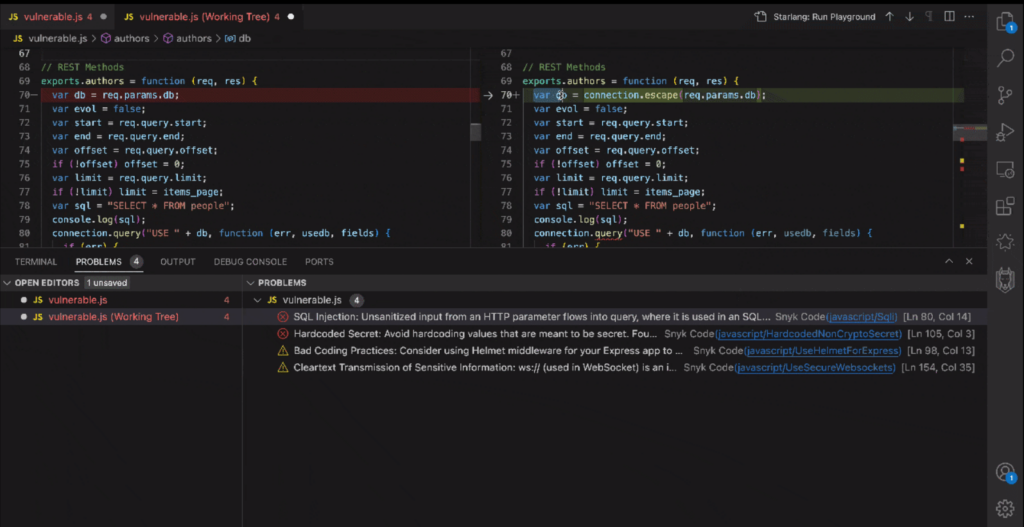
Snyk stands at the forefront of identifying and rectifying vulnerabilities in open-source projects and dependencies. With its sharp focus on securing open-source software, it offers a much-needed shield against potential security breaches.
Why I Picked Snyk:
In my continuous search for tools that ensure software robustness, Snyk caught my attention due to its dedicated focus on open-source vulnerabilities. When determining and comparing static code analysis tools, Snyk's specialization in tracking and managing open-source project vulnerabilities made it stand out.
I determined that, in the realm of open-source software, Snyk is undoubtedly best for vulnerability management, providing an invaluable service to the development community.
Standout Features and Integrations:
One of Snyk's prime features is its extensive database of open-source vulnerabilities, making it a vital tool for developers leveraging open-source projects. Furthermore, its dashboards offer comprehensive insights, enabling development teams to quickly identify and address potential threats.
When it comes to integrations, Snyk effortlessly ties in with popular repositories like GitHub and Bitbucket. It also smoothly integrates with CI/CD pipelines, including Jenkins, improving the DevOps workflow.
Pros and Cons
Pros:
- Offers insights and actionable solutions through its dashboards.
- Integration with popular repositories and CI/CD tools.
- Comprehensive database catering specifically to open-source vulnerabilities.
Cons:
- Pricing and tiers can be complex for teams with varied needs.
- The granularity of its features might require a learning curve for some users.
- While it specializes in open-source, it might not cover all proprietary software vulnerabilities.

Codacy
Best for automated code quality reviews
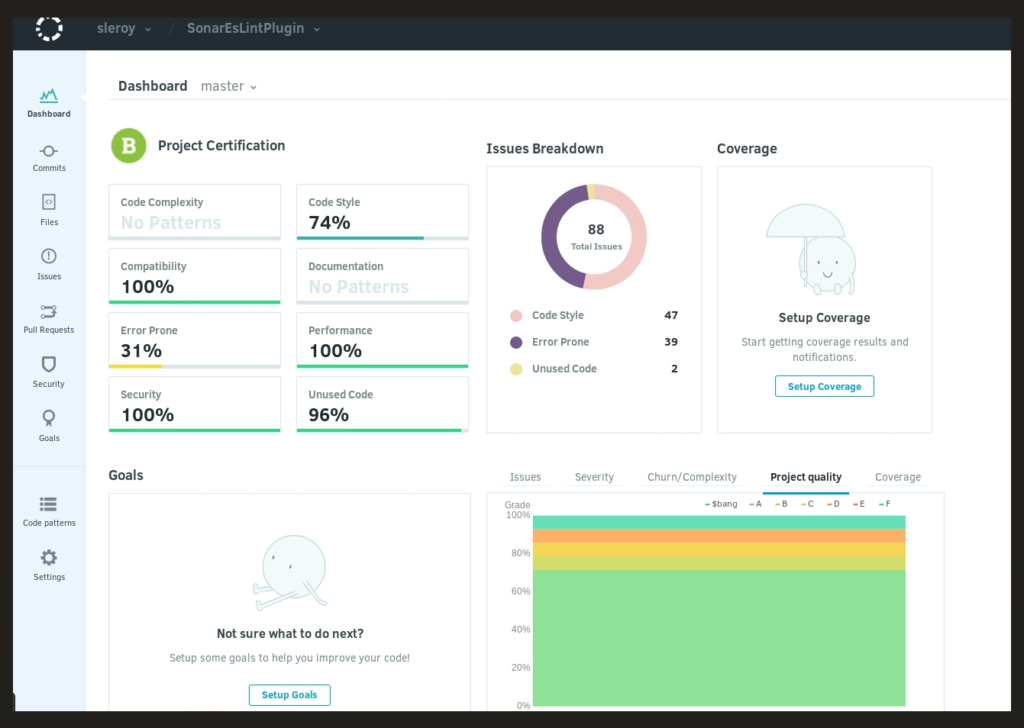
Codacy is a prominent static code analysis tool that focuses on automating code quality reviews. By streamlining the code review process, it ensures that development teams deliver high-quality code consistently.
Why I Picked Codacy:
In the vast domain of static code analysis tools, choosing Codacy was a deliberate decision. When determining which tools to highlight, Codacy stood out due to its potent automated review capabilities. I chose Codacy because I believe its emphasis on automating quality reviews is paramount, positioning it as an essential asset for teams desiring to ensure consistent quality without manual oversight.
Standout Features and Integrations:
Codacy shines with its ability to identify a broad range of issues, from coding errors and code smells to security issues. It offers detailed dashboards that provide a snapshot of the overall code quality, aiding in the rapid identification of problem areas.
As for integrations, Codacy blends perfectly with platforms like GitHub, GitLab, and Bitbucket. This ensures code reviews and quality checks throughout the development process.
Pros and Cons
Pros:
- Automated reviews reduce manual oversight and human errors.
- Strong integrations with popular repositories, improving the development workflow.
- Efficient source code analyzer detecting a wide array of issues.
Cons:
- Annual billing may not cater to all teams or projects.
- Potential for occasional false positives in code reviews.
- Some users might find certain features slightly complex.
Best for in-depth source code scanning
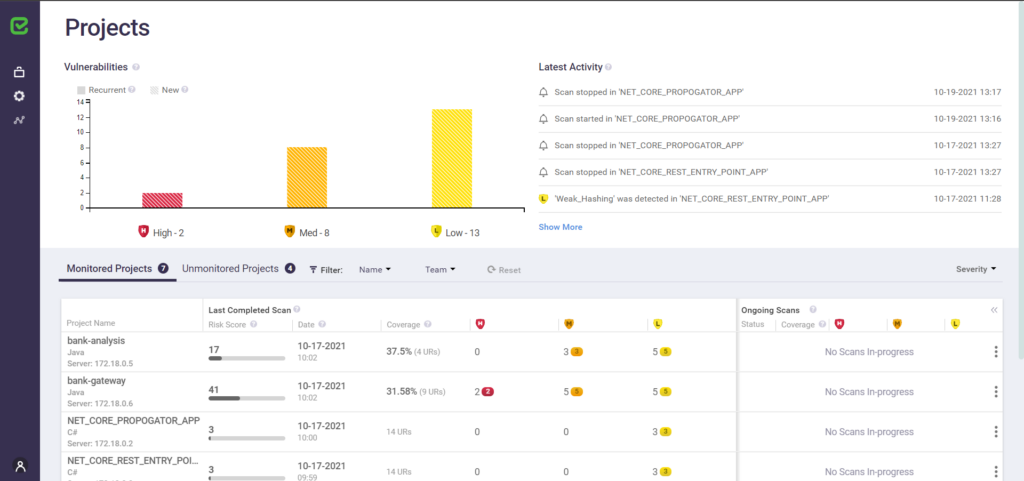
Checkmarx is a renowned static application security testing tool, dives deep into the source code to identify vulnerabilities. Its focus on thorough source code scanning ensures that even intricate security issues don't go unnoticed.
Why I Picked Checkmarx:
Selecting the right tools from a plethora of options can be daunting. I picked Checkmarx for this list after judging its unparalleled depth in source code analysis. Compared to other tools, Checkmarx provides an extensive examination, diving deep into programming languages and repositories.
In my opinion, its prowess in in-depth source code scanning solidifies its position as a top choice for teams aiming to fortify their code against potential threats.
Standout Features and Integrations:
Checkmarx excels in identifying a spectrum of security issues, from common vulnerabilities to nuanced threats in the source code. Its dashboards are highly informative, offering development teams a panoramic view of potential risks in the codebase.
For integrations, Checkmarx collaborates with platforms like GitHub, GitLab, and Bitbucket, ensuring a fortified development process that integrates security considerations from the get-go.
Pros and Cons
Pros:
- Mastery in various programming languages, including Java, Python, PHP, and Ruby.
- Strong integration with popular repositories, ensuring security is an integral part of the development workflow.
- Comprehensive source code analyzer adept at spotting an extensive range of vulnerabilities.
Cons:
- Pricing transparency can be improved for easier decision-making.
- Potential for false positives, demanding thorough review.
- May require a learning curve for those new to static application security testing.

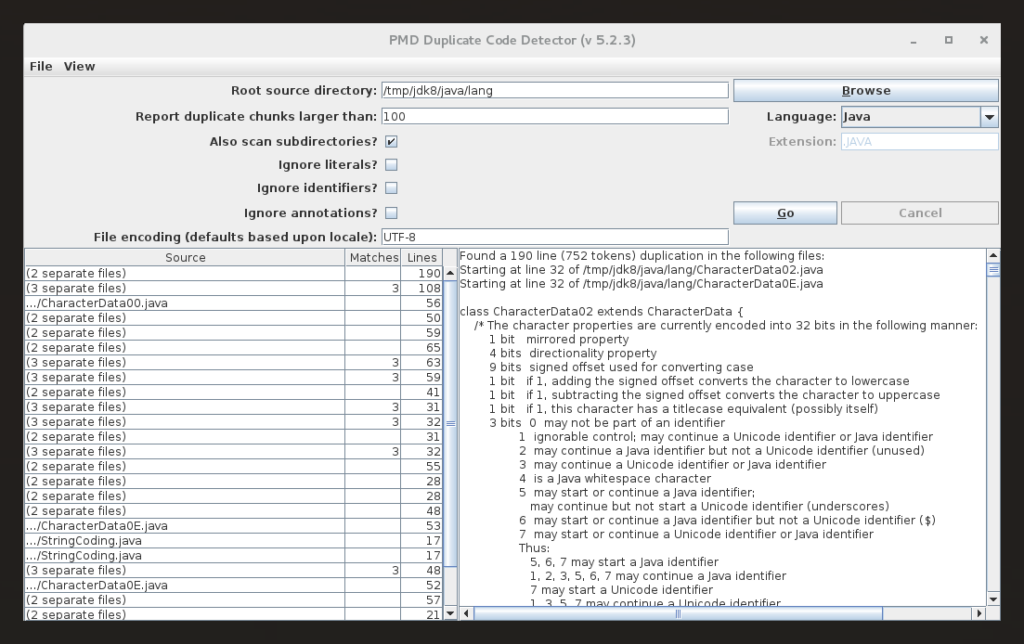
PMD is a well-regarded static code analysis tool that offers developers the capability to rapidly identify frequent coding flaws across various programming languages. Its forte lies in its proficiency to swiftly pinpoint such issues, making it indispensable for those who prioritize swift code reviews.
Why I Picked PMD:
Navigating through the diverse field of static code analysis tools, choosing PMD became an evident choice after determining its strengths and comparing them with its peers. The tool's inherent capability to swiftly uncover common coding flaws made it stand out, distinguishing it from the vast array of options available.
I picked it because, in my judgment, PMD excels at rapidly identifying coding flaws, ensuring that development teams can make quick rectifications.
Standout Features and Integrations:
PMD is celebrated for its broad support for multiple programming languages, including Java, JavaScript, and Apex, which grants it a versatility not all tools possess. Its source code analysis is robust, and the ability to detect code smells and coding errors promptly is commendable.
As for integrations, PMD incorporates popular platforms like GitHub, GitLab, and Jenkins, aligning itself perfectly with the development process of many teams.
Pros and Cons
Pros:
- Robust integrations with platforms like GitHub and Jenkins.
- Quick and effective detection of common coding flaws.
- Broad support for multiple programming languages.
Cons:
- Being open-source, it might lack some commercial-level support or features.
- The UI might not be as intuitive for beginners.
- Might require some configuration for specific projects.

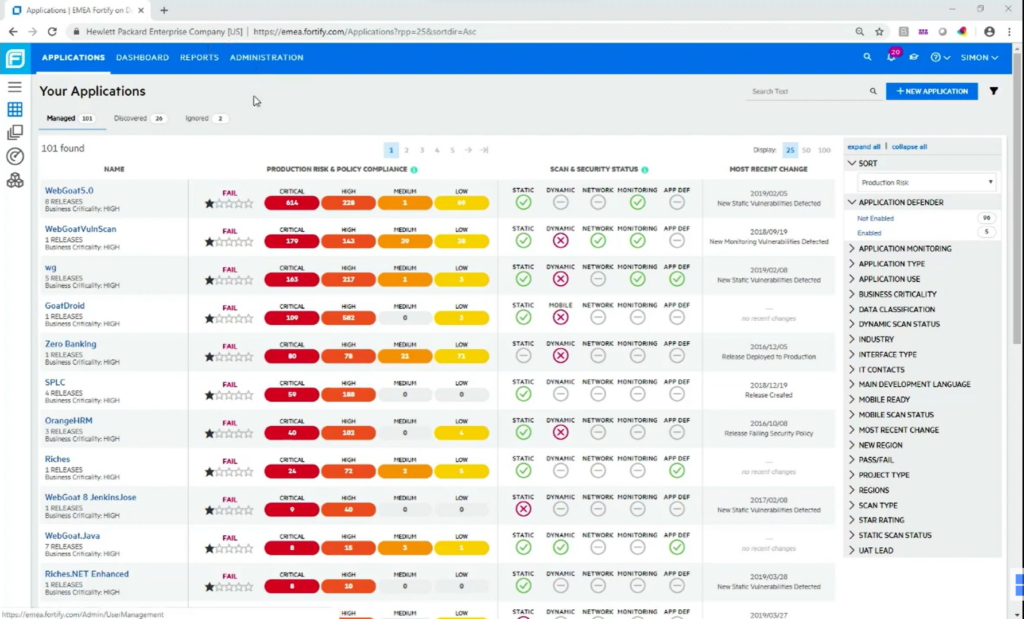
Fortify on Demand is a SaaS solution that facilitates rigorous security analysis of source code, pinpointing vulnerabilities with precision. When considering cloud-based platforms for security evaluations, its dedicated focus ensures it remains unparalleled.
Why I Picked Fortify on Demand:
While curating this list, I delved deep into numerous tools, and my judgment led me to select Fortify on Demand. The tool's cloud-centric architecture and its prowess in static application security testing distinguished it from the rest. Having compared a multitude of platforms, I confidently determine Fortify on Demand to be the prime choice for cloud-based security assessments.
Standout Features and Integrations:
Fortify on Demand excels in its static code analysis for Java, Python, and many other programming languages, ensuring a thorough detection of potential security issues. Its dashboards provide a comprehensive insight into vulnerabilities, coding errors, and technical debt, assisting development teams in remediation.
The tool integrates with popular repositories like GitHub, GitLab, and Bitbucket and also ties well with CI/CD tools like Jenkins for continuous integration.
Pros and Cons
Pros:
- Robust integrations with popular repositories and CI/CD tools.
- Comprehensive dashboards that aid in quick vulnerability assessments and remediations.
- Proficient in static code analysis across various programming languages.
Cons:
- Might be on the pricier side for startups or businesses with tight budgets.
- Potential false positives could require manual validation.
- Might be overwhelming for small development teams due to its breadth of features.
Other Static Code Analysis Tools for Java
Below is a list of additional static code analysis tools for Java that I shortlisted, but did not make it to the top 10. These are definitely worth checking out.
- Coverity
For detection of software defects in development
- Klocwork
For real-time security vulnerability detection
- Azul Platform Core
For Java runtime customization
- Parasoft JTest
For comprehensive Java testing
- Codiga
For code consistency and maintenance
- JArchitect
For detailed code architecture visualization
- Infer
Good for mobile app static analysis
- Fortify Static Code Analyzer
Good for end-to-end vulnerability management
- CodeSonar
Good for detecting complex programming errors
- Checkstyle
Good for Java coding standard adherence
- FindBugs
Good for bytecode-based Java bug detection
- Semmle
Good for data-driven code exploration
- Veracode Static Analysis (SAST)
Good for scalable threat detection in binaries


How I Evaluate Static Code Analysis Tools
I evaluate static code analysis tools across two layers: core requirements any SAST tool must meet—like flagging XSS before a PR merges—and what separates one worth recommending from the rest.
Core Functionality (Table Stakes For This List)
When I'm selecting tools for my list, I rank each one on a scale from 0 (does not offer the functionality) to 5 (excels in this area) for each core functionality listed below. Then, I calculate the tool's total score into a percentage. Each tool needs to achieve a minimum total score of 65% to be considered for inclusion.
- Multi-Language Support: I check which languages each tool supports and whether it can handle the mix you'd realistically see in a stack—like a Java backend alongside a TypeScript frontend.
- Vulnerability & Bug Detection: The engine should catch real issues like SQL injection, null pointer dereferences, and buffer overflows through data flow and control flow analysis, not just pattern matching.
- Coding Standards Enforcement: I evaluate whether you can enforce rulesets like CERT or Google style guides and create custom rules—useful when your team has internal conventions beyond public standards.
- CI/CD & IDE Integration: Tools should plug into the places developers already work, so I look for native support in platforms like GitHub Actions, GitLab CI, Jenkins, and IDEs like VS Code or IntelliJ.
- Actionable Reporting & Remediation: Findings need severity ratings and clear fix guidance so developers can resolve a flagged cross-site scripting issue without switching to a separate reference doc.
- Compliance & Standards Coverage: I look for mapping to frameworks like OWASP Top 10, CWE Top 25, and industry-specific standards such as MISRA for embedded systems or PCI DSS for payment processing.
Once I have a list of tools that meet this criteria, I consider what sets each platform apart.
Differentiating Factors (What Sets Vendors Apart)
Here's how I compare and contrast different vendors:
Standout Features
Incremental scanning makes a real difference—when a tool analyzes only the changed lines in a pull request instead of rescanning the entire codebase, it keeps pipeline times reasonable on large repos. I also evaluate whether a tool offers a custom query language, like CodeQL or Semgrep patterns, which lets security teams write detection rules tailored to internal APIs or proprietary frameworks. AI-powered auto-remediation is increasingly valuable too, especially when it suggests contextual fixes directly in a PR rather than just flagging the issue.
Beyond Features
False positive rates matter more than most buyers realize. A tool that floods developers with noise trains them to ignore findings, so I evaluate how each vendor handles triage workflows and whether it learns from past suppression decisions. Deployment model is another key consideration—teams handling sensitive source code often need self-hosted or air-gapped options rather than SaaS-only offerings. I also look at licensing transparency, since pricing based on contributors versus lines of code can dramatically shift total cost depending on your team structure.
How to Choose Static Code Analysis Tool Java
It’s easy to get bogged down in long feature lists and complex pricing structures. To help you stay focused as you work through your unique software selection process, here’s a checklist of factors to keep in mind:
| Factor | What to Consider |
|---|---|
| Scalability | Can the tool grow with your projects? Check if it handles increasing codebases and additional users without performance loss. Avoid tools that limit growth. |
| Integrations | Does it fit into your current workflow? Look for compatibility with your existing CI/CD tools and platforms. Ensure smooth data exchange across systems. |
| Customizability | Can you tailor it to your workflow? Evaluate if the tool allows you to adjust rules and reports to match your team's coding standards and practices. |
| Ease of use | Will your team easily adopt it? Consider the learning curve and the intuitiveness of the interface. A complex tool may slow down productivity initially. |
| Implementation and onboarding | How quickly can you get started? Assess the availability of resources like tutorials, support, and documentation to aid in a smooth transition. |
| Cost | Does it fit your budget? Compare the pricing structure against your financial constraints. Be wary of hidden fees or necessary add-ons that increase cost. |
| Security safeguards | How does it protect your code? Ensure the tool offers robust security features to detect vulnerabilities and prevent data breaches. |
| Compliance requirements | Does it meet industry standards? Verify if the tool complies with regulations relevant to your industry to avoid legal issues. |
What Are Static Code Analysis Tools for Java?
Static code analysis tools java are software solutions that analyze Java code for bugs, vulnerabilities, and compliance with coding standards without executing the code. These tools are typically used by developers and quality assurance teams to ensure code quality and security. Automated code reviews, vulnerability detection, and compliance checks help with maintaining high code standards and identifying issues early. Overall, these tools save time and resources by catching errors before they reach production.
Features
When selecting static code analysis tools java, keep an eye out for the following key features:
- Code vulnerability detection: Identifies potential security threats in your code, helping prevent breaches early on.
- Automated code reviews: Provides instant feedback on code quality to maintain consistency across projects.
- Customizable rule sets: Allows you to tailor code analysis to meet your team's specific coding standards and practices.
- Real-time analysis: Offers immediate insights as you code, enabling quick adjustments and improvements.
- Integration capabilities: Ensures smooth operation with your existing tools and platforms, enhancing workflow efficiency.
- Detailed reporting: Delivers comprehensive insights into code issues, helping prioritize fixes and improvements.
- Compliance checks: Verifies adherence to industry standards, reducing the risk of legal issues.
- Support for multiple languages: Enables teams to work across various projects without needing different tools.
- Low-latency processing: Minimizes delays during code analysis, ensuring a smooth development process.
- Continuous monitoring: Keeps track of code quality over time, helping maintain high standards and prevent regression.
Benefits
Implementing static code analysis tools java provides several benefits for your team and your business. Here are a few you can look forward to:
- Improved code quality: Automated code reviews and vulnerability detection help maintain high standards and reduce errors in your codebase.
- Enhanced security: Identifying vulnerabilities early prevents potential security breaches, protecting your applications and data.
- Time savings: Real-time analysis and detailed reporting allow for quick detection and resolution of issues, speeding up the development process.
- Compliance assurance: Compliance checks ensure your code meets industry standards, reducing the risk of legal complications.
- Resource efficiency: By catching errors before production, these tools save time and resources that would otherwise be spent on debugging and fixing issues.
- Facilitated collaboration: Integration capabilities allow for smooth operation with existing tools, enhancing teamwork and communication.
- Consistent performance: Continuous monitoring helps maintain code quality over time, preventing regressions and ensuring reliable application performance.
Costs & Pricing
Selecting static code analysis tools java requires an understanding of the various pricing models and plans available. Costs vary based on features, team size, add-ons, and more. The table below summarizes common plans, their average prices, and typical features included in static code analysis tools java solutions:
Plan Comparison Table for Static Code Analysis Tools Java
| Plan Type | Average Price | Common Features |
|---|---|---|
| Free Plan | $0 | Basic code analysis, limited language support, and community support. |
| Personal Plan | $5-$25/user/month | Standard code analysis, customizable rule sets, and real-time feedback. |
| Business Plan | $25-$50/user/month | Advanced code analysis, integration capabilities, detailed reporting, and compliance checks. |
| Enterprise Plan | $50-$100/user/month | Comprehensive code analysis, dedicated support, continuous monitoring, and extensive language support. |
Static Code Analysis Tools for Java FAQs
Here are some answers to common questions about static code analysis tools java:
What are the three techniques used in static code analysis tools?
Static code analysis tools typically use syntax analysis, data and control flow analysis, and security analysis. Syntax analysis checks for correct code structure, while data and control flow analysis track how data moves through the code. Security analysis identifies vulnerabilities that could be exploited.
What are the limitations of static code analysis?
Static code analysis tools can only identify issues without executing the code. They might miss performance or usability issues that occur during runtime. Additionally, these tools may produce false positives, requiring developers to manually verify flagged issues.
How do static code analysis tools help in maintaining code quality?
These tools help maintain code quality by automatically checking for bugs, vulnerabilities, and adherence to coding standards. They provide instant feedback to developers, allowing for quick corrections and consistent code quality across the project.
What is the main purpose of static code analysis tools?
The main purpose is to catch problems early, maintain stylistic consistency, and improve code quality. For example, they can flag issues like unclosed files or misnamed variables before they cause problems in the application.
Can static code analysis tools integrate with CI/CD pipelines?
Yes, many static code analysis tools integrate with CI/CD pipelines to automate the code review process. This integration ensures that code is continuously checked for quality and security issues before deployment, enhancing overall development efficiency.
How do static code analysis tools differ from dynamic analysis tools?
Static code analysis tools analyze code without executing it, focusing on code structure and potential issues. In contrast, dynamic analysis tools evaluate code during runtime, identifying issues that occur when the program is executed, such as memory leaks and performance bottlenecks.
What’s Next:
If you're in the process of researching static code analysis tools java, connect with a SoftwareSelect advisor for free recommendations.
You fill out a form and have a quick chat where they get into the specifics of your needs. Then you'll get a shortlist of software to review. They'll even support you through the entire buying process, including price negotiations.