

Gestire una pipeline DevOps non è un compito semplice. Tra il garantire la stabilità in produzione, monitorare i colli di bottiglia delle prestazioni e prevenire i tempi di inattività, la pressione per mantenere tutto perfettamente funzionante può risultare schiacciante. Magari ti sei ritrovato a dover affrontare ritardi frustranti causati da problemi non individuati o a combattere con strumenti che non si integrano perfettamente nei tuoi flussi di lavoro. La realtà è che, senza i giusti strumenti di monitoraggio DevOps, mantenere l’efficienza e offrire un’ottima esperienza utente diventa una vera sfida.
Gli strumenti di monitoraggio DevOps sono progettati per darti visibilità sui tuoi sistemi, aiutandoti a identificare e risolvere potenziali problemi prima che abbiano un impatto sugli utenti. Sono essenziali per mantenere le operazioni fluide, ottimizzare le prestazioni e garantire che il tuo team possa concentrarsi sull’innovazione anziché spegnere incendi. Negli anni ho lavorato con numerose soluzioni di monitoraggio su grandi progetti e team diversi. In questa guida ti presenterò le mie principali raccomandazioni e approfondimenti per aiutarti a scegliere lo strumento perfetto, semplificare i processi e mantenere i tuoi sistemi al massimo delle prestazioni.
Perché fidarsi dei nostri consigli sui software
6,700+
Reviews
20
Industry experts
16+
Evaluation factors
14
Years
Il nostro team testa e recensisce software dal 2012. In quanto leader tecnologici noi stessi, sappiamo quanto sia difficile — e importante — scegliere il software giusto.
Per questa guida, abbiamo valutato gli strumenti attraverso test praticie ricerche indipendenti, assegnando un punteggio agli strumenti in base ai nostri criteri di selezione.
Le nostre recensioni riflettono il nostro giudizio editoriale umano, non un discorso di vendita.
Revisori esperti:
- Paulo Gardini MiguelDirettore tecnico
 Tim FisherVP dell'IA
 Gabriel RosasTech Lead e architetto software
 Christhian GruhnTech Lead e architetto della piattaforma

Riepilogo dei Migliori Strumenti di Monitoraggio DevOps
| Tool | Best For | Trial Info | Price | ||
|---|---|---|---|---|---|
| 1 | Ideale per il monitoraggio di infrastrutture ibride | Prova gratuita di 30 giorni | Da $200/mese (fatturato annualmente) | Website | |
| 2 | Ideale per il monitoraggio reale degli utenti | Prova gratuita di 30 giorni + demo gratuita disponibile | Da $10/mese (fatturato annualmente) | Website | |
| 3 | Ideale per il monitoraggio multi-cloud | Prova gratuita di 30 giorni + demo gratuita + piano gratuito disponibile | Da $199/anno | Website | |
| 4 | Ideale per approfondimenti in tempo reale sull'infrastruttura | Prova gratuita di 14 giorni + piano gratuito + demo gratuita disponibile | Da $4.50/node/mese (fatturato annualmente) | Website | |
| 5 | Ideale per il monitoraggio dei certificati SSL | Piano gratuito + demo gratuita disponibile | A partire da $8/10 monitoraggi/mese (fatturato annualmente) | Website | |
| 6 | Ideale per il monitoraggio di interruzioni e guasti dei server | Prova gratuita di 14 giorni | Da $21/utente/mese | Website | |
| 7 | Ideale per il monitoraggio continuo di grandi reti di porte | Prova gratuita di 30 giorni | A partire da $1.995/utente | Website | |
| 8 | Ideale per il monitoraggio delle prestazioni di siti web e mobile | Prova gratuita di 15 giorni | Da $6/core/mese | Website | |
| 9 | Ideale per l'osservabilità full-stack nelle soluzioni SaaS | Piano gratuito disponibile | A partire da 49$/utente/mese | Website | |
| 10 | Ideale per monitorare e cercare tra i big data | Prova gratuita di 60 giorni | Prezzo su richiesta | Website |


Recensioni dei Migliori Strumenti di Monitoraggio DevOps
Ecco una panoramica dei principali strumenti di monitoraggio DevOps. Metterò in evidenza le funzionalità che ogni strumento offre e il motivo per cui meritano un posto in questa lista.
 Ideale per il monitoraggio di infrastrutture ibride
- Prova gratuita di 30 giorni
- Da $200/mese (fatturato annualmente)
Visit WebsiteCustomer Rating:4.6/5This rating combines scores from multiple user review sites to reflect overall customer sentiment about the product.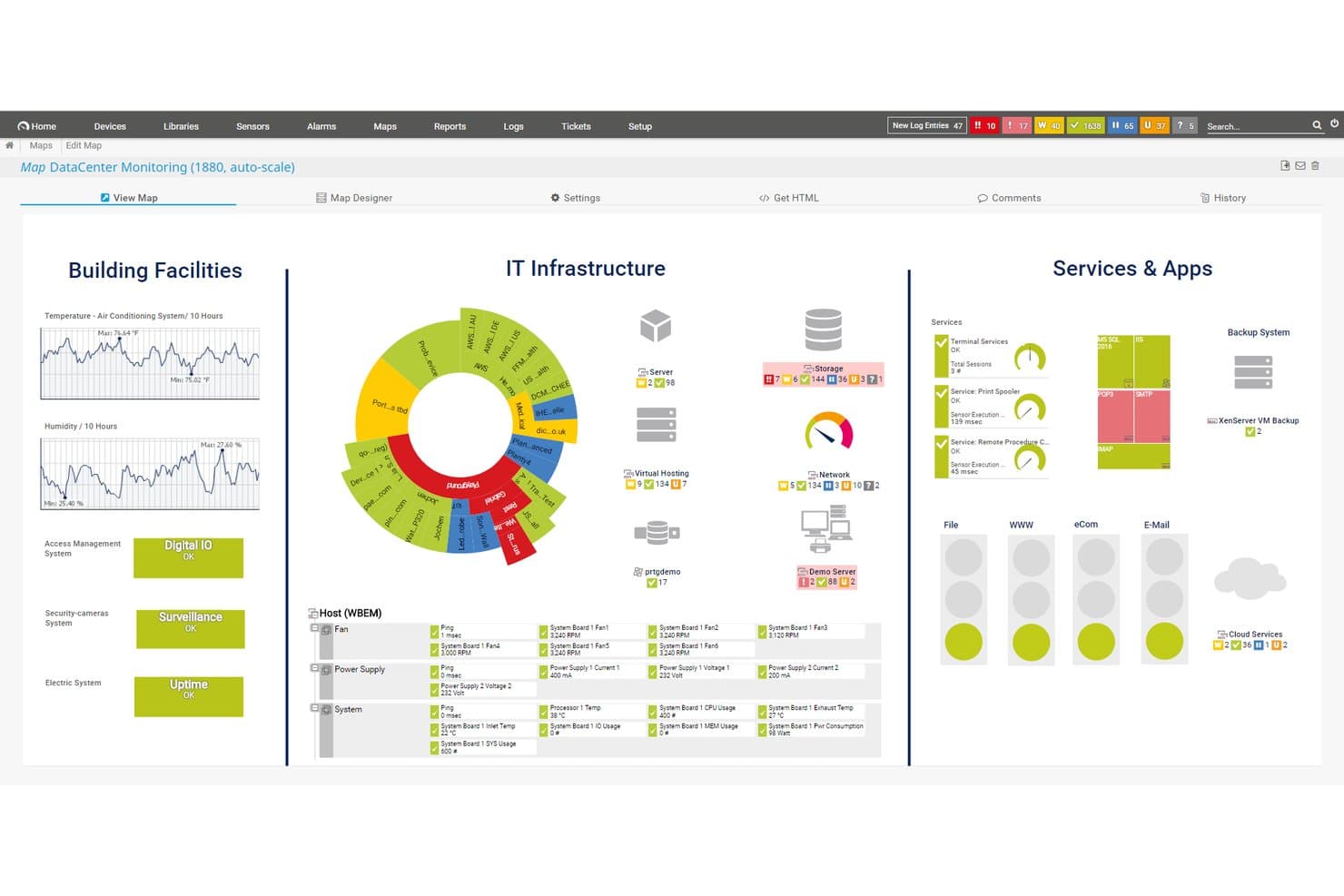
Paessler PRTG offre una mappa di monitoraggio del data center che visualizza strutture, infrastruttura IT, servizi e applicazioni in un'unica dashboard unificata. Paessler PRTG è una piattaforma di monitoraggio dell'infrastruttura IT senza agente che traccia dispositivi di rete, server, applicazioni, database e risorse cloud tramite un sistema basato su sensori con dashboard personalizzabili e avvisi in tempo reale.
Per chi è più adatto Paessler PRTG?
I team IT di medie e grandi aziende che necessitano di una visibilità centralizzata su reti on-premises, server e infrastrutture ibride.
Perché ho scelto Paessler PRTG
Ho scelto Paessler PRTG tra i migliori perché la sua architettura basata su sensori mi permette di raccogliere metriche da dispositivi di rete, server, applicazioni e risorse cloud in un'unica piattaforma. Trovo molto utile come il progettista di mappe PRTG mi consenta di costruire dashboard personalizzate in tempo reale che riflettono la disposizione reale della mia infrastruttura, invece di un modello generico. L'installazione delle sonde remote estende questa copertura a più sedi senza dover avviare strumenti di monitoraggio separati.
Funzionalità principali di Paessler PRTG
- Monitoraggio basato su sensori: Permette di tenere traccia di diversi tipi di dispositivi, servizi e protocolli assegnando sensori individuali a metriche specifiche.
- Sensori personalizzati REST: Consente di estrarre dati da API di terze parti o applicazioni personalizzate tramite richieste HTTP.
- Monitoraggio distribuito con sonde remote: Supporta il monitoraggio di infrastrutture distribuite geograficamente da un'unica console.
- Audit logging e single sign-on: Abilita il tracciamento delle attività degli utenti e la gestione semplificata degli accessi per la conformità nelle organizzazioni di maggiori dimensioni.
Integrazioni di Paessler PRTG
Paessler PRTG offre integrazioni native con Amazon CloudWatch, Microsoft Azure, VMware vSphere e Slack, e fornisce un'API per integrazioni personalizzate.
Pros and Cons
Pros:
- Sensori personalizzabili su tutti i livelli dell'infrastruttura
- Eccellente supporto per deployment on-premises e ibridi
- La funzione di auto-scoperta mappa automaticamente tutta la rete
Cons:
- Monitoraggio nativo limitato per container e Kubernetes
- L'interfaccia utente appare datata rispetto alle alternative moderne
Learn more about Paessler PRTG: Ideale per il monitoraggio reale degli utenti
- Prova gratuita di 30 giorni + demo gratuita disponibile
- Da $10/mese (fatturato annualmente)
Visit WebsiteCustomer Rating:4.7/5This rating combines scores from multiple user review sites to reflect overall customer sentiment about the product.
Site24x7 offre dashboard personalizzabili in cui i team DevOps possono adattare la visualizzazione del monitoraggio alle loro specifiche esigenze. Site24x7 è una soluzione di monitoraggio basata su cloud pensata per i team DevOps e le operazioni IT. Offre capacità di monitoraggio complete per siti web, server, reti, applicazioni e servizi cloud. Con Site24x7, puoi ottenere informazioni in tempo reale sulle prestazioni e lo stato della tua infrastruttura IT.
Perché ho scelto Site24x7: Apprezzo la sua funzionalità di monitoraggio delle prestazioni delle applicazioni (APM). Questo strumento ti aiuta a identificare e risolvere problemi di prestazioni nelle tue applicazioni fornendo approfondimenti dettagliati sulle tracce delle transazioni, le query del database e i componenti applicativi. Un'altra funzione preziosa è il monitoraggio reale degli utenti (RUM). RUM ti permette di tracciare e analizzare le esperienze degli utenti reali sui tuoi siti web e applicazioni web. Comprendendo come gli utenti interagiscono con i tuoi servizi, puoi prendere decisioni informate per migliorare usabilità e prestazioni.
Caratteristiche e integrazioni principali di Site24x7
Le funzionalità includono il monitoraggio sintetico delle transazioni web, che ti consente di simulare le interazioni degli utenti per identificare eventuali problemi prima che possano influire sugli utenti reali. Inoltre, il monitoraggio della rete offre visibilità sullo stato dei dispositivi di rete, aiutandoti a mantenere l’affidabilità. La gestione dei log è un’altra funzione che permette di raccogliere e analizzare i log provenienti da varie fonti, facilitando una risoluzione efficiente dei problemi.
Le integrazioni includono ServiceNow, PagerDuty, Jira, Microsoft Teams, Slack, Nagios, AWS, Azure, Google Cloud Platform, Docker, Jenkins e Kubernetes.
Pros and Cons
Pros:
- Offre avvisi in tempo reale su vari canali
- Dashboard e report personalizzabili
- Monitoraggio completo per diversi sistemi
Cons:
- Un numero eccessivo di avvisi può risultare opprimente per gli utenti
- Configurazione iniziale complessa per ambienti di grandi dimensioni
Learn more about Site24x7: Ideale per il monitoraggio multi-cloud
- Prova gratuita di 30 giorni + demo gratuita + piano gratuito disponibile
- Da $199/anno
Visit WebsiteCustomer Rating:4.3/5This rating combines scores from multiple user review sites to reflect overall customer sentiment about the product.
Piattaforma solida di gestione delle prestazioni applicative con capacità di monitoraggio estese e integrazioni di terze parti per un migliore controllo IT. ManageEngine Applications Manager è uno strumento completo che offre il monitoraggio multi-cloud, permettendo agli utenti di monitorare, gestire, verificare e mettere in sicurezza le loro infrastrutture multi-cloud e ibride. Il suo punto di forza risiede nella capacità di fornire una soluzione unificata per il monitoraggio e la gestione di ambienti multi-cloud, rivelandosi la scelta migliore per le aziende che desiderano ottimizzare i propri sforzi di monitoraggio multi-cloud.
Perché ho scelto ManageEngine Applications Manager: ManageEngine Applications Manager si distingue offrendo funzioni robuste che facilitano il monitoraggio continuo, l'analisi delle prestazioni e la risoluzione dei problemi lungo l'intera pipeline DevOps. Supporta un approccio proattivo alla gestione degli incidenti, consente l'automazione dei controlli di routine e fornisce analisi dettagliate per migliorare le decisioni. La sua capacità di integrarsi senza difficoltà con vari strumenti di sviluppo, test e deployment lo rende una risorsa preziosa per i team DevOps che puntano all'alta efficienza e a tempi di inattività minimi.
Funzionalità e integrazioni di ManageEngine Applications Manager
Le funzionalità includono un ampio supporto nativo per il monitoraggio di oltre 100 applicazioni e server, spaziando da database, web server, application server e server virtuali, fino a piattaforme cloud, container e architetture a microservizi. Inoltre, ManageEngine Applications Manager integra funzionalità avanzate di analisi delle cause profonde alimentate da algoritmi di machine learning.
Le integrazioni includono Amazon Web Services (AWS), Microsoft Azure, Google Cloud Platform, Oracle Database, MySQL, Microsoft SQL Server, VMware, Docker, Apache Tomcat e Redis.
Pros and Cons
Pros:
- Monitoraggio completo di applicazioni, server e ambienti cloud
- Dashboard e report personalizzabili per analisi approfondite
- Rilevamento automatico delle anomalie e meccanismi di avviso
Cons:
- Può essere complesso da configurare e personalizzare per esigenze specifiche
- Il costo può essere proibitivo per piccole e medie imprese
Learn more about ManageEngine Applications Manager: Ideale per approfondimenti in tempo reale sull'infrastruttura
- Prova gratuita di 14 giorni + piano gratuito + demo gratuita disponibile
- Da $4.50/node/mese (fatturato annualmente)
Visit WebsiteCustomer Rating:4.8/5This rating combines scores from multiple user review sites to reflect overall customer sentiment about the product.
Netdata fornisce dashboard completamente automatizzati che visualizzano ogni singola metrica. Netdata è una piattaforma open-source per il monitoraggio e la risoluzione dei problemi che offre metriche ad alta risoluzione, log di sistema e visualizzazioni in tempo reale per il monitoraggio dei sistemi. Si propone come un'alternativa economica e facile da usare rispetto a piattaforme più costose e complesse.
Perché ho scelto Netdata: Mi piace che la piattaforma dia importanza ai dati di alta fedeltà e offra visualizzazioni in tempo reale, permettendo agli utenti di monitorare le prestazioni e lo stato del sistema con precisione. Inoltre, semplifica e migliora il processo di monitoraggio per i team DevOps con funzionalità per la raccolta, l'archiviazione, l'interrogazione, la visualizzazione e le notifiche su un'ampia gamma di metriche. Netdata può essere eseguito su più nodi e ogni istanza di Netdata è in grado di funzionare autonomamente.
Caratteristiche e integrazioni distintive di Netdata
Le funzionalità includono avvisi per notificare gli utenti in caso di problemi rilevati all'interno del sistema, rilevamento automatico delle anomalie e dashboard automatizzati e personalizzabili. Inoltre, il nucleo dell'ecosistema Netdata è open-source e include tutte le funzioni di monitoraggio come il database, il motore di interrogazione, il motore di scoring, il motore di salute e il motore di apprendimento automatico.
Le integrazioni includono Containers, Kubernetes Containers, Macchine Virtuali, Apache, Consul, Elasticsearch, OpenSearch, MySQL, Redis, file di log Squid, Windows, macOS e centinaia di altri ancora.
Pros and Cons
Pros:
- Notifiche automatiche
- Monitoraggio illimitato delle metriche
- Grafici interattivi per la visualizzazione dei dati
Cons:
- Potrebbe avere una curva di apprendimento per sfruttarne al massimo le funzioni
- Gli approfondimenti potrebbero essere più completi
Learn more about Netdata: Ideale per il monitoraggio dei certificati SSL
- Piano gratuito + demo gratuita disponibile
- A partire da $8/10 monitoraggi/mese (fatturato annualmente)
Visit WebsiteCustomer Rating:4.7/5This rating combines scores from multiple user review sites to reflect overall customer sentiment about the product.
UptimeRobot monitora lo stato dei certificati SSL e l'uptime in un'unica dashboard in tempo reale. Per i team DevOps che cercano una soluzione di monitoraggio affidabile, UptimeRobot offre un'opzione pratica che supporta il monitoraggio dei certificati SSL insieme ai controlli di uptime. È adatto a team di tutte le dimensioni, dai singoli operatori alle organizzazioni più grandi, che necessitano di visibilità sulla disponibilità dei servizi e sulle prestazioni degli endpoint. Aiutando i team a rilevare problemi come scadenza dei certificati, tempi di inattività e rallentamenti nelle risposte, UptimeRobot supporta operazioni stabili e un'erogazione costante dei servizi.
Perché ho scelto UptimeRobot
Ho scelto UptimeRobot per il suo monitoraggio dei certificati SSL, che aiuta i team DevOps a evitare problemi causati da certificati scaduti o configurati in modo errato. Tiene traccia dello stato dei certificati e invia avvisi prima che scadano, riducendo il rischio di avvisi di accesso o interruzioni del servizio. UptimeRobot fornisce anche avvisi di inattività attraverso integrazioni come Slack e PagerDuty, rendendo più facile per i team rispondere rapidamente e mantenere servizi affidabili.
Funzionalità principali di UptimeRobot
Oltre al monitoraggio dei certificati SSL, UptimeRobot offre:
- Controlli da più località: Monitora i tuoi servizi da più località nel mondo per garantire l'accessibilità globale.
- Monitoraggio dei tempi di risposta: Tieni traccia della rapidità con cui il tuo server risponde per ottenere informazioni sui colli di bottiglia delle prestazioni.
- Pagine di stato personalizzabili: Condividi aggiornamenti sullo stato in tempo reale con gli utenti tramite pagine di stato personalizzate con il tuo marchio.
- Gestione degli incidenti: Gestisci e risolvi gli incidenti in modo efficiente grazie ad avvisi personalizzabili e livelli di accesso per il team.
Integrazioni di UptimeRobot
Le integrazioni includono Slack, PagerDuty, Microsoft Teams, Telegram, Discord, Splunk On-Call e altre ancora, permettendo una gestione degli avvisi senza interruzioni sulle piattaforme di comunicazione preferite.
Pros and Cons
Pros:
- Avvisi in tempo reale assicurano una risposta rapida ai problemi di downtime
- Il monitoraggio SSL aiuta a mantenere efficacemente la sicurezza del sito web
- Supporta più canali di avviso
Cons:
- Personalizzazione limitata delle impostazioni di notifica rispetto ai concorrenti
- Non adatto a stack DevOps complessi
Learn more about UptimeRobot: Ideale per il monitoraggio di interruzioni e guasti dei server
- Prova gratuita di 14 giorni
- Da $21/utente/mese
Visit WebsiteCustomer Rating:4.5/5This rating combines scores from multiple user review sites to reflect overall customer sentiment about the product.
Puoi monitorare e calcolare le percentuali di errori delle richieste API in PagerDuty. PagerDuty è una piattaforma di risposta agli incidenti che invia avvisi in caso di interruzioni o malfunzionamenti dei servizi. Nei momenti critici, può inviare notifiche tramite email, SMS e telefonate al tuo team di sviluppo o alla base clienti.
Perché ho scelto PagerDuty: Ho scelto PagerDuty perché è uno strumento eccellente se gestisci infrastrutture critiche che vuoi monitorare costantemente. La piattaforma consente di ricevere notifiche di allerta on-call in tempo reale.
Funzionalità e integrazioni distintive di PagerDuty:
Le funzionalità che mi hanno colpito di più sono completamente dedicate ad avvisare i team nel caso in cui sistemi, nodi o servizi applicativi vadano in errore e includono avvisi email, notifiche mobili, analisi della causa principale, notifiche in tempo reale e prioritizzazione. Puoi anche programmare ed escalationare automaticamente i problemi.
Le integrazioni includono plugin preconfigurati per AWS, ServiceNow, Salesforce, Zendesk, Atlassian, Datadog, Slack, Splunk e altri ancora.
Pros and Cons
Pros:
- Consente di assegnare la gestione degli incidenti alla persona o al team più appropriato
- Gli avvisi personalizzabili possono essere inviati via email, telefono, SMS o notifiche push
- Filtra le notifiche per dare priorità agli avvisi di maggior rilievo che indicano reali minacce, riducendo al contempo i falsi allarmi
Cons:
- Cercare avvisi storici può essere difficile a meno di disporre dell'ID esatto
- Utilizza una dashboard convenzionale che potrebbe essere più personalizzabile in base a esigenze e preferenze specifiche
Learn more about PagerDuty: Ideale per il monitoraggio continuo di grandi reti di porte
- Prova gratuita di 30 giorni
- A partire da $1.995/utente
Visit WebsiteCustomer Rating:4.6/5This rating combines scores from multiple user review sites to reflect overall customer sentiment about the product.
Qui puoi monitorare la larghezza di banda e lo stato delle porte in Nagios. Nagios è un'applicazione software open-source che monitora costantemente le reti di traffico. Può tracciare l'utilizzo della larghezza di banda per porta per il traffico in entrata e in uscita, rilevare interruzioni di rete, identificare porte sovraccariche e scoprire abusi nella rete.
Perché ho scelto Nagios: Invece di esporre i miei sistemi a vulnerabilità o preoccuparmi delle prestazioni lente della rete, Nagios fornisce al mio team DevOps una visibilità immediata della nostra rete. Inoltre, mi è piaciuto che registri informazioni come problemi di infrastruttura di rete e processi falliti per porta.
Caratteristiche principali e integrazioni di Nagios
Le funzionalità offerte da Nagios garantiscono la sicurezza delle porte di rete. Queste includono monitoraggio SNMP, monitoraggio di switch e router, monitoraggio di rete e monitoraggio ping, che mi aiutano a mantenere l'integrità e la sicurezza della mia infrastruttura di rete.
Le integrazioni pre-integrate includono Amazon SNS, Prometheus, PagerDuty, Dynatrace e altro ancora. Inoltre, Nagios dispone di oltre 3.000 plugin ufficiali e della community che gli sviluppatori possono aggiungere allo stack.
Pros and Cons
Pros:
- La versione open source è completamente gratuita
- Leggero per un utilizzo minimo delle risorse
- Aumenta la disponibilità dell'intera infrastruttura di rete per i guasti di protocollo e le interruzioni di rete
Cons:
- Sono necessarie licenze separate per le funzionalità di sicurezza e di visibilità della rete
- Utilizza file invece di database per memorizzare i file di configurazione nel backend
Learn more about Nagios: Ideale per il monitoraggio delle prestazioni di siti web e mobile
- Prova gratuita di 15 giorni
- Da $6/core/mese
Visit WebsiteCustomer Rating:4.3/5This rating combines scores from multiple user review sites to reflect overall customer sentiment about the product.
AppDynamics può monitorare dettagli storici dei pagamenti e fornire dati sul rapporto di accesso degli utenti. AppDynamics è uno strumento di gestione delle prestazioni delle applicazioni completo. Utilizza algoritmi di apprendimento automatico per individuare i problemi di prestazione, confrontarli con metriche di riferimento e generare avvisi quando necessario.
Perché ho scelto AppDynamics: Ho scelto AppDynamics perché si concentra sulle prestazioni delle applicazioni utilizzando il monitoraggio per garantire un'esperienza utente ottimale. Che tu stia gestendo un sito web o un'app mobile, AppDynamics assicura che i tuoi clienti non incontrino problemi come timeout o tempi di caricamento lenti delle pagine.
Caratteristiche e integrazioni distintive di AppDynamics:
Funzionalità che ho trovato eccellenti in AppDynamics per il monitoraggio delle prestazioni includono il monitoraggio delle prestazioni delle applicazioni (APM) e la visibilità dell'infrastruttura con visibilità sui database. Inoltre, il monitoraggio degli utenti finali ha attirato la mia attenzione poiché garantisce la massima velocità possibile delle applicazioni per i tuoi clienti.
Integrazioni con cui AppDynamics collabora includono plugin preconfigurati come LoadRunner, Sainapse e NeoLoad per le prestazioni e la consegna continua. AppDynamics collabora anche con SquaredUp, Medallia e Quantum Metric per monitorare l'esperienza del cliente.
Pros and Cons
Pros:
- Fornisce informazioni in tempo reale sui processi che consumano CPU e memoria
- Profondità nel monitoraggio di applicazioni web e infrastruttura notevole
- La visibilità della rete permette di vedere la quantità di banda utilizzata per nodo
Cons:
- La funzionalità può risultare eccessiva per le piccole aziende
- Nessuna scansione automatica delle applicazioni; devono essere definite in un file di configurazione
Learn more about AppDynamics: Ideale per l'osservabilità full-stack nelle soluzioni SaaS
- Piano gratuito disponibile
- A partire da 49$/utente/mese
Visit WebsiteCustomer Rating:4.3/5This rating combines scores from multiple user review sites to reflect overall customer sentiment about the product.
Con New Relic puoi monitorare ogni istanza del tuo servizio. New Relic è uno strumento di monitoraggio e analisi web che osserva in tempo reale ogni componente applicativo distribuito su database e server.
Perché ho scelto New Relic: Ho scelto New Relic perché offre una soluzione 'tutto in uno' che monitora e analizza ogni aspetto dello stack tecnologico. Avere una visibilità completa end-to-end permette ai team di ottenere informazioni utili quando si verificano problemi e di affrontarli e risolverli con tempestività.
Caratteristiche principali e integrazioni di New Relic:
Funzionalità che rendono New Relic ideale per il monitoraggio full-stack includono il monitoraggio delle applicazioni e dei database. Inoltre, è disponibile il monitoraggio della disponibilità per assicurarsi che i sistemi funzionino in luoghi pubblici o privati 24 ore su 24.
Integrazioni disponibili con plugin preconfigurati come AWS, Kubernetes, Azure, Google Cloud Platform e Prometheus. È anche possibile utilizzare integrazioni native come SQL Server per inviare query a New Relic.
Pros and Cons
Pros:
- Estremamente ricco di funzionalità e consente di scrivere query personalizzate sui dati raccolti dai sistemi di strumentazione
- Offre informazioni su metriche e prestazioni anche sotto carichi e stress elevati
- Installazione semplice dell'agente che consente di visualizzare i dati sulla dashboard in pochi minuti
Cons:
- Il costo può essere considerato elevato, soprattutto per startup e anche per aziende di medie dimensioni
- L'interfaccia può risultare un po' complessa a causa dell'elevato numero di opzioni visualizzate
Learn more about New Relic: 10Ideale per monitorare e cercare tra i big data
Splunk
- Prova gratuita di 60 giorni
- Prezzo su richiesta
Visit WebsiteCustomer Rating:4.3/5This rating combines scores from multiple user review sites to reflect overall customer sentiment about the product.
Splunk consente agli utenti di ordinare i dati e fornisce statistiche su vari tipi di dati Splunk è uno strumento software che acquisisce e indicizza i dati, organizzandoli in un archivio ricercabile. Consente la generazione di avvisi, report e visualizzazioni da grandi insiemi di dati.
Perché ho scelto Splunk: Ho scelto Splunk per la sua capacità di scalare e gestire grandi volumi di dati. Con la crescente complessità delle applicazioni moderne e dei sistemi distribuiti, la scalabilità di Splunk garantisce una gestione e un'analisi efficaci dei log provenienti da molteplici fonti senza compromettere le prestazioni.
Caratteristiche principali e integrazioni di Splunk:
Le funzionalità di Splunk sono progettate per offrire ai team una maggiore visibilità sulle loro applicazioni. Ritengo che le sue capacità di indicizzazione e raccolta dati, gestione dei carichi di lavoro, toolkit di apprendimento automatico e strumenti intuitivi di esplorazione dei dati lo rendano uno strumento eccellente per i team.
Le integrazioni sono disponibili tramite plugin predefiniti per Docker, Jenkins, Kubernetes, Ansible, AWS, Azure e ServiceNow. Inoltre, Splunk fornisce informazioni sulle funzionalità di ciascuna integrazione, permettendoti di vedere se le tue integrazioni possono fornirti tracce, log, metriche o metadati con Splunk.
Pros and Cons
Pros:
- Salva le tue ricerche e riconosce automaticamente i dati importanti
- Altamente scalabile e facile da implementare
- Crea report analitici e visualizza i dati con grafici, tabelle e diagrammi
Cons:
- Può essere costoso, specialmente se i tuoi servizi richiedono risorse intensive
- Ottimizzare le ricerche per la velocità può essere difficile
- Visita il sito web (si apre in una nuova finestra)
Learn more about Splunk:
Altri Strumenti di Monitoraggio DevOps
Ecco alcuni altri strumenti che non sono entrati nella top 12 ma che vale sicuramente la pena considerare:
- 11PrometheusIdeale per gli avvisi e l'aggregazione delle metriche
- 12Grafana CloudIdeale per il monitoraggio, l'analisi e la visualizzazione dei dati
- 13BuddyIdeale per il monitoraggio di siti web e app mobili per piccole imprese
- 14InfluxDBIdeale per il monitoraggio di dati in serie temporale in un unico database polivalente
- 15SensuIdeale per il monitoraggio di ambienti cloud
- 16ChaosSearchIdeale per centralizzare dati di log ed eventi nel cloud
- 17DynatraceIdeale per il monitoraggio delle prestazioni end-to-end per grandi aziende
- 18Dotcom MonitorIdeale per monitorare i flussi di lavoro critici
- 19IcingaIdeale per verificare la disponibilità delle risorse di rete
Recensioni Correlate di Software & Strumenti
Se non hai ancora trovato quello che cerchi, dai un'occhiata anche a queste altre tipologie di strumenti che abbiamo testato e valutato.
- Software per il Monitoraggio della Rete
- Software per il Monitoraggio dei Server
- Soluzioni SD-Wan
- Strumenti per il Monitoraggio dell’Infrastruttura
- Packet Sniffer
- Strumenti per il Monitoraggio delle Applicazioni
Come Valuto Gli Strumenti di Monitoraggio DevOps
Valuto questi strumenti su due livelli: requisiti fondamentali come l'ingestione di metriche, il tracing distribuito e l'instradamento degli alert, poi i fattori differenzianti che determinano l'adattabilità al tuo stack e al tuo team.
Funzionalità di Base (Requisiti Minimi per Questa Lista)
Quando seleziono gli strumenti per la mia lista, ne valuto ciascuno su una scala da 0 (non offre la funzionalità) a 5 (eccelle in quest'area) per ogni funzionalità principale elencata di seguito. Poi calcolo il punteggio totale dello strumento in percentuale. Ogni strumento deve raggiungere un punteggio minimo totale del 75% per essere preso in considerazione.
- Monitoraggio di Infrastruttura e Applicazioni: Valuto se uno strumento può monitorare host, container, database e servizi applicativi in un unico posto, come vedere i picchi di CPU sui nodi Kubernetes insieme alla latenza delle API.
- Osservabilità a Tutto Stack: Log, metriche e trace devono essere correlati tra servizi, così puoi seguire una richiesta lenta da un errore frontend attraverso i salti tra microservizi fino alla causa principale.
- Alerting in Tempo Reale e Gestione degli Incidenti: Controllo la presenza di condizioni di alert configurabili, politiche di escalation e instradamento verso strumenti come PagerDuty o Slack, così che gli ingegneri reperibili ricevano notifica tramite il canale corretto.
- Monitoraggio Pipeline CI/CD: Il tracciamento dei deployment è fondamentale qui. Cerco visibilità sulle fasi di build, tassi di errore e la capacità di correlare un deploy non riuscito a un incidente in produzione.
- Integrazioni con la Toolchain DevOps: Lo strumento deve integrarsi con il tuo stack esistente. Cerco connettori nativi per Kubernetes, Terraform, Jenkins, GitHub e i principali provider cloud.
- Rilevamento Anomalie e Analisi delle Cause Principali: Valuto se lo strumento va oltre le soglie statiche. Il rilevamento di anomalie basato su ML e la correlazione degli eventi aiutano gli SRE a fare ordine nel rumore degli alert durante gli outage.
Una volta individuata una lista di strumenti che soddisfano questi criteri, considero cosa distingue ciascuna piattaforma.
Fattori Differenzianti (Cosa Distingue i Fornitori)
Ecco come confronto i diversi fornitori:
Caratteristiche Distintive
Il tracciamento degli SLO è un vero discriminante. Cerco strumenti che permettano ai team SRE di definire budget di errore e monitorare i burn rate, così che le decisioni sulla affidabilità siano guidate dai dati e non reattive. Anche il monitoraggio sintetico è importante: simulando chiamate API o flussi utente da più regioni si individuano problemi di latenza prima che li sperimentino gli utenti reali. Il RUM (Real User Monitoring) completa questa panoramica catturando la reale performance di browser e dispositivi mobili, dandoti uno scenario completo su come una release impatta sull'esperienza utente finale.
Oltre le Funzionalità
Valuto con attenzione anche la prevedibilità dei costi. Alcuni strumenti fatturano in base all'host, altri a volume di dati, e i costi di conservazione dei log possono aumentare rapidamente se si ingeriscono terabyte da grandi cluster Kubernetes. Un altro aspetto che verifico è il supporto a OpenTelemetry, perché adottare standard aperti protegge il team dal vendor lock-in se cambiano le esigenze. Considero anche il tempo per generare valore: auto-strumentazione e dashboard preconfigurate possono fare la differenza tra andare in produzione in pochi giorni o impiegare settimane per una configurazione manuale.
Come Scegliere gli Strumenti di Monitoraggio DevOps
È facile perdersi tra lunghe liste di funzionalità e strutture di prezzo complesse. Per aiutarti a rimanere focalizzato durante il tuo processo di selezione del software, ecco un elenco di aspetti da tenere in considerazione:
| Fattore | Cosa Considerare |
|---|---|
| FattoreScalabilità | Cosa ConsiderareAssicurati che lo strumento possa gestire carichi di lavoro crescenti e un numero maggiore di utenti senza perdere in prestazioni. Le opzioni basate su cloud con auto-scaling possono aiutare a gestire la crescita. |
| FattoreIntegrazioni | Cosa ConsiderareVerifica se lo strumento si integra con il tuo stack DevOps esistente, inclusi pipeline CI/CD, servizi cloud e piattaforme di risposta agli incidenti. |
| FattorePersonalizzazione | Cosa ConsiderareCerca opzioni per regolare le impostazioni di monitoraggio, le soglie di allerta e le dashboard per adattarle ai flussi di lavoro e alle priorità del tuo team. |
| FattoreFacilità d'Uso | Cosa ConsiderareLo strumento dovrebbe avere un'interfaccia chiara e controlli intuitivi, così che il tuo team possa individuare rapidamente i problemi e agire di conseguenza. Configurazioni complicate possono rallentare i tempi di risposta. |
| FattoreBudget | Cosa ConsiderareConfronta i costi di abbonamento, le licenze e le tariffe extra per funzionalità avanzate o limiti di dati aumentati. Fai attenzione ai costi nascosti. |
| FattoreGaranzie di Sicurezza | Cosa ConsiderareCerca crittografia, controlli di accesso e trasmissione sicura dei dati per proteggere le informazioni sensibili ed evitare violazioni. |
| FattoreAllerte in Tempo Reale | Cosa ConsiderareLo strumento dovrebbe fornire avvisi istantanei in caso di problemi di performance o interruzioni, permettendo al team di agire velocemente e minimizzare i tempi di inattività. |
| FattoreConservazione dei Dati e Reportistica | Cosa ConsiderareAssicurati che lo strumento conservi i dati storici a sufficienza per analisi dettagliate e l’identificazione dei trend. I report esportabili sono utili per le revisioni di team. |
Tendenze negli Strumenti di Monitoraggio DevOps
Nella mia ricerca, ho consultato numerosi aggiornamenti di prodotto, comunicati stampa e log di rilascio di diversi fornitori di strumenti di monitoraggio DevOps. Ecco alcune delle tendenze emergenti a cui sto prestando attenzione:
Rilevamento delle anomalie migliorato: Nuovi modelli di apprendimento automatico stanno migliorando il rilevamento delle anomalie, aiutando i team a individuare schemi irregolari in tempo reale e a ridurre i falsi positivi.
Osservabilità full-stack: I fornitori stanno andando oltre il monitoraggio di base per offrire una visione completa di infrastruttura, applicazioni ed esperienza utente in un unico posto. Questo rende più semplice individuare e risolvere i problemi. Quando valuti le piattaforme di osservabilità, cerca soluzioni che offrano capacità di monitoraggio complete.
Analisi guidate dall'IA: Sempre più strumenti utilizzano l'intelligenza artificiale per analizzare i dati e prevedere problemi di performance prima che si verifichino. Questo consente ai team di agire in modo proattivo invece che reattivo di fronte ai malfunzionamenti.
Tracciamento distribuito: Gli strumenti aggiungono funzionalità di tracing che consentono ai team di seguire le richieste attraverso microservizi e container. Questo aiuta a individuare dove si verificano ritardi o malfunzionamenti.
Sistemi auto-riparanti: Alcuni strumenti ora offrono una rimedio automatizzato, dove il sistema è in grado di rilevare un problema e correggerlo senza intervento umano. Questo riduce i tempi di inattività e quelli di risposta.
Cosa sono gli Strumenti di Monitoraggio DevOps?
Gli strumenti di monitoraggio DevOps sono soluzioni software specializzate progettate per tracciare e analizzare in tempo reale le prestazioni e lo stato di salute di applicazioni e infrastrutture. Questi strumenti sono utilizzati principalmente da ingegneri DevOps, amministratori di sistema e professionisti IT per garantire il funzionamento senza interruzioni e la consegna dei prodotti software.
Gli strumenti di monitoraggio DevOps aiutano ad automatizzare il processo di monitoraggio, fornendo informazioni sulle prestazioni del sistema e identificando e risolvendo rapidamente i problemi prima che possano influire sull'ambiente di produzione. Funzionalità come avvisi in tempo reale, strumenti di osservabilità dei dati e l’analisi predittiva supportano una risoluzione proattiva dei problemi e migliorano l’efficienza operativa.
Funzionalità
Ecco alcune delle funzionalità più importanti che cerco negli strumenti di monitoraggio DevOps quando li valuto per la mia lista:
- Avvisi e notifiche in tempo reale: Questa funzionalità garantisce un'immediata consapevolezza dei problemi non appena si presentano. È essenziale per mitigare rapidamente i problemi, evitando che piccoli inconvenienti si trasformino in gravi interruzioni di servizio.
- Dashboard complete: Le dashboard offrono una visione unificata di tutte le metriche e i log. Sono fondamentali per visualizzare lo stato della pipeline di sviluppo e la salute delle applicazioni, facilitando l'identificazione di tendenze e potenziali problematiche.
- Metriche personalizzabili: Opzioni di personalizzazione per il monitoraggio di specifiche metriche. Adattare le metriche alle necessità consente un monitoraggio più mirato, assicurando che i team possano controllare gli indicatori di prestazione più rilevanti per i loro progetti.
- Gestione e analisi dei log: Gestione efficace dei log e capacità analitiche. Analizzare i log aiuta a diagnosticare problemi e comprendere il comportamento delle applicazioni, aspetto vitale per la risoluzione dei problemi e l'ottimizzazione.
- Scalabilità: La capacità di scalare le soluzioni di monitoraggio con la crescita dei progetti. La scalabilità assicura che lo strumento di monitoraggio possa gestire carichi crescenti, prevenendo un degrado delle prestazioni nel tempo.
- Capacità di integrazione: La possibilità di integrarsi con una vasta gamma di strumenti di monitoraggio API e piattaforme. Questa caratteristica permette una collaborazione senza soluzione di continuità tra i vari strumenti utilizzati nella pipeline di sviluppo, rafforzando l'efficienza del flusso di lavoro e la coerenza dei dati.
- Funzionalità di sicurezza e conformità: Misure di sicurezza integrate e reportistica per la conformità. Queste funzionalità aiutano a proteggere i dati sensibili e a garantire che la pipeline di sviluppo rispetti i requisiti normativi.
- Gestione automatizzata degli incidenti: Automazione del processo di risposta agli incidenti. Gestendo automaticamente gli incidenti, i team possono ridurre i tempi di inattività e migliorare i tempi di risposta, aumentando così l'affidabilità delle applicazioni.
- Supporto cloud-native: Ottimizzato per monitorare ambienti basati su cloud. Poiché molte applicazioni sono ora ospitate sul cloud, il supporto nativo garantisce che il monitoraggio sia efficiente ed efficace in questi ambienti.
- Visibilità end-to-end: La capacità di monitorare ogni aspetto della pipeline di sviluppo. Questa funzionalità offre una visione olistica della pipeline, dai commit del codice al deployment, fondamentale per comprendere l'impatto dei cambiamenti e identificare eventuali colli di bottiglia.
Vantaggi
Gli strumenti di monitoraggio svolgono un ruolo essenziale nell’ecosistema DevOps. Non solo aiutano a individuare e risolvere rapidamente i problemi, ma forniscono anche preziose informazioni che contribuiscono a decisioni più consapevoli e a migliorare le prestazioni complessive. Ecco alcuni benefici più specifici che questi strumenti apportano al tuo team DevOps:
- Maggiore efficienza operativa: Gli strumenti di monitoraggio DevOps automatizzano il tracciamento e l’analisi di varie metriche e log lungo la pipeline di sviluppo. Questa automazione libera tempo prezioso per i team, consentendo loro di concentrarsi su attività più strategiche invece che su monitoraggi e diagnosi manuali.
- Migliore affidabilità dei sistemi: Fornendo avvisi e notifiche in tempo reale, questi strumenti permettono ai team di rilevare e gestire tempestivamente i problemi prima che diventino seri. Questa capacità di risposta immediata riduce sensibilmente i tempi di inattività e garantisce che i sistemi rimangano stabili e affidabili.
- Risoluzione proattiva dei problemi: L’uso di analisi predittive e rilevamento delle anomalie aiuta le organizzazioni ad anticipare i problemi prima che si verifichino. Identificando potenziali criticità con anticipo, i team possono intervenire preventivamente, evitando interruzioni e assicurando il regolare svolgimento delle operazioni.
- Prestazioni ottimizzate: Gli strumenti Database DevOps offrono capacità di analisi sulle prestazioni di applicazioni e infrastrutture, individuando i colli di bottiglia e le aree da migliorare. Queste informazioni consentono ai team di ottimizzare i propri sistemi per ottenere migliori prestazioni, migliorando l’esperienza utente e l’efficienza operativa.
- Aumento del livello di sicurezza: Grazie a funzionalità focalizzate sul monitoraggio delle metriche di sicurezza e degli standard di conformità, questi strumenti aiutano a individuare vulnerabilità e a garantire che i sistemi rispettino le migliori pratiche di sicurezza. Questo rafforzamento della sicurezza protegge da violazioni e mantiene l’integrità dei dati e dei sistemi aziendali.
Costi & Prezzi
Grazie a una vasta gamma di opzioni di piano disponibili, comprendere i prezzi e le funzionalità di ciascuno può aiutare chi acquista software a prendere una decisione informata in linea con le proprie esigenze e il proprio budget. Dalle versioni gratuite pensate per piccoli progetti ai piani enterprise con funzionalità avanzate, esistono strumenti di monitoraggio adatti a ogni scala operativa.
Tabella di confronto dei piani per strumenti di monitoraggio DevOps
Di seguito una panoramica dettagliata delle opzioni di piano e dei prezzi comuni degli strumenti di monitoraggio DevOps, pensata per aiutare chi si avvicina a questa categoria di software a orientarsi nella scelta.
| Tipo di piano | Prezzo medio | Caratteristiche comuni |
|---|---|---|
| Tipo di pianoGratuito | Prezzo medio$0 | Caratteristiche comuniCapacità di monitoraggio di base, metriche e log limitati, supporto dalla community, accesso ai forum |
| Tipo di pianoBase | Prezzo medio$20-$50/user/month | Caratteristiche comuniCapacità di monitoraggio avanzate, più metriche e log, supporto via email, integrazione con altri strumenti |
| Tipo di pianoStandard | Prezzo medio$50-$100/user/month | Caratteristiche comuniSuite di monitoraggio completa, analisi avanzate, supporto 24/7, dashboard personalizzabili, opzioni di integrazione |
| Tipo di pianoPremium | Prezzo medio$100-$200/user/month | Caratteristiche comuniFunzionalità premium inclusi analisi predittive, capacità di machine learning, supporto dedicato, integrazioni personalizzate |
| Tipo di pianoEnterprise | Prezzo medioPrezzo personalizzato | Caratteristiche comuniTutte le funzionalità Premium più opzioni di scalabilità, account manager dedicato, sicurezza di livello aziendale |
FAQ sugli strumenti di monitoraggio DevOps
Ecco alcune risposte alle domande più comuni sugli strumenti di monitoraggio DevOps:
Cosa fare dopo:
Se stai cercando informazioni sugli strumenti di monitoraggio DevOps, contatta gratuitamente un consulente SoftwareSelect per ricevere raccomandazioni.
Compila un modulo e ti confronti rapidamente con un esperto per approfondire le tue esigenze specifiche. Riceverai poi una selezione di software da valutare. Ti supporteranno anche durante tutto il processo di acquisto, incluse le negoziazioni sui prezzi.