

The best database DevOps tools help teams automate database changes, manage version control, and keep development and production environments consistent. These tools make it easier to handle schema updates, reduce deployment errors, and maintain reliability across complex data pipelines.
Many teams start looking for these tools when manual database updates cause conflicts, migration scripts break in production, or collaboration between developers and DBAs becomes a bottleneck. Problems like slow release cycles, inconsistent environments, and poor visibility into schema changes can quickly stall progress.
I’ve worked with engineering and DevOps teams implementing database automation across cloud and on-prem setups, testing tools for scalability, rollback reliability, and CI/CD integration.
In this guide, you’ll learn which database DevOps tools actually simplify versioning, minimize deployment risks, and help your team release database changes with confidence.
Why Trust Our Software Recommendations
6,700+
Reviews
20
Industry experts
16+
Evaluation factors
14
Years
Our team has been testing and reviewing software since 2012. As tech leaders ourselves, we know how difficult—and important—it is to choose the right software.
For this guide, we evaluated tools using hands-on testing and independent research, scoring tools using our selection criteria.
Our reviews reflect our human editorial judgment, not a sales pitch.
Expert reviewers:
- Paulo Gardini MiguelTech Director
 Tim FisherVP of AI
 Gabriel RosasTech Lead & Software Architect
 Christhian GruhnTech Lead & Platform Architect

Best Database DevOps Tools Summary
This comparison chart summarizes pricing details for my top database DevOps tools selections to help you find the best one for your budget and business needs.
| Tool | Best For | Trial Info | Price | ||
|---|---|---|---|---|---|
| 1 | Best for on-premises enterprise CI/CD pipelines | Free trial available | From $6/user/month | Website | |
| 2 | Best for SQL Server team DevOps workflows | 14-day free trial | From $1,410/user/year (billed annually) | Website | |
| 3 | Best for database governance in regulated teams | Free plan + free trial available | From $20/user/month | Website | |
| 4 | Best for SQL Server DevOps pipelines | Free trial available | Pricing upon request | Website | |
| 5 | Best for test data masking in DevOps pipelines | Free demo available | From $36,000 per TB annually (billed annually) | Website | |
| 6 | Best for SOX and HIPAA audit trail enforcement | Free demo available | Pricing upon request | Website | |
| 7 | Best for migration-based version control | Free trial available | Pricing upon request | Website | |
| 8 | Best for database change automation | 30-day free trial | Pricing upon request | Website | |
| 9 | Best for AI-native database change authoring | Free plan available | Pricing upon request | Website | |
| 10 | Best for SQL Server schema comparison | Free plan + free demo available | From $249.95/month | Website |


Best Database DevOps Tool Reviews
Below are my detailed summaries of the best database DevOps tools that made it onto my shortlist. My reviews offer a detailed look at each tool’s key features, pros & cons, integrations, and ideal use cases to help you find the best one.
 Best for on-premises enterprise CI/CD pipelines
- Free trial available
- From $6/user/month
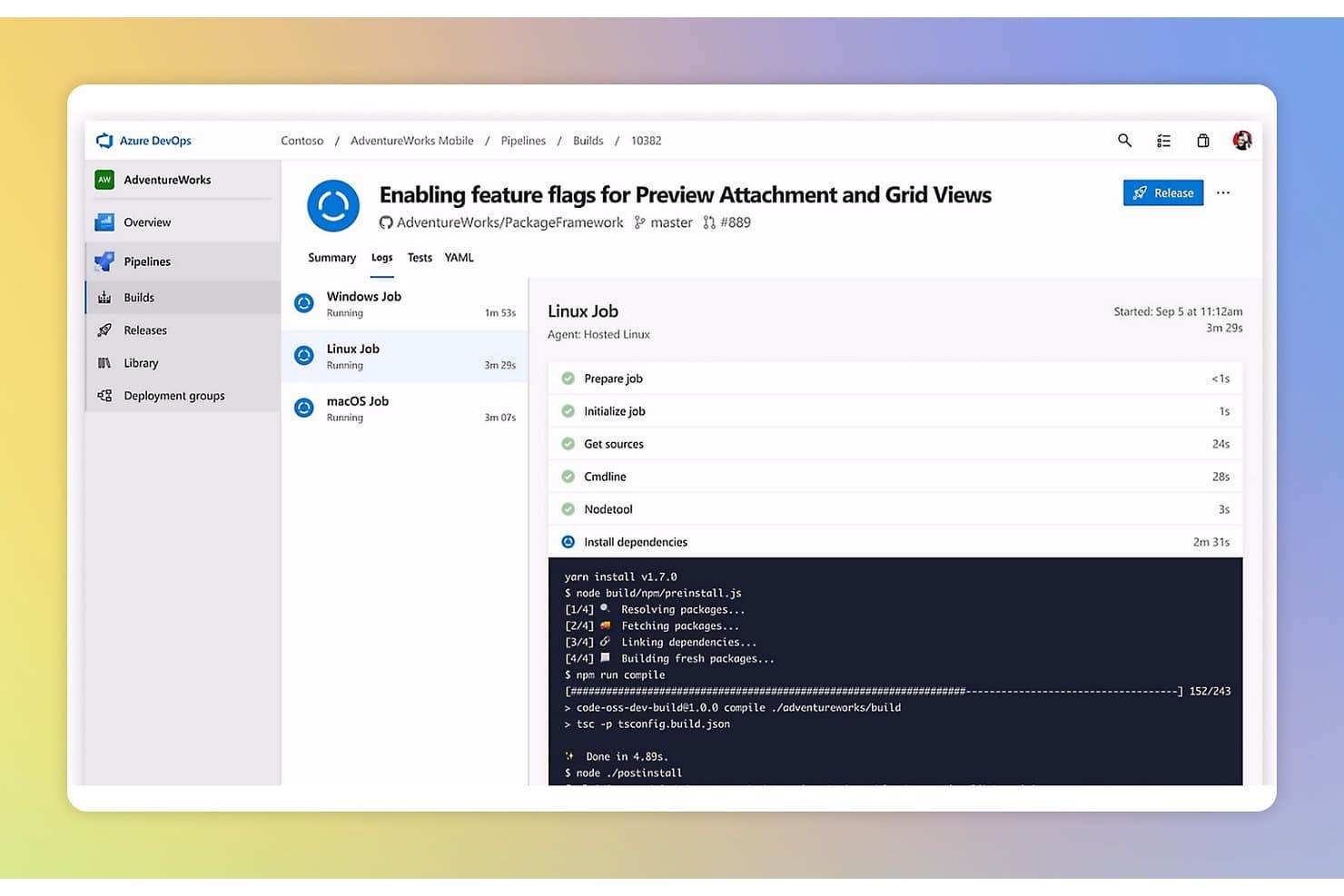
Azure DevOps Server tracks multi-platform CI build logs in real time. My Evaluation Score
- Database Version Control
- Strong
- Automated Schema Migration
- Adequate
- CI/CD Pipeline Integration
- Excels
- Governance & Audit Logging
- Strong
- Rollback & Drift Detection
- Adequate
- Multi-Database Platform Support
- Minimal
Azure DevOps Server is a self-hosted DevOps platform from Microsoft that combines Git-based version control, CI/CD pipelines, and release management with native SQL Server schema deployment tooling via DACPAC and Azure Pipelines.
Who Is Azure DevOps Server Best For?
Azure DevOps Server is a strong fit for enterprise teams in regulated industries that need a self-hosted CI/CD platform with native SQL Server integration and strict data sovereignty requirements.
Why I Picked Azure DevOps Server
I picked Azure DevOps Server as one of the best because it's the only tool on this list built specifically for enterprises that can't move their CI/CD infrastructure to the cloud. Running SQL Server pipelines on-premises through Azure Pipelines with native
SqlAzureDacpacDeployment@1tasks means your DACPAC-based schema changes deploy through the same approval gates, branch policies, and RBAC controls that govern your application code. I also like that SqlPackage schema comparison runs directly in the pipeline, flagging drift before a single change touches production.Azure DevOps Server Key Features
- Branch policies: Enforce required reviewers, build validation, and comment resolution before database code changes merge into protected branches.
- tSQLt pipeline integration: Run T-SQL unit tests automatically within Azure Pipelines to validate database logic before any deployment executes.
- Self-hosted agent support: Deploy pipeline agents inside your private network to reach on-premises SQL Server instances without exposing them to external traffic.
- Azure Key Vault integration: Store and retrieve SQL credentials and connection strings directly within pipelines using native secrets management.
Azure DevOps Server Integrations
Azure DevOps Server offers native integrations across the Microsoft ecosystem, including Azure SQL Database, Visual Studio, and Microsoft Entra ID. It supports GitHub, Bitbucket, GitLab, Jenkins, Terraform, Jira, and ServiceNow through service connections or Marketplace integrations.
Pros and Cons
Pros:
- Supports shift-left T-SQL testing in pipelines
- Deep integration with Microsoft databases and tools
- Runs entirely on-premises for full control
Cons:
- No automated rollback for failed deployments
- Native support limited to SQL Server
Learn more about Azure DevOps Server: Best for SQL Server team DevOps workflows
- 14-day free trial
- From $1,410/user/year (billed annually)

SQL Toolbelt Essentials lets users search for objects across databases instantly. My Evaluation Score
- Database Version Control
- Excels
- Automated Schema Migration
- Strong
- CI/CD Pipeline Integration
- Strong
- Governance & Audit Logging
- Adequate
- Rollback & Drift Detection
- Adequate
- Multi-Database Platform Support
- Minimal
SQL Toolbelt Essentials is an 11-tool bundle for SQL Server teams that covers the full database development lifecycle, combining schema comparison, version control, AI-assisted coding, unit testing, and automated documentation in a single SSMS-native package.
Who Is SQL Toolbelt Essentials Best For?
SQL Toolbelt Essentials is built for SQL Server–focused database teams that need version control, schema comparison, and unit testing inside a single SSMS-native bundle.
Why I Picked SQL Toolbelt Essentials
SQL Toolbelt Essentials earns its spot on my shortlist because it's the most complete SQL Server DevOps bundle I've seen, covering schema comparison, version control, unit testing, and AI-assisted coding in a single SSMS-native package. I particularly like how SQL Source Control turns version control into a byproduct of normal development, automatically tracking every schema change without extra manual steps. SQL Compare Pro adds dependency-aware deployment scripts with data loss warnings, which is exactly what SQL Server release managers need before pushing changes to production.
SQL Toolbelt Essentials Key Features
- SQL Dependency Tracker: Visually maps relationships between SQL Server objects so you can assess the impact of a change before you make it.
- SQL Test with tSQLt integration: Runs unit tests against T-SQL code directly inside SSMS, catching logic errors before they reach deployment.
- SQL Multi Script: Executes T-SQL scripts across multiple servers and databases simultaneously from a single interface.
- SQL Doc: Auto-generates database documentation on a schedule, keeping your schema docs current without manual effort.
SQL Toolbelt Essentials Integrations
SQL Toolbelt Essentials has native Git integration through SQL Source Control, including GitHub, GitLab, Azure Repos, and Bitbucket. It supports CI/CD integrations with Azure DevOps, Jenkins, GitHub Actions, and GitLab CI through its extension, CLI, or PowerShell workflows.
Pros and Cons
Pros:
- AI-assisted SQL coding and code review
- Dependency impact analysis before deployments
- Version control built into SSMS workflow
Cons:
- Full automation requires extra add-on products
- Only supports Microsoft SQL Server engines
Learn more about SQL Toolbelt Essentials : Best for database governance in regulated teams
- Free plan + free trial available
- From $20/user/month

Bytebase integrates SQL review and auto-deploy into a GitHub CI/CD pipeline. My Evaluation Score
- Database Version Control
- Excels
- Automated Schema Migration
- Excels
- CI/CD Pipeline Integration
- Strong
- Governance & Audit Logging
- Excels
- Rollback & Drift Detection
- Strong
- Multi-Database Platform Support
- Excels
Bytebase is a database DevOps platform that covers schema migration, version control, SQL review, access control, and audit logging across 24 database engines.
Who Is Bytebase Best For?
Bytebase is a strong fit for teams in regulated industries—finance, healthcare, and SaaS—where database changes need documented approval chains, audit trails, and compliance-ready access controls.
Why I Picked Bytebase
Bytebase earns its spot on my shortlist because it's built specifically for teams where a schema change going wrong isn't just a bug—it's a compliance incident. I love that it combines immutable audit logs, risk-based approval workflows, and dynamic data masking into one governed pipeline, so finance or healthcare teams aren't stitching together separate tools to meet SOC 2 or HIPAA requirements. The policy-as-code support via Terraform means access rules and approval flows live in Git alongside application code, not in someone's head.
Bytebase Key Features
- Batch schema changes: Apply a single schema change across hundreds of tenant databases simultaneously through a coordinated, tracked workflow.
- Web-based SQL editor: Query any connected database through a governed browser interface with built-in masking, query history, and saved scripts.
- MCP server for AI agents: Connect AI agents and developer IDEs to submit database changes through the same approval and audit pipeline as human engineers.
- Schema drift detection: Automatically identify unauthorized or untracked schema changes and alert your team before they cause environment inconsistencies.
Bytebase Integrations
Bytebase offers native integrations with GitHub, GitLab, Bitbucket, Azure DevOps, Slack, Microsoft Teams, and more. RESTful and gRPC APIs support custom integrations and CI/CD workflows.
Pros and Cons
Pros:
- Dynamic data masking tied to user roles
- Automated schema drift detection and reporting
- Policy-as-code for unified governance workflows
Cons:
- No native ephemeral database provisioning
- Advanced governance features require enterprise upgrade
Learn more about Bytebase:

ApexSQL lets users build and manage CI/CD pipelines for database DevOps. My Evaluation Score
- Database Version Control
- Excels
- Automated Schema Migration
- Excels
- CI/CD Pipeline Integration
- Strong
- Governance & Audit Logging
- Strong
- Rollback & Drift Detection
- Adequate
- Multi-Database Platform Support
- Minimal
ApexSQL is a SQL Server DevOps toolkit that covers database version control, CI/CD pipeline integration, automated schema migration, shift-left testing, and database documentation in a single suite.
Who Is ApexSQL Best For?
ApexSQL is a strong fit for DBAs and DevOps engineers managing SQL Server environments who need a single suite to handle version control, pipeline automation, and shift-left testing.
Why I Picked ApexSQL
ApexSQL earns its spot on my shortlist because it's the most purpose-built SQL Server DevOps suite I've come across, covering the full pipeline from source control to post-deploy verification in one toolkit. I particularly like how ApexSQL Enforce applies 100-plus static analysis rules as a pipeline gate, failing builds before bad code ever reaches staging. Pair that with native tSQLt unit testing inside SSMS, and shift-left testing becomes a practical reality rather than a goal.
ApexSQL Key Features
- Ephemeral database provisioning: Spin up disposable, isolated database environments during pipeline execution to support branch-level testing workflows.
- Synthetic test data generation: ApexSQL Generate produces millions of rows of randomized, referentially intact test data exportable in SQL, CSV, JSON, XML, and Excel formats.
- Automated database documentation: ApexSQL Doc generates database documentation in multiple formats, including HTML, PDF, and Markdown, covering databases, SSAS, and SSIS packages.
- Open-source PowerShell cmdlet library: A publicly available PowerShell library on GitHub lets your team inspect, modify, and extend pipeline logic for custom automation workflows.
ApexSQL Integrations
ApexSQL offers documented integrations with Git, SVN, Mercurial, Perforce, TFS/Azure Repos, Azure DevOps Server, Jenkins, Bamboo, and TeamCity. It also provides Octopus Deploy templates, an Atlassian Marketplace plugin for Bamboo, and open-source PowerShell cmdlets for custom CI/CD workflows.
Pros and Cons
Pros:
- Includes built-in test data generation
- Enforces 100-plus static SQL code rules
- Deep SQL Server Management Studio integration
Cons:
- Lacks always-on drift detection between runs
- Only supports Microsoft SQL Server databases
Learn more about ApexSQL: Best for test data masking in DevOps pipelines
- Free demo available
- From $36,000 per TB annually (billed annually)
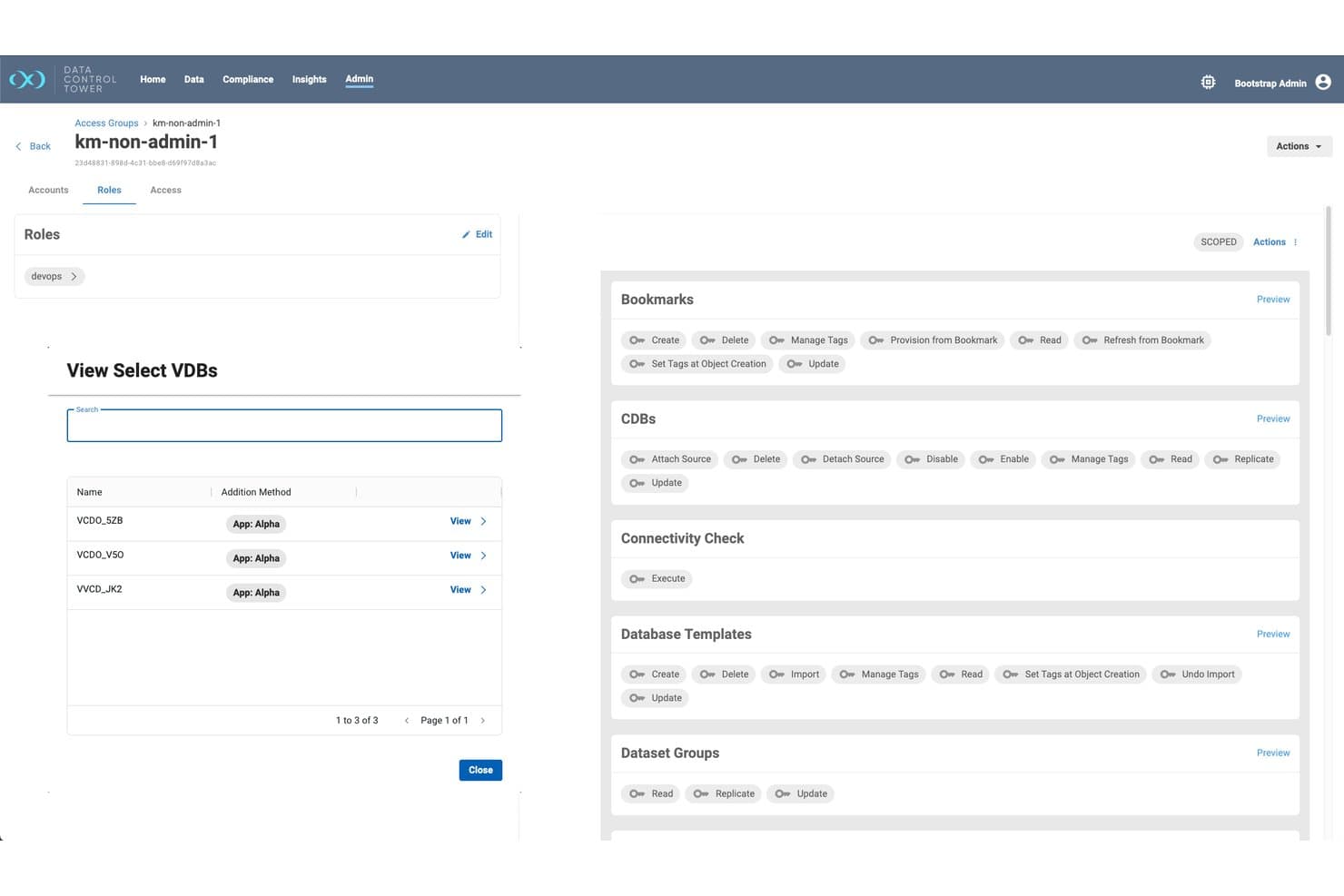
Perforce Delphix manages role-based access controls for database VDBs. My Evaluation Score
- Database Version Control
- Limited
- Automated Schema Migration
- Limited
- CI/CD Pipeline Integration
- Excels
- Governance & Audit Logging
- Excels
- Rollback & Drift Detection
- Minimal
- Multi-Database Platform Support
- Excels
Perforce Delphix is a test data management and data virtualization platform that automates the provisioning, masking, and governance of non-production database environments across DevOps pipelines.
Who Is Perforce Delphix Best For?
Perforce Delphix is a strong fit for DevOps and platform engineering teams in regulated industries that need automated test data masking and on-demand, production-like database environments in CI/CD pipelines.
Why I Picked Perforce Delphix
I picked Perforce Delphix as one of the best because its automated test data masking is genuinely hard to replicate with general-purpose DevOps tooling. When a pipeline spins up a virtual database clone, Delphix simultaneously discovers and obfuscates PII, PHI, and PCI-scope fields across all related tables, keeping referential integrity intact. That means your test environments get production-like data without ever exposing real customer records, which is exactly the kind of shift-left compliance enforcement regulated teams need baked into their CI/CD workflows.
Perforce Delphix Key Features
- Self-service virtual database provisioning: Developers and testers can spin up on-demand, production-like database clones via API, CLI, or UI without waiting on a DBA.
- Dataset versioning with bookmark and rewind: Teams can capture named data states, branch environments, and roll back to any prior checkpoint during testing or pipeline runs.
- AI-powered synthetic data generation: Generates realistic, scenario-specific datasets for edge-case testing and AI/ML model training when production data can't be used.
- Data Control Tower governance dashboard: Provides centralized RBAC, policy-driven masking automation, and a sensitive data vulnerability heatmap across hybrid cloud environments.
Perforce Delphix Integrations
Perforce Delphix offers integrations with Jenkins, Azure DevOps, GitHub, Terraform, Puppet, ServiceNow, BlazeMeter, and Liquibase. Its REST APIs, CLI, and Data Control Tower Toolkit support custom CI/CD data provisioning workflows.
Pros and Cons
Pros:
- AI-powered synthetic data generation
- Self-service virtual database environment provisioning
- Automated masking for sensitive test data
Cons:
- Database migration relies on third-party tools
- No native schema version control features
Learn more about Perforce Delphix: Best for SOX and HIPAA audit trail enforcement
- Free demo available
- Pricing upon request
Visit WebsiteCustomer Rating:4.5/5
DBmaestro automates database version control, deployment, and security. My Evaluation Score
- Database Version Control
- Excels
- Automated Schema Migration
- Excels
- CI/CD Pipeline Integration
- Excels
- Governance & Audit Logging
- Excels
- Rollback & Drift Detection
- Strong
- Multi-Database Platform Support
- Excels
DBmaestro is a database DevOps platform that combines version control, CI/CD pipeline integration, automated schema migration, drift detection, and compliance enforcement across relational, cloud, and NoSQL databases.
Who Is DBmaestro Best For?
DBmaestro is a strong fit for regulated enterprises—think financial services and healthcare—where SOX and HIPAA compliance demands an airtight, auditable trail of every database change.
Why I Picked DBmaestro
DBmaestro earns its spot on my shortlist because no other tool I've evaluated treats compliance as a first-class feature rather than an afterthought. Its segregation of duties enforcement means no single user can approve, deploy, and audit their own database change, which is exactly what SOX and HIPAA auditors look for. Immutable audit trails log every change with full context, cutting evidence collection from weeks to hours when audit season hits.
DBmaestro Key Features
- Multi-database platform support: Connects to relational, cloud-native, and NoSQL databases including Oracle, SQL Server, PostgreSQL, Snowflake, Databricks, and MongoDB from a single platform.
- DryRun deployment simulation: Runs a full simulation of a deployment before execution, giving developers a CI feedback loop to catch issues before they reach production.
- DORA-aligned observability dashboard: Tracks deployment frequency, lead time, change failure rate, and MTTR across database release pipelines in a dedicated Release Cockpit View.
- DBmaestro Genie for root cause analysis: An AI assistant that correlates audit trails, deployment history, and schema change records to surface root cause insights and remediation steps after pipeline failures.
DBmaestro Integrations
DBmaestro offers native integrations with Jenkins, Azure DevOps, GitLab, GitHub Actions, Jira, ServiceNow, CyberArk Vault, AWS Secrets Manager, and Azure Key Vault. It also supports OIDC, Microsoft Entra, LDAP, and Active Directory for identity management.
Pros and Cons
Pros:
- Automated rollback with certified backout plans
- Immutable audit trail for all database changes
- Built-in SOX and HIPAA compliance enforcement
Cons:
- Some DBAs report restricted environment control
- Thin public review volume compared to peers
Learn more about DBmaestro: Best for migration-based version control
- Free trial available
- Pricing upon request
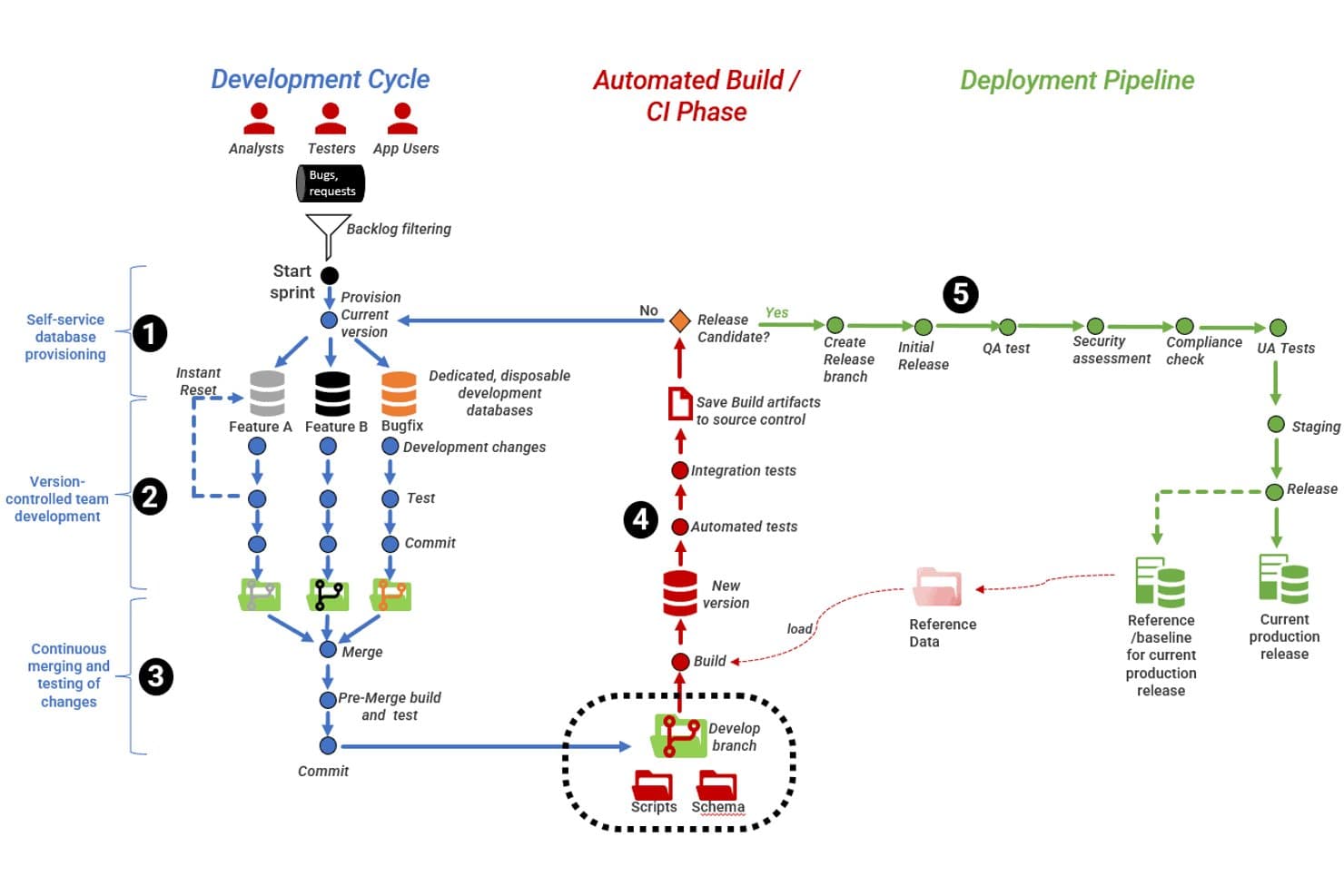
Flyway supports end-to-end database DevOps across dev, CI, and deployment pipelines. My Evaluation Score
- Database Version Control
- Excels
- Automated Schema Migration
- Excels
- CI/CD Pipeline Integration
- Excels
- Governance & Audit Logging
- Strong
- Rollback & Drift Detection
- Strong
- Multi-Database Platform Support
- Strong
Flyway is a database DevOps tool that manages schema changes through versioned SQL migration scripts, with support for 60+ relational database platforms, CI/CD pipeline integrations, drift detection, and policy-based change governance.
Who Is Flyway Best For?
Flyway is a strong fit for DevOps and platform engineering teams that manage relational database schemas across multiple environments and need migration scripts to live alongside application code in version control.
Why I Picked Flyway
Flyway earns its spot as one of the best on my shortlist because it's the tool I trust most when migration-based version control is the priority. Every schema change lives as a versioned SQL script (think
V1__,V2__) stored directly in your application repo, and a schema history table in the target database tracks exactly what's been applied. I also like that the Enterprise edition's checksum validation catches unauthorized out-of-band changes before they cause drift, and the Autopilot feature auto-generates deployment and rollback scripts by comparing current versus desired state.Flyway Key Features
- Policy-as-code enforcement: Flyway automatically runs code policy checks on every migration script through your CI/CD pipeline, flagging destructive changes, missing dependencies, and security modifications before they reach production.
- Flyway MCP Server: Connects AI coding assistants like GitHub Copilot, Cursor, and Claude Code into the Flyway migration workflow so AI-generated schema changes are version-controlled and policy-checked.
- Dry-run deployments: Generates a detailed report of exactly what Flyway would apply before any changes execute, giving you a pre-deployment review artifact for compliance sign-off.
- Cluster-safe migration execution: Flyway coordinates migration runs across multiple nodes in a cluster environment, preventing conflicts when several instances start simultaneously.
Flyway Integrations
Flyway offers native integrations with GitHub Actions, Azure DevOps, Jenkins, GitLab CI/CD, Octopus Deploy, AWS CodeCatalyst, AWS CodeBuild, and AWS CodeDeploy. Its CLI, Java API, Maven, and Gradle support custom CI/CD workflows.
Pros and Cons
Pros:
- Policy-as-code enforces strong change governance
- Cluster-safe migration execution for high availability
- Checksum validation prevents unauthorized schema drift
Cons:
- No support for NoSQL database migrations
- Rollback automation limited to paid edition
Learn more about Flyway:
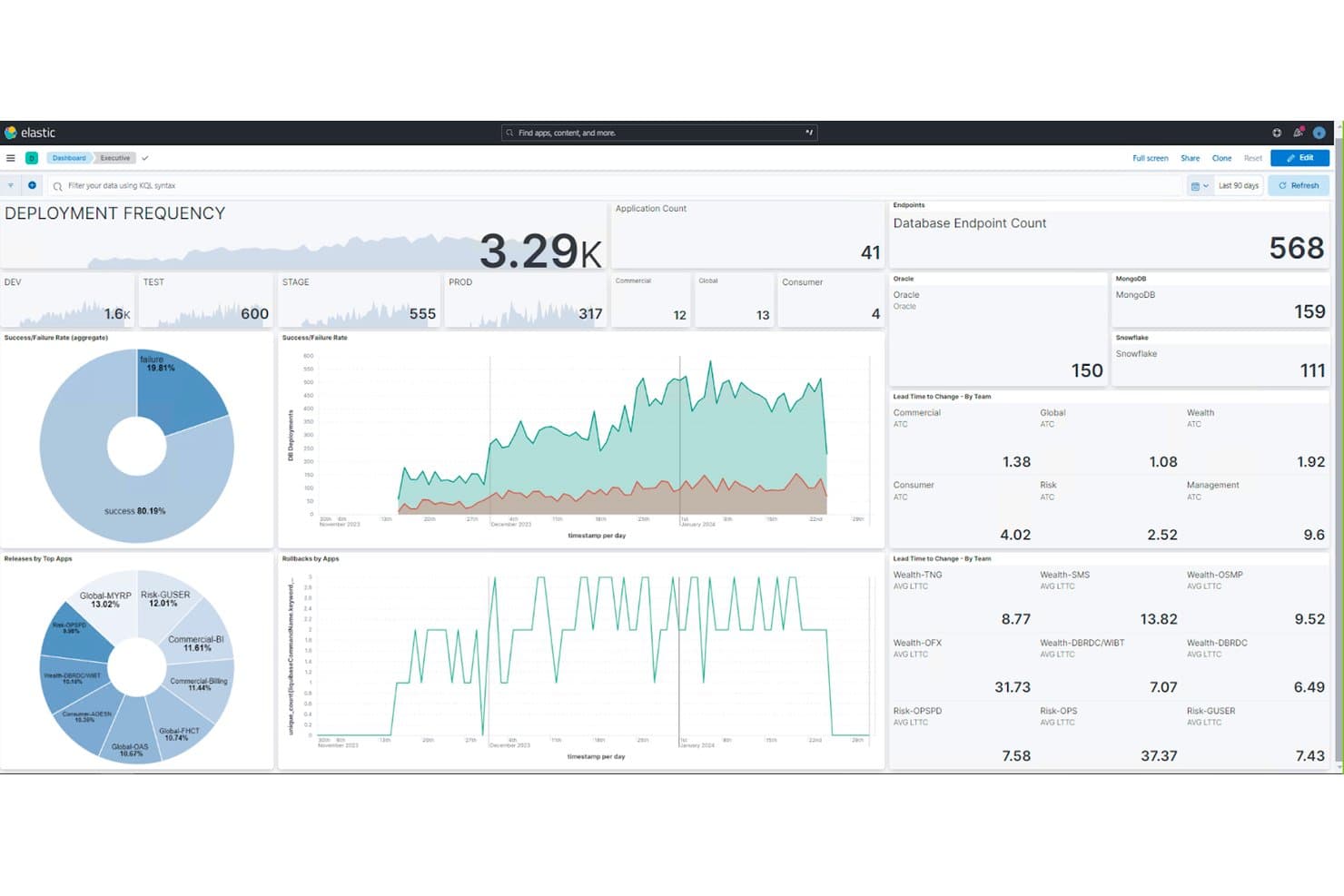
Liquibase tracks deployment frequency and database endpoint metrics across teams. My Evaluation Score
- Database Version Control
- Excels
- Automated Schema Migration
- Excels
- CI/CD Pipeline Integration
- Excels
- Governance & Audit Logging
- Excels
- Rollback & Drift Detection
- Excels
- Multi-Database Platform Support
- Excels
Liquibase is a database DevOps tool that combines version-controlled schema migrations, automated drift detection, CI/CD pipeline integration, and governance policy checks across 65+ database engines.
Who Is Liquibase Best For?
Liquibase is a strong fit for DevOps and platform engineering teams managing schema changes across multiple database engines in regulated or high-deployment-frequency environments.
Why I Picked Liquibase
Liquibase earns its spot on my shortlist because no other tool comes close to its breadth of database change automation across 65+ engines, from PostgreSQL and Oracle to Snowflake and MongoDB. I'm particularly impressed by its AI Changelog Generator, which converts plain-language descriptions into validated, production-ready XML changelogs before they ever touch a pipeline. Pair that with targeted changeset-level rollback and automated drift detection with risk scoring, and you get a tool built for teams where a bad schema change carries real consequences.
Liquibase Key Features
- Policy checks: Automated pre-deployment rules that block risky patterns like destructive DDL, missing rollback logic, or naming convention violations before changes reach production.
- Flow files: Reusable pipeline templates that standardize end-to-end database change workflows across CI/CD environments without manual scripting.
- Multi-format changelog support: Teams can define and manage schema changes in SQL, XML, YAML, or JSON, stored directly alongside application code in source control.
- VS Code extension: A developer IDE integration that lets engineers author changelogs, run policy checks, and review audit trails without leaving their coding environment.
Liquibase Integrations
Liquibase integrates with Jenkins, GitHub Actions, GitLab CI/CD, Azure Pipelines, Harness, ServiceNow, Kubernetes, Docker, and VS Code. It also supports Maven and Gradle for database changes within application build workflows.
Pros and Cons
Pros:
- AI-powered changelog generation available
- Automated drift detection with risk scoring
- Supports over 65 database engines
Cons:
- Secure edition pricing is quote-only
- Advanced rollback often requires manual scripting
Learn more about Liquibase: Best for AI-native database change authoring
- Free plan available
- Pricing upon request

Harness Database DevOps visualizes database migration pipeline steps end-to-end. My Evaluation Score
- Database Version Control
- Excels
- Automated Schema Migration
- Excels
- CI/CD Pipeline Integration
- Excels
- Governance & Audit Logging
- Excels
- Rollback & Drift Detection
- Excels
- Multi-Database Platform Support
- Excels
Harness Database DevOps is a pipeline-native database DevOps module that orchestrates schema migrations, version control, drift detection, rollback automation, and governance across 15+ database engines within CI/CD workflows.
Who Is Harness Database DevOps Best For?
Harness Database DevOps is a strong fit for enterprise teams managing heterogeneous database estates who need AI-assisted migration authoring and governance built directly into their CI/CD pipelines.
Why I Picked Harness Database DevOps
Harness Database DevOps earns its spot on my shortlist because its AI-assisted migration authoring genuinely sets it apart. I can describe a schema change in plain English and the tool generates a compliant SQL migration script, a rollback script, and a Git commit automatically, with governance policies checked before anything touches production. It also supports Model Context Protocol, so my team can trigger that same workflow directly from Claude Desktop or Cursor.
Harness Database DevOps Key Features
- OPA policy-as-code enforcement: Governance policies written in Rego are automatically evaluated at pre-migration and pre-production pipeline steps, blocking destructive or non-compliant changes before they reach production.
- Schema drift detection: A unified environment dashboard identifies when actual schema state diverges from the expected state, surfacing root-cause context and timestamps per environment.
- Dual migration framework support: Flyway and Liquibase run side-by-side within unified pipelines, so teams aren't forced to standardize on a single migration toolchain.
- Automatic rollback script generation: Rollback scripts are generated for every migration at authoring time, with restore points tagged automatically after each successful deployment.
Harness Database DevOps Integrations
Harness Database DevOps offers native integrations with Jenkins, Azure DevOps, JFrog, GitHub, GitLab, Bitbucket, and Jira. It also supports API access for custom integrations.
Pros and Cons
Pros:
- Built-in OPA policy enforcement for migrations
- Supports both Liquibase and Flyway together
- AI generates compliant SQL and rollback scripts
Cons:
- On-premises deployment requires Enterprise plan
- MongoDB governance features are limited initially
Learn more about Harness Database DevOps: Best for SQL Server schema comparison
- Free plan + free demo available
- From $249.95/month
Visit WebsiteCustomer Rating:4.7/5
dbForge Studio for SQL Server automates database refresh steps in a DevOps workflow. My Evaluation Score
- Database Version Control
- Strong
- Automated Schema Migration
- Excels
- CI/CD Pipeline Integration
- Strong
- Governance & Audit Logging
- Minimal
- Rollback & Drift Detection
- Adequate
- Multi-Database Platform Support
- Minimal
dbForge Studio for SQL Server is a Windows-based IDE for SQL Server development and administration that bundles schema comparison, source control, CI/CD pipeline integration, unit testing, and DevOps automation into a single tool.
Who Is dbForge Studio for SQL Server Best For?
dbForge Studio for SQL Server is a strong fit for SQL Server DBAs and developers who want schema comparison, source control, and CI/CD automation in a single Windows-based tool.
Why I Picked dbForge Studio for SQL Server
I've included dbForge Studio for SQL Server in my top picks because its Schema Compare feature is genuinely best-in-class for SQL Server environments. It compares databases against live instances, backups, snapshots, or source control versions, generates dependency-aware sync scripts, and flags data loss risks before you deploy. I also like that it supports both state-based and migration-based models, so you can fit it into the deployment workflow your team already uses.
dbForge Studio for SQL Server Key Features
- Source control integration: Connects to Git, SVN, Azure DevOps, Perforce, Mercurial, and SourceGear Vault to version-control schema objects and static data side by side.
- tSQLt unit testing: Runs tSQLt-based unit tests directly within the IDE and automates them through PowerShell cmdlets in your CI/CD pipeline.
- DevOps pipeline automation: Provides native plugins for Jenkins, TeamCity, Azure DevOps, and Bamboo, plus a PowerShell cmdlets module for broader CI/CD platform support.
- AI Assistant: Generates SQL from natural language input, explains query logic clause by clause, and surfaces optimization suggestions within the editor.
dbForge Studio for SQL Server Integrations
Native integrations include Jenkins, TeamCity, Azure DevOps, Bamboo, Git, Subversion, Perforce, and Mercurial. PowerShell cmdlets, NuGet packages, and CLI automation support custom CI/CD workflows.
Pros and Cons
Pros:
- Granular rollback per object or environment
- Native PowerShell automation for CI/CD workflows
- Schema comparison handles dependencies and data loss
Cons:
- Continuous drift detection not available
- No support for non-SQL Server engines
Learn more about dbForge Studio for SQL Server:
Other Database DevOps Tools
Here are some additional database DevOps tools that didn’t make it onto my shortlist but are still worth checking out.
- 11Octopus DeployBest for CD orchestration across database tool stacks
- 12AtlasBest for declarative, IaC-style schema migrations
- 13DB Change ManagerBest for cross-RDBMS schema drift detection
How I Evaluate Database DevOps Tools
I look at database DevOps tools in two layers: baseline must-haves—schema versioning, CI/CD integration, automated migrations—and the differentiators that set the best options apart.
Core Functionality (Table Stakes For This List)
When I'm selecting tools for my list, I rank each one on a scale from 0 (does not offer the functionality) to 5 (excels in this area) for each core functionality listed below. Then, I calculate the tool's total score into a percentage. Each tool needs to achieve a minimum total score of 65% to be considered for inclusion.
- Database Version Control: I check whether schema objects, stored procedures, and static data can be versioned in Git with proper branching and merge conflict resolution.
- CI/CD Pipeline Integration: Each tool should connect with platforms like Jenkins, GitHub Actions, or Azure DevOps so database deployments run inside existing pipelines.
- Automated Schema Migration: I evaluate how well the tool generates and deploys change scripts across environments—especially when handling dependency chains between tables, views, and functions.
- Multi-Database Engine Support: Whether your stack runs PostgreSQL, SQL Server, Oracle, or a managed cloud database, I look at the breadth of supported engines and how consistent the experience is across them.
- Rollback & Drift Detection: I look for the ability to detect unauthorized or out-of-process changes in production and roll back failed deployments without manual scripting.
- Governance & Audit Logging: Approval workflows, role-based access, and immutable audit trails matter—especially for teams working under SOX, PCI-DSS, or similar compliance requirements.
Once I have a list of tools that meet this criteria, I consider what sets each platform apart.
Differentiating Factors (What Sets Vendors Apart)
Here's how I compare and contrast different vendors:
Standout Features
Shift-left testing is a major differentiator. Tools that include static analysis or unit testing frameworks let teams catch issues in schema changes before they ever reach staging. I also evaluate ephemeral database provisioning, where teams can spin up disposable, production-like clones tied to feature branches or pull requests. This accelerates code review and reduces environment bottlenecks. Sensitive data masking matters too—especially when teams need realistic test data without exposing personally identifiable information in lower environments.
Beyond Features
Ecosystem fit is something I weigh heavily. A database DevOps tool needs to slot into your existing stack—Git providers, CI/CD platforms, and ITSM tools like Jira or ServiceNow. Compliance readiness also matters. I check for certifications like SOC 2 and ISO 27001, along with secure credential handling and segregation of duties. Time-to-value varies widely across vendors, so I look at documentation quality, prebuilt templates, and whether there's a clear migration path from manual database change processes.
How to Choose Database DevOps Tools
It’s easy to get bogged down in long feature lists and complex pricing structures. Here's a checklist of factors to remember to help you stay focused as you work through your unique software selection process.
| Factor | What to Consider |
| Scalability | Ensure the tool can grow with your needs. Look for options that handle increased data loads and user numbers without compromising performance. |
| Integrations | To streamline workflows, check if the tool integrates with your existing tech stack, like CI/CD platforms, cloud services, and other desktop database software. |
| Customizability | Consider how much you can tailor the tool to fit your processes. Look for features that let you adjust workflows or add custom scripts easily. |
| Ease of Use | Evaluate the interface and navigation. Tools should have intuitive designs that minimize training time and boost productivity for your team. |
| Budget | Align the tool's cost with your financial constraints. Consider subscription fees, hidden costs, and whether they offer plans that fit your budget. |
| Security Safeguards | Look for robust security features to protect your data. Ensure the tool offers encryption, access controls, and compliance with regulations. |
| Support | Assess the availability and quality of customer support. Consider if they offer 24/7 support, dedicated reps, or comprehensive online resources. |
| Performance Monitoring | Ensure the tool provides features to monitor and optimize database performance, helping your team identify and resolve issues promptly. |
Trends
In my research, I sourced countless product updates, press releases, and release logs from different database DevOps tools. Here are some of the emerging trends I’m keeping an eye on.
- AI-Driven Insights: More tools use AI for predictive analytics and database anomaly detection. This helps your team catch potential issues early and optimize performance. Vendors like Flyway are incorporating machine learning to make more intelligent recommendations.
- Self-Healing Databases: Some database design tools now offer self-healing capabilities, automatically fixing common database errors without manual intervention. This feature is becoming popular as it reduces user downtime and maintenance overhead.
- Enhanced Security Features: There's a growing focus on advanced security features like dynamic data masking and real-time threat detection. These features help protect sensitive data and comply with regulations, which is crucial for many businesses.
- Improved Collaboration Tools: Many DevOps tools add better collaboration features, such as shared dashboards and real-time updates. These help your team work more efficiently, even when remote or distributed, by keeping everyone on the same page.
- Cross-Cloud Support: As businesses move to multi-cloud strategies, database DevOps tools adapt to support multiple cloud environments. This trend is essential for teams that need flexibility and want to avoid vendor lock-in, with products like DbVisualizer offering cross-cloud capabilities.
What are Database DevOps Tools?
Database DevOps tools are software solutions that automate and manage database changes within the DevOps process. Database administrators, developers, and IT operations professionals use these tools to enhance collaboration and efficiency.
Version control, automated deployments, and security features help manage database changes, reduce errors, and maintain compliance. Quality database testing tools are essential for ensuring these processes work reliably. These tools provide significant value by improving the speed and reliability of database updates and operations.
Features
When selecting database DevOps tools, including database monitoring tools, watch for the following key features.
- Version control: Tracks database changes over time, allowing your team to efficiently manage updates and rollback errors.
- Automated deployments: Streamlines the deployment process by automating repetitive tasks, reducing human error and saving time.
- Security safeguards: Protects sensitive data with features like encryption and access controls, ensuring compliance with regulations.
- Cross-cloud support: Provides flexibility by allowing databases to operate across multiple cloud environments, preventing vendor lock-in.
- Real-time monitoring: Keeps track of database performance and health, enabling quick detection and resolution of potential issues.
- Collaboration tools: Enhances teamwork with shared dashboards and real-time updates, ensuring everyone stays informed.
- Self-healing capabilities: Automatically fixes common database errors, reducing downtime and maintenance efforts.
- Predictive analytics: Uses AI to forecast and detect anomalies, optimizing database performance before problems arise.
- Schema comparison: Identifies differences between database schemas, helping maintain consistency across environments.
- Data masking: Protects sensitive information by obscuring data, which helps maintain privacy during testing and development.
- Database automation: Speeds up workflows by automating routine database management tasks, improving efficiency for DBAs and development teams.
- Source control: Integrates with version control systems to manage database changes alongside application code, ensuring consistency across deployments.
- Audit trail: Tracks all database changes and user activity, providing accountability and aiding compliance with industry regulations.
- Provisioning: Simplifies database setup and configuration for application development and testing environments, reducing delays.
- Alerting: Delivers timely notifications about performance issues or potential bottlenecks, enabling proactive database management.
- Code reviews: Facilitates peer reviews of database code to maintain quality and identify errors before deployment.
- DevOps workflow integration: Aligns database changes with software development and DevOps tools for Salesforce as well as other CRMs, ensuring smooth collaboration between development and operations teams.
- Validation tools: Checks database changes for errors or inconsistencies, safeguarding against deployment issues.
- Lifecycle management: Supports database changes through all phases of the DevOps lifecycle, ensuring traceability and smooth transitions.
- Operations collaboration: Enhances communication and coordination between database and operations teams for seamless deployment and monitoring.
- Database code management: Streamlines editing, testing, and deploying database code, aligning it with modern software development practices.
- DevOps strategy support: Aligns database practices with broader DevOps strategies, fostering agile and efficient workflows.
- Oracle database compatibility: Provides tailored tools for managing Oracle databases, ensuring optimized performance and compliance.
- Bottleneck identification: Pinpoints performance bottlenecks within databases, helping teams resolve issues quickly to maintain smooth operations.
- Data engineering support: Integrates seamlessly into data engineering workflows, enabling scalable and efficient database solutions.
Benefits
Implementing database DevOps tools provides several benefits for your team and your business. Here are a few you can look forward to.
- Increased efficiency: Automating deployments and change management speeds up processes and reduces manual effort.
- Enhanced collaboration: Shared dashboards and real-time updates keep your team connected and informed, improving teamwork.
- Improved data security: Features like data masking and access controls protect sensitive information, ensuring compliance.
- Reduced downtime: Self-healing capabilities and real-time monitoring help prevent and quickly resolve issues.
- Scalability: Cross-cloud support and flexible integration options allow your systems to grow with your business needs.
- Better performance: Predictive analytics and monitoring enable proactive optimization of your database systems.
- Consistent environments: Version control and schema comparison ensure uniformity across development, testing, and production environments.
Costs & Pricing
Selecting database DevOps tools requires understanding the various pricing models and plans available. Costs vary based on features, team size, add-ons, and more. The table below summarizes standard plans, average prices, and typical features in database DevOps tools solutions.
Plan Comparison Table for Database DevOps Tools
| Plan Type | Average Price | Common Features |
| Free Plan | $0 | Basic version control, limited database support, and community support. |
| Personal Plan | $5-$25/ user/month | Version control, basic automation, and single database support. |
| Business Plan | $30-$75/ user/month | Multi-database support, enhanced security features, and performance monitoring. |
| Enterprise Plan | $100-$20/ user/month | Advanced analytics, cross-cloud support, and dedicated customer support. |
Database DevOps Tools FAQs
Here are some answers to common questions about database DevOps tools.
Which database is best for DevOps engineers?
The best database for DevOps engineers often depends on the specific requirements of your projects. Popular choices include SQL Server, MySQL, Oracle, and PostgreSQL due to their versatility and support in DevOps environments. Each offers unique features, so consider your team’s familiarity and project needs when choosing.
Is SQL used in database DevOps tools?
Yes, SQL is widely used in DevOps for automating database deployments and ensuring data integrity in CI/CD pipelines. It helps teams manage database changes effectively and supports data-driven decision-making. Knowing SQL can seamlessly enhance your team’s ability to integrate databases with DevOps practices.
How do I manage changes in database DevOps tools?
Managing database changes in DevOps involves using version control systems and automated deployment tools. These tools help track changes, facilitate rollbacks, and ensure consistency across environments. Incorporating these practices into your workflow can improve efficiency and reduce errors.
What security measures should be in place for database DevOps tools?
Security measures for database DevOps tools should include encryption, access controls, and regular audits. Implementing these safeguards helps protect sensitive data and complies with industry regulations. Integrating security practices into your DevOps pipeline for comprehensive protection is essential.
How do database DevOps tools support continuous integration?
Database DevOps tools support continuous integration by automating database updates and ensuring they align with application changes. They enable rapid testing and deployment, maintaining data integrity throughout the process. Using these tools helps keep your development cycle efficient and error-free.