

I 10 migliori strumenti di monitoraggio dei server recensiti nel 2026

Selezione dei migliori strumenti di monitoraggio dei server


Gestire i server può essere un incubo, vero? Devi tenere sotto controllo disponibilità, sicurezza e prestazioni, ed è facile sentirsi sopraffatti. È qui che entrano in gioco gli strumenti di monitoraggio dei server, che fungono da paio di occhi in più sulla rete.
Da anni analizzo questi strumenti e sono qui per condividere ciò che ho scoperto. Il mio obiettivo è offrirti una panoramica chiara e imparziale delle migliori opzioni disponibili, aiutandoti a prendere decisioni consapevoli.
In questo articolo troverai le mie scelte migliori, ciascuna valutata con attenzione agli aspetti davvero importanti. Che tu stia cercando qualcosa di semplice o una soluzione un po' più sofisticata, ho quello che fa per te. Esaminiamo i dettagli e troviamo la soluzione più adatta al tuo team.
Perché fidarsi dei nostri consigli sui software
Il nostro team testa e recensisce software dal 2012. In quanto leader tecnologici noi stessi, sappiamo quanto sia difficile — e importante — scegliere il software giusto.
Per questa guida, abbiamo valutato gli strumenti attraverso test praticie ricerche indipendenti, assegnando un punteggio agli strumenti in base ai nostri criteri di selezione.
Le nostre recensioni riflettono il nostro giudizio editoriale umano, non un discorso di vendita.
Riepilogo dei migliori strumenti di monitoraggio dei server
Questa tabella comparativa riassume i dettagli dei prezzi delle mie migliori selezioni di strumenti di monitoraggio dei server, per aiutarti a trovare quello più adatto al tuo budget e alle esigenze della tua azienda.
| Tool | Best For | Trial Info | Price | ||
|---|---|---|---|---|---|
| 1 | Ideale per la gestione degli endpoint e la conformità delle patch | Prova gratuita di 14 giorni disponibile | Prezzi su richiesta | Website | |
| 2 | Ideale per il monitoraggio dell’infrastruttura su scala cloud | Prova gratuita di 14 giorni | Da $15/host/mese (fatturato annualmente) | Website | |
| 3 | Ideale per server Windows, Linux e virtuali | Prova gratuita di 30 giorni | A partire da $179/mese (fatturazione annuale) | Website | |
| 4 | Migliore soluzione open source | Piano gratuito disponibile | Prezzo su richiesta | Website | |
| 5 | Ideale per il monitoraggio delle prestazioni applicative con intelligenza artificiale | Prova gratuita disponibile | Da $7/host/mese | Website | |
| 6 | Ideale per il monitoraggio agentless dei server Windows | Prova gratuita di 14 giorni + demo gratuita disponibile | Prezzo su richiesta | Website | |
| 7 | Ideale per il monitoraggio continuo dei server | Demo gratuita disponibile | Da $245/25 dispositivi | Website | |
| 8 | Ideale per il monitoraggio di server su larga scala | Piano gratuito + prova gratuita di 30 giorni disponibile | Da $275/mese (fatturazione annuale) | Website | |
| 9 | Ideale per il monitoraggio esaustivo delle metriche dei server | Prova gratuita di 30 giorni + demo gratuita disponibile | Da $10/mese (fatturazione annuale) | Website | |
| 10 | Ideale per il tracing distribuito e il debugging degli errori | Piano gratuito + prova gratuita + demo gratuita disponibili | Da $26/mese (fatturato annualmente) | Website |

Recensioni dei migliori strumenti di monitoraggio dei server
Di seguito trovi i miei riepiloghi dettagliati dei migliori strumenti di monitoraggio dei server inclusi nella mia selezione. Le mie recensioni offrono un’analisi approfondita delle funzionalità principali, dei pro e dei contro, delle integrazioni e dei casi d’uso ideali di ogni strumento, per aiutarti a trovare quello più adatto a te.

NinjaOne
Ideale per la gestione degli endpoint e la conformità delle patch
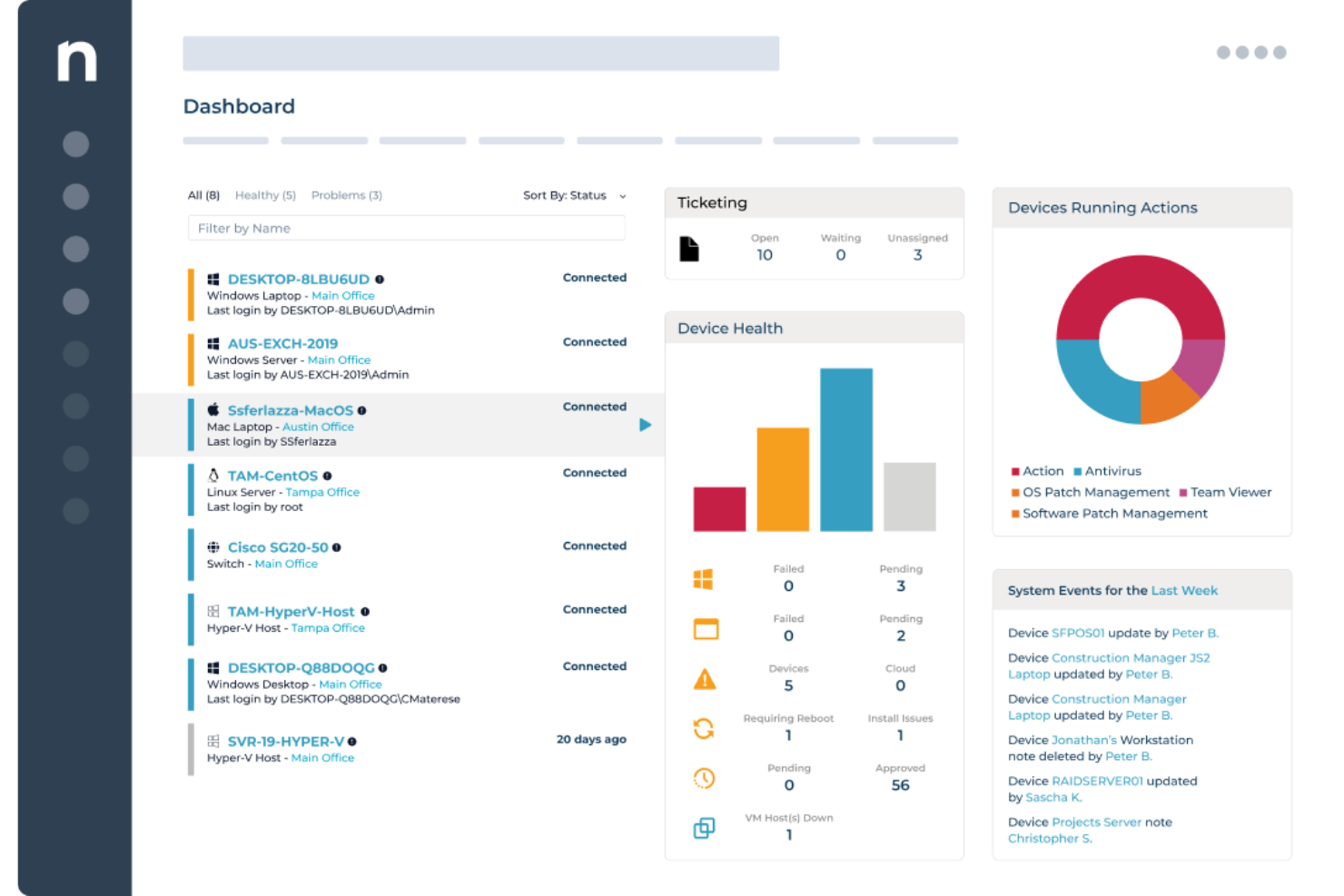
NinjaOne offre ai team IT e ai fornitori di servizi gestiti una piattaforma unificata per monitorare i server, automatizzare la gestione delle patch e gestire gli endpoint in ambienti distribuiti, aiutando a ridurre i tempi di inattività e semplificare il controllo dell'infrastruttura.
Per chi è ideale NinjaOne?
NinjaOne è particolarmente adatto per MSP e team IT interni che gestiscono ampi parchi di server ed endpoint in più sedi o ambienti clienti.
Perché ho scelto NinjaOne
Ho scelto NinjaOne tra i migliori perché la sua gestione delle patch copre l'intero ciclo di conformità, non solo la distribuzione. La funzione Patch Intelligence analizza la telemetria e i segnali di distribuzione per segnalare automaticamente gli aggiornamenti instabili e interrompere le patch rischiose prima che causino interruzioni. È possibile impostare politiche di gestione patch basate sul ruolo del dispositivo, così i server che eseguono carichi di lavoro diversi ricevono aggiornamenti secondo tempi differenti, senza intervento manuale. Inoltre, i report di conformità delle patch forniscono una chiara panoramica su richiesta di cosa è stato aggiornato, cosa no, e dove risiedono le vulnerabilità su ogni endpoint.
Funzionalità principali di NinjaOne
- Monitoraggio degli endpoint in tempo reale: Visualizza stato di salute, configurazioni e conformità di tutti gli endpoint da un'unica console cloud-native.
- Risoluzione automatica degli endpoint: Utilizza script basati su condizioni per rilevare e correggere automaticamente i problemi degli endpoint senza intervento del tecnico.
- Distribuzione di software e sistema operativo: Esegui il rollout di software, aggiornamenti e configurazioni Windows su tutti gli endpoint con workflow automatizzati e ripetibili.
- Inventario hardware e software: Ottieni una panoramica in tempo reale di ogni dispositivo nell'ambiente, comprese le specifiche hardware, il software installato e lo stato della garanzia.
Integrazioni di NinjaOne
NinjaOne offre integrazioni native con ConnectWise, Autotask, Zendesk, Webroot, Bitdefender, TeamViewer, Splashtop, Acronis e l'ecosistema Microsoft, incluso Microsoft 365 e Azure. È disponibile un'API per integrazioni personalizzate.
Pros and Cons
Pros:
- Documentazione API completa
- Report flessibili con metriche personalizzate
- Rilevamento automatico degli endpoint
Cons:
- Ritardi occasionali nella distribuzione delle patch
- Complessità nella configurazione degli avvisi per eventi non standard
New Product Updates from NinjaOne
NinjaOne Launches Browser Management
NinjaOne launches Browser Management with visibility into browser activity, extensions, AI usage, and policy controls. This extends endpoint management into the browser while giving IT teams more control over browser-based risk. For more information, visit NinjaOne’s official site.
Datadog
Ideale per il monitoraggio dell’infrastruttura su scala cloud
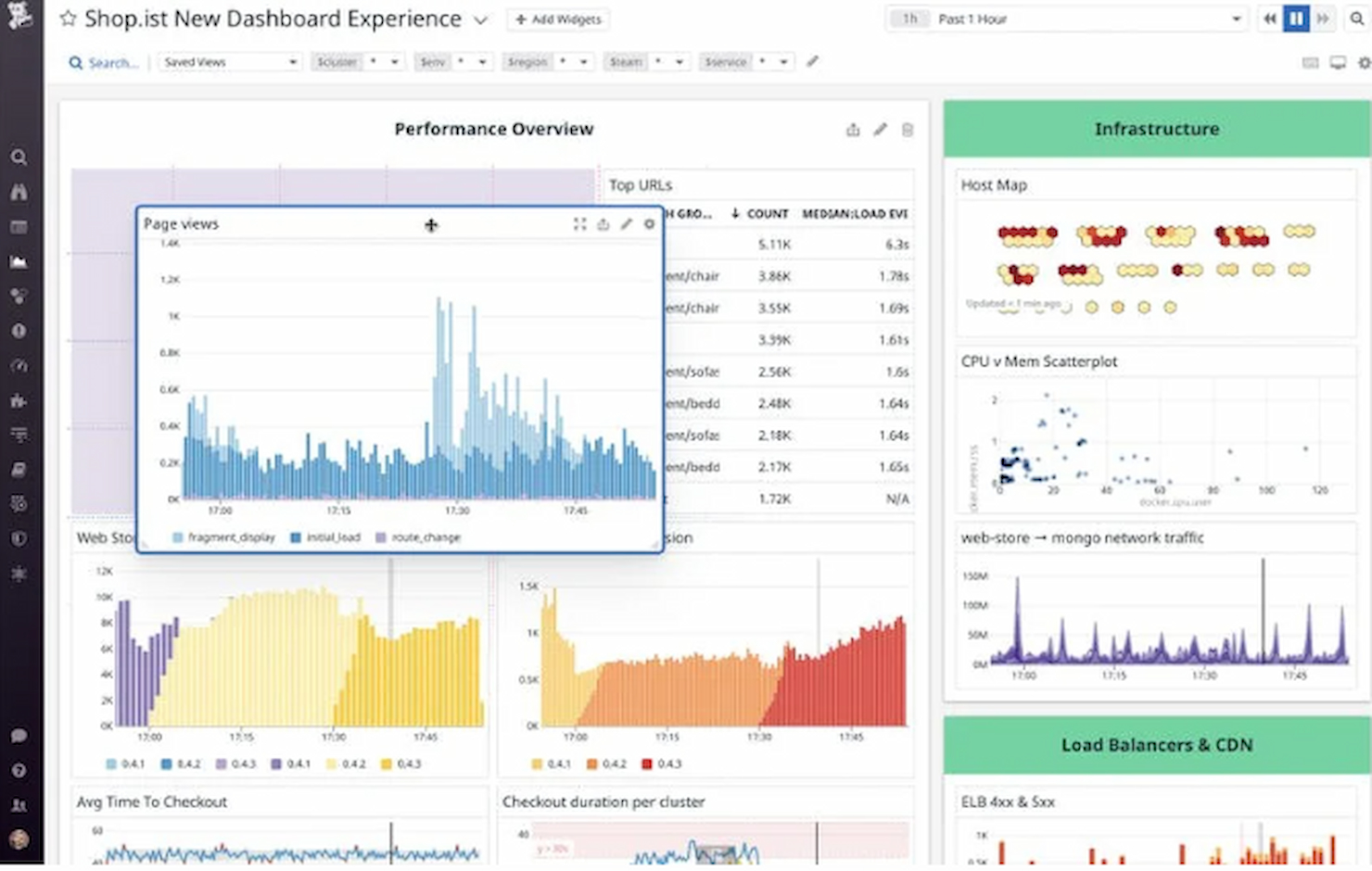
Datadog offre ai team IT e ai professionisti DevOps una piattaforma unificata per monitorare lo stato dei server, tracciare metriche di prestazioni e risolvere problemi in ambienti cloud e ibridi complessi.
Per chi è più indicato Datadog?
Datadog è particolarmente indicato per team di ingegneria di medie e grandi dimensioni che gestiscono infrastrutture cloud-native o ibride su larga scala.
Perché ho scelto Datadog
Datadog si è guadagnato un posto nella mia lista perché gestisce in modo eccellente il monitoraggio su scala cloud, dove l'enorme volume di host, container e servizi mette in difficoltà la maggior parte degli strumenti. Lo apprezzo perché traccia decine di migliaia di metriche di infrastruttura già preconfigurate, con registri storici continui che permangono anche dopo la dismissione dell'infrastruttura—caratteristica davvero utile quando si analizzano incidenti su risorse cloud temporanee. Utilizzo anche la ricerca e l’analisi basate su tag per esplorare ambienti multi-cloud senza dover scrivere query complesse, risparmiando veramente tempo nella gestione di centinaia di host tra AWS, Azure e GCP contemporaneamente. La correlazione degli avvisi guidata dall’AIOps è un’altra funzionalità su cui faccio molto affidamento—evidenzia i segnali rilevanti invece di inondare gli ingegneri reperibili con allarmi superflui.
Funzionalità principali di Datadog
- Monitoraggio dei processi in tempo reale: Visualizza in tempo reale l’utilizzo di CPU, memoria e I/O a livello di processo su tutti i tuoi host.
- Monitoraggio delle prestazioni di rete: Traccia il volume delle richieste, la latenza e gli errori tra servizi e componenti infrastrutturali in tutto l’ambiente.
- Gestione dei log: Raccogli, analizza e cerca log provenienti da server e servizi, con la possibilità di correlarli direttamente con metriche e tracer.
- Dashboard personalizzate: Crea visualizzazioni che combinano metriche, log e tracer da tutta l’infrastruttura in un’unica vista.
Integrazioni Datadog
Datadog offre oltre 600 integrazioni native, tra cui AWS, Azure, Google Cloud Platform, Kubernetes, Docker, Slack, PagerDuty, Jira, GitHub, ServiceNow e Zapier. È disponibile un'API per integrazioni personalizzate.
Pros and Cons
Pros:
- Ottimizzato per ambienti cloud
- Monitoraggio e allerta completi
- Lista di integrazioni molto ampia
Cons:
- Curva di apprendimento per le funzionalità avanzate
- Costi aggiuntivi per funzionalità extra

Ideale per server Windows, Linux e virtuali

PRTG è una piattaforma di monitoraggio creata per i team IT e gli amministratori di sistema che devono garantire il funzionamento continuo di server, reti e infrastrutture grazie a dashboard personalizzabili, avvisi automatici e il supporto per un'ampia gamma di protocolli.
Per chi è più indicato PRTG?
PRTG è particolarmente adatto a team IT di medie e grandi dimensioni che gestiscono ambienti complessi e multi-dispositivo e necessitano di una visibilità centralizzata su server, reti e applicazioni.
Perché ho scelto PRTG
Ho scelto PRTG tra i migliori strumenti per il monitoraggio in tempo reale dei server grazie all'estrema precisione e tempestività del suo sistema di monitoraggio basato su sensori. Ogni sensore monitora un singolo valore—carico della CPU, utilizzo della memoria, spazio su disco—e puoi configurare l'intervallo di scansione per ciascun sensore, così ottieni dati in tempo reale con la frequenza richiesta dal tuo ambiente. Gli avvisi di PRTG vanno oltre le semplici notifiche di disponibilità: puoi impostare trigger su soglia che si attivano prima che un server raggiunga uno stato critico, il che significa che il mio team può rilevare un disco che si sta riempiendo o un picco di memoria prima che provochi un'interruzione. Il rilevamento delle anomalie basato su intelligenza artificiale aggiunge un ulteriore livello, adattando automaticamente le soglie al tuo ambiente in modo che gli avvisi rimangano pertinenti e non semplicemente rumorosi. PRTG monitora server Windows, Linux e virtualizzati uno accanto all'altro, utilizzando il protocollo più adatto (SNMP, WMI o SSH), invece di obbligarti a una singola modalità di raccolta dati. La funzione di auto-scoperta analizza il tuo ambiente e suggerisce automaticamente i sensori pertinenti, così gestire un parco server eterogeneo non significa dover utilizzare strumenti diversi.
Funzionalità principali di PRTG
- Monitoraggio distribuito: Monitora più sedi remote da una sola dashboard utilizzando probe che comunicano tramite crittografia TLS.
- Report personalizzabili: Crea e pianifica report utilizzando modelli personalizzati per condividere lo stato dell'infrastruttura con gli stakeholder.
- Mappe e dashboard: Progetta mappe di rete in tempo reale con informazioni sullo stato dal vivo tramite il designer di mappe drag-and-drop.
- Accesso da app mobile: Monitora il tuo ambiente anche in mobilità usando le app native di PRTG per iOS e Android.
Integrazioni di PRTG
PRTG offre integrazioni native con Amazon CloudWatch, VMware vSphere, Microsoft Azure, Google Cloud Platform, Cisco, Dell EMC, HPE, NetApp e presenta integrazioni native in tutto l'ecosistema Microsoft, compresi Microsoft 365 e Azure. È disponibile una API per integrazioni personalizzate.
Pros and Cons
Pros:
- Scalabile per reti di diverse dimensioni
- Monitoraggio e avvisi personalizzabili
- Interfaccia visiva facile da usare
Cons:
- Costi elevati per le implementazioni di grandi dimensioni
- Le funzionalità più avanzate possono richiedere un po' di apprendimento
New Product Updates from Paessler PRTG
Paessler PRTG Improves Route Monitoring and Auto-Discovery
Paessler PRTG adds route-change alerts, faster traceroute processing, updated auto-discovery defaults, and a Proxmox template. This improves network monitoring and setup. For more information, visit Paessler’s official site.
 .
.
Icinga
Migliore soluzione open source
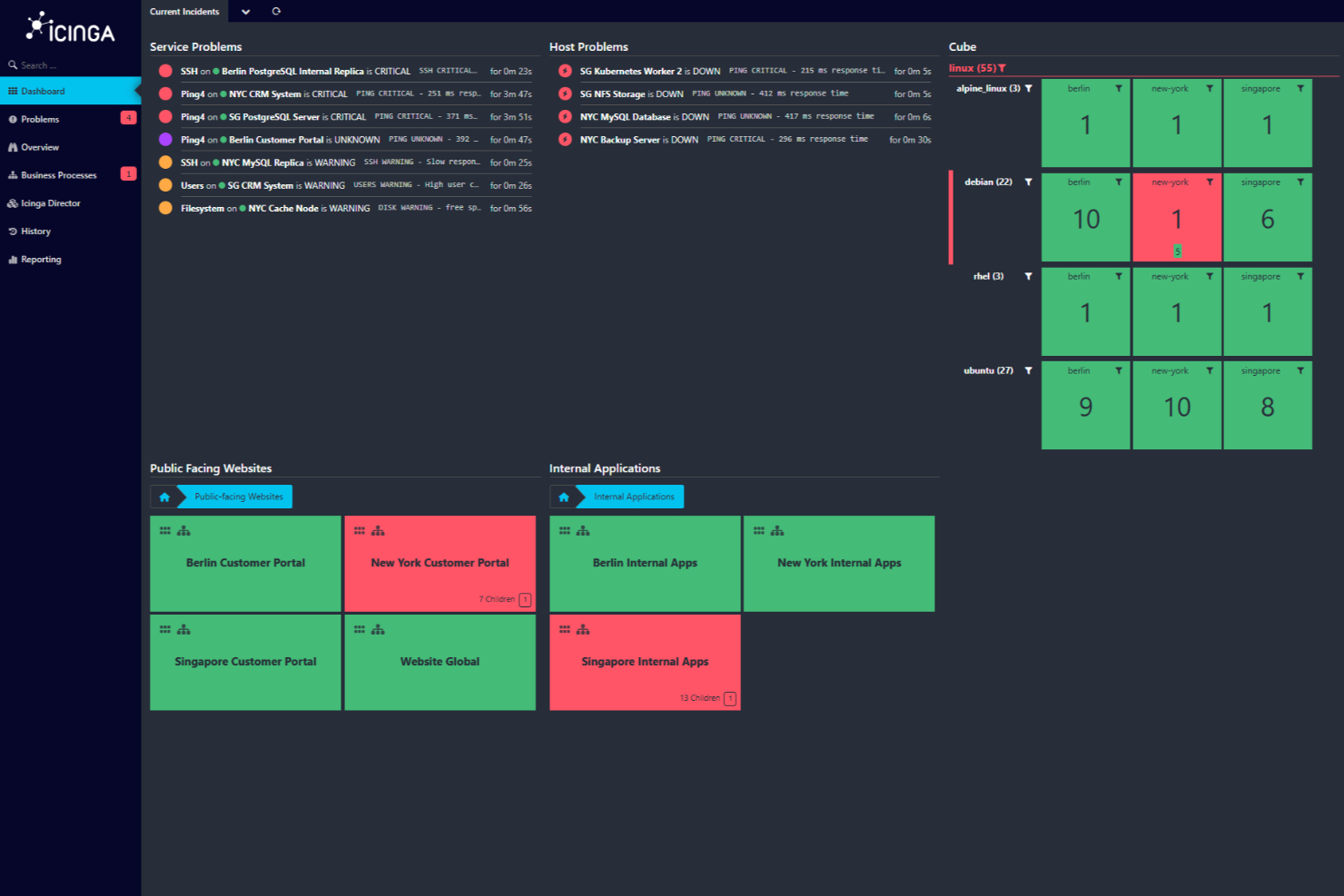
Icinga è una piattaforma di monitoraggio sviluppata per team IT e amministratori di sistema che necessitano di una visibilità approfondita sulla salute dei server, sulle prestazioni della rete e sullo stato dell'infrastruttura in ambienti complessi.
Per Chi È Ideale Icinga?
Icinga è particolarmente adatto a team IT di medie e grandi dimensioni che cercano una soluzione di monitoraggio open source altamente personalizzabile, adattabile a infrastrutture complesse e multi-ambiente.
Perché Ho Scelto Icinga
Icinga si guadagna il suo posto nella mia lista perché è una delle poche piattaforme di monitoraggio dei server veramente open-source che non riduce le funzionalità per spingerti verso una versione a pagamento. Apprezzo il motore di esecuzione dei check di Icinga che consente al mio team di definire logiche di monitoraggio personalizzate usando qualsiasi linguaggio di scripting, evitando il vincolo di modelli di controllo predefiniti. Il modulo Icinga Director è particolarmente utile—offre un'interfaccia di configurazione web per gestire host, servizi e notifiche su larga scala senza dover modificare direttamente i file di configurazione. Per i team che gestiscono infrastrutture ibride o on-premises, questo livello di controllo è difficile da replicare in uno strumento closed-source.
Funzionalità Principali di Icinga
- Monitoraggio distribuito: Distribuisci zone satellite per monitorare reti e data center remoti da un'istanza centrale di Icinga.
- Regole di allerta ed escalation: Configura flussi di notifiche che indirizzano gli avvisi ai membri giusti del team in base alla gravità e alle finestre temporali.
- Icinga DB: Un backend ad alte prestazioni che archivia ed elabora i dati di monitoraggio per query e report rapidi.
- Grafici e visualizzazioni: Integrazione con strumenti come Grafana per mostrare metriche di performance in tempo reale e dati storici dei server.
Integrazioni di Icinga
Icinga offre integrazioni native con Grafana, Jira, Slack, PagerDuty, ServiceNow, InfluxDB, Elasticsearch, Graylog, e dispone di un'API per integrazioni personalizzate.
Pros and Cons
Pros:
- Gratuito senza costi di attivazione
- Scalabile per ambienti sia piccoli sia grandi
- Altamente personalizzabile per svariate esigenze di infrastruttura IT
Cons:
- Segnalati occasionalmente problemi di performance in scenari ad alto carico
- L'installazione e la configurazione richiedono un periodo di apprendimento
New Product Updates from Icinga

Icinga Adds TOTP Two-Factor Authentication to Icinga Web
Icinga added time-based one-time password (TOTP) two-factor authentication to Icinga Web, helping organizations strengthen login security with an additional verification step. For more information, visit Icinga’s official site.
 .
.
Ideale per il monitoraggio delle prestazioni applicative con intelligenza artificiale

Dynatrace offre ai team IT e alle aziende una piattaforma unificata per monitorare la salute dei server, analizzare le prestazioni dell'infrastruttura e individuare rapidamente i problemi all'interno di ambienti cloud e ibridi complessi.
Per chi è più adatto Dynatrace?
Dynatrace si adatta perfettamente a grandi aziende e team DevOps che gestiscono infrastrutture complesse, multi-cloud o ibride e hanno bisogno di una visibilità approfondita sull'intero stack tecnologico.
Perché ho scelto Dynatrace
Dynatrace si guadagna un posto nella mia shortlist per il modo in cui il suo motore Davis AI gestisce l'analisi delle cause principali. Invece di generare una miriade di avvisi che il mio team dovrebbe analizzare, Davis individua automaticamente la fonte esatta di un problema di prestazioni—fino al livello di codice—prima ancora che gli utenti ne risentano. Mi piace anche il grafico di dipendenze Smartscape, che offre una mappa in tempo reale di come servizi, processi e host sono collegati tra loro: così, quando un'applicazione rallenta, posso vedere esattamente quale componente a monte o a valle ne è responsabile. Questa combinazione di intelligenza artificiale causale e mappatura della topologia in tempo reale lo rende davvero diverso dagli strumenti che semplicemente raccolgono metriche lasciando a te la diagnosi.
Funzionalità principali di Dynatrace
- Distribuzione OneAgent: Un unico agente viene installato su qualsiasi host e raccoglie automaticamente metriche, log, tracce e dati di topologia su tutto lo stack senza necessità di configurazione manuale.
- Monitoraggio dei log con Grail: Il data lakehouse Grail di Dynatrace acquisisce e conserva i log in contesto con tracce e metriche, permettendo di eseguire query su tutti i tipi di dati senza gestire schemi o livelli di storage.
- AutomationEngine: Si integra con strumenti di gestione degli incidenti e di ripristino per attivare workflow di auto-risoluzione, apertura automatica di ticket e aggiornamenti CMDB in tempo reale quando vengono rilevati problemi.
- OpenPipeline: Un livello di elaborazione in streaming ad alte prestazioni che acquisisce, arricchisce e contestualizza i dati da qualsiasi fonte prima che raggiungano l'archiviazione o l'analisi.
Integrazioni Dynatrace
Dynatrace offre oltre 650 integrazioni native, tra cui ServiceNow, AWS, Azure, Google Cloud Platform, Kubernetes, VMware, Red Hat OpenShift, Slack, PagerDuty, Jira e Zapier. È disponibile un'API per integrazioni e automazioni personalizzate.
Pros and Cons
Pros:
- Approfondimenti dettagliati tramite intelligenza artificiale
- Monitoraggio applicativo completo
- Ampia gamma di integrazioni
Cons:
- La complessità richiede una formazione dedicata
- L'installazione può essere impegnativa per i principianti

Auvik
Ideale per il monitoraggio agentless dei server Windows

Auvik offre ai team IT e ai provider di servizi gestiti uno strumento per monitorare, mappare e gestire l'infrastruttura di server e rete da un'unica dashboard basata su cloud, aiutandoti a rilevare problemi e mantenere l'operatività in ambienti complessi.
Per Chi è Ideale Auvik?
Auvik è particolarmente adatto per i provider di servizi gestiti e i team IT interni che necessitano di una visibilità centralizzata su ambienti di rete e server multi-sede o multi-cliente.
Perché Ho Scelto Auvik
Ho scelto Auvik tra i migliori perché apprezzo il modo in cui gestisce il monitoraggio dei server Windows senza richiedere la sostituzione dell'infrastruttura esistente. Il percorso senza agent tramite l'Auvik Collector ti offre visibilità in tempo reale su CPU, memoria, utilizzo disco e stato online—senza installare software su ogni server. Mi piace anche l'avviso sui servizi Windows, in cui il mio team può creare regole di allerta personalizzate usando Alerts 2.0 per attivarsi su determinati stati dei servizi, nomi dei servizi o soglie di utilizzo, con opzioni di soppressione per ridurre il rumore dai servizi che si autoripristinano. L'inventario automatico del software raccoglie nome applicazione, fornitore, versione e data di installazione da ciascun server monitorato, molto utile durante un audit di sicurezza o per verifiche di conformità software.
Funzionalità Chiave di Auvik
- Rilevamento automatico dei server: Auvik rileva automaticamente i server Windows e mostra informazioni dettagliate su componenti e servizi entro pochi minuti dal deployment.
- Dashboard delle prestazioni: Visualizza l'andamento di CPU, memoria e utilizzo disco nel tempo tramite dashboard dedicate ai server, con dati storici utili per individuare pattern e pianificare la capacità.
- Previsione delle prestazioni: Auvik traccia i parametri di CPU e memoria nel tempo per individuare trend di utilizzo e prevedere potenziali problemi prima che impattino la disponibilità del server.
- Visibilità multi-sede dell'infrastruttura: Monitora server e dispositivi di rete su siti illimitati da un'unica dashboard cloud, con tutti gli avvisi e i dati dei dispositivi in un unico posto.
Integrazioni di Auvik
Auvik offre integrazioni native con ConnectWise, Autotask, ServiceNow, Slack, PagerDuty, Freshdesk, Zendesk, Microsoft Teams e Webex, e mette a disposizione anche un'API per integrazioni personalizzate.
Pros and Cons
Pros:
- I backup automatici delle configurazioni proteggono da cambiamenti errati
- Gli avvisi in tempo reale aiutano i team a intervenire prima che le prestazioni peggiorino
- Il monitoraggio senza agent permette un'installazione rapida per i server Windows
Cons:
- Le funzionalità avanzate possono richiedere configurazioni e ottimizzazioni aggiuntive
- Supporto limitato per Linux e altri server non-Windows
New Product Updates from Auvik
Auvik Aurora Adds AI Alert Creation and Troubleshooting
Auvik Aurora adds AI-assisted alert creation and troubleshooting with natural-language prompts and guided investigation. This helps teams create alerts and diagnose issues faster. For more information, visit Auvik’s official site.
 .
.
Ideale per il monitoraggio continuo dei server
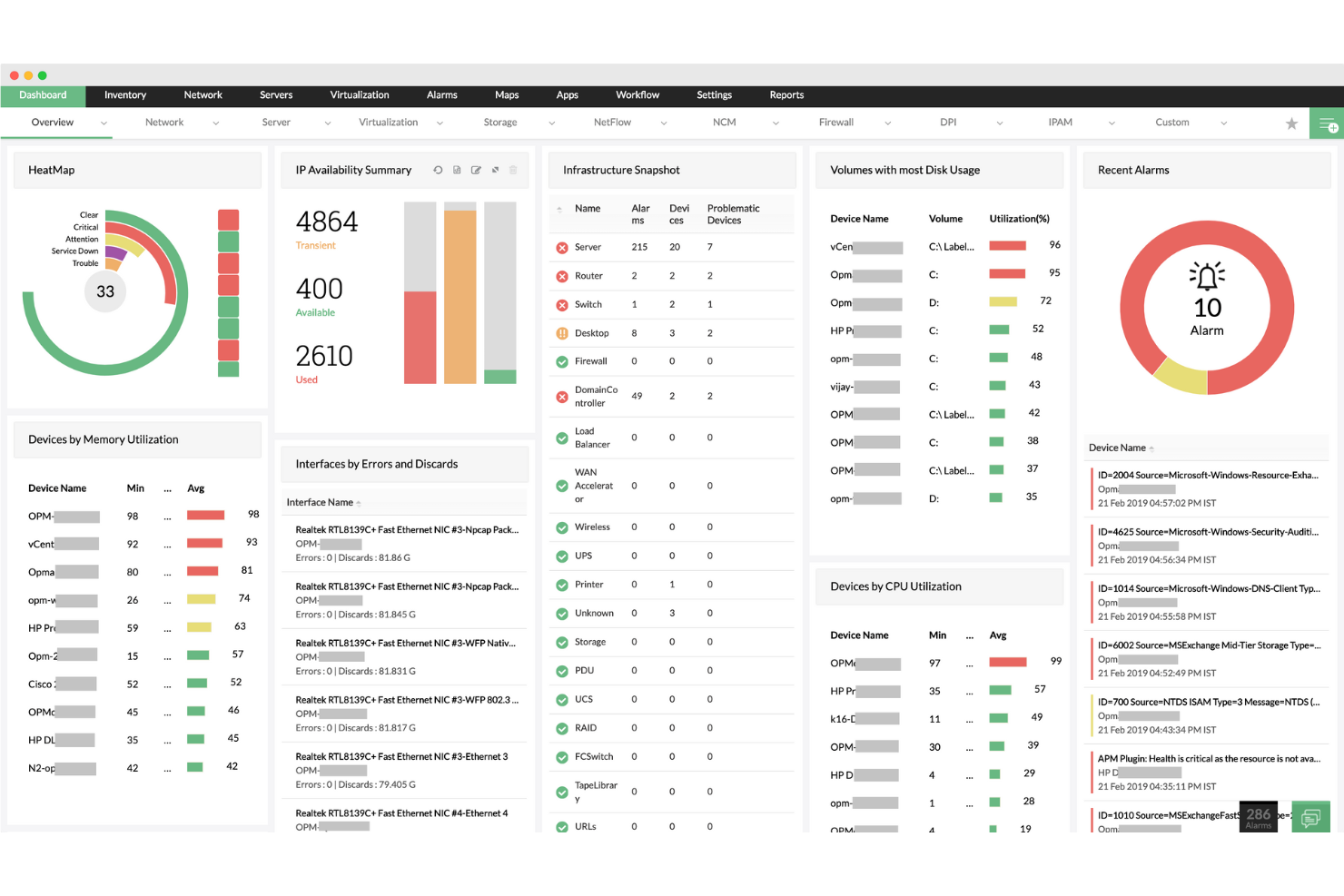
ManageEngine OpManager è una piattaforma di monitoraggio di rete e server progettata per i team IT e gli amministratori di sistema che hanno bisogno di monitorare la salute, le prestazioni e l'operatività dei server in infrastrutture complesse.
Per Chi è Ideale ManageEngine OpManager?
ManageEngine OpManager è particolarmente indicato per team IT di medie e grandi dimensioni che gestiscono ambienti server distribuiti e necessitano di una visibilità centralizzata.
Perché Ho Scelto ManageEngine OpManager
ManageEngine OpManager si guadagna il suo posto nella mia shortlist per la copertura completa del monitoraggio continuo dei server: gli intervalli di monitoraggio possono scendere fino a 30 secondi, e i monitor 'heartbeat' in tempo reale possono operare a intervalli di 1 secondo per le risorse mission-critical. Tiene traccia di oltre 300 metriche di prestazione dedicate su più di 130 fornitori di server, dalla CPU e l'utilizzo della memoria, alla latenza del disco e i deadlock al secondo. Le soglie adattive basate su ML rappresentano un vero elemento di differenziazione—OpManager apprende come appare la 'normalità' per ogni metrica e regola automaticamente le soglie di allarme ogni ora, riducendo i falsi positivi. Questa visibilità continua e auto-calibrante è difficile da replicare con la configurazione manuale delle soglie.
Funzionalità Principali di ManageEngine OpManager
- Monitoraggio dei log dei server: Monitora i log eventi di Windows, i syslog e i log applicativi per Exchange, IIS e server MS SQL, con avvisi basati su regole per specifici eventi di log.
- Builder di workflow automatizzati: Utilizza un'interfaccia drag-and-drop senza scrittura di codice con oltre 70 azioni per costruire flussi di lavoro di correzione sequenziali che possono riavviare servizi o avviare automaticamente VM.
- Visualizzazione 3D dei data center: Consente di mappare i rack dei server e i pavimenti dei data center in 2D o 3D, con lo stato in tempo reale dei dispositivi sovrapposto alla disposizione fisica.
- Previsione della capacità di storage: Analizza le tendenze di utilizzo storiche e attuali per generare report che prevedono il consumo futuro di storage prima che sorgano problemi di capacità.
Integrazioni di ManageEngine OpManager
ManageEngine OpManager offre integrazioni native con ServiceDesk Plus, AlarmsOne, Analytics Plus, Applications Manager, NetFlow Analyzer, Network Configuration Manager e presenta integrazioni native nell'ecosistema Microsoft, inclusi Microsoft 365 e Azure. È disponibile un'API per integrazioni personalizzate.
Pros and Cons
Pros:
- Capacità di monitoraggio complete
- Avvisi in tempo reale
- Scalabilità per reti in crescita
Cons:
- Configurazione iniziale complessa
- Problemi occasionali con gli aggiornamenti
New Product Updates from ManageEngine OpManager

ManageEngine OpManager Adds NVIDIA GPU Monitoring
ManageEngine OpManager adds NVIDIA GPU monitoring for Linux servers, dedicated GPU dashboards, adaptive thresholds, and automated incident response to help teams track AI infrastructure performance, health, and resource usage. For more information, visit ManageEngine OpManager’s official site.
 .
.
Checkmk
Ideale per il monitoraggio di server su larga scala

Checkmk è una piattaforma di monitoraggio progettata per team IT e aziende che devono tenere traccia della salute, delle prestazioni e della disponibilità dei server in ambienti complessi e distribuiti.
Per chi è più indicato Checkmk?
Checkmk è particolarmente adatto a medie e grandi aziende e provider di servizi gestiti che gestiscono infrastrutture server estese in ambienti on-premises, cloud o ibridi.
Perché ho scelto Checkmk
Checkmk si è guadagnato un posto nella mia selezione per la capacità di gestire il monitoraggio su larga scala senza cedere sotto il peso di infrastrutture complesse. Apprezzo in particolare la sua architettura di monitoraggio distribuito, che consente al mio team di scalare su centinaia di siti e monitorare milioni di dispositivi da un'unica installazione. La funzione di auto-discovery è molto utile: rileva automaticamente host e servizi, così l'inserimento di nuovi server non richiede una configurazione manuale a ogni passaggio. La configurazione basata su regole da 1 a N permette di applicare regole di monitoraggio a migliaia di host contemporaneamente, invece di dover configurare ciascuno singolarmente.
Caratteristiche principali di Checkmk
- Monitoraggio predittivo: Utilizza dati storici e algoritmi per regolare dinamicamente le soglie e prevedere il consumo futuro delle risorse prima che insorgano problemi.
- Monitoraggio dei log: Raccoglie e filtra eventi da syslog, trap SNMP, log di eventi Windows e file di log, raggruppando le voci duplicate per ridurre il rumore degli avvisi.
- Agent Bakery: Gestisce centralmente e automatizza la distribuzione e l'aggiornamento degli agenti sugli host, riducendo il carico manuale per ampi parchi server.
- Inventario hardware e software: Identifica automaticamente e traccia tutti gli asset hardware e software, monitora le modifiche e integra i dati nella visione CMDB.
Integrazioni Checkmk
Checkmk offre oltre 20 integrazioni native, tra cui ServiceNow, Jira, Grafana, Nagios, Prometheus, VMware vSphere, AWS, Azure, Google Cloud Platform, Slack e Zapier. È disponibile un'API per integrazioni personalizzate.
Pros and Cons
Pros:
- Monitoraggio scalabile
- Dashboard personalizzabili
- REST API per l'integrazione con strumenti di terze parti
Cons:
- Configurazione complessa
- Possibile curva di apprendimento per i principianti
New Product Updates from Checkmk
Checkmk Adds Experimental MCP Server and OAuth 2.0 Support
Checkmk adds an experimental MCP server and built-in OAuth 2.0 authorization for commercial editions. These updates let AI agents query monitoring data with native authorization support. For more information, visit Checkmk’s official site.
 .
.
Site24x7
Ideale per il monitoraggio esaustivo delle metriche dei server
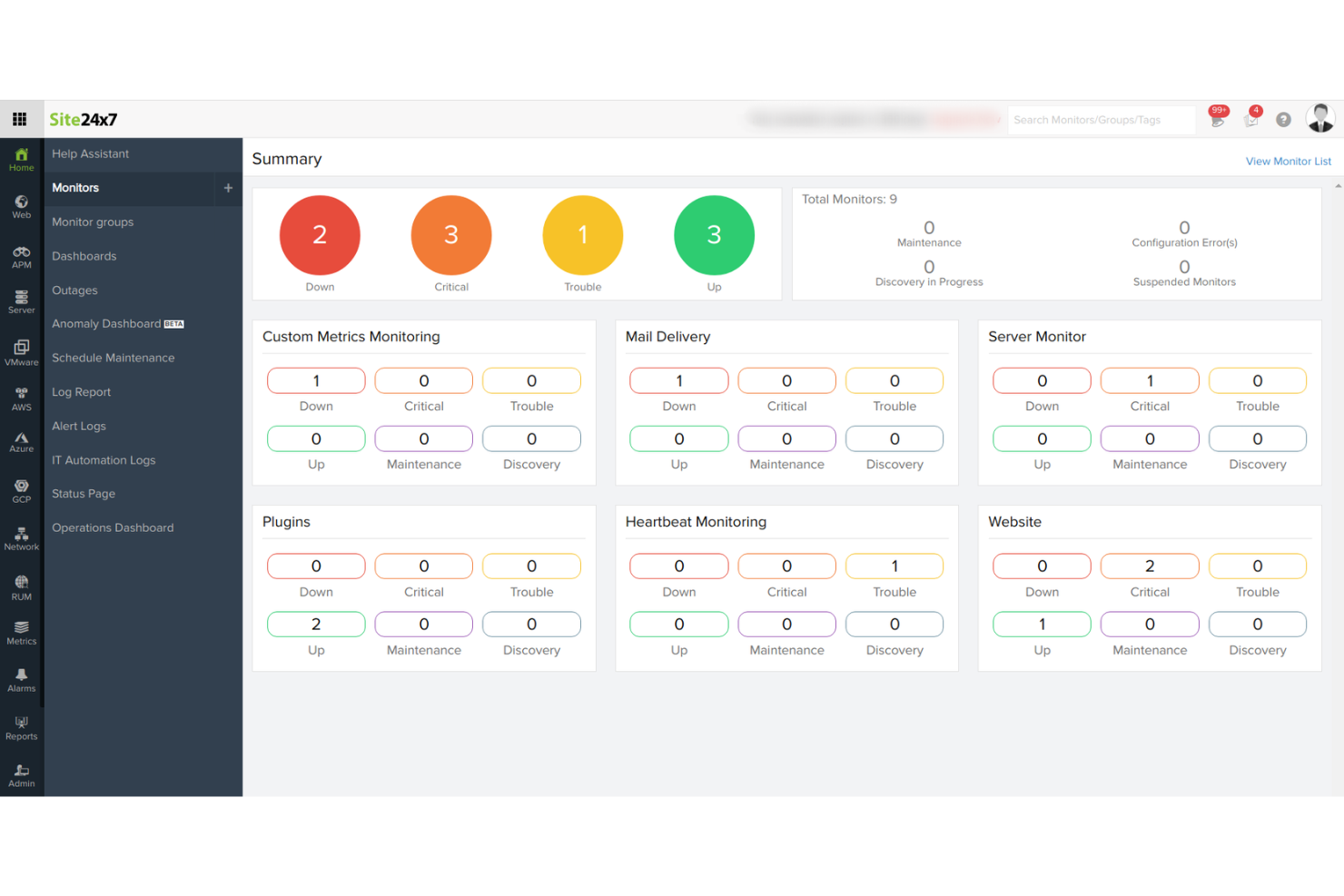
Site24x7 offre ai team IT e ai fornitori di servizi gestiti una piattaforma unificata per monitorare la salute, le prestazioni e l’operatività dei server sia in ambienti cloud che on-premise, aiutandoti a individuare i problemi prima che impattino gli utenti.
Per chi è meglio Site24x7?
Site24x7 è adatto a team IT e MSP che gestiscono ambienti infrastrutturali misti e hanno bisogno di uno strumento unico per monitorare insieme server, applicazioni e reti.
Perché ho scelto Site24x7
Site24x7 si guadagna il suo posto nella mia shortlist grazie alla profondità con cui traccia le metriche dei server. Posso monitorare l’utilizzo della CPU, della memoria, I/O del disco, throughput di rete e processi in esecuzione da un’unica dashboard—senza dover combinare strumenti separati. Apprezzo anche la funzione di monitoraggio dei processi, che permette di tracciare servizi specifici e ricevere un avviso non appena uno smette di rispondere. I report di Site24x7 sul monitoraggio dei server mi forniscono dati storici sulle prestazioni, utili per individuare tendenze prima che si trasformino in incidenti.
Funzionalità principali di Site24x7
- Rilevamento anomalie basato su IA: Site24x7 utilizza il machine learning per segnalare comportamenti insoliti dei server e prevedere il degrado delle prestazioni prima che causi un’interruzione.
- Gestione dei log: Raccogli, cerca e analizza i dati dei log dei server direttamente all’interno della piattaforma per correlare gli eventi dei log con le metriche di prestazioni.
- Monitoraggio VMware e container: Traccia host VMware ESX/ESXi, container Docker e cluster Kubernetes insieme ai server fisici da una sola console.
- Allerta personalizzabile: Imposta allerte basate su soglie o su anomalie, con politiche di escalation per indirizzare le notifiche ai membri del team appropriati.
Integrazioni Site24x7
Site24x7 offre oltre 100 integrazioni native, incluse AWS, Azure, Google Cloud Platform, Microsoft Teams, Slack, PagerDuty, Jira, ServiceNow, Opsgenie, Datadog e Zapier. È disponibile un’API per integrazioni personalizzate.
Pros and Cons
Pros:
- Capacità di monitoraggio complete
- Allerte e notifiche in tempo reale
- Dashboard e report personalizzabili
Cons:
- Complessità nella configurazione iniziale per ambienti di grandi dimensioni
- Personalizzazione limitata nelle modalità di allerta
New Product Updates from Site24x7
Site24x7 Adds Compliance Reports and Domain Squatting Detection
Site24x7’s Digital Risk Analyzer now offers domain compliance assessment and squatting detection to help you validate security posture, compare domains, and spot impersonation risks faster. For more information, visit Site24x7’s official site.
 .
.
Sentry
Ideale per il tracing distribuito e il debugging degli errori
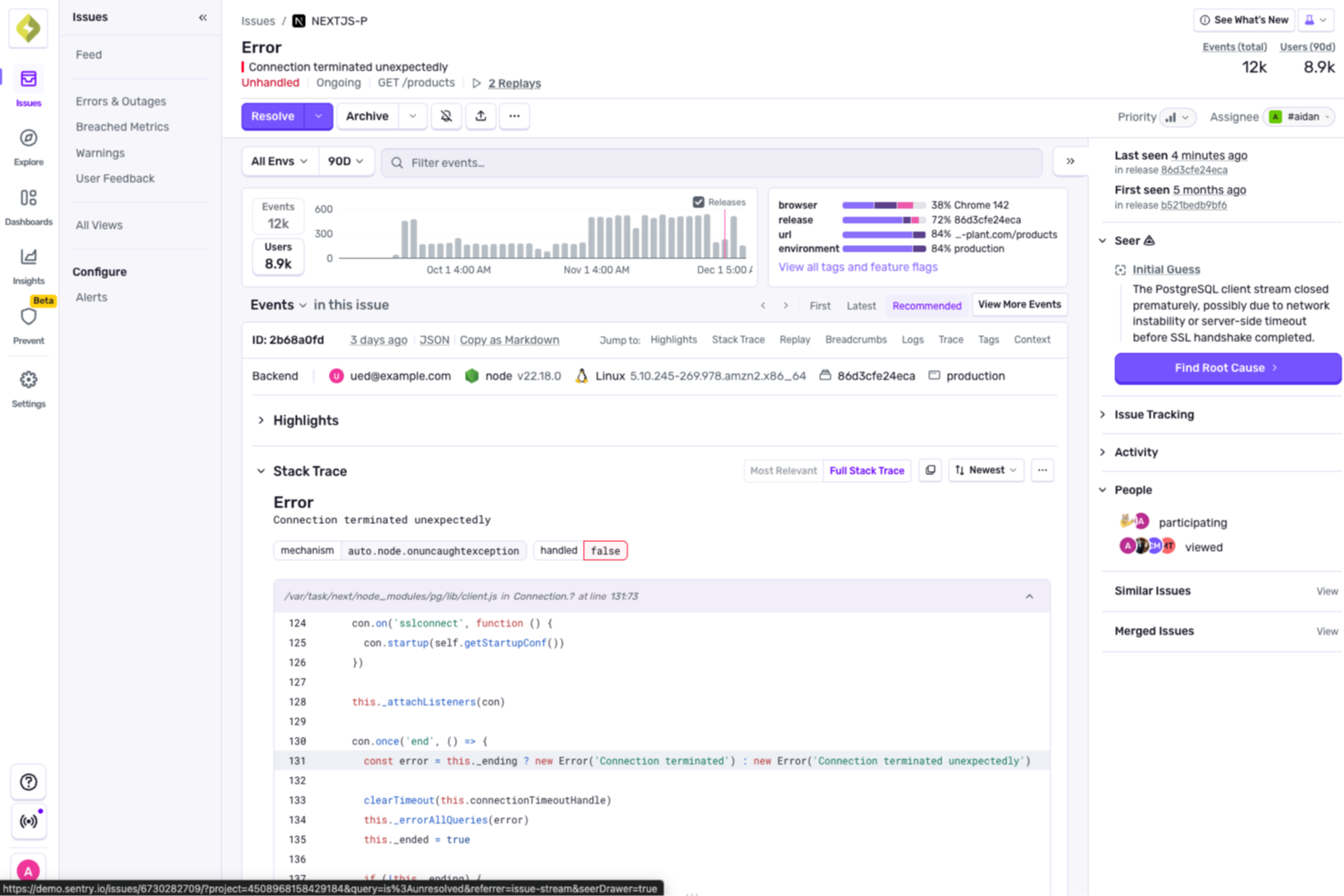
Sentry offre ai team IT e agli sviluppatori visibilità in tempo reale sugli errori lato server e sui problemi di prestazioni, aiutandoli a identificare, diagnosticare e risolvere i problemi in sistemi distribuiti e ambienti cloud.
Per chi è ideale Sentry?
Sentry è particolarmente adatto a team di ingegneria e DevOps che sviluppano e mantengono applicazioni complesse e multi-servizio e che necessitano di una visibilità approfondita sugli errori e sulle prestazioni a livello di codice.
Perché ho scelto Sentry
Ho scelto Sentry come uno dei migliori perché il suo tracciamento distribuito va più in profondità rispetto alla maggior parte degli strumenti di monitoraggio. Mentre altre piattaforme mostrano solo che qualcosa è lento, il Trace Explorer di Sentry ti permette di seguire una singola richiesta attraverso ogni servizio, chiamata al database e salto API—così puoi individuare l'esatta sezione che causa un picco di latenza senza dover cambiare strumento. Apprezzo anche come errori e tracce siano collegati nella stessa visualizzazione, il che significa che quando un job in background fallisce, posso vedere cosa l'ha attivato a monte. Seer—l'agente di debug basato su AI di Sentry—analizza insieme stack trace, log, replay e dati di tracciamento per identificare automaticamente la causa principale dei problemi e persino suggerire una soluzione.
Funzionalità principali di Sentry
- Monitoraggio degli errori in tempo reale: Cattura e raggruppa le eccezioni man mano che si verificano nelle applicazioni lato server, includendo stack trace completi e dati contestuali per ogni problema.
- Monitoraggio delle prestazioni: Monitora la velocità delle transazioni, le percentuali di latenza e le query lente sui database per evidenziare i colli di bottiglia nei servizi backend.
- Replay delle sessioni: Registra le sessioni degli utenti così puoi riprodurre esattamente le condizioni che hanno portato a un errore o un crash lato server.
- Alerting personalizzato: Ti permette di configurare avvisi basati su soglie o anomalie su tassi di errore, latenza e metriche di prestazione su progetti o ambienti specifici.
Integrazioni di Sentry
Sentry offre oltre 100 integrazioni native, tra cui GitHub, GitLab, Jira, Slack, Trello, PagerDuty, Datadog, AWS, Azure DevOps, Google Cloud Platform e Zapier. Un'API è disponibile per integrazioni personalizzate e automazione con flussi CI/CD.
Pros and Cons
Pros:
- Efficace osservabilità frontend con funzionalità di session replay
- Monitoraggio completo, inclusi prestazioni e segnalazione di crash
- Tracking degli errori avanzato con monitoraggio delle eccezioni per utente
Cons:
- Implementazione complessa soprattutto per stack di piattaforme eterogenei
- Copertura meno ampia per il monitoraggio a livello di infrastruttura
New Product Updates from Sentry

Sentry Lets Seer Iterate on Pull Requests
Sentry lets Seer continue working on the pull requests it opens by responding to review feedback, fixing certain CI failures, and pushing follow-up commits. This keeps updates, discussion, and revision history in the same pull request. For more information, visit Sentry’s official site.
 .
.Altri strumenti di monitoraggio dei server
Ecco alcune ulteriori opzioni di strumenti di monitoraggio dei server che non sono entrate nella mia selezione, ma che vale comunque la pena prendere in considerazione:
- Nagios
Ideale per il monitoraggio completo dell'infrastruttura IT
- LogicMonitor
Ideale per costruire, addestrare e gestire modelli di IA
- AppDynamics
Ideale per il monitoraggio end-to-end delle transazioni di business
- New Relic
Ideale per analisi applicative in tempo reale
- Dotcom Monitor
Ideale per simulare reali interazioni utente


Come Valuto i Software di Monitoraggio dei Server
Valuto gli strumenti di monitoraggio dei server su due livelli: le capacità di base—come il polling inferiore al minuto e la copertura ibrida—che qualificano uno strumento, e i fattori differenzianti che determinano quale sia la soluzione migliore.
Funzionalità di Base (Requisiti Fondamentali per Questa Lista)
Quando seleziono gli strumenti per la mia lista, valuto ciascuno su una scala da 0 (non offre la funzionalità) a 5 (eccelle in quest'area) per ogni funzionalità di base elencata qui sotto. Poi, calcolo il punteggio totale dello strumento in percentuale. Ogni strumento deve raggiungere un punteggio minimo totale del 75% per poter essere considerato.
- Monitoraggio delle Risorse in Tempo Reale: Controllo quanto dettagliatamente ogni strumento traccia CPU, memoria, I/O disco e traffico di rete, e se gli intervalli di polling sono abbastanza rapidi da rilevare picchi brevi.
- Supporto Multi-OS e Ambienti: Uno strumento dovrebbe coprire host Windows, Linux e Unix in ambienti on-premise, virtuali e cloud, così che flotte ibride non richiedano soluzioni distinte.
- Opzioni di Avvisi e Notifiche: Valuto se le soglie sono personalizzabili per ogni metrica e se gli avvisi possono essere instradati su canali effettivamente utilizzati dai team, come Slack, PagerDuty o email.
- Verifiche di Uptime e Disponibilità: Qui sono importanti controlli costanti tramite ping, HTTP e TCP con registrazione dei downtime, soprattutto per team che monitorano SLA su servizi rivolti ai clienti.
- Dati Storici e Reportistica: Valuto la profondità di conservazione dei dati e se le dashboard supportano l’analisi delle tendenze per la pianificazione della capacità, come l’individuazione di un volume disco che si riempie costantemente nel tempo.
- Raccolta con o senza Agente: Opzioni di implementazione flessibili sono fondamentali. Alcuni ambienti non possono eseguire agenti su host legacy, quindi è importante il supporto per SNMP, WMI, SSH o polling via API.
Una volta ottenuta una lista di strumenti che soddisfano questi criteri, considero ciò che distingue ciascuna piattaforma.
Fattori Differenzianti (Cosa Distingue i Fornitori)
Ecco come confronto e metto a paragone i diversi fornitori:
Funzionalità Distintive
L’auto-discovery e la mappatura delle dipendenze fanno risparmiare davvero tanto tempo quando si devono gestire centinaia di server. Cerco strumenti che individuano nuovi host e visualizzano come i servizi sono connessi. L’analisi della causa principale si basa su questo correlando eventi su tutto lo stack, così si risolve il vero problema invece di rincorrere sintomi durante un’interruzione. Per i team che gestiscono workload containerizzati, il monitoraggio nativo di Kubernetes e Docker insieme alle metriche dei server tradizionali mantiene tutto in un unico posto.
Oltre le Funzionalità
La struttura dei prezzi è un fattore molto importante. I modelli per host, per metrica e basati su ingestione di dati scalano in modo molto diverso, e superamenti imprevisti possono avere un grande impatto quando si monitorano migliaia di endpoint. Valuto anche la profondità d’integrazione con piattaforme di gestione degli incidenti e ITSM come ServiceNow e PagerDuty, dato che i dati di monitoraggio sono utili solo se alimentano direttamente i flussi di risposta. Considero inoltre la flessibilità del deployment, soprattutto per i team in contesti regolamentati che necessitano di opzioni self-hosted oltre alla comodità del cloud.
Come scegliere gli strumenti di monitoraggio dei server
È facile perdersi in lunghi elenchi di funzionalità e strutture tariffarie complesse. Per aiutarti a rimanere concentrato mentre affronti il tuo processo di selezione del software, ecco una checklist dei fattori da tenere a mente:
| Fattore | Cosa considerare |
| Scalabilità | Assicurati che lo strumento possa crescere insieme alla tua azienda. Cerca software di monitoraggio aziendale in grado di gestire un aumento dei dati e degli utenti senza cali di prestazioni, soprattutto se la tua azienda è in espansione. |
| Integrazioni | Verifica la compatibilità con i sistemi esistenti. Lo strumento dovrebbe integrarsi facilmente con il tuo attuale insieme di software, come AWS, Azure o Slack, per risparmiare tempo e fatica. |
| Personalizzazione | Scegli strumenti che ti consentano di personalizzare dashboard e report. In questo modo il tuo team otterrà le informazioni specifiche di cui ha bisogno senza elementi superflui. |
| Semplicità d'uso | Valuta l'intuitività dell'interfaccia. Il tuo team dovrebbe poterla utilizzare senza difficoltà, riducendo la curva di apprendimento e accelerando l'adozione. |
| Budget | Confronta i piani tariffari in base ai tuoi vincoli finanziari. Considera il costo totale, comprese eventuali tariffe nascoste o componenti aggiuntivi necessari, per evitare di superare il budget. |
| Misure di sicurezza | Dai priorità agli strumenti dotati di solide misure di sicurezza. Assicurati che offrano crittografia dei dati, controlli degli accessi e conformità agli standard del settore per proteggere le informazioni sensibili. |
| Affidabilità | Cerca garanzie comprovate sui tempi di disponibilità. Uno strumento affidabile assicura un monitoraggio continuo senza frequenti interruzioni, mantenendo fluide le tue operazioni. |
| Opzioni di assistenza | Considera la disponibilità e la qualità dell'assistenza clienti. L'accesso a un supporto 24 ore su 24, 7 giorni su 7, a responsabili dedicati dell'account e a risorse di assistenza complete è fondamentale. |
Tendenze negli strumenti di monitoraggio dei server
Nella mia ricerca, ho raccolto innumerevoli aggiornamenti di prodotto, comunicati stampa e registri delle versioni di diversi fornitori di strumenti di monitoraggio dei server. Ecco alcune delle tendenze emergenti che sto tenendo d'occhio:
- Approfondimenti basati sull'IA: molti strumenti ora utilizzano l'IA per fornire analisi predittive, aiutandoti a prevedere i problemi prima che si verifichino. Questa tendenza rende il monitoraggio più proattivo, con fornitori di alternative a Nagios come Dynatrace che integrano l'IA per avvisi e diagnosi più intelligenti.
- Osservabilità dell'intero stack: gli utenti desiderano visibilità sull'intero stack tecnologico, non solo sui server. Strumenti come New Relic si stanno ampliando per offrire informazioni su applicazioni, infrastruttura ed esperienze degli utenti in un unico luogo, fornendo una visione completa.
- Visualizzazione dei dati in tempo reale: con la crescita dei dati, la necessità di visualizzarli in tempo reale diventa fondamentale. I fornitori stanno potenziando i pannelli di controllo per mostrare flussi di dati in tempo reale, consentendo ai team di reagire immediatamente ai cambiamenti nei loro ambienti.
- Monitoraggio nativo del cloud: poiché sempre più aziende si trasferiscono nel cloud, gli strumenti di monitoraggio si stanno evolvendo per supportare le architetture native del cloud. Soluzioni come Datadog offrono funzionalità specifiche per gli ambienti cloud, garantendo compatibilità ed efficienza.
- Monitoraggio avanzato della sicurezza: la sicurezza è una preoccupazione sempre più importante e gli strumenti offrono ora funzionalità di sicurezza più avanzate. Le soluzioni di monitoraggio integrano il rilevamento delle minacce e i controlli di conformità per proteggere i dati, rispondendo alla richiesta degli utenti di sistemi più sicuri.
Cosa sono gli strumenti di monitoraggio dei server?
Gli strumenti di monitoraggio dei server tengono continuamente sotto controllo lo stato e le prestazioni dei server — CPU, memoria, disco, I/O, processi, servizi e rete — affinché i team IT e DevOps possano rilevare tempestivamente i problemi, risolvere più rapidamente gli incidenti e mantenere gli SLO negli ambienti locali, cloud e ibridi.
Gli avvisi in tempo reale, le metriche delle prestazioni e le funzionalità di visualizzazione dei dati aiutano a eseguire un monitoraggio proattivo e a risolvere rapidamente i problemi, in modo simile a come gli strumenti di monitoraggio dei siti web tengono traccia della disponibilità e delle prestazioni.
Funzionalità degli strumenti di monitoraggio dei server
Quando selezioni gli strumenti di monitoraggio dei server, presta attenzione alle seguenti funzionalità chiave:
- Monitoraggio in tempo reale: ricevi aggiornamenti immediati sullo stato e sulle prestazioni del server. Il monitoraggio in tempo reale ti consente di individuare i problemi nel momento in cui si verificano, così puoi intervenire e risolverli prima che diventino problemi gravi.
- Avvisi automatici: ricevi notifiche tramite e-mail, SMS o avvisi sul pannello di controllo quando i server raggiungono soglie prestabilite per CPU, memoria, spazio su disco o altre metriche. Non dovrai controllare manualmente i server: il sistema ti avviserà quando sarà il momento di intervenire.
- Monitoraggio dell'utilizzo delle risorse: controlla statistiche dettagliate come l'utilizzo della CPU, il consumo di memoria, l'attività del disco e il traffico di rete su tutti i server. Questo ti aiuta a prendere decisioni più consapevoli riguardo ad aggiornamenti, scalabilità o bilanciamento del carico.
- Dati storici e report: accedi a registri e report che monitorano le prestazioni dei server nel tempo. L'analisi delle tendenze storiche ti aiuta a identificare i problemi ricorrenti o i momenti in cui potresti aver bisogno di maggiore potenza del server.
- Pannelli di controllo personalizzabili: personalizza il pannello di controllo del monitoraggio per mostrare le informazioni più importanti per te. I componenti trascinabili ti consentono di visualizzare le metriche chiave e ottenere una panoramica immediata adatta al tuo flusso di lavoro.
- Monitoraggio di processi e servizi: tieni sotto controllo processi o servizi specifici in esecuzione sui server. Saprai immediatamente se un'attività critica smette di funzionare, così potrai ripristinare rapidamente il normale funzionamento.
- Supporto multipiattaforma: monitora i server indipendentemente dal sistema operativo utilizzato, che sia Windows, Linux o macOS. Puoi gestire ambienti misti senza dover cambiare strumento.
- Integrazione con i sistemi di notifica: collega lo strumento di monitoraggio ad applicazioni per la collaborazione come Slack o a strumenti per la gestione delle segnalazioni. Questo riduce lo scambio di e-mail e aiuta il team ad agire rapidamente quando qualcosa richiede attenzione.
- Sicurezza e controlli degli accessi: controlla chi può visualizzare o modificare le configurazioni di monitoraggio. Le solide funzionalità di sicurezza aiutano a prevenire modifiche non autorizzate e a proteggere le informazioni sensibili sui server.
- Scalabilità: aggiungi facilmente nuovi server e servizi man mano che la tua azienda cresce. In questo modo la soluzione di monitoraggio potrà stare al passo con le tue esigenze in espansione senza perdere colpi.
Funzionalità comuni dell'IA per gli strumenti di monitoraggio dei server
I moderni strumenti di monitoraggio dei server sfruttano spesso l'intelligenza artificiale per migliorare le prestazioni e semplificare la gestione. Ecco alcune funzionalità comuni basate sull'IA da ricercare:
- Rilevamento delle anomalie: gli algoritmi di intelligenza artificiale identificano automaticamente schemi insoliti o deviazioni nelle prestazioni del server, aiutandoti a individuare i problemi prima che si aggravino.
- Analisi predittiva: i modelli di apprendimento automatico prevedono potenziali guasti del server o carenze di risorse, consentendoti di adottare misure preventive e ridurre al minimo i tempi di inattività.
- Analisi automatizzata delle cause principali: l'intelligenza artificiale individua rapidamente l'origine dei problemi di prestazioni, riducendo il tempo e l'impegno necessari per la risoluzione dei problemi.
- Avvisi intelligenti: i sistemi intelligenti riducono al minimo i falsi positivi imparando il comportamento normale del server e notificandoti solo quando qualcosa richiede realmente attenzione.
- Pianificazione della capacità: l'intelligenza artificiale analizza le tendenze di utilizzo per consigliare un'allocazione ottimale delle risorse e strategie di scalabilità, garantendo che i server siano in grado di gestire le esigenze future.
- Automazione con autoriparazione: alcuni strumenti utilizzano l'intelligenza artificiale per risolvere automaticamente i problemi comuni, come il riavvio dei servizi o la riallocazione delle risorse, senza intervento umano.
- Soglie di monitoraggio adattive: l'intelligenza artificiale modifica dinamicamente le soglie degli avvisi in base ai dati storici e ai modelli di utilizzo, mantenendo pertinenti le notifiche con l'evolversi del tuo ambiente.
Vantaggi
L'implementazione di strumenti di monitoraggio dei server offre numerosi vantaggi al tuo team e alla tua azienda. Ecco alcuni dei risultati che puoi aspettarti:
- Risoluzione proattiva dei problemi: gli avvisi in tempo reale e l'analisi predittiva consentono al tuo team di affrontare i problemi prima che si aggravino, riducendo i tempi di inattività.
- Prestazioni migliorate: il monitoraggio delle metriche delle prestazioni aiuta a mantenere il funzionamento ottimale dei server, migliorando l'efficienza complessiva.
- Processo decisionale informato: i pannelli di controllo personalizzabili e la reportistica automatizzata forniscono informazioni utili per orientare le scelte strategiche del tuo team.
- Maggiore sicurezza: le funzionalità di monitoraggio della sicurezza rilevano le minacce e garantiscono la conformità, proteggendo i tuoi dati da potenziali violazioni.
- Supporto alla scalabilità: gli strumenti progettati per la scalabilità crescono insieme alla tua azienda, gestendo senza problemi l'aumento dei dati e del numero di utenti.
- Visibilità completa: l'osservabilità dell'intero stack offre al tuo team una visione completa della tua infrastruttura, potenziando le funzionalità di monitoraggio.
Costi e prezzi
La scelta degli strumenti di monitoraggio dei server richiede la comprensione dei vari modelli di prezzo e dei piani disponibili. I costi variano in base alle funzionalità, alle dimensioni del team, ai componenti aggiuntivi e ad altri fattori. La tabella seguente riepiloga i piani comuni, i relativi prezzi medi e le funzionalità tipicamente incluse nelle soluzioni di strumenti di monitoraggio dei server:
Tabella di confronto dei piani per gli strumenti di monitoraggio dei server
| Tipo di piano | Prezzo medio | Funzionalità comuni |
| Piano gratuito | $0 | Monitoraggio di base, pannelli di controllo limitati e avvisi standard. |
| Piano personale | $5-$25/user/month | Metriche delle prestazioni, pannelli di controllo personalizzabili e reportistica di base. |
| Piano aziendale | $30-$75/user/month | Analisi avanzata, avvisi in tempo reale e funzionalità di integrazione. |
| Piano aziendale avanzato | $100-$300/user/month | Osservabilità dell'intero stack, analisi predittiva e assistenza dedicata. |
Domande frequenti sugli strumenti di monitoraggio dei server
Ecco alcune risposte alle domande comuni sugli strumenti di monitoraggio dei server:
Perché il monitoraggio dell'inventario è importante nella sicurezza informatica?
Il monitoraggio dell’inventario è fondamentale per la sicurezza informatica perché consente di identificare, monitorare e gestire ogni dispositivo e risorsa software presenti nell’ambiente IT. Con un inventario completo, è possibile individuare i dispositivi non autorizzati, tenere traccia delle vulnerabilità e garantire che il software rimanga conforme alle normative. Un monitoraggio accurato aiuta a ridurre le violazioni dei dati evidenziando le lacune nella sicurezza o nella gestione delle patch e offre una visione chiara per gli audit e la risposta agli incidenti.
In che modo il software di gestione dell'inventario IT può aiutare negli audit di conformità?
Il software di gestione dell’inventario IT supporta gli audit di conformità mantenendo registri accurati di tutte le risorse hardware e software. È possibile generare rapidamente report, ricostruire la cronologia delle risorse e dimostrare su richiesta i dettagli relativi a licenze o configurazioni. La documentazione automatizzata e i registri delle modifiche aiutano a essere sempre pronti per gli audit, riducono il lavoro manuale e semplificano i controlli normativi.
Quali integrazioni dovrei cercare negli strumenti di gestione dell'inventario IT?
Cerca strumenti di gestione dell’inventario IT che si integrino con i sistemi esistenti, come il software per gli help desk, i database di gestione della configurazione (CMDB), software per server applicativi e le soluzioni di gestione degli endpoint. Le integrazioni con gli strumenti di sicurezza, i servizi directory e i provider cloud ottimizzano i flussi di lavoro e garantiscono che i dati dell’inventario rimangano aggiornati nell’intero stack IT. Gli strumenti di monitoraggio dei server monitorano continuamente lo stato e le prestazioni dei server—CPU, memoria, disco, I/O, processi, servizi e rete—così i team IT e DevOps possono rilevare tempestivamente i problemi, risolvere più rapidamente gli incidenti e mantenere gli SLO negli ambienti locali, cloud e ibridi.
In che modo questi strumenti supportano gli ambienti di lavoro remoti o ibridi?
La maggior parte delle moderne piattaforme di gestione dell’inventario IT offre accesso cloud, installazione remota degli agenti e sincronizzazione in tempo reale. È possibile monitorare i dispositivi ovunque si trovino, a casa o in uffici diversi, tenere traccia dell’hardware assegnato ai lavoratori da remoto e automatizzare gli aggiornamenti. In questo modo si riducono i punti ciechi e si può rispondere più rapidamente ai problemi, indipendentemente dalla posizione del team.
Quali funzionalità aiutano a ridurre lo smarrimento o il furto dell'hardware?
Molti strumenti di gestione dell’inventario IT offrono l’etichettatura delle risorse, la geolocalizzazione, i registri di consegna e restituzione e gli avvisi per attività insolite. Queste funzionalità consentono di monitorare le assegnazioni dei dispositivi, registrare gli spostamenti e recuperare più rapidamente l’hardware smarrito. È inoltre possibile configurare promemoria automatici per la restituzione o la manutenzione dei dispositivi, riducendo al minimo il rischio di smarrimento o furto.
Come funziona il rilevamento automatizzato delle risorse nelle moderne piattaforme di gestione dell'inventario?
Il rilevamento automatizzato delle risorse analizza la rete per individuare tutti i dispositivi connessi e il software installato. Il sistema aggiorna continuamente l’inventario, rileva le risorse nuove o non autorizzate e aiuta a mantenere un database delle risorse accurato. Questo consente di risparmiare tempo, migliorare la sicurezza e ridurre gli errori del monitoraggio manuale.
Cosa succede ora
Se stai cercando un software per il monitoraggio dei server, contatta gratuitamente un consulente SoftwareSelect per ricevere consigli.
Compila un modulo e fissa una chiamata per condividere i dettagli delle tue esigenze. Riceverai una selezione ristretta di software da valutare e supporto durante l'intero processo di acquisto, comprese le negoziazioni sul prezzo.