

Il software per il monitoraggio dell'infrastruttura ti aiuta a tenere sotto controllo lo stato e le prestazioni dei tuoi sistemi, che tu gestisca server, reti, applicazioni o macchine virtuali.
Molti team cercano questi strumenti quando devono gestire punti ciechi nella propria infrastruttura, fanno fatica a rilevare tempestivamente i problemi o perdono tempo passando da una dashboard all'altra. Scegliere lo strumento sbagliato o affidarsi a uno obsoleto può portare a mancati avvisi, tempi di inattività o visibilità limitata.
Ho aiutato diversi team a scegliere e configurare piattaforme di monitoraggio adatte alle loro esigenze e che rendessero davvero più semplice la risoluzione dei problemi, non più difficile. Questa guida si basa su quell'esperienza pratica, così puoi trovare un software che ti offra chiarezza senza complicazioni.
Perché fidarsi dei nostri consigli sui software
6,700+
Reviews
20
Industry experts
16+
Evaluation factors
14
Years
Il nostro team testa e recensisce software dal 2012. In quanto leader tecnologici noi stessi, sappiamo quanto sia difficile — e importante — scegliere il software giusto.
Per questa guida, abbiamo valutato gli strumenti attraverso test praticie ricerche indipendenti, assegnando un punteggio agli strumenti in base ai nostri criteri di selezione.
Le nostre recensioni riflettono il nostro giudizio editoriale umano, non un discorso di vendita.
Revisori esperti:
- Paulo Gardini MiguelDirettore tecnico
 Tim FisherVP dell'IA
 Gabriel RosasTech Lead e architetto software
 Christhian GruhnTech Lead e architetto della piattaforma

Tabella di confronto degli strumenti di monitoraggio
La tabella seguente confronta i dettagli sui prezzi dei migliori strumenti di monitoraggio che ho selezionato.
| Tool | Best For | Trial Info | Price | ||
|---|---|---|---|---|---|
| 1 | Ideale per il monitoraggio di IT, OT e cloud | Prova gratuita di 30 giorni | Da $179/mese (fatturazione annuale) | Website | |
| 2 | Ideale per la visibilità della rete in tempo reale | Prova gratuita di 14 giorni + demo gratuita disponibile | Prezzi su richiesta | Website | |
| 3 | Ideale per il rilevamento proattivo dei problemi | Prova gratuita di 30 giorni + demo gratuita disponibile | Da $129/tecnico/mese (fatturazione annuale) | Website | |
| 4 | Miglior soluzione open source | Piano gratuito disponibile | Prezzo su richiesta | Website | |
| 5 | Ideale per il monitoraggio delle prestazioni in tempo reale | Prova gratuita di 30 giorni + demo gratuita + piano gratuito disponibile | A partire da $199/anno | Website | |
| 6 | Ideale per il monitoraggio in tempo reale degli errori applicativi | Piano gratuito + prova gratuita + demo gratuita disponibili | Da $26/mese (fatturazione annuale) | Website | |
| 7 | Ideale per la gestione completa della rete | Demo gratuita disponibile | Da $245/mese (fatturato annualmente) | Website | |
| 8 | Ideale per il monitoraggio proattivo | Prova gratuita di 30 giorni + demo gratuita disponibile | A partire da $10/mese (fatturati annualmente) | Website | |
| 9 | Ideale per il rilevamento delle anomalie assistito dall'IA | Prova gratuita disponibile | Prezzo su richiesta | Website | |
| 10 | Ideale per il monitoraggio su scala cloud | Prova gratuita di 14 giorni | A partire da $15/utente/mese (fatturato annualmente) | Website |


Recensioni dei migliori strumenti di monitoraggio
Di seguito sono riportati i miei riepiloghi dettagliati dei migliori strumenti di monitoraggio inclusi nel mio elenco ristretto. Le mie recensioni offrono un’analisi dettagliata delle funzionalità principali, dei vantaggi e degli svantaggi, delle integrazioni e dei casi d’uso ideali di ciascuno strumento, per aiutarti a trovare quello più adatto a te.
 Ideale per il monitoraggio di IT, OT e cloud
- Prova gratuita di 30 giorni
- Da $179/mese (fatturazione annuale)
Visit WebsiteCustomer Rating:4.6/5
L'albero dei dispositivi per il monitoraggio della rete in PRTG mostra come i dispositivi sono interconnessi e fornisce informazioni dettagliate sullo stato di ciascun dispositivo. PRTG Network Monitor è uno strumento completo che ti aiuta a tenere sotto controllo l'intera infrastruttura IT. Monitora sistemi, dispositivi, traffico e applicazioni, fornendo informazioni in tempo reale sullo stato della tua rete. Con PRTG puoi individuare e risolvere i problemi prima che diventino critici.
Perché ho scelto PRTG: Ho scelto PRTG per la sua capacità di unificare il monitoraggio di varie tecnologie tramite protocolli integrati come SNMP, WMI, SSH e altri. Questo significa che puoi supervisionare una vasta gamma di piattaforme, dispositivi e sistemi all'interno della tua rete, garantendo che tutti i componenti funzionino correttamente. Inoltre, PRTG offre report personalizzabili, permettendoti di generare report dettagliati su misura per le tue esigenze. Un altro aspetto prezioso di PRTG è il suo sistema di avvisi in tempo reale. Ricevi notifiche immediate su potenziali problemi, consentendoti di intervenire rapidamente e ridurre al minimo i tempi di inattività. La maggior parte degli strumenti di monitoraggio copre infrastrutture IT, cloud o sistemi industriali — raramente tutti e tre. PRTG riunisce server, dispositivi di rete e servizi cloud con apparecchiature OT moderne tramite Modbus e OPC UA, così i team che supervisionano un mix di ambienti IT standard e industriali non devono ricorrere a strumenti separati da integrare.
Funzionalità e integrazioni principali:
Altre caratteristiche chiave includono statistiche dettagliate sulle applicazioni che girano nella tua rete, aiutandoti a gestire efficacemente le risorse. Inoltre, la funzione di monitoraggio distribuito consente di monitorare più reti in diverse sedi, tutto da un'unica interfaccia. Dispone anche di mappe e dashboard in tempo reale che visualizzano lo stato della rete, facilitando l'identificazione e la risoluzione dei problemi. Le integrazioni includono AWS, Cisco, Dell Technologies, HPE, VMware, ServiceNow, Check Point, Sonicwall, NetApp, Fujitsu, Lansweeper e Martello.
Pros and Cons
Pros:
- Offre una panoramica completa dell'infrastruttura di rete
- Dashboard personalizzabili e avvisi in tempo reale
- Supporta molteplici tecnologie di monitoraggio
Cons:
- La configurazione iniziale può richiedere tempo
- La licenza basata sui sensori può diventare costosa per reti di grandi dimensioni
Learn more about Paessler PRTG: Ideale per la visibilità della rete in tempo reale
- Prova gratuita di 14 giorni + demo gratuita disponibile
- Prezzi su richiesta
Visit WebsiteCustomer Rating:4.7/5
Auvik offre una dashboard dettagliata per il monitoraggio della rete. Auvik è una piattaforma di gestione della rete che migliora la visibilità e le prestazioni della tua rete. Offre strumenti di monitoraggio che ti aiutano a tenere sotto controllo la rete e a mantenerla efficiente.
Perché ho scelto Auvik: Uno dei motivi per cui ho scelto Auvik come uno dei migliori strumenti di monitoraggio è la sua capacità di fornire il monitoraggio dei dispositivi in tempo reale. Questa funzionalità ti consente di tenere costantemente d'occhio lo stato di salute della tua rete, assicurandoti di individuare e risolvere i problemi non appena si presentano. Un'altra caratteristica convincente è la mappatura automatica della rete, che rappresenta visivamente la struttura e le connessioni della tua rete. Questo ti aiuta a comprendere come interagiscono i vari dispositivi, rendendo più semplice la gestione e la risoluzione dei problemi. Un'altra funzione degna di nota è il monitoraggio delle metriche di prestazione. Con questa funzionalità puoi raccogliere dati preziosi sulle prestazioni della rete, permettendoti di prendere decisioni informate per ottimizzarne la funzionalità. La piattaforma offre anche avvisi personalizzabili che ti notificano eventuali problematiche, così puoi affrontarle prima che si aggravino.
Funzionalità e integrazioni di rilievo:
Le funzionalità includono backup delle configurazioni per evitare la perdita di impostazioni critiche, gestione remota dei dispositivi che consente il controllo ovunque tu sia, e impostazioni di allerta globali per garantire un monitoraggio costante su tutta la rete. Queste caratteristiche lavorano insieme per offrire una soluzione completa per la gestione e il monitoraggio della rete.
Le integrazioni includono Cisco, Datto, Microsoft Intune, Slack, ServiceNow, ConnectWise, Dell, Fortinet, Palo Alto Networks, Cisco Meraki, Okta e Jamf.
Pros and Cons
Pros:
- Visibilità in tempo reale sulle prestazioni di rete
- Mappatura e rilevamento della rete automatizzati
- Backup delle configurazioni e automazione dei confronti
Cons:
- Dettagli sui prezzi non disponibili pubblicamente
- Capacità di gestione offline limitata
Learn more about Auvik: Ideale per il rilevamento proattivo dei problemi
- Prova gratuita di 30 giorni + demo gratuita disponibile
- Da $129/tecnico/mese (fatturazione annuale)
Visit WebsiteCustomer Rating:4.6/5
Atera offre monitoraggio e avvisi in tempo reale per una gestione efficiente dei sistemi. Atera è una piattaforma di gestione IT tutto-in-uno progettata per i Managed Service Provider (MSP) e i professionisti IT. Aiuta a monitorare, gestire e automatizzare le operazioni IT su dispositivi e reti, con un forte focus sulla riduzione del carico di lavoro manuale grazie all'IA e all'automazione. Atera offre visibilità in tempo reale sulle prestazioni dei sistemi, sulla salute della rete e sullo stato dei dispositivi, facilitando la gestione proattiva degli ambienti IT.
Perché ho scelto Atera: Ho scelto Atera perché si distingue per le sue capacità di monitoraggio e gestione remota (RMM), che consentono di tenere sotto controllo le prestazioni, l'operatività e lo stato della rete in tempo reale. Questo rende più facile individuare e risolvere i problemi prima che si aggravino. Apprezzo anche gli strumenti di automazione guidata dall'IA di Atera, che aiutano ad accelerare la risoluzione dei ticket e liberano tempo per attività IT più strategiche. Le dashboard personalizzabili inoltre migliorano l'usabilità, dando pieno controllo su come visualizzare l'ambiente.
Funzionalità principali e integrazioni:
Le funzionalità di Atera includono la gestione delle patch per garantire che i sistemi rimangano sicuri e aggiornati, oltre a strumenti di scoperta della rete che forniscono una visione chiara di tutti i dispositivi connessi. I report avanzati aiutano ad analizzare le tendenze delle prestazioni, mentre il sistema di ticketing integrato centralizza il monitoraggio dei problemi. Le integrazioni includono Salesforce, HubSpot, Microsoft Teams, Zendesk, Jira Software Cloud, Acronis Cyber Protect Cloud, Asana, ServiceNow e notifiche WhatsApp, tra gli altri.
Pros and Cons
Pros:
- Prezzi accessibili che prevedono il pagamento per tecnico e non per dispositivo
- Combina monitoraggio remoto, ticketing e automazione
- Gestione IT efficace e risoluzione dei problemi
Cons:
- Potrebbe essere necessaria una breve curva di apprendimento
- Mancano alcune opzioni avanzate di personalizzazione
 Miglior soluzione open source
- Piano gratuito disponibile
- Prezzo su richiesta
Visit WebsiteCustomer Rating:4.7/5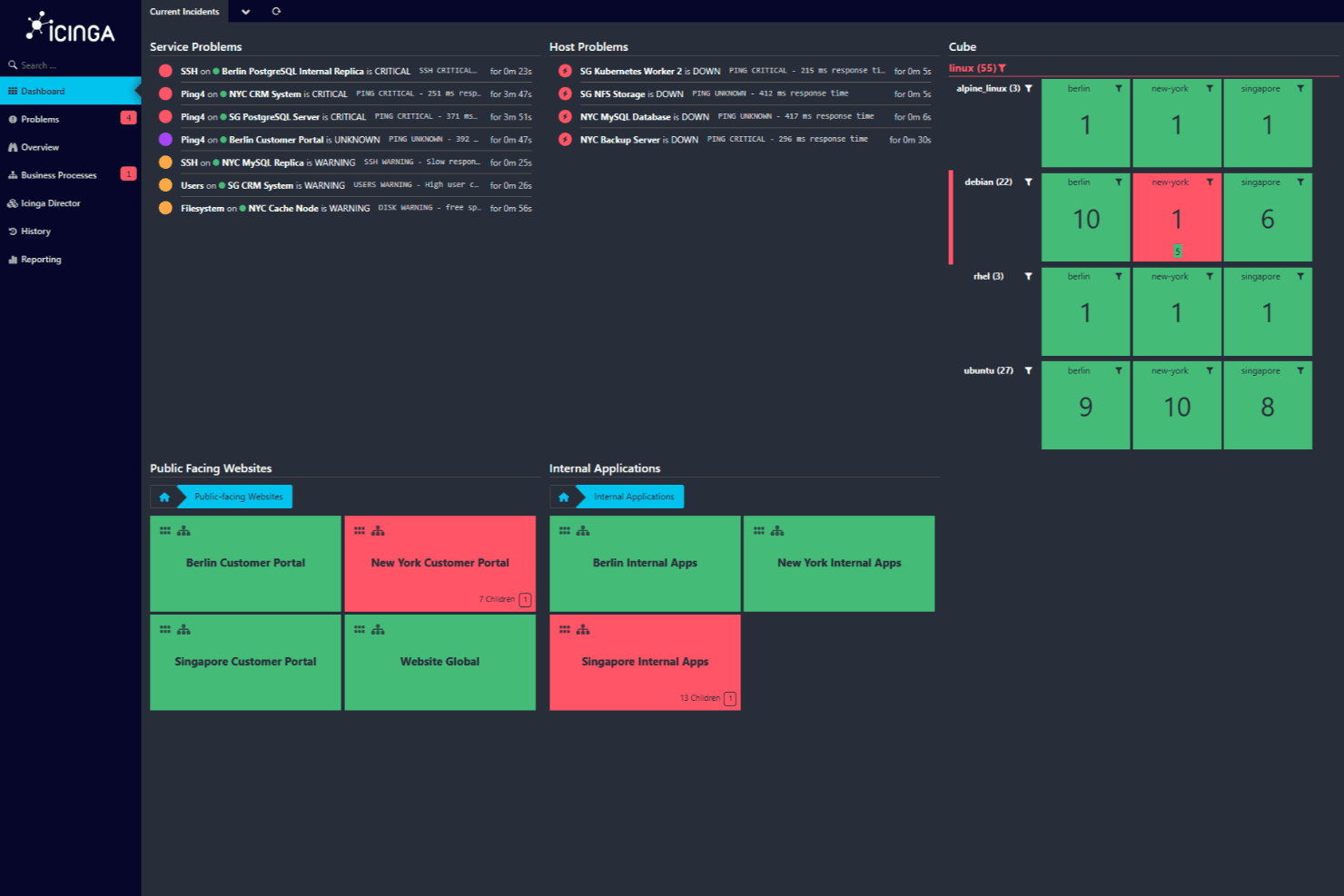
Dashboard di Icinga che mostra gli incidenti attuali con criticità e segnalazioni di problemi di servizio su siti web pubblici e applicazioni interne. Icinga è una soluzione di monitoraggio open source che ti aiuta a tenere sotto controllo l'intera infrastruttura IT. È progettato per gestire ambienti complessi, offrendo una vasta gamma di funzionalità per assicurare che i tuoi sistemi funzionino senza problemi.
Perché ho scelto Icinga: Permette di monitorare tutto, dai server e reti alle applicazioni e database. Puoi importare automaticamente i dati da fonti come Active Directory o piattaforme cloud come AWS e Azure, mantenendo la configurazione di monitoraggio sincronizzata con la tua infrastruttura. Mi piace anche il fatto che offre automazione del monitoraggio, consentendoti di gestire più facilmente processi ripetitivi. Inoltre, grazie a metriche e log, puoi raccogliere e analizzare dati per ottenere preziose informazioni sui tuoi sistemi.
Funzionalità e integrazioni principali:
Altre caratteristiche chiave includono il monitoraggio distribuito e basato su agenti per supportare la copertura in più sedi e avvisi e notifiche personalizzabili per aiutarti a risolvere rapidamente i problemi. I suoi strumenti di analisi consentono inoltre di creare dashboard e report personalizzati, aiutandoti a identificare colli di bottiglia e tracciare i tempi di operatività storici.
Alcune delle integrazioni di Icinga includono Grafana, AWS, Azure, Puppet, Ansible, Chef, Terraform, Jira, PagerDuty, ServiceNow, BigPanda e Stackstorm.
Pros and Cons
Pros:
- Altamente personalizzabile per le varie esigenze dell'infrastruttura IT
- Scalabile per ambienti piccoli e grandi
- Gratuito da usare senza costi di configurazione
Cons:
- L'installazione e la configurazione richiedono una curva di apprendimento
- Segnalati occasionali problemi di prestazioni in scenari ad alto carico
Learn more about Icinga: Ideale per il monitoraggio delle prestazioni in tempo reale
- Prova gratuita di 30 giorni + demo gratuita + piano gratuito disponibile
- A partire da $199/anno
Visit WebsiteCustomer Rating:4.3/5
ManageEngine Applications Manager fornisce il monitoraggio delle applicazioni in tempo reale, mostrando lo stato di salute del sistema, la disponibilità e il tempo di attività in un'unica dashboard centralizzata. ManageEngine Applications Manager è uno strumento che ti aiuta a monitorare le prestazioni delle tue applicazioni e dell'infrastruttura IT. Tiene sotto controllo vari componenti come server, database e servizi cloud per assicurarsi che funzionino senza intoppi. In questo modo, aiuta il tuo team a individuare e risolvere i problemi prima che influenzino gli utenti.
Perché ho scelto ManageEngine Applications Manager: Ho scelto ManageEngine Applications Manager per la sua capacità di monitorare una vasta gamma di tecnologie. Supporta oltre 150 tecnologie, inclusi server applicativi, database e piattaforme cloud. Questo significa che puoi supervisionare tutto l'ambiente IT da una singola console, rendendo più facile individuare e affrontare potenziali problemi. Un'altra funzione utile è il monitoraggio delle prestazioni in tempo reale. Lo strumento offre informazioni su metriche come uso della CPU e della memoria, tempi di risposta e dettagli sulle transazioni. Grazie a queste informazioni, il tuo team può identificare rapidamente i colli di bottiglia delle prestazioni e adottare misure correttive per mantenere le applicazioni al massimo delle prestazioni.
Funzionalità principali e integrazioni:
Le funzionalità includono il monitoraggio sintetico delle transazioni, che consente di simulare le interazioni degli utenti con le applicazioni per individuare potenziali problemi prima che influiscano sugli utenti finali. Inoltre, il monitoraggio reale degli utenti fornisce informazioni sulle esperienze effettive dei tuoi utenti, aiutandoti a capire come si comportano le applicazioni in condizioni reali.
Le integrazioni includono ManageEngine ServiceDesk Plus, ServiceNow, Site24x7, AlarmsOne, Slack, Prometheus, AWS, Google Cloud, Microsoft Azure, Oracle e MySQL.
Pros and Cons
Pros:
- Semplifica la gestione delle applicazioni e delle loro relazioni
- Il sistema di avvisi in tempo reale aiuta i team a rispondere tempestivamente ai problemi
- Monitora una vasta gamma di applicazioni e componenti dell'infrastruttura
Cons:
- Lo strumento può richiedere molte risorse
- La configurazione dello strumento per esigenze specifiche può essere impegnativa
Learn more about ManageEngine Applications Manager: Ideale per il monitoraggio in tempo reale degli errori applicativi
- Piano gratuito + prova gratuita + demo gratuita disponibili
- Da $26/mese (fatturazione annuale)
Visit WebsiteCustomer Rating:4.5/5
Sentry fornisce monitoraggio dell'applicazione a livello di codice per sviluppatori. Per sviluppatori e aziende che cercano uno strumento di monitoraggio in grado di offrire informazioni immediate sulle prestazioni delle applicazioni e sugli errori, Sentry si distingue come una soluzione completa. È particolarmente adatto a chi opera nello sviluppo web e mobile, nell'e-commerce e nei settori enterprise, rispondendo all'esigenza fondamentale di un monitoraggio in tempo reale degli errori e dell'ottimizzazione delle prestazioni durante i periodi di alto traffico.
Perché ho scelto Sentry
Ho scelto Sentry per le sue solide capacità di monitoraggio degli errori e di tracciamento delle prestazioni. Lo strumento eccelle nel rilevamento degli errori in tempo reale, avvisando immediatamente il team delle criticità e consentendo una rapida risoluzione. La funzione di distributed tracing di Sentry offre una visione dettagliata delle prestazioni delle transazioni, aiutando a identificare e ottimizzare le operazioni lente. Inoltre, la funzionalità di session replay fornisce un contesto visivo per il debug, facilitando la comprensione delle interazioni dell'utente e la risoluzione efficace dei problemi.
Funzionalità principali di Sentry
Oltre al monitoraggio in tempo reale degli errori applicativi, Sentry offre:
- Segnalazione crash di app mobile: Fornisce informazioni sui crash delle app mobili con dettagliato stack trace.
- Analisi per il gaming: Offre monitoraggio delle prestazioni specifico per le applicazioni di gioco, evidenziando problemi di latenza e frame-rate.
- Revisione del codice con AI: Utilizza l'intelligenza artificiale per suggerire possibili soluzioni ai problemi rilevati, semplificando il processo di debugging.
- Sicurezza e conformità: Garantisce la protezione dei dati degli utenti tramite misure di sicurezza conformi agli standard di settore, rendendolo adatto per applicazioni che gestiscono informazioni sensibili.
Integrazioni di Sentry
Sentry offre un'ampia gamma di integrazioni native per aumentare l'efficienza dei flussi di lavoro, tra cui GitHub, Bitbucket, GitLab, Slack, Microsoft Teams, Jira, Asana, Trello, Datadog e PagerDuty.
Pros and Cons
Pros:
- Il distributed tracing mostra informazioni sulle prestazioni a livello di transazione
- Raggruppamento avanzato degli errori aiuta a prioritizzare le criticità per una risoluzione rapida
- Offre monitoraggio degli errori in tempo reale su app web, mobile e backend
Cons:
- Non tutte le integrazioni sono disponibili nativamente, alcune si basano su API di terze parti
- Avvisi e informazioni sulle applicazioni limitati nei piani di livello inferiore
Learn more about Sentry: Ideale per la gestione completa della rete
- Demo gratuita disponibile
- Da $245/mese (fatturato annualmente)
Visit WebsiteCustomer Rating:4.3/5
Dashboard di gestione della rete di ManageEngine OpManager ManageEngine OpManager è uno strumento robusto che si specializza nell’offrire un approccio integrato alla gestione della rete. Offre funzionalità che spaziano dal monitoraggio delle prestazioni di rete all’automazione delle configurazioni di rete, risultando una soluzione perfetta per una gestione della rete a 360 gradi.
Perché ho scelto ManageEngine OpManager: Quando si è trattato di scegliere uno strumento per una gestione completa della rete, ManageEngine OpManager si è distinto nelle mie valutazioni. La sua serie di funzionalità specifiche è rivolta proprio a chi cerca una visione olistica delle operazioni e dello stato della propria rete.
Sulla base di queste valutazioni, ho ritenuto che ManageEngine OpManager sia la soluzione ideale per le attività di gestione totale della rete.
Caratteristiche principali e integrazioni:
OpManager si distingue per le sue capacità di monitoraggio sia dei server fisici che virtuali. La gestione delle configurazioni di rete permette agli amministratori di eseguire backup, ripristini e automatizzare le attività, offrendo tranquillità contro gli errori di configurazione.
Per quanto riguarda le integrazioni, ManageEngine OpManager supporta l’integrazione con soluzioni ITOM più diffuse e applicazioni di gestione IT di terze parti, arricchendo così le sue funzionalità.
Pros and Cons
Pros:
- Offre monitoraggio sia di server fisici che virtuali.
- Include una suite completa per la gestione delle configurazioni di rete.
- Ampie capacità di integrazione con altre soluzioni per la gestione IT.
Cons:
- Potrebbe presentare una curva di apprendimento ripida per i principianti.
- La vasta gamma di funzionalità potrebbe risultare opprimente per realtà su piccola scala.
- Il modello di licenza potrebbe non essere adatto a tutte le tipologie di azienda.
Learn more about ManageEngine OpManager: Ideale per il monitoraggio proattivo
- Prova gratuita di 30 giorni + demo gratuita disponibile
- A partire da $10/mese (fatturati annualmente)
Visit WebsiteCustomer Rating:4.7/5
Site24x7 fornisce dashboard in tempo reale, mostrando metriche chiave sulle prestazioni come tempo di risposta, disponibilità, perdita di pacchetti, sessioni attive e traffico di rete. Site24x7 è una soluzione di monitoraggio basata su cloud progettata per i team DevOps e IT Operations. Offre funzionalità di monitoraggio complete per siti web, server, applicazioni e dispositivi di rete, fornendo approfondimenti in tempo reale su prestazioni e disponibilità.
Perché ho scelto Site24x7: Apprezzo Site24x7 per il suo solido monitoraggio delle prestazioni applicative (APM). Supporta diversi linguaggi di programmazione, tra cui Java, .NET, Ruby, PHP e Node.js. Un altro aspetto degno di nota è il monitoraggio reale degli utenti (RUM) di Site24x7. Questa funzione permette di analizzare l'esperienza effettiva degli utenti che interagiscono con il tuo sito web o le tue applicazioni web. Segmentando i dati sulle prestazioni per browser, piattaforma, area geografica, e altro, puoi ottenere preziose informazioni su come diversi fattori influenzino l'esperienza utente e prendere decisioni informate per migliorarla. Nel complesso, queste funzionalità consentono di monitorare proattivamente vari componenti della tua infrastruttura IT.
Funzionalità principali & Integrazioni:
Altre funzioni includono il monitoraggio sintetico delle transazioni web, che permette di registrare e simulare interazioni utente multi-step in un vero browser, aiutandoti a ottimizzare percorsi critici come i form di login e i carrelli degli acquisti. Inoltre, la gestione dei log di Site24x7 consolida e indicizza i log provenienti da varie fonti, facilitando la risoluzione efficiente dei problemi e delle criticità.
Le integrazioni includono ServiceNow, PagerDuty, Opsgenie, Jira, ManageEngine AlarmsOne, ManageEngine ServiceDesk Plus, Slack, Microsoft Teams, Zoho Cliq, Amazon EventBridge, Zapier e Webhook.
Pros and Cons
Pros:
- Opzioni di personalizzazione flessibili per dashboard e report
- Avvisi in tempo reale affidabili che permettono una rapida risoluzione dei problemi
- Funzionalità di monitoraggio complete sui vari componenti dell'infrastruttura IT
Cons:
- Opzioni di integrazione limitate con alcuni strumenti di terze parti
- La complessità della configurazione può essere impegnativa per i nuovi utenti
Learn more about Site24x7: Ideale per il rilevamento delle anomalie assistito dall'IA
- Prova gratuita disponibile
- Prezzo su richiesta
Visit WebsiteCustomer Rating:4.5/5
Dashboard centrale dello strumento di monitoraggio Dynatrace Dynatrace è uno strumento di monitoraggio delle prestazioni progettato per supervisionare l'intero ecosistema digitale. Le sue sofisticate capacità di intelligenza artificiale gli permettono non solo di monitorare, ma anche di identificare proattivamente le anomalie all'interno di un sistema.
Questo particolare orientamento verso analisi basate sull'IA lo rende particolarmente adatto a chi cerca una soluzione per il rilevamento delle anomalie.
Perché ho scelto Dynatrace: Nella mia ricerca di soluzioni di monitoraggio, Dynatrace ha catturato la mia attenzione grazie al suo marcato focus sull'intelligenza artificiale. La decisione di selezionarlo è stata influenzata dalle sue capacità uniche di IA che facilitano un rapido rilevamento delle anomalie, spesso anticipando i problemi prima che si aggravino.
Il mio giudizio, dopo aver confrontato vari strumenti, mi ha portato a credere che Dynatrace sia impareggiabile nell'offrire rilevamento delle anomalie assistito dall'IA.
Caratteristiche distintive e integrazioni:
Dynatrace offre rilevamento delle anomalie in tempo reale e determinazione della causa principale, attributi fondamentali per una rapida risoluzione dei problemi. Il monitoraggio full-stack, dagli applicativi alle infrastrutture, garantisce una copertura completa.
Per quanto riguarda le integrazioni, Dynatrace si collega con piattaforme cloud, strumenti CI/CD e le principali piattaforme di operazioni IT, rendendolo adattabile a diversi ambienti IT.
Pros and Cons
Pros:
- Capacità avanzate di IA per il rilevamento delle anomalie in tempo reale.
- Monitoraggio full-stack completo.
- Ambiente di integrazione ricco con popolari piattaforme cloud e per operazioni IT.
Cons:
- Può risultare complesso per utenti non abituati a strumenti basati sull'IA.
- L'ampia gamma di funzionalità può richiedere sessioni di formazione dedicate.
- La mancanza di trasparenza nei prezzi può scoraggiare alcuni potenziali utenti.
 10Ideale per il monitoraggio su scala cloud
Datadog
- Prova gratuita di 14 giorni
- A partire da $15/utente/mese (fatturato annualmente)
Visit WebsiteCustomer Rating:4.5/5
Interfaccia semplice di Datadog con funzionalità drag-and-drop Datadog è una piattaforma completa di monitoraggio e analisi che offre una visione unificata dell'infrastruttura IT. La sua attenzione al monitoraggio su scala cloud consente alle organizzazioni di ottenere informazioni approfondite sulle loro operazioni in diversi ambienti cloud. Questa stretta integrazione con le operazioni su scala cloud è ciò che rende Datadog una scelta ottimale per questo scopo.
Perché ho scelto Datadog: Nella mia selezione di strumenti per questa lista, Datadog si è costantemente distinto come uno dei principali candidati. Ho valutato le sue capacità sulla base del suo approccio specializzato al monitoraggio centrato sul cloud, una caratteristica non comune in altri strumenti.
Questa attenzione specifica mi ha portato a stabilire che Datadog è davvero il migliore per chi necessita di soluzioni di monitoraggio su scala cloud.
Funzionalità e integrazioni di spicco:
Datadog è noto per i suoi dashboard sulle prestazioni in tempo reale, che possono essere personalizzati per visualizzare metriche, tracce e log. Inoltre, la sua rilevazione delle anomalie permette di individuare proattivamente problemi prima che abbiano un impatto sugli utenti.
In termini di integrazioni, Datadog supporta oltre 400 integrazioni, tra cui AWS, Google Cloud Platform, Azure, Slack e Docker.
Pros and Cons
Pros:
- Dashboard personalizzati offrono una visione completa delle operazioni.
- Supporta una vasta gamma di integrazioni per la massima compatibilità.
- Il rilevamento proattivo delle anomalie aiuta a identificare i problemi in anticipo.
Cons:
- Potrebbe essere troppo complesso per operazioni di piccola scala.
- Il prezzo può risultare significativo per team di grandi dimensioni.
- Alcuni utenti possono incontrare una curva di apprendimento iniziale.
Altri strumenti di monitoraggio
Di seguito trovi un elenco di ulteriori strumenti di monitoraggio che ho inserito nella mia selezione, ma che non sono rientrati tra i primi 10. Vale sicuramente la pena dare loro un’occhiata.
- 11New RelicIdeale per approfondimenti sulle prestazioni applicative
- 12Nagios XIIdeale per il monitoraggio completo dell'infrastruttura
- 13PrometheusIdeale per allerta in tempo reale e raccolta dati multidimensionale
- 14SolarWinds Observability SaaSIdeale per il monitoraggio in tempo reale dello stato del database
- 15Micro Focus SiteScopeIdeale per il monitoraggio delle applicazioni senza agenti
- 16SensuIdeale per workflow di monitoraggio flessibili
- 17ObserviumIdeale per controlli sulla salute di hardware di rete e server
- 18CheckmkIdeale per soluzioni di monitoraggio unificate
- 19Dotcom MonitorIdeale per creare script multi-step
Come valuto gli strumenti di monitoraggio
Divido la mia valutazione in due livelli: le funzionalità di base che uno strumento deve avere per gestire gli avvisi alle 3 del mattino e tracciare i guasti tra servizi distribuiti, e i fattori distintivi che separano i buoni strumenti da quelli eccellenti.
Funzionalità di base (Requisiti minimi per questa lista)
Quando seleziono gli strumenti per la mia lista, valuto ciascuno su una scala da 0 (non offre la funzionalità) a 5 (eccelle in quest'area) per ogni funzionalità di base indicata di seguito. Poi, calcolo il punteggio totale dello strumento come percentuale. Ogni strumento deve raggiungere un punteggio minimo totale del 75% per essere preso in considerazione.
- Monitoraggio in tempo reale: Verifico con quale velocità ogni strumento rileva le metriche in tempo reale—che si tratti di picchi della CPU su un host o variazioni di latenza in un cluster Kubernetes durante un deployment.
- Avvisi e notifiche: Il sistema di avvisi di ciascuno strumento deve supportare soglie configurabili, trigger basati su anomalie e l'invio verso canali come Slack, PagerDuty o email.
- Raccolta dati da più fonti: Valuto se lo strumento acquisisce metriche, log e trace da server, container, servizi cloud e applicazioni invece di coprire un solo tipo di telemetria.
- Dashboard e visualizzazione: La possibilità di creare dashboard personalizzate è fondamentale—penso a una visualizzazione unica che mostri tassi di errore API accanto ai tempi di query del database durante un incidente.
- Dati storici e reportistica: L'analisi delle tendenze su settimane o mesi è essenziale per la pianificazione della capacità, quindi verifico le finestre di conservazione e la profondità delle opzioni di reportistica.
- Integrazioni ed estensibilità: Uno strumento deve connettersi al resto dello stack—pipeline CI/CD, piattaforme ITSM, fornitori cloud—tramite integrazioni native, API o standard aperti come OpenTelemetry.
Una volta che ho una lista di strumenti che rispettano questi criteri, considero cosa distingue ciascuna piattaforma.
Fattori distintivi (Cosa differenzia i fornitori)
Ecco come confronto e metto a confronto i diversi fornitori:
Caratteristiche di rilievo
Il tracing distribuito è un importante fattore distintivo—quando un flusso di acquisto attraversa cinque microservizi, voglio vedere esattamente dove si accumula la latenza. Anche la funzione di auto-discovery e la mappatura della topologia sono rilevanti per i team che gestiscono ambienti dinamici dove i container vengono creati costantemente. Guardo anche al monitoraggio sintetico, che permette di simulare transazioni utente e chiamate API per individuare guasti prima che siano colpiti gli utenti reali.
Oltre le funzionalità
La prevedibilità dei costi è un aspetto che valuto attentamente—i costi di monitoraggio possono aumentare rapidamente quando l'ingestione dei dati cresce durante gli incidenti, quindi verifico se il modello del fornitore rimane sostenibile man mano che l'ambiente si espande. Anche le certificazioni di sicurezza e conformità come SOC 2 e ISO 27001 sono importanti, soprattutto per i team in settori regolamentati. Valuto inoltre il time-to-value: dashboard preconfigurate, auto-strumentazione e agent leggeri fanno davvero la differenza se hai bisogno di visibilità fin dal primo giorno.
Come scegliere gli strumenti di monitoraggio
È facile perdersi in lunghi elenchi di funzionalità e strutture di prezzo complesse. Per aiutarti a rimanere concentrato mentre affronti il tuo specifico processo di selezione del software, ecco un elenco di fattori da tenere a mente:
| Fattore | Cosa considerare |
|---|---|
| FattoreScalabilità | Cosa considerareLo strumento può crescere insieme alla tua azienda? Considera le esigenze future e se lo strumento è in grado di gestire una quantità maggiore di dati e utenti senza problemi di prestazioni. Cerca opzioni di scalabilità flessibili. |
| FattoreIntegrazioni | Cosa considerareSi collega ai sistemi esistenti? Assicurati che sia compatibile con il tuo attuale insieme di tecnologie, come CRM, ERP o servizi cloud, per evitare soluzioni alternative costose. |
| FattorePersonalizzazione | Cosa considerarePuoi adattare lo strumento ai tuoi flussi di lavoro? Verifica se puoi modificare dashboard, avvisi e report in base ai processi e alle esigenze specifiche del tuo team. |
| FattoreFacilità d'uso | Cosa considerareLo strumento è intuitivo per il tuo team? Valuta la curva di apprendimento e se il tuo team può adottare rapidamente lo strumento senza una formazione approfondita. Cerca interfacce facili da usare. |
| FattoreImplementazione e avvio | Cosa considerareQuanto è semplice il processo di configurazione? Considera il tempo e le risorse necessari per rendere operativo lo strumento. Cerca fornitori che offrano supporto e risorse complete per l'avvio. |
| FattoreCosto | Cosa considerareIl prezzo rientra nel tuo budget? Confronta il costo dello strumento con le sue funzionalità e i suoi vantaggi. Fai attenzione a eventuali costi nascosti o addebiti per utenti o funzionalità aggiuntivi. |
| FattoreMisure di sicurezza | Cosa considerareProtegge i tuoi dati? Valuta le misure di sicurezza adottate, come la crittografia e la conformità agli standard di settore, per assicurarti che i tuoi dati rimangano al sicuro. |
| FattoreDisponibilità dell'assistenza | Cosa considerareL'aiuto è accessibile quando serve? Verifica le opzioni di assistenza disponibili, come il supporto 24 ore su 24, 7 giorni su 7, la chat dal vivo o i responsabili account dedicati, per assicurarti di ricevere assistenza quando ne hai bisogno. |
Cosa sono gli strumenti di monitoraggio?
Gli strumenti di monitoraggio sono software che tengono traccia delle prestazioni e dello stato di sistemi, reti e applicazioni. Sono utilizzati dai team IT, dagli ingegneri DevOps e dagli amministratori di sistema per individuare tempestivamente i problemi, ridurre i tempi di inattività e mantenere i sistemi in condizioni operative ottimali. Il monitoraggio delle metriche, gli avvisi e le dashboard aiutano a individuare le tendenze, risolvere i problemi e mantenere i team informati. Il software di monitoraggio dell'hardware offre ai team la visibilità necessaria per gestire i sistemi senza sorprese.
Funzionalità
Quando selezioni gli strumenti di monitoraggio, presta attenzione alle seguenti funzionalità chiave:
- Avvisi in tempo reale: invia notifiche istantanee agli utenti quando si verificano problemi, consentendo una risposta e una risoluzione rapide.
- Dashboard personalizzabili: adatta l'interfaccia per visualizzare le metriche e i dati più rilevanti per il tuo team.
- Funzionalità di integrazione: collega perfettamente i sistemi e i software esistenti per offrire una visione unificata delle operazioni.
- Analisi automatizzata delle cause principali: individua la causa alla base dei problemi senza intervento manuale, risparmiando tempo e fatica.
- Analisi predittiva: prevede i potenziali problemi prima che si verifichino, contribuendo a mantenere la stabilità del sistema.
- Scalabilità: si adatta alla crescita dei dati e alle esigenze degli utenti, garantendo che lo strumento rimanga efficace con l'espansione dell'azienda.
- Misure di sicurezza: protegge i dati sensibili grazie alla crittografia e alla conformità agli standard di settore.
- Report completi: genera report dettagliati per analizzare le tendenze delle prestazioni e supportare il processo decisionale.
- Supporto multi-cloud: monitora le applicazioni in diversi ambienti cloud, offrendo una visione completa delle operazioni.
- Interfaccia intuitiva: garantisce facilità d'uso, consentendo ai membri del team di navigare e utilizzare lo strumento in modo efficiente.
Vantaggi
L'implementazione di strumenti di monitoraggio insieme agli strumenti di mappatura della rete offre numerosi vantaggi al tuo team e alla tua azienda. Eccone alcuni:
- Migliori prestazioni del sistema: gli avvisi in tempo reale e l'analisi automatizzata delle cause principali aiutano a risolvere rapidamente i problemi, mantenendo i sistemi in condizioni operative ottimali.
- Processo decisionale più efficace: i report completi e l'analisi predittiva offrono informazioni utili per prendere decisioni aziendali consapevoli.
- Maggiore efficienza: le dashboard personalizzabili e le funzionalità di integrazione fanno risparmiare tempo fornendo dati rilevanti in un formato facilmente accessibile.
- Scalabilità: con la crescita dell'azienda, la scalabilità garantisce che lo strumento si adatti alle maggiori esigenze senza problemi di prestazioni.
- Sicurezza dei dati: le misure di sicurezza proteggono le informazioni sensibili, garantendo la conformità agli standard di settore.
- Risparmio sui costi: l'individuazione e la risoluzione tempestive dei problemi riducono i tempi di inattività e i costi associati, con vantaggi per i profitti.
- Visibilità multipiattaforma: il supporto multi-cloud offre una visione unificata delle operazioni nei diversi ambienti, migliorando la trasparenza complessiva.
Costi e prezzi
La selezione degli strumenti di monitoraggio richiede una comprensione dei vari modelli di prezzo e dei piani disponibili. I costi variano in base alle funzionalità, alle dimensioni del team, ai componenti aggiuntivi e ad altri fattori. La tabella seguente riassume i piani più comuni, i relativi prezzi medi e le funzionalità tipicamente incluse nelle soluzioni di monitoraggio:
Tabella comparativa dei piani per gli strumenti di monitoraggio
| Tipo di piano | Prezzo medio | Funzionalità comuni |
|---|---|---|
| Tipo di pianoPiano gratuito | Prezzo medio$0/user/month | Funzionalità comuniMonitoraggio di base, avvisi limitati e supporto della comunità. |
| Tipo di pianoPiano personale | Prezzo medio$5-$25/user/month | Funzionalità comuniAvvisi in tempo reale, cruscotti personalizzabili e analisi di base. |
| Tipo di pianoPiano aziendale | Prezzo medio$30-$75/user/month | Funzionalità comuniReportistica avanzata, funzionalità di integrazione e accesso multiutente. |
| Tipo di pianoPiano per grandi aziende | Prezzo medio$100-$300/user/month | Funzionalità comuniAnalisi predittiva, supporto 24/7 e opzioni di personalizzazione complete. |
Domande frequenti sugli strumenti di monitoraggio
Ecco alcune risposte alle domande frequenti sugli strumenti di monitoraggio:
Come funziona uno strumento di monitoraggio?
Uno strumento di monitoraggio tiene traccia di varie metriche, come il carico della CPU, la larghezza di banda della rete e lo spazio su disco. Aiuta a rilevare i problemi e avvisa gli amministratori prima che gli utenti ne siano interessati. Questi strumenti garantiscono il corretto funzionamento dei sistemi fornendo informazioni sulle prestazioni e sui potenziali problemi.
Quali competenze sono necessarie per utilizzare gli strumenti di monitoraggio?
Sono necessarie competenze statistiche e analitiche per raccogliere e analizzare i dati. Queste competenze aiutano a comprendere l’impatto del monitoraggio e a prendere decisioni informate. È inoltre utile avere familiarità con l’interpretazione dei dati e una conoscenza di base dei sistemi IT.
Come selezionare gli strumenti di monitoraggio delle applicazioni?
Considera il tipo e la complessità della tua applicazione. Valuta quanto sia facile implementare e gestire lo strumento e assicurati che soddisfi i tuoi standard di sicurezza. Cerca funzionalità in linea con le tue esigenze specifiche e che offrano il massimo valore al tuo team.
Come funzionano gli strumenti di monitoraggio della rete?
Gli strumenti di monitoraggio della rete tengono traccia di aspetti come il traffico, l’utilizzo della larghezza di banda e la disponibilità. Rilevano i dispositivi presenti sulla rete e forniscono aggiornamenti sullo stato. Ciò aiuta a gestire le prestazioni della rete e a identificare i potenziali problemi prima che interessino gli utenti.
Quali sono le difficoltà più comuni nell'utilizzo degli strumenti di monitoraggio?
Gli utenti devono spesso affrontare difficoltà come il sovraccarico di dati, che può rendere difficile identificare i problemi principali. Anche l’integrazione con i sistemi esistenti può essere complessa. È importante configurare correttamente gli avvisi per evitare notifiche non necessarie, che possono causare affaticamento da avvisi.
In che modo gli strumenti di monitoraggio possono migliorare le prestazioni del sistema?
Gli strumenti di monitoraggio forniscono informazioni in tempo reale sulle prestazioni del sistema, aiutandoti a identificare e risolvere rapidamente i problemi. Analizzando le tendenze e avvisandoti dei potenziali problemi, questi strumenti aiutano a mantenere il sistema in condizioni ottimali e a ridurre i tempi di inattività.