

I migliori software per service desk aiutano i team a risolvere più rapidamente i problemi, ridurre gli arretrati di ticket, migliorare l’accuratezza delle risposte e mantenere una comunicazione chiara con gli utenti. Questi strumenti centralizzano le richieste, automatizzano le attività di routine e offrono ai team di supporto la visibilità necessaria per gestire i problemi prima che interrompano i flussi di lavoro.
I team cercano spesso soluzioni per service desk quando il monitoraggio manuale porta a richieste trascurate, processi incoerenti rallentano il supporto o lacune nella documentazione rendono difficile comprendere i problemi ricorrenti. Queste difficoltà causano ritardi, aumentano la frustrazione degli utenti e rendono difficile per i team IT e operativi coordinarsi efficacemente.
Con oltre 20 anni di esperienza nel settore come Chief Technology Officer, ho testato e recensito decine di piattaforme software per service desk in contesti reali, valutandone i flussi di lavoro, le integrazioni e l’usabilità. Questa guida mette in evidenza i migliori software per service desk, che migliorano l’efficienza del supporto, favoriscono la collaborazione e aiutano i team a fornire un’assistenza affidabile agli utenti. Ogni recensione illustra funzionalità, vantaggi e svantaggi e casi d’uso più adatti, per aiutarti a scegliere lo strumento giusto.
Perché fidarsi dei nostri consigli sui software
6,700+
Reviews
20
Industry experts
16+
Evaluation factors
14
Years
Il nostro team testa e recensisce software dal 2012. In quanto leader tecnologici noi stessi, sappiamo quanto sia difficile — e importante — scegliere il software giusto.
Per questa guida, abbiamo valutato gli strumenti attraverso test praticie ricerche indipendenti, assegnando un punteggio agli strumenti in base ai nostri criteri di selezione.
Le nostre recensioni riflettono il nostro giudizio editoriale umano, non un discorso di vendita.
Revisori esperti:
- Paulo Gardini MiguelDirettore tecnico
 Tim FisherVP dell'IA
 Gabriel RosasTech Lead e architetto software
 Christhian GruhnTech Lead e architetto della piattaforma

Tabella comparativa: software per service desk
Questa tabella comparativa riassume i dettagli sui prezzi delle mie migliori selezioni di software per service desk.
| Tool | Best For | Trial Info | Price | ||
|---|---|---|---|---|---|
| 1 | Il migliore per automazione dei ticket potenziata dall'IA | Prova gratuita di 30 giorni + demo gratuita disponibile | Da $129/tecnico/mese (fatturati annualmente) | Website | |
| 2 | Ideale per helpdesk IT unificato e gestione degli asset | Prova gratuita di 14 giorni + demo gratuita disponibile | A partire da $19/agente/mese (fatturazione annuale) | Website | |
| 3 | Ideale per automazioni del flusso di lavoro alimentate dall'IA | Prova gratuita di 14 giorni | Prezzo su richiesta | Website | |
| 4 | Ideale per ticket con contesto completo | Prova gratuita di 21 giorni + demo gratuita disponibile | Da $149/tecnico/mese (fatturato annualmente) | Website | |
| 5 | Ideale per flussi di lavoro basati su ticket | Prova gratuita di 14 giorni + demo gratuita disponibile | A partire da $15/utente/mese (fatturazione annuale) | Website | |
| 6 | Ideale per ticketing e collaborazione potenziati dall'IA | Piano gratuito + prova gratuita di 7 giorni + demo gratuita disponibile | A partire da $25/utente/mese (fatturazione annuale) | Website | |
| 7 | Ideale per offrire assistenza personalizzata | Prova gratuita di 15 giorni + demo gratuita disponibile | Da $12/utente/mese (fatturazione annuale) | Website | |
| 8 | Ideale per un supporto ecommerce centralizzato | Prova gratuita di 14 giorni | Da $39/agente/mese | Website | |
| 9 | Ideale per la gestione automatizzata multilingue delle richieste | Prova gratuita di 14 giorni + piano gratuito + demo gratuita | A partire da $16/utente/mese (con fatturazione annuale) | Website | |
| 10 | Il migliore con configurazione istantanea sia su cloud che on-premise | Prova gratuita di 21 giorni | Da $29/mese | Website |


Recensioni dei migliori software per service desk
 Il migliore per automazione dei ticket potenziata dall'IA
- Prova gratuita di 30 giorni + demo gratuita disponibile
- Da $129/tecnico/mese (fatturati annualmente)
Visit WebsiteCustomer Rating:4.6/5
Interfaccia di monitoraggio dispositivi Atera che mostra disponibilità in tempo reale, metriche di sistema e opzioni di accesso remoto. Atera è principalmente una piattaforma di gestione IT tutto-in-uno creata per fornitori di servizi gestiti (MSP) e dipartimenti IT. Tra le sue numerose capacità, offre anche un sistema di help desk completo che unisce gestione dei ticket, automazione e flussi di lavoro potenziati dall'IA.
Perché ho scelto Atera: Ho incluso Atera perché il suo help desk è integrato direttamente nel suo più ampio sistema di monitoraggio e gestione remota (RMM), offrendoti piena visibilità sia sui ticket di supporto che sulla salute degli endpoint in un'unica posizione. Ciò che distingue Atera è il suo AI Copilot, capace di riassumere automaticamente i ticket, proporre soluzioni e fornire approfondimenti diagnostici direttamente nel ticket. Questo ti consente di ridurre il tempo dedicato alla revisione e all'assegnazione dei ticket, specialmente quando gestisci grandi flotte di dispositivi. Per i team IT che si occupano sia del supporto che della gestione dei sistemi, l'automazione dei ticket basata sull'IA aiuta a ridurre il lavoro ripetitivo mantenendo tempi di risposta rapidi.
Funzionalità principali & integrazioni:
Atera offre campi ticket personalizzati, instradamento dinamico e regole di automazione adattive che si modificano in base al tipo o alla priorità del ticket. È possibile configurare portali self-service e knowledge base per deviare i ticket e ridurre il volume delle richieste. Le funzionalità basate sull'IA permettono inoltre la generazione automatica di riassunti dei ticket e diagnosi per accelerare la gestione.
Integrazioni includono Microsoft Teams, Slack, ServiceNow, Okta, Azure Active Directory, Microsoft Outlook, le notifiche WhatsApp, monday.com, Jira Software Cloud, Acronis Cyber Protect Cloud, Google Sheets e ChatGPT (OpenAI).
Pros and Cons
Pros:
- Gestione centralizzata dei ticket e del service desk
- AI Copilot può generare riassunti dei ticket e automatizzare le risposte
- Include portale self-service e knowledge base integrati
Cons:
- Integrazione limitata rispetto agli strumenti PSA o ITSM specializzati
- Le funzionalità avanzate possono richiedere tempo di configurazione
 Ideale per helpdesk IT unificato e gestione degli asset
- Prova gratuita di 14 giorni + demo gratuita disponibile
- A partire da $19/agente/mese (fatturazione annuale)
Visit WebsiteCustomer Rating:4.6/5
Freshservice offre un archivio centralizzato di informazioni e soluzioni per i problemi IT più comuni. Freshservice è uno strumento cloud per la gestione dei servizi IT progettato per supportare i tuoi team IT nella gestione e risoluzione rapida dei problemi. Le sue funzionalità rispondono alle esigenze moderne dell’IT, garantendo al team la capacità di affrontare sfide tecniche con facilità.
Perché ho scelto Freshservice: Ho scelto Freshservice per le sue potenti capacità di automazione e intelligenza artificiale, che semplificano le attività ripetitive e liberano il tuo team IT affinché possa concentrarsi su problematiche più complesse. Le analisi basate sull’AI permettono decisioni più rapide e intelligenti grazie all’analisi dei dati. La piattaforma include anche una solida gestione degli asset, che consente di tracciare tutti i beni IT in un unico luogo e monitorarne l’intero ciclo di vita. Questa visibilità supporta una migliore pianificazione degli aggiornamenti e della manutenzione. Inoltre, il portale self-service consente agli utenti finali di risolvere indipendentemente i problemi comuni, contribuendo a ridurre il volume dei ticket per il team.
Funzionalità principali & integrazioni:
Le funzionalità includono la gestione degli incidenti, che aiuta il team a dare priorità e risolvere rapidamente i problemi, e la gestione dei problemi, che identifica e mitiga le cause alla base degli incidenti ricorrenti. La gestione dei cambiamenti è un’altra funzionalità che assicura che ogni modifica all’infrastruttura IT venga gestita senza intoppi e con il minimo disturbo. Queste funzioni lavorano insieme per offrire un sistema di supporto completo alle operazioni IT.
Le integrazioni includono Microsoft Teams, Slack, Google Workspace, Azure, Jira, AWS, Zapier, Trello, GitHub e ServiceNow.
Pros and Cons
Pros:
- Gestione del supporto basata su AI
- Capacità di gestione degli asset
- Funzionalità di automazione robuste per ridurre le attività manuali
Cons:
- Freddy AI è una funzionalità aggiuntiva a pagamento
- I report potrebbero essere più personalizzabili
Learn more about Freshservice: Ideale per automazioni del flusso di lavoro alimentate dall'IA
- Prova gratuita di 14 giorni
- Prezzo su richiesta
Visit WebsiteCustomer Rating:4.5/5
SysAid mostra record di servizio attivi con riepiloghi di ticket assistiti dall'IA, livelli di priorità e tempistiche di risposta. SysAid è una piattaforma di IT Service Management (ITSM) con un forte supporto per la gestione degli asset IT e delle operazioni IT. Fornisce strumenti che aiutano i team a tracciare, gestire e mantenere asset hardware e software, integrando tali dati nei flussi di lavoro di service desk e ITSM. Questo la rende un'opzione pratica per le organizzazioni che danno alta priorità alla visibilità e al controllo degli asset.
Perché ho scelto SysAid: Ho scelto SysAid perché le sue capacità di gestione degli asset sono strettamente integrate con le funzionalità di service desk e di operazioni IT. I dati sugli asset non vengono gestiti in isolamento; sono collegati direttamente a ticket, utenti e richieste di servizio, offrendo ai team IT un miglior contesto durante la risoluzione dei problemi o la pianificazione della manutenzione. Per le organizzazioni concentrate sul migliorare la gestione degli asset IT, pur continuando a supportare i servizi IT quotidiani, SysAid offre un approccio equilibrato e strutturato.
Funzionalità e integrazioni principali:
Le principali funzionalità di SysAid comprendono un inventario degli asset IT, la gestione delle patch e funzionalità di controllo remoto. Inoltre, offre un portale self-service che aumenta l'autonomia degli utenti e riduce il carico di lavoro IT.
Per quanto riguarda le integrazioni, SysAid funziona bene con diverse applicazioni di terze parti, garantendo un ambiente IT interconnesso.
Pros and Cons
Pros:
- Funzionalità robuste di gestione degli asset IT ottimizzano le operazioni IT
- Il portale self-service dà autonomia agli utenti e riduce il volume dei ticket dell'help desk
- Flessibilità con le integrazioni di terze parti assicura operazioni IT adattive
Cons:
- L'interfaccia utente può risultare complessa per principianti
- Le funzionalità di reportistica potrebbero necessitare personalizzazioni aggiuntive per esigenze specifiche
- La configurazione iniziale può richiedere tempo per ambienti IT di grandi dimensioni
 Ideale per ticket con contesto completo
- Prova gratuita di 21 giorni + demo gratuita disponibile
- Da $149/tecnico/mese (fatturato annualmente)
Visit WebsiteCustomer Rating:4.6/5
SuperOps organizza i ticket critici per stato, aiutando i team a dare rapidamente priorità e intervenire su questioni urgenti. SuperOps è una piattaforma alimentata dall'intelligenza artificiale che combina strumenti di automazione dei servizi professionali (PSA) e di monitoraggio e gestione remota (RMM). È progettata per aiutare i fornitori di servizi gestiti (MSP) e i team IT a gestire ticket, asset e flussi di lavoro in un unico posto.
Perché ho scelto SuperOps: Un motivo per cui SuperOps si distingue è il suo sistema di gestione dei ticket basato sull'IA. Con funzionalità come Monica AI, il tuo team può ricevere suggerimenti per le soluzioni, riepiloghi dei ticket e identificazioni di problemi ricorrenti, riducendo così le escalation e velocizzando le risoluzioni. La piattaforma collega inoltre i ticket alle cronologie dei dispositivi e agli asset, offrendo ai tecnici il contesto completo necessario per risolvere i problemi senza dover cambiare strumento.
Caratteristiche e integrazioni principali:
Le funzionalità includono la gestione gerarchica delle policy che consente di definire regole a livello di cliente, sito o dispositivo, standardizzando la fornitura dei servizi in diversi ambienti. Dispone inoltre di una knowledge base integrata che permette al team di documentare soluzioni e procedure per una rapida consultazione.
Le integrazioni includono ConnectWise, TeamViewer, Xero, Stripe, QuickBooks, SentinelOne, Lifecycle Manager, Guardz e Microsoft Azure.
Pros and Cons
Pros:
- Monica AI aiuta nella risoluzione dei ticket suggerendo possibili soluzioni
- Il time tracker integrato assicura una registrazione accurata del tempo impiegato sui ticket
- Gestisce l'allocazione delle risorse e la disponibilità dei tecnici
Cons:
- Rispetto ai concorrenti, SuperOps offre meno integrazioni di terze parti
- Pur essendo potente, le opzioni di personalizzazione possono risultare complesse
Learn more about SuperOps: Ideale per flussi di lavoro basati su ticket
- Prova gratuita di 14 giorni + demo gratuita disponibile
- A partire da $15/utente/mese (fatturazione annuale)
Visit WebsiteCustomer Rating:4.4/5
Una foto incentrata sulla gestione delle richieste di assistenza clienti all'interno di Freshdesk. Freshdesk (un prodotto di Freshworks Inc.) è una piattaforma di assistenza clienti progettata per aiutare le aziende a gestire e organizzare le richieste di supporto in modo più efficace. Si concentra su flussi di lavoro basati su ticket che facilitano il monitoraggio, la priorità e la risoluzione delle problematiche dei clienti da un unico sistema. L'interfaccia è pensata per essere accessibile, il che può facilitare un onboarding più rapido per gli operatori di supporto.
Perché ho scelto Freshdesk: Ho scelto Freshdesk per la chiarezza con cui struttura i flussi di lavoro basati su ticket. Durante l'analisi di diversi strumenti di assistenza clienti, Freshdesk si è distinto per l'approccio semplice alla creazione, assegnazione e risoluzione dei ticket senza aggiungere complessità superflue. Include anche Freddy AI, che può assistere gli operatori suggerendo risposte e nella gestione dei ticket all'interno del flusso di lavoro esistente. Se cerchi un software che ti aiuti a gestire i ticket in modo facile da seguire e mantenere, Freshdesk risponde bene a questa esigenza.
Funzionalità e integrazioni di rilievo:
Freshdesk comprende strumenti di instradamento dei ticket che permettono di assegnare le richieste in base a regole predefinite, aiutando i team a indirizzare le richieste agli operatori più appropriati. Supporta richieste provenienti da diversi canali, tra cui email e piattaforme social, mantenendo tutte le conversazioni all'interno di un unico flusso di ticketing.
Integrazioni disponibili con strumenti come Slack, Salesforce e Trello, che possono contribuire a collegare le attività di supporto con i flussi di lavoro di collaborazione, CRM e gestione dei progetti.
Pros and Cons
Pros:
- Instradamento efficiente dei ticket riduce i tempi di risposta
- Supporto multicanale che mantiene un flusso di lavoro coerente
- Ampio ecosistema di integrazioni di terze parti
Cons:
- Analisi avanzate riservate ai piani premium
- La configurazione può richiedere tempo per i team più grandi
- Alcune limitazioni nella personalizzazione
Learn more about Freshdesk: Ideale per ticketing e collaborazione potenziati dall'IA
- Piano gratuito + prova gratuita di 7 giorni + demo gratuita disponibile
- A partire da $25/utente/mese (fatturazione annuale)
Visit WebsiteCustomer Rating:4.7/5
Hiver fornisce dashboard analitici in tempo reale per monitorare le prestazioni del team e le metriche del servizio clienti. Hiver è una piattaforma di help desk alimentata dall'IA creata per i team che gestiscono richieste dei clienti tramite caselle di posta condivise come Gmail. Progettata per aumentare la visibilità, la collaborazione e la precisione delle risposte, centralizza ogni interazione, dall'email alla chat fino a WhatsApp, in uno spazio di lavoro unificato.
Perché ho scelto Hiver: Ho scelto Hiver per la sua integrazione senza soluzione di continuità con Gmail e il suo solido sistema di ticketing basato su IA. Organizza automaticamente i messaggi in arrivo in ticket tracciabili, aiutandoti a rimanere aggiornato sulle richieste dei clienti senza cambiare strumento. Apprezzo anche la sua analisi del sentiment integrata e i suggerimenti automatici di risposta, che possono aiutare il tuo team a dare priorità e rispondere più rapidamente. Gli strumenti di automazione del flusso di lavoro di Hiver riducono ulteriormente lo sforzo manuale, garantendo che le operazioni di supporto si svolgano in modo fluido e costante.
Caratteristiche distintive e integrazioni:
Le funzionalità includono la gestione omnicanale della casella di posta che unisce tutte le comunicazioni con i clienti in un unico luogo, automazione dei flussi di lavoro che assegna e instrada automaticamente i ticket, e un portale clienti che consente agli utenti di risolvere autonomamente i problemi. I dashboard analitici forniscono informazioni sulle tendenze del servizio e sulle prestazioni degli agenti.
Le integrazioni includono Salesforce, HubSpot, Slack, Google Sheets, Gmail, monday.com, Asana, ClickUp, Zoho CRM, Shopify, WhatsApp e Jira.
Pros and Cons
Pros:
- La casella di posta omnicanale centralizza le comunicazioni
- L'automazione IA migliora la risoluzione dei ticket
- I dashboard analitici migliorano il monitoraggio delle prestazioni
Cons:
- Problemi di sincronizzazione tra le diverse piattaforme di dispositivi
- 3. I frequenti aggiornamenti dell'app causano ritardi
Learn more about Hiver: Ideale per offrire assistenza personalizzata
- Prova gratuita di 15 giorni + demo gratuita disponibile
- Da $12/utente/mese (fatturazione annuale)
Visit WebsiteCustomer Rating:4.4/5
Uno screenshot incentrato sulla dashboard a tema scuro dello strumento Zoho Desk. Zoho Desk si distingue come un sistema di help desk affidabile che offre alle aziende un modo efficiente per gestire il supporto clienti. Il suo focus sull'utilizzo dell'intelligenza artificiale per fornire assistenza contestuale lo rende una scelta ideale per le aziende che desiderano sfruttare l'AI per migliorare il supporto IT, motivo per cui si distingue come la migliore soluzione per l'assistenza contestuale AI.
Perché ho scelto Zoho Desk: Nella selezione dei migliori strumenti, Zoho Desk è emerso costantemente come uno dei principali contendenti grazie alle sue innovative funzionalità AI. Il suo focus sull'assistenza AI contestuale lo differenzia dalla massa, portando l'esperienza di help desk ad un livello più sofisticato grazie all'intelligenza artificiale che comprende il contesto delle problematiche e aiuta a offrire soluzioni su misura. L'ho scelto in particolare perché, secondo me e dopo un confronto, le sue capacità AI sono superiori nell'offrire supporto IT guidato dal contesto.
Caratteristiche principali e integrazioni:
L'assistente AI di Zoho Desk, Zia, spicca per le sue previsioni intelligenti, rilevamento delle anomalie e suggerimenti basati sulla knowledge base, tutti pensati per ottimizzare il processo di supporto. Inoltre, lo strumento offre potenti funzionalità di automazione che semplificano i flussi di lavoro dei team IT.
Per quanto riguarda le integrazioni, Zoho Desk offre solidi collegamenti con altri prodotti Zoho e applicazioni di terze parti essenziali come Salesforce, Slack e Trello, garantendo alle aziende un sistema integrato e coerente.
Pros and Cons
Pros:
- Assistenza AI innovativa che comprende il contesto
- Strumenti di automazione robusti per il workflow del supporto IT
- Integrazioni senza soluzione di continuità con applicazioni terze popolari
Cons:
- Potrebbe risultare complesso per aziende alle prime armi con l'AI
- L'interfaccia può sembrare affollata a causa delle numerose funzionalità
- Richiede un periodo di apprendimento per sfruttare appieno le capacità AI
Learn more about Zoho Desk: Ideale per un supporto ecommerce centralizzato
- Prova gratuita di 14 giorni
- Da $39/agente/mese
Visit WebsiteCustomer Rating:4.4/5
eDesk gestisce il supporto clienti ecommerce da più canali in un'unica visualizzazione. eDesk è una soluzione di help desk alimentata dall'intelligenza artificiale, creata per le aziende ecommerce che necessitano di un supporto centralizzato e intelligente per la gestione dei ticket. Grazie a strumenti che automatizzano le attività di supporto di routine, eDesk aiuta i team a gestire grandi volumi di interazioni con i clienti in modo più efficiente. Riunendo i messaggi dei clienti in un unico sistema e assegnando i ticket agli agenti giusti, supporta risposte più rapide e accurate.
Perché ho scelto eDesk
Ho scelto eDesk per il suo supporto centralizzato all’ecommerce, che raccoglie i messaggi dei clienti da tutti i canali di vendita in un unico posto. L'instradamento intelligente dei ticket assegna le richieste agli agenti appropriati, riducendo la necessità di smistamento manuale da parte del tuo team. La Smart Inbox facilita la priorità alle questioni urgenti e la coerenza nelle risposte su tutte le piattaforme ecommerce, aiutando a mantenere la fiducia dei clienti e la qualità del servizio.
Caratteristiche principali di eDesk
Oltre all'instradamento intelligente dei ticket, eDesk offre:
- Chatbot AI: Fornisce supporto in tempo reale 24/7, assicurando assistenza ai clienti anche fuori dall’orario lavorativo.
- Vista cliente: Offre accesso rapido allo storico degli ordini dei clienti, permettendo al team di fornire risposte personalizzate e informate.
- Strumenti di supporto pre-vendita: Aiuta a coinvolgere i potenziali clienti con risposte tempestive alle loro domande, incentivando le conversioni.
- Knowledge Base: Riduce la frequenza delle richieste consentendo ai clienti di trovare risposte in autonomia.
Integrazioni di eDesk
Le integrazioni includono Shopify, Amazon, eBay, Walmart, BigCommerce, Magento, WooCommerce, Allegro e Linnworks.
Pros and Cons
Pros:
- Progettato per gestire grandi volumi di richieste ecommerce
- Le automazioni basate su AI migliorano l'efficienza delle risposte
- Integra dati ricchi sugli ordini per un servizio clienti migliorato
Cons:
- Personalizzazione dei report limitata per analisi complesse
- Progettato principalmente per l'ecommerce, meno flessibile per altri settori
Learn more about eDesk: Ideale per la gestione automatizzata multilingue delle richieste
- Prova gratuita di 14 giorni + piano gratuito + demo gratuita
- A partire da $16/utente/mese (con fatturazione annuale)
Visit WebsiteCustomer Rating:4.6/5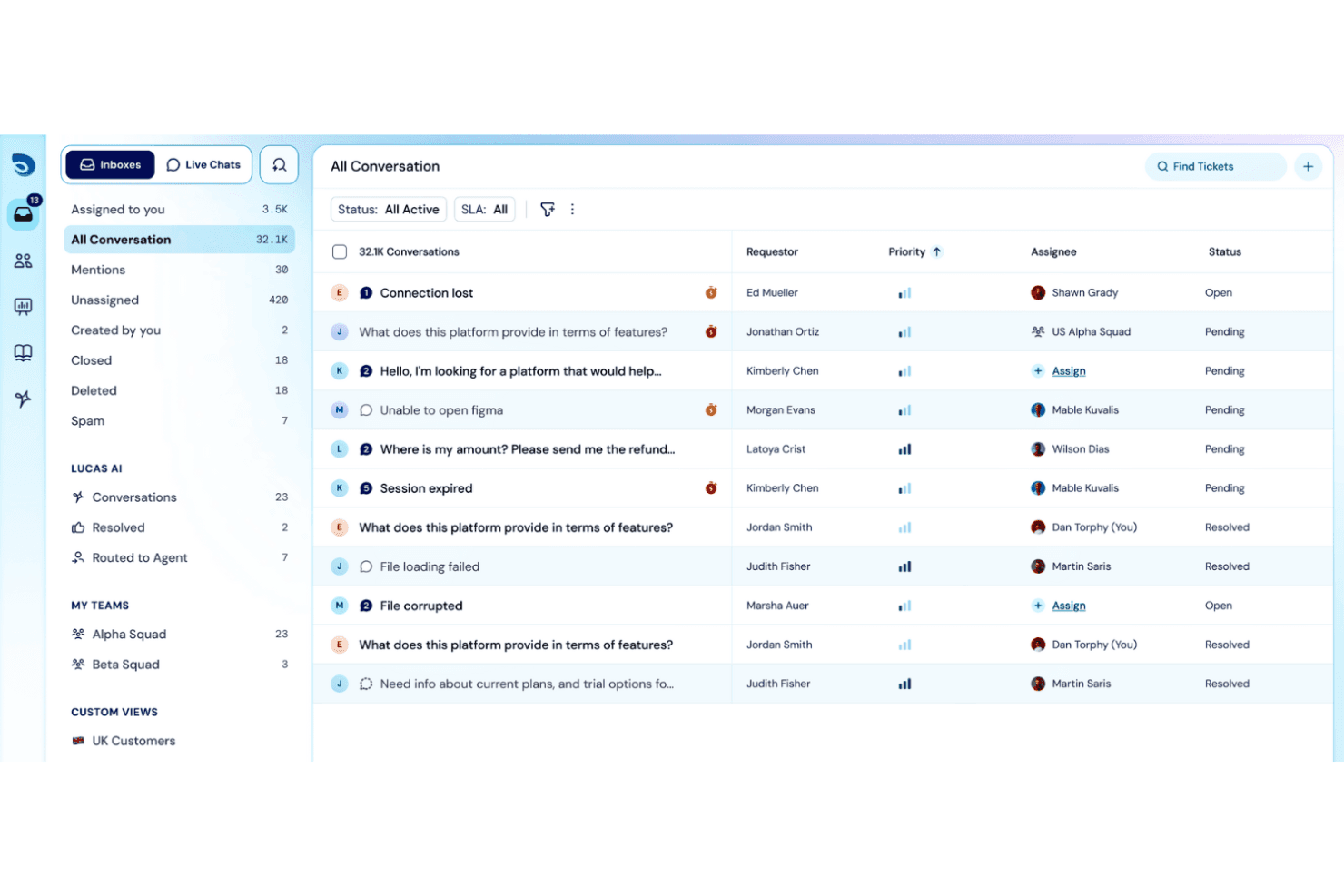
SparrowDesk mostra una posta in arrivo unificata delle conversazioni con colonne per priorità, assegnatario e stato, per gestire 32.1K richieste di assistenza. SparrowDesk è una piattaforma di assistenza basata sull'intelligenza artificiale che combina la gestione omnicanale delle richieste, l'automazione dei flussi di lavoro senza codice, il monitoraggio degli SLA, una base di conoscenza ad accesso autonomo e un agente AI per la risoluzione automatizzata delle richieste.
Per chi è più adatto SparrowDesk?
SparrowDesk è particolarmente adatto alle piccole e medie imprese con team di supporto essenziali che necessitano di una gestione delle richieste basata sull'intelligenza artificiale senza una configurazione ITSM complessa.
Perché ho scelto SparrowDesk
Ho scelto SparrowDesk come una delle migliori soluzioni perché la gestione multilingue delle richieste è realmente automatizzata, non è semplicemente un'opzione di traduzione aggiunta in un secondo momento. Zoona, il suo agente AI, risolve le richieste in entrata in qualsiasi lingua utilizzando i contenuti effettivi della tua base di conoscenza, quindi traduce l'intero thread affinché gli agenti possano rispondere senza cambiare strumento o assumere specialisti linguistici. L'AI Copilot aggiunge riepiloghi istantanei delle richieste e risposte suggerite, così anche i thread multilingue più complessi vengono gestiti rapidamente.
Caratteristiche principali di SparrowDesk
- Strumento per flussi di lavoro senza codice: Progetta e automatizza visivamente i processi di supporto creando flussi di lavoro con il sistema di trascinamento.
- Posta in arrivo omnicanale: Gestisci le richieste provenienti da e-mail, chat dal vivo, moduli web e Slack in un'unica coda organizzata per priorità.
- Monitoraggio dell'Accordo sul livello di servizio (SLA): Imposta, monitora e fai rispettare le scadenze di risposta e risoluzione in base a orari lavorativi personalizzati.
- Report e dashboard personalizzati: Crea e visualizza analisi in tempo reale sulle metriche delle richieste, sull'attività degli agenti e sulla conformità agli SLA.
Integrazioni di SparrowDesk
SparrowDesk offre integrazioni native con Gmail, Slack, Salesforce, Microsoft 365, HubSpot, Shopify, Linear, Pipedrive, Attio e SurveySparrow. È disponibile un'API per le integrazioni personalizzate.
Pros and Cons
Pros:
- L'agente AI gestisce le richieste senza l'intervento degli agenti
- Il supporto multilingue copre automaticamente i canali delle richieste
- L'automazione senza codice riduce il lavoro manuale sui flussi
Cons:
- Piattaforma più recente con una comunità di utenti più piccola
- La reportistica non offre opzioni avanzate di esportazione per l'analisi aziendale
Learn more about SparrowDesk: Il migliore con configurazione istantanea sia su cloud che on-premise
- Prova gratuita di 21 giorni
- Da $29/mese
Visit WebsiteCustomer Rating:4.3/5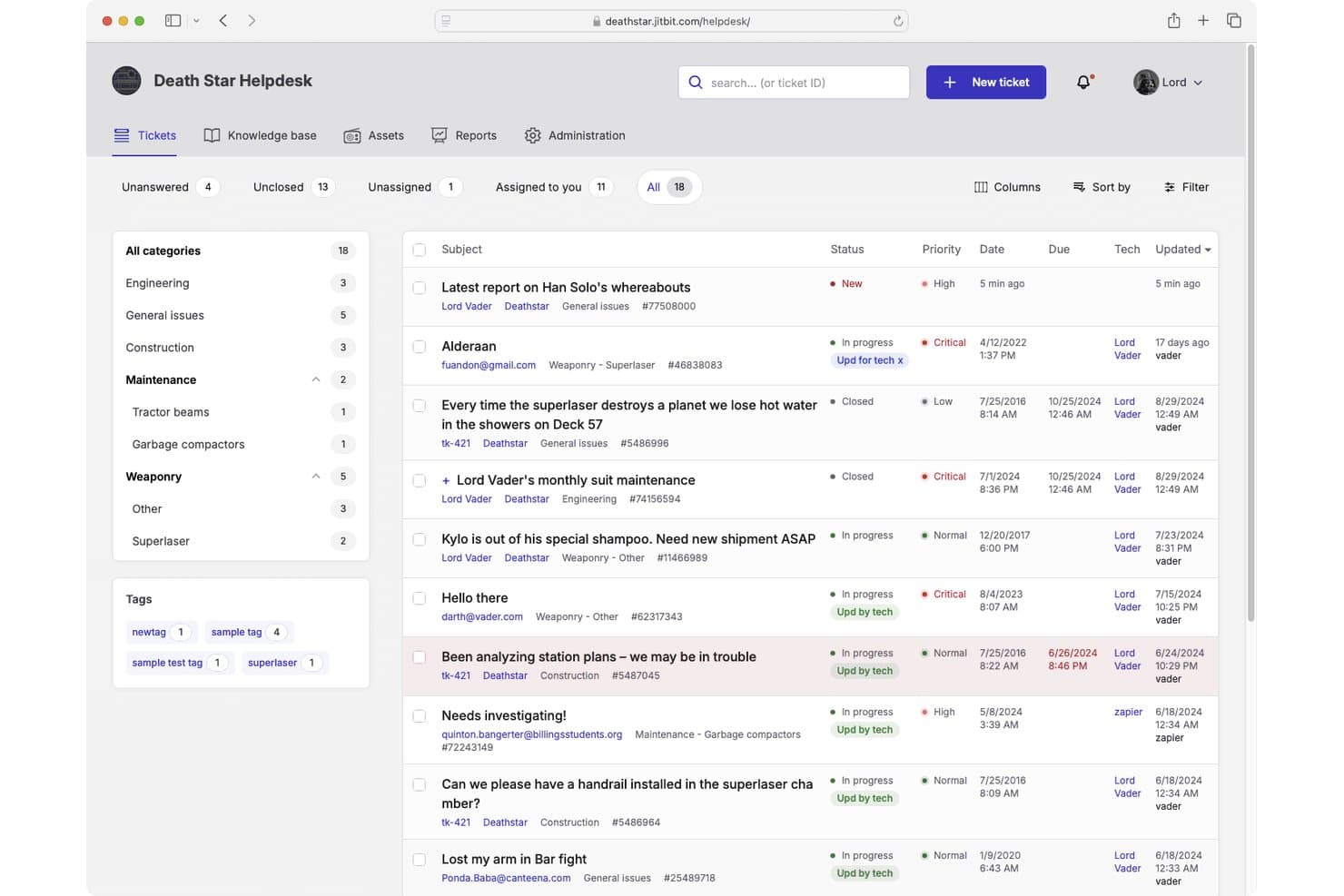
Jitbit Helpdesk offre un'interfaccia di gestione dei ticket con viste categorizzate, livelli di priorità, indicatori di stato e tracciamento degli assegnatari per i team di supporto. Jitbit Helpdesk è una piattaforma di help desk che gestisce la gestione dei ticket, la conversione delle email in ticket, l'automazione dei flussi di lavoro, una base di conoscenza self-service e le integrazioni IT sia in modalità cloud che on-premise.
Per chi è ideale Jitbit Helpdesk?
I team di supporto IT di aziende piccole e medie che necessitano del pieno controllo sulla propria infrastruttura troveranno particolarmente interessante il modello self-hosted con licenza perpetua.
Perché ho scelto Jitbit Helpdesk
Ho incluso Jitbit Helpdesk tra le mie scelte migliori perché pochissimi strumenti di help desk offrono davvero sia la distribuzione SaaS che quella self-hosted senza compromessi. Nel cloud, sei operativo in pochi secondi senza bisogno di carta di credito. L'opzione self-hosted viene fornita con una licenza perpetua e accesso al codice sorgente C#, così il tuo team possiede e può modificare direttamente l'applicazione. Mi piace in particolare il motore di regole per l'automazione, che consente di programmare logiche SLA, assegnazioni automatiche e trigger di escalation senza toccare una riga di codice.
Funzionalità chiave di Jitbit Helpdesk
- Supporto per campi personalizzati: Aggiungi campi personalizzati ai ticket per una raccolta e un monitoraggio dei dati più dettagliati.
- Modulo di tracciamento degli asset: Collega apparecchiature o risorse direttamente ai ticket di supporto tramite la gestione integrata degli asset.
- Integrazione Active Directory: Sincronizza gli account utente e abilita il single sign-on utilizzando i servizi directory della tua organizzazione.
- Base di conoscenza con suggerimenti AI: Mostra automaticamente gli articoli rilevanti mentre agenti o utenti creano nuovi ticket di supporto.
Integrazioni di Jitbit Helpdesk
Jitbit Helpdesk offre integrazioni native con Slack, Jira, GitHub, Asana, Microsoft Teams, TeamViewer, Google Drive, Dropbox, Basecamp e WhatsApp, e si collega tramite Zapier. È disponibile un'API per integrazioni personalizzate.
Pros and Cons
Pros:
- Può essere distribuito come vero software on-premise
- Automazione dell'instradamento e dell'escalation dei ticket
- Accesso completo al codice sorgente con self-hosted
Cons:
- Opzioni di personalizzazione dei report limitate
- Nessun supporto telefonico nativo nella coda dei ticket
Learn more about Jitbit Helpdesk:
Altri software per service desk degni di nota
Di seguito è riportato un elenco di altri software per service desk che ho selezionato, ma che non sono rientrati nelle prime dieci posizioni. Tuttavia, vale ancora la pena prenderli in considerazione.
- 11MissiveIdeale per la collaborazione del team nelle caselle di posta condivise
- 12TidioIdeale per l'assistenza clienti potenziata dall'IA
- 13monday serviceIdeale per monitorare le richieste di supporto interno
- 14IntercomMigliore per la messaggistica clienti in tempo reale
- 15IssuetrakIdeale per l'assegnazione round-robin dei ticket
- 16ServiceNowLa migliore per le operazioni di servizio IT a livello enterprise
- 17Jira Service ManagementIdeale per progetti IT agili
- 18KayakoIdeale per percorsi clienti unificati
- 19GuruIdeale per l'accesso alla base di conoscenza
- 20SolarWinds Web Help DeskIdeale per l'automazione dei ticket ITSM
- 21SAAS FirstIdeale per chatbot supportati dall'intelligenza artificiale
- 22LiveAgentIdeale per la comunicazione multicanale
- 23Help ScoutIdeale per piccole imprese e team
- 24Desk365Ideale per risposte ai ticket guidate dall’IA
- 25ZendeskIdeale per integrare diversi canali
Recensioni di software correlate
Se non hai ancora trovato ciò che cerchi, dai un’occhiata a questi strumenti alternativi che abbiamo testato e valutato.
- Software per il monitoraggio della rete
- Software per il monitoraggio dei server
- Soluzioni SD-Wan
- Strumenti per il monitoraggio dell’infrastruttura
- Analizzatore di pacchetti
- Strumenti per il monitoraggio delle applicazioni
Come valuto i software di help desk
Divido la mia valutazione in due livelli: i requisiti di base che uno strumento deve coprire—come la raccolta multicanale e il rispetto degli SLA—e i fattori distintivi che rendono una piattaforma più adatta rispetto a un'altra.
Funzionalità di base (requisiti minimi per questa lista)
Quando seleziono gli strumenti per la mia lista, valuto ciascuno su una scala da 0 (non offre la funzionalità) a 5 (eccelle in quest'area) per ogni funzionalità di base elencata di seguito. Poi calcolo il punteggio totale dello strumento in percentuale. Ogni strumento deve raggiungere un punteggio totale minimo del 75% per essere preso in considerazione.
- Sistema di gestione dei ticket: Valuto come ogni strumento gestisce l'intero ciclo di vita del ticket—stati, priorità, categorizzazione, campi personalizzati e collegamento ticket genitore/figlio per problemi complessi.
- Raccolta multicanale: Ogni piattaforma dovrebbe unificare le richieste provenienti da email, portale, chat e strumenti come Slack o Teams in una coda unica invece di caselle di posta separate.
- Automazione dei flussi di lavoro & SLA: Controllo se le regole di instradamento, i trigger di escalation e i timer SLA possono essere configurati per priorità o team—come l'auto-escalation di un guasto server P1.
- Base di conoscenza & self-service: Una base di conoscenza ricercabile unita a un portale self-service è importante, soprattutto se suggerisce articoli pertinenti prima che l'utente invii un ticket.
- Reportistica & analytics: Dashboard che coprono volume dei ticket, carico di lavoro degli agenti, rispetto degli SLA e tendenze di risoluzione aiutano i responsabili IT a individuare i colli di bottiglia senza estrazioni manuali di dati.
- Integrazioni con strumenti IT: Connessioni native a monitoraggio, gestione degli asset, servizi directory e tool di sviluppo come Jira o PagerDuty mantengono il supporto integrato nello stack IT più ampio.
Una volta che ho una lista di strumenti che soddisfano questi criteri, considero cosa distingue ogni piattaforma.
Fattori differenzianti (ciò che distingue i fornitori)
Ecco come confronto i vari fornitori:
Caratteristiche distintive
Il supporto ITSM e ITIL è un importante elemento distintivo. Strumenti come Freshservice e ServiceNow vanno oltre la gestione dei ticket offrendo la gestione integrata di cambiamenti, problemi e rilasci—utile quando un singolo guasto genera dozzine di incidenti correlati. Valuto anche se una piattaforma include la gestione integrata degli asset o della configurazione, poiché collegare un ticket a un dispositivo specifico o CI accelera l'analisi delle cause. Anche le capacità di intelligenza artificiale sono rilevanti qui, soprattutto agenti virtuali che possono gestire reset password o richieste comuni senza l'intervento di un tecnico.
Oltre alle caratteristiche
Le certificazioni di sicurezza e conformità come SOC 2 Type II e ISO 27001 hanno un peso reale qui, soprattutto per i team IT che gestiscono dati sensibili di dipendenti o infrastrutture. Considero anche come ogni piattaforma si adatta alla dimensione del team, poiché uno strumento adatto a un help desk di cinque persone potrebbe non reggere il volume di ticket aziendali. Anche l'estensibilità dell'ecosistema conta. API aperte e webhook consentono di creare integrazioni personalizzate, come inviare avvisi dal proprio stack di monitoraggio direttamente nell'help desk come ticket.
Come scegliere il software per service desk
È facile perdersi in lunghi elenchi di funzionalità e strutture tariffarie complesse. Per aiutarti a rimanere concentrato mentre affronti il tuo processo di selezione del software, unico per le tue esigenze, ecco una lista di fattori da tenere presenti:
| Fattore | Cosa considerare |
|---|---|
| FattoreScalabilità | Cosa considerareVerifica se il software può crescere insieme al tuo team e gestire un volume crescente di ticket senza problemi di prestazioni. Questo aiuta a evitare migrazioni frequenti del software man mano che la tua attività si espande. |
| FattoreIntegrazioni | Cosa considerareAssicurati che il software si integri facilmente con gli strumenti che già utilizzi, come piattaforme di posta elettronica, sistemi CRM o strumenti di chat interna, per garantire l'efficienza del tuo flusso di lavoro. |
| FattorePersonalizzazione | Cosa considerareCerca una soluzione che ti permetta di adattare i campi dei ticket, i report e i flussi di lavoro in base ai processi di assistenza specifici del tuo team. La personalizzazione evita soluzioni alternative che fanno perdere tempo al tuo team. |
| FattoreSemplicità d'uso | Cosa considerareScegli un software con un'interfaccia intuitiva e una navigazione chiara. Se il tuo team ritiene difficile utilizzare lo strumento, il tasso di adozione ne risentirà, con un impatto sulla produttività. |
| FattoreBudget | Cosa considerareConfronta gli strumenti che rientrano nel tuo budget e assicurati che i prezzi siano trasparenti. Verifica l'eventuale presenza di costi nascosti, come le tariffe per le integrazioni, lo spazio di archiviazione aggiuntivo o i livelli di assistenza. |
| FattoreMisure di sicurezza | Cosa considerareAssicurati che il software offra solide misure di sicurezza, tra cui la crittografia dei dati, le autorizzazioni basate sui ruoli e la conformità a standard come GDPR o HIPAA, proteggendo i dati sensibili dei clienti. |
| FattoreReportistica | Cosa considerareValuta se lo strumento offre report e analisi dettagliati per aiutarti a individuare schemi ricorrenti, monitorare le prestazioni del team e migliorare l'erogazione del servizio. |
| FattoreQualità dell'assistenza | Cosa considerareValuta la rapidità di risposta dell'assistenza clienti del fornitore. Un buon servizio di assistenza ti aiuta a risolvere rapidamente i problemi o le domande che il tuo team potrebbe incontrare durante l'implementazione e in seguito. |
Tendenze nei software per l'assistenza
Durante la mia ricerca, ho raccolto innumerevoli aggiornamenti di prodotto, comunicati stampa e registri delle versioni di diversi fornitori di software per l'assistenza. Ecco alcune delle tendenze emergenti che sto tenendo d'occhio:
- Chatbot basati sull'intelligenza artificiale: Gli strumenti ora utilizzano chatbot più intelligenti per rispondere alle richieste dei clienti in modo istantaneo e accurato. Questo riduce i tempi di attesa e permette al tuo team di concentrarsi sui problemi più complessi. Fornitori come Freshdesk e Zendesk hanno ampliato notevolmente le funzionalità dei chatbot.
- Assistenza proattiva: I software pongono sempre più l'accento sul rilevamento proattivo dei problemi. Anziché attendere l'apertura dei ticket, questi strumenti avvisano il tuo team dei potenziali problemi, impedendo che si verifichino prima che i clienti li notino. Help Scout è uno dei fornitori all'avanguardia in questo cambiamento.
- Analisi avanzate: Gli strumenti di assistenza stanno migliorando il modo in cui raccolgono e presentano i dati. Grazie alle analisi avanzate, il tuo team può individuare facilmente i colli di bottiglia del servizio, migliorare le prestazioni e comprendere meglio il comportamento dei clienti. Zoho Desk ha migliorato notevolmente le funzionalità di analisi.
- Analisi del sentimento dei clienti: Gli strumenti ora analizzano automaticamente le interazioni con i clienti per valutarne la soddisfazione o la frustrazione. Il tuo team può quindi stabilire le priorità dei ticket, contribuendo a evitare esperienze negative. Gladly sta sviluppando questo approccio.
- Innovazione dell'assistenza autonoma: I fornitori stanno perfezionando i portali per l'assistenza autonoma, rendendo più facile per i clienti trovare rapidamente le risposte in autonomia. Questo dà maggiore autonomia agli utenti e riduce il carico di lavoro del tuo team di assistenza. Fornitori come HubSpot Service Hub hanno notevolmente migliorato le proprie basi di conoscenza.
Che cos'è un software per l'assistenza?
Il software per l'assistenza consente ai team di gestire le richieste degli utenti, monitorare i problemi e rispondere alle difficoltà da un unico sistema. Il personale IT, i team di assistenza e i professionisti delle operations lo utilizzano per organizzare i ticket, ridurre i ritardi e offrire agli utenti un'assistenza più chiara.
Il monitoraggio dei ticket, l'instradamento automatico e gli strumenti di comunicazione aiutano a mantenere organizzate le richieste, ridurre i tempi di risposta e rendere più facile seguire il lavoro di assistenza. Nel complesso, questo software aiuta i team a fornire agli utenti un'assistenza più rapida e coerente.
Funzionalità dei software per l'assistenza
Quando scegli un software per l'assistenza, presta attenzione alle seguenti funzionalità chiave:
- Gestione dei ticket: Tiene traccia delle richieste dei clienti e le organizza in una posizione centralizzata, aiutando il tuo team a rispondere rapidamente e a risolvere i problemi.
- Base di conoscenza: Fornisce risorse di autoassistenza, consentendo ai clienti di trovare autonomamente le soluzioni e riducendo il volume dei ticket.
- Chat dal vivo: Consente al tuo team di interagire immediatamente con i clienti, migliorando i tempi di risposta e la soddisfazione dei clienti.
- Supporto multicanale: Permette al tuo team di gestire le comunicazioni con i clienti attraverso canali come e-mail, social network e app di messaggistica da un'unica dashboard.
- Reportistica: Offre informazioni dettagliate sulle prestazioni del team, sulle tendenze dei ticket e sulla soddisfazione dei clienti, aiutando la tua azienda a migliorare la qualità del servizio.
- Gestione degli SLA: Aiuta a definire, monitorare e rispettare gli accordi sui livelli di servizio, garantendo risposte tempestive e un supporto affidabile.
- Regole di automazione: Riducono le attività ripetitive, come l'instradamento dei ticket o l'assegnazione delle priorità, lasciando al tuo team più tempo per concentrarsi sulle interazioni di maggior valore.
- Sondaggi sul feedback dei clienti: Raccolgono direttamente i feedback dei clienti, fornendo al tuo team informazioni utili per migliorare le esperienze dei clienti e la qualità del servizio.
- Flussi di lavoro personalizzati: Consentono di adattare i processi dell'help desk ai requisiti specifici della tua azienda, migliorando l'efficienza complessiva.
- Rilevamento delle collisioni: Impedisce a più membri del team di lavorare sullo stesso ticket, evitando attività duplicate e confusione.
Vantaggi del software per help desk
L'implementazione di un software per help desk offre numerosi vantaggi al tuo team e alla tua azienda. Ecco alcuni dei vantaggi che puoi aspettarti:
- Risposte più rapide: La gestione centralizzata dei ticket aiuta il tuo team a visualizzare, stabilire le priorità e rispondere rapidamente alle richieste.
- Maggiore efficienza: Le regole di automazione gestiscono le attività ripetitive, consentendo al tuo team di dedicare più tempo ai problemi importanti.
- Clienti più soddisfatti: I portali di autoassistenza e le basi di conoscenza aiutano i clienti a trovare rapidamente le risposte in autonomia.
- Maggiore visibilità: Gli strumenti di reportistica mostrano chiaramente le tendenze dei ticket e le prestazioni del team, permettendoti di sapere esattamente dove migliorare.
- Maggiore produttività: Funzionalità come il rilevamento delle collisioni impediscono le attività duplicate, consentendo al tuo team di gestire più richieste in modo efficiente.
- Collaborazione più efficace: I cruscotti unificati e le note interne aiutano il tuo team a collaborare meglio nella risoluzione dei problemi.
- Conformità semplificata: La gestione degli SLA garantisce che i ticket rispettino i tempi di servizio concordati, aiutando il tuo team a rimanere in linea con gli obiettivi.
Costi e prezzi del software per help desk
La scelta di un software per help desk richiede la comprensione dei vari modelli e piani tariffari disponibili. I costi variano in base alle funzionalità, alle dimensioni del team, ai componenti aggiuntivi e ad altri fattori. La tabella seguente riepiloga i piani più comuni, i relativi prezzi medi e le funzionalità tipicamente incluse nelle soluzioni software per help desk:
Tabella comparativa dei piani per il software per help desk
| Tipo di piano | Prezzo medio | Funzionalità comuni |
|---|---|---|
| Tipo di pianoPiano gratuito | Prezzo medio$0 | Funzionalità comuniGestione di base dei ticket, supporto via e-mail e reportistica limitata. |
| Tipo di pianoPiano personale | Prezzo medio$10-$25/utente/mese | Funzionalità comuniSupporto multicanale, regole di automazione e sondaggi sui clienti. |
| Tipo di pianoPiano aziendale | Prezzo medio$30-$75/utente/mese | Funzionalità comuniGestione degli SLA, analisi avanzate, flussi di lavoro personalizzati e rilevamento delle collisioni. |
| Tipo di pianoPiano per grandi aziende | Prezzo medio$80-$150+/utente/mese | Funzionalità comuniReportistica avanzata, chatbot basati sull'intelligenza artificiale, ampie opzioni di personalizzazione e supporto dedicato per il cliente. |
Riepilogo
Il software giusto per l'assistenza clienti può semplificare la gestione dei problemi dei clienti, implementare la gestione delle modifiche e garantire operazioni fluide, soprattutto in un modello SaaS basato sul cloud.
Tuttavia, il software ideale varia in base alle esigenze specifiche: da quelli che richiedono solide funzionalità IT a quelli che cercano una gestione integrata delle risorse o una soluzione completa per la gestione dei servizi.
Punti chiave:
- Determinare le esigenze principali: Prima di esaminare le opzioni, identifica le tue esigenze principali. Che tu stia valutando un'infrastruttura IT robusta, la gestione delle risorse o una semplice soluzione di assistenza cloud, il software dovrebbe rispondere alle tue principali problematiche ed esigenze.
- Dare priorità a usabilità e funzionalità: Il miglior software non deve offrire soltanto numerose funzionalità; dovrebbe anche presentare un'interfaccia intuitiva. Un design semplice e facile da usare può fare una differenza significativa, soprattutto per piattaforme come le soluzioni di assistenza, dove la rapidità di risposta e l'efficienza sono fondamentali.
- Considerare l'analisi costi-benefici: Sebbene il prezzo sia un fattore importante, è essenziale valutare il valore del software. A volte, un'opzione leggermente più costosa potrebbe offrire funzionalità che consentono di risparmiare tempo e risorse nel lungo periodo. Inoltre, non trascurare le opzioni gratuite per l'assistenza o le alternative open source; potrebbero offrire esattamente le funzionalità adatte alle startup o alle attività più piccole.