

15 Beste Incident-Management-Software im Test 2026

Beste Incident Management Software: Shortlist
Hier ist meine Shortlist der besten Incident Management Software:


Das Management von Incidents kann für IT-Teams eine echte Herausforderung sein. Wenn ein unerwartetes Problem den Arbeitsablauf stört, zählt jede Sekunde. Hier kommt Incident Management Software ins Spiel, die Ihnen hilft, Probleme schnell und effizient zu lösen.
Meiner Erfahrung nach kann das richtige Tool den entscheidenden Unterschied machen, um Ihre Abläufe reibungslos am Laufen zu halten. Ich habe verschiedene Optionen getestet und bewertet, um Ihnen eine gut recherchierte Auswahl der besten Lösungen zu präsentieren.
In diesem Artikel teile ich meine Top-Empfehlungen und hebe deren einzigartige Funktionen und Vorteile hervor. Sie erhalten Einblicke, wie diese Tools Ihrem Team helfen können, die Reaktionszeiten zu verbessern und die Zusammenarbeit zu stärken, damit Sie auf alles vorbereitet sind, was auf Sie zukommt.
Table of Contents
- Beste Software-Shortlist
- Warum Sie unseren Software-Bewertungen vertrauen können
- Spezifikationen vergleichen
- Bewertungen
- Weitere Incident-Management-Software
- Verwandte Testberichte
- Auswahlkriterien
- So wählen Sie aus
- Trends
- Was ist Incident-Management-Software?
- Funktionen
- Vorteile
- Kosten und Preise
- FAQs
Why Trust Our Software Reviews
We’ve been testing and reviewing software since 2023. As tech leaders ourselves, we know how critical and difficult it is to make the right decision when selecting software.
We invest in deep research to help our audience make better software purchasing decisions. We’ve tested more than 2,000 tools for different tech use cases and written over 1,000 comprehensive software reviews. Learn how we stay transparent & our software review methodology.
Zusammenfassung: Beste Incident Management Software
Diese Vergleichstabelle fasst die Preisinformationen meiner besten Incident Management Software-Empfehlungen zusammen, damit Sie das passende Tool für Ihr Budget und Ihre Geschäftsanforderungen finden.
| Tool | Best For | Trial Info | Price | ||
|---|---|---|---|---|---|
| 1 | Am besten für automatisiertes Vorfallmanagement | 21-tägige kostenlose Testphase + kostenlose Demo | Ab $19/Agent/Monat (jährliche Abrechnung) | Website | |
| 2 | Am besten für Business Continuity geeignet | Kostenlose Demo verfügbar | Preise auf Anfrage | Website | |
| 3 | Am besten zur Reduzierung von IT-Arbeitsaufwänden mit KI geeignet | 14-tägige kostenlose Testversion | Preise auf Anfrage | Website | |
| 4 | Am besten für Echtzeit-Erkennung von Vorfällen | 30-tägige kostenlose Testphase + kostenlose Demo verfügbar | Ab $149/Techniker/Monat (jährliche Abrechnung) | Website | |
| 5 | Am besten geeignet für KI-gesteuerte Service-Automatisierung | 30 Tage kostenlos testen | Ab $39/Nutzer/Monat | Website | |
| 6 | Am besten geeignet für die Integration von Threat Hunting | Kostenlose Testphase + kostenlose Demo verfügbar | Preise auf Anfrage | Website | |
| 7 | Am besten für KI-gestützte Vorfalllösung | Kostenlose Demo verfügbar | Ab $20/Nutzer/Monat | Website | |
| 8 | Am besten für Protokollverwaltung | 30-tägige kostenlose Testversion + kostenlose Demo | Preise auf Anfrage | Website | |
| 9 | Am besten geeignet für Bereitschaftsmanagement | 14-tägige kostenlose Testversion | Ab $9/Nutzer/Monat | Website | |
| 10 | Am besten für Echtzeit-Benachrichtigungen | 14-tägige kostenlose Testversion + kostenloses Demo | Ab $5/Nutzer/Monat | Website | |
| 11 | Am besten für Unternehmenslösungen | 30-tägige kostenlose Testversion + kostenlose Demo | Preis auf Anfrage | Website | |
| 12 | Am besten für Leistungsüberwachung geeignet | 14-tägige kostenlose Testphase verfügbar | Bezahlung nach Verbrauch | Website | |
| 13 | Am besten für AIOps-Fähigkeiten | 90-tägige kostenlose Testversion | $5/überwachten Knoten/Monat | Website | |
| 14 | Am besten für teamübergreifende Vorfallbearbeitung geeignet | 7-tägige kostenlose Testversion | Ab $20/Nutzer/Monat (jährlich abgerechnet) | Website | |
| 15 | Am besten geeignet für Kollaboration im Team | Kostenloser Tarif für immer | Ab $5/Nutzer/Monat | Website |


-

Site24x7
Visit WebsiteThis is an aggregated rating for this tool including ratings from Crozdesk users and ratings from other sites.4.7 -
GitHub Actions
Visit WebsiteThis is an aggregated rating for this tool including ratings from Crozdesk users and ratings from other sites.4.8 -
Docker
Visit WebsiteThis is an aggregated rating for this tool including ratings from Crozdesk users and ratings from other sites.4.6





Bewertungen der besten Incident Management Software
Nachfolgend finden Sie meine ausführlichen Zusammenfassungen der besten Incident Management Software, die es auf meine Shortlist geschafft haben. Meine Bewertungen geben Ihnen einen detaillierten Überblick über Schlüsselfunktionen, Vor- und Nachteile, Integrationen und optimale Einsatzbereiche jedes Tools, damit Sie das für Sie passende finden.


Freshservice ist eine cloudbasierte Service-Desk-Plattform, die Teams dabei unterstützt, Vorfälle über mehrere Kanäle hinweg zu verwalten. Sie bietet ein anpassbares Ticketsystem und Berichtswerkzeuge, die Einblick in Vorfalltrends und die Leistung geben.
Warum ich Freshservice ausgewählt habe: Ich habe Freshservice gewählt, weil Teams damit Vorfälle aus verschiedenen Kanälen erfassen und verwalten können, darunter Mobile Apps, Telefongespräche, Feedback-Widgets, Self-Service-Portale, E-Mail, den Freddy-Chatbot und persönliche Anfragen. Anfragen aus diesen Kanälen werden automatisch in Tickets umgewandelt, was Teams hilft, die Bearbeitung von Vorfällen zu optimieren und das Hin und Her zu reduzieren, das bei der Verwaltung von Problemen über unterschiedliche Plattformen hinweg entstehen kann.
Herausragende Funktionen und Integrationen von Freshservice:
Funktionen, die die Vorfall-Workflows unterstützen, umfassen die Möglichkeit, das Incident Management mit Change-, Asset- und Configuration Management zu verknüpfen. Dadurch erhalten Teams mehr Kontext bei der Bearbeitung von Tickets. Freshservice integriert sich zudem mit Slack, sodass Nutzer direkt aus Slack-Direktnachrichten heraus Tickets erstellen und Ticket-Status aus dem Freshservice-Portal direkt in Slack bearbeiten können.
Integrationen umfassen native Anbindungen an Tools wie Google Kalender, TeamViewer, Document360, Azure Active Directory und Office 365 Kalender.
Pros and Cons
Pros:
- Individuell anpassbare Service Level Agreements (SLAs) und Eskalationsregeln
- Kann mit der KI-Engine Freddy auf historische Daten zugreifen
- Aussagekräftige Berichte und Analysen zu Vorfalltrends und Leistung
Cons:
- Steile Lernkurve
- Kann teuer werden, wenn die Anzahl der Agenten steigt
New Product Updates from Freshservice

Freshservice Enhances Global Search and Dashboards With Task Support
Freshservice enhances Global Search and Dashboards by adding support for ticket, problem, change, and release tasks, along with custom task views. This update helps teams search, track, and report on tasks from one centralized interface. For more information, visit Freshservice's official site.

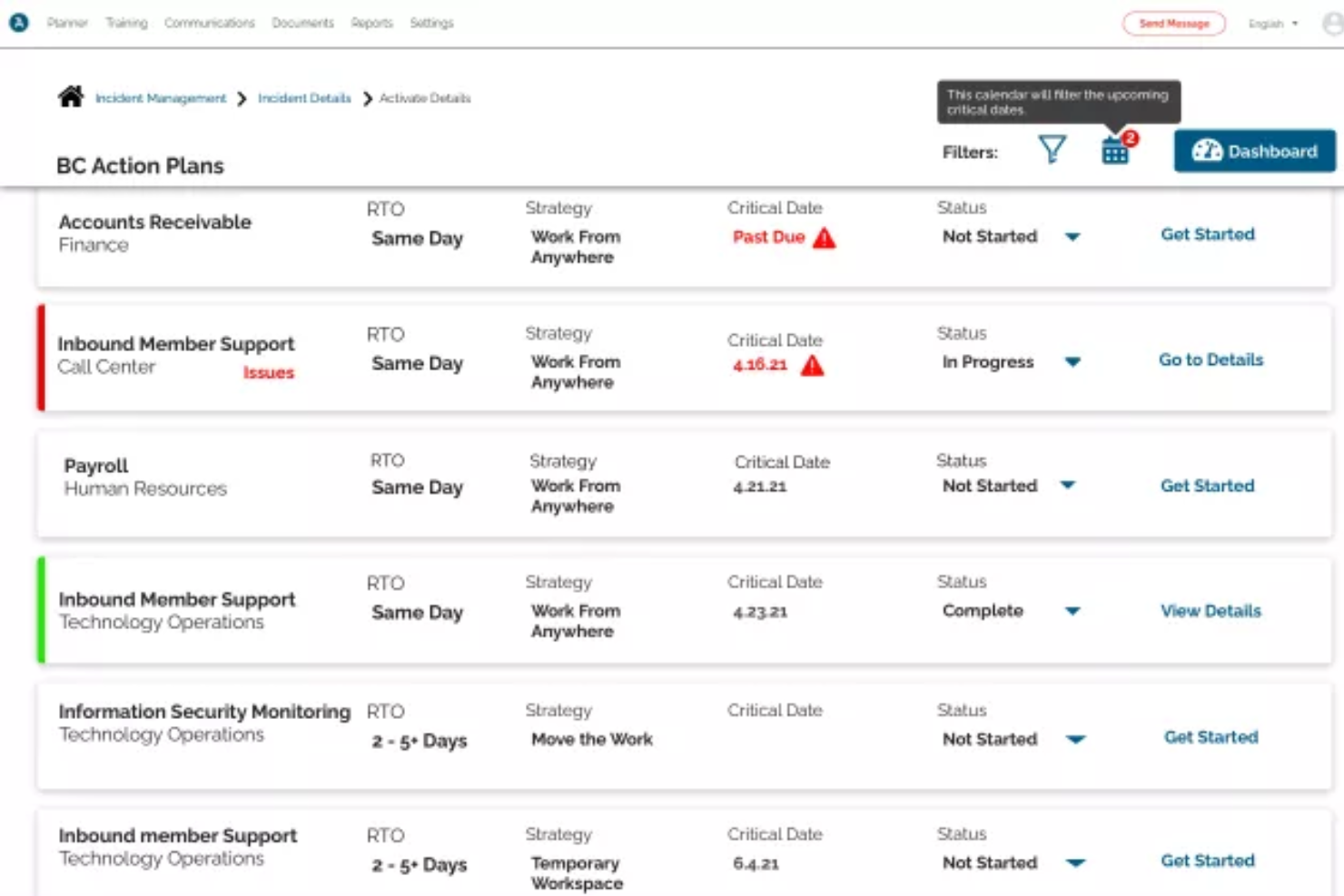
Preparis ist eine Business Continuity- und Vorfallmanagement-Plattform, die sich an Organisationen richtet, die ihre betriebliche Resilienz sicherstellen müssen. Sie ist für Teams konzipiert, die sich auf Notfallvorsorge und Krisenmanagement konzentrieren.
Warum ich Preparis gewählt habe: Die Plattform ist auf Business Continuity spezialisiert und bietet Werkzeuge wie Notfallbenachrichtigungssysteme und Krisenmanagementpläne. Das intuitive Dashboard hilft Ihrem Team, Reaktionen effektiv zu koordinieren. Mit dem Fokus auf Risikoanalysen und Compliance-Überwachung sorgt Preparis dafür, dass Sie auf jegliche Störungen vorbereitet sind. Zusätzlich werden Schulungsmodule angeboten, die die Krisenkompetenz Ihres Teams verbessern.
Herausragende Funktionen & Integrationen:
Funktionen umfassen Notfallbenachrichtigungssysteme, die Ihr Team im Krisenfall auf dem Laufenden halten. Die Krisenmanagementpläne der Plattform unterstützen Sie dabei, wirksam auf Vorfälle zu reagieren. Verfügbare Schulungsmodule verbessern die Vorbereitung und Handlungsfähigkeit Ihres Teams.
Integrationen umfassen Microsoft Office 365, Google Workspace, Slack, Salesforce, Zendesk, ServiceNow, Jira, SharePoint, Okta und DocuSign.
Pros and Cons
Pros:
- Intuitives Dashboard-Design
- Wirksame Krisenmanagementpläne
- Notfallbenachrichtigungssysteme
Cons:
- Nicht ideal für kleine Teams
- Mögliche Verzögerungen bei Benachrichtigungen

SysAid
Am besten zur Reduzierung von IT-Arbeitsaufwänden mit KI geeignet
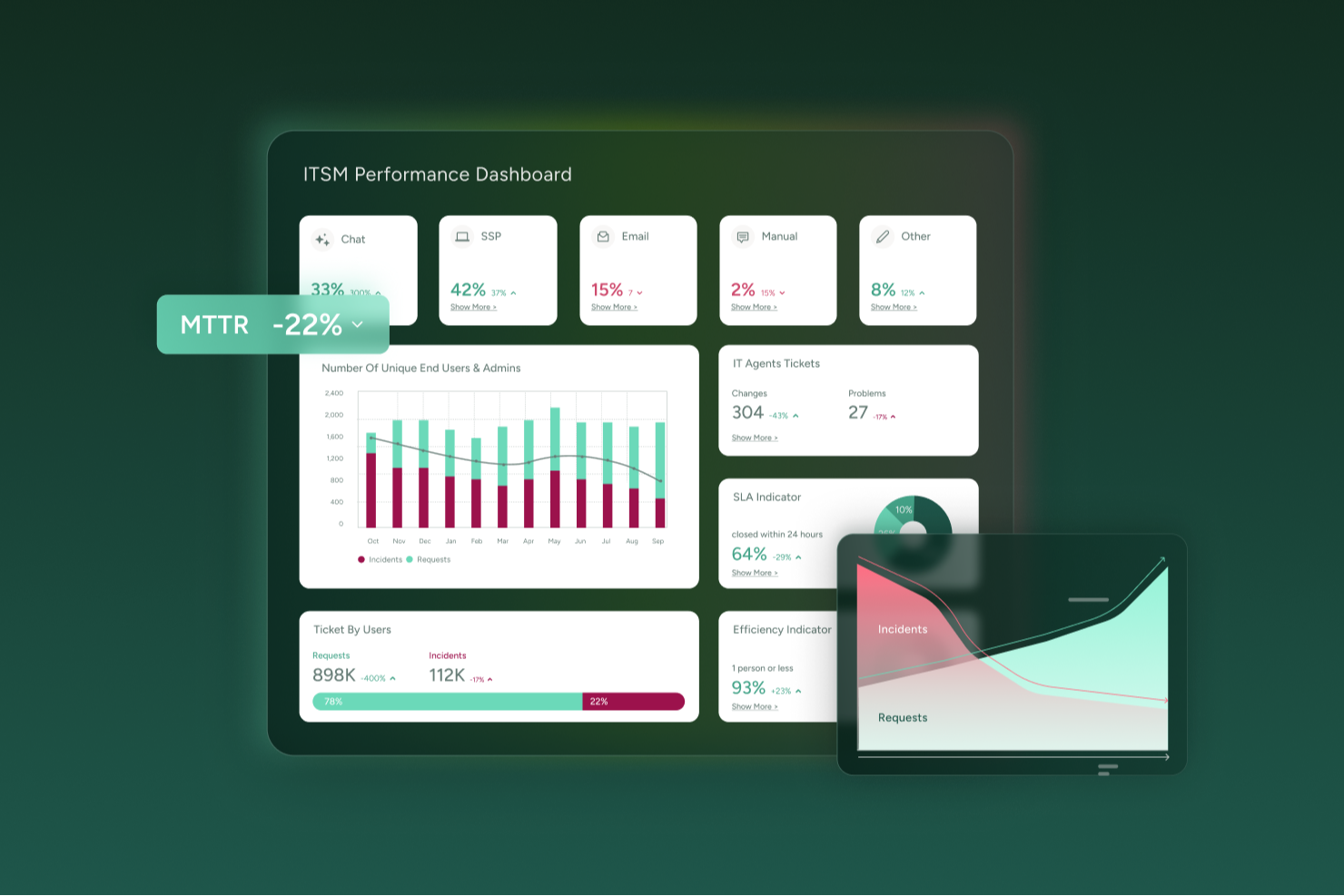
SysAid ist eine IT-Service-Management (ITSM) Software, die IT-Teams dabei unterstützt, Vorfälle effizienter mithilfe von Automatisierung und KI-Funktionen zu verwalten. Sie unterstützt ITIL-konforme Prozesse zum Erfassen, Kategorisieren und Lösen von Vorfällen und bietet zusätzlich Tools für Self-Service, Analysen und Asset-Management. Durch die Zentralisierung der Serviceprozesse und die Automatisierung routinemäßiger Aufgaben hilft SysAid Organisationen, die Servicebereitstellung zu verbessern und SLA-Vorgaben einzuhalten.
Warum ich SysAid gewählt habe: Ich habe SysAid wegen der KI-gesteuerten Automatisierung und der stark anpassbaren Workflows ausgewählt, die den manuellen Aufwand bei der Bearbeitung von Vorfällen deutlich reduzieren können. Die KI-Agenten und der SysAid Copilot kategorisieren und priorisieren Tickets automatisch, sodass sich Ihr IT-Team auf Vorgänge mit größerer Wirkung statt auf Routinefälle konzentrieren kann. Gefallen haben mir auch die integrierten Analyse- und Berichtswerkzeuge, die eine Echtzeiteinsicht in die Performance und die SLA-Trends ermöglichen. Diese Funktionen machen SysAid zu einer überzeugenden Option für IT-Teams, die Vorfall-, Asset- und Service-Management in einer Plattform wünschen.
Herausragende Funktionen & Integrationen:
Funktionen umfassen eine KI-basierte Configuration Management Database (CMDB), die Ihre IT-Umgebung abbildet, eine Automatisierungs-Engine zur Bearbeitung wiederkehrender Workflows und ein anpassbares Self-Service-Portal zur schnelleren Problemlösung. SysAid bietet zudem integriertes Asset-Management und Fernzugriffstools für effiziente Fehlerbehebung.
Integrationen umfassen Active Directory, Azure Active Directory, Salesforce, Microsoft 365, ServiceNow, Slack, Zendesk, Amazon SQS, Google Drive, Dropbox, GitHub und Trello.
Pros and Cons
Pros:
- KI-Automatisierung optimiert die Ticketbearbeitung
- Echtzeit-Analysen verbessern die Leistungsüberwachung
- Workflow-Automatisierung steigert die Prozesseffizienz
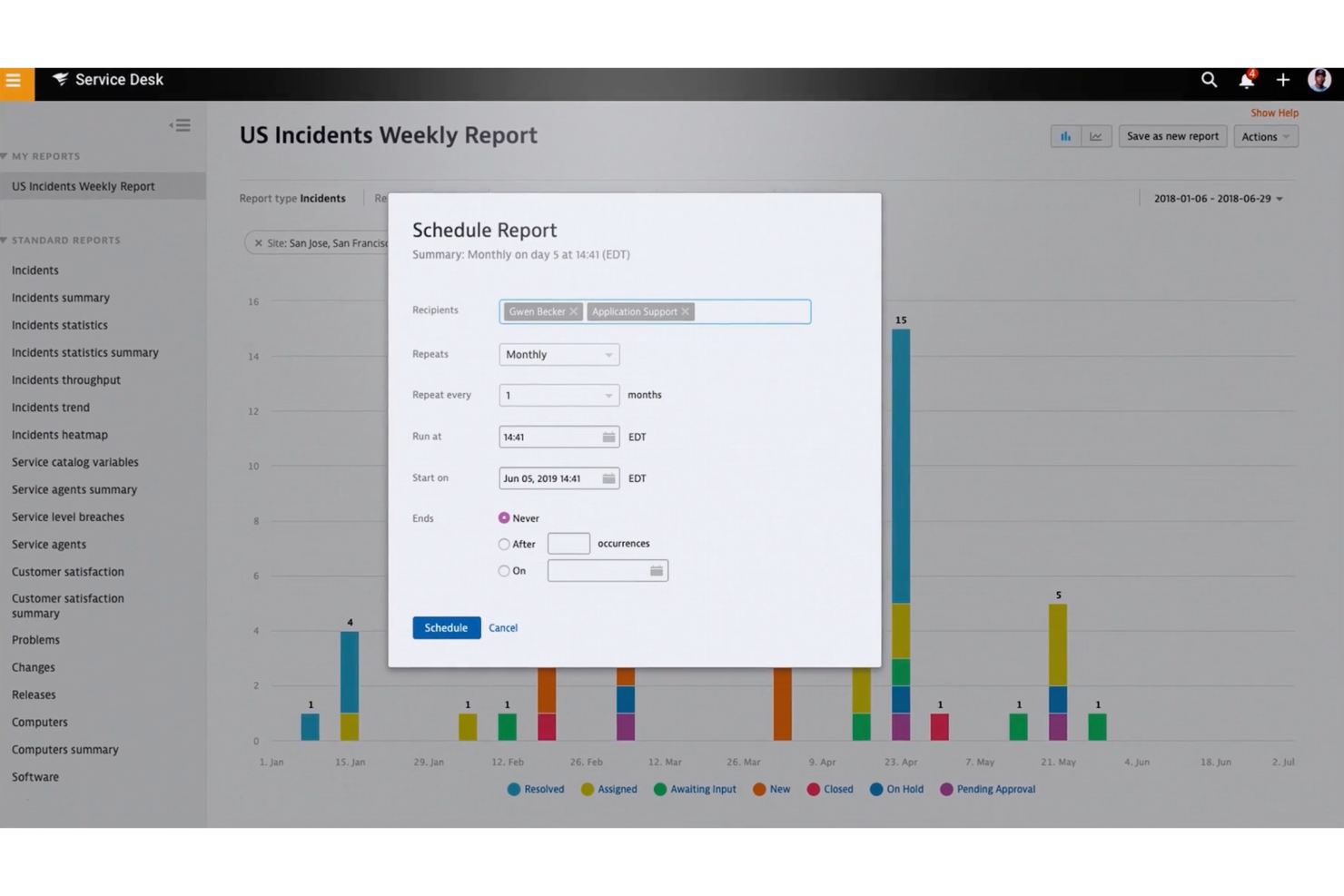
Cons:
- Oberflächendesign wirkt etwas veraltet
- Implementierungsprozess häufig langsam
New Product Updates from SysAid

SysAid Adds Direct Knowledge Base Linking in Service Records
SysAid now allows linking knowledge base articles directly to service records, enhancing centralized access to information and speeding up issue resolution. For more information, visit SysAid's official site.
 .
.

Atera ist eine All-in-One-IT-Management-Plattform, die für IT-Teams und Managed Service Provider (MSPs) entwickelt wurde. Sie vereint Remote Monitoring und Management (RMM), professionelle Service-Automatisierung (PSA), Helpdesk-Ticketing und Patch-Management. Die Incident-Management-Funktionen sind in die umfassende Plattform integriert und bieten Ihnen sowohl proaktives Monitoring als auch automatisierte Reaktion auf Vorfälle.
Warum ich Atera gewählt habe: Ich habe Atera ausgewählt, weil es Incident Management als Teil seiner Remote-Monitoring- und Helpdesk-Plattform bietet. Atera erkennt in Echtzeit Leistungsprobleme bei Geräten und Netzwerken und erstellt bei Überschreiten von Schwellenwerten automatisch Tickets, die die Vorfälle an das richtige Team weiterleiten. Die integrierten künstlichen Intelligenz (KI) Funktionen analysieren Schlüsselwörter und fassen Tickets zusammen, sodass Techniker weniger Zeit für die Kategorisierung und mehr Zeit für die Problemlösung aufwenden. Dies kann den manuellen Triage-Aufwand reduzieren und Ihrem Team helfen, schneller auf Systemstörungen zu reagieren.
Herausragende Funktionen & Integrationen:
Funktionen umfassen die Geräteerkennung mit Network Mapper (NMAP)-Technologie, mit der Sie alle mit Ihrem Netzwerk verbundenen Geräte sehen können. Die Automatisierungsmöglichkeiten reichen von der Skripterstellung über die Fehlerbehebung an Geräten bis hin zur Umwandlung von Tickets in Wissensdatenbankartikel. Außerdem erhalten Sie geplante Schwachstellen-Scans, die nach Common Vulnerabilities and Exposures (CVEs) in Verbindung mit offenen Ports und bekannten Sicherheitsrisiken suchen.
Integrationen umfassen Microsoft Teams, Slack, ServiceNow, Okta, Azure Active Directory (Azure AD), Microsoft Outlook, WhatsApp-Benachrichtigungen, monday.com, Jira Software Cloud, Acronis Cyber Protect Cloud, Google Sheets, ChatGPT (OpenAI), Asana, Freshservice, Google Kalender, NetSuite, Salesforce, HubSpot, Zendesk, ClickUp, Gmail.
Pros and Cons
Pros:
- Integrierte KI-Unterstützung für Ticketmanagement und Fehlerbehebung
- Vereinheitlichte Plattform für RMM, PSA und Helpdesk
- Preisgestaltung pro Techniker
Cons:
- Begrenzte Anpassungsmöglichkeiten für Workflows
- Mobile App hat weniger Funktionen als die Desktop-Version
New Product Updates from Atera

Atera Enhances IT Autopilot With Automation and File Support
Atera’s IT Autopilot gets three major boosts: you can now attach common files for deeper analysis, automate IT tasks with clear workflows, and choose how the system follows up when users go silent. These updates help streamline IT operations and improve resolution efficiency. For more information, visit Atera’s official site.

Am besten geeignet für KI-gesteuerte Service-Automatisierung
SolarWinds IT Service Desk richtet sich an IT-Fachkräfte und Organisationen, die Lösungen für das Incident Management benötigen. Es unterstützt KI-gesteuerte Service-Automatisierung, um das Ticketmanagement zu erleichtern und die Abläufe bei der Bearbeitung von Vorfällen zu verbessern. Die Plattform adressiert Herausforderungen wie Ticketverwaltung und -lösung mit Tools, die darauf ausgelegt sind, Serviceprozesse zu optimieren. Sie eignet sich besonders für IT-Service-Management-Teams, die ihre Supportabläufe und das Benutzererlebnis verbessern möchten.
Warum ich SolarWinds IT Service Desk ausgewählt habe
Ich habe SolarWinds IT Service Desk wegen seiner KI-gesteuerten Service-Automatisierung gewählt, die Teams hilft, Vorfälle mit weniger manuellem Aufwand zu bearbeiten. Die Plattform verwendet KI-basierte Ticketklassifizierung und -weiterleitung, um den Aufwand für die Einstufung und Zuweisung von Aufgaben zu reduzieren. Außerdem unterstützt sie automatisierte Workflows, die Tickets effizienter durch die einzelnen Lösungsschritte führen und IT-Teams dabei helfen, konsequente Servicelevels aufrechtzuerhalten.
Wichtige Funktionen von SolarWinds IT Service Desk
Neben der KI-gesteuerten Service-Automatisierung bietet SolarWinds IT Service Desk:
- Mobiler Zugriff: Bietet Unterstützung unterwegs, sodass Ihr Team Vorfälle von überall aus bearbeiten kann.
- Service Level Management: Ermöglicht die Definition und Überwachung von Servicelevels, damit Ihr Team seine Zusagen einhält.
- IT-Asset-Management: Unterstützt die Verwaltung des Lebenszyklus von IT-Assets und trägt zur Aufrechterhaltung der betrieblichen Effizienz bei.
- Configuration Management Database (CMDB): Bietet Einblick in die Infrastruktur – entscheidend für ein effektives Incident Management und die Lösung von Vorfällen.
SolarWinds IT Service Desk Integrationen
Zu den Integrationen gehören Microsoft Teams, Slack, Jira und weitere Tools. Es wird eine REST API für individuelle Integrationen unterstützt.
Pros and Cons
Pros:
- Einfaches Ticketmanagement mit klarer Anfrageverfolgung
- Übersichtliches Layout reduziert den Zeitaufwand bei der Bearbeitung von Anfragen
- Zentralisierte Inventarverfolgung für IT-Geräte und -Systeme
Cons:
- Einfache Möglichkeiten zur Fernverwaltung
- Kann für kleine, einfache Helpdesk-Einrichtungen komplex wirken

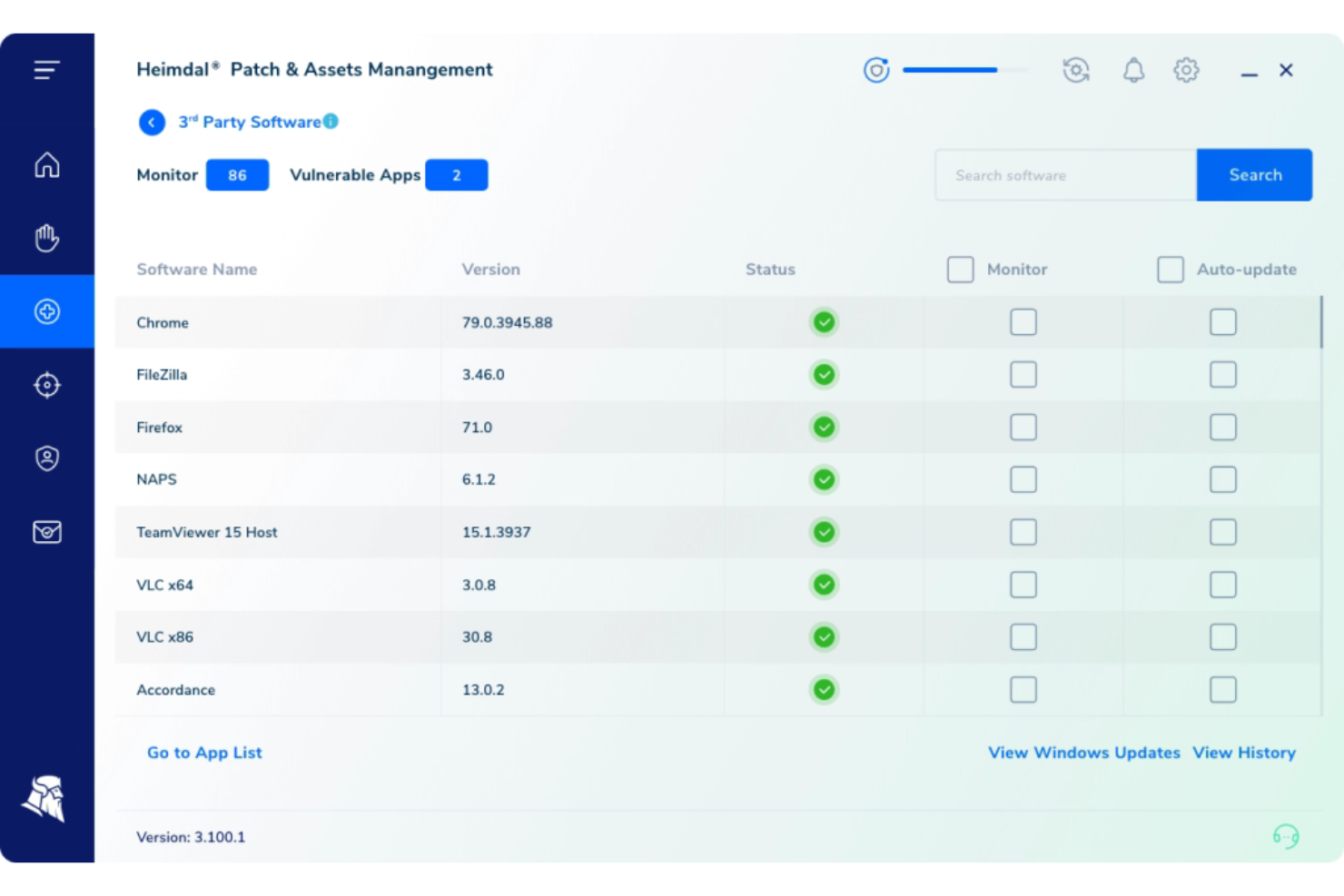
In der heutigen komplexen Cybersicherheitslandschaft bietet Heimdal eine einheitliche Plattform, die auf die vielfältigen Anforderungen des Incident Managements zugeschnitten ist. Dieses Tool ist insbesondere für Branchen wie das Gesundheitswesen, Bildungseinrichtungen und den öffentlichen Sektor attraktiv, in denen die Einhaltung von Standards wie ISO 27001 und HIPAA entscheidend ist. Durch die Integration von Funktionen wie Threat Hunting und Endpoint-Sicherheit unterstützt Heimdal Unternehmen jeder Größe dabei, Sicherheitsvorfälle effektiv zu verwalten und darauf zu reagieren, wodurch die Komplexität reduziert und die gesamte Sicherheitslage verbessert wird.
Warum ich Heimdal gewählt habe
Ich habe Heimdal aufgrund seiner außergewöhnlichen Fähigkeit ausgewählt, Threat Hunting und Schwachstellenmanagement in seine Incident-Management-Software zu integrieren. Diese Funktionen ermöglichen es Ihrem Team, potenzielle Bedrohungen proaktiv zu identifizieren und zu entschärfen, bevor sie zu kritischen Problemen werden. Darüber hinaus sorgen die Endpoint-Sicherheitsfunktionen dafür, dass alle Geräte in Ihrem Unternehmen kontinuierlich geschützt sind, was einen umfassenden Ansatz für das Incident Management bietet. Die nahtlose Integration dieser Funktionalitäten macht Heimdal zu einer verlässlichen Wahl für Unternehmen, die ihre Cybersicherheitsmaßnahmen verbessern möchten.
Heimdal Hauptfunktionen
Neben seinen Kernfunktionalitäten habe ich noch weitere Funktionen gefunden, die die Fähigkeiten im Incident Management erweitern:
- E-Mail-Sicherheit: Diese Funktion bietet fortschrittlichen Schutz vor Phishing und anderen E-Mail-basierten Bedrohungen und stellt sicher, dass Ihre Kommunikationskanäle sicher bleiben.
- Privileged Access Management: Damit lassen sich Zugriffe auf kritische Systeme kontrollieren und überwachen, um das Risiko von Insider-Bedrohungen zu verringern.
- Patch-Management: Automatisiert das Aktualisieren von Software im gesamten Unternehmen, um Schwachstellen zu minimieren.
- Managed SOC Services: Heimdal bietet ausgelagerte Security Operations Center-Services an, sodass sich Ihr Team auf die Kernaufgaben des Unternehmens konzentrieren kann, während dennoch ein robustes Sicherheitsmanagement gewährleistet bleibt.
Heimdal-Integrationen
Native Integrationen werden von Heimdal derzeit nicht aufgeführt; jedoch unterstützt die Plattform benutzerdefinierte Integrationen über APIs.
Pros and Cons
Pros:
- Automatisierte Patch-Verteilung auf allen Endgeräten
- Starke Erkennung von Schwachstellen und Bedrohungen
- Detaillierte Asset- und Lizenzübersicht
Cons:
- Keine nativen Integrationen verfügbar
- Benutzeroberfläche erfordert Einarbeitungszeit

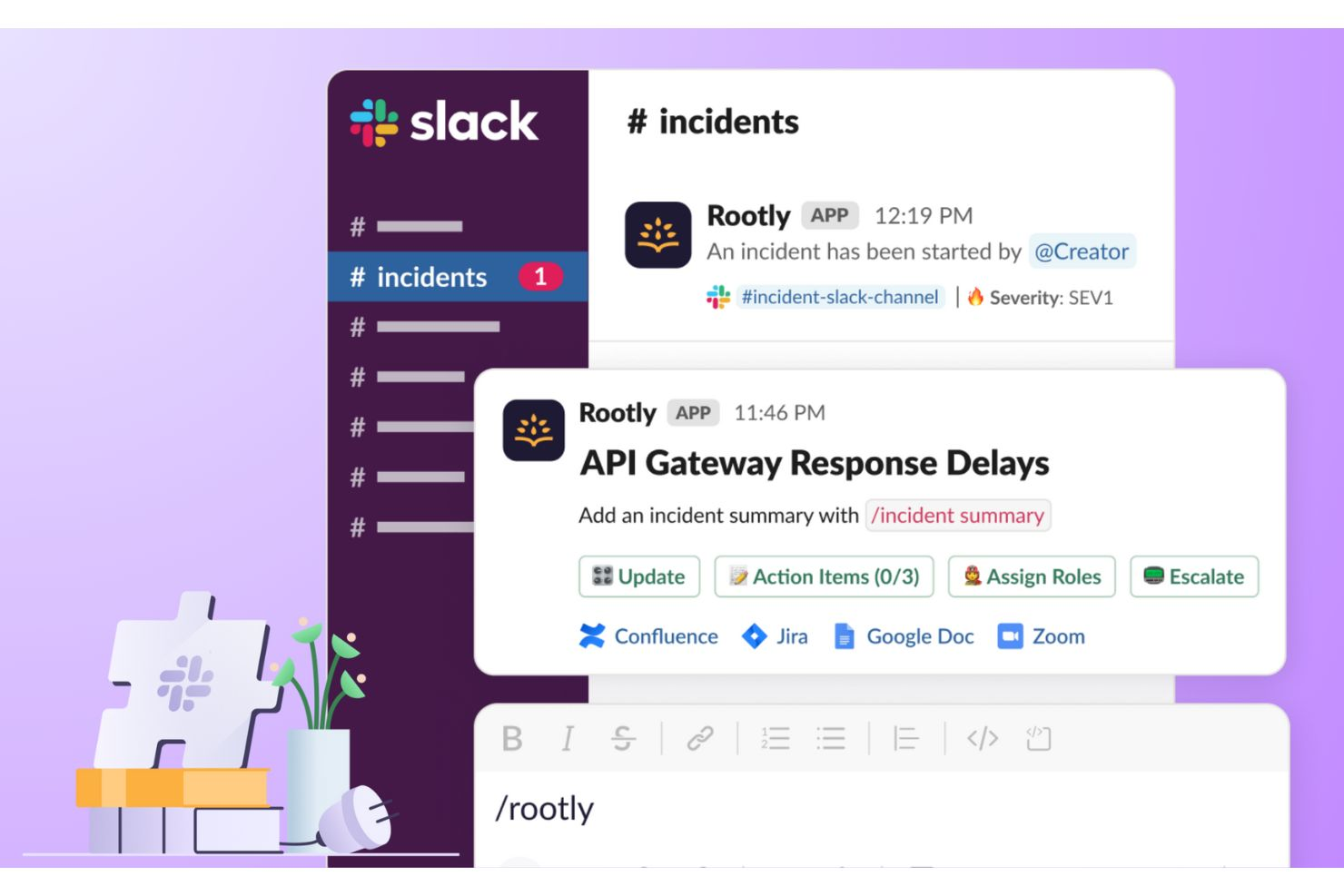
Rootly ist eine KI-gestützte Plattform für das Vorfallmanagement, entwickelt für moderne Engineering- und DevOps-Teams. Sie automatisiert Reaktions-Workflows, unterstützt die Einsatzplanung und integriert sich mit wichtigen Kollaborationstools wie Slack und Microsoft Teams. Rootly hilft Ihrem Team, Ausfallzeiten zu minimieren und die operative Zuverlässigkeit zu steigern, indem Automatisierung und Kommunikation an einem Ort zusammengeführt werden.
Warum ich Rootly gewählt habe: Ich habe Rootly ausgewählt, weil es die zeitaufwändigsten Aspekte der Vorfallsreaktion von der Erkennung bis zur Behebung automatisiert. Die KI-gestützte Ursachenanalyse hilft, Probleme schneller zu identifizieren und schlägt sogar Lösungen vor, um Unterbrechungen zu minimieren. Besonders gefällt mir, dass Sie Vorfälle direkt in Slack verwalten können, was die Kommunikation fördert und Kontextwechsel reduziert. Wenn Ihr Team schnelle Reaktion und datenbasierte Erkenntnisse schätzt, ist Rootly eine ausgezeichnete Wahl.
Herausragende Funktionen & Integrationen von Rootly:
Funktionen umfassen automatisierte Workflows zur Optimierung von Erkennung und Reaktion, Tools für das Bereitschaftsmanagement zur Dienstplanerstellung und KI-basierte SRE-Funktionen, die wahrscheinliche Lösungen vorschlagen. Die Plattform automatisiert außerdem Nachbesprechungen nach Vorfällen sowie die Aktualisierung von Statusseiten für Kunden.
Integrationen umfassen Slack, Microsoft Teams, Confluence, Jira, Terraform, Zapier, Salesforce, HubSpot, Notion, WhatsApp, Intercom, Okta und Google Workspace Apps.
Pros and Cons
Pros:
- KI-basierte Automatisierung für Vorfallmanagement
- Integriert mit Slack und Teams
- Automatisierte Nachbesprechungen mit KI-Zusammenfassungen
Cons:
- Unternehmenspreise auf Anfrage
- Öffentlich nur begrenzte Integrationsliste verfügbar

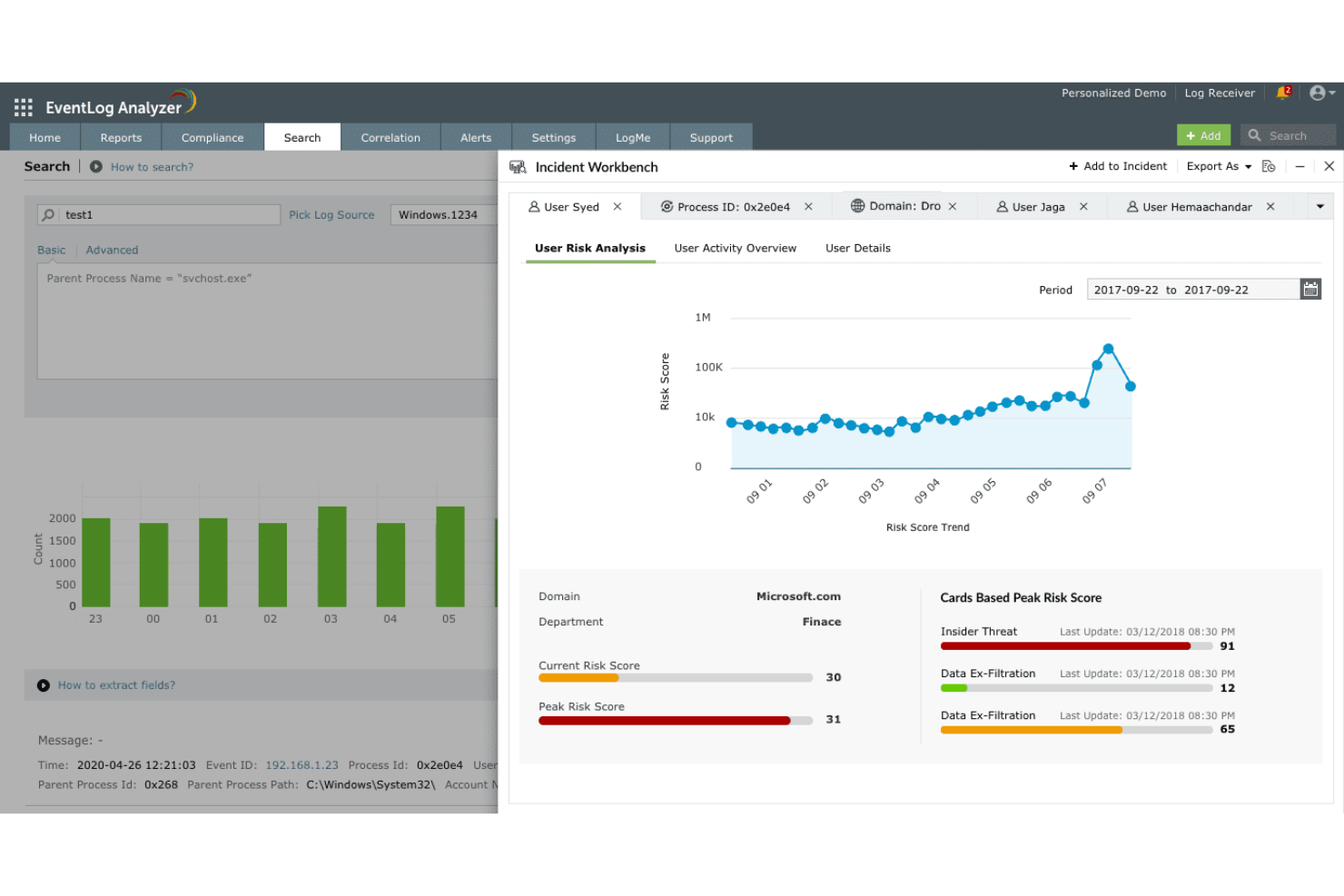
ManageEngine EventLog Analyzer ist ein Protokollverwaltungstool, das für IT-Administratoren und Sicherheitsexperten entwickelt wurde. Es hilft bei der Überwachung, Verwaltung und Prüfung von Netzwerkprotokollen, um die Einhaltung von Vorschriften sicherzustellen und die Sicherheit zu erhöhen.
Warum ich ManageEngine EventLog Analyzer gewählt habe: Es ist speziell auf die Protokollverwaltung zugeschnitten und bietet Echtzeit-Analyse von Protokollen sowie anpassbare Warnmeldungen. Das Tool erstellt detaillierte Berichte, die Sie bei der Erfüllung von Compliance-Vorgaben wie PCI DSS und HIPAA unterstützen. Das intuitive Dashboard ermöglicht eine einfache Navigation und einen schnellen Zugriff auf kritische Daten. Durch die Fähigkeit, Protokolle aus verschiedenen Quellen zu verwalten, ist es ideal für Teams, die eine umfassende Protokollübersicht benötigen.
Herausragende Funktionen & Integrationen:
Funktionen umfassen die Überwachung von Protokollen in Echtzeit, wodurch Ihr Team stets über Netzwerkaktivitäten auf dem Laufenden bleibt. Das anpassbare Warnsystem stellt sicher, dass Sie bei ungewöhnlichen Aktivitäten umgehend benachrichtigt werden. Das Tool bietet zudem umfangreiche Berichtsfunktionen, die die Erfüllung von Compliance-Anforderungen erleichtern.
Integrationen umfassen Microsoft Active Directory, Windows Server, Linux, Oracle, SQL Server, Cisco, Juniper, VMware, Amazon Web Services und Google Cloud Platform.
Pros and Cons
Pros:
- Anpassbares Warnsystem
- Echtzeitprotokollüberwachung
- Umfangreiche Berichtsfunktionen
Cons:
- Ressourcenintensiv in großen Netzwerken
- Gelegentliche Verzögerungen bei der Berichtserstellung


Opsgenie ist ein Incident-Management-Tool, das für IT- und DevOps-Teams entwickelt wurde. Es konzentriert sich auf die Verwaltung von Bereitschaftsdiensten und unterstützt Teams dabei, Vorfälle effizient zu koordinieren, um Systemzuverlässigkeit zu gewährleisten und Ausfallzeiten auf ein Minimum zu reduzieren.
Warum ich Opsgenie gewählt habe: Es glänzt in der Verwaltung von Bereitschaftsdiensten mit Funktionen wie Zeitplandefinitionen über mehrere Zeitzonen hinweg und Eskalationen. Die Plattform ermöglicht es deinem Team, Alarme effektiv zu verwalten und damit die Reaktionszeiten zu verkürzen. Mit anpassbaren Benachrichtigungsregeln wird sichergestellt, dass die richtigen Personen zur richtigen Zeit alarmiert werden. Opsgenie bietet zudem Reporting-Features, die Einblicke in Incident-Trends und die Teamleistung geben.
Hervorstechende Funktionen & Integrationen:
Funktionen umfassen Planungstools, die mehrere Zeitzonen berücksichtigen und globalen Teams die Bereitschaftsplanung erleichtern. Die anpassbaren Benachrichtigungsregeln der Plattform erlauben es dir, Alarme auf deine Anforderungen zuzuschneiden. Die Reporting-Funktionen liefern Einblicke in Vorfälle und helfen dir, die Leistung deines Teams zu verbessern.
Integrationen umfassen Jira, Slack, Microsoft Teams, AWS, Datadog, New Relic, ServiceNow, VictorOps, PagerDuty und Zendesk.
Pros and Cons
Pros:
- Detailliertes Incident-Reporting
- Planung über mehrere Zeitzonen
- Anpassbare Benachrichtigungsregeln
Cons:
- Begrenzte Vorlagen direkt verfügbar
- Benötigt möglicherweise häufige Anpassungen

AlertOps ist eine Plattform für Incident Management und Reaktion, die sich an IT- und DevOps-Teams richtet. Sie ist auf Echtzeit-Benachrichtigungen spezialisiert und hilft Teams, Vorfälle effektiv zu verwalten, um Ausfallzeiten zu minimieren.
Warum ich AlertOps gewählt habe: Es ist für Echtzeit-Benachrichtigungen konzipiert und bietet Benachrichtigungen über mehrere Kanäle sowie anpassbare Workflows. Die Plattform stellt sicher, dass Ihr Team zeitnahe Updates über verschiedene Kommunikationskanäle erhält. Mit Eskalationsrichtlinien können Sie Vorfälle nach Prioritätsstufen verwalten. AlertOps bietet zudem detaillierte Analysen, die Ihnen helfen, Vorfallstrends zu verstehen und Reaktionszeiten zu verbessern.
Herausragende Funktionen & Integrationen:
Funktionen sind unter anderem Benachrichtigungen über mehrere Kanäle, sodass Ihr Team stets informiert bleibt. Mit den anpassbaren Workflows können Sie Prozesse individuell gestalten. Detaillierte Analysen liefern Einblicke in Vorfallstrends und unterstützen datenbasierte Entscheidungen.
Integrationen umfassen Slack, Microsoft Teams, Jira, ServiceNow, AWS, Zendesk, Salesforce, Datadog, Nagios und Opsgenie.
Pros and Cons
Pros:
- Mehrkanal-Benachrichtigungen
- Anpassbare Eskalationsrichtlinien
- Detaillierte Vorfallanalysen
Cons:
- Begrenzte Vorlagen direkt nutzbar
- Mögliche Benachrichtigungsverzögerungen

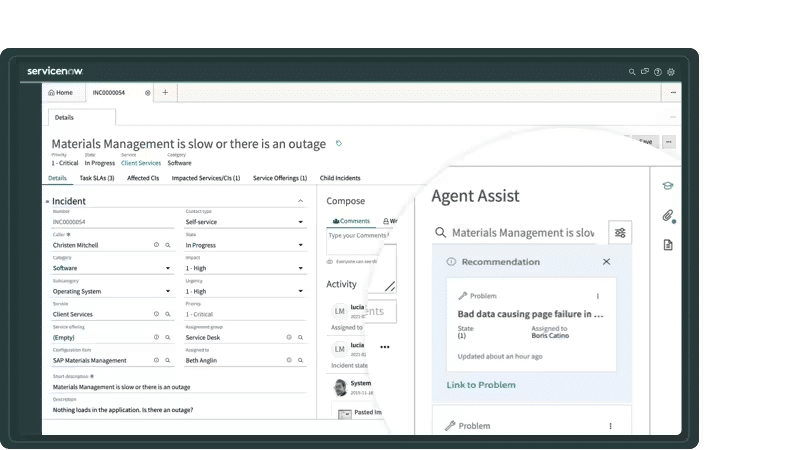
ServiceNow ist eine Incident-Management-Plattform, die für große Unternehmen und IT-Abteilungen entwickelt wurde. Sie unterstützt die Automatisierung von Workflows, das Management von Vorfällen und sorgt für ein effizientes IT-Service-Management.
Warum ich ServiceNow ausgewählt habe: Es ist speziell für Unternehmenslösungen konzipiert und bietet Funktionen wie automatisierte Workflows und Vorfallsverfolgung. Die Plattform stellt ein zentrales System zur Verfügung, um alle IT-bezogenen Incidents zu verwalten, sodass Ihr Team organisiert bleibt. Die anpassbaren Dashboards liefern Einblicke in Ihre Abläufe und erleichtern das Erkennen von Engpässen. Dank der hohen Skalierbarkeit eignet sich ServiceNow für große Organisationen mit komplexen Anforderungen.
Herausragende Funktionen & Integrationen:
Funktionen umfassen automatisierte Workflows, die Ihre Prozesse im Incident-Management optimieren. Das Vorfallsverfolgungssystem der Plattform ermöglicht es Ihnen, alle IT-Probleme effizient im Blick zu behalten. Anpassbare Dashboards bieten Einblicke in Ihre Betriebsabläufe und unterstützen Sie dabei, fundierte Entscheidungen zu treffen.
Integrationen umfassen Microsoft Azure, AWS, Google Cloud Platform, Jira, Slack, Zoom, SAP, Salesforce, Oracle und VMware.
Pros and Cons
Pros:
- Skalierbar für große Unternehmen
- Automatisierte Workflow-Funktionen
- Anpassbare Dashboards
Cons:
- Erfordert technisches Fachwissen
- Hohe Implementierungskosten

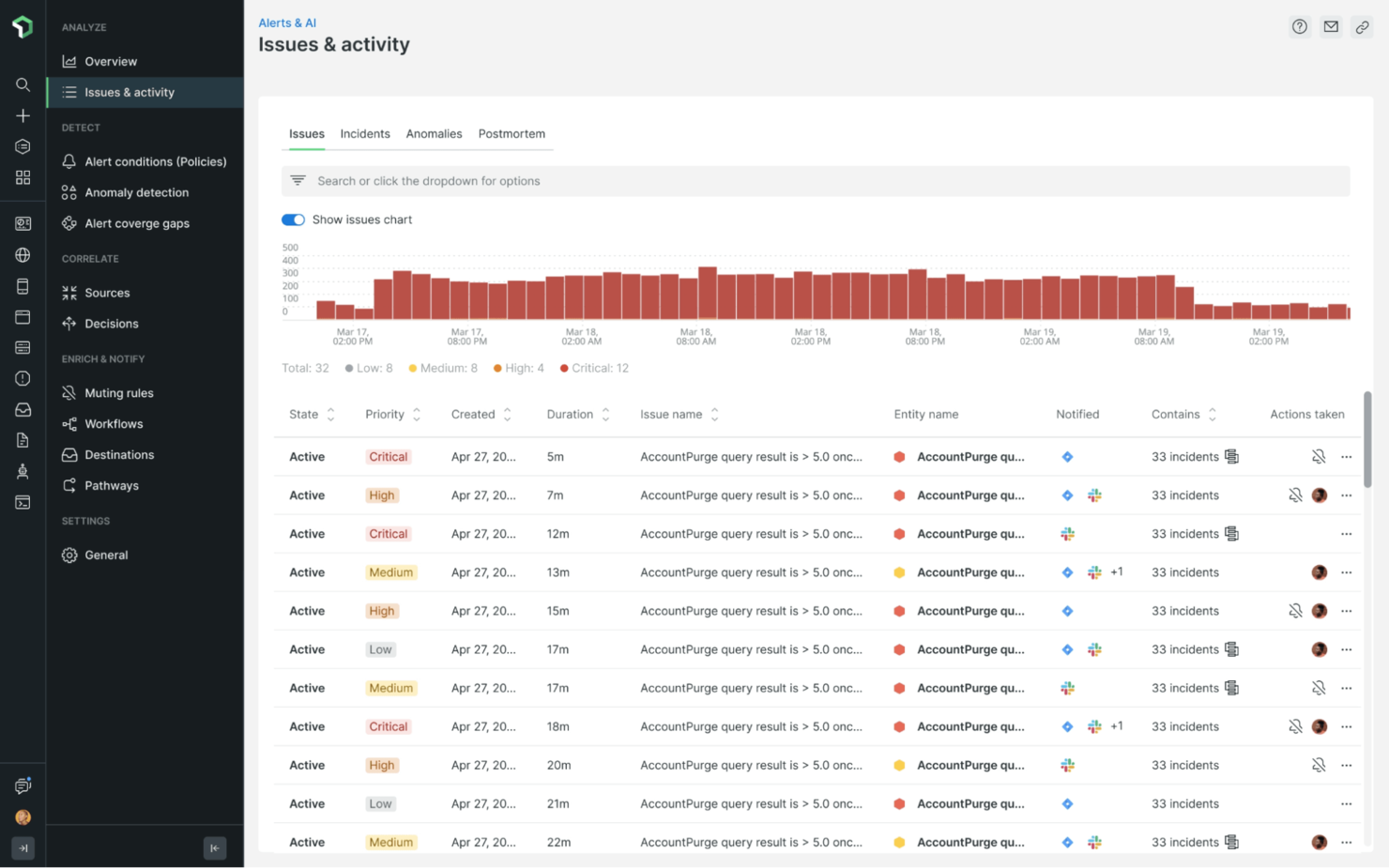
New Relic ist ein Tool zur Anwendungsleistungsüberwachung (APM), das für Entwickler und IT-Betriebsteams entwickelt wurde. Es hilft dabei, die Anwendungsleistung zu verfolgen, Engpässe zu identifizieren und einen reibungslosen Betrieb sicherzustellen.
Warum ich New Relic gewählt habe: Es ist speziell für die Leistungsüberwachung konzipiert und bietet Funktionen wie Echtzeitanalysen und detaillierte Metriken. Die Plattform bietet eine einheitliche Ansicht Ihres gesamten Stacks, sodass Probleme leicht erkannt werden können. Das Benachrichtigungssystem stellt sicher, dass Ihr Team bei Anomalien sofort informiert wird. Die Fähigkeit von New Relic, sowohl Infrastruktur als auch Anwendungen zu überwachen, macht es vielseitig für verschiedene IT-Umgebungen.
Herausragende Funktionen & Integrationen:
Funktionen sind unter anderem Echtzeitanalysen, die sofortige Einblicke in Ihre Anwendungen ermöglichen. Das Tool bietet detaillierte Metriken, mit deren Hilfe Sie Leistungstrends im Zeitverlauf nachvollziehen können. Die Funktion der einheitlichen Ansicht erlaubt es, alles auf einem Dashboard zu sehen und vereinfacht so die Problemfindung.
Integrationen umfassen AWS, Microsoft Azure, Google Cloud Platform, Kubernetes, Docker, Slack, Jira, PagerDuty, ServiceNow und GitHub.
Pros and Cons
Pros:
- Detaillierte Leistungsmetriken
- Echtzeitanalysen
- Einheitliche Stack-Ansicht
Cons:
- Ressourcenintensiv in großen Umgebungen
- Gelegentliche Probleme beim Datenabgleich

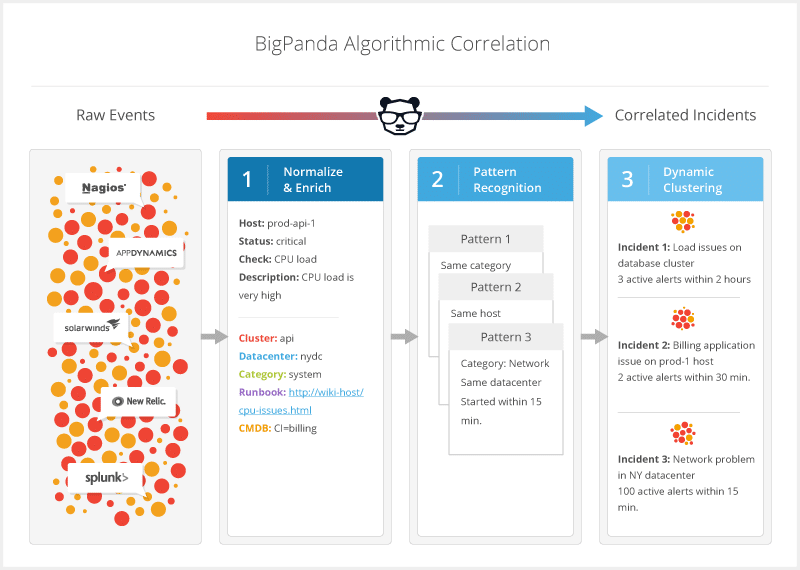
BigPanda ist eine Incident-Management-Plattform, die für IT-Operations- und DevOps-Teams entwickelt wurde. Sie konzentriert sich auf Incident Intelligence und Automatisierung und unterstützt Teams bei der Verwaltung von Warnmeldungen sowie der Reduzierung von Störgeräuschen, um die Systemzuverlässigkeit sicherzustellen.
Warum ich BigPanda gewählt habe: Die Plattform überzeugt durch ihre AIOps-Fähigkeiten und bietet Ereigniskorrelation sowie Funktionen zur Geräuschreduzierung. Dadurch kann sich Ihr Team auf kritische Vorfälle konzentrieren, indem überflüssige Warnungen herausgefiltert werden. Die Automatisierungsfunktionen optimieren den Incident-Response-Prozess. Mit den erweiterten Analysen von BigPanda erhalten Sie Einblicke in Vorfallmuster, was die proaktive Problemlösung unterstützt.
Herausragende Funktionen & Integrationen:
Funktionen beinhalten Ereigniskorrelation, die Ihrem Team hilft, zusammenhängende Warnungen zu identifizieren. Funktionen zur Geräuschreduzierung filtern irrelevante Warnmeldungen heraus, sodass Sie den Fokus auf kritische Probleme legen können. Erweiterte Analysen bieten Einblicke in Vorfallmuster und unterstützen Ihr Team bei der proaktiven Behandlung potenzieller Probleme.
Integrationen umfassen ServiceNow, Splunk, Nagios, New Relic, Amazon Web Services, Microsoft Azure, Google Cloud Platform, Slack, PagerDuty und Datadog.
Pros and Cons
Pros:
- Effektive Geräuschreduzierung
- Fähigkeit zur Ereigniskorrelation
- Proaktive Einblicke zur Problemlösung
Cons:
- Hohe Lernkurve
- Ressourcenintensiv in großen Umgebungen
Am besten für teamübergreifende Vorfallbearbeitung geeignet
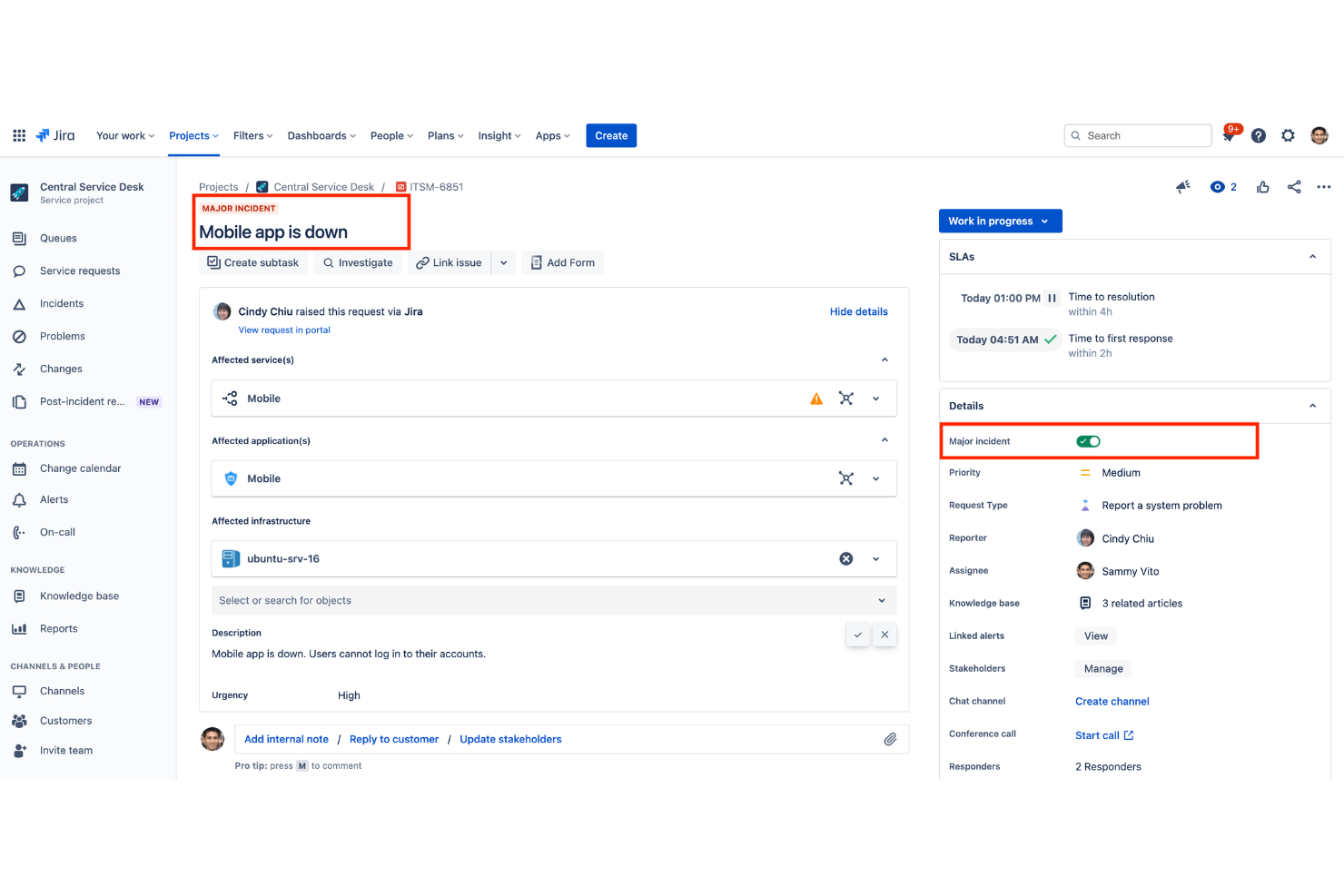
Jira Service Management ist eine IT-Service-Desk-Plattform von Atlassian, die Ihnen hilft, Vorfälle, Serviceanfragen und den IT-Betrieb zu verwalten. Sie bietet Mitarbeitenden und Kunden eine Self-Service-Option und stellt IT-Teams Werkzeuge zur Verfügung, um Vorfälle effizient zu protokollieren, zu priorisieren und zu lösen.
Warum ich Jira Service Management ausgewählt habe: Ich habe Jira Service Management ausgewählt, weil es IT-Support- und Entwicklungsteams auf einer Plattform zusammenführt. Dadurch lassen sich Vorfälle schneller lösen, da alle dieselbe Arbeitsansicht und denselben Kontext teilen. Besonders gut gefällt mir die Anpassbarkeit der Service Level Agreements (SLAs), mit denen sichergestellt wird, dass die Teams Antwortfristen einhalten und die Vorfallbearbeitung im Zeitplan bleibt.
Herausragende Funktionen und Integrationen von Jira Service Management
Besonders nützliche Funktionen sind für mich das Self-Service-Portal, das es Nutzern ermöglicht, Probleme zu melden und nachzuverfolgen, ohne die IT zusätzlich zu belasten, sowie die Anfrageschlangen, mit denen Teams Vorfälle nach Dringlichkeit priorisieren können. Die Plattform beinhaltet zudem Berichts- und Trendanalysetools, die Führungskräften Einblicke in die Performance und wiederkehrende Probleme geben.
Integrationen umfassen GitHub, Microsoft Azure, Zendesk, Opsgenie, Jenkins, Dynatrace, Slack, ServiceNow, Confluence, Google Workspace Admin, Salesforce und Google Sheets.
Pros and Cons
Pros:
- Werkzeuge für teamübergreifende Zusammenarbeit
- Anpassbare SLAs für Fristen
- Detaillierte Reporting-Dashboards
Cons:
- Komplexer Einrichtungsprozess
- Begrenzte Nicht-Atlassian-Integrationen

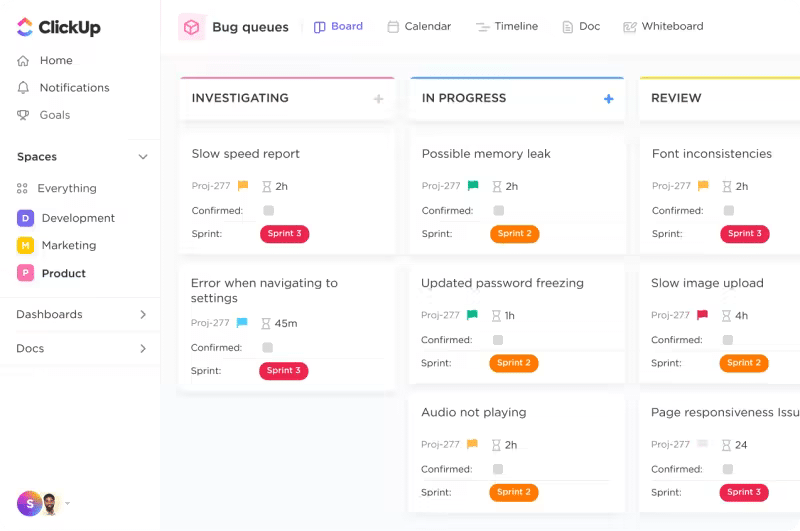
ClickUp ist ein Projektmanagement-Tool, aber Teams können es auch nutzen, um Vorfälle zu verwalten und darauf zu reagieren. Seine flexiblen Funktionen für das Vorfallmanagement ermöglichen es, für jeden Schritt des Incident-Response-Prozesses Aufgaben zu erstellen sowie Prioritäten und Fälligkeitstermine festzulegen.
Warum ich ClickUp ausgewählt habe: Ich habe ClickUp in diese Liste aufgenommen, weil es einen Überblick auf hoher Ebene über alle Vorfälle und deren Fortschritt bietet. Sie können eigene Dashboards mit verschiedenen Ansichten wie z. B. einer Board-Ansicht erstellen, in der Sie Vorfälle nach Status, Zuständigkeit und anderen Eigenschaften gruppieren können. Es gibt außerdem Roadmaps, die Ihnen helfen, Probleme zu priorisieren und Abhängigkeiten für deren Lösung zu definieren.
Hervorstechende Funktionen und Integrationen von ClickUp:
Funktionen umfassen Gantt-Diagramme, mit denen Sie den Ticketstatus und die zeitliche Entwicklung der Bearbeitung nachverfolgen können. Gut gefällt mir auch, dass Sie in ClickUp einfache Status wie „In Bearbeitung“ oder „In einer Besprechung“ für sich selbst anlegen können, um besser mit dem Team zu kollaborieren. Mit Email ClickApp können Sie E-Mails direkt in ClickUp empfangen, sodass Sie nicht ständig zwischen verschiedenen Plattformen wechseln müssen.
Integrationen sind nativ eingebunden. Sie können mehr als 1.000 Tools wie Slack, GitHub, WebHooks, Harvest, Google Drive, Outlook, Google Kalender und Figma anbinden. Zudem sind eigene Integrationen über eine öffentliche API möglich.
Pros and Cons
Pros:
- Vorlagen für Vorfallberichte
- Checklisten, damit keine Aufgaben vergessen werden
- Dokumentationsfunktion für die Erfassung von Fehlern und deren Lösungsplanung
Cons:
- Wirkt auf den ersten Blick aufgrund der Vielzahl an Funktionen kompliziert
- Manchmal fehleranfällig
Weitere Optionen für Incident Management Software
Hier sind einige weitere Incident Management Software-Lösungen, die es nicht in meine Shortlist geschafft haben, aber dennoch einen Blick wert sind:
- incident.io
Am besten für schnelle Reaktionen auf Vorfälle
- Mantis Bug Tracker
Am besten für Bugtracking
- xMatters
Am besten für automatisierte Incident Response
- FireHydrant
Am besten geeignet für Post-Incident-Reviews
- Rippling IT
Am besten für die Integration ins Gerätemanagement
- ManageEngine ServiceDesk Plus
Am besten geeignet für ITIL-konforme Prozesse
- Mitratech Alyne
Am besten für compliance-orientierte Teams geeignet


Auswahlkriterien für Incident Management Software
Bei der Auswahl der besten Incident Management Lösungen für diese Liste habe ich typische Anforderungen und Schmerzpunkte von Käufern wie etwa die Verkürzung von Reaktionszeiten und die Optimierung der Kommunikation während Incidents berücksichtigt. Zudem kam folgendes Bewertungsraster zum Einsatz, damit meine Einschätzung strukturiert und fair bleibt:
Kernfunktionen (25 % der Gesamtbewertung)
Um in diese Liste aufgenommen zu werden, musste jede Lösung diese Anwendungsfälle abdecken:
- Vorfallverfolgung und -lösung
- Echtzeit-Benachrichtigung
- Kommunikations- und Kollaborationstools
- Berichtswesen und Analysen
- Integration mit bestehenden Systemen
Zusätzliche besondere Funktionen (25 % der Gesamtbewertung)
Zur weiteren Eingrenzung der Auswahl habe ich zusätzlich nach einzigartigen Eigenschaften gesucht, etwa:
- KI-basierte Erkenntnisse
- Individuell anpassbare Workflows
- Multi-Channel-Benachrichtigung
- Tools zur Nachbearbeitung von Incidents
- Compliance-Management
Benutzerfreundlichkeit (10 % der Gesamtbewertung)
Um die Anwenderfreundlichkeit jeder Lösung einzuschätzen, habe ich Folgendes berücksichtigt:
- Intuitives Benutzerinterface
- Personalisierungsmöglichkeiten
- Navigationstempo
- Einarbeitungsaufwand
- Mobile Verfügbarkeit
Onboarding (10 % der Gesamtbewertung)
Zur Bewertung des Onboarding-Erlebnisses jeder Plattform habe ich Folgendes berücksichtigt:
- Verfügbarkeit von Schulungsvideos
- Interaktive Produkttouren
- Zugriff auf Vorlagen
- Vorhandensein von Chatbots
- Webinare und Workshops
Kundensupport (10 % der Gesamtbewertung)
Um die Kundensupport-Angebote der einzelnen Softwareanbieter zu bewerten, habe ich Folgendes berücksichtigt:
- 24/7-Erreichbarkeit
- Reaktionszeit
- Angebotene Supportkanäle
- Zugriff auf Wissensdatenbank
- Qualität des Kundenservices
Preis-Leistungs-Verhältnis (10 % der Gesamtbewertung)
Um das Preis-Leistungs-Verhältnis jeder Plattform zu bewerten, habe ich Folgendes einbezogen:
- Preistransparenz
- Im Basistarif enthaltene Funktionen
- Kosten im Vergleich zu Wettbewerbern
- Rabatte bei jährlicher Abrechnung
- Potenzial für Return on Investment (ROI)
Kundenbewertungen (10 % der Gesamtbewertung)
Um ein Gefühl für die allgemeine Kundenzufriedenheit zu bekommen, habe ich beim Lesen von Kundenbewertungen Folgendes berücksichtigt:
- Gesamtzufriedenheitsbewertung
- Anmerkungen zur Zuverlässigkeit
- Rückmeldungen zum Kundenservice
- Erwähnungen zur Benutzerfreundlichkeit
- Erfahrungen mit Integrationen
Wie Sie die richtige Incident-Management-Software wählen
Es ist leicht, sich in langen Funktionslisten und komplexen Preisstrukturen zu verlieren. Damit Sie während Ihres individuellen Software-Auswahlprozesses den Überblick behalten, hier eine Checkliste wichtiger Faktoren:
| Faktor | Worauf ist zu achten |
| Skalierbarkeit | Stellen Sie sicher, dass die Software mit Ihrem Team wachsen kann. Suchen Sie nach Lösungen, die mehr Benutzer und Vorfälle aufnehmen, ohne die Leistung zu beeinträchtigen. |
| Integrationen | Prüfen Sie, ob sich die Software mit Ihren bestehenden Tools wie Slack, Jira oder AWS integrieren lässt. Nahtlose Integration spart Zeit und reduziert manuelle Arbeit im Team. |
| Anpassbarkeit | Berücksichtigen Sie, ob das Tool individuelle Workflows und Benachrichtigungen für Ihre Anforderungen ermöglicht. Diese Flexibilität steigert Effizienz und Nutzerzufriedenheit. |
| Benutzerfreundlichkeit | Bewerten Sie die Benutzeroberfläche und Navigation. Ein leicht zu bedienendes Tool verkürzt die Einarbeitungszeit und beschleunigt die Reaktion Ihres Teams bei Vorfällen. |
| Budget | Vergleichen Sie die Kosten mit Ihrem Budget. Achten Sie auf das Preis-Leistungs-Verhältnis der verschiedenen Tarifstufen und auf versteckte Gebühren, die Ihre Finanzen beeinflussen könnten. |
| Sicherheitsmaßnahmen | Suchen Sie nach Funktionen wie Datenverschlüsselung und Zugriffskontrollen. Diese Maßnahmen sind entscheidend für den Schutz sensibler Daten während des Incident-Managements. |
| Support | Bewerten Sie Verfügbarkeit und Qualität des Kundensupports. Zuverlässiger Support ist im Ernstfall wichtig, wenn schnelle Hilfe benötigt wird. |
| Berichtswesen | Achten Sie auf umfassende Reporting-Tools, die Einblicke in Vorfalltrends und Teamleistung bieten. Diese Einblicke können gezielte Verbesserungen anstoßen. |
Trends im Bereich Incident-Management-Software
Für meine Recherche habe ich zahlreiche Produktneuheiten, Pressemitteilungen und Veröffentlichungsprotokolle verschiedener Anbieter von Incident-Management-Software ausgewertet. Hier sind einige der neuesten Trends, die ich beobachte:
- KI-gesteuerte Einblicke: Viele Tools nutzen mittlerweile Künstliche Intelligenz (KI), um Incident-Daten zu analysieren und zukünftige Probleme vorherzusagen. Das hilft Teams, sich besser vorzubereiten und schneller zu reagieren. Anbieter wie Moogsoft integrieren KI, um prädiktive Analysen und intelligentere Alarmsysteme bereitzustellen.
- Echtzeit-Zusammenarbeit: Es gibt einen Trend, Kommunikationswerkzeuge in Echtzeit direkt in Incident-Management-Plattformen zu integrieren. Dies fördert die Koordination im Team während Vorfällen und ermöglicht schnellere Lösungen. Tools wie incident.io integrieren Chatfunktionen direkt in ihre Plattformen.
- Kontextbezogene Alarmierungen: Anstatt Teams mit Alarmen zu überfluten, bieten neue IT-Alarmierungssoftwares kontextreiche Benachrichtigungen. So können Teams priorisieren und sich zuerst den kritischsten Problemen widmen. Opsgenie bietet zum Beispiel Alarme an, die relevante Incident-Details für schnelleres Handeln enthalten.
- Analyse nach dem Vorfall: Immer mehr Tools konzentrieren sich auf umfassende Möglichkeiten zur Nachbereitung von Vorfällen. Diese Funktionen helfen Teams, aus vergangenen Vorfällen zu lernen und ihre Reaktionen künftig zu verbessern. FireHydrant bietet detaillierte Nachberichtsanalysen zur Förderung kontinuierlicher Verbesserung.
- Nutzerzentrierte Dashboards: Es wird zunehmend Wert auf anpassbare Dashboards gelegt, die auf einzelne Nutzerrollen zugeschnitten sind. Das ermöglicht Nutzern, relevante Daten schnell abzurufen. Anbieter wie ServiceNow bieten Dashboards, die auf die individuellen Bedürfnisse zugeschnitten werden können.
Was ist Incident-Management-Software?
Incident-Management-Software ist ein Werkzeug, das Unternehmen dabei unterstützt, Vorfälle effizient zu erfassen, zu verwalten und zu beheben. IT-Fachkräfte, DevOps-Teams und Mitarbeitende im Kundensupport nutzen diese Tools, um Ausfallzeiten zu minimieren und die Servicezuverlässigkeit zu erhöhen.
Automatisierte Workflows, Zusammenarbeit in Echtzeit und kontextbezogene Benachrichtigungen ermöglichen schnelle Reaktionen und effektive Kommunikation während Vorfällen. Insgesamt steigern diese Cyber-Incident-Response-Services die betriebliche Effizienz und sorgen für eine schnellere Wiederherstellung nach Störungen.
Funktionen von Incident-Management-Software
Achten Sie bei der Auswahl einer Incident-Management-Software auf folgende zentrale Funktionen:
- Automatisierte Workflows: Vereinfachen Sie Incident-Reaktionen, indem Sie Routineaufgaben automatisieren, sodass Ihr Team sich auf komplexere Probleme konzentrieren kann.
- Echtzeit-Zusammenarbeit: Verbessern Sie die Teamkommunikation während Vorfällen, damit alle auf dem gleichen Stand sind und die Lösungszeiten sinken.
- Kontextbezogene Alarmierungen: Versenden Sie Alarme mit relevanten Informationen, um eine Priorisierung zu ermöglichen und kritischere Vorfälle zuerst zu adressieren.
- Nach-Vorfall-Analyse: Ermöglichen Sie Einblicke in vergangene Vorfälle, um kontinuierliche Verbesserungen und bessere künftige Reaktionen zu unterstützen.
- Anpassbare Dashboards: Nutzer können ihre Sicht individuell gestalten und so schneller auf relevante Daten zugreifen.
- KI-gesteuerte Einblicke: Nutzen Sie Künstliche Intelligenz, um Daten zu analysieren und potenzielle künftige Vorfälle vorherzusagen, so dass Sie besser vorbereitet sind.
- Multikanal-Benachrichtigungen: Stellen Sie sicher, dass Ihr Team Alarme über verschiedene Kommunikationskanäle erhält, damit alle informiert bleiben.
- Skalierbarkeit: Unterstützen Sie wachsende Teams und eine steigende Anzahl von Vorfällen, ohne Leistung oder Effizienz einzubüßen.
- Integrationsmöglichkeiten: Binden Sie bestehende Tools wie Slack, Jira und AWS ein, um in Ihrem Unternehmen einen durchgängigen Workflow zu schaffen.
- Benutzerfreundliche Oberfläche: Ermöglichen Sie eine intuitive Navigation und senken Sie die Lernkurve, damit sich Teams schnell an die Software gewöhnen.
Vorteile von Incident-Management-Software
Die Einführung einer Incident-Management-Software bietet zahlreiche Vorteile für Ihr Team und Ihr Unternehmen. Auf diese können Sie sich freuen:
- Schnellere Reaktionszeiten: Automatisierte Workflows und Echtzeit-Alarme helfen Ihrem Team, Vorfälle zügig zu bearbeiten und Ausfallzeiten gering zu halten.
- Verbesserte Kommunikation: Werkzeuge zur Zusammenarbeit in Echtzeit stellen sicher, dass alle im Team während Vorfällen informiert und koordiniert bleiben.
- Bessere Priorisierung: Kontextbezogene Benachrichtigungen helfen Ihrem Team, sich zuerst auf die kritischsten Probleme zu konzentrieren und die Effizienz zu steigern.
- Aussagekräftige Analysen: Nachbereitungen liefern wertvolle Erkenntnisse über Incident-Trends und unterstützen kontinuierliche Verbesserungsprozesse.
- Höhere Bereitschaft: KI-gesteuerte Einblicke und prädiktive Analysen helfen Ihrem Team, Probleme früh zu erkennen, bevor sie auftreten.
- Individuelles Nutzererlebnis: Anpassbare Dashboards und benutzerfreundliche Oberflächen erleichtern Ihrem Team die Navigation und die effektive Nutzung der Software.
Kosten und Preisgestaltung von Incident-Management-Software
Die Auswahl von Incident-Management-Software erfordert ein Verständnis der verschiedenen verfügbaren Preismodelle und -pläne. Neben namhaften Anbietern wie Jira sollten Sie auch Jira Service Management Alternativen prüfen, um die beste Lösung für Ihr Budget zu finden. Die Kosten variieren je nach Funktionsumfang, Teamgröße, Add-ons und weiteren Faktoren. Die folgende Tabelle fasst gängige Pläne, deren Durchschnittspreise sowie die typischen Funktionen zusammen, die in Incident-Management-Softwarelösungen enthalten sind:
Vergleichstabelle der Tarife für Incident-Management-Software
| Tariftyp | Durchschnittlicher Preis | Häufige Funktionen |
| Kostenloser Tarif | $0 | Grundlegende Vorfallnachverfolgung, begrenzte Benachrichtigungen und essenzielle Berichte. |
| Persönlicher Tarif | $5-$25/Benutzer/Monat | Erweiterte Benachrichtigungen, anpassbare Dashboards und Integration mit ausgewählten Tools. |
| Business-Tarif | $30-$60/Benutzer/Monat | Echtzeit-Zusammenarbeit, detaillierte Analysen und Benachrichtigungen über mehrere Kanäle. |
| Enterprise-Tarif | $70-$100/Benutzer/Monat | Vollständige Anpassbarkeit, KI-gestützte Einblicke, Nachanalyse von Vorfällen und priorisierter Kundensupport. |
FAQs zu Incident-Management-Software
Hier sind einige Antworten auf häufig gestellte Fragen zur Incident-Management-Software:
Wie kann Incident-Management-Software Risiken am Arbeitsplatz reduzieren?
Incident-Management-Software hilft Ihrem Team, potenzielle Risiken frühzeitig zu erkennen und zu beheben, bevor sie eskalieren. Durch Echtzeit-Warnmeldungen und detaillierte Berichte stellt die Software sicher, dass Ihr Team über auftretende Probleme sofort informiert wird. Dieser proaktive Ansatz sorgt für eine sicherere Arbeitsumgebung und minimiert Unterbrechungen.
Wie stellt Incident-Management-Software die Einhaltung von Vorschriften sicher?
Diese Tools überwachen Fristen und Anforderungen zur Einhaltung von Compliance-Richtlinien und helfen Ihrem Team, branchenspezifische Standards einzuhalten. Häufig sind Vorlagen und Checklisten für Vorschriften wie OSHA integriert, wodurch Ihr Team die Einhaltung einfacher gewährleisten kann. Dadurch verringert sich das Risiko von Strafen und Ihr Betrieb läuft reibungslos.
Welche Tools eignen sich am besten zur Automatisierung der Vorfallbehebung?
Die Automatisierung der Vorfallbehebung spart Ihrem Team Zeit und verringert menschliche Fehler. Tools wie SIEM-Systeme und SOAR-Plattformen werden dafür häufig eingesetzt. Sie helfen, Vorfälle automatisch zu priorisieren und zu beheben, sodass sich Ihr Team auf komplexere Aufgaben konzentrieren kann, die menschliches Eingreifen erfordern.
Wie integriert sich Incident-Management-Software mit anderen Tools?
Die meisten Incident-Management-Lösungen bieten Integrationen mit beliebten Tools wie Slack, Jira und AWS. Diese Integrationen ermöglichen Ihrem Team schlanke Workflows und gewährleisten, dass Informationen plattformübergreifend geteilt werden. Diese Konnektivität steigert die Effizienz und sorgt dafür, dass alle Teammitglieder auf demselben Stand sind.
Was ist der Unterschied zwischen Problem-Management und Incident-Management?
Im Incident-Management geht es darum, akute Probleme schnell zu beheben und den Service rasch wiederherzustellen. Das Problem-Management hingegen zielt darauf ab, die Ursachen wiederkehrender Probleme zu erkennen und dauerhaft zu beheben. Incident-Management ist reaktiv und kümmert sich um Vorfälle, wenn sie auftreten, während Problem-Management proaktiv zukünftige Vorfälle verhindert.
Wie priorisiert man mehrere gleichzeitig auftretende Vorfälle?
Die Priorisierung erfolgt anhand von Auswirkungen und Dringlichkeit. Incident-Management-Software bietet Werkzeuge zur Kategorisierung und Priorisierung von Vorfällen anhand vordefinierter Kriterien. So kann Ihr Team die wichtigsten Störungen zuerst beheben und sicherstellen, dass die gravierendsten Vorfälle schnell gelöst werden.
Wie geht es weiter?
Wenn Sie sich gerade mit der Recherche zu Incident-Management-Software befassen, verbinden Sie sich kostenlos mit einem SoftwareSelect-Berater für Empfehlungen.
Sie füllen ein Formular aus und führen ein kurzes Gespräch, in dem Ihre spezifischen Anforderungen besprochen werden. Anschließend erhalten Sie eine Auswahlliste an Software, die Sie überprüfen können. Die Berater begleiten Sie sogar durch den gesamten Kaufprozess, einschließlich Preisverhandlungen.