

The best Jira Service Management alternatives help IT teams deliver faster support, align with ITIL processes, and manage service requests without running into the platform’s customization and integration limits. These tools give organizations more flexibility in workflows, better automation options, and stronger reporting capabilities to meet the needs of both technical and non-technical teams.
Many organizations start searching for Jira Service Management alternatives after struggling with challenges like rigid configurations that slow down process changes, juggling integrations that don’t connect cleanly, or spending too much time maintaining complex setups instead of focusing on resolving tickets. These pain points often lead to delays, frustrated users, and higher support costs.
I’ve tested IT service management tools in live production environments, worked with teams migrating from legacy systems, and evaluated how platforms perform across SaaS and enterprise stacks. Those experiences showed me which solutions actually improve service delivery and which introduce new inefficiencies.
In this guide, you’ll see which Jira Service Management alternatives provide the cleanest setups, stronger ITIL alignment, and the most useful automation features to help your team resolve requests faster and with less effort.
What is Jira Service Management?
Jira Service Management is a service management software designed to help teams manage and deliver great service experiences. It's commonly used by IT professionals, customer support teams, and project managers who need efficient tools for handling service requests and incident management.
Ticketing, workflow automation, and reporting features help with organizing tasks, prioritizing requests, and gaining insights into service performance. Overall, Jira Service Management provides a structured approach to managing service operations, helping your team deliver quality service efficiently.
Why Trust Our Software Recommendations
6,700+
Reviews
20
Industry experts
16+
Evaluation factors
14
Years
Our team has been testing and reviewing software since 2012. As tech leaders ourselves, we know how difficult—and important—it is to choose the right software.
For this guide, we evaluated tools using hands-on testing and independent research, scoring tools using our selection criteria.
Our reviews reflect our human editorial judgment, not a sales pitch.
Expert reviewers:
- Paulo Gardini MiguelTech Director
 Tim FisherVP of AI
 Gabriel RosasTech Lead & Software Architect
 Christhian GruhnTech Lead & Platform Architect

Jira Service Management Alternatives Comparison Table
This comparison table summarizes pricing details for my top Jira Service Management alternative selections:
| Tool | Best For | Trial Info | Price | ||
|---|---|---|---|---|---|
| 1 | Best for quick ITSM adoption | 14-day free trial | From $19/user/month (billed annually) | Website | |
| 2 | Best for ITIL-aligned service operations | Free trial available | From $89/agent/month | Website | |
| 3 | Best for native AI-powered ticket handling | Free demo available | Pricing upon request | Website | |
| 4 | Best for user-friendly customization | Free demo + 30-day free trial available | From $99/agent/month (billed annually) | Website | |
| 5 | Best for customizable service portals | Free demo available | Pricing upon request | Website | |
| 6 | Best for self-service capabilities | Free demo available | From $76/agent/month | Website | |
| 7 | Best for endpoint automation | Free demo available | Pricing upon request | Website | |
| 8 | Best for customizable service portals | 14-day free trial + free demo available | Pricing upon request | Website | |
| 9 | Best for self-service capabilities | Free demo available | Pricing upon request | Website | |
| 10 | Best for seamless system integration | Free demo available | Pricing upon request | Website |


Why Trust Our Software Recommendations
6,700+
Reviews
20
Industry experts
16+
Evaluation factors
14
Years
Our team has been testing and reviewing software since 2012. As tech leaders ourselves, we know how difficult—and important—it is to choose the right software.
For this guide, we evaluated tools using hands-on testing and independent research, scoring tools using our selection criteria.
Our reviews reflect our human editorial judgment, not a sales pitch.
Expert reviewers:
- Paulo Gardini MiguelTech Director
- Tim FisherVP of AI
- Gabriel RosasTech Lead & Software Architect
- Christhian GruhnTech Lead & Platform Architect
Best Jira Service Management Alternatives Reviews
Below are my detailed summaries of the best Jira Service Management alternatives that made it onto my shortlist. My reviews offer a detailed look at the key features, pros & cons, integrations, and ideal use cases of each tool to help you find the best one for you.
 Best for quick ITSM adoption
- 14-day free trial
- From $19/user/month (billed annually)
Visit WebsiteCustomer Rating:4.6/5
Freshservice provides a centralized view of agent availability and tickets. Freshservice gives you an IT service management platform that feels more approachable and structured than Jira Service Management when your team isn’t already tied into the Atlassian ecosystem or doesn’t need deep developer workflow alignment. It’s built around standardized ITIL practices—handling incidents, problems, changes, and assets from a single interface with automation and self-service portals that help reduce manual coordination.
Why I Picked Freshservice
I picked Freshservice as an alternative to Jira Service Management because it lets your IT and support teams adopt a solid ITSM framework quickly while avoiding the steeper learning curve and setup overhead that often comes with Atlassian’s tools. You’ll find structured incident, problem, and change management workflows that guide your processes in line with widely accepted service standards.
Built-in automation lets you route tickets, manage SLAs, and keep work moving without hand-built configurations. For organizations that prioritize clarity and ease of adoption over deep developer-centric integrations, Freshservice feels like a practical alternative.
Freshservice Key Features
Aside from the ticketing and ITIL workflows noted above, there are several other features that make Freshservice a compelling choice when you’re weighing it against Jira Service Management:
- Asset management: Track hardware, software, and cloud assets in a CMDB that links directly to service tickets so you know what’s affected and why.
- Enterprise Service Management: Extend service management beyond IT to other departments within your organization, such as HR or Facilities.
- Reporting and Analytics: Gain insights into your service desk performance with detailed reports and analytics.
- Change Management: Manage changes in your IT environment with a structured approach to minimize risks and disruptions.
Freshservice Integrations
Integrations include Microsoft Teams, Slack, Jira, SecPod, Azure Active Directory, TeamViewer, DocuSign, GitHub, Google Workspace, and Dropbox.
Pros and Cons
Pros:
- Strong ITIL-aligned workflows for structured service delivery.
- Integrated ticketing and asset management improves context.
- Self-service portal reduces incoming manual requests.
Cons:
- Mobile app has limited functionality for some users.
- Asset management can get expensive as you scale.
Learn more about Freshservice: Best for ITIL-aligned service operations
- Free trial available
- From $89/agent/month
Visit WebsiteCustomer Rating:4.5/5
SysAid ITSM performance dashboard visualizing ticket volumes, SLA indicators, and MTTR trends across support channels. SysAid speaks directly to IT teams and service desks that want a single place to manage tickets, assets, and service requests. It is well-suited for mid-sized to large organizations that feel slowed down by fragmented help desk tools and manual workflows. If your team needs both IT service management capabilities, such as incident, change, and problem handling, alongside asset tracking, SysAid brings these functions together so you do not have to manage separate systems.
Why I Picked SysAid
I picked SysAid because it combines a mature ITSM framework with automation that helps you manage service requests and infrastructure from one platform. It supports core ITIL practices, including incident, change, and configuration management, which adds structure to service delivery. Its built-in automation and AI-driven ticket categorization and routing reduce the workload on your agents, allowing them to focus on higher-priority issues.
SysAid Key Features
Aside from those core capabilities, you get a suite of additional tools that make SysAid more than just a help desk:
- Self-Service Portal: Allows end users to submit tickets, track request status, and access a knowledge base, which can reduce incoming support requests.
- Asset Management and CMDB: Automatically discovers and tracks hardware and software assets, while mapping relationships between assets and services for improved infrastructure visibility.
- Service Level Management: Helps you define, manage, and meet service level agreements (SLAs) to support consistent service delivery.
- Reporting and Analytics: Provides detailed reporting on ticket resolution times, asset lifecycle data, and overall service performance to help guide operational improvements.
SysAid Integrations
Integrations include Jira, Microsoft Teams, Slack, Active Directory, Azure AD, SCCM, VMware, Google Workspace, Okta, and Salesforce.
Pros and Cons
Pros:
- Workflow automation handles repetitive tasks, saving time.
- Self-service options reduce support load on IT staff.
- Strong asset tracking and visibility across hardware/software lifecycles.
Cons:
- When features are not properly configured, automations and SLA workflows can become complex and confusing for agents.
- Mobile app experience lacks full functionality.
 Best for native AI-powered ticket handling
- Free demo available
- Pricing upon request
Visit WebsiteCustomer Rating:4.5/5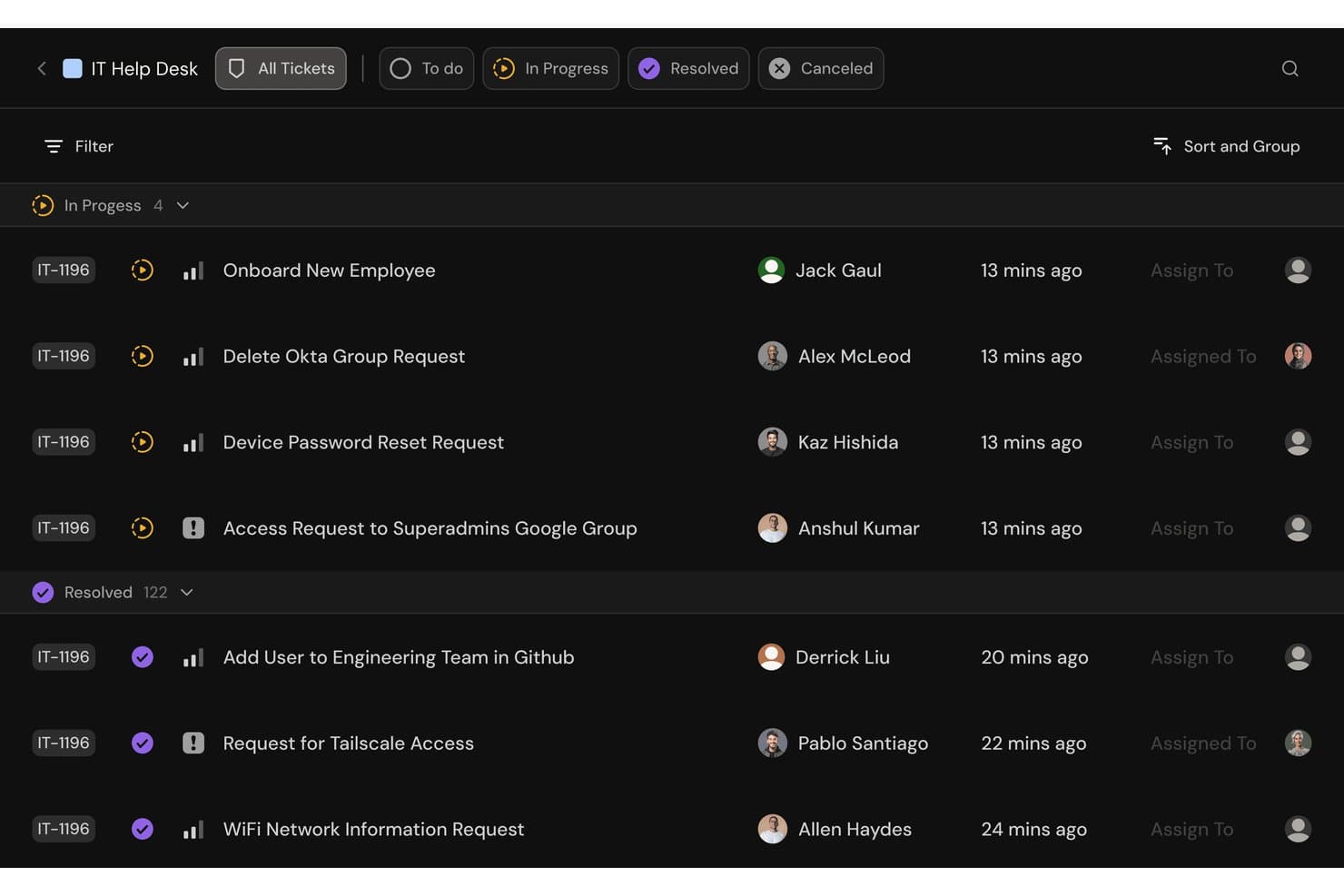
Serval offers an IT Help Desk ticket management interface with grouped ticket statuses, assignee tracking, and priority indicators for managing IT requests. Serval is an AI-native ITSM platform built for IT operations teams that want to automate a large share of routine help desk requests without adding complexity or replacing their existing toolchain.
Who Is Serval Best For?
Serval suits mid-to-large IT teams with enough ticket volume to make AI-driven automation worthwhile, particularly those looking to automate repetitive service requests without requiring coding expertise.
Why Serval Is a Good Best Jira Service Management Alternatives Reviewed
I picked Serval as one of the best because its two-agent architecture automates ticket resolution end-to-end, not just triage. The Help Desk Agent handles incoming requests from Slack, Teams, email, and web portals, while the Automation Agent creates deterministic TypeScript workflows that can be pulled locally through the Serval CLI for Git version control. What I appreciate most is that Serval can coexist with Jira, automating the routine tier while escalating complex tickets back into your existing queue with full context attached.
Serval Key Features
- Team segmentation: Distinct queues, integrations, workflows, and AI models for IT, Security, HR, and more in a single platform.
- Access management: Just-in-time provisioning and approval workflows for access requests.
- AI Suggestions: Surfaces automation opportunities from ticket patterns and recommends new skills, workflows, app connections, and knowledge updates.
- Analytics: Tracks resolution rates, time saved, and SLA performance through built-in dashboards.
Serval Integrations
Serval offers native integrations with Okta, Google Workspace, Microsoft Teams, Slack, Notion, Confluence, Jira, GitHub, ServiceNow, and Salesforce. An API is available for custom integrations.
Pros and Cons
Pros:
- Supports on-premises deployment for compliance requirements
- Deterministic automation reduces inconsistent manual resolutions
- AI handles tickets end-to-end autonomously
Cons:
- Newer platform with a smaller user community
- May be more than smaller IT teams need
Learn more about Serval: 4Best for user-friendly customization
Halo
- Free demo + 30-day free trial available
- From $99/agent/month (billed annually)
Visit WebsiteCustomer Rating:4.7/5
HaloITSM supports IT teams with incident, problem, and change management. HaloITSM is an IT service management software designed for IT teams and service desk professionals. It helps with incident management, problem management, and change management.
Why it's a good Jira Service Management alternative: HaloITSM's user-friendly customization allows your team to tailor workflows to fit specific needs. With drag-and-drop interfaces and customizable dashboards, it simplifies complex processes. The tool also offers intuitive reporting and analytics, making it easy to track performance. Its flexibility in adapting to various business environments sets it apart from Jira Service Management.
Standout Features & Integrations:
Features include asset management for tracking hardware and software, a self-service portal for users to submit and track requests, and automated ticket routing to ensure the right person handles each issue.
Integrations include Microsoft Teams, Azure Active Directory, Microsoft 365, Slack, Okta, Google Workspace, Freshdesk, Jira, and Zapier.
Pros and Cons
Pros:
- Flexible deployment options
- Intuitive reporting tools
- Easy to customize workflows
Cons:
- Requires initial setup time
- Limited mobile app functionality
Learn more about Halo: Best for customizable service portals
- Free demo available
- Pricing upon request
Visit WebsiteCustomer Rating:4.3/5
Vivantio supports enterprises with service delivery, incident resolution, and automation. Vivantio is an IT service management platform designed for enterprises and large teams. It supports service delivery, incident resolution, and workflow automation across departments.
Why Vivantio is a good Jira Service Management alternative: You can build service desks that adapt to enterprise-scale needs with configurable ticketing and role-based access. Features like SLA management let you track and meet service expectations across multiple teams. Its service catalog tools make it easier to manage complex service offerings in one place. Reporting and analytics give your team visibility into performance so you can keep improving.
Standout Features & Integrations:
Features include asset and CMDB management that centralize configuration data, workflow automation that reduces manual steps in daily tasks, and knowledge management that makes resources easier to find and share.
Integrations include Microsoft Teams, Slack, Salesforce, ServiceNow, Zendesk, Freshservice, Jira, Asana, Trello, and Monday.com.
Pros and Cons
Pros:
- Useful service catalog features
- Strong SLA tracking tools
- Scales well for enterprise service desks
Cons:
- Setup may take time
- Pricing not transparent
Learn more about Vivantio: Best for self-service capabilities
- Free demo available
- From $76/agent/month
Visit WebsiteCustomer Rating:4.3/5
TOPdesk supports service desks with incident, asset, and workflow management. TOPdesk is an IT service management software solution aimed at service desk teams across various sectors. It helps manage incidents, assets, and workflows to improve service delivery.
Why it's a good Jira Service Management alternative: TOPdesk offers strong self-service capabilities through its user-friendly portal, allowing you to empower users to solve common issues themselves. With incident management tools, your team can efficiently track and resolve issues. The asset management feature helps you keep track of all your resources. Its customizable forms and dashboards enable you to tailor the system to meet your specific needs.
Standout Features & Integrations:
Features include a knowledge base that allows users to find solutions quickly, a change management module that helps you manage IT changes efficiently, and performance reporting to track service levels. These features ensure your team can deliver effective service.
Integrations include Microsoft Teams, Slack, Atlassian Jira, Microsoft 365, Google Workspace, Salesforce, Azure Active Directory, ServiceNow, Zendesk, and Freshdesk.
Pros and Cons
Pros:
- Customizable dashboards
- Efficient incident tracking
- Strong self-service portal
Cons:
- Learning curve for new users
- Setup can be complex
Learn more about TOPdesk:

Ivanti Neurons supports enterprises with service delivery, automation, and IT ops. Ivanti Neurons is an IT service management platform built for enterprises. It supports service delivery, workflow automation, and IT operations across organizations.
Why Ivanti Neurons is a good Jira Service Management alternative: You get endpoint automation that detects, diagnoses, and resolves issues before they affect users. Features like automated remediation and AI-driven classification reduce manual work. Its asset management tools connect devices, software, and cloud resources to your service desk. Dashboards then give your team insights to keep systems healthy and efficient.
Standout Features & Integrations:
Features include self-service portals that let users resolve requests quickly, no-code workflow tools that allow you to design processes without technical skills, and mobile access that keeps your team connected anywhere.
Integrations include Microsoft Teams, Slack, Salesforce, ServiceNow, Zendesk, Freshservice, Jira, Asana, Trello, and Monday.com.
Pros and Cons
Pros:
- Flexible deployment options
- AI-driven ticket classification
- Strong endpoint automation
Cons:
- Setup may take time
- Pricing not transparent
Learn more about Ivanti Neurons: Best for customizable service portals
- 14-day free trial + free demo available
- Pricing upon request
Visit WebsiteCustomer Rating:1/5
SysAid supports IT teams with incidents, service delivery, and workflow automation. SysAid is an IT service management platform designed for IT departments and service desks. It supports incident management, service delivery, and workflow automation across organizations.
Why SysAid is a good Jira Service Management alternative: You get built-in asset tracking that connects directly with your service desk. Features like IT asset management and CMDB let you track hardware, software, and cloud resources in one place. Asset data is tied to tickets, giving your team context for faster resolutions. Reporting tools then give you clear insights into performance and resource usage.
Standout Features & Integrations:
Features include workflow designer that simplifies automation of daily tasks, service catalog management that organizes services for users, and knowledge management that helps your team document and share solutions.
Integrations include Microsoft Teams, Slack, Salesforce, ServiceNow, Zendesk, Freshservice, Jira, Asana, Trello, and monday.com.
Pros and Cons
Pros:
- Supports ITIL 4 practices
- Good automation options
- Built-in asset management
Cons:
- Setup can be complex
- Pricing not transparent
Learn more about SysAid:

BMC Helix supports enterprises with service delivery, incidents, and IT operations. BMC Helix is an IT service management platform designed for enterprises. It supports service delivery, incident management, and IT operations at scale.
Why BMC Helix is a good Jira Service Management alternative: You get AI-driven service management designed to handle complex IT operations. Features like predictive insights and automated issue resolution keep large systems running smoothly. Its CMDB and asset management tools give your team control over infrastructure data. Advanced analytics and dashboards then provide clarity across your enterprise operations.
Standout Features & Integrations:
Features include generative AI assistants that guide users through tasks, change and release management that reduces risk in updates, and digital workplace tools that unify service access for employees.
Integrations include Microsoft Teams, Slack, Salesforce, ServiceNow, Zendesk, Freshservice, Jira, Asana, Trello, and monday.com.
Pros and Cons
Pros:
- Strong CMDB capabilities
- AI-driven insights and automation
- Scales well for large enterprises
Cons:
- Setup can be complex
- Pricing not transparent
Learn more about BMC Helix:

EasyVista automates and simplifies IT service delivery for professionals and desks. EasyVista is an IT service management software that caters to IT professionals and service desks in various industries. It focuses on automating and simplifying service delivery processes.
Why it's a good Jira Service Management alternative: EasyVista offers seamless system integration, which allows your team to connect various business applications effortlessly. Its no-code workflow automation simplifies complex tasks without technical expertise. The self-service portal empowers users to resolve issues independently, reducing the workload on your IT team. EasyVista's comprehensive knowledge management ensures that team members have easy access to the necessary information.
Standout Features & Integrations:
Features include advanced reporting tools that provide insights into service performance, customizable dashboards that let you tailor views to your needs, and mobile access, which ensures your team can work on the go. These features help your team stay informed and efficient.
Integrations include Microsoft Teams, Salesforce, ServiceNow, Jira, AWS, Azure, Google Workspace, Slack, Ivanti, and Zendesk.
Pros and Cons
Pros:
- Easy mobile access
- Strong knowledge management
- No-code workflow automation
Cons:
- Requires training for new users
- Initial setup complexity
Learn more about EasyVista:
Other Jira Service Management Alternatives
Here are some additional Jira Service Management alternatives that didn’t make it onto my shortlist, but are still worth checking out:
- 11SymphonyAIBest for AI-driven automation
- 12XurrentBest for structured workflows
- 13INFRAON ITSMBest for unified IT and business services
- 14C2-ITSMBest for no-code workflow automation
- 15TeamDynamixBest for customizable service portals
- 16SolarWinds Service DeskBest for cloud-based service desks
- 17ManageEngine ServiceDesk PlusBest for IT asset management
- 18Freshservice by FreshworksBest for AI-driven service automation
- 19ServiceNow IT Service Management (ITSM)Best for global enterprise IT teams
- 20OpenText Service ManagementBest for enterprise-grade compliance
- 21Efecte Service ManagementBest for European data hosting
How I Evaluate Jira Service Management Alternatives
I split my evaluation into baseline criteria—incident management, SLA automation, ITIL workflows—and differentiators like pricing and DevOps toolchain fit that set the best options apart.
Core Functionality (Table Stakes For This List)
When I'm selecting tools for my list, I rank each one on a scale from 0 (does not offer the functionality) to 5 (excels in this area) for each core functionality listed below. Then, I calculate the tool's total score into a percentage. Each tool needs to achieve a minimum total score of 65% to be considered for inclusion.
- Ticketing & Incident Management: I evaluate how each tool handles multi-channel ticket intake, routing rules, and major incident workflows—like linking child tickets to a parent during an outage.
- Self-Service Portal & Knowledge Base: Each platform's portal should let end users browse a service catalog, submit requests, and search KB articles before opening a ticket.
- ITIL Process Support: I check whether the tool covers incident, problem, change, and release management as distinct modules rather than lumping everything into a single ticket queue.
- SLA & Workflow Automation: Configurable SLA policies with escalation triggers matter here—I look at whether you can set separate SLA clocks for response vs. resolution by priority tier.
- Asset Management & CMDB: I look for native asset tracking and configuration item mapping so teams can link incidents to affected services and trace root cause across dependencies.
- Integrations & API Ecosystem: The tool should connect with monitoring, DevOps, and collaboration platforms your team already uses—think PagerDuty alerts creating tickets or Slack threads syncing to updates.
Once I have a list of tools that meet this criteria, I consider what sets each platform apart.
Differentiating Factors (What Sets Vendors Apart)
Here's how I compare and contrast different vendors:
Standout Features
AI-driven features like virtual agents and auto-categorization can dramatically cut L1 ticket volume. I look at how well each tool deflects routine requests like password resets before they reach an agent. Native ChatOps integration also matters; teams that live in Slack or Microsoft Teams benefit when they can create and update tickets without switching apps. I also evaluate no-code workflow builders, since IT admins who can modify approval chains or onboarding flows without scripting get faster time-to-value.
Beyond Features
Pricing structure is one of the first things I evaluate. Some platforms charge per agent while others offer unlimited-agent plans, and hidden costs for modules like change or asset management can inflate the total cost fast. DevOps toolchain fit is equally important—I check whether the tool connects natively with CI/CD pipelines and monitoring stacks so incidents from production alerts flow directly into tickets. Implementation speed also shapes my recommendations. Prebuilt ITIL templates and guided setup wizards help IT teams go live in days rather than months.
Why Look For A Jira Service Management Alternative?
While Jira Service Management is a good choice of service management software, there are a number of reasons why some users seek out alternative solutions. You might be looking for a Jira Service Management alternative for the following reasons:
- It's too complex for small teams
- You need more customization options
- It lacks certain industry-specific features
- You're looking for better mobile access
- You need a more budget-friendly option
- It doesn't support your region's language
If any of these sound like you, you’ve come to the right place. My list contains several service management software options that are better suited for teams facing these challenges with Jira Service Management and looking for alternative solutions.
Jira Service Management Key Features
Here are some of the key features of Jira Service Management, to help you contrast and compare what alternative solutions offer:
- Incident management: Allows your team to track and resolve incidents efficiently, ensuring minimal disruption.
- Change management: Helps you manage changes to IT infrastructure, reducing risk and improving service quality.
- Asset management: Enables tracking and management of IT assets, providing visibility into your resources.
- Service request fulfillment: Allows users to submit requests and track their status, improving service delivery.
- Problem management: Helps identify and resolve the root causes of incidents, preventing future issues.
- Self-service portal: Empowers users to find solutions and submit requests independently, reducing the IT team's workload.
- Automation rules: Let you automate repetitive tasks, saving time and increasing efficiency.
- Reporting and analytics: Provides insights into service performance, helping you make informed decisions.
- Knowledge management: Stores and organizes information, making it easy for your team to access and share knowledge.
- Customizable workflows: Allows you to tailor processes to fit your team's specific needs, enhancing productivity.