
The 25 Best Patch Management Software Of 2026

Best Patch Management Software Shortlist
Here’s my shortlist of the best patch management software:


Keeping every device updated isn’t just about convenience, it’s about protecting your business from evolving cyber threats. Patch management software takes the manual work out of staying secure by automatically updating systems, tracking compliance, and reducing vulnerabilities. Whether you manage a small IT team or oversee enterprise-level operations, the right tool can save hours of repetitive work and prevent costly downtime.
Why Trust Our Software Reviews
Best Patch Management Software Summary
This comparison chart summarizes pricing details for my top patch management software selections to help you find the best one for your budget and business needs.
| Tool | Best For | Trial Info | Price | ||
|---|---|---|---|---|---|
| 1 | Best for simplified patch compliance reporting | Free trial + free demo available | Pricing upon request | Website | |
| 2 | Best for AI-powered ITSM with smart patching | 14-day free trial available | From $19/user/month (billed annually) | Website | |
| 3 | Best for multi-OS patch management | 30-day free trial + free demo available | From $149/technician/month (billed annually) | Website | |
| 4 | Best with real-time asset visibility | Free trial + free demo available | Pricing upon request | Website | |
| 5 | Best for remote workforce patch management | Not available | From $10/user/month (billed annually) | Website | |
| 6 | Best for MSPs looking for extensive customization | Not available | Pricing upon request | Website | |
| 7 | Best for those needing backup and patch management in one | 30-day free trial + free demo | From $49.99/user/year | Website | |
| 8 | Best for large enterprise scalability | Not available | From $50/user/month (billed annually) | Website | |
| 9 | Best for integrating with other Ivanti products | Free demo available | Pricing upon request | Website | |
| 10 | Best for centralized control of heterogeneous networks | Not available | From $34/user/month (min 10 seats) | Website |


-

Freshservice
Visit WebsiteThis is an aggregated rating for this tool including ratings from Crozdesk users and ratings from other sites.4.6 -
Deel IT
Visit Website -
Rippling IT
Visit WebsiteThis is an aggregated rating for this tool including ratings from Crozdesk users and ratings from other sites.4.8



Best Patch Management Software Reviews
Below are my detailed summaries of the best patch management software that made it onto my shortlist. My reviews offer a detailed look at the key features, pros & cons, integrations, and ideal use cases of each tool to help you find the best one for you.


NinjaOne is a unified IT operations solution that includes streamlined patch management. Its patch compliance reporting is simplified and straightforward, catering to organizations that require this specific feature.
Why I Picked NinjaOne: I chose NinjaOne because it offers an intuitive approach to patch compliance reporting. This particular aspect sets it apart, making it best for those who need simplified reporting in compliance settings.
Standout Features & Integrations:
NinjaOne provides automated patching, custom scripting, and real-time monitoring. The platform also includes intuitive dashboards that simplify compliance reporting.
The tool integrates with popular RMM and PSA tools, as well as cloud storage solutions like Dropbox and Google Drive.
Pros and Cons
Pros:
- Low starting price point
- Custom scripting options
- Simplified patch compliance reporting
Cons:
- Dashboards can be cluttered.
- Fewer advanced features
- Limited support for non-Windows platforms
New Product Updates from NinjaOne
NinjaOne Launches Integrated Remote Access
NinjaOne has expanded its automated management platform by introducing NinjaOne Remote, a secure remote access solution for multiple operating systems. For more information, visit NinjaOne's official site.

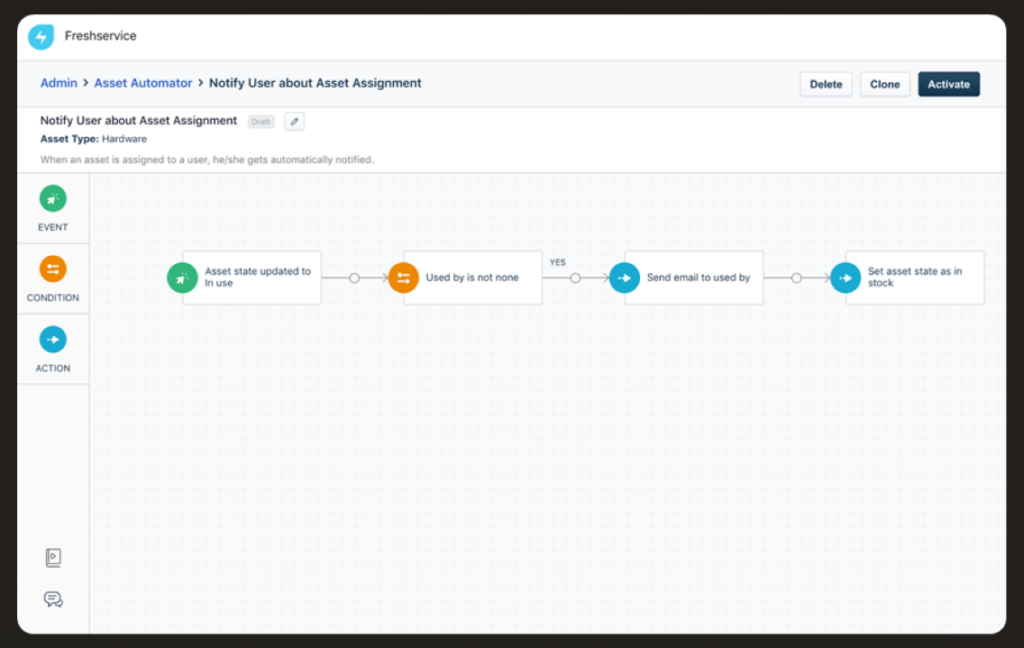
Freshservice is an ITSM platform that combines service management with automated patch management capabilities. It helps you manage incidents, assets, and changes while using AI-driven workflows to streamline patch deployment and device oversight.
Why I Picked Freshservice: I picked Freshservice because it combines AI-powered IT service management with automated patch testing and deployment in a single system. Its intelligent automation supports ticket routing and service workflows, while built-in patch management tools help you identify, test, and deploy updates across devices without relying on separate software.
Standout Features & Integrations:
Freshservice offers features like auto-discovery of devices, automated patch testing, and deployment. Furthermore, it has a built-in CMDB for better asset management.
It integrates with popular ITSM tools, IT operations tools, and software like Jira and Slack.
Pros and Cons
Pros:
- Flexible integrations
- Built-in CMDB for asset management
- ITIL compliance
Cons:
- Limited patch-specific features.
- Overkill for non-ITIL organizations
- Pricier starting point
New Product Updates from Freshservice

Freshservice Enhances Global Search and Dashboards With Task Support
Freshservice enhances Global Search and Dashboards by adding support for ticket, problem, change, and release tasks, along with custom task views. This update helps teams search, track, and report on tasks from one centralized interface. For more information, visit Freshservice's official site.


Atera is a complete solution for IT professionals and managed service providers, offering tools for remote monitoring and management. It's designed to simplify your workload by automating various processes, including multi-OS patch management.
Why I Picked Atera: I picked Atera because it automates patch installations across multiple operating systems, which can save you a lot of time. Whether you're dealing with Windows, macOS, or Linux, Atera has you covered with its automated scheduling and installation features. This ensures that your systems are always up to date without you having to manually intervene.
Another reason Atera stands out is its ability to handle reboots and manage patch-related tasks without disrupting your work. This means you can focus on more critical tasks while knowing that your patch management is being handled efficiently. These features make it a reliable choice for keeping your systems secure.
Standout Features & Integrations:
Features include automated patch management that covers Windows, macOS, and Linux, There's an option for offline agent execution, so patches can be applied even when machines aren't connected to the internet. Additionally, Atera offers detailed reporting on patch statuses.
The tool integrates with Microsoft Teams, Slack, ServiceNow, Okta, Jira Software Cloud, Azure Active Directory, Microsoft Outlook, WhatsApp Notifications, Acronis Cyber Protect Cloud, Google Sheets, ChatGPT (OpenAI), and monday.com.
Pros and Cons
Pros:
- Custom scripts and real-time dashboards offer visibility into patch workflows
- Combines patch management, remote access, and help desk features
- Unlimited endpoint coverage under a single technician license makes it cost-effective for MSPs
Cons:
- Interface can feel clunky when managing large device fleets or running bulk actions
- Compliance and audit reporting may fall short for heavily regulated industries
- Patch rollback options are minimal compared to enterprise-grade tools
New Product Updates from Atera

Atera Enhances IT Autopilot With Automation and File Support
Atera’s IT Autopilot gets three major boosts: you can now attach common files for deeper analysis, automate IT tasks with clear workflows, and choose how the system follows up when users go silent. These updates help streamline IT operations and improve resolution efficiency. For more information, visit Atera’s official site.


Heimdal's patch management software stands out as a versatile solution for businesses aiming to enhance their cybersecurity posture. It is particularly appealing to IT professionals and managed service providers (MSPs) who need to manage software updates seamlessly across various platforms. By automating the patch deployment process, Heimdal addresses the challenge of keeping systems secure and compliant with industry regulations, making it an ideal choice for sectors like healthcare, education, and government.
Why I Picked Heimdal
I picked Heimdal for its ability to automate the patch deployment process, which significantly reduces manual workload and ensures timely updates. With support for over 350 third-party applications, Heimdal provides comprehensive coverage to keep your systems secure and compliant. Its integration with Heimdal's Unified Security Platform further enhances your organization's cybersecurity strategy, making it a practical choice for those in need of effective patch management.
Heimdal Key Features
In addition to automated patch deployment, I also found that Heimdal offers several other valuable features:
- Vulnerability Management: Continuously scans your systems to identify and address potential security threats.
- Asset Management: Provides real-time visibility into your organization's IT assets, helping you track and manage them effectively.
- Customizable Patching Schedules: Allows you to set patch deployment times that minimize disruptions to your operations.
- Priority Server Updates: Optimizes patch distribution for bandwidth-limited environments, ensuring critical updates reach priority endpoints first.
Heimdal Integrations
Native integrations are not currently listed by Heimdal; however, the platform supports API-based custom integrations.
Pros and Cons
Pros:
- Detailed asset and license visibility
- Strong vulnerability and threat detection
- Automates patching across endpoints
Cons:
- Interface requires onboarding time
- No native integrations available


Action1 is a cloud-based patch management solution designed to assist businesses in automating the deployment of software patches to remote workforces. This is particularly beneficial for companies with many remote employees who require consistent patching, making it best for remote workforce patch management.
Why I Picked Action1: I selected Action1 for this compilation because of its cloud-based architecture that effectively allows businesses to manage patches across remote workforces. It stands out for its ability to maintain the security and performance of distributed endpoints.
Thus, it cuts the best tool for companies needing remote workforce patch management.
Standout Features & Integrations:
The most vital features of Action1 include automated patch assessments, real-time reporting, and multi-platform support, offering businesses greater flexibility in managing patches across various operating systems. It also integrates with commonly used systems like Active Directory and SCCM, making it more adaptable for businesses with existing infrastructure.
Pros and Cons
Pros:
- Multi-platform support covers a broad range of operating systems.
- Real-time reporting gives immediate insights into patch compliance.
- Cloud-based architecture is ideal for managing remote workforces.
Cons:
- Limited features compared to some other enterprise-level solutions.
- Could be a learning curve for teams new to patch management.
- Minimum seat requirements may not suit smaller organizations.

ConnectWise Automate is designed to help Managed Service Providers (MSPs) manage and automate all aspects of patch management. Its customizable nature means you can tailor the tool's features to better align with your unique operational requirements, making it ideal for MSPs that require extensive customization.
Why I Picked ConnectWise Automate: In selecting tools for this list, customization was a key criterion. ConnectWise Automate offers extensive customizability, allowing MSPs to adapt the software to fit specific client needs or niche markets.
This unique capability justifies its position as best for MSPs who demand extensive customization options in their patch management solutions.
Standout Features & Integrations:
Key features include role-based security, automated patch testing, and customizable reporting tools, providing MSPs with the capability to fine-tune their patch management processes.
ConnectWise Automate also integrates with other solutions from the ConnectWise suite, as well as third-party tools like LabTech, ScreenConnect, and SQL Server, thereby offering a comprehensive ecosystem for MSPs.
Pros and Cons
Pros:
- A comprehensive ecosystem with various integrations for better operational flow.
- Role-based security ensures granular control over the system.
- Extensive customization capabilities allow for niche deployments.
Cons:
- May require additional training to fully utilize all customization options.
- Base fees and annual billing may pose a financial burden for some businesses.
- Complexity could make the system daunting for small teams.


Acronis offers a unique combination of data backup solutions along with patch management. This two-in-one approach makes it particularly useful for those requiring both backup and patch management capabilities.
Why I Picked Acronis: I chose Acronis because it uniquely combines backup and patch management in a single tool. This dual functionality makes it stand out from the competition. It is best suited for businesses that require backup solutions along with their patch management.
Standout Features & Integrations:
Key features include real-time backup, scheduled patching, and ransomware protection. Acronis also offers customizable alerts for system health.
Acronis integrates well with Windows and has API support for extending its capabilities further.
Pros and Cons
Pros:
- Customizable alerts for system health
- Offers ransomware protection
- Combines backup and patch management
Cons:
- Might be too feature-rich for small enterprises.
- Higher starting price point
- Minimum 5-seat purchase required


SolarWinds Patch Manager is designed to simplify patch management across complex enterprise networks. With its ability to scale effortlessly, it is well-suited to meet the demands of large enterprise environments, justifying its tag as best for large enterprise scalability.
Why I Picked SolarWinds Patch Manager: I picked SolarWinds Patch Manager because its architecture is geared towards scalability and complexity, allowing it to handle the varied requirements of large enterprises. It stands out due to its extensive reporting capabilities and customization options, which make it invaluable for large-scale operations.
Hence, this tool is best for large enterprises that require scalability in their patch management efforts.
Standout Features & Integrations:
Key features of SolarWinds include its detailed patch compliance reporting, role-based administration, and extensive customization options that provide better control over patching processes. It integrates well with various SolarWinds products and with Microsoft WSUS and SCCM, offering a way to scale patch management across large enterprises.
Pros and Cons
Pros:
- Strong customization options to fit enterprise needs.
- Detailed compliance reporting allows for rigorous oversight.
- Robust scalability is suitable for large enterprises.
Cons:
- Annual billing might be a drawback for some businesses.
- Complexity may require specialized staff for full utilization.
- High costs may deter smaller organizations.


Ivanti's Patch Management software aims to automate patching while ensuring network security. Its tight integration with other Ivanti products makes it particularly beneficial for businesses already invested in the Ivanti ecosystem.
Why I Picked Ivanti: I chose Ivanti for this list because of its synergistic value to businesses already using Ivanti’s products. It stands apart for its native integration capabilities, which provide a unified experience across all Ivanti solutions. That's why I consider this tool best for those looking to integrate patch management with their existing Ivanti products.
Standout Features & Integrations:
The most important features include automated vulnerability assessments and remediation, customizable policies, and detailed reporting capabilities.
Integration-wise, Ivanti Patch Management works exceptionally well with other Ivanti offerings, such as Ivanti Endpoint Manager and Ivanti Service Manager, adding value through unified workflows and data sharing.
Pros and Cons
Pros:
- Detailed reporting provides insights into patch compliance and vulnerabilities
- Customizable patching policies offer flexible management
- Strong native integration with other Ivanti products
Cons:
- The learning curve may be steep for those new to Ivanti products.
- Limited value for those not already invested in Ivanti's ecosystem
- Minimum seat requirement might be restrictive for small businesses

Best for centralized control of heterogeneous networks

ManageEngine Patch Management Plus is designed to offer centralized patch management across a variety of network environments. Its strength lies in unifying patch processes across diverse systems, making it ideal for centralized control of heterogeneous networks.
Why I Picked ManageEngine Patch Management Plus: I chose ManageEngine Patch Management Plus for its robust capability to centralize control across varied network systems. This specialization differentiates it from other tools. It's particularly suited for organizations with diverse networks that require centralized patch management.
Standout Features & Integrations:
The tool provides automated patch deployments, detailed network scans, and vulnerability assessments. Moreover, it supports a multitude of operating systems, from Windows and macOS to various Linux distributions.
ManageEngine Patch Management Plus integrates with Windows, macOS, and Linux systems, as well as common software applications like Microsoft Office.
Pros and Cons
Pros:
- Detailed vulnerability assessments
- Supports a variety of operating systems
- Comprehensive centralized control
Cons:
- Limited third-party integrations.
- Steeper learning curve
- Minimum 10-seat purchase required
Other Patch Management Software
Here are some additional patch management software options that didn’t make it onto my shortlist, but are still worth checking out:
- N-central Patch Management
For automating routine patch tasks
- Automox
For cloud-native environments
- ITarian
For small businesses on a budget
- Scalefusion
For automated patch deployment
- GFI Languard
Good for businesses needing network security scans
- Kaseya VSA
Good for centralized management with compliance reporting
- Microsoft Defender for IoT
Good for IoT devices requiring high-security standards
- PDQ
Good for automated deployments of third-party updates
- Atera
For IT consultants and service providers
- GoTo Resolve
Good for remote patching via a simple interface
- Syxsense
Good for cloud-based patch management
- Lumension Patch and Remediation
Good for focusing on compliance and remediation
- Patch My PC
Good for lightweight patching needs
- Datto RMM Patch Management
Good for managed service providers looking for scalable options
- Comodo IT and Security Manager
Good for companies needing a comprehensive security suite


Patch Management Software Selection Criteria
When selecting the best patch management software to include in this list, I considered common buyer needs and pain points like security compliance and efficient update management. I also used the following framework to keep my evaluation structured and fair:
Core Functionality (25% of total score)
To be considered for inclusion in this list, each solution had to fulfill these common use cases:
- Automate patch deployment
- Schedule updates
- Provide compliance reporting
- Support multiple operating systems
- Monitor patch status
Additional Standout Features (25% of total score)
To help further narrow down the competition, I also looked for unique features, such as:
- Real-time threat detection
- Integration with security tools
- Customizable dashboards
- Patch rollback options
- Multilingual support
Usability (10% of total score)
To get a sense of the usability of each system, I considered the following:
- Intuitive interface
- Easy navigation
- Minimal learning curve
- Responsive design
- Customization options
Onboarding (10% of total score)
To evaluate the onboarding experience for each platform, I considered the following:
- Availability of training videos
- Interactive product tours
- Access to webinars
- Use of chatbots for support
- Pre-built templates
Customer Support (10% of total score)
To assess each software provider’s customer support services, I considered the following:
- 24/7 support availability
- Multiple contact channels
- Response time
- Quality of knowledge base
- Availability of live chat
Value For Money (10% of total score)
To evaluate the value for money of each platform, I considered the following:
- Competitive pricing
- Feature set offered
- Cost transparency
- Discounts for annual billing
- Free trial availability
Customer Reviews (10% of total score)
To get a sense of overall customer satisfaction, I considered the following when reading customer reviews:
- Overall satisfaction ratings
- Commonly mentioned features
- Frequency of updates
- Feedback on support quality
- Ease of implementation
How to Choose Patch Management Software
It’s easy to get bogged down in long feature lists and complex pricing structures. To help you stay focused as you work through your unique software selection process, here’s a checklist of factors to keep in mind:
| Factor | What to Consider |
|---|---|
| Scalability | Can the tool grow with your business? Consider the number of devices you’ll manage as you expand. Look for solutions that can scale without a hitch. |
| Integrations | Does it work with your existing systems? Ensure compatibility with your current tools, like security software or IT management platforms. |
| Customizability | Can you tailor the software to your needs? Look for tools that let you customize dashboards and reports to fit your workflows. |
| Ease of use | Is the interface intuitive? A user-friendly design reduces training time and helps your team work more efficiently. |
| Implementation and onboarding | How long will it take to get up and running? Consider the resources needed and whether the vendor provides support like training videos or tutorials. |
| Cost | What’s the total cost of ownership? Look beyond the sticker price. Consider hidden fees, long-term contracts, and whether the pricing aligns with your budget. |
| Security safeguards | Does it meet your security needs? Evaluate encryption, data protection measures, and compliance with industry standards. |
| Support availability | Will you get the help you need? Check for 24/7 support options, response times, and whether support is included in the pricing. |
What Is Patch Management Software?
Patch management software is a tool that helps automate the process of updating software applications and systems to ensure they are secure and up-to-date. IT professionals and system administrators generally use these tools to maintain system security and efficiency. Automated patch deployment, scheduling updates, and compliance reporting help with managing large networks and reducing manual work. Overall, these tools keep systems secure, minimize vulnerabilities, and ensure smooth operations.
Features
When selecting patch management software, keep an eye out for the following key features:
- Automated patch deployment: Automatically apply updates to systems, reducing the need for manual intervention and ensuring timely fixes.
- Compliance reporting: Generate reports to demonstrate adherence to industry standards and regulations, helping maintain security compliance.
- Real-time monitoring: Track the status of patches across your network to quickly identify and address any issues.
- Customizable dashboards: Tailor the interface to display the most relevant information for your team, improving workflow efficiency.
- Scheduling updates: Set specific times for updates to minimize disruption during business hours and maintain productivity.
- Vulnerability scanning: Identify potential security risks in your systems, allowing for proactive measures to be taken.
- Remote access capabilities: Manage and update systems from any location, which is particularly useful for distributed teams.
- Data protection integration: Ensure that patches are applied without compromising data integrity, maintaining overall security.
- Cross-platform support: Manage patches across different operating systems, ensuring consistent security measures are in place.
- User-friendly interface: Simplify navigation and reduce training time, allowing your team to focus on critical tasks.
Benefits
Implementing patch management software provides several benefits for your team and your business. Here are a few you can look forward to:
- Enhanced security: Regular updates and vulnerability scanning help protect your systems from threats and reduce security risks.
- Increased efficiency: Automated patch deployment and scheduling save time and resources, allowing your team to focus on more important tasks.
- Improved compliance: Compliance reporting ensures you meet industry standards, which can prevent costly penalties.
- Reduced downtime: Scheduling updates during off-peak hours minimizes disruptions to your business operations.
- Better system performance: Keeping software up-to-date with the latest patches ensures optimal performance and stability.
- Remote management: Remote access capabilities allow you to manage and update systems from anywhere, which is beneficial for distributed teams.
- Customizable user experience: Customizable dashboards and a user-friendly interface make it easier for your team to work efficiently and effectively.
Costs & Pricing
Selecting patch management software requires an understanding of the various pricing models and plans available. Costs vary based on features, team size, add-ons, and more. The table below summarizes common plans, their average prices, and typical features included in patch management software solutions:
Plan Comparison Table for Patch Management Software
| Plan Type | Average Price | Common Features |
|---|---|---|
| Free Plan | $0 | Basic patch deployment, limited reporting, and community support. |
| Personal Plan | $5-$25/user/month | Automated patching, scheduling updates, and basic compliance reporting. |
| Business Plan | $30-$60/user/month | Advanced reporting, cross-platform support, and remote management capabilities. |
| Enterprise Plan | $65-$100/user/month | Customizable dashboards, real-time monitoring, and premium customer support. |
Patch Management Software FAQs
Here are some answers to common questions about patch management software:
How does patch management help prevent cyberattacks?
Patch management reduces security risks by closing known software vulnerabilities before hackers can exploit them. Once a patch is released, attackers often target unpatched systems. Automated patch tools ensure updates are applied quickly, keeping your network protected with minimal manual effort.
What are the risks of not using patch management software?
Without automated patching, your systems become more vulnerable to malware, ransomware, and data breaches. Manual updates are often delayed or missed, leaving critical gaps in protection. Over time, this can lead to system instability, downtime, or even compliance violations.
Can patch management software work in hybrid or remote work setups?
Yes. Most modern patch management tools are cloud-based, meaning they can update and monitor devices wherever they are—whether at home, in the office, or on the road. This flexibility keeps distributed teams secure without needing complex network setups.
How does patch management support compliance and auditing?
Many industries require proof that systems are regularly updated. Patch management tools automatically generate detailed reports showing update history, device status, and compliance with security policies. These reports help meet regulatory standards and simplify audit preparation.
What key features should I prioritize when choosing patch management software?
Focus on automation, cross-platform support, and real-time monitoring. Automation saves time, cross-platform compatibility ensures every device stays covered, and live dashboards give visibility into patch status. Strong reporting and easy integrations are also essential for scaling your IT operations efficiently.
What’s Next:
If you're in the process of researching patch management software, connect with a SoftwareSelect advisor for free recommendations.
You fill out a form and have a quick chat where they get into the specifics of your needs. Then you'll get a shortlist of software to review. They'll even support you through the entire buying process, including price negotiations.