
22 Meilleurs Logiciels de Signalement d’Incidents de 2026

Meilleurs logiciels de signalement d'incidents : la sélection
Voici ma sélection des meilleurs logiciels de signalement d’incidents :


D'après mon expérience, le bon outil peut transformer une situation stressante en un processus maîtrisé, permettant de gagner du temps et de limiter les erreurs. J’ai passé en revue les meilleures solutions disponibles, en me concentrant sur ce qui compte véritablement pour les experts techniques comme vous.
Dans cet article, je vous partage mes choix préférés de logiciels de signalement d'incidents, ainsi que leurs principales fonctionnalités et avantages. Vous trouverez des avis impartiaux et documentés pour vous aider à prendre une décision éclairée. Découvrons ensemble les solutions qui peuvent rendre la gestion des incidents plus fluide et efficace.
Why Trust Our Software Reviews
Résumé des meilleurs logiciels de signalement d'incidents
Ce tableau comparatif résume les informations tarifaires de mes meilleurs choix de logiciels de signalement d’incidents afin de vous aider à trouver celui qui conviendra à votre budget et à vos besoins métiers.
| Tool | Best For | Trial Info | Price | ||
|---|---|---|---|---|---|
| 1 | Best for user-friendly incident handling | 14-day free trial available | From $19/user/month (billed annually) | Website | |
| 2 | Best for linking incidents and asset data | 14-day free trial | Pricing upon request | Website | |
| 3 | Best for incident documentation management | Free demo available | Pricing upon request | Website | |
| 4 | Best for integrated incident detection & ticketing | 30-day free trial + free demo available | From $149/technician/month (billed annually) | Website | |
| 5 | Best for automating response workflows | Free demo available | From $20/user/month | Website | |
| 6 | Best for real-time incident and threat detection | 30-day free trial + free demo | Pricing upon request | Website | |
| 7 | Best for automated remediation | Free trial + free demo available | Pricing upon request | Website | |
| 8 | Best for privacy incident management | Free demo available | Pricing upon request | Website | |
| 9 | Best for centralized help desk needs | 30-day free trial + free demo available | From $39/month | Website | |
| 10 | Best for structured incident workflows | Free demo available | Pricing upon request | Website |


-

Site24x7
Visit WebsiteThis is an aggregated rating for this tool including ratings from Crozdesk users and ratings from other sites.4.6 -
Docker
Visit WebsiteThis is an aggregated rating for this tool including ratings from Crozdesk users and ratings from other sites.4.6 -
Pulumi
Visit WebsiteThis is an aggregated rating for this tool including ratings from Crozdesk users and ratings from other sites.4.8





Avis sur les meilleurs logiciels de signalement d'incident
Vous trouverez ci-dessous mes résumés détaillés des meilleurs logiciels de signalement d’incidents inclus dans ma sélection. Mes analyses présentent les fonctionnalités principales, les points forts et faibles, les intégrations et les cas d’usages recommandés pour chaque outil afin de vous permettre de faire le meilleur choix possible.

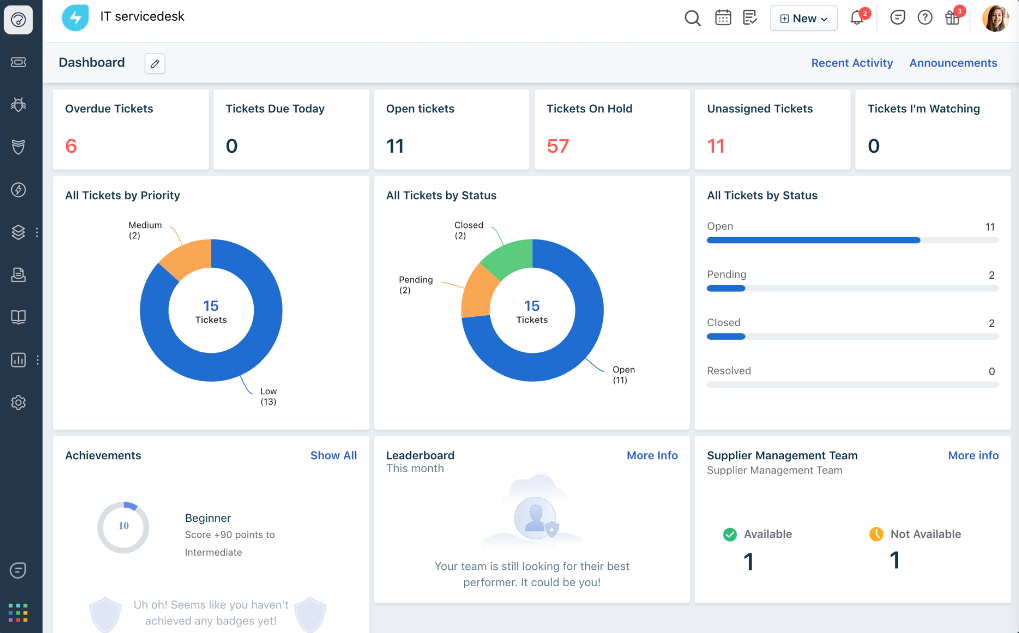
Freshservice, by Freshworks, is an IT service management tool tailored to streamline incident and service requests in organizations. Given its intuitive interface and user-centric design, it stands as a prime choice for teams that prioritize user-friendliness when managing and resolving incidents.
Why I Picked Freshservice: When determining the best tools for this list, Freshservice's reputation for being user-friendly made it an immediate consideration. What differentiates it from others is its intuitive design combined with robust capabilities, making the incident-handling process smoother.
Based on my evaluation, Freshservice shines for those organizations seeking a balance between capability and user-friendliness in their incident management tools.
Standout Features & Integrations:
Freshservice offers features like a smart ticketing system, knowledge base, and asset management. Their automation capabilities reduce manual efforts, making the incident resolution process more efficient.
For integrations, Freshservice supports a myriad of apps and platforms, including Slack, Zoom, and Microsoft Teams, ensuring that teams can connect their preferred tools without hassle.
Pros and Cons
Pros:
- Wide range of integration options supports varied organizational needs
- Robust automation capabilities reduce manual intervention
- Intuitive interface facilitates quicker adoption among teams
Cons:
- The need to navigate through multiple features can be overwhelming for some users
- Customization might require some technical expertise
- The tool’s depth might sometimes overshadow its simplicity for first-time users
New Product Updates from Freshservice

Freshservice Enhances Global Search and Dashboards With Task Support
Freshservice enhances Global Search and Dashboards by adding support for ticket, problem, change, and release tasks, along with custom task views. This update helps teams search, track, and report on tasks from one centralized interface. For more information, visit Freshservice's official site.

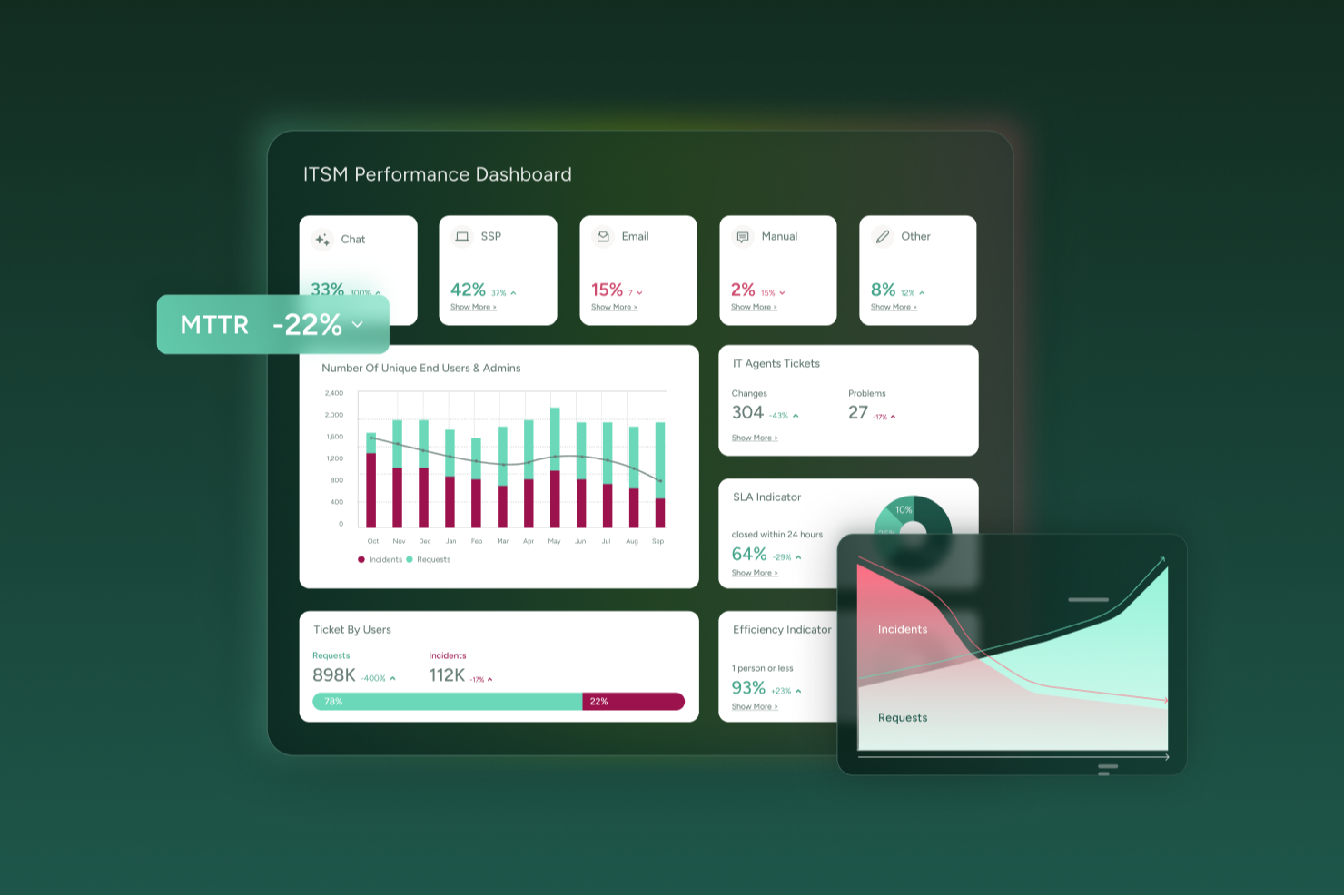
SysAid provides an incident reporting and IT service management platform designed for IT teams that want to manage issues proactively rather than reactively. If your team handles frequent support tickets, manages hardware or software assets, or delivers IT services across multiple departments, SysAid helps bring those processes into a single, more manageable system.
Why I Picked SysAid
I picked SysAid because its incident management capabilities are tightly integrated with AI-driven ticketing and automated workflows that reduce manual effort. SysAid’s AI supports ticket categorization, prioritization, and routing, helping your team spend less time on routine triage and more time resolving higher-impact issues. Incident records are also linked directly to asset and user data, so when a problem occurs, you have immediate context around the affected hardware, software, or user. This combination of automation and visibility can be especially helpful when fast, informed resolution is important.
SysAid Key Features
Aside from what I mentioned above, your team also benefits from features like:
- Self-Service: Lets end users submit tickets or search a knowledge base on their own, reducing the number of manual support requests.
- Workflow Automation: This feature allows you to automate repetitive processes, ensuring consistency and freeing up your team to focus on complex tasks.
- Change Management: SysAid provides tools to manage change processes, minimizing risk and ensuring smooth transitions within your IT environment.
- Reporting: Get built-in metrics (e.g., ticket volume, resolution times, SLA compliance) to monitor IT performance and identify trends over time.
SysAid Integrations
Integrations include Jira, Microsoft Teams, Slack, Active Directory, Azure AD, SCCM, VMware, Google Workspace, Okta, and Salesforce.
Pros and Cons
Pros:
- Workflow automation ensures process consistency.
- Self-service portal empowers users to report incidents directly.
- AI-driven automation reduces manual incident management tasks.
Cons:
- When features are not properly configured, automations and SLA workflows can become complex and confusing for agents.
- Mobile app experience lacks full functionality.
New Product Updates from SysAid

SysAid Adds Direct Knowledge Base Linking in Service Records
SysAid now allows linking knowledge base articles directly to service records, enhancing centralized access to information and speeding up issue resolution. For more information, visit SysAid's official site.
 .
.

Preparis is a cloud-based platform designed to help businesses prepare for and respond to emergencies, focusing on ensuring business continuity. It enables teams to centralize communication, manage risks, and execute response strategies efficiently.
Why I Picked Preparis: Preparis includes tools for organizing and storing critical documents related to incidents, ensuring important information is easily accessible during an emergency. Its reporting tools allow you to log and analyze incidents, helping you understand patterns and improve your response over time. These features are designed to give your team clear visibility into incidents, ensuring a coordinated and timely response that supports ongoing business operations.
The platform’s alerting system also ensures key personnel are notified the moment an issue arises, helping you respond faster.
Standout Features & Integrations:
Other features include customizable action plans for different types of incidents, so your team knows exactly what steps to take. Additionally, its incident manager lets you track, assign, and resolve IT incidents in one place. Integrations include systems like ADP and Okta.
Pros and Cons
Pros:
- Scalable for organizations of all sizes
- Real-time notification system
- Effective documentation for incident reports, plans, and audits
Cons:
- Could offer ticket management for IT incidents
- Limited customization options available


Atera is a unified IT management platform primarily built for IT teams and MSPs. It combines remote monitoring and management (RMM), help desk ticketing, and professional services automation (PSA). Its incident reporting features work within this larger system, helping you log, track, and address incidents as part of your ongoing IT operations.
Why I Picked Atera: I included Atera for its ability to turn system alerts into actionable tickets automatically. When the platform detects threshold breaches in performance or hardware health, it can create tickets and categorize them with AI-based tagging. This allows your team to act on incidents quickly, reducing the time it takes to assign issues to the right person. Its real-time monitoring paired with ticket automation gives smaller IT teams a way to centralize incident reporting without needing multiple tools.
Standout Features & Integrations:
Atera includes AI tools that can auto-summarize tickets and draft responses based on incident data. The platform also supports script generation for troubleshooting tasks, knowledge base article creation from resolved tickets, and full network discovery to identify assets that may be affected by incidents. You can access remote devices directly for investigation and apply patch management to minimize vulnerabilities that could lead to future incidents. Integrations include Microsoft Teams, Slack, ServiceNow, Okta, Azure Active Directory, WhatsApp Notifications, Google Workspace, Jira Software Cloud, Acronis Cyber Protect Cloud, Google Sheets, Gmail, ClickUp, Autopilot.
Pros and Cons
Pros:
- Built-in AI support for ticket management and troubleshooting
- Unified platform for RMM, PSA, and help desk
- Pay-per-technician pricing model
Cons:
- Limited customization of workflows
- Mobile app has fewer features than desktop version
New Product Updates from Atera

Atera Enhances IT Autopilot With Automation and File Support
Atera’s IT Autopilot gets three major boosts: you can now attach common files for deeper analysis, automate IT tasks with clear workflows, and choose how the system follows up when users go silent. These updates help streamline IT operations and improve resolution efficiency. For more information, visit Atera’s official site.


Rootly is an incident reporting and response platform designed to help teams detect, manage, and resolve incidents quickly. It centralizes communication, automates alerts, and facilitates collaboration across systems like Slack and Microsoft Teams. By covering the entire incident lifecycle—from detection through to AI-powered postmortems, Rootly helps organizations improve reliability and reduce resolution times.
Why I Picked Rootly: I picked Rootly because it brings AI to the heart of incident management. It automates response workflows in chat tools like Slack and Teams, so your team can take action without switching platforms. I also like its post-incident retrospective feature, which generates AI summaries and timelines automatically.
If you’re looking to enhance visibility and consistency in your incident process, Rootly offers a well-balanced blend of automation and collaboration.
Standout Features & Integrations:
Standout features include AI SRE tools that automate root cause analysis, post-incident retrospectives with AI-generated summaries, and MCP server integration that lets developers resolve incidents directly in their IDE. The on-call management system supports automated scheduling and escalation, while the status page keeps customers informed in real time.
Integrations include Slack, Microsoft Teams, Confluence, Jira, Terraform, Zoom, Datadog, Sentry, Notion, Zapier, Linear, and Google Meet.
Pros and Cons
Pros:
- Automated retrospectives with AI summaries
- Integrates with Slack and Teams
- AI-driven automation for incident response
Cons:
- Limited integration list publicly available
- Enterprise pricing requires custom quote

Best for real-time incident and threat detection

ManageEngine EventLog Analyzer is a comprehensive log management and IT compliance solution designed to enhance network security and streamline compliance with IT audit requirements.
Why I Picked ManageEngine EventLog Analyzer: I like the real-time security auditing and instant threat detection capabilities of EventLog Analyzer. The software continuously monitors the network for any suspicious activities and provides immediate alerts, enabling quick response to potential threats.
This real-time monitoring is complemented by comprehensive compliance management, which helps organizations adhere to various regulatory requirements such as PCI-DSS, HIPAA, and GDPR. The ability to generate detailed compliance reports not only simplifies the audit process but also ensures that the organization remains compliant with industry standards.
Standout Features & Integrations:
It also offers advanced threat analytics to enhance security by assessing threats from malicious URLs, IPs, and domains, utilizing third-party threat feeds to prioritize response actions. Additionally, the detailed reporting feature helps organizations comply with regulatory requirements and improve their security posture by generating comprehensive reports on log data. Integrations include Log360, ADAudit Plus, Firewall Analyzer, SharePoint Manager Plus, M365 Security Plus, Cloud Security Plus, and DataSecurity Plus.
Pros and Cons
Pros:
- In-depth auditing capabilities
- Extensive log management capabilities
- Supports real-time monitoring and alerting features
Cons:
- Some users find the initial setup to be complex
- The tool can be resource-intensive

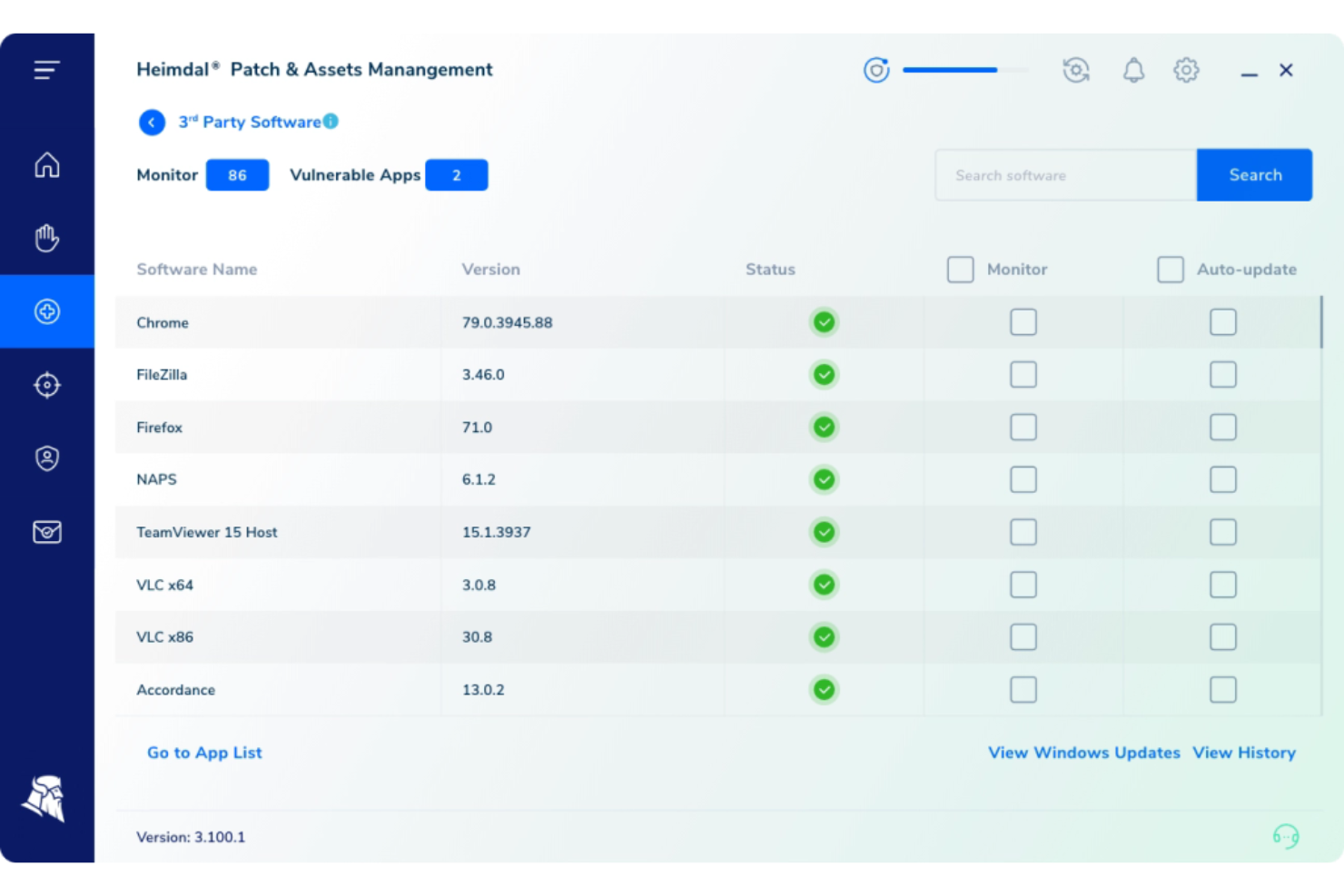
Heimdal caters to businesses seeking incident reporting software, particularly in industries like healthcare, education, and government. It offers automated incident response capabilities that enhance compliance and data governance. By integrating advanced threat detection and response features, Heimdal addresses the need for real-time alerts and continuous monitoring, helping organizations manage security incidents effectively.
Why I Picked Heimdal
I picked Heimdal for its standout automated incident response capabilities that directly tackle the challenges faced in incident reporting. With its Extended Detection and Response (XDR) platform, Heimdal provides real-time threat hunting and automated remediation, ensuring a quick and efficient reaction to security threats. Additionally, the integration with third-party applications streamlines incident management processes, making it a reliable choice for organizations looking to enhance their incident reporting mechanisms.
Heimdal Key Features
In addition to its automated incident response capabilities, Heimdal offers several other features beneficial for incident reporting:
- 24/7 Security Operations Center (SOC) Support: Your team receives round-the-clock assistance to monitor and respond to security incidents promptly.
- Threat Intelligence Integration: Heimdal provides actionable insights by correlating data with threat intelligence, empowering you to make informed decisions.
- Vulnerability Management: This feature helps you identify and address vulnerabilities within your infrastructure, reducing the risk of security breaches.
- Endpoint Detection and Response (EDR): You can monitor and analyze endpoint activities in real-time, ensuring quick identification and response to suspicious behaviour.
Heimdal Integrations
Native integrations are not currently listed by Heimdal; however, the platform supports API-based custom integrations.
Pros and Cons
Pros:
- Detailed asset and license visibility
- Strong vulnerability and threat detection
- Automates patching across endpoints
Cons:
- Interface requires onboarding time
- No native integrations available


OneTrust specializes in a platform that focuses on privacy, security, and third-party risk management. With its emphasis on privacy incident management, OneTrust ensures that organizations comply with global regulations while addressing potential privacy incidents proactively.
Why I Picked OneTrust: In the process of selecting tools, OneTrust caught my attention due to its distinct focus on privacy incident management. Compared to other contenders, OneTrust’s commitment to privacy compliance and its suite of tools tailored to this niche were impressive.
I believe OneTrust is best equipped for organizations that prioritize privacy incident management amidst the growing importance of data protection.
Standout Features & Integrations:
OneTrust provides an automated incident response workflow that aligns with various global regulations. Their risk assessment features further ensure that any potential privacy threats are addressed promptly. Integration-wise, OneTrust is compatible with popular enterprise tools such as Salesforce, Microsoft Teams, and Slack, enhancing its functionality in a diverse tech environment.
Pros and Cons
Pros:
- Comprehensive global compliance features ensure adherence to regulations
- Robust integrations with leading enterprise tools
- Tailored tools specifically for privacy incident management
Cons:
- Overhead costs could arise when aiming for full compliance across multiple regulations
- Configuration might demand technical knowledge for optimal setup
- The platform's diverse features might have a steep learning curve


SolarWinds Service Desk is a versatile platform designed to centralize all help desk operations, making it easier for businesses to handle IT service management. By consolidating diverse IT service processes into one unified platform, it aptly addresses the challenges of organizations looking for a centralized solution.
Why I Picked SolarWinds Service Desk: I selected SolarWinds Service Desk after observing the platform's capability to amalgamate various help desk operations easily. Amongst the myriad of tools I compared, this one distinctly offers a comprehensive central hub, which is pivotal for businesses wanting a unified point of control.
This centralization is the primary reason I deem it the best choice for those in search of centralized help desk solutions.
Standout Features & Integrations:
SolarWinds Service Desk presents an array of features such as incident management, asset discovery, and knowledge base creation. One of its notable attributes is the AI-driven suggestions that help agents resolve tickets faster. As for integrations, the platform connects well with software like Jira, Slack, and Microsoft Teams, facilitating cohesive IT operations across different applications.
Pros and Cons
Pros:
- Extensive integration capabilities with popular applications
- AI-driven suggestions aid in quicker ticket resolution
- Comprehensive central hub for help desk operations
Cons:
- Interface might require a learning period for some users
- Advanced features can be overwhelming for smaller teams
- Some users might find its setup process time-consuming


ServiceNow is a cloud-based platform that provides workflow automation, integrating IT operations into a unified system. It offers an organized and structured method of handling incident workflows, ensuring efficient response and resolution.
Why I Picked ServiceNow: Having compared several tools, ServiceNow was selected for its meticulous approach to structured workflows. Its capabilities in systemizing and automating incident management processes made it a clear standout. I determined that ServiceNow's structured incident workflows are exceptional, making it the go-to for organizations seeking a structured approach.
Standout Features & Integrations:
ServiceNow excels in its incident management capabilities, providing automatic routing, escalation, and notification. The platform also offers detailed reporting and performance analytics. Its integration capabilities are extensive, working effectively with tools such as Microsoft Teams, Slack, and various security and operations platforms.
Pros and Cons
Pros:
- Comprehensive reporting and analytics aid in performance measurement
- Integration-friendly with various other IT platforms and tools
- Robust automation capabilities streamline incident response
Cons:
- The comprehensive feature set might be overwhelming for smaller organizations
- Customization, though possible, may require technical expertise
- The platform can be perceived as intricate for newcomers
Autres logiciels de signalement d'incident
Voici quelques autres solutions de signalement d’incidents qui n’ont pas été retenues dans ma sélection, mais qui méritent tout de même votre attention :
- Jira Service Management
For IT team collaboration
- incident.io
For streamlined incident tracking
- xMatters
For focused incident response
- FireHydrant
For comprehensive incident orchestration
- LogicManager
For events and incidents integration
- ManageEngine ServiceDesk Plus
For ITIL incident alignment
- Zendesk
For customer-centered incident management
- NinjaOne
Good for remote IT operations management
- SysAid
Good for combined IT helpdesk solutions
- ClickUp
Good for flexible incident reporting templates


Critères de sélection des logiciels de signalement d'incidents
Pour sélectionner les meilleurs logiciels de signalement d'incidents à inclure dans cette liste, j'ai pris en compte les besoins courants des acheteurs et leurs difficultés, comme la simplicité d'utilisation et la fiabilité des données. J'ai également utilisé le cadre d’évaluation suivant pour garantir une analyse structurée et impartiale :
Fonctionnalités fondamentales (25% de la note finale)
Pour être inclus dans cette liste, chaque solution devait répondre à ces cas d'usage courants :
- Suivi des incidents
- Alertes et notifications
- Rapports et analyses
- Gestion de la conformité
- Contrôle d'accès utilisateur
Fonctionnalités différenciantes (25% de la note finale)
Pour départager les meilleurs outils, j'ai également recherché des fonctionnalités uniques comme :
- Tableaux de bord personnalisables
- Outils de collaboration en temps réel
- Automatisation de la réponse aux incidents
- Intégration avec les objets connectés (IoT)
- Analyses prédictives intégrant l'intelligence artificielle
Expérience utilisateur (10% de la note finale)
Pour juger de l'ergonomie de chaque système, j'ai évalué les points suivants :
- Interface intuitive
- Navigation fluide
- Courbe d'apprentissage réduite
- Paramètres utilisateur personnalisables
- Options d'accessibilité
Onboarding (10% de la note finale)
Pour évaluer l’expérience d’arrivée sur chaque plateforme, j'ai pris en compte les critères suivants :
- Disponibilité de vidéos de formation
- Visites interactives du produit
- Accès à des webinaires
- Modèles complets
- Chatbots réactifs
Support client (10 % du score total)
Pour évaluer les services d’assistance de chaque fournisseur de logiciel, j’ai pris en compte les éléments suivants :
- Support disponible 24h/24, 7j/7
- Multiples canaux de support
- Délai de réponse
- Personnel de support qualifié
- Disponibilité d’un centre d’aide
Rapport qualité/prix (10 % du score total)
Pour évaluer le rapport qualité/prix de chaque plateforme, j’ai pris en compte les éléments suivants :
- Tarification compétitive
- Ensemble de fonctionnalités par rapport au coût
- Disponibilité de versions d’essai gratuites
- Plans tarifaires flexibles
- Réductions pour les contrats longue durée
Avis clients (10 % du score total)
Pour avoir une idée de la satisfaction générale des clients, j’ai pris en compte ce qui suit lors de la lecture des avis clients :
- Notes de satisfaction globale
- Problèmes fréquemment signalés
- Retours des utilisateurs sur les fonctionnalités
- Indicateurs de fidélité client
- Tendances des retours au fil du temps
Comment choisir un logiciel de gestion des incidents
Il est facile de se perdre dans de longues listes de fonctionnalités et des structures tarifaires complexes. Pour vous aider à rester concentré lors de votre processus de sélection, voici une liste de critères à garder à l’esprit :
| Critère | Ce qu’il faut considérer |
|---|---|
| Scalabilité | Le logiciel peut-il évoluer avec votre entreprise ? Pensez au nombre d’utilisateurs pris en charge et à la capacité à gérer un volume de données croissant à mesure que votre société se développe. |
| Intégrations | Est-il compatible avec vos outils existants ? Vérifiez la compatibilité avec vos systèmes actuels (CRM, email, plateformes de communication, etc.). |
| Personnalisation | Pouvez-vous l’adapter à vos processus ? Cherchez les options permettant de modifier les tableaux de bord, rapports et paramètres utilisateurs en fonction des besoins de votre équipe. |
| Facilité d’utilisation | Est-il simple à prendre en main ? Évaluez l’interface utilisateur et vérifiez si une formation intensive est nécessaire pour une utilisation efficace. |
| Mise en œuvre et intégration | Combien de temps faut-il pour l’installer et l’adopter ? Considérez le processus d’installation, le support disponible et les ressources de formation pour garantir une transition fluide. |
| Coût | Le prix est-il adapté à votre budget ? Comparez les plans tarifaires, en tenant compte d’éventuels frais cachés, et assurez-vous que le coût correspond à la valeur apportée. |
| Garanties de sécurité | Vos données et votre vie privée sont-elles protégées ? Recherchez le chiffrement, le respect de la réglementation sur la protection des données et d’autres mesures de sécurité. |
| Disponibilité du support | Aurez-vous de l’aide en cas de besoin ? Vérifiez la disponibilité du service client, y compris les horaires et les canaux (téléphone, email, chat). |
Qu’est-ce qu’un logiciel de gestion des incidents ?
Un logiciel de gestion des incidents est un outil utilisé pour documenter et gérer des incidents comme des pannes informatiques, des violations de sécurité ou toute perturbation opérationnelle. Les professionnels informatiques, les équipes de sécurité et les responsables conformité s’appuient généralement sur ces outils pour traiter rapidement les problèmes et garantir le bon fonctionnement des opérations. Les solutions comme les logiciels d’alerte IT, la journalisation des données et les flux de travail personnalisables contribuent à une gestion efficace des incidents et à leur résolution. Ces outils offrent une valeur indéniable en réduisant les temps d’arrêt et en améliorant les délais de réaction.
Fonctionnalités
Lorsque vous sélectionnez un logiciel de gestion des incidents, portez une attention particulière aux fonctionnalités clés suivantes :
- Suivi des incidents : Enregistre automatiquement les incidents, aidant les équipes à suivre tous les problèmes depuis leur apparition jusqu'à leur résolution.
- Alertes automatisées : Avertit instantanément les membres d'équipe concernés afin d'assurer une réponse rapide aux incidents.
- Flux de travail personnalisables : Vous permet d'adapter les processus aux besoins spécifiques de votre équipe pour améliorer l'efficacité.
- Journalisation des données : Maintient un registre complet des incidents, utile pour les audits et les contrôles de conformité.
- Collaboration en temps réel : Permet aux équipes de travailler ensemble sur les incidents en temps réel, améliorant la communication et la résolution des problèmes.
- Outils de rapports : Fournit des analyses sur les tendances des incidents et la performance de l'équipe, favorisant l'amélioration continue.
- Mesures de sécurité : Protège les informations sensibles grâce au chiffrement et au respect des normes de protection des données.
- Capacités d'intégration : Se connecte à d'autres outils comme Slack et Jira pour rationaliser les flux de travail et stimuler la productivité.
- Interface conviviale : Simplifie la navigation et minimise la courbe d'apprentissage pour les nouveaux utilisateurs.
- Suivi de la conformité : Aide à garantir que votre organisation respecte les exigences réglementaires en assurant le suivi des incidents liés à la conformité.
Avantages
La mise en place d'un logiciel de signalement des incidents offre de nombreux avantages pour votre équipe et votre entreprise. Voici quelques-uns dont vous pourrez bénéficier :
- Temps de réponse améliorés : Les alertes automatisées et la collaboration en temps réel permettent à votre équipe de réagir rapidement et efficacement aux incidents.
- Exactitude des données renforcée : La journalisation des données garantit que tous les détails relatifs aux incidents sont enregistrés et conservés avec précision pour référence ultérieure.
- Meilleure gestion de la conformité : Le suivi de la conformité aide votre entreprise à rester alignée sur les exigences réglementaires et à éviter les pénalités.
- Productivité accrue : Les flux de travail personnalisables et les capacités d'intégration permettent à votre équipe de travailler plus efficacement avec les processus existants.
- Analyses éclairantes : Les outils de rapports fournissent des informations précieuses sur les tendances des incidents et la performance de l'équipe, facilitant la prise de décision.
- Sécurité renforcée : Les mesures de sécurité protègent les données sensibles, procurant à votre équipe une tranquillité d'esprit lors de la gestion des incidents.
- Facilité d'utilisation : Une interface conviviale réduit la courbe d'apprentissage, permettant à votre équipe d'adopter rapidement le logiciel.
Coûts & Tarification
Sélectionner un logiciel de signalement des incidents implique de comprendre les différents modèles et plans tarifaires proposés. Les coûts varient selon les fonctionnalités, la taille de l'équipe, les modules complémentaires et bien plus encore. Le tableau ci-dessous résume les offres courantes, leurs prix moyens et les principales fonctionnalités incluses dans les solutions de signalement des incidents :
Tableau comparatif des plans pour un logiciel de signalement des incidents
| Type de plan | Prix moyen | Fonctionnalités courantes |
|---|---|---|
| Plan Gratuit | $0/utilisateur/mois | Suivi d'incident de base, alertes limitées et support communautaire. |
| Plan Personnel | $5-$25/utilisateur/mois | Suivi des incidents, outils de rapports élémentaires et support par e-mail. |
| Plan Business | $30-$60/utilisateur/mois | Rapports avancés, flux de travail personnalisables, intégrations et support prioritaire. |
| Plan Enterprise | $70-$100/utilisateur/mois | Accès complet aux fonctionnalités, sécurité renforcée, suivi de la conformité et support dédié. |
FAQ sur les logiciels de signalement d’incidents
Voici des réponses à des questions fréquemment posées sur les logiciels de signalement d’incidents :
Quelle est la différence entre la déclaration d’incident et la gestion des incidents ?
La déclaration d’incident consiste à documenter les incidents lorsqu’ils surviennent, tandis que la gestion des incidents englobe l’ensemble du processus de traitement, du début à la fin. Le signalement n’est que la première étape de la gestion. Une gestion efficace des incidents utilise les données issues des signalements pour résoudre rapidement les problèmes et éviter qu’ils ne se reproduisent. Assurez-vous que votre équipe comprend bien ces deux aspects pour gérer efficacement les perturbations.
Quelle est la sécurité des logiciels de signalement d’incidents ?
Oui, la plupart des logiciels de signalement d’incidents sont conçus en tenant compte de la sécurité. De nombreux outils intègrent le chiffrement, le contrôle des accès et le respect de normes telles que le RGPD. Cependant, vous devez toujours vérifier les fonctionnalités de sécurité d’un outil avant de l’acheter. Recherchez le chiffrement, l’authentification à deux facteurs et les certifications de conformité pour vous assurer que vos données restent protégées.
Les logiciels de signalement d’incidents peuvent-ils s’intégrer aux systèmes existants ?
Oui, de nombreux outils de signalement d’incidents proposent des possibilités d’intégration avec des systèmes existants tels que Slack, Jira et Microsoft Teams. Les intégrations permettent de rationaliser les flux de travail en connectant votre outil de signalement d’incidents aux autres logiciels utilisés par votre équipe. Avant de choisir un outil, vérifiez sa compatibilité avec vos systèmes actuels pour garantir une intégration sans accroc.
Comment choisir le bon logiciel de signalement d’incidents pour mon équipe ?
Commencez par évaluer les besoins de votre équipe et les flux de travail existants. Tenez compte de facteurs tels que la facilité d’utilisation, les capacités d’intégration et l’évolutivité. Choisissez un outil qui correspond à votre budget et propose les fonctionnalités nécessaires. Vous pouvez également profiter d’essais gratuits ou de démonstrations afin de tester le logiciel avant de prendre une décision.
Et maintenant :
Si vous êtes en train de rechercher un logiciel de signalement d’incidents, contactez gratuitement un conseiller SoftwareSelect pour des recommandations personnalisées.
Vous remplissez un formulaire et échangez rapidement afin qu’ils prennent connaissance de vos besoins spécifiques. Vous recevrez ensuite une liste restreinte de logiciels à examiner. Ils vous accompagneront même tout au long du processus d’achat, y compris lors de la négociation des prix.