

Les meilleurs logiciels MDM vous aident à appliquer les politiques de sécurité, à suivre et contrôler les appareils, et à protéger les données sensibles sur les terminaux appartenant à l’entreprise comme sur les terminaux BYOD. Ils sont conçus pour gérer les problèmes courants tels que l’effacement à distance d’un appareil après sa perte ou son vol, l’application incohérente des politiques entre les systèmes d’exploitation et la configuration manuelle chronophage des nouveaux appareils.
Si vous avez rencontré des problèmes liés à l’informatique fantôme, à des lacunes dans les rapports de conformité ou à un contrôle d’accès à distance peu fiable, vous n’êtes pas seul. De nombreuses équipes informatiques adoptent des solutions MDM après avoir constaté que leur approche existante ne pouvait pas évoluer ni les protéger contre des menaces croissantes.
J’ai testé des plateformes MDM dans des environnements d’entreprise et de taille intermédiaire, en travaillant avec des équipes qui déployaient des parcs d’appareils dans les secteurs de la santé, de la finance et de l’éducation. Ce guide présente les outils qui simplifient réellement l’inscription, réduisent le nombre de tickets d’assistance et offrent aux administrateurs une visibilité claire sur leur écosystème mobile.
Pourquoi faire confiance à nos recommandations de logiciels
6,700+
Reviews
20
Industry experts
16+
Evaluation factors
14
Years
Notre équipe teste et évalue des logiciels depuis 2012. En tant que leaders technologiques nous-mêmes, nous savons à quel point il est difficile — et important — de choisir le bon logiciel.
Pour ce guide, nous avons évalué les outils grâce à des tests pratiques et une recherche indépendante, en notant les outils selon nos critères de sélection.
Nos avis reflètent notre jugement éditorial humain, et non un argumentaire de vente.
Réviseurs experts:
- Paulo Gardini MiguelDirecteur technique
 Tim FisherVP de l'IA
 Gabriel RosasTech Lead et architecte logiciel
 Christhian GruhnTech Lead et architecte plateforme

Tableau comparatif des logiciels MDM
Ce tableau comparatif résume les tarifs de mes meilleurs choix de logiciels MDM :
| Tool | Best For | Trial Info | Price | ||
|---|---|---|---|---|---|
| 1 | Idéal pour l’intégration et le départ des employés | Essai gratuit disponible | À partir de $8/utilisateur/mois (facturation annuelle) | Website | |
| 2 | Idéal pour la gestion des terminaux et la conformité des correctifs | Essai gratuit + démo gratuite disponible | Tarification sur demande | Website | |
| 3 | Idéal pour la gestion des appareils d'équipes distantes et internationales | Démo gratuite disponible | à partir de $5/personne/mois | Website | |
| 4 | Idéal pour la gestion de terminaux multi-OS | Essai gratuit de 14 jours | À partir de $2/appareil/mois | Website | |
| 5 | Idéal pour l'effacement à distance des données | Essai gratuit disponible | À partir de $1.30/mois | Website | |
| 6 | Idéal pour les cas d'usage en périphérie | Essai gratuit de 30 jours | À partir de $3.99/appareil/mois (facturé annuellement) | Website | |
| 7 | Idéal pour la gestion de flottes mixtes et d’appareils durcis | Démo gratuite disponible | Tarifs sur demande | Website | |
| 8 | Idéal pour l'installation sur site | Essai gratuit de 30 jours + Offre gratuite disponible (jusqu’à 25 appareils) | $495/50 appareils (facturé annuellement) | Website | |
| 9 | Idéal pour le zéro confiance et les informations de parc pilotées par l’IA | Essai gratuit de 30 jours | À partir de $3.00/appareil/mois | Website | |
| 10 | Idéal pour ses fonctionnalités avancées de mode kiosque | Version d'essai gratuite disponible | À partir de 24 $/appareil/an | Website |


Avis sur les meilleurs logiciels MDM
Voici mes 20 principales recommandations de logiciels MDM, avec leurs fonctionnalités, leurs avantages et leurs tarifs de départ.
 Idéal pour l’intégration et le départ des employés
- Essai gratuit disponible
- À partir de $8/utilisateur/mois (facturation annuelle)
Visit WebsiteCustomer Rating:4.8/5
Affichez tout le matériel physique d’un employé via le portail MDM de Rippling. Rippling IT se distingue pour les entreprises souhaitant connecter étroitement la gestion des appareils avec l’intégration et la sortie des employés. C’est particulièrement utile pour les équipes RH et IT qui doivent automatiser le provisionnement, l’accès et la récupération des appareils lors de l’arrivée ou du départ du personnel. La plateforme relie les contrôles des appareils directement à votre système RH, vous aidant à réduire les étapes manuelles et les risques de sécurité lors des changements de personnel.
À qui s’adresse Rippling IT ?
Aux équipes d’opérations IT et RH des petites et moyennes entreprises dotées d’effectifs dispersés. Elle convient aux structures qui souhaitent que le provisionnement des appareils soit aligné avec les processus d’intégration et de sortie des employés.
Pourquoi j’ai choisi Rippling IT
Ce qui rend Rippling IT pertinent en tant que logiciel de gestion des appareils mobiles (MDM), c’est la façon dont il relie la gestion des appareils aux événements du cycle de vie des employés. Lorsqu’une personne arrive ou quitte l’entreprise, la plateforme peut attribuer, configurer ou révoquer automatiquement l’accès aux appareils en fonction de son statut dans le système RH. J’apprécie que Rippling IT permette de faire appliquer des politiques de sécurité et de verrouiller ou d’effacer à distance les appareils dans le cadre du processus de sortie. Ce niveau d’automatisation réduit les erreurs manuelles et préserve la sécurité des données de l’organisation lors des transitions.
Fonctionnalités clés de Rippling IT
Parmi les autres fonctionnalités qui rendent Rippling IT précieux pour la gestion des appareils :
- Compatibilité multiplateforme : Gérez les appareils Windows, macOS et Linux depuis un tableau de bord unique.
- Gestion automatisée des mises à jour : Planifiez et déployez à distance les mises à jour du système d’exploitation et des logiciels.
- Règles de conformité personnalisées : Définissez et appliquez des standards de sécurité à tous les appareils gérés.
- Suivi d’inventaire : Surveillez en temps réel les affectations, l’état et la localisation des appareils.
Intégrations de Rippling IT
Les intégrations comprennent Slack, Zoom, Google Workspace, Microsoft 365, Salesforce, Box, Dropbox, GitHub, ADP et Okta.
Pros and Cons
Pros:
- Réduit les complications lors de l’intégration et du départ
- Créez des flux de travail communs pour faciliter le déploiement
- Peut intégrer les fonctionnalités RH et IT
Cons:
- Fait plus que la simple gestion d’appareils, ce qui peut être plus que nécessaire
- La configuration initiale peut être chronophage
Learn more about Rippling IT: Idéal pour la gestion des terminaux et la conformité des correctifs
- Essai gratuit + démo gratuite disponible
- Tarification sur demande
Visit WebsiteCustomer Rating:4.7/5
NinjaOne permet aux entreprises de contrôler, corriger et gérer à distance les appareils des employés. NinjaOne est un logiciel UEM et de gestion informatique de premier plan qui propose un large éventail de solutions pour les services informatiques et les MSP, notamment la gestion des terminaux, la gestion des correctifs, la gestion des appareils mobiles, le contrôle à distance et la sauvegarde des terminaux.
À qui s'adresse NinjaOne ?
Aux responsables des opérations informatiques et aux fournisseurs de services gérés, dans les PME et les entreprises de taille moyenne du secteur technologique et des services professionnels. Il convient aux équipes ayant besoin d'une gestion centralisée des terminaux avec suivi de la conformité des correctifs dans des environnements distribués.
Pourquoi j'ai choisi NinjaOne
J'ai choisi NinjaOne pour son orientation marquée sur la gestion des terminaux et la conformité des correctifs, des priorités clés pour les équipes informatiques qui gèrent un ensemble hétérogène d'appareils. La plateforme permet d'automatiser le déploiement des correctifs sur différents systèmes d'exploitation, réduisant ainsi le risque de failles entraînées par des mises à jour manquées. Vous pouvez également surveiller la santé et le statut de conformité des appareils en temps réel, ce qui facilite la détection et la résolution proactive des problèmes. Pour les organisations devant faire respecter des normes de sécurité et maintenir chaque terminal à jour, les outils centralisés et d'automatisation de NinjaOne constituent une solution efficace.
Fonctionnalités principales de NinjaOne
Parmi les fonctionnalités utiles de NinjaOne pour la gestion des appareils, on retrouve :
- Contrôle à distance des appareils : Accédez aux appareils à distance et dépannez-les sans interrompre les utilisateurs finaux.
- Automatisation de l'intégration des appareils : Configurez les nouveaux appareils avec des politiques et paramètres prédéfinis dès leur mise en ligne.
- Gestion des inventaires : Suivez le matériel et les logiciels de l'ensemble du parc d'appareils depuis un tableau de bord centralisé.
- Alertes personnalisées : Configurez des notifications pour certains événements, comme les accès non autorisés ou les changements de configuration.
Intégrations de NinjaOne
Les intégrations incluent ConnectWise Manage, Autotask PSA, HaloPSA, Accelo, SherpaDesk, RepairShopr, Harmony PSA et Computicate PSA.
Pros and Cons
Pros:
- Scripts à distance dans plusieurs langages
- Gestion détaillée des rôles utilisateur
- Gestion intégrée des correctifs
Cons:
- Courbe d'apprentissage abrupte
- Personnalisation limitée des mécanismes d'alerte
Learn more about NinjaOne: Idéal pour la gestion des appareils d'équipes distantes et internationales
- Démo gratuite disponible
- à partir de $5/personne/mois
Visit WebsiteCustomer Rating:4.9/5
Le suivi des actifs de Deel fournit une vue d'ensemble de tous les appareils loués et possédés utilisés par les employés dans le monde entier. Deel IT s'adresse aux équipes informatiques et aux entreprises qui gèrent des effectifs distribués, en offrant une gestion centralisée des appareils, l'approvisionnement et des contrôles de sécurité pour soutenir les opérations à distance et internationales.
Pour qui Deel IT est-il le mieux adapté ?
Deel IT convient particulièrement aux entreprises ayant des équipes internationales ou axées sur le télétravail, qui doivent gérer, approvisionner et sécuriser des appareils dans plusieurs pays.
Pourquoi j'ai choisi Deel IT
Deel IT a mérité sa place dans ma liste restreinte car c'est l'une des rares plateformes MDM qui gère réellement les opérations d'appareils à l'échelle mondiale de bout en bout. J'apprécie qu'elle couvre tout le cycle de vie des appareils : achat, configuration, expédition et récupération, dans plus de 130 pays, sans dépendre de fournisseurs régionaux fragmentés. Concrètement, cela signifie que mon équipe peut expédier un ordinateur portable préconfiguré et conforme à la politique d'entreprise à une nouvelle recrue au Brésil ou en Allemagne sans avoir à utiliser un outil logistique distinct. L'enrôlement sans contact via Apple Business Manager et Windows Autopilot est un vrai atout, car les appareils arrivent déjà enrôlés et configurés avant même que l'employé n'ouvre la boîte.
Fonctionnalités clés de Deel IT
- Configuration des politiques de sécurité : Définissez et appliquez des niveaux de sécurité sur les appareils — y compris les règles de mot de passe, le chiffrement, les exigences VPN et les listes d'applications autorisées — pour des groupes d'utilisateurs ou des types d'appareils depuis un seul tableau de bord.
- Effacement et verrouillage à distance : Verrouillez, effacez ou envoyez des messages à distance aux appareils perdus ou compromis, avec une option d'effacement sélectif pour les appareils personnels (BYOD) qui supprime uniquement les données de l'entreprise.
- Surveillance de la conformité et alertes : Suivez le statut de conformité de l’ensemble de votre parc informatique en temps réel, avec des indicateurs colorés et des alertes instantanées lorsque des appareils ne sont plus conformes à la politique.
- Géorepérage et suivi de localisation : Mettez en place des contrôles d'accès basés sur la localisation qui verrouillent automatiquement les appareils ou révoquent des autorisations lorsqu'ils quittent des zones sécurisées désignées ou des régions approuvées.
Intégrations de Deel IT
Les intégrations comprennent FaceUp, Snowflake API, DefensX, Microsoft Finance, Kintsugi, ReFresh OS, Revo.ai, Keeper, Human Interest et Everyminute.
Pros and Cons
Pros:
- Propose des configurations d'appareils personnalisables
- Assure la sécurité des appareils grâce au MDM et à la protection des points de terminaison
- Offre une visibilité complète sur les actifs informatiques à l’échelle mondiale
Cons:
- Peut ne pas convenir aux équipes ayant des besoins très complexes en gestion d’actifs IT
- Ne propose pas de fonctionnalités au-delà de la gestion des appareils, comme la gestion du réseau et des serveurs
Learn more about Deel IT: Idéal pour la gestion de terminaux multi-OS
- Essai gratuit de 14 jours
- À partir de $2/appareil/mois
Visit WebsiteCustomer Rating:4.7/5
Scalefusion vous permet de caster et de contrôler les appareils d'entreprise, qu'ils appartiennent à la société ou à un employé. Scalefusion est une solution de gestion unifiée des terminaux (UEM) qui aide les entreprises à sécuriser et à gérer un large éventail de terminaux, y compris les smartphones, tablettes, ordinateurs portables, appareils robustes, systèmes de point de vente, casques VR, imprimantes et panneaux d'affichage numérique. Elle offre une prise en charge intuitive multiplateforme couvrant Android, Windows, iOS, macOS, Linux et ChromeOS, ce qui la rend idéale pour la gestion de dispositifs multi-OS.
À qui s'adresse Scalefusion ?
Aux responsables informatiques et aux équipes de mobilité des entreprises de taille moyenne dans les secteurs du commerce de détail, de la logistique et des services sur le terrain. Elle convient parfaitement aux entreprises qui gèrent des flottes de terminaux multi-OS sur plusieurs sites répartis.
Pourquoi j'ai choisi Scalefusion
Ce qui m'a attiré chez Scalefusion, c'est son orientation vers la gestion des appareils sur différents systèmes d'exploitation sans complexifier la tâche des équipes IT. Scalefusion permet l'application centralisée des politiques et la supervision des appareils pour Windows, Android, iOS et macOS, ce qui en fait un choix pratique pour les organisations avec un environnement hétérogène. J'ai choisi Scalefusion car il vous permet de configurer, sécuriser et mettre à jour les terminaux depuis un seul tableau de bord, quel que soit l'OS. Cette approche unifiée aide les équipes IT à maintenir le contrôle et la cohérence sur tous les terminaux.
Principales fonctionnalités de Scalefusion
D'autres fonctionnalités qui rendent Scalefusion attrayant pour la gestion des terminaux incluent :
- Mode kiosque : Verrouillez les appareils en mode application unique ou multi-applications pour des usages dédiés.
- Cast et contrôle à distance : Affichez et contrôlez l'écran des appareils à distance pour le dépannage et l'assistance.
- Gestion de contenu : Distribuez, mettez à jour et supprimez des fichiers ou documents sur les terminaux gérés.
- Alertes de conformité automatisées : Soyez averti lorsque des appareils ne respectent plus les politiques établies.
Intégrations Scalefusion
Les intégrations incluent Azure AD, Google Workspace, Google Maps, Okta, PingOne, Jira, Freshservice, Checkpoint Mobile Threat Defense, IceWarp, Zebra, Samsung Knox, Lenovo et Office 365. Une API est disponible pour développer des intégrations personnalisées si besoin.
Pros and Cons
Pros:
- Regroupe l'UEM, le ZTA et la sécurité des terminaux dans une seule plateforme
- Support 24/7 gratuit
- Gestion des terminaux efficace
Cons:
- Facturation annuelle uniquement
- VPN par application non disponible
Learn more about Scalefusion: 5Idéal pour l'effacement à distance des données
Prey
- Essai gratuit disponible
- À partir de $1.30/mois
Visit WebsiteCustomer Rating:4.7/5
La fonction de suivi des appareils de Prey propose des données de localisation détaillées, des informations sur les appareils et des fonctionnalités de rapportage. Prey est un outil de suivi et de sécurité multiplateforme conçu pour vous permettre de surveiller et de protéger vos ordinateurs portables, téléphones et tablettes sur plusieurs systèmes d’exploitation. Il aide les organisations à sécuriser les appareils perdus ou volés grâce à une suppression rapide et à distance des données.
À qui s'adresse Prey ?
Aux administrateurs informatiques et responsables de la sécurité dans les petites et moyennes organisations disposant d’employés mobiles ou à distance. Il convient aux entreprises qui privilégient le suivi à distance et l’effacement des données pour protéger les appareils perdus ou volés.
Pourquoi j'ai choisi Prey
Ce qui distingue Prey, c’est son accent mis sur l’effacement des données à distance, qui est une priorité pour les organisations gérant des données sensibles sur des appareils mobiles. Prey vous permet de déclencher à distance une suppression sécurisée des données d’un appareil, afin de réagir rapidement en cas de perte ou de vol. J’ai choisi Prey car il inclut aussi la géolocalisation et le verrouillage d’appareils, vous permettant d'agir avant qu’une violation ne survienne. Ces fonctionnalités font de Prey une solution adaptée pour les équipes IT qui doivent limiter les risques d’exposition des données sur leur parc d’appareils.
Fonctionnalités clés de Prey
En plus de ses capacités d’effacement de données à distance, j’ai également trouvé ces fonctionnalités utiles :
- Géorepérage : Définissez des frontières virtuelles et recevez des alertes lorsque les appareils entrent ou sortent des zones désignées.
- Rapports d’informations matérielles : Accédez à des rapports détaillés sur le matériel des appareils, y compris les numéros de série et les composants installés.
- Journaux d’audit d’utilisation des appareils : Suivez l’activité et l’accès des appareils pour la surveillance de la sécurité et la conformité.
- Prise en charge multi-OS : Gérez et surveillez les appareils sous Windows, macOS, Linux, Android et iOS.
Intégrations Prey
Les intégrations incluent Okta, Shibboleth, Keycloak, OpenAM, SimpleSAMLphp, Apache Syncope, WordPress, Drupal, NetIQ Access Manager et Gluu Server.
Pros and Cons
Pros:
- Compatibilité sur plusieurs plateformes
- Fonctionnalités à distance comme le verrouillage, la messagerie et l’alarme
- Fonctionnalité de suivi GPS
Cons:
- Précision de la géolocalisation variable
- Le processus de mise à jour peut être fastidieux
Learn more about Prey: Idéal pour les cas d'usage en périphérie
- Essai gratuit de 30 jours
- À partir de $3.99/appareil/mois (facturé annuellement)
Visit WebsiteCustomer Rating:4.8/5
Affichez tous vos appareils dans le portail SureMDM. SureMDM se distingue auprès des organisations qui gèrent des appareils dans des environnements distants, difficiles ou à haute sécurité. Il est particulièrement adapté aux secteurs tels que la logistique, la fabrication et les services publics, qui doivent contrôler des appareils en périphérie du réseau ou dans des conditions de terrain exigeantes. Grâce à son orientation vers les usages en périphérie, SureMDM vous permet de garder un œil sur vos appareils et d'assurer leur sécurité, même lorsqu'ils fonctionnent hors du cadre traditionnel du bureau.
À qui s'adresse SureMDM ?
Aux administrateurs informatiques et responsables des opérations dans des organisations de taille moyenne disposant d'environnements distribués ou en périphérie. Il convient aux entreprises qui gèrent des appareils dans des sites distants, en première ligne ou dans des contextes opérationnels spécialisés.
Pourquoi j'ai choisi SureMDM
Pour les équipes qui doivent gérer des appareils dans des environnements contraignants ou éloignés, SureMDM offre des fonctionnalités adaptées aux usages en périphérie. Je l'ai choisi car il prend en charge la surveillance à distance de l'état des appareils et la remédiation automatique, essentielles lorsque les appareils fonctionnent loin du support informatique. Son mode kiosque et ses fonctions de verrouillage permettent de sécuriser les terminaux dans des lieux publics ou à haut risque. Ces fonctionnalités font de SureMDM un choix solide pour les organisations qui ne peuvent se permettre de perdre la visibilité ou le contrôle de leurs appareils en périphérie de leur réseau.
Fonctionnalités clés de SureMDM
J'ai également identifié plusieurs autres fonctionnalités qui rendent SureMDM attractif pour la gestion des appareils :
- Prise en charge multi-OS : Gérez les appareils Android, iOS, Windows, Linux et macOS depuis une console unique.
- Enrôlement massif d'appareils : Ajoutez rapidement un grand nombre d'appareils grâce à des QR codes ou des fichiers de provisioning.
- Installation d'applications à distance : Déployez, mettez à jour ou supprimez des applications sur les appareils gérés sans intervention de l'utilisateur.
- Scripts personnalisés : Automatisez les tâches d'appareil et la maintenance à l'aide de scripts personnalisés pour les plateformes prises en charge.
Intégrations SureMDM
Les intégrations incluent Office 365, Splunk, Cisco ISE, Intel AMT, et plus encore.
Pros and Cons
Pros:
- Flexible et personnalisable
- Historique solide d'assistance client
- Interface utilisateur simple
Cons:
- La configuration peut être complexe
- Peut être lent à installer sur les appareils des utilisateurs
Learn more about SureMDM: Idéal pour la gestion de flottes mixtes et d’appareils durcis
- Démo gratuite disponible
- Tarifs sur demande
Visit WebsiteCustomer Rating:4.4/5
SOTI MobiControl offre aux équipes informatiques des secteurs de la santé, de la vente au détail, de la logistique et des services sur le terrain un moyen de gérer, sécuriser et prendre en charge un large éventail d’appareils mobiles et de terminaux depuis une plateforme unique.
À qui SOTI MobiControl convient-il le mieux ?
SOTI MobiControl convient particulièrement aux entreprises de taille moyenne à grande des secteurs à forte intensité d’actifs, comme la logistique, la santé et la vente au détail, qui ont besoin d’un contrôle centralisé sur de grandes flottes d’appareils utilisant différents systèmes d’exploitation.
Pourquoi j’ai choisi SOTI MobiControl
SOTI MobiControl figure sur ma liste restreinte, car il couvre véritablement toute la gamme des systèmes d’exploitation — Android, iOS, macOS, Windows et Linux — depuis une seule console de gestion. J’apprécie le fait qu’il aille au-delà de la gestion de base des appareils mobiles en prenant également en charge les terminaux IoT et les appareils basés sur Linux, ce que la plupart des concurrents ne proposent pas. La fonctionnalité SOTI XTreme Technology m’est particulièrement utile dans les environnements distribués : elle accélère jusqu’à 10 fois la diffusion des applications et des données, ce qui est important lorsque l’on déploie de volumineuses mises à jour du système d’exploitation sur des centaines d’appareils répartis dans des entrepôts ou des points de vente disposant d’une bande passante limitée.
Fonctionnalités clés de SOTI MobiControl
- Géorepérage et application de règles fondées sur la localisation : Créez des géorepérages de forme personnalisée pour suivre la localisation des appareils et déployer ou restreindre automatiquement les applications, le contenu et les règles en fonction de la position de l’appareil.
- Configuration des appareils partagés : Permettez à plusieurs employés de partager un même appareil au fil des équipes, avec un accès personnalisé aux applications et aux données accordé au moyen d’identifiants de connexion individuels ou de l’authentification unique (SSO).
- Inscription et approvisionnement rapides : Inscrivez et configurez de nouveaux appareils sur le terrain à l’aide de méthodes telles que l’inscription Android Zero-Touch, Apple DEP, Samsung KME, Windows Autopilot et Zebra StageNow.
- Tableau de bord de l’état du système : Surveillez les données en temps réel et l’historique des 48 dernières heures concernant la longueur des files d’attente, l’utilisation du processeur, les performances de la base de données et l’état des serveurs depuis une seule vue de la console.
Intégrations de SOTI MobiControl
Les intégrations comprennent Microsoft Entra ID, Zebra, Samsung, Apple DEP, inscription Android Zero-Touch, Windows Autopilot, Imprivata, SOTI Hub, SOTI Surf et SOTI Identity.
Pros and Cons
Pros:
- Interface conviviale qui simplifie la gestion des appareils
- Prise en charge étendue de nombreux appareils et systèmes d’exploitation
- Fonctionnalités efficaces de dépannage à distance
Cons:
- Des problèmes de performance occasionnels ont été signalés par des utilisateurs
- Certains utilisateurs trouvent le processus de configuration complexe
Learn more about SOTI MobiControl: Idéal pour l'installation sur site
- Essai gratuit de 30 jours + Offre gratuite disponible (jusqu’à 25 appareils)
- $495/50 appareils (facturé annuellement)

Suivez vos appareils grâce au portail sur site de ManageEngine, présenté ici. ManageEngine Mobile Device Manager Plus se distingue auprès des organisations qui ont besoin d'une solution MDM flexible sur site. C’est un excellent choix pour les équipes informatiques des secteurs réglementés ou les entreprises ayant des exigences strictes de résidence des données. Grâce à la prise en charge des environnements multi-OS et à un contrôle granulaire des appareils, il vous aide à gérer la sécurité et la conformité sur des parcs hétérogènes.
À qui s'adresse ManageEngine Mobile Device Manager Plus ?
Aux départements informatiques des organisations de taille moyenne à grande dans des secteurs réglementés. Il convient aux entreprises qui requièrent des options de déploiement sur site pour répondre à leurs exigences internes de sécurité ou de conformité.
Pourquoi j'ai choisi ManageEngine Mobile Device Manager Plus
Pour les organisations nécessitant un contrôle sur site, ManageEngine Mobile Device Manager Plus offre une flexibilité de déploiement que les MDM uniquement cloud ne peuvent égaler. Je l’ai choisi parce qu’il permet aux équipes informatiques d’héberger et de gérer leur propre infrastructure MDM, ce qui est essentiel pour les entreprises avec des besoins stricts en matière de conformité ou de souveraineté des données. La plateforme permet l’application détaillée de politiques sur les appareils et la gestion des accès basée sur les rôles, ce qui donne aux administrateurs la capacité d’adapter la sécurité et la gestion à leur environnement. Cela en fait une solution idéale pour des secteurs comme le gouvernement, la santé ou la finance, où les solutions sur site sont souvent requises.
Fonctionnalités clés de ManageEngine Mobile Device Manager Plus
D'autres fonctionnalités qui rendent ManageEngine Mobile Device Manager Plus intéressant pour les équipes informatiques incluent :
- Prise en charge multi-OS : Gérer et sécuriser des appareils sous Android, iOS, Windows, macOS et Chrome OS.
- Distribution et gestion des applications : Déployez, mettez à jour et supprimez des applications sur tous les appareils depuis une console centrale.
- Outils de dépannage à distance : Accédez aux appareils à distance pour diagnostiquer et résoudre les problèmes sans intervention de l’utilisateur.
- Géorepérage et suivi de localisation : Définissez des politiques selon la localisation et surveillez les appareils en temps réel.
Intégrations de ManageEngine Mobile Device Manager Plus
Des intégrations natives sont disponibles avec des plateformes comme ServiceNow, Zendesk et Zoho CRM. Des intégrations API personnalisées sont également proposées.
Pros and Cons
Pros:
- Fonctionnalités complètes pour une grande variété de besoins
- Support client dédié
- Portail d’administration simple à utiliser
Cons:
- La tarification implique un engagement annuel
- Fonctionnalités de personnalisation limitées
Learn more about ManageEngine Mobile Device Manager Plus: Idéal pour le zéro confiance et les informations de parc pilotées par l’IA
- Essai gratuit de 30 jours
- À partir de $3.00/appareil/mois
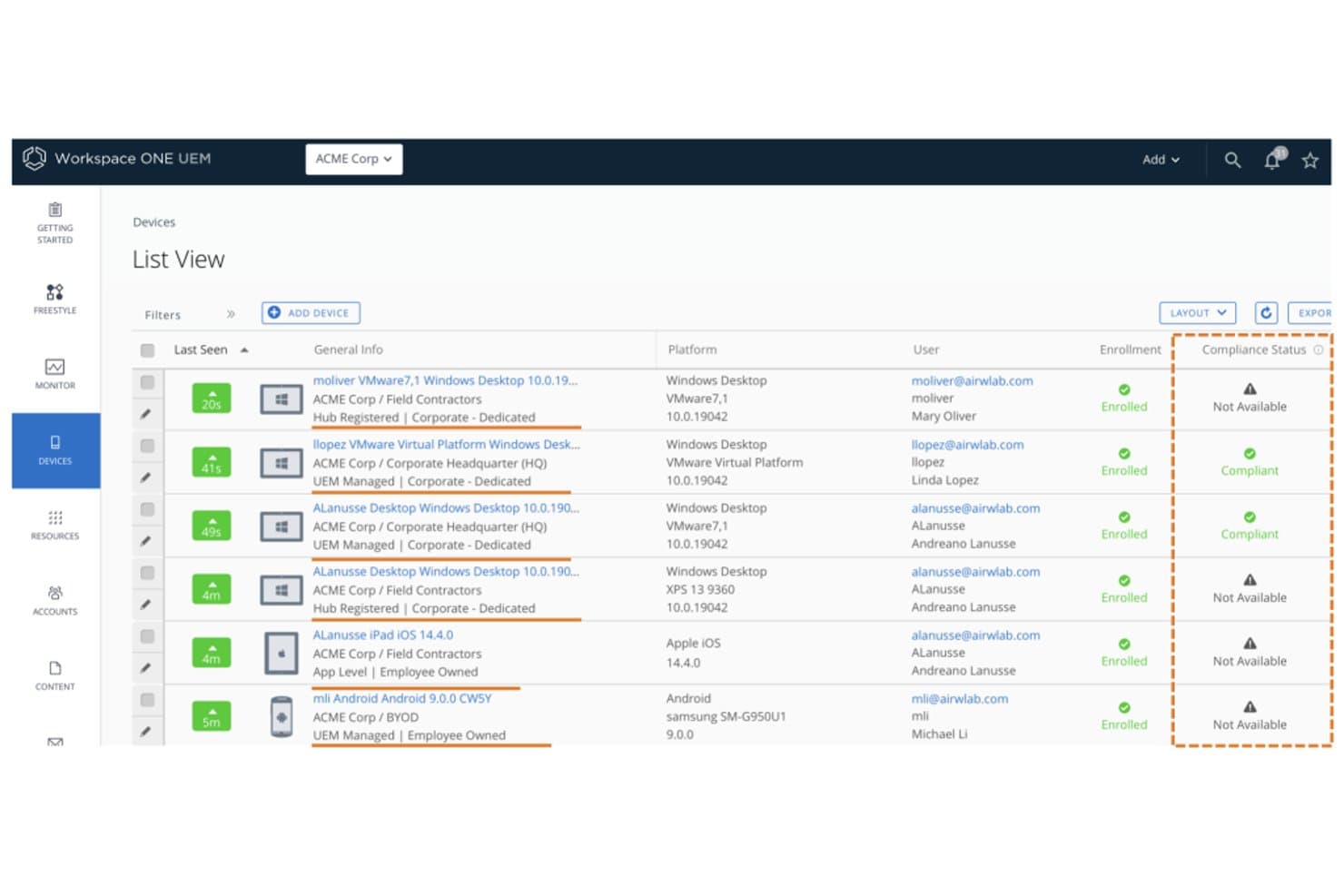
Workspace ONE UEM suit l’état de conformité des appareils parmi les terminaux inscrits. Workspace ONE UEM est une plateforme de gestion unifiée des terminaux d’entreprise proposée par Omnissa, qui couvre la gestion des appareils mobiles, de bureau, durcis et IoT sous iOS, Android, Windows, macOS, ChromeOS et Linux depuis une seule console d’administration.
À qui Workspace ONE UEM convient-il le mieux ?
Workspace ONE UEM convient particulièrement aux grandes entreprises qui gèrent des parcs d’appareils diversifiés et utilisant plusieurs systèmes d’exploitation, pour lesquelles la sécurité zéro confiance et la conformité réglementaire sont incontournables.
Pourquoi j’ai choisi Workspace ONE UEM
Workspace ONE UEM figure dans ma sélection grâce à sa capacité à combiner l’application du modèle zéro confiance et l’intelligence de parc pilotée par l’IA d’une manière que peu de plateformes égalent. Je suis particulièrement impressionné par Omnissa Intelligence, qui utilise l’apprentissage automatique pour détecter les anomalies, prévoir les problèmes liés aux appareils et déclencher une remédiation autonome avant même que les utilisateurs ne soient affectés. Sa défense intégrée contre les menaces mobiles se démarque également : elle identifie les réseaux Wi-Fi malveillants, les tentatives d’hameçonnage et les applications à risque sur iOS, Android et ChromeOS, puis transmet directement ces informations au moteur de conformité afin d’automatiser les réponses.
Principales fonctionnalités de Workspace ONE UEM
- Inscription sans intervention : automatise le provisionnement des appareils sous iOS, Android, Windows et macOS via ABM/DEP, Android Enterprise et Windows Autopilot, sans configuration manuelle.
- Freestyle Orchestrator : un outil de création de flux de travail qui permet aux administrateurs de concevoir et d’automatiser des séquences de déploiement de ressources fondées sur des politiques pour des groupes d’appareils gérés.
- Effacement sélectif des données d’entreprise : supprime uniquement les données d’entreprise des appareils inscrits tout en laissant intact le contenu personnel, ce qui est essentiel lors du retrait d’appareils utilisés dans le cadre du BYOD.
- VPN par application : achemine uniquement le trafic des applications gérées via un tunnel VPN, en séparant le trafic des applications personnelles sur le même appareil.
Intégrations de Workspace ONE UEM
Workspace ONE UEM propose cinq intégrations natives documentées, notamment Microsoft Entra ID, Okta, Google Workspace, ServiceNow et Microsoft Defender for Endpoint. Son API REST prend en charge les intégrations personnalisées, tandis que la connectivité avec ServiceNow inclut l’ITSM et les connecteurs Service Graph.
Pros and Cons
Pros:
- Couvre iOS, Android, Windows, macOS et Linux
- Zéro confiance et défense contre les menaces intégrées
- Détection et remédiation des anomalies pilotées par l’IA
Cons:
- Le déploiement sur site est progressivement abandonné
- Pas de correctifs natifs pour les applications tierces
Learn more about Workspace ONE UEM: 10Idéal pour ses fonctionnalités avancées de mode kiosque
TinyMDM
- Version d'essai gratuite disponible
- À partir de 24 $/appareil/an
Visit WebsiteCustomer Rating:4.7/5
TinyMDM propose des options de configuration du mode kiosque et des contrôles de gestion des applications au sein de son tableau de bord des politiques. TinyMDM est une plateforme de gestion de terminaux mobiles (MDM) conçue pour les organisations ayant besoin de sécuriser, surveiller et contrôler des appareils Android dans des secteurs tels que la vente au détail, la logistique et les services sur le terrain, aidant ainsi les équipes informatiques à gérer de vastes parcs d'appareils.
À qui s'adresse TinyMDM ?
TinyMDM convient particulièrement aux équipes informatiques dans les domaines du commerce de détail, de la logistique et des opérations sur le terrain, qui doivent gérer à grande échelle des flottes d'appareils Android dédiés.
Pourquoi j'ai choisi TinyMDM
J'ai sélectionné TinyMDM parmi les meilleures solutions MDM en raison de ses capacités de mode kiosque qui vont bien au-delà d'un simple verrouillage. J'apprécie le fait qu'il propose à la fois des configurations kiosque mono-application et multi-applications—qu'il s'agisse de déployer une tablette en libre-service dans un environnement de vente ou un appareil terrain bloqué sur une application logistique, la configuration s'adapte parfaitement au besoin. Le mode 'Classique' est particulièrement utile : il bloque les notifications, désactive les boutons Accueil et Tâches récentes, et empêche l'arrêt de l'appareil, ce qui permet à l'utilisateur de rester concentré sur sa tâche. Je trouve aussi la fonction de sessions confidentielles véritablement utile : elle permet à un utilisateur temporaire de se connecter avec ses comptes personnels, puis supprime automatiquement ces données à la fin de la session.
Fonctionnalités clés de TinyMDM
- Contrôle à distance : Accédez et contrôlez à distance les appareils Android enregistrés en temps réel pour résoudre les problèmes sans être sur place.
- Gestion des applications : Déployez, mettez à jour ou retirez silencieusement des applications sur tous les appareils enregistrés directement depuis le tableau de bord.
- Suivi de géolocalisation : Surveillez en temps réel la localisation des appareils sur une carte pour garder un œil sur vos équipes mobiles et vos équipements.
- Politiques de sécurité : Appliquez des exigences de mot de passe, restreignez les paramètres des appareils et effacez à distance les appareils perdus ou volés.
Intégrations TinyMDM
Les intégrations incluent Microsoft Entra ID et une API REST pour l'intégration avec des applications externes.
Pros and Cons
Pros:
- Procédure de configuration simple, y compris l'enrôlement via QR code
- Gestion à distance efficace
- Compatible avec les appareils non-GMS, pour des options élargies de compatibilité
Cons:
- Impossible d'activer à distance les services de localisation
- L'étiquetage des appareils après une configuration groupée peut être fastidieux
Learn more about TinyMDM:
Autres options de logiciels MDM
Bien qu’ils ne figurent pas dans ma liste des 12 meilleurs, ces outils restent des solutions intéressantes à découvrir.
- 11Microsoft IntuneIdéal pour les intégrations Microsoft
- 12Swif.aiIdéal pour les environnements multi-OS avec conformité intégrée
- 13HexnodeIdéal pour l’application de politiques fondée sur le géorepérage
- 14IruIdéal pour les équipes privilégiant Apple qui s’étendent à Windows
- 15BlackBerry UEMIdéal pour la sécurité des terminaux de niveau gouvernemental
- 16Citrix XENMobileIdéal pour la gestion des appareils Android
- 17FileWave Unified Endpoint Management SoftwareIdéal pour la gestion des appareils multi-plateformes
- 18Ivanti Neurons for MDMIdéal pour les appareils personnels (BYOD) et le parc d’entreprise dans une seule console
Comment j'évalue les logiciels MDM
Je divise mon évaluation en critères indispensables — comme l'inscription sans intervention manuelle (zero-touch) et l'application de politiques sur plusieurs plateformes — puis les éléments différenciateurs qui font passer un MDM d'un bon produit à la solution idéale pour votre parc.
Fonctionnalités de base (Critères obligatoires pour cette liste)
Lorsque je sélectionne des outils pour ma liste, j'attribue à chacun une note de 0 (ne propose pas la fonctionnalité) à 5 (excelle dans ce domaine) pour chaque fonctionnalité de base énumérée ci-dessous. Ensuite, je calcule le score total de l'outil en pourcentage. Chaque outil doit atteindre un score total minimum de 75% pour être pris en considération.
- Inscription et approvisionnement des appareils : Je vérifie si la plateforme prend en charge les workflows d'inscription automatisée comme Apple Business Manager et Android Enterprise pour permettre aux administrateurs de livrer des appareils directement aux utilisateurs finaux, déjà préconfigurés.
- Application de politiques à distance : Chaque outil doit permettre de déployer des exigences de mot de passe, des paramètres de chiffrement et des configurations Wi-Fi à des groupes d'appareils, sans intervention manuelle, à grande échelle.
- Verrouillage et effacement à distance : J'évalue si les administrateurs peuvent lancer l'effacement complet d'un appareil volé ou un effacement sélectif qui ne supprime que les données d'entreprise lorsqu'un employé quitte l'organisation.
- Gestion des applications mobiles : La plateforme doit gérer la distribution d'applications via les boutiques publiques et les créations internes, y compris l'attribution de licences via des achats en volume et des mises à jour forcées.
- Surveillance de la conformité et reporting : Je recherche des tableaux de bord en temps réel qui signalent les appareils non conformes, comme un téléphone avec un système d'exploitation obsolète ou sans chiffrement obligatoire.
- Compatibilité multi-OS : Un MDM pertinent doit au minimum gérer iOS et Android, et j'attribue une meilleure note aux plateformes offrant une véritable parité de fonctionnalités sur Windows, macOS et ChromeOS.
Une fois la liste des outils répondant à ces critères obtenue, j'examine les spécificités de chaque plateforme.
Facteurs de différenciation (Ce qui distingue les éditeurs)
Voici comment je compare et distingue les différents fournisseurs :
Fonctionnalités remarquables
La « containerisation » BYOD (Bring Your Own Device) est essentielle lorsque vos collaborateurs utilisent des appareils personnels au travail. Je recherche les plateformes qui séparent strictement les données professionnelles et personnelles afin que le service IT puisse effacer les applications métier sans toucher aux photos privées. L'intégration du modèle zero-trust est un autre point que j'examine, notamment les outils qui relient les contrôles de conformité des appareils à des politiques d'accès conditionnel via des fournisseurs d'identité comme Okta ou Azure AD. J'évalue aussi si la plateforme inclut une protection contre les menaces mobiles intégrée, capable de détecter le phishing ou des attaques réseau, et de mettre automatiquement l'appareil en quarantaine.
Au-delà des fonctionnalités
Les certifications de conformité sont pour moi un critère clé. Une plateforme alignée sur SOC 2, HIPAA ou FedRAMP vous évite d'avoir à mettre en place des contrôles compensatoires spécifiques. Les intégrations d'écosystème ont aussi de l'importance : votre MDM doit se connecter à des outils ITSM comme ServiceNow et à des plateformes SIEM afin que les alertes sur les appareils alimentent directement les processus d'incident existants. J'évalue également la flexibilité des licences, car un parc mixte de tablettes d'entrepôt partagées et de téléphones personnels exige souvent un mélange de modèles par appareil et par utilisateur.
Comment choisir un logiciel MDM
Il est facile de se perdre dans les longues listes de fonctionnalités et les structures tarifaires complexes. Pour vous aider à rester concentré tout au long de votre processus de sélection de logiciels, qui vous est propre, voici une liste de facteurs à garder à l’esprit :
| Facteur | Points à prendre en compte |
|---|---|
| FacteurÉvolutivité | Points à prendre en compteLe logiciel peut-il évoluer avec votre entreprise ? Tenez compte de vos besoins futurs et de la possibilité de gérer facilement des appareils supplémentaires à mesure que votre équipe s’agrandit. |
| FacteurIntégrations | Points à prendre en compteSe connecte-t-il à vos outils existants ? Assurez la compatibilité avec les systèmes actuels tels que le CRM, la messagerie électronique et les applications de productivité afin de préserver l’efficacité des flux de travail. |
| FacteurPersonnalisation | Points à prendre en comptePouvez-vous adapter le logiciel à vos processus ? Recherchez des options permettant de modifier les paramètres, les tableaux de bord et les rapports afin de répondre à vos besoins spécifiques. |
| FacteurFacilité d’utilisation | Points à prendre en compteL’interface est-elle intuitive ? Assurez-vous que votre équipe peut l’utiliser sans formation approfondie, ce qui permet de gagner du temps et de réduire la frustration. |
| FacteurMise en œuvre et intégration | Points à prendre en compteEn combien de temps pouvez-vous démarrer ? Évaluez le temps de configuration et les ressources nécessaires, notamment les supports de formation et l’assistance, pour assurer une transition fluide. |
| FacteurCoût | Points à prendre en compteQuelle est la dépense totale ? Comparez le prix du logiciel à votre budget, en tenant compte des frais cachés, de la maintenance et des économies potentielles. |
| FacteurMesures de sécurité | Points à prendre en compteProtège-t-il vos données ? Recherchez des fonctionnalités telles que le chiffrement, les contrôles d’accès et la conformité aux normes de protection des données afin de protéger les informations sensibles. |
Qu’est-ce qu’un logiciel MDM ?
Les logiciels de gestion des appareils mobiles (MDM) sont des outils qui permettent aux administrateurs informatiques de gérer de manière centralisée tous les appareils connectés au réseau de l’entreprise. Le logiciel se connecte aux appareils de votre entreprise, ce qui vous permet de contrôler les accès, d’installer des logiciels et d’appliquer des politiques de sécurité.
Les logiciels MDM peuvent être utilisés pour les téléphones, les tablettes, les ordinateurs et autres appareils IoT fonctionnant avec des systèmes d’exploitation tels qu’iOS, Android, Windows et bien d’autres. Ils offrent aux administrateurs informatiques un contrôle de niveau entreprise et leur permettent de protéger et de surveiller les appareils contre les menaces de sécurité.
Fonctionnalités
Lorsque vous choisissez un logiciel MDM, soyez attentif aux fonctionnalités clés suivantes :
- Inscription des appareils : cette fonctionnalité vous permet d’ajouter rapidement et en toute sécurité de nouveaux appareils à votre système de gestion, afin que votre équipe puisse être opérationnelle sans difficulté. C’est la première étape pour regrouper tous vos appareils au même endroit.
- Gestion à distance des appareils : contrôlez et dépannez les appareils sans avoir besoin de vous trouver à proximité. Vous pouvez déployer des mises à jour, configurer des paramètres, voire verrouiller ou effacer un appareil s’il est perdu, ce qui peut vous éviter bien des soucis (et des e-mails furieux).
- Gestion des applications : déployez, mettez à jour ou supprimez des applications sur tous vos appareils depuis un tableau de bord unique. C’est un gain de temps considérable qui permet de s’assurer que tout le monde utilise les bons outils.
- Contrôles de sécurité et de conformité : définissez des politiques pour protéger les données sensibles, imposez des exigences en matière de mots de passe, chiffrez les données et veillez à ce que votre organisation respecte les réglementations relatives à la confidentialité.
- Inventaire et suivi des actifs : gardez un œil sur chaque appareil de votre parc, notamment sur son utilisateur, son état et son emplacement. Vous saurez toujours où se trouvent vos investissements technologiques et qui pourrait avoir besoin d’une mise à niveau.
- Gestion des contenus : distribuez des documents importants, des mises à jour ou des formulaires directement sur les appareils des utilisateurs. Vous vous assurez ainsi que chacun dispose de ce dont il a besoin, sans devoir gérer d’interminables échanges d’e-mails.
- Gestion des accès utilisateurs : contrôlez les personnes autorisées à accéder à certaines ressources et applications en fonction de leurs rôles ou de leurs groupes. Vous pouvez ainsi limiter l’accès aux données sensibles aux seules personnes qui en ont besoin.
- Rapports et analyses : obtenez des informations détaillées sur l’utilisation, les incidents de sécurité et la conformité. Les tableaux de bord vous permettent d’identifier les tendances, de résoudre rapidement les problèmes et de montrer à votre responsable que vous maîtrisez la situation.
- Prise en charge multiplateforme : gérez différents types d’appareils et systèmes d’exploitation, comme iOS, Android et Windows, sans avoir besoin d’un outil différent pour chacun. Cela simplifie les choses lorsque votre équipe privilégie l’utilisation de ses propres appareils (BYOD).
Fonctionnalités courantes d’intelligence artificielle des logiciels MDM
Outre les fonctionnalités standard des logiciels MDM présentées ci-dessus, bon nombre de ces solutions intègrent l’intelligence artificielle avec des fonctionnalités telles que :
Authentification adaptative des utilisateurs : grâce à l’intelligence artificielle, le système ajuste les exigences d’authentification en fonction du contexte et du niveau de risque, par exemple en exigeant des étapes de sécurité supplémentaires uniquement lorsqu’un comportement inhabituel est détecté.
Détection prédictive des menaces : l’intelligence artificielle analyse les schémas au sein de votre réseau afin de repérer les risques de sécurité potentiels et de vous en avertir avant qu’ils ne deviennent de graves problèmes. C’est comme disposer d’un garde du corps numérique qui surveille la foule.
Surveillance automatisée de la conformité : l’intelligence artificielle analyse en temps réel les paramètres et l’activité des appareils, en signalant tout élément susceptible d’entraîner une violation des politiques. Cela vous évite une grande partie des vérifications manuelles.
Détection intelligente des anomalies : l’intelligence artificielle apprend à connaître le comportement habituel des appareils de votre organisation et vous avertit instantanément lorsqu’un élément semble anormal, comme des heures ou des lieux d’accès inhabituels.
Recommandations intelligentes en matière de politiques : au lieu de définir vous-même chaque règle, l’intelligence artificielle suggère des politiques optimales en fonction de vos données d’utilisation et de l’évolution de vos besoins en matière de sécurité.
Dépannage automatisé : l’intelligence artificielle identifie les problèmes courants des appareils et propose des solutions, afin que vous passiez moins de temps à éteindre des incendies.
Avantages
La mise en œuvre d’un logiciel MDM offre plusieurs avantages à votre équipe et à votre entreprise. Voici quelques-uns de ceux dont vous pouvez bénéficier :
- Sécurité renforcée : En appliquant des politiques de sécurité et en permettant l’effacement à distance, les logiciels MDM protègent les données sensibles contre les accès non autorisés.
- Efficacité améliorée : L’automatisation de l’inscription des appareils et de la distribution des applications permet de gagner du temps et garantit la cohérence entre les appareils.
- Meilleure conformité : L’inventaire et les rapports réguliers contribuent au maintien de la conformité avec les normes et réglementations du secteur.
- Productivité accrue : Garantir aux utilisateurs l’accès aux applications et outils nécessaires améliore la productivité globale de l’équipe.
- Réduction des coûts : La prévention des violations de données et l’optimisation de l’utilisation des appareils peuvent entraîner des réductions significatives des coûts pour l’entreprise.
- Flexibilité de la gestion : La prise en charge de plusieurs plateformes permet de gérer différents appareils depuis une interface unique, ce qui simplifie les tâches administratives.
- Contrôle basé sur la localisation : Les fonctionnalités de géorepérage renforcent la sécurité en contrôlant l’accès aux appareils selon leur emplacement.
Coûts et tarification
Le choix d’un logiciel MDM nécessite de comprendre les différents modèles tarifaires et forfaits disponibles. Les coûts varient en fonction des fonctionnalités, de la taille de l’équipe, des modules complémentaires et d’autres facteurs. Le tableau ci-dessous récapitule les forfaits courants, leurs prix moyens et les fonctionnalités généralement incluses dans les solutions logicielles MDM :
Tableau comparatif des forfaits des logiciels MDM
| Type de forfait | Prix moyen | Fonctionnalités courantes |
|---|---|---|
| Type de forfaitForfait gratuit | Prix moyen$0 | Fonctionnalités courantesGestion de base des appareils, distribution des applications et rapports limités. |
| Type de forfaitForfait personnel | Prix moyen$5-$15/utilisateur/mois | Fonctionnalités courantesGestion des appareils, distribution des applications, politiques de sécurité et analyses de base. |
| Type de forfaitForfait professionnel | Prix moyen$20-$40/utilisateur/mois | Fonctionnalités courantesFonctionnalités de sécurité avancées, rapports personnalisés, intégrations et rôles utilisateur. |
| Type de forfaitForfait entreprise | Prix moyen$50-$100/utilisateur/mois | Fonctionnalités courantesEnsemble complet de fonctionnalités, analyses avancées, prise en charge de plusieurs plateformes et assistance 24 h/24, 7 j/7. |
FAQ sur les logiciels MDM
Voici quelques réponses aux questions courantes sur les logiciels MDM :