

Alle Geräte auf dem neuesten Stand zu halten, hat nicht nur mit Komfort zu tun, sondern auch damit, Ihr Unternehmen vor sich entwickelnden Cyberbedrohungen zu schützen. Software zur Patchverwaltung nimmt Ihnen die manuelle Arbeit ab, die für die Aufrechterhaltung der Sicherheit erforderlich ist, indem sie Systeme automatisch aktualisiert, die Compliance überwacht und Schwachstellen reduziert. Ganz gleich, ob Sie ein kleines IT-Team verwalten oder den Betrieb eines Großunternehmens beaufsichtigen – das richtige Tool kann Ihnen stundenlange wiederholte Arbeit ersparen und kostspielige Ausfallzeiten verhindern.
Warum Sie unseren Software-Empfehlungen vertrauen können
6,700+
Reviews
20
Industry experts
16+
Evaluation factors
14
Years
Unser Team testet und bewertet Software seit 2012. Als Tech-Führungskräfte wissen wir selbst, wie schwierig – und wichtig – es ist, die richtige Software auszuwählen.
Für diesen Leitfaden haben wir Tools mithilfe von praktischen Tests und unabhängiger Recherche bewertet und dabei unsere Bewertungskriterien angewendet.
Unsere Bewertungen spiegeln unser menschliches redaktionelles Urteilsvermögen wider, keine Verkaufsstrategie.
Expertenprüfer:
- Paulo Gardini MiguelTech-Direktor
 Tim FisherVP für KI
 Gabriel RosasTech Lead & Software-Architekt
 Christhian GruhnTech Lead & Plattform-Architekt

Zusammenfassung der besten Software zur Patchverwaltung
Diese Vergleichstabelle fasst die Preisinformationen meiner besten Empfehlungen für Software zur Patchverwaltung zusammen, damit Sie die beste Lösung für Ihr Budget und Ihre geschäftlichen Anforderungen finden.
| Tool | Best For | Trial Info | Price | ||
|---|---|---|---|---|---|
| 1 | Am besten geeignet für vereinfachte Berichte zur Patch-Compliance | Kostenlose Testversion + kostenlose Demo verfügbar | $3/user/month | Website | |
| 2 | Am besten geeignet für KI-gestütztes ITSM mit intelligentem Patch-Management | 14-tägige kostenlose Testversion verfügbar | $19/user/month | Website | |
| 3 | Am besten geeignet für das Multi-OS-Patch-Management | 30-tägige kostenlose Testversion + kostenlose Demo verfügbar | Ab $149/Techniker/Monat (jährliche Abrechnung) | Website | |
| 4 | Am besten mit Assettransparenz in Echtzeit | Kostenlose Testversion + kostenlose Demo verfügbar | Preis auf Anfrage | Website | |
| 5 | Am besten mit einheitlicher Risikoerkennung und Patch-Bereitstellung | 30-tägige kostenlose Testversion | Preis auf Anfrage | Website | |
| 6 | Am besten für das Patch-Management von Remote-Arbeitskräften geeignet | Kostenloser Plan verfügbar | $10/Benutzer/Monat (mindestens 5 Plätze) | Website | |
| 7 | Am besten für cloud-native Umgebungen geeignet | 15-tägige kostenlose Testversion | $3/Nutzer/Monat (jährliche Abrechnung) | Website | |
| 8 | Am besten mit automatisierter CVE-Behebung | 14-tägige kostenlose Testphase + Demo verfügbar | Ab $12/pro Gerät/Jahr | Website | |
| 9 | Am besten für MSPs, die umfangreiche Anpassungsmöglichkeiten suchen | $19/user/month (jährlich abgerechnet) + $2500 Grundgebühr pro Monat | Website | ||
| 10 | Am besten für kleine Unternehmen mit begrenztem Budget | Kostenlose Testversion + kostenlose Demo verfügbar | $4/user/Monat | Website |


Tests der besten Software zur Patchverwaltung
Nachfolgend finden Sie meine detaillierten Zusammenfassungen der besten Softwarelösungen zur Patchverwaltung, die es in meine Auswahlliste geschafft haben. In meinen Tests erhalten Sie einen detaillierten Überblick über die wichtigsten Funktionen, Vor- und Nachteile, Integrationen und idealen Anwendungsfälle jedes Tools, damit Sie die beste Lösung für sich finden.
 Am besten geeignet für vereinfachte Berichte zur Patch-Compliance
- Kostenlose Testversion + kostenlose Demo verfügbar
- $3/user/month
Visit WebsiteCustomer Rating:4.7/5
Dashboard-Übersicht in der NinjaOne Patch-Management-Software NinjaOne ist eine einheitliche IT-Betriebslösung, die ein optimiertes Patch-Management beinhaltet. Die Berichterstattung zur Patch-Compliance ist vereinfacht und übersichtlich gestaltet und richtet sich an Unternehmen, die genau diese Funktion benötigen.
Warum ich NinjaOne ausgewählt habe: Ich habe NinjaOne gewählt, weil es einen intuitiven Ansatz für die Berichterstattung zur Patch-Compliance bietet. Genau dieser Aspekt hebt das Tool hervor und macht es besonders geeignet für alle, die vereinfachte Berichte in Compliance-Umgebungen benötigen.
Hervorstechende Funktionen & Integrationen:
NinjaOne bietet automatisiertes Patchen, benutzerdefinierte Skripterstellung und Echtzeitüberwachung. Die Plattform verfügt zudem über intuitive Dashboards, die die Compliance-Berichterstattung vereinfachen.
Das Tool lässt sich mit gängigen RMM- und PSA-Tools sowie Cloud-Speicherlösungen wie Dropbox und Google Drive integrieren.
Pros and Cons
Pros:
- Vereinfachte Berichte zur Patch-Compliance
- Optionen für benutzerdefinierte Skripte
- Niedriger Einstiegspreis
Cons:
- Eingeschränkte Unterstützung für Nicht-Windows-Plattformen
- Weniger fortgeschrittene Funktionen
- Dashboards können überladen wirken.
Learn more about NinjaOne: Am besten geeignet für KI-gestütztes ITSM mit intelligentem Patch-Management
- 14-tägige kostenlose Testversion verfügbar
- $19/user/month
Visit WebsiteCustomer Rating:4.6/5
Testen und Bereitstellen von Patches in der Freshservice Patch-Management-Software Freshservice ist eine ITSM-Plattform, die Servicemanagement mit automatisiertem Patch-Management kombiniert. Sie hilft Ihnen, Vorfälle, Assets und Änderungen zu verwalten, während KI-gestützte Workflows die Patch-Bereitstellung und Geräteüberwachung optimieren.
Warum ich mich für Freshservice entschieden habe: Ich habe Freshservice ausgewählt, weil es KI-gestütztes IT-Service-Management mit automatisiertem Patch-Test und -Bereitstellung in einem einzigen System vereint. Die intelligente Automatisierung unterstützt die Ticket-Zuweisung und Service-Workflows, während integrierte Patch-Management-Tools Sie dabei unterstützen, Updates geräteübergreifend zu identifizieren, zu testen und bereitzustellen, ohne auf separate Software angewiesen zu sein.
Herausragende Funktionen & Integrationen:
Freshservice bietet Funktionen wie automatische Gerätediscovery, automatisiertes Patch-Testing und -Deployment. Zudem verfügt es über eine integrierte CMDB für ein besseres Asset-Management.
Es integriert sich mit gängigen ITSM-Tools, IT-Betriebswerkzeugen und Software wie Jira und Slack.
Pros and Cons
Pros:
- ITIL-Konformität
- Integrierte CMDB für Asset-Management
- Flexible Integrationen
Cons:
- Höherer Einstiegspreis
- Überdimensioniert für Non-ITIL-Organisationen
- Begrenzte patch-spezifische Funktionen.
Learn more about Freshservice: Am besten geeignet für das Multi-OS-Patch-Management
- 30-tägige kostenlose Testversion + kostenlose Demo verfügbar
- Ab $149/Techniker/Monat (jährliche Abrechnung)
Visit WebsiteCustomer Rating:4.6/5
Atera-Automatisierungsprofil zeigt geplantes Betriebssystem-Patch-Management, Software-Updates und Wartungsaufgaben, die alle von einem zentralen Dashboard aus verwaltet werden. Atera ist eine Komplettlösung für IT-Profis und Managed Service Provider und bietet Werkzeuge für das Remote Monitoring und Management. Die Lösung wurde entwickelt, um Ihre Arbeitsbelastung durch Automatisierung verschiedener Prozesse, einschließlich Multi-OS-Patch-Management, zu vereinfachen.
Warum ich Atera ausgewählt habe: Ich habe Atera gewählt, weil es die Patch-Installationen auf mehreren Betriebssystemen automatisiert, was Ihnen viel Zeit sparen kann. Egal ob Sie mit Windows, macOS oder Linux arbeiten – Atera bietet Ihnen dank automatischer Planung und Installationsfunktionen umfassende Unterstützung. So sind Ihre Systeme stets auf dem neuesten Stand, ohne dass Sie manuell eingreifen müssen.
Ein weiterer Grund, warum Atera hervorsticht, ist die Fähigkeit, Neustarts und patchbezogene Aufgaben zu verwalten, ohne Ihre Arbeit zu unterbrechen. So können Sie sich auf wichtigere Aufgaben konzentrieren und wissen, dass das Patch-Management effizient abläuft. Diese Funktionen machen es zu einer zuverlässigen Wahl, um Ihre Systeme sicher zu halten.
Hervorstechende Funktionen & Integrationen:
Zu den Funktionen gehören automatisiertes Patch-Management für Windows, macOS und Linux. Es gibt eine Option für die Ausführung des Agents im Offline-Modus, sodass Patches auch dann angewendet werden können, wenn Geräte nicht mit dem Internet verbunden sind. Zusätzlich bietet Atera ausführliche Berichte über den Patch-Status.
Die Software lässt sich in Microsoft Teams, Slack, ServiceNow, Okta, Jira Software Cloud, Azure Active Directory, Microsoft Outlook, WhatsApp-Benachrichtigungen, Acronis Cyber Protect Cloud, Google Sheets, ChatGPT (OpenAI) und monday.com integrieren.
Pros and Cons
Pros:
- Unbegrenzte Endpunktabdeckung mit einer einzigen Technikerlizenz – kosteneffektiv für MSPs
- Kombiniert Patch-Management, Fernzugriff und Helpdesk-Funktionen
- Eigene Skripte und Echtzeit-Dashboards bieten Transparenz im Patch-Workflow
Cons:
- Möglichkeiten zum Patch-Rollback sind im Vergleich zu Enterprise-Tools eingeschränkt
- Compliance- und Auditing-Berichte könnten für stark regulierte Branchen unzureichend sein
- Benutzeroberfläche kann bei Verwaltung großer Geräteflotten oder Massenaktionen umständlich wirken
 Am besten mit Assettransparenz in Echtzeit
- Kostenlose Testversion + kostenlose Demo verfügbar
- Preis auf Anfrage

Heimdals einheitliches Verwaltungs-Dashboard bietet Ihnen einen klaren Überblick über die Konformität der Endgeräte, den Patch-Status und die Sicherheitskontrollen auf allen verwalteten Geräten. Die Software zur Patchverwaltung von Heimdal zeichnet sich als vielseitige Lösung für Unternehmen aus, die ihre Cybersicherheitslage verbessern möchten. Sie ist besonders für IT-Fachleute und Managed-Service-Provider (MSPs) attraktiv, die Softwareaktualisierungen nahtlos über verschiedene Plattformen hinweg verwalten müssen. Durch die Automatisierung des Patch-Bereitstellungsprozesses begegnet Heimdal der Herausforderung, Systeme sicher und konform mit Branchenvorschriften zu halten, und ist damit eine ideale Wahl für Bereiche wie Gesundheitswesen, Bildung und Regierung.
Warum ich Heimdal ausgewählt habe
Ich habe Heimdal aufgrund seiner Fähigkeit ausgewählt, den Patch-Bereitstellungsprozess zu automatisieren, wodurch der manuelle Arbeitsaufwand erheblich reduziert und die rechtzeitige Durchführung von Aktualisierungen sichergestellt wird. Mit Unterstützung für mehr als 350 Anwendungen von Drittanbietern bietet Heimdal eine umfassende Abdeckung, um Ihre Systeme sicher und konform zu halten. Die Integration in Heimdals einheitliche Sicherheitsplattform stärkt die Cybersicherheitsstrategie Ihres Unternehmens zusätzlich und macht die Lösung zu einer praktischen Wahl für alle, die eine effektive Patchverwaltung benötigen.
Wichtige Funktionen von Heimdal
Neben der automatisierten Patch-Bereitstellung habe ich festgestellt, dass Heimdal mehrere weitere wertvolle Funktionen bietet:
- Schwachstellenverwaltung: Durchsucht Ihre Systeme kontinuierlich, um potenzielle Sicherheitsbedrohungen zu erkennen und zu beheben.
- Assetverwaltung: Bietet Echtzeittransparenz über die IT-Assets Ihres Unternehmens und unterstützt Sie dabei, diese effektiv zu verfolgen und zu verwalten.
- Anpassbare Patch-Zeitpläne: Ermöglicht Ihnen, Zeitpunkte für die Patch-Bereitstellung festzulegen, die Betriebsunterbrechungen minimieren.
- Priorisierte Serveraktualisierungen: Optimiert die Patch-Verteilung in Umgebungen mit begrenzter Bandbreite und stellt sicher, dass kritische Aktualisierungen zuerst die priorisierten Endpunkte erreichen.
Heimdal-Integrationen
Heimdal bietet derzeit keine nativen Integrationen; die Plattform unterstützt jedoch benutzerdefinierte API-basierte Integrationen.
Pros and Cons
Pros:
- Automatisiert die Patchverwaltung auf allen Endgeräten
- Leistungsstarke Erkennung von Schwachstellen und Bedrohungen
- Detaillierte Transparenz über Assets und Lizenzen
Cons:
- Keine nativen Integrationen verfügbar
- Die Benutzeroberfläche erfordert eine Einarbeitungszeit
Learn more about Heimdal: Am besten mit einheitlicher Risikoerkennung und Patch-Bereitstellung
- 30-tägige kostenlose Testversion
- Preis auf Anfrage
Visit WebsiteCustomer Rating:4.5/5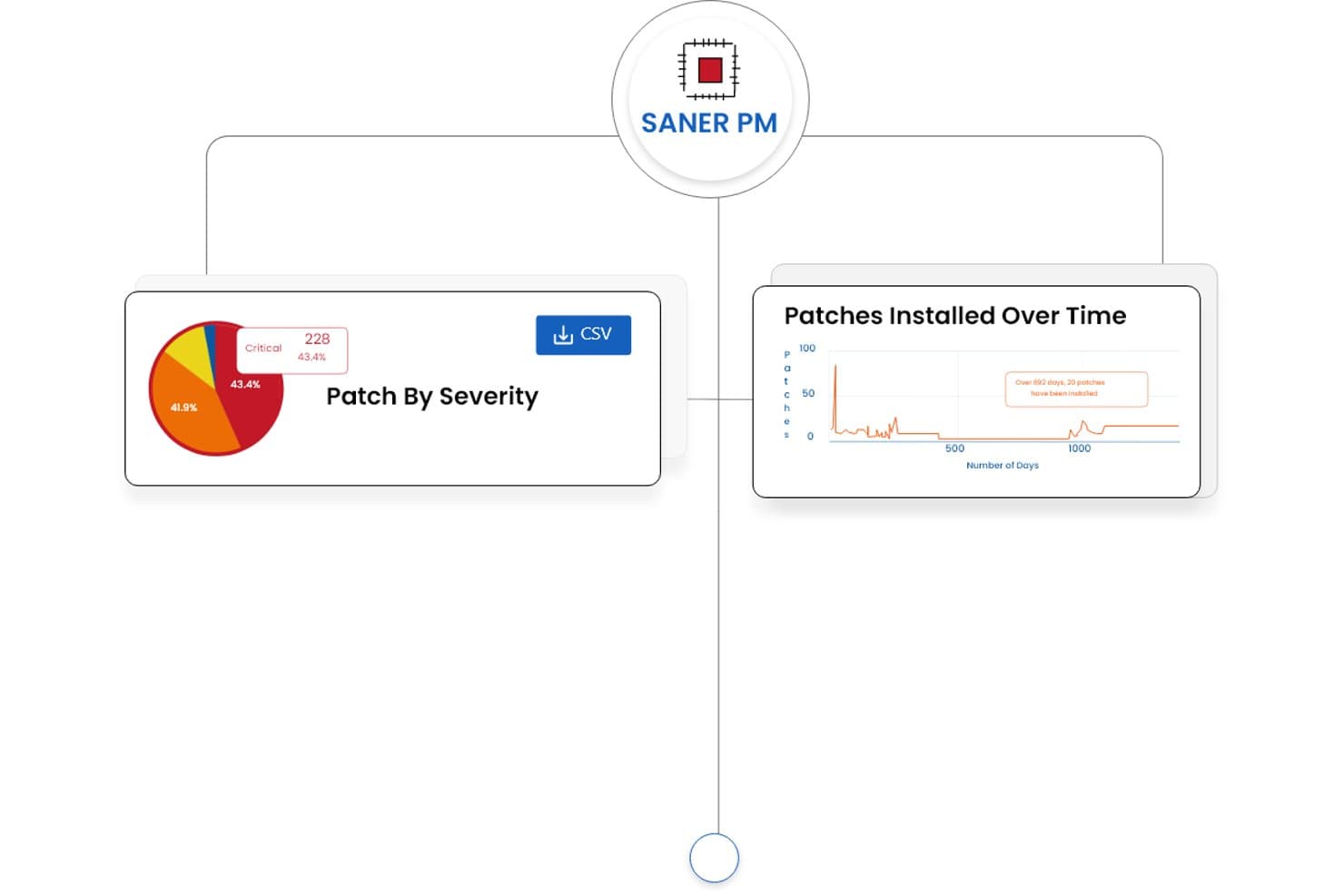
SecPod (Saner Platform) bietet Dashboards für das Patch-Management, die eine Aufschlüsselung des Patch-Schweregrads und Trends der im Laufe der Zeit installierten Patches anzeigen. Die Saner Platform von SecPod ist eine cloudnative Lösung für Patch-Management und die Verwaltung von Schwachstellenrisiken, die kontinuierliche Risikoerkennung, automatisierte Patch-Bereitstellung und Compliance-Berichte für Windows, macOS, Linux und mehr als 550 Anwendungen von Drittanbietern kombiniert.
Für wen ist SecPod (Saner Platform) am besten geeignet?
Sicherheits- und IT-Betriebsteams in mittelgroßen bis großen Unternehmen, die Schwachstellenerkennung und Patch-Beseitigung von einer einzigen Plattform aus verwalten müssen.
Warum ich mich für SecPod (Saner Platform) entschieden habe
SecPod (Saner Platform) gehört zu den besten Lösungen auf meiner Auswahlliste, weil es zwei normalerweise getrennte Arbeitsabläufe – Schwachstellenerkennung und Patch-Bereitstellung – in einer agentenbasierten Plattform zusammenführt. Besonders gefällt mir, wie die Plattform die SSVC-Bewertung des Geschäftskontexts, die EPSS-Wahrscheinlichkeit einer Ausnutzung und CISA-KEV-Daten kombiniert, um aufzuzeigen, welche Patches tatsächlich dringend angewendet werden müssen. Das Zurücksetzen mit nur einem Klick ist besonders nützlich, wenn ein Patch in einer Produktionsumgebung Probleme verursacht und schnell ein stabiler Zustand wiederhergestellt werden muss.
Hauptfunktionen von SecPod (Saner Platform)
- Automatisiertes Patchen mehrerer Betriebssysteme: Wendet kontinuierlich Patches für Windows, macOS, Linux und mehr als 550 Anwendungen von Drittanbietern über eine einzige Konsole an.
- Individuelle Patch-Paketierung: Ermöglicht Administratoren, organisationsspezifische oder intern entwickelte Patches zusammen mit Hersteller-Updates bereitzustellen.
- Compliance-Berichte: Erstellt exportierbare, prüfungsbereite Berichte, die regulatorischen Rahmenwerken wie HIPAA, PCI und SOC 2 zugeordnet sind.
- Cloudnative Agentenarchitektur: Ermöglicht Patchen und Schwachstellenmanagement für verteilte und Remote-Endpunkte, ohne auf VPNs angewiesen zu sein.
Integrationen von SecPod (Saner Platform)
Native Integrationen sind nicht eindeutig dokumentiert. Für individuelle Integrationen steht eine API zur Verfügung.
Pros and Cons
Pros:
- Vereinheitlichte Schwachstellenerkennung und Patch-Beseitigung
- Risikobasierte Priorisierung von Patches mithilfe realer Bedrohungsdaten
- Unterstützt Patches für mehr als 550 Anwendungen von Drittanbietern
Cons:
- Die Berichtsschnittstelle kann anfangs überwältigend wirken
- Nur begrenzte Integrationsmöglichkeiten mit Drittanbietern verfügbar
Learn more about SecPod (Saner Platform): Am besten für das Patch-Management von Remote-Arbeitskräften geeignet
- Kostenloser Plan verfügbar
- $10/Benutzer/Monat (mindestens 5 Plätze)
Visit WebsiteCustomer Rating:4.9/5
Übersicht über das 'Endpoints'-Dashboard in der Action1 Patch-Management-Software Action1 ist eine cloudbasierte Patch-Management-Lösung, die Unternehmen dabei unterstützt, die Bereitstellung von Software-Patches für Remote-Arbeitskräfte zu automatisieren. Dies ist besonders vorteilhaft für Unternehmen mit vielen Remote-Mitarbeitern, die eine konsistente Patch-Versorgung benötigen, und macht es zur besten Wahl für das Patch-Management verteilter Belegschaften.
Warum ich Action1 ausgewählt habe: Ich habe Action1 für diese Zusammenstellung ausgewählt, weil die cloudbasierte Architektur es Unternehmen ermöglicht, Patches effektiv bei Remote-Arbeitskräften zu verwalten. Es hebt sich dadurch hervor, dass es Sicherheit und Leistung verteilter Endpunkte aufrechterhält.
Deshalb ist es das beste Tool für Unternehmen, die Patch-Management für Remote-Arbeitskräfte benötigen.
Hervorstechende Funktionen & Integrationen:
Die wichtigsten Funktionen von Action1 sind automatisierte Patch-Bewertungen, Echtzeitberichte und Multi-Plattform-Unterstützung, was Unternehmen mehr Flexibilität beim Patch-Management über verschiedene Betriebssysteme hinweg bietet. Es integriert sich außerdem mit verbreiteten Systemen wie Active Directory und SCCM und ist somit anpassungsfähig für Unternehmen mit bestehender Infrastruktur.
Pros and Cons
Pros:
- Cloudbasierte Architektur ist ideal für die Verwaltung von Remote-Arbeitskräften.
- Echtzeitberichte liefern sofortige Einblicke in den Patch-Status.
- Multi-Plattform-Unterstützung deckt eine breite Palette von Betriebssystemen ab.
Cons:
- Mindestsitz-Anforderungen sind möglicherweise nicht für kleinere Organisationen geeignet.
- Einarbeitungszeit für Teams, die neu im Patch-Management sind.
- Begrenzte Funktionen im Vergleich zu einigen anderen Enterprise-Lösungen.
Learn more about Action1: Am besten für cloud-native Umgebungen geeignet
- 15-tägige kostenlose Testversion
- $3/Nutzer/Monat (jährliche Abrechnung)
Visit WebsiteCustomer Rating:4.7/5
Systemverwaltungsfunktion in der Automox Patch-Management-Software Automox automatisiert das Patch-Management in der Cloud, von der Erkennung bis zur Bereitstellung. Es ist flexibel und skalierbar und eignet sich perfekt zur Absicherung von Remote-Endpunkten.
Warum ich Automox gewählt habe: Ich habe Automox für diese Liste ausgewählt, weil es einen umfassenden, cloud-nativen Ansatz für das Patch-Management bietet. In einer Welt, in der Remote-Arbeit immer häufiger wird, ist ein Tool, das von Grund auf für cloudbasierte Vorgänge konzipiert ist, von unschätzbarem Wert.
Automox sticht hervor, weil es Remote-Endpunkte verwaltet und absichert und sich daher besonders für Unternehmen eignet, die in cloud-nativen Umgebungen agieren.
Hervorstechende Funktionen & Integrationen:
Automox bietet Funktionen wie automatische Systemerkennung, kontinuierliche Schwachstellenbewertung und richtlinienbasierte Automatisierung. Diese Funktionen erleichtern das Patch-Management und verringern die Sicherheitsrisiken, die mit veralteter Software verbunden sind.
Darüber hinaus integriert sich Automox mit gängigen Drittanbieter-Tools wie Slack, Jira und Webhooks, was eine bessere Kommunikation und Koordination in Ihrem Unternehmen ermöglicht.
Pros and Cons
Pros:
- Cloud-native Plattform, entwickelt für moderne, verteilte Unternehmen.
- Richtlinienbasierte Automatisierung zur Vereinfachung von Patch-Management-Aufgaben.
- Integriert sich mit beliebten Drittanbieter-Tools für bessere Kommunikation und Koordination.
Cons:
- Für Unternehmen, die nicht vollständig cloudbasiert arbeiten, weniger geeignet.
- Preise basieren auf jährlicher Abrechnung, was für manche Unternehmen ungünstig sein könnte.
- Erfordert technisches Know-how für Einrichtung und Konfiguration.
 Am besten mit automatisierter CVE-Behebung
- 14-tägige kostenlose Testphase + Demo verfügbar
- Ab $12/pro Gerät/Jahr
Visit WebsiteCustomer Rating:4.6/5
PDQ Deploy zeigt ein Echtzeit-Deployments-Dashboard mit Installationen von Softwarepaketen inklusive Online-Status, Abschlussstatus und verstrichener Zeit über mehrere Endpunkte hinweg. PDQ Connect ist eine cloudbasierte Patch-Management-Plattform für Windows-Geräte, die automatisierte Patch-Bereitstellung, Remote-Geräteinventarisierung, Erstellung von eigenen Softwarepaketen und rollenbasierte Zugriffskontrollen bietet.
Für wen ist PDQ Connect am besten geeignet?
IT-Teams in kleinen bis mittelgroßen Unternehmen, die Windows-Geräte in verteilten oder Remote-Umgebungen verwalten.
Warum habe ich PDQ Connect ausgewählt?
Ich habe PDQ Connect als eines der besten ausgewählt, weil es die Behebung von CVEs automatisiert, sodass mein Team Schwachstellen schnell beheben kann, sobald sie erkannt werden. Mir gefällt, dass es CVE-Daten importiert, sie unseren Windows-Geräten zuordnet und Patches ohne manuelle Eingriffe ausrollt. Dieser Ansatz ermöglicht es uns, Bedrohungen einen Schritt voraus zu sein und das Risiko einer Sicherheitslücke in unserer Umgebung zu verringern.
Wichtige Funktionen von PDQ Connect
- Remote-Geräteinventarisierung: Anzeige und Verwaltung aller Windows-Geräte in Ihrer Umgebung über ein zentrales Dashboard.
- Bereitstellung eigener Softwarepakete: Eigene Softwarepakete erstellen und gezielt auf Geräte ausrollen.
- Rollenbasierte Zugriffskontrolle: Berechtigungen und Rollen für Teammitglieder zur sicheren Verwaltung zuweisen.
- Echtzeit-Berichterstattung: Aktuelle Berichte zum Patch-Status und zur Geräte-Compliance generieren.
PDQ Connect Integrationen
Native Integrationen sind nicht eindeutig dokumentiert. PDQ Connect stellt eine API für individuelle Integrationen bereit.
Pros and Cons
Pros:
- Echtzeit-Geräteinventarisierung und Statusaktualisierungen
- Automatisierte Patch-Planung für Windows-Geräte
- Detaillierte Compliance- und Audit-Berichte
Cons:
- Fehlende integrierte Schwachstellen-Scan-Funktionen
- Begrenzte Möglichkeiten zur Anpassung der Berichterstellung
Learn more about PDQ Connect: Am besten für MSPs, die umfangreiche Anpassungsmöglichkeiten suchen
- $19/user/month (jährlich abgerechnet) + $2500 Grundgebühr pro Monat
Visit WebsiteCustomer Rating:4/5
ConnectWise Automate Monitoring-Funktion für Patch-Management ConnectWise Automate wurde entwickelt, um Managed Service Providern (MSPs) dabei zu helfen, alle Aspekte des Patch-Managements zu verwalten und zu automatisieren. Dank der anpassbaren Struktur können Sie die Funktionen des Tools individuell auf Ihre speziellen betrieblichen Anforderungen zuschneiden, was es ideal für MSPs macht, die umfangreiche Anpassungsmöglichkeiten benötigen.
Warum ich ConnectWise Automate gewählt habe: Bei der Auswahl der Tools für diese Liste war Anpassbarkeit ein zentrales Kriterium. ConnectWise Automate bietet umfassende Anpassungsoptionen, sodass MSPs die Software optimal auf spezifische Kundenanforderungen oder Nischenmärkte abstimmen können.
Diese besondere Fähigkeit rechtfertigt die Position als beste Lösung für MSPs, die umfangreiche Anpassungsmöglichkeiten bei Patch-Management-Lösungen verlangen.
Herausragende Funktionen & Integrationen:
Zu den wichtigsten Funktionen gehören rollenbasierte Sicherheit, automatisiertes Patch-Testing und anpassbare Berichtstools, wodurch MSPs ihre Patch-Management-Prozesse präzise abstimmen können.
ConnectWise Automate lässt sich zudem in andere Lösungen der ConnectWise Suite sowie in Drittanbieter-Tools wie LabTech, ScreenConnect und SQL Server integrieren und bietet damit ein umfassendes Ökosystem für MSPs.
Pros and Cons
Pros:
- Umfangreiche Anpassungsmöglichkeiten erlauben Nischen-Einsätze.
- Rollenbasierte Sicherheit sorgt für eine differenzierte Kontrolle über das System.
- Umfassendes Ökosystem mit diversen Integrationen für bessere Betriebsabläufe.
Cons:
- Komplexität könnte das System für kleine Teams abschreckend machen.
- Grundgebühren und jährliche Abrechnung können für manche Unternehmen eine finanzielle Belastung darstellen.
- Es kann zusätzliche Schulungen erfordern, um alle Anpassungsoptionen vollständig zu nutzen.
Learn more about ConnectWise Automate: 10Am besten für kleine Unternehmen mit begrenztem Budget
ITarian
- Kostenlose Testversion + kostenlose Demo verfügbar
- $4/user/Monat
Visit WebsiteCustomer Rating:3.9/5
Itarians Patch-Verfahren für das Patch-Management Itarian ist eine cloudbasierte IT-Management-Plattform, die eine Reihe von Diensten einschließlich Patch-Management anbietet. Dank seiner Erschwinglichkeit und dem schlanken Funktionsumfang ist es ideal für kleine Unternehmen mit begrenztem Budget.
Warum ich Itarian gewählt habe: Ich habe Itarian ausgewählt, weil die Plattform eine kostengünstige Option für kleine Unternehmen bietet, ohne auf grundlegende Funktionen zu verzichten. Was Itarian auszeichnet, ist die Kombination aus Kosteneffizienz und Nutzen. Es eignet sich am besten für kleine Unternehmen mit begrenztem Budget und bietet eine Lösung, die Kosten und Funktionalität effektiv in Einklang bringt.
Hervorstechende Funktionen & Integrationen:
Itarian bietet automatisiertes Patch-Management, Schwachstellenbewertung und Fernüberwachung. Die Plattform liefert außerdem Echtzeit-Benachrichtigungen, um Administratoren stets informiert zu halten.
Das Tool integriert sich mit gängigen Betriebssystemen wie Windows, Linux und macOS und bietet API-Unterstützung für erweiterte Funktionalität.
Pros and Cons
Pros:
- Kostengünstig für kleine Unternehmen
- Enthält grundlegende Funktionen wie Schwachstellenbewertung
- Unterstützt mehrere Betriebssysteme
Cons:
- Begrenzte erweiterte Funktionen
- Benutzeroberfläche kann für Einsteiger komplex sein
- Keine native Integration mit beliebten Business-Apps.
Learn more about ITarian:
Weitere Software zur Patchverwaltung
Hier sind einige weitere Optionen für Software zur Patchverwaltung, die es nicht in meine Auswahlliste geschafft haben, aber dennoch einen Blick wert sind:
- 11AcronisAm besten geeignet für diejenigen, die Datensicherung und Patch-Management in einem benötigen
- 12SolarWinds Patch ManagerAm besten für große Unternehmensskalierbarkeit
- 13IvantiAm besten geeignet zur Integration mit anderen Ivanti-Produkten
- 14ManageEngine Patch Management PlusAm besten für zentrale Kontrolle heterogener Netzwerke
- 15N-central Patch ManagementAm besten zur Automatisierung routinemäßiger Patch-Aufgaben
- 16ScalefusionAm besten für automatisierte Patch-Bereitstellung
Wie ich Patch-Management-Software bewerte
Egal, ob Sie entfernte Endgeräte patchen oder Updates für Drittanbieter-Apps über verschiedene Betriebssysteme hinweg verwalten: Ich bewerte jedes Tool in zwei Ebenen – den Basisanforderungen, die es erfüllen muss, und den Besonderheiten, die es hervorheben.
Kernfunktionen (Grundvoraussetzungen für diese Liste)
Wenn ich Tools für meine Liste auswähle, bewerte ich jedes einzelne auf einer Skala von 0 (bietet die Funktion nicht) bis 5 (überzeugt in diesem Bereich) hinsichtlich jeder unten aufgeführten Kernfunktion. Anschließend rechne ich die Gesamtpunktzahl des Tools in einen Prozentsatz um. Jedes Tool muss eine Mindestgesamtwertung von 75 % erreichen, um für die Aufnahme berücksichtigt zu werden.
- Patch-Erkennung & Inventarisierung: Ich prüfe, ob das Tool kontinuierlich Endpunkte scannt und ein Echtzeitbild fehlender Patches erstellt, statt lediglich Ad-hoc-Scans durchzuführen, deren Ergebnisse schon nach wenigen Stunden veraltet sind.
- Automatisierte Patch-Bereitstellung: Richtliniengesteuerte Bereitstellung ist hier entscheidend – ich achte auf konfigurierbare Freigabeworkflows und Gruppierungslogik, damit Sie Updates beispielsweise auf Finanzserver anders verteilen können als auf Entwickler-Arbeitsplätzen.
- Unterstützung von Betriebssystemen & Drittanbieter-Apps: Ein Tool, das nur Windows-Updates abdeckt, reicht nicht aus. Ich bewerte die Breite der Betriebssystemunterstützung (macOS, Linux) und den Drittanbieter-Katalog für Apps wie Chrome, Zoom und Java.
- Patch-Planung & Rollback: Ich achte auf Wartungsfenster, gestufte Rollouts und zuverlässige Rücksetzoptionen – denn ein fehlerhafter Patch, der ohne Rücknahmeoption mitten am Tag in die Produktion geschoben wird, ist ein echtes Risiko.
- Compliance-Reporting & Auditing: Berichte müssen den Patch-Status mit Rahmenwerken wie PCI-DSS oder CIS-Benchmarks abgleichen. Ich prüfe, ob Sie prüfungsfähige Ergebnisse generieren können, ohne Daten manuell zusammensetzen zu müssen.
- Remote- & Verteiltes Patchen: Mit hybriden Arbeitsmodellen bewerte ich, wie jedes Tool Endgeräte außerhalb des Firmennetzwerks behandelt – etwa durch cloud-native Agenten, Relay-Server oder Peer-to-Peer-Verteilung.
Sobald ich eine Liste von Tools habe, die diese Kriterien erfüllen, betrachte ich, was jede Plattform besonders macht.
Unterscheidungsmerkmale (Was die Anbieter abhebt)
So vergleiche und unterscheide ich verschiedene Anbieter:
Herausragende Funktionen
Schwachstellenpriorisierung ist ein großes Thema – ich suche nach Tools, die CVE/CVSS-Daten in die Patch-Warteschlangen integrieren, damit Ihr Team zuerst aktiv ausgenutzte Bedrohungen behebt und nicht nur das neueste Update. Pre-Deployment-Tests sind ebenso wichtig, denn eine Sandbox oder ein Testring kann ein fehlerhaftes Treiber-Update auffangen, bevor es Ihre Produktionsumgebung erreicht. Ich bewerte auch die Unterstützung für eigene Patches, mit denen Sie interne Anwendungsupdates zusammen mit vom Hersteller bereitgestellten Patches über denselben Workflow paketieren und bereitstellen können.
Mehr als Funktionen
Integrationen sind hier sehr wichtig – ich prüfe, ob jedes Tool sich nativ mit Ihrer ITSM-, SIEM- und Endpoint-Security-Landschaft verbindet, sodass Patchdaten in bestehende Incident- und Schwachstellenprozesse übergehen. Compliance-Ausrichtung ist ebenso entscheidend, besonders wenn Ihr Unternehmen den Patch-Status beispielsweise auf HIPAA oder SOC 2 abbildet. Ich bewerte außerdem die Transparenz bei Preisen und Lizenzierung, da modellbasierte Abrechnung pro Endpunkt ganz anders skaliert als Festpreis-Abos, wenn die Anzahl der Geräte von 500 auf 5.000 wächst.
So wählen Sie Software zur Patchverwaltung aus
Es ist leicht, sich in langen Funktionslisten und komplexen Preisstrukturen zu verlieren. Damit Sie sich bei der Auswahl der für Sie passenden Software auf das Wesentliche konzentrieren können, finden Sie hier eine Checkliste mit Faktoren, die Sie berücksichtigen sollten:
| Faktor | Zu beachten |
|---|---|
| FaktorSkalierbarkeit | Zu beachtenKann das Tool mit Ihrem Unternehmen wachsen? Berücksichtigen Sie die Anzahl der Geräte, die Sie bei Ihrer Expansion verwalten werden. Suchen Sie nach Lösungen, die sich problemlos skalieren lassen. |
| FaktorIntegrationen | Zu beachtenFunktioniert die Lösung mit Ihren bestehenden Systemen? Stellen Sie die Kompatibilität mit Ihren aktuellen Tools sicher, etwa mit Sicherheitssoftware oder IT-Management-Plattformen. |
| FaktorAnpassbarkeit | Zu beachtenKönnen Sie die Software an Ihre Anforderungen anpassen? Suchen Sie nach Tools, mit denen Sie Dashboards und Berichte an Ihre Arbeitsabläufe anpassen können. |
| FaktorBenutzerfreundlichkeit | Zu beachtenIst die Benutzeroberfläche intuitiv? Ein benutzerfreundliches Design reduziert den Schulungsaufwand und hilft Ihrem Team, effizienter zu arbeiten. |
| FaktorImplementierung und Einführung | Zu beachtenWie lange dauert es, bis die Lösung einsatzbereit ist? Berücksichtigen Sie die benötigten Ressourcen und ob der Anbieter Unterstützung wie Schulungsvideos oder Tutorials bereitstellt. |
| FaktorKosten | Zu beachtenWie hoch sind die Gesamtbetriebskosten? Schauen Sie über den angegebenen Preis hinaus. Berücksichtigen Sie versteckte Gebühren, langfristige Verträge und ob die Preisgestaltung zu Ihrem Budget passt. |
| FaktorSicherheitsvorkehrungen | Zu beachtenErfüllt die Lösung Ihre Sicherheitsanforderungen? Bewerten Sie Verschlüsselung, Maßnahmen zum Datenschutz und die Einhaltung von Branchenstandards. |
| FaktorVerfügbarkeit des Supports | Zu beachtenErhalten Sie die benötigte Unterstützung? Achten Sie auf Supportoptionen rund um die Uhr, Reaktionszeiten und darauf, ob der Support im Preis enthalten ist. |
Was ist Software zur Patchverwaltung?
Patch-Management-Software ist ein Tool, das dabei hilft, den Prozess der Aktualisierung von Softwareanwendungen und Systemen zu automatisieren, um sicherzustellen, dass sie sicher und auf dem neuesten Stand sind. IT-Fachleute und Systemadministratoren verwenden diese Tools im Allgemeinen, um die Systemsicherheit und -effizienz aufrechtzuerhalten. Die automatisierte Bereitstellung von Patches, die Planung von Aktualisierungen und die Berichterstattung zur Compliance helfen bei der Verwaltung großer Netzwerke und reduzieren den manuellen Aufwand. Insgesamt sorgen diese Tools für die Sicherheit der Systeme, minimieren Schwachstellen und gewährleisten einen reibungslosen Betrieb.
Funktionen
Achten Sie bei der Auswahl einer Patch-Management-Software auf die folgenden wichtigen Funktionen:
- Automatisierte Patch-Bereitstellung: Wenden Sie Aktualisierungen automatisch auf Systeme an, um den Bedarf an manuellen Eingriffen zu reduzieren und zeitnahe Fehlerbehebungen sicherzustellen.
- Compliance-Berichterstattung: Erstellen Sie Berichte, die die Einhaltung von Branchenstandards und Vorschriften belegen, und tragen Sie so zur Aufrechterhaltung der Compliance bei.
- Überwachung in Echtzeit: Verfolgen Sie den Status von Patches in Ihrem Netzwerk, um Probleme schnell zu erkennen und zu beheben.
- Anpassbare Dashboards: Passen Sie die Oberfläche so an, dass die für Ihr Team relevantesten Informationen angezeigt werden, und verbessern Sie dadurch die Workflow-Effizienz.
- Planung von Aktualisierungen: Legen Sie bestimmte Zeiten für Aktualisierungen fest, um Unterbrechungen während der Geschäftszeiten zu minimieren und die Produktivität aufrechtzuerhalten.
- Scannen auf Schwachstellen: Identifizieren Sie potenzielle Sicherheitsrisiken in Ihren Systemen, damit proaktive Maßnahmen ergriffen werden können.
- Funktionen für den Fernzugriff: Verwalten und aktualisieren Sie Systeme von jedem Ort aus, was besonders für verteilte Teams nützlich ist.
- Integration des Datenschutzes: Stellen Sie sicher, dass Patches angewendet werden, ohne die Datenintegrität zu beeinträchtigen, und erhalten Sie so die allgemeine Sicherheit aufrecht.
- Plattformübergreifende Unterstützung: Verwalten Sie Patches auf verschiedenen Betriebssystemen und stellen Sie sicher, dass einheitliche Sicherheitsmaßnahmen umgesetzt sind.
- Benutzerfreundliche Oberfläche: Vereinfachen Sie die Navigation und verkürzen Sie die Einarbeitungszeit, damit sich Ihr Team auf wichtige Aufgaben konzentrieren kann.
Vorteile
Die Implementierung einer Patch-Management-Software bietet Ihrem Team und Ihrem Unternehmen mehrere Vorteile. Hier sind einige davon, auf die Sie sich freuen können:
- Erhöhte Sicherheit: Regelmäßige Aktualisierungen und das Scannen auf Schwachstellen helfen, Ihre Systeme vor Bedrohungen zu schützen und Sicherheitsrisiken zu reduzieren.
- Höhere Effizienz: Die automatisierte Patch-Bereitstellung und -Planung sparen Zeit und Ressourcen, sodass sich Ihr Team auf wichtigere Aufgaben konzentrieren kann.
- Verbesserte Compliance: Die Compliance-Berichterstattung stellt sicher, dass Sie Branchenstandards erfüllen, wodurch kostspielige Strafen vermieden werden können.
- Weniger Ausfallzeiten: Die Planung von Aktualisierungen außerhalb der Stoßzeiten minimiert Unterbrechungen Ihres Geschäftsbetriebs.
- Bessere Systemleistung: Wenn Sie Software mit den neuesten Patches auf dem aktuellen Stand halten, gewährleisten Sie optimale Leistung und Stabilität.
- Fernverwaltung: Funktionen für den Fernzugriff ermöglichen es Ihnen, Systeme von überall aus zu verwalten und zu aktualisieren, was für verteilte Teams von Vorteil ist.
- Anpassbare Benutzererfahrung: Anpassbare Dashboards und eine benutzerfreundliche Oberfläche erleichtern es Ihrem Team, effizient und effektiv zu arbeiten.
Kosten & Preise
Die Auswahl einer Patch-Management-Software setzt ein Verständnis der verschiedenen verfügbaren Preismodelle und Tarife voraus. Die Kosten variieren je nach Funktionen, Teamgröße, Zusatzoptionen und weiteren Faktoren. Die folgende Tabelle fasst gängige Tarife, deren Durchschnittspreise und typische enthaltene Funktionen von Patch-Management-Softwarelösungen zusammen:
Tarifvergleichstabelle für Patch-Management-Software
| Tariftyp | Durchschnittlicher Preis | Übliche Funktionen |
|---|---|---|
| TariftypKostenloser Tarif | Durchschnittlicher Preis$0 | Übliche FunktionenGrundlegende Patch-Bereitstellung, eingeschränkte Berichterstattung und Community-Support. |
| TariftypPersönlicher Tarif | Durchschnittlicher Preis$5-$25/Benutzer/Monat | Übliche FunktionenAutomatisches Patchen, Planung von Aktualisierungen und grundlegende Compliance-Berichterstattung. |
| TariftypGeschäftstarif | Durchschnittlicher Preis$30-$60/Benutzer/Monat | Übliche FunktionenErweiterte Berichterstattung, plattformübergreifende Unterstützung und Funktionen zur Fernverwaltung. |
| TariftypUnternehmenstarif | Durchschnittlicher Preis$65-$100/Benutzer/Monat | Übliche FunktionenAnpassbare Dashboards, Überwachung in Echtzeit und Premium-Kundensupport. |
Häufig gestellte Fragen zu Patch-Management-Software
Hier finden Sie Antworten auf häufig gestellte Fragen zu Patch-Management-Software:
Wie hilft Patch-Management, Cyberangriffe zu verhindern?
Patch-Management reduziert Sicherheitsrisiken, indem bekannte Software-Schwachstellen geschlossen werden, bevor Hacker sie ausnutzen können. Sobald ein Patch veröffentlicht wird, nehmen Angreifer häufig ungepatchte Systeme ins Visier. Automatisierte Patch-Tools stellen sicher, dass Updates schnell angewendet werden, und halten Ihr Netzwerk mit minimalem manuellem Aufwand geschützt.
Welche Risiken bestehen, wenn keine Patch-Management-Software verwendet wird?
Ohne automatisiertes Patchen sind Ihre Systeme anfälliger für Malware, Ransomware und Datenschutzverletzungen. Manuelle Updates werden häufig verzögert oder versäumt, wodurch kritische Schutzlücken entstehen. Mit der Zeit kann dies zu Systeminstabilität, Ausfallzeiten oder sogar Verstößen gegen Compliance-Vorgaben führen.
Kann Patch-Management-Software in hybriden oder vollständig verteilten Arbeitsumgebungen eingesetzt werden?
Ja. Die meisten modernen Patch-Management-Tools sind cloudbasiert und können Geräte daher unabhängig von ihrem Standort aktualisieren und überwachen – egal, ob sie sich zu Hause, im Büro oder unterwegs befinden. Diese Flexibilität schützt verteilte Teams, ohne dass komplexe Netzwerkkonfigurationen erforderlich sind.
Wie unterstützt Patch-Management Compliance und Audits?
In vielen Branchen muss nachgewiesen werden, dass Systeme regelmäßig aktualisiert werden. Patch-Management-Tools erstellen automatisch detaillierte Berichte mit dem Updateverlauf, dem Gerätestatus und dem Erfüllungsgrad der Sicherheitsrichtlinien. Diese Berichte helfen bei der Einhaltung gesetzlicher Standards und vereinfachen die Vorbereitung auf Audits.
Welche wichtigen Funktionen sollte ich bei der Auswahl einer Patch-Management-Software priorisieren?
Achten Sie auf Automatisierung, plattformübergreifende Unterstützung und Echtzeitüberwachung. Automatisierung spart Zeit, die Kompatibilität mit verschiedenen Plattformen stellt sicher, dass jedes Gerät abgedeckt bleibt, und Live-Übersichten bieten Einblick in den Patch-Status. Leistungsstarke Berichte und einfache Integrationen sind ebenfalls entscheidend, um Ihre IT-Abläufe effizient zu skalieren.
Wie geht es weiter:
Wenn Sie gerade Patch-Management-Software recherchieren, wenden Sie sich an einen SoftwareSelect-Berater und erhalten Sie kostenlos Empfehlungen.
Sie füllen ein Formular aus und führen ein kurzes Gespräch, in dem die genauen Anforderungen erörtert werden. Anschließend erhalten Sie eine Vorauswahl an Software, die Sie prüfen können. Die Berater unterstützen Sie sogar während des gesamten Kaufprozesses, einschließlich der Preisverhandlungen.