

10 beste Werkzeuge zur Fernüberwachung und -verwaltung von 2026

Auswahlliste der besten Software zur Fernüberwachung und -verwaltung


Die beste Software zur Fernüberwachung und -verwaltung hilft Teams, Probleme frühzeitig zu erkennen, den Systemzustand aufrechtzuerhalten und Geräte in verteilten Umgebungen zu unterstützen, ohne vor Ort Zugriff zu benötigen. Diese Werkzeuge erleichtern die Automatisierung von Aktualisierungen, die Überwachung der Leistung und die Behebung von Problemen, bevor sie Benutzer oder Abläufe beeinträchtigen.
Wenn Fehlkonfigurationen Ausfälle verursachen, manuelles Patchen die Reaktionszeiten verlängert oder Sicherheitslücken auf entfernten Geräten unbemerkt bleiben, können Leistung und Zuverlässigkeit schnell abnehmen. Diese Herausforderungen erhöhen den Supportaufwand, verlängern Ausfallzeiten und erschweren die Zusammenarbeit für IT-Teams, Dienstanbieter und Servicedesk-Teams.
Mit über 20 Jahren Branchenerfahrung als Technischer Leiter habe ich Dutzende Plattformen für Fernüberwachung und -verwaltung in realen Umgebungen getestet und bewertet, um ihre Transparenz, Automatisierungsfunktionen und Integrationsqualität zu beurteilen. Dieser Leitfaden stellt die besten Softwarelösungen zur Fernüberwachung und -verwaltung vor, die Teams dabei unterstützen, zuverlässigen Support für verteilte Systeme bereitzustellen. Jede Bewertung behandelt Funktionen, Vor- und Nachteile sowie geeignete Einsatzbereiche, damit Sie das richtige Werkzeug auswählen können.
Warum Sie unseren Software-Empfehlungen vertrauen können
Unser Team testet und bewertet Software seit 2012. Als Tech-Führungskräfte wissen wir selbst, wie schwierig – und wichtig – es ist, die richtige Software auszuwählen.
Für diesen Leitfaden haben wir Tools mithilfe von praktischen Tests und unabhängiger Recherche bewertet und dabei unsere Bewertungskriterien angewendet.
Unsere Bewertungen spiegeln unser menschliches redaktionelles Urteilsvermögen wider, keine Verkaufsstrategie.
Zusammenfassung der besten Software zur Fernüberwachung und -verwaltung
| Tool | Best For | Trial Info | Price | ||
|---|---|---|---|---|---|
| 1 | Am besten geeignet zur Kontrolle des Gerätezugriffs | Kostenlose Testversion verfügbar | Ab $8/Nutzer/Monat (jährlich abgerechnet) | Website | |
| 2 | Am besten für zentralisiertes IT-Management | Kostenlose Testversion + kostenlose Demo verfügbar | Ab $20/Nutzer/Monat (jährlich abgerechnet) + $25 Grundgebühr pro Monat | Website | |
| 3 | Am besten für die Überwachung von Systemen in Echtzeit | 30-tägige kostenlose Testversion + kostenlose Demo verfügbar | Ab $149/Techniker/Monat (jährlich abgerechnet) | Website | |
| 4 | Am besten für umfassendes Asset-Management | 14-tägige kostenlose Testversion | Ab $89/Nutzer/Monat (jährliche Abrechnung) | Website | |
| 5 | Am besten für unbegrenztes Endpunkt-Management | 14-tägige kostenlose Testphase | Ab $139/Nutzer/Monat (jährliche Abrechnung) | Website | |
| 6 | Am besten geeignet für Endpunktsicherheit & Bedrohungsinformationen | Kostenlose Testversion + kostenlose Demo verfügbar | Preise auf Anfrage | Website | |
| 7 | Am besten für proaktive Überwachung | Kostenlose Demo + 30-tägige kostenlose Testversion verfügbar | Ab $9/Monat (jährlich abgerechnet) | Website | |
| 8 | Am besten geeignet für KI-gesteuerte Performance-Schwellenwerte | Kostenlose Demo verfügbar | Ab $245/25 Geräte | Website | |
| 9 | Am besten geeignet für Echtzeit-Fernüberwachung | Kostenlose Demo verfügbar | Ab $11/Nutzer/Monat (jährliche Abrechnung) | Website | |
| 10 | Am besten geeignet für die Verwaltung von Mac- und iOS-Geräten | Ab $6/Nutzer/Monat (jährliche Abrechnung) + $150 Grundgebühr pro Monat | Website |


Bewertungen der besten Software zur Fernüberwachung und -verwaltung

Am besten geeignet zur Kontrolle des Gerätezugriffs
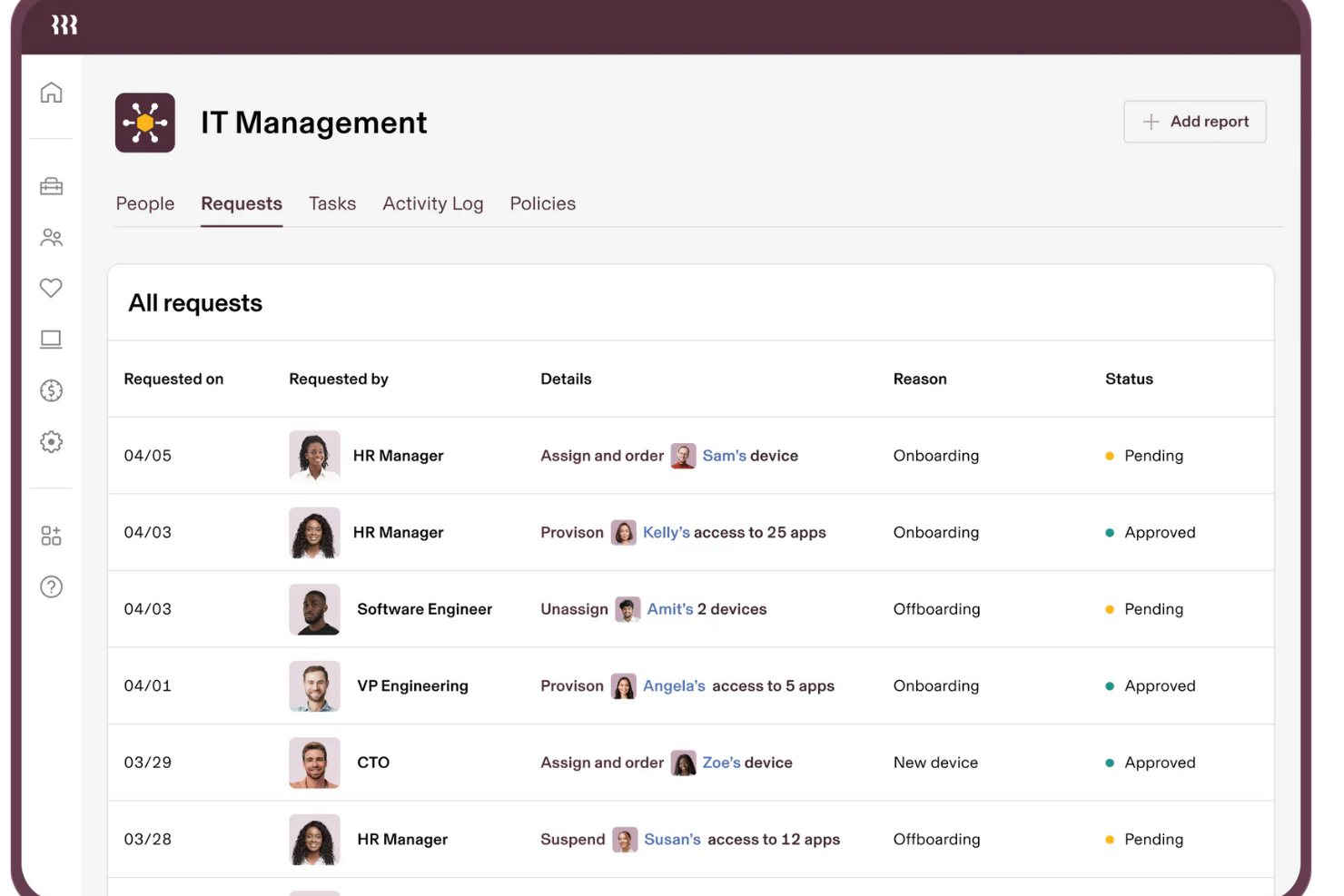
Rippling IT ist eine Komplettlösung zur Verwaltung der IT-Infrastruktur Ihres Unternehmens von einer einzigen Plattform aus. Sie ermöglicht es Ihnen, alles zu steuern, von Mitarbeitergeräten bis hin zum Softwarezugriff, und sorgt dafür, dass Ihr Team über die Werkzeuge verfügt, die es für effektives Arbeiten benötigt. Michael Pedrotti, Mitbegründer von Ghostcap, bemerkte: 'Die Zugriffsregelungen mit Bedingungen sind ebenfalls ideal. Wird ein Nutzer unserem Counter-Strike-Server-Projekt zugewiesen, werden alle Nutzerrechte in Echtzeit aktualisiert: Überwachungssoftware, Kundeninformationen, Spezialprogramme.'
Warum ich Rippling IT gewählt habe: Mit Rippling können Sie alle Geräte aus der Ferne verwalten und überwachen, sodass sie Ihren Sicherheitsstandards entsprechen. Sie können Geräte in Echtzeit verfolgen, Software-Updates verteilen und sogar verlorene oder gestohlene Geräte aus der Ferne sperren oder löschen. Die Plattform von Rippling hilft Ihnen außerdem bei der Benutzerverwaltung durch Identitäts- und Zugriffsmanagement, sodass Sie von einem einzigen Dashboard aus steuern können, wer worauf Zugriff erhält.
Herausragende Funktionen & Integrationen:
Rippling IT bietet außerdem ein Gerätelebenszyklus-Management, mit dem Aufgaben wie Versand und Rückholung von Firmengeräten automatisiert werden können. Für alle, die viel Hardware verwalten, ermöglicht das Inventarmanagement-Feature die Übersicht über Geräte, damit nichts im Chaos verloren geht. Ein weiteres Highlight ist das Mobile Device Management von Rippling, das für Windows und macOS funktioniert und es Ihnen ermöglicht, Verschlüsselung und andere Sicherheitsrichtlinien automatisch durchzusetzen. Zu den Integrationen zählen Slack, Google Workspace, Office 365, AWS, Zoom, Dropbox und Salesforce.
Pros and Cons
Pros:
- Einfache Richtliniendurchsetzung für alle Mitarbeitergeräte
- Geräte können aus der Ferne gesperrt und gelöscht werden
- Unterstützung bei Onboarding und Offboarding von Mitarbeitern und deren Geräten
Cons:
- Überwacht keine komplexeren Infrastrukturaspekte wie Netzwerke
- Die erstmalige Einrichtung kann komplex sein
New Product Updates from Rippling IT

Rippling IT Launches Helpdesk for Agentic Support
Rippling IT launches Helpdesk with automated ticket resolution, contextual troubleshooting, approvals, escalations, and activity logging. These features help IT teams resolve routine employee requests with less manual work. For more information, visit Rippling’s official site.
 .
.
NinjaOne
Am besten für zentralisiertes IT-Management
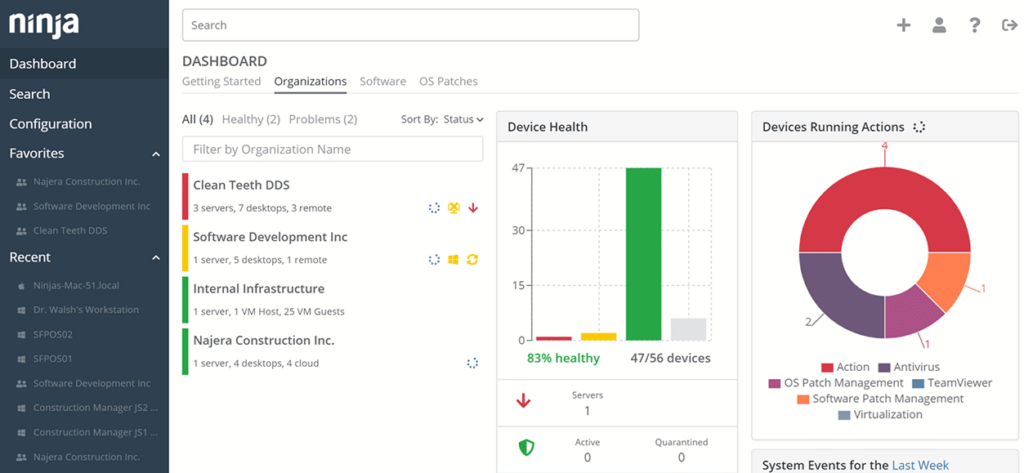
Für diejenigen, die eine umfassende Lösung zur Optimierung ihrer IT-Abläufe suchen, bietet NinjaOne eine All-in-One-Plattform, die auf die Bedürfnisse von Managed Service Providern und IT-Abteilungen zugeschnitten ist. Durch die Zentralisierung der Verwaltung mehrerer Geräte steigert sie die operative Effizienz und bietet Echtzeit-Einblicke, was sie zu einer attraktiven Wahl für Unternehmen macht, die ihre IT-Infrastruktur verbessern möchten. Die Software vereinfacht komplexe Prozesse, sodass sich Ihr Team auf strategische Aufgaben konzentrieren kann, während ein nahtloses Gerätemanagement gewährleistet wird.
Warum ich NinjaOne gewählt habe
Ich habe mich für NinjaOne entschieden, weil es eine herausragende Fähigkeit zur Zentralisierung des IT-Managements bietet und ein einheitliches Erlebnis für die Verwaltung verschiedener Endgeräte schafft. Die Echtzeitüberwachung der Plattform ermöglicht es, potenzielle Probleme frühzeitig zu erkennen und stellt sicher, dass Ihre IT-Umgebung stets aktuell ist. Besonders schätze ich das automatisierte Patch-Management, das manuelle Eingriffe reduziert und Ihre Systeme ohne Aufwand sicher hält. Zudem ermöglicht der sichere Fernzugriff von NinjaOne die direkte Kontrolle über Geräte und erleichtert eine schnelle und effektive Unterstützung, wenn nötig.
NinjaOne Schlüsselfunktionen
Neben seinen zentralisierten Verwaltungsfunktionen bietet NinjaOne mehrere weitere Merkmale, die seine Funktionalität erweitern.
- Automatisierung von Endpunktaufgaben: Automatisiert sich wiederholende Aufgaben, sodass sich Ihr Team auf strategischere Initiativen konzentrieren kann.
- Verwaltung mobiler Geräte: Bietet eine umfassende Verwaltung sowohl für iOS- als auch für Android-Geräte und vereinfacht damit mobile Abläufe.
- Helpdesk- und Ticketing-Suite: Verfügt über automatisierte Workflows und ein Self-Service-Portal für Kunden, was das Service-Management verbessert.
- Asset-Management: Bietet Echtzeit-Überwachung und Verwaltung von IT-Assets, um eine optimale Nutzung und Lebenszyklusverwaltung zu gewährleisten.
NinjaOne Integrationen
Integrationen umfassen Crowdstrike, SentinelOne, Splashtop, Azure, Slack, ConnectWise, N-able, OneLogin und IT Glue.
Pros and Cons
Pros:
- Vereinheitlichtes Dashboard für verschiedene IT-Aufgaben
- Umfangreiche Integrationsmöglichkeiten mit führenden Tools
- Automatisiertes Patchen für stets aktuelle Systeme
Cons:
- Für Einsteiger ins zentrale IT-Management kann es eine Lernkurve geben
- Begrenzte Anpassungsoptionen im Dashboard
- Manche Nutzer finden die Benutzeroberfläche weniger intuitiv
New Product Updates from NinjaOne
NinjaOne Launches Browser Management
NinjaOne launches Browser Management with visibility into browser activity, extensions, AI usage, and policy controls. This extends endpoint management into the browser while giving IT teams more control over browser-based risk. For more information, visit NinjaOne’s official site.

Atera
Am besten für die Überwachung von Systemen in Echtzeit
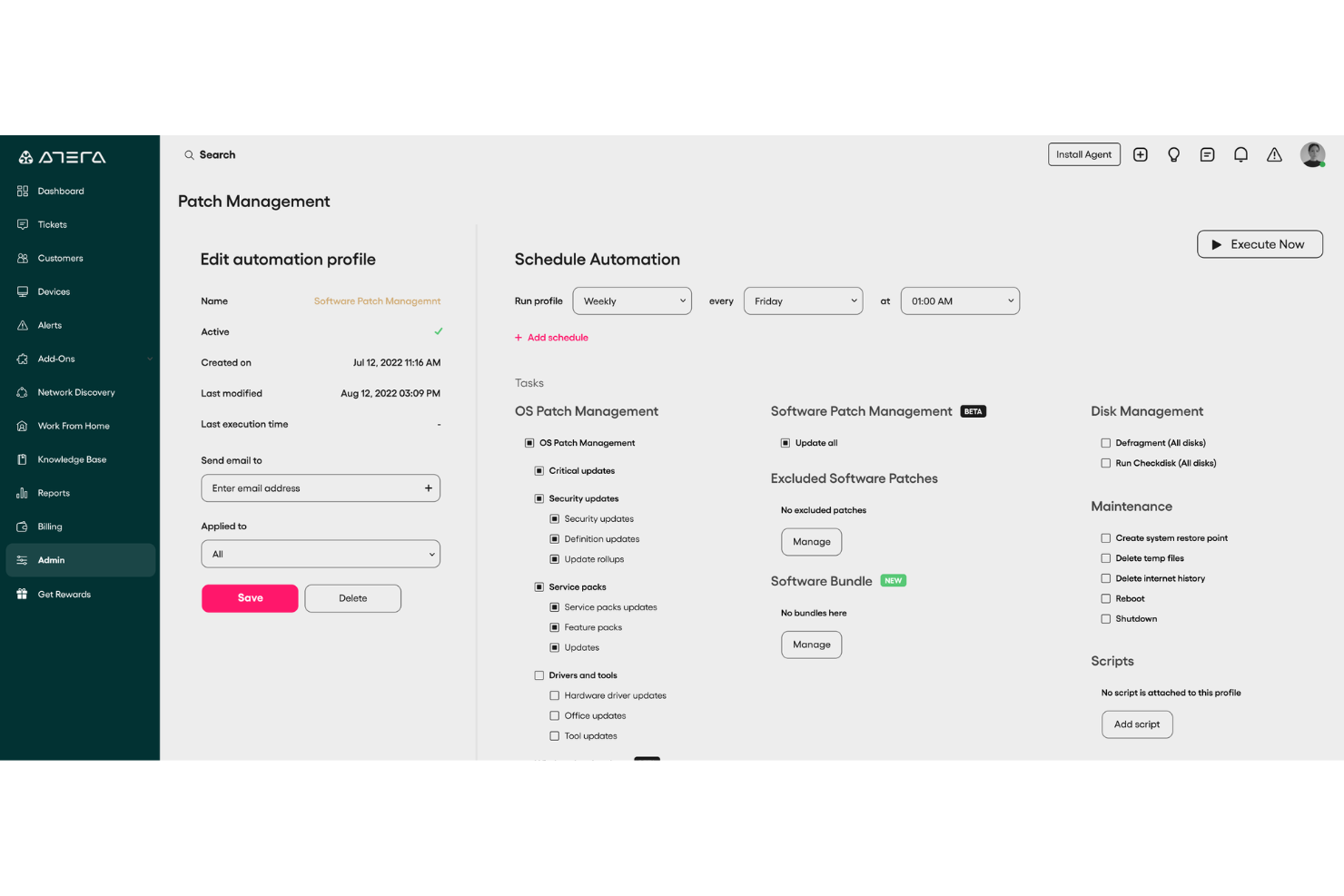
Atera ist eine vielseitige Software für Fernüberwachung und -verwaltung, die IT-Profis und Managed Service Providern dabei hilft, ihre IT-Umgebungen im Blick zu behalten. Mit einer Vielzahl von Funktionen zielt Atera darauf ab, das Management der IT-Infrastruktur für Ihr Team einfacher und effizienter zu gestalten.
Warum ich Atera gewählt habe: Ich habe Atera gewählt, weil es Echtzeit-Fernüberwachungsfunktionen bietet, mit denen Sie die Leistung Ihrer Systeme kontinuierlich verfolgen können. Diese Funktion hilft Ihnen, Probleme zu erkennen, bevor sie größer werden, wodurch Ausfallzeiten minimiert und ein reibungsloser Betrieb gewährleistet wird. Ein weiterer Grund ist das automatisierte Patch-Management, das sicherstellt, dass all Ihre Geräte mit den neuesten Sicherheitspatches ausgestattet sind. Dadurch werden Schwachstellen reduziert und Ihr Netzwerk bleibt sicher.
Hervorstechende Funktionen & Integrationen:
Atera bietet IT-Automatisierung, um Routineaufgaben wie Patching und Scripting zu optimieren, wodurch Teams Zeit sparen und den manuellen Aufwand reduzieren. Eingebaute Berichte liefern Einblicke in Systemzustand und Leistung, während der sichere Fernzugriff es ermöglicht, Geräte von überall aus zu unterstützen. Es integriert sich mit Tools wie Microsoft Teams, Slack, Jira Software Cloud, Okta und Acronis, sodass es sich leicht in Ihr bestehendes IT-Ökosystem einfügt.
Pros and Cons
Pros:
- Effektive IT-Verwaltung und Problemlösung
- Kombiniert Fernüberwachung, Ticketing und Automatisierung
- Preisgünstiges Modell, bei dem pro Techniker statt pro Gerät abgerechnet wird
Cons:
- Kleine Eingewöhnungszeit nötig
- Fehlen einiger fortgeschrittener Anpassungsoptionen
New Product Updates from Atera

Atera Adds Webhook Triggers for Technician Assignment Changes
Atera ticket automation rules now support a webhook trigger when a ticket’s technician assignment changes, expanding automation beyond creation, status updates, and closure/resolution events. For more information, visit Atera's official site.

SuperOps
Am besten für umfassendes Asset-Management
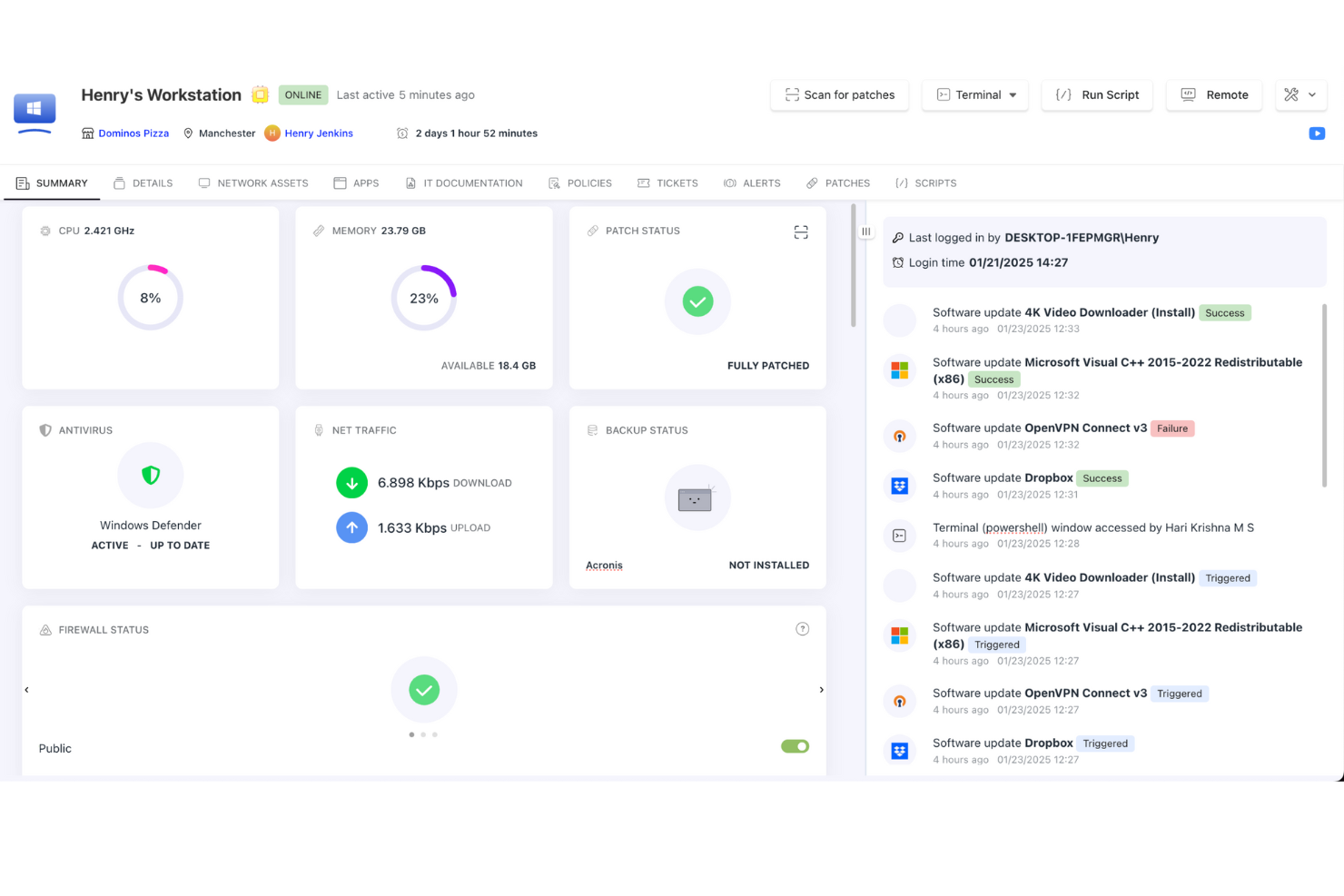
SuperOps ist eine einheitliche Plattform, die Professional Services Automation (PSA) und Remote Monitoring and Management (RMM) Tools kombiniert und speziell für Managed Service Providers (MSPs) entwickelt wurde. Sie ermöglicht Ihrem Team, Client-Endpunkte, Computer und Netzwerke aus der Ferne zu überwachen und sorgt dafür, dass Systeme rund um die Uhr funktionsfähig bleiben.
Warum ich SuperOps ausgewählt habe: Ich habe SuperOps aufgrund seiner starken Remote-Monitoring-Fähigkeiten und der integrierten Automatisierungstools gewählt, die MSPs dabei helfen, die Systeme ihrer Kunden im Blick zu behalten. Das Asset-Management-Feature bietet Ihnen vollständige Transparenz über jedes einzelne Gerät, was die Nachverfolgung der Leistung und das frühzeitige Erkennen von Problemen erleichtert. Das KI-gestützte Benachrichtigungssystem der Plattform reduziert unnötige Alarmmeldungen, indem es nur die relevanten Warnungen hervorhebt, sodass Ihr Team schneller reagieren kann. Sie können außerdem Alarmrichtlinien individuell auf die Kundenumgebungen abstimmen, was Ausfallzeiten vorbeugt und einen reibungslosen Betrieb ermöglicht. Diese Funktionen erleichtern die Betreuung mehrerer Kunden ohne mühsame manuelle Aufgaben.
Herausragende Funktionen & Integrationen:
Weitere Funktionen umfassen richtlinienbasierte Automatisierung, mit der Sie Richtlinien für alle Kundensysteme festlegen und durchsetzen, um eine konsistente Konfiguration und Compliance zu gewährleisten. Darüber hinaus ermöglicht das Patch-Management der Plattform die automatisierte Bereitstellung von Betriebssystem- und Drittanbieter-Software-Updates, sodass Kundensysteme sicher und aktuell bleiben. Zu den Integrationen gehören ConnectWise Control, Acronis, Hudu, TeamViewer, SentinelOne, QuickBooks Online, QuickBooks Desktop, Bitdefender und Azure AD.
Pros and Cons
Pros:
- Vereinfacht die Verteilung von Updates und Patches über Kundensysteme hinweg
- Umfassende Funktionen speziell für MSPs
- Effektives Ticket-Automatisierungsmodul
Cons:
- Begrenzte Anpassungsmöglichkeiten für bestimmte Funktionen
- Eingeschränkte Sprachunterstützung
New Product Updates from SuperOps

SuperOps Improves Ticket Visibility, Dynamic Forms, and Dashboard Views
SuperOps introduces improvements to ticket visibility, dynamic forms, and dashboard visualizations. These updates help technicians manage customer conversations, simplify ticket creation, and keep dashboard views consistent across teams. For more information, visit SuperOps' official site.
 .
.
Syncro
Am besten für unbegrenztes Endpunkt-Management
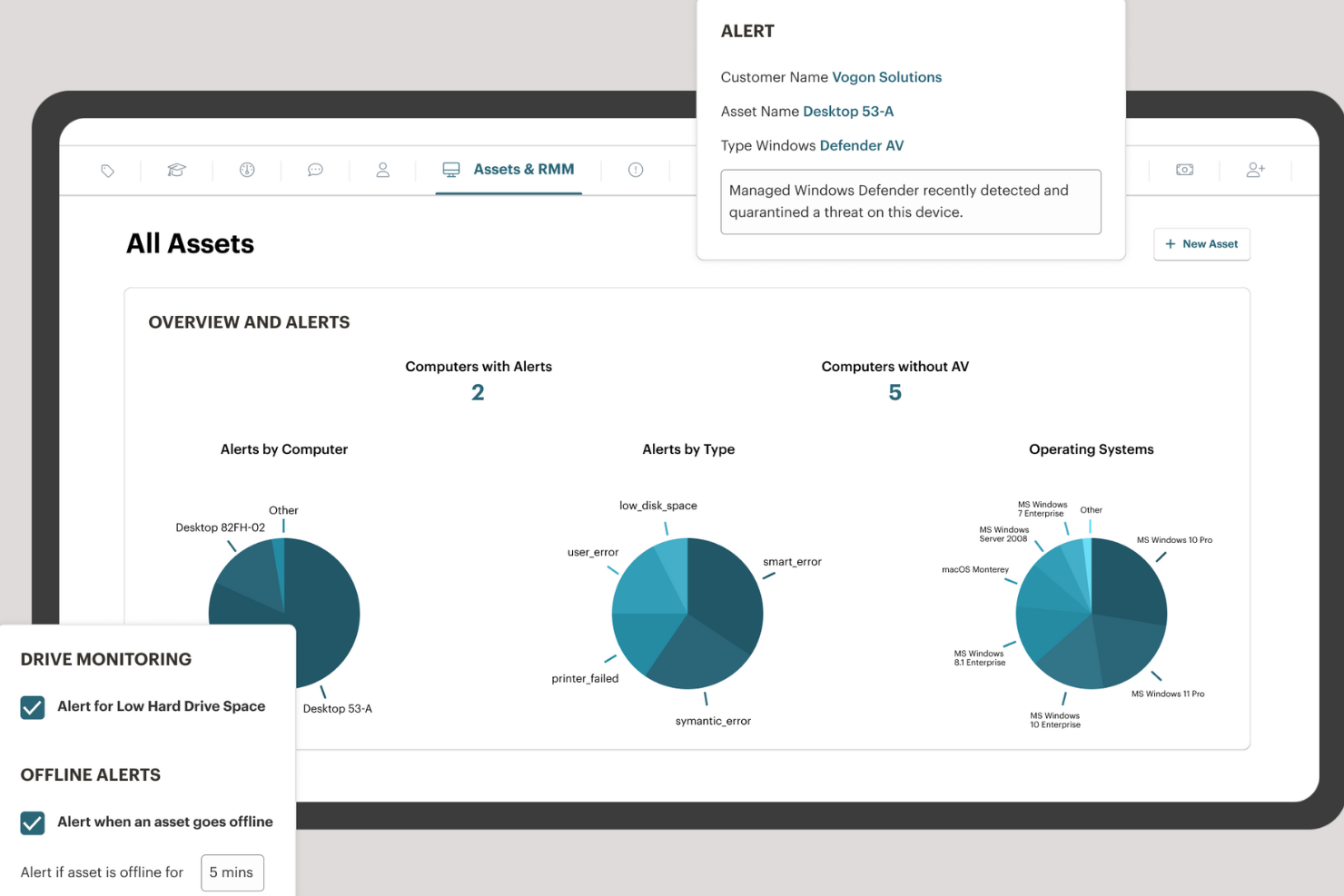
Syncro ist eine All-in-One-Plattform, die für Managed Service Providers (MSPs) und IT-Teams entwickelt wurde und Remote Monitoring and Management (RMM) mit Professional Services Automation (PSA) kombiniert. Sie ermöglicht es Ihnen, unbegrenzt viele Endpunkte zu überwachen, Skripte auszuführen, Updates zu verteilen und Warnmeldungen individuell anzupassen, um potenzielle Probleme proaktiv zu erkennen, bevor sie ernst werden.
Warum ich Syncro ausgewählt habe: Es bietet eine leistungsstarke Skript-Engine, mit der Sie individuelle Skripte auf mehreren Geräten erstellen und ausführen können, um Routinetätigkeiten zu automatisieren und manuellen Aufwand zu reduzieren. Diese Funktion spart nicht nur Zeit, sondern sorgt auch für Konsistenz bei der Verwaltung von Kundensystemen. Ein weiterer überzeugender Aspekt ist das integrierte Helpdesk-Ticketsystem von Syncro. Mit diesem Feature können Sie Kundenanfragen von der ersten Meldung bis zur Lösung problemlos innerhalb derselben Plattform bearbeiten. Durch die zentrale Ticketverwaltung kann Ihr Team schneller und effizienter auf Kundenbedürfnisse reagieren und so die Servicequalität steigern.
Hervorstechende Funktionen & Integrationen:
Weitere Funktionen umfassen ein robustes Patch-Management für Windows-Betriebssysteme, das sicherstellt, dass die Systeme Ihrer Kunden stets aktuell und sicher sind. Zudem ermöglichen das anpassbare Kundenportal und die Dokumentation einen professionellen Auftritt, indem sie Ihren Kunden einfachen Zugang zu wichtigen Informationen bieten. Zu den Integrationen zählen u.a. Worldpay, Stripe, PayPal, Acronis Cyber Protect, Bitdefender GravityZone, ConnectWise Importer, Dropbox, IT Glue, Google Kalender, Microsoft Outlook Kalender, Microsoft Teams und Zapier.
Pros and Cons
Pros:
- Unbegrenzte Endpunkte ohne zusätzliche Kosten
- Leistungsstarke Skriptfunktionen für Automatisierung
- Umfassendes Funktionspaket, das RMM- und PSA-Tools integriert
Cons:
- Könnte mehr Möglichkeiten zur Individualisierung von Berichten bieten
- Mobile App bietet nicht alle Funktionen der Desktop-Version

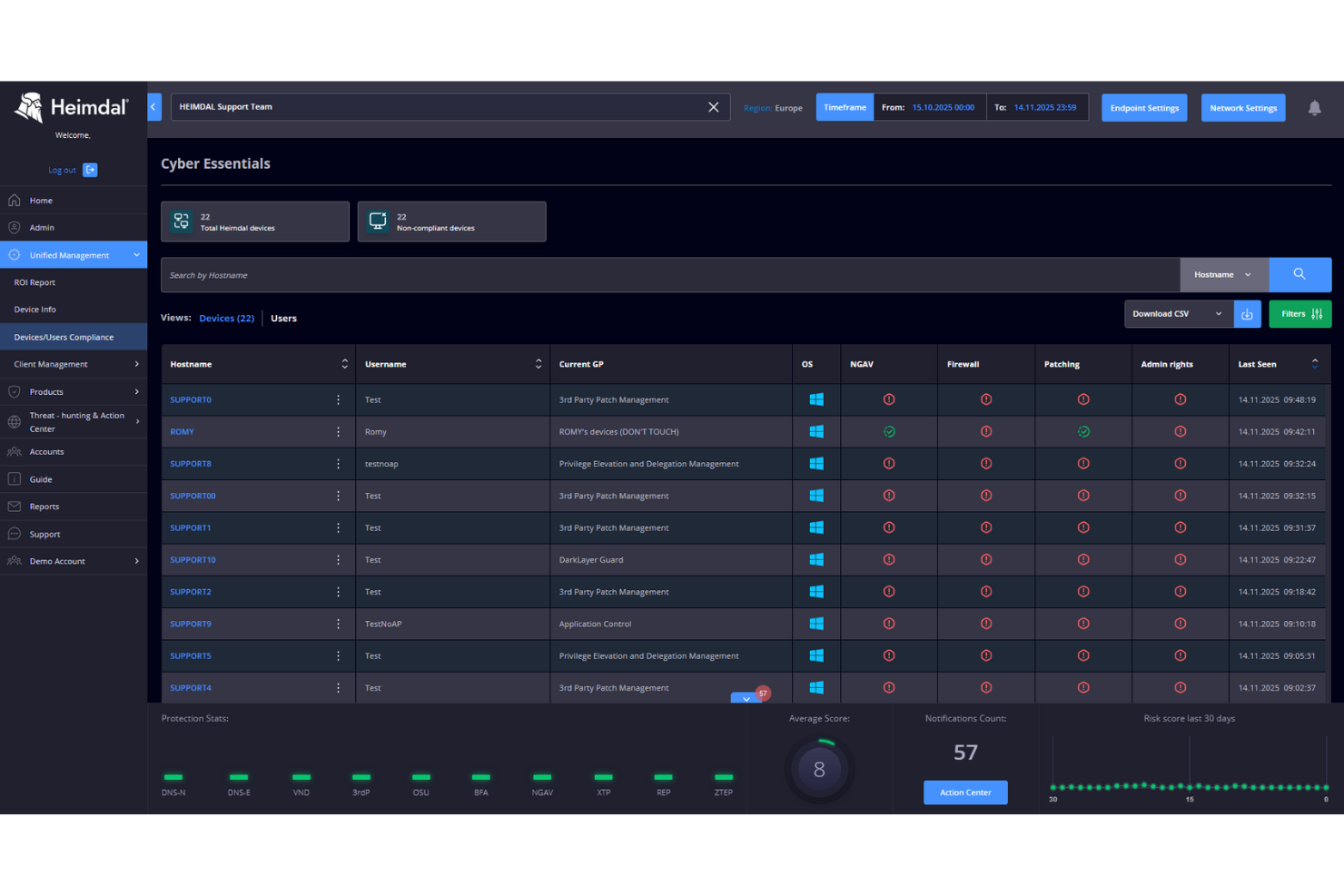
Für Organisationen, die eine zuverlässige Lösung für die Fernüberwachung und -verwaltung benötigen, bietet Heimdal eine einheitliche Cybersicherheitsplattform. Sie ist für Unternehmen, Managed Service Provider und Sicherheitsteams konzipiert und vereint Bedrohungserkennung, Endpunktsicherheit und Schwachstellenmanagement an einem Ort. Egal ob Sie im Gesundheitswesen, Bildungsbereich oder in der kritischen Infrastruktur tätig sind – Heimdal hilft Ihnen, eine konsistente Sicherheit in unterschiedlichen IT-Umgebungen aufrechtzuerhalten.
Warum ich Heimdal gewählt habe
Ich habe Heimdal ausgewählt, weil es Endpunktsicherheit eng mit Bedrohungsinformationen verbindet – beides ist entscheidend für effektive Fernüberwachung und -verwaltung. Heimdals Endpoint Detection & Response (EDR) unterstützt die proaktive Bedrohungserkennung und ermöglicht eine schnelle Reaktion auf Vorfälle, was den Schutz Ihrer Systeme verbessert. Das Privileged Access Management (PAM) sorgt für eine sichere Zugriffskontrolle und senkt das Risiko von unbefugtem Zugriff. Zusammen stärken diese Funktionen die Sicherheit, während sie das tägliche Management erleichtern – das macht Heimdal für viele Organisationen praktisch.
Heimdal Hauptfunktionen
Neben den Kernkompetenzen bietet Heimdal mehrere Funktionen, die besonders für Fernüberwachung und -verwaltung nützlich sind:
- Patch-Management: Automatisiert die Bereitstellung von Updates auf allen Geräten und behebt Schwachstellen effizient.
- Bedrohungsinformationen: Automatisiert die Datenerfassung und Reaktion auf Schwachstellen und teilt Erkenntnisse per Warnmeldungen und Berichte.
- Geräte- und Anwendungssteuerung: Reguliert den Zugriff auf Geräte und den Einsatz von Anwendungen, um nicht autorisierte Software-Installationen zu verhindern.
- Schutz vor Datenverlust (DLP): Verhindert Datenlecks durch Benutzer-Authentifizierung, Verschlüsselung und konfigurierbare Regeln.
Heimdal Integrationen
Zu den Integrationen gehören ConnectWise RMM, Autotask PSA, HaloPSA und andere Tools von Drittanbietern, wodurch eine nahtlose Einbindung in bestehende IT-Umgebungen gewährleistet ist.
Pros and Cons
Pros:
- Automatisches Patchen von Betriebssystemen und Drittanbieter-Software
- Starke Kontrollen für privilegierte Zugriffe
- Einheitliche Plattform für Sicherheitsmanagement
Cons:
- Anpassung von Berichten teilweise eingeschränkt
- Fortgeschrittene Einrichtung erfordert Einarbeitung

Site24x7
Am besten für proaktive Überwachung
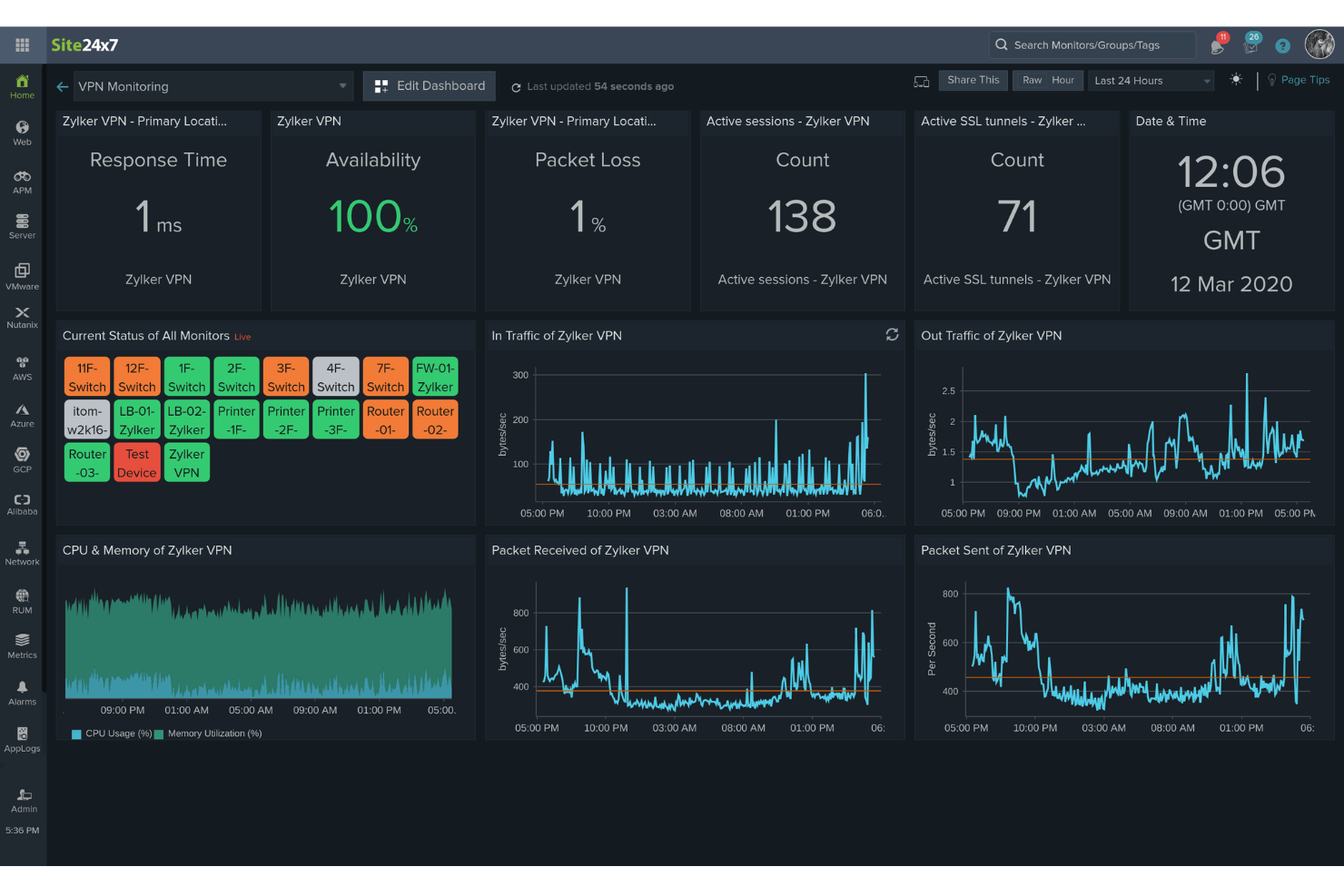
Site24x7 ist eine cloudbasierte Überwachungslösung, mit der Sie Ihre gesamte IT-Infrastruktur im Blick behalten. Sie bietet Tools zur Überwachung von Websites, Servern, Anwendungen, Netzwerken und Cloud-Diensten, um einen reibungslosen Betrieb Ihrer Systeme sicherzustellen.
Warum ich Site24x7 ausgewählt habe: Sie können Anwendungen überwachen, die auf Plattformen wie Java, .NET, Ruby, PHP und Node.js entwickelt wurden, sodass Sie Leistungsengpässe erkennen und beheben können, bevor sie die Nutzer beeinträchtigen. Das sorgt dafür, dass Ihre Anwendungen reaktionsschnell und zuverlässig bleiben. Mir gefällt außerdem das Netzwerk-Monitoring von Site24x7. Es bietet umfassende Sichtbarkeit für kritische Netzwerkgeräte wie Router, Switches und Firewalls. Das hilft Ihnen dabei, Netzwerkprobleme proaktiv zu erkennen und zu beheben.
Besondere Funktionen & Integrationen:
Weitere Funktionen sind Real User Monitoring, mit dem Sie die tatsächliche Nutzererfahrung auf Ihren Websites und Anwendungen analysieren können, um die Performance aus deren Sicht zu verstehen. Das synthetische Monitoring von Web-Transaktionen ermöglicht es Ihnen, Nutzerinteraktionen in einem echten Browser zu simulieren, was die Optimierung von Workflows wie Login-Formularen und Warenkörben erleichtert. Zu den Integrationen gehören ServiceNow, PagerDuty, Opsgenie, Jira, ManageEngine AlarmsOne, ManageEngine ServiceDesk Plus, Slack, Microsoft Teams, Zoho Cliq, Amazon EventBridge, Zapier und Webhooks.
Pros and Cons
Pros:
- Umfassende Überwachungsfunktionen für verschiedene IT-Infrastrukturkomponenten
- Zuverlässige Echtzeit-Benachrichtigungen ermöglichen schnelle Problemlösung
- Flexible Anpassungsmöglichkeiten für Dashboards und Berichte
Cons:
- Die Konfiguration kann für neue Nutzer herausfordernd sein
- Begrenzte Integrationsmöglichkeiten mit bestimmten Drittanbieter-Tools
New Product Updates from Site24x7
Site24x7 Adds Compliance Reports and Domain Squatting Detection
Site24x7’s Digital Risk Analyzer now offers domain compliance assessment and squatting detection to help you validate security posture, compare domains, and spot impersonation risks faster. For more information, visit Site24x7’s official site.
 .
.
Am besten geeignet für KI-gesteuerte Performance-Schwellenwerte
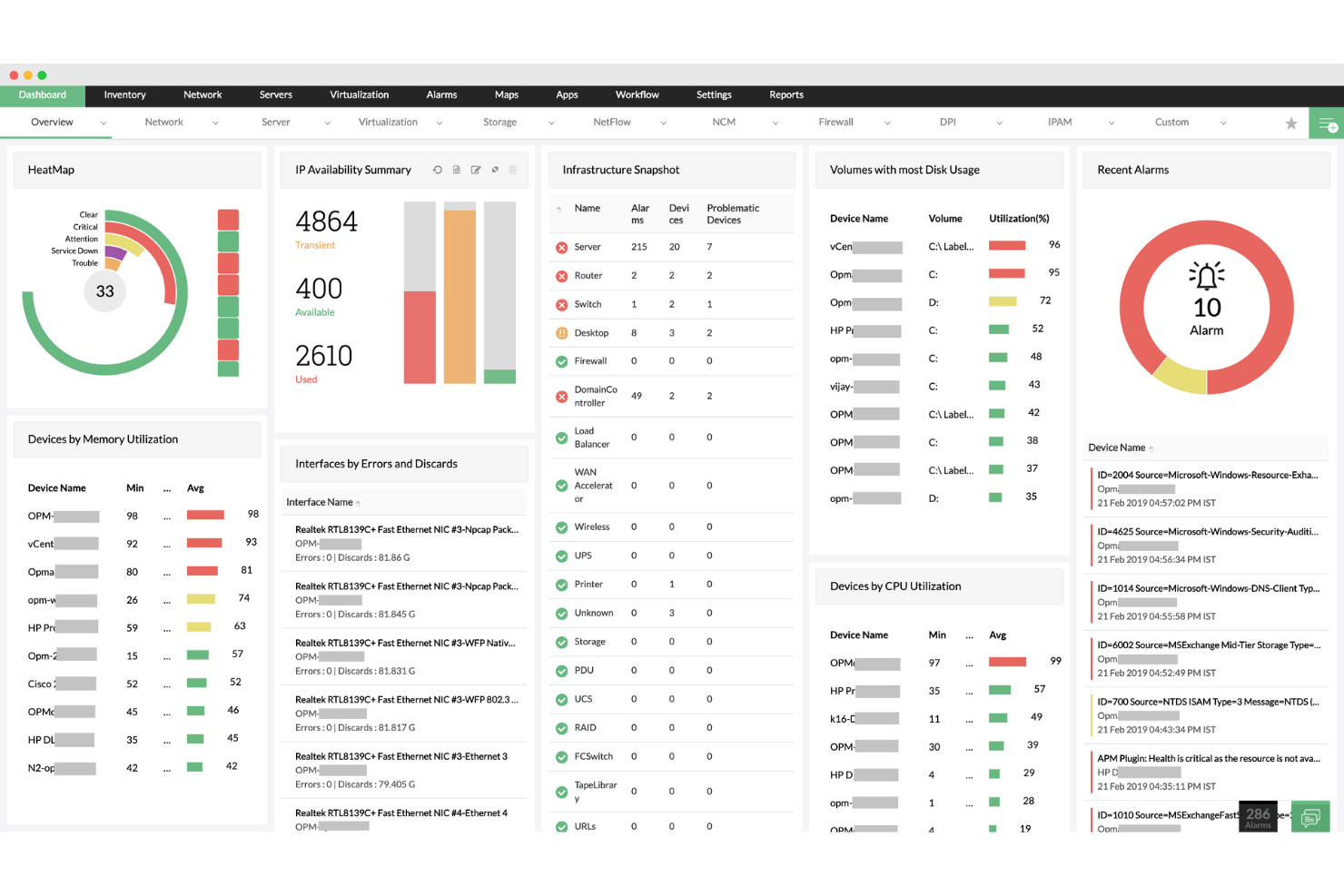
ManageEngine OpManager ist eine Netzwerküberwachungslösung, die speziell für IT-Betriebsteams und Managed Service Providers (MSPs) entwickelt wurde. Sie bietet Echtzeit-Einblicke in die Leistung von physischen und virtuellen Servern, Netzwerkgeräten und Anwendungen und stellt zudem Tools für Automatisierung, Benachrichtigungen und Compliance bereit. Mit umfangreichen Integrationsmöglichkeiten und skalierbaren Bereitstellungsmodellen eignet sich OpManager sowohl für KMUs als auch für Unternehmensumgebungen.
Warum ich ManageEngine OpManager ausgewählt habe: Ich habe OpManager gewählt, weil es die detaillierte Überwachung von virtueller und physischer Infrastruktur mit umfassenden Automatisierungsfunktionen kombiniert – etwas, das nicht alle RMMs gleich gut beherrschen. Besonders hervorzuheben sind die KI-gesteuerten Performance-Schwellenwerte, die umfangreiche Gerätekompatibilität und die dynamischen Visualisierungstools, die Teams dabei helfen, Engpässe schnell zu erkennen und zu beheben. Zudem macht die Unterstützung hybrider Netzwerke – eine Kombination aus Cloud- und On-Premise-Ressourcen – die Lösung flexibel für verschiedene IT-Strategien.
Hervorstechende Funktionen & Integrationen:
Zu den wichtigsten Funktionen zählen die fortschrittliche Überwachung virtualisierter Server (für VMware, Hyper-V, Citrix), verteilte Netzwerküberwachung über eine Probe-Central-Architektur, Workflow-Automatisierung für Wartung und Benachrichtigungen sowie über 100 anpassbare Berichte. Zudem ermöglicht OpManager Kapazitätsprognosen und die Massenerkennung virtueller Server. Zu den Integrationen gehören ServiceDesk Plus, ServiceNow, Jira, Slack, Microsoft Teams, Analytics Plus, AlarmsOne, REST API und Webhook-Integrationen.
Pros and Cons
Pros:
- Automatisierte, geplante Netzwerkerkennung
- Unterstützt Umgebungen mehrerer Anbieter
- Echtzeit- und automatische Aktualisierung von Netzwerkübersichten
Cons:
- Preisgestaltung könnte für kleine Teams hoch sein
- Ersteinrichtung kann komplex sein
New Product Updates from ManageEngine OpManager

ManageEngine OpManager Adds NVIDIA GPU Monitoring
ManageEngine OpManager adds NVIDIA GPU monitoring for Linux servers, dedicated GPU dashboards, adaptive thresholds, and automated incident response to help teams track AI infrastructure performance, health, and resource usage. For more information, visit ManageEngine OpManager’s official site.
 .
.
Pulseway
Am besten geeignet für Echtzeit-Fernüberwachung

Pulseway bietet eine Plattform für IT-Fachleute und Teams, um ihre Systeme und Netzwerke überall im Blick zu behalten. Mit dem Fokus auf die Überwachung in Echtzeit aus der Ferne liefert Pulseway sofortige Benachrichtigungen und Systemstatus, was es für Unternehmen, die Wert auf unmittelbare Einblicke und schnelle Reaktionen legen, unverzichtbar macht.
Warum ich Pulseway ausgewählt habe: Beim Vergleich verschiedener Plattformen für die Fernüberwachung hat mich Pulseways Engagement für die Bereitstellung von Echtzeitdaten überzeugt. Ich fand es besser als andere, da die Benutzeroberfläche leicht verständlich ist und das Alarmsystem besonders schnell reagiert. Das wichtigste Merkmal von Pulseway – der Fokus auf Einblicke in Echtzeit – macht es zur idealen Lösung für Unternehmen, die jederzeit einen sofortigen Überblick über den Zustand ihrer Systeme benötigen.
Hervorstechende Funktionen & Integrationen:
Pulseway überzeugt mit einem Mobile-First-Ansatz, der IT-Administratoren ermöglicht, Systeme direkt per Smartphone zu verwalten. Die Plattform bietet zudem automatisierte Workflows, die eine schnelle Problemlösung unterstützen. Für einen erweiterten Funktionsumfang lässt sich Pulseway mit beliebten Tools wie Slack, Zendesk und Trello integrieren, was eine effektive Kommunikation und Aufgabenerledigung fördert.
Pros and Cons
Pros:
- Echtzeit-Benachrichtigungen sorgen für sofortige Aufmerksamkeit bei möglichen Problemen
- Mobile-First-Design erlaubt Systemverwaltung von unterwegs
- Automatisierte Workflows unterstützen eine schnelle Problemlösung
Cons:
- Die Ersteinrichtung könnte für einige Nutzer etwas komplex sein
- Die mobile Oberfläche ist zwar praktisch, aber für komplexe Aufgaben eventuell eingeschränkt
- Die Bandbreite der Integrationen könnte größer sein, obwohl sie nützlich sind

Addigy
Am besten geeignet für die Verwaltung von Mac- und iOS-Geräten

Addigy bietet umfassende Verwaltungslösungen, die speziell auf Apple-Geräte wie Mac und iOS zugeschnitten sind. Es geht auf die besonderen Anforderungen und Herausforderungen des Apple-Ökosystems ein und erweist sich als wertvolles Werkzeug für Unternehmen, die stark auf Mac- und iOS-Geräte angewiesen sind.
Warum ich Addigy gewählt habe: Bei der Untersuchung von Tools für die Geräteverwaltung hat mich Addigy durch seinen spezialisierten Ansatz für das Apple-Ökosystem überzeugt. Im Vergleich zu allgemeinen Geräteverwaltungsplattformen bietet Addigy Feinheiten und Funktionen, die wirklich auf Mac- und iOS-Geräte zugeschnitten sind. Gerade diese Spezifität und der gezielte Ansatz lassen mich glauben, dass es die beste Wahl für Unternehmen ist, die eine fortschrittliche Verwaltung ihrer Apple-Geräte anstreben.
Herausragende Funktionen & Integrationen:
Zu den wichtigsten Funktionen von Addigy gehören die Fernverwaltung von Geräten, die Überwachung von Assets und die richtlinienbasierte Automatisierung für das Apple-Ökosystem. Darüber hinaus bietet es Sicherheitskonfigurationen und Softwarebereitstellung speziell für Mac und iOS. In Bezug auf Integrationen verbindet sich Addigy nahtlos mit Plattformen wie Jamf, Apple School Manager und Apple Business Manager, um eine einheitliche Verwaltungserfahrung für Apple-Geräte zu gewährleisten.
Pros and Cons
Pros:
- Spezialisiert auf die Verwaltung von Mac- und iOS-Geräten und geht auf besondere Anforderungen ein
- Bietet richtlinienbasierte Automatisierung, die speziell auf Apple-Geräte zugeschnitten ist
- Integriert sich effizient mit anderen auf Apple ausgerichteten Management-Plattformen
Cons:
- Möglicherweise nicht geeignet für Unternehmen mit einer vielfältigen Geräteauswahl
- Die Grundgebühr kann die Gesamtkosten für kleinere Unternehmen erhöhen
- Einige fortgeschrittene Funktionen erfordern eine längere Einarbeitung
Weitere Software zur Fernüberwachung und -verwaltung
Nachfolgend finden Sie eine Liste zusätzlicher Softwarelösungen zur Fernüberwachung und -verwaltung, die ich in die engere Auswahl aufgenommen habe, die es jedoch nicht unter die besten 12 geschafft haben. Es lohnt sich auf jeden Fall, sie sich anzusehen.
- InvGate Service Management
Am besten für KI-gestützte Problemlösung
- N-able
Am besten geeignet für skalierbare Monitoring-Lösungen
- ConnectWise Automate
Besonders geeignet für umfassende IT-Automatisierung
- SysAid
Am besten geeignet für IT-Service-Management und Ticketing
- Comodo RMM
Am besten für sicherheitsorientiertes Management geeignet
- ManageEngine
Am besten geeignet für ganzheitliches IT-Operations-Management
- Datto
Ideal für Datensicherung und Notfallwiederherstellung
- MSP360
Am besten für Cloud-Backup und Speicherverwaltung geeignet
- Domotz Pro
Am besten für Netzwerk- und Gerätemanagement geeignet
- Swif.ai
Am besten geeignet für die Echtzeit-Überwachung von Geräten
- Deel IT
Am besten geeignet für globale Gerätebeschaffung und -versand
- NordStellar
Am besten für Echtzeit-Bedrohungswarnungen
- DeskDirector
Gut zur Verschlankung von Service-Desk-Abläufen


Verwandte Testberichte
Wie ich Remote Monitoring und Management Software bewerte
Ich bewerte RMMs auf zwei Ebenen: die grundlegenden Anforderungen, die jedes Tool erfüllen muss—wie unbeaufsichtigter Zugriff und automatisiertes Patchen—und die Unterscheidungsmerkmale, die für MSPs oder IT-Teams in Unternehmen relevant sind.
Kernfunktionen (Grundvoraussetzungen für diese Liste)
Bei der Auswahl der Tools bewerte ich jedes auf einer Skala von 0 (bietet die Funktion nicht) bis 5 (übertrifft in diesem Bereich) für jede der unten aufgeführten Kernfunktionen. Anschließend berechne ich die Gesamtscore des Tools in Prozent. Jedes Tool muss eine Mindestgesamtpunktzahl von 75 % erreichen, um in die engere Auswahl aufgenommen zu werden.
- Remote-Überwachung von Endpunkten: Ich überprüfe, ob ein Tool die Überwachung von CPU, Arbeitsspeicher, Festplatte und Betriebszeit in Echtzeit über Windows-, macOS- und Linux-Endpunkte hinweg bietet, nicht nur einfache Ping-Tests.
- Automatisiertes Patch-Management: Geplantes OS- und Drittanbieter-Patching mit Genehmigungsworkflows ist hier entscheidend, besonders für Teams, die Hunderte von Endpunkten an mehreren Kundenstandorten verwalten.
- Fernzugriff & Fernsteuerung: Ich bewerte, ob der unbeaufsichtigte Zugriff Sitzungstools wie Dateiübertragung, Kommandozeile und Multi-Monitor-Unterstützung umfasst, um Probleme zu lösen, ohne die Endbenutzer zu stören.
- Alarmierung & automatische Behebung: Die besten Tools ermöglichen das Setzen von schwellenwertbasierten Alarmen, die automatisch Skripte ausführen, etwa einen abgestürzten Dienst neu starten, bevor überhaupt ein Ticket erstellt wird.
- Mandantenfähige Verwaltungsoberfläche: Für MSPs, die dutzende Kunden betreuen, prüfe ich, ob das Dashboard Mandanten-Trennung, rollenbasierte Zugriffssteuerung und mandantenspezifische Richtlinienkonfiguration unterstützt.
- Scripting- & Automatisierungs-Engine: Ich bewerte die Unterstützung für PowerShell-, Bash- oder Python-Skripte mit Zeitplanung und gemeinsamen Bibliotheken, da Massenaufgaben wie Registry-Änderungen oder Softwareverteilungen davon abhängen.
Sobald ich eine Liste der Tools habe, die die Kriterien erfüllen, prüfe ich, wodurch sich jede Plattform auszeichnet.
Unterscheidungsmerkmale (Wodurch sich Anbieter abheben)
So vergleiche und kontrastiere ich verschiedene Anbieter:
Herausragende Funktionen
Integriertes PSA und Ticketing verknüpfen Alarme direkt mit abrechenbarer Zeit und Kundenakten, was MSP-Techniker davor bewahrt, während eines Vorfalls zwischen Plattformen wechseln zu müssen. Ich prüfe außerdem, ob ein Tool integrierte Endpunkterkennung oder Ransomware-Rollback bietet, da die zusätzliche Installation eines separaten EDR-Agents über das RMM die Komplexität und den Aufwand erhöht. Eine gut gestaltete mobile App ist ebenfalls wichtig—Techniker, die auf Alarme außerhalb der Bürozeiten reagieren, müssen Skripte ausführen und Remote-Sitzungen vom Smartphone starten können, nicht nur Benachrichtigungen lesen.
Mehr als nur Funktionen
Die Preismodelle variieren in diesem Bereich stark—Lizenzierung pro Endpunkt vs. pro Techniker macht einen riesigen Unterschied, je nachdem, ob man ein MSP mit kleinem Team oder eine interne IT-Abteilung mit großem Gerätebestand ist. Ich bewerte außerdem die Integrationsmöglichkeiten mit Tools wie ConnectWise, IT Glue und Autotask, da ein isoliertes RMM doppelte Dateneingaben und langsamere Ticketbearbeitung verursacht. Die Sicherheitslage ist ebenfalls ein Schlüsselfaktor: Ich prüfe auf SOC-2-Konformität, MFA-Erzwingung und verschlüsselte Agenten-Kommunikation, insbesondere wenn Endpunkte verwaltet werden, die sensible Kundendaten verarbeiten.
So wählen Sie Software zur Fernüberwachung und -verwaltung aus
Bei langen Funktionslisten und komplexen Preisstrukturen verliert man leicht den Überblick. Damit Sie sich bei der individuellen Auswahl Ihrer Software auf das Wesentliche konzentrieren können, finden Sie hier eine Checkliste mit Faktoren, die Sie berücksichtigen sollten:
| Faktor | Was zu beachten ist |
|---|---|
| Skalierbarkeit | Kann die Software mit Ihrem Unternehmen wachsen? Berücksichtigen Sie Benutzerlimits und die Datenverarbeitung, wenn Ihr Team wächst. |
| Integrationen | Verbindet sie sich mit Ihren vorhandenen Tools? Achten Sie auf die Kompatibilität mit wichtiger Software wie CRM- oder Helpdesk-Systemen. |
| Anpassbarkeit | Können Sie sie an Ihre Arbeitsabläufe anpassen? Prüfen Sie, ob sich Dashboards, Benachrichtigungen und Berichte an Ihre spezifischen Anforderungen anpassen lassen. |
| Benutzerfreundlichkeit | Ist die Benutzeroberfläche intuitiv? Denken Sie an die technischen Kenntnisse Ihres Teams und daran, wie schnell es sich an das neue System gewöhnen wird. |
| Implementierung und Einarbeitung | Wie läuft die Einrichtung ab? Prüfen Sie, ob Ressourcen wie Schulungen, Support und Community-Foren zur Verfügung stehen, um den Übergang zu erleichtern. |
| Kosten | Passt die Preisgestaltung in Ihr Budget? Vergleichen Sie die Tarife und achten Sie auf versteckte Gebühren oder langfristige Verträge, die sich auf Ihre Finanzen auswirken könnten. |
| Sicherheitsvorkehrungen | Gibt es starke Sicherheitsmaßnahmen? Stellen Sie die Einhaltung von Branchenstandards sicher und achten Sie auf Funktionen wie Verschlüsselung und Zwei-Faktor-Authentifizierung. |
| Verfügbarkeit des Supports | Welche Support-Optionen werden angeboten? Berücksichtigen Sie die Verfügbarkeit von Live-Chat und telefonischem Support sowie die Frage, ob dieser in Ihrer Zeitzone abgedeckt ist. |
Was ist Software zur Fernüberwachung und -verwaltung?
Software zur Fernüberwachung und -verwaltung ist ein Tool, mit dem IT-Fachkräfte Geräte und Netzwerke aus der Ferne überwachen und verwalten können. Diese Tools werden häufig von IT-Administratoren, Anbietern verwalteter Dienste und technischen Supportteams eingesetzt, um die Systemintegrität und -sicherheit zu gewährleisten.
Die Überwachung der Netzwerkleistung, die Verwaltung von IT-Ressourcen und der Fernzugriff tragen dazu bei, dass Systeme reibungslos und sicher funktionieren. Insgesamt bieten diese Tools den Benutzern eine bessere Kontrolle und höhere Effizienz bei der Verwaltung ihrer IT-Umgebungen.
Funktionen
Achten Sie bei der Auswahl einer Software zur Fernüberwachung und -verwaltung auf die folgenden wichtigen Funktionen:
- Geräteüberwachung: Überwachen Sie den Zustand, Status und die Leistung aller verbundenen Geräte in Echtzeit. So können Sie Probleme frühzeitig erkennen und dafür sorgen, dass alles reibungslos läuft, ohne ständig manuell prüfen zu müssen.
- Automatisierte Warnmeldungen: Richten Sie Benachrichtigungen für kritische Ereignisse wie Ausfälle, ungewöhnliche Aktivitäten oder Hardwarefehler ein. Diese Warnmeldungen erleichtern es Ihnen, schnell zu reagieren, bevor aus kleinen Störungen große Probleme werden.
- Patch-Management: Planen, verteilen und überprüfen Sie Betriebssystem- und Softwareupdates auf mehreren Geräten. So halten Sie Sicherheitsrisiken gering und behalten Schwachstellen im Blick, ohne den mühsamen Ansatz einer Aktualisierung Gerät für Gerät.
- Fernsteuerung: Greifen Sie von überall auf Computer und Systeme zu, um Fehler zu beheben, Support zu leisten oder Änderungen vorzunehmen. Damit können Sie Kundenprobleme schnell lösen, unabhängig davon, wo Sie oder Ihr Team sich befinden.
- Berichte und Analysen: Erstellen Sie detaillierte Berichte über Geräteleistung, Sicherheitsstatus und Systemnutzung. Diese Daten liefern klare Erkenntnisse für bessere Entscheidungen und helfen Ihnen, Kunden den Wert Ihrer Arbeit zu zeigen.
- Benutzer- und Zugriffsverwaltung: Legen Sie Berechtigungen und Rollen fest, damit die richtigen Personen den richtigen Zugriff erhalten. So bleibt Ihr Netzwerk sicher und jeder kann nur mit den Bereichen interagieren, für die er vorgesehen ist.
- Softwarebereitstellung: Installieren oder aktualisieren Sie Anwendungen gleichzeitig auf mehreren Endgeräten. Sie können die von Ihrem Team oder Ihren Kunden benötigten Tools effizient bereitstellen, Zeit sparen und Inkonsistenzen vermeiden.
- Integrationsunterstützung: Verbinden Sie die Lösung mit anderen IT-Systemen wie Ticket-, Dokumentations- oder Sicherungstools. Die Verknüpfung aller Systeme hilft Ihnen, Abläufe zu optimieren und sich wiederholende Aufgaben zu automatisieren.
Häufige KI-Funktionen von Software zur Fernüberwachung und -verwaltung
Über die oben aufgeführten Standardfunktionen von Software zur Fernüberwachung und -verwaltung hinaus integrieren viele dieser Lösungen KI mit Funktionen wie:
- Automatisierte Bedrohungserkennung: Nutzen Sie KI, um ungewöhnliche Aktivitäten oder Cybersicherheitsrisiken in Echtzeit zu erkennen. Intelligente Algorithmen helfen Ihnen dabei, Bedrohungen schneller zu identifizieren, als es eine manuelle Überwachung jemals könnte.
- Vorausschauende Wartung: Analysieren Sie Trends bei der Geräteleistung, um vorherzusagen, wann Geräte wahrscheinlich ausfallen. So können Sie proaktive Reparaturen planen und kostspielige Ausfallzeiten vermeiden.
- Intelligente Ticketweiterleitung: Nutzen Sie KI, um Supportanfragen anhand ihrer Priorität, der Gerätehistorie oder der Fachkenntnisse von Technikern zu sortieren und zuzuweisen. So bleibt die Problemlösung reibungslos, ohne dass eine Flut von Tickets für Chaos sorgt.
- Automatisierte Fehlerbehebung: Ermöglichen Sie der KI, häufige Probleme automatisch zu beheben, etwa durch das Anwenden von Patches oder den Neustart von Diensten. Dadurch gewinnen Sie Zeit für komplexere Probleme und verhindern, dass alltägliche Störungen den Ablauf verlangsamen.
- Anomalieerkennung: Scannen Sie kontinuierlich nach Verhaltensweisen, die nicht den normalen Mustern entsprechen, und kennzeichnen Sie potenzielle Probleme, bevor sie außer Kontrolle geraten. So bleiben Sie immer einen Schritt voraus und erkennen versteckte Probleme, bevor sie eskalieren.
Vorteile
Die Implementierung von Software zur Fernüberwachung und -verwaltung bietet Ihrem Team und Ihrem Unternehmen mehrere Vorteile. Hier sind einige, auf die Sie sich freuen können:
- Höhere Effizienz: Die Automatisierung von Aufgaben wie Patchverwaltung und Anlagenverfolgung schafft Ihrem Team Zeit, sich auf strategische Initiativen zu konzentrieren.
- Verbesserte Sicherheit: Funktionen wie Echtzeitwarnungen und Sicherheitsvorkehrungen helfen dabei, Ihr Netzwerk vor Bedrohungen und Schwachstellen zu schützen.
- Kosteneinsparungen: Der Fernzugriff verringert den Bedarf an Vor-Ort-Besuchen, senkt Reisekosten und beschleunigt die Problemlösung.
- Besseres Ressourcenmanagement: Tools zur Anlagenverwaltung schaffen Transparenz über IT-Ressourcen, verbessern deren Zuweisung und reduzieren Verschwendung.
- Verbesserte Entscheidungsfindung: Berichte und Analysen liefern Erkenntnisse, die Ihnen helfen, die Systemleistung zu optimieren und zukünftige Anforderungen zu planen.
- Skalierbarkeit: Die Software wächst mit Ihrem Unternehmen und unterstützt problemlos eine steigende Anzahl von Benutzern und Geräten.
Kosten & Preise
Die Auswahl einer Software zur Fernüberwachung und -verwaltung erfordert ein Verständnis der verschiedenen verfügbaren Preismodelle und Tarife. Die Kosten variieren je nach Funktionen, Teamgröße, Zusatzoptionen und weiteren Faktoren. Die folgende Tabelle fasst gängige Tarife, ihre durchschnittlichen Preise und typische enthaltene Funktionen von Lösungen für Software zur Fernüberwachung und -verwaltung zusammen:
Vergleichstabelle der Tarife für Software zur Fernüberwachung und -verwaltung
| Tarifart | Durchschnittlicher Preis | Gängige Funktionen |
|---|---|---|
| Kostenloser Tarif | $0 | Grundlegende Netzwerküberwachung, eingeschränkter Fernzugriff und grundlegende Berichterstellung. |
| Persönlicher Tarif | $5-$25/Benutzer/Monat | Erweiterte Überwachung, Fernzugriff, Patchverwaltung und grundlegende Analysen. |
| Geschäftstarif | $30-$60/Benutzer/Monat | Umfassende Netzwerküberwachung, benutzerdefinierte Dashboards, Integrationsmöglichkeiten und Warnungen. |
| Unternehmenstarif | $70-$120/Benutzer/Monat | Alle Funktionen des Geschäftstarifs, erweiterte Sicherheit, dedizierter Support und Optionen für die Skalierbarkeit. |
Häufig gestellte Fragen zu Software für Fernüberwachung und -verwaltung
Hier finden Sie Antworten auf häufige Fragen zu Software für Fernüberwachung und -verwaltung:
Kann RMM-Software Remote-Arbeitsumgebungen unterstützen?
Ja, RMM-Software eignet sich ideal für Remote-Arbeitsumgebungen. Sie ermöglicht IT-Teams, Geräte unabhängig von ihrem Standort zu überwachen und zu verwalten, sodass alle Mitarbeitenden konsistente Unterstützung erhalten. Funktionen wie der Fernzugriff und die Patch-Verwaltung tragen dazu bei, Produktivität und Sicherheit aufrechtzuerhalten.
Wie unterstützt RMM-Software die Einhaltung von Vorschriften?
RMM-Software unterstützt die Einhaltung von Vorschriften, indem sie Aktualisierungen automatisiert und prüfungsbereite Berichte erstellt. Sie stellt sicher, dass Systeme mit den neuesten Sicherheitspatches ausgestattet sind, und verringert dadurch Compliance-Risiken. Dies ist besonders für Branchen mit strengen regulatorischen Anforderungen wie dem Gesundheitswesen und dem Finanzwesen von Vorteil.
Können RMM-Werkzeuge IoT-Geräte verwalten?
Ja, moderne RMM-Werkzeuge können IoT-Geräte und nicht herkömmliche Geräte verwalten. Sie ermöglichen eine einheitliche Überwachung verschiedenartiger Infrastrukturen und stellen sicher, dass alle verbundenen Geräte sicher sind und optimal funktionieren. Diese Fähigkeit unterstützt umfassendere IT-Strategien in Unternehmen, die IoT-Technologien einsetzen.
Wie geht es weiter?
Wenn Sie gerade Software für Fernüberwachung und -verwaltung recherchieren, wenden Sie sich für kostenlose Empfehlungen an einen SoftwareSelect-Berater.
Sie füllen ein Formular aus und führen ein kurzes Gespräch, in dem die spezifischen Anforderungen Ihres Unternehmens besprochen werden. Anschließend erhalten Sie eine Auswahlliste von Software, die Sie prüfen können. Die Berater unterstützen Sie sogar während des gesamten Kaufprozesses, einschließlich der Preisverhandlungen.