

The best Automox alternatives deliver cloud-native endpoint management with reliable patch automation, broad OS support, and strong security controls. If you’re searching for Automox alternatives, you likely need a platform that can handle complex, distributed environments without adding overhead or risk.
With threats evolving and IT teams stretched thin, choosing the right solution is essential for maintaining uptime, compliance, and control. This list will help you compare leading options so you can find a tool that fits your organization’s needs and keeps your endpoints secure.
What is Automox?
Automox is a cloud-native endpoint management platform designed to automate patching, configuration, and security updates across multiple operating systems. IT teams use Automox to manage and secure endpoints from a single dashboard, regardless of location. The platform supports Windows, macOS, and Linux devices, helping organizations reduce vulnerabilities and maintain compliance. Automox is valued for its scalability, secure remote access, and ability to simplify routine endpoint maintenance tasks.
Comparison Table: Automox Alternatives
This comparison table summarizes pricing details for my top Automox alternative selections.
| Tool | Best For | Trial Info | Price | ||
|---|---|---|---|---|---|
| 1 | Best for HR-driven device lifecycle automation | 14-day free trial | From $8/user/month (billed annually) | Website | |
| 2 | Best for remote patching on distributed endpoints | Free plan + free demo available | Pricing upon request | Website | |
| 3 | Best for cross-platform device and identity management | 30-day free trial | From $9/user/month (billed annually) | Website | |
| 4 | Best for multi-OS patch automation across networks | 30-day free trial + free demo | Pricing upon request | Website | |
| 5 | Best for large-scale patching in complex enterprises | Free trial available | Pricing upon request | Website | |
| 6 | Best for integration with Microsoft 365 environments | Free trial available | From $60/user/month (billed annually) | Website | |
| 7 | Best for centralized patching in Windows environments | Free trial + free demo available | From $39/user/month | Website | |
| 8 | Best for customizable software deployment workflows | 14-day free trial | Pricing upon request | Website | |
| 9 | Best for granular patching of Windows servers | Free demo available | Pricing upon request | Website | |
| 10 | Best for unified management of diverse device types | 30-day free trial | From $3.00/device/month | Website |


Why Trust Our Software Recommendations
6,700+
Reviews
20
Industry experts
16+
Evaluation factors
14
Years
Our team has been testing and reviewing software since 2012. As tech leaders ourselves, we know how difficult—and important—it is to choose the right software.
For this guide, we evaluated tools using hands-on testing and independent research, scoring tools using our selection criteria.
Our reviews reflect our human editorial judgment, not a sales pitch.
Expert reviewers:
- Paulo Gardini MiguelTech Director
 Tim FisherVP of AI
 Gabriel RosasTech Lead & Software Architect
 Christhian GruhnTech Lead & Platform Architect

Best Automox Alternatives Reviews
Below are my detailed summaries of the best Automox alternatives that made it onto my shortlist. My reviews offer a detailed look at the features, capabilities, and best use cases of each platform to help you find the best one for you.
 Best for HR-driven device lifecycle automation
- 14-day free trial
- From $8/user/month (billed annually)
Visit WebsiteCustomer Rating:4.8/5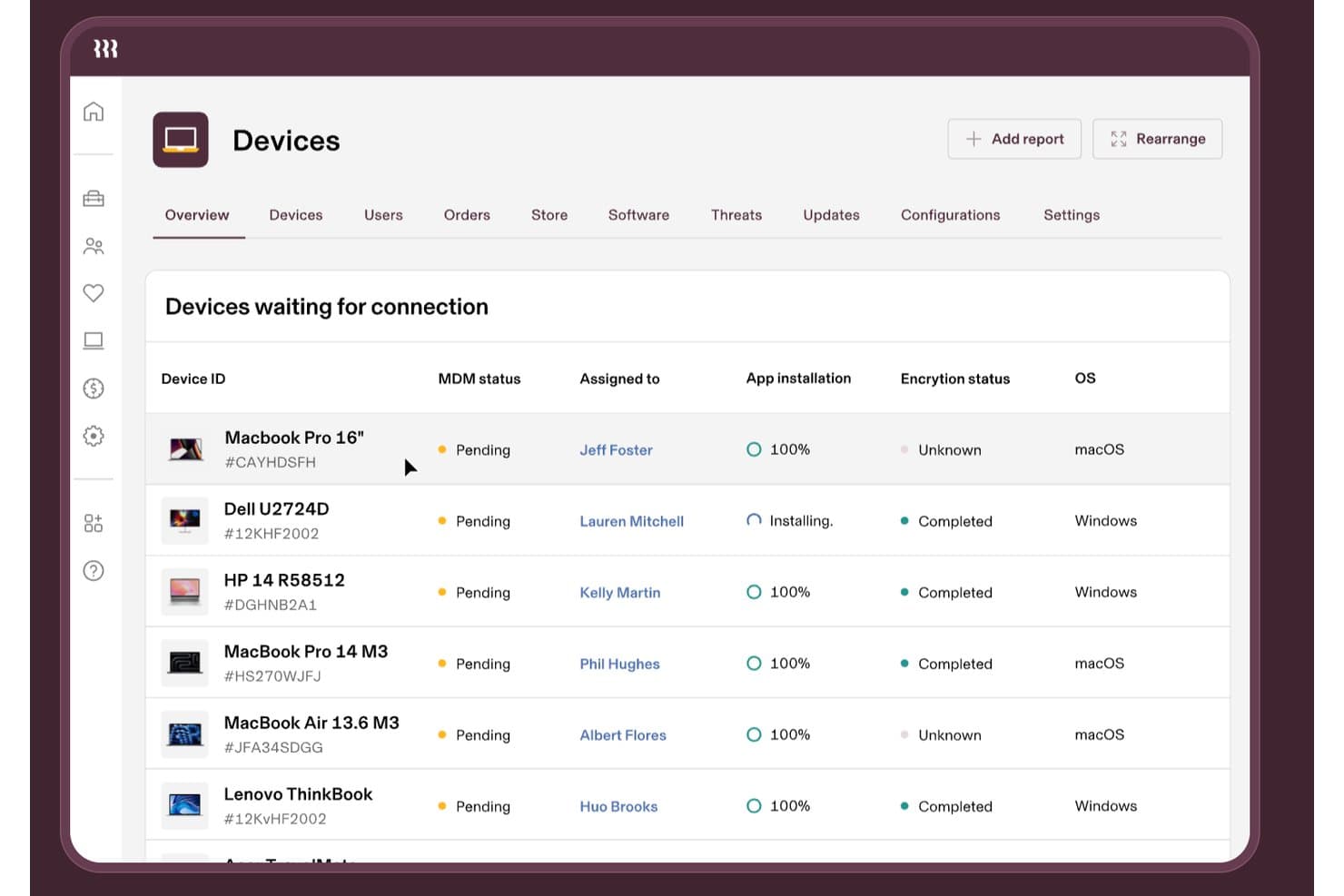
Rippling IT tracks device MDM status, encryption, and app installs. Rippling IT is endpoint management software for IT and HR teams that centralizes device provisioning, application access, security controls, and offboarding across a distributed workforce.
Who Is Rippling IT Best For?
IT and HR teams at distributed companies that need employee changes to trigger device provisioning, access updates, and offboarding tasks.
Why Rippling IT Is a Good Best Automox Alternatives
I picked Rippling IT because its HR-driven device lifecycle automation connects employee changes with IT actions. My team uses it to trigger device provisioning, application access updates, security controls, and offboarding tasks from one workflow. That helps us manage endpoint changes when employees join, change roles, or leave.
Rippling IT Key Features
- Cross-OS management: Manage macOS, Windows, iOS, and iPadOS endpoints.
- Device inventory: View serial numbers, OS versions, battery health, and disk usage.
- Configuration profiles: Push Wi-Fi, firewall, printer, and login settings.
- Endpoint scripting: Run scheduled Bash or PowerShell scripts on managed devices.
Rippling IT Integrations
Rippling offers 600+ out-of-the-box integrations, including Okta, Microsoft Entra ID, Slack, Zendesk, and Cylance. It also provides developer kits and an App Shop for custom integrations.
Pros and Cons
Pros:
- Provides inventory, profiles, and endpoint scripting
- Supports macOS, Windows, iOS, and iPadOS
- HR changes trigger device lifecycle workflows
Cons:
- Some admins report difficult MDM experiences
- Less focused on third-party patch automation
Learn more about Rippling IT: Best for remote patching on distributed endpoints
- Free plan + free demo available
- Pricing upon request
Visit WebsiteCustomer Rating:4.9/5
Action1 offers an endpoint management dashboard displaying managed devices with status. Action1 is a SaaS patch management platform designed for IT teams managing distributed or remote endpoints. It’s especially useful for organizations that need to maintain security and compliance across devices outside traditional office networks. If you’re looking for a solution that simplifies remote patching without requiring on-premises infrastructure, Action1 is worth considering.
Who Is Action1 Best For?
Action1 is a strong fit for IT teams in mid-sized businesses and MSPs that need to manage patching for remote or distributed endpoints across multiple locations.
Why Action1 Is a Good Automox Alternative
What sets Action1 apart as an Automox alternative is its focus on remote patching for distributed endpoints. I picked it because it allows IT teams to deploy and manage patches across devices that aren’t connected to a corporate network, which is essential for supporting remote and hybrid workforces. The platform’s cloud-native design means you don’t need on-premises servers or VPNs to keep endpoints secure and compliant. If you’re managing endpoints in multiple locations or for clients with remote staff, Action1’s remote patching capabilities make it a strong choice.
Action1 Key Features
Some other features that stand out for IT teams considering Action1 include:
- Automated Patch Approval Policies: Set rules to automatically approve or reject patches based on severity, vendor, or product.
- Real-Time Endpoint Inventory: View up-to-date hardware and software details for every managed device in your environment.
- Role-Based Access Controls: Assign granular permissions to users and groups to control who can manage, deploy, or view patches.
- Detailed Audit Logs: Track all patching actions and changes for compliance and security auditing.
Action1 Integrations
Integrations include Microsoft Entra ID, Okta, Duo, Microsoft Intune, and more.
Pros and Cons
Pros:
- Automated patch approval workflows
- Real-time patch compliance reporting
- Free for up to 200 endpoints
Cons:
- Reporting exports lack advanced customization
- Patch deployment speed can lag at times
Learn more about Action1: Best for cross-platform device and identity management
- 30-day free trial
- From $9/user/month (billed annually)
Visit WebsiteCustomer Rating:4.6/5
JumpCloud offers a dashboard showing user, device, and application statistics with actionable notifications. JumpCloud offers a unified platform for managing devices and user identities across Windows, macOS, and Linux environments. It’s a strong choice for IT teams that need to enforce security policies and control access from a single cloud-based console. If you’re looking to simplify cross-platform endpoint and identity management, JumpCloud addresses both needs in one solution.
Who Is JumpCloud Best For?
JumpCloud is a good fit for IT teams in midsize businesses that need to manage devices and user identities across multiple operating systems from a single cloud-based platform.
Why JumpCloud Is a Good Automox Alternative
I picked JumpCloud because it combines device management and identity management in a single cloud-native platform, which is something Automox doesn’t natively provide. With JumpCloud, you can manage Windows, macOS, and Linux devices alongside user access controls from one dashboard. I also appreciate its directory services, which let you enforce security policies and manage authentication without relying on separate tools. For IT teams that want unified control over both endpoints and user identities, JumpCloud offers a practical alternative to Automox.
JumpCloud Key Features
Some other features that make JumpCloud a strong option for cloud-native endpoint management include:
- Zero Trust security policies: Enforce device and user authentication requirements based on real-time risk assessments.
- Patch management automation: Schedule and deploy OS and application updates across all managed devices.
- Remote command execution: Run scripts and commands on endpoints without requiring a VPN connection.
- Reporting and auditing: Generate detailed logs and reports on device status, user activity, and policy compliance.
JumpCloud Integrations
Integrations include Google Workspace, Microsoft 365, Okta, Salesforce, Slack, Dropbox, Atlassian, Zendesk, and more.
Pros and Cons
Pros:
- Enforces Zero Trust security policies natively
- Provides built-in directory and SSO features
- Manages devices and identities in one platform
Cons:
- Mobile device management features are basic
- Fewer third-party integrations
Learn more about JumpCloud: Best for multi-OS patch automation across networks
- 30-day free trial + free demo
- Pricing upon request
Visit WebsiteCustomer Rating:4.4/5
ManageEngine Patch Manager Plus displays the All Patch Configurations dashboard with deployment status tracking. ManageEngine Patch Manager Plus is designed for teams providing IT services that need centralized patch management across diverse operating systems. It stands out for organizations managing both on-premises and remote endpoints in mixed-OS environments. If you’re looking for granular control and automation beyond what most cloud-native platforms offer, this tool is worth considering.
Who Is ManageEngine Patch Manager Plus Best For?
IT administrators in mid-sized to large organizations managing mixed Windows, macOS, and Linux environments across multiple locations will find this platform especially useful.
Why ManageEngine Patch Manager Plus Is a Good Automox Alternative
For teams that need to automate patching across Windows, macOS, and Linux networks, Patch Manager Plus offers strong multi-OS support. I picked it because it lets you schedule, test, and deploy patches to endpoints both inside and outside your corporate network. The platform’s automated patch scanning module and deployment workflows help reduce manual effort and missed updates. Its ability to handle remote and distributed devices makes it a practical choice for organizations with complex, hybrid environments.
ManageEngine Patch Manager Plus Key Features
Some other features worth noting for teams considering Patch Manager Plus include:
- Third-Party Patching: Patch a wide range of third-party applications alongside operating systems from the same dashboard.
- Automated Patch Testing: Test patches in a controlled environment before deployment to minimize disruption and compatibility issues.
- Custom Deployment Policies: Create and enforce custom patch policies based on department, location, or device group.
- Detailed Compliance Reporting: Generate reports on patch status, compliance levels, and audit trails for regulatory needs.
ManageEngine Patch Manager Plus Integrations
Integrations include Tenable Vulnerability Management, Tenable Security Center, Rapid7, CrowdStrike Falcon Spotlight, and more.
Pros and Cons
Pros:
- Offers granular scheduling and deployment policies
- Includes third-party application patch management
- Supports patching for Windows, macOS, and Linux
Cons:
- Remote patching setup can be complex
- Lacks real-time patch status dashboards
Learn more about ManageEngine Patch Manager Plus: Best for large-scale patching in complex enterprises
- Free trial available
- Pricing upon request
Visit WebsiteCustomer Rating:4.4/5
HCL BigFix offers a Fixlet Explorer dashboard displaying vulnerability metrics. HCL BigFix is an endpoint management and patching platform built for organizations with complex, distributed IT environments. It’s a strong choice for enterprises that need to manage thousands of endpoints across multiple operating systems and locations. If you’re looking for a solution that can handle large-scale patching and compliance across diverse device fleets, BigFix offers capabilities that go beyond many cloud-native competitors.
Who Is HCL BigFix Best For?
HCL BigFix is a good fit for large enterprises and public sector organizations that need to manage and secure endpoints across complex, multi-platform environments.
Why HCL BigFix Is a Good Automox Alternative
For organizations facing the challenge of patching thousands of endpoints across complex, distributed environments, HCL BigFix stands out. I picked it because it supports patch management for Windows, macOS, Linux, and UNIX, all from a single console, which is rare among cloud-native competitors. BigFix’s real-time visibility and automated remediation help IT teams keep large, diverse device fleets secure and compliant. Its ability to scale across global networks makes it a valuable IT management solution for enterprises with demanding compliance needs.
HCL BigFix Key Features
Some other features that make HCL BigFix a strong option for enterprise endpoint management include:
- Custom Policy Enforcement: Create and enforce custom security and configuration policies across all managed endpoints.
- Role-Based Access Control: Assign granular permissions to different IT roles for secure delegation and oversight.
- Automated Software Distribution: Deploy and update software packages to endpoints automatically based on defined schedules or triggers.
- Integrated Compliance Reporting: Generate detailed compliance reports to support audits and regulatory requirements directly from the platform.
HCL BigFix Integrations
Integrations include HCL AppScan, HCL iControl, HCL Connections, HCL Domino, HCL Notes, HCL SafeLinx, and more.
Pros and Cons
Pros:
- Scales to manage hundreds of thousands of endpoints
- Custom policy enforcement for compliance needs
- Real-time endpoint visibility and reporting
Cons:
- Limited cloud-native features
- Complex setup for multi-site deployments
Learn more about HCL BigFix: Best for integration with Microsoft 365 environments
- Free trial available
- From $60/user/month (billed annually)

Microsoft Intune offers endpoint management capabilities, including device enrollment, identity management, and more. Microsoft Intune is a cloud-based endpoint management platform built for organizations that rely on Microsoft 365 and Azure. It’s a strong fit for IT teams needing MDM capabilities for Windows, macOS, iOS, and Android devices in environments where Microsoft integration is a priority. If you need an all-in-one approach to unified policy enforcement across a Microsoft-centric ecosystem, Intune addresses those needs directly.
Who Is Microsoft Intune Best For?
IT teams in mid-sized to large organizations that standardize on Microsoft 365 and Azure for productivity and security management will get the most value from Intune.
Why Microsoft Intune Is a Good Automox Alternative
I picked Microsoft Intune because it offers deep, native integration with Microsoft 365 environments, which is a priority for many organizations already invested in Microsoft’s ecosystem. Intune lets you manage device compliance, application deployment, and security policies directly alongside your Microsoft 365 and Azure resources. This tight integration centralizes identity management and conditional access, making it easier to enforce security standards across all endpoints. For teams that want unified endpoint management without leaving the Microsoft stack, Intune is the best alternative to Automox.
Microsoft Intune Key Features
Some other features that stand out for IT teams considering Microsoft Intune include:
- Remote Device Wipe: Remotely erase data from lost or compromised devices to protect sensitive information.
- Role-Based Access Control: Assign granular permissions to IT staff based on job function or responsibility.
- Mobile Application Management: Manage and secure corporate apps on both managed and unmanaged devices.
- Automated OS Updates: Schedule and enforce operating system updates across all enrolled endpoints.
Microsoft Intune Integrations
Integrations include Microsoft 365, Microsoft Entra ID, OneDrive, SharePoint, Exchange, and more.
Pros and Cons
Pros:
- Automated device enrollment for Azure AD
- Built-in conditional access and compliance policies
- Deep integration with Microsoft 365 services
Cons:
- Reporting features lack customization options
- Limited patch management for third-party apps
Learn more about Microsoft Intune: Best for centralized patching in Windows environments
- Free trial + free demo available
- From $39/user/month

SolarWinds Patch Manager displays computer inventory, patch status, and update summaries. SolarWinds Patch Manager is designed for IT professionals who need to manage patching across large Windows environments. It appeals to organizations that rely on Microsoft technologies and want granular control over patch deployment and compliance. If you’re looking for a patch management solution that integrates with Windows Server Update Services and Microsoft System Center, this tool addresses those needs directly.
Who Is SolarWinds Patch Manager Best For?
SolarWinds Patch Manager is a strong choice for IT administrators in midsize to large organizations that manage primarily Windows-based IT infrastructure.
Why SolarWinds Patch Manager Is a Good Automox Alternative
For organizations that need centralized patching in Windows environments, SolarWinds Patch Manager stands out as a focused solution. I picked it because it integrates directly with Windows Server Update Services and Microsoft System Center, giving you granular control over patch deployment and scheduling. The tool also provides detailed patch compliance reporting, which helps IT teams meet audit and regulatory requirements. If your environment is heavily invested in Microsoft technologies, SolarWinds Patch Manager offers targeted features that Automox doesn’t natively provide.
SolarWinds Patch Manager Key Features
Some other features that make SolarWinds Patch Manager useful for IT management include:
- Third-party application patching: Patch a wide range of non-Microsoft applications alongside Windows updates.
- Automated patch approval workflows: Set rules for automatic approval or rejection of specific patches.
- Customizable alerting: Receive notifications for patch failures, pending updates, or compliance issues.
- Role-based access control: Assign granular permissions to different users or teams within the platform.
SolarWinds Patch Manager Integrations
Integrations include Microsoft WSUS, Microsoft SCCM, SolarWinds Network Performance Monitor, and more.
Pros and Cons
Pros:
- Provides automated patch approval workflows
- Enables patching of offline and virtual machines
- Integrates natively with WSUS and SCCM
Cons:
- No cloud-native agent for remote endpoints
- Limited support for non-Windows operating systems
Learn more about SolarWinds Patch Manager: Best for customizable software deployment workflows
- 14-day free trial
- Pricing upon request

PDQ Deploy displays a detailed device inventory table. PDQ Deploy is a deployment automation tool designed for IT professionals who need granular control over software distribution. It’s especially useful for organizations with complex or custom deployment requirements across Windows environments. If you’re looking for a solution that supports advanced scripting and flexible deployment schedules, PDQ Deploy offers capabilities that go beyond many cloud-native endpoint management platforms.
Who Is PDQ Deploy Best For?
PDQ Deploy is a strong patching solution for IT administrators in mid-sized organizations that need to automate and customize software deployments across Windows devices.
Why PDQ Deploy Is a Good Automox Alternative
What makes PDQ Deploy a strong Automox alternative is its focus on customizable software deployment workflows. I picked it because it lets you build detailed deployment packages using scripts, variables, and multi-step processes, which is ideal for organizations with unique or complex requirements. You can schedule deployments, set up triggers, and control update rollouts with a high degree of precision. For IT teams that need more than basic patching and want to tailor deployments to their environment, PDQ Deploy offers flexibility that many cloud-native endpoint management platforms don’t match.
PDQ Deploy Key Features
Some other features that set PDQ Deploy apart for IT teams managing endpoints:
- Centralized Deployment Console: Manage all deployment tasks and monitor progress from a single dashboard.
- Pre-Built Software Library: Access a catalog of ready-to-deploy application packages for common software.
- Deployment History Tracking: Review detailed logs of past deployments for auditing and troubleshooting.
- Role-Based Access Control: Assign permissions to users or groups to control who can create, schedule, or approve deployments.
PDQ Deploy Integrations
Integrations include PDQ Inventory, PowerShell, MSI installers, Windows Task Scheduler, and more.
Pros and Cons
Pros:
- Large library of pre-built software packages
- Extensive scripting support for custom tasks
- Highly granular control over deployment steps
Cons:
- No built-in patch management for OS updates
- Windows-only, no macOS or Linux support
Learn more about PDQ Deploy: Best for granular patching of Windows servers
- Free demo available
- Pricing upon request

Ivanti Neurons Patch Intelligence dashboard displays SLA compliance metrics and a detailed list of pending security updates. Ivanti Security Controls is designed for IT teams that need advanced control over patch management and endpoint security. It appeals to organizations with complex Windows server environments and strict compliance requirements. If you’re looking for a solution that goes beyond basic patching and offers detailed visibility into vulnerabilities, Ivanti Security Controls is worth considering.
Who Is Ivanti Security Controls Best For?
Ivanti Security Controls is a strong fit for IT administrators in mid-sized to large enterprises that manage complex Windows server infrastructures.
Why Ivanti Security Controls Is a Good Automox Alternative
When you need precise control over patching for Windows servers, Ivanti Security Controls stands out among Automox alternatives. I picked it because it lets you target patches at the OS, third-party apps, and even virtual machines with detailed scheduling and approval workflows. The platform also offers agentless and agent-based scanning to improve your patch management process without extra overhead. For IT teams that require granular patch deployment and visibility into patch status across complex infrastructures, Ivanti Security Controls delivers capabilities that go beyond basic endpoint management.
Ivanti Security Controls Key Features
Some other features worth noting for IT teams considering Ivanti Security Controls include:
- Patch Content Repository: Access a regularly updated library of patches for Microsoft and third-party applications.
- Role-Based Access Control: Assign granular permissions to different IT staff based on their responsibilities.
- Vulnerability Assessment: Scan endpoints to identify missing patches and security vulnerabilities before deployment.
- PowerShell Automation: Use built-in PowerShell scripts to automate repetitive patch management and security tasks.
Ivanti Security Controls Integrations
Integrations include Microsoft SCCM, VMware, Red Hat Satellite, ServiceNow, Qualys, Tenable, Rapid7, Splunk, and more.
Pros and Cons
Pros:
- Includes built-in vulnerability assessment tools
- Offers granular patch targeting for Windows servers
- Supports agentless and agent-based patching workflows
Cons:
- Interface can feel dated and non-intuitive
- Limited support for macOS and Linux endpoints
Learn more about Ivanti Security Controls: Best for unified management of diverse device types
- 30-day free trial
- From $3.00/device/month

Workspace ONE UEM dashboard displays Windows patch deployment metrics. Workspace ONE UEM is a unified endpoint management platform designed for organizations managing a wide range of device types and operating systems. It’s a strong choice for IT teams in enterprises or regulated industries that need centralized control over mobile, desktop, and IoT endpoints. If you’re looking for a solution that brings together device management, security, and compliance in one place, Workspace ONE UEM is worth considering.
Who Is Workspace ONE UEM Best For?
Workspace ONE UEM is a good fit for large enterprises and regulated industries that need centralized management of diverse devices across multiple platforms.
Why Workspace ONE UEM Is a Good Automox Alternative
When you need unified management across a mix of device types, Workspace ONE UEM stands out among Automox alternatives. I picked it because it supports centralized policy enforcement and lifecycle management for Windows, macOS, Linux, iOS, Android, and even IoT devices from a single console. The platform also offers granular compliance controls and real-time monitoring, which are essential for organizations with complex endpoint environments. If your team manages a diverse fleet and needs consistent cyber security and configuration across all endpoints, Workspace ONE UEM delivers on that need.
Workspace ONE UEM Key Features
Some other features worth noting for IT teams considering Workspace ONE UEM include:
- Remote device wipe: Remotely erase data from lost or compromised devices to protect sensitive information.
- Application deployment and management: Push, update, and manage applications across all managed endpoints from a unified dashboard.
- Conditional access policies: Set rules that control device and user access to corporate resources based on compliance status.
- Automated OS patching: Schedule and automate operating system updates for multiple device types to maintain security and compliance.
Workspace ONE UEM Integrations
Integrations include ServiceNow, CrowdStrike, NVIDIA, IGEL, Workspace ONE Assist, and more.
Pros and Cons
Pros:
- Integrates with major identity and security platforms
- Provides remote device wipe and lock features
- Offers granular compliance and security policies
Cons:
- Limited patch management for non-Windows platforms
- Interface can be complex for new admins
Learn more about Workspace ONE UEM:
Other Automox Alternatives
Here are some additional Automox alternatives that didn’t make it onto my shortlist, but are still worth checking out:
- 11Tanium PatchBest for real-time visibility and control of endpoints
- 12baramundi Patch ManagementBest for integrated patch and asset management
- 13NinjaOneBest for rapid deployment in MSP and IT teams
- 14PulsewayBest for mobile-first patch management control
- 15ScalefusionBest for patching Windows devices in remote teams
- 16ConnectWise AutomateBest for scripting and automation flexibility
- 17TenableBest for integrating patching with vulnerability scanning
- 18HeimdalBest for automated vulnerability remediation workflows
- 19ThreatLockerBest for application whitelisting with patching
- 20N‑central® RMMBest for MSP-focused patch management
- 21SecOps SolutionBest for compliance-driven patch management
- 22Vicarius vRxBest for risk-based patch prioritization
How I Evaluate Automox Alternatives
I look at Automox alternatives in two layers: core cross-platform patching and automation must-haves, then differentiators like MSP multi-tenancy, CVE workflows, and compliance tooling.
Core Functionality (Table Stakes For This List)
When I'm selecting tools for my list, I rank each one on a scale from 0 (does not offer the functionality) to 5 (excels in this area) for each core functionality listed below. Then, I calculate the tool's total score into a percentage. Each tool needs to achieve a minimum total score of 65% to be considered for inclusion.
- Cross-Platform Patch Management: I check whether each tool patches Windows, macOS, and Linux endpoints and how deep its third-party application catalog goes for apps like Zoom, Chrome, and Adobe.
- Cloud-Native Architecture: The tool should manage endpoints over the internet with a lightweight agent, so remote teams don't need a VPN or on-prem relay server to receive patches.
- Policy-Based Automation: I evaluate how granularly you can build patch schedules, group devices by criteria like OS or department, and trigger auto-remediation when a device drifts out of compliance.
- Software Deployment: Each platform should let you push, update, and remove software packages across your fleet—whether that's deploying a new browser version or silently uninstalling unapproved apps.
- Endpoint Configuration Management: I look at whether the tool supports custom script execution and system-level settings enforcement, like disabling USB ports or hardening firewall rules at scale.
- Reporting & Compliance Visibility: Dashboards and reports should surface patch status, missing updates, and device compliance posture clearly enough to hand directly to auditors or share with leadership.
Once I have a list of tools that meet this criteria, I consider what sets each platform apart.
Differentiating Factors (What Sets Vendors Apart)
Here's how I compare and contrast different vendors:
Standout Features
I look at whether a tool connects directly with vulnerability scanners like Tenable or Qualys, so your team can go from CVE discovery to patch deployment without switching consoles. Custom scripting support matters too—pre-built script libraries save hours when you need to, say, rotate local admin passwords across hundreds of endpoints overnight. A self-service app portal is another differentiator worth noting, since it lets end users install approved software on their own and cuts down on repetitive IT tickets.
Beyond Features
MSP and multi-tenant support are big considerations. If you manage endpoints for multiple clients, you need isolated tenant views, role-based access, and per-client reporting from one console. Compliance certifications also carry weight—I check for SOC 2 Type II and built-in mapping to frameworks like CIS or NIST, especially when your organization faces regular audits. Integration depth rounds things out. A tool that connects natively to your ITSM platform and identity provider means fewer manual handoffs between patching, ticketing, and access management.
Why Look For an Automox Alternative?
While Automox is a good choice of cloud-native endpoint management platform, there are a number of reasons why some users seek out alternative solutions. You might be looking for an Automox alternative because…
- Needing support for legacy or non-Windows operating systems
- Wanting more granular patch scheduling options
- Requiring on-premises deployment instead of cloud-only
- Seeking deeper integration with Microsoft tools
- Looking for more advanced compliance reporting
- Needing a solution available in restricted regions
If any of these sound like you, you’ve come to the right place. My list contains several cloud-native endpoint management platform options that are better suited for teams facing these challenges with Automox and looking for alternative solutions.
Features
Here are some of the key features of Automox, to help you contrast and compare what alternative solutions offer:
- Cross-platform patch management: Automox lets you deploy patches to Windows, macOS, and Linux devices from a single cloud-based console, making it easier to manage diverse device fleets.
- Automated policy enforcement: Set up custom policies to automate patch deployment, software updates, and configuration changes across all endpoints, reducing manual intervention.
- Real-time device visibility: Monitor the status of every managed endpoint in real time, including patch compliance, update history, and device health metrics.
- Remote device management: Manage and update endpoints regardless of their location, supporting remote and hybrid workforces without requiring VPN access.
- Third-party application patching: Patch a wide range of non-OS applications, such as browsers and productivity tools, to reduce vulnerabilities beyond just operating systems.
- Custom scripting support: Use PowerShell, Bash, or Shell scripts to automate complex tasks, remediate issues, or enforce configurations across endpoints.
- Role-based access control: Assign granular permissions to users and groups, ensuring only authorized personnel can perform sensitive actions or access critical data.
- API access: Integrate Automox with other IT and security tools using its RESTful API, enabling workflow automation and data sharing across platforms.
- Detailed compliance reporting: Generate reports on patch status, policy compliance, and remediation actions to support audits and regulatory requirements.
- Cloud-native architecture: Manage endpoints without on-premises infrastructure, leveraging a scalable and secure cloud platform for centralized control.