

Action1 Review: Pros, Cons, Features and Pricing Explained
I dig into why Action1's automated patch management isn't just quick—it's quietly transforming how IT teams safeguard endpoints. Curious how it sets a new standard? Let's get into it.

We review tools independently, and commissions help fund our testing. See our transparency policy, our methodology, or suggest a tool.
Action1 is a cloud-native patch management software built for IT teams managing endpoints across distributed or remote environments. I'd consider it if your organization has grown beyond what on-premises tools can handle without heavy infrastructure overhead. If you've evaluated Ivanti but found its deployment complexity and licensing costs hard to justify, Action1 is worth a close look—it covers automated patch deployment, third-party application patching, and endpoint visibility without requiring on-site servers or agents that need constant maintenance.
Action1 Evaluation Summary
4.9/5
- Pricing upon request
- Free plan + free demo available
Why Trust Our Software Recommendations
6,700+
Reviews
20
Industry experts
16+
Evaluation factors
14
Years
Our team has been testing and reviewing software since 2012. As tech leaders ourselves, we know how difficult—and important—it is to choose the right software.
For this guide, we evaluated tools using hands-on testing and independent research, scoring tools using our selection criteria.
Our reviews reflect our human editorial judgment, not a sales pitch.
Expert reviewers:
- Paulo Gardini MiguelTech Director
 Tim FisherVP of AI
 Gabriel RosasTech Lead & Software Architect
 Christhian GruhnTech Lead & Platform Architect

Action1 Overview
When judging Action1, I think its cloud-first approach, simple interface, and hands-off onboarding stand out compared to most options. Pricing is predictable, and remote patching for distributed endpoints is stronger than average. Where Action1 can underperform is with limited integrations, which may matter in complex toolchains. For IT teams balancing compliance and large hybrid fleets, I'd choose Action1 for its automation and visibility, especially if you want predictable costs and minimal training.
Pros
- Automates patch deployment for Windows and third-party apps
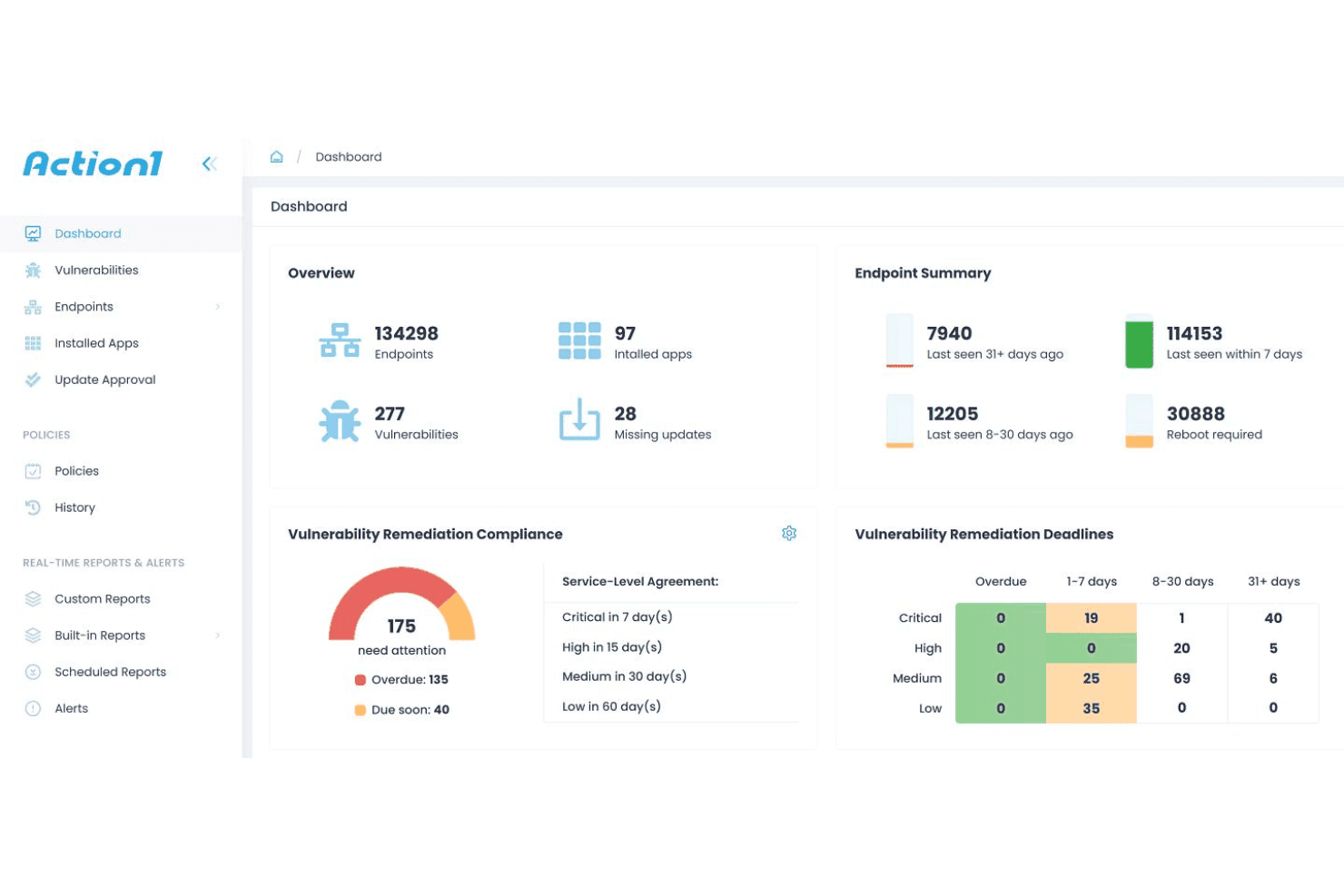
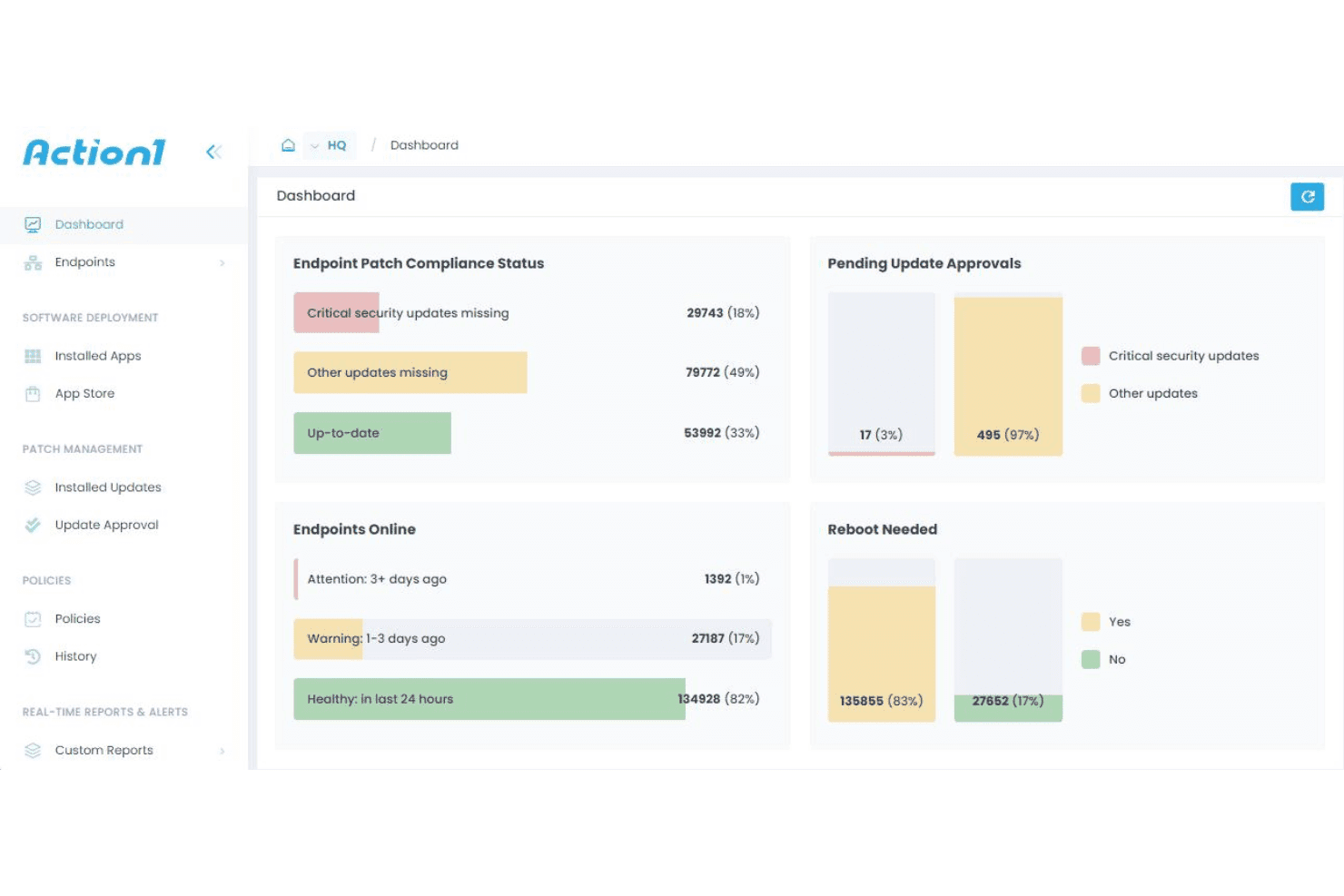
- Cloud dashboard gives instant visibility into device compliance
- Remote patching works well for distributed or hybrid teams
Cons
- No mobile app for on-the-move management
- Reporting customization is limited for advanced audits
- Lacks built-in asset inventory tracking
Is Action1 Right For Your Needs?
Who Would be a Good Fit for Action1?
Action1 suits businesses and IT teams that need fast, centralized patch management without complex infrastructure, especially in regulated, distributed, or cloud-first settings. Its remote device support and compliance reporting make it a popular choice for sectors like finance, healthcare, and MSPs caring for many endpoints. The easy onboarding helps smaller IT departments manage security without extra headcount. Organisations pursuing GDPR, SOC 2 Type II, or ISO 27001 certification will also find the audit trail and reporting capabilities genuinely useful.
- Financial ServicesEnvironments with strict compliance needs benefit from Action1's detailed reporting and auditing.
- Healthcare ProvidersHealthcare IT can automate patching across many endpoints to meet HIPAA requirements.
- Remote SMB IT TeamsSMBs with distributed staff can patch devices everywhere with Action1's cloud console.
- Managed Service ProvidersMSPs can oversee patching for multiple clients from one dashboard.
- Education InstitutionsSchools and districts get centralized control over laptops and desktops used on- and off-campus.
- Compliance-Driven EnterprisesCompanies with regulatory demands get value from Action1's vulnerability assessments.
Who Would be a Bad Fit for Action1?
Organizations that rely on Linux-based infrastructure, have deeply custom patching workflows, or strictly air-gapped environments won't find Action1 as suitable. The tool's focus on Windows and cloud-based management limits its fit for heavy DevOps teams, large-scale government deployments, or businesses with unique network restrictions. Teams that need remote desktop and remote access capabilities beyond patching, should evaluate whether Action1's current roadmap meets their timeline.
- Linux-Only EnvironmentsAction1 does not support patch management for Linux servers or desktops.
- Air-Gapped NetworksWithout internet connectivity, Action1's cloud management can't function.
- DevOps TeamsThose needing tight CI/CD or containerized patch automations won't find Action1 as flexible.
- Very Large EnterprisesMassive companies with highly granular policies might outgrow Action1's reporting.
- Government/Military SectorsStrict data residency and sovereignty requirements may rule out a US-based cloud platform.
- Highly Custom Patch FlowsTeams needing deep customization for unique software stacks might find Action1 too prescriptive.
Our Review Methodology
How We Test & Score Tools
We’ve spent years building, refining, and improving our software testing and scoring system. The rubric is designed to capture the nuances of software selection and what makes a tool effective, focusing on critical aspects of the decision-making process.
Below, you can see exactly how our testing and scoring works across seven criteria. It allows us to provide an unbiased evaluation of the software based on core functionality, standout features, ease of use, onboarding, customer support, integrations, customer reviews, and value for money.
Core Functionality (25% of final scoring)
The starting point of our evaluation is always the core functionality of the tool. Does it have the basic features and functions that a user would expect to see? Are any of those core features locked to higher-tiered pricing plans? At its core, we expect a tool to stand up against the baseline capabilities of its competitors.
Standout Features (25% of final scoring)
Next, we evaluate uncommon standout features that go above and beyond the core functionality typically found in tools of its kind. A high score reflects specialized or unique features that make the product faster, more efficient, or offer additional value to the user.
We also evaluate how easy it is to integrate with other tools typically found in the tech stack to expand the functionality and utility of the software. Tools offering plentiful native integrations, 3rd party connections, and API access to build custom integrations score best.
Ease of Use (10% of final scoring)
We consider how quick and easy it is to execute the tasks defined in the core functionality using the tool. High scoring software is well designed, intuitive to use, offers mobile apps, provides templates, and makes relatively complex tasks seem simple.
Onboarding (10% of final scoring)
We know how important rapid team adoption is for a new platform, so we evaluate how easy it is to learn and use a tool with minimal training. We evaluate how quickly a team member can get set up and start using the tool with no experience. High scoring solutions indicate little or no support is required.
Customer Support (10% of final scoring)
We review how quick and easy it is to get unstuck and find help by phone, live chat, or knowledge base. Tools and companies that provide real-time support score best, while chatbots score worst.
Customer Reviews (10% of final scoring)
Beyond our own testing and evaluation, we consider the net promoter score from current and past customers. We review their likelihood, given the option, to choose the tool again for the core functionality. A high scoring software reflects a high net promoter score from current or past customers.
Value for Money (10% of final scoring)
Lastly, in consideration of all the other criteria, we review the average price of entry level plans against the core features and consider the value of the other evaluation criteria. Software that delivers more, for less, will score higher.
Core Features
Automated Patch Deployment
Automatically scans and applies patches for Windows OS, MacOS, Linux, and third-party apps. IT admins can schedule or trigger deployments to meet patch deadlines.
Cloud-Based Management Console
Manage all patching tasks from a single web dashboard. Teams get real-time visibility into update status across every endpoint.
Remote Endpoint Support
Deploy patches to on-premise, remote, and offsite devices without a VPN. Especially useful for businesses with distributed workforces.
Patch Approval Workflow
Review, approve, or block patches before deployment. Admins stay in control of which updates install in production environments.
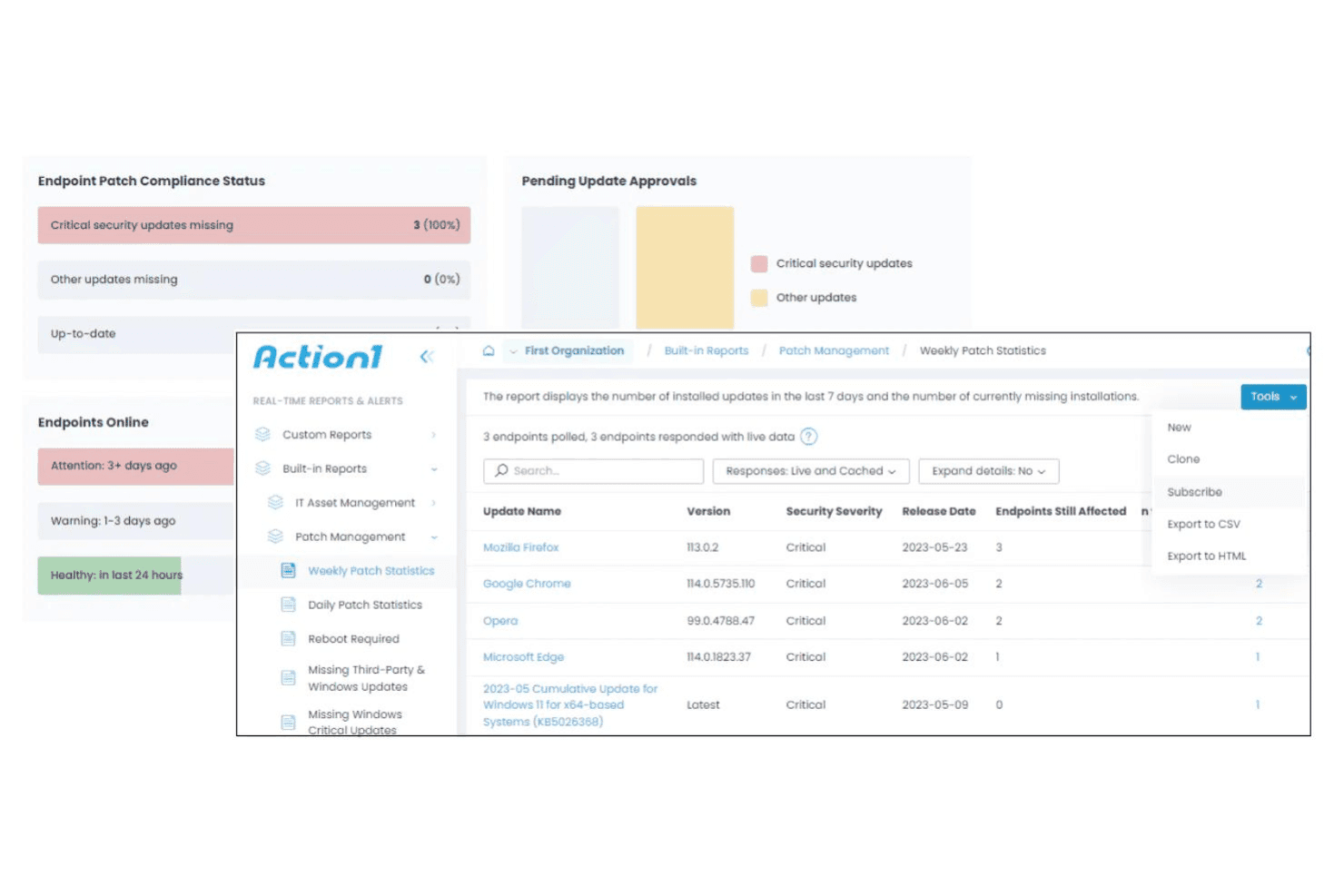
Detailed Patch Reporting
Generate patch compliance reports for internal reviews or audits. Reports show which devices are up-to-date or have failed patches.
Vulnerability Assessment
Identifies missing patches linked to known security risks. Prioritize patching based on potential threats and CVEs.
Ease of Use
Action1 feels purpose-built for IT pros who want speed and simplicity. The cloud console makes managing and approving patches a one-click affair, and setup is honestly quick—even for teams without deep patch management experience. I find real-time visibility and remote device support especially user-friendly, since you don't need complex infrastructure or steep learning to get started. End users experience minimal disruption during patch cycles, which is exactly what busy IT teams need.
Integrations
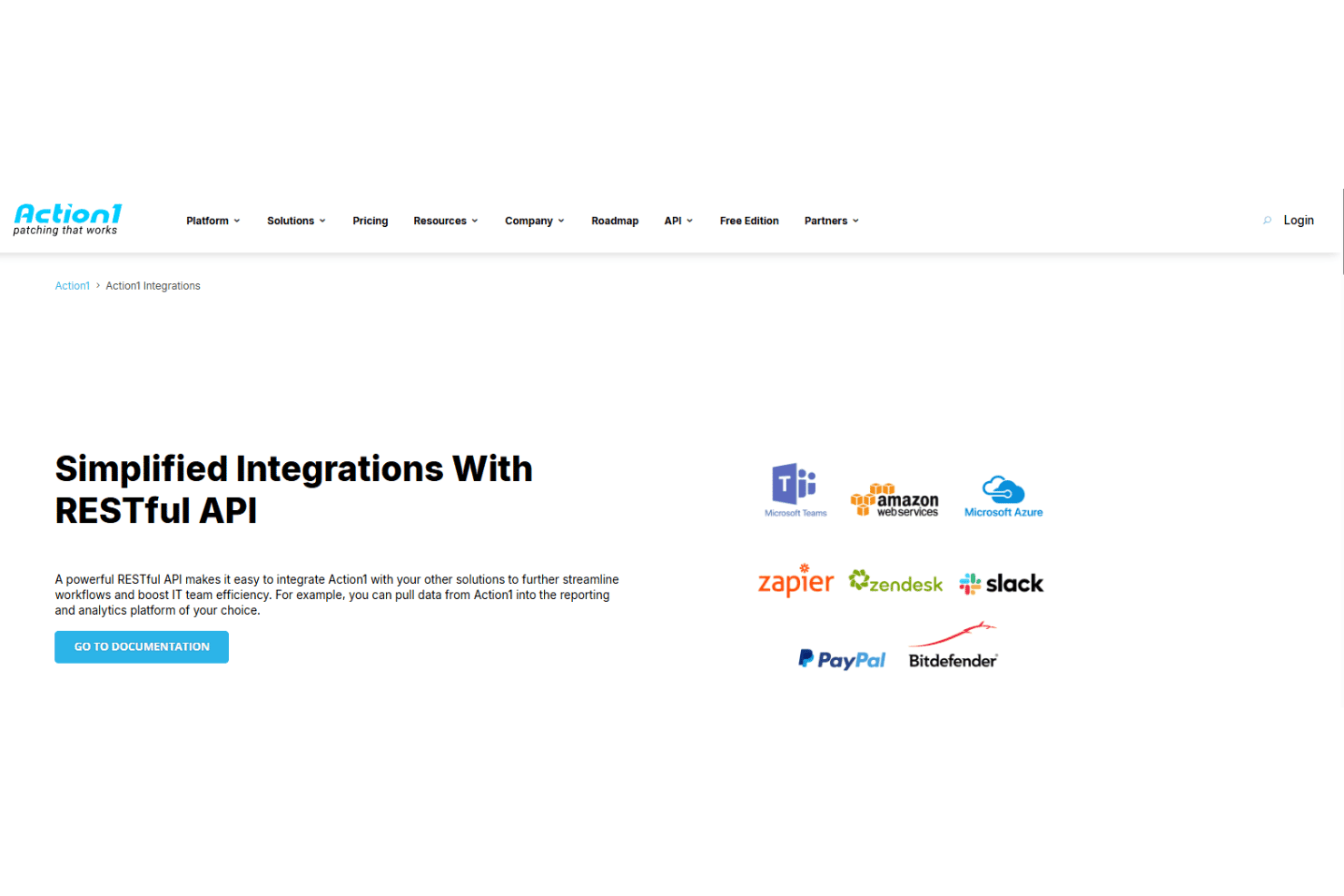
Action1 integrates with Microsoft Teams, AWS, Azure, Zendesk, and Slack, among others.
Action1 also provides a REST API, which enables custom integrations and connections with third-party applications and tools like Zapier.
Action1 Specs
- 2-Factor Authentication: Yes
- Anti-Virus: Yes
- API: Yes
- Bug Tracking: Yes
- Dashboard: Yes
- Data Export: Yes
- Data Import: Yes
- Data Visualization: Yes
- Email Integration: Yes
- External Integrations: Yes
- File Sharing: Yes
- File Transfer: Yes
- Firewall: Yes
- Google Apps Integration: Yes
- Inventory Tracking: Yes
- Malware Protection: Yes
- Multi-User: Yes
- Network Device Performance Monitoring: Yes
- Network Traffic Monitoring: Yes
- Network Visualization: Yes
- Notifications: Yes
- Project Management: Yes
- Scheduling: Yes
- Third-Party Plugins/Add-Ons: Yes


