
22 Beste Endpoint-Schutz-Software 2026

Beste Endpoint-Security-Software Übersicht
Hier ist meine Übersicht über die beste Endpoint-Security-Software:


Die beste Endpoint-Security-Software hilft Teams, Bedrohungen frühzeitig zu erkennen, unbefugten Zugriff zu verhindern, Malware-Vorfälle zu reduzieren und einen konsistenten Schutz auf Laptops, Servern und mobilen Geräten aufrechtzuerhalten. Diese Tools geben Sicherheitsteams die nötige Transparenz und Kontrolle, um schnell zu reagieren – ohne den Arbeitsalltag zu unterbrechen.
Organisationen suchen oft nach Endpoint-Sicherheitslösungen, wenn unverwaltete Geräte Schwachstellen einführen, Fehlkonfigurationen es Angreifern ermöglichen, Schutzmechanismen zu umgehen, oder manuelle Untersuchungsprozesse die Reaktionszeit verzögern. Diese Probleme erhöhen das Risiko von Sicherheitsverletzungen, verursachen operative Engpässe und erschweren die Zusammenarbeit zwischen Sicherheits- und IT-Teams.
Mit über 20 Jahren Branchenerfahrung als Chief Technology Officer habe ich Dutzende Endpoint-Security-Plattformen in realen Umgebungen getestet und bewertet – hinsichtlich Erkennungsgenauigkeit, Integrationsmöglichkeiten und Benutzerfreundlichkeit. Dieser Leitfaden stellt die besten Endpoint-Security-Lösungen vor, die Transparenz verbessern, schnellere Reaktionen unterstützen und den Schutz in verteilten Umgebungen stärken. Jede Bewertung enthält Informationen zu Funktionen, Vor- und Nachteilen sowie idealen Anwendungsfällen, um Ihnen die Auswahl des richtigen Tools zu erleichtern.
Table of Contents
- Beste Software-Shortlist
- Warum Sie Unseren Software-Bewertungen Vertrauen Sollten
- Spezifikationen vergleichen
- Bewertungen
- Weitere Endpoint-Sicherheitssoftware
- Ähnliche Software-Bewertungen
- Auswahlkriterien für Endpoint-Sicherheitssoftware
- Wie wählt man Endpoint-Sicherheitssoftware aus
- Trends bei Endpoint-Sicherheitssoftware
- Was ist Endpoint-Sicherheit?
- Funktionen
- Vorteile
- Kosten und Preise
- FAQs
Why Trust Our Software Reviews
Kurzübersicht: Beste Endpoint-Security-Software
| Tool | Best For | Trial Info | Price | ||
|---|---|---|---|---|---|
| 1 | Best for global teams | Free demo available | from $10/person/month | Website | |
| 2 | Best for continuous monitoring | 30-day free trial + free demo available | From $149/technician/month (billed annually) | Website | |
| 3 | Best for multi-OS endpoint management | 14-day free trial | From $2/device/month | Website | |
| 4 | Best for automated incident response | 14-day free trial | From $89/user/month (billed annually) | Website | |
| 5 | Best for ransomware encryption protection | Free trial + free demo available | Pricing upon request | Website | |
| 6 | Best for real-time visibility and remediation | 30-day free trial | Pricing upon request | Website | |
| 7 | Best for protecting business data for small-to-medium-sized companies | 30-day free trial available | From $118.99/5 devices/year | Website | |
| 8 | Best for endpoint scanning and response | 30-day free trial + free demo available | From $39.95/device (billed annually) | Website | |
| 9 | Best for protecting small businesses endpoints | 30-day free trial available | From $31.37/device/year | Website | |
| 10 | Best for malware and attack prevention for small businesses | Not available | From $16.90/endpoint/year | Website |

-

Site24x7
Visit WebsiteThis is an aggregated rating for this tool including ratings from Crozdesk users and ratings from other sites.4.6 -
Docker
Visit WebsiteThis is an aggregated rating for this tool including ratings from Crozdesk users and ratings from other sites.4.6 -
Pulumi
Visit WebsiteThis is an aggregated rating for this tool including ratings from Crozdesk users and ratings from other sites.4.8





Die 10 besten Endpoint-Security-Software im Vergleich
Im Folgenden finden Sie meine ausführlichen Zusammenfassungen der besten Endpoint-Security-Programme, die es auf meine Übersicht geschafft haben. Meine Bewertungen bieten Ihnen einen genauen Einblick in die wichtigsten Funktionen, Vor- & Nachteile, Integrationen und ideale Anwendungsfälle, damit Sie das passende Tool finden.


Deel IT is a global-first IT solution that helps you manage and automate your company's IT operations across more than 130 countries. It streamlines equipment and software management, making tasks like onboarding and offboarding straightforward, no matter where your team members are located.
Why I picked Deel IT: I chose Deel IT because of its integrated mobile device management (MDM) and endpoint protection features. These tools allow you to automatically secure devices by configuring them with necessary security measures and business-critical applications before they're delivered to your employees. This approach reduces risks associated with manual setups and ensures that devices are ready for immediate use upon arrival.
Deel IT Standout Features & Integrations:
Features include the ability to grant and revoke application access remotely. This means you can control who has access to specific software and data, enhancing your organization's security posture. It also offers device lifecycle management, which covers everything from purchasing and provisioning to monitoring and recovering assets remotely.
Integrations include Hubstaff, QuickBooks, Google Workspace, Slack, JIRA, Brex, Dropbox, Microsoft 365, SAP S/4HANA, Airtable, Google Sheets, and HubSpot.
Pros and Cons
Pros:
- Simplifies global equipment procurement and deployment
- Provides comprehensive asset tracking and visibility
- Includes robust security features like MDM and endpoint protection
Cons:
- Mobile app is limited compared to desktop version
- Not ideal for businesses with complex asset management and IT needs


Atera is an all-in-one IT management platform that helps you monitor, manage, and secure your IT environment. It offers a unified solution combining remote monitoring and management (RMM), professional services automation (PSA), and endpoint protection tools, making it a good fit for small businesses and managed service providers (MSPs).
Why I picked Atera: I chose Atera for its continuous monitoring capabilities, which allow you to proactively manage endpoints across your IT environment. Its automated patch management feature helps reduce security vulnerabilities by keeping devices up to date without manual effort. I also like that Atera integrates easily with leading antivirus tools, adding another layer of protection through partnerships with providers like Bitdefender.
Atera Standout Features & Integrations:
Standout features include network discovery for identifying and monitoring all devices on your network and role-based access control to manage who can access sensitive areas of your IT infrastructure. Atera also supports compliance with key standards like ISO/IEC and GDPR, giving you additional confidence in its security posture.
Integrations include Xero, Control D, Cynet All-in-One Cybersecurity Platform, Domotz, TeamViewer, QuickBooks Online, AnyDesk, Zapier, Acronis, Splashtop, Webroot, and Bitdefender.
Pros and Cons
Pros:
- Consolidates various IT management functions like RMM, helpdesk, and ticketing
- Integrated well with third-party tools
- Centralized dashboard for key metrics
Cons:
- Not comprehensive for larger MSPs
- Learning curve for new users due to breadth of features
New Product Updates from Atera

Atera Enhances IT Autopilot With Automation and File Support
Atera’s IT Autopilot gets three major boosts: you can now attach common files for deeper analysis, automate IT tasks with clear workflows, and choose how the system follows up when users go silent. These updates help streamline IT operations and improve resolution efficiency. For more information, visit Atera’s official site.


Scalefusion is a unified mobile device and endpoint management solution that offers a wide range of features for managing devices and users, including location tracking, application management, geofencing, and more. The platform has a user-friendly interface and versatile deployment options for businesses of all sizes.
Why I picked Scalefusion: I chose Scalefusion for its multi-OS endpoint management capabilities. The platform enables businesses to manage and secure a wide range of devices, including smartphones, tablets, laptops, and desktops across various operating systems such as iOS, Android, Windows, and macOS. It allows IT administrators to manage this diverse range of devices from a single dashboard.
Scalefusion Standout Features & Integrations:
Features that are compelling about Scalefusion are its content management capabilities that allow users to manage and distribute content on enrolled devices, pitstops for insights into distance traveled by devices, and role-based access control. It also offers real-time location tracking, geofencing, and reports on compliance.
Integrations include Google Workspace, Google Maps, Google Drive, Okta, Azure AD, Office 365 AD, Samsung Knox, Lenovo, Kyocera, Jira, Freshservice, Janam, and more.
Pros and Cons
Pros:
- API available for customizations
- Simple deployment and configuration
- Detailed granular control over device lockdown
Cons:
- Messaging is unavailable when offline
- Occasional lag for remote locking and unlocking
New Product Updates from Scalefusion
Scalefusion Introduces Apple TV Management
Scalefusion now supports Apple TV management, enabling IT teams to configure and monitor devices. For more information, visit Scalefusion's official site.
 .
.
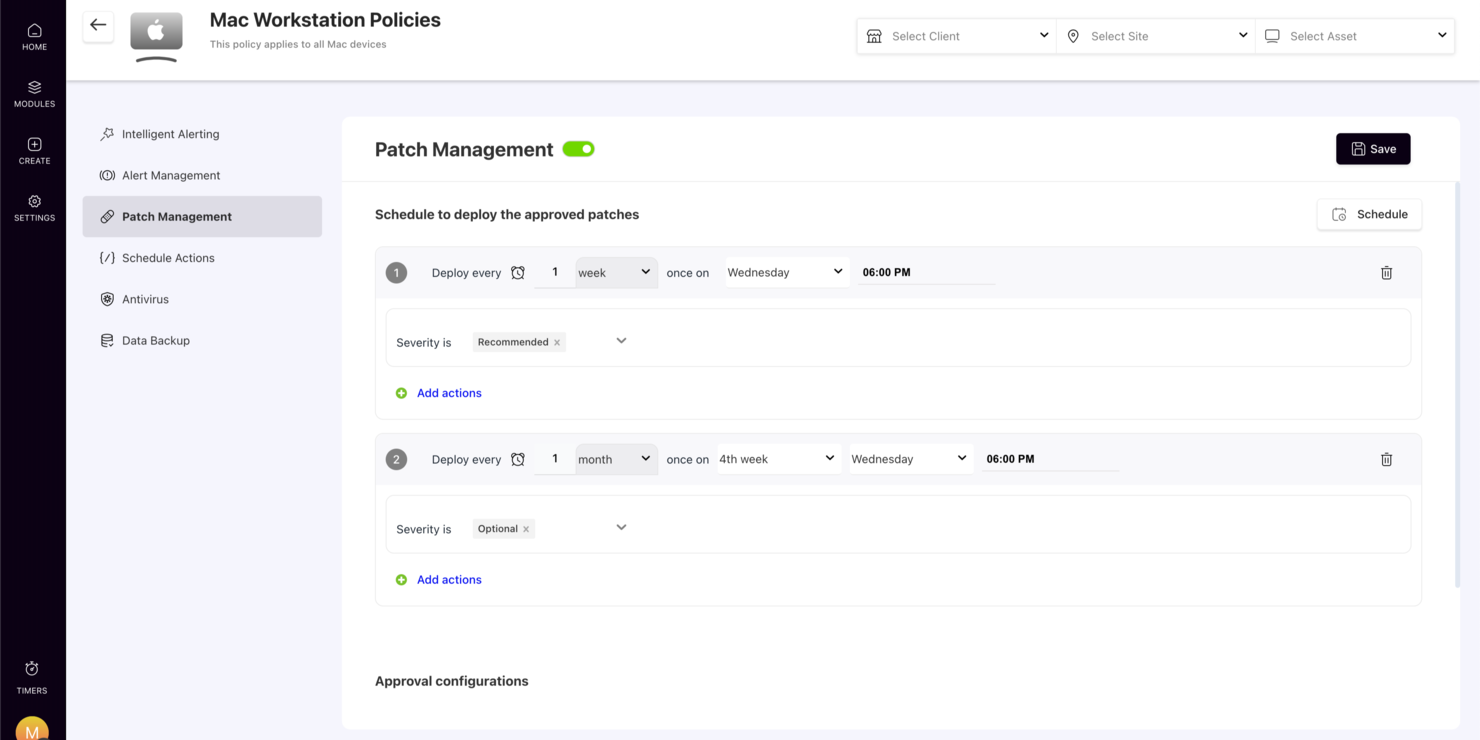
SuperOps offers a tailored IT management platform for those seeking endpoint protection, especially appealing to Managed Service Providers (MSPs) and IT teams. It addresses the need for enhanced security and operational efficiency across various devices. By consolidating multiple tools into one solution, SuperOps helps automate workflows and ensure compliance, making it a valuable asset for IT professionals and service providers.
Why I Picked SuperOps
I picked SuperOps for its emphasis on unified endpoint management, which is crucial for maintaining security across diverse devices. With its cross-platform mobile device management, you can ensure seamless oversight and protection regardless of the operating system. Additionally, the platform's automated ticketing system aids in quick incident response, a feature that can significantly reduce downtime and enhance security measures.
SuperOps Key Features
In addition to its standout features, SuperOps offers several other functionalities:
- Software Governance: Manages application discovery, approval, and removal, ensuring compliance and reducing security risks.
- Patch Management: Provides proactive patch management for Windows devices to address vulnerabilities promptly.
- Service Desk Management: Streamlines IT support with automated ticketing and service workflows, improving response times.
- Asset Management: Offers comprehensive visibility and control over IT assets to maintain security and compliance.
SuperOps Integrations
Integrations include Microsoft 365, Google Workspace, Slack, QuickBooks, Xero, FreshBooks, Stripe, PayPal, Zapier, and an API for custom integrations.
Pros and Cons
Pros:
- Strong MSP focused workflow tools
- Cross platform device support
- Unified endpoint and asset management
Cons:
- Patch management focused on Windows
- Not a dedicated antivirus solution
New Product Updates from SuperOps

SuperOps Adds HTML Support for Ticket Closure Emails
SuperOps introduces HTML embedding for ticket closure emails. This update allows teams to include custom content such as CSAT survey links and branded elements in resolution emails. For more information, visit SuperOps’ official site.
 .
.
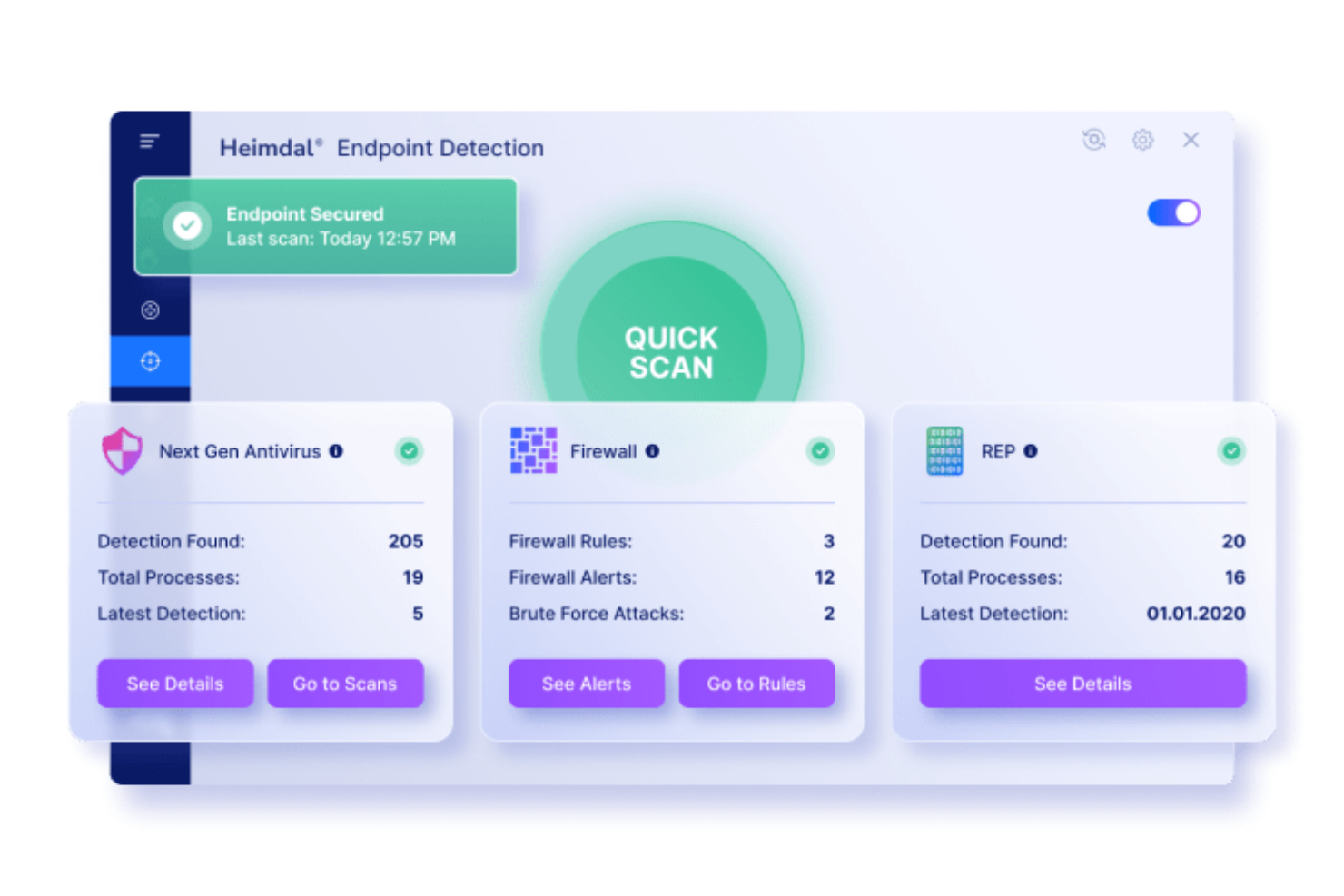
For those seeking a robust endpoint protection solution, Heimdal presents a compelling option tailored to meet the cybersecurity needs of various industries. Designed for businesses in sectors like healthcare, education, and government, Heimdal offers advanced features to protect critical infrastructures and sensitive data. By leveraging machine learning and behavioural analysis, Heimdal addresses the complexities of modern cyber threats, ensuring organizations can operate securely and confidently.
Why I Picked Heimdal
I picked Heimdal as a standout choice for endpoint protection due to its integration of next-gen antivirus and firewall capabilities, which offer real-time threat detection and blocking. The inclusion of ransomware encryption protection ensures data remains uncompromised during attacks, a crucial feature in today's threat landscape. Additionally, Heimdal's Endpoint Detection and Response (EDR) system provides continuous monitoring and quick response to potential threats, making it a reliable ally in maintaining cybersecurity.
Heimdal Key Features
In addition to its robust antivirus and EDR solutions, Heimdal offers several other features that can enhance your endpoint protection strategy:
- Threat Intelligence: This feature provides real-time monitoring and automated threat remediation, crucial for staying ahead of evolving threats.
- Patch and Vulnerability Management: Ensures your systems are always up-to-date, reducing the risk of exploitation from known vulnerabilities.
- Privileged Access Management: Controls and secures access to sensitive systems, mitigating the risk of insider threats.
- Data Loss Prevention (DLP): Protects against unauthorized access and data breaches, safeguarding sensitive information.
Heimdal Integrations
Native integrations are not currently listed by Heimdal; however, the platform supports API-based custom integrations.
Pros and Cons
Pros:
- Detailed asset and license visibility
- Strong vulnerability and threat detection
- Automates patching across endpoints
Cons:
- Interface requires onboarding time
- No native integrations available


Within endpoint protection and management, HCL BigFix provides a solution focused on security, compliance, and control. Tailored for IT professionals and security teams across various industries, it addresses the critical challenges of maintaining compliance and securing endpoints against vulnerabilities. By offering a unified platform that integrates asset discovery, automated patching, and real-time compliance monitoring, HCL BigFix aims to simplify endpoint management while ensuring your systems remain secure and operational.
Why I Picked HCL BigFix
I picked HCL BigFix for its unique real-time visibility and automated remediation, which are crucial to any endpoint protection strategy. This platform excels with automated patch management, keeping your systems up to date and protected against known vulnerabilities. Additionally, its compliance monitoring tools help you adhere to industry standards without manual oversight. These functionalities make it an appealing choice for organizations that prioritize security and efficiency in managing their IT environments.
HCL BigFix Key Features
In addition to real-time visibility and remediation, HCL BigFix offers:
- AI-Driven Automation: This feature leverages artificial intelligence to automate routine tasks, reducing manual intervention and optimizing IT operations.
- Risk-Based Prioritization: It helps your team focus on the most critical vulnerabilities by assessing and prioritizing risks based on impact and likelihood.
- Unified Workspace Management: This feature provides an integrated view of all endpoints, simplifying management across diverse IT environments.
- Intelligent Runbook Automation: It offers automated workflows for common IT tasks, improving response times and reducing errors.
HCL BigFix Integrations
Integrations include ServiceNow, Forescout, Resilient, Qradar, VMware ESXi, Google Cloud, AWS, Azure, and partnerships with other cloud services.
Pros and Cons
Pros:
- Automates patch management across diverse operating systems
- Effective in risk-based prioritization of vulnerabilities
- Comprehensive asset discovery and inventory capabilities
Cons:
- Can be resource-intensive on older systems
- Some users report challenges with deployment and updates

Best for protecting business data for small-to-medium-sized companies

Bitdefender GravityZone is a cloud-based cybersecurity application for workplace devices. It defends against viruses, malware, and other threats.
Why I picked Bitdefender GravityZone: I picked Bitdefender GravityZone for its strong security and user-friendly management. I felt it was a great choice of cybersecurity tool for small-to-medium-sized businesses due to its ease of use, allowing businesses to focus on core activities without the need for dedicated specialists.
Bitdefender GravityZone Standout Features & Integrations:
Features I believe that stood out include a single, user-friendly platform that supports various devices such as desktops, laptops, and physical devices. It employs machine learning and behavioral analysis for advanced threat detection, and can be used through cloud or on-prem management consoles.
Integrations rely on API keys from Bitdefender GravityZone to operate and include pre-built plug-ins such as Amazon AWS, Microsoft Active Directory, and ConnectWise Automate to give control over agent and agentless devices.
Pros and Cons
Pros:
- Granular control of security settings
- Ability to assign policies for automated deployments with customized settings
- Runs efficiently on low-end computers
Cons:
- Network printers are blocked by default, causing initial difficulties and frustrations.
- Locating quarantined emails can sometimes be challenging


Apex One is an endpoint security solution that proactively protects against vulnerabilities by virtually patching them. It scans for vulnerabilities based on criteria such as severity and Common Vulnerabilities and Exposures (CVE) listing, providing comprehensive protection for platforms and devices.
Why I picked Apex One: I chose Apex One because it utilizes deep scanning to detect malware, viruses, and other threats on all endpoints. It also collects data from millions of application events to identify and track potential risks, ensuring your product and systems are kept up-to-date with the latest cyber threats.
Apex One Standout Features & Integrations:
Features I found beneficial for endpoint protection and scanning include advanced threat techniques like machine learning, as well as noise-canceling methods such as census and safelisting. This combination minimizes false positives and enhances overall security.
Integrations consist of native plug-ins that enhance security visibility and functionality. Some of the popular plug-ins are IBM QRadar, Fortinet, and Splunk.
Pros and Cons
Pros:
- Behavior monitoring module terminates suspicious processes
- External machines receive direct updates from Apex One servers for protection
- After installing Apex One agents, users can perform full scans and review machine logs
Cons:
- Inability to rename endpoint agent names after they're assigned to a system
- The basic reporting feature is okay but could use improvements


Avast Small Business Solutions is an endpoint security and antivirus software specifically tailored for small businesses. It offers next-gen endpoint protection tools (exploit mitigation, behavioral analysis, and ML) alongside antivirus, patch management, VPN, and USB protection features.
Why I picked Avast Small Business Solutions: I picked Avast Small Business Solutions because it is affordable and easy to use. It provides small businesses with automatic protection against cyber threats by monitoring and eliminating them centrally at each endpoint.
Avast Small Business Solutions Standout Features & Integrations:
Features I appreciated most are those tailored for small businesses, such as offering simplified endpoint protection through a single-screen interface.They enable cybersecurity teams to monitor potential viruses and detect suspicious files on devices both in the office and remotely.
Integrations are native and can be added by ClientID and Client Secret parameters via Avast Business Hub. Integrations include ConnectWise, ConnectWise Automate, and Ivanti.
Pros and Cons
Pros:
- Transferable devices between policies through the cloud portal to test and maintain security levels
- Set parameters in a policy and apply them to endpoints with a single click
- Lockout prevents unauthorized deactivation and requires authorized passwords
Cons:
- Includes voice notification for antivirus updates, easily disabled in menu options
- Occasionally initiates unexpected startup scans while your system is running

Best for malware and attack prevention for small businesses

Symantec Endpoint Protection is an endpoint security solution designed to protect servers and computers from malware, hackers, and other threats. It applies robust technology, including firewall protection, to ensure the safety and integrity of your systems.
Why I picked Symantec Endpoint Protection: I picked Symantec Endpoint Protection because of its comprehensive features and security measures. The price point, features, and ease of use make it a great starting point for small business owners looking to protect their tech stack. The added firewall feature provides an extra layer of protection.
Symantec Endpoint Protection Standout Features & Integrations:
Features that I found helpful in this software are firewall protection, antivirus solutions, and integration with EDR Consoles. These features team up to keep businesses secure by blocking unauthorized access, defending against harmful software, and providing advanced detection and response capabilities.
Integrations that Symantec uses are primarily native and include Unified Endpoint Management (UEM), REST APIs, and Unified Endpoint Management (UEM).
Pros and Cons
Pros:
- Utilizes advanced threat detection mechanisms
- Offers AI guidance for creating and deploying policies
- Provides robust protection against cybersecurity threats
Cons:
- Resource-intensive and may cause slowdowns on older systems
- Merger with Broadcom may cause support challenges for existing customers.
Weitere Endpoint-Security-Software
Hier sind weitere Endpoint-Security-Lösungen, die es nicht in meine Auswahl geschafft haben, aber sich dennoch lohnen, angeschaut zu werden:
- ESET Endpoint Protection
For preventing ransomware attacks
- Kaspersky Business
For preventing cyber attacks for medium-sized businesses
- SentinelOne Endpoint Protection
For protecting your customers' endpoints
- CrowdStrike Falcon Endpoint Protection Enterprise
For defending SaaS Cloud endpoints
- Malwarebytes Endpoint Protection
Low-cost option
- Trellix Endpoint Protection Platform
For centralizing your cybersecurity defense in the cloud
- Heimdal Threat Protection Endpoint
For integrated endpoint protection
- Cynet 360
All-in-one endpoint solution
- Scalefusion OneIdP
For zero trust device access
- Cisco Secure Endpoints
For work-from-home endpoints
- Cortex XDR
For extended endpoint monitoring
- ThreatLocker
For granular control over your endpoints


Weitere Software-Reviews
Falls Sie hier nicht fündig geworden sind, werfen Sie einen Blick auf diese alternativen Tools, die wir getestet und bewertet haben.
- Netzwerküberwachungssoftware
- Serverüberwachungssoftware
- SD-Wan-Lösungen
- Infrastruktur-Monitoring-Tools
- Packet Sniffer
- Application Monitoring Tools
Auswahlkriterien für Endpoint-Security-Software
Bei der Auswahl der besten Endpoint-Security-Lösungen für diese Übersicht habe ich typische Bedürfnisse und Herausforderungen wie Schutz entfernter Geräte vor Malware und das Minimieren von Ausfallzeiten durch Sicherheitsverletzungen berücksichtigt. Zudem habe ich das folgende strukturierte Bewertungsschema verwendet, um fair und vergleichbar zu bewerten:
Kernfunktionalität (25% der Gesamtwertung)
Um in diese Übersicht aufgenommen zu werden, musste jede Lösung folgende Anwendungsfälle abdecken:
- Malware erkennen und blockieren
- Unbefugten Zugriff verhindern
- Endpunktaktivitäten überwachen
- Auf Sicherheitsvorfälle reagieren
- Endgeräte aus der Ferne verwalten
Besondere Zusatzfunktionen (25% der Gesamtwertung)
Um die Auswahl weiter zu präzisieren, habe ich zudem auf spezielle Alleinstellungsmerkmale geachtet, etwa:
- KI-basierte Bedrohungserkennung
- Automatisierte Reaktion und Behebung
- Zero-Trust-Sicherheitsrahmen
- Darknet-Überwachung
- Cybersecurity-Software
- Verhaltensanalyse von Endpunktaktivitäten
Benutzerfreundlichkeit (10 % der Gesamtbewertung)
Um ein Gefühl für die Benutzerfreundlichkeit jedes Systems zu bekommen, habe ich Folgendes berücksichtigt:
- Einfachheit der Einrichtung und Konfiguration
- Intuitive Benutzeroberfläche
- Geringe Beeinträchtigung der Systemleistung
- Klare und umsetzbare Warnmeldungen
- Rollenbasierte Zugriffskontrolle
Onboarding (10 % der Gesamtbewertung)
Um die Onboarding-Erfahrung jeder Plattform zu bewerten, habe ich Folgendes berücksichtigt:
- Verfügbarkeit von Schulungsvideos und Produkttouren
- Geführte Einrichtung oder Onboarding-Unterstützung
- Zugang zu Live-Webinaren oder Workshops
- Qualität der Dokumentation und Wissensdatenbank
- Verfügbarkeit von Migrationsunterstützung
Kundensupport (10 % der Gesamtbewertung)
Um die Kundensupport-Dienste jedes Softwareanbieters zu beurteilen, habe ich Folgendes berücksichtigt:
- 24/7 Support-Verfügbarkeit
- Reaktionszeit bei dringenden Anliegen
- Live-Chat-, Telefon- und E-Mail-Optionen
- Persönlicher Account-Manager
- Proaktive Bedrohungsbenachrichtigungen
Preis-Leistungs-Verhältnis (10 % der Gesamtbewertung)
Um das Preis-Leistungs-Verhältnis jeder Plattform zu bewerten, habe ich Folgendes berücksichtigt:
- Transparente Preisstruktur
- Kosten im Vergleich zu ähnlichen Lösungen
- Verfügbarkeit einer kostenlosen Testversion oder Demo
- Vertragsflexibilität
- Mengenrabatte für größere Teams
Kundenbewertungen (10 % der Gesamtbewertung)
Um einen Eindruck der allgemeinen Kundenzufriedenheit zu gewinnen, habe ich beim Lesen von Kundenrezensionen Folgendes berücksichtigt:
- Berichte über Systemleistung und Stabilität
- Zufriedenheit mit Bedrohungserkennung und -reaktion
- Kommentare zur Benutzerfreundlichkeit
- Beschwerden über Fehlalarme
- Lob für die Qualität des Kundensupports
Wie man Endpunktsicherheits-Software auswählt
Es ist leicht, sich in langen Funktionslisten und komplexen Preisstrukturen zu verlieren. Damit Sie bei Ihrem individuellen Auswahlprozess den Überblick behalten, erhalten Sie hier eine Checkliste mit Faktoren, die Sie im Auge behalten sollten:
| Faktor | Worauf achten? |
|---|---|
| Skalierbarkeit | Stellen Sie sicher, dass die Software mit Ihrem Unternehmen mitwachsen kann. Sie sollte im Zuge der Expansion mehr Geräte und Nutzer unterstützen, ohne Einbußen bei der Leistung. |
| Integrationen | Stellen Sie sicher, dass die Software mit bestehenden Systemen (wie SIEM, Threat Intelligence und Identity-Management-Plattformen) kompatibel ist, um Kompatibilitätsprobleme zu vermeiden. |
| Anpassbarkeit | Suchen Sie nach Software, die es Ihnen ermöglicht, Sicherheitsrichtlinien, Benachrichtigungen und Reaktionsaktionen an die spezifischen Bedürfnisse Ihres Unternehmens anzupassen. |
| Benutzerfreundlichkeit | Die Benutzeroberfläche sollte intuitiv sein und Ihrem Team eine einfache Navigation ermöglichen. Komplizierte Setups oder schwer auffindbare Einstellungen können die Reaktionszeit auf Bedrohungen verzögern. |
| Budget | Berücksichtigen Sie die Gesamtkosten, einschließlich Lizenzgebühren, Kosten pro Nutzer und Zusatzgebühren für Support oder zusätzliche Funktionen. |
| Sicherheitsvorkehrungen | Achten Sie auf Funktionen wie Verschlüsselung, Multi-Faktor-Authentifizierung und Echtzeit-Überwachung zur Absicherung sensibler Daten. |
| Bedrohungserkennung und -reaktion | Die Software sollte Bedrohungen schnell erkennen und darauf reagieren können. Echtzeitwarnungen und automatisierte Reaktionen sind ideal. |
| Support und Schulung | Prüfen Sie, ob der Anbieter Schulungsressourcen, Live-Support und Unterstützung beim Onboarding bietet, damit Ihr Team schnell betriebsbereit ist. |
Trends bei Endpunktsicherheits-Software
Für meine Recherche habe ich zahlreiche Produktaktualisierungen, Pressemitteilungen und Changelogs verschiedener Anbieter von Endpunktsicherheits-Software ausgewertet. Hier sind einige der aufkommenden Trends, die ich im Blick behalte:
- KI-gesteuerte Bedrohungserkennung: Immer mehr Anbieter nutzen maschinelles Lernen und künstliche Intelligenz, um Bedrohungen in Echtzeit zu erkennen und darauf zu reagieren, wodurch die Genauigkeit verbessert und Fehlalarme reduziert werden.
- Zero-Trust-Architektur: Anbieter setzen zunehmend auf Zero-Trust-Modelle, bei denen jeder Zugriffsantrag überprüft wird, selbst innerhalb interner Netzwerke.
- Erweiterte Erkennung und Reaktion (XDR): XDR-Software integriert Daten aus mehreren Sicherheitsebenen (Endpunkte, Netzwerke, Cloud), um einen umfassenderen Überblick über Bedrohungen zu bieten.
- Threat Hunting: Einige Lösungen bieten nun proaktives Threat Hunting an, bei dem Sicherheitsteams aktiv nach versteckten Bedrohungen suchen, statt auf Alarme zu warten.
- Verhaltensanalyse: Immer mehr Tools konzentrieren sich auf die Analyse von Benutzer- und Geräteverhalten, um ungewöhnliche Aktivitäten zu erkennen und Insider-Bedrohungen oder kompromittierte Zugangsdaten zu verhindern.
Was ist Endpoint-Security?
Endpoint-Security-Software schützt Geräte wie Laptops, Server und Mobiltelefone vor Bedrohungen wie Malware, unbefugtem Zugriff und Datenverlust. Diese Tools werden von IT-Teams, Sicherheitsanalysten und Systemadministratoren eingesetzt, um Geräte zu sichern und das Risiko im gesamten Unternehmen zu verringern.
Funktionen wie Bedrohungserkennung, Geräteüberwachung und Richtliniendurchsetzung helfen dabei, Probleme frühzeitig zu erkennen, die Einhaltung von Vorschriften zu gewährleisten und die Gefahr einer Verbreitung von Angriffen zu reduzieren. Insgesamt tragen diese Tools dazu bei, die Geräte sicherer und das Arbeitsumfeld besser geschützt zu halten.
Funktionen von Endpoint-Security-Software
Bei der Auswahl von Endpoint-Security-Software sollten Sie auf folgende Schlüsselfunktionen achten:
- Bedrohungserkennung: Überwacht Endpunkte in Echtzeit auf verdächtige Aktivitäten und potenzielle Sicherheitsverletzungen.
- Vorfallreaktion: Isoliert und behebt Sicherheitsbedrohungen automatisch, um weiteren Schaden zu verhindern.
- Gerätekontrolle: Erlaubt Ihnen die Kontrolle darüber, welche Geräte auf Ihr Netzwerk zugreifen dürfen, um unbefugten Zugriff zu verhindern.
- Patch-Management: Erkennt Schwachstellen und behebt diese durch automatische Installation von Sicherheitsupdates.
- Verschlüsselung: Lösungen wie VPN-Software schützen sensible Daten an den Endpunkten, indem sie diese sowohl im Ruhezustand als auch bei der Übertragung verschlüsseln.
- Anwendungskontrolle: Beschränkt, welche Anwendungen auf Ihren Geräten ausgeführt werden dürfen, um das Risiko von Malware-Infektionen zu verringern.
- Verhaltensanalyse: Überwacht Nutzer- und Geräteaktivitäten, um ungewöhnliche Muster zu erkennen, die auf eine Sicherheitsbedrohung hinweisen könnten.
- Cloudbasierte Verwaltung: Ermöglicht die Überwachung und Steuerung der Endpoint-Security von einem zentralen Dashboard aus.
- Bedrohungsinformationen: Nutzt globale Bedrohungsdatenbanken, um neue Gefahren zu identifizieren und davor zu schützen.
- Multi-Faktor-Authentifizierung: Fügt eine zusätzliche Sicherheitsebene hinzu, indem weitere Verifikation über das Passwort hinaus erforderlich ist.
Vorteile von Endpoint-Security-Software
Die Implementierung von Endpoint-Security-Software bietet zahlreiche Vorteile für Ihr Team und Ihr Unternehmen. Auf diese können Sie sich freuen:
- Verbesserte Bedrohungserkennung: Erkennt und reagiert in Echtzeit auf Malware, Ransomware und andere Bedrohungen und verringert so das Risiko von Datenlecks.
- Bessere Kontrolle: Ermöglicht die Verwaltung und Überwachung aller Endpunkte über eine zentrale Plattform, was das Sicherheitsmanagement vereinfacht.
- Weniger Ausfallzeiten: Schnelle Reaktion auf Bedrohungen minimiert Systemunterbrechungen und unterstützt somit die Produktivität Ihres Teams.
- Unterstützung bei der Einhaltung von Vorschriften: Hilft Ihnen, branchenspezifische Sicherheitsstandards einzuhalten, indem alle Endpunkte ordnungsgemäß abgesichert und überwacht werden.
- Weniger Risiko von Datenverlust: Verschlüsselungs- und Backup-Funktionen schützen sensible Daten auch im Falle eines Geräteverlusts oder einer Kompromittierung.
- Erweiterter Geräteschutz: Kontrolliert, welche Geräte auf Ihr Netzwerk zugreifen dürfen, und blockiert unbefugte oder potenziell riskante Verbindungen.
- Skalierbarkeit: Kann problemlos mit dem Wachstum Ihres Unternehmens erweitert werden, sodass Sie weitere Endpunkte hinzufügen können, ohne auf Schutz zu verzichten.
Kosten und Preisgestaltung von Endpoint-Security-Software
Die Auswahl von Endpoint-Security-Software erfordert ein Verständnis der verschiedenen verfügbaren Preismodelle und -pläne. Die Kosten variieren je nach Funktionen, Teamgröße, Zusatzoptionen und mehr. Die folgende Tabelle fasst gängige Pläne, deren Durchschnittspreise und typische enthaltene Funktionen von Endpoint-Security-Software-Lösungen zusammen:
Vergleichstabelle für Endpoint-Security-Software
| Plantyp | Durchschnittspreis | Gängige Funktionen |
|---|---|---|
| Kostenloser Plan | $0 | Grundlegende Bedrohungserkennung, eingeschränkte Geräteabdeckung und minimale Berichterstattung. |
| Persönlicher Plan | $5-$25/Benutzer/Monat | Echtzeit-Bedrohungsüberwachung, Malware-Schutz und E-Mail-Sicherheitssoftware. |
| Geschäftsplan | $25-$75/Benutzer/Monat | Tools zur Endpunkt-Erkennung und -Reaktion (EDR-Tools), erweiterte Bedrohungsinformationen, Richtlinienumsetzung und Berichterstattung. |
| Unternehmensplan | $75-$150/Benutzer/Monat | KI-basierte Bedrohungserkennung, 24/7-Support, Verhaltensanalyse, benutzerdefinierte Berichte und Netzwerkintegration. |
Häufig gestellte Fragen zu Endpoint Security Software
Hier finden Sie Antworten auf häufig gestellte Fragen zur Endpoint Security Software:
Worin unterscheidet sich Endpoint Security Software von herkömmlichen Antivirenprogrammen?
Kann Endpoint Security Software vor Zero-Day-Angriffen schützen?
Wie integriert sich Endpoint Security Software in bestehende IT-Infrastrukturen?
Welche Faktoren sollte ich bei der Wahl einer Endpoint Security Lösung beachten?
Wie geht Endpoint Security Software mit Datenschutzfragen um?
Ist Endpoint Security Software auch für kleine Unternehmen geeignet?
Wie geht es weiter?
Wenn Sie gerade Endpoint Security Software recherchieren, nehmen Sie Kontakt zu einem SoftwareSelect-Berater auf und erhalten Sie kostenlose Empfehlungen.
Sie füllen einfach ein Formular aus und führen ein kurzes Gespräch, in dem Ihre individuellen Anforderungen besprochen werden. Anschließend erhalten Sie eine Auswahlliste mit passenden Software-Lösungen zur Prüfung. Der Beratende unterstützt Sie auch im gesamten Beschaffungsprozess, einschließlich Preisverhandlungen.