

20 Beste Asset-Management-Software für IT-Teams im Jahr 2026

Beste Asset-Management-Software – Auswahl
Hier ist meine Auswahl der besten Asset-Management-Software:


Die beste Asset-Management-Software hilft Ihnen dabei, alle physischen und digitalen Vermögenswerte in Ihrem Unternehmen zu verfolgen, zu warten und zu optimieren – ganz ohne fehleranfällige Tabellenkalkulationen oder insulare Systeme. Diese Tools verschaffen IT-Leitern und Betriebsteams volle Transparenz über Gerätelebenszyklen, Softwarelizenzen und Wertminderungen, sodass teure Ausfallzeiten und Compliance-Lücken verhindert werden, bevor sie entstehen.
Nach über 12 Jahren Erfahrung mit der Bewertung von SaaS- und Unternehmens-IT-Tools habe ich Asset-Management-Systeme erfolgreich in IT-Abteilungen eingeführt. Die richtige Plattform katalogisiert nicht nur Assets – sie verändert die Art und Weise, wie Teams Budgets planen, die Lebensdauer von Hardware verlängern und Beschaffungsentscheidungen mit den Unternehmenszielen in Einklang bringen.
Lassen Sie uns in meine Favoriten eintauchen!
Why Trust Our Software Reviews
We’ve been testing and reviewing software since 2023. As tech leaders ourselves, we know how critical and difficult it is to make the right decision when selecting software.
We invest in deep research to help our audience make better software purchasing decisions. We’ve tested more than 2,000 tools for different tech use cases and written over 1,000 comprehensive software reviews. Learn how we stay transparent & our software review methodology.
Zusammenfassung: Beste Asset-Management-Software für IT-Teams
| Tool | Best For | Trial Info | Price | ||
|---|---|---|---|---|---|
| 1 | Best for reducing IT ticket volume | 30-day free trial + free demo available | From $149/technician/month (billed annually) | Website | |
| 2 | Best for asset lifecycle with dependency mapping | 14-day free trial available | From $19/user/month (billed annually) | Website | |
| 3 | Best for automated hardware workflows | Free demo available | From $8/month/seat (+$540 platform fee) | Website | |
| 4 | Best for integrated IT asset oversight | 14-day free trial | From $89/user/month (billed annually) | Website | |
| 5 | Best for IT asset and license management | Free trial available | From $300/month | Website | |
| 6 | Best for hybrid workspace asset tracking | Free demo available | Pricing upon request | Website | |
| 7 | Best for managing global assets in 130+ countries | Free demo available | from $5/person/month | Website | |
| 8 | Best for automated device discovery | 14-day free trial available | Pricing upon request | Website | |
| 9 | Best for preventive IT maintenance automation | Free plan available | From $28/user/month | Website | |
| 10 | Best for automated asset tracking | 7-day free trial | From $29.99/user/month | Website | |
| 11 | Best budget-friendly fixed asset management tool | 15-day free trial | From $35/month (billed annually) | Website | |
| 12 | Best for advanced inventory management | Free 14-day trial + free demo available | From $50/month (billed annually) | Website | |
| 13 | Best ITAM for large organizations | Free demo available | Pricing upon request | Website | |
| 14 | Best enterprise asset management software to extend asset life cycle | Free trial available | Pricing upon request | Website | |
| 15 | Best for managing corporate mobile devices | 30-day free trial + Free plan available (up to 25 devices) | $495/50 devices (billed annually) | Website | |
| 16 | Best for managing identical software assets | Free demo available | From $1,295/user/year | Website | |
| 17 | Best ITAM customization with an open API | Free plan + free demo available | From $39.99/month (Hosted version) | Website | |
| 18 | Best user-friendly physical asset management | Free plan available | From $10/user/month (billed annually) | Website | |
| 19 | Best digital asset management tool for scalability | Free demo available | Pricing upon request | Website | |
| 20 | Best for simplifying IT asset onboarding | Free trial available | From $0.21/node/month | Website |


-

Site24x7
Visit WebsiteThis is an aggregated rating for this tool including ratings from Crozdesk users and ratings from other sites.4.7 -
GitHub Actions
Visit WebsiteThis is an aggregated rating for this tool including ratings from Crozdesk users and ratings from other sites.4.8 -
Docker
Visit WebsiteThis is an aggregated rating for this tool including ratings from Crozdesk users and ratings from other sites.4.6





Bewertungen: Beste Asset-Management-Software
Hier finden Sie eine Zusammenfassung der zehn besten Asset-Management-Lösungen für IT-Teams, sodass Sie die besonderen Funktionen, Einsatzmöglichkeiten, Preise und Nachteile vergleichen können, um das für Sie passende Tool zu finden.


Atera is an IT management platform built to help IT teams oversee assets, automate tasks, and deliver proactive support through AI-powered capabilities. It combines essential IT tools like RMM, helpdesk, ticketing, and patch management into one platform.
Why I Picked Atera: I chose Atera for its focus on autonomous IT management, which blends AI-driven agents with traditional IT tools to handle routine tasks automatically. This lets you run IT operations more efficiently by reducing ticket volumes and response times. You also gain full visibility and control over your assets through a unified platform—ideal for small IT teams looking to scale without additional headcount.
Atera Standout Features and Integrations:
Standout features include AI agents that autonomously resolve issues on user devices, unified remote monitoring and management (RMM), built-in helpdesk ticketing, patch management, and IT automation. Atera also offers context-aware intelligence that taps into your knowledge base to resolve issues in line with your processes.
Integrations include Microsoft Teams, Slack, Zapier, Bitdefender, and other common IT tools to support communication, security, and workflows.
Pros and Cons
Pros:
- Detailed reporting and client-facing dashboards
- Proactive issue detection and automation options
- Centralizes ticketing, RMM, PSA, and asset management
Cons:
- Some limitations in PSA and billing features
- Learning curve for new users due to breadth of features
New Product Updates from Atera

Atera Enhances IT Autopilot With Automation and File Support
Atera’s IT Autopilot gets three major boosts: you can now attach common files for deeper analysis, automate IT tasks with clear workflows, and choose how the system follows up when users go silent. These updates help streamline IT operations and improve resolution efficiency. For more information, visit Atera’s official site.


Freshservice is a leading IT Asset Management (ITAM) platform that helps organizations gain full control over their technology assets. From hardware and software to fixed assets like vehicles and machinery, teams can track, manage, and optimize resources throughout their lifecycle. Emma Johnson, IT Consultant at Johnson Technology Solutions, shared: “As an IT consultant, I recommend Freshservice to my clients for its comprehensive ITIL-aligned service management features. Its problem management and change management modules are particularly impressive.”
Why I picked Freshservice: It’s one of the easiest platforms to use when you’re wanting to track all of your software, SaaS, computers, devices, and keep them maintained without much work.
Freshservice Standout Features and Integrations:
Standout features include automated reminders to enable proactive maintenance scheduling. This helps save a ton of time when you're wanting to keep your assets up-to-date and to improve asset life cycles. The platform helps with forecasting future maintenance and costs to help manage expenses to improve your profit margins. Plus, you can manage your inventory, purchase orders, and relationship mapping.
Integrations include Dropbox, Jira, Freshdesk, Bomgar, CloudWatch, Quickbooks, Zapier, Zoom, Freshbooks, and Microsoft Teams.
Pros and Cons
Pros:
- Mobile app for barcodes or QR code scanning
- User-friendly platform
Cons:
- API can be a bit complicated
New Product Updates from Freshservice

Freshservice Enhances Global Search and Dashboards With Task Support
Freshservice enhances Global Search and Dashboards by adding support for ticket, problem, change, and release tasks, along with custom task views. This update helps teams search, track, and report on tasks from one centralized interface. For more information, visit Freshservice's official site.


Workwize is an IT hardware management platform designed to help businesses equip their global workforce. It caters to the needs of IT, HR, and operations teams, providing a comprehensive solution to manage IT hardware assets.
Why I picked Workwize: Workwize offers a centralized platform that connects IT suppliers, logistics, and local warehouses, giving you a single view to oversee the complete lifecycle of your IT assets. This integration simplifies procurement, deployment, management, retrieval, and disposal of IT assets across distributed teams. By automating workflows, Workwize reduces manual tasks, allowing your team to focus on more strategic initiatives.
Workwize Standout Features and Integrations:
Standout features include automated workflows, device procurement and deployment, management of replacements and retrievals, centralized asset lifecycle view, connection with IT suppliers, logistics integration, local warehouse coordination, Active Directory integration, and SCIM compatibility.
Integrations include Active Directory, SCIM, HR Systems, IRIS Cascade HR, ADP Workforce Now, AFAS Software, AlexisHR, Azure Active Directory, BambooHR, and Breathe HR.
Pros and Cons
Pros:
- Centralized platform for IT asset management
- Automated workflows
- Assists with procuring and deploying devices
Cons:
- Device repairs limited to enterprise plan
- May be expensive for smaller businesses
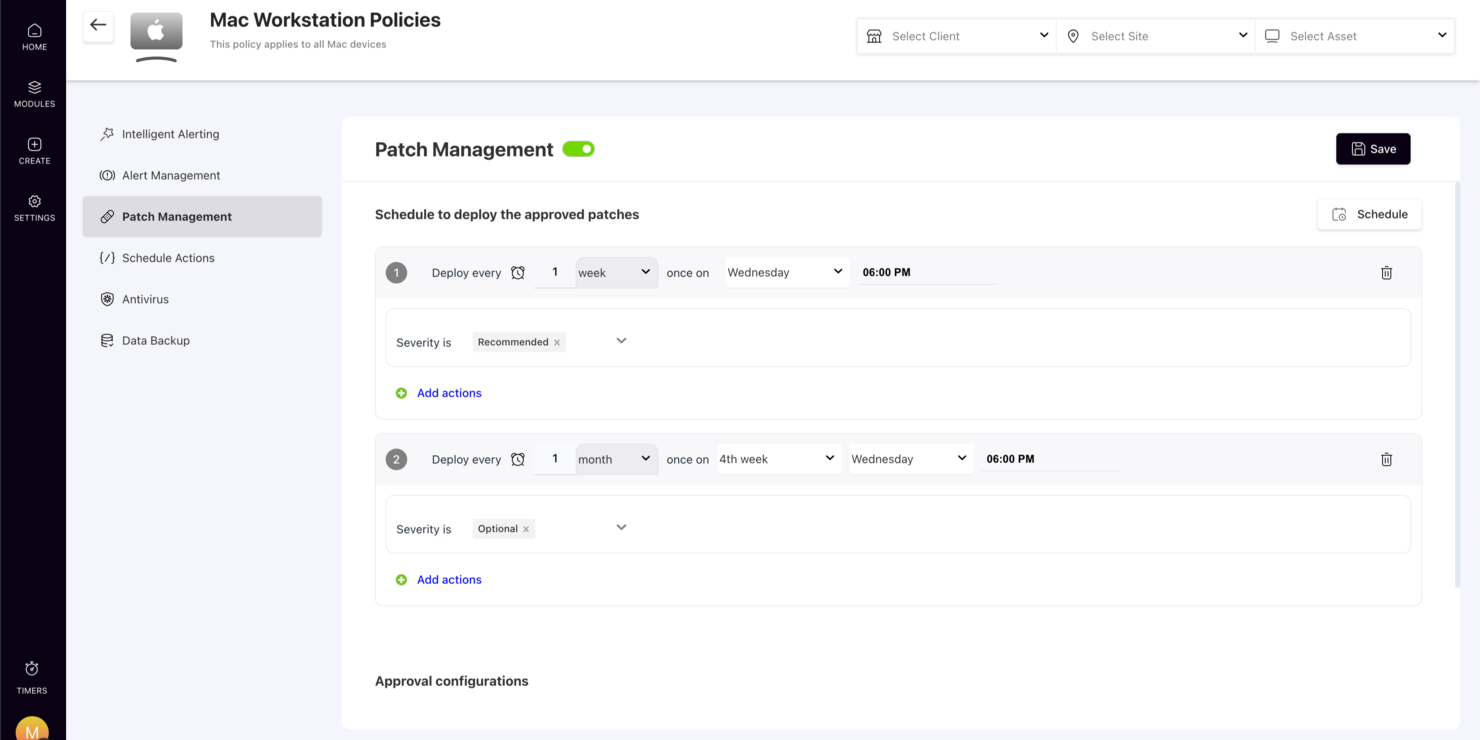
In the fast-paced world of IT management, SuperOps stands out as a dynamic platform designed specifically for Managed Service Providers (MSPs) and internal IT teams. By harnessing the power of Agentic AI, it offers a suite of features that cater to the complex needs of asset management. Whether you're dealing with endpoint security, service automation, or asset tracking, SuperOps aims to consolidate these processes into a single, efficient workflow. This makes it an invaluable tool for those looking to streamline IT operations and enhance overall efficiency.
Why I Picked SuperOps
I picked SuperOps because it uniquely integrates service desk management and asset management into one cohesive platform, making it ideal for CTO asset management. The platform leverages Agentic AI to automate workflows, which is crucial for efficient IT operations. Additionally, it provides comprehensive endpoint security, ensuring that all devices within your network are protected. These features directly address the needs of IT teams looking to manage assets while maintaining high levels of security and efficiency.
SuperOps Key Features
In addition to its core functionalities, I also found several features that make SuperOps a compelling choice for CTO asset management:
- Patch Management: Keeps your software up-to-date by automating the deployment of patches across your network.
- Mobile Device Management: Allows you to manage and secure mobile devices from a single platform.
- Executive Dashboards: Provides strategic business insights through customizable dashboards.
- Real-Time Profitability Tracking: Helps you monitor and improve financial performance with real-time data analytics.
SuperOps Integrations
Integrations include Microsoft 365, Google Workspace, QuickBooks, Xero, TeamViewer, Splashtop, Acronis, Bitdefender, Webroot, and IT Glue.
Pros and Cons
Pros:
- AI-powered workflow automation
- Built-in endpoint security tools
- Unified PSA and RMM platform
Cons:
- Learning curve for new users
- Primarily built for MSPs
New Product Updates from SuperOps

SuperOps Adds HTML Support for Ticket Closure Emails
SuperOps introduces HTML embedding for ticket closure emails. This update allows teams to include custom content such as CSAT survey links and branded elements in resolution emails. For more information, visit SuperOps’ official site.
 .
.

Setyl provides organizations with a clear, organized view of their entire IT landscape, bringing hardware, software, users, and vendors into one accessible platform. Instead of juggling multiple tools or spreadsheets, teams can rely on Setyl to streamline processes, improve accountability, and maintain control over growing tech environments.
Why I Picked Setyl: I chose Setyl because it excels at unifying hardware, software, license, and spend data in one place, making it a true single source of truth for IT management. Its lifecycle tracking ensures assets and licenses are efficiently assigned, monitored, and recovered during onboarding and offboarding. With features like renewal alerts, shadow IT detection, and compliance-ready reporting, it helps organizations cut waste, improve security, and stay audit-ready. Plus, its wide range of integrations with HR, MDM, IAM, and finance tools automates data syncing, reducing manual effort and eliminating silos.
Standout features & integrations:
Standout features include employee-centric workflows, such as equipment assignment tracking and seamless recovery during staff transitions. Its vendor management tools also let you consolidate contract details, renewal dates, and vendor risk profiles, while expenditure tracking links costs to specific assets and teams for clearer budget accountability.
Integrations include Google Workspace, Microsoft 365, Intune, Google Endpoint Management, Jamf, Lansweeper, Meraki, JumpCloud, Okta, BambooHR, HiBob, ADP Workforce Now, Workday, Zendesk, Jira Service Management, and more.
Pros and Cons
Pros:
- Software and hardware asset management in one
- Assistance with setup offered as standard
- Unlimited assets included in price
Cons:
- Doesn’t offer the complex functionalities that may be needed for large enterprise organizations
- No native mobile app


OfficeSpace helps IT and operations teams track physical assets across hybrid workplaces, giving you a clear view of what equipment you own, where it lives, and who is using it. It’s especially useful for organizations juggling both in-office and remote setups, since it centralizes asset data and supports real-time updates from the field.
Why I Picked OfficeSpace
I picked OfficeSpace because it gives your team a single system to manage desks, hardware, and shared resources without switching between tools. You can automate maintenance tasks through scheduled work orders, which reduces manual follow-up and keeps equipment in reliable condition. The platform also ties asset data to location details, helping you understand where devices are deployed and how they’re being used. I like that OfficeSpace includes depreciation and lifecycle tracking, since this helps finance and IT stay aligned on asset value. Its mobile access ensures field teams can update records immediately through barcode scans, photos, and condition notes.
OfficeSpace Key Features
Here are a few more features that support asset tracking across hybrid work environments:
- Asset Audits: Lets you run location-based audits to confirm inventory accuracy.
- Mobile Check-In/Out: Enables real-time updates when employees borrow or return equipment.
- Depreciation Tracking: Calculates asset value over time for better financial planning.
- Cross-Team Dashboards: Gives IT, facilities, and finance shared visibility into asset health and usage.
OfficeSpace Integrations
Integrations include Microsoft Teams, Slack, ServiceNow, Jira, SAP, Google Workspace, Workday, Zoom, Okta, and OneLogin.
Pros and Cons
Pros:
- Detailed lifecycle tracking supports financial planning
- Mobile tools help field teams update records instantly
- Automated work orders reduce manual maintenance follow-up
Cons:
- Setup requires time to configure locations and asset types
- Some facility-focused modules may exceed IT team needs


Deel is a comprehensive platform that integrates HR, payroll, immigration, and people development tools, making it a versatile solution for businesses of all sizes. In addition to these core functions, Deel offers a robust IT suite that addresses the challenges of managing IT operations for a distributed workforce.
Why I picked Deel: As a platform that manages IT operations in over 130 countries, Deel IT provides a unified solution for the procurement, deployment, tracking, and recovery of IT assets. Its unique combination of local expertise and global infrastructure allows companies to navigate complex regulations and logistics, ensuring that equipment is delivered quickly and securely. With real-time visibility and control over all IT assets, including those owned or leased from other vendors, Deel helps IT teams manage their global inventory efficiently.
Deel Standout Features and Integrations:
Standout features include a fully automated device setup process, where devices are pre-configured with necessary apps, software, and security controls before reaching employees. It also provides comprehensive support with global service-level agreement (SLA) backed repairs, loaner devices, and 24/7 support. Additionally, the platform's device refresh and upgrade automation feature ensures that equipment stays up-to-date.
Integrations include Microsoft Azure Active Directory, Okta, Google Workspace, Slack, Microsoft Teams, BambooHR, Workday, and SAP SuccessFactors.
Pros and Cons
Pros:
- Supports equipment deployment in over 130 countries
- Helps automate asset workflows
- HR and IT asset management in one
Cons:
- Doesn't offer features beyond device management, like network and server management
- May not be ideal for teams with very complex IT asset needs


Auvik is a cloud-based network management software designed to give you complete visibility and control over your network infrastructure. It automatically discovers and maps your network devices, providing real-time insights into their status and connections.
Why I picked Auvik: I picked Auvik because it automatically discovers and inventories all devices on your network, capturing details like make, model, and location. This helps your team stay on top of every asset without manual tracking. Auvik also supports hardware lifecycle management by flagging devices nearing end-of-life or end-of-support so you can plan replacements and avoid downtime.
Auvik Standout Features and Integrations:
Standout features include real-time network mapping that visually represents your network's topology, allowing you to see how devices are interconnected and quickly identify potential issues. Auvik also offers configuration management, automatically backing up device configurations and tracking changes so you can restore previous settings if needed.
Integrations include Autotask PSA, Microsoft Teams, Slack, Datto RMM, Cisco, Fortinet, Ubiquiti, Salesforce, Zoom, ConnectWise, Palo Alto Networks, and Dell.
Pros and Cons
Pros:
- Detailed device inventory aids in lifecycle management
- Can back up and restore device configurations
- Prompt alerting system for various issues
Cons:
- Occasional delays in real-time data updates
- Setting up more advanced functionalities can be challenging
New Product Updates from Auvik
Auvik Adds HA Pair Monitoring, Improves Ping Alerts, & Expands SaaS Integrations
Auvik introduces HA Pair Monitoring for Fortinet firewalls, improved Service Status alerts for Internal Ping Checks, and new SaaS integrations with ServiceNow, GitLab, ClickUp, and Notion. These updates improve network monitoring visibility and provide better insights into SaaS license usage. For more information, visit Auvik’s official site.
 .
.
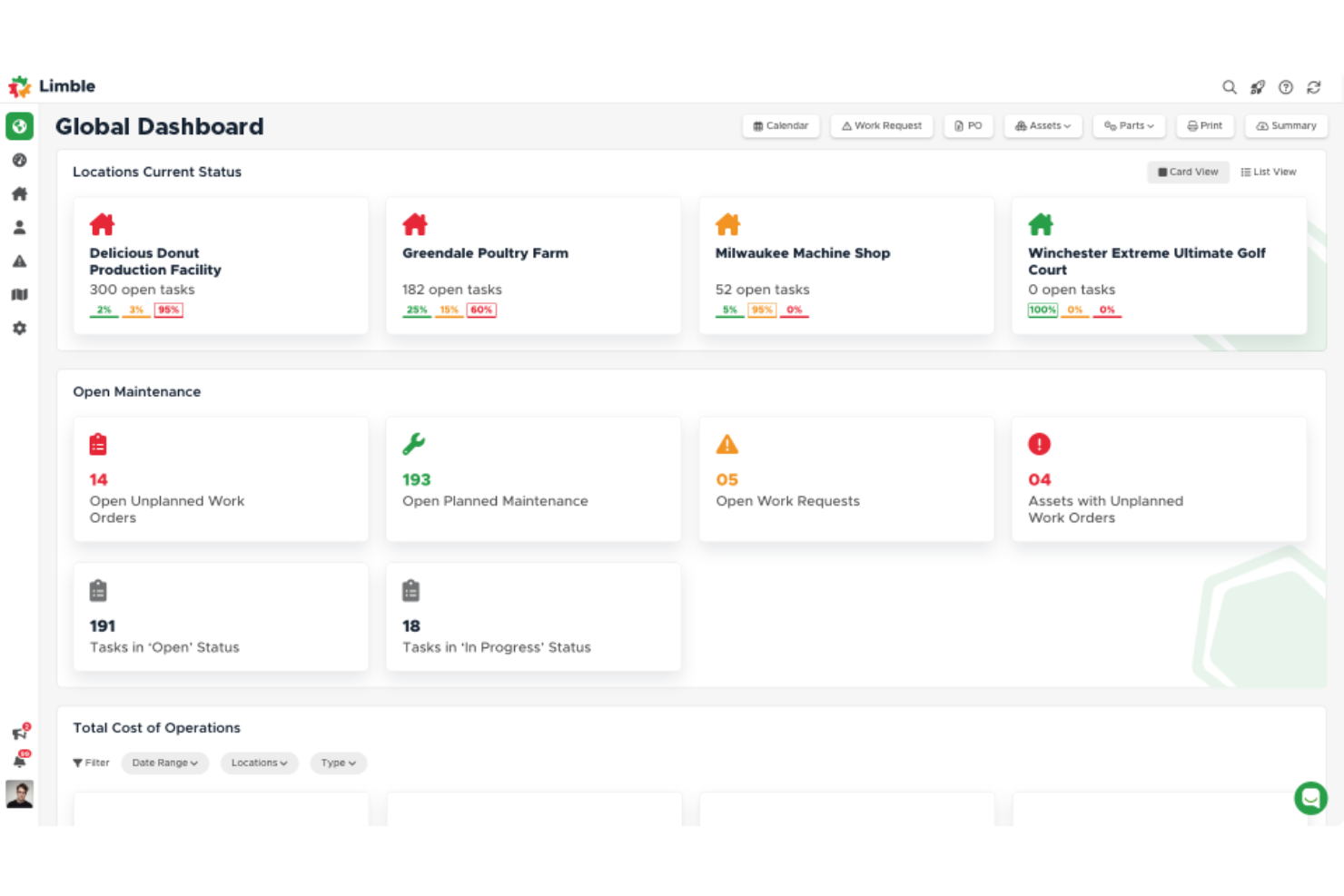
Limble is a cloud-based computerized maintenance management system (CMMS) and asset management platform. Originally designed to streamline maintenance operations in various industries, Limble offers features such as work order management, preventive maintenance, and inventory tracking.
Why I picked Limble: It provides robust tools for tracking and managing IT assets, ensuring that all hardware and software assets are accounted for and maintained properly. Limble's automated work order management system allows IT teams to schedule and prioritize maintenance tasks effectively, while its asset management capabilities ensure that equipment lifecycle information is readily available.
Limble Standout Features and Integrations:
Standout features include an intuitive dashboard that provides a real-time overview of all maintenance activities and customizable reporting that allows teams to generate detailed reports on various aspects of asset management. Preventive maintenance scheduling helps to automate routine maintenance tasks, reducing the likelihood of unexpected equipment failures.
Integrations include Zapier, QuickBooks, Salesforce, Microsoft Teams, Slack, Jira, ServiceNow, and Google Workspace.
Pros and Cons
Pros:
- Robust features for tracking asset history and managing parts inventory
- Simplifies the creation, assignment, and tracking of work orders
- Accessible through mobile
Cons:
- Initial setup may require assistance
- Automated reporting could be more robust


EZO AssetSonar is an IT Asset Management (ITAM) platform that helps organizations manage hardware, software, and SaaS in one place. It is designed to support scaling IT teams by providing visibility, control, and compliance across assets
Why I Picked Ezo AssetSonar: I picked Ezo AssetSonar for its automation features that simplify asset tracking and ensure license compliance across your IT environment. It supports IT service management with tools for faster incident response and ticket resolution, helping teams maintain operational continuity. Real-time monitoring and vulnerability alerts enhance security, while centralized license data helps reclaim unused software and control SaaS spending.
Ezo AssetSonar Standout Features and Integrations:
Standout features include real-time monitoring and alerts that secure assets and prevent security breaches by providing immediate notifications of vulnerabilities. The software's centralized license management helps you optimize software spending by reclaiming unused licenses. Additionally, Ezo AssetSonar's shadow IT detection ensures compliance across your organization by identifying unauthorized software usage.
Integrations include Zendesk, Jira Service Desk, G Suite, Okta, OneLogin, Centrify, Azure AD, Ping Identity, SCCM, Jamf Pro, Microsoft Intune, and Cisco Meraki.
Pros and Cons
Pros:
- Detailed asset tracking
- Real-time compliance alerts
- Mobile device management
Cons:
- Limited customization options
- Occasional reporting delays

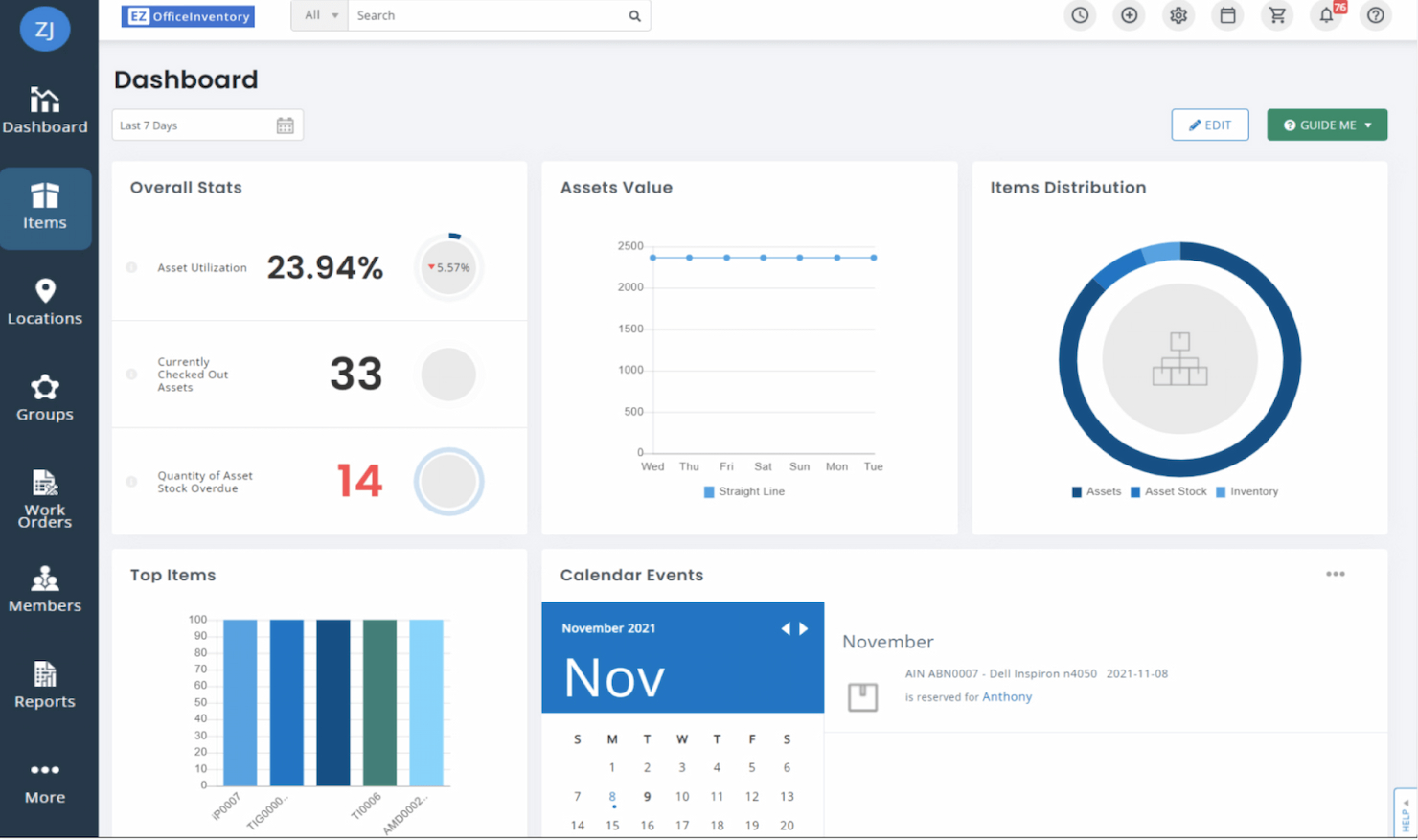
EZOfficeInventory is fixed asset management software that allows you to keep track of your inventory, machinery, tools, vehicles, and more. The budget-friendly tool is great for small businesses looking for adequate software that fits within their budget.
Why I picked EZOfficeInventory: I consider this platform one of the best value asset tracking platforms available. While it isn’t the most robust platform, it offers everything a small business needs to track fixed assets efficiently, and it does it with a user-friendly platform.
EZOfficeInventory Standout Features and Integrations:
Standout features include both web-based and mobile asset management. You can track inventory, equipment, tools, and even depreciation with the platform. I like how it also comes with a user-friendly mobile app that lets users track and manage fixed assets on the go. It lets you scan QR, RFID, or barcodes from anywhere.
Integrations include Google Suite, Zendesk, and Zendesk Sunshine, Jira Service Desk, PingIdentity, Okta, OneDrive, and OneLogin.
Pros and Cons
Pros:
- Asset availability calendar for easy reservation
- User-friendly platform
- Great value
Cons:
- No inventory retail management
- The mobile app can be a bit buggy


Asset Panda is an all-in-one asset management platform that allows you to track a variety of assets including IT assets, fixed assets, and more. The IT asset management platform features advanced inventory management techniques, which is perfect for organizations with thousands of SKUs.
Why I picked Asset Panda: I like how the software lets you bundle related equipment together in its asset-kitting system. Plus, its custom barcode creator allows you to easily add in new inventory in seconds.
Asset Panda Standout Features and Integrations:
Standout features include maintenance tracking, tool tracking, leased equipment tracking, and more. I consider this software to be one of the most versatile there is in terms of comprehensive asset management. I like how the platform can be customized to a wide range of industries like healthcare, construction, education, government, and nonprofits.
Integrations include Microsoft Active Directory, Azure Active Directory, Okta, OneLogin, Zendesk, ServiceNow, Lansweeper, and Google Workspace.
Pros and Cons
Pros:
- Unlimited fields and configuration options
- Role-based permissions to protect sensitive data
- Asset kitting to bundle related equipment
Cons:
- Difficult to set up new users
- Takes some time to learn the platform


Flexea is a robust SaaS-based IT asset management tool that’s targeted towards large organizations with mature ITAM processes. The software is primarily used to mitigate IT and security risks and reduce costs through efficient asset management.
Why I picked Flexera: Flexera is a comprehensive ITAM that can do a lot for large organizations. I chose it because it offers enterprise businesses either cloud or on-premise versions of the software. The customization capabilities make it easy to configure the platform to your liking to help keep costs low and productivity up.
Flexera Standout Features and Integrations:
Standout features include a massive entitlement library that automates effective licensing positions (ELP). I think this feature is great because it can help reduce costs without the need to manually track all of your software licenses to ensure you’re compliant.
Integrations include ServiceNow, Microsoft System Center Configuration Manager (SCCM), Snow Software, and BMC Helix.
Pros and Cons
Pros:
- Data-driven insights into contract management
- Automatic lifecycle management
- Software requests
Cons:
- Complex setup
- Can be pretty pricey

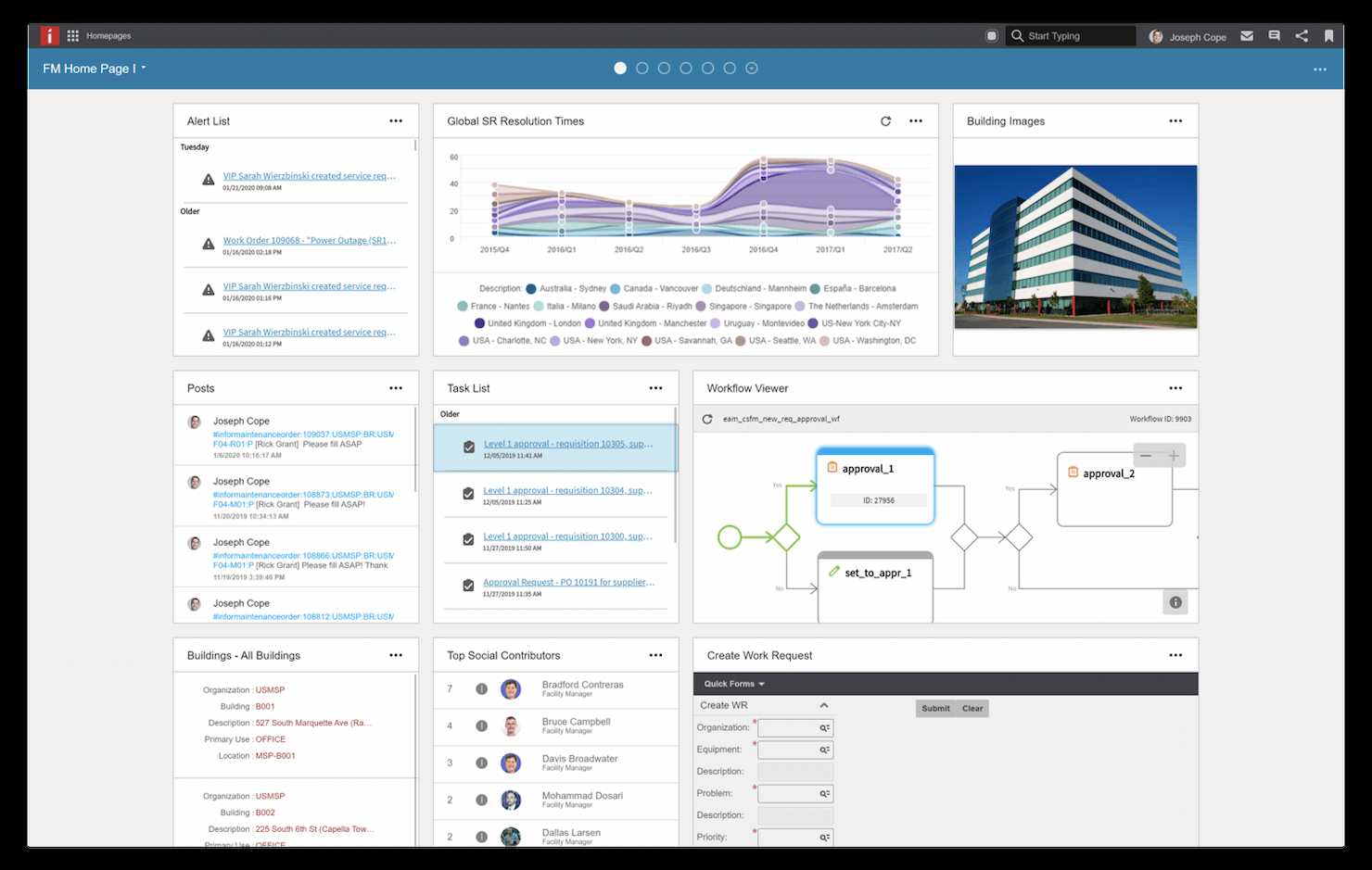
HxGN EAM is a top-of-the-line enterprise asset management (EAM) tool. With 30+ years of experience in asset management, the platform can help large organizations extend the life cycle of their assets with the software.
Why I picked HxGN EAM: I like how the platform is equipped with a variety of lifecycle extension tools like the risk management features, asset performance management (APM) tool, and more, to help extend the lifespan of assets.
HxGN EAM Standout Features and Integrations:
Standout features include artificial intelligence (AI) and machine learning (ML) to give users insights into the condition of the organization’s assets. I like how there are also industry-specific versions of the software for healthcare, manufacturing, energy, and more. The platform can also help you improve the lifespan of your assets with integrated analytics and case management features.
Integrations include Microsoft (MS) Project, Oracle, and Excel.
Pros and Cons
Pros:
- AI-driven insights to help in autonomous decision-making
- Great for extending lifespan of fleets, equipment, and facilities
Cons:
- Not many integrations available


ManageEngine Mobile Device Manager Plus is a practical asset management system created specifically to organize and manage all mobile devices within your organization. The Mobile Device Management (MDM) software is designed to manage smartphones, laptops, tablets, desktops, and more with software management included.
Why I picked ManageEngine: One of the most common fixed assets that organizations manage is mobile devices. I chose ManageEngine because they dedicate their entire software to this division of asset management to make it easy to organize, reserve, and secure the most vital tool of any business: smartphones.
Freshservice Standout Features and Integrations:
Standout features include setting company-wide restrictions, compliance with company policies on each device, and silently installing approved apps automatically. I like how accessible the software is as you can use it on any operating system like iOS, Android, Windows, Chrome OS, macOS, and iPad OS. One unique feature is the ability to remotely wipe all company data from the phone in the event of the device being lost or stolen.
Integrations include Zendesk, Zoho Creator, Zoho CRM, ServiceNow, and Spiceworks.
Pros and Cons
Pros:
- Tracks app usage
- Lost or stolen phones can have company data wiped remotely
- On-premise and cloud-based services available
Cons:
- Cloud-based version can be buggy
- User interface can be a bit tricky to navigate


AssetCloud by Wasp Barcode Technologies is a great tool organizations can use to track both software and fixed assets. Used by IBM, Lockheed Martin, Mercedes Benz, and Sony, the platform can help you if you use a variety of identical assets.
Why I picked AssetCloud: I like how the asset management tool includes a work order and maintenance system you can use to assign work orders to more than one person at a time. You can include a few assets and tasks into a single work order at once, as this means you don’t need to create multiple work orders if you have plenty of identical units.
AssetCloud Standout Features and Integrations:
Standout features include a multi-quantity asset feature to track identical groups of assets. You can choose between two configurations: cloud-hosted or self-hosted, to align the platform to your needs. The platform also allows you to purchase supporting items like label printers, tags, and scanners to help manage fixed assets.
Integrations include Zapier, HubSpot, Google Workspace, Slack, Mailchimp, Twitter, Facebook Lead Ads, Trello, and Calendly.
Pros and Cons
Pros:
- 25 pre-built inventory tracking reports
- Makes it easy to manage identical asset classes
Cons:
- Performance issues with mobile app
- Initial setup is time-consuming


Snipe-IT is the most popular open-source ITAM on the market. The software provides businesses with the ability to manage software, licenses, hardware, consumables, and more. The platform’s open-source code allows businesses to easily customize the maintenance, upgrades, and security of their software and hardware assets.
Why I picked Snipe-IT: I chose Snipe-IT because of its ability to allow you to customize the software to your needs. Its open-source design lets you modify the software to your liking so you can better manage your IT inventory like licenses, software, computers, smartphones, and more.
Snipe-IT Standout Features and Integrations:
Standout features include a clean dashboard to give you an overview of the most recent asset activity, such as a license renewal, a computer checked-out by an employee, or a notification on an upcoming license expiry. One thing I think will be very beneficial to those looking for a custom solution is the REST API included in the software. It can help you integrate the app within your own system to help you streamline IT assets management right into your current workflow.
Integrations include LDAP and Active Directory, and the tool has an open API for advanced integration options.
Pros and Cons
Pros:
- Can integrate with barcode and QR code readers
- Great for managing IT assets on the go
- Open-source offers impressive customization options
Cons:
- The search function can be confusing
- The software has a steep learning curve


AssetTiger is an asset management platform that helps you track your fixed assets in a user-friendly way. Their tool lets you add unlimited users, get set up quickly, and turn your smartphone into a digital asset scanner thanks to its intuitive mobile app.
Why I picked AssetTiger: The platform makes it easy for anyone to get started with asset management. It features a user-friendly check-in and check-out system to reserve assets quickly and efficiently. I like how you can reserve different assets in advance right from your phone.
AssetTiger Standout Features and Integrations:
Standout features include advanced reports to track asset status (by depreciation, check-out times, and maintenance requirements). In my opinion, the tool is one of the best on the market in terms of being able to create custom reports like inventory status and overall usage. Another great feature is the alerts managers can set up to notify them to check on contract due dates.
Integrations aren’t available yet.
Pros and Cons
Pros:
- Easily schedule equipment maintenance
- Store contracts and licenses in a single place
- User-friendly platform
Cons:
- Can’t customize fields much
- Not third-party integrations available yet


Bynder is a leading digital asset management (DAM) tool that’s used by Canon, Puma, Spotify, and other world-famous brands. The platform is best suited for organizations in the process of scaling to help track their digital assets.
Why I picked Bynder: I like how the platform lets managers automate creative workflows with customizable approval paths and versioning. In my opinion, the platform’s branded templates are handy to help creative and marketing teams design new assets right on the platform.
Bynder Standout Features and Integrations:
Standout features include AWS global services, which, to me, is a strong foundation for organizations looking to scale without fear of their DAM breaking down. I also like how you have access to a video studio to easily edit different marketing assets. Plus, the platform comes equipped with a collaborative dashboard that graphic designers can use to automatically alter assets.
Integrations include BloomReach, TYPO3, Google Workspace, Google Analytics, Wrike, Drupal 7, Drupal 8, Hootsuite, and Microsoft Active Directory.
Pros and Cons
Pros:
- Create and manage assets directly in the platform
- Branded templates for congruent design
- Quick onboarding
Cons:
- Customer support could be improved
- Can sometimes load slowly


InvGate Asset Management is an IT asset management solution designed to help your team discover, track, and manage hardware, software, and cloud assets across their full lifecycle. It centralizes asset data into a single view, making it easier to maintain visibility and control across distributed environments.
Why I picked InvGate Asset Management: I picked InvGate Asset Management because it combines automated discovery with flexible asset modelling, which helps you maintain an accurate, up-to-date inventory without relying on manual tracking. It supports multiple onboarding methods, including agent-based and agentless discovery, manual asset creation, and integrations with existing tools, so you can fit it into your current environment. Custom asset fields and lifecycle tracking from procurement through retirement make it practical for audits, refresh planning, and depreciation tracking, especially if you manage diverse hardware across teams or locations.
InvGate Asset Management Standout Features and Integrations:
Standout features include the configuration management database, which maps relationships between assets and related services to help clarify dependencies within your IT environment. The platform also supports automated hardware discovery, lifecycle and status tracking, warranty and contract visibility, and depreciation tracking to support audit readiness and long term planning. Automation rules can reduce manual work by standardizing how assets are categorized and managed.
Integrations with tools like Lansweeper, FileWave, Microsoft Active Directory, Okta, and other Microsoft services help import existing asset data and keep inventory consistent across systems.
Pros and Cons
Pros:
- Comprehensive asset discovery and inventory capabilities
- Centralized contract management
- Effective software license management
Cons:
- Setup may require technical expertise
- Could offer more native integrations
Weitere Asset-Management-Software
Hier sind einige weitere Optionen, die es nicht auf die Shortlist für Asset-Management-Software geschafft haben, aber trotzdem eine Überlegung wert sind:
- Syncro
For real-time remote asset monitoring and management
- Prey
For device movement visibility
- NinjaOne
ITAM for managed service providers
- GoCodes Asset Management
ITAM for construction and schools
- Wedia
Marketing asset management for copyrights and licenses
- Zluri
For SaaS management
- GLPI
Simple open-source asset tracking
- 4ALLPORTAL
DAM for OCR text recognition
- MaintainX
For maintaining physical equipment
- TOPdesk
Visual ITAM
- InvGate Assets
ITAM for startups
- Zoho
For integrating with other Zoho tools
- Sapphire
AI-powered ITAM
- SysAid IT Asset Management
For on-site hosting
- Xyicon
ITAM for multiple locations


Verwandte Rezensionen
Suchen Sie nach weiteren Technik-Tools und Systemen? Hier finden Sie noch mehr Softwarebewertungen vom CTO Club Team:
- Cloud-Plattform als Service
- API-Tools
- Cloud-Speicher-Software
- Virtualisierungssoftware
- Infrastructure as Code Tools
- PaaS-Services
- Cloud-Sicherheitstools
- DevOps-Monitoring-Tools
Auswahlkriterien für Asset-Management-Software
Bei der Auswahl der besten Asset-Management-Software für diese Liste habe ich häufige Käuferbedürfnisse und Herausforderungen wie effizientes Asset-Tracking und die Einhaltung von Datenschutzvorgaben berücksichtigt. Außerdem habe ich das folgende Rahmenwerk genutzt, um meine Bewertung strukturiert und fair zu gestalten:
Kernfunktionen (25 % der Gesamtbewertung)
Um in diese Liste aufgenommen zu werden, musste jede Lösung die folgenden Anwendungsfälle erfüllen:
- Asset-Standorte verfolgen
- Asset-Lebenszyklen verwalten
- Wartungspläne überwachen
- Compliance-Berichte generieren
- Audit-Trails bereitstellen
Weitere besondere Funktionen (25 % der Gesamtbewertung)
Zur weiteren Differenzierung habe ich auch nach einzigartigen Eigenschaften gesucht, wie zum Beispiel:
- Echtzeit-Asset-Tracking
- Individuell anpassbare Dashboards
- Integration mit IoT-Geräten
- Erweiterte Reporting-Tools
- Mobile App-Zugriff
Benutzerfreundlichkeit (10% der Gesamtbewertung)
Um einen Eindruck von der Benutzerfreundlichkeit jedes Systems zu gewinnen, habe ich Folgendes berücksichtigt:
- Intuitive Benutzeroberfläche
- Einfache Navigation
- Minimale Einarbeitungszeit
- Klares visuelles Design
- Reaktionsschnelle Performance
Onboarding (10% der Gesamtbewertung)
Um die Onboarding-Erfahrung jeder Plattform zu bewerten, habe ich Folgendes betrachtet:
- Verfügbarkeit von Trainingsvideos
- Interaktive Produkttouren
- Zugang zu Vorlagen
- Chat-Support während der Einrichtung
- Webinare für neue Nutzer
Kundensupport (10% der Gesamtbewertung)
Um den Kundendienst der jeweiligen Software-Anbieter zu beurteilen, habe ich Folgendes berücksichtigt:
- 24/7 Support-Verfügbarkeit
- Mehrere Kontaktmöglichkeiten
- Zugang zu einer Wissensdatenbank
- Effiziente Reaktionszeiten
- Persönliche Unterstützung
Preis-Leistungs-Verhältnis (10% der Gesamtbewertung)
Um das Preis-Leistungs-Verhältnis jeder Plattform zu beurteilen, habe ich Folgendes einbezogen:
- Wettbewerbsfähige Preisgestaltung
- Flexible Abonnementpläne
- Verfügbarkeit einer kostenlosen Testphase
- Kosten im Verhältnis zu den Funktionen
- Rabatte für Jahrespläne
Kundenbewertungen (10% der Gesamtbewertung)
Um das Gesamtbild der Kundenzufriedenheit zu erfassen, habe ich bei der Auswertung von Kundenbewertungen auf Folgendes geachtet:
- Allgemeine Zufriedenheitsbewertungen
- Häufig gelobte Funktionen
- Regelmäßige Beschwerden
- Nutzerfeedback zu Updates
- Erfahrungsberichte aus ähnlichen Branchen
Wie wählt man eine Asset Management Software aus?
Es ist leicht, sich in endlosen Funktionslisten und komplexen Preisstrukturen zu verlieren. Damit Sie bei Ihrem individuellen Auswahlprozess fokussiert bleiben, hier eine Checkliste mit wichtigen Faktoren:
| Faktor | Worauf achten? |
|---|---|
| Skalierbarkeit | Wächst die Software mit Ihrem Unternehmen mit? Bedenken Sie zukünftige Expansionen und prüfen Sie, ob das Tool mit mehr Assets und Nutzern problemlos umgehen kann. |
| Integrationen | Lässt sich das System mit bestehenden Prozessen verbinden? Prüfen Sie die Kompatibilität mit Lösungen wie ERP-, CRM- oder DCIM-Software, die Ihr Team bereits nutzt. |
| Anpassbarkeit | Können Sie das System auf Ihre Arbeitsabläufe zuschneiden? Suchen Sie nach Möglichkeiten, Felder, Dashboards und Berichte Ihren Bedürfnissen anzupassen. |
| Benutzerfreundlichkeit | Ist es für das gesamte Team leicht zu bedienen? Testen Sie die Oberfläche, um sicherzustellen, dass sie intuitiv ist und den Schulungsaufwand senkt. |
| Einführung und Onboarding | Wie schnell können Sie loslegen? Bewerten Sie den Einrichtungsprozess sowie Ressourcen wie Tutorials oder Support, um den Umstieg zu erleichtern. |
| Kosten | Passt es in Ihr Budget? Vergleichen Sie Preismodelle – inklusive versteckter Kosten wie Einrichtungsgebühren oder Zusatzfunktionen. |
| Sicherheitsstandards | Sind Ihre Assets geschützt? Achten Sie auf die Einhaltung Ihrer Sicherheitsanforderungen, Datenverschlüsselung und Branchenvorgaben. |
| Support-Verfügbarkeit | Welche Unterstützung erhalten Sie im Problemfall? Prüfen Sie auf 24/7-Supportoptionen und achten Sie auf Nutzerbewertungen zu Servicequalität und Reaktionszeit. |
Was ist Asset Management Software?
Asset Management Software ist ein Werkzeug, das IT-Fachleute, Gebäudemanager und Finanzteams nutzen, um die Asset-Auslastung zu erhöhen und Kosten zu senken. Die Software bietet ein zentrales System zur Verwaltung von physischen Geräten, digitalen Assets und Softwarelizenzen über den gesamten Produktlebenszyklus hinweg – von der Anschaffung bis zur Ausmusterung.
Inventarverwaltung, Wartungsplanung und Compliance-Berichte erleichtern ein effizientes Asset Management und fundierte Entscheidungen.
Durch die Konsolidierung von Daten aus verschiedenen Abteilungen ermöglichen diese Werkzeuge intelligenteres Budgetieren, Compliance-Überwachung und Wartungsplanung und sorgen dafür, dass Assets sicher, effizient und vollständig erfasst sind.
Funktionen von Asset Management Software
Achten Sie bei der Auswahl einer Asset Management Software auf folgende Schlüsselfunktionen:
- Bestandsverfolgung: Behalten Sie Ihre Vermögenswerte mit Echtzeit-Tracking im Blick, sodass Sie immer wissen, wo sich Ihre Ausrüstung, Hardware oder Werkzeuge befinden. Diese Funktion vereinfacht Prüfungen und hilft, Verluste oder Verlegungen zu verhindern.
- Lebenszyklusverwaltung: Überwachen Sie jede Phase im Lebenszyklus eines Vermögenswerts – von der Anschaffung bis zur Entsorgung. So können Sie Ersatz planen, Wartungen terminieren und wichtige Datenpunkte erfassen, um die Lebensdauer und den Wert jedes Vermögenswerts zu maximieren.
- Wartungsplanung: Richten Sie automatisch regelmäßige Wartungserinnerungen für Ihre Vermögenswerte ein. Rechtzeitige Instandhaltung verlängert die Lebensdauer, reduziert Ausfallzeiten und sorgt für reibungslosere Abläufe.
- Compliance-Management: Stellen Sie sicher, dass alle Vermögenswerte den gesetzlichen und sicherheitstechnischen Standards entsprechen. Erhalten Sie Erinnerungen für Inspektionen und generieren Sie Berichte, mit denen Sie jederzeit auditbereit sind und sicherstellen, dass Sie die Vorschriften einhalten.
- Barcode-/RFID-Integration: Mit Barcode- oder RFID-Technologie können Sie Vermögenswerte schnell ein- und ausbuchen, physische Audits beschleunigen und Fehler bei der manuellen Dateneingabe reduzieren. Das sorgt für zusätzliche Genauigkeit im Asset-Management.
- Berichtswesen und Analyse: Erstellen Sie detaillierte Berichte, um Trends zu erkennen, Engpässe zu identifizieren und bessere Investitionsentscheidungen zu treffen. Die richtigen Erkenntnisse helfen Ihnen, Kosten zu senken und Ressourcen optimal einzusetzen.
- Benutzerberechtigungen und -rollen: Kontrollieren Sie, wer Zugriff auf verschiedene Arten von Vermögenswerten hat, diese ändern oder verwalten kann. So bleibt die Datensicherheit gewahrt und die Zusammenarbeit klar geregelt – jeder kennt seine Zuständigkeiten.
- Mobile Zugänglichkeit: Verwalten Sie Ihre Vermögenswerte von überall über eine mobilfreundliche Oberfläche oder eine spezielle App. Besonders praktisch für Teams im Außendienst oder für alle, die unterwegs Echtzeit-Updates benötigen.
- Abschreibungsverfolgung: Behalten Sie den Wert Ihrer Vermögenswerte im Blick, indem automatische Abschreibungsberechnungen durchgeführt werden. So sind Sie immer gut vorbereitet, egal ob für Buchhaltung, steuerliche Zwecke oder Wiederverkaufsplanung.
- Integrationsfähigkeit: Verbinden Sie Ihre Asset-Management-Software nahtlos mit anderen Tools wie Finanzsystemen, Beschaffungsplattformen und Helpdesk-Lösungen, damit Ihre Daten synchronisiert und Ihre Arbeitsprozesse reibungslos laufen.
Häufige KI-Funktionen in Asset-Management-Software
Zusätzlich zu den oben beschriebenen Standardfunktionen integrieren viele dieser Lösungen KI mit Funktionen wie:
- Prädiktive Wartung: KI analysiert historische Daten und Nutzungstrends, um vorherzusagen, wann ein Vermögenswert gewartet werden sollte. Dadurch lassen sich unerwartete Ausfälle vermeiden und kostspielige Stillstandszeiten reduzieren.
- Automatisierte Asset-Kategorisierung: KI organisiert neue Vermögenswerte automatisch in die richtigen Kategorien, indem intelligente Erkennungsalgorithmen genutzt werden. Dadurch entfällt zeitaufwändige manuelle Zuordnung.
- Anomalieerkennung: KI überwacht kontinuierlich die Nutzungsmuster von Vermögenswerten und weist auf Auffälligkeiten hin, sodass potenzielle Betrugsfälle, Missbrauch oder technische Probleme frühzeitig erkannt werden können.
- Intelligente Lageroptimierung: KI berechnet optimale Lagerbestände und empfiehlt Nachbestellpunkte basierend auf Nutzungsmustern. So bleibt der Betrieb im Gleichgewicht, ohne Überbestände aufzubauen.
- Erweiterte Risikobewertung: KI wertet Daten aus verschiedenen Quellen aus, um Ihnen ein klareres, aktuelleres Bild der Risiken jedes Vermögenswerts zu geben. So können Sie Inspektionen oder Upgrades gezielt priorisieren.
- Natürliche Sprachsuche: Mit KI-gestützter Suche, die gewöhnliche Sprache versteht, finden Sie schneller Informationen zu Vermögenswerten – auch ohne genaue Namen oder Details zu kennen.
Vorteile
Die Einführung einer Asset-Management-Software bietet zahlreiche Vorteile für Ihr Team und Ihr Unternehmen. Hier einige, auf die Sie sich freuen können:
- Höhere Effizienz: Automatisierte Verfolgung und Berichterstattung entlasten Ihr Team, damit es sich auf strategischere Aufgaben konzentrieren kann.
- Kosteneinsparungen: Optimiert die Nutzung von Vermögenswerten und verringert unnötige Anschaffungen durch klare Übersicht der aktuellen Bestände.
- Bessere Compliance: Erleichtert das Einhalten von Branchenvorgaben durch automatisierte Berichterstellung und Audit-Trails.
- Bessere Entscheidungsfindung: Echtzeitdaten und fortschrittliche Reporting-Tools ermöglichen fundierte und zeitnahe Entscheidungen.
- Längere Nutzungsdauer: Durch regelmäßige Wartung werden Ausfälle verhindert und die Lebensdauer Ihrer Vermögenswerte erhöht.
- Mehr Transparenz: Sie erhalten Einblick in Bewegungen und Nutzung der Vermögenswerte und behalten Kontrolle sowie Nachvollziehbarkeit.
- Skalierbarkeit: Passt sich den wachsenden Anforderungen Ihres Unternehmens an und unterstützt im Laufe der Zeit immer mehr Vermögenswerte und Nutzer.
Kosten & Preise
Die Auswahl von Software für das Anlagenmanagement erfordert ein Verständnis der verschiedenen Preismodelle und verfügbaren Tarife. Die Kosten variieren je nach Funktionen, Teamgröße, Zusatzoptionen und mehr. Die folgende Tabelle gibt einen Überblick über gängige Tarife, deren durchschnittliche Preise und typische Funktionen, die in Asset Management Software-Lösungen enthalten sind:
Vergleichstabelle für Asset Management Software-Tarife
| Tarifart | Durchschnittspreis | Typische Funktionen |
|---|---|---|
| Kostenloser Tarif | $0 | Basis-Anlagenverfolgung, begrenzte Nutzeranzahl und grundlegende Berichte. |
| Persönlicher Tarif | $5-$25/Nutzer/Monat | Anlagenverfolgung, Wartungsplanung, grundlegende Berichte und mobiler Zugriff. |
| Business-Tarif | $30-$60/Nutzer/Monat | Erweiterte Verfolgung, Integrationsmöglichkeiten, anpassbare Dashboards und Compliance-Berichte. |
| Enterprise-Tarif | $70-$150/Nutzer/Monat | Vollständiger Funktionsumfang, erweiterte Analysen, dedizierter Support sowie unbegrenzte Nutzer und Anlagen. |
FAQs zur Asset Management Software
Hier finden Sie Antworten auf häufig gestellte Fragen zur Asset Management Software:
Kann Asset Management Software mit bestehenden Systemen integriert werden?
Wie verbessert Asset Management Software die Compliance?
Ist eine Schulung für die Nutzung der Asset Management Software erforderlich?
Wie geht es weiter?
Wenn Sie nach Software für das Anlagenmanagement suchen, können Sie sich kostenlos von einem SoftwareSelect Berater Empfehlungen geben lassen.
Füllen Sie ein Formular aus und besprechen Sie Ihre spezifischen Anforderungen. Sie erhalten eine Shortlist mit Softwarelösungen sowie Unterstützung während des gesamten Beschaffungsprozesses – inklusive Preisverhandlungen.