

20 Best Rippling IT Alternatives in 2026

Rippling IT Alternatives Shortlist


The best Rippling IT alternatives offer centralized device management, secure identity controls, and automation for IT workflows without locking you into a single vendor ecosystem. If you’re searching for Rippling IT alternatives, you likely need flexible tools to manage user access, endpoints, and SaaS apps as your business grows or diversifies.
Choosing the right IT management software can help you reduce manual work, improve security, and adapt to changing infrastructure and business needs. In this list, you’ll find trusted options that support a range of environments, integration requirements, and support models, so you can confidently select the best fit for your team.
What Is Rippling IT?
Rippling IT is the IT management module that’s part of the broader Rippling HR platform. It centralizes device, user, and application administration for businesses. It combines identity management, device provisioning, and workflow automation in a single system. IT teams use Rippling IT to manage employee access, enforce security policies, and automate onboarding or offboarding tasks. This approach helps organizations maintain control over their technology environment and employee experience while reducing manual processes and supporting global compliance requirements.
Best Rippling IT Alternatives Summary
This comparison chart summarizes pricing details for my top Rippling IT alternative selections to help you find the best one for your budget and business needs.
| Tool | Best For | Trial Info | Price | ||
|---|---|---|---|---|---|
| 1 | Best for global device logistics | Free demo available | from $5/person/month | Website | |
| 2 | Best with built-in AI for ticket routing | 14-day free trial + free demo available | From $19/agent/month (billed annually) | Website | |
| 3 | Best for SaaS discovery and license optimization | Free demo available | Pricing upon request | Website | |
| 4 | Best for unified device and identity management | 30-day free trial + free demo available | Pricing upon request | Website | |
| 5 | Best for managing Apple devices at scale | Free 14-day trial available | Pricing upon request | Website | |
| 6 | Best for cross-platform mobile device management | 14-day free trial + free demo available | From $2.20/device/month (billed annually) | Website | |
| 7 | Best for automated IT asset lifecycle tracking | 14-day free trial + free demo available | Pricing upon request | Website | |
| 8 | Best for customizable IT service automation | Free demo available | Pricing upon request | Website | |
| 9 | Best for Microsoft environments | 30-day free trial available | From $10/user/month (billed annually) | Website | |
| 10 | Best for secure SSO across cloud apps | 30-day free trial + free demo available | From $6/user/month (billed annually) | Website |

Why Trust Our Software Reviews
We’ve been testing and reviewing software since 2023. As tech leaders ourselves, we know how critical and difficult it is to make the right decision when selecting software.
We invest in deep research to help our audience make better software purchasing decisions. We’ve tested more than 2,000 tools for different tech use cases and written over 1,000 comprehensive software reviews. Learn how we stay transparent & our software review methodology.
-

Freshservice
Visit WebsiteThis is an aggregated rating for this tool including ratings from Crozdesk users and ratings from other sites.4.6 -
Deel IT
Visit WebsiteThis is an aggregated rating for this tool including ratings from Crozdesk users and ratings from other sites.4.9 -
Rippling IT
Visit WebsiteThis is an aggregated rating for this tool including ratings from Crozdesk users and ratings from other sites.4.8


Rippling IT Alternatives Reviews
Below are my detailed summaries of the best Rippling IT alternatives that made it onto my shortlist. My reviews offer a detailed look at the features, integrations, and best use cases of each platform to help you find the best one for you.

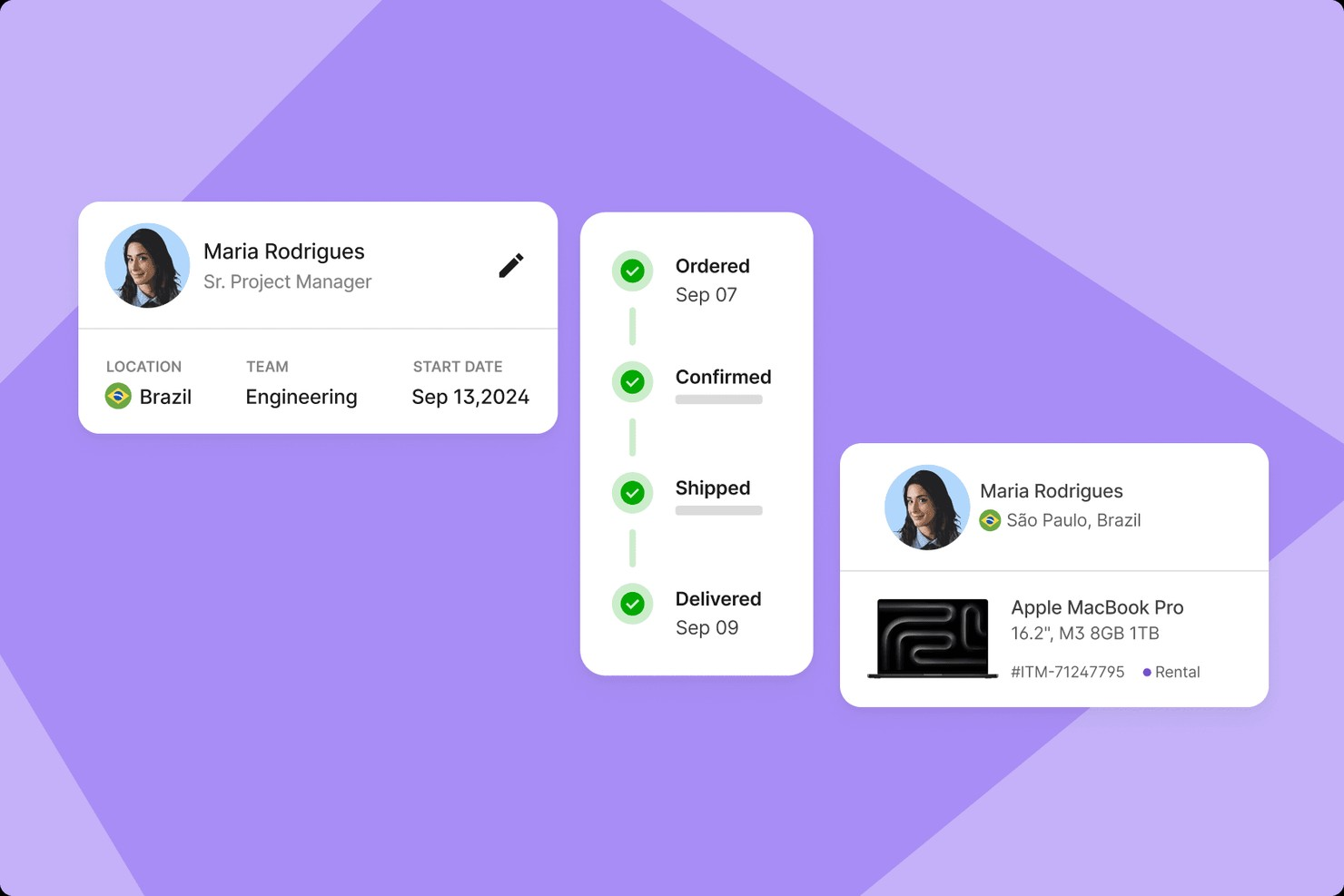
Deel IT gives IT teams and HR leaders a way to manage devices for distributed workforces across borders. If you need to handle hardware logistics, compliance, and onboarding for remote or global teams, Deel IT brings everything into one platform.
Who Is Deel IT Best For?
Global IT teams managing hardware logistics for distributed employees across multiple countries.
Why Deel IT Is a Good Rippling IT Alternative
I picked Deel IT because my team can ship, retrieve, and manage devices for employees in over 130 countries without juggling multiple vendors. I appreciate how the platform handles customs, local compliance, and device retrieval logistics. In practice, that means we avoid delays and lost equipment when onboarding or offboarding remote staff. Deel IT’s global reach is something I haven’t found in other Rippling IT alternatives.
Deel IT Key Features
- Automated device assignment: Assign laptops and hardware to new hires directly from the platform.
- Centralized device inventory: Track all company devices in one dashboard for easy management.
- Device return management: Initiate and monitor device returns when employees leave or change roles.
- Compliance documentation storage: Store and access compliance records for every device issued.
Deel IT Integrations
Deel IT offers over 60 native integrations with HRIS platforms, including Workday, BambooHR, HiBob, SAP SuccessFactors, and Gusto. An API is available for custom integrations.
Pros and Cons
Pros:
- Centralized dashboard for device compliance tracking
- Fixed-cost device lifecycle management
- Automated device onboarding and offboarding workflows
Cons:
- Lacks advanced analytics for device usage
- Device catalog may not cover all brands

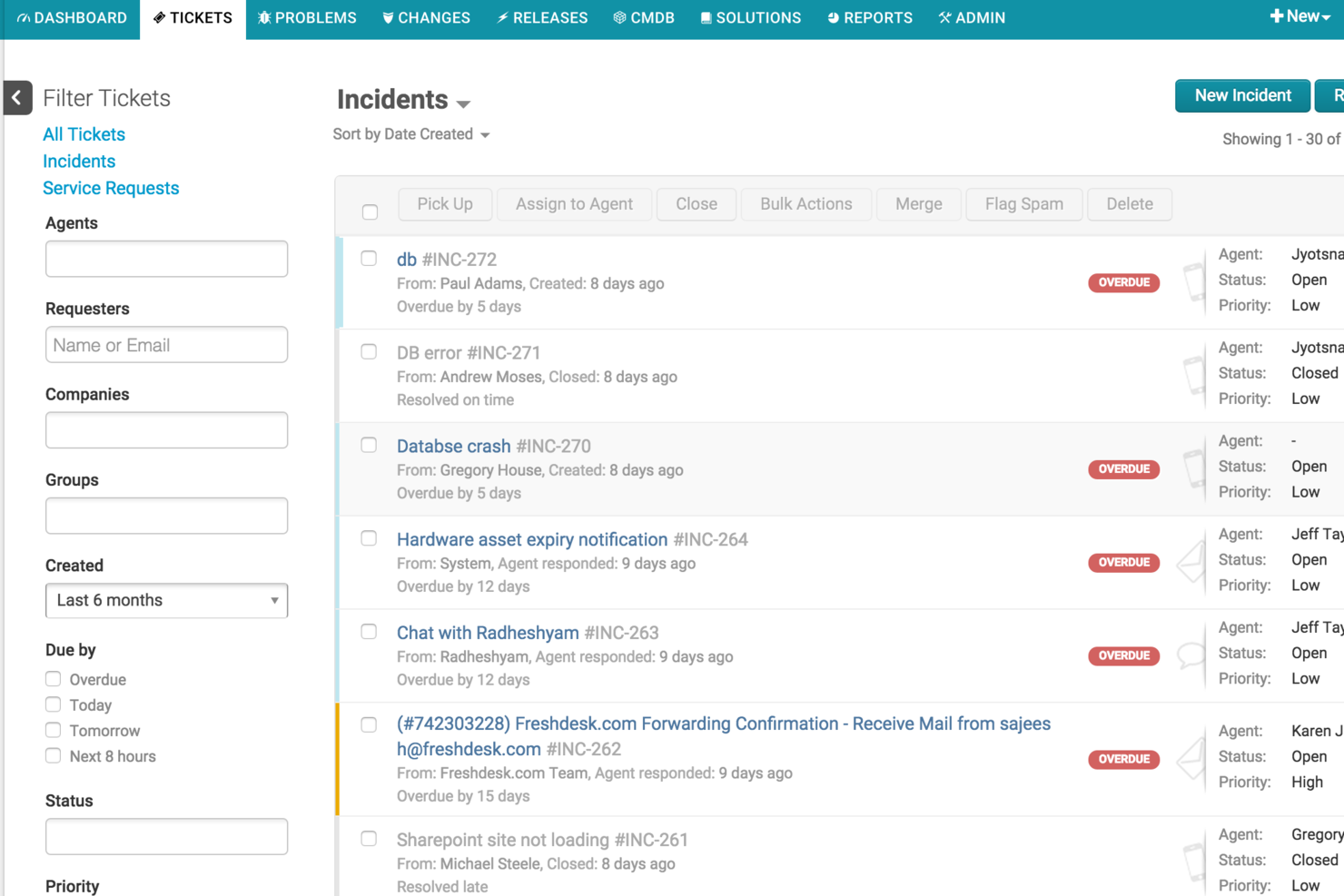
Freshservice is a cloud-based IT service management platform designed for teams that want to automate support and streamline operations. It’s a strong choice for IT, HR, and finance teams looking to modernize workflows and reduce manual effort across service requests.
Who Is Freshservice Best For?
IT service desks in mid-sized to large organizations that want to automate ticket routing and reduce manual triage.
Why Freshservice Is a Good Rippling IT Alternative
I picked Freshservice because its built-in AI for ticket routing takes a lot of manual work off my team’s plate. The AI automatically categorizes and assigns tickets based on context, so we don’t have to triage every request ourselves. I also like that it learns from past tickets to improve accuracy over time. In practice, that means we resolve issues faster and keep our IT staff focused on higher-value work.
Freshservice Key Features
- Change management: Track, approve, and implement IT changes with built-in workflows.
- Service catalog: Let users request IT and business services from a customizable portal.
- Asset discovery: Automatically detect and inventory hardware and software assets.
- Incident management: Log, prioritize, and resolve incidents from a unified dashboard.
Freshservice Integrations
Freshservice offers native integrations with Microsoft Teams, SecPod, Slack, TeamViewer, Jira, and Microsoft Entra ID. Connector apps and APIs are available for custom integrations, and the marketplace features over 1,200 enterprise app integrations.
Pros and Cons
Pros:
- Automation rules simplify repetitive service tasks
- Fast cloud deployment with minimal IT overhead
- Built-in modules for HR and finance workflows
Cons:
- Asset management less advanced
- Limited payroll and benefits management features
New Product Updates from Freshservice

Freshservice Adds Email and Mailbox Audit Logs
Freshservice now adds audit logs for Email Settings and Mailboxes, letting admins track actions, changes, and timestamps across workspaces for better visibility and control. For more information, visit Freshservice's official site.

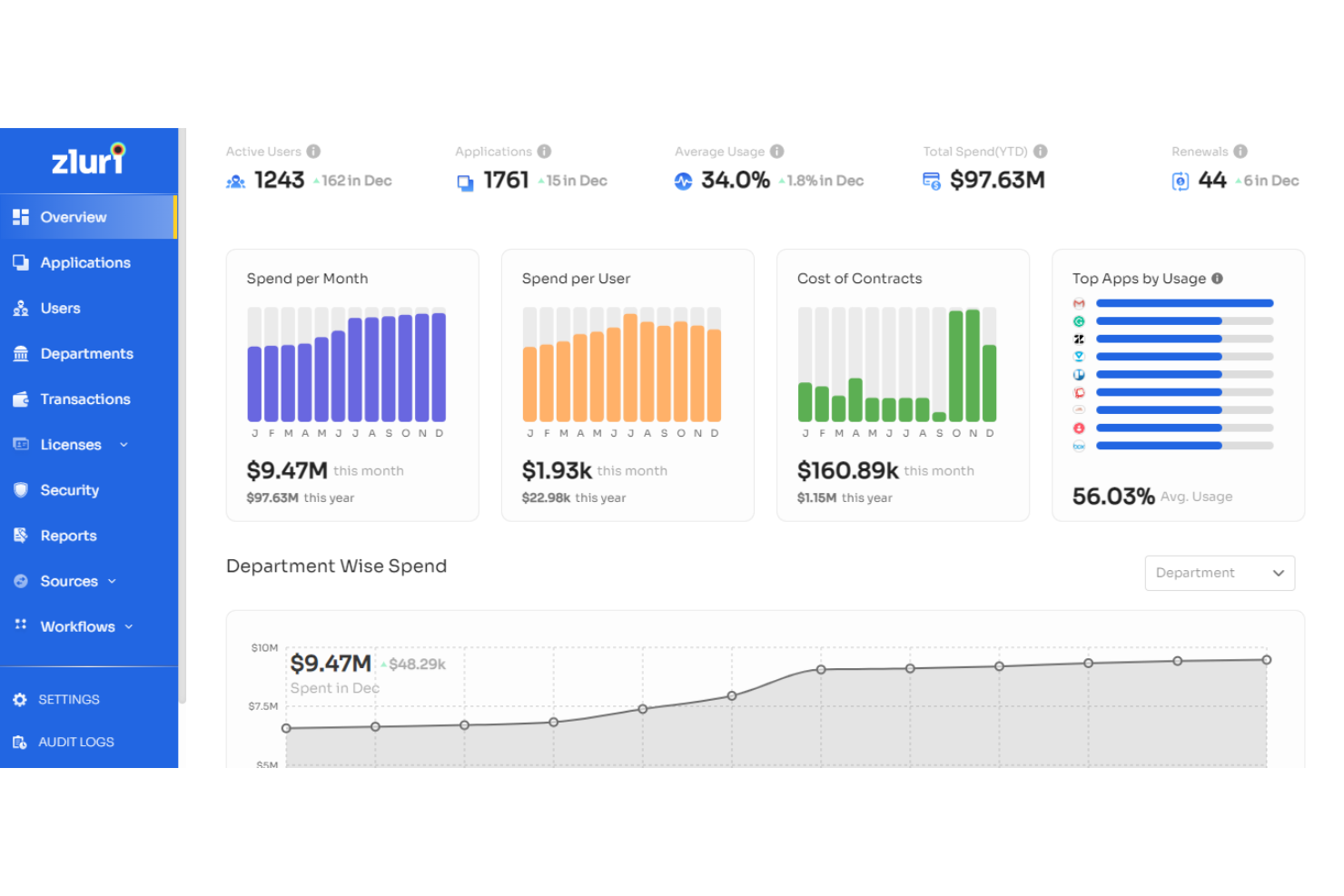
Zluri is a SaaS management platform designed for IT teams that need visibility and control over their cloud software stack. It’s a strong fit for organizations looking to uncover hidden SaaS usage and manage software spend. If you’re struggling with shadow IT or redundant app licenses, Zluri helps you identify, monitor, and optimize your SaaS environment.
Who Is Zluri Best For?
Zluri fits IT administrators in mid-sized to large organizations that need to discover, monitor, and optimize SaaS usage across departments.
Why Zluri Is a Good Rippling IT Alternative
When you need to uncover all the SaaS tools in use across your organization, Zluri offers discovery and license optimization capabilities that Rippling IT doesn’t match. I picked Zluri because it automatically scans your environment to identify both sanctioned and unsanctioned SaaS applications, giving IT teams a clear picture of software usage. Its license management features help you track renewals, eliminate unused subscriptions, and optimize spend. For IT leaders focused on reducing shadow IT and controlling SaaS costs, Zluri brings targeted tools that go beyond basic user or device management.
Zluri Key Features
Some other features in Zluri that IT teams may find valuable include:
- Automated onboarding and offboarding workflows: Set up and manage user access to SaaS applications during employee lifecycle events.
- Security and compliance monitoring: Track app permissions and flag risky or non-compliant SaaS usage.
- Customizable approval workflows: Route SaaS app requests through configurable approval chains for better governance.
- Contractor management: Store, track, and manage international contractors and renewal dates in one place.
Zluri Integrations
Integrations include Google Workspace, Slack, Zoom, Microsoft 365, Jira, Okta, Zendesk, GitHub, Asana, and more.
Pros and Cons
Pros:
- Monitors app permissions for security risks
- Tracks SaaS license usage and renewal dates
- Patented AuthKnox shadow IT discovery
Cons:
- Inconsistent deprovisioning for non-SCIM apps
- Limited custom-built third-party app connectors

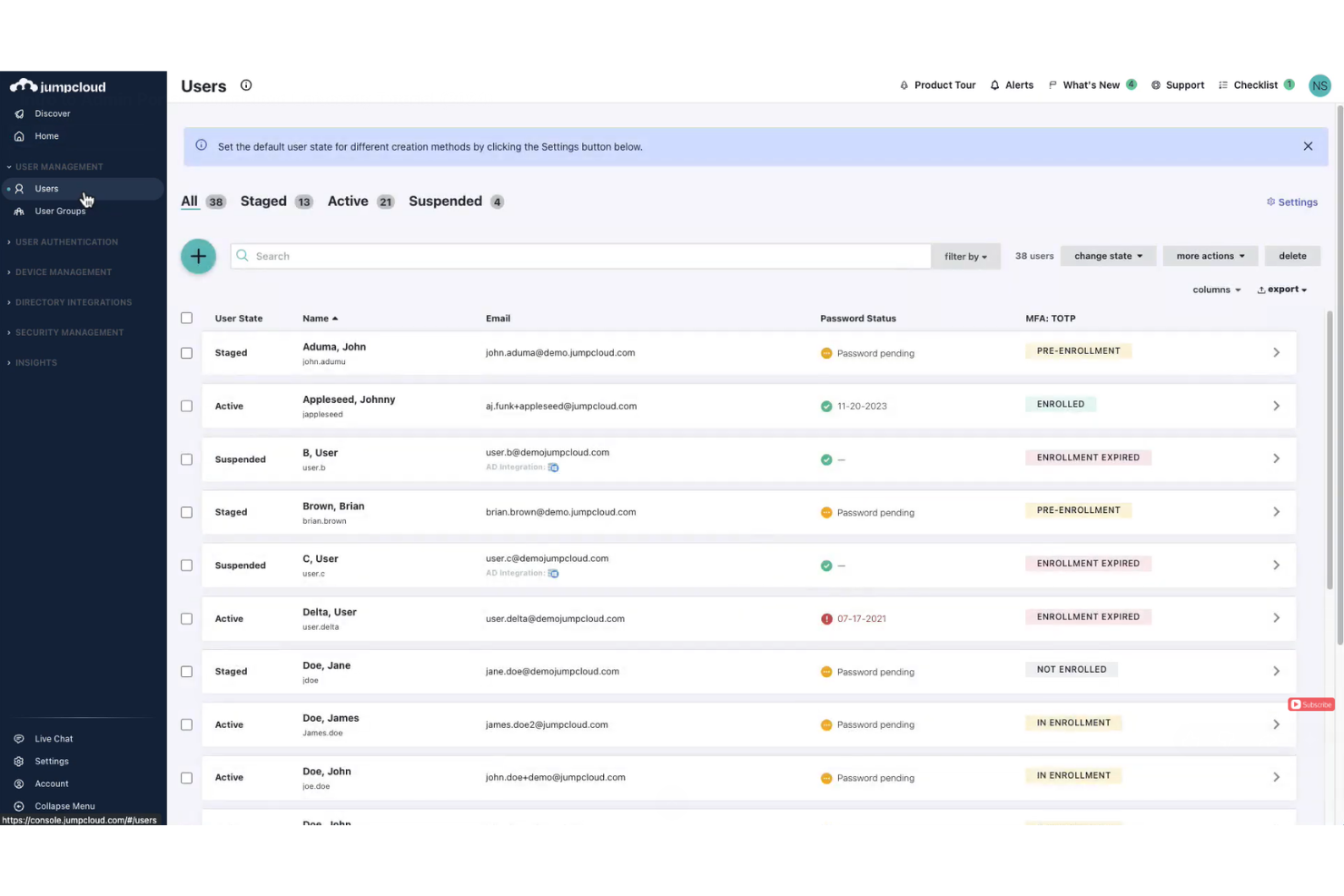
JumpCloud is a cloud-based platform designed for IT teams that need to manage both user identities and devices from a single user-friendly interface. It’s especially useful for organizations with mixed operating systems or those using an employer of record (EOR) to unify access and endpoint control. If you’re looking for an alternative to Rippling IT that emphasizes cross-platform device management alongside identity, JumpCloud is worth considering.
Who Is JumpCloud Best For?
JumpCloud is a strong choice for IT administrators in small to mid-sized businesses that need unified management of user identities and devices across multiple operating systems.
Why JumpCloud Is a Good Rippling IT Alternative
What sets JumpCloud apart is its unified approach to device and identity management, which is especially valuable for IT teams handling diverse endpoints. I picked JumpCloud because it lets you manage Windows, macOS, and Linux devices alongside user access from a single cloud-based console. Features like cross-platform device policies and remote command execution help IT admins maintain security and compliance without juggling multiple tools. This makes JumpCloud a practical alternative to Rippling IT for organizations that need centralized control over both users and devices.
JumpCloud Key Features
Some other features that stand out for IT teams considering JumpCloud include:
- LDAP-as-a-Service: Provides cloud-based LDAP authentication for legacy applications and network resources.
- RADIUS-as-a-Service: Enables secure Wi-Fi and VPN authentication without on-premises RADIUS servers.
- Single Sign-On (SSO): Offers centralized access to a wide range of cloud applications through SAML and OIDC protocols.
- User Self-Service Portal: Lets users manage their own passwords and MFA settings, reducing IT support workload.
JumpCloud Integrations
Integrations include Google Workspace, Microsoft 365, Salesforce, BambooHR, ADP Workforce Now, Slack, AWS, Atlassian, GitHub, Zoom, Dropbox, and more.
Pros and Cons
Pros:
- Provides granular policy enforcement for endpoints
- Offers LDAP and RADIUS as cloud services
- Supports Windows, macOS, and Linux devices
Cons:
- No native time tracking or PTO management
- Limited mobile device management capabilities

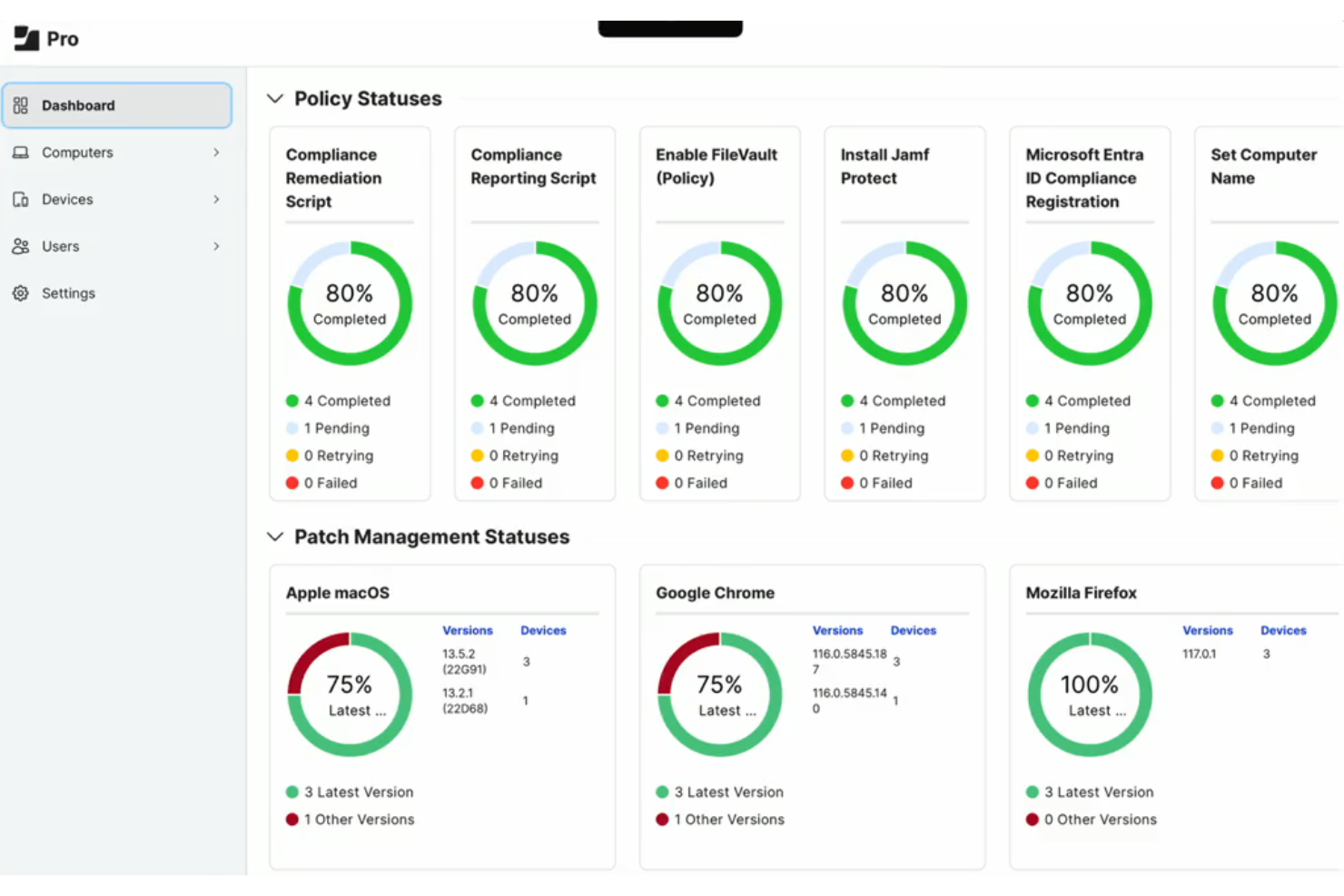
If your team manages a fleet of Apple devices, Jamf is a cost-effective and specialized platform designed for this exact need. IT administrators in education, healthcare, and enterprise environments often turn to Jamf for its deep integration with macOS, iOS, and iPadOS. The platform helps you automate device setup, enforce security policies, and keep Apple hardware compliant at scale.
Who Is Jamf Best For?
Jamf is a strong fit for IT and HR management teams in organizations that need to manage large numbers of Apple devices across education, healthcare, or enterprise environments.
Why Jamf Is a Good Rippling IT Alternative
For organizations that rely heavily on Apple hardware, Jamf offers a level of device management that’s purpose-built for macOS, iOS, and iPadOS environments. I picked Jamf because it provides automated device enrollment, remote configuration, and granular policy enforcement tailored specifically for Apple devices. These features let IT teams deploy, secure, and update large fleets of Apple hardware without manual intervention. If you need to manage Apple devices at scale, Jamf delivers controls and automation that go beyond what generalist IT platforms like Rippling IT can offer.
Jamf Key Features
Some other features that IT teams may find valuable include:
- Patch Management: Automates the process of deploying software updates and security patches to Apple devices.
- App Distribution: Allows IT to remotely deploy and manage applications across all managed devices.
- Inventory Management: Provides detailed hardware and software inventory reporting for all enrolled Apple devices.
- Self Service Portal: Lets users access approved apps, resources, and support tools without IT intervention.
Jamf Integrations
Integrations include Google Workspace, Microsoft, Okta, ServiceNow, Red Canary, Carousel Digital Signage, SwiftConnect, and moew.
Pros and Cons
Pros:
- Supports zero-touch deployment for large rollouts
- Customizable self-service app portal for users
- Automated onboarding for macOS and iOS devices
Cons:
- Some advanced features require separate licensing
- No Windows or Android device management

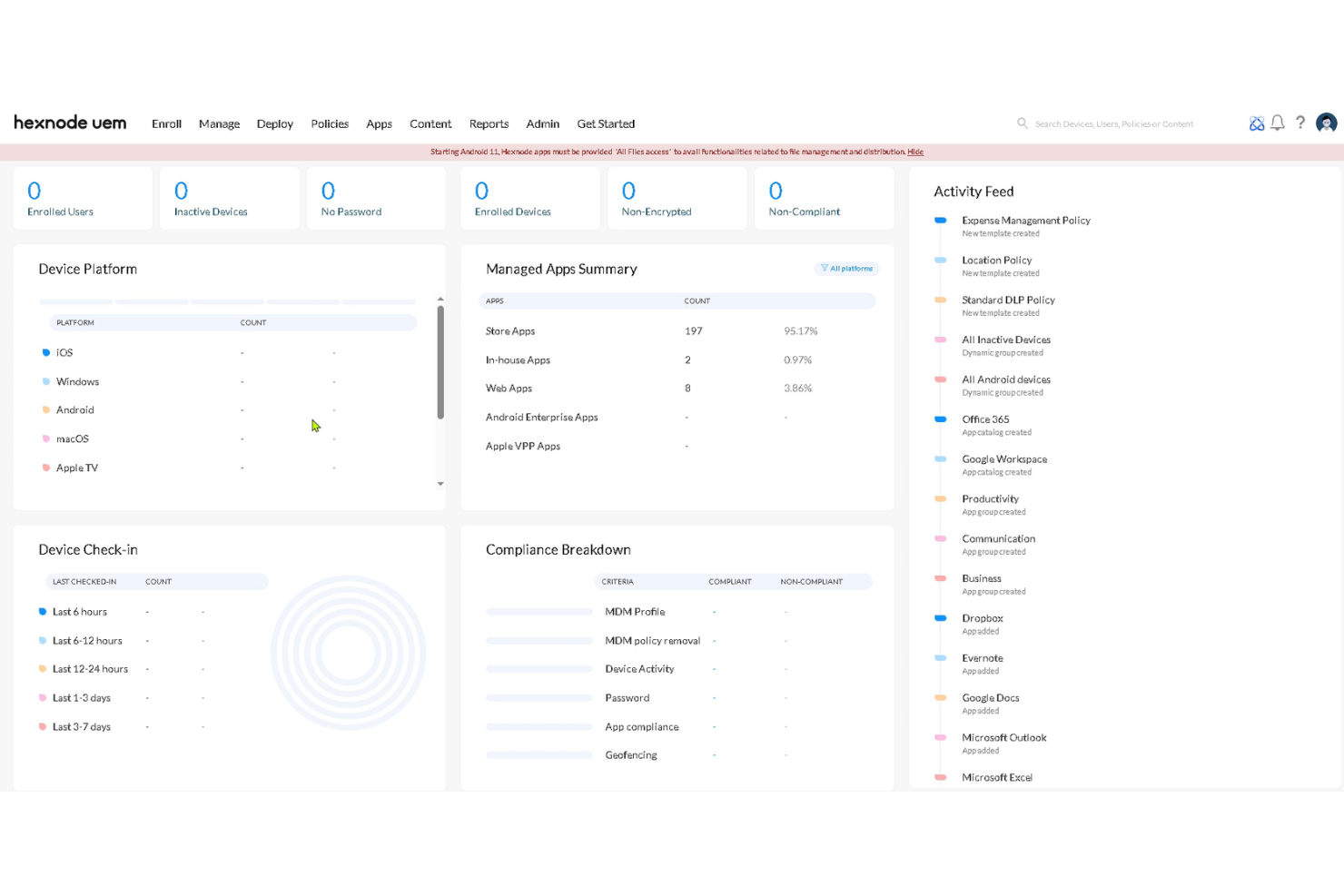
Hexnode is a unified endpoint management platform designed for IT teams managing diverse device fleets. It’s a strong choice for organizations that need to secure, monitor, and control mobile devices across multiple operating systems. If you’re looking for granular policy enforcement and remote management beyond what Rippling IT offers, Hexnode brings specialized tools for device oversight.
Who Is Hexnode Best For?
Hexnode suits IT administrators in mid-sized businesses and enterprises that need to manage and secure mobile devices across multiple platforms.
Why Hexnode Is a Good Rippling IT Alternative
For organizations that need to manage a mix of iOS, Android, Windows, macOS, and even tvOS devices, Hexnode stands out for its cross-platform mobile device management capabilities. I picked Hexnode because it lets IT teams enforce security policies, deploy apps, and remotely lock or wipe devices regardless of the operating system. Its granular control over device configurations and compliance monitoring is especially useful for businesses with a diverse device landscape. If you’re looking for more advanced device management than what Rippling IT provides, Hexnode brings focused tools for unified endpoint oversight.
Hexnode Key Features
Some other features in Hexnode that IT teams may find valuable include:
- Kiosk mode: Lock devices into single-app or multi-app kiosk mode for secure, dedicated use cases.
- Remote troubleshooting: Access devices of remote teams to diagnose and resolve issues without physical intervention.
- Geofencing: Set location-based rules and automate actions when devices enter or leave defined geographic areas.
- Content management: Distribute, update, and remove documents or media files on managed devices from a central console.
Hexnode Integrations
Integrations include Azure Active Directory, Okta, Google Workspace, Microsoft 365, Zendesk, ServiceNow, Splunk, Freshservice, Jira, and more.
Pros and Cons
Pros:
- Integrates with major identity and ITSM platforms
- Provides remote troubleshooting and device access
- Includes kiosk mode for dedicated device use
Cons:
- Desktop management lacks mobile feature parity
- Lacks asset lifecycle and procurement tracking
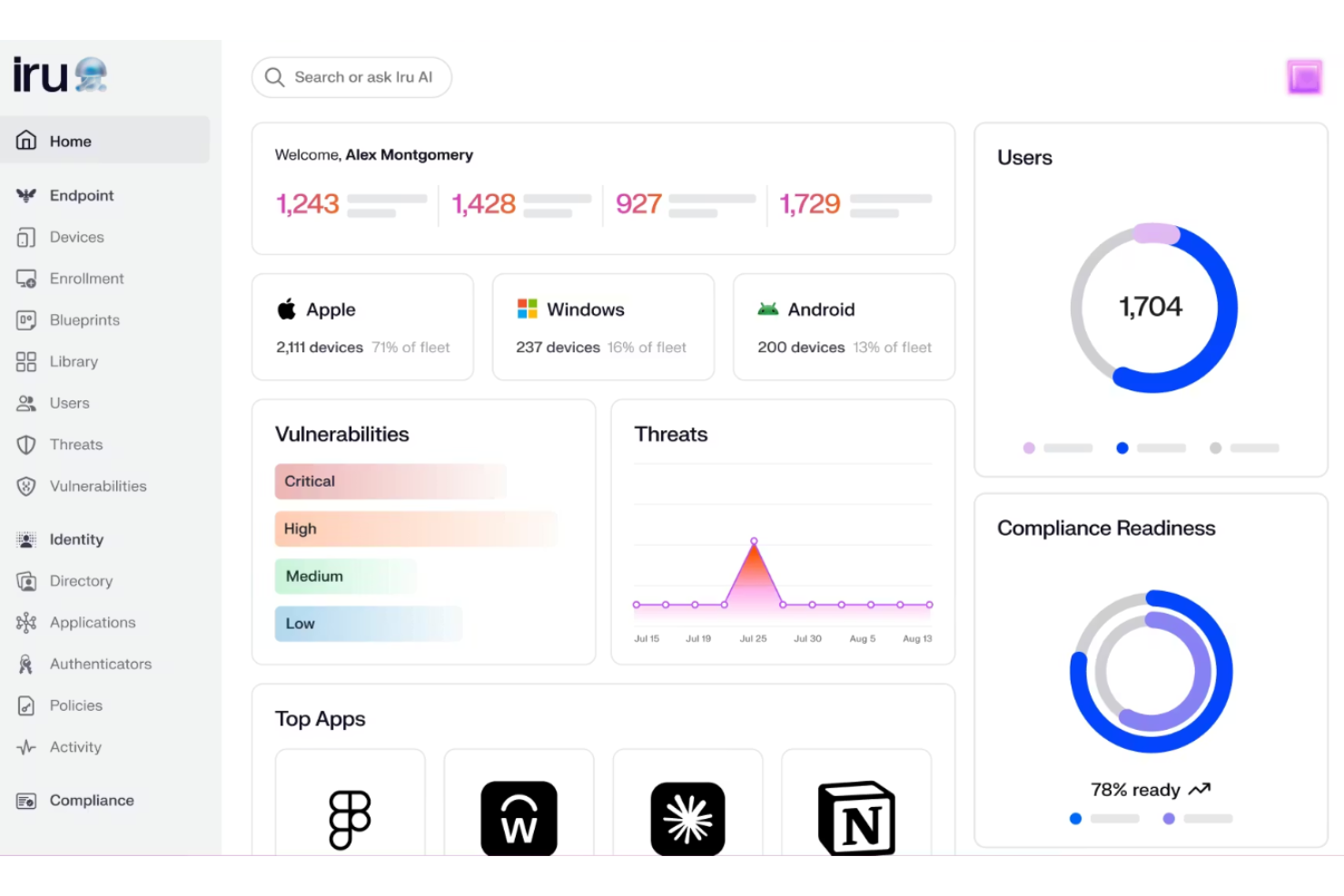
Iru (formerly Kandji) offers a focused platform for IT teams in small businesses that need to track and manage hardware assets across their entire lifecycle. It’s a good fit for organizations that want to automate asset inventory, maintenance, and end-of-life processes without relying on spreadsheets or manual tracking. If you’re looking for a tool that helps reduce asset loss and improves audit readiness, Iru is worth considering.
Who Is Iru Best For?
Iru is a strong choice for IT asset managers in mid-sized businesses that need automated tracking of hardware throughout its lifecycle.
Why Iru Is a Good Rippling IT Alternative
When you need a tool that specializes in automated IT asset lifecycle tracking, Iru stands out as a focused alternative to Rippling. I picked Iru because it automates asset check-in, check-out, maintenance scheduling, and end-of-life processes, which helps IT teams avoid manual errors and asset loss. The platform also provides real-time visibility into asset status and location, making audits and compliance much easier to manage. If your priority is reducing the administrative burden of asset management, Iru’s automation features are a strong fit.
Iru Key Features
Some other features I found useful for IT teams include:
- Custom asset fields: Add organization-specific fields to asset records for more granular tracking and reporting.
- Barcode and QR code support: Generate and scan barcodes or QR codes for fast asset identification and updates.
- Automated notifications: Set up alerts for upcoming maintenance, warranty expirations, or asset assignments.
- Role-based access controls: Assign permissions based on user roles to ensure only authorized staff can modify or view sensitive asset data.
Iru Integrations
Integrations include AssetPanda, Amazon S3, Cloudflare, Google Workspace, Okta, and more.
Pros and Cons
Pros:
- Automated maintenance and warranty alerts
- Supports barcode and QR code scanning
- Tracks asset lifecycle stages automatically
Cons:
- Lacks support for software license management
- No built-in employee onboarding workflows

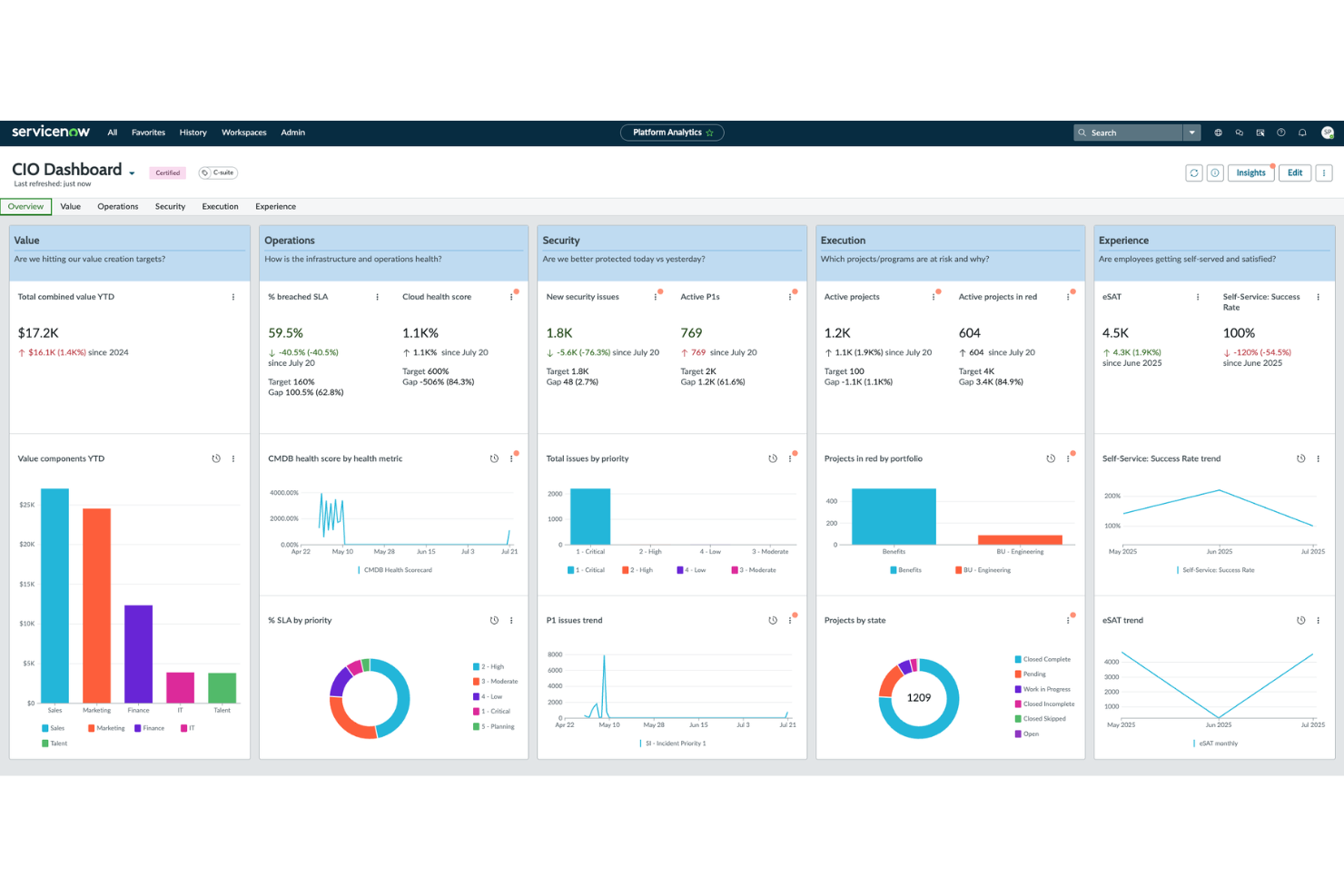
ServiceNow is an enterprise IT service management platform built for organizations that need deep customization and scalability. It’s a strong choice for IT teams in large businesses or regulated industries that require tailored workflows and integrations. If you’re looking to centralize complex IT operations and support global expansion, ServiceNow offers a flexible foundation.
Who Is ServiceNow Best For?
ServiceNow is a strong fit for large enterprises and IT departments that need highly customizable service management across complex environments.
Why ServiceNow Is a Good Rippling IT Alternative
When you need a platform that can adapt to unique IT processes or global payroll workflows, ServiceNow stands out for its deep customization options. I picked ServiceNow because it lets you design and automate service management workflows to fit highly specific business requirements. The platform’s workflow engine and low-code tools allow IT teams to build, modify, and scale processes without heavy reliance on developers. This level of flexibility makes ServiceNow a strong alternative for organizations that have outgrown more rigid IT management solutions like Rippling.
ServiceNow Key Features
Some other ServiceNow features worth noting include:
- Incident Management: Tracks, prioritizes, and resolves IT incidents through a centralized dashboard.
- Change Management: Manages and automates change requests to minimize risk and disruption.
- CMDB (Configuration Management Database): Maintains a real-time inventory of IT assets and their relationships.
- Virtual Agent: Provides AI-powered chat support for users to resolve common IT issues.
ServiceNow Integrations
Integrations include Jira, Salesforce, Microsoft Teams, Slack, Azure DevOps, Splunk, Okta, Workday, SAP SuccessFactors, and more.
Pros and Cons
Pros:
- Full ITIL framework compliance
- Scalable for global team deployments
- Extensive automation for repetitive service tasks
Cons:
- Months-long initial deployment timeline
- Separate licensing for discovery tools

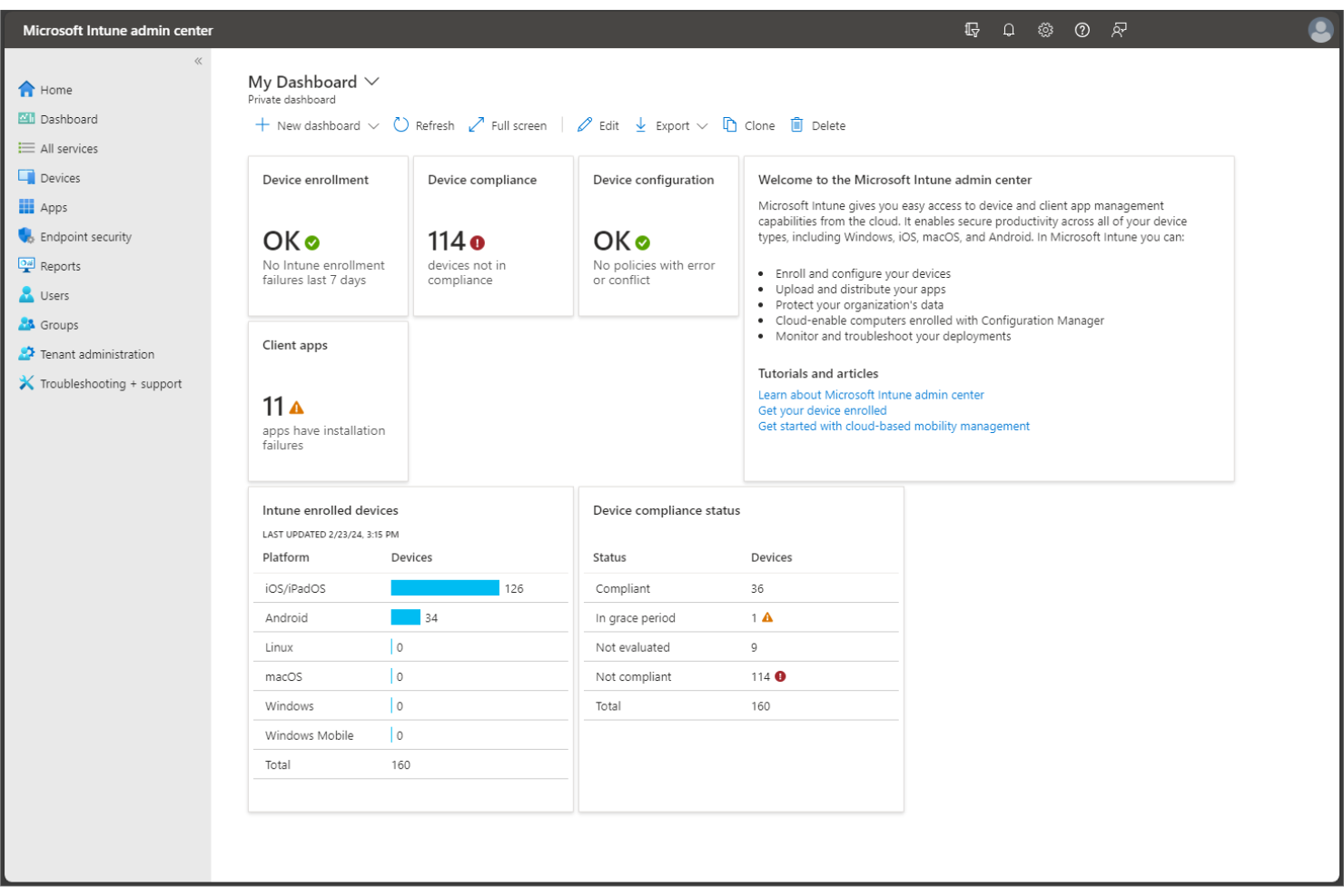
If your organization relies on Microsoft 365, Microsoft Intune offers unified endpoint management built for Windows-centric environments. IT teams in regulated industries often choose Intune to enforce enterprise-level security, manage devices, and control application access across distributed workforces. The platform helps you centralize policy management and compliance for both company-owned and BYOD devices.
Who Is Microsoft Intune Best For?
Microsoft Intune is a strong fit for IT teams in mid-sized to large organizations that need to manage and secure Windows devices across distributed or hybrid workforces.
Why Microsoft Intune Is a Good Rippling IT Alternative
For organizations that operate primarily in Microsoft environments, Intune offers native integration with Windows, Azure Active Directory, and Microsoft 365. I picked Intune because it lets IT teams enforce security policies, deploy software, and manage updates directly within the Microsoft ecosystem. The platform supports granular device compliance controls and conditional access, which are essential for businesses with strict regulatory or security requirements. If your infrastructure is built around Microsoft products, Intune provides unified endpoint management that’s tightly aligned with your existing tools and workflows.
Microsoft Intune Key Features
Some other features that IT teams may find valuable include:
- Mobile application management: Manage and secure apps on both company-owned and personal devices without requiring full device enrollment.
- Remote device wipe: Remotely erase employee data from lost or compromised devices to protect sensitive information.
- Role-based access control: Assign granular permissions to IT staff based on job function or responsibility.
- Automated device enrollment: Automatically configure and enroll new devices into management as soon as they connect to your network.
Microsoft Intune Integrations
Integrations include Microsoft 365, Microsoft Defender for Endpoint, Microsoft Teams, Microsoft Purview, Microsoft Priva, and more.
Pros and Cons
Pros:
- Built-in conditional access and threat protection
- Supports both company-owned and BYOD management
- Native integration with Microsoft 365 and Azure
Cons:
- Complex setup for hybrid environments
- Limited support for non-Windows OS

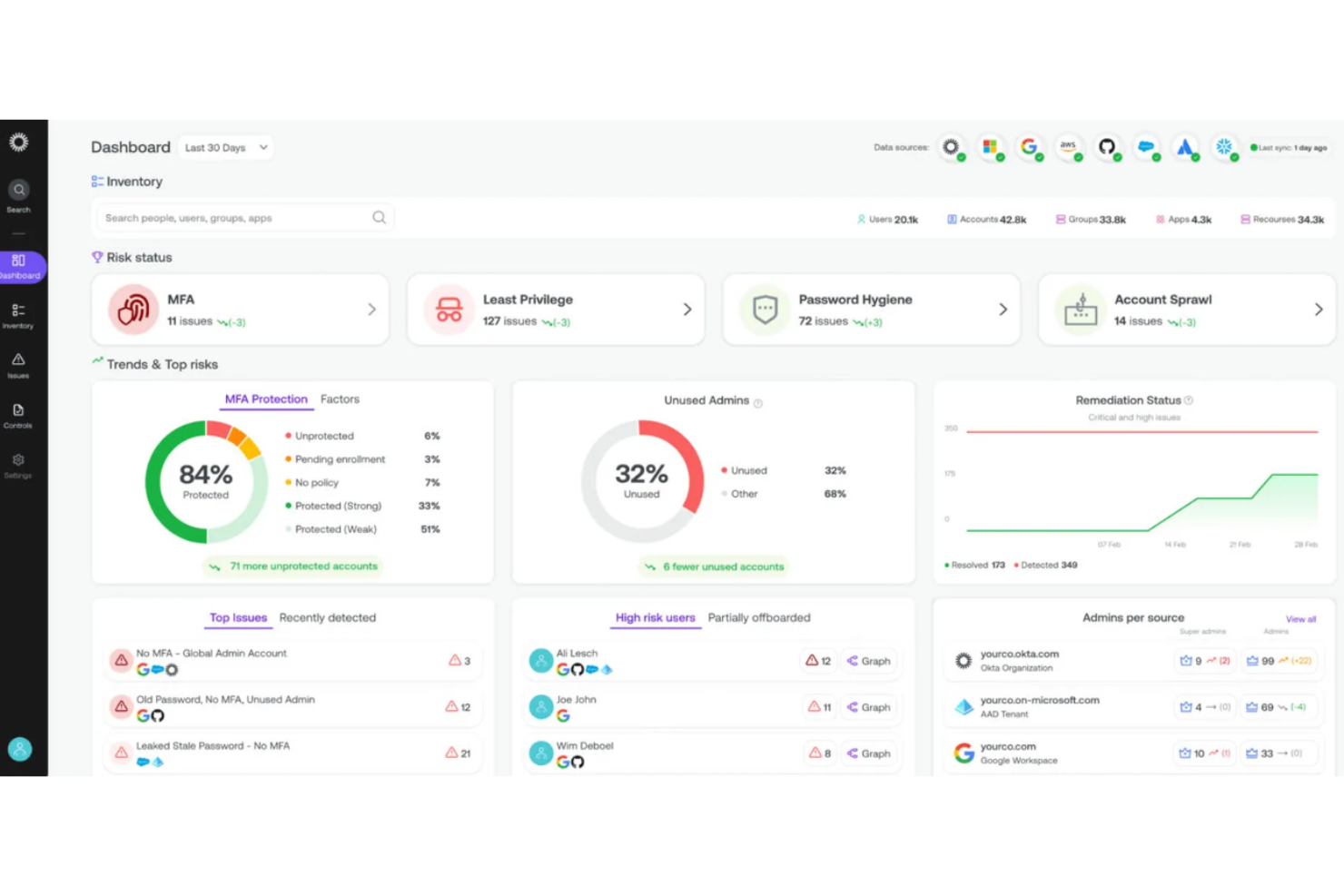
Okta Workforce Identity is designed for organizations that need to manage secure access across a wide range of cloud applications. It’s a strong fit for IT teams in startups and businesses with complex app environments or strict compliance needs. Okta stands out for its deep focus on identity and access management, helping you centralize authentication and reduce security risks.
Who Is Okta Workforce Identity Best For?
Okta Workforce Identity is a good fit for IT administrators in mid-sized to large organizations that need to manage secure access to multiple cloud applications across distributed teams.
Why Okta Workforce Identity Is a Good Rippling IT Alternative
I included Okta Workforce Identity because it delivers secure single sign-on (SSO) across a wide range of cloud applications, which is essential for organizations managing multiple SaaS tools. Okta’s centralized authentication lets IT teams enforce consistent access policies and monitor user activity from one dashboard. I appreciate its adaptive multi-factor authentication, which adds another layer of security for sensitive environments. These capabilities make Okta a strong choice for businesses that prioritize secure, scalable access management and transparent pricing.
Okta Workforce Identity Key Features
Some other features I found useful for IT teams include:
- Lifecycle Management: Automates user provisioning and deprovisioning across connected applications.
- Universal Directory: Centralizes user profiles and attributes from multiple sources for easier management.
- API Access Management: Controls and secures access to APIs with policy-based authorization.
- Employee Self-Service Password Reset: Allows users to reset their own passwords, reducing IT support requests.
Okta Workforce Identity Integrations
Integrations include Microsoft 365, Google Workspace, Salesforce, Slack, Zoom, ServiceNow, AWS, Box, Workday, and more.
Pros and Cons
Pros:
- Centralized employee directory for unified management
- Strong adaptive multi-factor authentication options
- Extensive pre-built integrations
Cons:
- Complex setup for advanced policies
- No built-in HR or payroll processing features
Other Rippling IT Alternatives
Here are some additional Rippling IT alternatives that didn’t make it onto my shortlist, but are still worth checking out:
- Ivanti
For AI-powered service management workflows
- BetterCloud
For SaaS application administration
- Electric
For on-demand expert support via Slack
- NinjaOne
For remote monitoring of distributed endpoints
- TeamDynamix
For IT project portfolio management
- Addigy
For real-time remote project troubleshooting
- N-sight
For multi-tenant remote monitoring
- Atera
For pay-per-technician pricing
- Workwize
For hardware and software procurement
- Vanta
For continuous security and compliance monitoring


Rippling IT Alternatives Selection Criteria
When selecting the best Rippling IT alternatives to include in this list, I considered common buyer needs and pain points related to IT management software products, like reducing manual IT workload and ensuring secure device management. I also used the following framework to keep my evaluation structured and fair:
Core Functionality (25% of total score)
To be considered for inclusion in this list, each solution had to fulfill these common use cases:
- Manage user accounts and permissions
- Provision and deprovision devices
- Monitor device health and compliance
- Enforce security policies
- Track IT assets
Additional Standout Features (25% of total score)
To help further narrow down the competition, I also looked for unique features, such as:
- Slack or Teams-based IT support
- Automated onboarding and offboarding workflows
- Real-time security monitoring
- Built-in compliance management tools
- Hardware procurement and lifecycle tracking
Usability (10% of total score)
To get a sense of the user experience of each system, I considered the following:
- Simple and intuitive interface
- Clear navigation and dashboard layout
- Minimal training required for IT staff
- Responsive design for mobile apps and desktop
- Customizable workflows and settings
Onboarding (10% of total score)
To evaluate the onboarding experience for each platform, I considered the following:
- Availability of training videos and documentation
- Step-by-step product tours or walkthroughs
- Pre-built templates for common IT tasks
- Access to onboarding specialists or chatbots
- Webinars or live training sessions
Customer Support (10% of total score)
To assess each software provider’s customer support services, I considered the following:
- Availability of live chat or phone support
- Response time for support requests
- Access to a knowledge base or help center
- Community forums or user groups
- Proactive support for onboarding and troubleshooting
Value For Money (10% of total score)
To evaluate the value for money of each platform, I considered the following:
- Transparent and predictable pricing structure
- Features included at each pricing tier
- Flexibility to scale up or down
- No hidden fees or surprise charges
- Free trial or demo availability
Customer Reviews (10% of total score)
To get a sense of overall customer satisfaction, I considered the following when reading customer reviews:
- Consistency of positive feedback across platforms
- Reported reliability and uptime
- Quality of customer support experiences
- Ease of use and implementation
- Real-world outcomes and ROI shared by users
Why Look For A Rippling IT Alternative?
While Rippling is a good choice of IT management software alongside its HR features, there are a number of reasons why some users seek out Rippling alternative solutions. You might be looking for a Rippling IT alternative because…
- You need more advanced device management features
- Your organization requires IT-only solutions without HR modules
- You want more flexible or modular pricing options
- Your team operates outside Rippling’s supported regions
- You require different EOR services
- You need deeper integrations with security or monitoring tools
If any of these sound like you, you’ve come to the right place. My list contains several IT management software options that are better suited for teams facing these challenges with Rippling and looking for alternative solutions.
Rippling IT Key Features
Rippling offers a comprehensive HR, IT, and payroll solution to help you manage your global workforce without the hassle of disconnected systems. Here are the key features of its IT and HR tools to help you contrast and compare Rippling competitors:
- Device management: Centrally manage, configure, and monitor company laptops, desktops, and mobile devices from a single platform.
- Full-service payroll management: Handles automated payroll processing, including tax filings at local, state, and federal levels within its payroll software.
- Global workforce management: Easily pay and manage international employees and international teams through native payroll services or a PEO model.
- App provisioning: Assign and revoke access to cloud applications for users based on their roles and department.
- Benefits administration: Offers a unified management system for health insurance, 401(k), and other perks, where deductions automatically sync with payroll functionality.
- Time and attendance: Track time-off and hours worked with a built-in workforce management platform that flags overtime and compliance risks.
- Talent management and ATS: Manage the full talent management lifecycle, from recruiting and hiring to performance management and 360-degree reviews.
- Employee engagement and HCM: Use the HCM (Human Capital Management) suite in Rippling’s HR solution to run pulse surveys and training to boost employee management and retention.
- Expense management: Automate expense management by issuing corporate cards and approving reimbursements that flow directly into your accounting.
- Single sign-on (SSO): Enable users to securely access multiple business applications with one set of login credentials.
- Policy enforcement: Set and enforce security policies, such as password requirements and device encryption, across your organization.
- Remote device lock and wipe: Remotely lock or erase lost or stolen devices to protect sensitive company data.
- Directory integration: Sync user data and permissions with popular directory services like Google Workspace and Microsoft 365.
- Compliance management: Track and manage compliance with industry standards and regulations through automated reporting and controls.
- IT ticketing: Allow employees to submit IT requests and track their resolution through an integrated help desk system.
- Audit logs: Maintain detailed records of user activity, device changes, and access events for security and compliance purposes.