

I 10 migliori software per MSP del 2026

Elenco dei migliori software MSP


I migliori software MSP ti aiutano a monitorare i sistemi negli ambienti dei clienti, automatizzare la manutenzione ordinaria come l'applicazione di patch e i backup e rispondere più rapidamente ai problemi senza dover gestire strumenti scollegati.
Se il tuo team è sommerso dai ticket, perde gli avvisi critici o gestisce manualmente gli aggiornamenti per più clienti, è un segnale che hai superato i limiti della configurazione attuale. Problemi comuni come il monitoraggio inaffidabile, la reportistica incoerente e gli strumenti che non sono scalabili sono spesso ciò che spinge gli MSP a cercare una piattaforma migliore.
Ho lavorato con MSP che supportano PMI e organizzazioni più grandi, testando queste piattaforme in implementazioni reali per capire cosa migliori effettivamente la visibilità e i tempi di risposta.
Questa guida analizza gli strumenti per MSP che offrono un'automazione affidabile, interfacce intuitive e flussi di lavoro che supportano concretamente il modo in cui lavora il tuo team.
Perché fidarsi dei nostri consigli sui software
Il nostro team testa e recensisce software dal 2012. In quanto leader tecnologici noi stessi, sappiamo quanto sia difficile — e importante — scegliere il software giusto.
Per questa guida, abbiamo valutato gli strumenti attraverso test praticie ricerche indipendenti, assegnando un punteggio agli strumenti in base ai nostri criteri di selezione.
Le nostre recensioni riflettono il nostro giudizio editoriale umano, non un discorso di vendita.
Riepilogo dei 10 migliori software MSP
Questa tabella comparativa riassume i dettagli sui prezzi delle mie migliori selezioni di software MSP per aiutarti a trovare quello più adatto al tuo budget e alle esigenze della tua azienda.
| Tool | Best For | Trial Info | Price | ||
|---|---|---|---|---|---|
| 1 | Ideale per la gestione degli endpoint | Prova gratuita di 14 giorni disponibile | Prezzo su richiesta | Website | |
| 2 | Ideale per la gestione MSP tutto-in-uno | Prova gratuita di 30 giorni + demo gratuita disponibile | Da $129/tecnico/mese (fatturato annualmente) | Website | |
| 3 | Ideale per la gestione della rete | Prova gratuita di 14 giorni + demo gratuita disponibile | Prezzi su richiesta | Website | |
| 4 | Ideale per integrare gestione RMM, PSA e M365 | Prova gratuita disponibile | Da $129/utente/mese (fatturazione annuale) | Website | |
| 5 | Ideale per la gestione di DMARC | Prova gratuita di 15 giorni + demo gratuita | Da $8/utente/mese (fatturato annualmente) | Website | |
| 6 | Ideale per il monitoraggio in tempo reale | Demo gratuita disponibile | Da $44/mese | Website | |
| 7 | Ideale per ambienti IT ibridi | Prova gratuita di 15 giorni | Da $16/unità ibrida/mese | Website | |
| 8 | Ideale per il supporto nativo alla multi-tenancy | Prova gratuita disponibile | Da $7.50/utente/mese | Website | |
| 9 | Ideale per servizi MSP tutto-in-uno | Prova gratuita di 14 giorni + demo gratuita disponibile | Da $79/tecnico/mese | Website | |
| 10 | Ideale per aziende in crescita | Prova gratuita di 14 giorni | Prezzo su richiesta | Website |


Recensioni dei migliori software MSP
Ecco una recensione delle migliori soluzioni software MSP sul mercato, incluse funzionalità, integrazioni e prezzi.

NinjaOne
Ideale per la gestione degli endpoint

NinjaOne è un software di monitoraggio e gestione remota che traccia i dispositivi in tempo reale per gestire gli endpoint dei clienti su larga scala.
Perché ho scelto NinjaOne: Ho inserito NinjaOne in questo elenco per la sua gestione unificata dei dispositivi — puoi monitorare e controllare tutte le macchine virtuali, i server e i dispositivi dei tuoi clienti. È presente anche la gestione delle patch per endpoint Windows, Mac e Linux. Puoi inoltre rilevare e risolvere automaticamente problemi degli endpoint come riavvii mancati e porte aperte.
Funzionalità e integrazioni di spicco di NinjaOne:
Funzionalità che desidero evidenziare sono la capacità di NinjaOne di inviare automaticamente avvisi ai tecnici quando si verifica un problema. Tutte le attività sugli endpoint, come la configurazione dei dispositivi, la manutenzione, l'installazione delle app e persino l'applicazione delle patch, possono essere automatizzate.
Integrazioni sono disponibili nativamente per SentinelOne, TeamViewer, Slack, Splashtop e Okta.
Pros and Cons
Pros:
- App mobile per la gestione degli endpoint
- Portale self-service
- Documentazione IT nativa
Cons:
- Integrazioni di terze parti limitate rispetto ad altre soluzioni di gestione degli endpoint
- Può risultare complesso da usare e navigare
New Product Updates from NinjaOne
NinjaOne Launches Browser Management
NinjaOne launches Browser Management with visibility into browser activity, extensions, AI usage, and policy controls. This extends endpoint management into the browser while giving IT teams more control over browser-based risk. For more information, visit NinjaOne’s official site.

Atera
Ideale per la gestione MSP tutto-in-uno
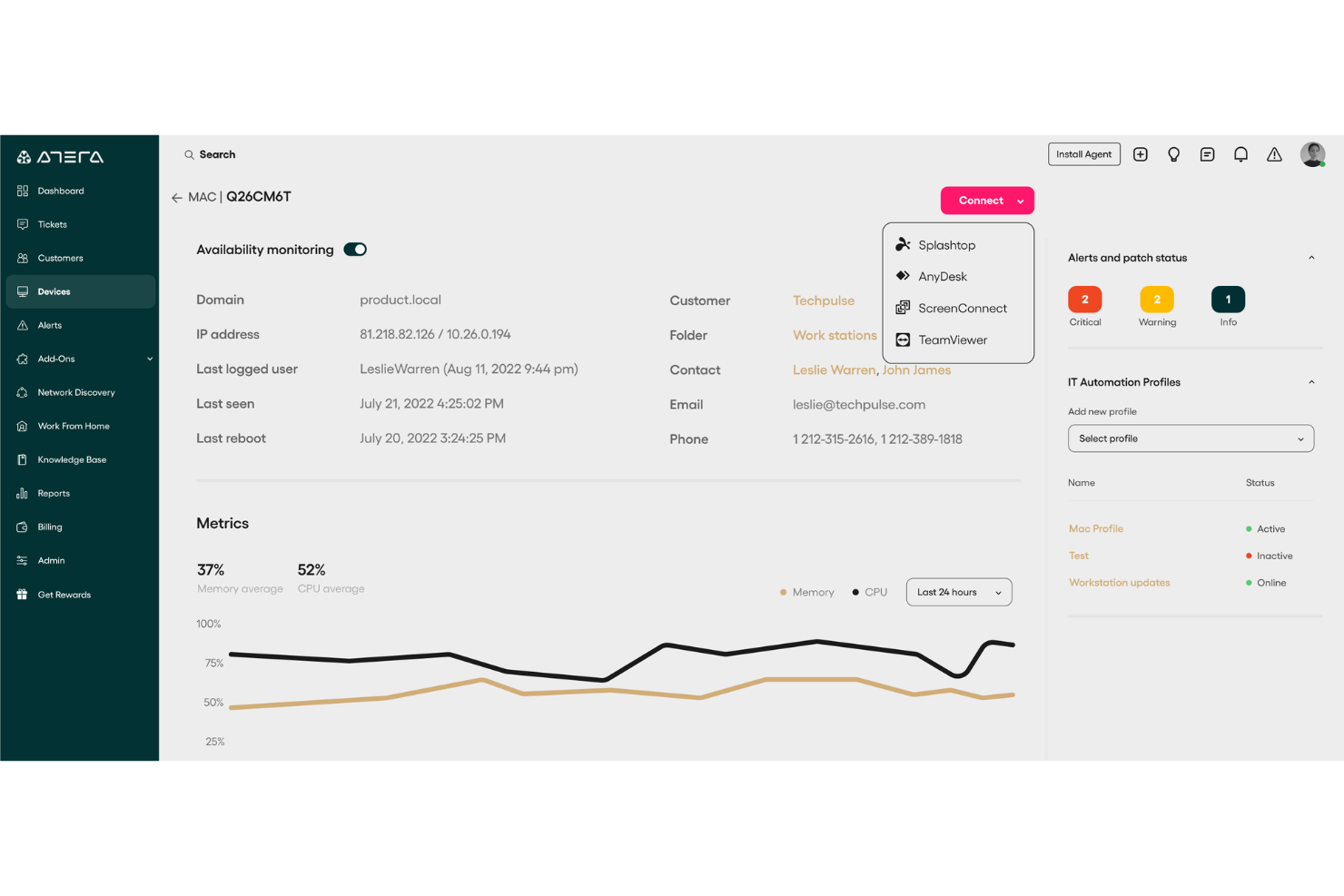
Atera è una piattaforma di gestione IT all-in-one progettata per i fornitori di servizi gestiti (MSP) e per i team IT interni che necessitano di una piena visibilità su dispositivi, utenti e clienti. La piattaforma combina Monitoraggio e Gestione Remota (RMM) e Automazione dei Servizi Professionali (PSA) in un unico sistema, offrendo anche funzionalità di automazione, ticketing e gestione delle risorse.
Perché ho scelto Atera: Ho scelto Atera perché integra la gestione degli endpoint, il monitoraggio dei clienti e le funzioni di help desk in un'unica soluzione. Puoi monitorare server, workstation e dispositivi di rete dei clienti da una dashboard centralizzata. Quando si verifica un problema, le notifiche in tempo reale ti consentono di intervenire prima che le criticità impattino sui tuoi clienti. Il modello di prezzo per tecnico della piattaforma può inoltre fornire ai piccoli MSP costi prevedibili mentre acquisiscono nuovi clienti. Offrendo visibilità sui dispositivi, monitoraggio proattivo e strumenti di automazione in un'unica interfaccia, Atera aiuta gli MSP a mantenere sotto controllo sia le operazioni quotidiane che la soddisfazione dei clienti.
Funzionalità e integrazioni principali:
Funzionalità includono assegnazione automatica dei ticket tramite intelligenza artificiale, rilevamento della rete, creazione ricorrente di ticket, portali di self-service per i clienti, gestione personalizzata di contratti e SLA, e reportistica avanzata.
Integrazioni includono Microsoft Teams, Slack, ServiceNow, Okta, Azure Active Directory, Microsoft Outlook, notifiche WhatsApp, monday.com, Jira Software Cloud, Acronis Cyber Protect Cloud, Google Sheets e ChatGPT (OpenAI).
Pros and Cons
Pros:
- Rilevamento automatico dei dispositivi
- Scansione in tempo reale delle vulnerabilità CVE
- Inventario centralizzato per le risorse di rete
Cons:
- Le opzioni di personalizzazione possono risultare limitate
- Alcune funzionalità richiedono componenti aggiuntivi separati
New Product Updates from Atera

Atera Adds Webhook Triggers for Technician Assignment Changes
Atera ticket automation rules now support a webhook trigger when a ticket’s technician assignment changes, expanding automation beyond creation, status updates, and closure/resolution events. For more information, visit Atera's official site.

Auvik
Ideale per la gestione della rete
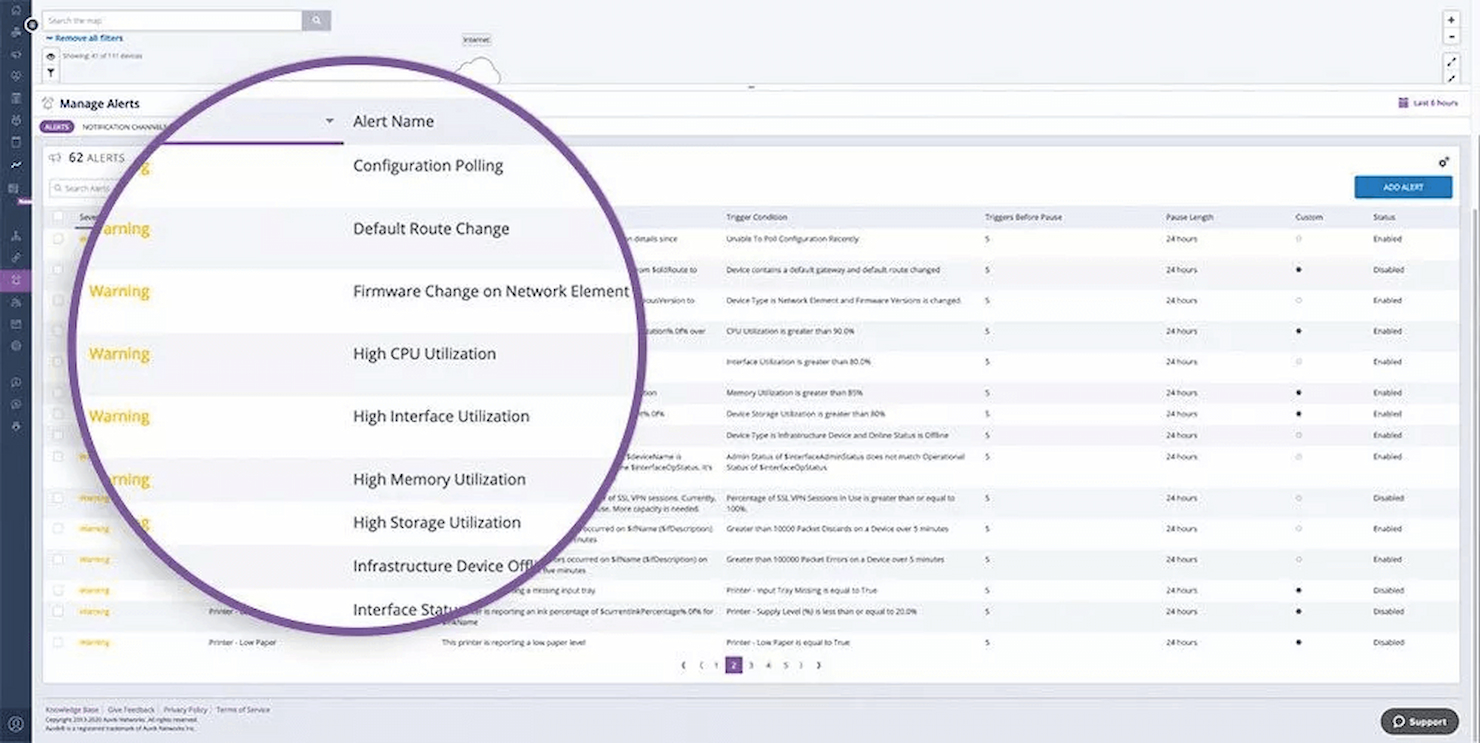
Auvik è un MSP basato su cloud che offre potenti funzionalità di scalabilità e sicurezza. Può essere configurato in meno di un'ora e aiuta nel monitoraggio della rete da parte degli MSP.
Perché ho scelto Auvik: Ho scelto Auvik perché offre 50 avvisi preconfigurati. In caso di problemi di rete, riceverai notifiche in tempo reale. Auvik archivia i dati di rete così puoi utilizzarli per pianificazione o analisi future.
Funzionalità e integrazioni distintive di Auvik:
Funzionalità che considero notevoli includono il monitoraggio VPN che aiuta a capire se si sta raggiungendo la soglia delle sessioni VPN, evitando così tempi di inattività. Consolida i syslog dei dispositivi di rete così ottieni più informazioni sui problemi di rete. Può anche verificare eventuali latenze e pacchetti persi dal tuo provider Internet.
Integrazioni sono disponibili nativamente, inclusi ArcusTeam, Autotask PSA, BrightGauge, ChatGenie, ConnectWise, Freshdesk, Teams, Opsgenie e Slack. Sono disponibili anche le API.
Pros and Cons
Pros:
- Backup e ripristino automatici
- 2FA, permessi e ruoli, e log di audit
- Gestione degli asset IT
Cons:
- Potrebbe non essere efficace per le reti più piccole
- Curva di apprendimento ripida per gli utenti meno esperti di tecnologia
New Product Updates from Auvik
Auvik Aurora Adds AI Alert Creation and Troubleshooting
Auvik Aurora adds AI-assisted alert creation and troubleshooting with natural-language prompts and guided investigation. This helps teams create alerts and diagnose issues faster. For more information, visit Auvik’s official site.
 .
.
Syncro
Ideale per integrare gestione RMM, PSA e M365
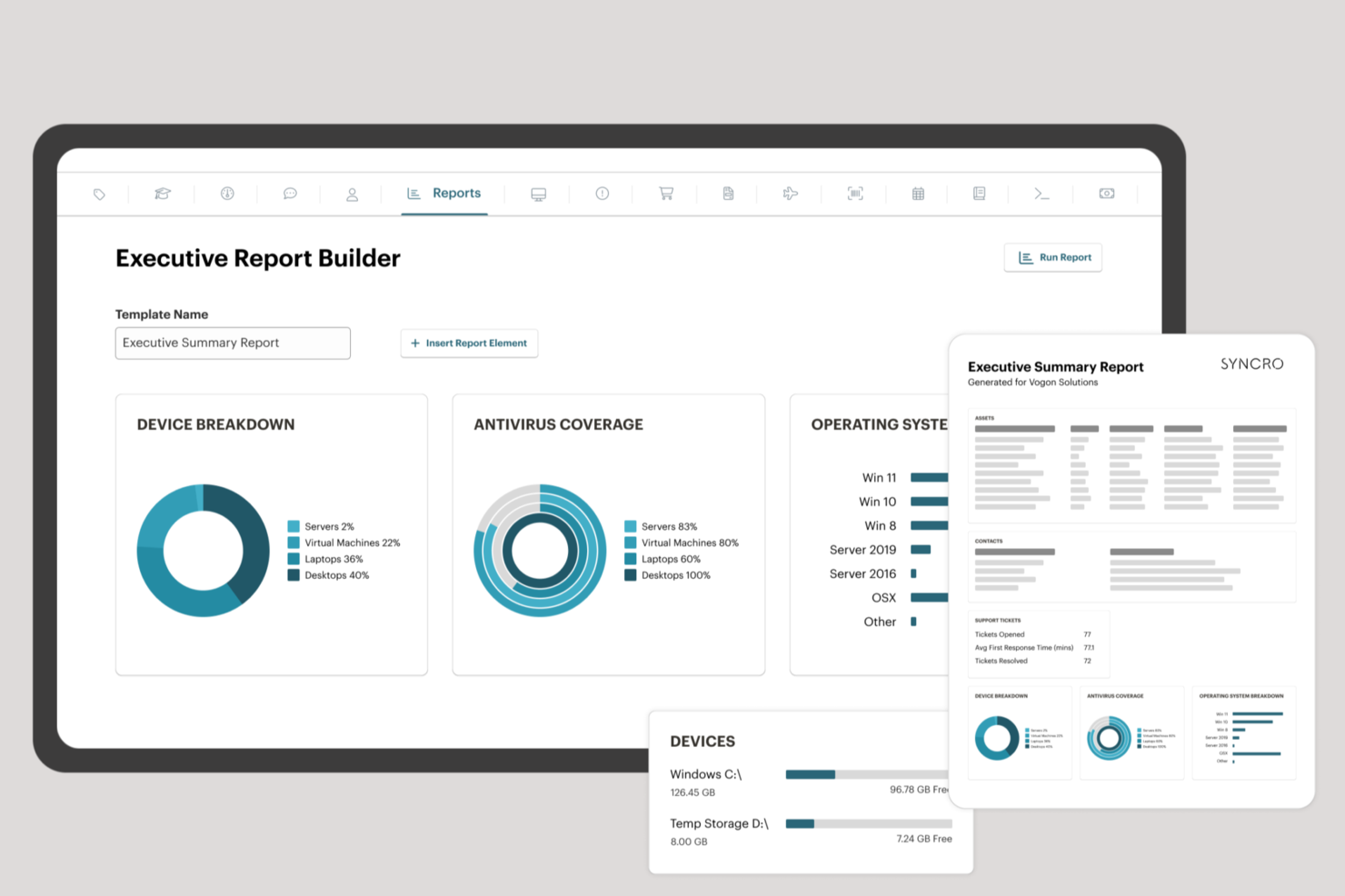
Syncro offre la prima piattaforma di Extended Monitoring and Management (XMM) progettata appositamente per MSP di medie dimensioni e team IT interni. La piattaforma unificata integra RMM (gestione degli endpoint), automazione dei servizi professionali (PSA) e gestione multi-tenant di Microsoft 365 per aiutare le organizzazioni a semplificare le operazioni, rafforzare la sicurezza e crescere in modo redditizio.
Perché ho scelto Syncro: Syncro offre una potente automazione, funzionalità AI native, una profonda integrazione con Microsoft 365 e il supporto per oltre 50 strumenti di terze parti—consentendo ai team di ridurre la complessità, abbattere i costi e scoprire nuove opportunità di guadagno. Il suo modello di prezzo trasparente per utente e l'impegno per l'innovazione continua lo rendono una soluzione ideale per le operazioni IT moderne.
Caratteristiche distintive e integrazioni di Syncro:
Le funzionalità includono scripting avanzato, ticketing e automazione per varie attività, inclusa la gestione delle patch. Offre inoltre accesso remoto, un'app mobile, politiche personalizzabili e reportistica per la conformità, tutto progettato per semplificare, mettere in sicurezza e far crescere la tua attività.
Le integrazioni includono Worldpay, Stripe, PayPal, Acronis Cyber Protect, Bitdefender GravityZone, ConnectWise Importer, Dropbox, IT Glue, Google Calendar, Microsoft Outlook Calendar, Microsoft Teams e Zapier.
Pros and Cons
Pros:
- Sistema di fatturazione ed emissione fatture efficiente
- Ottime funzionalità di automazione
- Set di funzionalità completo che integra gestione RMM, PSA e M365
Cons:
- L'app mobile manca di alcune funzionalità presenti nella versione desktop
- Le opzioni di personalizzazione dei report potrebbero essere maggiori
Ideale per la gestione di DMARC

PowerDMARC è una piattaforma SaaS di autenticazione email per MSP e MSSP progettata per automatizzare e semplificare la gestione della sicurezza dei nomi di dominio per più clienti utilizzando un'unica piattaforma.
Perché ho scelto PowerDMARC: PowerDMARC offre un pannello di controllo self-service multi-tenant con supporto per più lingue, rendendolo ideale per MSP che gestiscono molti clienti. Questa funzionalità permette di gestire e monitorare in modo efficiente più domini, fornendo una vista centralizzata sullo stato di autenticazione email dei clienti. Inoltre, la piattaforma di PowerDMARC è pronta per MSP/MSSP, offrendo supporto white-label per URL, DMARC RUA, RUF, SPF ospitato, DKIM ospitato, DMARC MTA-STS, TLS-RPT e BIMI.
Caratteristiche e integrazioni principali di PowerDMARC:
Caratteristiche includono avvisi automatici che possono essere configurati per essere inviati tramite email, Slack, Discord o webhook personalizzati. Offre inoltre reportistica DMARC, che fornisce informazioni dettagliate sull'autenticazione delle email, aiutando le organizzazioni a identificare e mitigare tentativi di spoofing.
Integrazioni includono Gradient MSP, SecLytics e Connectwise, insieme al supporto per la sincronizzazione PSA disponibile per oltre 15 directory.
Pros and Cons
Pros:
- Supporto multi-tenant e multilingua
- Analisi predittiva dell'intelligence sulle minacce
- Crittografia dei report RUF
Cons:
- Soluzioni più avanzate possono avere una curva di apprendimento ripida
- Può richiedere il supporto clienti per configurazioni complesse e risoluzione dei problemi

Pulseway
Ideale per il monitoraggio in tempo reale
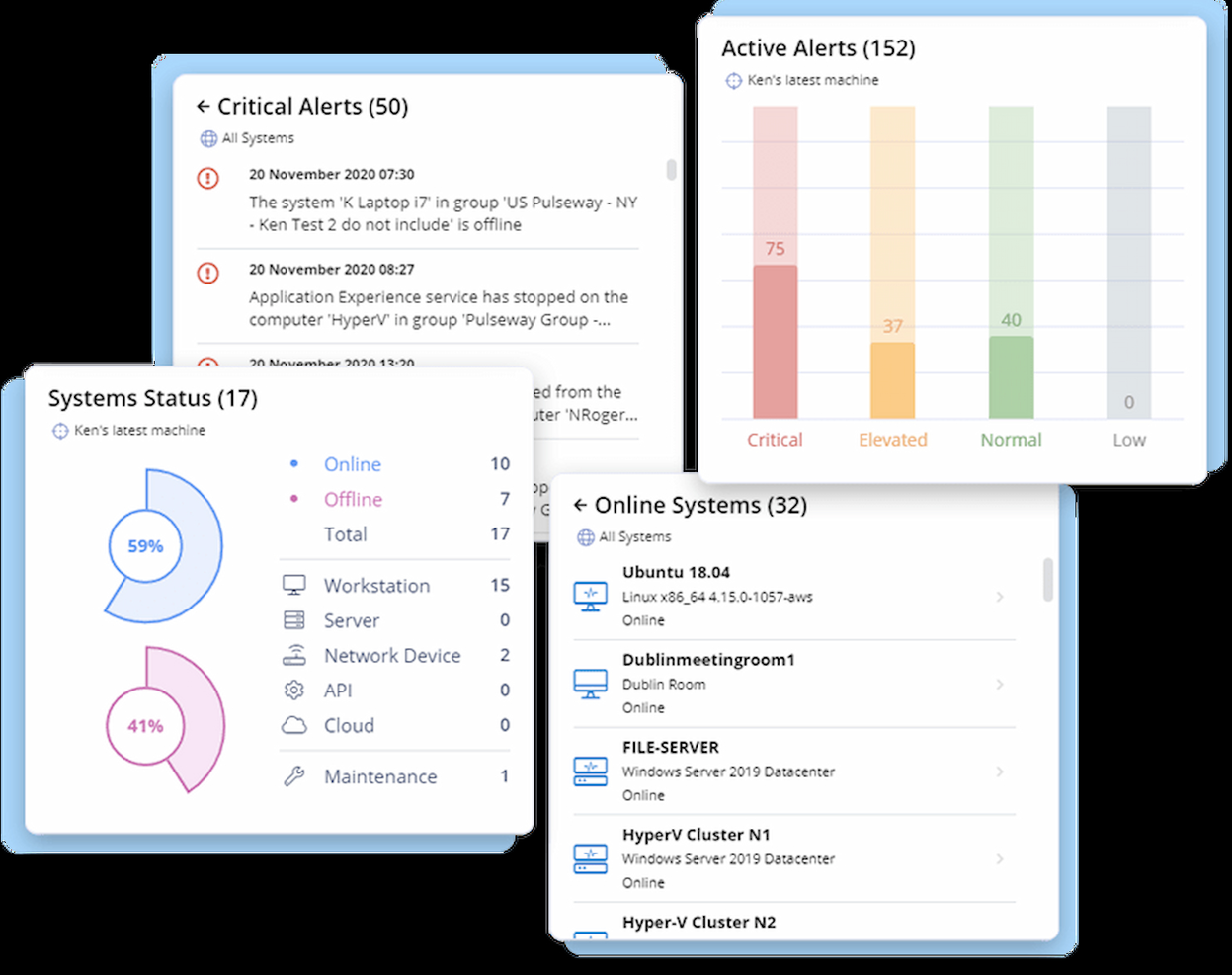
Con Pulseway, puoi monitorare tutti i tuoi sistemi e applicazioni in tempo reale, consentendo una maggiore visibilità e controllo sulla tua infrastruttura IT.
Perché ho scelto Pulseway: Mi piace che il monitoraggio in tempo reale di Pulseway permetta di tracciare costantemente le prestazioni e lo stato dei dispositivi, inclusi l'utilizzo della CPU, della memoria, dello spazio su disco, dell'uso della rete e altro ancora. Le capacità di monitoraggio di Pulseway si estendono anche ad applicazioni web, servizi cloud e dispositivi di rete.
Funzionalità e integrazioni distintive di Pulseway:
Le funzionalità che spiccano per me sono la possibilità di ricevere notifiche in tempo reale su problemi IT tramite SMS, email o notifiche push sui tuoi dispositivi mobili. Puoi inoltre ottenere report dettagliati sulle prestazioni, sull'uso e sullo stato di salute dei sistemi. Puoi automatizzare operazioni a più passaggi e flussi di lavoro utilizzando la funzione avanzata di automazione di Pulseway.
Le integrazioni sono disponibili in modo nativo per Autotask, Zendesk, PowerShell, PagerDuty, Slack, IT Glue e ConnectWise. Sono disponibili le API.
Pros and Cons
Pros:
- Design mobile-first
- Supporto multipiattaforma
- Accesso e controllo remoto
Cons:
- Integrazioni limitate con applicazioni di terze parti
- Nessuna opzione integrata per backup e ripristino
Ideale per ambienti IT ibridi
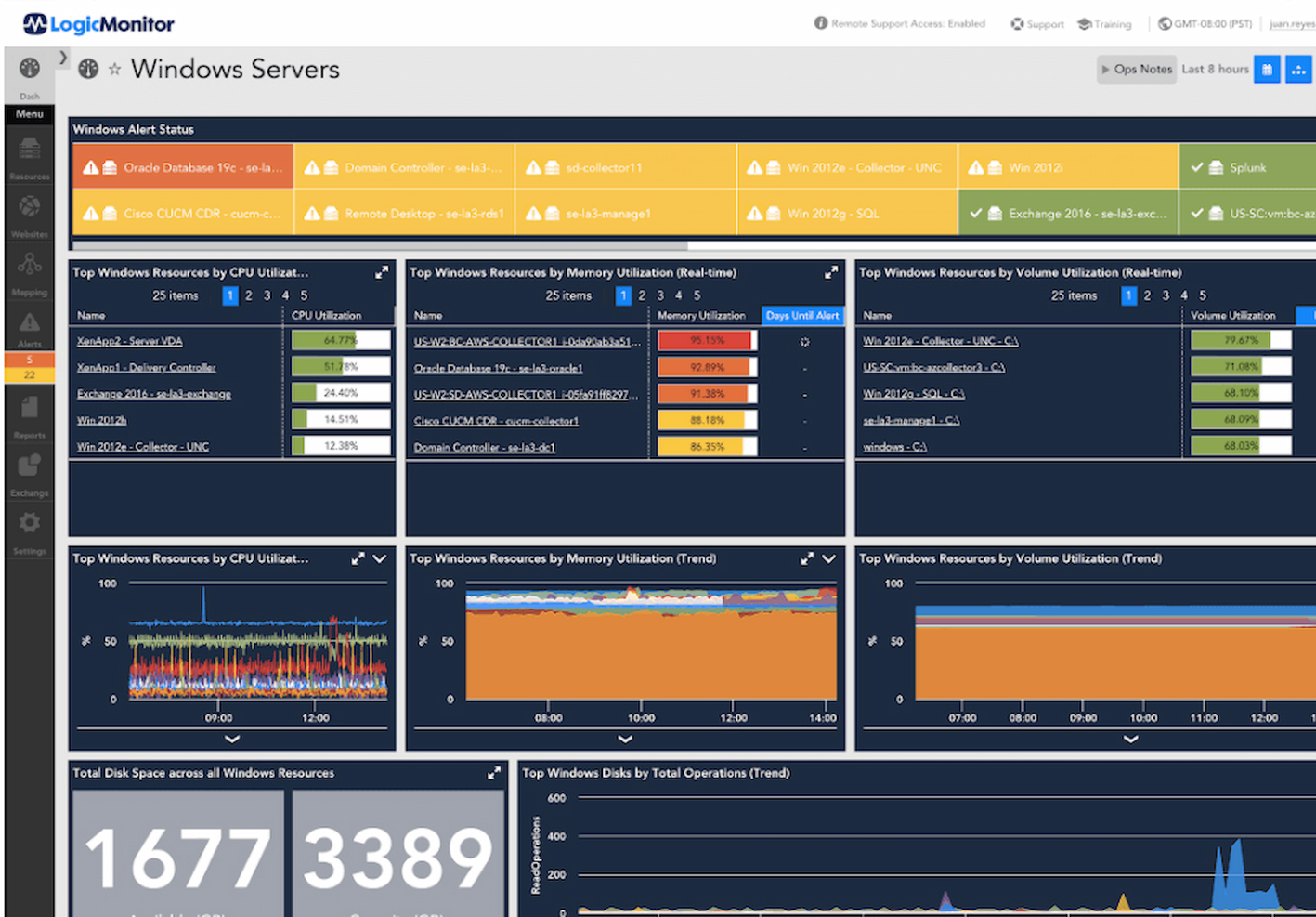
LogicMonitor offre funzionalità di monitoraggio complete per le infrastrutture IT, con automazione e approfondimenti predittivi basati sull'IA che aiutano i fornitori di servizi gestiti (MSP) a identificare i problemi prima che abbiano un impatto sui clienti.
Perché ho scelto LogicMonitor: Apprezzo il fatto che LogicMonitor supporti sia l'infrastruttura cloud pubblica e privata che gli ambienti on-premises e ibridi. Offre supporto multi-tenant, permettendo ai MSP di gestire e monitorare più clienti da un'unica dashboard. È possibile creare dashboard personalizzate con modelli predefiniti per ogni cliente, per un'esperienza più visiva e personalizzata.
Funzionalità e integrazioni di spicco di LogicMonitor:
Funzionalità che ho apprezzato durante la mia valutazione sono la possibilità di monitorare in modo completo le infrastrutture IT, inclusi server, container, database, siti web sintetici, macchine virtuali, reti, storage e applicazioni. La piattaforma invia avvisi e notifiche ai MSP quando si verificano problemi, garantendo che possano intervenire rapidamente su eventuali criticità.
Integrazioni disponibili includono oltre 2.000 opzioni native come PagerDuty, Redis, BigPanda, ServiceNow, ConnectWise, Citrix e Juniper Mist.
Pros and Cons
Pros:
- Supporto completo e risorse di formazione
- Log e metriche per monitorare le prestazioni
- Può monitorare strumenti di produttività come Zoom e Slack
Cons:
- Può essere complesso da configurare e impostare per ambienti specifici
- Alcuni utenti segnalano problemi con i tempi di risposta dell'assistenza clienti

Ideale per il supporto nativo alla multi-tenancy

Inuvika OVD Enterprise è una piattaforma per la distribuzione virtuale di applicazioni e desktop progettata per aiutare i provider di servizi gestiti (MSP) a offrire servizi sicuri, scalabili ed economicamente vantaggiosi.
Perché ho scelto Inuvika OVD Enterprise: Ho scelto Inuvika OVD Enterprise perché è costruito per gli MSP, con una multi-tenancy nativa che consente di gestire più clienti in un unico ambiente. Puoi anche personalizzare la piattaforma con il tuo marchio o quello dei tuoi clienti, facilitando l'applicazione del branding. La containerizzazione delle risorse permette di ospitare più utenti per server, rendendo il servizio più conveniente. Essendo basato su Linux, consente di risparmiare sulle licenze senza sacrificare le funzionalità. Il modello pay-per-use, basato su utenti concorrenti, aggiunge flessibilità e rende più semplice la scalabilità.
Caratteristiche e integrazioni di Inuvika OVD Enterprise:
Le funzionalità includono una console di gestione unificata che offre il controllo centralizzato dell'intero ambiente, semplificando le attività amministrative. La compatibilità della piattaforma con diversi hypervisor e servizi directory, come MSAD e LDAP, garantisce inoltre un'integrazione senza problemi con le infrastrutture esistenti.
Le integrazioni includono Cisco Duo, WatchGuard Endpoint Protection Platform (EPP), Zadara, AuthPoint, XenServer, Nutanix AHV, VMware ESXi, Verge-OS e Microsoft Active Directory.
Pros and Cons
Pros:
- Implementazione rapida e aggiornamenti semplici
- Modello di sicurezza Zero Trust con 2FA integrata
- Accesso unificato alle applicazioni Windows e Linux
Cons:
- Requisito minimo di utenti per l'on-premise
- Integrazioni limitate con terze parti

SuperOps
Ideale per servizi MSP tutto-in-uno

SuperOps è una piattaforma PSA (Professional Services Automation) progettata per gli MSP che consente di gestire facilmente clienti, progetti e risorse in un unico posto.
Perché ho scelto SuperOps: Apprezzo la completezza di SuperOps. Monitoraggio e gestione remota, catalogo dei servizi, gestione delle risorse, dashboard personalizzabili e soluzioni di sicurezza integrate — SuperOps offre tutto. Dispone anche di una moderna service desk per gestire problemi e ticket.
Caratteristiche distintive e integrazioni di SuperOps:
Le funzionalità che voglio evidenziare comprendono il suo CRM che aiuta a semplificare la gestione dei clienti, la gestione dei contratti per semplificare la fatturazione, la gestione automatica delle patch e gli avvisi basati su regole. Puoi inoltre utilizzare le funzionalità di documentazione IT per organizzare le conoscenze.
Le integrazioni sono disponibili nativamente per TeamViewer, QuickBooks, Stripe, Hudu, SentinelOne e Acronis.
Pros and Cons
Pros:
- Gestione progetti e collaborazione
- Runbook per un onboarding tecnico più rapido
- Disponibile tracciamento del tempo
Cons:
- Integrazioni limitate
- Funzionalità limitate dell'app mobile

N-able
Ideale per aziende in crescita
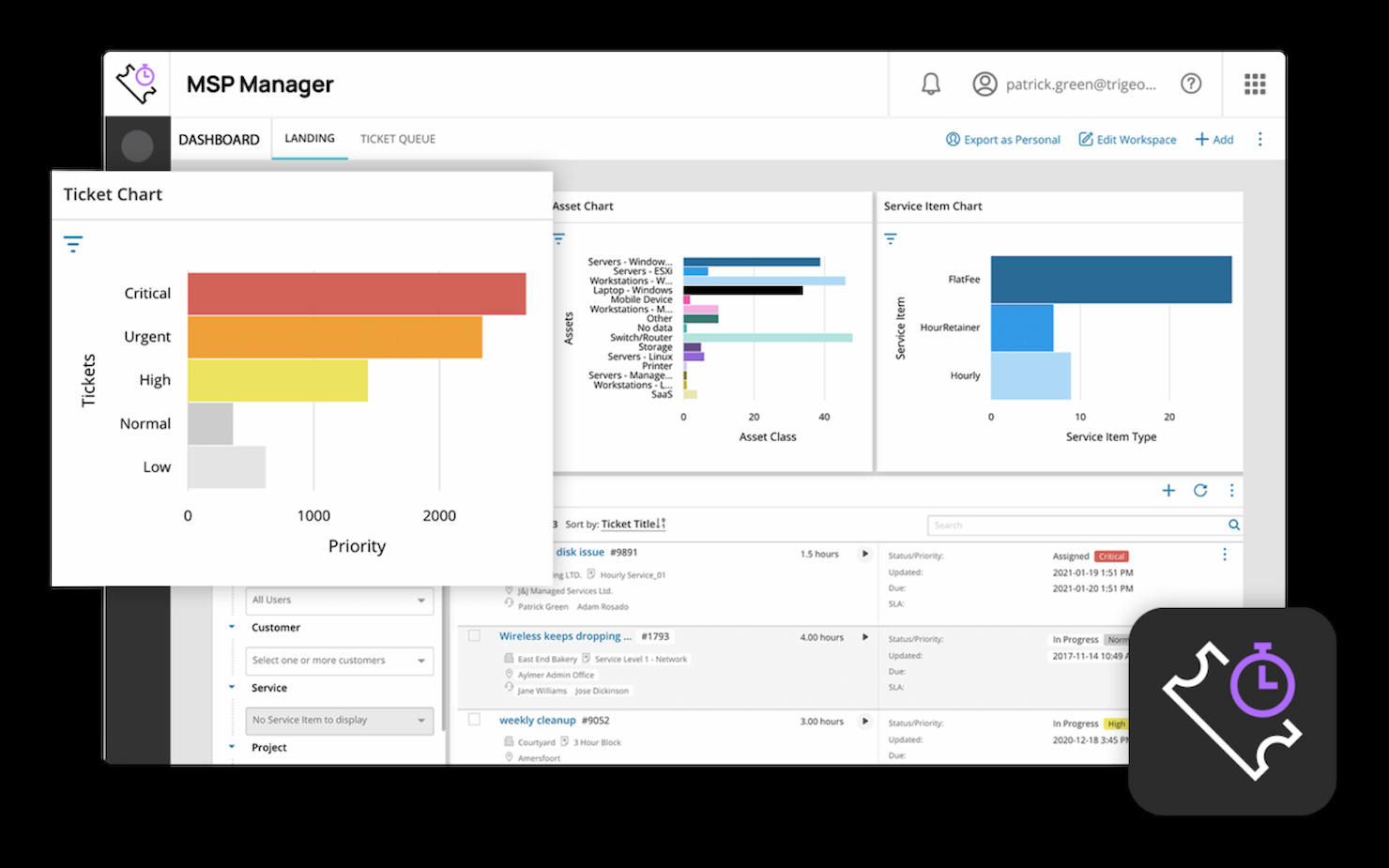
N-able è un software basato su cloud che aiuta i fornitori di servizi gestiti (MSP) a monitorare, gestire e proteggere l'infrastruttura IT dei propri clienti da una piattaforma centralizzata.
Perché ho scelto N-able: Man mano che le aziende crescono, necessitano di risorse IT per gestire reti, sicurezza e backup — tutto ciò che N-able offre. Ho inserito N-able in questo elenco perché fornisce una suite completa di servizi IT. Puoi scoprire e mappare automaticamente le reti dei clienti, effettuare la gestione delle patch e ridurre il rischio di perdita dei dati grazie agli strumenti di backup e ripristino.
Funzionalità e integrazioni principali di N-able:
Le funzionalità che ho trovato preziose sono una gestione efficiente dei ticket, dove puoi progettare flussi di lavoro e regole di assegnazione, creare code di agenti affinché il tecnico giusto gestisca il ticket ed inviare email ai clienti direttamente dal ticket. Puoi anche monitorare e gestire a distanza l'infrastruttura IT dei clienti, riducendo la necessità di visite in loco.
Le integrazioni sono disponibili nativamente per Able Ninja, Acronis, Auvik, Barracuda, Cisco Meraki, Datto RMM e Kaspersky.
Pros and Cons
Pros:
- Identifica e combatti minacce avanzate agli endpoint con l'IA
- Proteggi le reti con il filtro DNS
- Report personalizzabili
Cons:
- Supporto limitato per ambienti non-Microsoft
- L'automazione dei flussi di lavoro può essere macchinosa
Altri software MSP da prendere in considerazione
Ecco alcune altre opzioni che non sono entrate nell’elenco principale. Tuttavia, se hai bisogno di ulteriori suggerimenti per software MSP utili, dai un’occhiata a queste soluzioni:
- ConnectWise
Ideale per automatizzare le attività IT
- Kaseya
Ideale per grandi aziende
- IBM
Ideale per la cybersicurezza
- Datto
Ideale per il backup e il disaster recovery
- Scalefusion
Ideale per la gestione di endpoint multi-OS
- ManageEngine ServiceDesk Plus
Ideale per la gestione dei servizi IT


Recensioni di software correlate
Se non hai ancora trovato quello che cerchi, dai un'occhiata a questi strumenti alternativi che abbiamo testato e valutato.
- Software di monitoraggio della rete
- Software di monitoraggio dei server
- Soluzioni SD-WAN
- Strumenti di monitoraggio dell'infrastruttura
- Analizzatore di pacchetti
- Strumenti di monitoraggio delle applicazioni
Come valuto il software per MSP
Valuto le piattaforme MSP su due livelli: le capacità di base—RMM, gestione multi-tenant, PSA e automazione delle patch—che ogni strumento deve avere, e i fattori distintivi che separano le opzioni migliori.
Funzionalità di base (Requisiti minimi per questa lista)
Quando seleziono gli strumenti per la mia lista, valuto ciascuno su una scala da 0 (non offre la funzionalità) a 5 (eccelle in questo ambito) per ogni funzionalità di base elencata di seguito. Poi, calcolo il punteggio totale dello strumento in percentuale. Ogni strumento deve raggiungere un punteggio minimo totale del 65% per essere considerato per l'inclusione.
- Monitoraggio e gestione remota: Controllo se una piattaforma può monitorare endpoint, server e reti su diversi sistemi operativi con avvisi in tempo reale e accesso remoto integrato.
- Gestione clienti multi-tenant: Ogni strumento dovrebbe permettere di segmentare gli ambienti dei clienti con policy, dashboard e autorizzazioni basate sui ruoli separati per ogni tenant.
- PSA & Ticketing: Valuto i flussi di lavoro dei ticket, i timer SLA e il tracciamento del tempo—ad esempio, se i tecnici possono registrare ore fatturabili direttamente da un ticket in strumenti come Autotask o ConnectWise.
- Automazione delle patch & scripting: Cerco un motore di patch basato su policy e il supporto per scripting personalizzato in modo che il team possa distribuire aggiornamenti su centinaia di endpoint secondo una pianificazione.
- Gestione della fatturazione & dei contratti: La piattaforma dovrebbe collegare l'erogazione dei servizi alla fatturazione, supportando contratti ricorrenti e fatturazione basata sull'utilizzo con integrazioni a strumenti di contabilità.
- Strumenti per sicurezza & conformità: Valuto livelli di sicurezza integrati o nativamente integrati—AV, EDR, backup—e se la piattaforma offre report di conformità per i framework rilevanti per i clienti.
Una volta ottenuta una lista di strumenti che rispettano questi criteri, considero ciò che differenzia ciascuna piattaforma dalle altre.
Fattori differenzianti (Cosa distingue i fornitori)
Ecco come confronto i diversi fornitori:
Caratteristiche distintive
La documentazione IT integrata è un grande differenziatore. Le piattaforme che archiviano password, configurazioni e SOP insieme ai ticket evitano ai tecnici di saltare tra strumenti come IT Glue e il proprio RMM. Guardo anche alla reportistica vCIO e QBR che genera roadmap e indicatori di salute pronti per i clienti. Questi aiutano i responsabili clienti a dimostrare il valore durante le revisioni periodiche. Anche i portali rivolti ai clienti sono importanti, soprattutto quelli brandizzabili dove gli utenti finali possono inviare ticket e monitorare le performance SLA senza dover chiamare.
Oltre le caratteristiche
La struttura dei prezzi è fondamentale. Valuto se una piattaforma addebita per endpoint o per tecnico, poiché ciò influisce direttamente sui margini man mano che la base clienti cresce. L'ecosistema di integrazione è altrettanto importante—il tuo stack MSP probabilmente include strumenti come ConnectWise, Xero o Microsoft 365, e verifico la presenza di connettori nativi e accesso API aperto. Guardo anche alla postura di sicurezza del fornitore, inclusa la certificazione SOC 2 Tipo II e le pratiche della catena di fornitura, poiché le piattaforme MSP sono obiettivi di alto valore per gli attaccanti.
Come scegliere il software MSP
È facile perdersi in lunghi elenchi di funzionalità e strutture tariffarie complesse. Per aiutarti a rimanere concentrato mentre porti avanti il tuo processo di selezione del software, unico per le tue esigenze, ecco una lista di fattori da tenere presenti:
| Fattore | Elementi da considerare |
|---|---|
| Scalabilità | Assicurati che il software sia in grado di gestire le esigenze crescenti dei clienti e l'aumento del volume di dati senza problemi di prestazioni. Cerca il supporto per più clienti per gestire efficacemente più ambienti. |
| Integrazioni | Il software dovrebbe integrarsi con altri strumenti come sistemi di gestione dei ticket, CRM e software DMARC. Questo riduce la necessità di passare da un sistema all'altro e migliora l'efficienza. |
| Personalizzazione | Assicurati di poter modificare pannelli di controllo, avvisi e rapporti in base al flusso di lavoro del tuo team e ai requisiti dei clienti. La flessibilità è fondamentale per adattarsi alle diverse esigenze dei clienti. |
| Semplicità d'uso | Un'interfaccia pulita e intuitiva riduce la curva di apprendimento e aiuta il tuo team a lavorare più velocemente. Cerca strumenti con una navigazione chiara e una documentazione di supporto facilmente accessibile. |
| Budget | Confronta i piani tariffari in base alle funzionalità e al numero di clienti supportati. Fai attenzione ai costi nascosti, come limiti sui dati, supporto premium o moduli aggiuntivi. |
| Misure di sicurezza | Il software dovrebbe includere crittografia, controlli degli accessi basati sui ruoli e funzionalità di conformità per proteggere i dati sensibili dei clienti. Gli aggiornamenti regolari della sicurezza sono un ulteriore vantaggio. |
| Automazione | Cerca strumenti che automatizzino attività di routine come l'applicazione di aggiornamenti correttivi, i backup e la risoluzione dei problemi. Questo libera tempo per il tuo team e riduce gli errori umani. |
| Reportistica | Il software dovrebbe offrire rapporti in tempo reale e storici sulle prestazioni dei sistemi, sui tempi di risoluzione dei ticket e sulla soddisfazione dei clienti, per aiutarti a monitorare e migliorare le prestazioni. |
Tendenze nei software per MSP
Nel corso della mia ricerca, ho raccolto innumerevoli aggiornamenti di prodotto, comunicati stampa e registri delle versioni di diversi fornitori di software per MSP. Ecco alcune delle tendenze emergenti che sto monitorando:
- Automazione basata sull'intelligenza artificiale: Un numero sempre maggiore di piattaforme MSP integra l'intelligenza artificiale per prevedere i guasti dei sistemi, automatizzare la gestione dei ticket e suggerire soluzioni. Questo aiuta i team a prevenire i problemi prima che si aggravino e riduce il lavoro manuale.
- Modelli di sicurezza a fiducia zero: Gli strumenti per MSP si stanno orientando verso modelli a fiducia zero, che richiedono la verifica continua degli utenti e dei dispositivi. Questo rafforza la protezione contro gli accessi non autorizzati e le minacce interne.
- Supporto ampliato per gli ambienti ibridi: Il software per MSP si sta evolvendo per gestire infrastrutture in sede e cloud da un unico pannello di controllo, offrendo maggiore visibilità e controllo tra gli ambienti.
- Personalizzazione a marchio bianco: I fornitori offrono più opzioni di personalizzazione a marchio bianco, consentendo agli MSP di personalizzare i portali e i rapporti destinati ai clienti per rafforzare l'identità del marchio.
- Portali autonomi: Molte piattaforme MSP includono ora opzioni autonome per i clienti, consentendo loro di monitorare i problemi, gestire le richieste e accedere ai rapporti senza dover ricorrere direttamente all'intervento del fornitore.
Che cos'è il software per MSP?
Il software per MSP è uno strumento che aiuta i fornitori di servizi gestiti (MSP) a monitorare, gestire e supportare l'infrastruttura IT dei clienti da una piattaforma centralizzata. I fornitori di servizi IT, gli amministratori di sistema e i responsabili di rete utilizzano in genere questi strumenti per automatizzare le attività, ridurre i tempi di inattività e migliorare l'erogazione dei servizi.
Il monitoraggio remoto, i sistemi di gestione dei ticket e l'applicazione automatizzata degli aggiornamenti correttivi aiutano a mantenere l'integrità dei sistemi, risolvere rapidamente i problemi e migliorare la soddisfazione dei clienti. Nel complesso, il software per MSP aiuta le aziende a gestire in modo efficiente gli ambienti di più clienti, riducendo al minimo il lavoro manuale.
Funzionalità del software per MSP
Quando scegli un software per MSP, presta attenzione alle seguenti funzionalità chiave:
- Monitoraggio e gestione remoti: Consente di monitorare i sistemi dei clienti e risolvere i problemi senza essere presenti in loco.
- Gestione automatizzata degli aggiornamenti correttivi: Aggiorna automaticamente i sistemi dei clienti per mantenere il software sicuro e aggiornato.
- Sistema di gestione dei ticket: Centralizza il monitoraggio e la risoluzione dei problemi per aiutare il tuo team a rispondere rapidamente alle richieste dei clienti.
- Supporto per più clienti: Consente di gestire più ambienti dei clienti da un'unica interfaccia.
- Monitoraggio delle prestazioni di rete: Tiene traccia dello stato della rete e avvisa in caso di problemi di prestazioni prima che abbiano conseguenze sui clienti.
- Backup e ripristino di emergenza: Garantisce che i dati vengano sottoposti regolarmente a backup e possano essere ripristinati rapidamente in caso di guasto.
- Fatturazione ed emissione delle fatture: Genera e monitora le fatture dei clienti in base all'utilizzo dei servizi.
- Monitoraggio della sicurezza: Rileva in tempo reale potenziali minacce e tentativi di accesso non autorizzati.
- Reportistica per i clienti: Fornisce rapporti dettagliati sulle prestazioni dei sistemi e sulla risoluzione dei problemi, garantendo trasparenza nei confronti dei clienti.
- Avvisi personalizzati: Invia notifiche in base a condizioni preimpostate per aiutare il tuo team a rispondere più rapidamente ai problemi.
Vantaggi del software per MSP
L'implementazione di un software per provider di servizi gestiti offre diversi vantaggi al tuo team e alla tua azienda. Ecco alcuni dei vantaggi che puoi aspettarti:
- Maggiore efficienza: l'automazione del monitoraggio, dell'applicazione delle patch e della reportistica riduce il lavoro manuale e aiuta il tuo team a concentrarsi sulle attività più importanti.
- Tempi di risposta più rapidi: gli avvisi in tempo reale e la gestione automatizzata dei ticket consentono di risolvere rapidamente i problemi dei clienti.
- Maggiore soddisfazione dei clienti: la gestione centralizzata e il monitoraggio coerente delle prestazioni aiutano a offrire un servizio più affidabile.
- Risparmio sui costi: l'automazione delle attività e il consolidamento degli strumenti possono ridurre le spese generali e i costi operativi.
- Maggiore sicurezza: il monitoraggio della sicurezza e gli aggiornamenti automatizzati aiutano a proteggere i dati dei clienti e a ridurre la vulnerabilità agli attacchi.
- Scalabilità: il supporto multi-tenant e i flussi di lavoro automatizzati facilitano l'espansione della base clienti senza aggiungere complessità.
- Reportistica più significativa: i report personalizzati sulle prestazioni del sistema e sulla risoluzione dei problemi offrono a te e ai tuoi clienti una visibilità migliore sulla qualità del servizio.
Costi e prezzi del software per MSP
La scelta del software per MSP richiede la comprensione dei vari modelli e piani tariffari disponibili. I costi variano in base alle funzionalità, alle dimensioni del team, ai componenti aggiuntivi e ad altri fattori. La tabella seguente riassume i piani più comuni, i relativi prezzi medi e le funzionalità tipicamente incluse nelle soluzioni software per MSP:
Tabella comparativa dei piani per il software per MSP
| Tipo di piano | Prezzo medio | Funzionalità comuni |
|---|---|---|
| Piano gratuito | $0 | Monitoraggio di base, avvisi limitati e supporto della comunità. |
| Piano personale | $10–$30/utente/mese | Software RMM e avvisi, reportistica di base e accesso per un singolo utente. |
| Piano aziendale | $40–$100/utente/mese | Supporto per più clienti, applicazione automatizzata delle patch, reportistica avanzata e autorizzazioni basate sui ruoli. |
| Piano per grandi aziende | $150–$500/utente/mese | Automazione basata sull'IA, integrazioni personalizzate, personalizzazione con marchio proprio, supporto dedicato e monitoraggio dettagliato della sicurezza. |
Domande frequenti sul software MSP
Ecco alcune risposte alle domande comuni sul software MSP:
In che modo il software MSP aiuta a gestire più clienti?
Quali sono le funzionalità principali da considerare nella scelta del software MSP?
In che modo il software MSP migliora la sicurezza dei clienti?
Il software MSP può integrarsi con strumenti e piattaforme esistenti?
In che modo il software MSP supporta la scalabilità durante la crescita dell'azienda?
Quali sono i costi da considerare nell'implementazione del software MSP?
Conclusione
Il software MSP può aiutarti a gestire i clienti in modo più efficiente automatizzando molte attività quotidiane. Questo include tutto, dal monitoraggio delle prestazioni della rete al controllo delle licenze software e alla gestione delle richieste.
Con una soluzione MSP puoi anche ridurre il rischio di inattività e perdita di dati, poiché il software è in grado di rilevare e risolvere automaticamente i problemi. Spero che il mio elenco dei migliori software MSP ti aiuti a trovare la soluzione più adatta alla tua azienda.
Iscriviti alla newsletter di The CTO Club per ricevere approfondimenti dai principali esperti del settore tecnologico.