

As an IT professional, I understand the need for comprehensive solutions that can handle the diverse requirements of the work. Tools like ConnectWise are a staple for many IT teams, offering a broad range of features from scripting to messaging, all bundled into a web-based platform accessible from desktop and mobile apps. But while ConnectWise can be an asset, there might be better fits for some teams or use cases.
I think it’s vital that you explore alternatives to ConnectWise that align more closely with your team's specific needs. Seek tools with easy integration, superior remote support, and user-friendly interfaces. Identifying the best fit for your team is essential to enhancing your IT management experience.
What Is ConnectWise?
ConnectWise is an IT management platform that helps businesses deliver and support technology services. It's mostly used by MSPs, IT service providers, and internal IT teams to stay on top of tickets, assets, and client systems. Remote access, automation tools, and reporting features help with managing devices, resolving issues faster, and keeping things organized. Overall, ConnectWise makes it easier for your team to stay productive and deliver reliable support.
Why Trust Our Software Recommendations
6,700+
Reviews
20
Industry experts
16+
Evaluation factors
14
Years
Our team has been testing and reviewing software since 2012. As tech leaders ourselves, we know how difficult—and important—it is to choose the right software.
For this guide, we evaluated tools using hands-on testing and independent research, scoring tools using our selection criteria.
Our reviews reflect our human editorial judgment, not a sales pitch.
Expert reviewers:
- Paulo Gardini MiguelTech Director
 Tim FisherVP of AI
 Gabriel RosasTech Lead & Software Architect
 Christhian GruhnTech Lead & Platform Architect

ConnectWise Alternatives Comparison Table
This comparison table summarizes pricing details for my top ConnectWise alternative selections:
| Tool | Best For | Trial Info | Price | ||
|---|---|---|---|---|---|
| 1 | Best for HR-driven device and identity management | 14-day free trial | From $8/user/month (billed annually) | Website | |
| 2 | Best for remote endpoint management | 30-day free trial + free demo available | From $129/technician/month (billed annually) | Website | |
| 3 | Best for AI-driven task automation | 21-day free trial + free demo available | From $149/technician/month (billed annually) | Website | |
| 4 | Best with prebuilt connectors for rapid integration | 30-day free trial | Pricing upon request | Website | |
| 5 | Best for complete IT business management | 30-day free trial + free demo available | From $85/agent/month (billed annually) | Website | |
| 6 | Best for agile IT service management | Free plan + 14-day free trial available | From $25/user/month | Website | |
| 7 | Best for AI-driven IT service management | Free demo available | Pricing upon request | Website | |
| 8 | Best for cloud-based mobile and desktop management | Free trial available | From $60/user/month (billed annually) | Website | |
| 9 | Best for AI-powered endpoint optimization | Free demo available | Pricing upon request | Website | |
| 10 | Best for unified endpoint management and security | Website |


Best ConnectWise Alternatives Reviews
Below are my detailed summaries of the best ConnectWise alternatives that made it onto my shortlist. My reviews offer a detailed look at the key features, pros & cons, integrations, and ideal use cases of each tool to help you find the best one for you.
 Best for HR-driven device and identity management
- 14-day free trial
- From $8/user/month (billed annually)
Visit WebsiteCustomer Rating:4.8/5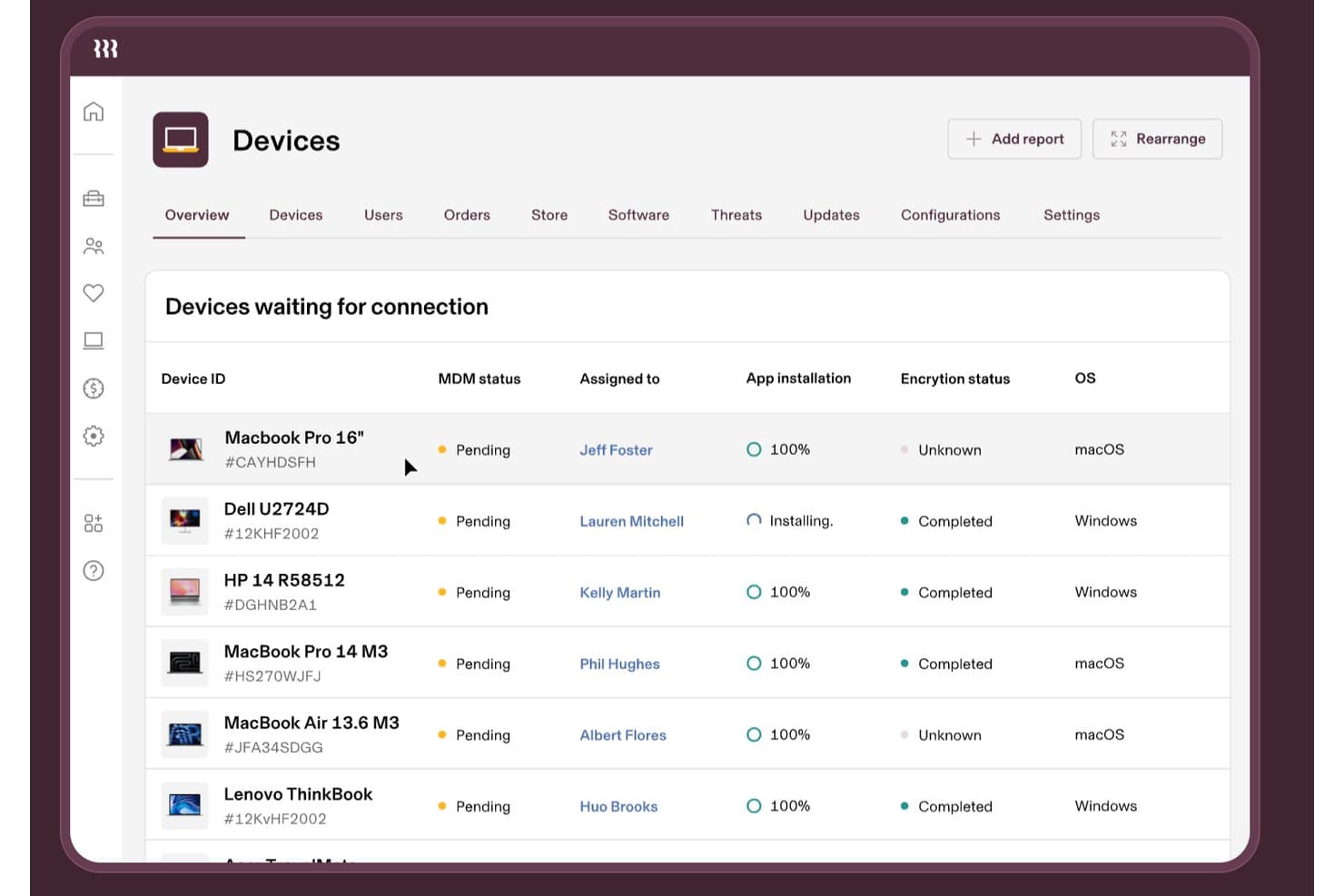
Rippling IT tracks device MDM status, encryption, and app installs. Rippling IT is an IT management platform for growing businesses that connects employee data with device and access workflows, helping IT teams simplify onboarding, offboarding, and day-to-day endpoint administration.
Who Is Rippling IT Best For?
Rippling IT suits growing businesses where HR and IT teams share responsibility for employee devices, access, onboarding, and offboarding.
Why Rippling IT Is a Good ConnectWise Alternative
I picked Rippling IT because its HR-driven device and identity management connects employee records with device and access workflows. I use it to coordinate onboarding, offboarding, endpoint administration, and access changes between HR and IT. That helps prevent former employees from retaining access when their status changes.
Rippling IT Key Features
- Software inventory: View installed applications across company devices.
- Remote lock and wipe: Secure lost or compromised devices remotely.
- Device health monitoring: Check endpoint status and configuration details.
- Automated patching: Apply operating system updates across managed devices.
Rippling IT Integrations
Rippling IT offers 650+ native app integrations, including GitHub, Slack, Jira, AWS, Zoom, and Microsoft 365. It also provides a REST API for custom integrations and workflow automation.
Pros and Cons
Pros:
- Remote lock and wipe controls
- Automated application access changes
- HR-triggered onboarding and offboarding workflows
Cons:
- Support responses can take time
- Recurring bugs affect daily administration
Learn more about Rippling IT: Best for remote endpoint management
- 30-day free trial + free demo available
- From $129/technician/month (billed annually)
Visit WebsiteCustomer Rating:4.6/5
This is an overview of Atera's availability monitoring. Atera is a cloud-based Information Technology (IT) management platform that brings together Remote Monitoring and Management (RMM), Professional Services Automation (PSA), and remote access into a single solution. It’s designed to help IT professionals and Managed Service Providers (MSPs) proactively manage systems, automate tasks, and support end users efficiently.
Why it's a good ConnectWise alternative:
I selected Atera for this list because it simplifies IT management with its all-in-one platform, especially for MSPs and smaller IT teams. Its integrated suite of Remote Monitoring and Management (RMM), Professional Services Automation (PSA), and remote access tools offers a contrast to ConnectWise’s more modular approach. For MSPs looking to manage endpoints remotely without juggling multiple platforms, Atera is the Best for remote IT monitoring and management for MSPs.
Standout Features & Integrations:
Atera offers essential features like real-time system monitoring, patch management, remote access, and automated ticketing workflows. Its automation capabilities reduce manual tasks through customizable scripts and AI-powered diagnostics. Integrations include Microsoft Teams, Slack, ServiceNow, Salesforce, HubSpot, ClickUp, and Acronis Cyber Protect Cloud, among others, helping MSPs extend functionality across their existing technology stack.
Pros and Cons
Pros:
- Strong integrations with business tools
- Efficient IT automation capabilities
- Unified platform with RMM, PSA, and remote access
Cons:
- Advanced reporting features may be lacking compared to other tools.
- Customization options could be improved
- Interface may seem complex to new users
 Best for AI-driven task automation
- 21-day free trial + free demo available
- From $149/technician/month (billed annually)
Visit WebsiteCustomer Rating:4.6/5
SuperOps ticket management dashboard displaying IT support requests organized by priority, with status tracking and SLA indicators for streamlined service desk operations. For IT teams and Managed Service Providers (MSPs) seeking a modern, AI-driven solution to enhance their operations, SuperOps offers a compelling alternative to traditional platforms. It integrates Professional Services Automation (PSA) with Remote Monitoring and Management (RMM), providing a unified platform designed to streamline service delivery and improve efficiency. With features like automated workflows and strategic business insights, SuperOps is particularly appealing to those looking to reduce tool overload while maintaining a high level of service quality.
Why I Picked SuperOps
I picked SuperOps as a ConnectWise alternative because of its innovative integration of AI-driven automation and IT management. You’ll find its Agentic AI feature particularly useful for automating repetitive tasks, which can free up your team to focus on more strategic initiatives. The platform's service desk management is another standout feature, providing a centralized space to manage client issues and tickets more effectively. Additionally, its endpoint security tools ensure that your IT environment remains secure without needing multiple disparate systems.
SuperOps Key Features
In addition to its AI capabilities and service desk management, I also found the following features beneficial:
- Asset Management: Allows you to track and manage IT assets across the organization, providing insights into asset performance and lifecycle.
- Patch Management: Automates the deployment of software updates, helping you maintain system security and compliance with minimal manual intervention.
- Event Scheduling: Facilitates the planning and management of IT events, ensuring that your team is always aligned with organizational priorities.
- Contract Management: Streamlines the process of managing client contracts, making it easier to track terms, renewals, and compliance.
SuperOps Integrations
Integrations include ConnectWise Control, Xero, QuickBooks, Bitdefender, TeamViewer, SentinelOne, Azure AD, Stripe, Acronis, and Splashtop.
Pros and Cons
Pros:
- Patch and endpoint management included
- Strong automation and AI tools
- Built-in mobile device management
Cons:
- Cloud-based, requires internet access
- May require onboarding time
Learn more about SuperOps: Best with prebuilt connectors for rapid integration
- 30-day free trial
- Pricing upon request

Discover a smarter, more flexible alternative to ConnectWise with Celigo. Celigo is an integration platform designed for IT teams and businesses that need to connect and automate workflows across multiple cloud applications. If you’re looking for a ConnectWise alternative that emphasizes flexibility and control over integrations, Celigo is worth a close look.
Who Is Celigo Best For?
IT teams at mid-sized and enterprise companies needing rapid integration between cloud business applications.
Why Celigo Is a Good connectwise alternative
I picked Celigo because its prebuilt connectors let my team integrate new cloud apps in hours, not weeks. I appreciate how we can connect Salesforce, NetSuite, and Microsoft Dynamics without custom coding. In practice, that means we automate data syncs and workflows right out of the box. This speed is a big advantage over ConnectWise for rapid deployment needs.
Celigo Key Features
- Visual flow builder: Design and manage integrations with a drag-and-drop interface.
- Error management dashboard: Monitor and resolve integration errors in real time.
- Role-based access controls: Set permissions for users and teams across integrations.
- Data transformation tools: Map and convert data formats between connected systems.
Celigo Integrations
Integrations include Salesforce, Microsoft Dynamics 365 Business Central, Oracle NetSuite, Walmart, SAP, Snowflake, Acumatica, Adobe, ADP, and 3M.
Pros and Cons
Pros:
- Flexible data mapping and transformation options
- Supports multi-step, multi-app integrations
- Real-time monitoring and error management tools
Cons:
- Limited on-premises system integration
- Initial setup can be time-intensive
Learn more about Celigo: Best for complete IT business management
- 30-day free trial + free demo available
- From $85/agent/month (billed annually)
Visit WebsiteCustomer Rating:4.8/5
Here's HaloPSA feature that manages the service desk with ITIL-aligned functionality. HaloPSA is a professional service automation solution that serves as an all-in-one platform for managing all aspects of an IT business. It caters to the needs of IT service businesses by providing comprehensive IT management capabilities.
Pros and Cons
Pros:
- Robust customer service
- Wide range of integrations
- Comprehensive set of IT business management tools
Cons:
- Some features may require additional cost.
- Interface could be more intuitive.
- It may be overwhelming for small businesses
Learn more about HaloPSA: Best for agile IT service management
- Free plan + 14-day free trial available
- From $25/user/month
Visit WebsiteCustomer Rating:4/5
Improve IT operations teams with contextual information for better decision-making and risk reduction in Jira Service Management. Jira Service Management, from Atlassian, is a popular IT service management tool designed to integrate with Atlassian's other products, offering agile practices for service management. It brings together developers and IT operations to collaborate and address issues more quickly and efficiently.
Pros and Cons
Pros:
- ITIL-certified processes
- Excellent integration with the Atlassian suite
- Agile IT service management capabilities
Cons:
- Higher cost for smaller teams due to minimum agent requirement
- User interface could be more intuitive.
- It could be over-featured for smaller businesses
Learn more about Jira Service Management: Best for AI-driven IT service management
- Free demo available
- Pricing upon request
Visit WebsiteCustomer Rating:4.1/5
By using intelligent service automation, you can improve the agent experience with BMC Helix ITSM. BMC Helix ITSM is a comprehensive IT service management tool that leverages artificial intelligence to automate service delivery and management. It provides predictive service management capabilities, making it a strong choice for businesses aiming to harness AI in their IT processes.
Pros and Cons
Pros:
- Wide range of integrations with cloud platforms and other applications
- Comprehensive incident and problem management
- Strong AI-powered service management capabilities
Cons:
- Some users report a complex setup process.
- It could be over-featured for smaller businesses.
- Lack of transparency in pricing
Learn more about BMC Helix ITSM: Best for cloud-based mobile and desktop management
- Free trial available
- From $60/user/month (billed annually)

Here's Microsoft Intune secure mobile productivity, identity-driven security, and modern Windows/Mac management. Microsoft Intune is a cloud-based service in the enterprise mobility management (EMM) sector that helps enable your workforce to be productive while protecting your corporate data. It is particularly known for its robust mobile and desktop management features.
Pros and Cons
Pros:
- Robust security capabilities
- Excellent integration with Microsoft ecosystem
- Strong mobile and desktop management features
Cons:
- Could offer better support for non-Microsoft platforms
- More expensive than some other options
- Requires some learning curve for non-technical users
Learn more about Microsoft Intune: Best for AI-powered endpoint optimization
- Free demo available
- Pricing upon request

Here's Ivanti Neurons for UEM's integrated, intelligent control over the many desktop and mobile platforms used by your users. Ivanti Neurons for UEM offers a platform that combines unified endpoint management (UEM) and security capabilities, with a focus on leveraging AI for endpoint optimization. It caters to organizations of all sizes that must manage and secure various devices while ensuring optimal performance.
Pros and Cons
Pros:
- Extensive integration possibilities
- Comprehensive device and security management
- Strong AI-driven automation capabilities
Cons:
- Setup could be complex for new users
- It may have a steep learning curve.
- Pricing details are not transparent.
Learn more about Ivanti Neurons for UEM:

Here's ManageEngine Desktop Central's features for managing servers, desktops, laptops, smartphones, tablets, and POS devices. ManageEngine Desktop Central is a unified endpoint management (UEM) solution providing a wide range of tools to manage and secure your endpoints. Its specialization in both UEM and endpoint security makes it a practical choice for companies requiring a holistic management and security solution.
Pros and Cons
Pros:
- Provides automated patch management
- Supports multiple operating systems and devices
- Comprehensive endpoint management and security tools
Cons:
- Some users report difficulties with the initial setup.
- It may be complex for smaller businesses.
- Requires a minimum of 50 seats
Learn more about ManageEngine Desktop Central:
Other ConnectWise Alternatives
Here are some additional ConnectWise alternatives that didn’t make it onto my shortlist, but are still worth checking out:
- 11Quest KACEBest for comprehensive IT asset management
- 12N-able MSP ManagerBest for scalable IT service management for MSPs
- 13Tanium XEMBest for integrated endpoint security and management
- 14NinjaOneBest for streamlined managed service provider tasks
- 15RepairShoprBest for small business repair shop automation
- 16SyncroBest for automated IT service workflows
- 17Syxsense ManageGood for managing and securing endpoints from the cloud
- 18ManageEngine ServiceDesk PlusGood for integrating IT helpdesk and asset management
- 19SysAidGood for comprehensive IT service management and help desk needs
- 20BroadcomGood for endpoint security and performance
- 21Jamf ProGood for Apple device management in businesses
- 22IBM Security MaaS360Good for secure mobile device management
- 23Alloy SoftwareGood for asset management and IT service management workflows
- 24Citrix Endpoint ManagementGood for integrating diverse mobile platforms
- 25Baramundi Management SuiteGood for automated IT operations and security tasks
- 26Sophos MobileGood for mobile device security in corporate environments
- 27Matrix42 Secure Unified Endpoint ManagementGood for managing and securing digital workspaces
Other Software Reviews
How I Evaluate ConnectWise Alternatives
I evaluate these tools in two layers—core RMM and PSA capabilities that every option must have, and the differentiators that matter when you're managing 50+ clients or migrating a ticket history.
Core Functionality (Table Stakes For This List)
When I'm selecting tools for my list, I rank each one on a scale from 0 (does not offer the functionality) to 5 (excels in this area) for each core functionality listed below. Then, I calculate the tool's total score into a percentage. Each tool needs to achieve a minimum total score of 65% to be considered for inclusion.
- Remote Monitoring & Management: I check whether the platform can monitor endpoints, servers, and network devices with proactive alerting and patch management across multiple OS environments.
- PSA & Ticketing: Every tool should offer a service desk with SLA tracking, ticket routing, and dispatch workflows that keep technicians moving through queues.
- Remote Access & Control: I evaluate attended and unattended session support, looking at features like file transfer, session recording, and multi-monitor handling during live troubleshooting.
- Automation & Scripting: Tools like Datto RMM and NinjaOne each approach scripting differently, so I look at script libraries, scheduled tasks, and policy-based automation options.
- Billing & Client Management: I look for time tracking tied to tickets, contract management, and invoicing features that help MSPs connect service delivery to revenue.
- Reporting & Integrations: The tool should offer configurable dashboards and connect with the platforms MSPs already rely on, such as IT Glue, QuickBooks, or backup solutions.
Once I have a list of tools that meet this criteria, I consider what sets each platform apart.
Differentiating Factors (What Sets Vendors Apart)
Here's how I compare and contrast different vendors:
Standout Features
An integrated security stack is a big differentiator—platforms with native endpoint detection reduce agent bloat on client machines compared to layering on third-party tools. I also look at network discovery and mapping features, which speed up onboarding new clients by auto-detecting devices and dependencies. A full-featured mobile app matters too, especially for field techs who need to manage tickets or launch remote sessions from a phone between site visits.
Beyond Features
Pricing model matters a lot here. Per-technician pricing favors smaller teams, while per-endpoint models can work better at scale, so I evaluate which structure fits different MSP sizes. I also look at migration support—switching from ConnectWise means moving ticket histories, client configs, and contract data, and some vendors offer dedicated migration paths while others leave you on your own. Compliance certifications like SOC 2 and HIPAA readiness are worth checking too, especially if you serve clients in regulated industries like healthcare or finance.
Why Look For A ConnectWise Alternative?
While ConnectWise is a good choice of IT management platform, there are a number of reasons why some users seek out alternative solutions. You might be looking for a ConnectWise alternative because…
- You need a simpler tool that’s easier to set up and use.
- Your team doesn’t need all the extra tools bundled in.
- You’re running into issues with slow or buggy performance.
- You want more responsive or helpful customer support.
- You’re looking for a more affordable pricing model.
- You need features better suited for in-house IT rather than MSPs.
If any of these sound like you, you’ve come to the right place. My list contains several IT management platform options that are better suited for teams facing these challenges with ConnectWise and looking for alternative solutions.
ConnectWise Key Features
Here are some of the key features of ConnectWise to help you contrast and compare what alternative solutions offer:
- Remote monitoring and management: Lets you keep tabs on client endpoints and fix issues without needing to be on-site.
- Ticketing system: Helps your team track, manage, and resolve support requests in one place.
- IT automation: Lets you set up rules to handle repetitive tasks like patching and maintenance.
- Billing and invoicing: Generates invoices based on work done so your team gets paid accurately.
- Asset management: Keeps a record of all hardware and software to make audits and planning easier.
- Network discovery: Finds all devices on a network so nothing slips through the cracks.
- Reporting and dashboards: Shows your team how you're doing with tickets, time tracking, and service delivery.
- Patch management: Lets you push security updates to systems so you can keep things up to date.
- Third-party integrations: Connects with other tools your team uses so you don’t have to jump between apps.
- Endpoint security tools: Helps you protect client systems with antivirus and threat detection features.