
Guide du CTO : Les 25 meilleurs logiciels de gestion des actifs informatiques

10 Meilleurs logiciels de gestion des actifs informatiques – Sélection
Here's my pick of the 10 best software from the 20 tools reviewed.


Gérer les actifs informatiques peut être complexe, surtout avec le travail hybride et la multiplication des outils logiciels. Les logiciels de gestion des actifs informatiques permettent de tout organiser en suivant le matériel, les logiciels et les licences en un seul endroit.
Ils font gagner du temps, réduisent les coûts et garantissent la conformité, que vous dirigiez une petite entreprise ou une grande société. J'ai analysé et comparé les meilleurs logiciels de gestion des actifs informatiques pour vous aider à trouver la solution la plus adaptée à votre équipe.
Table of Contents
- Meilleure sélection de logiciels
- Pourquoi nous faire confiance
- Comparer les spécifications
- Avis
- Autres logiciels de gestion des actifs informatiques
- Avis associés
- Critères de sélection
- Comment choisir
- Qu'est-ce qu'un logiciel de gestion des actifs informatiques ?
- Fonctionnalités
- Avantages
- Coûts et tarifs
- FAQ
Why Trust Our Software Reviews
Résumé des meilleurs logiciels de gestion des actifs informatiques
Ce tableau comparatif résume les informations tarifaires de ma sélection de logiciels de gestion des actifs informatiques pour vous aider à choisir la meilleure solution selon votre budget et vos besoins d’entreprise.
| Tool | Best For | Trial Info | Price | ||
|---|---|---|---|---|---|
| 1 | Best for intuitive asset management interface | 14-day free trial available | From $19/user/month (billed annually) | Website | |
| 2 | Best for unified ITSM and asset management | 14-day free trial | Pricing upon request | Website | |
| 3 | Best for creating asset inventories | Free demo available | Pricing upon request | Website | |
| 4 | Best for IT asset and license management | Free trial available | From $300/month | Website | |
| 5 | Best for full device lifecycle visibility | 30-day free trial + free demo available | From $149/technician/month (billed annually) | Website | |
| 6 | Best for automating the entire IT asset lifecycle | Free trial available | From $8/user/month (billed annually) | Website | |
| 7 | Best for global asset management | Free demo available | from $5/person/month | Website | |
| 8 | Best for managed service providers | 14-day free trial | From $89/user/month (billed annually) | Website | |
| 9 | Best for simplifying IT asset onboarding | Free trial available | From $0.21/node/month | Website | |
| 10 | Best for automated patch management | Free trial + free demo available | Pricing upon request | Website |


-

Site24x7
Visit WebsiteThis is an aggregated rating for this tool including ratings from Crozdesk users and ratings from other sites.4.6 -
Docker
Visit WebsiteThis is an aggregated rating for this tool including ratings from Crozdesk users and ratings from other sites.4.6 -
Pulumi
Visit WebsiteThis is an aggregated rating for this tool including ratings from Crozdesk users and ratings from other sites.4.8





Avis sur les meilleurs logiciels de gestion des actifs informatiques
Vous trouverez ci-dessous mes résumés détaillés des meilleurs logiciels de gestion des actifs informatiques ayant intégré ma sélection. Mes avis proposent un aperçu approfondi des fonctionnalités clés, avantages et inconvénients, intégrations et cas d’usage idéaux de chaque outil pour vous aider à choisir la solution qui vous conviendra le mieux.


Freshservice is an asset management solution designed with a keen emphasis on user experience. By streamlining complex processes into an intuitive interface, it caters to both end users and IT professionals. Given its design philosophy, it stands out as the go-to option for teams that prioritize a user-friendly asset management experience.
Why I Picked Freshservice: Among the myriad of tools I analyzed, Freshservice emerged as a distinct choice due to its clear dedication to a user-centric interface. I selected it not only for its refined aesthetics but also for how it simplifies intricate asset management tasks. For organizations that aim to empower their end users with an easy-to-navigate system, I determined that Freshservice is the best fit.
Standout features & integrations:
Freshservice boasts a customizable dashboard that adapts to varying user preferences, ensuring every user finds what they need without hassle. Its robust customer support features ensure that help is always at hand, enhancing user confidence. Integration-wise, Freshservice is versatile, with compatibility that includes popular platforms and even extends to iOS devices, adding mobility to its list of strengths.
Pros and Cons
Pros:
- Strong customer support infrastructure ensures user queries are addressed promptly
- Customizable dashboard caters to diverse user needs
- A highly intuitive interface reduces the learning curve for end users
Cons:
- Configuration options could be overwhelming for novice users
- Mobile app experience may vary across devices
- Some features might be locked behind higher-priced tiers
New Product Updates from Freshservice

Freshservice Enhances Global Search and Dashboards With Task Support
Freshservice enhances Global Search and Dashboards by adding support for ticket, problem, change, and release tasks, along with custom task views. This update helps teams search, track, and report on tasks from one centralized interface. For more information, visit Freshservice's official site.

SysAid offers a unified platform where your IT team can manage hardware and software assets, track their lifecycle, and connect that data directly to help desk and service workflows. This approach is particularly useful if you oversee infrastructure across multiple locations or support a large user base and want asset information readily available during support and service management activities.
Why I Picked SysAid
I picked SysAid because it combines IT asset tracking with help desk workflows, so asset data stays linked to support tickets and service requests. This gives your team the context they need when troubleshooting hardware issues or managing software licenses. SysAid’s automated discovery and inventory tools collect hardware and software data across your environment, while integration with the service desk ensures incidents are associated with the correct assets. This unified view makes it easier to identify outdated software, manage license compliance, and respond more effectively to hardware-related issues.
SysAid Key Features
In addition to the asset-tracking and service-desk linkage I mentioned above, SysAid offers several other features that enhance IT asset management:
- CMDB (Configuration Management Database): Lets you map relationships between devices, services, and users, giving a holistic view of how assets are connected across your infrastructure.
- Remote control: Enables your support agents to securely access and manage computers from a distance, which helps troubleshoot hardware and software issues without needing physical access.
- Software license tracking: Tracks installed software across devices and monitors license usage and renewals — helping you stay compliant and avoid unnecessary licensing spend.
- Patch management: Allows deploying software patches to one or many devices based on customized policies, helping you keep systems secure and up to date across your network.
SysAid Integrations
Integrations include Microsoft Active Directory, Azure Active Directory, LDAP, SAML, Google Workspace, Microsoft 365, VMware, AWS, and SCCM. An API is also available for custom integrations.
Pros and Cons
Pros:
- Integrated CMDB lets you map dependencies and see relationships between assets and services.
- Remote control support helps resolve issues on any device without physical access.
- Tracks hardware and software assets together with service desk data in one platform.
Cons:
- Mobile app experience lacks full functionality.
- No support for geofencing in asset tracking.
New Product Updates from SysAid

SysAid Adds Direct Knowledge Base Linking in Service Records
SysAid now allows linking knowledge base articles directly to service records, enhancing centralized access to information and speeding up issue resolution. For more information, visit SysAid's official site.
 .
.

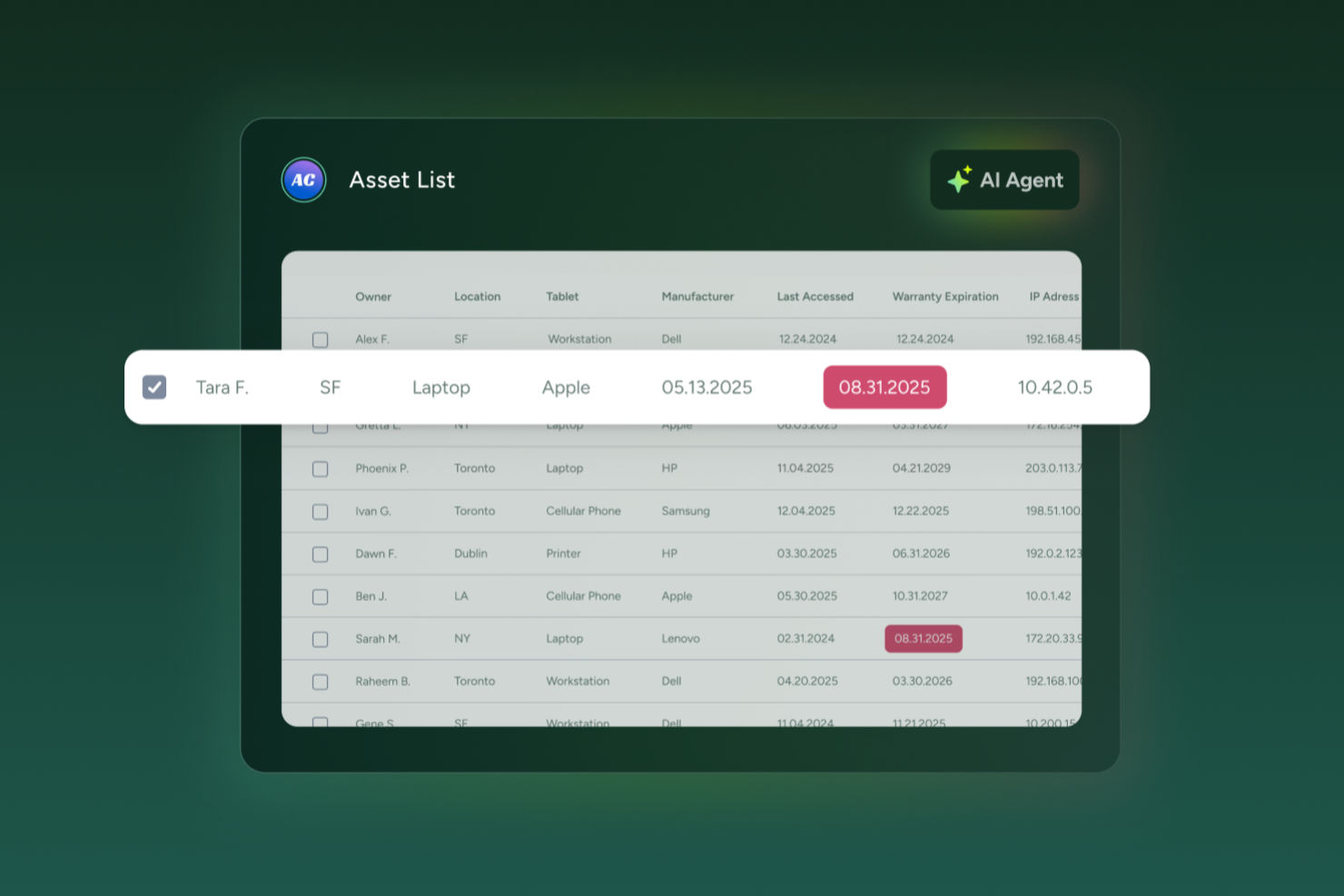
OfficeSpace is a workplace management platform designed to help teams organize and oversee their physical work environments.
Why I Picked OfficeSpace: OfficeSpace's asset management features are particularly relevant for IT asset management. The platform allows users to create a digital inventory of assets, including detailed information such as serial numbers, purchase costs, warranty expirations, and depreciation details. This centralized system helps IT teams keep track of equipment like laptops, monitors, and other devices, ensuring that all assets are accounted for and maintained properly.
Standout features & integrations:
Another key feature is the automation of maintenance schedules and work orders. OfficeSpace enables users to set up recurring maintenance tasks and automatically generate work orders when certain conditions are met, such as low inventory levels or upcoming warranty expirations. Integrations include Microsoft Teams, Google Workspace, Slack, Office 365, and Zoom.
Pros and Cons
Pros:
- Manages the entire asset lifecycle
- Automated maintenance scheduling
- Detailed inventory management
Cons:
- May not cover all types of IT assets
- No mobile app available

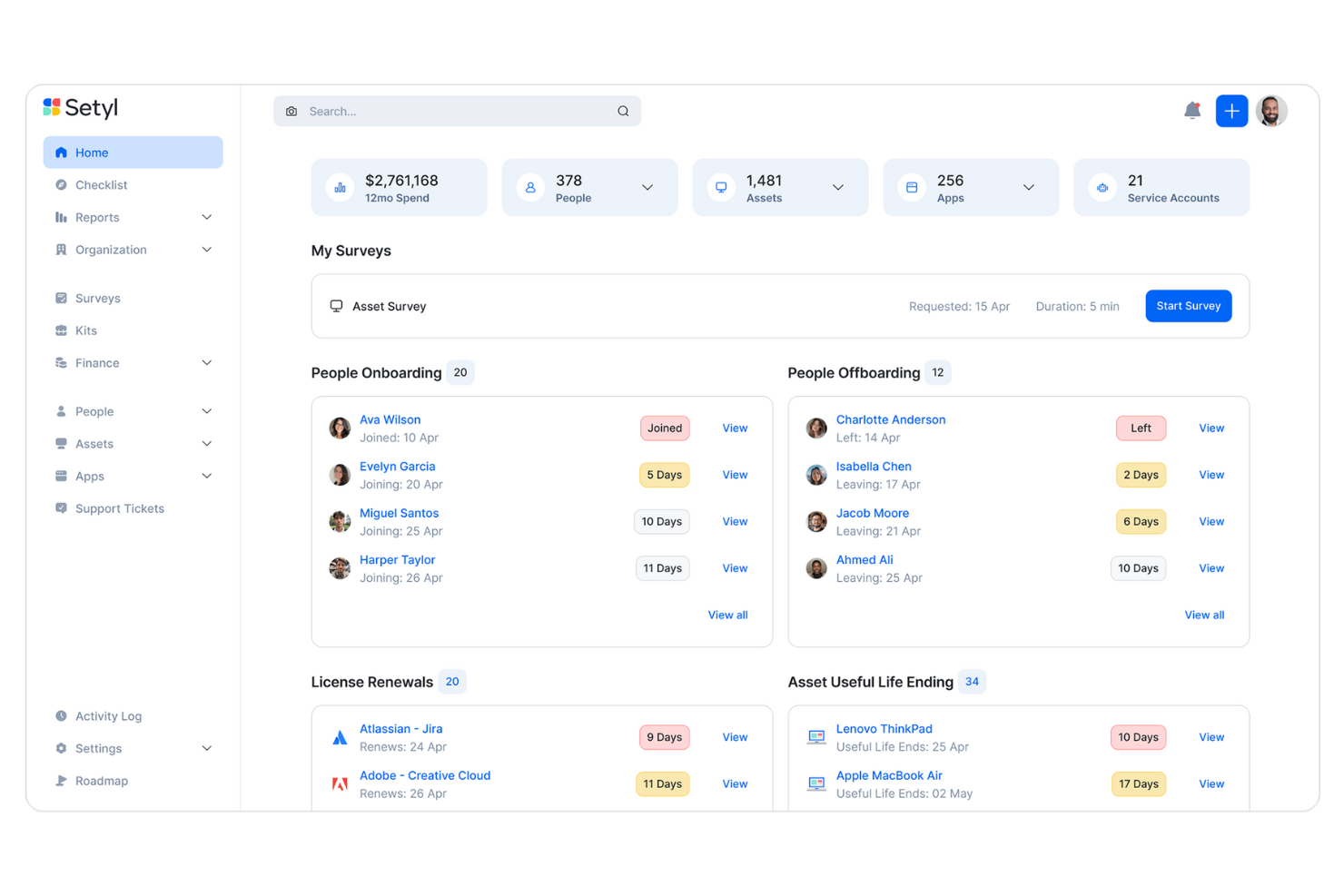
Setyl is a cloud-based IT management platform that provides comprehensive oversight of your organization's assets, software applications, licenses, users, vendors, and expenditures. It consolidates all these elements into a single, centralized system, offering full visibility and control over your IT infrastructure.
Why I picked Setyl: You can track the entire lifecycle of each asset—from acquisition to disposal—so you can make informed decisions about maintenance and replacements. I also like its comprehensive software asset register. This feature consolidates all your SaaS subscriptions, software licenses, installed applications, and service contracts into a single, centralized platform. You can record and manage key data such as contracts, pricing structures, renewal dates, assigned users, application owners, and linked hardware devices, giving you a clear and organized overview of your software assets.
Setyl Standout Features and Integrations:
Other standout features include employee onboarding and offboarding workflows to streamline the assignment and retrieval of devices and licenses. Additionally, Setyl offers detailed activity logs as well as archiving workflows, allowing you to keep a record of all changes and prepare for security audits. The platform integrates with Google Workspace, Microsoft 365, Atera, CDW, CrowdStrike, JumpCloud, Google Endpoint Management, Okta, NinjaOne, NetSuite, Xero, Zoom, Slack, BambooHR, ADP Workforce Now, Zendesk, Jira Service Management, Workday, and more.
Pros and Cons
Pros:
- Unlimited assets included in price
- Assistance with setup offered as standard
- Software and hardware asset management in one
Cons:
- No native mobile app
- Doesn’t offer the complex functionalities that may be needed for large enterprise organizations
New Product Updates from Setyl

Setyl's New Tools for Asset Control
Setyl's update introduces new tools for onboarding, asset control, software reporting, and integrations to make IT management more streamlined. The features help organizations onboard employees faster, maintain optimal inventory, track software usage and costs more clearly, and keep licenses up to date to cut waste and improve efficiency. For more information, visit Setyl's official site.


Atera is an IT management platform that helps you oversee your organization’s hardware assets, software environments, and IT operations. It combines asset management, remote monitoring, automation, and helpdesk features into a single centralized system.
Why I picked Atera:
Atera makes it easy to track your IT assets throughout their entire lifecycle—from onboarding to retirement—so you always know where devices are, who’s using them, and what condition they’re in. I also appreciate Atera’s pay-per-technician model, which allows unlimited endpoint management without hidden fees. This is ideal for growing IT teams looking to consolidate asset tracking, remote maintenance, and IT support into one streamlined platform.
Atera Standout Features and Integrations:
Atera’s combination of Remote Monitoring and Management (RMM) with Professional Services Automation (PSA) lets you manage both hardware assets and IT support operations from one place. Other standout features include automated patch management, proactive alerts, and remote access tools like Splashtop and TeamViewer to assist with troubleshooting. Atera also supports automated onboarding and offboarding, helping IT teams manage device assignments and permissions efficiently. Integrations include Microsoft Teams, Slack, WhatsApp Notifications, Microsoft Outlook, Asana, ClickUp, Acronis Cyber Protect Cloud, Salesforce, Jira Software Cloud, Google Chat, Azure Active Directory, Okta, Freshservice, RingCentral, Google Sheets, and ChatGPT (OpenAI).
Pros and Cons
Pros:
- Centralizes ticketing, RMM, PSA, and asset management
- Proactive issue detection and automation options
- Detailed reporting and client-facing dashboards
Cons:
- Learning curve for new users due to breadth of features
- Some limitations in PSA and billing features
New Product Updates from Atera

Atera Enhances IT Autopilot With Automation and File Support
Atera’s IT Autopilot gets three major boosts: you can now attach common files for deeper analysis, automate IT tasks with clear workflows, and choose how the system follows up when users go silent. These updates help streamline IT operations and improve resolution efficiency. For more information, visit Atera’s official site.


Rippling IT helps your team manage everything related to people operations, including IT assets, from one place. With its centralized platform, you can automate device management, track inventory, and control access for new hires or exiting employees.
Why I Picked Rippling IT: Rippling IT is a strong choice for IT asset management because it offers tools to automate the entire lifecycle of your assets. You can assign devices, monitor their status, and even retrieve them when employees leave. It’s easy to see what’s available, who’s using what, and where your inventory gaps are. The platform even handles device provisioning and remote lock/wipe options, so your IT team can manage devices from anywhere.
Standout features & integrations:
Some standout features include automated onboarding and offboarding processes and integrations with over 600 apps. Rippling IT also supports single sign-on (SSO), multi-factor authentication (MFA), and real-time device monitoring. Available integrations include Google Workspace, Microsoft 365, Slack, Zoom, AWS, and Dropbox.
Pros and Cons
Pros:
- Remote device lock and wipe capabilities
- Customizable workflow automation
- Support for onboarding and offboarding employees and their devices
Cons:
- Not all features may be necessary for smaller operations
- Can be complex to set up initially


Deel is a comprehensive platform designed to support global HR, payroll, and IT operations, making it a versatile solution for companies with international teams. Originally built for hiring and compliance across borders, Deel has expanded its offerings by incorporating IT management through the acquisition of Hofy.
Why I Picked Deel: Deel can handle equipment procurement, deployment, and tracking across 130+ countries. For companies managing global teams, this kind of reach is crucial for maintaining smooth operations without worrying about complex logistics, customs, or compliance issues. Deel also excels in providing real-time visibility over all physical assets like laptops and other hardware, including those owned or leased from third-party vendors, giving businesses control over asset health and inventory on a global scale.
Standout features & integrations:
Additional standout features include robust 24/7 global support, which ensures that employees can resolve technical issues quickly no matter where they are, and the platform’s ability to automate device refresh cycles, saving companies both time and costs. Deel integrates with key tools like Apple Business Manager, Windows Autopilot, Okta, OneLogin, Rippling, and Workday.
Pros and Cons
Pros:
- Can combine HR and IT asset management in one
- Helps automate asset workflows
- Supports equipment deployment in over 130 countries
Cons:
- May not be ideal for teams with very complex IT asset needs
- Doesn't offer features beyond device management, like network and server management


SuperOps is a PSA-RMM platform designed for MSPs, offering features such as asset, policy, patch, and client management. It automates time-consuming tasks for MSP companies, such as server checking, updating, and restarting, saving them the time and effort associated with manual work.
Why I Picked SuperOps: The asset management feature simplifies the process of managing and performing tasks on assets, ensuring they are always patched and equipped with the necessary software. SuperOps also excels in automation capabilities, including user-friendly scripting and ticket automation modules. I also appreciate its intuitive interface, which makes for easier adoption for new technicians.
Standout features & integrations:
Standout features include policy, patch, alert, and desktop management, as well as tools for remote access. It also offers a service desk, scheduling, reporting, project management, and contract and client management with the ability to manage invoices and payments. It supports integrations with tools like Splashtop, TeamViewer, Bitdefender, Xero, QuickBooks, Stripe, SentinelOne, Guardz, Hudu, Emsisoft, Microsoft Azure, and Webroot.
Pros and Cons
Pros:
- Easy-to-learn platform
- RMM and PSA tools in one platform
- Automates time-consuming tasks
Cons:
- Client portal could be improved
- Limited support for other languages
New Product Updates from SuperOps

SuperOps Adds HTML Support for Ticket Closure Emails
SuperOps introduces HTML embedding for ticket closure emails. This update allows teams to include custom content such as CSAT survey links and branded elements in resolution emails. For more information, visit SuperOps’ official site.
 .
.

InvGate Asset Management is an IT asset management solution that helps you discover, centralize, and manage your organization's physical, virtual, and cloud assets. It offers a unified view of your IT infrastructure, enabling better decision-making and operational efficiency.
Why I Picked InvGate: I chose InvGate Asset Management for its ability to simplify the onboarding process with multiple methods to build your inventory. These methods include Agent-based installations, Agentless discovery, manual entry, and third-party integrations with tools like Lansweeper, FileWave, VMware, Intune, and Jamf.
The platform also lets you automate asset lifecycle management. It helps IT teams track hardware assets from procurement to disposal while leveraging smart automation to enforce policies and categorize assets. Custom fields allow you to track asset details specific to your organization, from lifecycle data to usage policies and compliance.
Standout features & integrations:
Other features include inventory creation flexibility and IT spend optimization with insights into software usage, license assignments, and asset utilization. Additionally, when combined with InvGate’s IT service management (ITSM) solution, organizations can create advanced workflows that connect asset management with service requests, incidents, and change management processes. Asset data can be imported via integrations with platforms like Lansweeper, FileWave, VMware, Intune, Jamf, Microsoft Active Directory, and Okta.
Pros and Cons
Pros:
- Effective software license management
- Centralized contract management
- Comprehensive asset discovery and inventory capabilities
Cons:
- Technical capabilities like staging and VPN are limited to higher-tier plans
- Could offer more native integrations
New Product Updates from InvGate Asset Management
InvGate Asset Management's Enhanced Emails with Cost Center Variables
InvGate Asset Management now includes cost center variables in automation emails for personalized notifications. For more information, visit InvGate Asset Management's official site.
 .
.
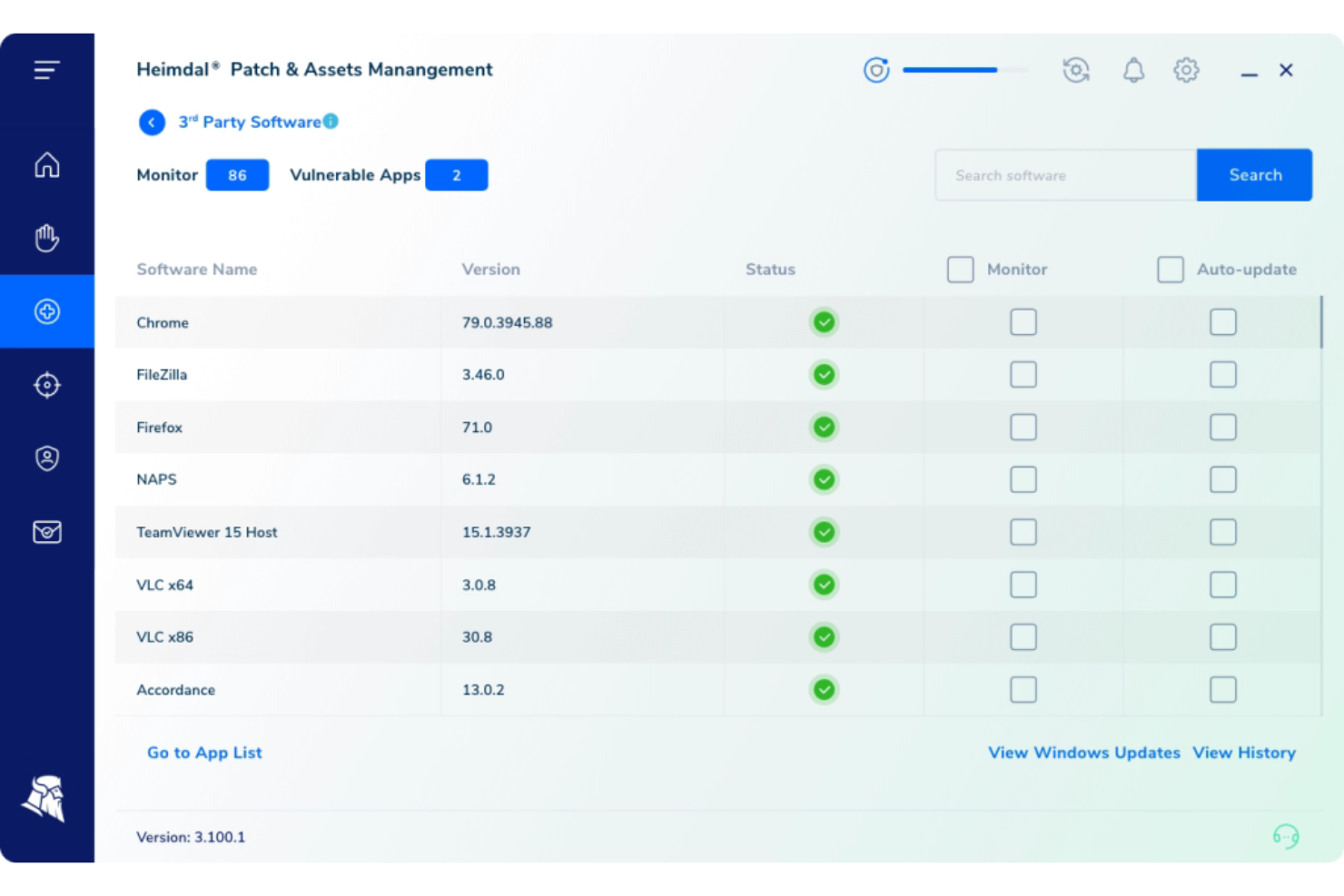
Heimdal caters to the diverse needs of industries like healthcare, education, and government, offering a versatile IT asset management solution. Designed for IT professionals and managed service providers (MSPs), Heimdal emphasizes automated patch management, vulnerability management, and comprehensive endpoint security. By integrating with third-party tools such as ConnectWise and Autotask, it ensures a streamlined workflow and enhanced compliance with industry standards.
Why I Picked Heimdal
I picked Heimdal for its distinctive ability to automate patch management, a crucial aspect of IT asset management that directly addresses the challenge of keeping software up-to-date and secure. Heimdal's platform automates patch deployment across a wide range of third-party applications, ensuring rapid delivery and compliance. Additionally, its integration capabilities with tools like ConnectWise and Autotask support a seamless IT management experience, making it a practical choice for organizations looking to enhance their IT operations and security posture.
Heimdal Key Features
In addition to its robust patch management capabilities, I also found that Heimdal offers several other valuable features:
- Threat Hunting: Provides proactive tools for detecting and responding to potential threats before they escalate.
- Unified Endpoint Management: Streamlines the management of all endpoints within an organization, enhancing operational efficiency.
- Privileged Access Management: Secures sensitive accounts and sessions, reducing the risk of unauthorized access.
- Extended Detection & Response (XDR): Integrates various security measures to deliver comprehensive protection against cyber threats.
Heimdal Integrations
Native integrations are not currently listed by Heimdal; however, the platform supports API-based custom integrations.
Pros and Cons
Pros:
- Detailed asset and license visibility
- Strong vulnerability and threat detection
- Automates patching across endpoints
Cons:
- Interface requires onboarding time
- No native integrations available
Autres logiciels de gestion des actifs informatiques
Voici quelques autres solutions de gestion des actifs informatiques qui n’ont pas été sélectionnées dans ma liste principale, mais qui méritent tout de même d’être considérées :
- Limble
For preventive IT maintenance automation
- Device42
For comprehensive IT asset visualization
- SolarWinds Service Desk
For incident and asset correlation
- Josys
For unified SaaS and device management
- Jira Service Management
For linking assets to requests
- IBM Flexera One
For software license optimization
- OpenText Asset Management X
For enterprise-level asset scalability
- Ivanti Neurons for ITAM
For proactive IT asset insights
- ServiceNow IT Asset Management (ITAM)
For unified IT operations
- ScalePad
For configuration management


Critères de sélection des logiciels de gestion des actifs informatiques
Pour sélectionner les meilleurs logiciels de gestion des actifs informatiques à intégrer dans cette liste, j'ai pris en compte les besoins courants des acheteurs et les difficultés rencontrées, telles que le suivi efficace des actifs et la gestion de la conformité. J'ai également utilisé le cadre d'évaluation suivant pour structurer et garantir l'équité de mon analyse :
Fonctionnalité principale (25 % de la note totale)
Pour figurer dans cette liste, chaque solution devait répondre aux cas d'usage suivants :
- Suivi et gestion des stocks des actifs
- Gestion des licences et conformité
- Gestion du cycle de vie du matériel
- Gestion financière et budgétisation
- Rapports et analyses
Fonctionnalités distinctives supplémentaires (25 % de la note totale)
Pour départager les candidats, j'ai aussi étudié les caractéristiques uniques suivantes :
- Découverte automatisée des actifs
- Surveillance en temps réel et alertes
- Intégration avec des outils tiers
- Tableaux de bord de rapports personnalisables
- Analyses prédictives pour le cycle de vie des actifs
Facilité d'utilisation (10 % de la note totale)
Pour évaluer l’ergonomie de chaque système, j’ai pris en compte les points suivants :
- Interface utilisateur intuitive
- Navigation et accessibilité aisées
- Personnalisation de l’expérience utilisateur
- Courbe d’apprentissage minimale
- Qualité du design graphique
Phase d’intégration (10 % de la note totale)
Pour évaluer l'expérience d'intégration de chaque plateforme, j'ai pris en compte les points suivants :
- Disponibilité de vidéos de formation et de tutoriels
- Accès à des visites interactives du produit
- Modèles d'intégration complets
- Chatbots et assistance en ligne
- Webinaires réguliers et démonstrations en direct
Support client (10 % du score total)
Pour évaluer les services d’assistance de chaque fournisseur de logiciels, j'ai pris en compte les éléments suivants :
- Disponibilité du support 24h/24 et 7j/7
- Accès à des gestionnaires de compte dédiés
- Délai de réponse aux demandes
- Disponibilité d’une base de connaissances complète
- Options de support multicanal
Rapport qualité/prix (10 % du score total)
Pour évaluer le rapport qualité/prix de chaque plateforme, j'ai pris en compte les éléments suivants :
- Modèles de tarification concurrentiels
- Fonctionnalités proposées à chaque niveau de prix
- Réductions pour les abonnements annuels
- Analyse du rapport coût/bénéfices
- Souplesse des plans tarifaires
Avis clients (10 % du score total)
Pour avoir une idée de la satisfaction globale des clients, j'ai pris en considération les éléments suivants lors de la lecture des avis clients :
- Évaluations globales de satisfaction
- Points de douleur fréquemment signalés
- Fonctionnalités mises en avant par les utilisateurs
- Fréquence des avis positifs par rapport aux négatifs
- Retour des utilisateurs sur la qualité du service client
Comment choisir un logiciel de gestion des actifs IT
Il est facile de se perdre dans de longues listes de fonctionnalités et des structures tarifaires complexes. Pour vous aider à rester concentré tout au long de votre processus de sélection de logiciel, voici une liste de critères à garder en tête :
| Facteur | À prendre en compte |
|---|---|
| Évolutivité | L’outil peut-il évoluer avec votre entreprise ? Pensez à vos besoins futurs et vérifiez que le logiciel pourra gérer un volume d’actifs croissant sans coûts supplémentaires ni perte de performances. |
| Intégrations | Est-il compatible avec vos systèmes existants ? Contrôlez la compatibilité avec des outils tels qu’ERP, CRM et autres systèmes de gestion IT pour garantir des flux de travail fluides. |
| Personnalisation | Pouvez-vous adapter l’outil à vos processus ? Cherchez des options pour modifier les flux de travail, rapports et tableaux de bord selon vos besoins opérationnels spécifiques. |
| Facilité d’utilisation | Est-il convivial pour votre équipe ? Évaluez la conception de l’interface et la rapidité avec laquelle votre équipe peut apprendre à utiliser le logiciel efficacement. |
| Mise en œuvre et intégration | La configuration est-elle complexe ? Évaluez le temps et les ressources nécessaires pour démarrer ainsi que le niveau d’accompagnement fourni par le fournisseur à cette étape. |
| Coût | Correspond-il à votre budget ? Comparez les offres tarifaires, les frais cachés, et vérifiez si le coût correspond à la valeur ajoutée selon vos critères. |
| Sécurité | Vos actifs sont-ils protégés ? Assurez-vous que le logiciel dispose du chiffrement, de contrôles d’accès et qu’il est conforme aux normes de sécurité pour protéger les données sensibles. |
| Exigences de conformité | Répond-il aux normes de votre secteur ? Vérifiez si le logiciel prend en charge la conformité avec la réglementation propre à votre domaine ou à votre région, comme le RGPD ou HIPAA. |
Qu’est-ce qu’un logiciel de gestion des actifs IT ?
Le logiciel de gestion des actifs informatiques est un outil qui sert à suivre, gérer et optimiser les actifs IT tout au long de leur cycle de vie. Les professionnels IT, tels que les gestionnaires d’actifs et les administrateurs IT, utilisent généralement ces outils pour améliorer l’efficacité et garantir la conformité. Les fonctionnalités de suivi des actifs, de gestion des licences et de reporting permettent de maintenir un inventaire organisé et de prendre des décisions éclairées. Les organisations avec des opérations de centres de données complexes peuvent également profiter de logiciels spécialisés de DCIM pour la gestion de l’infrastructure. Ces outils offrent une valeur globale en réduisant les coûts et en améliorant l’utilisation des actifs.
Fonctionnalités
Lors du choix de votre logiciel de gestion des actifs IT, assurez-vous qu’il propose les fonctionnalités clés suivantes :
- Suivi des actifs : Vous aide à maintenir un inventaire précis des actifs matériels et logiciels, garantissant que vous savez toujours ce que vous possédez et où cela se trouve.
- Gestion des licences : Vous permet de gérer efficacement les licences des logiciels, d’assurer la conformité et d’éviter les amendes coûteuses.
- Gestion du cycle de vie : Suit les actifs de l’acquisition à la mise au rebut, vous aidant à maximiser la valeur des actifs et à planifier les remplacements.
- Découverte automatisée : Identifie et enregistre automatiquement les nouveaux actifs du réseau, ce qui permet un gain de temps et réduit les erreurs manuelles.
- Rapports et analyses : Fournit des informations sur l’utilisation et les performances des actifs, vous aidant à prendre des décisions éclairées et à optimiser l’allocation des ressources.
- Gestion de la conformité : Garantit le respect des réglementations et normes du secteur, réduisant les risques et protégeant votre organisation.
- Gestion financière : Vous aide à gérer les dépenses et budgets liés aux actifs, améliorant ainsi la maîtrise des coûts et la planification financière.
- Capacités d’intégration : Se connecte à d’autres systèmes et outils informatiques pour assurer un flux de données fluide et des opérations unifiées.
- Interface conviviale : Propose une conception intuitive qui facilite la navigation et l’utilisation efficace du logiciel par votre équipe.
- Fonctionnalités de sécurité : Protège les données sensibles grâce au chiffrement et aux contrôles d’accès, assurant ainsi la sécurité de vos actifs contre les menaces.
Bénéfices
La mise en place d’un logiciel de gestion des actifs informatiques apporte plusieurs avantages à votre équipe et à votre entreprise. Voici quelques-uns des bénéfices auxquels vous pouvez vous attendre :
- Réduction des coûts : En optimisant l’utilisation des actifs et en évitant les achats inutiles, vous pouvez réduire significativement les dépenses opérationnelles.
- Meilleure conformité : Garantit que votre organisation respecte les normes du secteur et évite les pénalités grâce à une gestion efficace des licences et de la conformité.
- Amélioration de la prise de décision : Fournit des informations précieuses via les rapports et les analyses, vous aidant à prendre des décisions avisées sur l’allocation des ressources et la budgétisation.
- Efficacité accrue : Automatise les tâches manuelles telles que le suivi et la découverte des actifs, ce qui permet un gain de temps et une réduction des erreurs.
- Meilleure sécurité : Protège les données sensibles grâce à des fonctionnalités de sécurité robustes, garantissant la protection de vos actifs contre les accès non autorisés.
- Opérations rationalisées : S’intègre à d’autres systèmes informatiques, offrant une vue unifiée des opérations et améliorant l’efficacité des flux de travail.
Coûts & Tarification
Le choix d’un logiciel de gestion des actifs informatiques nécessite de comprendre les différents modèles de tarification et forfaits disponibles. Les coûts varient selon les fonctionnalités, la taille de l’équipe, les modules complémentaires, et bien plus, comme lors du choix de solutions de logiciels d’approvisionnement informatique. Le tableau ci-dessous résume les forfaits courants, leurs prix moyens et les fonctionnalités typiquement incluses dans les logiciels de gestion des actifs informatiques :
Tableau comparatif des forfaits pour les logiciels de gestion des actifs informatiques
| Type de forfait | Prix moyen | Fonctionnalités courantes |
|---|---|---|
| Forfait gratuit | $0 | Suivi de base des actifs, rapports limités et support communautaire. |
| Forfait personnel | $5-$25/user/month | Suivi des actifs, rapports de base, assistance par e-mail et intégrations limitées. |
| Forfait entreprise | $30-$60/user/month | Rapports avancés, gestion des licences, assistance téléphonique et davantage d’intégrations. |
| Forfait grand compte | $65-$120/user/month | Tableaux de bord personnalisables, gestion complète du cycle de vie, support dédié et accès API. |
FAQ sur les logiciels de gestion des actifs informatiques
Voici des réponses à des questions courantes sur les logiciels de gestion des actifs informatiques :
Quel est le principal objectif d’un logiciel de gestion des actifs informatiques ?
Le principal objectif d’un logiciel de gestion des actifs informatiques est de suivre et de gérer les actifs informatiques d’une organisation tout au long de leur cycle de vie. Cela inclut le suivi de l’inventaire matériel et logiciel, l’assurance du respect des licences et l’optimisation de l’utilisation des actifs. Une bonne gestion des actifs permet de réduire les coûts et d’améliorer l’efficacité opérationnelle.
Comment un logiciel de gestion des actifs informatiques s’intègre-t-il avec les systèmes existants ?
Les logiciels de gestion des actifs informatiques s’intègrent souvent avec des systèmes tels que ERP, CRM et outils de support technique. L’intégration permet un échange de données fluide, réduisant la saisie manuelle et les erreurs. Avant l’achat, vérifiez si le logiciel propose des API ou des intégrations natives avec vos systèmes actuels pour garantir la compatibilité.
Un logiciel de gestion des actifs informatiques peut-il aider en matière de conformité ?
Oui, un logiciel de gestion des actifs informatiques peut aider en matière de conformité en suivant les licences logicielles et en s’assurant qu’elles sont conformes aux accords fournisseurs. Il fournit des rapports et des alertes pour les renouvellements et audits à venir. Cette approche proactive réduit le risque de pénalités pour non-conformité et maintient l’organisation en conformité.
Comment choisir le bon logiciel de gestion des actifs informatiques pour mon entreprise ?
Pour choisir le bon logiciel de gestion des actifs informatiques, commencez par évaluer les besoins spécifiques de votre organisation et votre budget. Prenez en compte la scalabilité, la facilité d’utilisation et les capacités d’intégration. Essayez plusieurs solutions pour déterminer celle qui s’aligne le mieux avec vos processus et propose les fonctionnalités nécessaires.
Et après :
Si vous êtes en train de rechercher un logiciel de gestion des actifs informatiques, contactez un conseiller SoftwareSelect pour obtenir des recommandations gratuites.
Vous remplissez un formulaire et avez une courte discussion pour préciser vos besoins. Ensuite, vous recevez une liste restreinte de logiciels à examiner. Ils vous accompagnent même tout au long du processus d’achat, y compris lors des négociations tarifaires.