

Explorar las numerosas herramientas de mesa de ayuda disponibles hoy en día puede resultar abrumador, especialmente si su equipo necesita tanto seguimiento de tickets como visibilidad de los activos. La plataforma adecuada puede ahorrar tiempo, reducir el estrés y centralizar sus operaciones de soporte.
Esta guía analiza soluciones confiables diseñadas para equipos que valoran los flujos de trabajo organizados, la automatización y la rendición de cuentas. Cada reseña destaca qué hace que el software sobresalga, su mejor caso de uso y sus principales ventajas y desventajas para ayudarle a encontrar la opción adecuada.
Por qué confiar en nuestras recomendaciones de software
6,700+
Reviews
20
Industry experts
16+
Evaluation factors
14
Years
Nuestro equipo lleva probando y evaluando software desde 2012. Como líderes tecnológicos, sabemos lo difícil —y lo importante— que es elegir el software adecuado.
Para esta guía, evaluamos las herramientas mediante pruebas prácticas e investigación independiente, puntuando las herramientas según nuestros criterios de selección.
Nuestras reseñas reflejan nuestro criterio editorial humano, no un discurso de ventas.
Revisores expertos:
- Paulo Gardini MiguelDirector técnico
 Tim FisherVP de IA
 Gabriel RosasTech Lead y arquitecto de software
 Christhian GruhnTech Lead y arquitecto de plataforma

Resumen del mejor software de mesa de ayuda con gestión de activos
| Tool | Best For | Trial Info | Price | ||
|---|---|---|---|---|---|
| 1 | Ideal para la supervisión de activos en tiempo real | Prueba gratuita de 14 días disponible | Precio a consultar | Website | |
| 2 | Mejor para incorporar las mejores prácticas de ITIL | Prueba gratuita de 14 días + demostración gratuita disponible | Desde $19/agente/mes (facturado anualmente) | Website | |
| 3 | Ideal para combinar la mesa de ayuda y la gestión de activos de TI | Prueba gratuita de 30 días + demostración gratuita disponible | Desde $129/técnico/mes (facturado anualmente) | Website | |
| 4 | Mejor para mapas CMDB integrados | Prueba gratuita de 14 días | Precio bajo solicitud | Website | |
| 5 | Mejor para soporte de TI basado en contexto | Prueba gratuita de 21 días + demo gratuita disponible | Desde $149/técnico/mes (facturado anualmente) | Website | |
| 6 | La mejor opción para gestiones intuitivas de tickets y resolución de problemas | Prueba gratuita de 14 días + demo gratis disponible | $19/usuario/mes (facturado anualmente) | Website | |
| 7 | La mejor en automatización de servicios impulsada por IA | Demostración gratuita disponible | Precio bajo consulta | Website | |
| 8 | Ideal para la gestión de inventario de TI | Prueba gratuita de 14 días | Desde $9/asiento/mes (facturación anual) | Website | |
| 9 | Ideal para tareas de mantenimiento programadas | Prueba gratuita disponible | Desde $478/usuario/anualmente | Website | |
| 10 | Ideal para grandes empresas que necesitan soluciones de TI integrales | Demo gratuita disponible | $100/usuario/mes | Website |


Reseñas del mejor software de mesa de ayuda con gestión de activos
 Ideal para la supervisión de activos en tiempo real
- Prueba gratuita de 14 días disponible
- Precio a consultar
Visit WebsiteCustomer Rating:4.7/5
NinjaOne muestra el rendimiento del dispositivo en tiempo real, detalles del activo y el inventario de software en una vista unificada. NinjaOne es una plataforma de gestión de TI que combina la gestión de tickets de soporte y la gestión de activos en una solución unificada. Permite a los equipos de TI supervisar, administrar y brindar soporte a dispositivos y usuarios desde una única interfaz.
Por qué elegí NinjaOne: La función activa de gestión de activos de NinjaOne proporciona un inventario completo de activos de TI, mostrando datos en vivo sobre el estado y el rendimiento. Esta información en tiempo real permite a tu equipo evaluar rápidamente el estado de los dispositivos y tomar decisiones informadas durante la resolución de incidentes.
Otro aspecto clave es la experiencia de tickets personalizable. NinjaOne te permite adaptar los tableros de tickets al flujo de trabajo de tu equipo, garantizando que los tickets se clasifiquen y prioricen de manera eficaz.
Funciones y integraciones destacadas:
Las funciones incluyen informes y análisis en tiempo real, un portal de autoservicio para clientes, inventario de dispositivos en vivo, acceso remoto con un solo clic, herramientas de remediación silenciosa, documentación integrada, gestión automática de parches, tableros de técnicos flexibles y alertas de salud de los endpoints.
Las integraciones incluyen Accelo, Autotask, Bitdefender, BrightGauge, Connectwise Manage, CrowdStrike, IT Glue, Microsoft Entra, Okta, Slack, SentinelOne y Zendesk.
Pros and Cons
Pros:
- Capacidades completas de gestión de endpoints
- Control centralizado sobre las configuraciones de los dispositivos
- La gestión de tickets personalizable se adapta a los flujos de trabajo del equipo
Cons:
- La configuración inicial puede requerir tiempo y recursos
- La aplicación móvil podría ofrecer más funcionalidades
Learn more about NinjaOne: Mejor para incorporar las mejores prácticas de ITIL
- Prueba gratuita de 14 días + demostración gratuita disponible
- Desde $19/agente/mes (facturado anualmente)
Visit WebsiteCustomer Rating:4.6/5
Freshservice te permite crear una vista unificada de todos los activos en múltiples sistemas, oficinas y nubes. Freshservice es una herramienta de gestión de servicios de TI basada en la nube que integra perfectamente las mejores prácticas de ITIL en sus operaciones. Este software está diseñado para ayudar a las empresas a gestionar y rastrear activos de TI mientras proporciona una solución de mesa de ayuda de primera categoría, lo que lo hace excelente para quienes buscan cumplir con los estándares ITIL.
Por qué elegí Freshservice: Una característica destacada es su sólido sistema de gestión de incidentes, que permite la asignación inteligente de incidentes y proporciona a los técnicos todas las herramientas necesarias para resolver problemas de manera eficiente. Las capacidades de gestión de servicios impulsadas por IA de la plataforma aumentan aún más la productividad al proporcionar sugerencias inteligentes y automatizar tareas rutinarias. Además, Freshservice ofrece un catálogo de servicios unificado que simplifica la entrega de servicios, desde simples restablecimientos de contraseña hasta procesos de incorporación complejos.
Características e integraciones destacadas:
Las características clave de Freshservice incluyen sus módulos de gestión de incidentes, problemas, cambios y versiones, todos alineados con las directrices de ITIL. Además, ofrece un portal de autoservicio moderno e intuitivo para los usuarios finales. En cuanto a integraciones, Freshservice funciona bien con aplicaciones empresariales populares como Google Workspace, Slack y Okta, expandiendo su funcionalidad más allá del departamento de TI.
Pros and Cons
Pros:
- Ofrece un portal de autoservicio fácil de usar
- Soporta procesos ITIL
- Capacidades robustas de automatización de flujos de trabajo
Cons:
- Las opciones de personalización podrían ser mejores
- Puede ser costoso para pequeñas empresas
Learn more about Freshservice: Ideal para combinar la mesa de ayuda y la gestión de activos de TI
- Prueba gratuita de 30 días + demostración gratuita disponible
- Desde $129/técnico/mes (facturado anualmente)
Visit WebsiteCustomer Rating:4.6/5
Atera ofrece una función automatizada y simplificada de tickets para gestionar las operaciones de la mesa de ayuda. Atera es una plataforma de gestión de TI que combina Monitorización y Gestión Remota (RMM), Automatización de Servicios Profesionales (PSA) y software de mesa de ayuda en una única solución basada en la nube para proveedores de servicios gestionados (MSP) y equipos internos de TI. Además de sus capacidades de monitorización y automatización, Atera incluye herramientas de Gestión de Activos de TI (ITAM) que te ayudan a rastrear, organizar y gestionar los activos de TI durante todo su ciclo de vida.
Por qué elegí Atera:
Elegí Atera por la completa integración que ofrece entre el sistema de tickets de soporte y las herramientas de gestión de activos. Cuando se crea un ticket, puedes vincularlo directamente a activos de hardware o software, obteniendo contexto inmediato sin necesidad de cambiar de sistema. Puedes acceder al estado del dispositivo, datos de rendimiento e historial de servicios junto a cada solicitud de soporte. Esto te permite tomar decisiones más informadas a la hora de solucionar problemas y reducir el tiempo dedicado a recopilar información de fondo. La interfaz unificada de Atera también ayuda a los MSP y departamentos de TI a mantener tanto el soporte al cliente como el inventario de activos bajo el mismo techo.
Características destacadas e integraciones:
Las características incluyen gestión automática de parches, descubrimiento de red, resúmenes y recomendaciones de tickets impulsados por IA, acceso remoto, gestión de contratos y alertas proactivas de incidencias. Atera se integra con Microsoft Teams, Slack, ServiceNow, Okta, Azure Active Directory, Microsoft Outlook, notificaciones de WhatsApp, monday.com, Jira Software Cloud, ClickUp, Acronis Cyber Protect Cloud y Google Sheets.
Pros and Cons
Pros:
- Centraliza los tickets, RMM, PSA y la gestión de activos
- Detección proactiva de problemas y opciones de automatización
- Informes detallados y paneles para clientes
Cons:
- Curva de aprendizaje para nuevos usuarios debido a la amplitud de funciones
- Algunas limitaciones en las funciones de PSA y facturación
 Mejor para mapas CMDB integrados
- Prueba gratuita de 14 días
- Precio bajo solicitud
Visit WebsiteCustomer Rating:4.5/5
SysAid muestra registros de servicio activos con resúmenes de tickets asistidos por IA, niveles de prioridad y líneas de tiempo de respuesta. SysAid es una plataforma de Gestión de Servicios de TI (ITSM) que combina software de mesa de ayuda y gestión de activos en un solo sistema. Ayuda a los equipos de TI a gestionar incidentes, solicitudes de servicio y activos, al tiempo que mantiene visibilidad en todo el entorno de TI. Con automatización impulsada por IA y una CMDB centralizada, SysAid facilita flujos de trabajo más eficientes y una resolución de problemas más rápida.
Por qué elegí SysAid: Elegí SysAid porque te permite gestionar servicios y activos de TI en una sola plataforma conectada, en lugar de depender de herramientas separadas. Su CMDB incorporada mapea las relaciones entre hardware, software y servicios, mientras que las capacidades de IA de SysAid ayudan a categorizar y enrutar tickets de forma automática para reducir el triaje manual. Esta configuración proporciona una mayor visión general de las operaciones de TI y ayuda a reducir las interrupciones del servicio causadas por dependencias no detectadas o tiempos de respuesta lentos.
Características y integraciones destacadas:
Las características incluyen un Portal de Autoservicio que permite a los usuarios enviar solicitudes, resolver incidencias comunes y acceder a artículos de la base de conocimientos, categorización automática de tickets y automatización impulsada por IA para minimizar el trabajo repetitivo del service desk, y gestión de activos con CMDB para rastrear hardware, software y uso de licencias. SysAid también ofrece informes y analíticas para mostrar métricas como tiempos de respuesta, tendencias de carga de trabajo y posibles cuellos de botella.
Las integraciones incluyen Microsoft 365, Microsoft Teams, Slack, Jira, Salesforce, Google Workspace, ServiceNow, Zendesk, Zoom, Box, Dropbox y Trello.
Pros and Cons
Pros:
- El agente de IA automatiza la gestión de tickets
- La CMDB mapea relaciones de activos de TI
- La automatización de flujos de trabajo reduce errores operativos
Cons:
- La interfaz es considerada anticuada por los usuarios
- El proceso de implementación se reporta como lento
 Mejor para soporte de TI basado en contexto
- Prueba gratuita de 21 días + demo gratuita disponible
- Desde $149/técnico/mes (facturado anualmente)
Visit WebsiteCustomer Rating:4.6/5
SuperOps muestra los detalles del ticket, actualizaciones y estado de SLA en una vista unificada de mesa de ayuda. SuperOps es una plataforma impulsada por IA que combina la Automatización de Servicios Profesionales (PSA) y la Gestión y Monitoreo Remoto (RMM) para apoyar a los proveedores de servicios gestionados (MSP) y a los equipos de TI.
Por qué elegí SuperOps: Elegí SuperOps por lo estrechamente conectadas que están sus funciones de mesa de ayuda y gestión de activos. Cuando se crea un ticket, los técnicos pueden ver instantáneamente todos los datos de los activos relacionados con ese ticket—como versiones de software, detalles de hardware y cambios recientes—sin necesidad de cambiar de pestaña o herramienta. La línea de tiempo de los activos muestra cada evento asociado a un dispositivo, lo que facilita rastrear problemas e identificar patrones. También puedes actuar sobre esos activos directamente desde la mesa de ayuda, como ejecutar scripts o aplicar actualizaciones, lo que ahorra tiempo y reduce la cantidad de idas y vueltas. En general, estas funciones te ayudan a brindar un soporte de TI más contextualizado.
Funciones e integraciones destacadas:
Las funciones incluyen la detección de colisiones de técnicos, que ayuda a evitar que varios técnicos trabajen en el mismo ticket al mismo tiempo. En el área de gestión de activos, SuperOps también permite el mapeo de relaciones de activos, permitiéndote definir y visualizar cómo se conectan los activos—por ejemplo, qué impresora pertenece a qué departamento o qué software está instalado en qué dispositivo. Algunas integraciones incluyen Acronis, ESET, Sophos, SentinelOne, Emsisoft, Bitdefender, Splashtop, TeamViewer, Connectwise Control, Xero, Quickbooks y Azure.
Pros and Cons
Pros:
- Sistema inteligente de alertas basado en IA
- La plataforma ofrece sólidas herramientas de informes que aportan valiosos conocimientos sobre las operaciones de TI
- Los tickets se vinculan directamente a los activos
Cons:
- La configuración puede llevar mucho tiempo para equipos pequeños
- Soporte de idioma limitado
Learn more about SuperOps: La mejor opción para gestiones intuitivas de tickets y resolución de problemas
- Prueba gratuita de 14 días + demo gratis disponible
- $19/usuario/mes (facturado anualmente)
Visit WebsiteCustomer Rating:4.3/5
Captura de pantalla de la vista del panel del agente de Zendesk. Zendesk es una plataforma de servicio al cliente diseñada para optimizar el flujo de trabajo de tu equipo de soporte con su sólido e intuitivo sistema de tickets. El software destaca por su capacidad para simplificar la resolución de problemas, asegurando que las empresas puedan atender rápida y eficazmente las consultas o problemas de los clientes, consolidando así su posición como una de las mejores opciones para quienes buscan soluciones de ticketing intuitivas.
Por qué elegí Zendesk: Zendesk fue una elección clara para mi lista debido a su reconocida reputación en el ámbito de los software de helpdesk. Su interfaz fácil de usar y sus sólidas capacidades la convierten en una solución ideal para empresas que desean un proceso de gestión y resolución de tickets simplificado. Considero que Zendesk es la mejor opción para un ticketing intuitivo debido a su diseño eficiente, que ayuda a los usuarios a gestionar solicitudes sin esfuerzo, facilitando así una rápida resolución de problemas.
Características destacadas e integraciones:
Zendesk impresiona con su sistema inteligente de tickets, que clasifica y dirige automáticamente las solicitudes para una gestión eficiente. Su Answer Bot impulsado por IA ofrece respuestas inmediatas a las consultas de los clientes, mejorando la experiencia del usuario. En cuanto a integraciones, Zendesk se conecta muy bien con una gran cantidad de aplicaciones, incluyendo Slack, Salesforce y Microsoft Teams, permitiendo una comunicación y flujo de datos más fluido entre diferentes plataformas.
Pros and Cons
Pros:
- Interfaz fácil de usar para resolución eficiente de problemas
- Sistema inteligente de tickets con enrutamiento automático
- Amplia gama de integraciones para mayor funcionalidad
Cons:
- Puede resultar costoso para pequeñas empresas
- Las funciones avanzadas solo están disponibles en los niveles de precios superiores
- No incluye gestión de activos en los planes básicos
 La mejor en automatización de servicios impulsada por IA
- Demostración gratuita disponible
- Precio bajo consulta
Visit WebsiteCustomer Rating:4.5/5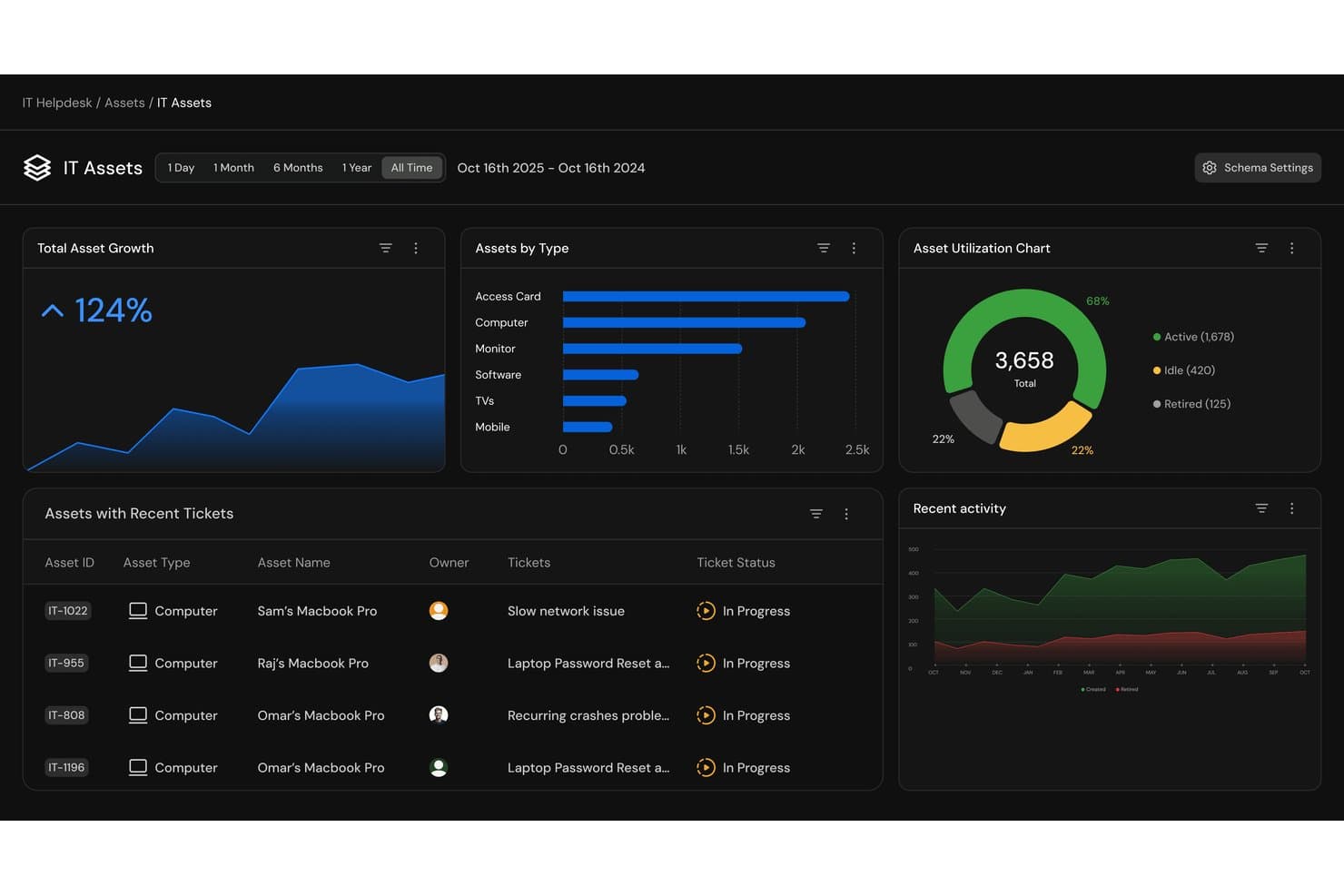
Serval ofrece un panel de activos de TI con métricas de crecimiento de activos, desglose por tipo de activo, gráficos de utilización y seguimiento de tickets recientes para la gestión de activos del help desk. Serval es una plataforma ITSM nativa de IA que combina la gestión de tickets de soporte, administración de activos, automatización de flujos de trabajo y gestión de accesos a través de agentes autónomos de IA que atienden y resuelven solicitudes de TI.
¿Para quién es mejor Serval?
Serval es ideal para equipos de TI de tamaño medio a grande en organizaciones técnicamente maduras que desean que la IA gestione de manera autónoma un alto volumen de solicitudes de soporte rutinarias.
Por qué elegí Serval
Serval se gana un lugar en mi lista corta por cómo maneja la automatización de forma diferente a cualquier otra herramienta que he revisado. En lugar de un creador de flujos de trabajo con arrastrar y soltar, puedo describir un proceso en lenguaje natural y Serval genera la automatización lista para producción. Lo que encuentro realmente útil es Serval Suggestions: mientras mi equipo cierra tickets manualmente, el sistema detecta patrones de resolución y propone flujos de trabajo completos que puedo publicar con un solo clic.
Características clave de Serval
- Ingesta y conciliación de activos: Recopila y fusiona automáticamente registros de activos desde sistemas MDM, HRIS, IdP y de compras.
- Gestión de código de flujos de trabajo personalizados: Almacena automatizaciones de flujos de trabajo como código auditable con control de versiones Git para mayor transparencia y recuperación.
- Segmentación de equipos: Organiza tickets, flujos de trabajo e integraciones por departamento, con controles de acceso detallados.
- Soporte multicanal: Permite a los equipos de TI recibir y gestionar solicitudes a través de Slack, Teams, correo electrónico y un portal web.
Integraciones de Serval
Serval ofrece integraciones nativas con Okta, Google Workspace, Microsoft Teams, Slack, Notion, Confluence, Jira, GitHub, ServiceNow y Salesforce. Hay una API disponible para integraciones personalizadas.
Pros and Cons
Pros:
- La IA resuelve tickets de manera autónoma sin intervención de técnicos
- Creación de flujos de trabajo en lenguaje natural sin programar
- Segmentación de equipos multidisciplinarios con controles de acceso detallados
Cons:
- La gestión de activos es menos profunda que en herramientas ITAM especializadas
- Producto nuevo con pocos datos de reseñas de terceros
Learn more about Serval: Ideal para la gestión de inventario de TI
- Prueba gratuita de 14 días
- Desde $9/asiento/mes (facturación anual)
Visit WebsiteCustomer Rating:4.6/5
monday service ayuda a los equipos de TI a rastrear activos y gestionar soporte con personalización sin código. monday service es una plataforma de servicios personalizable que ayuda a los equipos a gestionar y automatizar eficazmente sus operaciones y procesos de servicio. Su enfoque visual simplifica la gestión tanto de solicitudes de servicio como del inventario de TI.
Por qué elegí monday service: Los equipos pueden monitorear fácilmente el hardware, asignar tareas y realizar un seguimiento de fechas importantes de mantenimiento. Puedes organizar el equipo por tipo, rastrear números de serie y monitorizar el ciclo de vida de cada activo.
Los flujos de trabajo personalizables de la plataforma hacen sencillo crear un proceso de gestión de activos que se adapte a las necesidades específicas de tu equipo. Con automatizaciones, recibirás recordatorios cuando el mantenimiento esté próximo, y los paneles visuales mantienen a todos alineados y facilitan ver el estado de todo el equipamiento en tiempo real.
Funciones y integraciones destacadas:
Funciones incluyen flujos de trabajo personalizables sin código, centralización del seguimiento de activos de TI, paneles visuales para la gestión de hardware, automatizaciones para enviar recordatorios de mantenimiento, herramientas para rastrear números de serie y fechas de entrega, y herramientas de informes para obtener información sobre el uso de los activos.
Integraciones incluyen Slack, Zoom, Microsoft Teams, Google Drive, Dropbox, Jira, HubSpot, Salesforce, GitHub y Gmail.
Pros and Cons
Pros:
- Flujos de trabajo de activos personalizables
- Automatizaciones para el mantenimiento de activos
- Paneles visuales para el estado de activos
Cons:
- La configuración puede llevar tiempo
- Las automatizaciones pueden requerir ajustes
Learn more about monday service: Ideal para tareas de mantenimiento programadas
- Prueba gratuita disponible
- Desde $478/usuario/anualmente
Visit WebsiteCustomer Rating:4.5/5
Issuetrak consolida las solicitudes de soporte y ofrece un módulo independiente para gestión de activos. Issuetrak es un software de mesa de ayuda versátil diseñado para simplificar el seguimiento y la resolución de incidencias para empresas de diversos sectores. Ofrece un conjunto completo de herramientas para gestionar solicitudes de soporte al cliente, quejas e incidentes internos de manera eficiente.
Por qué elegí Issuetrak: La función de gestión de activos de Issuetrak te permite llevar un control de la información de hardware y software, asegurando que todos los activos estén contabilizados y actualizados. Además, el sistema permite programar tareas de mantenimiento, garantizando que los equipos se mantengan en las mejores condiciones.
Otra razón para considerar Issuetrak es su capacidad para automatizar la asignación de tickets mediante distribución rotativa. Esta característica asegura que los problemas entrantes se distribuyan de manera equitativa entre los miembros de tu equipo de soporte, evitando la sobrecarga individual y promoviendo tiempos de resolución eficientes. Al automatizar este proceso, tu equipo puede centrarse más en resolver incidencias que en gestionar la asignación de tareas.
Características destacadas & integraciones:
Características incluyen un Hub Centralizado de Incidencias que proporciona un lugar único para ver, gestionar y actualizar tickets fácilmente. La plataforma también ofrece flujos de tareas, lo que permite que tu equipo colabore en los casos y mantenga la consistencia en los procesos. Además, la base de conocimientos de Issuetrak ayuda a mantener la información importante accesible tanto para los usuarios como para los administradores.
Integraciones incluyen Microsoft 365, Google Analytics, Gmail, Salesforce, Power BI y miles más a través de Zapier. También puedes acceder a la API de Issuetrak para aún más conexiones.
Pros and Cons
Pros:
- Eficaz en la organización y gestión de tickets
- Opciones de despliegue en la nube y en instalaciones locales
- Sistema altamente personalizable
Cons:
- La gestión de activos es un complemento de pago
- Ciertas funciones pueden ser complejas de configurar
Learn more about Issuetrak: Ideal para grandes empresas que necesitan soluciones de TI integrales
- Demo gratuita disponible
- $100/usuario/mes
Visit WebsiteCustomer Rating:4.4/5
Una foto de la sección de detalles de un ticket creado en ServiceNow. ServiceNow ofrece una amplia gama de servicios de TI, lo que la convierte en una herramienta integral para grandes empresas. Su amplitud de funcionalidades cubre una infinidad de necesidades, asegurando su posición como solución líder para empresas que requieren servicios de TI completos.
Por qué elegí ServiceNow: ServiceNow surgió como un competidor destacado durante mi evaluación debido a su completo paquete de soluciones de TI. Elegí esta plataforma porque ofrece una gran variedad de servicios en un solo lugar, siendo especialmente útil para organizaciones grandes. Su amplia funcionalidad es lo que la distingue y la convierte en la 'Mejor para...' grandes empresas que necesitan un conjunto integral de soluciones de TI.
Características y integraciones destacadas:
ServiceNow destaca con sus funcionalidades de gestión de incidentes, gestión de problemas, gestión de cambios y lanzamientos, así como gestión de activos y costos. También ofrece impresionantes capacidades de IA que ayudan a automatizar tareas rutinarias. ServiceNow se integra a la perfección con muchas soluciones empresariales como Slack, Jira y Trello, lo que potencia aún más su eficacia.
Pros and Cons
Pros:
- Suite integral de soluciones de TI
- Capacidades avanzadas de IA para automatización
- Integraciones robustas con otras soluciones empresariales
Cons:
- El precio premium puede no ser adecuado para todos los presupuestos
- La interfaz puede ser complicada para los nuevos usuarios
- Requiere conocimientos técnicos para la personalización
Otro software de mesa de ayuda con gestión de activos
A continuación se presenta una lista de software adicional de mesa de ayuda con herramientas de gestión de activos que seleccioné, pero que no llegaron a estar entre los 10 mejores. Sin duda, vale la pena echarles un vistazo.
- 11InvGate Service ManagementMejor para flujos de trabajo de TI con función de arrastrar y soltar
- 12Jira Service ManagementIdeal para equipos de desarrollo ágil que buscan herramientas ITSM
- 13ConnectWise ManageMejor para servicios de TI que requieren una gestión empresarial robusta
- 14SysAidIdeal para integrar múltiples servicios ITSM en una sola plataforma
- 15Cherwell Service ManagementLa mejor opción para flujos de trabajo flexibles y personalizables
- 16Ivanti Service ManagementMejor para la gestión integral de activos de TI
- 17Spiceworks IT DesktopMejor para empresas preocupadas por el presupuesto que necesitan soporte de TI
- 18SolarWinds IT Service Desk SoftwareIdeal para la automatización de la gestión de incidentes
- 19HiverIdeal para comunicación omnicanal
- 20ManageEngine ServiceDesk PlusMejor para implementar análisis avanzados de TI
Reseñas relacionadas de software de mesa de ayuda con gestión de activos
Cómo evalúo el software de mesa de ayuda con gestión de activos
Evalúo estas herramientas en dos capas: la básica—cosas como una CMDB funcional, descubrimiento automatizado de activos y vinculación de tickets a activos—y los diferenciadores que distinguen a las plataformas más sólidas.
Funcionalidad principal (Requisitos esenciales para esta lista)
Cuando selecciono herramientas para mi lista, califico cada una en una escala del 0 (no ofrece la funcionalidad) al 5 (sobresale en esta área) para cada funcionalidad principal enumerada a continuación. Luego, convierto la puntuación total de la herramienta en un porcentaje. Cada herramienta debe alcanzar una puntuación mínima total del 65% para ser considerada para su inclusión.
- Sistema de tickets: Busco captación multicanal (correo, portal, chat), enrutamiento automatizado, temporizadores de SLA y gestión de colas para que los técnicos no deban clasificar manualmente cada solicitud.
- Repositorio de activos (CMDB): Una buena CMDB debe rastrear hardware, software y CI con estado de ciclo de vida, propiedad y mapeo de dependencias entre activos relacionados.
- Vinculación de tickets a activos: Verifico si un técnico puede acceder al historial completo de incidentes de un dispositivo directamente desde un ticket en vez de tener que buscarlo en una pantalla de inventario separada.
- Descubrimiento automatizado de activos: Aquí es importante el escaneo basado en red o agentes que mantiene tu inventario actualizado; las importaciones manuales de CSV no son suficientes para entornos en crecimiento.
- Seguimiento de licencias y contratos: Evalúo si la herramienta rastrea el conteo de licencias de software, contratos de proveedores, vencimientos de garantías y si alerta sobre problemas de cumplimiento antes de las fechas límite de renovación.
- Soporte de flujos de trabajo ITIL: Más allá del registro básico de incidentes, busco flujos de trabajo estructurados de gestión de cambios, problemas y solicitudes con cadenas de aprobación y rutas de escalamiento.
Una vez que tengo una lista de herramientas que cumplen con este criterio, considero qué diferencia a cada plataforma.
Factores diferenciadores (Qué distingue a los proveedores)
Así es como comparo y contrasto los diferentes proveedores:
Funciones destacadas
El control remoto incorporado es clave: los técnicos que pueden acceder al escritorio del usuario final directamente desde un ticket resuelven los problemas más rápido que aquellos que deben alternar entre herramientas separadas. También considero las capacidades de gestión de parches, ya que las plataformas que automatizan las actualizaciones del sistema operativo y de terceros reducen directamente el volumen de tickets que reciben. Vale la pena evaluar la derivación de tickets impulsada por IA, especialmente para equipos que reciben solicitudes repetitivas de restablecimiento de contraseñas o accesos que un chatbot puede manejar antes de que participe un técnico.
Más allá de las funciones
El ecosistema de integraciones es muy importante aquí. Tu herramienta de mesa de ayuda y gestión de activos debe sincronizarse con servicios de directorio como Active Directory u Okta para la provisión de usuarios, además de plataformas de gestión de endpoints como Intune o Jamf para datos de activos en tiempo real. También evalúo la postura de cumplimiento—las certificaciones SOC 2 Tipo II e ISO 27001 indican que un proveedor toma en serio la protección de datos, lo que importa cuando tu CMDB contiene registros sensibles de dispositivos y usuarios. El costo total de propiedad también merece atención, ya que algunos proveedores cobran extra por los agentes de descubrimiento o por registros de activos adicionales.
Cómo elegir un software de mesa de ayuda con gestión de activos
Es fácil perderse entre largas listas de funciones y estructuras de precios complejas. Para ayudarle a mantenerse enfocado mientras avanza en su proceso único de selección de software, aquí tiene una lista de factores que debe tener en cuenta:
| Factor | Qué debe considerar |
|---|---|
| FactorEscalabilidad | Qué debe considerar¿Puede la herramienta crecer junto con su empresa? Compruebe si admite un aumento de usuarios y datos sin que disminuya el rendimiento. Considere la expansión futura y cómo gestionará la herramienta una carga mayor. |
| FactorIntegraciones | Qué debe considerar¿Es compatible con sus sistemas actuales? Busque integraciones nativas con el software que ya utiliza. Evite las herramientas que requieren soluciones alternativas complejas para conectarse con su conjunto tecnológico. |
| FactorPersonalización | Qué debe considerar¿Puede adaptar la herramienta a sus flujos de trabajo? Asegúrese de que permita realizar ajustes para adaptarse a sus procesos sin necesidad de una programación extensa. La flexibilidad es clave para las necesidades empresariales particulares. |
| FactorFacilidad de uso | Qué debe considerar¿Es intuitiva la interfaz? Compruebe que tenga un diseño sencillo que los usuarios nuevos puedan aprender rápidamente. Evite las herramientas con una navegación excesivamente compleja que ralentice las tareas diarias. |
| FactorImplementación e incorporación | Qué debe considerar¿Con qué rapidez puede empezar su equipo? Busque herramientas que ofrezcan guías claras de incorporación, recursos de capacitación o soporte especializado para ayudarle a ponerse en marcha rápidamente. Al comparar herramientas como NinjaOne vs. Atera, tenga en cuenta la experiencia y los flujos de trabajo preferidos de su equipo. |
| FactorCoste | Qué debe considerar¿Está dentro de su presupuesto? Compare los planes de precios y esté atento a las tarifas ocultas. Considere el coste total de propiedad, incluidos los posibles costes futuros a medida que evolucionen sus necesidades. |
| FactorMedidas de seguridad | Qué debe considerar¿Están protegidos sus datos y activos? Compruebe los estándares de cifrado, las actualizaciones de seguridad periódicas y el cumplimiento de las normativas pertinentes. Asegúrese de que cumpla las políticas de seguridad de su organización. |
¿Qué es un software de mesa de ayuda con gestión de activos?
El software de mesa de ayuda con gestión de activos es una herramienta que combina la gestión de tickets y el seguimiento de activos para mejorar la prestación de servicios de TI. Los profesionales de TI, los equipos de soporte y los gerentes de operaciones suelen utilizar estas herramientas para gestionar de forma eficiente las consultas de los clientes y los activos de la empresa. Las funciones de gestión de tickets, seguimiento de activos y generación de informes de incidentes ayudan a organizar los flujos de trabajo y mantener la calidad del servicio. En general, estas herramientas y otros software de gestión de activos fijos mejoran la eficiencia y la gestión de recursos en las organizaciones.
Características
Al seleccionar un software de mesa de ayuda con gestión de activos, presta atención a las siguientes características clave:
- Gestión de tickets: Organiza y prioriza las consultas de los clientes para garantizar respuestas oportunas y eficientes.
- Seguimiento de activos: Supervisa y gestiona los activos de la empresa durante todo su ciclo de vida para mantener la responsabilidad y la eficiencia.
- Informes de incidentes: Registra y realiza un seguimiento de los incidentes para ayudar a los equipos a analizar patrones y prevenir problemas futuros.
- Flujos de trabajo personalizables: Permite a los equipos adaptar los procesos para satisfacer necesidades empresariales específicas sin necesidad de una programación extensa.
- Soporte multicanal: Permite la comunicación con los usuarios a través de diversas plataformas, mejorando la accesibilidad y la experiencia del usuario.
- Portal de autoservicio: Permite a los usuarios encontrar soluciones de forma independiente, reduciendo la carga de trabajo de los equipos de soporte.
- Herramientas de análisis: Proporciona información sobre el rendimiento y las tendencias del servicio, lo que facilita la toma de decisiones basada en datos.
- Capacidades de integración: Se conecta con los sistemas existentes para garantizar un flujo de información fluido entre plataformas.
- Medidas de seguridad: Protege los datos confidenciales mediante el cifrado y el cumplimiento de las normativas pertinentes.
- Facturación automatizada: Agiliza las operaciones financieras al garantizar una facturación y un seguimiento de los ingresos precisos.
Beneficios
La implementación de un software de mesa de ayuda con gestión de activos ofrece varios beneficios para tu equipo y tu empresa. Estos son algunos de los que puedes esperar:
- Mayor eficiencia: Automatiza tareas rutinarias como la gestión de tickets y el seguimiento de activos, lo que permite a tu equipo centrarse en las prioridades estratégicas.
- Mejor toma de decisiones: Proporciona herramientas de análisis que ofrecen información sobre las tendencias de rendimiento y te ayudan a tomar decisiones basadas en datos.
- Mejor gestión de recursos: Realiza un seguimiento de los activos durante todo su ciclo de vida, garantizando una utilización óptima y reduciendo el desperdicio.
- Mayor satisfacción de los usuarios: Ofrece un portal de autoservicio para que los usuarios resuelvan problemas de forma independiente, lo que conduce a una resolución más rápida de los problemas.
- Ahorro de costes: Reduce los costes operativos al automatizar los procesos de facturación y emisión de facturas, garantizando precisión y eficiencia.
- Escalabilidad: Apoya a las empresas en crecimiento al admitir un número cada vez mayor de usuarios y datos sin sacrificar el rendimiento.
- Mayor seguridad: Protege la información confidencial mediante medidas de seguridad y el cumplimiento de las normativas, garantizando la integridad de los datos.
Costes y precios
Seleccionar un software de mesa de ayuda con gestión de activos requiere comprender los diversos modelos de precios y planes disponibles. Los costes varían según las características, el tamaño del equipo, los complementos y otros factores. La tabla siguiente resume los planes habituales, sus precios medios y las características que suelen incluir las soluciones de software de mesa de ayuda con gestión de activos:
Tabla comparativa de planes de software de mesa de ayuda con gestión de activos
| Tipo de plan | Precio medio | Características habituales |
|---|---|---|
| Tipo de planPlan gratuito | Precio medio$0 | Características habitualesGestión básica de tickets, seguimiento limitado de activos y soporte de la comunidad. |
| Tipo de planPlan personal | Precio medio$5-$25/usuario/mes | Características habitualesGestión de tickets, seguimiento básico de activos, soporte por correo electrónico y portal de autoservicio. |
| Tipo de planPlan empresarial | Precio medio$30-$60/usuario/mes | Características habitualesGestión avanzada de activos, soporte multicanal, herramientas de generación de informes y capacidades de integración. |
| Tipo de planPlan corporativo | Precio medio$70-$120/usuario/mes | Características habitualesOpciones completas de personalización, análisis avanzados, gestión de cuentas especializada y funciones de seguridad mejoradas. |
Preguntas frecuentes sobre el software de mesa de ayuda con gestión de activos
¿Qué diferencia al software de mesa de ayuda con gestión de activos de una herramienta de mesa de ayuda normal?
Una mesa de ayuda normal se centra principalmente en gestionar tickets de servicio. Al combinarla con la gestión de activos, el sistema también rastrea los activos físicos y digitales, vinculando cada ticket con el equipo o software involucrado para ofrecer un mejor contexto y lograr resoluciones más rápidas.
¿Puede el software de mesa de ayuda rastrear activos que no sean de TI?
Sí. Aunque originalmente se diseñaron para activos de TI, como computadoras portátiles o servidores, muchas plataformas ahora permiten rastrear equipos de oficina, muebles e incluso licencias de software, lo que proporciona a los equipos una visibilidad completa en todos los departamentos.
¿Cómo mejora el seguimiento de activos la resolución de problemas?
Al conectar los tickets con activos específicos, los técnicos pueden consultar el historial completo de un activo, incluidos problemas anteriores o registros de mantenimiento. Esto permite identificar problemas recurrentes de forma más rápida y precisa.
¿Qué tipos de organizaciones utilizan software de mesa de ayuda con gestión de activos?
Se utiliza en diversos sectores, desde TI y educación hasta atención médica y finanzas. Cualquier organización que gestione equipos o herramientas digitales junto con la asistencia a los usuarios puede beneficiarse de esta solución.
¿Cómo encaja la automatización en las herramientas de mesa de ayuda y gestión de activos?
La automatización ayuda a dirigir los tickets, actualizar los registros de activos y activar recordatorios de mantenimiento. Reduce el trabajo manual repetitivo y garantiza que los datos se mantengan precisos en todos los sistemas.
¿Son mejores los sistemas de mesa de ayuda basados en la nube que los locales?
Los sistemas basados en la nube son más fáciles de acceder y actualizar, por lo que son ideales para equipos remotos o híbridos. Sin embargo, las configuraciones locales siguen siendo útiles para las empresas que necesitan un control estricto sobre el almacenamiento de datos y el cumplimiento normativo.
Qué sigue:
Si estás investigando software de mesa de ayuda con gestión de activos, conecta con un asesor de SoftwareSelect para recibir recomendaciones gratuitas.
Rellenas un formulario y tienes una breve conversación en la que profundizan en los detalles de tus necesidades. Después, recibirás una lista reducida de opciones de software para revisar. También te apoyarán durante todo el proceso de compra, incluidas las negociaciones de precios.