

10 Best ServiceNow Competitor Tools for ITSM in 2026

Best ServiceNow Competitors Shortlist


In the world of IT Service Management, ServiceNow has made a name for itself with its powerful dashboards and real-time data tracking capabilities. As someone who has navigated the vast sea of ITSM tools, I can tell you that ServiceNow excels at streamlining business processes and offering solutions tailored to organizations from startups to giants like IBM. ServiceNow, in essence, is a platform that automates IT business processes, providing a means for departments within a company to enhance their effectiveness.
I understand that every business has unique needs and the one-size-fits-all solution isn't always the best fit. Perhaps you're seeking a tool with more emphasis on mobile app functionality, more customizable templates, or better alignment with software development practices. This guide will walk you through the best alternatives to ServiceNow, focusing on their strengths, so you can choose the one that perfectly aligns with your business needs.
What Is ServiceNow?
ServiceNow is a digital workflow management platform that helps you manage IT services, operations, and business processes in one place. It’s used by IT teams, HR departments, and enterprise ops teams to automate requests, track incidents, and improve service delivery. Ticketing tools, self-service portals, and workflow automation help with handling issues, requests, and approvals more efficiently. Overall, ServiceNow helps your team stay organized and deliver faster support across the business.
Why Trust Our Software Recommendations
Our team has been testing and reviewing software since 2012. As tech leaders ourselves, we know how difficult—and important—it is to choose the right software.
For this guide, we evaluated tools using hands-on testing and independent research, scoring tools using our selection criteria.
Our reviews reflect our human editorial judgment, not a sales pitch.
Expert reviewers:
ServiceNow Competitors Comparison Table
This comparison table summarizes pricing details for my top ServiceNow competitor selections:
| Tool | Best For | Trial Info | Price | ||
|---|---|---|---|---|---|
| 1 | Best for managing multiple endpoints | 30-day free trial + free demo available | From $129/technician/month (billed annually) | Website | |
| 2 | Best for intuitive incident and problem management | 14-day free trial | From $19/user/month (billed annually) | Website | |
| 3 | Best for robust ITIL readiness and support | Free plan + 30-day free trial available | From $13/technician/month (billed annually) | Website | |
| 4 | Best for automation and AI capabilities | 30-day free trial | From $1,499/year (billed annually) | Website | |
| 5 | Best for seamless integration with Atlassian suite | Free plan + 14-day free trial available | From $25/user/month | Website | |
| 6 | Best for enriched IT performance analytics | 14-day free trial + free demo available | Pricing upon request | Website | |
| 7 | Best for excellent customer service interactions | 14-day free trial + free demo available | From $19/agent/month (billed annually) | Website | |
| 8 | Best for innovative codeless configuration | Not available | From $150/user/month | Website | |
| 9 | Best for comprehensive IT asset management | Not available | $19/user/month (billed annually) | Website | |
| 10 | Best for advanced AI-powered automation | Free demo available | Pricing upon request | Website |


Best ServiceNow Competitors Reviews
Below are my detailed summaries of the best ServiceNow competitors that made it onto my shortlist. My reviews offer a detailed look at the key features, pros & cons, integrations, and ideal use cases of each tool to help you find the best one for you.

Atera
Best for managing multiple endpoints

For IT teams and managed service providers looking to streamline operations, Atera offers an all-in-one IT management platform that integrates remote monitoring, patch management, and automation. This tool is ideal for those seeking an alternative to ServiceNow, particularly for managing multiple endpoints efficiently.
Why I Picked Atera
I appreciate Atera's ability to integrate remote monitoring and management with patch management and operational automation, which is crucial for teams managing multiple IT endpoints. Its ticket management system and 2-factor authentication are notable features that enhance security and streamline IT operations. These functionalities cater to teams looking to automate routine tasks and improve overall IT efficiency, positioning Atera as a great alternative to ServiceNow, especially for those who prioritize ease of use and comprehensive management capabilities.
Atera Key Features
In addition to its core functionalities, I also found several other features that enhance Atera's value:
- Help Desk Services: Provides a centralized system for managing customer inquiries and IT support tickets.
- AI-Driven Automation: Automates routine IT tasks, freeing up time for IT professionals to focus on more strategic initiatives.
- Self-service portal & knowledge base: Gives your users a space to submit tickets, track status and search articles, reducing repetitive agent load.
- Comprehensive IT Asset Management: Allows teams to track and manage IT assets across distributed environments effectively.
Atera Integrations
Integrations include Microsoft Teams, Slack, WhatsApp Notifications, monday.com, Okta, Jira Software Cloud, Jira Service Management, Microsoft Entra ID, and Bitdefender.
Pros and Cons
Pros:
- Includes AI-driven automation for proactive issue resolution.
- Integrates multiple IT management tools into one platform.
- Offers comprehensive remote monitoring and management features.
Cons:
- Reporting features may incur additional costs for advanced needs.
- Less granular control for highly complex custom workflows or integrations.
New Product Updates from Atera

Atera Adds Webhook Triggers for Technician Assignment Changes
Atera ticket automation rules now support a webhook trigger when a ticket’s technician assignment changes, expanding automation beyond creation, status updates, and closure/resolution events. For more information, visit Atera's official site.

Best for intuitive incident and problem management
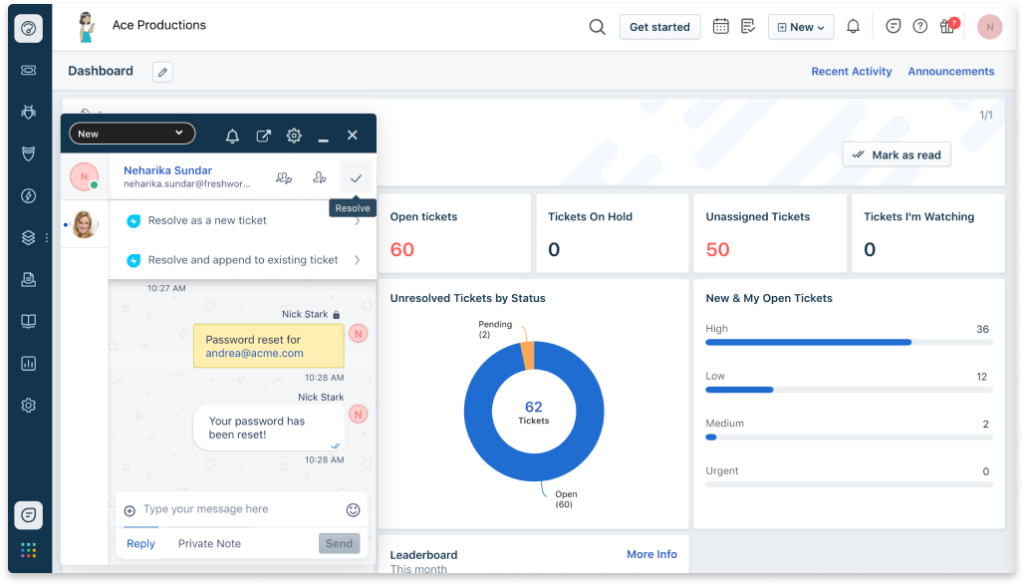
Freshservice, developed by Freshworks, provides a range of IT service management capabilities. What sets it apart is its user-friendly interface and advanced incident and problem management capabilities, justifying its place as the best tool for intuitive incident and problem management.
Pros and Cons
Pros:
- Strong integrations with other commonly used tools
- Excellent incident and problem management capabilities
- Easy-to-use interface makes it ideal for beginners
Cons:
- Some users report the need for better reporting features
- Advanced customization can be challenging
- Some features are only available in higher-priced plans
New Product Updates from Freshservice
 Experience)
Freshservice Introduces a Reimagined IT Asset Management (ITAM) Experience
Freshservice introduces a reimagined IT Asset Management (ITAM) experience with continuous infrastructure discovery, dependency mapping, IPAM, and Software License Management. This update helps teams improve asset visibility and manage connected IT environments more effectively. For more information, visit Freshservice’s official site.

Best for robust ITIL readiness and support

ServiceDesk Plus is an IT service management software designed to help businesses manage their IT infrastructure and services with greater efficiency. With its strong alignment with ITIL principles, it's a solid choice for organizations striving for robust ITIL readiness and support.
Pros and Cons
Pros:
- Wide range of integrations
- Comprehensive IT service management features
- Strong ITIL readiness and support
Cons:
- Fewer non-IT service workflows compared to ServiceNow
- Advanced features come at a higher cost
- User interface might require a learning curve

Best for automation and AI capabilities

InvGate Service Management offers a flexible IT service management solution for organizations looking for a practical alternative to ServiceNow. It suits teams that want to improve workflow efficiency using pre-built workflow templates that reduce setup time and standardize common IT processes. With its no-code design and built-in automation, InvGate helps you manage requests and operations without heavy customization or complex configuration.
Why I Picked InvGate Service Management
I picked InvGate Service Management for its pre-built workflow templates, which make it easier to set up and run IT service processes without starting from scratch. These templates help your team standardize common workflows while the visual editor allows adjustments without coding. On top of that, AI-powered ticket summaries and the virtual service agent reduce manual effort, making day-to-day request handling more manageable compared to heavier ServiceNow-style setups.
InvGate Service Management Key Features
In addition to pre-built workflow templates, InvGate Service Management offers:
- Customizable Dashboards: Monitor performance in real-time and make informed decisions with data-driven insights.
- Self-Service Options: Empower users to resolve common issues independently, easing the burden on IT support.
- Expert Support for Onboarding: Ensures smooth integration into your existing IT infrastructure, minimizing downtime.
InvGate Service Management Integrations
Native integrations include Microsoft Intune, Microsoft Teams, FileWave, ServiceNow CMDB, and Google Workspace. InvGate also supports custom integrations through its REST API, providing flexibility to connect with a wide range of tools.
Pros and Cons
Pros:
- Gamification elements boost user engagement and participation
- Integration with IT Asset Management supports comprehensive oversight
- Customizable SLA configurations cater to specific organizational needs
Cons:
- Imports and external app connections need extra configuration
- Workflow configuration requires upfront planning
New Product Updates from InvGate Service Management
InvGate Adds KB Article Creation and PDF Indexing for AI Search
InvGate Service Management adds KB article creation shortcuts and AI indexing for PDF attachments in KB articles. The updates help teams improve knowledge coverage and make more support content searchable through AI features. For more information, visit InvGate Service Management’s official site.
 .
.
Best for seamless integration with Atlassian suite
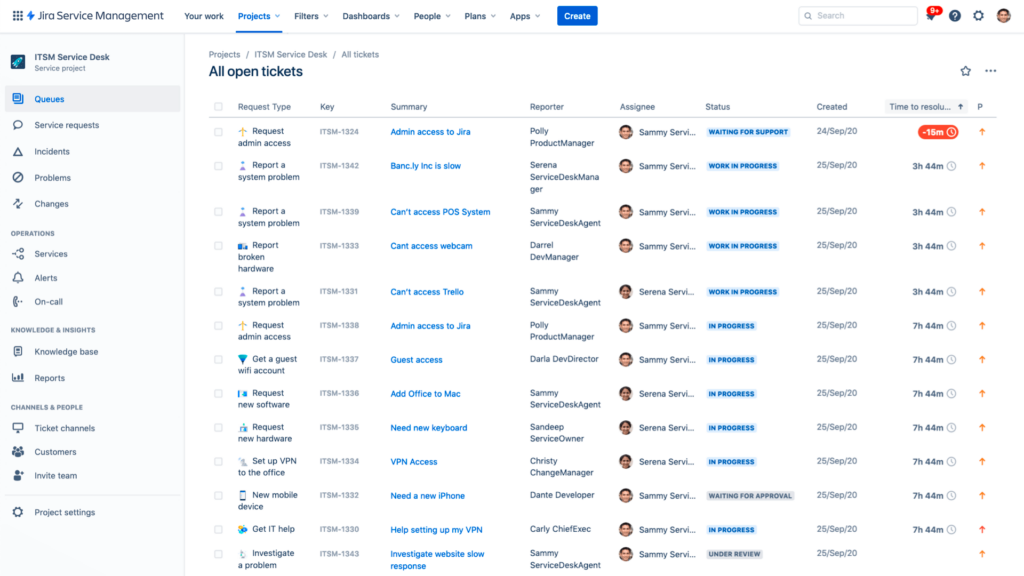
Jira Service Management is a robust IT service management tool and project management software that forms part of the larger Atlassian ecosystem. Its fluid integration with other Atlassian products positions it as an excellent choice for businesses already utilizing the Atlassian suite.
Pros and Cons
Pros:
- Access to the larger Atlassian ecosystem
- Robust set of IT service management features
- Seamless integration with other Atlassian tools
Cons:
- Reporting functionality could be more user-friendly
- Customization can be complex
- Learning curve for first-time users

SysAid
Best for enriched IT performance analytics

SysAid is an IT service management solution that offers an all-in-one service desk for organizations. With an emphasis on robust analytics, it indeed warrants the tag of being 'best for' enriched IT performance analytics.
Pros and Cons
Pros:
- Comprehensive service management features
- Integrates with several leading platforms
- Extensive analytical capabilities
Cons:
- Customer support could be improved
- The user interface could be more intuitive
- Detailed pricing information is not readily available


Freshdesk is a feature-rich customer support software solution designed to streamline customer service interactions and make life easier for support teams. This tool brings together all customer conversations into a centralized interface, ensuring nothing falls through the cracks.
Pros and Cons
Pros:
- A wide range of integrations
- Comprehensive ticketing system
- Extensive customer service-focused features
Cons:
- Limited ITSM capabilities compared to ServiceNow
- Customization may require technical expertise
- Pricing can escalate with advanced features


Cherwell Service Management is an IT service management tool that leverages automation to deliver efficient IT services. Its innovative approach to codeless configuration makes it an optimal choice for businesses seeking simplicity and adaptability.
Pros and Cons
Pros:
- Comprehensive IT service management features
- Wide range of integrations
- Innovative codeless configuration feature
Cons:
- Some users have noted occasional sluggishness in system performance
- The user interface could be more modern and intuitive
- Higher starting price compared to other tools


Service Desk by SolarWinds is an IT service management solution built for businesses to provide faster and more efficient support. Recognized for its comprehensive IT asset management capabilities, this tool facilitates tracking and managing assets throughout their lifecycle.
Pros and Cons
Pros:
- Wide range of integrations
- Detailed lifecycle tracking
- Comprehensive IT asset management
Cons:
- User interface could be more intuitive
- Advanced analytics require higher-tier plans
- May require initial training for full utilization


Ivanti Neurons for ITSM is an efficient IT service management platform that heavily leans on AI to streamline its automation capabilities. Given its potent AI-driven feature set, it offers a strong rationale for being the 'best for' advanced AI-powered automation.
Pros and Cons
Pros:
- Provides predictive analytics for better decision-making
- Smooth integrations with major enterprise software vendors
- Advanced AI-powered automation capabilities
Cons:
- Customization may require technical knowledge
- The user interface might seem complex for some users
- Pricing might be a bit steep for smaller businesses
Other ServiceNow Competitors
Here are some additional ServiceNow competitors that didn’t make it onto my shortlist, but are still worth checking out:
- Micro Focus Service Management Automation X (SMAX)
For large-scale service management and automation
- BMC Helix
For cognitive service management capabilities
- IFS Assist
For transformative digital service delivery
- NinjaOne
For seamless network management and monitoring
- Agiloft
Good for customizable and scalable service management
- TOPdesk
Good for fostering seamless collaboration in service delivery
- Deskera
Good for integrated business management with service support
- ITarian
Good for unified IT management and security
- Ivanti
Good for unifying IT operations and security data
- Alloy Software
Good for IT asset management and service desk operations
- Serviceaide
Good for AI-powered service management
- EASYVISTA
Good for mobile-first service management
- Hornbill
Good for streamlined IT service management with automated workflows
- Alemba
Good for comprehensive asset management
- Provance
Good for IT service management in Microsoft-centric organization


Other Software Reviews
- Cloud Development Platforms
- IaaS Providers
- Cloud Platforms as a Service
- Infrastructure As Code Tools
- Database Monitoring Tools
How I Evaluate ServiceNow Competitors
I split my evaluation into two layers: core baseline—ITIL workflows, CMDB, self-service—and the differentiators like AIOps or ESM that reveal if a tool genuinely rivals ServiceNow.
Core Functionality (Table Stakes For This List)
When I'm selecting tools for my list, I rank each one on a scale from 0 (does not offer the functionality) to 5 (excels in this area) for each core functionality listed below. Then, I calculate the tool's total score into a percentage. Each tool needs to achieve a minimum total score of 75% to be considered for inclusion.
- IT Service Management: I evaluate whether a tool covers incident, problem, change, and request management with ITIL alignment—things like CAB workflows and SLA tracking that mirror how IT teams actually run operations.
- Workflow Automation: Each platform's workflow builder matters here. I look for visual, no-code/low-code automation that handles real scenarios like employee onboarding or multi-stage change approvals across departments.
- Self-Service Portal: A good portal should include a service catalog and integrated knowledge base. I check whether end users can log requests, track status, and find answers before a ticket ever reaches an agent.
- Asset & Configuration Management: I look at how each tool handles ITAM and its CMDB—specifically, whether it maps CI relationships and dependencies so your team can trace the impact of a failed server across connected services.
- AI & Virtual Agent: This covers AI-driven ticket routing, virtual agents with NLP, and predictive capabilities. Tools like Freshservice and BMC Helix approach this differently, so I evaluate the depth and practical utility of each.
- Integrations & Extensibility: I check for open APIs and prebuilt connectors with the tools IT teams rely on daily—monitoring platforms, DevOps toolchains like Jenkins or GitHub, and collaboration apps like Slack and Microsoft Teams.
Once I have a list of tools that meet this criteria, I consider what sets each platform apart.
Differentiating Factors (What Sets Vendors Apart)
Here's how I compare and contrast different vendors:
Standout Features
Enterprise service management is a big differentiator—I look at whether a platform extends ITSM workflows to HR, facilities, and finance so your teams share one request system instead of managing separate tools. AIOps and event correlation also matter. Platforms like BMC Helix and Ivanti take different approaches to ingesting monitoring data, but I evaluate whether they actually reduce alert noise and surface root causes. I also consider low-code app builders that let you create custom apps beyond IT without heavy developer involvement.
Beyond Features
Total cost of ownership is where I spend the most time. ServiceNow's licensing complexity is often the reason teams start looking elsewhere, so I evaluate whether a competitor's pricing is transparent and predictable as you scale agents and assets. Implementation speed matters just as much—some platforms like Freshservice and Jira Service Management offer prebuilt ITIL templates that cut deployment from months to weeks. I also check security certifications like SOC 2, ISO 27001, and FedRAMP, especially for teams in regulated industries where missing credentials are a dealbreaker.
Why Look for a ServiceNow Competitor?
ServiceNow stands as a powerful cloud-based IT support platform that helps businesses manage digital workflows for enterprise operations. Its solutions, covering IT service management (ITSM), IT operations management (ITOM), and IT business management (ITBM), streamline processes and enhance productivity. It primarily targets large organizations and enterprise-level customers who require complex workflow and service management.
Despite its robust features, the need for alternatives to ServiceNow may arise due to various reasons. These could include cost considerations, as ServiceNow is often perceived as expensive, especially for small to mid-sized businesses. It contributes to the enhancement of customer experience and customer relationships by effectively addressing service issues and incidents.
ServiceNow Key Features
Here are some of the key features of ServiceNow, to help you contrast and compare what alternative solutions offer:
- Reporting and dashboards: Gives you real-time data on ticket volume, resolution time, and team performance.
- Incident management: Helps your team track, prioritize, and resolve IT issues faster.
- Change management: Lets you plan, test, and document system changes with less risk.
- Self-service portal: Gives users an easy way to submit tickets and find help articles.
- Service catalog: Lets you offer standard IT services through pre-defined request forms.
- Asset management: Helps you track hardware, software, and related IT assets in one place.
- Knowledge base: Lets your team document and share solutions to common problems.
- CMDB (Configuration Management Database): Maps out relationships between IT assets to support troubleshooting.
- Workflow automation: Automates repetitive tasks like approvals and ticket routing.
- Mobile access: Lets you view and manage tickets from a phone or tablet.
Summary
In summary, the field of ServiceNow and Jira service management alternatives is diverse, each providing a distinct set of features, strengths, and pricing structures. Whether your organization values large-scale service management, cognitive service capabilities, or intuitive incident and problem management, there's a ServiceNow alternative that will meet your needs.
Key Takeaways
- Understanding your organization's specific needs and use cases is crucial in selecting the right ITSM tool. Features that are beneficial for one company might be less important to another. Make sure to clearly identify what you need from a ServiceNow competitor before making a decision.
- When it comes to pricing, there is a wide range of options among ServiceNow competitors. Some offer more affordable solutions, while others provide premium services at a higher price point. Be sure to consider the total cost, including potential setup fees and the cost of additional seats as your company grows.
- Lastly, don't underestimate the value of usability and customer support. A tool with an intuitive interface and responsive customer service can save your team valuable time and help avoid potential frustrations. This is especially true for complex ITSM tools, where effective onboarding and ongoing support are key to maximizing value.
What Do You Think?
Of course, the ITSM field is rapidly evolving, and new tools and features are constantly emerging. If there's a ServiceNow competitor or a Jira service management alternatives that you believe deserves to be on this list, please don't hesitate to share your suggestion. I always appreciate my readers' insights and experiences, and your contribution could help other organizations find the right tool for their needs. Thank you for your time and input!