

Mantener la infraestructura en la nube funcionando sin problemas no consiste solo en garantizar el tiempo de actividad: se trata de detectar los problemas de rendimiento antes de que afecten a los usuarios, garantizar la escalabilidad sin derroches y mantener la visibilidad en entornos complejos. Si alguna vez has tenido dificultades con ralentizaciones inexplicables, interrupciones inesperadas o falta de información en tiempo real, sabes lo difícil que puede ser anticiparse a los problemas sin las herramientas de monitorización adecuadas.
Las herramientas de monitorización de infraestructura en la nube proporcionan una forma centralizada de realizar un seguimiento del rendimiento de las aplicaciones, la actividad de la red y el uso de los recursos en entornos de nube. A lo largo de los años, he probado una amplia variedad de estas herramientas y he evaluado su capacidad para detectar problemas, reducir los tiempos de respuesta e integrarse con los flujos de trabajo existentes. En esta guía, analizaré las mejores opciones disponibles para ayudarte a encontrar una solución que se adapte a tus necesidades de monitorización en la nube.
Por qué confiar en nuestras recomendaciones de software
6,700+
Reviews
20
Industry experts
16+
Evaluation factors
14
Years
Nuestro equipo lleva probando y evaluando software desde 2012. Como líderes tecnológicos, sabemos lo difícil —y lo importante— que es elegir el software adecuado.
Para esta guía, evaluamos las herramientas mediante pruebas prácticas e investigación independiente, puntuando las herramientas según nuestros criterios de selección.
Nuestras reseñas reflejan nuestro criterio editorial humano, no un discurso de ventas.
Revisores expertos:
- Paulo Gardini MiguelDirector técnico
 Tim FisherVP de IA
 Gabriel RosasTech Lead y arquitecto de software
 Christhian GruhnTech Lead y arquitecto de plataforma

Resumen de las mejores herramientas de monitorización de infraestructura en la nube
| Tool | Best For | Trial Info | Price | ||
|---|---|---|---|---|---|
| 1 | Ideal para paneles personalizados multinivel | Prueba gratuita de 30 días | Desde $200/mes (facturación anual) | Website | |
| 2 | Mejor para pruebas sintéticas de transacciones | No | Precios bajo solicitud | Website | |
| 3 | Mejor para el monitoreo del rendimiento de aplicaciones | No | $945 anuales para hasta 25 servidores o aplicaciones | Website | |
| 4 | Ideal para el monitoreo de infraestructuras híbridas de TI | No | Precios a consultar | Website | |
| 5 | Ideal para métricas de salud detalladas | Sí | $99/month | Website | |
| 6 | Ideal para el enfoque de Infraestructura como Código (IaC) | Sí | $20/user/month | Website | |
| 7 | Mejor para el entorno de IBM Cloud | No | $10 por cada millón de métricas ingeridas/mes | Website | |
| 8 | Bueno para datos unificados de aplicaciones e infraestructura | Prueba gratuita de 30 días disponible | Desde $7/nodo/mes | Website | |
| 9 | Mejor para monitoreo en la nube de código abierto | No | Gratis, soporte de pago desde $1000/mes | Website | |
| 10 | Mejor para observabilidad en tiempo real | No | $60 por host al mes | Website |


Reseñas de las mejores herramientas de monitorización de infraestructura en la nube
A continuación se muestran mis resúmenes detallados de las mejores herramientas de monitorización de infraestructura en la nube que llegaron a mi selección. Mis reseñas ofrecen un análisis detallado de las funciones principales, las ventajas y desventajas, las integraciones y los casos de uso ideales de cada herramienta para ayudarte a encontrar la mejor opción para ti.
 Ideal para paneles personalizados multinivel
- Prueba gratuita de 30 días
- Desde $200/mes (facturación anual)
Visit WebsiteCustomer Rating:4.6/5This rating combines scores from multiple user review sites to reflect overall customer sentiment about the product.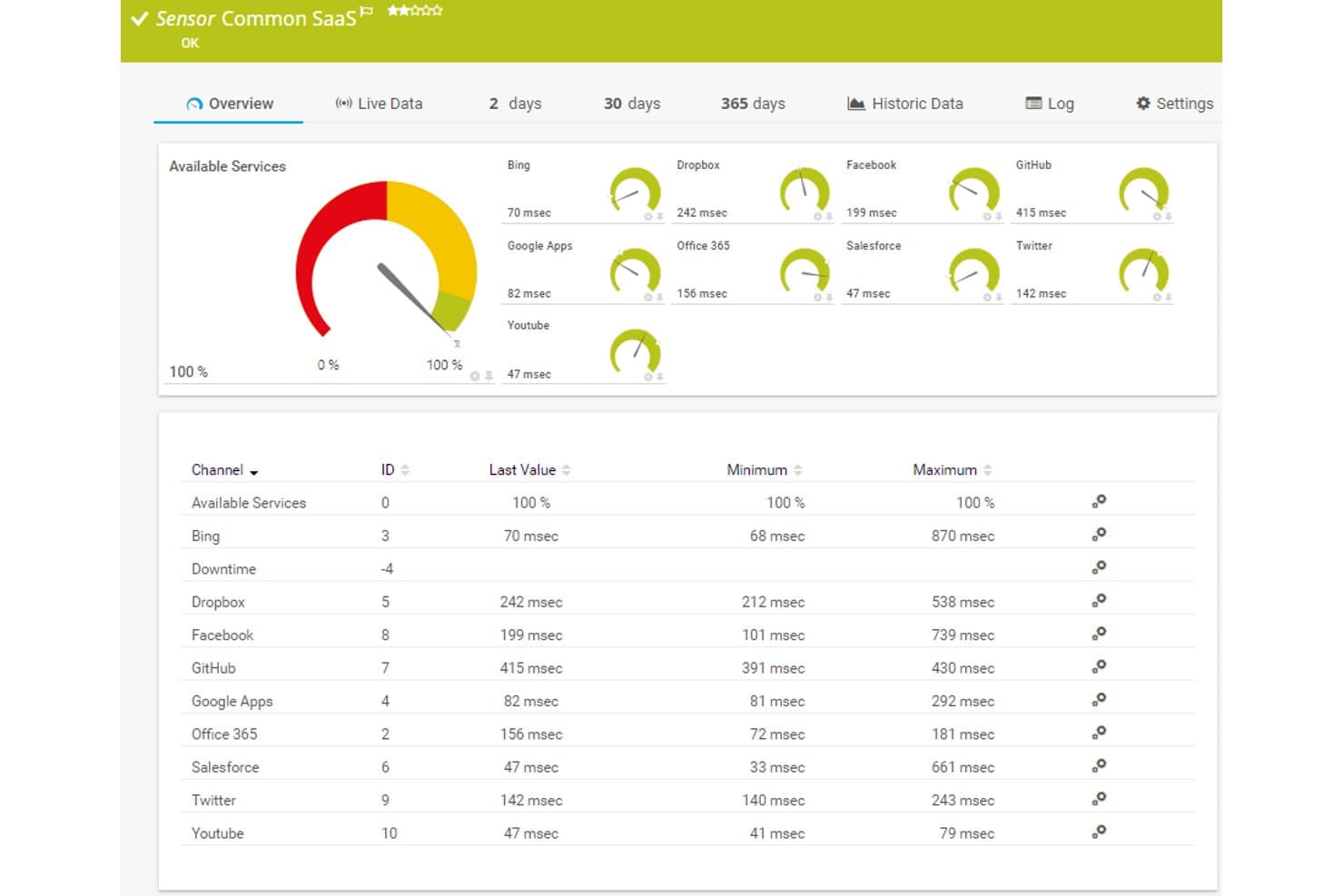
Paessler PRTG ofrece un panel de sensor SaaS común que muestra tiempos de respuesta y disponibilidad en tiempo real para servicios en la nube como Dropbox, Office 365, Salesforce y GitHub. Paessler PRTG es una plataforma de monitoreo de infraestructura que rastrea dispositivos de red, servidores, servicios en la nube y aplicaciones utilizando un enfoque basado en sensores, tanto en entornos locales como en la nube alojada.
¿Para quién es mejor Paessler PRTG?
Equipos de operaciones de TI en organizaciones medianas que gestionan entornos híbridos y necesitan visibilidad centralizada sobre la infraestructura de red, servidores y nube.
Por qué elegí Paessler PRTG
Elegí Paessler PRTG como uno de los mejores porque su creador de paneles realmente destaca frente a la mayoría de las herramientas de monitoreo. El diseñador de mapas de arrastrar y soltar me da acceso a más de 300 widgets, desde gráficos de tráfico hasta iconos de estado de dispositivos, y puedo superponer elementos HTML personalizados para crear vistas multinivel que reflejan exactamente cómo está organizada mi infraestructura. También utilizo la función de rotación de mapas para alternar entre diferentes perspectivas de infraestructura en una sola pantalla.
Características clave de Paessler PRTG
- Monitoreo basado en sensores: Permite rastrear métricas específicas de dispositivos, aplicaciones y servicios en la nube.
- Soporte para probe alojado en AWS: Permite monitorear entornos globales sin mantener infraestructura local.
- Probe multiplataforma: Se despliega en Windows, Linux, Raspberry Pi o NAS para una cobertura de agente flexible.
- Informes programados: Genera y envía por correo electrónico informes automatizados de datos de rendimiento, tendencias y métricas de SLA.
Integraciones de Paessler PRTG
Paessler PRTG ofrece integraciones nativas con AWS, Microsoft Azure, Google Cloud Platform, VMware vSphere y Microsoft 365. Hay una API disponible para integraciones personalizadas, y es compatible con webhooks para alertas en canales como Slack y Microsoft Teams.
Pros and Cons
Pros:
- Recopilación de métricas altamente granular basada en sensores
- Soporta entornos híbridos en la nube y locales
- Compatibilidad profunda con SNMP y protocolos de flujo
Cons:
- Observabilidad nativa en la nube más débil que la competencia
- El límite de sensores incrementa los costos
Learn more about Paessler PRTG: Mejor para pruebas sintéticas de transacciones
- No
- Precios bajo solicitud
Visit WebsiteCustomer Rating:4.7/5This rating combines scores from multiple user review sites to reflect overall customer sentiment about the product.
Site24x7 rastrea transacciones web de varios pasos para monitorear el rendimiento y la disponibilidad. Para las empresas que gestionan infraestructuras complejas en la nube, Site24x7 ofrece una solución de monitoreo que incluye pruebas sintéticas de transacciones para ayudar a rastrear la disponibilidad y el rendimiento de los servicios. Está dirigido a equipos de TI y organizaciones que necesitan una visibilidad clara en sus entornos en la nube, ayudando a abordar problemas como disminuciones de rendimiento, uso de recursos y respuesta a incidentes. Con cobertura para las principales plataformas en la nube y una variedad de funciones de monitoreo, Site24x7 ayuda a los equipos a mantener operaciones estables y una experiencia de usuario consistente.
Por qué elegí Site24x7
Elegí Site24x7 por sus pruebas sintéticas de transacciones, que ayudan a monitorear la disponibilidad de los servicios simulando flujos de trabajo de usuarios y sistemas. La plataforma también es compatible con los principales entornos en la nube e incluye monitoreo del rendimiento de aplicaciones para rastrear el comportamiento de las aplicaciones e identificar problemas. Sus funciones de automatización facilitan la gestión de incidentes, ayudando a los equipos a responder más rápido y administrar los recursos de manera más eficaz.
Funciones clave de Site24x7
Además de las pruebas sintéticas de transacciones, Site24x7 ofrece:
- Monitoreo Real de Usuarios (RUM): Esta función ofrece información sobre la experiencia real del usuario al rastrear y analizar las interacciones de los usuarios con tus aplicaciones.
- Gestión de logs: Con esta función, puedes agregar y analizar registros de diversas fuentes para obtener una visión completa del estado de tu sistema.
- Monitoreo de red: Proporciona visibilidad sobre el rendimiento de la red, ayudando a solucionar problemas de conectividad y optimizar la infraestructura de red.
Integraciones de Site24x7
Las integraciones incluyen Slack, ServiceNow, Moogsoft, Jira, PagerDuty, Freshservice, Microsoft Teams, Amazon EventBridge, Zapier y ManageEngine Analytics Plus.
Pros and Cons
Pros:
- Monitoreo flexible que se integra fácilmente con diversos componentes de infraestructura
- Monitoreo completo para distintos sistemas
- El monitoreo integral con inteligencia artificial admite la gestión de infraestructuras multicloud
Cons:
- La configuración compleja ralentiza la puesta en marcha y la comprensión de la plataforma
- Errores en alertas causan problemas al agregar nuevas configuraciones de monitoreo
Learn more about Site24x7: Mejor para el monitoreo del rendimiento de aplicaciones
- No
- $945 anuales para hasta 25 servidores o aplicaciones
Visit WebsiteCustomer Rating:4.3/5This rating combines scores from multiple user review sites to reflect overall customer sentiment about the product.
ManageEngine Applications Manager cuenta con funciones como alarmas para datos monitoreados y capturas de infraestructura para ofrecer soluciones de monitoreo integrales. Se puede revisar en su panel de control predeterminado. ManageEngine Applications Manager es una herramienta robusta que ofrece monitoreo de rendimiento de extremo a extremo para una amplia variedad de aplicaciones, bases de datos, servidores y sistemas. Es especialmente competente en proporcionar información detallada sobre el rendimiento de las aplicaciones, lo que la convierte en una solución óptima para el monitoreo del rendimiento de aplicaciones.
Por qué elegí ManageEngine Applications Manager:
Al seleccionar ManageEngine Applications Manager para esta lista, tuve en cuenta su capacidad integral para monitorear y gestionar aplicaciones en una variedad de entornos. Se destaca por ofrecer información detallada sobre el rendimiento de las aplicaciones, ayudando en la detección y resolución rápida de problemas.
En consecuencia, la consideré la “mejor para el monitoreo del rendimiento de aplicaciones” debido a sus capacidades superiores en este ámbito específico.
Características destacadas y integraciones:
Algunas de las características más sobresalientes de ManageEngine Applications Manager incluyen su capacidad de descubrimiento de aplicaciones, monitoreo exhaustivo de componentes y automatización inteligente. Estas funciones permiten un monitoreo robusto y la resolución automatizada de problemas, garantizando que el rendimiento de las aplicaciones se mantenga óptimo.
En cuanto a las integraciones, ManageEngine Applications Manager puede integrarse con varias aplicaciones, servidores y bases de datos, como Oracle, MySQL, Microsoft SQL Server, SAP y muchos más.
Pros and Cons
Pros:
- Monitoreo detallado del rendimiento de aplicaciones
- Amplia compatibilidad con diversas aplicaciones, servidores y bases de datos
- Automatización inteligente para la resolución de problemas
Cons:
- Puede ser complejo de configurar y poner en marcha
- El costo inicial elevado podría ser una barrera para empresas más pequeñas
- La interfaz puede no ser tan fácil de usar como la de algunas alternativas
Learn more about ManageEngine Applications Manager: Ideal para el monitoreo de infraestructuras híbridas de TI
- No
- Precios a consultar
Visit WebsiteCustomer Rating:4.5/5This rating combines scores from multiple user review sites to reflect overall customer sentiment about the product.
Aquí tienes una vista general de cómo el diseño de la interfaz de LogicMonitor facilita su uso. LogicMonitor es una plataforma SaaS automatizada de monitoreo del rendimiento de TI que proporciona visibilidad integral en infraestructuras de TI complejas. Dada su capacidad para gestionar tanto entornos locales como en la nube, se destaca como una de las mejores opciones para monitorear infraestructuras híbridas de TI.
Por qué elegí LogicMonitor:
Al seleccionar una herramienta que sobresale en el monitoreo de infraestructuras híbridas de TI, mi elección fue LogicMonitor. Su versatilidad al soportar una amplia gama de infraestructuras, incluidas la nube, sistemas locales y sistemas híbridos, la distingue. Determiné que LogicMonitor es la mejor para el monitoreo de infraestructuras híbridas de TI debido a su función de descubrimiento automatizado de dispositivos y su capacidad para gestionar sistemas diversos.
Funciones destacadas y integraciones:
La función de descubrimiento automatizado de dispositivos de LogicMonitor es verdaderamente notable, ya que simplifica el proceso de agregar nuevos dispositivos al sistema. También ofrece paneles de control personalizables, brindando a los usuarios flexibilidad para monitorear su infraestructura según sus necesidades específicas.
En cuanto a las integraciones, LogicMonitor es compatible con varias plataformas en la nube como AWS, Google Cloud y Azure. Además, se integra con herramientas empresariales clave como ServiceNow, Slack y Jira, contribuyendo a operaciones más ágiles.
Pros and Cons
Pros:
- Descubrimiento automático de dispositivos para una configuración sencilla
- Paneles personalizables para un monitoreo adaptado
- Soporta varias plataformas en la nube y herramientas empresariales
Cons:
- La información sobre precios no es transparente
- Algunos usuarios pueden encontrar la interfaz poco intuitiva
- La configuración de paneles personalizados puede requerir conocimientos técnicos
Learn more about LogicMonitor: Ideal para métricas de salud detalladas
- Sí
- $99/month
Visit WebsiteCustomer Rating:4.3/5This rating combines scores from multiple user review sites to reflect overall customer sentiment about the product.
Así es como se organiza el panel de Monitoreo del Rendimiento de Aplicaciones (APM) de New Relic. New Relic es una plataforma de análisis de software basada en la nube que ofrece información en tiempo real para ayudar a las empresas a evaluar el rendimiento de sus aplicaciones de software. Con sus métricas de estado detalladas, es especialmente hábil a la hora de proporcionar análisis en profundidad sobre el estado y la eficiencia de estos sistemas.
Por qué elegí New Relic:
New Relic me llamó la atención por sus potentes capacidades analíticas, y por eso lo elegí para esta lista. Su capacidad para ofrecer métricas de salud granulares y en tiempo real lo distingue de otras herramientas. Considero que New Relic es el mejor para métricas de salud detalladas gracias a su análisis de datos integral y sus capacidades de visualización, que ofrecen una visión más profunda del rendimiento de las aplicaciones.
Características destacadas y integraciones:
Una de las funciones más destacadas de New Relic es su capacidad de monitoreo del rendimiento de aplicaciones (APM), que brinda información integral sobre el estado de tus aplicaciones. Además, incluye monitoreo de usuario real, proporcionando datos sobre cómo interactúan los usuarios con tus aplicaciones.
New Relic se integra perfectamente con una variedad de plataformas como AWS, Azure, Google Cloud Platform y Kubernetes. Estas integraciones ayudan a ofrecer una visión más holística de tu infraestructura y aplicaciones.
Pros and Cons
Pros:
- Métricas de salud detalladas para análisis en profundidad
- Amplia variedad de integraciones con plataformas en la nube
- Capacidades integrales de monitoreo del rendimiento de aplicaciones
Cons:
- Precios elevados para pequeñas empresas
- Una interfaz compleja que puede ser difícil para principiantes
- La gran cantidad de funciones puede generar sobrecarga de información para algunos usuarios
Learn more about New Relic:

Aquí tienes una captura de pantalla que muestra con detalle un informe de resumen realizado en HashiCorp. HashiCorp ofrece un conjunto de herramientas de código abierto para permitir a las empresas definir, aprovisionar y gestionar infraestructuras de centros de datos utilizando un enfoque declarativo mediante código. Es ideal para organizaciones que desean adoptar la metodología de Infraestructura como Código (IaC) para mejorar la eficiencia y mantener la coherencia en la gestión de infraestructuras.
Por qué elegí HashiCorp:
Incluí a HashiCorp en mi selección debido a sus sólidas capacidades de IaC, que lo hacen bastante distintivo en el panorama de la gestión de infraestructuras. Este enfoque de IaC fomenta la eficiencia, la repetibilidad y la seguridad en el aprovisionamiento y la gestión de la infraestructura.
Por estas razones, considero que HashiCorp es 'Mejor para' organizaciones interesadas en utilizar el enfoque de IaC.
Características destacadas e integraciones:
Las herramientas de HashiCorp, como Terraform, Vault y Consul, ofrecen una amplia gama de funciones que se adaptan al aprovisionamiento de infraestructuras, la seguridad y la red de servicios. La característica de codificación de infraestructura de Terraform lo hace especialmente valioso para implementar y gestionar infraestructuras de cualquier escala.
Las integraciones más relevantes incluyen aquellas con AWS, GCP y Azure, ampliando efectivamente sus capacidades de IaC a través de múltiples entornos en la nube.
Pros and Cons
Pros:
- Excelentes capacidades de Infraestructura como Código
- Se integra con las principales plataformas de la nube
- Ofrece una variedad de herramientas para diferentes aspectos de la gestión de infraestructuras
Cons:
- Puede ser complejo de configurar y utilizar
- Las versiones empresariales pueden ser costosas para equipos pequeños
- El soporte para usuarios gratuitos puede ser limitado
Learn more about HashiCorp: Mejor para el entorno de IBM Cloud
- No
- $10 por cada millón de métricas ingeridas/mes

El panel principal de IBM Cloud Monitoring proporciona información como, entre otras cosas, la topología de red y el uso de recursos. IBM Cloud Monitoring es un servicio de monitoreo que proporciona información en tiempo real sobre el rendimiento de tus aplicaciones e infraestructuras alojadas en IBM Cloud. Esta herramienta está diseñada específicamente para funcionar perfectamente dentro del entorno de IBM Cloud, lo que la convierte en la mejor opción para quienes forman parte de este ecosistema.
Por qué elegí IBM Cloud Monitoring:
Elegir IBM Cloud Monitoring para la lista fue una decisión sencilla considerando su integración superior y compatibilidad nativa con el entorno de IBM Cloud. Destaca por su interoperabilidad sin fisuras con los diversos servicios de IBM Cloud.
La consideré la 'mejor para el entorno de IBM Cloud' debido a su capacidad para ofrecer métricas detalladas, paneles de control y alertas específicamente para IBM Cloud.
Características destacadas y integraciones:
Las métricas detalladas de IBM Cloud Monitoring proporcionan una gran cantidad de datos sobre el rendimiento de tu infraestructura. Su capacidad para proporcionar datos de monitoreo en tiempo real y facilitar la detección rápida de anomalías es notable.
En cuanto a integraciones, se integra perfectamente con varios servicios de IBM Cloud, incluidos IBM Cloud Databases, IBM Kubernetes Service e IBM Cloud Functions, por nombrar algunos.
Pros and Cons
Pros:
- Integración perfecta con los servicios de IBM Cloud
- Las métricas detalladas ofrecen información integral
- Monitoreo en tiempo real y detección de anomalías
Cons:
- La estructura de precios puede ser compleja y depende del uso
- Puede no integrarse bien con servicios ajenos a IBM
- La interfaz puede requerir un período de aprendizaje para los nuevos usuarios
Learn more about IBM Cloud Monitoring: Bueno para datos unificados de aplicaciones e infraestructura
- Prueba gratuita de 30 días disponible
- Desde $7/nodo/mes

SolarWinds Observability SaaS proporciona monitoreo detallado del rendimiento de aplicaciones SolarWinds Observability SaaS es una plataforma de monitoreo de infraestructura en la nube para equipos de TI y DevOps. Proporciona visibilidad a través de aplicaciones en la nube, infraestructura, registros, bases de datos, redes y datos de experiencia del usuario. Aborda las complejidades de gestionar diversos entornos de TI, ofreciendo herramientas para agilizar los procesos de monitoreo, mejorar la resolución de problemas y brindar información accionable, lo que la hace ideal para equipos que buscan optimizar sus operaciones de TI y mejorar el rendimiento del sistema.
Por qué elegí SolarWinds Observability SaaS
Elegí SolarWinds Observability SaaS por su capacidad de proporcionar una visibilidad integral mediante datos unificados de aplicaciones e infraestructura. Esta característica es crucial para comprender todo el alcance de los entornos de TI, lo que incluye compatibilidad con frameworks de código abierto e integraciones con terceros. Además, sus capacidades de AIOps, mejoradas con aprendizaje automático, pueden ayudar a reducir la fatiga por alertas al priorizar los problemas reales, convirtiéndolo en una herramienta valiosa para equipos abrumados por alertas constantes.
Características clave de SolarWinds Observability SaaS
Aquí hay algunas funciones que podrías encontrar útiles:
- Instrumentación automatizada y mapeo de dependencias: Esta función permite a tu equipo monitorear y mapear dependencias de forma eficiente sin intervención manual.
- Detección de anomalías en tiempo real y análisis de causa raíz potenciado por IA: Ayuda a identificar y abordar rápidamente los problemas antes de que afecten el rendimiento de tu sistema.
- Implementación rápida e interfaz fácil de usar: Tu equipo puede obtener valor rápidamente gracias a una interfaz intuitiva que simplifica la configuración y la gestión continua.
- Compatibilidad con frameworks de código abierto: Esto asegura una fácil integración con herramientas existentes, brindando flexibilidad en la gestión de tu infraestructura de TI.
Integraciones de SolarWinds Observability SaaS
Las integraciones incluyen AWS, Azure, Google Cloud Platform, Kubernetes, ServiceNow, Slack, Microsoft Teams, Jira, Splunk y PagerDuty.
Pros and Cons
Pros:
- Eficaz para la resolución de problemas y obtención de información operativa
- Archivado de datos integral con soporte para AWS S3
- Las capacidades de AIOps reducen la fatiga de alertas
Cons:
- Opciones limitadas de personalización para tableros e informes
- Curva de aprendizaje pronunciada para configuraciones complejas
Learn more about SolarWinds Observability SaaS: Mejor para monitoreo en la nube de código abierto
- No
- Gratis, soporte de pago desde $1000/mes

El panel de monitoreo de Zabbix proporciona fácilmente estados de monitoreo en tiempo real para adaptarse mejor a tus necesidades de monitoreo. Zabbix Cloud Monitoring es una herramienta robusta que ofrece seguimiento en tiempo real de servidores, máquinas virtuales y servicios en la nube. Conocida por ser de código abierto, destaca como la mejor opción para organizaciones que buscan personalización y rentabilidad.
Por qué elegí Zabbix Cloud Monitoring:
Elegí Zabbix por su naturaleza de código abierto que permite posibilidades de personalización y por su alcance integral de monitoreo que incluye servidores, máquinas virtuales y servicios en la nube. Destaca por su carácter flexible, lo que te permite modificarlo según necesidades específicas.
Por lo tanto, se gana la etiqueta de ser el 'Mejor para' monitoreo en la nube de código abierto, sirviendo a quienes valoran la flexibilidad y un enfoque práctico.
Funciones destacadas e integraciones:
Zabbix sobresale en el descubrimiento de redes, ofreciendo detección automatizada de dispositivos y configuraciones de red. Proporciona herramientas de visualización de datos avanzadas que te ayudan a entender las estadísticas de monitoreo de un vistazo. Como herramienta de código abierto, Zabbix se integra con una amplia gama de otros sistemas, incluyendo MySQL, PostgreSQL e IBM DB2.
Pros and Cons
Pros:
- Código abierto, ofrece posibilidades de personalización
- Amplia variedad de integraciones
- Funciones de monitoreo integrales
Cons:
- Curva de aprendizaje pronunciada para usuarios no técnicos
- La configuración puede ser compleja
- El soporte de pago es relativamente caro
Learn more about Zabbix Cloud Monitoring: Mejor para observabilidad en tiempo real
- No
- $60 por host al mes

Splunk Infrastructure Monitoring proporciona análisis rápidos basados en el rendimiento de la nube supervisada, ayudando a las empresas a obtener información y resultados de forma rápida. Splunk Infrastructure Monitoring es una herramienta que ofrece análisis y observabilidad en tiempo real para infraestructuras en la nube y microservicios. Como una plataforma reconocida por su velocidad y eficiencia, es la opción preferida para empresas que requieren obtener información instantánea sobre el rendimiento de su nube.
Por qué elegí Splunk Infrastructure Monitoring:
Seleccioné Splunk Infrastructure Monitoring debido a sus sólidas capacidades para proporcionar información en tiempo real, lo que la destaca en el ámbito de la observabilidad.
Es la riqueza de estos análisis lo que me llevó a considerarla la 'Mejor para' observabilidad en tiempo real, especialmente útil para empresas que exigen un conocimiento inmediato de sus operaciones en la nube.
Funciones destacadas y integraciones:
Splunk Infrastructure Monitoring cuenta con una arquitectura de transmisión en tiempo real que le permite ofrecer información inmediata. También incluye funciones como la generación instantánea de líneas base dinámicas y la detección de anomalías, lo que posibilita la identificación proactiva de problemas.
Las principales integraciones incluyen aquellas con AWS, Google Cloud y Azure, lo que le permite supervisar entornos multicloud sin inconvenientes.
Pros and Cons
Pros:
- Ofrece observabilidad en tiempo real
- Incluye funciones para la detección proactiva de problemas
- Se integra bien con las principales plataformas cloud
Cons:
- Puede ser caro para pequeñas empresas
- Interfaz compleja que puede requerir curva de aprendizaje
- Almacenamiento limitado de datos históricos
Learn more about Splunk Infrastructure Monitoring:
Otras herramientas de monitorización de infraestructura en la nube
A continuación se muestra una lista de herramientas adicionales de monitorización de infraestructura en la nube que incluí en mi selección, pero que no llegaron a las 10 mejores.
- 11ThousandEyesIdeal para visibilidad en cada ruta de red
- 12meshIQMejor para el monitoreo y la gestión de middleware
- 13CheckmkLa mejor opción para la supervisión integral de la infraestructura de TI
- 14DynatraceMejor para monitorización asistida por inteligencia artificial
- 15DatadogMejor para observabilidad full-stack
- 16Dotcom MonitorIdeal para monitoreo basado en agentes y sin agentes
Reseñas de software relacionadas
Si aún no has encontrado lo que buscas, consulta estas herramientas alternativas que hemos probado y evaluado.
- Software de monitorización de redes
- Software de monitorización de servidores
- Soluciones SD-Wan
- Herramientas de monitorización de infraestructura
- Analizador de paquetes
- Herramientas de monitorización de aplicaciones
Cómo evalúo las herramientas de monitoreo de infraestructura en la nube
Divido mi evaluación en requisitos básicos que una herramienta debe cumplir—como la ingesta de métricas multicloud y alertas en tiempo real—y los diferenciadores que separan las herramientas buenas de las excelentes.
Funcionalidad principal (Requisitos imprescindibles para esta lista)
Cuando selecciono herramientas para mi lista, califico cada una en una escala de 0 (no ofrece la funcionalidad) a 5 (sobresale en esta área) para cada funcionalidad principal que se detalla a continuación. Luego, calculo la puntuación total de la herramienta en un porcentaje. Cada herramienta necesita lograr una puntuación mínima total del 75% para ser considerada para inclusión.
- Monitoreo de recursos multicloud: Verifico si una herramienta puede ingerir métricas de AWS, Azure y GCP a través de servicios de cómputo, almacenamiento, red y bases de datos en una sola vista centralizada.
- Alertas en tiempo real y detección de anomalías: Los umbrales de alerta configurables y el enrutamiento son importantes aquí; busco entrega multicanal a herramientas como Slack, PagerDuty u Opsgenie, con soporte para escalamiento.
- Agregación de métricas, logs y trazas: Evalúo qué tan bien una herramienta correlaciona los diferentes tipos de telemetría para que los equipos puedan pasar de un pico de CPU a las entradas de logs y trazas relacionadas sin cambiar de contexto.
- Tableros personalizables y visualización: Las plantillas predefinidas permiten que los equipos comiencen rápido, pero también busco personalización drag-and-drop para que SREs y responsables de operaciones puedan construir vistas específicas por rol.
- Auto-descubrimiento y métodos de integración: Una herramienta debe detectar los nuevos recursos en la nube a medida que se crean—ya sea mediante sondeo nativo de API o agentes livianos—sin requerir configuración manual cada vez.
- Datos históricos e informes: Analizo cuánto tiempo una herramienta retiene los datos de rendimiento y si admite análisis de tendencias, informes de planificación de capacidad y documentación de cumplimiento de SLA.
Una vez que tengo una lista de herramientas que cumplen con los criterios, considero qué distingue a cada plataforma.
Factores diferenciadores (Lo que distingue a los proveedores)
Así es como comparo y contrasto a los distintos proveedores:
Características destacadas
El análisis de causa raíz impulsado por IA es un gran diferenciador—cuando un pico de latencia afecta a un clúster de microservicios, quiero que la herramienta lo rastree automáticamente hasta el servicio que falla en vez de tener que revisar logs manualmente. La observabilidad de Kubernetes y contenedores es igualmente importante, especialmente las métricas a nivel de pod y nodo con mapeo de dependencias entre clústeres. También evalúo capacidades de optimización de costos como la detección de recursos inactivos y recomendaciones para dimensionamiento correcto, ya que las herramientas que muestran datos de gasto junto con métricas de rendimiento otorgan al equipo de infraestructura una verdadera ventaja durante las conversaciones presupuestarias.
Más allá de las características
La transparencia en los precios es fundamental en este ámbito. Los datos de telemetría crecen rápido y verifico si una herramienta cobra por host, por GB ingerido o por métrica, y cuán predecibles son los costos a medida que los entornos escalan. La profundidad de integración es otro factor clave; busco soporte nativo para OpenTelemetry y Prometheus junto con conectores a plataformas de gestión de incidentes y pipelines de CI/CD que se adapten a los flujos de trabajo existentes. Para los equipos en industrias reguladas, también evalúo certificaciones del proveedor como SOC 2 Tipo II e ISO 27001, además de RBAC, SSO y opciones de residencia de datos regionales.
Cómo elegir herramientas de monitorización de infraestructura en la nube
Es fácil perderse entre largas listas de funciones y estructuras de precios complejas. Para ayudarte a mantener la atención mientras avanzas en tu proceso específico de selección de software, aquí tienes una lista de factores que debes tener en cuenta:
| Factor | Qué tener en cuenta |
|---|---|
| FactorEscalabilidad | Qué tener en cuentaAsegúrate de que la herramienta pueda gestionar unas necesidades de infraestructura cada vez mayores. Tu solución de monitorización debe escalar a medida que tu entorno en la nube se expande, añadiendo nuevas instancias y servicios sin problemas de rendimiento. |
| FactorIntegraciones | Qué tener en cuentaBusca una herramienta que se integre con tus proveedores de nube actuales (AWS, Azure, GCP) y servicios de terceros (como Slack y Jira). Esto ayuda a centralizar los datos de monitorización y automatizar las alertas. |
| FactorPersonalización | Qué tener en cuentaElige una solución que te permita crear paneles, informes y alertas personalizados para adaptarse a las necesidades y los flujos de trabajo específicos de tu equipo. La flexibilidad en la visualización de datos es fundamental. |
| FactorFacilidad de uso | Qué tener en cuentaUna interfaz fácil de usar reduce la curva de aprendizaje y acelera la resolución de problemas. Asegúrate de que la herramienta sea intuitiva tanto para desarrolladores como para usuarios no técnicos. |
| FactorPresupuesto | Qué tener en cuentaComprueba la estructura de precios para detectar costes ocultos, como la retención de datos, el soporte prémium o las integraciones adicionales. Compara los distintos niveles de precios para evitar pagar de más. |
| FactorMedidas de seguridad | Qué tener en cuentaAsegúrate de que la herramienta ofrezca cifrado, control de acceso basado en roles y conexiones de API seguras para proteger los datos confidenciales de la infraestructura. El cumplimiento de los estándares del sector (como SOC 2) es una ventaja adicional. |
| FactorAutomatización | Qué tener en cuentaBusca funciones de automatización como la detección de anomalías, la corrección automática y el ajuste del rendimiento para reducir el trabajo manual y mejorar la eficiencia. |
| FactorAlertas en tiempo real | Qué tener en cuentaAsegúrate de que la herramienta proporcione alertas y notificaciones en tiempo real a través de varios canales (correo electrónico, Slack, etc.) para responder rápidamente a los problemas. |
Tendencias en las herramientas de monitorización de la infraestructura en la nube
En mi investigación, recopilé innumerables actualizaciones de productos, comunicados de prensa y registros de versiones de distintos proveedores de herramientas de monitorización de infraestructuras en la nube. Estas son algunas de las tendencias emergentes que estoy siguiendo de cerca:
- Información basada en IA: Cada vez más herramientas utilizan la IA y el aprendizaje automático para predecir fallos, detectar anomalías y sugerir soluciones antes de que los problemas se agraven. Esto ayuda a los equipos a ser proactivos en lugar de reactivos.
- Seguimiento detallado de costes: Las herramientas de monitorización ofrecen ahora información más detallada sobre el gasto en la nube, lo que ayuda a los equipos a identificar el despilfarro y optimizar la asignación de recursos. Algunas herramientas incluso ofrecen recomendaciones automatizadas para ahorrar costes.
- Observabilidad unificada: Los proveedores están combinando la monitorización de la infraestructura, las aplicaciones y la red en una única plataforma. Esto proporciona a los equipos una visión completa de su entorno sin tener que cambiar de herramienta.
- Monitorización del perímetro: A medida que más cargas de trabajo se trasladan al perímetro, las herramientas se amplían para monitorizar dispositivos y microservicios periféricos. Esto ayuda a los equipos a mantener el rendimiento y la disponibilidad en entornos distribuidos.
- Monitorización de seguridad mejorada: Las herramientas están incorporando funciones de detección de amenazas y registro de seguridad en tiempo real. Algunas ofrecen ahora integraciones con SIEM (gestión de información y eventos de seguridad) para responder más rápidamente a los incidentes.
¿Qué son las herramientas de monitorización de la infraestructura en la nube?
Las herramientas de monitorización de la infraestructura en la nube proporcionan una forma automatizada de supervisar los procesos operativos dentro de una infraestructura de TI basada en la nube. Utilizadas principalmente por profesionales de TI, ingenieros de redes y administradores de sistemas, estas herramientas son muy valiosas para realizar un seguimiento del estado, el rendimiento y la salud de los servidores, las bases de datos, las redes y los servicios de aplicaciones alojados en la nube.
Cumplen una función esencial a la hora de identificar rápidamente los problemas, prevenir posibles interrupciones y garantizar el buen funcionamiento de las operaciones empresariales. Estas herramientas de monitorización ofrecen información y análisis que ayudan a optimizar los recursos y, por tanto, desempeñan un papel fundamental en la toma de decisiones estratégicas y la mejora del rendimiento general del sistema.
Características de las herramientas de monitorización de la infraestructura en la nube
Al seleccionar herramientas de monitorización de la infraestructura en la nube, presta atención a las siguientes características clave:
- Supervisión en tiempo real: Proporciona visibilidad instantánea del rendimiento de la infraestructura, lo que ayuda a detectar y resolver problemas rápidamente.
- Paneles personalizados: Permite crear vistas personalizadas de las métricas clave, lo que facilita el seguimiento de los aspectos más importantes para tu equipo.
- Detección de anomalías: Utiliza el aprendizaje automático y el software de supervisión de registros para identificar patrones inusuales y señalar posibles problemas antes de que afecten al rendimiento.
- Alertas y notificaciones: Envía alertas a través de varios canales (correo electrónico, Slack, etc.) para notificar a tu equipo de los problemas en tiempo real.
- Agregación de registros: Recopila y organiza registros de diferentes sistemas, lo que facilita la resolución de problemas y la identificación de sus causas raíz.
- Seguimiento de costes: Desglosa el gasto en la nube por servicio, región o proyecto, lo que ayuda a identificar el desperdicio y optimizar los costes.
- Control de acceso basado en roles: Permite definir los permisos de los usuarios para garantizar que los miembros del equipo solo tengan acceso a los datos que necesitan.
- Análisis de datos históricos: Almacena datos históricos de rendimiento, lo que permite identificar tendencias y tomar decisiones fundamentadas.
- Soluciones multinube: Supervisa la infraestructura de diferentes proveedores de servicios en la nube, como AWS, Azure y Google Cloud, en una sola plataforma.
- API e integraciones: Se conecta con otras herramientas y plataformas para automatizar los flujos de trabajo y centralizar los datos.
Ventajas de las herramientas de supervisión de la infraestructura en la nube
La implementación de herramientas de supervisión de la infraestructura en la nube ofrece varias ventajas para tu equipo y tu empresa. Estas son algunas de las que puedes esperar:
- Mayor disponibilidad: Las herramientas de supervisión ayudan a detectar pronto los problemas de rendimiento, reduciendo el tiempo de inactividad y manteniendo los servicios disponibles para los usuarios.
- Resolución más rápida de problemas: Las alertas en tiempo real y los registros detallados facilitan que tu equipo identifique y solucione los problemas rápidamente.
- Mejor gestión de costes: Las funciones de seguimiento de costes y optimización de recursos ayudan a evitar el aprovisionamiento excesivo y reducir el desperdicio.
- Mayor seguridad: La detección de amenazas integrada y el registro de seguridad ayudan a detectar vulnerabilidades y responder más rápidamente a los ataques.
- Toma de decisiones más fundamentada: Los datos históricos y el análisis de tendencias proporcionan información sobre los patrones de rendimiento y las necesidades de recursos.
- Gestión multinube simplificada: Los paneles unificados y la compatibilidad con varias nubes permiten supervisar diferentes entornos de nube desde un solo lugar.
- Colaboración mejorada del equipo: El acceso basado en roles y los paneles compartidos garantizan que todos los miembros de tu equipo tengan los datos que necesitan para tomar decisiones.
Costes y precios de las herramientas de supervisión de la infraestructura en la nube
La selección de herramientas de supervisión de la infraestructura en la nube requiere comprender los distintos modelos de precios y planes disponibles. Los costes varían en función de las funciones, el tamaño del equipo, los complementos y otros factores. En la siguiente tabla se resumen los planes habituales, sus precios medios y las funciones que suelen incluir las herramientas de supervisión de la infraestructura en la nube:
Tabla comparativa de planes para herramientas de supervisión de la infraestructura en la nube
| Tipo de plan | Precio medio | Funciones habituales |
|---|---|---|
| Tipo de planPlan gratuito | Precio medio$0 | Funciones habitualesHerramientas básicas de supervisión del rendimiento, alertas limitadas, asistencia de la comunidad e integración con una sola nube. |
| Tipo de planPlan personal | Precio medio$10–$30/usuario/mes | Funciones habitualesSeguimiento del rendimiento, alertas en tiempo real, análisis básico de registros y acceso para un solo usuario. |
| Tipo de planPlan empresarial | Precio medio$40–$100/usuario/mes | Funciones habitualesCompatibilidad multinube, detección avanzada de anomalías, paneles personalizados y permisos basados en equipos. |
| Tipo de planPlan corporativo | Precio medio$150–$500/usuario/mes | Funciones habitualesInformación basada en IA, corrección automatizada, supervisión de la seguridad, gestor de cuenta exclusivo y seguimiento del cumplimiento normativo. |
Preguntas frecuentes sobre herramientas de monitorización de infraestructura en la nube
Estas son algunas respuestas a preguntas frecuentes sobre las herramientas de monitorización de infraestructura en la nube:
¿Cómo gestionan estas herramientas la monitorización en entornos multinube?
Muchas herramientas de monitorización de infraestructura en la nube son compatibles con entornos multinube, lo que permite monitorizar recursos de distintos proveedores de servicios en la nube, como AWS, Azure y Google Cloud, desde una única plataforma. Este enfoque unificado ayuda a tu equipo a mantener una supervisión coherente y simplifica la gestión.
¿Pueden estas herramientas integrarse con los flujos de trabajo de DevOps existentes?
Sí, la mayoría de las herramientas de monitorización ofrecen integraciones con populares \u003ca href=\u0022https://thectoclub.com/tools/best-devops-monitoring-tools/\u0022\u003eherramientas de monitorización de DevOps\u003c/a\u003e, como Jenkins, GitHub y Slack. Estas integraciones permiten a tu equipo incorporar los datos de monitorización a los flujos de trabajo existentes, mejorando la colaboración y agilizando los procesos.
¿Cómo ayudan estas herramientas a optimizar los costes de la nube?
Muchas herramientas de monitorización ofrecen funciones que realizan un seguimiento del uso de los recursos e identifican aquellos infrautilizados. Al analizar estos datos, puedes tomar decisiones fundamentadas para optimizar el gasto en la nube y asignar los recursos de forma más eficiente.
¿Qué funciones de seguridad suelen incluir estas herramientas?
Las funciones de seguridad suelen incluir detección de amenazas en tiempo real, evaluaciones de vulnerabilidades y monitorización del cumplimiento. Estas capacidades ayudan a tu equipo a identificar y abordar rápidamente posibles problemas de seguridad, manteniendo la integridad de tu infraestructura.
¿Hasta qué punto se pueden personalizar los paneles y los informes de estas herramientas?
La mayoría de las herramientas ofrecen paneles e informes personalizables, lo que permite adaptar la presentación de las métricas y los análisis a las necesidades específicas de tu equipo. Esta flexibilidad garantiza que puedas centrarte en los datos más relevantes para tus operaciones.
¿Admiten estas herramientas respuestas automatizadas a los problemas detectados?
Sí, muchas herramientas de monitorización admiten funciones de automatización capaces de activar acciones predefinidas en respuesta a alertas o anomalías específicas. Esta automatización ayuda a tu equipo a resolver los problemas rápidamente, reduciendo el tiempo de inactividad y mejorando la fiabilidad del sistema.
¿Qué viene después?
Si estás investigando herramientas de monitorización de infraestructura en la nube, conecta con un asesor de SoftwareSelect para recibir recomendaciones gratuitas.
Rellenas un formulario y mantienes una breve conversación en la que se profundiza en los detalles de tus necesidades. Después, recibirás una lista de software preseleccionado para revisar. También te ayudarán durante todo el proceso de compra, incluidas las negociaciones de precios.