

1 Beste Tools für statische Anwendungssicherheitstests im Jahr 2026

10 Beste Tools für statisches Application Security Testing: Die Shortlist
Here's my pick of the 10 best software from the 15 tools reviewed.


Bei der Navigation durch die Welt des statischen Application Security Testings habe ich dessen unverzichtbare Bedeutung erkannt, wenn es darum geht, Sicherheitslücken automatisiert im Quellcode zu erkennen. Solche Tools decken nicht nur die Grundlagen ab, sondern tauchen auch in komplexe Cybersicherheitsbereiche ein, helfen bei der Bekämpfung von Fehlkonfigurationen und bieten ein umfassendes Schwachstellenmanagement.
Als Sicherheitsexperte habe ich sowohl On-Premise-Lösungen als auch Plugins kennengelernt, die in Kombination mit Dynamic Application Security Testing arbeiten, um Verteidigungsmaßnahmen zu verstärken. Lassen Sie nicht nach; wählen Sie das richtige Tool, um die Schutzmaßnahmen Ihrer Software zu stärken.
Was ist ein Tool für statisches Application Security Testing?
Statische Application Security Testing Tools, oft als SAST abgekürzt, sind spezialisierte Softwarelösungen, die dazu dienen, den Quellcode, Bytecode oder Binärcode von Anwendungen zu analysieren, ohne diese tatsächlich auszuführen. Entwickler, Sicherheitsexperten und Unternehmen integrieren SAST in ihren Softwareentwicklungsprozess, um Sicherheitslücken frühzeitig zu erkennen und zu beheben und so sicherzustellen, dass ihre Anwendungen eine starke Verteidigung gegen Cyber-Bedrohungen aufrechterhalten.
Es ist mehr als nur ein Tool – es ist ein unverzichtbarer Verbündeter, der Entwicklungsteams hilft, sicheren Code zu gewährleisten und Sicherheitsprobleme bereits beim Code-Review zu adressieren, lange bevor sie eskalieren. Durch die Integration dieser Tools in den Entwicklungszyklus können Sie den Shift-Left-Ansatz verfolgen, mit White-Box-Testing tief eintauchen und Schwachstellen von Buffer Overflows bis hin zu Cross-Site-Scripting frühzeitig erkennen und beheben – auch in mobilen Anwendungen.
Zusammenfassung: Beste Tools für statisches Application Security Testing
| Tool | Best For | Trial Info | Price | ||
|---|---|---|---|---|---|
| 1 | Am besten zur Reduzierung von Fehlalarmen | Kostenlose Version verfügbar | Ab $200/Monat | Website | |
| 2 | Am besten geeignet für KI-gestützte Schwachstellen-Triage | Kostenloser Tarif verfügbar + kostenlose Demo | Ab $350/Monat | Website | |
| 3 | Am besten für risikoorientierte Priorisierung ohne unnötige Meldungen | 7-tägige kostenlose Testphase verfügbar | Ab $399/Monat | Website | |
| 4 | Am besten für die Echtzeit-Bedrohungserkennung | Kostenlose Demo + 15-tägige kostenlose Testphase verfügbar | Preis auf Anfrage | Website | |
| 5 | Am besten für Open-Source-Code-Einblicke | Kostenloser Plan verfügbar | Preis auf Anfrage | Website | |
| 6 | Am besten für integrierte DevOps-Sicherheit | 30-tägige kostenlose Testphase + kostenlose Demo | Ab $4/Nutzer/Monat (jährliche Abrechnung) | Website | |
| 7 | Am besten für ganzheitliche Anwendungssicherheit | Not available | Preise auf Anfrage | Website | |
| 8 | Am besten für skalierbare Unternehmenslösungen | Kostenlose Demo verfügbar | Preise auf Anfrage | Website | |
| 9 | Am besten zur Erkennung von sensiblen Datenlecks | Not available | Preise auf Anfrage | Website | |
| 10 | Am besten für das Testen von Java-Anwendungen | 14-tägige kostenlose Testversion | Preis auf Anfrage | Website |


-

Site24x7
Visit WebsiteThis is an aggregated rating for this tool including ratings from Crozdesk users and ratings from other sites.4.6 -
GitHub Actions
Visit WebsiteThis is an aggregated rating for this tool including ratings from Crozdesk users and ratings from other sites.4.8 -
Docker
Visit WebsiteThis is an aggregated rating for this tool including ratings from Crozdesk users and ratings from other sites.4.6





Reviews: Die besten Tools für statisches Application Security Testing

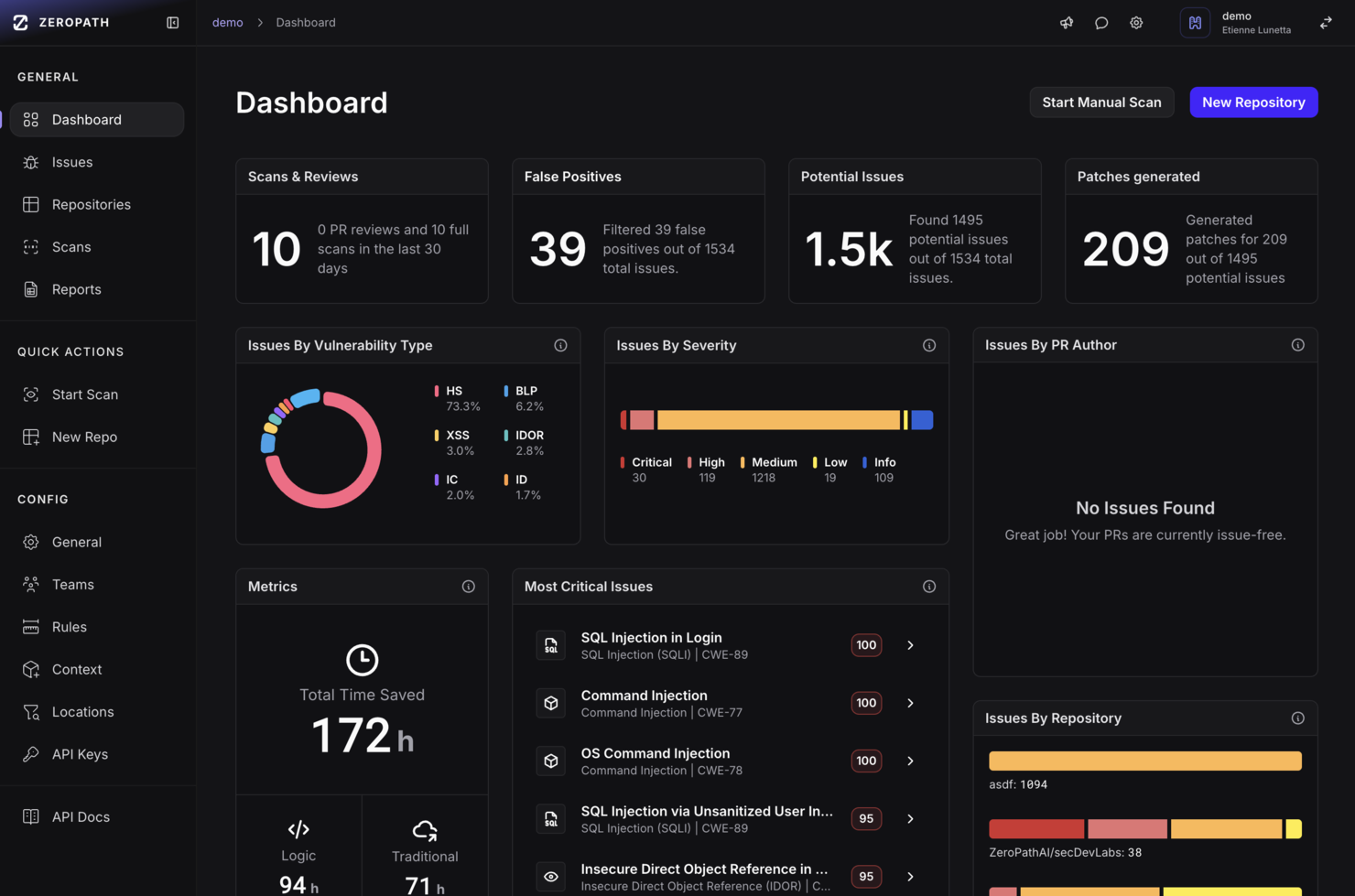
Für Organisationen, die ihre Anwendungssicherheit stärken möchten, bietet Zeropath eine fortschrittliche, KI-gesteuerte Lösung für die statische Anwendungssicherheitsprüfung (SAST). Ideal für innovative Unternehmen, überzeugt diese Plattform durch die Identifikation und automatische Behebung von Code-Schwachstellen, Compliance-Verstößen und Sicherheitsproblemen und lässt sich nahtlos in bestehende Entwicklungsabläufe integrieren.
Warum ich Zeropath gewählt habe
Ich habe Zeropath aufgrund seines KI-gestützten Ansatzes zur statischen Anwendungssicherheitsprüfung ausgewählt, der sich besonders durch die drastische Reduzierung von Fehlalarmen auszeichnet. Diese Funktion ist für Entwicklerteams, die auf Genauigkeit und Effizienz bei der Schwachstellenerkennung Wert legen, entscheidend. Zudem ermöglichen die nahtlose Integration mit Entwickler-Tools wie GitHub und GitLab sofortiges Feedback und KI-generierte Korrekturen, was den Sicherheitsüberprüfungsprozess erheblich beschleunigt. Die Fähigkeit von Zeropath, eine kontextbezogene Priorisierung anzubieten, stellt zudem sicher, dass Ihr Team die kritischsten Schwachstellen schnell priorisieren und beheben kann.
Zeropath Hauptfunktionen
Neben seinen herausragenden KI-Fähigkeiten bietet Zeropath noch zahlreiche weitere nützliche Funktionen:
- Tiefe Schwachstellenerkennung: Die Plattform durchsucht den Code gründlich, um komplexe Sicherheitslücken zu identifizieren, die von anderen Tools möglicherweise übersehen werden.
- Fähigkeiten zum Risikomanagement: Sie liefert einen umfassenden Überblick über potenzielle Sicherheitsrisiken, sodass Ihr Team diese effektiv steuern und minimieren kann.
- Compliance-Berichte: Zeropath verfügt über leistungsstarke Tools zur Erstellung von Compliance-Berichten, damit Ihr Unternehmen stets den Branchenstandards und Regularien entspricht.
- Executive-Dashboards: Diese Dashboards bieten einen Überblick über Ihre Sicherheitslage und erleichtern eine fundierte Entscheidungsfindung für Verantwortliche.
Zeropath Integrationen
Zu den Integrationen zählen GitHub, GitLab, Bitbucket, Jira, Slack, Linear und Azure DevOps.
Pros and Cons
Pros:
- Bietet klare Lösungsvorschläge, die Ihre Sicherheitsüberprüfungen beschleunigen.
- Reduziert unnötige Meldungen, sodass sich Ihr Team auf echte Probleme konzentrieren kann.
- Findet logische Fehler und verborgene Risiken, die bei normalen Scans oft übersehen werden.
Cons:
- Es kann etwas Zeit erfordern, die Arbeitsabläufe an die Automatisierung anzupassen.
- Potenzial für übersehene Schwachstellen, wenn die KI nicht korrekt konfiguriert ist.

Am besten geeignet für KI-gestützte Schwachstellen-Triage
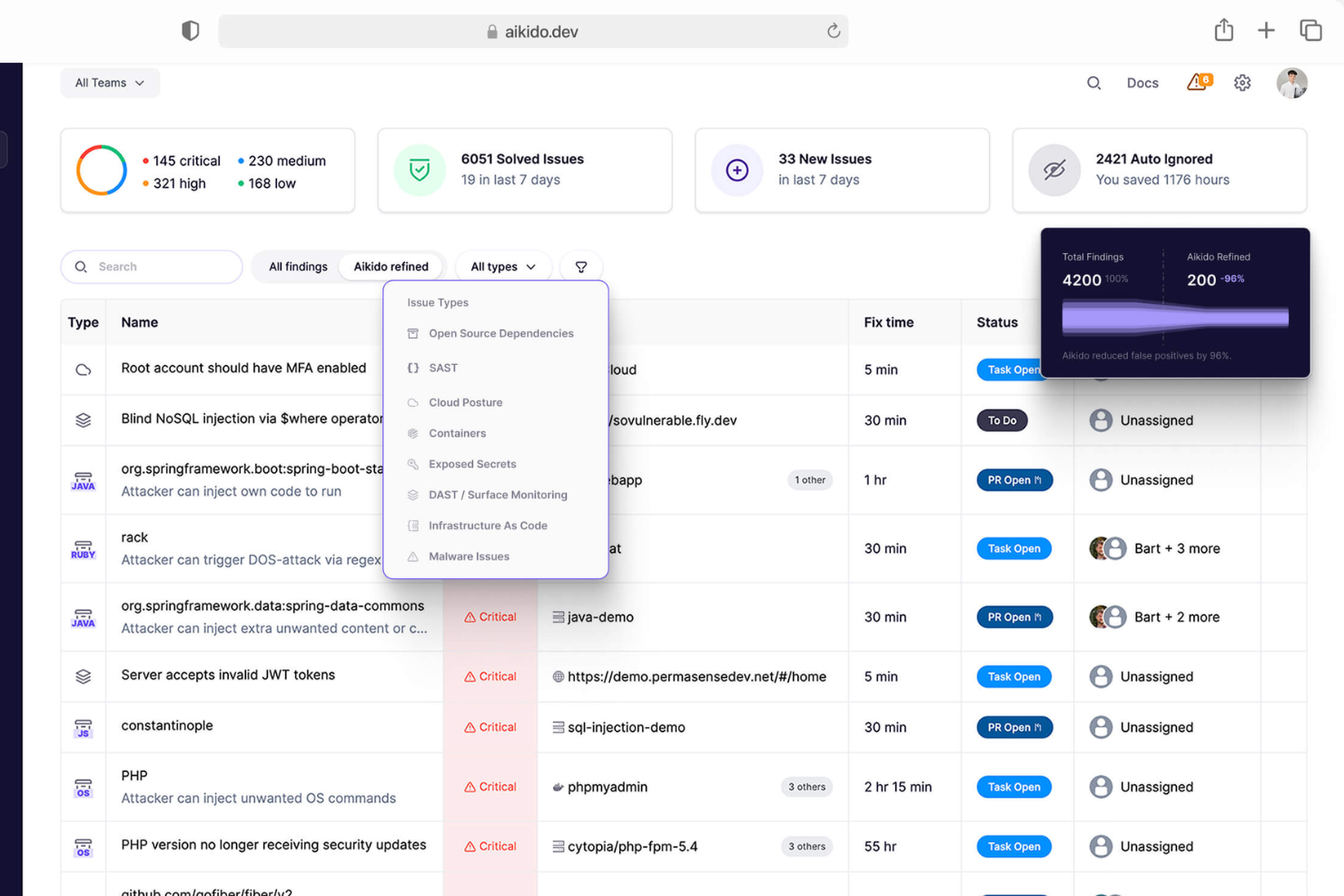
Aikido Security ist eine Plattform, die Ihren Quellcode scannt, um Sicherheitslücken zu erkennen, bevor sie zu Problemen werden. Durch die Analyse Ihres Codebestands erkennt sie Schwachstellen wie SQL-Injektionen, Cross-Site-Scripting (XSS) und Buffer Overflows und liefert klare Anweisungen, wie diese behoben werden können.
Warum ich Aikido Security ausgewählt habe: Die SAST-Engine von Aikido konzentriert sich ausschließlich auf Sicherheitsaspekte und filtert nicht sicherheitsrelevante Probleme wie Lesbarkeit oder Stil heraus. Das bedeutet, Sie erhalten nur relevante Warnungen, können Ablenkungen reduzieren und Ihr Team kann sich auf echte Schwachstellen fokussieren. Darüber hinaus unterstützt Aikido alle gängigen Programmiersprachen und sorgt so für umfassende Abdeckung verschiedenster Codebasen.
Herausragende Funktionen & Integrationen:
Weitere Funktionen umfassen ein KI-gestütztes Auto-Triage-System, das Schwachstellen priorisiert, Fehlalarme herausfiltert und umsetzbare Handlungsempfehlungen liefert. Außerdem werden Abhängigkeits-Scans, integrierter IDE-Support, Laufzeitschutz, Cloud-Posture-Management, Open-Source-Abhängigkeits-Scans, Erkennung von Geheimnissen sowie Infrastructure-as-Code-Scans geboten.
Integrationen umfassen Amazon Web Services (AWS), Google Cloud, Microsoft Azure Cloud, Drata, Vanta, AWS Elastic Container Registry, Docker Hub, Jira, Asana und GitHub.
Pros and Cons
Pros:
- Skalierbar für wachsende Teams
- Bietet umsetzbare Erkenntnisse
- Verfügt über ein umfassendes Dashboard und anpassbare Berichte
Cons:
- Nur auf Englisch verfügbar
- Ignoriert Schwachstellen, wenn kein Fix verfügbar ist
New Product Updates from Aikido Security

Aikido Security Introduces AI Fix Prompts and Pentest Modeling
Aikido Security introduces new features including AI-powered fix prompts, real-time pentest threat modeling, and Alibaba Cloud support to strengthen application security workflows. For more information, visit Aikido Security’s official site.

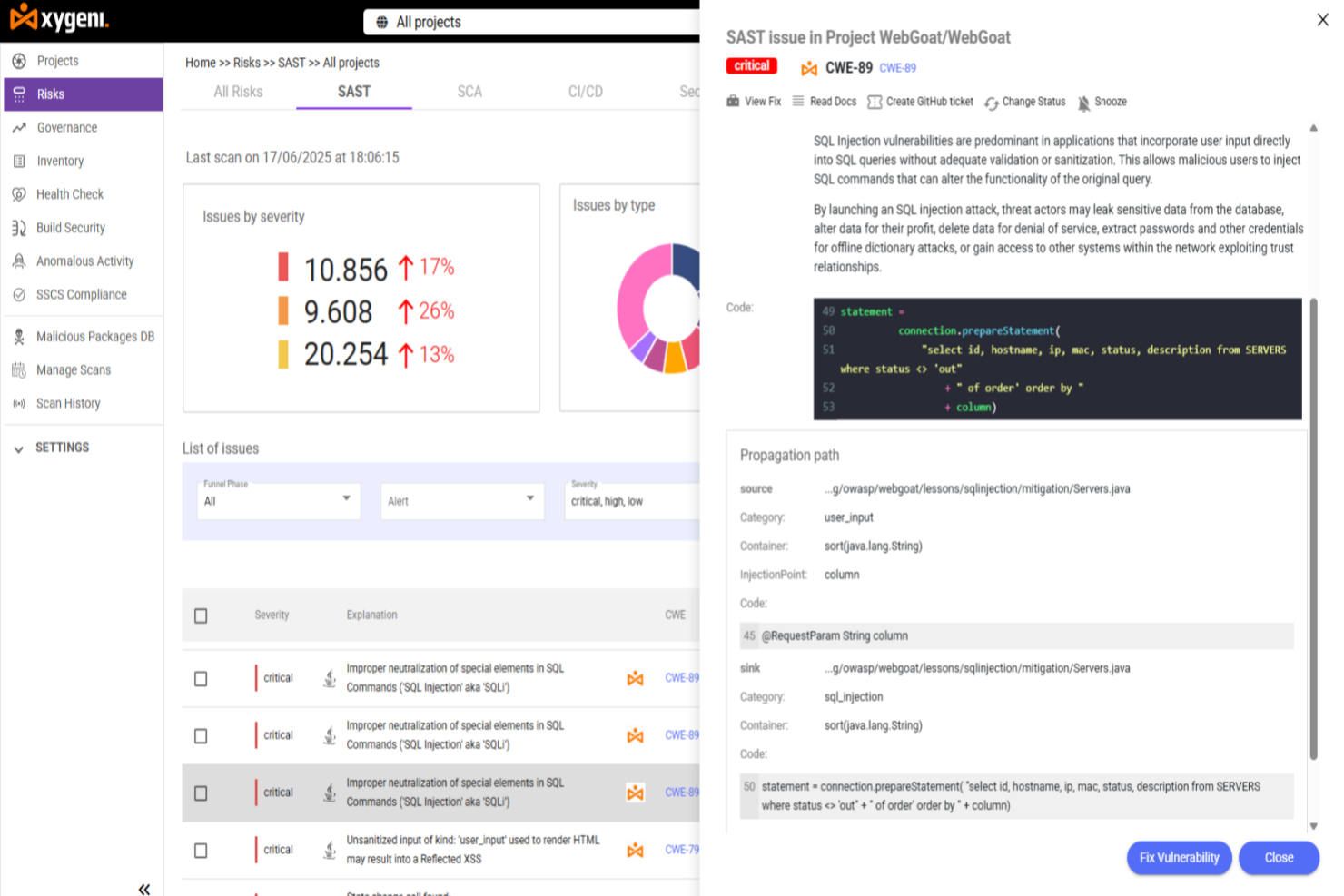
Für Entwickler und Sicherheitsteams, die eine zuverlässige Lösung für statische Anwendungssicherheitstests suchen, bietet Xygeni kontextbezogene Risikoanalysen und KI-gestützte Behebung über Anwendungscode und die Software-Lieferkette hinweg. Die Plattform ist darauf ausgelegt, Schwachstellen frühzeitig zu erkennen, sie nach ihrer tatsächlichen Auswirkung zu priorisieren und direkt in Ihre Entwicklungs-Workflows einzubinden. Der Fokus liegt darauf, den Alarm-Lärm zu reduzieren und gleichzeitig die Genauigkeit der Sicherheitseinstufung zu verbessern.
Warum ich Xygeni gewählt habe
Ich habe Xygeni aufgrund seiner risikoorientierten Priorisierung ohne unnötige Meldungen ausgewählt, die durch KI-gestützte Einstufung und kontextbezogene Analysen ermöglicht wird. Die Plattform bewertet Schwachstellen anhand ihrer Erreichbarkeit, Ausnutzbarkeit, geschäftlichen Auswirkungen und Abhängigkeitskontext, sodass sich Ihr Team auf die wirklich relevanten Risiken konzentrieren kann, anstatt auf oberflächliche Ergebnisse. Die KI-gestützte Behebung trägt außerdem dazu bei, bestimmte Probleme automatisch zu lösen, wodurch manueller Aufwand reduziert und schnelle, sichere Entwicklungszyklen unterstützt werden.
Wichtige Funktionen von Xygeni
Zusätzlich zu den herausragenden Merkmalen bietet Xygeni weitere Funktionen, die Ihre Sicherheitsanforderungen abdecken:
- KI-Triage & anpassbarer Risiko-Trichter: Erkennt automatisch Befunde und ermöglicht es Ihnen, Priorisierungskriterien entsprechend Ihrer Umgebung und Risikobereitschaft anzupassen.
- Kontextbasierte Priorisierung: Nutzt Erreichbarkeit, Ausnutzbarkeit, geschäftlichen Einfluss und Abhängigkeitsanalysen, um Schwachstellen nach tatsächlicher Exposition zu bewerten.
- Echtzeit-Malware-Erkennung im Anwendungscode: Überwacht kontinuierlich den Code, um bösartige Muster innerhalb der Anwendungslogik und nicht nur in Drittanbieter-Abhängigkeiten zu erkennen.
- Automatisierte Asset-Inventarisierung: Hält eine stets aktuelle Übersicht über Softwarekomponenten und Abhängigkeiten in allen Projekten.
Integrationen von Xygeni
Integrationen umfassen GitHub, GitLab, Jenkins, Azure DevOps, Bitbucket, Slack, Jira und GitHub Ticketing.
Pros and Cons
Pros:
- Datenschutzorientiertes Scanning stellt Datensicherheit sicher
- Funktionsbasierte Analyse priorisiert Schwachstellen
- Echtzeit-Erkennung minimiert Sicherheitsrisiken
Cons:
- Die Preisgestaltung kann für manche Teams hoch sein
- Begrenzte Integrationen im Vergleich zu Mitbewerbern

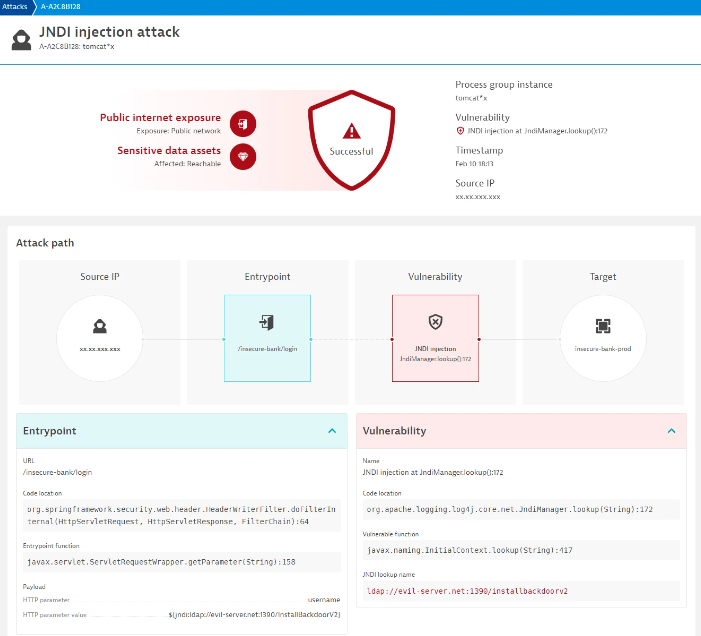
Dynatrace bietet eine fortschrittliche Anwendungsleistungs- und Überwachungslösung, die nicht nur die Performance misst, sondern auch Sicherheitsbedrohungen in Echtzeit erkennt und adressiert. Das Bekenntnis der Plattform zur sofortigen Bedrohungserkennung macht sie zu einem entscheidenden Vorteil für Unternehmen, die eine sichere digitale Umgebung aufrechterhalten möchten, ohne an Agilität einzubüßen.
Warum ich Dynatrace gewählt habe: Bei der Entscheidung, welche Tools in diese Liste aufgenommen werden sollten, fiel mir besonders die Geschwindigkeit auf, mit der Dynatrace arbeitet. Im Vergleich zu anderen Plattformen stellte ich fest, dass das Echtzeit-Bedrohungserkennungssystem von Dynatrace sowohl einzigartig als auch unschätzbar ist.
Angesichts der sich ständig weiterentwickelnden Cyber-Bedrohungen und des schnellen Reaktionsbedarfs für Unternehmen bin ich zu dem Schluss gekommen, dass Dynatrace als „am besten für die Echtzeit-Bedrohungserkennung“ herausragt.
Herausragende Funktionen & Integrationen:
Dynatrace überzeugt mit Features wie Full-Stack-Monitoring, Ursachenanalyse und KI-unterstützter Problemlösung, die Bedrohungen nicht nur erkennen, sondern auch deren schnelle Behebung unterstützen.
Im Bereich Integrationen bietet Dynatrace Kompatibilität mit zahlreichen Cloud-Plattformen, CI/CD-Tools und Container-Orchestrierungssystemen und gewährleistet so Sicherheitsüberwachung in unterschiedlichsten Umgebungen.
Pros and Cons
Pros:
- KI-Unterstützung hilft bei schneller Bedrohungsabwehr
- Umfassendes Full-Stack-Monitoring bietet tiefe Einblicke
- Robuste Integrationsmöglichkeiten mit beliebten Cloud- und DevOps-Tools
Cons:
- Für kleinere Unternehmen eventuell zu umfangreich
- Die Vielzahl an Funktionen kann am Anfang eine Lernkurve bedeuten
- Preise sind möglicherweise nicht auf kleinere Budgets abgestimmt
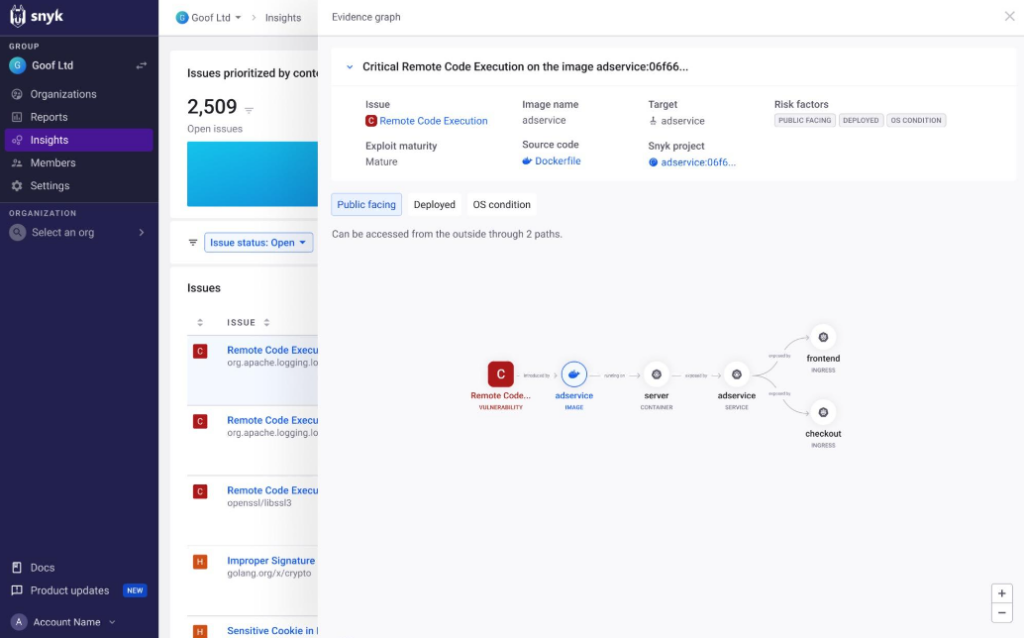
Snyk ist eine führende Sicherheitsplattform, die speziell darauf ausgerichtet ist, Schwachstellen in Open-Source-Bibliotheken und Containern zu erkennen und zu beheben. Durch den Fokus auf die Besonderheiten von Open-Source-Codebasen bietet Snyk Teams wertvolle Einblicke und sorgt so für eine sicherere Anwendungsentwicklung und -bereitstellung.
Warum ich Snyk gewählt habe: Ich habe Snyk ausgewählt, nachdem ich verschiedene Tools für die Sicherheit von Open-Source-Software verglichen habe. Snyk hat sich besonders durch seine umfassende Schwachstellendatenbank und die klaren Code-Einblicke hervorgehoben. Diese besonderen Merkmale machen Snyk zweifellos zum Tool mit den besten Einblicken in Open-Source-Code.
Herausragende Funktionen & Integrationen:
Im Zentrum des Snyk-Angebots steht eine umfassende, regelmäßig aktualisierte Schwachstellendatenbank, die eine präzise und zeitnahe Bedrohungserkennung ermöglicht. Darüber hinaus bietet Snyk Lizenzkonformitätsprüfungen und Empfehlungen zur Behebung, was für Open-Source-Projekte äußerst nützlich ist.
Bezüglich der Integrationen unterstützt Snyk eine breite Palette an Plattformen, von GitHub und Bitbucket bis hin zu gängigen CI/CD-Pipelines, sodass Sicherheitsprüfungen einfach in Entwicklungsabläufe eingebunden werden können.
Pros and Cons
Pros:
- Umfassende Schwachstellendatenbank, die speziell für Open-Source-Projekte ausgerichtet ist
- Lizenzkonformitätsfunktionen sorgen für rechtliche Absicherung
- Umfangreiche Integrationsmöglichkeiten vereinfachen den Entwicklungsprozess
Cons:
- Hauptsächlich auf Open-Source-Projekte ausgerichtet, was nicht für alle Anwendungsarten geeignet ist
- Die Tiefe der Einblicke kann Einsteiger überfordern
- Ohne transparente Preisangaben ist die Budgetplanung schwierig

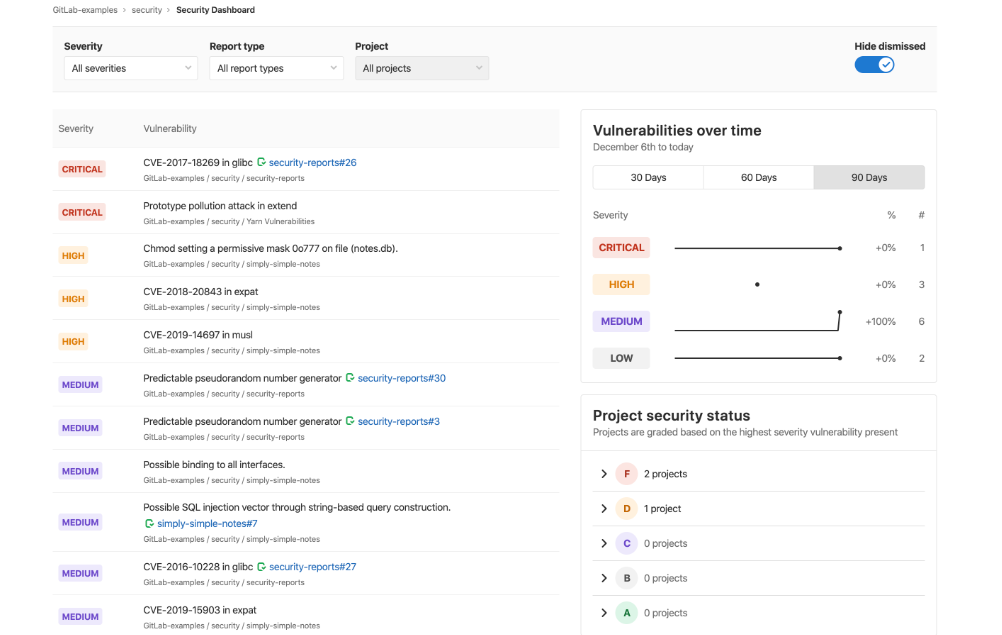
GitLab ist eine umfassende DevOps-Plattform, die Quellcodeverwaltung, kontinuierliche Integration und kontinuierliche Auslieferung (CI/CD) in einer Oberfläche vereint. Mit integrierten Sicherheitsfunktionen sorgt sie dafür, dass der Softwareentwicklungsprozess in jeder Phase abgesichert bleibt – ideal für Teams, die eine integrierte Sicherheitslösung wünschen.
Warum ich GitLab gewählt habe: Auf der Suche nach einem umfassenden DevOps-Tool mit besonderem Fokus auf Sicherheit stieß GitLab als Spitzenreiter hervor. Der einheitliche Ansatz im Softwareentwicklungszyklus sowie die eingebauten Sicherheitskomponenten unterscheiden GitLab von vielen eigenständigen Tools. Besonders die nahtlose Verbindung von Entwicklung und Sicherheit ist für mich der Hauptgrund, warum es „am besten für integrierte DevOps-Sicherheit“ ist.
Herausragende Funktionen & Integrationen:
GitLab bietet automatisierte Sicherheitsscans in seinen CI/CD-Pipelines, sodass der Code vor dem Deployment auf Schwachstellen überprüft wird. Darüber hinaus schützen seine Container-Sicherheitsfunktionen Docker-Container und Kubernetes-Cluster.
Hinsichtlich Integrationen unterstützt GitLab eine Vielzahl von Tools wie Jenkins, JIRA und Kubernetes, sodass Teams ihre bestehenden Technologiestacks beibehalten und dennoch von den Möglichkeiten GitLabs profitieren können.
Pros and Cons
Pros:
- Zusammengeführtes DevOps und Sicherheit auf einer Plattform
- Robuste Container-Sicherheitsfunktionen für moderne Anwendungsbereitstellung
- Umfangreiche Integrationsmöglichkeiten mit gängigen Entwicklungstools
Cons:
- Durch den umfassenden Funktionsumfang steilere Lernkurve
- Die Leistung kann je nach Projektgröße variieren
- Einige erweiterte Sicherheitsfunktionen sind höheren Preisklassen vorbehalten

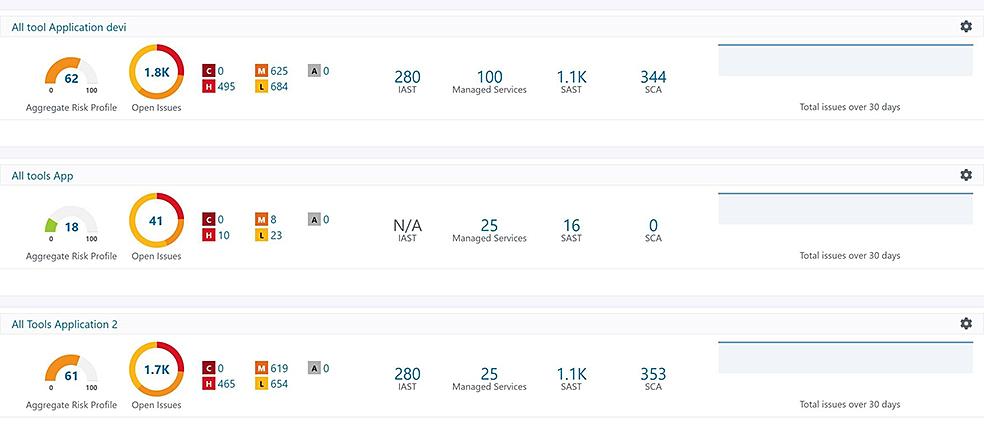
Synopsys bietet eine umfassende Anwendungssicherheitsplattform, die verschiedene Aspekte der Software-Absicherung abdeckt – von der Code-Analyse bis zur Bedrohungsaufklärung. Der ganzheitliche Ansatz der Plattform sorgt dafür, dass Unternehmen einen vollständigen Überblick erhalten und Schwachstellen in jeder Phase des Software-Lebenszyklus angehen können.
Warum ich Synopsys ausgewählt habe: Beim Zusammentragen der Tools für diese Liste hat sich Synopsys durch seinen allumfassenden Ansatz zur Anwendungssicherheit besonders hervorgetan. Während meiner Recherche und beim Vergleich wurde die Fähigkeit, eine End-to-End-Lösung zu bieten, als wichtiges Unterscheidungsmerkmal erkennbar.
Angesichts der steigenden Notwendigkeit für Unternehmen, ganzheitliche Sicherheit über den gesamten Lebenszyklus ihrer Anwendungen hinweg zu gewährleisten, halte ich Synopsys tatsächlich für das beste Tool für „ganzheitliche Anwendungssicherheit“.
Hervorstechende Funktionen & Integrationen:
Im Kern punktet Synopsys mit Funktionen wie statischer Code-Analyse, Software-Stücklisten-Analyse und Penetrationstests. Diese ermöglichen eine frühe und kontinuierliche Erkennung von Schwachstellen. Bei den Integrationen arbeitet Synopsys reibungslos mit einer Vielzahl von Entwicklungs- und Betriebstools zusammen, sodass Sicherheit ein natürlicher Bestandteil des Software-Auslieferungsprozesses wird.
Pros and Cons
Pros:
- Bietet eine umfassende Suite an Tools zur Anwendungssicherheit
- Unterstützt die frühzeitige Erkennung von Schwachstellen durch statische Code-Analyse
- Lässt sich gut in gängige DevOps-Tools integrieren
Cons:
- Für Einsteiger ist die Lernkurve eventuell steiler
- Umfangreiche Features könnten kleinere Teams überfordern
- Der große Funktionsumfang könnte in manchen Szenarien zu Redundanzen führen

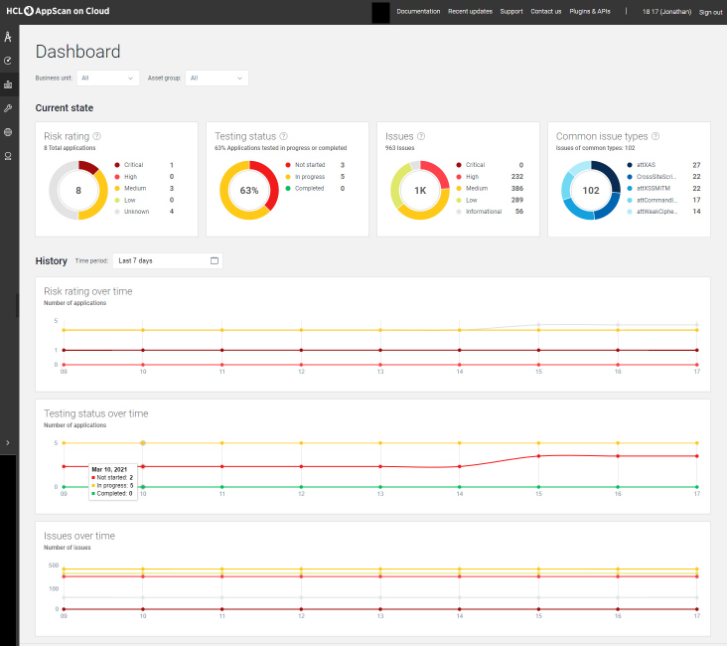
HCL AppScan ist eine umfassende Software-Sicherheitslösung, die Unternehmen dabei unterstützt, Schwachstellen in ihren Anwendungen zu erkennen, zu beheben und zu verhindern. Mit dem Wachstum von Organisationen steigt auch der Bedarf an skalierbaren Sicherheitslösungen, wodurch AppScan zu einem wichtigen Werkzeug für große Unternehmen wird.
Warum ich HCL AppScan ausgewählt habe: Beim Vergleich verschiedener Sicherheitstools habe ich festgestellt, dass HCL AppScan leistungsstarke Funktionen bietet, die besonders für große Unternehmen geeignet sind. Das Alleinstellungsmerkmal liegt in der Fähigkeit, mit dem Unternehmen zu wachsen und dabei die Sicherheit sicherzustellen, ohne das Wachstum zu behindern. Ich bin überzeugt, dass es „am besten für skalierbare Unternehmenslösungen“ ist, basierend auf der Erfolgsbilanz und der Fähigkeit, hohen Sicherheitsanforderungen gerecht zu werden.
Hervorstechende Funktionen & Integrationen:
HCL AppScan bietet dynamische und statische Sicherheitstests für Anwendungen und stellt so die Sicherheit sowohl auf Code- als auch auf Laufzeitebene sicher. Darüber hinaus überbrückt das Interactive Application Security Testing (IAST) die Lücke zwischen statischen und dynamischen Tests.
Bei den Integrationen ermöglicht AppScan die Anbindung an CI/CD-Pipelines und fördert so sichere DevOps-Praktiken.
Pros and Cons
Pros:
- Unterstützt sowohl dynamisches als auch statisches Application Security Testing
- Effiziente Integration mit CI/CD-Tools
- Für Skalierbarkeit entwickelt und somit für große Organisationen geeignet
Cons:
- Könnte für kleine Unternehmen oder Startups überdimensioniert sein
- Für eine optimale Nutzung sind geschulte Fachkräfte erforderlich
- Das umfangreiche Funktionsangebot kann neue Nutzer überfordern


GitGuardian ist auf die Überwachung von Codebasen und die Erkennung unbeabsichtigter Lecks sensibler Informationen wie API-Schlüssel oder Zugangsdaten spezialisiert. Angesichts der zunehmenden Zahl von Sicherheitsverletzungen, die durch offengelegte Geheimnisse in öffentlichen Repositories entstehen, dient GitGuardian als eine entscheidende Verteidigungslinie für Unternehmen.
Warum ich GitGuardian ausgewählt habe: Ich habe GitGuardian nach einer sorgfältigen Prüfung mehrerer Tools zur Sicherung von Code-Repositories ausgewählt. Der gezielte Ansatz von GitGuardian bei der Identifizierung offengelegter Geheimnisse sowie seine leistungsstarken Erkennungsalgorithmen machten es zum klaren Spitzenreiter. Seine Präzision beim Aufspüren potenzieller Datenlecks ist der Grund, warum ich es als 'am besten zur Erkennung von sensiblen Datenlecks' bezeichne.
Hervorstechende Funktionen & Integrationen:
Eine der wichtigsten Funktionen von GitGuardian ist die Fähigkeit, öffentliche und private Repositories kontinuierlich auf über 200 verschiedene Arten von Geheimnissen zu scannen. Zudem ermöglicht seine Incident-Response-Plattform Teams, schnell auf erkannte Schwachstellen zu reagieren.
Bei den Integrationen verbindet sich GitGuardian nahtlos mit Plattformen wie GitHub, GitLab und Bitbucket, um eine umfassende Abdeckung verschiedener Entwicklungsumgebungen sicherzustellen.
Pros and Cons
Pros:
- Fokussiert auf die Erkennung sensibler Datenlecks
- Unterstützt Scans öffentlicher und privater Repositories
- Schnelle Incident-Response-Plattform ermöglicht zeitnahe Reaktionen auf Schwachstellen
Cons:
- Die Spezialisierung des Tools deckt möglicherweise nicht alle Sicherheitsbedürfnisse ab
- Ohne transparente Preisgestaltung kann die Budgetierung für Teams schwierig sein
- Die Abhängigkeit von Drittanbieter-Integrationen kann die Erkennungseffektivität auf nicht unterstützten Plattformen beeinträchtigen

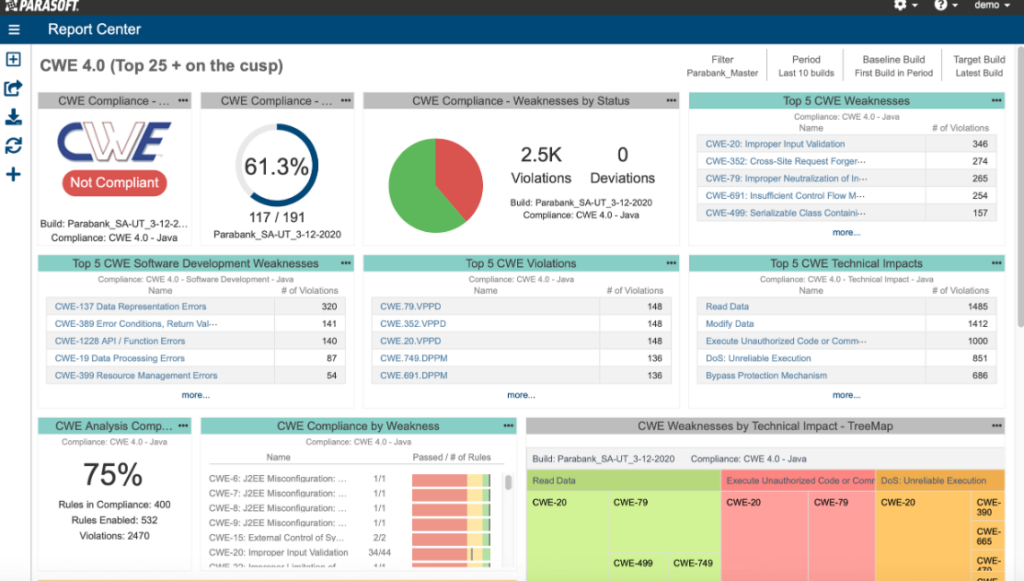
Parasoft Jtest ist ein spezialisiertes Java-Testtool, das mit Sorgfalt entwickelt wurde, um die Qualität von Java-Anwendungen zu stärken. Es bietet eine umfassende Suite an Funktionen, um sicherzustellen, dass Java-Codes nicht nur fehlerfrei sind, sondern auch den Best Practices und Standards entsprechen. Das macht es zur ersten Wahl für das Testen von Java-Anwendungen.
Warum ich Parasoft Jtest ausgewählt habe: Ich habe Parasoft Jtest nach einem gründlichen Vergleich mit anderen Java-Testtools gewählt. Sein umfangreicher Funktionsumfang, der speziell auf Java zugeschnitten ist, sowie sein Ruf in der Branche heben es hervor.
Meine Entscheidung, dass es „am besten für das Testen von Java-Anwendungen“ geeignet ist, beruht auf seiner konsequenten Ausrichtung auf Java und die damit verbundenen Besonderheiten.
Herausragende Funktionen & Integrationen:
Parasoft Jtest überzeugt durch seine statische Analyse, die sicherstellt, dass der Code den Programmierstandards entspricht. Zudem nutzt es Unit-Testing und Codeabdeckung, um die Robustheit und Widerstandsfähigkeit von Java-Anwendungen zu gewährleisten. In puncto Integration arbeitet Parasoft Jtest nahtlos mit gängigen CI/CD-Tools zusammen und unterstützt zudem die Integration mit Versionskontrollsystemen.
Pros and Cons
Pros:
- Spezialisiert auf Java und ermöglicht gründliches Testen
- Umfangreiche Funktionen von statischer Analyse bis Codeabdeckung
- Starke Integrationsmöglichkeiten
Cons:
- Kann für Java-Anfänger überwältigend sein
- Konzentriert sich hauptsächlich auf Java und ist dadurch in anderen Sprachen weniger einsetzbar
- Die Ersteinrichtung kann für einige Teams eine Lernkurve darstellen
Weitere empfehlenswerte Tools für statisches Application Security Testing
Nachfolgend finden Sie eine Liste weiterer Tools für statisches Application Security Testing, die ich zwar in die engere Auswahl genommen habe, die es aber nicht in die Top 12 geschafft haben. Sie sind dennoch definitiv einen Blick wert.
- Mend.io
Am besten für moderne Webanwendungssicherheit


Auswahlkriterien für die besten Tools im Bereich statisches Application Security Testing
Auf meiner Suche nach den besten Tools fürs statische Application Security Testing habe ich mich nicht mit oberflächlichen Bewertungen zufrieden gegeben. Ich bin tief eingestiegen, habe viele Tools getestet und recherchiert, um die wahren Perlen in diesem Bereich zu identifizieren. Aus dieser umfassenden Bewertung habe ich entscheidende Kriterien abgeleitet, wobei die spezifische Funktionalität an erster Stelle stand.
Hier ist die detaillierte Aufschlüsselung dessen, was aus meiner Sicht am meisten zählt:
Kernfunktionen
- Schwachstellenerkennung: Die Hauptaufgabe jedes SAST-Tools. Es sollte potenzielle Sicherheitslücken im Quellcode effizient und präzise identifizieren.
- Kompatibilität mit Codebasen: Die Fähigkeit, mehrere Programmiersprachen und Frameworks zu prüfen, damit kein Teil Ihrer Anwendung unüberprüft bleibt. Das heißt: Egal, ob Sie statische Codeanalyse-Tools für Java oder Python absichern möchten – die Software bleibt kompatibel.
- Continuous Integration: Leichte Integration in die CI/CD-Pipeline, sodass regelmäßige und automatisierte Code-Prüfungen ein fester Bestandteil des Entwicklungsprozesses sind.
- Risikopriorisierung: Es reicht nicht, Schwachstellen zu finden – sie müssen auch nach ihrer Schwere priorisiert werden, damit die kritischsten zuerst behoben werden.
Wichtige Funktionen
- Eigene Regel-Erstellung: Ermöglicht Nutzern, eigene Regel-Sets zu definieren, die speziell auf die Anforderungen ihrer Anwendung zugeschnitten sind.
- Binärcode-Scan: Einige Tools bieten die Möglichkeit, kompilierte Anwendungen zu untersuchen und sie ohne den originalen Quellcode zu bewerten.
- Echtzeit-Feedback: Sofortiges Feedback beim Schreiben oder Einchecken von Code unterstützt einen proaktiven Ansatz für Sicherheit.
- Cloud-basierte Scans: Bietet Flexibilität und Skalierbarkeit, besonders wichtig für größere Unternehmen oder Teams, die verteilt arbeiten.
Benutzerfreundlichkeit
- Intuitives Dashboard: Für ein SAST-Tool ist eine visuelle Darstellung der Schwachstellen inklusive Dateipfaden und Schweregrad-Diagrammen entscheidend. Dies hilft, den Sicherheitsstatus der Anwendung schnell zu erfassen.
- Einfache Integrationspunkte: SAST-Tools sollten Plug-and-Play-Integrationen mit gängigen IDEs und Versionsverwaltungssystemen besitzen, um Konflikte im Entwicklungsprozess zu minimieren.
- Rollenbasierter Zugriff: Stellt sicher, dass nur autorisiertes Personal Zugriff auf Scan-Ergebnisse und Konfigurationen erhält, was die Sicherheit innerhalb des Sicherheitstools erhöht.
- Umfassende Dokumentation: Aufgrund der technischen Komplexität dieser Tools ist eine umfassende Wissensdatenbank mit gängigen Anwendungsfällen und Hinweisen zur Fehlerbehebung essenziell für die Einarbeitung und kontinuierliche Unterstützung der Nutzer.
Die häufigsten Fragen zu statischen Anwendungssicherheitstest-Tools (FAQ)
Welche Vorteile bietet die Nutzung eines SAST-Tools?
Der Einsatz eines SAST-Tools bietet mehrere Vorteile:rnu003cul class=u0022wp-block-listu0022u003ern tu003cliu003eu003cstrongu003eFrüherkennung:u003c/strongu003e Schwachstellen werden frühzeitig im Entwicklungszyklus erkannt, noch bevor der Code ausgeführt wird.u003c/liu003ern tu003cliu003eu003cstrongu003eKosteneffizienz:u003c/strongu003e Probleme früh zu beheben ist in der Regel kostengünstiger, als sie nach der Bereitstellung zu beheben.u003c/liu003ern tu003cliu003eu003cstrongu003eVerbesserte Sicherheitslage:u003c/strongu003e Sie erhalten einen umfassenden Überblick über die Sicherheit der Anwendung und können das u003ca href=u0022https://thectoclub.com/tools/best-risk-management-software/u0022u003eRisikomanagementu003c/au003e verbessern.u003c/liu003ern tu003cliu003eu003cstrongu003eEntwickler-Schulung:u003c/strongu003e Echtzeit-Feedback vermittelt Entwicklern Best Practices für Sicherheit und verbessert die Codequalität.u003c/liu003ern tu003cliu003eu003cstrongu003eRegulatorische Compliance:u003c/strongu003e Viele Tools unterstützen die Einhaltung branchenspezifischer Sicherheitsanforderungen.u003c/liu003ernu003c/ulu003e
Wie viel kosten diese Tools typischerweise?
Die Kosten für SAST-Tools können je nach Funktionalität, Skalierbarkeit und Zielgruppe (Unternehmen vs. Einzelentwickler) stark variieren. Die Preise reichen von wenigen Dollar pro Monat für Basis-Tools bis zu mehreren Tausend Dollar im Jahr für Unternehmenslösungen.
Was sind gängige Preismodelle für SAST-Tools?
Es gibt verschiedene Preismodelle von SAST-Anbietern:rnu003cul class=u0022wp-block-listu0022u003ern tu003cliu003eu003cstrongu003ePro Benutzer/Entwickler:u003c/strongu003e Die Abrechnung erfolgt nach der Anzahl der Nutzer oder Entwickler, die das Tool verwenden.u003c/liu003ern tu003cliu003eu003cstrongu003ePro Scan:u003c/strongu003e Abrechnung je durchgeführtem Scan.u003c/liu003ern tu003cliu003eu003cstrongu003eAbonnementbasiert:u003c/strongu003e Monatliche oder jährliche Abos, die unbegrenzte Scans innerhalb des Zeitraums ermöglichen.u003c/liu003ern tu003cliu003eu003cstrongu003eStaffelpreise:u003c/strongu003e Unterschiedliche Preisstufen je nach Funktionsumfang, Anzahl der Scans oder Codebasis-Größe.u003c/liu003ernu003c/ulu003e
In welchem Preisrahmen bewegen sich diese Tools typischerweise?
Die Preisspanne ist sehr groß. Für Einzelentwickler oder kleine Projekte beginnen die Preise oft schon bei $10–$50 pro Monat. Für große Unternehmen oder umfangreiche Tools kann sie von $1.000 bis $5.000 pro Jahr oder sogar mehr reichen.
Welche sind einige der günstigsten und teuersten Softwareoptionen?
Zu den günstigeren Lösungen zählen Tools wie Semgrep oder DeepSource, die insbesondere für Einzelentwickler oder kleine Teams attraktive Preise bieten. Enterprise-Lösungen wie Checkmarx oder Veracode Static Analysis liegen dagegen preislich am oberen Ende – bedingt durch den großen Funktionsumfang und die hohe Skalierbarkeit.
Gibt es kostenlose SAST-Tools?
Ja, es gibt kostenlose SAST-Tools, oft als Open-Source-Projekte. Beispielsweise bietet Semgrep eine kostenlose Stufe an; darüber hinaus gibt es weitere Open-Source-Lösungen wie FlawFinder oder Brakeman für Ruby-on-Rails-Anwendungen. Allerdings sind die kostenlosen Varianten häufig hinsichtlich Funktionsumfang oder Anzahl der Scans eingeschränkt.
Handelt es sich bei der Abrechnung um einen einmaligen Preis oder ein Abonnement?
Die meisten SAST-Tools werden als wiederkehrendes Abonnement angeboten, monatlich, vierteljährlich oder jährlich. Manche Hersteller bieten zwar Einzellizenzierungen an, doch das ist in der Branche eher unüblich.
Bieten diese Tools Testphasen oder Demos an?
Ja, viele SAST-Tools bieten Testphasen an, sodass Nutzer deren Funktionen und Effizienz vor dem Kauf ausprobieren können. Die Laufzeit dieser Testphasen reicht von einer Woche bis zu einem Monat – je nach Tool.
Weitere Bewertungen von Software für Sicherheitstests
Zusammenfassung
Die Wahl des besten Tools für statische Anwendungssicherheitstests (SAST) ist ein wichtiger Schritt, um die Sicherheit des Quellcodes einer Anwendung zu gewährleisten. In diesem Leitfaden habe ich die wichtigsten Funktionen, essenziellen Merkmale, Aspekte der Benutzerfreundlichkeit und entscheidende Auswahlkriterien detailliert erläutert, die bei der passenden Wahl einer SAST-Lösung von Bedeutung sind.
Das richtige Tool leistet mehr als nur das Auffinden von Schwachstellen: Es liefert wertvolle Einblicke, fördert bestes Coding unter Entwicklern und unterstützt die Erfüllung von Compliance-Anforderungen.
Wichtige Erkenntnisse
- Früherkennung zählt: Der Hauptvorteil von SAST-Tools besteht in ihrer Fähigkeit, Schwachstellen früh im Entwicklungszyklus zu erkennen. Dies ist kosteneffizient und stärkt die allgemeine Sicherheitslage.
- Benutzerfreundlichkeit und Nutzererlebnis: Neben der reinen Funktionalität sollten Sie auch das Design des Tools, die einfache Einarbeitung, die Benutzeroberfläche und den Kundensupport berücksichtigen. Ein effektives SAST-Tool sollte sich nahtlos in den Workflow eines Entwicklers integrieren.
- Preis-Leistungs-Verhältnis: Obwohl der Preis ein wichtiger Faktor ist, sollten Sie die Kosten immer in Relation zum gebotenen Mehrwert betrachten. Einige Tools sind zwar teuer, bieten aber durch ihre umfassenden Funktionen, Skalierbarkeit und Genauigkeit einen höheren Return on Investment.
Was denken Sie?
Auch wenn ich intensive Recherche und Tests durchgeführt habe, um diese Liste zusammenzustellen, ist der Bereich des statischen Anwendungssicherheitstests groß und ständig im Wandel. Sollten Sie weitere statische Anwendungs- oder Software Composition Analysis Tools kennen, die Sie für wertvoll halten und die hier nicht aufgeführt sind, würde ich mich sehr über Ihre Rückmeldung freuen. Bitte teilen Sie Ihre Vorschläge oder Erfahrungen in den Kommentaren und helfen Sie mit, diese Ressource für alle noch umfassender zu machen. Ihre Einblicke könnten anderen dabei helfen, das passende SAST-Tool zu finden.