

Die 10 besten Mobile Testing Tools 2026

10 Beste Mobile Testing Tools Shortlist
Here's my pick of the 10 best software from the 25 tools reviewed.


Das Testen von mobilen Apps auf verschiedenen Geräten, Betriebssystemen und unter Berücksichtigung unterschiedlicher Nutzerverhalten ist komplex. Gerätefragmentierung und Leistungsengpässe verzögern Releases, frustrieren Nutzer und gefährden den Erfolg einer App. Ohne die passenden Testing-Tools ist es schwierig, ein verlässliches Nutzungserlebnis zu bieten.
Ich habe jahrelange Erfahrung in der mobilen Entwicklung und im Testing und kenne diese Herausforderungen aus erster Hand. Vom Debugging mit XCode bis hin zur Performance-Optimierung weiß ich, was funktioniert. Dieser Leitfaden bietet detaillierte Rezensionen zu den besten Tools für mobile Testautomatisierung, damit Sie Tests automatisieren, reale Nutzerumgebungen simulieren und plattformübergreifende Kompatibilität sicherstellen können.
Warum Sie unseren Software-Reviews vertrauen können
Seit 2023 testen und bewerten wir Software. Als IT- und Datenspezialisten wissen wir, wie wichtig und schwierig es ist, die richtige Entscheidung bei der Softwareauswahl zu treffen.
Wir investieren viel in gründliche Recherchen, um unserer Community fundierte Software-Kaufentscheidungen zu ermöglichen. Wir haben über 2.000 Tools für verschiedene IT-Anwendungen getestet und mehr als 1.000 umfassende Software-Bewertungen geschrieben. Erfahren Sie wie wir transparent bleiben & unsere Bewertungsmethodik.
Table of Contents
Beste Mobile Testing Tools Zusammenfassung
| Tool | Best For | Trial Info | Price | ||
|---|---|---|---|---|---|
| 1 | Best for AI-powered real device testing | Free trial + free demo available | From $15/month (billed annually) | Website | |
| 2 | Best for versatile app testing | Free demo available | Pricing upon request | Website | |
| 3 | Best for scalable cloud-based infrastructure | Free plan available + free demo | From $15/user/month (billed annually) | Website | |
| 4 | Best for qualitative feedback from real users | Free demo available | Pricing available upon request | Website | |
| 5 | Best for real device testing | Free trial available | From $29/month (billed annually) | Website | |
| 6 | Best for synthetic testing | Free trial + free demo available | Pricing upon request | Website | |
| 7 | Best for codeless automation testing | Free plan available + free demo | From $183/user/month | Website | |
| 8 | Best for AI-driven test maintenance | Free plan available | From $99/month (billed annually) | Website | |
| 9 | Best for device cloud management | Free trial available | From $83/month | Website | |
| 10 | Best for open-source community support | Not available | Free to use | Website |
-

Site24x7
Visit WebsiteThis is an aggregated rating for this tool including ratings from Crozdesk users and ratings from other sites.4.7 -
GitHub Actions
Visit WebsiteThis is an aggregated rating for this tool including ratings from Crozdesk users and ratings from other sites.4.8 -
Docker
Visit WebsiteThis is an aggregated rating for this tool including ratings from Crozdesk users and ratings from other sites.4.6





Beste Mobile Testing Tools im Test
Nachfolgend finden Sie meine detaillierten Zusammenfassungen der besten Tools für die mobile Testautomatisierung, die es in meine Shortlist geschafft haben. Meine Bewertungen geben einen detaillierten Einblick in die wichtigsten Funktionen, Vorteile & Nachteile, Integrationen und das ideale Einsatzgebiet der einzelnen Lösungen, um Ihnen bei der Auswahl zu helfen.


Pcloudy is an advanced mobile application testing platform offering a comprehensive suite for evaluating apps on real mobile devices. You can run tests concurrently across multiple devices, making it great if you're looking for parallel test execution options.
Why I Picked Pcloudy: I picked Pcloudy because its AI-powered real-device testing gives your team smarter ways to catch issues that traditional mobile testing often overlooks. Its AI engine analyzes test sessions on actual Android and iOS devices to highlight failure patterns, UI anomalies, and performance concerns without you having to sift through logs manually. You also get AI-assisted test execution that selects optimal devices and surfaces likely problem areas, helping you focus on high-risk scenarios.
Standout features & integrations:
One of Pcloudy's most notable features is its support for scriptless automation, allowing even those without deep programming knowledge to conduct tests. It also offers real-time debugging and boasts compatibility with emulators and real devices.
Regarding integrations, Pcloudy is adaptable with Jenkins for continuous testing, and it also interfaces effectively with tools like Jira and Selenium, improving the flexibility of the testing platform.
Pros and Cons
Pros:
- Supports parallel test execution on a wide array of devices, from iOS to Android.
- Integrates effortlessly with popular tools such as Jenkins, Jira, and Selenium.
- Supports parallel test execution on a wide array of devices, from iOS to Android.
Cons:
- Requires stable internet connectivity for optimal real-device cloud performance.
- Advanced analytics may take a bit of time to interpret for new users.


QA Wolf is a service that delivers automated end-to-end test coverage for web and mobile applications. By automating tests, QA Wolf helps your team focus on shipping features without worrying about bugs.
Why I Picked QA Wolf: QA Wolf's ability to test any mobile app, including native, web, view-based hybrid, React Native, Flutter, Xamarin, responsive/adaptive apps, progressive web apps (PWA), and single-page applications (SPA), makes it a versatile choice for mobile testing. This flexibility ensures that no matter what technology your app is built on, QA Wolf can handle the testing process.
Standout features & integrations:
Other standout features include QA Wolf's comprehensive coverage. They build tests that cover gestures, camera functions, sensor interactions, and everything else, ensuring that every aspect of your app is thoroughly tested. QA Wolf also continuously updates your tests to align with new functionality as your app evolves, ensuring they remain relevant and effective.
Integrations include Jira, Asana, Linear, Slack, Microsoft Teams, GitHub, GitLab, Bitbucket, Jenkins, CircleCI, Travis CI, and Azure DevOps.
Pros and Cons
Pros:
- 24-hour test maintenance
- All bugs are human-verified
- Easy to collaborate with the QA Wolf team via Slack or Teams
Cons:
- Less flexibility to customize testing
- Not ideal for development teams wanting full control over tests
New Product Updates from QA Wolf

QA Wolf Adds Android Emulator Infrastructure for Device Testing
QA Wolf introduces Android emulator infrastructure with expanded device and OS testing support. These updates enable teams to test across real-world device conditions and improve test coverage. For more information, visit QA Wolf’s official site.
 .
.

LambdaTest offers cloud-based testing services that allow developers to run tests on various browser and OS combinations. Its scalable cloud infrastructure is essential for businesses targeting a global audience with diverse device preferences, making it the ideal solution for this field.
Why I Picked LambdaTest: LambdaTest caught my attention among other testing tools due to its extensive cloud infrastructure, which is ideal for business scaling. Its comprehensive testing solution sets it apart from other platforms that offer limited browser or OS selection. LambdaTest's cloud-based infrastructure is a top choice for businesses needing a tool that can adapt to their testing requirements.
Standout features & integrations:
LambdaTest shines with features such as real-time browser testing, screenshots for quick visual verifications, and automation testing capabilities. The platform supports testing for both mobile web and native apps across a range of iOS and Android devices.
Furthermore, it integrates effortlessly with CI/CD tools like Jenkins, popular bug tracking tools such as Jira, and test automation frameworks including Selenium.
Pros and Cons
Pros:
- Real-time testing allows for immediate feedback and quicker debugging.
- Integration with popular development and testing tools improves the overall testing process.
- Extensive browser and OS combination coverage ensures comprehensive testing.
Cons:
- Cost might be a factor for startups or businesses with limited budgets.
- Initial setup and familiarization may be needed for those new to cloud-based testing.
- While cloud-based, internet connectivity might affect the responsiveness of the platform.

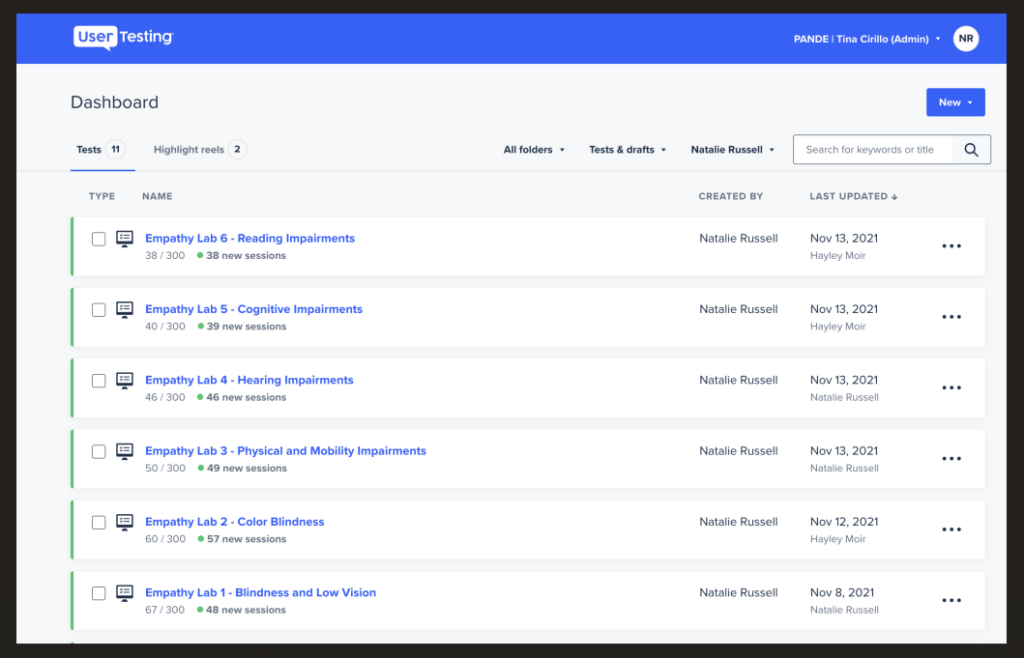
UserTesting is a platform that allows companies to obtain direct feedback from real users regarding their products or services. This tool focuses on the qualitative aspects of user experience, making it invaluable for those who prioritize genuine user insights and sentiments.
Why I Picked UserTesting: While sifting through numerous tools, UserTesting caught my eye due to its emphasis on harnessing genuine user perspectives. I chose it because, compared to other platforms, UserTesting provides a unique avenue to tap into raw, unfiltered feedback from actual users. This makes it different and invaluable. Given its robust approach to capturing qualitative data, it stands as the best tool for sourcing detailed feedback from real users.
Standout features & integrations:
UserTesting boasts real-time video feedback, where businesses can see and hear users interact with their products. They also offer segmented user panels, ensuring feedback is sourced from relevant user demographics.
Integrations-wise, UserTesting syncs well with tools like Jira for actionable feedback-to-task translation and various platforms for mobile application testing, catering to both iOS and Android devices.
Pros and Cons
Pros:
- Effective integrations, especially with Jira, streamline the feedback loop and action items.
- Provides access to segmented user panels, ensuring that feedback is relevant and actionable.
- Offers real-time video feedback, allowing businesses to visually and audibly understand user interactions.
Cons:
- The platform might require a slight learning curve for those unfamiliar with user experience testing tools.
- Focused on qualitative feedback, it might not cater to those looking for extensive quantitative data.
- May not be as cost-effective for small businesses or startups.

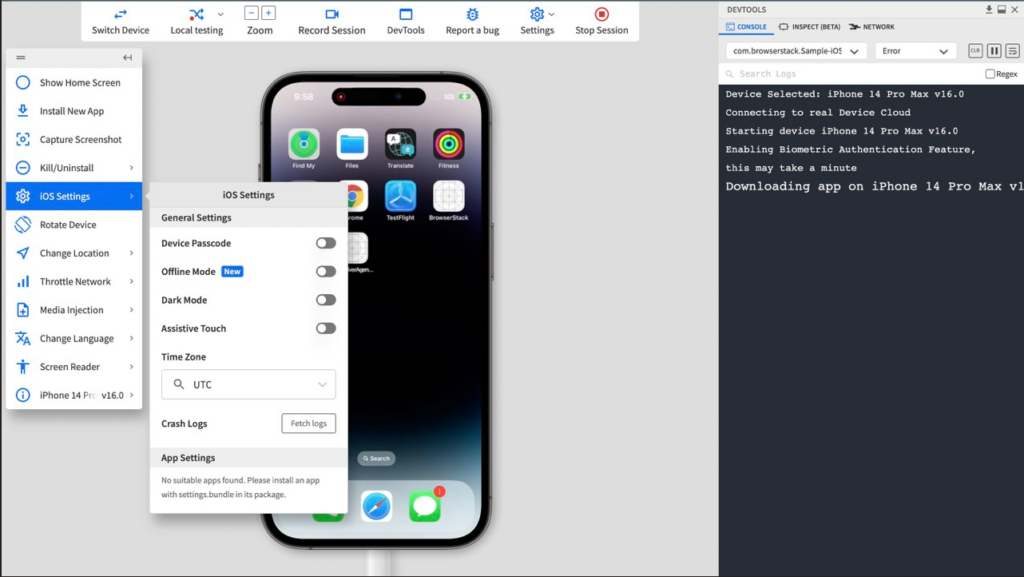
BrowserStack is a software testing platform that offers access to authentic desktop and mobile devices for real-time testing. It's ideal for developers and QA teams looking to evaluate websites and mobile applications across multiple browsers and devices. Its extensive infrastructure makes it particularly useful for real device testing.
Why I Picked BrowserStack: In the course of determining the best tools for the list, BrowserStack consistently stood out. One of the pivotal reasons I chose it was due to its unmatched library of real mobile devices and browsers. Its capability to provide a genuine, tangible testing environment on both Android and iOS devices is unparalleled, which solidified my opinion that it's the best for real device testing.
Standout features & integrations:
BrowserStack offers a vast array of real devices, ensuring the compatibility and performance testing of applications is genuine. It supports both manual testing and automation testing, making it versatile for different testing needs.
When it comes to integrations, BrowserStack works harmoniously with Jenkins for continuous testing, ties with Jira for bug tracking, and supports WebDriver for creating browser automation scripts.
Pros and Cons
Pros:
- Offers integrations with popular tools like Jenkins, Jira, and WebDriver.
- Enables both manual and automation testing on its platform.
- Provides access to a wide variety of real devices from Android to iOS.
Cons:
- Real device availability can sometimes be limited during peak usage times.
- The vast number of features might be overwhelming for some new users.
- Might be considered costly for smaller teams with limited budgets.


New Relic is an observability platform that helps you monitor and improve your software's performance. With its suite of tools, you can keep an eye on applications, infrastructure, and customer experiences to ensure everything runs smoothly.
Why I Picked New Relic: For mobile testing, New Relic's synthetic monitoring stands out because it allows you to emulate mobile devices. This means you can simulate how your mobile app performs on various devices and browsers, helping you identify and fix issues specific to mobile users. By setting up these synthetic tests, you can proactively monitor your app's availability and functionality, ensuring a seamless experience for your users.
Standout features & integrations:
Features include the ability to run automated, scriptable tests on your mobile applications. You can create custom scripts to simulate user interactions, allowing you to monitor critical business transactions and API endpoints. You can also test from multiple global locations, allowing you to monitor your app's performance from different regions.
Integrations include AWS, Google Cloud Platform, Microsoft Azure, Slack, Atlassian Jira, AWS EventBridge, Email Notifications, Mobile Push Notifications, Opsgenie, PagerDuty, ServiceNow, and Prometheus.
Pros and Cons
Pros:
- Good synthetic monitoring and testing features
- Provides real-time monitoring and insights
- Effective alerting functionality promptly notifies users of issues
Cons:
- Dashboards may require customization for specific use cases
- The user interface can be overwhelming for new users


Katalon Studio offers a comprehensive platform for software testing, both for web and mobile applications. Emphasizing ease of use, Katalon shines in its ability to provide robust testing solutions without requiring users to write a single line of code, making it especially beneficial for those seeking codeless automation testing.
Why I Picked Katalon Studio: If you're looking for an automation testing solution that doesn't require coding, Katalon Studio is a great choice. It's user-friendly and straightforward to use.
Standout features & integrations:
One of Katalon's most distinguishing features is its intuitive interface, tailored to guide users through the testing process with plain English commands. Complementing this, it offers compatibility for both iOS and Android applications, ensuring wide-reaching mobile test automation.
As for integrations, Katalon collaborates with Jenkins for continuous testing, Jira for task management, and ties into Selenium and Appium frameworks, further bolstering its capabilities.
Pros and Cons
Pros:
- Deep integrations with widely-used tools like Jenkins and Jira
- Compatibility across multiple platforms, including iOS devices and Android devices
- Intuitive no-code testing platform suitable for all users
Cons:
- Some advanced features might be locked behind higher pricing tiers.
- Limited custom scripting opportunities due to its codeless nature
- Might require some initial orientation for complete novices


Autify is a no-code testing platform designed for users of varying skill levels, enabling the automation of software testing processes. It caters to businesses ranging from small startups to large enterprises, focusing on improving efficiency and the quality of applications.
Why I Picked Autify: I like its ability to run tests on both real devices and emulators simultaneously. This means you don't need to prepare physical devices for testing, saving you time and resources. By maximizing test frequency and coverage, your team can ensure your app performs well across different environments. Another valuable feature is Autify's machine learning capabilities that support maintaining UIs that change frequently. As your app evolves, Autify's AI detects changes in the source code and UI, automatically correcting test scenarios at every run.
Standout features & integrations:
Features include environment variables that let you pass data during test creation and execution, terminal operations that capture actions like shaking the device or moving the app to the background and foreground, and visual regression testing that automatically spots differences in the UI to help you maintain consistency across app versions.
Integrations include GitHub Actions, CircleCI, Jenkins, Bitrise, and Autify CLI.
Pros and Cons
Pros:
- Detects visual changes to maintain UI consistency
- Cross-browser and multi-device testing
- Test creation without coding knowledge
Cons:
- Lacks integrated tracking for issues discovered during tests
- Offers a narrower range of integrations compared to some competitors

Kobiton is a dynamic mobile testing platform offering an extensive device cloud, encompassing real mobile devices and emulators for comprehensive application testing. Its prowess in managing a vast array of devices remotely makes it an indispensable tool, particularly when emphasizing device cloud management.
Why I Picked Kobiton: It's not easy to find the best tool among so many options. After comparing different platforms that offer similar services, I chose Kobiton. What sets Kobiton apart is its detailed approach to device management and its all-encompassing device cloud. The ability to access many iOS and Android devices in real-time makes Kobiton the top choice for device cloud management.
Standout features & integrations:
Kobiton delivers stellar performance with features like real-time testing on iOS and Android devices, aiding in mobile test automation and manual testing. Additionally, the platform provides detailed logs, screenshots, and videos, which are indispensable for debugging.
Regarding integrations, Kobiton meshes well with Jenkins for continuous testing, Jira for efficient task management and supports Selenium scripts for those delving into web application testing.
Pros and Cons
Pros:
- Versatile integrations including Jenkins and Jira, improving the testing process
- In-depth reporting with logs, screenshots, and video recordings aiding in debugging
- Broad spectrum of real mobile devices and emulators for extensive testing
Cons:
- Some advanced features may require higher-tier plans.
- Occasional latency reported on certain emulators
- Might pose a learning curve for beginners unfamiliar with device cloud platforms


Appium is an open-source tool for automating native, mobile web, and hybrid applications on iOS and Android platforms. Recognized for its flexibility, Appium's strength lies in the extensive support it receives from its thriving community.
Why I Picked Appium: In my journey of selecting tools, Appium emerged distinctly due to its robust open-source nature and the immense backing of its community. I chose Appium because it provides an avenue for collaborative input from global developers and testers, making it different from proprietary platforms. Given its active community and continuous evolution, I'm confident in asserting that Appium stands unrivaled when it comes to open-source community support.
Standout features & integrations:
Appium excels with features like support for multiple programming languages including Java, Python, and Ruby, and the ability to test on both emulators and real mobile devices. It's also known for its compatibility with both iOS and Android applications.
Regarding integrations, Appium works with tools like Selenium Webdriver for added functionality, Jenkins for continuous testing, and it supports integration with test automation frameworks such as cucumber.
Pros and Cons
Pros:
- Integration with other tools like Jenkins and Selenium improves its utility.
- Compatibility with both iOS and Android platforms ensures a broad testing spectrum.
- Multi-language support, catering to a diverse range of developers.
Cons:
- Requires additional setup and configuration compared to some out-of-the-box solutions.
- Since it's community-supported, issue resolution might not be as fast as commercial platforms.
- Might have a steeper learning curve for beginners due to its extensive features.
Weitere Mobile Testing Tools, die Sie in Betracht ziehen sollten
Hier sind einige weitere Tools für mobile Testautomatisierung, die es zwar nicht in meine Auswahl geschafft haben, aber dennoch einen Blick wert sind:
- Testim
For machine learning test maintenance
- Perfecto Mobile App Testing Tool
For enterprise-grade security
- Ranorex Mobile Automation Testing
For cross-platform support
- Loadmill
For testing real user network conditions
- Micro Focus Unified Functional Testing (UFT)
For integrated API testing
- testomat.io
For grouped mobile test execution
- Sauce Labs
Good for continuous integration workflows
- testRigor
Good for minimal code test creation
- Genymotion
Good for virtual device testing
- Global App Testing
Good for crowd-based testing solutions
- Espresso
Good for native Android UI testing
- TestComplete Mobile
Good for script-free test design
- Sofy
Good for AI-powered test scenarios.
- MonkeyTalk
Good for behavior-driven testing
- Selendroid
Good for hybrid Android app testing


Weitere IT-Software Reviews
Falls Sie hier nicht fündig geworden sind, schauen Sie sich diese alternativen Tools an, die wir bereits getestet und bewertet haben.
- Netzwerk-Monitoring-Software
- Server-Monitoring-Software
- SD-Wan-Lösungen
- Infrastruktur-Monitoring-Tools
- Paket-Sniffer
- Application Monitoring Tools
Auswahlkriterien für Mobile Testautomatisierungstools
Bei der Auswahl der besten Tools für die mobile Testautomatisierung habe ich gängige Nutzerbedürfnisse und Herausforderungen wie Gerätefragmentierung und plattformübergreifende Kompatibilität beachtet. Zudem habe ich folgendes Bewertungsschema verwendet, um meine Einschätzung strukturiert und fair zu gestalten:
Kernfunktionen (25 % der Gesamtbewertung)
Um in diese Liste aufgenommen zu werden, musste jede Lösung diese Anwendungsfälle abdecken:
- Automatisierung von funktionalen und Performance-Tests
- Testen auf mehreren Geräten und Plattformen
- Erstellung detaillierter Testberichte
- Echtzeit-Debugging unterstützen
- Integration mit CI/CD-Pipelines
Zusätzliche herausragende Funktionen (25 % der Gesamtbewertung)
Zur weiteren Einschränkung habe ich auch auf besondere Funktionen geachtet, darunter:
- KI-gesteuerte Testgenerierung
- Parallele Testausführung
- Intelligente Fehleranalyse bei Tests
- Simulation von Netzwerkkonditionen
- Wiederverwendbarkeit von Testscripten über Plattformen hinweg
Benutzerfreundlichkeit (10% der Gesamtbewertung)
Um einen Eindruck von der Benutzerfreundlichkeit jedes Systems zu bekommen, habe ich Folgendes berücksichtigt:
- Intuitive Benutzeroberfläche
- Niedrige Lernkurve
- Klare und ausführliche Dokumentation
- Flexible Skripting-Optionen
- Einfache Testwartung
Onboarding (10% der Gesamtbewertung)
Um das Onboarding-Erlebnis jeder Plattform zu bewerten, habe ich Folgendes berücksichtigt:
- Verfügbarkeit von Schulungsvideos
- Interaktive Produkttouren
- Vorgefertigte Testvorlagen
- Onboarding-Unterstützung durch den Anbieter
- Schnelle Einrichtung der Testumgebung
Kundensupport (10% der Gesamtbewertung)
Um die Kundendienstleistungen der jeweiligen Anbieter zu beurteilen, habe ich Folgendes berücksichtigt:
- Verfügbarkeit von 24/7-Support
- Reaktionszeit des Support-Teams
- Wissensdatenbank und Nutzer-Community
- Mehrkanal-Support (E-Mail, Chat, Telefon)
- Verfügbarkeit von Produkt-Updates und Patches
Preis-Leistungs-Verhältnis (10% der Gesamtbewertung)
Um das Preis-Leistungs-Verhältnis jeder Plattform zu evaluieren, habe ich Folgendes berücksichtigt:
- Flexible Preismodelle
- Verfügbarkeit einer kostenlosen Testversion
- Skalierbare Tarife für Teamgrößen
- Pay-as-you-go-Optionen
- Transparenz bei der Lizenzierung
Kundenbewertungen (10% der Gesamtbewertung)
Um einen Gesamteindruck der Kundenzufriedenheit zu erhalten, habe ich beim Durchlesen von Kundenrezensionen Folgendes betrachtet:
- Adoptionsraten und langfristige Nutzung
- Allgemeine Zufriedenheit
- Rückmeldungen zur Produktzuverlässigkeit
- Kommentare zur Benutzerfreundlichkeit
- Berichte über die Qualität des Kundensupports
Wie man Mobile Testautomatisierungstools auswählt
Es ist leicht, sich in langen Funktionslisten und komplexen Preisstrukturen zu verlieren. Damit Sie sich im Auswahlprozess besser orientieren können, habe ich eine Checkliste zusammengestellt, auf die Sie achten sollten:
| Faktor | Worauf achten? |
|---|---|
| Skalierbarkeit | Stellen Sie sicher, dass das Tool große Testmengen verarbeiten und eine wachsende Anzahl an Geräten und Nutzern ohne Leistungsprobleme unterstützen kann. |
| Integrationen | Achten Sie auf Kompatibilität mit CI/CD-Pipelines, Bug-Tracking-Tools und Cloud-basierten Testdiensten, um Ihren Entwicklungsprozess zu optimieren. |
| Anpassbarkeit | Das Tool sollte es ermöglichen, Testfälle und Berichte an die Bedürfnisse Ihres Teams und verschiedene App-Umgebungen anzupassen. |
| Benutzerfreundlichkeit | Bevorzugen Sie Tools mit einer intuitiven Oberfläche, geringem Lernaufwand und klarer Dokumentation, damit Ihr Team schnell loslegen kann. |
| Budget | Bewerten Sie die Gesamtkosten, einschließlich Lizenzgebühren, nutzerabhängige Preise und Zusatzkosten für Premiumfunktionen oder Support. |
| Sicherheitsmaßnahmen | Achten Sie darauf, dass das Tool branchenübliche Standards für Datenschutz einhält – dazu gehören Verschlüsselung und gesicherte Zugriffskontrollen. |
| Testberichterstattung | Suchen Sie nach mobiler Analysesoftware mit detaillierten, anpassbaren Testberichten, die Probleme, Erfolgsraten und Performancekennzahlen hervorheben. |
| Paralleles Testen | Ein Tool, das die gleichzeitige Ausführung von Tests auf mehreren Geräten und Plattformen unterstützt, kann den Testzyklus beschleunigen. |
Trends bei Mobile Testautomatisierungstools
Für meine Recherche habe ich zahllose Produktneuheiten, Pressemitteilungen und Release-Logs verschiedener Anbieter von Mobile-Testautomatisierungstools ausgewertet. Hier sind einige der aufkommenden Trends, die ich besonders beobachte:
- KI-gesteuertes Testen: Werkzeuge nutzen zunehmend KI, um Testfälle automatisch zu erstellen, auszuführen und zu aktualisieren. Dies hilft, Muster und Probleme schneller zu erkennen, verbessert die Genauigkeit und reduziert den manuellen Aufwand.
- Selbstheilende Testscripte: Manche Plattformen bieten inzwischen selbstheilende Funktionen an, wobei Testskripte sich automatisch anpassen, wenn sich die Benutzeroberfläche der App ändert, um den Wartungsaufwand zu minimieren.
- Echtes Geräte-Cloud-Testing: Immer mehr Tools bieten Zugang zu einer Cloud-basierten Umgebung mit echten Geräten, sodass Teams auf verschiedenen Hardware-Konfigurationen testen können, ohne physische Geräte zu benötigen.
- Shift-Left-Testing: Werkzeuge ermöglichen ein früheres Testen im Entwicklungszyklus, sodass Teams Fehler erkennen und beheben können, bevor sie in die Produktion gelangen, was die Gesamteffizienz steigert.
- Plattformübergreifende Kompatibilität: Es gibt eine wachsende Nachfrage nach Tools, die automatisierte Tests konsistent auf iOS, Android und anderen Plattformen ausführen können, wodurch der Bedarf an separaten Test-Suiten reduziert wird.
Was sind Mobile Testautomatisierungs-Tools?
Mobile Testautomatisierungs-Tools bieten Lösungen für Entwickler und QA-Profis, um die Funktionalität, Benutzerfreundlichkeit und Leistung von mobilen Anwendungen gründlich zu prüfen. Diese Software simuliert verschiedene Geräte, Betriebssysteme und Netzwerkbedingungen, um sicherzustellen, dass Anwendungen in unterschiedlichen Szenarien reibungslos funktionieren.
Sie werden hauptsächlich von Softwareentwicklungsteams, Qualitätssicherungs-Testern und manchmal auch von Produktmanagern genutzt, um potenzielle Probleme zu erkennen, bevor die App bei den Endnutzern ankommt. Durch das Erkennen und Beheben dieser Probleme wird eine konsistente, hochwertige Nutzererfahrung auf verschiedenen mobilen Plattformen und in vielen Umgebungen sichergestellt.
Funktionen von Mobile Testautomatisierungs-Tools
Achten Sie bei der Auswahl von Mobile Testautomatisierungs-Tools auf folgende Hauptfunktionen:
- Plattformübergreifende Unterstützung: Erlaubt das Schreiben eines einzigen Testskripts, das sowohl auf iOS als auch auf Android ausgeführt werden kann und spart so Zeit und Aufwand.
- Tests auf echten Geräten: Bietet Zugang zu einer Cloud-basierten Umgebung mit echten Geräten für präzisere Testergebnisse.
- Parallele Ausführung: Ermöglicht die gleichzeitige Ausführung mehrerer Tests, wodurch der Testprozess beschleunigt und die Effizienz erhöht wird.
- Scriptlose Automatisierung: Ermöglicht es auch Nicht-Entwicklern, Tests über eine visuelle Benutzeroberfläche ohne Programmierkenntnisse zu erstellen.
- Performancemonitoring: Misst Ladezeiten, Reaktionszeiten und die allgemeine Stabilität der App während des Testens.
- KI-gesteuerte Testfallerstellung: Verwendet KI, um Testfälle automatisch zu generieren und potenzielle Probleme schneller zu erkennen.
- Selbstheilende Testscripte: Passt Testskripte automatisch an, wenn sich die Benutzeroberfläche der App ändert, um den Wartungsaufwand zu reduzieren.
- Integration mit CI/CD: Lässt sich nahtlos in Continuous Integration- und Deployment-Pipelines integrieren, um schnellere Releases zu ermöglichen.
- Testberichterstattung: Erzeugt detaillierte Berichte mittels Mobile-Crash-Reporting-Tools, mit Einblicken in Testabdeckung und Fehlerpunkte.
- Unterstützung für komplexe Gesten: Testet Multi-Touch-Gesten, Wischbewegungen und andere fortgeschrittene Benutzerinteraktionen.
Vorteile von Mobile Testautomatisierungs-Tools
Der Einsatz von Mobile Testautomatisierungs-Tools bietet Ihrem Team und Ihrem Unternehmen diverse Vorteile. Hier einige, auf die Sie sich freuen können:
- Schnellere Release-Zyklen: Automatisierung reduziert die Zeit für manuelle Tests, sodass Sie Aktualisierungen und neue Funktionen schneller veröffentlichen können.
- Erhöhte Testabdeckung: Automatisierung ermöglicht es, mehr Tests auf verschiedenen Geräten und Plattformen durchzuführen, was die Gesamtabdeckung verbessert.
- Verbesserte Genauigkeit: Automatisierte Tests eliminieren Anwenderfehler und liefern konsistentere Ergebnisse.
- Kosteneinsparungen: Reduziert den Bedarf an großen QA-Teams und aufwendigen manuellen Tests, was die Betriebskosten senkt.
- Bessere Skalierbarkeit: Unterstützt das Testen auf mehreren Geräten und Betriebssystemen gleichzeitig, sodass Ihr Team einfacher skalieren kann.
- Frühzeitige Fehlererkennung: Erkennt Probleme früher im Entwicklungsprozess, was die Kosten und den Aufwand für spätere Fehlerbeseitigung reduziert.
- Bessere Performance-Einblicke: Liefert detaillierte Berichte und Analysen, die Ihrem Team helfen, Muster zu erkennen und die App-Leistung zu verbessern.
Kosten und Preise von Mobile Testautomatisierungs-Tools
Für die Auswahl von Mobile Testautomatisierungs-Tools ist es wichtig, die unterschiedlichen Preismodelle und Tarife zu verstehen. Die Kosten variieren je nach Funktionen, Teamgröße, Zusatzpaketen und weiteren Faktoren. Die folgende Tabelle fasst gängige Tarife, deren Durchschnittspreise und typische enthaltene Merkmale von Mobile Testautomatisierungslösungen zusammen:
Tarifvergleichstabelle für mobile Testautomatisierungs-Tools
| Tariftyp | Durchschnittlicher Preis | Gemeinsame Funktionen |
|---|---|---|
| Gratis-Tarif | $0 | Grundlegende Testerstellung, begrenzte Geräteabdeckung und Community-Support. |
| Persönlicher Tarif | $10–$30/Benutzer/Monat | Testautomatisierung für kleine Projekte, Tests auf mehreren Geräten und E-Mail-Support. |
| Business-Tarif | $30–$100/Benutzer/Monat | Erweiterte Test-Frameworks, paralleles Testen, Analysen und dedizierter Support. |
| Enterprise-Tarif | Kundenspezifische Preise | Unbegrenztes Testen, API-Zugang, individuelle Integrationen und Premium-Support. |
FAQs zu mobilen Testautomatisierungs-Tools
Hier finden Sie Antworten auf häufig gestellte Fragen zu mobilen Testautomatisierungs-Tools:
Wie gehen mobile Testautomatisierungs-Tools mit Tests auf verschiedenen Geräten und Betriebssystemen um?
Mobile Testautomatisierungs-Tools bieten oft plattformübergreifende Unterstützung, sodass Sie ein einziges Testszenario schreiben können, das auf mehreren Geräten und Betriebssystemen läuft. Falls erforderlich, können Teams auch iOS-Emulatoren verwenden, um die Konsistenz auf allen Plattformen und Anwendungsfällen sicherzustellen. Dies gewährleistet, dass Ihre Anwendung in verschiedenen Umgebungen korrekt funktioniert, ohne für jedes Gerät oder Betriebssystem eigene Tests schreiben zu müssen.
Können mobile Testautomatisierungs-Tools in Continuous Integration/Continuous Deployment (CI/CD) Pipelines integriert werden?
Ja, viele mobile Testautomatisierungs-Tools sind darauf ausgelegt, sich nahtlos in CI/CD-Pipelines zu integrieren. Diese Integration ermöglicht es Ihrem Team, Testprozesse zu automatisieren, sodass neue Code-Änderungen automatisch getestet werden, bevor sie bereitgestellt werden – das hilft, die Stabilität und Qualität der Anwendung sicherzustellen.
Welche Programmiersprachen werden von mobilen Testautomatisierungs-Tools unterstützt?
Die unterstützen Programmiersprachen variieren je nach Tool. Beispielsweise unterstützt Appium Sprachen wie Java, Python, Ruby und C#, während andere Tools ihre eigenen unterstützten Sprachen haben. Es ist wichtig, ein Tool zu wählen, das zu den bestehenden Programmierkenntnissen Ihres Teams passt.
Wie verwalten mobile Testautomatisierungs-Tools das Testen auf realen Geräten im Vergleich zu Emulatoren?
Mobile Testautomatisierungs-Tools ermöglichen das Testen sowohl auf realen Geräten als auch auf Emulatoren. Tests auf echten Geräten liefern genauere Ergebnisse, da sie reale Nutzungsbedingungen widerspiegeln, während Emulatoren insbesondere in der Frühphase kostengünstig und praktisch sind. Einige Tools bieten zudem cloudbasierten Zugriff auf eine große Anzahl echter Geräte für Testzwecke an.
Gibt es mobile Testautomatisierungs-Tools, die skriptloses oder codeloses Testen unterstützen?
Ja, einige mobile Testautomatisierungs-Tools bieten skriptlose oder codelose Testfunktionen an. So können Sie automatisierte Tests erstellen, ohne Code zu schreiben. Dieser Ansatz eignet sich besonders für Teams mit begrenzten Programmierkenntnissen, da Tester Tests per visueller Oberfläche oder in natürlicher Sprache gestalten können.
Wie gehen mobile Testautomatisierungs-Tools mit Updates von mobilen Betriebssystemen um?
Mobile Testautomatisierungs-Tools werden in der Regel regelmäßig aktualisiert, um die neuesten Versionen mobiler Betriebssysteme zu unterstützen. Dadurch bleiben Ihre automatisierten Tests auch nach einem OS-Update kompatibel, sodass Sie Probleme durch neue Systemversionen frühzeitig erkennen und beheben können.
Fazit
Die Wahl des richtigen Tools für mobile Tests ist entscheidend für die Qualität Ihrer Apps. Durch eine sorgfältige Berücksichtigung von Faktoren wie Gerätekompatibilität, Testautomatisierung und Integration in Ihren Entwicklungsablauf können Sie Ihre Testprozesse deutlich verbessern.
Denken Sie daran: Ziel ist es nicht nur, Fehler zu finden, sondern sie daran zu hindern, beim Endnutzer aufzutreten. Investieren Sie in die passenden Tools und Strategien, um ein belastbares Test-Framework zu schaffen, das die Zuverlässigkeit, Leistung und Zufriedenheit Ihrer Nutzer sichert.
Bleiben Sie mit unserem Newsletter zu Trends und Tools rund um mobile Tests auf dem Laufenden und erhalten Sie Expertenempfehlungen.