
CTO-Leitfaden zu den 25 besten IT-Asset-Management-Softwares

10 Beste IT-Asset-Management-Software: Auswahl
Here's my pick of the 10 best software from the 20 tools reviewed.


Die Verwaltung von IT-Assets kann herausfordernd sein, besonders bei hybriden Arbeitsmodellen und einer Vielzahl eingesetzter Softwaretools. IT-Asset-Management-Software hilft dabei, alles organisiert zu halten, indem sie Hardware, Software und Lizenzen an einem Ort verfolgt.
Sie spart Zeit, reduziert Kosten und sorgt für die Einhaltung von Vorschriften – egal, ob Sie ein kleines Unternehmen oder ein großer Konzern sind. Ich habe die besten IT-Asset-Management-Softwares für Sie überprüft und verglichen, um das passende Tool für Ihr Team zu finden.
Why Trust Our Software Reviews
Zusammenfassung: Beste IT-Asset-Management-Software
Diese Vergleichstabelle fasst die Preisinformationen meiner Top-Auswahl an IT-Asset-Management-Software zusammen und hilft Ihnen, die beste Lösung für Ihr Budget und Ihre Anforderungen zu finden.
| Tool | Best For | Trial Info | Price | ||
|---|---|---|---|---|---|
| 1 | Best for intuitive asset management interface | 14-day free trial available | From $19/user/month (billed annually) | Website | |
| 2 | Best for unified ITSM and asset management | 14-day free trial | Pricing upon request | Website | |
| 3 | Best for creating asset inventories | Free demo available | Pricing upon request | Website | |
| 4 | Best for IT asset and license management | Free trial available | From $300/month | Website | |
| 5 | Best for full device lifecycle visibility | 30-day free trial + free demo available | From $149/technician/month (billed annually) | Website | |
| 6 | Best for automating the entire IT asset lifecycle | Free trial available | From $8/user/month (billed annually) | Website | |
| 7 | Best for global asset management | Free demo available | from $5/person/month | Website | |
| 8 | Best for managed service providers | 14-day free trial | From $89/user/month (billed annually) | Website | |
| 9 | Best for simplifying IT asset onboarding | Free trial available | From $0.21/node/month | Website | |
| 10 | Best for automated patch management | Free trial + free demo available | Pricing upon request | Website |


-

Site24x7
Visit WebsiteThis is an aggregated rating for this tool including ratings from Crozdesk users and ratings from other sites.4.6 -
Docker
Visit WebsiteThis is an aggregated rating for this tool including ratings from Crozdesk users and ratings from other sites.4.6 -
Pulumi
Visit WebsiteThis is an aggregated rating for this tool including ratings from Crozdesk users and ratings from other sites.4.8





Bewertungen der besten IT-Asset-Management-Software
Nachfolgend finden Sie meine ausführlichen Zusammenfassungen der besten IT-Asset-Management-Softwares, die es auf meine Auswahlliste geschafft haben. Meine Bewertungen bieten einen detaillierten Überblick über die wichtigsten Funktionen, Vor- und Nachteile, Integrationen und ideale Einsatzbereiche jedes Tools – damit Sie das für Sie passende finden.


Freshservice is an asset management solution designed with a keen emphasis on user experience. By streamlining complex processes into an intuitive interface, it caters to both end users and IT professionals. Given its design philosophy, it stands out as the go-to option for teams that prioritize a user-friendly asset management experience.
Why I Picked Freshservice: Among the myriad of tools I analyzed, Freshservice emerged as a distinct choice due to its clear dedication to a user-centric interface. I selected it not only for its refined aesthetics but also for how it simplifies intricate asset management tasks. For organizations that aim to empower their end users with an easy-to-navigate system, I determined that Freshservice is the best fit.
Standout features & integrations:
Freshservice boasts a customizable dashboard that adapts to varying user preferences, ensuring every user finds what they need without hassle. Its robust customer support features ensure that help is always at hand, enhancing user confidence. Integration-wise, Freshservice is versatile, with compatibility that includes popular platforms and even extends to iOS devices, adding mobility to its list of strengths.
Pros and Cons
Pros:
- Strong customer support infrastructure ensures user queries are addressed promptly
- Customizable dashboard caters to diverse user needs
- A highly intuitive interface reduces the learning curve for end users
Cons:
- Configuration options could be overwhelming for novice users
- Mobile app experience may vary across devices
- Some features might be locked behind higher-priced tiers
New Product Updates from Freshservice

Freshservice Enhances Global Search and Dashboards With Task Support
Freshservice enhances Global Search and Dashboards by adding support for ticket, problem, change, and release tasks, along with custom task views. This update helps teams search, track, and report on tasks from one centralized interface. For more information, visit Freshservice's official site.

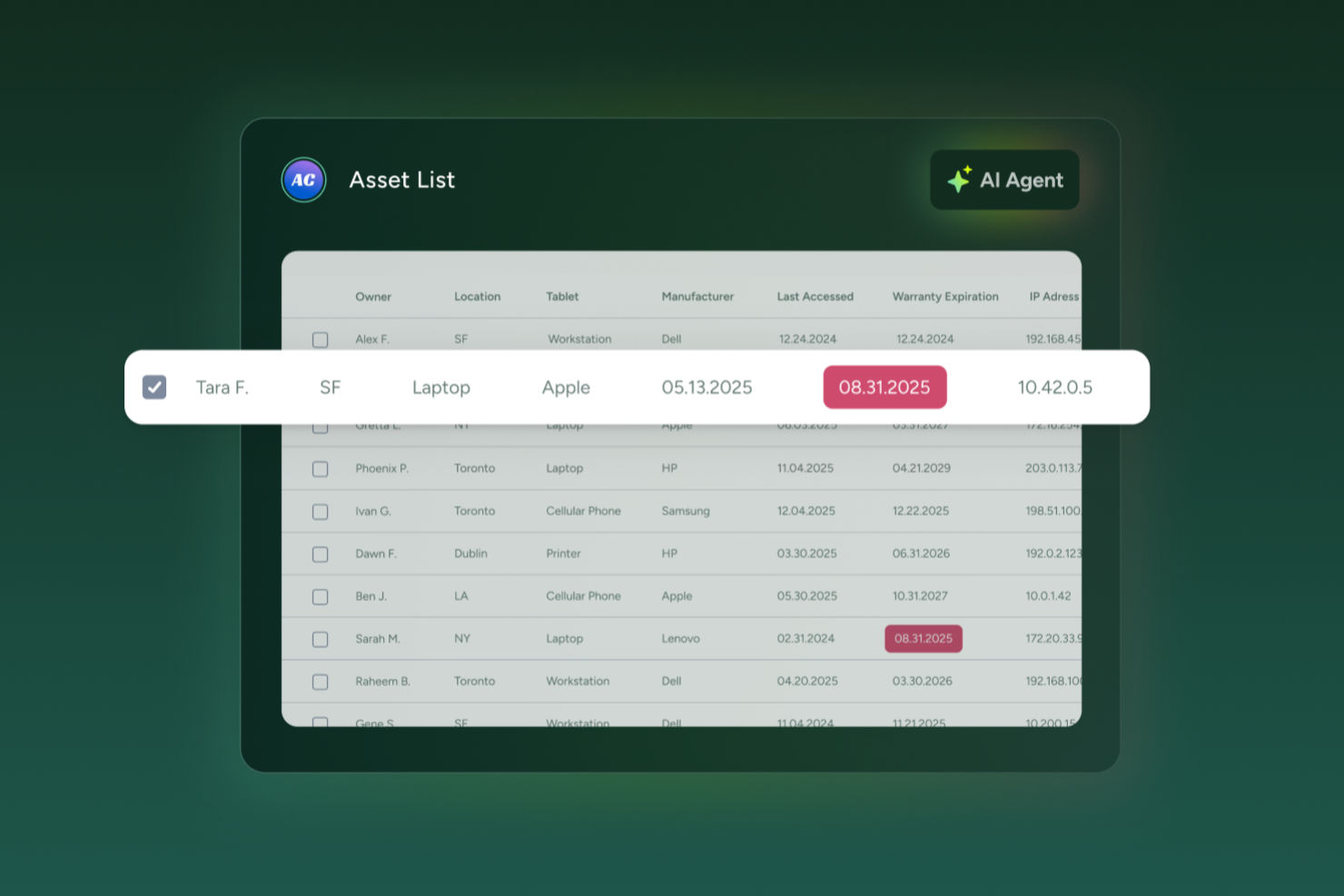
SysAid offers a unified platform where your IT team can manage hardware and software assets, track their lifecycle, and connect that data directly to help desk and service workflows. This approach is particularly useful if you oversee infrastructure across multiple locations or support a large user base and want asset information readily available during support and service management activities.
Why I Picked SysAid
I picked SysAid because it combines IT asset tracking with help desk workflows, so asset data stays linked to support tickets and service requests. This gives your team the context they need when troubleshooting hardware issues or managing software licenses. SysAid’s automated discovery and inventory tools collect hardware and software data across your environment, while integration with the service desk ensures incidents are associated with the correct assets. This unified view makes it easier to identify outdated software, manage license compliance, and respond more effectively to hardware-related issues.
SysAid Key Features
In addition to the asset-tracking and service-desk linkage I mentioned above, SysAid offers several other features that enhance IT asset management:
- CMDB (Configuration Management Database): Lets you map relationships between devices, services, and users, giving a holistic view of how assets are connected across your infrastructure.
- Remote control: Enables your support agents to securely access and manage computers from a distance, which helps troubleshoot hardware and software issues without needing physical access.
- Software license tracking: Tracks installed software across devices and monitors license usage and renewals — helping you stay compliant and avoid unnecessary licensing spend.
- Patch management: Allows deploying software patches to one or many devices based on customized policies, helping you keep systems secure and up to date across your network.
SysAid Integrations
Integrations include Microsoft Active Directory, Azure Active Directory, LDAP, SAML, Google Workspace, Microsoft 365, VMware, AWS, and SCCM. An API is also available for custom integrations.
Pros and Cons
Pros:
- Integrated CMDB lets you map dependencies and see relationships between assets and services.
- Remote control support helps resolve issues on any device without physical access.
- Tracks hardware and software assets together with service desk data in one platform.
Cons:
- Mobile app experience lacks full functionality.
- No support for geofencing in asset tracking.
New Product Updates from SysAid

SysAid Adds Direct Knowledge Base Linking in Service Records
SysAid now allows linking knowledge base articles directly to service records, enhancing centralized access to information and speeding up issue resolution. For more information, visit SysAid's official site.
 .
.

OfficeSpace is a workplace management platform designed to help teams organize and oversee their physical work environments.
Why I Picked OfficeSpace: OfficeSpace's asset management features are particularly relevant for IT asset management. The platform allows users to create a digital inventory of assets, including detailed information such as serial numbers, purchase costs, warranty expirations, and depreciation details. This centralized system helps IT teams keep track of equipment like laptops, monitors, and other devices, ensuring that all assets are accounted for and maintained properly.
Standout features & integrations:
Another key feature is the automation of maintenance schedules and work orders. OfficeSpace enables users to set up recurring maintenance tasks and automatically generate work orders when certain conditions are met, such as low inventory levels or upcoming warranty expirations. Integrations include Microsoft Teams, Google Workspace, Slack, Office 365, and Zoom.
Pros and Cons
Pros:
- Manages the entire asset lifecycle
- Automated maintenance scheduling
- Detailed inventory management
Cons:
- May not cover all types of IT assets
- No mobile app available

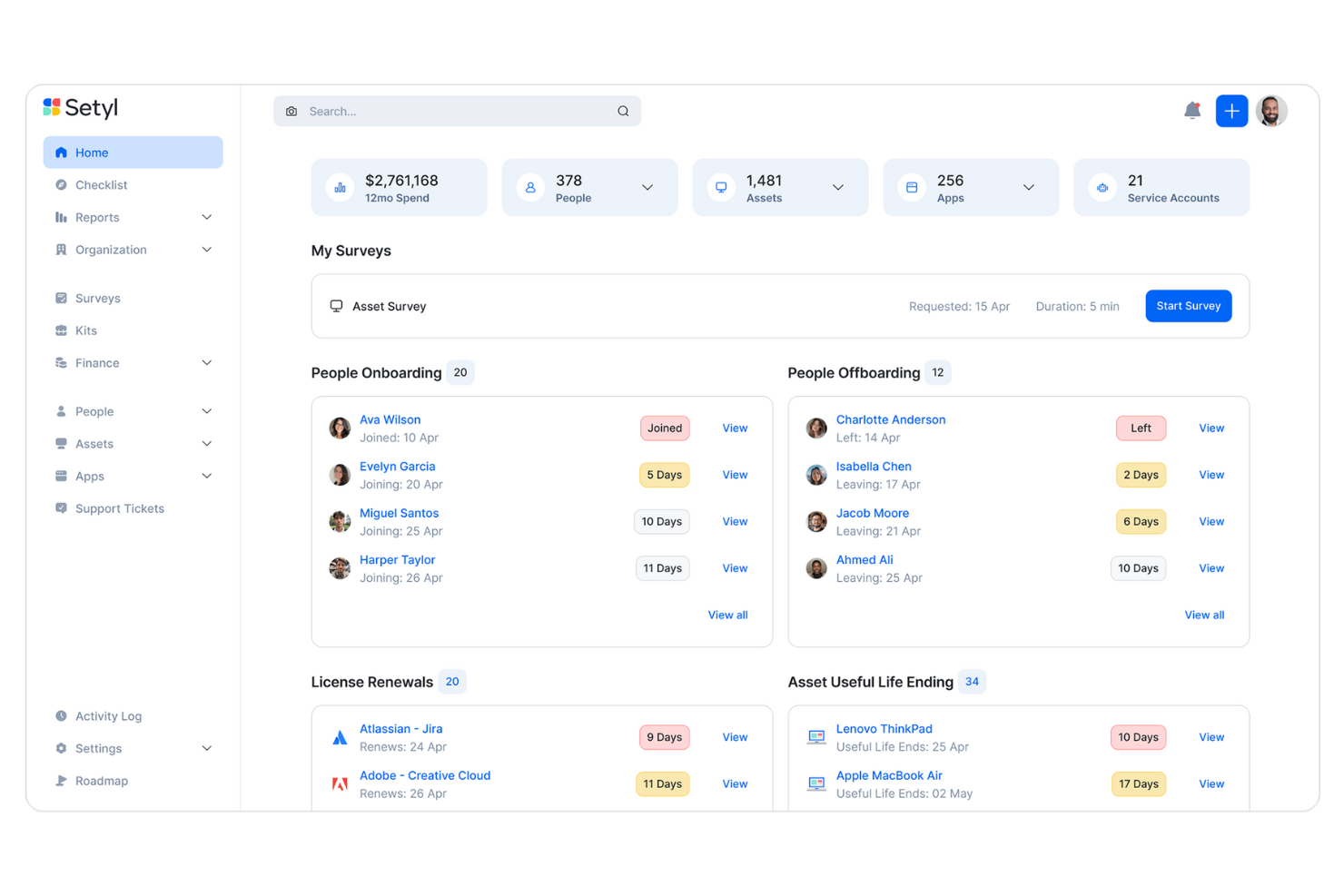
Setyl is a cloud-based IT management platform that provides comprehensive oversight of your organization's assets, software applications, licenses, users, vendors, and expenditures. It consolidates all these elements into a single, centralized system, offering full visibility and control over your IT infrastructure.
Why I picked Setyl: You can track the entire lifecycle of each asset—from acquisition to disposal—so you can make informed decisions about maintenance and replacements. I also like its comprehensive software asset register. This feature consolidates all your SaaS subscriptions, software licenses, installed applications, and service contracts into a single, centralized platform. You can record and manage key data such as contracts, pricing structures, renewal dates, assigned users, application owners, and linked hardware devices, giving you a clear and organized overview of your software assets.
Setyl Standout Features and Integrations:
Other standout features include employee onboarding and offboarding workflows to streamline the assignment and retrieval of devices and licenses. Additionally, Setyl offers detailed activity logs as well as archiving workflows, allowing you to keep a record of all changes and prepare for security audits. The platform integrates with Google Workspace, Microsoft 365, Atera, CDW, CrowdStrike, JumpCloud, Google Endpoint Management, Okta, NinjaOne, NetSuite, Xero, Zoom, Slack, BambooHR, ADP Workforce Now, Zendesk, Jira Service Management, Workday, and more.
Pros and Cons
Pros:
- Unlimited assets included in price
- Assistance with setup offered as standard
- Software and hardware asset management in one
Cons:
- No native mobile app
- Doesn’t offer the complex functionalities that may be needed for large enterprise organizations
New Product Updates from Setyl

Setyl's New Tools for Asset Control
Setyl's update introduces new tools for onboarding, asset control, software reporting, and integrations to make IT management more streamlined. The features help organizations onboard employees faster, maintain optimal inventory, track software usage and costs more clearly, and keep licenses up to date to cut waste and improve efficiency. For more information, visit Setyl's official site.


Atera is an IT management platform that helps you oversee your organization’s hardware assets, software environments, and IT operations. It combines asset management, remote monitoring, automation, and helpdesk features into a single centralized system.
Why I picked Atera:
Atera makes it easy to track your IT assets throughout their entire lifecycle—from onboarding to retirement—so you always know where devices are, who’s using them, and what condition they’re in. I also appreciate Atera’s pay-per-technician model, which allows unlimited endpoint management without hidden fees. This is ideal for growing IT teams looking to consolidate asset tracking, remote maintenance, and IT support into one streamlined platform.
Atera Standout Features and Integrations:
Atera’s combination of Remote Monitoring and Management (RMM) with Professional Services Automation (PSA) lets you manage both hardware assets and IT support operations from one place. Other standout features include automated patch management, proactive alerts, and remote access tools like Splashtop and TeamViewer to assist with troubleshooting. Atera also supports automated onboarding and offboarding, helping IT teams manage device assignments and permissions efficiently. Integrations include Microsoft Teams, Slack, WhatsApp Notifications, Microsoft Outlook, Asana, ClickUp, Acronis Cyber Protect Cloud, Salesforce, Jira Software Cloud, Google Chat, Azure Active Directory, Okta, Freshservice, RingCentral, Google Sheets, and ChatGPT (OpenAI).
Pros and Cons
Pros:
- Centralizes ticketing, RMM, PSA, and asset management
- Proactive issue detection and automation options
- Detailed reporting and client-facing dashboards
Cons:
- Learning curve for new users due to breadth of features
- Some limitations in PSA and billing features
New Product Updates from Atera

Atera Enhances IT Autopilot With Automation and File Support
Atera’s IT Autopilot gets three major boosts: you can now attach common files for deeper analysis, automate IT tasks with clear workflows, and choose how the system follows up when users go silent. These updates help streamline IT operations and improve resolution efficiency. For more information, visit Atera’s official site.


Rippling IT helps your team manage everything related to people operations, including IT assets, from one place. With its centralized platform, you can automate device management, track inventory, and control access for new hires or exiting employees.
Why I Picked Rippling IT: Rippling IT is a strong choice for IT asset management because it offers tools to automate the entire lifecycle of your assets. You can assign devices, monitor their status, and even retrieve them when employees leave. It’s easy to see what’s available, who’s using what, and where your inventory gaps are. The platform even handles device provisioning and remote lock/wipe options, so your IT team can manage devices from anywhere.
Standout features & integrations:
Some standout features include automated onboarding and offboarding processes and integrations with over 600 apps. Rippling IT also supports single sign-on (SSO), multi-factor authentication (MFA), and real-time device monitoring. Available integrations include Google Workspace, Microsoft 365, Slack, Zoom, AWS, and Dropbox.
Pros and Cons
Pros:
- Remote device lock and wipe capabilities
- Customizable workflow automation
- Support for onboarding and offboarding employees and their devices
Cons:
- Not all features may be necessary for smaller operations
- Can be complex to set up initially


Deel is a comprehensive platform designed to support global HR, payroll, and IT operations, making it a versatile solution for companies with international teams. Originally built for hiring and compliance across borders, Deel has expanded its offerings by incorporating IT management through the acquisition of Hofy.
Why I Picked Deel: Deel can handle equipment procurement, deployment, and tracking across 130+ countries. For companies managing global teams, this kind of reach is crucial for maintaining smooth operations without worrying about complex logistics, customs, or compliance issues. Deel also excels in providing real-time visibility over all physical assets like laptops and other hardware, including those owned or leased from third-party vendors, giving businesses control over asset health and inventory on a global scale.
Standout features & integrations:
Additional standout features include robust 24/7 global support, which ensures that employees can resolve technical issues quickly no matter where they are, and the platform’s ability to automate device refresh cycles, saving companies both time and costs. Deel integrates with key tools like Apple Business Manager, Windows Autopilot, Okta, OneLogin, Rippling, and Workday.
Pros and Cons
Pros:
- Can combine HR and IT asset management in one
- Helps automate asset workflows
- Supports equipment deployment in over 130 countries
Cons:
- May not be ideal for teams with very complex IT asset needs
- Doesn't offer features beyond device management, like network and server management

SuperOps is a PSA-RMM platform designed for MSPs, offering features such as asset, policy, patch, and client management. It automates time-consuming tasks for MSP companies, such as server checking, updating, and restarting, saving them the time and effort associated with manual work.
Why I Picked SuperOps: The asset management feature simplifies the process of managing and performing tasks on assets, ensuring they are always patched and equipped with the necessary software. SuperOps also excels in automation capabilities, including user-friendly scripting and ticket automation modules. I also appreciate its intuitive interface, which makes for easier adoption for new technicians.
Standout features & integrations:
Standout features include policy, patch, alert, and desktop management, as well as tools for remote access. It also offers a service desk, scheduling, reporting, project management, and contract and client management with the ability to manage invoices and payments. It supports integrations with tools like Splashtop, TeamViewer, Bitdefender, Xero, QuickBooks, Stripe, SentinelOne, Guardz, Hudu, Emsisoft, Microsoft Azure, and Webroot.
Pros and Cons
Pros:
- Easy-to-learn platform
- RMM and PSA tools in one platform
- Automates time-consuming tasks
Cons:
- Client portal could be improved
- Limited support for other languages
New Product Updates from SuperOps

SuperOps Adds HTML Support for Ticket Closure Emails
SuperOps introduces HTML embedding for ticket closure emails. This update allows teams to include custom content such as CSAT survey links and branded elements in resolution emails. For more information, visit SuperOps’ official site.
 .
.

InvGate Asset Management is an IT asset management solution that helps you discover, centralize, and manage your organization's physical, virtual, and cloud assets. It offers a unified view of your IT infrastructure, enabling better decision-making and operational efficiency.
Why I Picked InvGate: I chose InvGate Asset Management for its ability to simplify the onboarding process with multiple methods to build your inventory. These methods include Agent-based installations, Agentless discovery, manual entry, and third-party integrations with tools like Lansweeper, FileWave, VMware, Intune, and Jamf.
The platform also lets you automate asset lifecycle management. It helps IT teams track hardware assets from procurement to disposal while leveraging smart automation to enforce policies and categorize assets. Custom fields allow you to track asset details specific to your organization, from lifecycle data to usage policies and compliance.
Standout features & integrations:
Other features include inventory creation flexibility and IT spend optimization with insights into software usage, license assignments, and asset utilization. Additionally, when combined with InvGate’s IT service management (ITSM) solution, organizations can create advanced workflows that connect asset management with service requests, incidents, and change management processes. Asset data can be imported via integrations with platforms like Lansweeper, FileWave, VMware, Intune, Jamf, Microsoft Active Directory, and Okta.
Pros and Cons
Pros:
- Effective software license management
- Centralized contract management
- Comprehensive asset discovery and inventory capabilities
Cons:
- Technical capabilities like staging and VPN are limited to higher-tier plans
- Could offer more native integrations
New Product Updates from InvGate Asset Management
InvGate Asset Management's Enhanced Emails with Cost Center Variables
InvGate Asset Management now includes cost center variables in automation emails for personalized notifications. For more information, visit InvGate Asset Management's official site.
 .
.
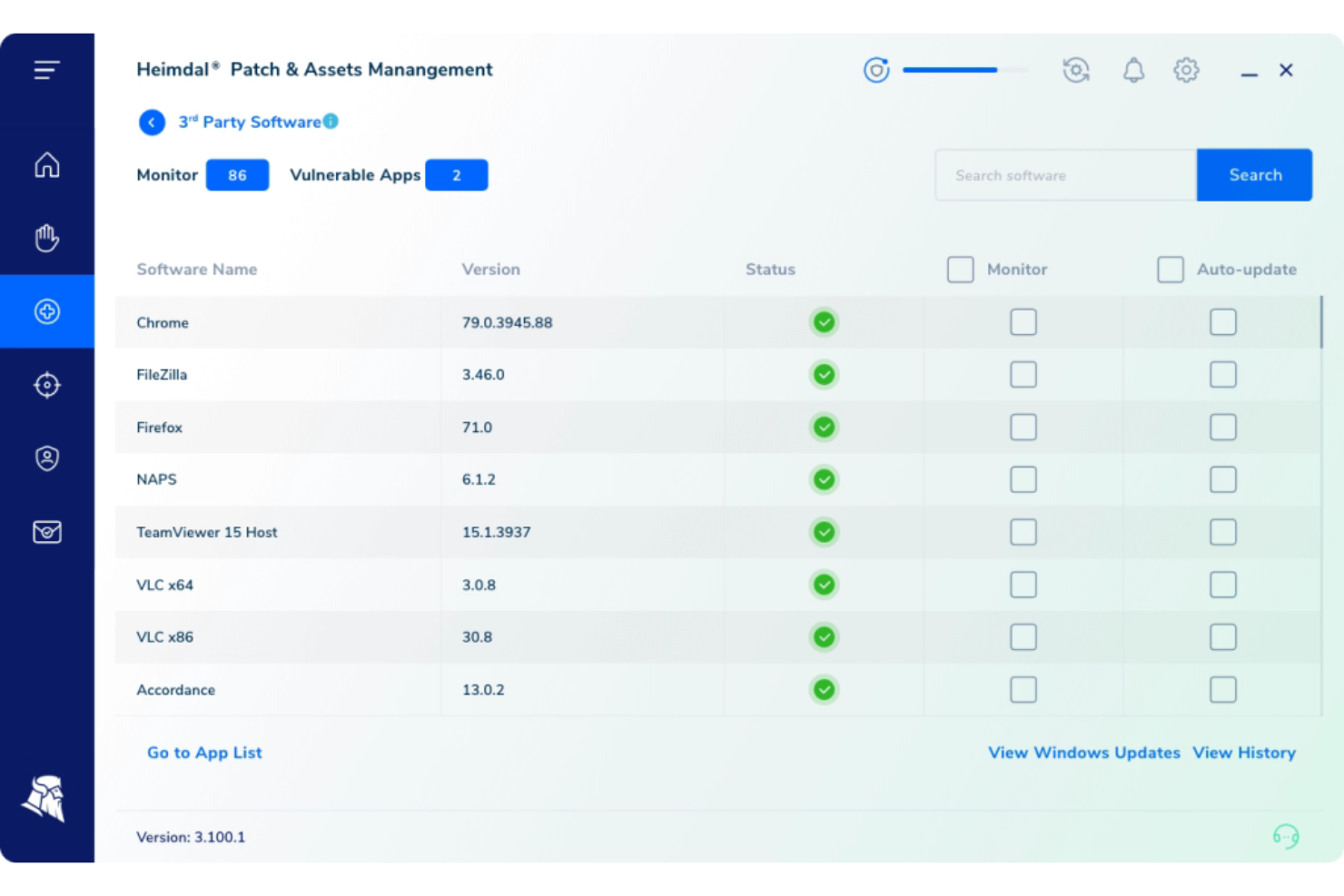
Heimdal caters to the diverse needs of industries like healthcare, education, and government, offering a versatile IT asset management solution. Designed for IT professionals and managed service providers (MSPs), Heimdal emphasizes automated patch management, vulnerability management, and comprehensive endpoint security. By integrating with third-party tools such as ConnectWise and Autotask, it ensures a streamlined workflow and enhanced compliance with industry standards.
Why I Picked Heimdal
I picked Heimdal for its distinctive ability to automate patch management, a crucial aspect of IT asset management that directly addresses the challenge of keeping software up-to-date and secure. Heimdal's platform automates patch deployment across a wide range of third-party applications, ensuring rapid delivery and compliance. Additionally, its integration capabilities with tools like ConnectWise and Autotask support a seamless IT management experience, making it a practical choice for organizations looking to enhance their IT operations and security posture.
Heimdal Key Features
In addition to its robust patch management capabilities, I also found that Heimdal offers several other valuable features:
- Threat Hunting: Provides proactive tools for detecting and responding to potential threats before they escalate.
- Unified Endpoint Management: Streamlines the management of all endpoints within an organization, enhancing operational efficiency.
- Privileged Access Management: Secures sensitive accounts and sessions, reducing the risk of unauthorized access.
- Extended Detection & Response (XDR): Integrates various security measures to deliver comprehensive protection against cyber threats.
Heimdal Integrations
Native integrations are not currently listed by Heimdal; however, the platform supports API-based custom integrations.
Pros and Cons
Pros:
- Detailed asset and license visibility
- Strong vulnerability and threat detection
- Automates patching across endpoints
Cons:
- Interface requires onboarding time
- No native integrations available
Weitere IT-Asset-Management-Software
Hier sind weitere Optionen für IT-Asset-Management-Software, die es nicht auf meine Auswahlliste geschafft haben, aber dennoch einen Blick wert sind:
- Limble
For preventive IT maintenance automation
- Device42
For comprehensive IT asset visualization
- SolarWinds Service Desk
For incident and asset correlation
- Josys
For unified SaaS and device management
- Jira Service Management
For linking assets to requests
- IBM Flexera One
For software license optimization
- OpenText Asset Management X
For enterprise-level asset scalability
- Ivanti Neurons for ITAM
For proactive IT asset insights
- ServiceNow IT Asset Management (ITAM)
For unified IT operations
- ScalePad
For configuration management


Auswahlkriterien für IT-Asset-Management-Software
Für die Auswahl der besten IT-Asset-Management-Softwares auf dieser Liste habe ich typische Käuferanforderungen und Schmerzpunkte wie effizientes Asset-Tracking und Compliance-Management berücksichtigt. Außerdem habe ich folgendes Bewertungsraster zur strukturierten und fairen Beurteilung genutzt:
Kernfunktionen (25% der Gesamtbewertung)
Um in diese Liste aufgenommen zu werden, musste jede Lösung diese gängigen Anwendungsfälle abdecken:
- Asset-Tracking und Inventarverwaltung
- Lizenzverwaltung und Compliance
- Hardware-Lifecycle-Management
- Finanzverwaltung und Budgetierung
- Berichtswesen und Analysen
Besondere Zusatzfunktionen (25% der Gesamtbewertung)
Um die Auswahl weiter einzuschränken, habe ich auch auf folgende besondere Features geachtet:
- Automatisierte Erkennung von Assets
- Echtzeitüberwachung und Benachrichtigungen
- Integration mit Drittanbieter-Tools
- Anpassbare Reporting-Dashboards
- Prädiktive Analysen für den Asset-Lebenszyklus
Benutzerfreundlichkeit (10% der Gesamtbewertung)
Um einen Eindruck von der Anwenderfreundlichkeit zu bekommen, habe ich folgende Aspekte geprüft:
- Intuitive Benutzeroberfläche
- Einfache Navigation und Zugänglichkeit
- Anpassbare Benutzererfahrung
- Minimale Einarbeitungszeit
- Ästhetische Designqualität
Onboarding (10% der Gesamtbewertung)
Zur Beurteilung des Onboarding-Erlebnisses jeder Plattform habe ich Folgendes berücksichtigt:
- Verfügbarkeit von Schulungsvideos und Tutorials
- Zugang zu interaktiven Produkttouren
- Umfassende Onboarding-Vorlagen
- Hilfreiche Chatbots und Helpdesk
- Regelmäßige Webinare und Live-Demos
Kundensupport (10 % der Gesamtbewertung)
Zur Bewertung der Kundensupport-Leistungen jedes Softwareanbieters habe ich Folgendes berücksichtigt:
- 24/7-Erreichbarkeit des Supports
- Zugang zu dedizierten Account-Managern
- Reaktionszeit auf Anfragen
- Verfügbarkeit einer umfassenden Wissensdatenbank
- Multi-Channel-Support-Optionen
Preis-Leistungs-Verhältnis (10 % der Gesamtbewertung)
Um das Preis-Leistungs-Verhältnis jeder Plattform zu beurteilen, habe ich Folgendes berücksichtigt:
- Wettbewerbsfähige Preismodelle
- Leistungsumfang in den jeweiligen Preiskategorien
- Rabatte bei Jahresabonnements
- Kosten-Nutzen-Analyse
- Flexible Preisgestaltung
Kundenbewertungen (10 % der Gesamtbewertung)
Um ein Bild der Kundenzufriedenheit zu erhalten, habe ich beim Lesen von Kundenrezensionen Folgendes beachtet:
- Allgemeine Zufriedenheitsbewertungen
- Häufig genannte Schmerzpunkte
- Von Nutzern gelobte Funktionen
- Häufigkeit positiver im Vergleich zu negativen Bewertungen
- Feedback der Nutzer zur Servicequalität des Kundendienstes
So wählen Sie eine IT-Asset-Management-Software aus
Es ist leicht, sich in langen Funktionslisten und komplexen Preisstrukturen zu verlieren. Damit Sie bei Ihrem individuellen Auswahlprozess den Überblick behalten, finden Sie hier eine Checkliste mit wichtigen Faktoren:
| Faktor | Worauf zu achten ist |
|---|---|
| Skalierbarkeit | Kann das Tool mit Ihrem Unternehmen wachsen? Berücksichtigen Sie zukünftige Anforderungen und ob die Software eine höhere Asset-Anzahl ohne zusätzliche Kosten oder Leistungseinbußen bewältigt. |
| Integrationen | Lässt sich das Tool mit Ihren bestehenden Systemen verbinden? Prüfen Sie die Kompatibilität mit Tools wie ERP, CRM und anderen IT-Management-Lösungen für nahtlose Arbeitsabläufe. |
| Anpassbarkeit | Können Sie das Tool an Ihre Prozesse anpassen? Achten Sie auf die Möglichkeit, Workflows, Berichte und Dashboards an Ihre betrieblichen Anforderungen zu individualisieren. |
| Benutzerfreundlichkeit | Ist es für Ihr Team einfach zu bedienen? Bewerten Sie das Oberflächendesign und wie schnell Ihr Team die Software effektiv nutzen kann. |
| Implementierung und Onboarding | Wie komplex ist die Einrichtung? Beurteilen Sie den Zeit- und Ressourcenaufwand für die Inbetriebnahme und ob der Anbieter während dieser Phase ausreichend Unterstützung bietet. |
| Kosten | Passt die Software in Ihr Budget? Vergleichen Sie die Preispläne, versteckte Gebühren und prüfen Sie, ob das Kosten-Nutzen-Verhältnis Ihren Anforderungen entspricht. |
| Sicherheitsmaßnahmen | Sind Ihre Assets geschützt? Achten Sie auf Verschlüsselung, Zugriffskontrollen und darauf, dass die Software gängigen Sicherheitsstandards entspricht, um sensible Daten zu schützen. |
| Compliance-Anforderungen | Erfüllt die Software branchenspezifische Standards? Kontrollieren Sie, ob die Software Compliance mit spezifischen Vorschriften wie DSGVO oder HIPAA unterstützt. |
Was ist IT-Asset-Management-Software?
IT-Asset-Management-Software ist ein Tool zur Nachverfolgung, Verwaltung und Optimierung von IT-Assets über deren gesamten Lebenszyklus. IT-Fachkräfte wie Asset-Manager und IT-Administratoren setzen diese Tools in der Regel ein, um die Effizienz zu steigern und die Compliance sicherzustellen. Die Funktionen zur Asset-Verfolgung, Lizenzverwaltung und Berichterstattung helfen dabei, ein organisiertes Inventar zu pflegen und fundierte Entscheidungen zu treffen. Organisationen mit komplexen Rechenzentrumsstrukturen profitieren zudem von spezieller DCIM-Software für die Infrastrukturverwaltung. Diese Tools bieten insgesamt einen Mehrwert, indem sie Kosten senken und die Auslastung der Assets optimieren.
Funktionen
Wenn Sie sich für eine IT-Asset-Management-Software entscheiden, sollten Sie besonders auf folgende Funktionen achten:
- Asset-Tracking: Hilft Ihnen, ein genaues Inventar Ihrer Hardware- und Software-Assets zu führen, sodass Sie jederzeit wissen, was Sie besitzen und wo sich diese befinden.
- Lizenzverwaltung: Ermöglicht die effektive Verwaltung von Softwarelizenzen, wodurch Sie Vorschriften einhalten und teure Strafen vermeiden.
- Lebenszyklusmanagement: Verfolgt Assets vom Erwerb bis zur Ausmusterung und hilft Ihnen, den Asset-Wert zu maximieren und Ersatz rechtzeitig zu planen.
- Automatische Erkennung: Identifiziert und erfasst neue Geräte im Netzwerk automatisch und spart Zeit sowie manuelle Fehler.
- Berichte und Analysen: Bietet Einblicke in die Nutzung und Leistungsfähigkeit der Assets und unterstützt Sie dabei, fundierte Entscheidungen zu treffen und die Ressourcenzuteilung zu optimieren.
- Compliance-Management: Stellt die Einhaltung von Branchenvorschriften und Standards sicher, reduziert Risiken und schützt Ihr Unternehmen.
- Finanzmanagement: Hilft Ihnen, Ausgaben und Budgets im Zusammenhang mit Assets zu steuern und verbessert Kostenkontrolle und Finanzplanung.
- Integrationsmöglichkeiten: Verbindet sich mit anderen IT-Systemen und -Tools, garantiert einen reibungslosen Datenfluss und vereinheitlichte Abläufe.
- Benutzerfreundliche Oberfläche: Bietet ein intuitives Design, das es Ihrem Team leicht macht, sich zurechtzufinden und die Software effizient zu nutzen.
- Sicherheitsfunktionen: Schützt sensible Daten mit Verschlüsselung und Zugriffskontrollen und stellt sicher, dass Ihre Assets vor Bedrohungen sicher sind.
Vorteile
Die Einführung von IT-Asset-Management-Software bringt zahlreiche Vorteile für Ihr Team und Ihr Unternehmen. Hier sind einige, auf die Sie sich freuen können:
- Kosteneinsparungen: Durch optimale Nutzung der Assets und den Verzicht auf unnötige Neuanschaffungen können Betriebskosten erheblich gesenkt werden.
- Verbesserte Compliance: Sorgt durch effektive Lizenz- und Compliance-Verwaltung dafür, dass Ihr Unternehmen Branchenstandards einhält und Sanktionen vermeidet.
- Verbesserte Entscheidungsfindung: Bietet wertvolle Einblicke durch Berichte und Analysen und hilft Ihnen, fundierte Entscheidungen bei der Asset-Zuteilung und Budgetplanung zu treffen.
- Erhöhte Effizienz: Automatisiert manuelle Aufgaben wie Asset-Tracking und -Erkennung, wodurch Zeit gespart und Fehler reduziert werden.
- Bessere Sicherheit: Schützt sensible Daten mit modernen Sicherheitsfunktionen, sodass Ihre Assets vor unbefugtem Zugriff sicher sind.
- Vereinfachte Betriebsabläufe: Integriert sich in andere IT-Systeme, schafft einen einheitlichen Überblick über die Abläufe und verbessert die Workflow-Effizienz.
Kosten & Preise
Die Auswahl von IT-Asset-Management-Software erfordert ein Verständnis der verschiedenen Preisstrukturen und verfügbaren Tarife. Die Kosten variieren je nach Funktionsumfang, Teamgröße, Erweiterungen und mehr – ähnlich wie bei der Auswahl von IT-Beschaffungssoftware. Die folgende Tabelle fasst gängige Tarife, deren Durchschnittspreise und typische Leistungsmerkmale zusammen, die in Lösungen für IT-Asset-Management enthalten sind:
Tarifvergleichstabelle für IT-Asset-Management-Software
| Tariftyp | Durchschnittspreis | Übliche Funktionen |
|---|---|---|
| Kostenloser Tarif | $0 | Basis-Asset-Tracking, eingeschränktes Reporting und Community-Support. |
| Persönlicher Tarif | $5-$25/user/month | Asset-Tracking, grundlegendes Reporting, E-Mail-Support und begrenzte Integrationen. |
| Business-Tarif | $30-$60/user/month | Erweitertes Reporting, Lizenzverwaltung, telefonischer Support und mehr Integrationen. |
| Enterprise-Tarif | $65-$120/user/month | Anpassbare Dashboards, vollständiges Lifecycle-Management, dedizierter Support und API-Zugang. |
FAQ zur IT-Asset-Management-Software
Hier finden Sie Antworten auf häufig gestellte Fragen zur IT-Asset-Management-Software:
Was ist der Hauptzweck von IT-Asset-Management-Software?
Der Hauptzweck einer IT-Asset-Management-Software besteht darin, die IT-Ressourcen eines Unternehmens über ihren gesamten Lebenszyklus zu verfolgen und zu verwalten. Dazu gehört die Überwachung von Hardware- und Software-Inventar, die Einhaltung von Lizenzbestimmungen sowie die Optimierung der Ressourcennutzung. Eine effektive Verwaltung der IT-Assets kann die Kosten senken und die betriebliche Effizienz steigern.
Wie integriert sich IT-Asset-Management-Software in bestehende Systeme?
IT-Asset-Management-Software wird häufig mit Systemen wie ERP, CRM und Helpdesk-Tools integriert. Die Integration ermöglicht einen nahtlosen Datenaustausch und reduziert manuelle Eingaben sowie Fehler. Prüfen Sie vor dem Kauf, ob die Software APIs oder native Integrationen mit Ihren aktuellen Systemen unterstützt, um die Kompatibilität sicherzustellen.
Kann IT-Asset-Management-Software bei der Einhaltung von Vorschriften unterstützen?
Ja, IT-Asset-Management-Software kann bei der Einhaltung von Vorschriften unterstützen, indem sie Softwarelizenzen überwacht und sicherstellt, dass diese den Vereinbarungen mit den Anbietern entsprechen. Sie erstellt Berichte und Benachrichtigungen zu anstehenden Verlängerungen und Audits. Dieser proaktive Ansatz reduziert das Risiko von Vertragsstrafen aufgrund von Nichteinhaltung und sorgt dafür, dass Ihr Unternehmen regelkonform bleibt.
Wie wähle ich die richtige IT-Asset-Management-Software für mein Unternehmen aus?
Um die passende IT-Asset-Management-Software auszuwählen, sollten Sie zunächst die spezifischen Anforderungen und das Budget Ihres Unternehmens analysieren. Berücksichtigen Sie Faktoren wie Skalierbarkeit, Benutzerfreundlichkeit und Integrationsmöglichkeiten. Probieren Sie einige Lösungen aus, um herauszufinden, welche am besten zu Ihren Arbeitsabläufen passt und die benötigten Funktionen bietet.
Wie geht es weiter:
Wenn Sie derzeit auf der Suche nach einer IT-Asset-Management-Software sind, nehmen Sie Kontakt zu einem SoftwareSelect-Berater auf und erhalten Sie kostenlose Empfehlungen.
Sie füllen ein Formular aus und führen ein kurzes Gespräch, bei dem Ihre individuellen Anforderungen besprochen werden. Anschließend erhalten Sie eine Shortlist mit passenden Software-Lösungen zur Auswahl. Darüber hinaus unterstützen die Berater Sie im gesamten Kaufprozess – einschließlich Preisverhandlungen.