

10 Beste Helpdesk-Software mit Asset-Management für 2026

10 Beste Helpdesk-Software mit Asset Management – Auswahlliste
Here's my pick of the 10 best software from the 25 tools reviewed.


Die Vielzahl an verfügbaren Helpdesk-Tools kann schnell überwältigend wirken – besonders, wenn Ihr Team sowohl ein Ticket-Tracking als auch eine Übersicht über die Assets benötigt. Die richtige Plattform kann Zeit sparen, Stress reduzieren und Ihre Support-Abläufe zentralisieren.
Dieser Leitfaden stellt bewährte Lösungen vor, die für Teams entwickelt wurden, die Wert auf organisierte Workflows, Automatisierung und Verantwortlichkeit legen. Jede Bewertung hebt hervor, was die Software besonders macht, für welchen Anwendungsfall sie am besten geeignet ist, sowie die wichtigsten Vor- und Nachteile, damit Sie die passende Wahl treffen können.
Table of Contents
Why Trust Our Software Reviews
Zusammenfassung: Beste Helpdesk-Software mit Asset Management
| Tool | Best For | Trial Info | Price | ||
|---|---|---|---|---|---|
| 1 | Best for real-time asset monitoring | Free trial + free demo available | Pricing upon request | Website | |
| 2 | Best for built-in CMDB maps | 14-day free trial | Pricing upon request | Website | |
| 3 | Best for combining help desk & IT asset management | 30-day free trial + free demo available | From $149/technician/month (billed annually) | Website | |
| 4 | Best for connecting tickets to assets | 30-day free trial available | From $17/user/month | Website | |
| 5 | Best for IT inventory management | Free trial available | From $26/seat/month (3 seat minimum) | Website | |
| 6 | Best for intuitive ticketing and problem resolution | Free trial + free demo available | From $19/agent/month (billed annually) | Website | |
| 7 | Best for large enterprises needing comprehensive IT solutions | Free demo available | Pricing upon request | Website | |
| 8 | Best for Agile development teams seeking ITSM tools | 7-day free trial | From $20/user/month (billed annually) | Website | |
| 9 | Best for scheduled maintenance tasks | Free trial available | From $478/user/annually | Website | |
| 10 | Best for IT services requiring robust business management | Not available | From $59/user/month | Website |


-

Site24x7
Visit WebsiteThis is an aggregated rating for this tool including ratings from Crozdesk users and ratings from other sites.4.6 -
GitHub Actions
Visit WebsiteThis is an aggregated rating for this tool including ratings from Crozdesk users and ratings from other sites.4.8 -
Docker
Visit WebsiteThis is an aggregated rating for this tool including ratings from Crozdesk users and ratings from other sites.4.6





Bewertungen: Beste Helpdesk-Software mit Asset Management


NinjaOne is an IT management platform that combines helpdesk ticketing and asset management into a unified solution. It enables IT teams to monitor, manage, and support devices and users from a single interface.
Why I picked NinjaOne: NinjaOne's active asset management feature provides a comprehensive inventory of IT assets, displaying live health and performance data. This real-time information allows your team to quickly assess device status and make informed decisions during incident resolution.
Another key aspect is the customizable ticketing experience. NinjaOne allows you to tailor ticket boards to your team's workflow, ensuring that tickets are categorized and prioritized effectively.
Standout features & integrations:
Features include real-time reporting and analytics, a self-service client portal, live device inventory, one-click remote access, stealth remediation tools, integrated documentation, automated patch management, flexible technician boards, and endpoint health alerts.
Integrations include Accelo, Autotask, Bitdefender, BrightGauge, Connectwise Manage, CrowdStrike, IT Glue, Microsoft Entra, Okta, Slack, SentinelOne, and Zendesk.
Pros and Cons
Pros:
- Customizable ticketing aligns with team workflows
- Centralized control over device configurations
- Comprehensive endpoint management capabilities
Cons:
- The mobile app could offer more functionalities
- Initial setup may require time and resources
New Product Updates from NinjaOne
NinjaOne Launches Integrated Remote Access
NinjaOne has expanded its automated management platform by introducing NinjaOne Remote, a secure remote access solution for multiple operating systems. For more information, visit NinjaOne's official site.

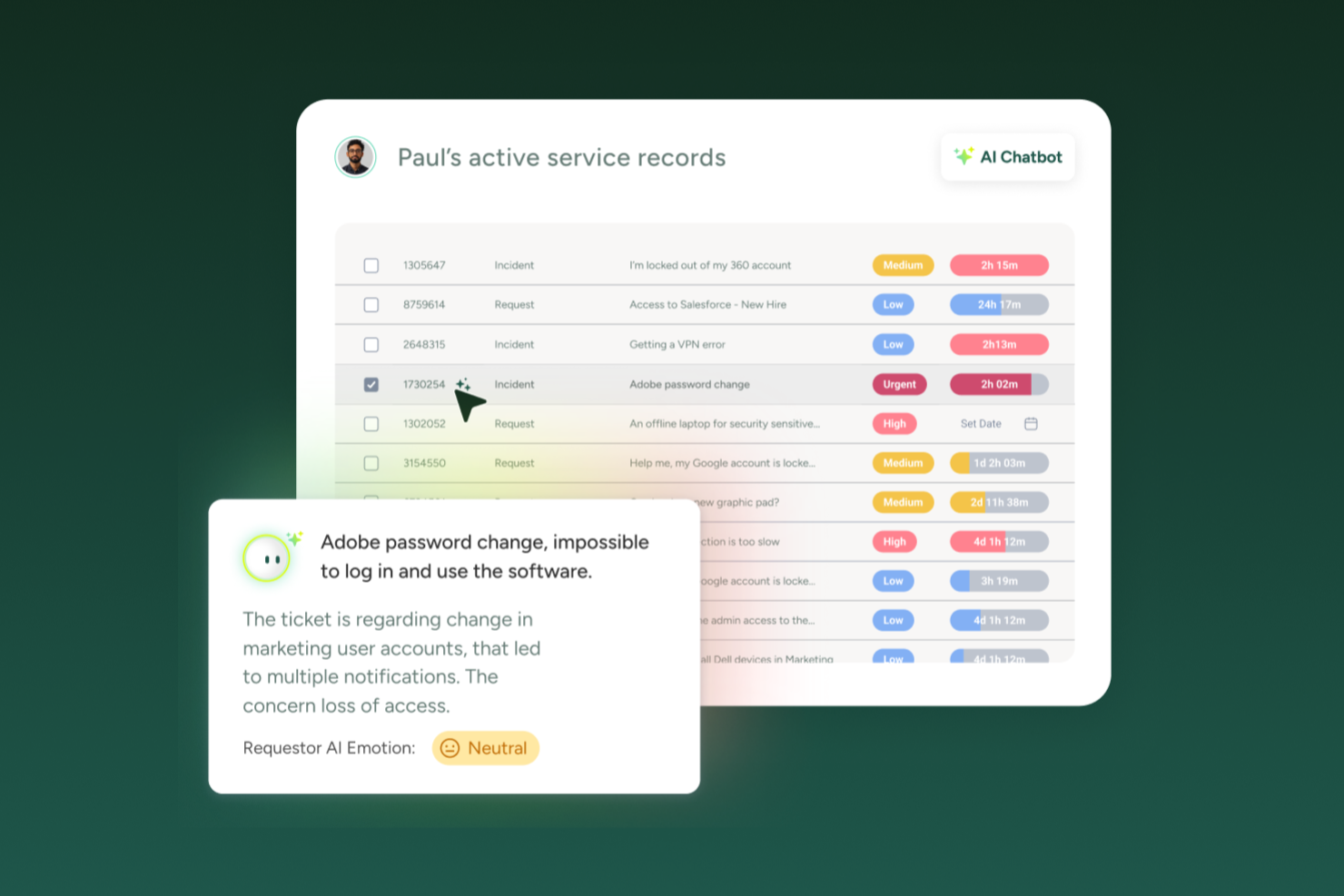
SysAid is an IT Service Management (ITSM) platform that combines help desk software and asset management in a single system. It helps IT teams manage incidents, service requests, and assets while maintaining visibility across the IT environment. With AI-driven automation and a centralized CMDB, SysAid supports more efficient workflows and faster issue resolution.
Why I picked SysAid: I picked SysAid because it lets you manage IT services and assets in one connected platform instead of relying on separate tools. It's built-in CMDB maps relationships between hardware, software, and services, while SysAid’s AI capabilities help categorize and route tickets automatically to reduce manual triage. This setup gives you clearer oversight of your IT operations and helps reduce service disruptions caused by missed dependencies or slow response times.
Standout features & integrations:
Features include a Self-Service Portal that allows users to submit requests, resolve common issues, and access knowledge articles, AI-driven ticket categorization and automation to reduce repetitive service desk work, and Asset Management with CMDB for tracking hardware, software, and license usage. SysAid also provides Reporting and Analytics to surface metrics like response times, workload trends, and potential bottlenecks.
Integrations include Microsoft 365, Microsoft Teams, Slack, Jira, Salesforce, Google Workspace, ServiceNow, Zendesk, Zoom, Box, Dropbox, and Trello.
Pros and Cons
Pros:
- Workflow automation reduces operational errors
- CMDB maps IT asset relationships
- AI agent automates ticket handling
Cons:
- Implementation process reported as slow
- Interface considered outdated by users
New Product Updates from SysAid

SysAid Adds Direct Knowledge Base Linking in Service Records
SysAid now allows linking knowledge base articles directly to service records, enhancing centralized access to information and speeding up issue resolution. For more information, visit SysAid's official site.
 .
.

Atera is an IT management platform that combines Remote Monitoring and Management (RMM), Professional Services Automation (PSA), and help desk software into one cloud-based solution for managed service providers (MSPs) and internal IT teams. In addition to its monitoring and automation capabilities, Atera includes IT Asset Management (ITAM) tools that help you track, organize, and manage IT assets throughout their lifecycle.
Why I Picked Atera:
I picked Atera because of how fully it integrates help desk ticketing with asset management tools. When a ticket is created, you can link it directly to hardware or software assets, giving you immediate context without needing to switch systems. You’re able to access device status, performance data, and service history alongside each support request. That means you can make more informed troubleshooting decisions and reduce time spent gathering background details. Atera’s unified interface also helps MSPs and IT departments keep both client support and asset inventory under one roof.
Standout features & integrations:
Features include automated patch management, network discovery, AI-powered ticket summaries and recommendations, remote access, contract management, and proactive issue alerts. Atera integrates with Microsoft Teams, Slack, ServiceNow, Okta, Azure Active Directory, Microsoft Outlook, WhatsApp Notifications, monday.com, Jira Software Cloud, ClickUp, Acronis Cyber Protect Cloud, and Google Sheets.
Pros and Cons
Pros:
- Detailed reporting and client-facing dashboards
- Proactive issue detection and automation options
- Centralizes ticketing, RMM, PSA, and asset management
Cons:
- Some limitations in PSA and billing features
- Learning curve for new users due to breadth of features
New Product Updates from Atera

Atera Enhances IT Autopilot With Automation and File Support
Atera’s IT Autopilot gets three major boosts: you can now attach common files for deeper analysis, automate IT tasks with clear workflows, and choose how the system follows up when users go silent. These updates help streamline IT operations and improve resolution efficiency. For more information, visit Atera’s official site.


InvGate Service Management is a comprehensive IT service management (ITSM) tool designed to enhance your organization's IT support operations. When integrated with InvGate Asset Management, businesses can maintain full control over their IT infrastructure.
Why I Picked InvGate Service Management: InvGate Service Management stood out to me because of its deep integration with InvGate Asset Management, making it an ideal choice for organizations that want a unified ITSM and asset management solution. By connecting service requests with asset data, IT teams can diagnose issues faster, track software licenses to prevent compliance risks, and automate workflows for proactive IT management. This level of integration provides end-to-end visibility across IT operations, reducing downtime and optimizing IT spending.
Standout features & integrations:
Key features include automated workflow triggers, which allow IT teams to automate actions based on asset conditions—such as generating tickets for warranty expirations, security patches, or device replacements. Additionally, its ITSM analytics and reporting features help businesses generate cross-reports between asset and service management data, enabling data-driven decision-making for procurement, asset performance, and IT service improvements. Some integrations include FileWave, Lansweeper, Microsoft Teams, Microsoft ActiveDirectory, Azure DevOps, Okta, Office 365, OpenAI, Outlook, and Jira.
Pros and Cons
Pros:
- Easily integrates service management with asset management
- Incorporates AI and low-code automation
- Provides a robust platform for incident management
Cons:
- Could offer more native integrations
- No social media ticket creation support
New Product Updates from InvGate Service Management
InvGate Service Management Enhances Workflows and Usability
InvGate Service Management introduces VSA access from the AI Hub, Microsoft Teams workflow task completion, expanded Okta workflow actions, and custom labels for workflow steps. These updates improve usability and streamline workflow execution across platforms. For more information, visit InvGate Service Management's official site.
 .
.

monday service is a customizable service platform that helps teams efficiently manage and automate their service operations and processes. Its visual approach simplifies the management of both service requests and IT inventory.
Why I picked monday service: Teams can easily monitor hardware, assign tasks, and keep track of important maintenance dates. You can organize equipment by type, track serial numbers, and monitor the lifecycle of each asset.
The platform’s customizable workflows make it simple to create an asset management process that fits your team’s specific needs. With automations, you’ll receive reminders when maintenance is due, and visual dashboards keep everyone aligned and make it easy to see the status of all equipment in real-time.
Standout features & integrations:
Features include customizable no-code workflows, centralized IT asset tracking, visual dashboards for hardware management, automations for sending maintenance reminders, tools for tracking serial numbers and handover dates, and reporting tools for asset usage insights.
Integrations include Slack, Zoom, Microsoft Teams, Google Drive, Dropbox, Jira, HubSpot, Salesforce, GitHub, and Gmail.
Pros and Cons
Pros:
- Visual dashboards for asset status
- Automations for asset maintenance
- Customizable asset workflows
Cons:
- Automations may require fine-tuning
- Setup can be time-consuming


Zendesk is a customer service platform designed to streamline your support team's workflow with its robust and intuitive ticketing system. The software shines brightly in its ability to simplify problem resolution, ensuring that businesses can swiftly and effectively attend to customer inquiries or issues, thereby solidifying its position as a top pick for those seeking intuitive ticketing solutions.
Why I Picked Zendesk: Zendesk was a clear choice for my list given its renowned reputation in the helpdesk software landscape. Its easy-to-use interface and robust capabilities make it an ideal solution for businesses looking for a streamlined ticketing and problem resolution process. I believe Zendesk is best for intuitive ticketing due to its efficient design, helping users navigate requests effortlessly, hence facilitating rapid problem resolution.
Standout features & integrations:
Zendesk impresses with its smart ticketing system that automatically routes and categorizes requests for efficient handling. Its AI-powered Answer Bot offers immediate responses to customer queries, enhancing user experience. In terms of integrations, Zendesk pairs well with a vast number of applications, including Slack, Salesforce, and Microsoft Teams, allowing for smoother communication and data flow between different platforms.
Pros and Cons
Pros:
- Wide range of integrations for enhanced functionality
- Smart ticketing system with auto-routing
- Easy-to-use interface for efficient problem resolution
Cons:
- Lacks asset management in the lower-tier plans
- Advanced features only available at higher pricing tiers
- Can be pricey for small businesses

Best for large enterprises needing comprehensive IT solutions

ServiceNow offers an extensive range of IT services making it an all-encompassing tool for large enterprises. Its breadth of functionality caters to a myriad of needs, securing its position as a leading solution for businesses requiring comprehensive IT services.
Why I Picked ServiceNow: ServiceNow emerged as a prime contender during my evaluation due to its comprehensive suite of IT solutions. I chose this platform because it offers a wide range of services under one roof, making it particularly useful for larger organizations. Its extensive functionality is what sets it apart and makes it the "Best for..." large enterprises that need a comprehensive set of IT solutions.
Standout features & integrations:
ServiceNow shines with its incident management, problem management, change and release management, and asset and cost management features. It also offers impressive AI capabilities that help automate routine tasks. ServiceNow integrates seamlessly with many enterprise solutions like Slack, Jira, and Trello, which further boosts its effectiveness.
Pros and Cons
Pros:
- Robust integrations with other enterprise solutions
- Advanced AI capabilities for automation
- Comprehensive suite of IT solutions
Cons:
- Requires technical knowledge for customization
- Interface can be complicated for new users
- Premium pricing may not suit all budgets
Best for Agile development teams seeking ITSM tools
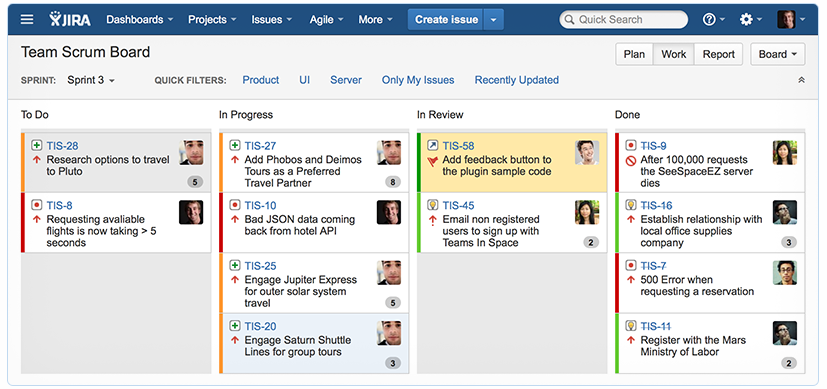
Jira Service Management is a dynamic tool offering a blend of IT service management capabilities with agile development practices. This makes it a perfect match for Agile teams looking for a solution to streamline their IT service management without breaking away from their development process.
Why I Picked Jira Service Management: In my assessment, Jira Service Management stood out due to its unique integration of agile methodologies with ITSM tools, making it a clear choice for Agile development teams. The way it weaves ITSM processes into a tool familiar to many developers made it distinct, leading to its selection as "Best for..." Agile teams seeking to manage IT services without straying from their development rhythm.
Standout features & integrations:
Jira Service Management offers robust incident management, problem management, and change management features, all designed with Agile teams in mind. Furthermore, it provides seamless integration with other Atlassian products like Confluence, Bitbucket, and of course, Jira Software, which amplifies its utility for Agile teams already invested in the Atlassian ecosystem.
Pros and Cons
Pros:
- Robust incident, problem, and change management tools
- Seamless integration with Atlassian ecosystem
- Agile methodology woven into ITSM features
Cons:
- Interface may feel complex to new users
- Non-Agile teams may not fully utilize its features
- Customization may require some technical know-how


Issuetrak is a versatile help desk software designed to simplify issue tracking and resolution for businesses across various industries. It offers a comprehensive suite of tools to manage customer support requests, complaints, and internal incidents efficiently.
Why I picked Issuetrak: Issuetrak's asset management feature allows you to keep track of hardware and software information, ensuring that all assets are accounted for and up to date. Additionally, the system enables the scheduling of maintenance tasks, ensuring that equipment remains in optimal condition.
Another reason to consider Issuetrak is its ability to automate ticket assignments through round-robin distribution. This feature ensures that incoming issues are evenly distributed among your support team, preventing overload on individual members and promoting efficient resolution times. By automating this process, your team can focus more on resolving issues rather than managing task assignments.
Standout features & integrations:
Features include a centralized Issue Hub that provides a one-stop location to view, manage, and update tickets with ease. The platform also offers task flows, allowing your team to collaborate on issues and maintain consistency in processes. Furthermore, Issuetrak's knowledge base helps keep important information accessible for both users and administrators.
Integrations include Microsoft 365, Google Analytics, Gmail, Salesforce, Power BI, and thousands more through Zapier. You can also access the Issuetrak API for even more connections.
Pros and Cons
Pros:
- Highly customizable system
- Cloud and on-premises deployment options
- Effective in organizing and managing tickets
Cons:
- Certain features may be complex to set up
- Asset management is a paid add-on

Best for IT services requiring robust business management

ConnectWise Manage is an IT Service Management (ITSM) solution that provides robust tools to handle IT services and manage business operations. It serves as a unified platform to automate tasks, streamline operations, and improve efficiency, making it a strong option for IT services that necessitate robust business management.
Why I Picked ConnectWise Manage: I chose ConnectWise Manage because of its comprehensive suite of features that enhance business management. It possesses an impressive capability to handle complex IT services, thanks to its robust business operations toolkit. The ability to balance IT and business management needs is what makes ConnectWise Manage the "Best for..." IT services requiring robust business management.
Standout features & integrations:
ConnectWise Manage offers a multitude of features like Help Desk, CRM, Ticketing, and Reporting, which collectively create an environment for efficient operations. Additionally, it integrates with a wide range of popular platforms such as Microsoft Azure, AWS, and Salesforce, allowing for an expanded utility within IT ecosystems.
Pros and Cons
Pros:
- Wide range of integrations
- Efficient operations due to automation of tasks
- Offers robust business management features
Cons:
- Initial setup might be complex
- Customization options may be limited
- Learning curve may be steep due to its extensive features
Weitere Helpdesk-Software mit Asset Management
Nachfolgend finden Sie eine Liste weiterer Helpdesk-Software mit Asset-Management-Funktionen, die ich in die engere Auswahl genommen, aber nicht in die Top 10 aufgenommen habe. Auf jeden Fall einen Blick wert.
- SysAid
For integrating multiple ITSM services into one platform
- Cherwell Service Management
For flexible and customizable workflows
- Ivanti Service Management
For comprehensive IT asset management
- Spiceworks IT Desktop
For budget-conscious businesses needing IT support
- BMC Remedy
For cloud-based IT service management
- SolarWinds IT Service Desk Software
For incident management automation
- Freshservice
For incorporating ITIL best practices
- SuperOps
For context-aware IT support
- ManageEngine ServiceDesk Plus
For implementing advanced IT analytics
- Hiver
For omnichannel communication
- HappyFox
Good for teams needing a user-friendly helpdesk platform
- Lansweeper
Good for IT departments needing network inventory and asset discovery
- Device42
Good for businesses requiring comprehensive IT infrastructure management
- Alloy Navigator
Good for IT operations requiring robust IT asset management
- HaloITSM
Good for businesses seeking a customizable ITSM solution with ITIL-aligned processes


Weitere Bewertungen von Helpdesk-Software mit Asset Management
Auswahlkriterien für Helpdesk-Software mit Asset Management
Bei der Auswahl der besten Helpdesk-Software mit Asset Management für diese Liste habe ich übliche Kundenbedürfnisse und Problempunkte wie effiziente Ticketbearbeitung und umfassende Asset-Verfolgung berücksichtigt. Zusätzlich habe ich den folgenden Rahmen genutzt, um meine Bewertung strukturiert und fair zu gestalten:
Kernfunktionalität (25 % der Gesamtbewertung)
Um in diese Liste aufgenommen zu werden, musste jede Lösung die folgenden gängigen Anwendungsfälle abdecken:
- Ticketverwaltung
- Asset-Verfolgung
- Vorfallmeldung
- Wissensdatenbank-Verwaltung
- Nutzerkommunikation
Weitere herausragende Funktionen (25 % der Gesamtbewertung)
Um die Auswahl weiter einzugrenzen, habe ich auch auf besondere Alleinstellungsmerkmale geachtet, wie zum Beispiel:
- KI-gestützte Automatisierung
- Anpassbare Dashboards
- Echtzeit-Analysen
- Omni-Channel-Support
- Integrationsmöglichkeiten
Benutzerfreundlichkeit (10 % der Gesamtbewertung)
Um die Benutzerfreundlichkeit jeder Lösung einzuschätzen, habe ich Folgendes berücksichtigt:
- Intuitive Benutzeroberfläche
- Einfache Navigation
- Minimale Einarbeitungszeit
- Anpassungsmöglichkeiten
- Attraktives Design
Einarbeitung (10 % der Gesamtbewertung)
Für die Bewertung des Onboardings jeder Plattform habe ich folgendes geprüft:
- Verfügbarkeit von Trainingsvideos
- Interaktive Produktführungen
- Vorlagen für das Onboarding
- Zugriff auf Webinare
- Unterstützung durch Chatbots
Kundensupport (10 % der Gesamtbewertung)
Um die Supportdienste jedes Softwareanbieters zu bewerten, habe ich Folgendes berücksichtigt:
- 24/7 Support-Verfügbarkeit
- Reaktionszeit
- Verfügbarkeit von Live-Chat
- Support-Dokumentation
- Persönliche Account-Manager
Preis-Leistungs-Verhältnis (10 % der Gesamtbewertung)
Um das Preis-Leistungs-Verhältnis jeder Plattform zu bewerten, habe ich Folgendes berücksichtigt:
- Preise im Vergleich zur Konkurrenz
- Funktionen, die im Basispreis enthalten sind
- Flexible Preismodelle
- Kosten für zusätzliche Funktionen
- Rendite (Return on Investment)
Kundenbewertungen (10 % der Gesamtbewertung)
Um einen Eindruck von der allgemeinen Kundenzufriedenheit zu bekommen, habe ich beim Lesen von Kundenbewertungen Folgendes berücksichtigt:
- Allgemeine Zufriedenheitsbewertung
- Rückmeldungen zum Kundensupport
- Bemerkungen zur Benutzerfreundlichkeit
- Von Nutzern gemeldete Probleme
- Empfehlungen von Benutzer:innen
So wählen Sie Helpdesk-Software mit Asset Management aus
Es ist leicht, sich in langen Funktionslisten und komplexen Preisstrukturen zu verlieren. Damit Sie während Ihres individuellen Auswahlprozesses fokussiert bleiben, finden Sie hier eine Checkliste mit wichtigen Faktoren:
| Faktor | Worauf zu achten ist |
|---|---|
| Skalierbarkeit | Kann das Tool mit Ihrem Unternehmen mitwachsen? Überprüfen Sie, ob steigende Nutzer- und Datenzahlen ohne Leistungseinbußen unterstützt werden. Berücksichtigen Sie zukünftiges Wachstum und wie das Tool größere Belastungen bewältigt. |
| Integrationen | Passt es zu Ihren bestehenden Systemen? Achten Sie auf native Integrationen mit bereits genutzter Software. Vermeiden Sie Tools, die aufwendig mit Ihrem Technik-Stack verbunden werden müssen. |
| Anpassbarkeit | Können Sie das Tool an Ihre Arbeitsabläufe anpassen? Stellen Sie sicher, dass Anpassungen ohne umfangreiche Programmierung möglich sind. Flexibilität ist besonders für individuelle Geschäftsanforderungen wichtig. |
| Benutzerfreundlichkeit | Ist die Benutzeroberfläche intuitiv bedienbar? Testen Sie, ob neue Nutzer:innen sich schnell zurechtfinden. Vermeiden Sie Tools mit zu komplexer Navigation, die den Arbeitsalltag erschwert. |
| Implementierung und Onboarding | Wie schnell kann Ihr Team starten? Suchen Sie nach Tools mit klaren Einführungsleitfäden, Schulungsressourcen oder persönlichem Support, um einen reibungslosen Start zu ermöglichen. Beim Vergleich von Tools wie NinjaOne vs. Atera sollten Sie auf die Erfahrung und bevorzugten Arbeitsweisen Ihres Teams achten. |
| Kosten | Liegt das Tool in Ihrem Budget? Vergleichen Sie die Preismodelle und achten Sie auf versteckte Kosten. Berücksichtigen Sie die Gesamtkosten über die Nutzungsdauer hinweg, einschließlich möglicher Zusatzkosten bei wachsendem Bedarf. |
| Sicherheitsvorkehrungen | Sind Ihre Daten und Assets angemessen geschützt? Überprüfen Sie Verschlüsselungsstandards, regelmäßige Sicherheitsupdates und Konformität mit relevanten Vorschriften. Stellen Sie sicher, dass die Lösungen mit Ihren Sicherheitsrichtlinien übereinstimmen. |
Was ist Helpdesk-Software mit Asset Management?
Helpdesk-Software mit Asset Management ist ein Werkzeug, das Ticketmanagement und Asset-Tracking kombiniert, um den IT-Service zu verbessern. IT-Fachleute, Support-Teams und Betriebsleiter:innen nutzen diese Tools in der Regel, um Kundenanfragen und Unternehmensressourcen effizient zu verwalten. Funktionen wie Ticketmanagement, Asset-Tracking und Vorfallsmeldungen helfen, Arbeitsabläufe zu organisieren und die Servicequalität zu sichern. Insgesamt steigern diese Tools und andere Softwarelösungen für das Anlagenmanagement die Effizienz und das Ressourcenmanagement in Unternehmen.
Funktionen
Achten Sie bei der Auswahl von Helpdesk-Software mit Asset Management auf folgende Schlüsselfunktionen:
- Ticketverwaltung: Organisiert und priorisiert Kundenanfragen, um zeitnahe und effiziente Antworten sicherzustellen.
- Anlagenverfolgung: Überwacht und verwaltet Unternehmenswerte während ihres gesamten Lebenszyklus, um Verantwortlichkeit und Effizienz zu gewährleisten.
- Vorfallmeldung: Erfasst und verfolgt Vorfälle, sodass Teams Muster analysieren und zukünftige Probleme verhindern können.
- Anpassbare Workflows: Ermöglicht es Teams, Prozesse individuell an spezifische Geschäftsanforderungen anzupassen, ohne umfangreiche Programmierung.
- Multi-Channel-Support: Ermöglicht die Kommunikation mit Nutzern über verschiedene Plattformen, was die Zugänglichkeit und Nutzererfahrung verbessert.
- Self-Service-Portal: Ermöglicht Anwendern, eigenständig Lösungen zu finden, wodurch das Support-Team entlastet wird.
- Analysetools: Bietet Einblicke in die Serviceleistung und Trends und unterstützt so datengesteuerte Entscheidungen.
- Integrationsmöglichkeiten: Bindet bestehende Systeme an, um einen reibungslosen Informationsfluss zwischen den Plattformen zu gewährleisten.
- Sicherheitsmaßnahmen: Schützt sensible Daten durch Verschlüsselung und die Einhaltung relevanter Vorschriften.
- Automatisierte Abrechnung: Vereinfacht finanzielle Abläufe durch genaue Rechnungsstellung und Umsatzverfolgung.
Vorteile
Die Einführung einer Helpdesk-Software mit Asset-Management bietet zahlreiche Vorteile für Ihr Team und Ihr Unternehmen. Auf diese können Sie sich freuen:
- Verbesserte Effizienz: Automatisiert Routineaufgaben wie Ticketverwaltung und Anlagenverfolgung, wodurch sich Ihr Team auf strategische Prioritäten konzentrieren kann.
- Verbesserte Entscheidungsfindung: Stellt Analysetools bereit, die Einblicke in Leistungstrends geben und so datengestützte Entscheidungen ermöglichen.
- Bessere Ressourcenverwaltung: Verfolgt Assets über ihren gesamten Lebenszyklus, um eine optimale Nutzung sicherzustellen und Verschwendung zu vermeiden.
- Höhere Benutzerzufriedenheit: Bietet ein Self-Service-Portal, mit dem Anwender Probleme eigenständig lösen und so eine schnellere Problemlösung erreichen.
- Kosteneinsparungen: Senkt Betriebskosten durch Automatisierung von Abrechnungs- und Rechnungsstellungsprozessen und sorgt für Genauigkeit und Effizienz.
- Skalierbarkeit: Unterstützt wachsende Unternehmen, indem steigende Nutzerzahlen und Datenmengen verarbeitet werden, ohne die Leistung zu beeinträchtigen.
- Stärkere Sicherheit: Schützt sensible Informationen durch Sicherheitsmaßnahmen und die Einhaltung gesetzlicher Vorschriften und gewährleistet Datenintegrität.
Kosten & Preise
Bei der Auswahl einer Helpdesk-Software mit Asset-Management ist es wichtig, die verschiedenen Preismodelle und Pläne zu verstehen. Die Kosten variieren je nach Funktionen, Teamgröße, Zusatzleistungen und mehr. Die folgende Tabelle fasst gängige Pläne, ihre Durchschnittspreise und typische enthaltene Funktionen von Helpdesk-Software mit Asset-Management zusammen:
Vergleichstabelle für Helpdesk-Software mit Asset-Management
| Plan-Typ | Durchschnittlicher Preis | Typische Funktionen |
|---|---|---|
| Gratis-Tarif | $0 | Grundlegende Ticketverwaltung, eingeschränkte Anlagenverfolgung und Community-Support. |
| Persönlicher Tarif | $5-$25/user/month | Ticketverwaltung, grundlegende Anlagenverfolgung, E-Mail-Support und Self-Service-Portal. |
| Geschäftstarif | $30-$60/user/month | Erweitertes Asset-Management, Multi-Channel-Support, Berichtswerkzeuge und Integrationsmöglichkeiten. |
| Unternehmenstarif | $70-$120/user/month | Vollständige Anpassungsoptionen, erweiterte Analysen, dediziertes Kontomanagement und erweiterte Sicherheitsfunktionen. |
Helpdesk-Software mit Asset-Management: Häufig gestellte Fragen
Wodurch unterscheidet sich eine Helpdesk-Software mit Asset-Management von einem gewöhnlichen Helpdesk-Tool?
Ein gewöhnlicher Helpdesk konzentriert sich hauptsächlich auf das Management von Service-Tickets. In Kombination mit Asset-Management verfolgt das System außerdem physische und digitale Vermögenswerte – und verknüpft jedes Ticket mit dem betreffenden Gerät oder der jeweiligen Software für besseren Kontext und schnellere Problemlösungen.
Kann eine Helpdesk-Software auch Nicht-IT-Assets verfolgen?
Ja. Während sie ursprünglich für IT-Assets wie Laptops oder Server entwickelt wurde, ermöglichen viele Plattformen heute auch die Nachverfolgung von Büroausstattung, Möbeln und sogar Softwarelizenzen – so erhalten Teams eine vollständige Übersicht über alle Abteilungen hinweg.
Wie verbessert Asset-Tracking die Fehlerbehebung?
Durch die Verknüpfung von Tickets mit bestimmten Assets können Techniker den vollständigen Verlauf eines Assets einsehen, einschließlich früherer Störungen oder Wartungsprotokolle. Das beschleunigt das Erkennen wiederkehrender Probleme und macht es genauer.
Welche Arten von Organisationen nutzen Helpdesk-Software mit Asset-Management?
Sie wird branchenübergreifend eingesetzt – von IT und Bildung bis hin zu Gesundheitswesen und Finanzen. Jedes Unternehmen, das Geräte oder digitale Tools zusammen mit Nutzersupport verwaltet, kann davon profitieren.
Wie passt Automatisierung in Helpdesk- und Asset-Management-Tools?
Automatisierung hilft dabei, Tickets weiterzuleiten, Asset-Datensätze zu aktualisieren und Wartungserinnerungen auszulösen. Das reduziert wiederkehrende manuelle Aufgaben und sorgt für genaue Daten in allen Systemen.
Sind cloudbasierte Helpdesk-Systeme besser als lokale?
Cloudbasierte Systeme sind leichter zugänglich und einfacher zu aktualisieren, was sie ideal für Remote- oder Hybrid-Teams macht. Lokale Installationen bleiben jedoch für Firmen wichtig, die strikte Kontrolle über ihre Datenspeicherung und Compliance benötigen.
Wie geht’s weiter:
Wenn Sie derzeit Helpdesk-Software mit Asset-Management recherchieren, erhalten Sie kostenlose Empfehlungen von einem SoftwareSelect-Berater.
Sie füllen ein Formular aus und führen ein kurzes Gespräch, in dem Ihre Anforderungen konkret besprochen werden. Anschließend erhalten Sie eine Auswahlliste passender Software. Die Berater unterstützen Sie sogar während des gesamten Kaufprozesses – einschließlich Preisverhandlungen.