

16 Best Microsoft Access Alternatives for 2026

Best Microsoft Access Alternative Shortlist
Here's my pick of the 10 best software from the 16 tools reviewed.


A strong Microsoft Access alternative offers flexible data modeling, easy app creation, and compatibility with modern workflows—without the limitations of legacy desktop software. If you’re searching for a replacement, you’re likely dealing with outdated interfaces, limited collaboration, or integration challenges that slow down your team.
This list will help you compare the top Microsoft Access alternatives, so you can find a database solution that fits your technical requirements, supports your business processes, and keeps your systems future-ready.
What is Microsoft Access?
Microsoft Access is a desktop database management system that lets users create, manage, and query relational databases using a graphical interface. It combines a database engine with tools for building forms, reports, and simple applications. Many small businesses and teams use Microsoft Access to organize data, automate tasks, and generate reports, but it’s limited by its desktop-only design and challenges with modern collaboration or integration needs.
Best Microsoft Access Alternatives Summary
This comparison chart summarizes pricing details for my top Microsoft Access alternative selections to help you find the best one for your budget and business needs.
| Tool | Best For | Trial Info | Price | ||
|---|---|---|---|---|---|
| 1 | Best with spreadsheet-style database views | Free plan available | From $20/user/month (billed annually) | Website | |
| 2 | Best for visual web app development | Free plan available | From $29/month (billed annually) | Website | |
| 3 | Best for custom app scalability | Free trial available | From $22/user/month (billed annually) | Website | |
| 4 | Best for open-source office suite users | Not available | Free to use | Website | |
| 5 | Best for building mobile-first apps | Free trial + free plan available | From $19/month (billed annually) | Website | |
| 6 | Best with SQL database connectivity | Free plan available | From $12/user/month (billed annually) | Website | |
| 7 | Best for rapid internal tool creation | Free demo available | From $1,350/month | Website | |
| 8 | Best for open-source automation workflows | Free trial available | From $19/month | Website | |
| 9 | Best with cross-platform desktop compatibility | Not available | Free to use | Website | |
| 10 | Best for granular data permissions | Free plan available | From $8/user/month (billed annually) | Website |


Why Trust Our Software Reviews
We’ve been testing and reviewing software since 2023. As tech leaders ourselves, we know how critical and difficult it is to make the right decision when selecting software.
We invest in deep research to help our audience make better software purchasing decisions. We’ve tested more than 2,000 tools for different tech use cases and written over 1,000 comprehensive software reviews. Learn how we stay transparent & our software review methodology.
-

Site24x7
Visit WebsiteThis is an aggregated rating for this tool including ratings from Crozdesk users and ratings from other sites.4.6 -
GitHub Actions
Visit WebsiteThis is an aggregated rating for this tool including ratings from Crozdesk users and ratings from other sites.4.8 -
Docker
Visit WebsiteThis is an aggregated rating for this tool including ratings from Crozdesk users and ratings from other sites.4.6





Best Microsoft Access Alternatives Reviews
Below are my detailed summaries of the Microsoft Access alternatives that made it onto my shortlist. My reviews offer a detailed look at the features, best use cases, and integrations of each platform to help you find the best one for you.

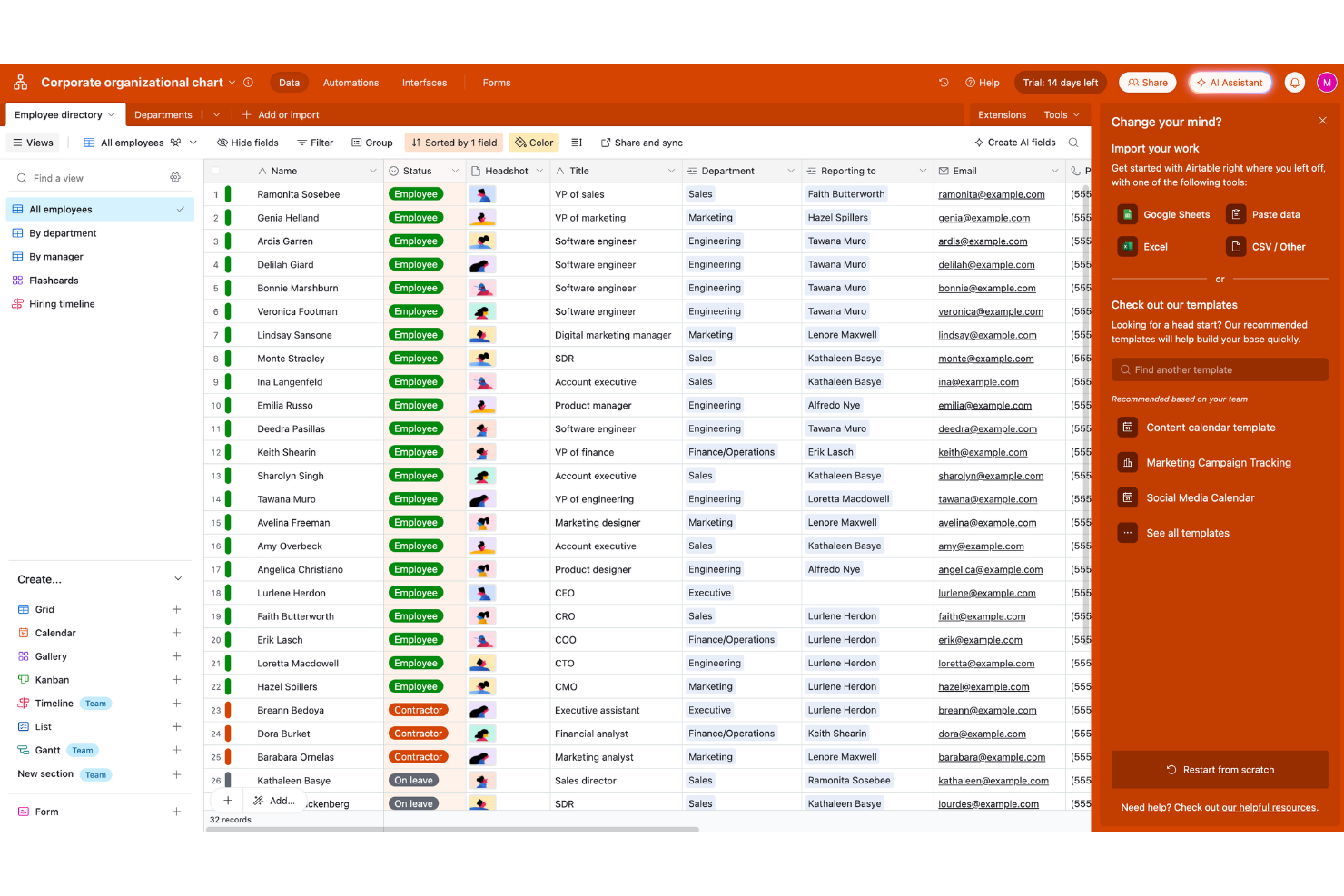
For teams that want a familiar spreadsheet feel with the flexibility of a database, Airtable offers a unique approach to managing business data. IT specialists, project managers, and operations teams can use Airtable to organize, link, and visualize information in ways that go far beyond what Microsoft Access provides. Its spreadsheet-style views, real-time collaboration, and customizable interfaces make it easy to build and adapt workflows without traditional database complexity.
Why Airtable Is a Good Microsoft Access Alternative
Unlike traditional database tools, Airtable gives you spreadsheet-style database views that make managing and visualizing data much more approachable. I picked Airtable because you can switch between grid, calendar, kanban, and gallery views to match your workflow needs. The platform also lets you link records across tables, so you can build relational databases without writing queries. These features help teams transition from Microsoft Access to a more flexible, collaborative environment.
Airtable Key Features
Some other features in Airtable help teams move beyond the limits of traditional databases:
- Automations: Set up custom triggers and actions to automate repetitive tasks within your workflows.
- Form builder: Collect structured data directly into your tables using customizable forms.
- Role-based permissions: Control who can view or edit specific tables, fields, or views.
- Revision history: Track changes to records and restore previous versions when needed.
Airtable Integrations
Integrations include Google Drive, Salesforce, Slack, Jira, Zendesk, Box, Dropbox, GitHub, Gmail, and more.
Pros and Cons
Pros:
- Built-in automations reduce manual processes
- Real-time collaboration supports distributed teams
- Spreadsheet-style views simplify data management
Cons:
- Record limits restrict large-scale databases
- Advanced reporting features are limited

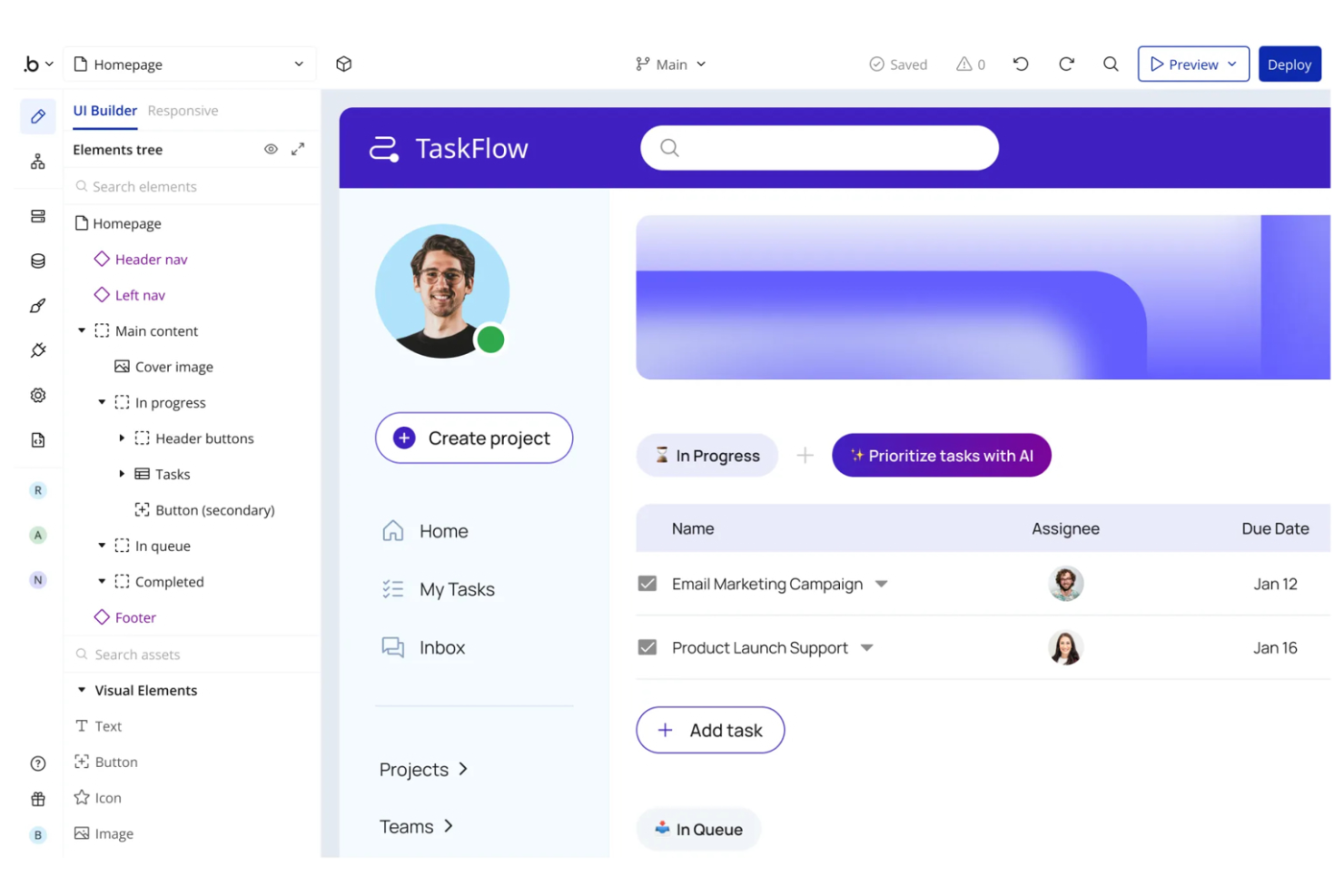
Unlike traditional database tools, Bubble gives you a visual way to build fully custom web applications without code. IT teams and business users can design interactive workflows, manage data, and create user interfaces all in one platform. This makes Bubble a strong choice for organizations that want to move beyond forms and tables to deliver modern, web-based solutions that go far beyond what Microsoft Access can offer.
Why Bubble Is a Good Microsoft Access Alternative
For teams looking to build modern web apps without code, Bubble offers a visual development environment that goes far beyond traditional database tools. I picked Bubble because it lets you design custom user interfaces, set up dynamic workflows, and manage your app’s data structure all through a drag-and-drop editor. The platform supports responsive design and real-time interactivity, so you can create applications that look and feel like professional web products. This makes Bubble especially appealing if you want to replace Access with something that enables full-featured, browser-based solutions.
Bubble Key Features
Some other features in Bubble help teams deliver more advanced web applications:
- API Connector: Connect to external services and data sources using REST APIs.
- Role-based permissions: Control user access and data visibility with granular permission settings.
- Version control: Manage app changes and roll back to previous versions as needed.
- Custom domain support: Launch your app on your own branded web address.
Bubble Integrations
Integrations include Stripe, Google Analytics, Google Maps, Algolia, SendGrid, Twilio, Airtable, Slack, HubSpot, and more.
Pros and Cons
Pros:
- Direct integration with Stripe for payments
- Responsive design tools for mobile interfaces
- Visual editor supports complex app logic
Cons:
- Exporting data requires manual setup
- No native support for relational databases

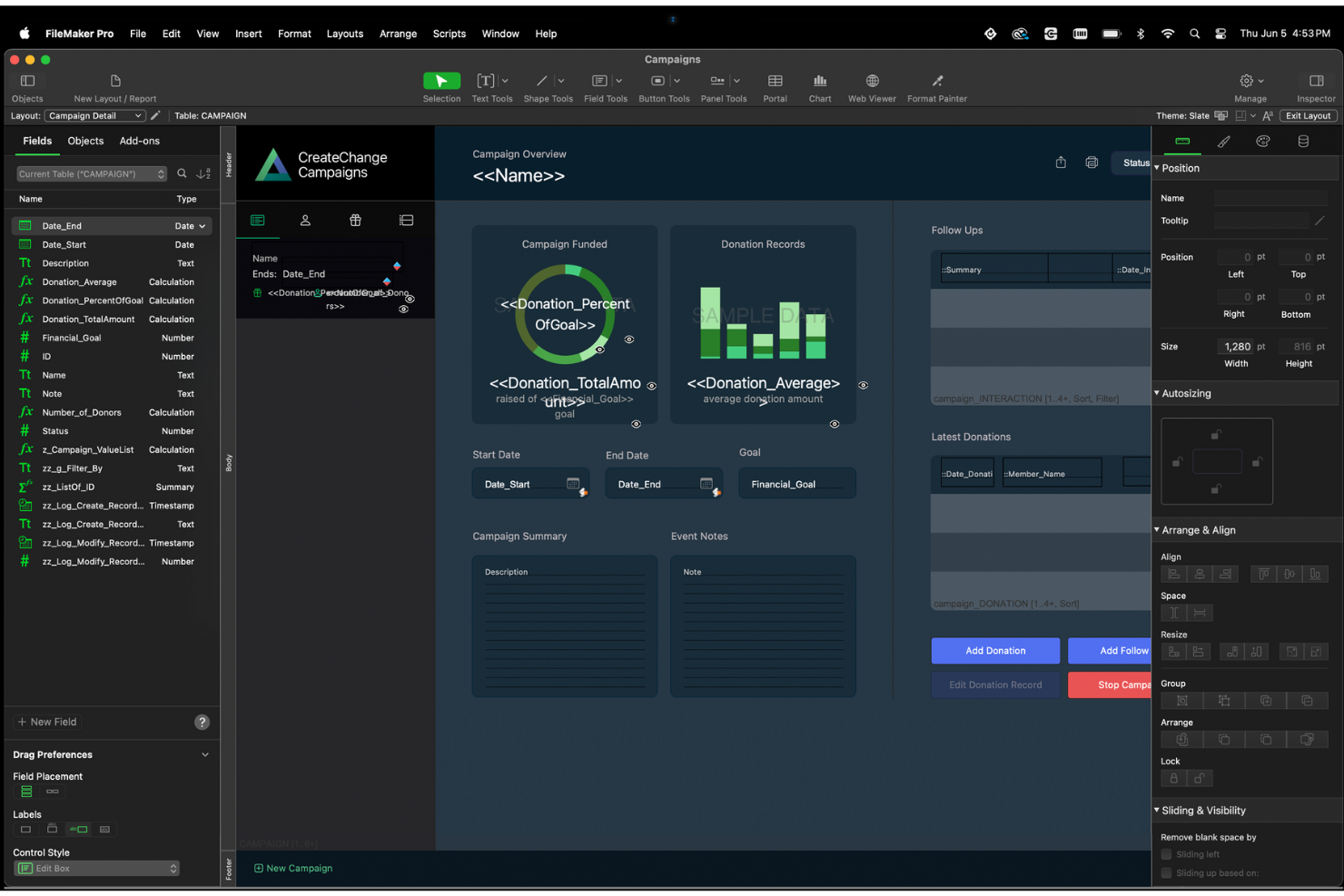
For teams that need to build and scale custom business apps, Claris FileMaker offers a flexible alternative to Microsoft Access. It’s well-suited for IT specialists and organizations that want to create tailored database solutions with advanced automation and integration options. If you’re looking for a platform that supports rapid app development across desktop, mobile, and web, FileMaker stands out for its scalability and cross-platform capabilities.
Why Claris FileMaker Is a Good Microsoft Access Alternative
Unlike many database tools, Claris FileMaker is built for teams that need to scale custom apps as their business grows. I picked FileMaker because it lets you design, deploy, and update custom database applications across desktop, mobile, and web from a single platform. The platform supports advanced scripting and automation, so you can create workflows that adapt to complex business needs. With its focus on the end-users and scalability, FileMaker is a strong fit for organizations that want to move beyond the limitations of traditional desktop databases.
Claris FileMaker Key Features
Some other features in Claris FileMaker help teams manage and extend their database solutions:
- Drag-and-drop layout editor: Build and customize user interfaces for your apps without coding.
- Built-in charting tools: Visualize data directly within your FileMaker applications using a variety of chart types.
- Role-based access controls: Set granular permissions for users and groups to protect sensitive data.
- Script debugger and data viewer: Troubleshoot and optimize scripts and workflows with dedicated development tools.
Claris FileMaker Integrations
Integrations include Claris Connect, Claris Studio, Microsoft SQL Server, Oracle, MySQL, PostgreSQL, IBM DB2, Amazon Web Services, and more.
Pros and Cons
Pros:
- Scales to support large, multi-user environments
- Built-in scripting for advanced workflow automation
- Supports cross-platform deployment
Cons:
- Mac-first design may frustrate Windows users
- Requires annual subscription for all deployments

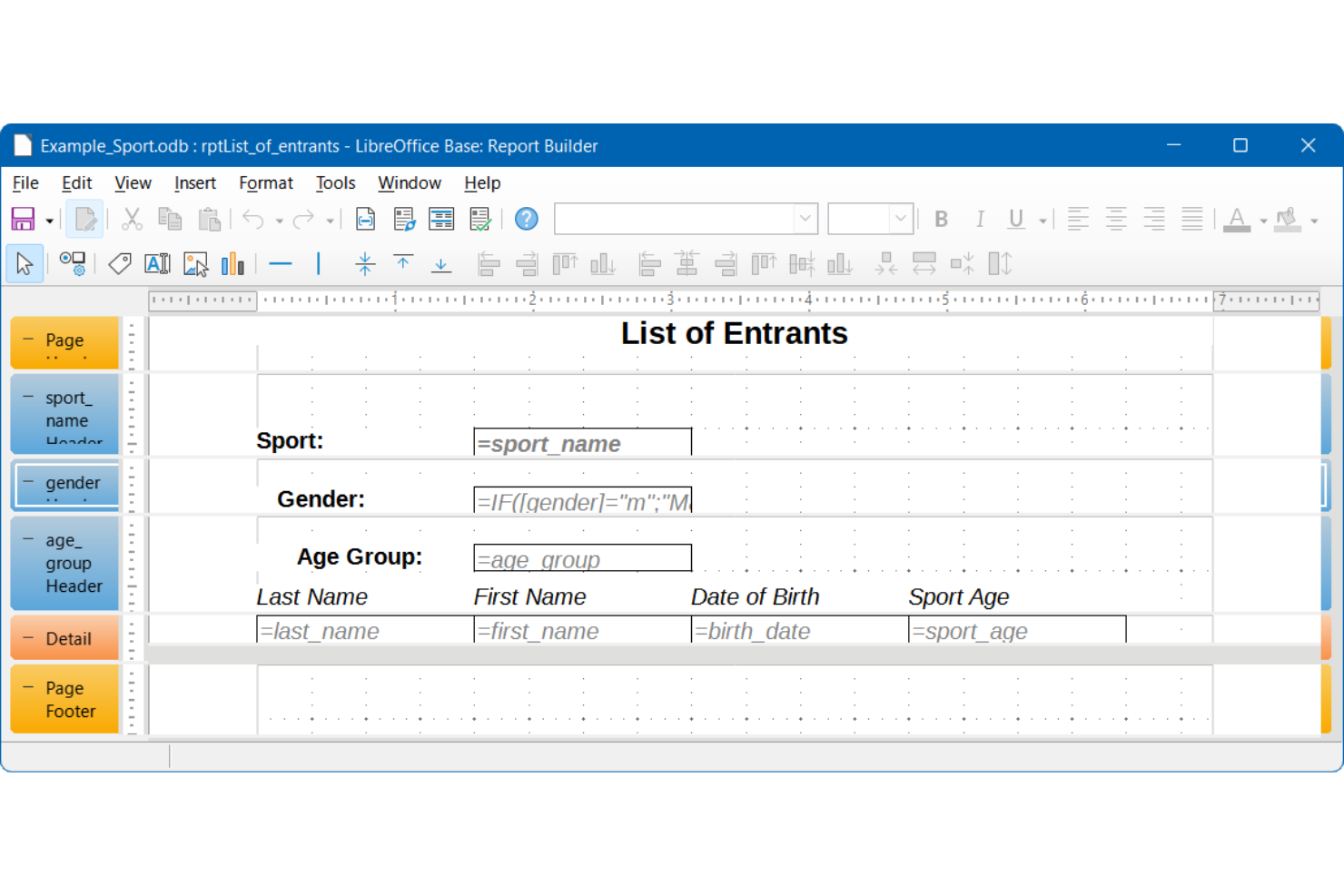
LibreOffice Base is a free, open-source database tool that integrates tightly with the LibreOffice suite. It’s a strong choice for IT teams and organizations already using open-source office software who want a Microsoft Access alternative that fits into their existing workflows. If you need a database solution that works well with open document formats and supports a range of back-end engines, LibreOffice Base offers flexibility without vendor lock-in.
Why LibreOffice Base Is a Good Microsoft Access Alternative
If your team already relies on open-source office tools, LibreOffice Base fits naturally into your workflow as a Microsoft Access alternative. I picked LibreOffice Base because it’s built to work with other LibreOffice applications, making it easy to link databases with spreadsheets and documents. The tool supports a variety of database engines, including Firebird and HSQLDB, and lets you design forms and reports using familiar open document standards. This approach gives you flexibility and control without tying you to proprietary formats or software.
LibreOffice Base Key Features
Some other features in LibreOffice Base help teams manage and analyze their data:
- Query designer: Build complex queries visually or with SQL for custom data retrieval.
- Table creation wizard: Set up new tables quickly using guided prompts and templates.
- Relationship manager: Define and manage relationships between tables using a graphical interface.
- Built-in report generator: Create and customize reports directly from your database tables and queries.
LibreOffice Base Integrations
Integrations include MySQL, MariaDB, Adabas D, Microsoft Access, PostgreSQL, dBase, LDAP, LibreOffice Calc, and more.
Pros and Cons
Pros:
- Offers visual tools for queries and relationships
- Integrates with LibreOffice Calc and Writer
- Supports both embedded and external databases
Cons:
- Fewer automation options than Microsoft Access
- No built-in cloud or web access

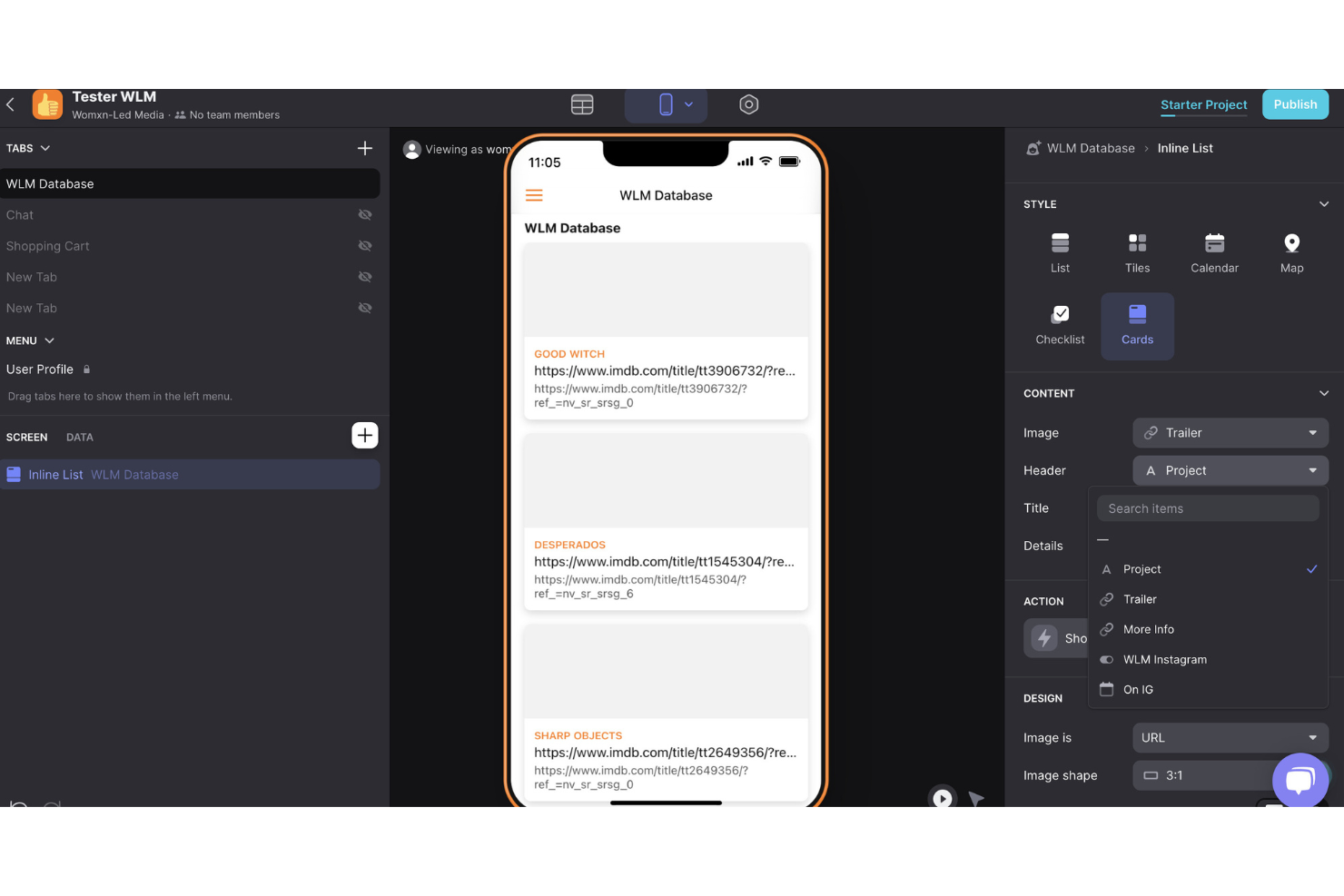
If you need to turn business data into mobile apps without coding, Glide is worth a look. IT teams, operations managers, and business analysts can use Glide to build mobile-first applications directly from spreadsheets or databases. Unlike Microsoft Access, Glide focuses on rapid app creation for mobile devices, making it easier to deliver custom tools to field teams or remote staff.
Why Glide Is a Good Microsoft Access Alternative
For teams that need to build mobile-first business tools, Glide offers a unique approach compared to traditional database platforms. I picked Glide because you can turn spreadsheets or databases into fully functional mobile apps with just a few clicks. The platform includes a visual app builder and pre-built components, so you can design interfaces and workflows tailored for smartphones and tablets. This makes Glide a strong choice for organizations that want to deliver data-driven solutions directly to users in the field.
Glide Key Features
Some other features in Glide help teams manage and deploy business apps at scale:
- Role-based access controls: Assign permissions to users based on their role within the organization.
- Data sync with Google Sheets: Keep app data updated in real time by connecting directly to Google Sheets.
- Custom branding: Apply your company’s logo, colors, and style to every app you build.
- Action builder: Create custom workflows and automate tasks within your mobile apps.
Glide Integrations
Integrations include Google Sheets, Excel, Airtable, PostgreSQL, MySQL, Google Analytics, OpenAI, Twilio, Slack, Zapier, and more.
Pros and Cons
Pros:
- Real-time sync with Google Sheets data
- Visual app builder requires no coding
- Mobile-first design supports field operations
Cons:
- No native desktop app experience
- Limited support for complex relational data
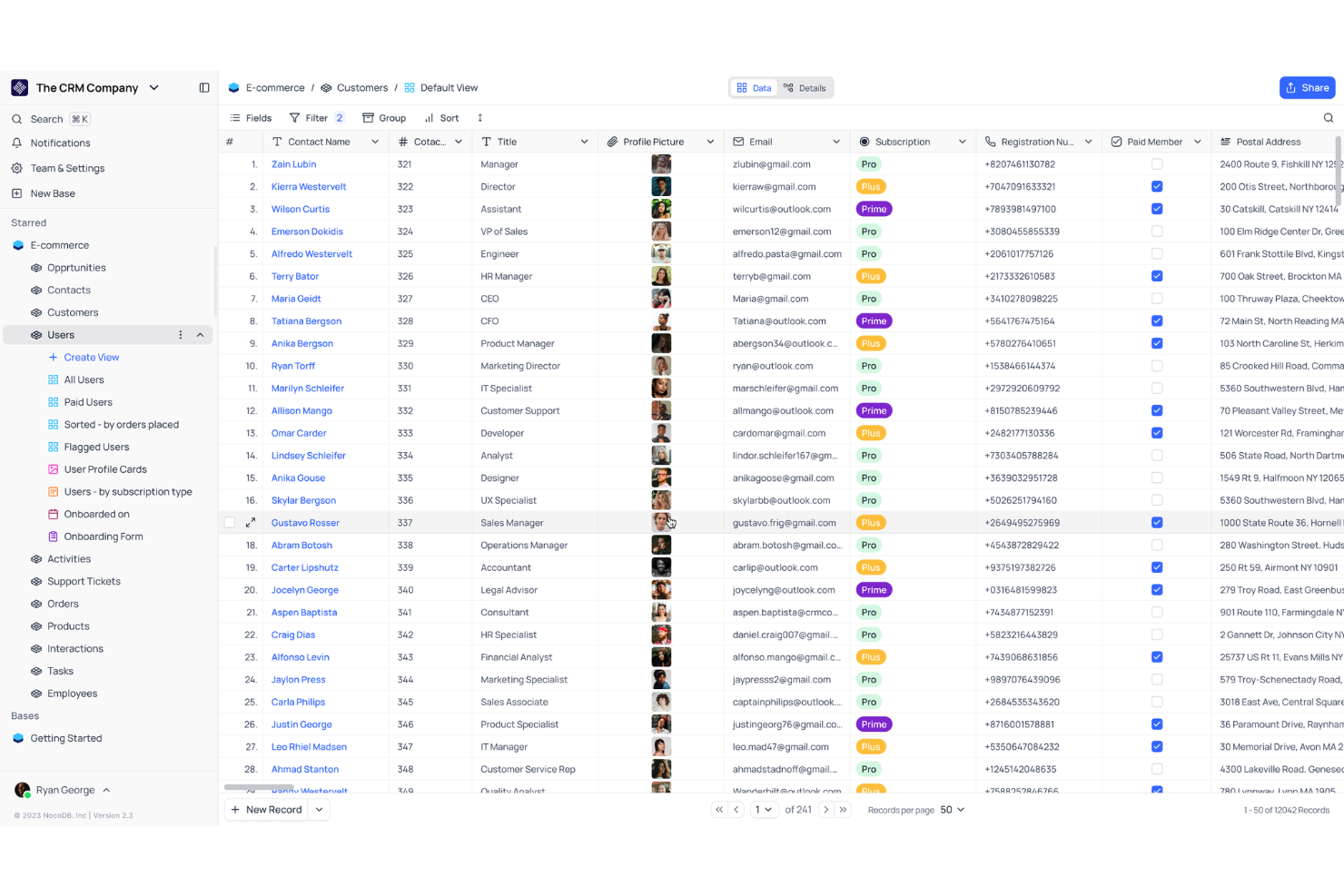
For teams that want to connect directly to existing SQL databases, NocoDB offers a flexible alternative to MS Access. It’s a strong fit for IT specialists, data engineers, and businesses that need to turn SQL data into collaborative, spreadsheet-style workspaces. NocoDB stands out by letting you manage, visualize, and update live SQL data without migrating or duplicating your database.
Why NocoDB Is a Good Microsoft Access Alternative
Unlike Microsoft Access, NocoDB connects directly to a wide range of SQL databases without requiring data migration. I picked NocoDB because you can instantly turn your existing MySQL, PostgreSQL, SQL Server, or other SQL databases into collaborative, spreadsheet-style applications. This approach lets you manage and update live data while keeping your database structure intact. NocoDB’s real-time sync and schema mapping features make it especially useful for IT teams that need to work with production data securely and efficiently.
NocoDB Key Features
Some other features that make NocoDB appealing for database management include:
- Role-based access controls: Assign different permissions to users and groups for secure collaboration.
- Custom views and filters: Create grid, gallery, kanban, and calendar views to organize and display data in multiple formats.
- API auto-generation: Instantly generate REST APIs for your connected tables to support integrations and automation.
- Form builder: Design and deploy custom forms for data entry directly into your SQL database.
NocoDB Integrations
Integrations include Gmail, Google Calendar, Slack, and more.
Pros and Cons
Pros:
- Includes built-in form builder for data entry
- Auto-generates REST APIs for all tables
- Connects directly to multiple SQL databases
Cons:
- Workflow automation options are minimal
- Lacks granular field-level permission controls


If you need to build custom internal tools without writing code, Blaze offers a modern alternative to Microsoft Access. This platform is designed for IT teams and operations professionals who want to quickly create secure, web-based apps for managing business processes. Blaze stands out by letting you automate workflows and connect data sources in a way that’s much more flexible than traditional desktop databases.
Why Blaze Is a Good Microsoft Access Alternative
Blaze stands out as a Microsoft Access alternative because it’s built for rapid internal tool creation, letting you move beyond the limitations of desktop databases. I picked Blaze for its visual app builder, which allows you to design custom workflows and interfaces without code. The platform also supports secure user authentication and granular permissions, so you can control access to sensitive business data. These features make Blaze a strong fit for teams that need to quickly launch and adapt internal apps as business needs change.
Blaze Key Features
Some other features in Blaze make it a flexible choice for teams replacing Microsoft Access:
- Drag-and-drop interface builder: Create custom layouts and dashboards by arranging components visually.
- Automated workflow triggers: Set up actions that run automatically based on data changes or user input.
- Custom data connectors: Link Blaze apps to external databases, APIs, or spreadsheets for real-time data access.
- Audit logging: Track user actions and changes within your apps for compliance and troubleshooting.
Blaze Integrations
Integrations include Airtable, Amazon Selling Partner API, athenahealth, Auth0, BigQuery, Calendly, Dropbox, Gmail, and more.
Pros and Cons
Pros:
- Connects to multiple external data sources
- Built-in user authentication and permissions
- Visual builder supports complex internal workflows
Cons:
- Fewer prebuilt templates than competitors
- Limited offline access for field teams


If you’re looking for an open-source alternative to Microsoft Access, Budibase gives you full control over your data and automation workflows. IT teams and developers can build internal tools, automate processes, and connect to a wide range of data sources—all with source code access. Budibase stands out for organizations that need customizable, self-hosted solutions and want to automate business logic beyond what Access can handle.
Why Budibase Is a Good Microsoft Access Alternative
Unlike Microsoft Access, Budibase is open-source and built for teams that want to automate workflows and customize every layer of their internal tools. I picked Budibase because it lets you design multi-step automations, trigger actions based on data changes, and connect to external systems using built-in connectors. The platform supports self-hosting, so you can deploy on your own infrastructure and maintain full control over your data and processes. By providing an intuitive GUI, Budibase becomes a strong fit for IT teams that need flexibility and automation capabilities beyond what Access provides.
Budibase Key Features
Some other features in Budibase help teams build and manage data-driven applications:
- Form builder: Create custom forms for data entry and user interaction.
- Role-based access control: Assign permissions and restrict access by user role.
- Multi-database support: Connect to PostgreSQL, MySQL, MongoDB, and more.
- Custom theming: Adjust the look and feel of your apps with configurable themes.
Budibase Integrations
Integrations include PostgreSQL, MySQL, MongoDB, Microsoft SQL Server, Google Sheets, Slack, Discord, Auth0, Okta, and more.
Pros and Cons
Pros:
- Connects to multiple SQL and NoSQL databases
- Self-hosting supports strict data control
- Open-source codebase allows full customization
Cons:
- No built-in support for Access file import
- Limited reporting and analytics features


Apache OpenOffice Base offers a free, open-source database solution that runs on Windows, macOS, and Linux. This tool is a strong fit for IT teams and organizations that need a Microsoft Access alternative with true cross-platform desktop compatibility. If you need to build and manage databases without being locked into a single operating system, OpenOffice Base stands out for its flexibility and accessibility.
Why Apache OpenOffice Base Is a Good Microsoft Access Alternative
For teams that need a database solution across Windows, macOS, and Linux, OpenOffice Base delivers true cross-platform compatibility that Microsoft Access lacks. I picked OpenOffice Base because it lets you create, edit, and manage databases on any major desktop operating system without compatibility issues. The tool supports a range of database engines, including its built-in HSQLDB as well as connections to MySQL, PostgreSQL, and others. Supporting custom macros, this flexibility makes it a practical choice for organizations with mixed-OS environments or those moving away from Windows-only tools.
Apache OpenOffice Base Key Features
Some other features in OpenOffice Base help teams manage and interact with their data:
- Form wizard: Build custom data entry forms using a step-by-step interface.
- Report builder: Design and generate printable reports from your database tables and queries.
- SQL query editor: Write and execute custom SQL queries directly within the application.
- Table relationship designer: Visually define and manage relationships between tables.
Apache OpenOffice Base Integrations
Integrations include MySQL, Adabas D, Microsoft Access, PostgreSQL, Microsoft Outlook, Microsoft Windows Address Book, and more.
Pros and Cons
Pros:
- Includes built-in form and report builders
- Supports direct connections to MySQL and PostgreSQL
- Runs natively on Windows, macOS, and Linux
Cons:
- Performance slows with large or complex databases
- Lacks cloud or web-based access options


If you need precise control over who can view or edit specific data, Grist offers a unique approach compared to Microsoft Access. It’s designed for IT teams, data managers, and organizations that require granular permissions at the row, column, or table level. Grist is especially useful when you want to securely share databases with different stakeholders without exposing unnecessary information.
Why Grist Is a Good Microsoft Access Alternative
Grist stands out for its ability to set granular data permissions, which is something Microsoft Access doesn’t natively support. I picked Grist because you can control access at the row, column, or table level, letting you decide exactly who can see or edit each part of your database. This is especially valuable for teams that need to share sensitive data with different users or departments. While there is a slight learning curve, Grist’s permission model helps you maintain security and compliance without creating multiple copies of data.
Grist Key Features
In addition to its advanced permission controls, Grist offers several other features that help teams manage and analyze data:
- Spreadsheet-like interface: Work with data in a familiar grid layout that supports formulas and calculations.
- Custom views: Create multiple views of your data, such as cards, summary tables, or filtered lists.
- Python-based formulas: Use Python for complex calculations and data transformations within your database.
- Revision history: Track changes and restore previous versions of your documents at any time.
Grist Integrations
Integrations are available via REST API and Webhooks.
Pros and Cons
Pros:
- Spreadsheet and database hybrid interface
- Python formulas for advanced data manipulation
- Row, column, and table-level permission controls
Cons:
- Lacks built-in workflow automation features
- No native integrations with external tools
Other Microsoft Access Alternatives
Here are some additional Microsoft Access alternative options that didn’t make it onto my shortlist, but are still worth checking out:


Microsoft Access Alternatives Selection Criteria
When selecting the best Microsoft Access alternatives to include in this list, I considered common buyer needs and pain points related to Microsoft Access alternative products, like needing more flexible deployment options and better collaboration features. I also used the following framework to keep my evaluation structured and fair:
Core Functionality (25% of total score)
To be considered for inclusion in this list, each solution had to fulfill these common use cases:
- Create and manage relational databases
- Import and export data in multiple formats
- Design custom forms and views
- Set user permissions and access controls
- Support multi-user collaboration
Additional Standout Features (25% of total score)
To help further narrow down the competition, I also looked for unique features, such as:
- Self-hosting or on-premises deployment
- Modular plugin or extension system
- Built-in automation or scripting tools
- Native API access for integrations
- Advanced data visualization options
Usability (10% of total score)
To get a sense of the ease of use of each system, I considered the following:
- Clean and intuitive user interface
- Logical navigation and menu structure
- Minimal clicks to complete common tasks
- Responsive design for different devices
- Accessibility for users with disabilities
Onboarding (10% of total score)
To evaluate the onboarding experience for each platform, I considered the following:
- Availability of step-by-step tutorials
- Access to pre-built templates
- Interactive product tours or walkthroughs
- In-app chatbots or help widgets
- Webinars or live training sessions
Customer Support (10% of total score)
To assess each software provider’s customer support services, I considered the following:
- Multiple support channels available
- Fast response times to inquiries
- Access to a searchable knowledge base
- Community forums or user groups
- Availability of dedicated account managers
Value For Money (10% of total score)
To evaluate the value for money of each platform, I considered the following:
- Transparent and predictable pricing
- Flexible plans for different team sizes
- Features included in lower-tier plans
- Free plan or trial availability
- Discounts for annual billing or nonprofits
Customer Reviews (10% of total score)
To get a sense of overall customer satisfaction, I considered the following when reading customer reviews:
- Positive feedback on reliability and uptime
- Reports of responsive customer support
- Comments on ease of migration from Access
- User satisfaction with feature set
- Feedback on integration capabilities
Why Look For a Microsoft Access Alternative?
While Microsoft Access is a good choice of Microsoft Access alternative, there are a number of reasons why some users seek out alternative solutions. You might be looking for a Microsoft Access alternative because…
- You need cloud-based or web-accessible databases
- Your team requires real-time multi-user collaboration
- You want to self-host for data privacy or compliance
- You need support for larger datasets or more users
- You work on macOS or Linux and need cross-platform compatibility
- You require more advanced integration or automation options
If any of these sound like you, you’ve come to the right place. My list contains several Microsoft Access alternative options that are better suited for teams facing these challenges with Microsoft Access and looking for alternative solutions.
Microsoft Access Key Features
Here are some of the key features of Microsoft Access, to help you contrast and compare what alternative solutions offer:
- Relational database design with tables, queries, forms, and reports
- Visual query builder for creating and editing SQL queries
- User-friendly built-in form designer for custom data entry interfaces
- Report generation tools for printing and sharing data summaries
- Integration with other Microsoft Office applications
- Support for VBA scripting and automation
- Import and export capabilities for various file formats
- User-level security and permissions management
- Local and networked database deployment options
- Data validation and input rules for maintaining data quality