

10 Best Free Helpdesk Software Reviewed in 2026

Best Free Helpdesk Software Shortlist
Here’s my shortlist of the best free helpdesk software across a growing ecosystem of tools and cloud services:


Running a business can be challenging, especially when resources are tight and you must manage complex data across various data sources. You need to keep your customers happy without breaking the bank. That's where free helpdesk software comes in. It offers a practical way to manage customer inquiries, data flow, and support tickets without the hefty price tag.
In my experience, finding the right tool can save you time, reduce stress, and improve data quality across customer datasets. I've tested and reviewed various options to bring you an unbiased look at the best free helpdesk solutions available, including cloud-native and open-source tool options.
In this article, you'll find my top picks that offer free plans or trials. I'll highlight their unique features, data management capabilities, and how they support end-to-end workflows to help your team tackle everyday challenges.
Why Trust Our Software Reviews
We’ve been testing and reviewing software since 2023. As tech leaders ourselves, we know how critical and difficult it is to make the right decision when selecting software.
We invest in deep research to help our audience make better software purchasing decisions. We’ve tested more than 2,000 tools for different tech use cases and written over 1,000 comprehensive software reviews. Learn how we stay transparent & our software review methodology.
Best Free Helpdesk Software Summary
While all of the helpdesk software in my list have free offerings, they also have paid plans should you wish to upgrade. Here are the base costs for each of the tools that made it onto my shortlist:
| Tool | Best For | Trial Info | Price | ||
|---|---|---|---|---|---|
| 1 | Best for connecting tickets & operational context | 14-day free trial available | From $19/user/month (billed annually) | Website | |
| 2 | Best for AI-driven ticketing | Free demo + 14-day free trial available | From $19/user/month (billed annually) | Website | |
| 3 | Best with HIPAA-ready compliance | Free trial available | From $25/user/month (billed annually) | Website | |
| 4 | Best for AI-driven ticket management | 14-day free trial | From $89/user/month (billed annually) | Website | |
| 5 | Best for cloud hosting | Free plan available | Free to use | Website | |
| 6 | Best for easy ticket management | Free plan + free demo available | From $39.99/month (billed annually) | Website | |
| 7 | Best for asset management | Free plan + 45-day free trial available | From €19/agent/month | Website | |
| 8 | Best for IT professionals | Free plan available | From $5/seat/month (billed annually) | Website | |
| 9 | Best for email integration | 30-day free trial + free plan available | From $12/user/month | Website | |
| 10 | Best for team collaboration | 15-day free trial + free demo available | From $49/organization/month (billed annually) | Website |


-

Freshservice
Visit WebsiteThis is an aggregated rating for this tool including ratings from Crozdesk users and ratings from other sites.4.6 -
Deel IT
Visit Website -
Rippling IT
Visit WebsiteThis is an aggregated rating for this tool including ratings from Crozdesk users and ratings from other sites.4.8



Best Free Helpdesk Software Review
Below are my detailed summaries of the best free helpdesk software that made it onto my shortlist. My reviews offer a detailed look at the key features, pros and cons, integrations, and ideal use cases of each tool to help you find the best one for you. While some of these tools offer a completely free version, others offer a free trial period. I’ve added a note about what’s free in each of my reviews.


Freshservice positions itself as helpdesk software that does more than just ticket logging by combining traditional support desk functions with structured IT service management practices, so your team can handle incoming requests, route issues, and manage service work from a single place. It’s built for IT teams, internal support groups (like HR or facilities), and businesses that want a helpdesk with ticketing, self-service, and automation capabilities that reduce manual work across service operations.
Why I Picked Freshservice
I picked Freshservice for its AI-powered service desk, which simplifies the user experience with drag-and-drop workflows. The platform's incident management feature automates ticket routing, ensuring quick resolution times, a crucial need for any helpdesk software.
Additionally, Freshservice's change management capabilities allow you to streamline compliance tracking, which is invaluable for maintaining operational integrity. Built-in automation and SLA management help you assign work and monitor service performance without manual oversight. When you want a helpdesk that connects ticket work with broader operational context and enforcement of service expectations, Freshservice delivers that balance.
Freshservice Key Features
In addition to its core functionalities, Freshservice provides several other features that enhance its utility as a helpdesk solution:
- Omnichannel Support: Manages support across platforms like email and Slack, ensuring seamless communication.
- Service Catalog: Offers a unified portal for all service requests, making it easy for users to find what they need.
- Knowledge Management: Centralizes information, reducing the workload on support agents by facilitating self-service.
- Asset Management: Tracks hardware and software assets alongside tickets, giving your helpdesk context about what’s being supported and its history.
Freshservice Integrations
Integrations include Microsoft Teams, Slack, Google Workspace, Jira, Dropbox, AWS, Azure, Zapier, Trello, and Salesforce.
Pros and Cons
Pros:
- Strong ITIL-aligned workflows for structured service delivery.
- Self-service portal reduces basic queries.
- Centralized ticketing and helpdesk workflow management.
Cons:
- Mobile app has limited functionality for some users.
- Asset management can get expensive as you scale.
New Product Updates from Freshservice

Freshservice Enhances Global Search and Dashboards With Task Support
Freshservice enhances Global Search and Dashboards by adding support for ticket, problem, change, and release tasks, along with custom task views. This update helps teams search, track, and report on tasks from one centralized interface. For more information, visit Freshservice's official site.

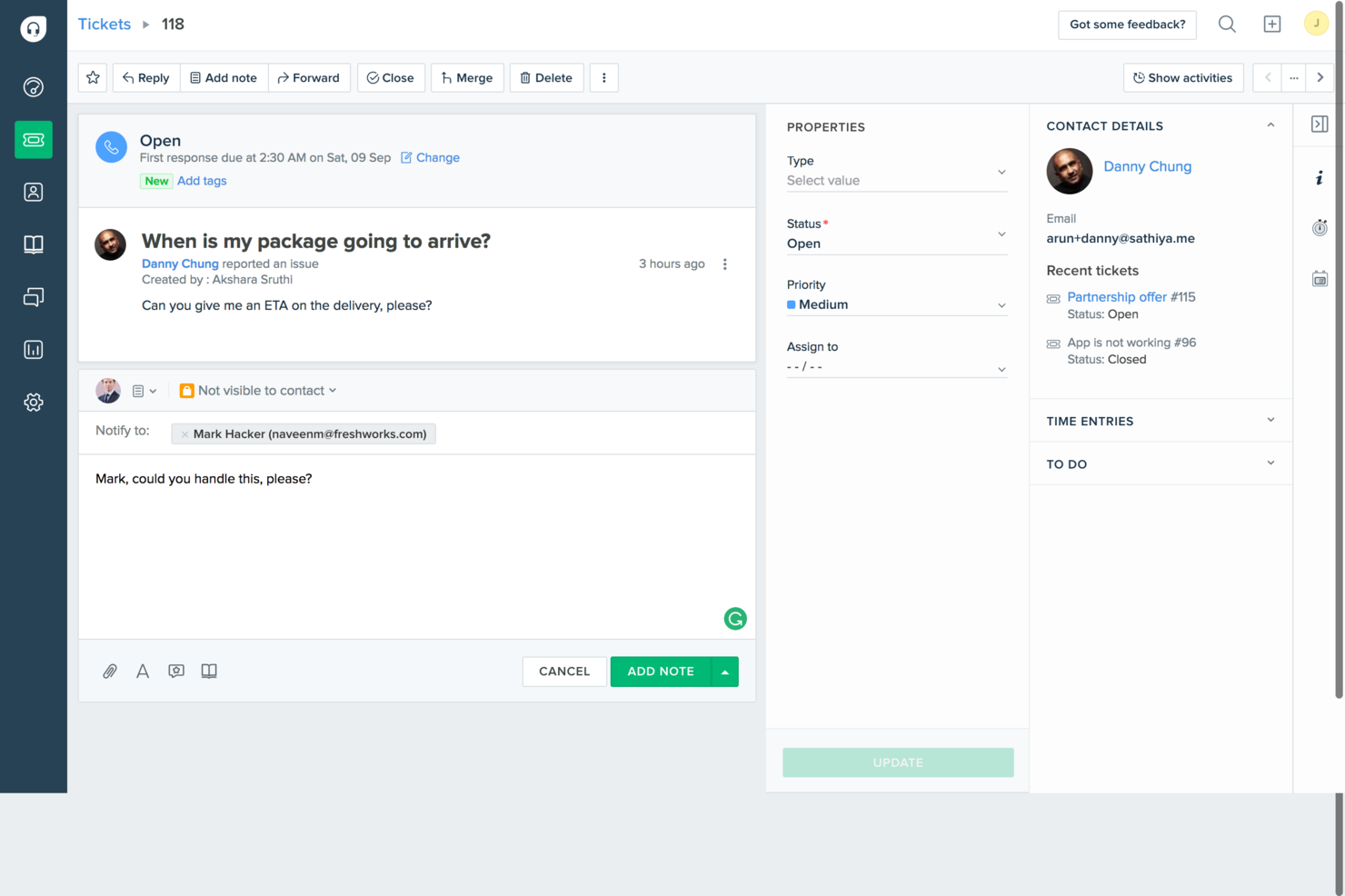
For businesses that want a straightforward, effective customer support solution, Freshdesk is a practical choice. Built with small businesses and startups in mind, it includes the core tools you need to handle customer service without unnecessary complexity. By centralizing ticketing across email and social media, Freshdesk helps your team manage customer inquiries in one place, so you can spend more time building strong customer relationships instead of juggling channels.
Why I Picked Freshdesk
I picked Freshdesk because of its integration of AI-driven ticketing and automation features that cater to the needs of businesses looking to optimize their customer support operations. The platform's AI-powered ticketing system significantly reduces ticket resolution time, allowing your team to focus on more strategic tasks. Additionally, Freshdesk's Freddy AI offers valuable insights and automates repetitive tasks, helping you enhance efficiency and productivity without the need for extensive manual intervention.
Freshdesk Key Features
In addition to its AI-driven capabilities, I also found Freshdesk to offer a range of other valuable features for free helpdesk software:
- Integrated Ticketing System: Manage customer queries from email and social media in one place, ensuring no request goes unanswered.
- Knowledge Base: Create a self-service portal where customers can find answers to their questions, reducing the load on your support team.
- Collaboration Tools: Enable your team to work together on tickets, ensuring that complex issues are resolved efficiently.
- Reporting and Analytics: Gain insights into ticket trends and team performance to make informed business decisions.
Freshdesk Integrations
Integrations include Slack, MS Teams, Shopify, Playvox, Facebook, WhatsApp, QuickBooks, Google Workspace, Trello, and Salesforce.
Pros and Cons
Pros:
- Built-in knowledge base portal
- Automated ticket dispatch included
- Multi-channel email and social ticketing
Cons:
- AI capabilities not fully free
- Limited customization on lower tiers
New Product Updates from Freshdesk

Freshdesk Enhances Contact Data Management and Social Identity Fields
Freshdesk now lets you manage social handles and handle large contact lists with ease, streamlining customer profiles and data tasks. For more information, visit Freshdesk’s official site.


Help Scout offers a helpdesk platform designed for teams that want to manage customer conversations with clarity and structure. It’s a good fit for small businesses, SaaS companies, and support teams looking for a shared inbox, automation, and a built-in knowledge base. If you need a free solution that balances collaboration with customer self-service, Help Scout is worth considering.
Who Is Help Scout Best For?
Help Scout suits small to midsize businesses and support teams that need a collaborative helpdesk with strong customer communication tools.
Why I Picked Help Scout
For teams that need to meet strict data privacy standards, I picked Help Scout because it offers a HIPAA-ready compliance option. This is especially important for healthcare organizations or any business handling sensitive health information. Help Scout’s HIPAA-ready plan includes features like secure data handling and signed Business Associate Agreements (BAAs), which are essential for regulatory compliance. These capabilities make it a practical choice if you’re searching for a free helpdesk solution that can scale to meet HIPAA requirements as your needs grow.
Help Scout Key Features
Some other features that stand out for helpdesk teams include:
- Shared inbox: Manage and assign customer conversations across your team from a single, organized inbox.
- Knowledge base (Docs): Create and maintain a searchable self-service portal for customers to find answers on their own.
- Automated workflows: Set up rules to automate repetitive tasks like ticket routing, tagging, and prioritization.
- In-app messaging: Communicate with customers directly inside your product or website using targeted messages.
Help Scout Integrations
Integrations include Salesforce, Shopify, WhatsApp, HubSpot, Jira, Linear, Stripe, Slack, FullStory, and WooCommerce.
What's Free?
Help Scout offers a free-forever plan for individuals or small teams. The free plan includes 1 shared inbox, 1 public knowledge base, up to 100 contacts per month, and limited saved replies, but does not include AI tools or most advanced features.
Pros and Cons
Pros:
- Collision detection prevents duplicate replies
- Shared inbox supports team collaboration
- Company-level conversation views for B2B support
Cons:
- Reporting and analytics features are restricted
- HIPAA compliance requires paid plan upgrade
New Product Updates from Help Scout

Help Scout Enhances Support Management With AI and Integrations
Help Scout introduces smarter routing, WhatsApp and Aircall integrations, and new AI enhancements to help teams manage conversations, automate workflows, and support customers across more channels. For more information, visit Help Scout’s official site.
 .
.
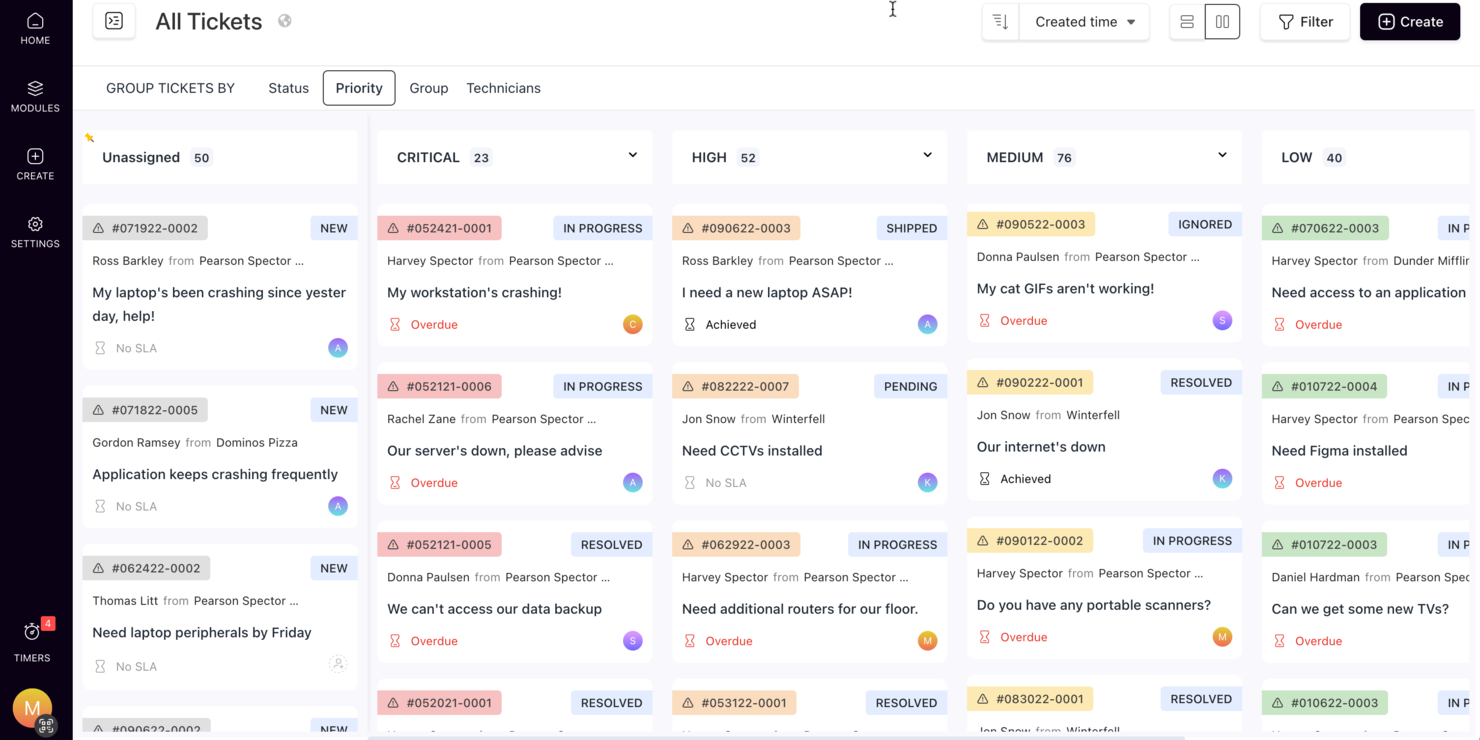
SuperOps offers a smart solution for businesses looking for free helpdesk software, particularly appealing to Managed Service Providers and IT teams. By incorporating AI-driven tools and centralized communication, it allows for efficient ticket management and automation of repetitive tasks, enhancing operational efficiency and client satisfaction. This platform addresses challenges like slow ticket resolution and fragmented communication, making it a valuable choice for organizations aiming to improve support operations without significant costs.
Why I Picked SuperOps
I picked SuperOps because it combines AI-driven ticket management with automation capabilities, offering a compelling option in the free helpdesk software realm. Its AI-powered communication tools provide clarity and quick ticket summaries, reducing response times significantly. Additionally, the platform automates SLA management and integrates help desk and service desk functionalities, providing users with a comprehensive tool to address their support needs effectively.
SuperOps Key Features
In addition to its AI-driven ticket management, SuperOps offers several other valuable features for helpdesk operations:
- Unified Runbooks: Streamline approvals and automate routine tasks with customizable workflows that enhance operational efficiency.
- Asset Management: Keep track of all hardware and software assets in one place, ensuring better control and decision-making.
- Patch Management: Automate the deployment of software updates and patches, reducing vulnerabilities and enhancing security.
- Mobile Device Management: Manage and secure mobile devices across your organization, ensuring compliance and data protection.
SuperOps Integrations
Integrations include Azure AD, Bitdefender, SentinelOne, Webroot, QuickBooks, ConnectWise Control, Stripe, Splashtop, ESET, and TeamViewer.
Pros and Cons
Pros:
- Patch and endpoint management included
- Strong automation and AI tools
- Built-in mobile device management
Cons:
- Cloud-based, requires internet access
- May require onboarding time
New Product Updates from SuperOps

SuperOps Adds HTML Support for Ticket Closure Emails
SuperOps introduces HTML embedding for ticket closure emails. This update allows teams to include custom content such as CSAT survey links and branded elements in resolution emails. For more information, visit SuperOps’ official site.
 .
.

Raiseaticket is a cloud-based helpdesk platform designed for businesses seeking efficient ticket management and customer support solutions. It serves a variety of industries by offering tools for ticket organization and customer communication.
Why I picked Raiseaticket: The free version is perfect if you prefer cloud hosting without additional costs. You can manage tickets efficiently with email ticketing and an intuitive dashboard. Raiseaticket allows unlimited agents, making it a cost-effective option for growing teams, while its cloud hosting capabilities provide flexibility and ease of access for remote support teams.
Standout Features and Integrations:
Features include a customizable ticketing system that lets you tailor workflows to your business needs. You can set up automated responses to improve response times and customer satisfaction. Raiseaticket also offers a reporting tool to track support performance.
Integrations include Slack, Microsoft Teams, Google Workspace, Office 365, and more.
What's free?
Raiseaticket offers a free-forever plan with no limits on agents, but it may limit access to advanced features and customization.
Pros and Cons
Pros:
- Customizable ticketing system
- Cloud-based access
- Unlimited agents in the free plan
Cons:
- Basic customization options
- Have to pay for premium integrations


ProProfs Help Desk is an AI-driven ticketing and support software designed for businesses aiming to improve customer service efficiency. It's ideal for companies in sectors such as IT, e-commerce, and hospitality, offering centralized ticket management and omnichannel support.
Why I picked ProProfs Help Desk: The free plan is perfect for single users who need efficient ticket management. It offers AI-powered support to resolve tickets quickly and centralizes queries via various channels, such as email and chat, while simplifying team collaboration features with shared inboxes. ProProfs stands out for making ticket management straightforward and effective, allowing ticket data to be exported for reporting in tools such as BigQuery or Snowflake.
Standout Features and Integrations:
Features include ticket assignment automation and canned responses to save time. The performance reporting feature provides insights into metrics like response times, helping you improve service quality. Customer satisfaction surveys allow you to gather feedback to improve your support.
Integrations include Salesforce, Slack, Shopify, BigCommerce, Jira, ClickUp, Microsoft Dynamics CRM, and more.
What's free?
The free plan is available for single users, with limitations on the number of agents and advanced features.
Pros and Cons
Pros:
- Centralizes multiple communication channels
- AI-driven ticket resolution
- Easy to use for beginners
Cons:
- UI feels dated at times
- Limited to a single user in the free plan


GLPI is open-source IT asset management and helpdesk software for organizations that need to manage their IT resources and support tickets. It provides tools for tracking assets, managing inventory, and organizing helpdesk requests.
Why I picked GLPI: The free version offers substantial IT asset and resource management capabilities without additional costs. GLPI allows you to handle support tickets and monitor inventory. You can transform and load GLPI data into Redshift and Snowflake using an ETL tool such as Airbyte.
Standout Features and Integrations:
Features include advanced inventory management and transformation capabilities to help you track hardware and software assets and manage raw data. The software also provides a ticketing system that organizes and prioritizes support requests. Additionally, GLPI offers reporting tools to provide insight into asset usage and helpdesk performance.
Integrations include Microsoft Active Directory, LDAP, Apache Directory, and more.
What's free?
GLPI offers a free-forever plan with full access to its asset management and helpdesk features, though it may require technical expertise for setup.
Pros and Cons
Pros:
- Customizable reporting tools
- No cost for basic functionalities
- Advanced asset management features
Cons:
- Limited mobile experience
- Requires technical expertise for setup


Spiceworks is free IT management, helpdesk, and data integration software designed for IT professionals and teams that manage big data environments and regularly extract data. It provides tools for managing helpdesk tickets, data pipelines, network inventory, IT reporting, data processing, batch processing, and data replication.
Why I picked Spiceworks: The free version is ideal for IT professionals seeking an IT management solution. Its features allow you to manage helpdesk tickets efficiently. Spiceworks provides detailed reporting and asset tracking capabilities. Its focus on IT management makes it a great choice for tech-heavy environments.
Standout Features and Integrations:
Features include network monitoring that lets you keep an eye on your infrastructure. The software also offers IT hardware and software asset management, as well as a user portal where team members can submit and track tickets.
Integrations include Microsoft Active Directory, LDAP, AlienVault, Webroot SecureAnywhere, NetClarity, and more.
What's free?
Spiceworks offers a free-forever plan with no user limits, but it may restrict premium support and advanced features.
Pros and Cons
Pros:
- Detailed asset tracking
- Advanced IT management tools
- No user limits on the free plan
Cons:
- Ad-supported interface
- Limited premium support in free version


osTicket is widely-used open-source helpdesk software designed for businesses of all sizes that need efficient ticket management and workflow optimization options. It offers tools to simplify customer support through email integration and ticket tracking. Ticket information can be extracted and transformed using ETL tools including Talend Open Studio and Informatica.
Why I picked osTicket: The free version is perfect for businesses that rely heavily on email communication. You can manage tickets efficiently through its email integration feature. osTicket supports unlimited users, making it a cost-effective solution for growing teams.
Standout Features and Integrations:
Features include a customizable ticketing system that lets you set up workflows and load data as needed. The system also provides automated responses to improve response times, automate data transformation, manage dependencies, support orchestration, and maintain strong data quality across ETL solutions and data ingestion pipelines. Additionally, osTicket offers a client portal where customers can track their ticket status.
Integrations include Microsoft Exchange, Gmail, Office 365, LDAP, Microsoft Active Directory, and more.
What's free?
osTicket offers a free-forever plan with no user limits, though it may require technical expertise for setup and customization.
Pros and Cons
Pros:
- Customizable ticketing system
- Strong email integration and data streaming
- Unlimited users in the free plan
Cons:
- Minimal native reports
- No built-in automation rules


Bitrix24 is a versatile business management and collaboration platform designed for teams that need efficient communication and project management tools. It acts as a centralized target system for support, CRM, and collaboration.
Why I picked Bitrix24: The free version is excellent if you want to improve collaboration without incurring costs. You can communicate with your team through chat and video calls and manage tasks in one place. Bitrix24 allows for unlimited users, making it a cost-effective solution for expanding teams. Its focus on team collaboration and communication tools sets it apart for businesses aiming to improve internal workflows.
Standout Features and Integrations:
Features include a project management tool and pre-built connectors that help you transform data and efficiently organize tasks and deadlines. You can use the CRM system to manage customer interactions and sales pipelines. Bitrix24 also offers document management, allowing your team to store and share files securely. Additionally, it supports cloud deployment on AWS.
Integrations include Mailchimp, Slack, Microsoft Office 365, Google Workspace, and more.
What's free?
Bitrix24 offers a free-forever plan with unlimited users, though it may have limitations on storage and advanced features.
Pros and Cons
Pros:
- Strong project management features
- Extensive automation for CRM
- Unlimited users in the free plan
Cons:
- Limited support resources in the free plan
- Limited storage in the free version
Other Free Helpdesk Software
Here are some additional helpdesk software options that offer free plans or trials. While these tools didn’t make it onto my shortlist, they’re still worth checking out:
- Frappe
For open-source customization
- Hesk
For small business support
- Uvdesk
For e-commerce support
- Zammad
For unlimited agents
- FreeScout
For self-hosted solutions
- HelpDeskZ
For multilingual support
- Vision Helpdesk
For multi-channel support
- Hiver
For Gmail integration
- Mojo Helpdesk
For educational institutions
- OneDesk
For project management integration
- Desk365
For Microsoft Teams users
- BoldDesk
For customization options
- Cayzu
For flat-rate team scaling
- SupportBee
For email-based support
- HubSpot Service Hub
For AI-powered CRM integration
- Jira Service Management
For IT teams
- HelpSpot
For simple ticket management
- LiveAgent
For live chat support
- SolarWinds Web Help Desk
For IT asset management
- Zoho Desk
For small teams


Related Reviews
Free Helpdesk Software Selection Criteria
When selecting the best free helpdesk software for this list, I considered common buyer needs and pain points such as budget constraints and ease of use. I also used the following framework to keep my evaluation structured and fair:
Core Functionality (25% of total score)
To be considered for inclusion in this list, each solution had to fulfill these common use cases:
- Manage support tickets
- Provide customer self-service options
- Track customer interactions
- Offer email integration
- Support multiple communication channels
Additional Standout Features (25% of total score)
To help further narrow down the competition, I also looked for unique features, such as:
- Customizable workflows
- AI-driven ticketing
- Multilingual support
- Integration with CRM systems
- Advanced reporting and analytics
Usability (10% of total score)
To get a sense of the usability of each system, I considered the following:
- Intuitive interface design
- Easy navigation
- Minimal learning curve
- Clear instructions and documentation
- Responsive design for mobile access
Onboarding (10% of total score)
To evaluate the onboarding experience for each platform, I considered the following:
- Availability of training videos
- Interactive product tours
- Access to templates and guides
- Chatbot assistance
- Webinars for new users
Customer Support (10% of total score)
To assess each software provider's customer support services, I considered the following:
- Availability of live chat support
- Response time for inquiries
- Access to a knowledge base
- Email support options
- Availability of community forums
Value for Money (10% of total score)
To evaluate the value for money of each platform, I considered the following:
- Features included in the free plan
- Cost of upgrading to paid plans
- Flexibility of pricing options
- Comparison with competitors' offerings
- Availability of discounts or promotions
Customer Reviews (10% of total score)
To get a sense of overall customer satisfaction, I considered the following when reading customer reviews:
- Commonly mentioned pros and cons
- User feedback on reliability
- Satisfaction with customer support
- Ease of setup and use
- Overall value perception
How To Choose Free Helpdesk Software
Complex feature lists and pricing structures can make it hard to figure out what you're really getting from a free helpdesk software. To help you stay focused as you work through your software selection process, here are some factors to keep in mind:
| Factor | What To Consider |
|---|---|
| Free Offer Scope | Check what features are included in the free plan. Ensure it covers your basic needs without hidden costs or limitations that could hinder your operations. |
| Scalability | Consider whether the software can grow with your business. Look for options that allow easy upgrades as your team or customer base expands. |
| Integrations | Ensure the software integrates with your existing tools like CRM, email, or chat systems. This will save time and improve efficiency for your team. |
| Ease of Use | Assess the user interface and overall experience. A simple, intuitive design will reduce the learning curve and help your team get started quickly. |
| Customization | Determine if you can tailor the software to fit your specific workflows. Customizable ticket fields or dashboards can improve productivity. |
| Support Options | Review the customer support available with the free plan. Access to live chat, email support, or a knowledge base can be critical when issues arise. |
| Reporting Tools | Check if the software provides reporting or analytics features. Insights into ticket volumes or response times can help improve customer service. |
| Security | Evaluate the security measures in place to protect your data. Ensure compliance with industry standards and consider encryption or multi-factor authentication. |
What Is Free Helpdesk Software?
Helpdesk software is a tool that helps businesses manage customer inquiries and support requests efficiently. These tools often offer free plans or trials, allowing users to access basic features without cost. Typically, customer service teams, IT professionals, and small business owners use these tools to improve customer communication and issue resolution. Ticket management, communication channels, and reporting features help with organizing support efforts, improving customer satisfaction, and providing valuable insights.
Features
When selecting helpdesk software, keep an eye out for the following key features:
Typically Free Helpdesk Software Features
- Ticket management: Allows you to organize and track customer inquiries, making it easier to resolve issues efficiently.
- Email integration: Connects your email system with the helpdesk, enabling effective communication with customers.
- Knowledge base: Provides a self-service portal for customers to find answers to common questions, reducing the number of support tickets.
- Basic reporting: Offers insights into support activities, helping you to understand performance metrics and areas for improvement.
- User management: Lets you add and manage team members, ensuring that everyone can access the necessary support tools.
Typically Paid Helpdesk Software Features
- Advanced analytics: Deliver in-depth insights into customer interactions and support performance, helping you make data-driven decisions.
- Automated workflows: Simplify repetitive tasks and processes, saving time and increasing your support team's efficiency.
- Multilingual support: Allows you to provide assistance in multiple languages, catering to a global customer base.
- Customizable dashboards: Enable you to tailor the user interface to match your team's specific needs and preferences.
- AI-driven responses: Use AI to generate automatic replies, improving response times and customer satisfaction.
Benefits
Implementing free helpdesk software provides several benefits for your team and your business. Here are a few you can look forward to:
- Cost savings: Free plans let you manage customer support without additional costs, making it ideal for small businesses and startups.
- Improved organization: Ticket management features help you keep track of customer inquiries, ensuring nothing falls through the cracks.
- Improved communication: Email integration and communication channels help you to connect effectively with customers and provide timely support.
- Self-service options: A knowledge base lets customers find answers on their own, reducing the workload on your support team.
- Scalability: Many free plans offer unlimited users, allowing your team to grow without incurring extra expenses.
- Basic insights: Reporting tools provide a glimpse into support performance, helping you to identify areas for improvement.
- Flexibility: Customizable workflows and user management features let you tailor the system to fit your team's needs.
Costs & Pricing
Although this article lists the best free helpdesk software options, these plans only offer limited features. There's a good chance you'll need to scale your plan up in the future.
The table below summarizes common plans, their average prices, and typical features included in helpdesk software solutions:
Plan Comparison Table for Helpdesk Software
| Plan Type | Average Price | Common Features |
|---|---|---|
| Free Plan | $0 | Basic ticket management, email integration, and self-service portal. |
| Personal Plan | $5-$49/user/month | Improved reporting, customizable workflows, and additional storage. |
| Business Plan | $30-$60/user/month | Multilingual support, advanced analytics, and CRM integration. |
| Enterprise Plan | $70-$399/user/month | AI-driven automation, dedicated support, and extensive customization options. |
Free Helpdesk Software FAQs
Here are some answers to common questions about free helpdesk software:
How do I choose the best free helpdesk software for my business?
Choosing the best free helpdesk software depends on your specific needs. Consider the features you need, such as real-time data access, ticket management, or email integration, and ensure the software supports the number of users you have. Look for tools that offer GUI-based configuration, drag-and-drop interfaces, no-code automation, and strong connectivity to analytics tools. Evaluate ease of use, available support options, and cloud services to ensure a smooth experience.
Is upgrading from a free plan to a paid plan simple?
Yes, most helpdesk software providers offer easy upgrades from free to paid plans. This allows you to access additional features and support as your business grows. Check if the provider offers flexible pricing options that fit your budget and needs.
Are there any limitations to using free helpdesk software?
Free helpdesk software often comes with limitations, such as fewer features, limited users, or restricted support. It’s important to understand these limitations and assess whether they align with your current business needs. Consider future growth and the possibility of upgrading if necessary.
How secure is free helpdesk software?
Security varies between providers, but reputable free helpdesk software typically includes basic security features such as access controls, data governance, and secure cloud-native deployment models. Look for options that offer data encryption, user authentication, and compliance with industry standards. This ensures reliable data movement, reduced latency, and secure data integration across cloud data platforms.
What kind of support can I expect with free helpdesk software?
Support for free helpdesk software and open-source data integration is usually limited compared to paid plans. You may have access to community forums, self-help resources, or email support. Evaluate the available support options and determine if they meet your needs, especially if you require quick assistance.
Can free helpdesk software integrate with other tools I use?
Many free helpdesk software solutions offer basic integrations with popular tools such as email, CRM, and project management software. Check if the software you’re considering offers a suitable data integration tool for your existing systems to ensure effective workflow and team efficiency.
What's Next:
If you're in the process of researching free helpdesk software, connect with a SoftwareSelect advisor for free recommendations.
You fill out a form and have a quick chat where they get into the specifics of your needs. Then you'll get a shortlist of software to review. They'll even support you through the entire buying process, including price negotiations.